





Explore Google Cloud SQL’s 3 Fault Tolerance Mechanism to Ease Data Pro

5207
Of your peers have already read this article.
2:00 Minutes
The most insightful time you'll spend today!
If you’re managing a crucial application that has to be fully fault-tolerant, you need your system to be able to handle every fault, no matter the type and scope of failure, with minimal downtime and data loss. Protecting against these faults means juggling numerous variables that can impact performance as well as recovery time and cost.
Today’s managed database services take over the operational complexity that used to exist for database administrators. Growing your organization’s tolerance required adding machines, compute, and storage, plus the operational costs of IT management: performing backups, writing scripts, creating dashboards, and carrying out testing to make sure your platform is ready when problems arise–all in a secure way.
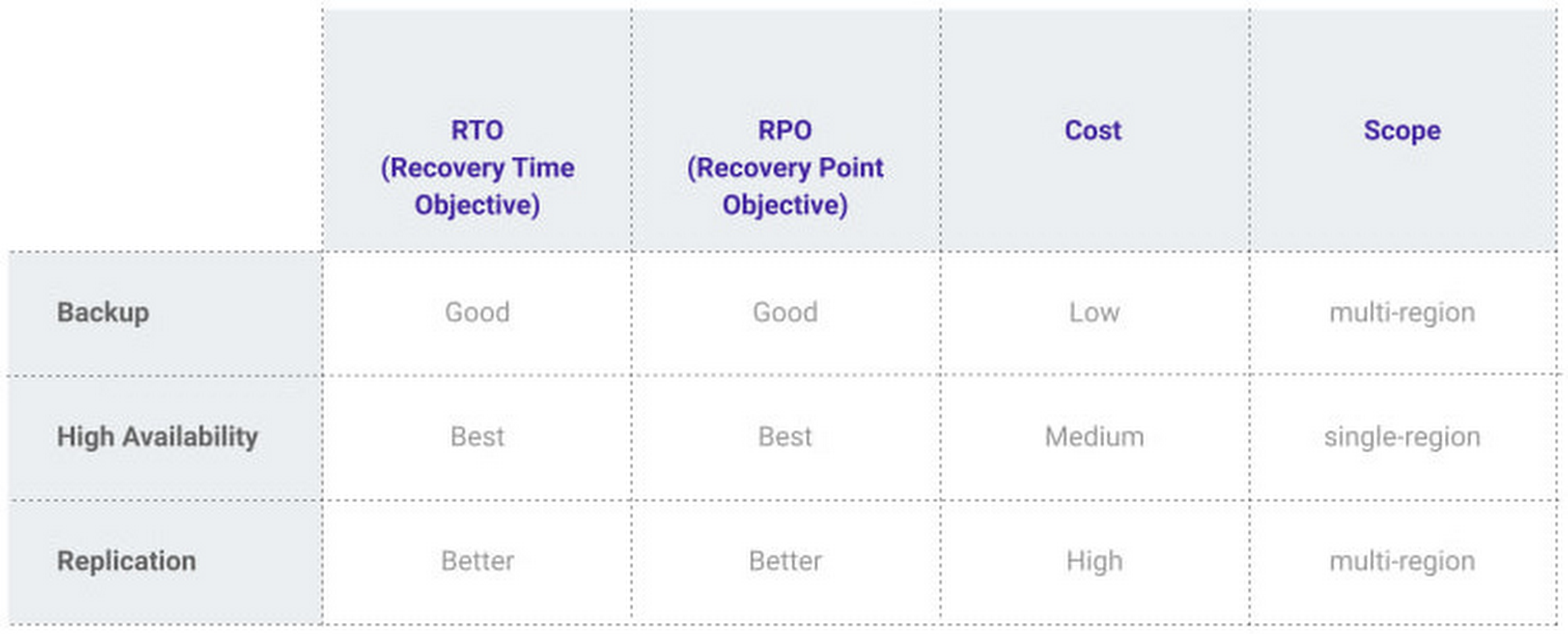
At Google, our Cloud SQL managed database service offers three fault tolerance mechanisms —backup, high availability, and replication—and there are three major factors to consider for each of them:
- RTO (recovery time objective): When a failure happens, how much time can be lost before significant harm occurs?
- RPO (recovery point objective): When a failure happens, how much data can be lost before significant harm occurs?
- Cost: How cost-effective is this solution?
We’ve heard from customers like Major League Baseball, HSBC, and Equifax that they have strict data-protection needs and require highly fault-tolerant multi-region applications—and they’ve all chosen Cloud SQL to meet those needs.
Let’s take a closer look at how the decision-making process plays out for each recovery solution.
High availability (HA)
If your application is business critical, you require minimum RTO and zero RPO— a high availability configuration ensures that you and your customers are protected. If the primary instance fails, there’s another standby instance ready to take over with no data loss. There’s an additional cost here, but doing this manually brings a great operational cost, since you have to detect and verify the fault, do the failover, and make sure it’s correct—you can’t have two primary instances or you risk data corruption—then finally connect the application to the new database.
Cloud SQL removes all that complexity. Choose high availability for a given instance and we’ll replicate the data across multiple zones, synchronously, to each zone’s persistent disk. If an HA instance has a failure, you don’t have to think about when to fail over because Cloud SQL detects the failure and automatically initiates failover, for a full recovery and no data loss within minutes. Cloud SQL also moves the IP address during failover so your application can easily reconnect. MLB, for example, uses Cloud SQL high availability to serve prediction data to live games with minimal downtime. Dev/test instances don’t need those same guarantees, but can use local backups to recover from any potential failure.
Cross-region replica
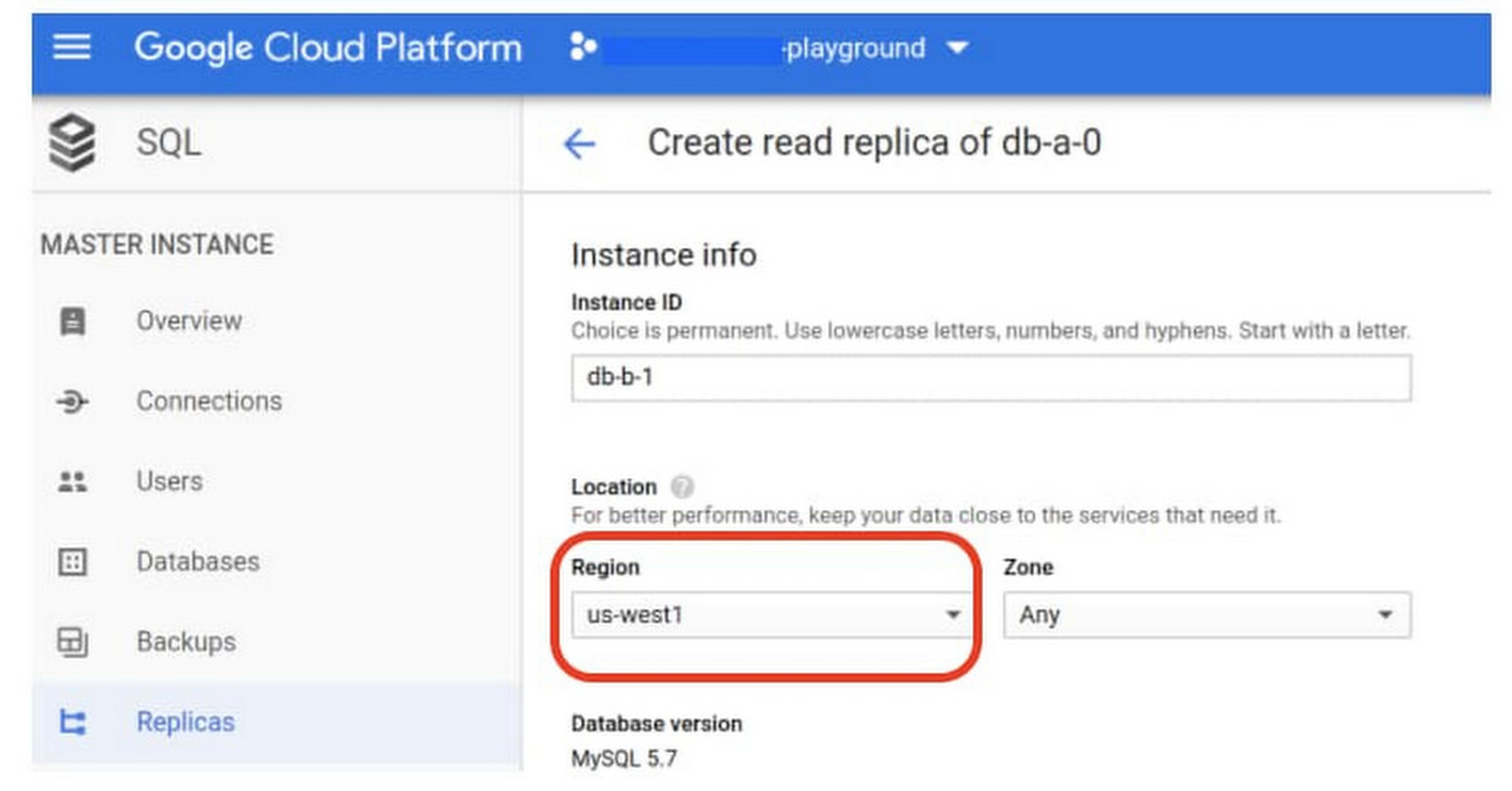
If a whole Google Cloud region goes down you still need your business to continue to run. That’s where cross-region replication comes in, a hot standby replica in another Google Cloud region provides RTO of minutes and RPO typically less than a minute . If you create a read replica in a region separate from your primary instance and you get hit with a regional outage, your application and database can start serving customers from another region within minutes. But this solution can be complex and enabling it yourself can be difficult and time-consuming. Securing cross-geography traffic demands end-to-end encryption and can bring connectivity issues too.
This is where the fully managed Cloud SQL solution shines. We offer MySQL, PostgreSQL and SQL Server database engines as a cross-region replication solution that’s easily configured and bolstered by Google’s interconnected global network. Just say, “I’m in U.S. East, I want to create a replica in U.S. West,” and it’s done, reliably and securely.
Backup
When you suffer data loss because of an operations error (for example, a bug in a script dropped your tables) or human error (for example, someone dropped the wrong table by accident), backups help you restore lost data to your Cloud SQL instance. Our low cost backup mechanism features point-in-time, granular recovery, meaning that if you accidentally delete data or something else goes wrong, you can ask for recovery of, for example, the state of that database down to the millisecond, such as Monday at 12:53pm. Your valuable data is replicated multiple times in multiple geographic locations automatically. This enables the automatic handling of failover in cases of major failure. You can always rest assured that your database is available and data is secure, even in the times of major failure crises.
Cloud SQL provides automated and on-demand backups. With automated backups, Google manages the backups so that you can easily restore them when required. Also, the scheduled backing is automatically taken by default. With on-demand backup, you can create a backup at any time. This could be useful if you are about to perform a risky operation on your database, as Cloud SQL lets you select a custom location for your backup data. When the backup is stored in multiple regions, and there’s an outage in the region that contains the source instance, you can restore a backup to a new or existing instance in a different region. This is also useful if your organization needs to comply with data residency regulations that require you to keep your backups within a specific geographic boundary.
Putting it all together
For critical workloads, MLB configures their Cloud SQL instances with backups, high availability, and cross-region replication. Doing so ensures they can recover from many failure types.
- To recover from human error (“Oops, I didn’t mean to delete that”), MLB uses backups and point-in-time recovery to recovery to a millisecond or specific database transaction
- To automatically recover from primary instance failures and zonal outages, MLB uses Cloud SQL’s high availability configuration
- To protect against regional outages, MLB uses cross-region replication
Creating a robust configuration, like MLB did, takes just a few minutes. Get started in our Console or review documentation.
6787
Of your peers have already watched this video.
2:30 Minutes
The most insightful time you'll spend today!
What is BigQuery?
BigQuery is Google Cloud’s enterprise data warehouse designed to help you ingest, store, analyze, and visualize big data with ease.
Organizations rely on data warehouses to aggregate data from disparate sources, process it, and make it readily available for data analysis that supports their strategic decision-making.
You can ingest data into BigQuery either through batch uploading or streaming data directly to deliver real-time insights.
As a fully-managed data warehouse, Google takes care of the infrastructure so you can focus on analyzing your data up to petabyte scale.
BigQuery supports the same Structured Query Language, or SQL, for analyzing your data, which you may be familiar with if you’ve worked with ANSI-compliant relational databases in the past.
If you’re looking to create machine learning models using your enterprise data, you can do so with BigQuery ML.
With only a few lines of SQL, you can train and execute models on your BigQuery data without needing to move it around.
When it comes time to visualize your data, BigQuery integrates with Looker, as well as several other business intelligence tools across our partner ecosystem.
Now, how do you use BigQuery?
Luckily, it’s straightforward to get up and running with BigQuery.
After creating a GCP project, you can immediately start querying public data sets, which Google Cloud hosts and makes available to all BigQuery users, or you can load your own data into BigQuery to analyze.
Interacting with BigQuery to load data, run queries, or even create ML models can be done in three different ways.
First is by using the UI and the Cloud Console. Second is by using the BigQuery command line tool. And third is by making calls to the BigQuery API, using client libraries available in several languages.
BigQuery is integrated with Google Cloud’s Identity and Access Management Service so you can securely share your data and analytical insights across the organization.
What does it cost to use BigQuery?
With BigQuery, you pay for storing and querying data and streaming inserts.
Loading and exporting data are free of charge.
Storage costs are based on the amount of data stored and have two rates based on how often the data is changing.
Query costs can be either on demand, meaning you are charged per query by the amount of data processed, or flat rate for customers who want to purchase dedicated resources.
Seven-Eleven Japan Leverages Google Cloud’s Performance and Speed for Real-time Business Insights

6816
Of your peers have already read this article.
4:00 Minutes
The most insightful time you'll spend today!
With the rise of technologies like smartphones, retailers have felt the pressure to meet evolving consumer needs and expectations. Seven-Eleven Japan(“SEJ”) has long been on the forefront of this thanks to the way they develop and invest in IT. However, in recent years, Japan’s leading convenience store chain has struggled to maintain its complex legacy systems at the rate needed to keep up with today’s rapid digitization, spurred on by the increasing proliferation of smartphones and an IT vendor-dependent structure.
Legacy systems limiting real-time responsiveness and innovation
Since its early days, SEJ has been proactive in adopting information technology, mainly relying on technology solutions from Japan’s leading vendors. But as the systems have grown, key business issues have been resolved using a vendor-dependent structure rather than being driven by SEJ’s own needs.
Datasets and business logic were combined and built into legacy environments, gradually leading to data silos. As a result, data was distributed across multiple systems, causing a variety of problems, including the inability to efficiently retrieve data when needed, delays in accessing data collected in individual stores, and difficulties taking measurements at the right time in business operations that require real-time responsiveness.
Connecting different systems also takes time and money, and the lead time for introducing new services—from planning to development and launch—has been longer than expected.
To solve these problems, SEJ’s IT department built “Seven Central”—a new platform for practical data use launched in 2020 to support the company’s future IT strategies and digital transformation initiatives.
At its core, Seven Central’s ultimate purpose is to allow real-time data views. Versatile, real-time datasets—such as point-of-sale (POS) data from 7-Eleven stores—are consolidated into a centralized location in the cloud. They created a simple data mart that provides data via an API to enable them to respond more quickly to requests from individual departments.
“In such uncertain times, it’s vital to use data to make quick decisions,” says Izuru Nishimura, Executive Officer and Head of ICT Department. “Each department across the entire company will be able to gain an immediate understanding of the situation based on the most up-to-date data and respond accordingly. This is why we built Seven Central.”
Google Cloud selected to help SEJ build and grow their data cloud
Today’s rapidly changing business environment has also highlighted the risk of IT support becoming a bottleneck. The long-term strategy is to gradually expand the datasets managed and collected in Seven Central according to business needs.
In the first phase, SEJ collected POS data from all 21,000+ stores to enable real-time analysis. Moving forward, they would like to collect other relevant data—for example, unstructured data, such as images and videos, or master datasets that are currently stored externally.
Google Cloud was already a top contender when SEJ started developing Seven Central in 2019. They compared various public cloud services besides Google Cloud, focusing on three main capabilities.
“We placed particular emphasis on service scalability to drive future digital transformation; security when handling data, which is the lifeline of our company; and finally, openness,” says Nishimura. He emphasizes that openness was perhaps the most important factor for choosing Google Cloud. Breaking away from the negative aspects of an entirely vendor-dependent system enabled them to build an agile development system with multiple vendors.
Google Cloud technologies including BigQuery and API management platform, Apigee, play a vital role in Seven Central. BigQuery’s high-speed processing at petabyte scale and fully managed infrastructure helped keep costs low during development and verification.
“Data is stored in a way that allows you to share it easily across organizations, which helps solve the issue of data silos from the perspective of scalability. I also like the fact there are some interesting features that could be used in the future—like BigQuery ML, which enables machine learning on BigQuery,” says Nishimura.
Apigee allows SEJ to separate datasets and business logic, which is one of the key points of Seven Central. While the trend these days is to standardize interfaces using an API, the reality tends to involve many different APIs rather than the introduction of one unified API. With Apigee, SEJ provides a single unified API for all of its data cloud, and they can now understand what data is used thanks to Apigee’s API usage visualizations.
“Right now, we collect data from all 21,000+ stores,” says Nishimura. “But in anticipation of a future expansion in business operations, we have designed a system that can scale up and run without issue, even if we were to have 30,000 stores, with 1,000 customers per store per day, purchasing five items per person.”
Real-time insights with BigQuery and Cloud Spanner
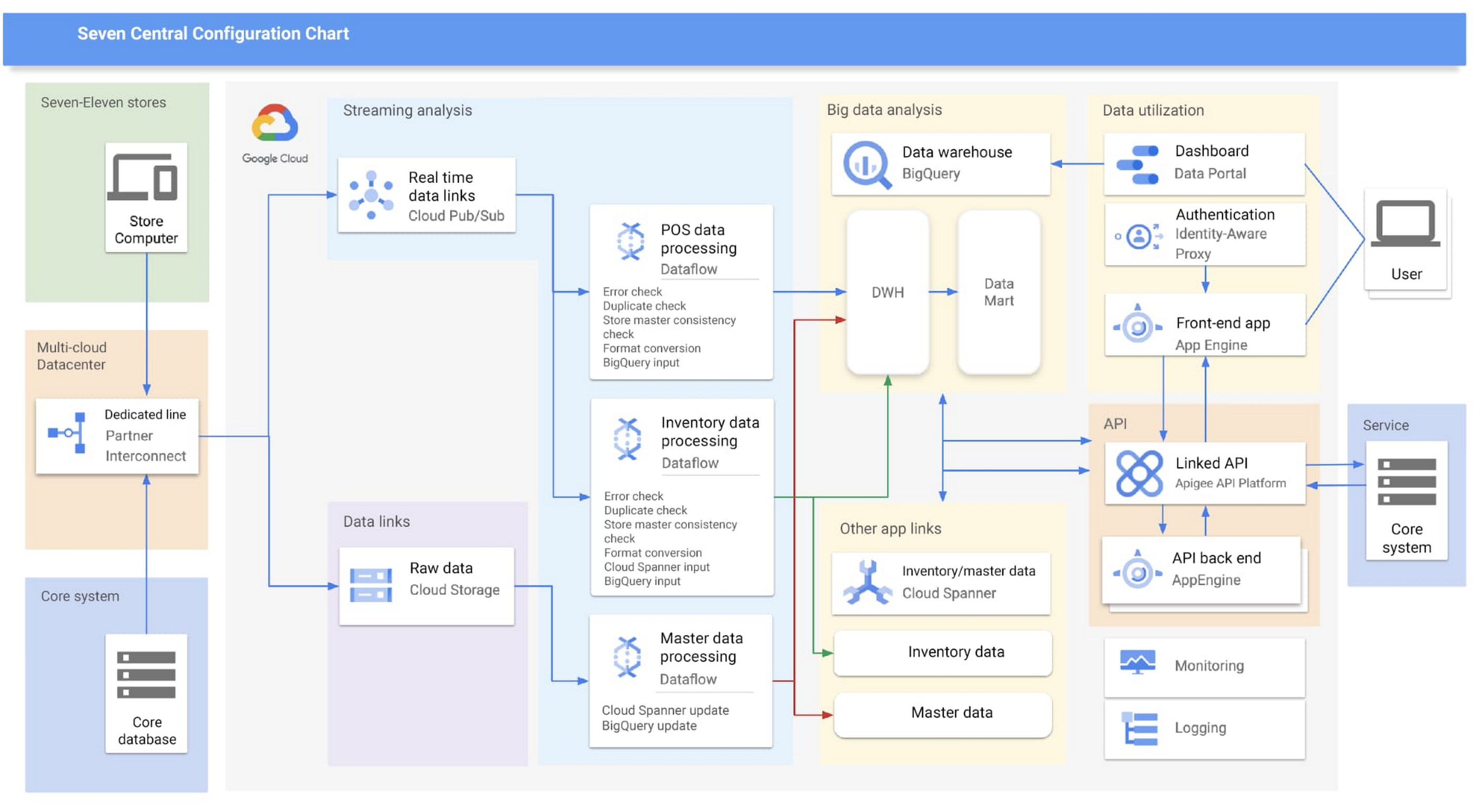
Google Cloud partner Cloud Ace came on board early in the planning phases. Based on their recommendations, SEJ decided to continue making full use of BigQuery to analyze data collected from all 21,000+ stores throughout Japan, while also using Cloud Spanner’s availability, near-unlimited scalability and transactional consistency to help achieve the real-time results needed for the project.
“Given that both the data and the regularity with which it is accessed are expected to steadily increase in the future, we chose Cloud Spanner as backend storage for data delivery via API. We consider it a good choice,” says Shota Kikuchi, General Manager, Consulting Department, Technology Division, Cloud Ace Co., Ltd.
Finally, they chose to use Google Cloud’s Stream Analytics Solutions messaging service for collecting POS data in real time, which can then be put to immediate use with Cloud Spanner and BigQuery.
High-speed responses exceed targets and create new value
Seven Central went live in September 2020 with surprising results.
They initially set a target time of one hour from when a customer makes a purchase to the point when Seven Central can use that data. But when the final system was first tried—it took barely a minute. Moving forward they estimate that the latest inventory data from the service side will become available within a few minutes of being added to the system.
“This is real innovation, and I must admit that I am quite surprised. As well as being able to solve existing issues, we also hope it will lead to new improvements and services that have been unimaginable up until now,” says Nishimura.
The team hopes to roll out the Seven Central platform in all companies affiliated with Seven & i Holdings—not just SEJ. They also plan to explore Google Cloud AI and machine learning technologies to take on challenges in new areas. For example, they are investigating the idea of clustering individual stores using BigQuery ML.
Seven Central has already attracted attention from many departments and received a lot of requests. Nishimura and his team say they hope to continue to grow Seven Central while still observing their fundamental principles—not including business logic, maintaining real-time results, and staying true to the uniqueness of SEJ.
Learn more about Google Cloud smart analytics solutions.
Renaulution: Renault’s story of migrating to 70 applications in 2 years

3309
Of your peers have already read this article.
3:00 Minutes
The most insightful time you'll spend today!
Editor’s note: Renault, the French automaker, embarked on a wholesale migration of its information systems—moving 70 applications to Google Cloud. Here’s how they migrated from Oracle databases to Cloud SQL for PostgreSQL.
The Renault Group, known for its iconic French cars has grown to include four complementary brands, and sold nearly 3 million vehicles in 2020. Following our company-wide strategic plan, “Renaulution,” we’ve shifted our focus over the past year from a car company integrating tech, to a tech company integrating cars that will develop software for our business. For the information systems group, that meant modernizing our entire portfolio and migrating 70 in-house applications (our quality and customer information systems) to Google Cloud. It was an ambitious project, but it’s paid off. In two years we migrated our Quality and Customer Satisfaction information systems applications, optimized our code, and cut costs thanks to managed database services. Compared to our on-premises infrastructure, using Google Cloud services and open-source technologies comes to roughly one dollar per user per year, which is significantly cheaper.
An ambitious journey to Google Cloud
We began our cloud journey in 2016 with digital projects integrating a new way of working and new technologies. These new technologies included those for agility at scale, data capabilities and CI/CD toolchain. Google Cloud stood out as the clear choice for its data capabilities. Not only are we using BigQuery and Dataflow to improve scaling and costs, but we are also now using fully managed database services like Cloud SQL for PostgreSQL. Data is a key asset for a modern car maker because it connects the car maker to the user, allows car makers to better understand usage and better informs what decisions we should make about our products and services. After we migrated our data lake to Google Cloud, it was a natural next step to move our front-end applications to Google Cloud so they would be easier to maintain and we could benefit from faster response times. This project was no small undertaking. For those 70 in-house applications (e.g. vehicle quality evaluation, statistical process control in plants, product issue management, survey analysis), for our information systems landscape, we had a range of technologies—including Oracle, MySQL, Java, IBM MQ, and CFT—with some applications created 20 years ago.
Champions spearhead each migration
Before we started the migration, we did a global analysis of the landscape to understand each application and its complexity. Then we planned a progressive approach, focusing on the smallest applications first such as those with a limited number of screens or with simple SQL queries, and saving the largest for last. Initially we used some automatic tools for the migration, but we learned very quickly nothing can replace the development team’s institutional knowledge. They served as our migration champions.
The apps go marching one by one
When we migrated our first few Oracle databases to Cloud SQL for PostgreSQL we tracked our learnings in an internal wiki to share common SQL patterns, which helped us speed up the process. For some applications, we simplified the architecture and took the opportunity to analyze and optimize SQL queries during the rework. We also used monitoring tools like Dynatrace and JavaMelody to ensure we improved the user experience.
The approach we developed was very successful—where database migration was initially seen as insurmountable, the entire migration project was completed in two years.
With on-premises applications it was hard for our developers to separate code performance from infrastructure limitations. So as part of our migration to Google Cloud, we optimized our applications with monitoring services. With these insights our team has more control over resources, which has reduced our maintenance and operations activity and resulted in faster, more stable applications. Plus, migrating to Cloud SQL has made it much easier for us to change our infrastructure as needed, add more power when necessary or even reduce our infrastructure size.
A new regime on Cloud SQL
Now that we’re running on Cloud SQL, we’ve improved performance even on large databases with many connected users. Thanks to built-in tools in the Google Cloud environment, we can now easily understand performance issues and quickly solve them. For example, we were able to reduce the duration of a heavy batch processing by a factor of three from nine to three hours. And we don’t have to wait for the installation of a new server, so our team can move faster. Beyond speed, we’ve also been able to cut costs. We optimized our code based on insights from monitoring tools, which not only enabled a more responsive application for the user, but it also reduced our costs because we’re not overprovisioned.
Learn more about the Renault Group and try out Cloud SQL today.
BigQuery Now Supports Multi-statement Transactions

3755
Of your peers have already read this article.
3:00 Minutes
The most insightful time you'll spend today!
Mercury, the Roman god of commerce, is often depicted carrying a purse, symbolic of business transactions, wearing winged sandals, illustrating his abilities to move at great speeds. Transactions power the world’s business systems today, ranging from millions of packages moving worldwide tracked in real time by logistics companies to global payments from personal loans to securities trading to intergovernmental transactions, keeping goods and services flowing worldwide. Today, we are very pleased to announce the public preview of multi-statement transactions in BigQuery.
BigQuery has long supported single-statement transactions through DML statements such as INSERT, UPDATE, DELETE, MERGE and TRUNCATE, applied to one table per transaction. Multi-statement transactions expand on this scope by supporting multiple SQL statements, including DML, spanning multiple tables in a single transaction. This means that the changes to data across multiple tables associated with all statements in a given transaction are committed atomically (all at once) if successful or all rolled back atomically in the event of a failure. These new multi-statement transaction capabilities now bridge the gap between online transaction processing (OLTP) systems and BigQuery through tighter and faster integration, just as Mercury’s speed enabled him to travel rapidly between the mortal and divine worlds.
Overview
A transaction is a set of tasks carried out against a database or a data warehouse representing a business unit of work. For example, an order expedite action may result in a series of changes to multiple tables, e.g., updating delivery dates on the order, adding new shipment lines on a shipment to create expedited delivery shipments and canceling (updating) prior normal delivery shipment lines. Correspondingly, when a batch job execute an ETL process in a data warehouse, it may perform data wrangling and data cleansing operations by transforming and saving the data in multiple tables. In both of these cases, if a failure occurs, then the entire transaction must be rolled back so that the system of record does not have partial data saved putting the dataset in an inconsistent state.
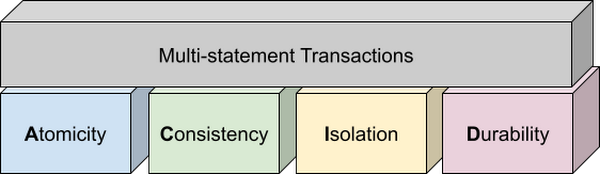
Transactions are known for their atomicity, consistency, isolation, and durability (ACID) properties. Atomicity indicates that all data changes (including metadata changes) are applied or reverted in a single operation, e.g. when a set of rows are added to a table with enrichment and the corresponding set of rows deleted, both operations happen together. Consistency refers to the consistency of data before and after the transaction has completed. When data is added to or updated in a table, the changes to data in tables are consistent with the constraints specified on the table or its columns, e.g. ensuring that the NOT NULL constraint is complied with when data gets added or modified in a table. Isolation indicates that multiple transactions can make changes to the table concurrently as long as the changes don’t conflict with each other, e.g. two transactions loading data into tables from different business units can proceed concurrently. Durability is the last and possibly the most important property of transactions which guarantees that in the event of a failure (after completing the transaction), all the changes committed by the transaction are saved for future transactions or queries.
Isolation level
All transactions in BigQuery including multi-statement transactions support snapshot isolation. At this isolation level, all statements in a transaction see a consistent snapshot of the database, as of the start of the transaction. BigQuery achieves this due to its multi-version property where it maintains the history of mutations to the database for a certain period. Transactions do not see any changes, committed or uncommitted, from other concurrent transactions while the transaction is in progress. BigQuery supports read-your-own-writes, where statements in a transaction can see all the changes applied by prior statements in the same transaction.
Example
Let’s run through an example to demonstrate how BigQuery supports the concept of multi-statement transactions with multiple sets of changes across multiple tables in one operation. In this example, we will set up this demo by creating 10 tables each with 100 partitions
Language: SQL
DECLARE num_tables DEFAULT 10;DECLARE x INT64 DEFAULT 0;# replace "demo" with your preferred dataset nameDECLARE ds STRING default "`00jathreya`";DECLARE prefix STRING DEFAULT "mst_demo";DECLARE table_name STRING;DECLARE pre_table_name STRING;/*Sets up 10 tables, with schema (partition_id:integer,value:timestamp).Each table has 100 partitions, with partition key 0, 10, 20, ..., 990.*/SET x = 0;WHILE x < num_tables DOSET table_name = format("%s.%s_%d", ds, prefix, x);EXECUTE IMMEDIATE format("""DROP TABLE IF EXISTS %s""", table_name);EXECUTE IMMEDIATE format("""CREATE OR REPLACE TABLE %s (partition_id INT64, value TIMESTAMP)PARTITION BY RANGE_BUCKET(partition_id, GENERATE_ARRAY(0, 1000, 10))AS SELECT partition_id, CURRENT_TIMESTAMP() AS value FROM UNNEST(GENERATE_ARRAY(0, 990, 10)) AS partition_id""", table_name);SET x = x + 1;END WHILE;# Verify the partitioned tables created and the timestampexecute immediate format("""select table_schema, table_name, count(partition_id), sum(total_rows), max(last_modified_time) from %s.INFORMATION_SCHEMA.PARTITIONSwhere starts_with(table_name,'%s')group by table_schema, table_name""", ds, prefix);# Verify data in table 9 based on the timestampEXECUTE IMMEDIATE format("""SELECT * FROM %s ORDER BY partition_id""", table_name);
Next, we will show how the new COMMIT and ROLLBACK commands in BigQuery allow you to save or reverse the changes in a transaction spanning multiple tables.
Language: SQL
DECLARE num_tables DEFAULT 10;DECLARE x INT64 DEFAULT 0;# Replace `mydataset` with your preferred dataset nameDECLARE ds STRING DEFAULT "`mydataset`";DECLARE prefix STRING DEFAULT "mst_demo";DECLARE table_name STRING;DECLARE pre_table_name STRING;/*Steps of the transaction:1. For table 0, updates the timestamp to CURRENT_TIMESTAMP.2. FOR table 1 to 9, merge table x using data from table x-1. All MERGE shouldsee the updated data in table x-1, so as a result the change in table 0 should bepropagated all the way to table 9.3. A total of 1000 partition changes on 10 tables.*/BEGIN TRANSACTION;SET x = 0;WHILE x < num_tables DOSET table_name = format("%s.%s_%d", ds, prefix, x);IF x = 0 THENEXECUTE IMMEDIATE format("""UPDATE %s SET value = CURRENT_TIMESTAMP WHERE true""", table_name);ELSESET pre_table_name = format("%s.%s_%d", ds, prefix, x-1);EXECUTE IMMEDIATE format("""MERGE %s t2 USING %s t1 ON t2.partition_id = t1.partition_idWHEN MATCHED THEN UPDATE SET value = t1.value""", table_name, pre_table_name);END IF;SET x = x + 1;END WHILE;# Verify data in table 9 inside transaction shows recently updated dataSET table_name = format("%s.%s_%d", ds, prefix, num_tables-1);EXECUTE IMMEDIATE format("""SELECT * FROM %s ORDER BY partition_id""", table_name);IF x = 9 THENCOMMIT TRANSACTION;ELSEROLLBACK TRANSACTION;END IF;# Verify data in table 9 outside transaction shows timestamp of original dataEXECUTE IMMEDIATE format("""SELECT * FROM %s ORDER BY partition_id""", table_name);
Monitoring and Management
Unlike single-statement transactions which map to a single DML command, multi-statement transactions are complex spanning multiple DML operations across multiple tables. To monitor these complex jobs, the BigQuery JOBS INFORMATION_SCHEMA views have been expanded to add a new column, TRANSACTION_ID, which contains a unique identifier for each transaction in BigQuery. You can query transactions that are in progress or the ones that have completed by querying these views.
Language: SQL
#Returns the list of transactions running under a parent job ID .;SELECTDISTINCT transaction_idFROM `region-us`.INFORMATION_SCHEMA.JOBS_BY_PROJECTWHERE parent_job_id = "job_id" AND state = "RUNNING";# Returns the active transactions and parent job id that are running and affect a named table.;WITHrunning_transactions AS (SELECT DISTINCT transaction_idFROM `region-us`.INFORMATION_SCHEMA.JOBS_BY_PROJECTWHERE state = "RUNNING")SELECTtransaction_id, parent_job_id, queryFROM `region-us`.INFORMATION_SCHEMA.JOBS_BY_PROJECT, running_transactionsWHERE destination_table = "mytable"AND transaction_id = running_transactions.transaction_id;# Returns all successfully committed transactionsSELECTtransaction_id, parent_job_id, queryFROM `region-us`.INFORMATION_SCHEMA.JOBS_BY_PROJECTWHERE statement_type = "COMMIT_TRANSACTION" AND error_result IS NULL;# Returns all rolled back transactionsSELECTtransaction_id, parent_job_id, queryFROM `region-us`.INFORMATION_SCHEMA.JOBS_BY_PROJECTWHERE statement_type = "ROLLBACK_TRANSACTION" AND error_result IS NULL;
To terminate a transaction, you will need to terminate the parent job under which the transaction is running by passing the parent job ID of the script containing the transaction to the BQ.JOBS.CANCEL system procedure.
Conclusion
As enterprises accelerate towards more real time insight-driven decisions, multi-statement transactions are a key enabler towards bringing transaction data into analytical data warehouses, such as BigQuery. With strong ACID properties, full transaction support for commit and rollback, and rich monitoring and management APIs built on proven transaction processing backbone, we are very pleased to help our BigQuery customers unlock the value of transactions through these new capabilities.
Google Cloud Leads the Landscape for Unstructured Data Security Platform: Forrester
7028
Of your peers have already read this article.
1:30 Minutes
The most insightful time you'll spend today!
As organizations expand their use of cloud computing services, more of their sensitive data inevitably moves to and lives in the cloud. Much of this sensitive data is unstructured and can be challenging to secure. Despite this potential challenge, the usefulness of cloud for data storage and processing is too big for most organizations to ignore and has in turn led to data sprawl, where their sensitive data is spread over many resources, both in the cloud and on-premise. Addressing data sprawl requires solutions that can discover, manage, and secure sensitive data, especially unstructured data, as it spreads.
To help organizations confidently move their sensitive data to the cloud, Google Cloud works diligently to earn and maintain customer trust. Control and transparency are pillars of our approach to offering a trusted cloud. Therefore, we’ve been expanding our capabilities to act on unstructured data as sprawl increases.
Given the importance of these capabilities to our strategy, we are happy to announce today that Forrester Research has named Google Cloud a Leader in The Forrester Wave™: Unstructured Data Security Platforms, Q2 2021 report, and rated Google Cloud highest in the current offering category among the providers evaluated.
The report evaluates the 11 most significant providers with platform solutions to secure and protect unstructured data, spanning from cloud providers to data security-focused vendors. The report notes that “Google offers breadth and depth with built-in data security in the cloud. Google Cloud Platform, Google Workspace, and BeyondCorp Enterprise have underlying data security products and features for protecting customer data.”
Google Cloud tools focused on protecting unstructured data were developed and battle-tested internally at Google to alleviate some of our own data security challenges. This brings the best of Google security to the organizations utilizing Google Cloud and our security tools. The report highlights that “Google productizes capabilities originally developed to secure its own business, and brings a disciplined approach to product enhancements for enterprise requirements. It serves a wide range of enterprise and mid-market, with a focus on emphasizing data protection needs by industry. ”
Google Cloud’s data security strategy focuses on meeting customers wherever they are in their cloud migration journey. The report highlights that “Google further enables a Zero Trust approach with third-party integrations through its BeyondCorp Alliance of partners in device management, endpoint security and gateways.”
Google Cloud received the highest possible score in sixteen criteria, in total receiving the most 5 out of 5 ratings among all vendors assessed. These criteria include: Data Intelligence, Access Control, Deletion, Obfuscation-Scope, Obfuscation-Key Management, Deployment, Security and Risk, APIs and Integration, Data Security Platform Vision, Data Security Execution Roadmap, Performance, Planned Enhancements, Zero Trust Enabling Partner Ecosystem, Diversity, Equity and Inclusion, Installed Base, and Revenue.
Notably, Google Cloud received the highest possible score in the Obfuscation criteria. Obfuscation can help protect sensitive data, like personally identifiable information (PII), which is critical to many enterprise workflows. Cloud DLP helps customers inspect and mask this sensitive data with techniques like redaction, bucketing, and tokenization, which help strike the balance between risk and utility. This is especially crucial when dealing with unstructured or free-text workloads, in which it can be challenging to know what data to redact. More than 150 detectors combine to power Cloud DLP’s masking, which can be deployed in data migrations and business workloads like real-time data collection and processing. For Obfuscation specifically, the report mentioned that Google “takes a broad view of DLP, which includes in-line redaction of sensitive elements in unstructured data and DLP APIs that extend support to additional data types like images or other media.”
We are honored to be a Leader in The Forrester Wave™ Unstructured Data Security Platforms Q2 2021 report, and look forward to continuing to innovate and partner with you on ways to make your digital transformation journey safer as we work to become your most trusted Cloud.
A copy of the full report can be viewed here.
More Relevant Stories for Your Company

How Kinguin Notched Up Shopping Experience with Google Recommendations AI
Over 2.14 billion people worldwide are expected to buy online this year, according to Statista. Online retail sales will account for 22% of all purchases by 2023. But in a competitive retail landscape, positive interactions can mean the difference between a sale and an abandoned shopping cart. One of the leading global

Unification of Dataplex and Data Catalog: A Full Spectrum of Data Governance and Data Management at Scale
Today, we are excited to announce that Google Cloud Data Catalog will be unified with Dataplex into a single user interface. With this unification, customers have a unified experience to search and discover their data, enrich it with relevant business information, organize it by logical data domains, and centrally govern


Can Your Data Warehouse Handle a 100-Trillion Row Query?
Today's enterprise demands from data go far beyond the capabilities of traditional data warehousing and for many leaders, the need to digitally transform their businesses is a key driver for data analytics spending. Businesses want to make real-time decisions from fresh information as well as make future predictions from their



Uber’s Story of Scaling Their App with Millions of Concurrent Requests
Uber has millions of concurrent customers who use the platform to book rides and place food delivery orders, generating billions of database transactions per day. In just a click of a button, Uber captures users' intent which bases their fulfillment model to meet the customers' demand, and match it to
