





Enhance Your GKE Deployment with Improved Control Plane Connectivity and Isolation

2710
Of your peers have already read this article.
3:00 Minutes
The most insightful time you'll spend today!
Once upon a time, all Google Kubernetes Engine (GKE) clusters used public IP addressing for communication between nodes and the control plane. Subsequently, we heard your security concerns and introduced private clusters enabled by VPC peering.
To consolidate the connectivity types, starting in March 2022, we began using Google Cloud’s Private Service Connect (PSC) for new public clusters’ communication between the GKE cluster control plane and nodes, which has profound implications for how you can configure your GKE environment. Today, we’re presenting a new consistent PSC-based framework for GKE control plane connectivity from cluster nodes. Additionally, we’re excited to announce a new feature set which includes cluster isolation at the control plane and node pool levels to enable more scalable, secure — and cheaper! — GKE clusters.
New architecture
Starting with GKE version 1.23 and later, all new public clusters created on or after March 15th, 2022 began using Google Cloud’s PSC infrastructure to communicate between the GKE cluster control plane and nodes. PSC provides a consistent framework that helps connect different networks through a service networking approach, and allows service producers and consumers to communicate using private IP addresses internal to a VPC.
The biggest benefit of this change is to set the stage for using PSC-enabled features for GKE clusters.
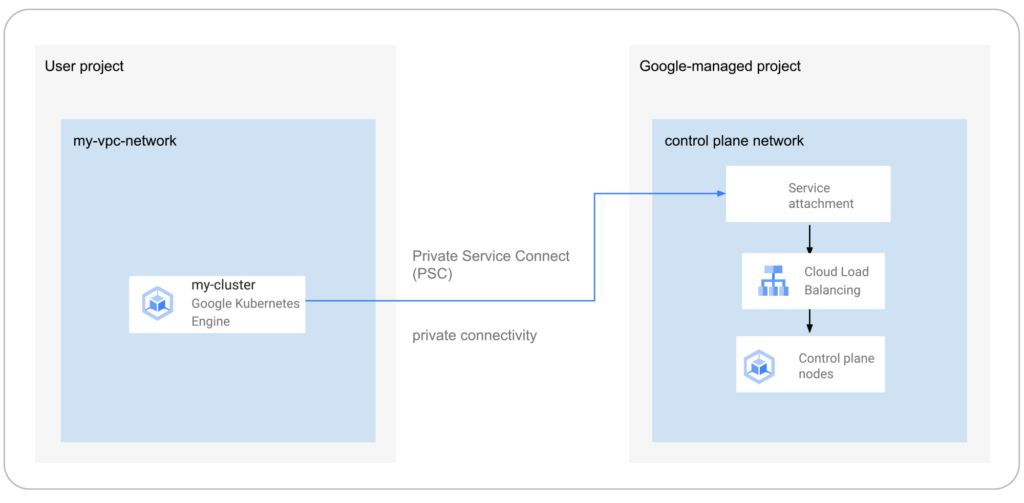
The new set of cluster isolation capabilities we’re presenting here is part of the evolution to a more scalable and secure GKE cluster posture. Previously, private GKE clusters were enabled with VPC peering, introducing specific network architectures. With this feature set, you now have the ability to:
- Update the GKE cluster control plane to only allow access to a private endpoint
- Create or update a GKE cluster node pool with public or private nodes
- Enable or disable GKE cluster control plane access from Google-owned IPs.
In addition, the new PSC infrastructure can provide cost savings. Traditionally, control plane communication is treated as normal egress and is charged for public clusters as a normal public IP charge. This is also true if you’re running kubectl for provisioning or other operational reasons. With PSC infrastructure, we have eliminated the cost of communication between the control plane and your cluster nodes, resulting in one less network egress charge to worry about.
Now, let’s take a look at how this feature set enables these new capabilities.
Allow access to the control plane only via a private endpoint
Private cluster users have long had the ability to create the control plane with both public and private endpoints. We now extend the same flexibility to public GKE clusters based on PSC. With this, if you want private-only access to your GKE control plane but want all your node pools to be public, you can do so.
This model provides a tighter security posture for the control plane, while leaving you to choose what kind of cluster node you need, based on your deployment.
To enable access only to a private endpoint on the control plane, use the following gcloud command:
gcloud container clusters update CLUSTER_NAME \
--enable-private-endpoint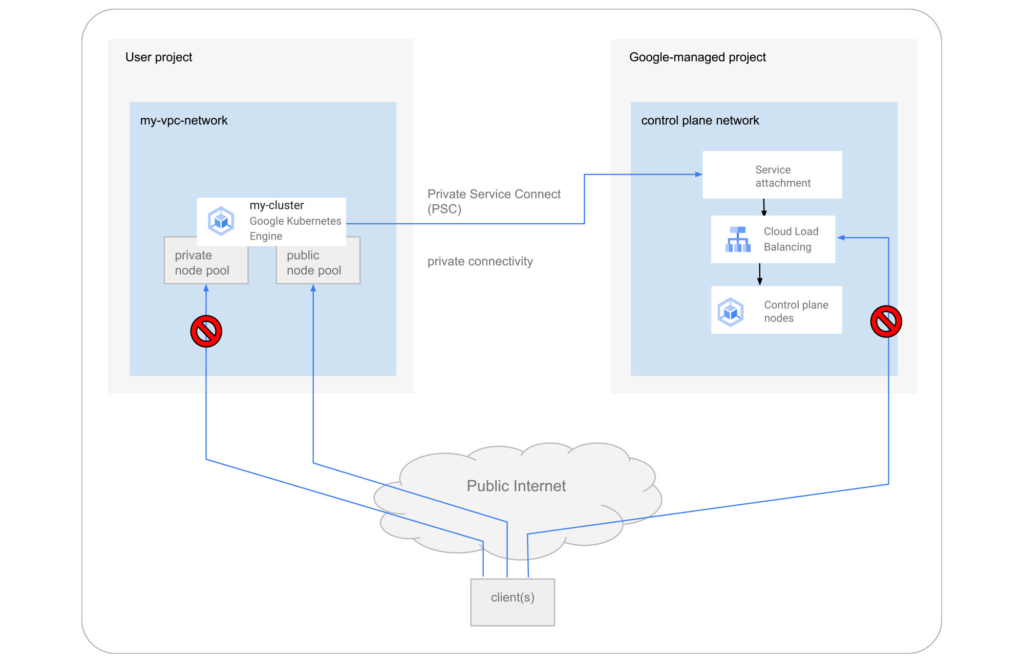
Allow toggling and mixed-mode clusters with public and private node pools
All cloud providers with managed Kubernetes offerings offer both public and private clusters. Whether a cluster is public or private is enforced at the cluster level, and cannot be changed once it is created. Now you have the ability to toggle a node pool to have private or public IP addressing.
You may also want a mix of private and public node pools. For example, you may be running a mix of workloads in your cluster in which some require internet access and some don’t. Instead of setting up NAT rules, you can deploy a workload on a node pool with public IP addressing to ensure that only such node pool deployments are publicly accessible.
To enable private-only IP addressing on existing node pools, use the following gcloud command:
gcloud container node-pools update POOL_NAME \
--cluster CLUSTER_NAME \
--enable-private-nodes
To enable private-only IP addressing at node pool creation time, use the following gcloud command:
gcloud container node-pools create POOL_NAME \
--cluster CLUSTER_NAME \
--enable-private-nodes
Configure access from Google Cloud
In some scenarios, users have identified workloads outside of their GKE cluster, for example, applications running in Cloud Run or any GCP VMs sourced with Google Cloud public IPs were allowed to reach the cluster control plane. To mitigate potential security concerns, we have introduced a feature that allows you to toggle access to your cluster control plane from such sources.
To remove access from Google Cloud public IPs to the control plane, use the following gcloud command:
gcloud container clusters update CLUSTER_NAME \
--no-enable-google-cloud-access
Similarly, you can use this flag at cluster creation time.
Choose your private endpoint address
Many customers like to map IPs to a stack for easier troubleshooting and to track usage. For example — IP block x for Infrastructure, IP block y for Services, IP block z for the GKE control plane, etc. By default, the private IP address for the control plane in PSC-based GKE clusters comes from the node subnet. However, some customers treat node subnets as infrastructure and apply security policies against it. To differentiate between infrastructure and the GKE control plane, you can now create a new custom subnet and assign it to your cluster control plane.
gcloud container clusters create CLUSTER_NAME \
--private-endpoint-subnetwork=SUBNET_NAME
What can you do with this new GKE architecture?
With this new set of features, you can basically remove all public IP communication for your GKE clusters! This, in essence, means you can make your GKE clusters completely private.
You currently need to create the cluster as public to ensure that it uses PSC, but you can then update your cluster using gcloud with the --enable-private-endpoint flag, or the UI, to configure access via only a private endpoint on the control plane or create new private node pools.
Alternatively, you can control access at cluster creation time with the --master-authorized-networks and --no-enable-google-cloud-access flags to prevent access from public addressing to the control plane.
Furthermore, you can use the REST API or Terraform Providers to actually build a new PSC-based GKE cluster with the default (thus first) node pools to have private nodes. This can be done by setting the enablePrivateNodes field to true (instead of leveraging the public GKE cluster defaults and then updating afterwards, as currently required with gcloud and UI operations).
Lastly, the aforementioned features extend not only to Standard GKE clusters, but also to GKE Autopilot clusters.
When evaluating if you’re ready to move these PSC-based GKE cluster types to take advantage of private cluster isolation, keep in mind that the control plane’s private endpoint has the following limitations:
- Private addresses in URLs for new or existing webhooks that you configure are not supported. To mitigate this incompatibility and assign an internal IP address to the URL for webhooks, set up a webhook to a private address by URL, create a headless service without a selector and a corresponding endpoint for the required destination.
- The control plane private endpoint is not currently accessible from on-premises systems.
- The control plane private endpoint is not currently globally accessible: Client VMs from different regions than the cluster region cannot connect to the control plane’s private endpoint.
All public clusters on version 1.25 and later that are not yet PSC-based are currently being migrated to the new PSC infrastructure; therefore, your clusters might already be using PSC to communicate with the control plane.
To learn more about GKE clusters with PSC-based control plane communication, check out these references:
- GKE Concept page for public clusters with PSC
- How-to: Change Cluster Isolation page
- How-to: GKE node pool creation page with isolation feature flag
- How-to: Schedule Pods on GKE Autopilot private nodes
- gcloud reference to create a cluster with a custom private subnet
- Terraform Providers Google: release v4.45.0 page
- Google Cloud Private Services Connect page.
Here are the more specific features in the latest Terraform Provider, handy to integrate into your automation pipeline:
Introducing a strong alternative to CentOS: Rocky Linux Optimized for Google Cloud
3350
Of your peers have already read this article.
3:30 Minutes
The most insightful time you'll spend today!
As CentOS 7 reaches end of life, many enterprises are considering their options for an enterprise-grade, downstream Linux distribution on which to run their production applications. Rocky Linux has emerged as a strong alternative that, like CentOS, is 100% compatible with Red Hat Enterprise Linux.
In April 2022, we announced a customer support partnership with CIQ, the official support and services partner and sponsor of Rocky Linux, as the first step in providing a best-in-class enterprise-grade supported experience for Rocky Linux on Google Cloud. Today we’re excited to announce the general availability of Rocky Linux Optimized for Google Cloud. We developed this collection of Compute Engine virtual machine images in close collaboration with CIQ so that you get optimal performance when using Rocky Linux on Compute Engine to run your CentOS workloads.
These new images contain customized variants of the Rocky Linux kernel and modules that optimize networking performance on Compute Engine infrastructure, while retaining bug-for-bug compatibility with Community Rocky Linux and Red Hat Enterprise Linux. The high bandwidth networking enabled by these customizations will be beneficial to virtually any workload, and are especially valuable for clustered workloads such as HPC (see this page for more details on configuring a VM with high bandwidth).
Going forward, we’ll collaborate with CIQ to publish both the community and Optimized for Google Cloud editions of Rocky Linux for every major release, and both sets of images will receive the latest kernel and security updates provided by CIQ and the Rocky Linux community. And of course, we’ll offer support with CIQ for both these images, per our partnership.
Rocky Linux Optimized for Google Cloud lets you take advantage of everything Compute Engine has to offer, including day-one support for our latest VM families, GPUs, and high-bandwidth networking. And for customers building for a multi-cloud deployment environment, the community Rocky images have you covered.
Starting today, Rocky Linux 8 Optimized for Google Cloud is available for all x86-based Compute Engine VM families (and soon for the new Arm-based Tau T2A), with version 9 soon to follow. Give it a try and let us know what you think.
KRM Series Part 5: Learn to Manage and Configure Hosted Resources with Kubernetes

3212
Of your peers have already read this article.
3:00 Minutes
The most insightful time you'll spend today!
This is the fifth and final post in a multi-part series about the Kubernetes Resource Model. Check out parts 1, 2, 3, and 4 to learn more.
In part 2 of this series, we learned how the Kubernetes Resource Model works, and how the Kubernetes control plane takes action to ensure that your desired resource state matches the running state.
Up until now, that “running resource state” has existed inside the world of Kubernetes- Pods, for example, run on Nodes inside a cluster. The exception to this is any core Kubernetes resource that depends on your cloud provider. For instance, GKE Services of type Load Balancer depend on Google Cloud network load balancers, and GKE has a Google Cloud-specific controller that will spin up those resources on your behalf.
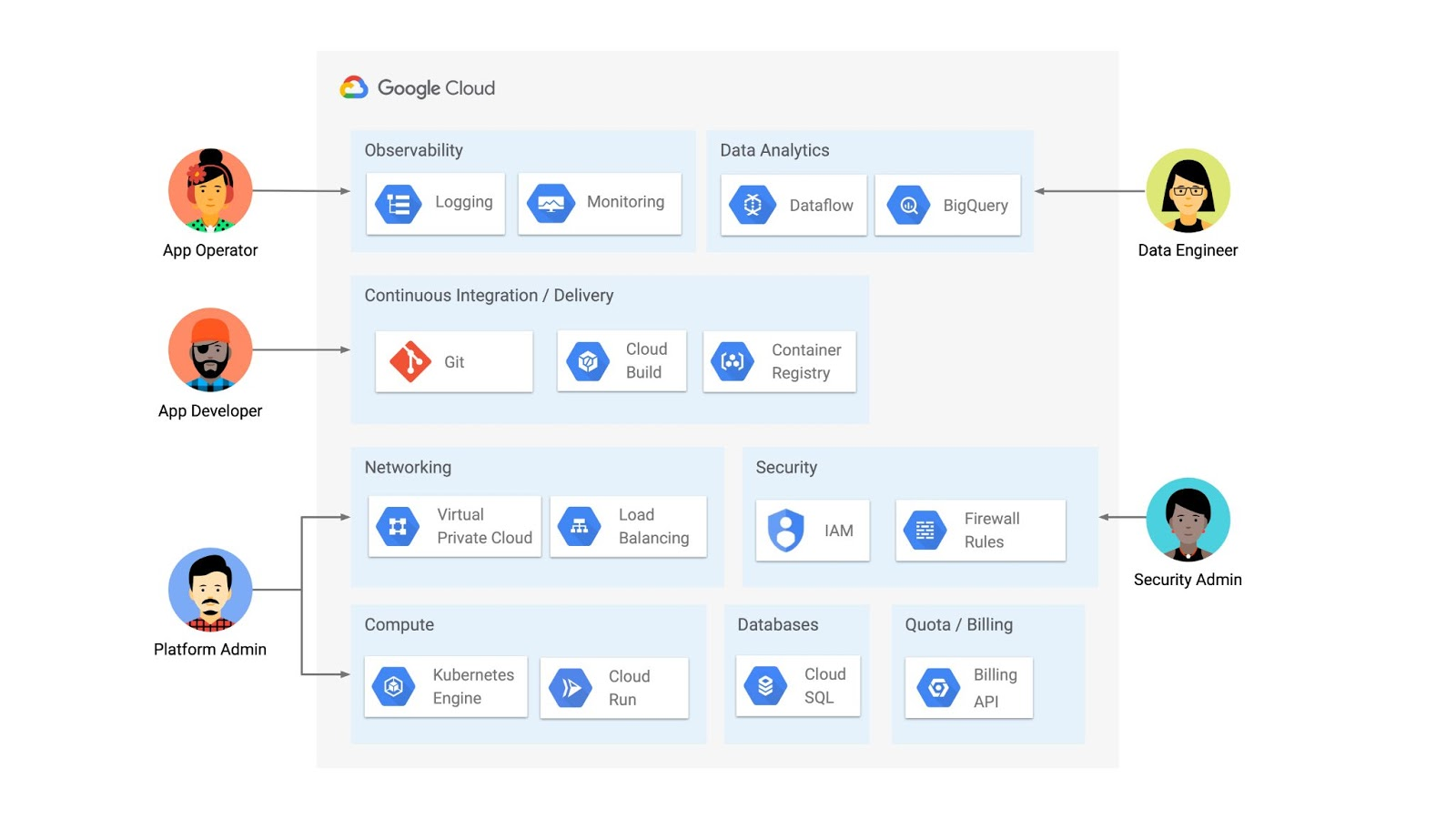
But if you’re operating a Kubernetes platform, it’s likely that you have resources that live entirely outside of Kubernetes. You might have CI/CD triggers, IAM policies, firewall rules, databases. The first post of this series introduced the platform diagram below, and asserted that “Kubernetes can be the powerful declarative control plane that manages large swaths” of that platform. Let’s close that loop by exploring how to use the Kubernetes Resource Model to configure and provision resources hosted in Google Cloud.
Why use KRM for hosted resources?
Before diving into the “what” and “how” of using KRM for cloud-hosted resources, let’s first ask “why.” There is already an active ecosystem of infrastructure-as-code tools, including Terraform, that can manage cloud-hosted resources. Why use KRM to manage resources outside of the cluster boundary?
Three big reasons. The first is consistency. The last post explored ways to ensure consistency across multiple Kubernetes clusters- but what about consistency between Kubernetes resources and cloud resources? If you have org-wide policies you’d like to enforce on Kubernetes resources, chances are that you also have policies around hosted resources. So one reason to manage cloud resources with KRM is to standardize your infrastructure toolchain, unifying your Kubernetes and cloud resource configuration into one language (YAML), one Git config repo, one policy enforcement mechanism.
The second reason is continuous reconciliation. One major advantage of Kubernetes is its control-loop architecture. So if you use KRM to deploy a hosted firewall rule, Kubernetes will work constantly to make sure that resource is always deployed to your cloud provider- even if it gets manually deleted.
A third reason to consider using KRM for hosted resources is the ability to integrate tools like kustomize into your hosted resource specs, allowing you to customize resource specifications without templating languages.
These benefits have resulted in a new ecosystem of KRM tools designed to manage cloud-hosted resources, including the Crossplane project, as well as first-party tools from AWS, Azure, and Google Cloud.
Let’s explore how to use Google Cloud Config Connector to manage GCP-hosted resources with KRM.
Introducing Config Connector
Config Connector is a tool designed specifically for managing Google Cloud resources with the Kubernetes Resource Model. It works by installing a set of GCP-specific resource controllers onto your GKE cluster, along with a set of Kubernetes Custom Resources for Google Cloud products, from Cloud DNS to Pub/Sub.
How does it work? Let’s say that a security administrator at Cymbal Bank wants to start working more closely with the platform team to define and test Policy Controller constraints. But they don’t have access to a Linux machine, which is the operating system used by the platform team. The platform team can address this by manually setting up a Google Compute Engine (GCE) Linux instance for the security admin. But with Config Connector, the platform team can instead create a declarative KRM resource for a GCE instance, commit it to the config repo, and Config Connector will spin up the instance on their behalf.
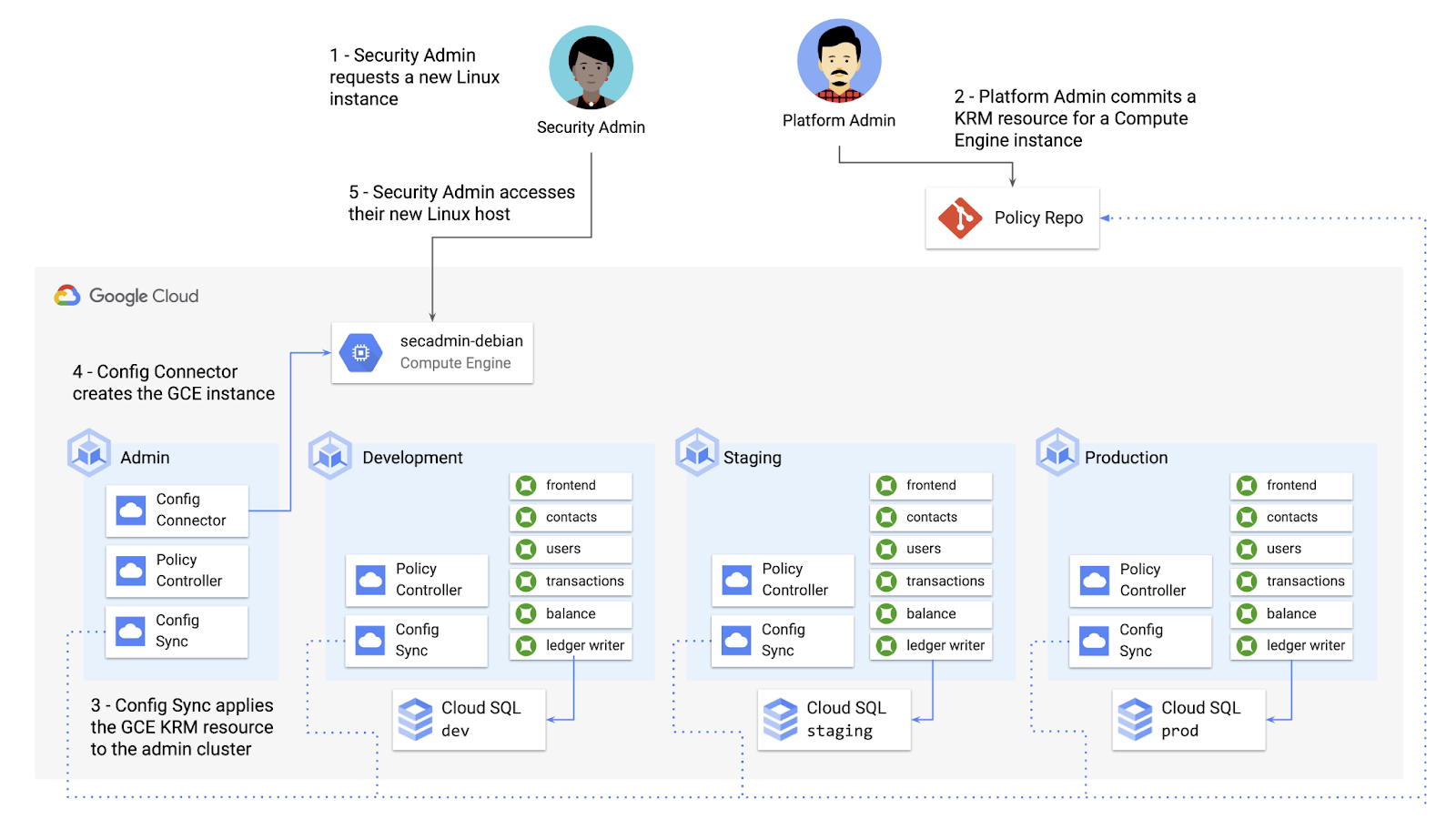
What does this declarative resource look like? A Config Connector resource is just a regular Kubernetes-style YAML file- in this case, a custom resource called Compute Instance. In the resource spec, the platform team can define specific fields, like what GCE machine type to use.
apiVersion: compute.cnrm.cloud.google.com/v1beta1kind: ComputeInstancemetadata:annotations:cnrm.cloud.google.com/allow-stopping-for-update: "true"name: secadmin-debianlabels:created-from: "image"network-type: "subnetwork"spec:machineType: n1-standard-1zone: us-west1-abootDisk:initializeParams:size: 24type: pd-ssdsourceImageRef:external: debian-cloud/debian-9...
Once the platform team commits this resource to the Config Sync repo, Config Sync will deploy the resource to the cymbal-admin GKE cluster, and Config Connector, running on that same cluster, will spin up the GCE resource represented in the file.
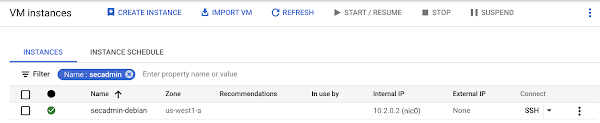
This KRM workflow for cloud resources opens the door for powerful automation, like custom UIs to automate resource requests within the Cymbal Bank org.
Integrating Config Connector with Policy Controller
By using Config Connector to manage Google Cloud-hosted resources as KRM, you can adopt Policy Controller to enforce guardrails across your cloud and Kubernetes resources.
Let’s say that the data analytics team at Cymbal Bank is beginning to adopt BigQuery. While the security team is approving production usage of that product, the platform team wants to make sure no real customer data is imported. Together, Config Connector and Policy Controller can set up guardrails for BigQuery usage within Cymbal Bank.
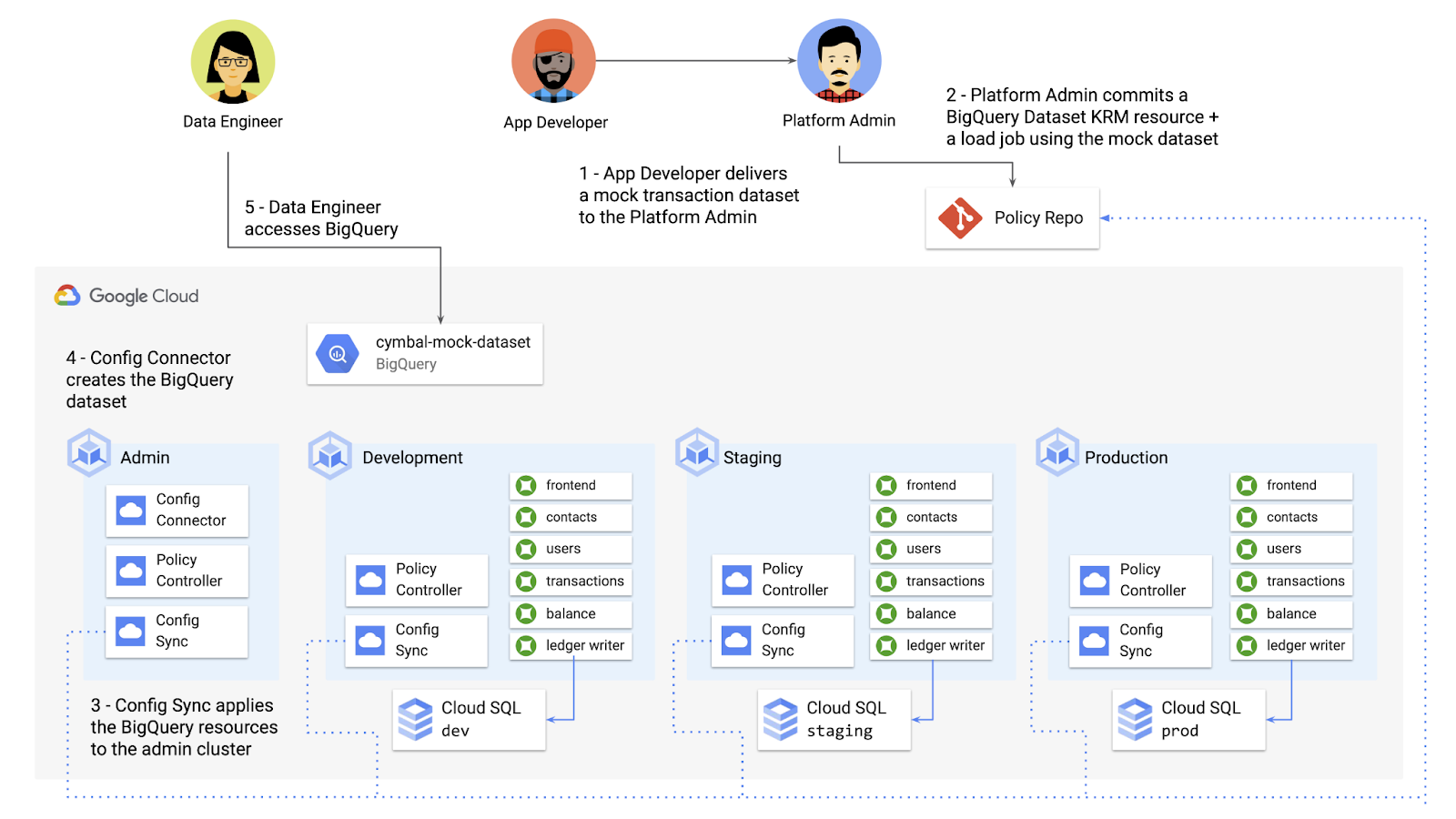
Config Connector supports BigQuery resources, including Jobs, Datasets, and Tables. The platform team can work with the analytics team to define a test dataset, containing mocked data, as KRM, pushing those resources to the Config Sync repo as they did with the GCE instance resource.
apiVersion: bigquery.cnrm.cloud.google.com/v1beta1kind: BigQueryJobmetadata:name: cymbal-mock-load-jobannotations:configsync.gke.io/cluster-name-selector: cymbal-adminspec:location: "US"jobTimeoutMs: "600000"load:sourceUris:- "gs://cymbal-bank-datasets/cymbal-mock-transactions.csv"
From there, the platform team can create a custom Constraint Template for Policy Controller, limiting the allowed Cymbal datasets to only the pre-vetted mock dataset:
rego: |package bigquerydatasetallownameviolation[{"msg": msg}] {input.review.object.kind == "BigQueryDataset"input.review.object.metadata.name != input.parameters.allowedNamemsg := sprintf("The BigQuery dataset name %v is not allowed", [input.review.object.metadata.name])}apiVersion: constraints.gatekeeper.sh/v1beta1
These guardrails, combined with IAM, can allow your organization to adopt new cloud products safely- not only defining who can set up certain resources, but within those resources, what field values are allowed.
Manage existing GCP resources with Config Connector
Another useful feature of Config Connector is that it supports importing existing Google Cloud resources into KRM format, allowing you to bring live-running resources into the management domain of Config Connector.
You can use the config-connector command line tool to do this, exporting specific resource URIs into static files:
config-connector export "//sqladmin.googleapis.com/sql/v1beta4/projects/cymbal-bank/instances/cymbal-dev" \--output cloudsql/
Output:
apiVersion: sql.cnrm.cloud.google.com/v1beta1kind: SQLInstancemetadata:annotations:cnrm.cloud.google.com/project-id: cymbal-bankname: cymbal-devspec:databaseVersion: POSTGRES_12region: us-east1resourceID: cymbal-dev...
From here, we can push these KRM resources to the config repo, and allow Config Sync and Config Controller to start lifecycling the resources on our behalf. The screenshot below shows that the cymbal-dev Cloud SQL database now has the “managed-by-cnrm” label, indicating that it’s now being managed from Config Connector (CNRM = “cloud-native resource management”).
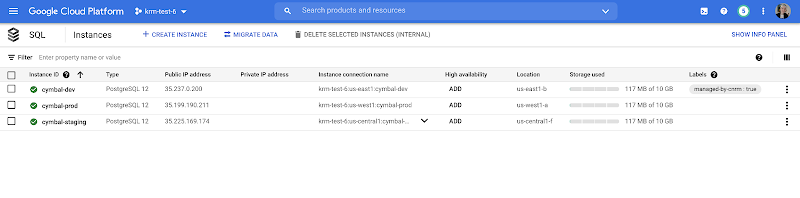
This resource export tool is especially useful for teams looking to try out KRM for hosted resources, without having to invest in writing a new set of YAML files for their existing resources. And if you’re ready to adopt Config Connector for lots of existing resources, the tool has a bulk export option as well.
Overall, while managing hosted resources with KRM is still a newer paradigm, it can provide lots of benefits for resource consistency and policy enforcement. Want to try out Config Connector yourself? Check out the part 5 demo.
This post concludes the Build a Platform with KRM series. Hopefully these posts and demos provided some inspiration on how to build a platform around Kubernetes, with the right abstractions and base-layer tools in mind.
Thanks for reading, and stay tuned for new KRM products and features from Google.
A CIO’s Guide to the Cloud: Hybrid and Human Solutions to Avoid Trade-offs

3868
Of your peers have already read this article.
2:30 Minutes
The most insightful time you'll spend today!
What do CIOs and CTOs deliver for the company? If you said “technology,” that’s just the beginning. According to their research, McKinsey found that 85% of CIOs and CTOs interviewed in the spring of 2019 said they were essential for at least two of the three most common CEO priorities—revenue acceleration, improved agility and time to market, and cost reduction.
IT modernization – including migrating to the cloud – is key to business growth and agility. Yet, according to a recent McKinsey study, 80% of CIOs report that regardless of their level of cloud migration, they still haven’t reached their projected agility and business benefits. Sometimes, this is because of issues like training and skills gaps in the IT workforce. Surprisingly often though, the barrier to reaching the goals is based on trade-offs that CIOs themselves feel they must make to strike a balance between the perfect and the possible.
But what if you could have it all without the trade-offs? As Will Grannis, Managing Director of the CTO Office at Google, and Arul Elumalai, Partner at McKinsey & Company discussed in our recent digital conference, many of the compromises CIOs make can be avoided with new technology, modern architectures and by encouraging a transformation mindset across the business. In interviews, CIOs explained how they’ve leveraged the best of the cloud without compromising on security, agility, and flexibility. Here’s how these leaders avoid three of the top perceived trade-offs—both with technology and by transforming their operating model.
Trade-off #1: Developer agility vs. control and governance
Moving to the cloud offers new opportunities for speed, but 69% of organizations indicate that stringent security guidelines and code review processes can slow developers significantly. One CISO of a multinational company mentioned that cloud development was so fast that they had to institute manual checks on their developers’ code. So much for agility.
To overcome this trade-off and maintain both speed and security, some respondents found success in DevOps, hiring security-experienced talent and introducing automation for security and quality. Building in security into the CI/CD pipeline and increasing automation don’t just eliminate the tradeoff, they result in higher quality and faster innovation.
At Google Cloud, we’ve also observed that customers with strong DevOps practices have increased speed-to-market and product/service quality. From our own journey, we’ve learned seven critical lessons essential to adopting a DevOps model, ranging from taking up small projects and embracing open source to building an overall DevOps culture.
Trade-off #2: Single-vendor benefits vs. freedom from lock-in
CIOs perceive benefits to using the fewest number of clouds, specifically avoiding introducing multiple systems that require their teams to develop and maintain multiple skillsets. Unfortunately, 83% of the CIOs interviewed said that while they would prefer fewer clouds, the potential financial and technical lock-in drives them to multiple providers.
Successful CIOs said that they can avoid lock-in pitfalls not just with contractual guardrails and executive and board education, but with evolving hybrid cloud technologies that provide additional choices. Hybrid cloud platforms based on containers can further mitigate the risk of using a single cloud vendor. The key to successful hybrid architectures is the infrastructure abstraction and portability that containers create for them, enabling disparate environments to work together.
This notion has been at the heart of our strategy at Google Cloud with Anthos, which provides an abstraction layer and an application modernization platform for hybrid and multi-cloud environments. Enterprises can use Anthos to modernize how they develop, secure, and operate hybrid-cloud environments and enable consistency across cloud environments.
Trade-off #3: Best-of-breed tools vs. standardization and familiarity
Optimizing tool chains for different environments can improve productivity, but many CIOs believe that this means reduced functionality and tools. While 77% of CIOs said they had to standardize to the lowest common denominator, some have found a better solution. Rather than giving up the languages, libraries, and frameworks that their teams prefer, effective leaders said that they found success by investing in training programs to upscale talent and adopting new open and vendor-agnostic solutions. Architectures that are based on open-source components have been the keys that helped remove this tradeoff, and eliminate the notion of a lowest common denominator.
This is why we have built Anthos on open-source components like Kubernetes, Istio and Knative. Anthos gives your business the choice you need. With the ability to create code that works in most environments using the tools, languages, and systems you prefer, you can do more without major changes to how you work.
Regardless of your current cloud adoption level, check out “Unlock business acceleration in a hybrid cloud world” to discover more about McKinsey’s findings, including how CIOs drive agility, methods to make trade-offs unnecessary, and how to prepare your team for the cloud. Then, stay tuned for subsequent posts that take a closer look at how hybrid solutions and strategies can help CIOs drive a transformation mindset across the business—without compromising on security, agility, and flexibility.
NCR’s Emerald Leverages Google Cloud to Help Grocers Boost Operational Agility

8263
Of your peers have already read this article.
3:00 Minutes
The most insightful time you'll spend today!
In recent years, the grocery industry has had to shift to facilitate a wider variety of checkout journeys for customers. This has meant ensuring a richer transaction mix, including mobile shopping, online shopping, in-store checkout, cashierless checkout or any combination thereof like buy online, pickup in store (BOPIS).
What’s more, in the past year and a half alone grocers have had to enable consumers new ways to shop for essentials. This has included needing to rapidly integrate or build on-demand delivery apps, offer curbside pickup with near-instant fulfillment as well as support touchless and cashless checkout experiences. Searches on Google Maps for retailers in the US with curbside pickup options have increased by 9000% since March 2020, and we believe these trends from 2020 will continue to define the future of grocery shopping.
The future of grocery will require agility and openness
Firstly, the need to rapidly adapt to changing consumer habits will be the new normal. Grocers will increasingly look to digitally transform legacy retail systems and modernize point of sale (POS) platforms to deliver and scale omnichannel experiences as quickly as possible. This necessitates a more agile and open architectural approach to technology – one built on microservices and leverages APIs so that new applications and experiences can be built, integrated and delivered faster.
Automation and data-driven retailing will be table stakes
In order for retailers to blend what they’re offering in the store with digital experiences more efficiently, they will also need to automate more. For example, with automation and business intelligence, grocers can take labor that might have been tied up with tender operations and checkout and redistribute those resources to restocking shelves, curbside pick-up or improving customer experiences.
Automation and access to real-time in-store inventory & supply chain data can also help grocers avoid the supply chain challenges seen in the early days of COVID-19. Grocers will need to find ways to leverage automation to ingest, organize, and analyze data from physical store networks, digital channels, distribution centers to better forecast demand and manage future fluctuations.
How NCR and Google Cloud are helping grocers adapt to disruption with operational agility
Helping grocers improve operational agility to address changing consumer shopping habits and to thrive during times of disruption is something that NCR and Google Cloud have teamed up to do. NCR has over 135 years of experience in retail, having invented the cash register and are continuing to help grocers innovate. NCR Emerald builds upon the company’s leadership in POS software and has turned it into a unified platform that helps grocers operate the entire store from front to back. The solution supports cashier-led checkout, self-checkout, integrated payments, merchandising, and enables regional managers and corporate employees access to the analytics and tools needed to optimize loyalty programs and promotions.

NCR has invested in a comprehensive, agile, and API-led retail architecture that lets grocers continually innovate and design new experiences as customers and the industry evolve. By running Emerald on Google Cloud, NCR can offer the solution on a subscription basis, helping grocers lower upfront capital expenditures and ensuring scalability. What’s more, NCR can tap into Google Cloud’s strength in data, analytics, and openness to deliver three key imperatives. Let’s take a look at each of these below.
Run the way grocers need to while leveraging Google Cloud as a single source of logic
Traditionally the POS system lived in the store. If disaster strikes, people still need access to food and essentials so the grocery store still needs to operate. It hardly gets more mission-critical than that. NCR Emerald is built on microservices, leveraging Kubernetes for front-of-house compute, and VMs (See graphic 1 below). This makes it easy to support lightweight clients accessible by store employees via any range of mobile devices, computer terminals, self-service kiosks, peripheral devices like receipt printers as well as legacy applications.
What’s unique is that because Emerald runs on Google Cloud, it supports all those in-store and digital touchpoints mentioned above, but also allows grocers to run lean. Emerald leverages Google Cloud as a single source of truth and operates a lot of what it does out of logic. Every sales transaction coming from every channel, including e-commerce, can be logged via NCR’s Hosted Service and centralized in BigQuery and Bigtable as a transaction data master. This enables the grocer to manage any transactional use case very consistently, whether it e supporting customers who want to purchase in one store and return in another, offering digital receipts or the ability to exchange online purchases in store. Emerald on Google Cloud can help retailers extend capabilities through the power of the cloud but not need to live exclusively in the cloud. In other words, the solution allows grocers the ability to run the way they need to.

Enable data-driven and real-time decision making for grocers
Store managers, regional managers, category managers, and others all require different cuts of the data to do their jobs effectively. However, data silos persist and how data is formatted and arranged can still remain pretty static. Therefore allowing users with different roles the ability to view and analyze that data quickly and in different ways continues to be a challenge.
As mentioned above, Emerald leverages Google Cloud data management solutions as the central repository for transactional, behavioral, and merchandising data. Every transaction from every store and every channel can be stored via NCR Hosted Service on BigQuery and Bigtable. NCR Analytics then harnesses the advanced analytical and data visualization capabilities of Looker to help grocers get a consolidated view of their business across all channels and then allow employees to slice and dice the data they way they need to. NCR Analytics also leverages the power of Google Cloud AI and machine learning to add another level of intelligence to the retailer’s data. For example, store managers can visualize how well they’re using their real estate and see how productive lanes 1-3 are compared with 7-10 or compare self-service versus manned lanes. By mapping to the retailer’s own catalog, they can also break down category-level performance and trends.

NCR Analytics takes advantage of Google Cloud’s data pipeline to reduce processing time, with scaling and resource management provided out of the box. By letting the cloud store and process the data, NCR is providing the ability for retailers to analyze their data in near real-time across all platforms – a real game changer in the grocery business.
Open APIs let grocers continually enrich the retail experience
Finally, Emerald is built on an API-first architecture managed through Apigee. It uses the power of Apigee as an open API platform to expose how Emerald can work with other NCR applications like loyalty and promotions, and third party applications like mobile ordering and order delivery to enrich the grocery experience for employees and customers. Every API that Emerald uses is available on Apigee, allowing them to share code samples and giving developers the ability to run scripts. This approach can allow retailers the ability to innovate in a fraction of the time and cost, speeding up 3rd party integrations up front and as businesses grow.
Take, for example, Northgate Market, a chain of 40 stores in California, that were able to transform its digital operations and enable experiences that set it apart from competitors – quickly and simply with Emerald. It took less than 6 months to go from contract to live deployment in the first store. Since then, Northgate Market has been able to extend their intelligence by leveraging the power of Looker and NCR Analytics.
Learn more about how NCR has been able to leverage an open, cloud-enabled architecture to help customers innovate across the retail, hospitality, and banking industries on the webinar “Role of APIs in Digital Transformation”. You can also learn more about how Northgate uses e-commerce to transform customer experience and gain consumer insights.
Transforming Businesses with Google Distributed Cloud Edge Appliance: A Look at Real-World Use Cases

2541
Of your peers have already read this article.
4:30 Minutes
The most insightful time you'll spend today!
While many organizations are driving digital transformation by migrating to the cloud, there are some industries, geographies, and use cases that require a different approach to cloud modernization. Regulated industries such as healthcare, insurance, pharmaceutical, energy, telecommunication, and banking have stringent data residency and sovereignty requirements. Other industries need to meet local data processing requirements, while others require real-time data processing with sub-millisecond latencies, for example to detect defects on manufacturing lines. These use cases demand a combination of edge, on-premises and cloud services for their infrastructure.
With these requirements in mind, Google Cloud launched Google Distributed Cloud powered by Anthos to extend the power of Google Cloud infrastructure and services to the edge (or closer). The underlying infrastructure for this service comes in two variants: a 42U rack filled with compute, storage, and networking devices called Google Distributed Cloud Edge Rack and a 1U appliance called Google Distributed Cloud Edge Appliance.
In this blog post, we discuss the Google Distributed Cloud Edge Appliance and how manufacturing, retail, and automotive industry verticals can use it to address common use cases.
How the appliance works
But first, let’s talk about the Google Distributed Cloud Edge Appliance itself.
Google Distributed Cloud Edge Appliances comprises two components: (1) Distributed Cloud Edge infrastructure and (2) the Distributed Cloud Edge service.
The Google Distributed Cloud Edge service runs on Google Cloud and serves as a control plane for the nodes and clusters running on your appliance. In order to perform remote management of the appliance and to collect metrics, the Distributed Cloud Edge service must be connected to Google Cloud at all times, allowing you to manage your workloads on the edge hardware through the Google Cloud Console. For customers who can’t be connected at all times for data residency or sovereignty reasons, we highly recommend that the appliance be connected to the cloud at least once a month to allow for needed security patches and updates.
Google Distributed Cloud Edge Appliances come with built-in network ports that provide connectivity to the control plane via the internet, Cloud VPN, or Dedicated Interconnect, and to your on-prem network. Each Google Distributed Cloud Edge Appliance is homed to a specific Google Cloud region but it is designed to also use any public Google Cloud endpoint to communicate with the control plane in Google Cloud, allowing you to move these appliances between different geographic locations.
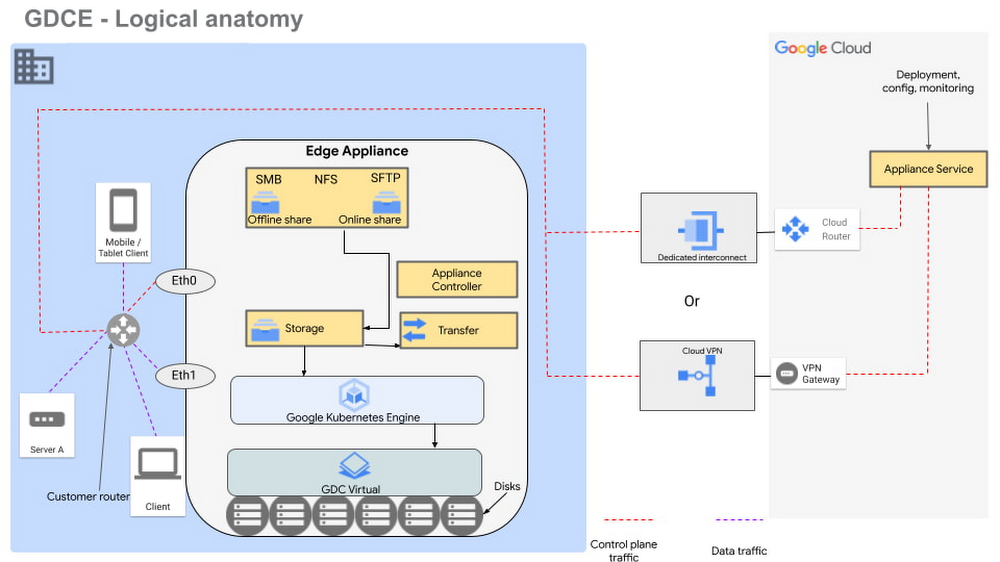
Figure 1 – Logical design of Google Distributed Cloud Edge Appliance
There are two NFS shares on each appliance; one is offline, meaning it does not transfer data to Google Cloud, and the other is online, meaning data saved to that share is synced to Cloud Storage on Google Cloud for further processing. The appliance supports Server Message Block (SMB) and Secure File Transfer Protocols (SFTP) for communication.
Each Google Distributed Cloud Edge Appliance runs Google Distributed Cloud Virtual, enabling you to build a single-node Kubernetes cluster with access to the underlying file system of the appliance. This allows you to build containerized applications on the underlying appliance hardware to address use cases in the following verticals.
Vertical use cases
Now that you understand how Google Cloud Edge Appliance is configured, let’s consider some of the industry use cases where it can provide unique value.
Manufacturing
In the manufacturing industry, quality control and safety is a crucial factor. Businesses need to ensure products are manufactured to the highest standards to remain competitive in their markets, to retain customers, and to keep factory workers safe. To do this, manufacturers need real-time data about the products being manufactured on the production lines, ensuring quality control and gaining a real-time view of where people are on the factory floor.
In manufacturing environments, Google Distributed Cloud Edge Appliance can be used to detect hazards or manufacturing defects in real-time. Figure 1 is a reference architecture for a hazard detection solution running off a Google Distributed Cloud Edge Appliance on a factory floor.
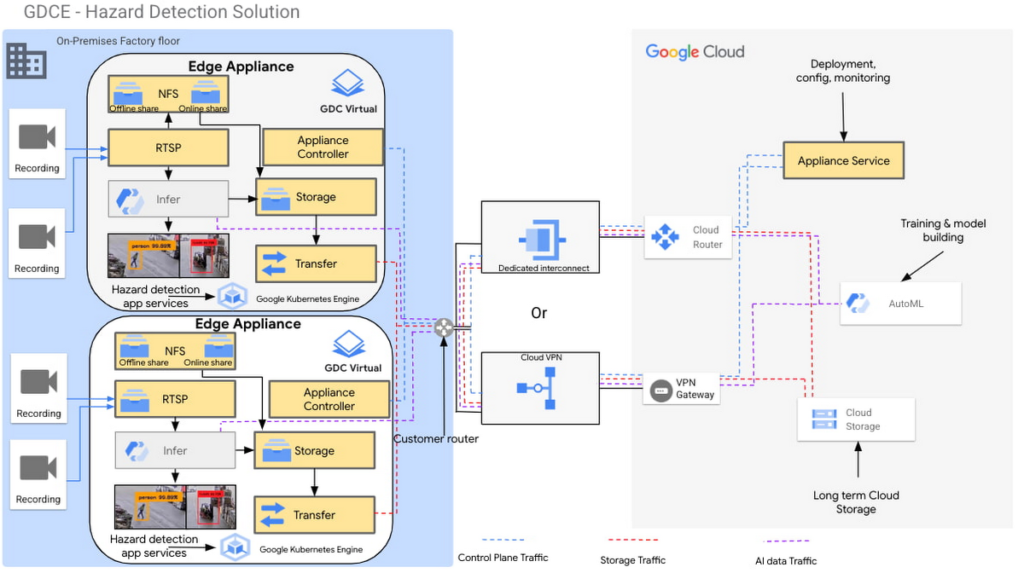
Figure 2 – Hazard detection architecture using Google Distributed Cloud Edge Appliance
In this architecture, cameras on the factory floor stream live video into the Google Distributed Cloud Edge Appliance. Depending on the number of cameras and appliances, cameras could be split or mapped to different appliances. This architecture makes it possible to initially transfer video data to Google Cloud using an online NFS share. Once in Google Cloud, you can use AutoML to train and build models that can be used as part of the hazard detection solution.
With these trained models, the cameras can stream video data into the appliance using the real-time streaming protocol (RTSP). You can then use AutoML inference to analyze the real-time video streaming data.
For example, in this reference architecture, if an individual comes too close to the fork lift, a function is triggered by the microservices running on the edge appliance that pushes a notification either to a messaging service, or to an enterprise resource planning tool. This alerts factory managers to factory floor hazards in real time so they can take corrective action.
You can also review messages and videos later on for preventive planning purposes, or push streamed videos to Cloud Storage for archive, to use the appliance’s storage space more efficiently.
Data transfers to Google Cloud can be done over Google Cloud Dedicated Interconnect, or VPN between the region and your site. This connectivity also allows you to send the appliance’s control-plane network traffic to the region.
You could also use the reference architecture in figure 2 for a product anomaly detection solution running off a Google Distributed Cloud Edge Appliance on a factory floor or manufacturing line. In this instance, machine learning models are trained to detect anomalies on finished products before final packaging.
Retail
In the retail industry, the Google Distributed Cloud Edge Appliance reference architecture in Figure 2 enables a number of transformative capabilities for retail operations, including:
- contactless checkout
- product scans
- mobile-scan-bag
- cashierless checkout
- unattended retail shops
- visual check-out monitoring
It does all this within a retailer’s facilities with the low latency and high throughput you need to process data locally, so you can obtain actionable insights from your data.
Or, you could use Google Distributed Cloud Edge Appliance at the edge to overhaul store management operations, for example, monitoring store occupancy, queue depth and wait times, detecting slips and falls and out-of-stock items, or monitoring inventory compliance.
Automotive
Advanced Driver Assistance Systems (ADAS) are becoming standard in modern automobiles. To successfully build and roll out continued improvements around ADAS, the automotive industry continues to run extensive tests on ADAS systems that are built into the vehicles they manufacture. Automotive companies can use Google Distributed Cloud Edge Appliance to modernize and transform how they collect data for the ADAS systems they’re developing. For example, test vehicles contain several different sensors that generate data, which can be quickly offloaded to an in-vehicle edge appliance.
Then, within the appliance, you can deploy containerized workloads to transform sensor data, infer videos and images and detect events. This alleviates the need for operators to label all events and allows development teams to quickly gather insights from the tests.
If you want to focus on a subset of information, you can transfer specific data or the entire data payload into Transfer Appliances when vehicles return to the development center. All these systems, i.e., transfer appliances and edge appliances, work in tandem to reduce local system administration and operational costs through a cloud-based control plane.
This approach allows you to deploy, track, monitor and configure services that are running in data centers or at edge locations from the cloud. From the factories, the data can be moved offline or online into Google Cloud where you can use different storage classes and processing capabilities to further process or store the data. You can also deploy newly trained models and business rules back to the edge appliances. In all this, data transfers between the cloud and the appliance are performed using end-to-end encryption, to give you control over your data.
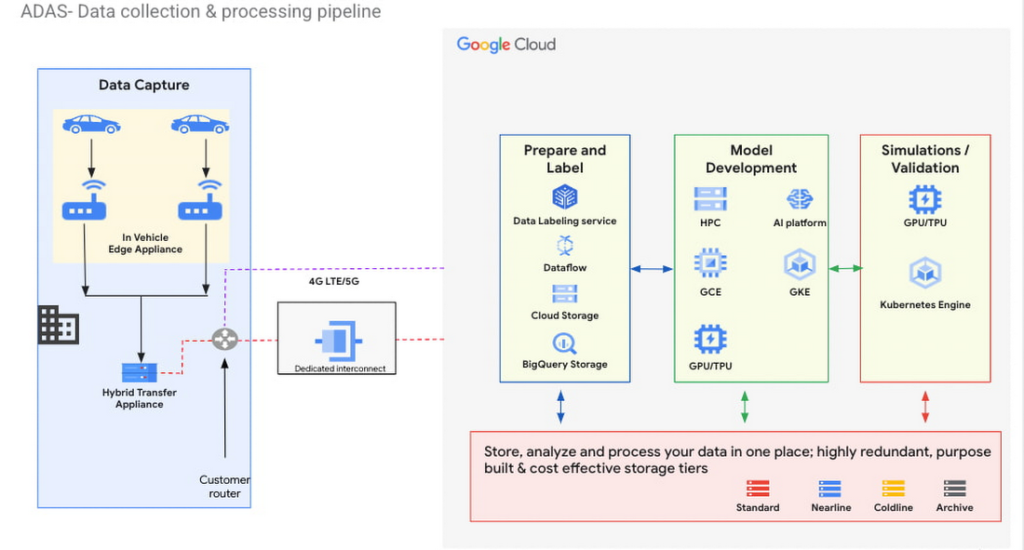
Figure 3 – ADAS implementation with a Google Distributed Cloud Edge Appliance
The reference architecture in Figure 3 shows an ADAS implementation where Google Distributed Cloud Edge Appliance is being used to gather, process and transform data at the edge in the automotive industry. It could also be applied to data capture and processing use cases in manned and unmanned vehicles. Notice how the Distributed Edge Appliance extends to the cloud by sending data there, or using other cloud-based services.
We’re just getting started
These are just a few of the use cases where organizations in the manufacturing, retail and automotive industries are using Google Distributed Cloud Edge Appliance with modern and containerized applications that are powered by Google Cloud. If you’re interested in bringing the power of Google Cloud to the edge using Google Distributed Cloud Edge Appliances to transform your business, reach out to us or any of our accredited partners.
More Relevant Stories for Your Company

Transform ‘Dark Data’ from Documents with Document AI, Cloud Functions and Workflows
At enterprises across industries, documents are at the center of core business processes. Documents store a treasure trove of valuable information whether it's a company's invoices, HR documents, tax forms and much more. However, the unstructured nature of documents make them difficult to work with as a data source. We

Guide to API Management: How to Become User-Centric
Customer and developer expectations are increasingly driving enterprise IT to employ new approaches to serving the needs of a diverse mix of users and experiences. That’s where application programming interfaces (APIs) come into play. They are the foundation which digital business is built, allowing app developers to create apps that

Application Modernization Made Easy
Modernizing apps on the cloud isn’t an “all or nothing” decision. Businesses want the option to modernize on-premises or choose multi-cloud solutions that meet their needs. That’s why we created a new solution for running apps anywhere – simply, flexibly, and securely. Embracing open standards, Anthos lets you run your applications, unmodified,

Target Leverages Google Cloud to Create Market-defining Online Experience
In the hyper-competitive world of online retail sales, ease-of-use and transaction speed can make or break business outcomes. However, a few years ago US Retail giant Target was going through a period of uncertainty. While the company had over 1800 stores across the US with an estimated 85% of US
