





Ease Your Migration and Modernization Journey with Microsoft and Windows on Google Cloud Demo Center

8292
Of your peers have already read this article.
2:00 Minutes
The most insightful time you'll spend today!
If you’re looking to migrate and modernize your Microsoft and Windows workloads, Google Cloud is your premiere destination. No matter what migration strategy you’ve selected or what value you’re looking to achieve, with Google Cloud you’re able to:
- simplify your migration and modernization journey
- reduce your on-prem footprint and increase agility
- optimize license usage to reduce costs
- modernize to reduce single-vendor dependencies
- rely on enterprise-class support backed by Microsoft
Whether you’re looking to migrate applications running on Windows virtual machines, adopt Windows containers in Google Kubernetes Engine (GKE), convert SQL databases to Cloud SQL, or something else, Google Cloud offers you the first-class experience you need.
But we don’t want you to take our word for it. Try it out yourself with our new online Microsoft and Windows on Google Cloud Demo Center without any commitment or friction.

The demo center uses hands-on guided simulations to walk you through several scenarios for solving business critical challenges with Google Cloud’s Microsoft and Windows solutions. Because these are all simulated, you’ll see how it works without any deployment, configuration, or commitment. It’s a seamless way for you to see exactly how Google Cloud can help you.
Run dedicated hardware and optimize with sole tenant
Sometimes you might want to run your workloads on dedicated hardware (with oversubscription options) for compliance, licensing, and management. Google Cloud provides sole-tenant nodes that allow you to easily deploy your virtual machines onto dedicated machines to avoid “noisy neighbor” issues, address regulatory or licensing constraints, and optimize inter-VM communications.
Plus, the CPU Overcommit option allows oversubscribing sole-tenant node resources by up to 2x, therefore helping save on per-physical core licensing for many licensed workloads like SQL Server.
Learn how to set up a sole tenant group and node.
Optimize license costs with premium images & custom VMs
One of the easiest ways to optimize your cloud experience with virtual machines (VM) is to pick the right VM image. Google Cloud provides premium license-included VM images that are thoroughly tested and optimized, including SQL Server options with pay-as-you-go licensing. These are great for workloads that don’t need to run all the time or when you do not have spare licenses for bring your own license (BYOL).
Explore some Windows & SQL images and learn how CPU/Memory options can help optimize deployment and save on licensing.
Modernize your databases with Managed SQL Server
Sometimes you need to manage your SQL Server instance to achieve certain business or operational goals. But more often, managing SQL Server deployments can be undifferentiated: backups, high-availability, updates, and patching are just some of the many things you have to take care of when going the do-it-yourself route. One way to modernize your database tier is to migrate to a managed service like Cloud SQL, which is a fully managed Relational Database service for SQL.
Explore the process of creating an instance in just a few clicks!
Extract apps from VMs and move to containers in GKE with Migrate for Anthos
Many Windows workloads running on virtual machines such as Internet Information Services (IIS) are ideal candidates for migrating to containers without major changes like rewriting or rearchitecting. However, doing this migration manually can be tedious, which is why Migrate for Anthos can help easily re-platform a .NET app running on IIS into a container-based app.
Simulate intelligently extracting, migrating, and modernizing applications to run natively on containers in GKE and Anthos clusters.
Move .NET applications to GKE on Windows without code changes
When you’re looking to go fully cloud native, you can leverage Windows containers in GKE without rewriting your .NET applications. Simply create clusters with Windows nodes and deploy containerized Windows workloads in a few clicks, even alongside Linux containers. These deployments reduce operational overhead with features such as auto-upgrade, auto-repair, and release channels.
Learn how easy it is to build a GKE cluster with a Windows node and deploy an app.
Now that you’ve gotten a feel for what’s available, go check out the Demo Center. You can also visit us at Windows and Microsoft on Google Cloud to learn more.
Learning Should be Your Resolution for 2022: Register for Google Cloud Skills Boost

3281
Of your peers have already read this article.
1:30 Minutes
The most insightful time you'll spend today!
Start your 2022 New Year’s resolutions by learning at no cost how to use Google Cloud with the following training opportunities:
30 day access to Google Cloud Skills Boost
Register by January 31, 2022 and claim 30 days free access to Google Cloud Skills Boost to complete the Getting Started with Google Cloud learning path.
Google Cloud Skills Boost is the definitive destination for skills development where you can personalize learning paths, track progress, and validate your newly-earned expertise with skill badges.
The Getting Started with Google Cloud learning path will give you the opportunity to earn three skill badges after you complete hands-on labs and courses designed for aspiring cloud engineers and architects. It covers the fundamentals of Google Cloud including core infrastructure, big data and ML, writing gcloud commands, using Cloud Shell, deploying virtual machines, and running containerized applications on GKE.
Cloud OnBoard: half day training on getting started with Google Cloud fundamentals
Attend the Getting Started Cloud OnBoard on January 20 for a comprehensive Google Cloud orientation. Google Cloud experts will show you how to execute your compute, available storage options, how to secure your data, and available Google Cloud managed services.
Cloud Study Jam: expert-guided hands-on lab
Google Cloud experts will walk you through a hands-on lab included in Google Cloud Skill Boost’s Getting Started with Google Cloud learning path when you join our Cloud Study Jam on January 27. Google Cloud experts will also answer questions live via chat during this event.
The Total Economic Impact of SAP on Google Cloud Gives Businesses a Transformation Accelerator: Forrester
DOWNLOAD WHITEPAPER3594
Of your peers have already downloaded this article
10:00 Minutes
The most insightful time you'll spend today!
By using Google Cloud, organizations can quickly and easily migrate their SAP applications and data to Google Cloud with minimal disruption to the business, reduce hardware and maintenance costs, and eliminate the complexities and risks of managing SAP applications on-premises. Because of Google Cloud’s pure-cloud infrastructure, organizations can host large instances in a pure-cloud environment, rather than relying on bare-metal servers as part of their public cloud strategies.
Google Cloud commissioned Forrester Consulting to conduct a Total Economic Impact™ (TEI) study and examine the potential return on investment (ROI) enterprises may realize by migrating and deploying SAP on Google Cloud. To better understand the benefits, costs, and risks associated with this investment, Forrester interviewed several customers with years of experience using SAP on Google Cloud and conducted a survey of customers who migrated SAP to Google Cloud, as well as customers who migrated SAP to a different public cloud.
After migrating their SAP infrastructure to Google Cloud, organizations found that they had more flexibility to spin up new SAP instances; reduced cost and effort to maintain SAP systems; and improved reliability, processing speeds, and uptime for SAP applications.
Download this Forrester report to find out the total economic impact of migrating your SAP workloads to Google Cloud.

Google Cloud Garners Highest Score in Forrester New Wave for Computer Vision Platforms
DOWNLOAD WHITEPAPER5329
Of your peers have already downloaded this article
8:30 Minutes
The most insightful time you'll spend today!
In Forrester’s evaluation of the emerging market for computer vision platforms, it identified the 11 most significant providers in the category — Amazon Web Services, Chooch AI, Clarifai, Deepomatic, EdgeVerve, Google, Hive, IBM, Microsoft, Neurala, and SAS — and evaluated them.
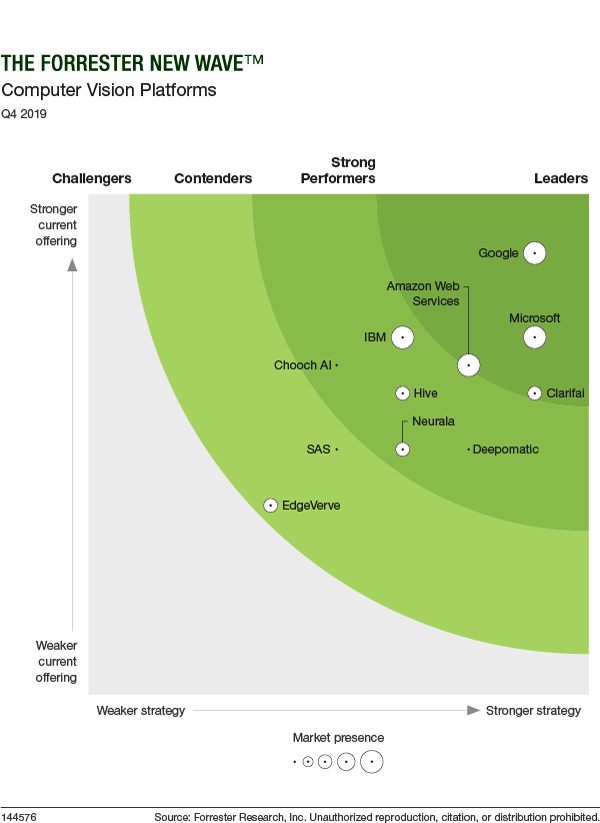
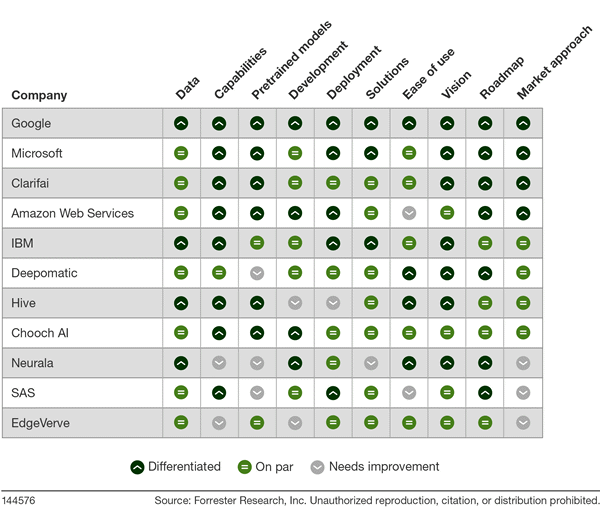
Its report details its findings about how well each vendor scored against 10 criteria and where they stand in relation to each other.
Google Cloud was classified as “differentiated” (the highest class) across all 10 criteria.
Find out more. Download The Forrester New Wave™: Computer Vision Platforms, Q4 2019.
Google Cloud Introduces Enterprise-grade Scheduler across All GCP Regions

3417
Of your peers have already read this article.
1:30 Minutes
The most insightful time you'll spend today!
Reliably executing tasks on a schedule is critical for everything from data engineering, to infrastructure management, and application maintenance. Today, we are thrilled to announce that Google Cloud Scheduler, our enterprise-grade scheduling service, is now available in more GCP regions and multiple regions can now be used from a single project removing the prior limit of a single region per project.
With many enterprise customers deploying complex distributed cloud systems, Cloud Scheduler has helped solve the problem of single-server cron scheduling being a single point of failure. With this update you are now able to create Scheduler jobs across distinct cloud regions that can help satisfy cross-regional availability and fail-over scenarios.
Furthermore, you are no longer required to create an AppEngine application in order to use Cloud Scheduler. For existing Cloud Scheduler jobs, it is safe to disable the AppEngine application within the project. Jobs will continue to function without an AppEngine application.
Creating jobs in different regions is easy. You simply pick the location where you would like your job to run. For example you can specify a location when creating a job through the gcloud command line :
HTTP Targets
gcloud scheduler jobs create http <job-name>--location <cloud-region>--schedule <cron-schedule>--uri <target-uri>
Pub/Sub Topics
gcloud scheduler jobs create pubsub <job-name>--location <cloud-region>--schedule <cron-schedule>--topic <topic-name>(--message-body <message-body> | --message-body-from-file <file-path>)
AppEngine Services
gcloud scheduler jobs create app-engine <job-name>--location <cloud-region>--schedule <cron-schedule>
Or you can pick a location when creating a job through the Cloud Console:
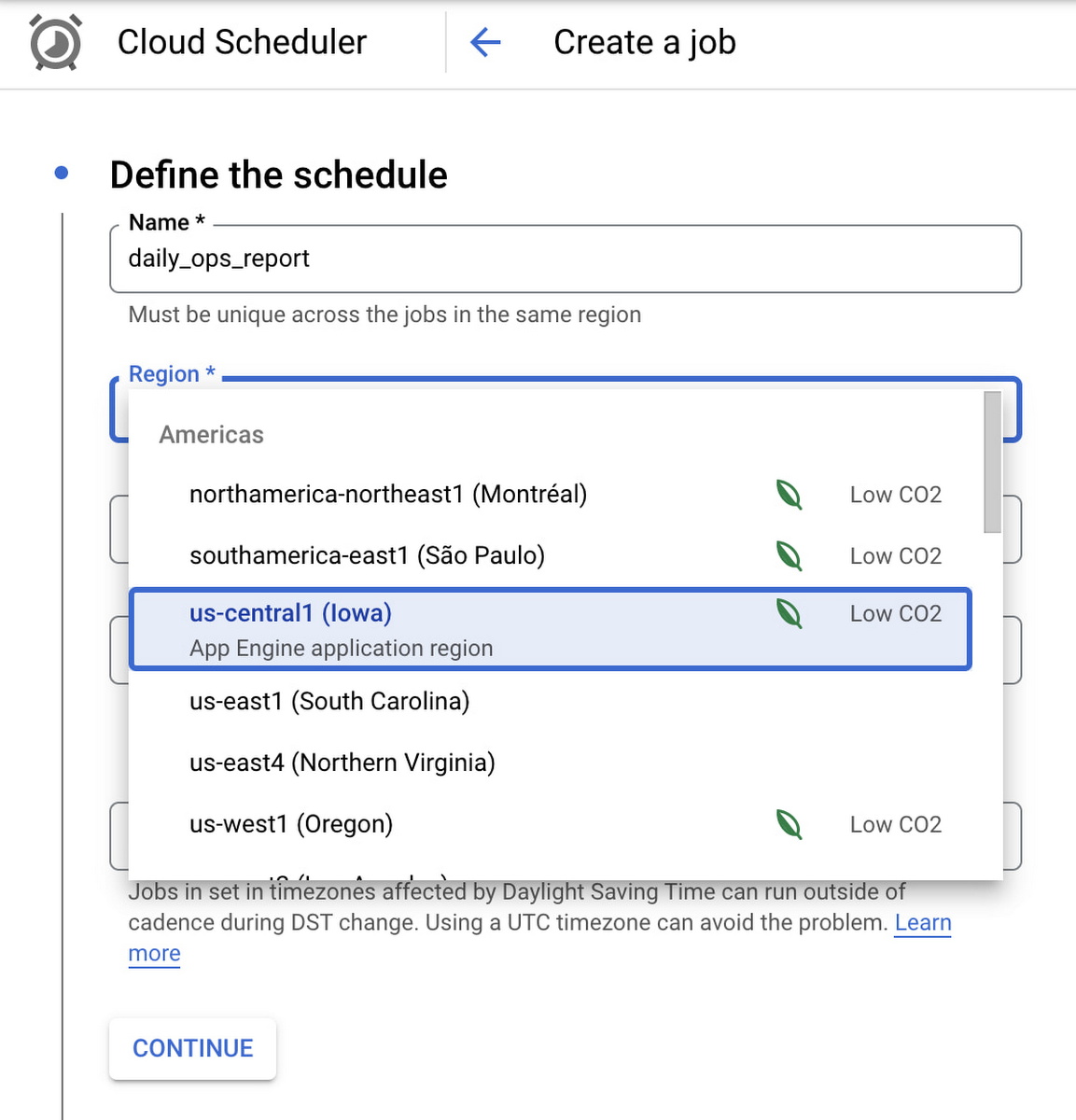
Google Cloud Scheduler is now available in 23 GCP Regions, and this number is expected to grow in the future. You can always find an up-to-date list of available regions by running:
gcloud scheduler locations list
We hope you are as excited about this launch as we are. Please reach out to us with any suggestions or questions in our public issue tracker.
How TapClicks’ Google Cloud Migration Makes Life Easy for Marketers

8547
Of your peers have already read this article.
2:00 Minutes
The most insightful time you'll spend today!
Editor’s note: In this blog post we learn how TapClicks migrated to Google Cloud to offer their marketing customers a unified platform for data management, operations, insights, and analysis.
TapClicks is a smart marketing cloud, powered by data, that unifies our customer’s marketing. By choosing to migrate our core applications last year to Google Cloud, we cut costs, solved data-sharing concerns for our customers, and opened our stack up to a new ecosystem of possibilities.
The core problem that we’re solving for our customers is how to manage their marketing infrastructures data and operations. Life isn’t easy for marketers now. There are 7,000 different vendors servicing this space today – creating much complexity between digital agencies, media, and brands. Marketers face challenges in navigating all of these systems, logging in and out, understanding pacing goals, and managing the flow of marketing data so they can analyze and report internally as well as to their clients at scale.
We unify omnichannel campaign data (250 API connectors and 6000 Smart Connectors ™ ) from a plethora of marketing sources on an automated data warehousing solution, creating simplicity for organizations. Over 4,000 agencies, media companies, and brands use our Marketing Operations and Data Management Platform, which imports data at scale and creates an automatic data warehouse on Google Cloud. Teams can also leverage TapClicks, like our world class Facebook connector, to import data directly into Google Data Studios. Beyond importing and storing, we also provide data exporting to other Google solutions like Google Data Studio and Google Sheets. We also create interactive dashboards that let stakeholders and clients analyze their data, as well as automated, multi-channel reports that go out to clients at specified times. So channel comparisons, optimizations, attribution, and calculations are easily performed. Some of our customers are able to generate hundreds of thousands of individual reports and dashboards for their clients.
Although we may be best known for our reporting and analytics, we also empower teams managing the marketing operations workflow from customers and internal stakeholders, especially at scale. Our user-friendly, configurable system helps manage their orders and campaigns. Through automation of this process, we deliver tremendous amounts of efficiency, time saving, cost savings, and reduction of errors. The combination of these solutions makes up our unified platform, with additional capabilities like marketing intelligence that offers competitive and brand-level analysis. This is a disruptive solution in use by all leading media companies, agencies and many brands.
Partnering for possibilities
We faced a few challenges with our original tech stack, which included a mix of the leader in web services revenue, leaders in high performance data warehousing, as well as vendors on bare metal servers.
- One challenge was around costs, which were growing.
- Second, many of our customers work with multiple brands, and are very hesitant to share their data with the leader in web services, who’s often viewed as their competitor.
- Third, these vendors are more focused on their own revenue rather than a true long term partnership that would enable their customers to enjoy similar success as they have experienced.
When looking at other cloud providers, Google Cloud emerged for us as the front runner. They were competitive on costs, and their native Kubernetes support was superior— a big selling point for our DevOps team. There’s also a movement in the marketing and advertising industry away from AWS toward Google Cloud because of the data-sharing concern. Finally, most of our customers are already using Google Cloud tools, so there’s brand recognition and familiarity there, and easier integrations with their own systems.
Migrating to Google Cloud
Our migration, which took about five months, involved moving a significant chunk of our infrastructure, including our core applications, using Google Kubernetes Engine (GKE). In our legacy architecture, each of our clients was assigned to one of our virtual machines (VMs), and there was a lot of unused capacity because we had to provision for the max usage. We appreciated GKE’s cloud native capabilities, especially autoscaling, a huge benefit for our web application. We have varying usage patterns during the day, and though our application is mostly used during business hours, there are also days in the month of higher usage, and autoscaling saves us time and costs. GKE also makes deployments much easier, and we anticipate a lot of benefits there for our developer environments. We’ve moved some of our microservices into GKE and plan to move more in the future. All in all, we were able to migrate our core products and the bulk of our AWS spend successfully to Google Cloud.
We also moved from our other vendors Relational Database Service (RDS) to running MySQL on our own VMs on Google Cloud, which gives us more flexibility in terms of settings and fine tuning. We’re still trying to find the best mix as we’re modernizing our infrastructure, and we took this opportunity to migrate from MySQL 5.7 to 8.0.
Our next stage is exploring more of the capabilities and services of Google Cloud, including BigQuery, which we’re considering for our own data warehouse. The fact that we could also run Snowflake on Google Cloud, if needed, was another selling point for our migration.
We’re especially interested in BigQuery ML’s machine learning and natural language processing capabilities, which enabled better predictive insights. Our customers want insights from their campaigns— which are working, which are paying off, where should they invest next? Using our platform, they’re looking not only to generate reporting, but also identify opportunities to improve campaign performance. We plan to use AI and ML to improve those capabilities, so that our customers can seamlessly unlock insight and intelligence from their marketing data and campaigns.
Double-clicking on Google Cloud
For us, being able to deeply leverage and partner with Google Cloud to deliver those solutions on a single stack is critical, and we think our customers will love it. We see TapClicks and Google Cloud partnering at a level beyond what you typically see in a cloud provider relationship. Already, fifty percent of our company is working with various Google Cloud solutions, and we envision TapClicks and Google Cloud as extensions of each other, providing a single, powerful platform solution.
Google Cloud understands the partnership concept, and their team was able to shine a light on their services and what they could bring to the table. Compared to our previous experiences, dealing with the Google Cloud team has been a true pleasure. Now that we’ve migrated, we’re ready to take our next steps into the services available to us in the Google Cloud ecosystem, and the problems we’ll continue to solve for our customers. Learn more about TapClicks and BigQuery ML.
More Relevant Stories for Your Company

Connected Data is the Lifeblood of Today’s Retailers: IDC’s 2022 Research
For a look ahead at the trends that will animate the retail industry this year, let’s take a look back at the 2022 National Retail Federation (NRF) "Big Show" in NYC. Attendees at January’s event were treated to tangible examples of how retail challenges are being solved today, including new



Journey to Transformation and Modernization with Google’s Distributed Cloud
Google Cloud has been leading the way of helping businesses make most from their cloud investments to drive digital transformation through modern application platforms that cater to today's customer needs. Watch the video from the Next '21 to explore three areas where companies are supported by Google Cloud throughout their

3 Important Factors to Consider for Moving Large-scale On-prem Data to Cloud with Storage Transfer Service
Organizations have been moving their on-premises data and applications to the cloud for the past several years, driven by reasons as varied as application modernization and content delivery to archival. In particular, we have seen migration momentum pick up in sectors like media and entertainment, where customers are rethinking how

Marxent Leverages Google Cloud to Elevate Customer Journeys on Retail Apps with 3D Shopping Experiences
As ecommerce for home goods exploded in popularity during COVID, furniture and DIY retailers looked to find new ways to grow online transaction sizes to in-store levels. Shopping for furniture and home improvement projects has always been challenging online. Furniture, kitchen cabinets, fixtures, and appliances become a part of daily
