





Dr. Agarwal’s Eye Hospital Cuts IT Support Tickets By 80% With Google

4959
Of your peers have already read this article.
3:00 Minutes
The most insightful time you'll spend today!
About Dr. Agarwal’s Eye Hospital
Dr. Agarwal’s Eye Hospital specializes in treating eye conditions such as cataracts; glaucoma; corneal problems such as ulcers, inflammation, and thinning; and retinal issues such as degeneration and detachment. The business operates 62 hospitals in cities across India and 14 hospitals in 8 countries in Africa, including Zambia, Nigeria, and Ghana.

Founded by the late Dr. J. Agarwal, Dr. Agarwal’s Eye Hospital, headquartered in Chennai, India, operates 62 hospitals in cities across India and 14 hospitals in 8 countries in Africa, including Zambia, Nigeria, and Ghana.
According to Dilip Ramadasan, GM-IT, Dr. Agarwal’s Eye Hospital, the business is the second-largest network of eye-care hospitals globally and aims to provide the best eye care in the world.
“We have focused on service over the last couple of years and decided to completely revamp back-end operations such as information technology and finance,” says Dilip.
“Realizing our vision involved moving to a completely new infrastructure that could deliver the scalability, agility, and performance our evolving application stack required.”
Replacing Aging Desktop Hardware and Applications
The business placed particular emphasis on upgrading its aging desktop fleet and traditional productivity applications.
“When I arrived in 2015, we only had 35 hospitals and all of them were using desktops that were five years or older,” Dilip says. “These desktops were due for replacement within the following six months to a year, so I had an ideal opportunity to upgrade our capabilities and address issues such as excessive support costs and resource requirements.”
For example, if a desktop at a hospital in a remote location experienced a problem, Dilip had to dispatch one of his technology team members to fix the issue. This could take up to five days, while the employee whose desktop was underperforming or failing often needed to wait until the fix was applied before resuming work.
Three Criteria for Improvement
When evaluating options to enhance the hospital’s information technology environment, Dilip applied three criteria: increasing revenue, increasing efficiency, and reducing costs.
Dilip elected to replace the traditional desktops and applications with Chromebase devices running Google Chrome and G Suite applications. “This option aligned perfectly with our efficiency and cost criteria,” he says.
The business started a four-month pilot of Chromebase devices with G Suite in October 2015 at four newly-opened hospitals.
“We wanted to see how users would react to the Chromebases running G Suite compared to the traditional desktops and applications,” he adds. “A large component of the project entailed educating users about the benefits of G Suite applications such as Google Docs and Sheets.”
Chromebases Running G Suite Deployed to 600 Users
Dr. Agarwal’s Eye Hospital has completed the deployment of Chromebases running G Suite to 600 users. This group comprised team members who needed to access a billing application or a human resources management system and doctors who needed to access patients’electronic medical records.
“My desktop total cost of ownership fell by up to 70% when I deployed these devices,” Dilip says.
With G Suite running on Chromebase devices, Dilip has been able to resolve many desktop support issues remotely, minimizing the need to send support team members to distant locations.
“The number of support tickets we used to process on the desktop computing side has fallen by a full 80%,” he says. “As a result, I’ve been able to cut the number of desktop support team members from eight to three and redeploy them to server and application management and support.”
Dilip cites Sheets and Google Drive as the G Suite applications most beneficial to the business.
Sheets enables hospital team members to share important cost and revenue numbers without having to attach multiple versions of spreadsheets to emails, while Google Drive facilitates collaboration by enabling the team members to store and view shared documents.
“Team members are able to spend more time on core activities rather than on picking up numbers and sharing them with regional managers,” Dilip says.
The business also uses Google Vault to protect management data held in emails and help ensure compliance with legislative requirements.
Google Cloud Platform Products Under Evaluation
Dr. Agarwal’s Eye Hospital is evaluating extending its deployment of Google Cloud Platform products to Google BigQuery and Google Data Studio.
“We are looking to add a business intelligence layer over applications running in other cloud environments, and Google potentially provides an option to do that,” Dilip says.
“This layer would enable us to analyze electronic medical record data to increase our understanding of patterns such as how a particular disease affects an individual across various stages of life and what types of interventions would deliver the best results.”
“Google has introduced the flexibility we need to reposition our engineers as needed, improved the relationship between the information technology team and operations teams, and given the information technology team greater confidence in resolving issues,” adds Dilip. “We will be continuing to scout for opportunities across Google platforms to increase our revenue and efficiencies while decreasing our costs.”
3800
Of your peers have already watched this video.
28:27 Minutes
The most insightful time you'll spend today!
Power your business with search and AI in G Suite
More than ever, businesses are dealing with major challenges like increased competition, data and information overload, and processes slowing people down.
To overcome these challenges, businesses need to move faster, harness data and resources and remove friction from getting things done.
We know that countless hours are wasted every day by information workers doing mundane tasks that distract and take time away from the creative knowledge work where they can uniquely add value. In 2019, we commissioned a total economic impact analysis with Forrester Research, and based on a number of interviews with our customers, we have learned that G Suite* is delivering value in four key ways, revenue growth, employee efficiency, risk mitigation, and IT cost savings.
The numbers are all based on a composite customer with 20,000 users generating $3 billion a year in revenue. For highly collaborative employees, the time savings of mundane tasks with G Suite is huge. Almost an extra month’s worth of time every year, with 20% of that time reallocated towards value-added tasks that are important to your business.
In this video, find out how G Suite can help with employee efficiency, saving people time, boosting productivity, and reducing frustration.
(G Suite* is now Google Workspace)
Arab Bank Accelerates its App Development and Testing Using Apigee and Anthos

6164
Of your peers have already read this article.
3:30 Minutes
The most insightful time you'll spend today!
Founded in 1930 and headquartered in Jordan, Arab Bank is one of the oldest banks in the Middle East. Operating out of 28 countries, we’ve earned our customers’ trust with a prudent approach to operations and respect for the cultures and customs in the region.
With a few exceptions where cloud providers have hosted their datacenter in a Middle Eastern or North African country, the banking sector, in general, in the region has been slow to adopt cloud technology for a number of reasons, including concern about data security, maturity and security controls of cloud services (PaaS and SaaS), and regulations in place. But on the other hand, we saw the opportunity to accelerate our development and testing using the cloud, as well as to partner with the fintech community and digital service providers to integrate their solution in the banking ecosystem. We needed more flexibility to connect with the outside world, and a more open architecture to help us drive our internal innovation at a faster rate with the help of the fintech industry. By collaborating with Google Cloud, we reached those goals and accelerated app development and testing through products like Apigee and Anthos. We’re now offering innovative apps and services to our customers and employees that leverage new technological capabilities to give more agility and flexibility, and to optimize our workloads.
Embracing the cloud in a regulated industry
To get started with the cloud, we needed to create internal awareness about cloud technology, the API layer, containers and their benefits amongst our leaders and staff. Google helped us educate and get buy-in from key functions by organizing open technology demonstration sessions and discussion panels. When considering potential cloud providers we had four decision criteria: maturity of security controls, ease of use, cost, and scalability / agility for new deployments and continuous innovation. This last factor was critical, and we were impressed by Google Cloud’s innovation roadmap, both via direct conversations and at Google’s Next conference, where we met a lot of people passionate about technology, innovation and building something new.
Going back to our journey, given the above-mentioned regional limitations, we started to develop a hybrid cloud approach. This helped us continue to operate on-premises for a number of services in production, particularly those that have personally identifiable information (PII) or other sensitive data attached, and to leverage the cloud for development, testing and production workloads that don’t contain customer data.
In the short term, we didn’t anticipate that our many jurisdictions would allow data to be transported to other countries. But cloud tools will allow us to tokenize or anonymize customer data while maintaining customer data on-premises. This applies to many digital journeys such as customer onboarding, credit facility online applications, or marketplace navigation. In the coming years, we predict our API integration with partners will accelerate and enrich the overall digital value proposition of our business segments, namely consumer banking, small and medium-size businesses and large corporate and institutional clients.
Building connections and cornerstones in the cloud
The first move in our digital transformation was to implement Apigee, Google Cloud’s API management platform, to connect to the world’s digital banking ecosystem. Apigee provides the security, sharing, mediation policies, and developer portal capabilities for us to successfully meet Open Banking standards while focusing on innovation.
On the back of the Apigee implementation, we created an accelerator program to incubate Fintech ideas that can, in turn, integrate into our digital platforms and be offered to our customers. We also developed various banking APIs, all designed and documented in accordance with PSD2 and Open Banking regulations, and made them available to our partners. These APIs exposed on our API development portal offer the needed code structure for fintech companies to design creative solutions around them.
Next, we adopted Anthos, Google Cloud’s managed application platform. Anthos has become a cornerstone of our operations because it works across hybrid cloud, offering integration of microservice containers and fueling collaborative opportunities with external parties. Our current Anthos infrastructure includes several hundreds of microservices now running on containers in Google Kubernetes Engine (GKE) and on-premises. We now use the cloud for collaboration, development and testing, but not for production, which is done on-premises.
Along the way, Google Cloud’s Professional Services Organization (PSO) helped us through the entire cloud setup process, and with the adoption of Anthos. We originally built on the cloud tools through an iterative process, learning from our successes and errors along the way. Now that we have a better sense of how Anthos operates, we’re building a fresh infrastructure atop a sound, stable, and resilient foundation that will let us scale easily as we work to transform Arab Bank into a digital-first enterprise, that is our ambition.
Currently products running on Anthos include customer acquisition and onboarding via mobile apps, and our Arabi-Pay app, which allows customers to instantly pay each other via WhatsApp or other messaging platforms. Leveraging Anthos, our instant loan service for Arab Bank salaried employees can grant and disburse loans up to $7,000 in less than seven minutes.
In addition, we’ve built a number of digital journeys for our Small and Medium Enterprise (SME) customers, such as our SME client digital onboarding process and paperless SME lending platform.
While some may think that digital adoption in this part of the world can be slow, as customer contact remains anchored in our customs, the recent COVID-19 pandemic has accelerated the adoption of digital banking services and electronic payments, inspiring more confidence to buy and pay online. Thanks to our rich and user-friendly banking app that relies on Apigee and Anthos for critical customer journeys, over 90% of new-to-bank customers are using our mobile apps. Within the next 18 months, we predict that number will be closer to 100%.
Of course, with higher customer adoption comes the challenge of potential service interruptions. A single moment of downtime can be highly visible to many digital customers. But Google Cloud’s Anthos and Apigee give us the flexibility to resume processes at a fast rate, so any interruptions are almost invisible to our customers. In fact, when the COVID-19 pandemic hit, though our branches could be open only for limited hours each day, our consumer clients in particular were able to take advantage of our digital services in a very self-sufficient manner. Being well positioned with Google Cloud, we could also keep our internal teams and external partners connected and productive. Without Google Cloud, continuing the digital transformation of the bank at the pace we wanted would have been a big challenge.
Collaborating across borders and time zones
With Google Cloud, our ability to collaborate and partner has transformed significantly. We operate 24/7 now because our developers are scattered across multiple geographies and different time zones. Because testing and deployment can run around the clock, including on weekends, we currently deploy a new digital journey in a few weeks, faster than ever before. This has given our organization a spirited mindset that prioritizes innovation, and raised the bar in terms of our operating model.
Another consideration about Google Cloud tools is the elimination of inefficient processes typically seen in a software development lifecycle. We now build in a completely agile manner, from design squads until deployment in production. Compared to where we were two years ago, when we had an annual maximum of two systems releases in production, we now have close to monthly releases of our digital packages. In addition, we also supplement those monthly releases with additional ad-hoc releases and fixes in between. As a result, we have removed internal silos and improved tremendously the collaboration between the product and sales teams, operations, IT Dev Factory and Infrastructure, as well as our supporting functions.
Through the agile process facilitated by APIs, we introduced Design Thinking workshops involving external customers and prospects early on to understand their true pain points better and emotions during the existing journeys and how to make new digital journeys frictionless. As a result, the relevance of our products for various customer personas has improved tremendously.
Transcending banking
With Google Cloud, we can offer our customers so much more than just banking. We’ve become more digitally relevant to their lives. For example, we recently launched a mortgage app that helps customers all the way from home selection through mortgage negotiations and closing, and even to getting the home decorated. It’s an end-to-end journey in which API integration with key regional players was a cornerstone to our success.
For other digital products, we have an extensive roadmap of lifestyle-based solutions relevant to each segment and age group. We’ve only scratched the surface of the services we can provide, and we see the cloud as the future for everything we want to do.
Read more about Google Cloud’s Open Banking solution to learn how you can simplify and accelerate the process of delivering open banking as required by PSD2. You can also view our video on Open Banking, powered by Apigee API Management.
New ways Google Workspace works with tools you already use

4042
Of your peers have already read this article.
6:30 Minutes
The most insightful time you'll spend today!
Looking back on 2020, it’s clear that the ways we work have rapidly transformed—from the rise of remote work and increasingly digitized processes, to balancing time across work and personal responsibilities. But one thing hasn’t changed—businesses still rely on a staggering number of applications to get work done. Working from home and the associated pressures on productivity have only emphasized the need for fewer tools that do more, are easy to use from anywhere, and seamlessly integrate with other software.
Google Workspace helps you get more done—with communication and collaboration tools known and loved by billions of users, thoughtfully connected together. And while billions of users choose our apps, we recognize that they also need to effectively collaborate with partners, customers, and even teammates that might use other tools. In particular, we know that many people work with a mix of Google Workspace and Microsoft applications—for example, while migrating to Google Workspace or collaborating with external vendors or clients. That’s why we make it easy for you to use Google Workspace with Microsoft Office and Office 365, helping you collaborate productively from any device with anyone, regardless of what tools you use.
Save time with helpful intelligence and faster workflows in Google Workspace
Creating and collaborating on content is at the heart of getting work done. When working with content received from customers, partners, or teammates, employees shouldn’t lose time converting files or working in unfamiliar tools.
With Google Drive, you can store and share over 100 different file types and formats, including Microsoft Word, Excel, and PowerPoint files, as well as PDFs, images, and videos. And by using intelligent features like Priority and Quick Access in Drive, you can find files nearly 50% faster.
With Office editing, users can also easily edit Microsoft Office files in Google Docs, Sheets, and Slides without converting them, with the added benefit of layering on Google Workspace’s enhanced collaborative and assistive features. From assigning action items via comment, to writing faster with Smart Compose, to accelerating data entry with Sheets Smart Fill, Office editing brings Google Workspace functionality to your Office files. And we recently extended Office editing to the Docs, Sheets, and Slides mobile apps as well, so you can easily work on Office files on the go.
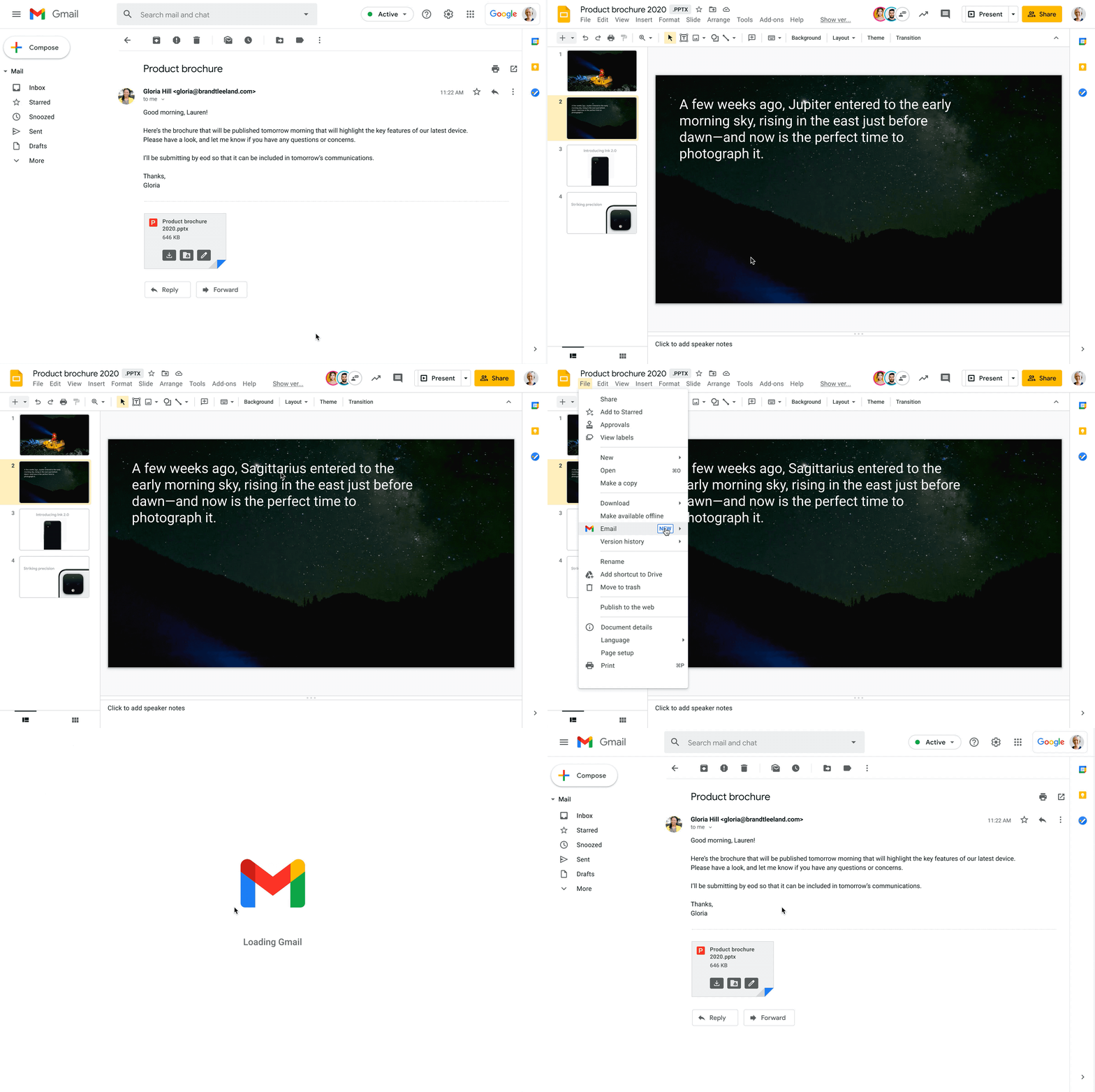
Starting today, you can also open Office files for editing directly from a Gmail attachment, further simplifying your workflows. For example, when you receive a Word document as an email attachment, you can open it and start editing in Docs with a single click while still preserving the Word file format. Then you can respond to the original email thread and include the updated file, right from Docs—saving you time by eliminating steps like downloading the file to edit, or searching for the relevant email to reattach it to.
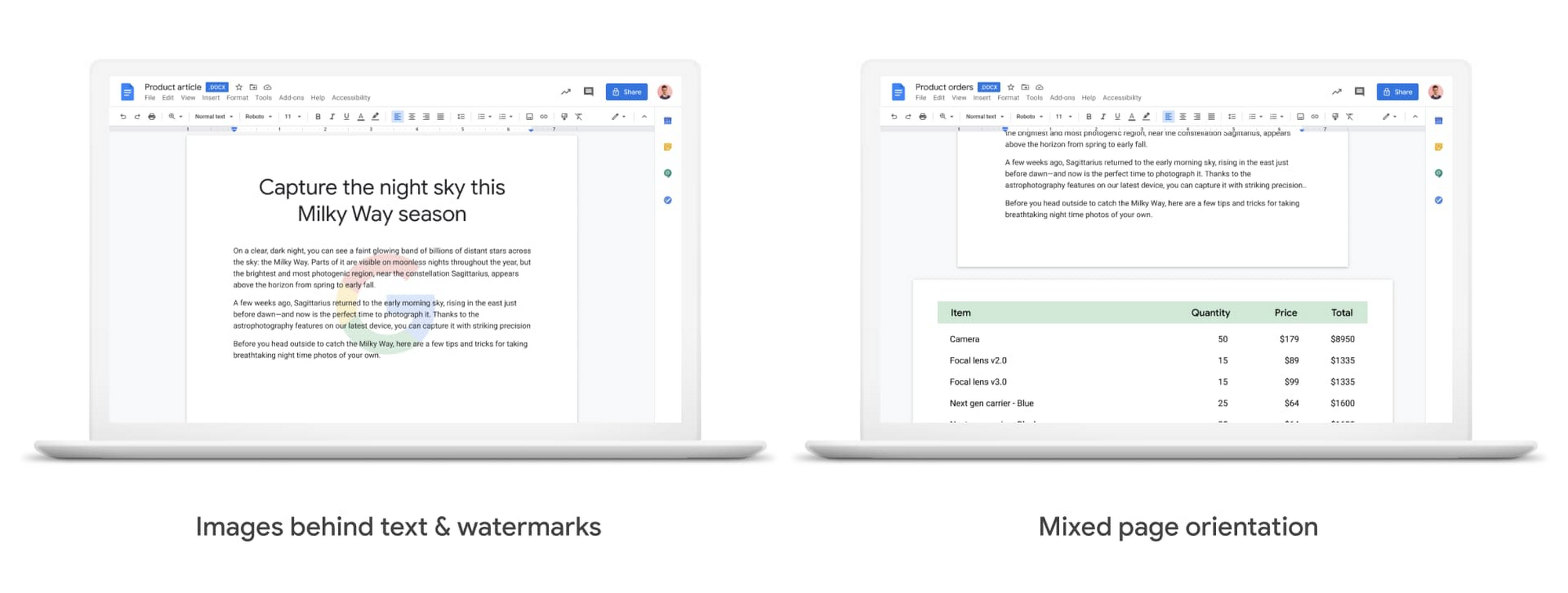
We also know it’s important that your Office files look consistent when opened in Docs, Sheets, and Slides, so we continue to support additional formatting options used in Office files. Today, we’re announcing mixed page orientation support in Docs, so you can create Docs or edit Word files with mixed landscape and portrait pages. And next year, we’ll add support for inserting images behind text and watermarks, to give you further flexibility.
Finally, when it comes to spreadsheets, we know that many organizations maintain both Excel and Sheets, especially when relying heavily on macros that have been built over time to automate processes. In Sheets, it’s easy for anyone to record macros, without having to write any code. And to make it easier for teams to transition from Excel to Sheets or support co-existence of these tools, we have also launched a new Macro Conversion add-on that helps users migrate macros from Excel to Sheets. This way, teams can save time through automation, without having to start from scratch.https://www.youtube.com/embed/CUKAUFoa86M
Stay connected with others, wherever you are
Business growth is fueled by people connecting and generating ideas together, whether they are working from the same office or dispersed around the globe. Google Workspace makes it easy to schedule time and meet with others, helping you maintain a connection with your collaborators and accomplish more together, from any device, anywhere.
To make and maintain these connections, people need an easy way to schedule time with others, regardless of which calendaring system they are using. Some organizations run mixed calendaring environments, for example, during a migration to Google Workspace or merger, where one company is not on Google Workspace. To help in such scenarios, the Google Calendar Interop tool makes it easy for people to schedule and book resources regardless of which system they’re on. With Calendar Interop, teams across systems can see each other’s free/busy status, event details, and book shared resources, so that they don’t need an endless exchange of chats or emails to land on a time that works for both parties.
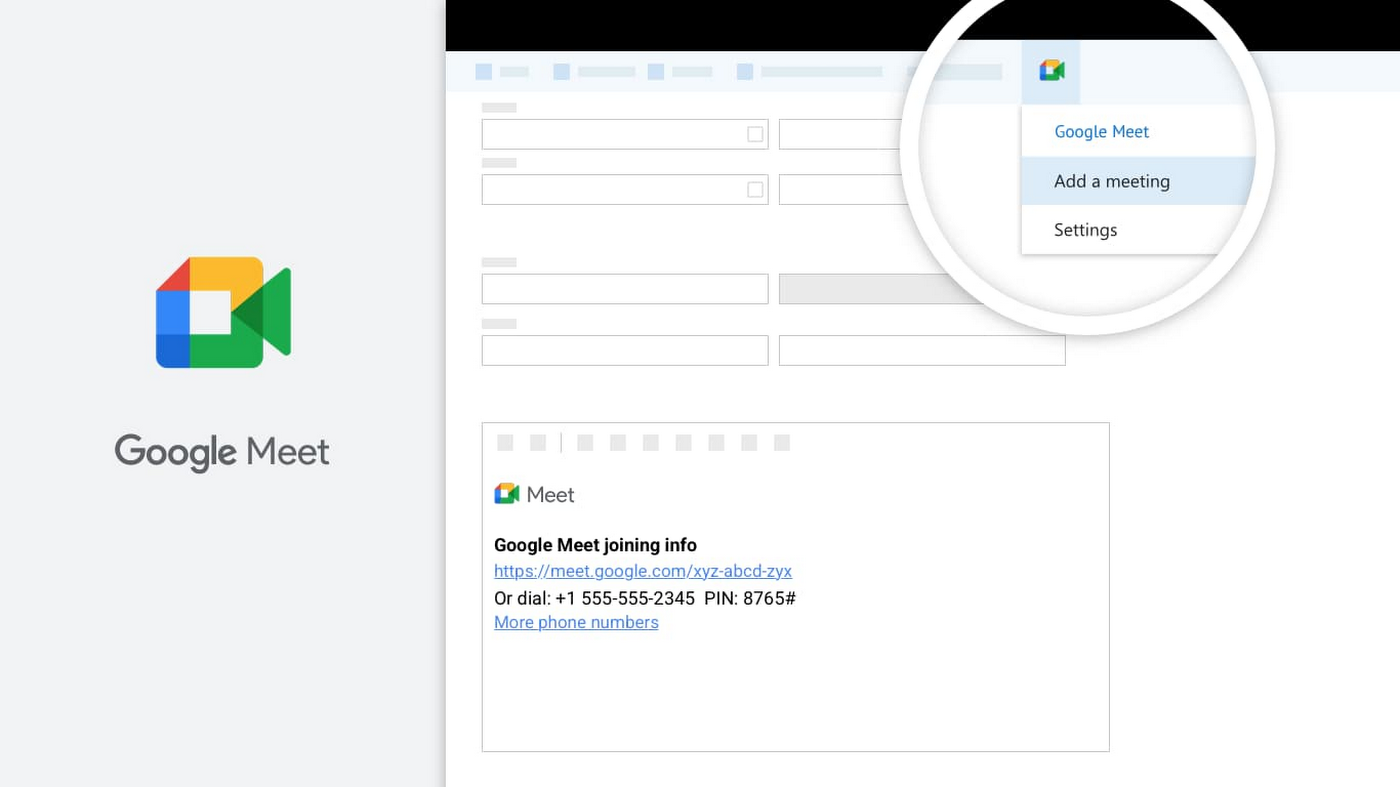
Google Meet is another powerful tool for keeping employees connected, wherever they are. With Meet, it’s easy for teams to connect via secure, enterprise-grade video conferencing from any device—laptop, mobile, or even dial-in via phone. Google Workspace customers can invite anyone to join a Meet call, including people using Outlook who don’t have a Google Account. Or if using Outlook to schedule events, users can easily add Meet video conferencing details using the Google Meet add-in for Microsoft Outlook. With a simple tap of the meeting link in your email or calendar, you can easily connect face-to-face with your collaborators, helping maintain that human connection that drives work forward.
Be productive from anywhere with custom solutions
Often, certain tasks and processes require employees to develop custom applications to manage them. Understanding how to code can be a huge barrier for employees faced with this challenge, but Google Cloud’s AppSheet enables anyone to build applications without having to write code. AppSheet is available to all Google Workspace users and has a number of tight integrations that make it easy to build custom apps on top of Google Workspace apps, like Google Sheets.
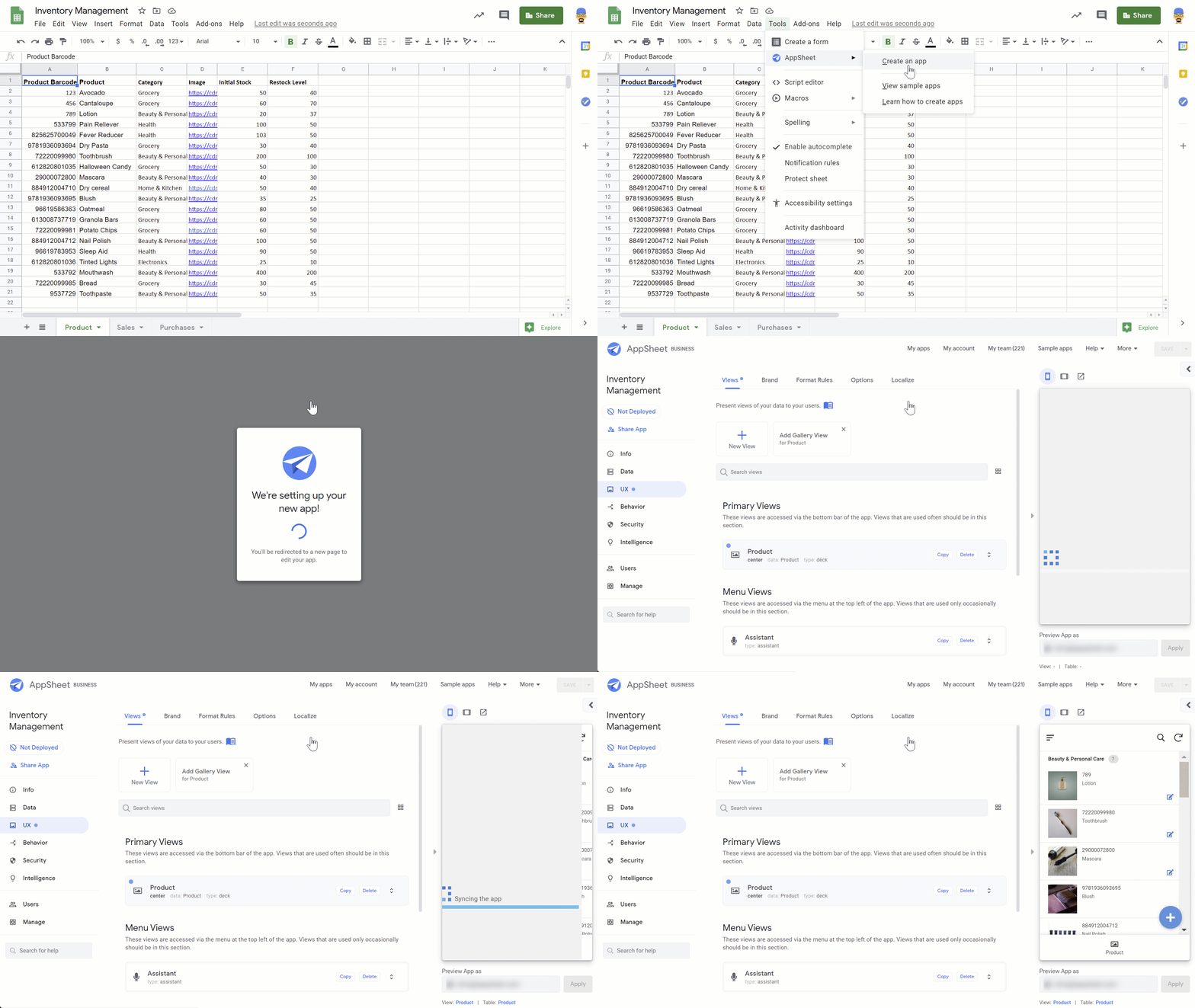
AppSheet is designed to work on any device and can connect to your data and spreadsheets, wherever they live. While AppSheet and Google Workspace are tightly integrated, AppSheet also easily connects to O365 data sources such as Excel spreadsheets stored in OneDrive or SharePoint. AppSheet creates a bridge between environments—custom apps and automations can connect to Google Workspace and Microsoft Office apps simultaneously, so that teams and processes split between environments can be managed more seamlessly. Plus, with AppSheet, even Microsoft users can easily incorporate Google’s leading AI and machine learning capabilities, like optical character recognition and sentiment analysis, into their apps.
Flexibility is important when it comes to effective collaboration, and we’ll continue to invest in the many ways Google Workspace can work seamlessly with the rest of the tools you use—helping you accomplish more, faster. Visit our learning center for more info on topics like working with Office files in our apps, or check out these helpful switching guides if your organization is currently transitioning from Microsoft Office to Google Workspace.
Google Workspace and Chrome Enterprise Integral for Colgate-Palmolive’s Flexible Work-Culture

3881
Of your peers have already read this article.
2:00 Minutes
The most insightful time you'll spend today!
Editor’s note: Today’s post is by Roger Lim, IT Manager of Collaboration Infrastructure Development, and Jim Arcure, Director of Infrastructure Development, both with Colgate-Palmolive, the multinational consumer products company. Colgate-Palmolive is in the midst of a multiyear project to create a collaborative, flexible work culture, leveraging Google Workspace and Chrome Enterprise.
Colgate-Palmolive Company is a caring, innovative growth company reimagining a healthier future for all people, their pets, and our planet. Focused on Oral Care, Personal Care, Home Care, and Pet Nutrition, and reaching more than 200 countries and territories, Colgate teams are developing and selling product offerings essential to society through brands such as Colgate, Palmolive, elmex, meridol, Tom’s of Maine, hello, Sorriso, Speed Stick, Softsoap, Irish Spring, Protex, Sanex, Filorga, eltaMD, PCA Skin, Ajax, Axion, Fabuloso, Soupline and Suavitel, as well as Hill’s Science Diet and Hill’s Prescription Diet.
Colgate-Palmolive has been accelerating growth and delivering meaningful innovation and attracting new and diverse talent in areas such as ecommerce, innovation and digital. That speed and agility comes in large part from the Chrome Enterprise tools that allow the business to move faster and stay competitive.
Changing out software and hardware for 30,000 employees in 70+ countries is a massive project. Early on, we chose Chrome Enterprise as our partner. We had to move away from our dependency on legacy platforms, software, and devices if our business was going to thrive. We knew cloud-based tools like Chrome and Google Workspace would do what on-premises solutions can’t—ease the IT workload while keeping employees happy and productive.
Why we’re escaping legacy apps and embracing the cloud
We don’t want Colgate-Palmolive’s size and geographical breadth to get in the way of people working together and maintaining its strength in global teamwork. That’s why we’re replacing bulky, hard-to-maintain, on-premises applications and software with cloud versions that everyone can securely access in a web browser.
As an IT team, we thought about how much work time we spent installing, updating, and troubleshooting software (up to 30 percent of work hours during big upgrades!). As we were looking at ways to work together better, we had our eyes on the cloud revolution—and, specifically, Chrome Enterprise and Google Workspace.
First step, switch to a new browser
Back in 2016, the IT team was working to move everyone to Google Workspace and away from legacy productivity applications. Once you start Google Workspace adoption, it’s time to take a closer look at browser options.
We chose Chrome Browser for several reasons. It updates automatically, so we could cross lengthy upgrade tasks off our list. An even bigger benefit is that Chrome Browser’s management tools, data protection, and malware detection are all built in. We anticipate a lot of synergy here by leveraging these features and having our users go all Chrome.
Chrome Browser also gave us tools to manage and grant access to apps across our multi-platform device fleet. We call Chrome Browser Cloud Management our “golden nugget” because every browser gets enrolled automatically in browser management.
It’s now much easier to push out new extensions and apps (and allowlist or blocklist them) compared to the time-consuming process of using our existing desktop policy management settings. The ability to easily manage extensions is a huge benefit since it enabled IT to provide new and safe functionality to our end users.
Next, share new ways of working together
Our IT team wants workers to see the benefits of Google Workspace and Chrome Browser on their own, but sometimes we have to guide them toward the finish line. At the beginning of the project, we developed “Going Google” tools to notify users to consider Google Workspace when opening legacy applications that are no longer needed.
As Chrome Enterprise and Google Workplace became our primary productivity tools, it was also important to ensure our users did not fall back on old habits. Our “Going Google” tools gave our IT organization the ability to not only notify, but turn off specific legacy apps per user. Though IT could easily restore access to these legacy apps on a temporary basis, we have seen a significant dropoff in these types of requests over the past few months. Our goal is to give Colgate people a gentle and consistent reminder that we will be a Google Workspace-only company. By taking these active and decisive steps, we ensure that our users and teams are migrating to Google Workspace today.
To that end, we’ve provided lots of support. We use over 1,000 Colgate “Google Guides” around the world who run on-site classes and webinars on Google Workspace, and are available for one-on-one help, as well as roughly 700 “Google Gurus” who are savvy early-adopters and can lend a hand to colleagues with questions about Google Workspace. Our training classes and webinars are playing to packed houses, and we’re scheduling sessions that focus on specific skills, like a class about using Google Sheets attended by 250 people via Google Meet.
Finally, start rolling out new devices
If we can get everyone at Colgate-Palmolive working in Google Workspace and Chrome Browser, then offering Chromebooks is another natural fit: Chromebooks and the Chrome OS are built for the cloud world we want to work in. We’re pilot testing about 200 Chromebooks for employees, mostly in our customer development department. The Chromebooks are in high demand in challenging locations because they’re easier to deploy for new hires. When employees eventually get back to their offices, we are eager to expand Grab-and-Go racks for people that need a temporary loaner. These Grab-and-Go racks in our New York City and Piscataway, N.J. offices will provide another way for people to test drive Chromebooks.
Two hundred-odd years after Colgate-Palmolive started doing business, we’re excited about the modern focus of our workplace tools. The Google tools that allow us to collaborate also allow the company to succeed well into our third century.

Collaboration Helps Nielsen Gain Better Consumer Insights and Save Costs by 20%
DOWNLOAD CASE STUDY4844
Of your peers have already downloaded this article
5:00 Minutes
The most insightful time you'll spend today!
The Nielsen Company is one of the world’s most well-known and respected marketing research firms, with operations in over 100 countries. Its 56,000 employees work to provide insights and data that give customers a better understanding of what people watch, listen to, and buy.
Those insights are essential to companies in a variety of industries, including media and entertainment, consumer products, and retail, that must stay in touch with customers in a fast-changing marketplace.
In order to help customers get the information they need to increase ad sales and boost market share, Nielsen must empower its employees to collaborate across markets and global offices.
But Nielsen’s employees were working out of individual e-mail inboxes that delayed decision-making and made it difficult for the company to take immediate action on time-sensitive information.
The company saw an opportunity to improve collaboration by moving productivity apps to the cloud—Google Cloud’s G Suite—allowing employees to work anytime, anywhere, and on any device and collaborating in real-time.
“In keeping with our cloud-first strategy and digital transformation, we wanted to give our employees state-of-the-art collaboration tools,” says Kimberly Anstett, CIO at Nielsen. “We knew that a global, cloud-based toolset would help change the way everyone in the company works and maximize the value we deliver to our customers.”
More Relevant Stories for Your Company

CARTO’s Data Visualization Powered by Google Cloud and deck.g
Editor’s note: Today’s blog post is from Alberto Asuero, CTO of CARTO, the location intelligence platform. Today he shares more details about the source of the data for advanced data visualizations created with Google Maps Platform and deck.gl and how the CARTO platform enables this workflow. During Google Cloud Next




Are You Suffering from Spreadsheet Paralysis?
Today, within the four walls of your office there’s just one concern everyone has: What do the numbers say? The answer to that question almost always rests with you. If they get it wrong, everybody gets it wrong. But does it have to be so hard to get it right?

The Future of Cloud Computing: Choose Your Own Services and Payment Options
As the saying goes, “it’s hard to make predictions, especially about the future.” Some organizations find it challenging to predict what cloud resources they’ll need in months or years ahead. Every organization is on its own unique cloud journey. To help, we’re developing new ways for customers to consume and

The New Google Workspace Essentials: Bring Modern Collaboration to Work!
More than 3 billion users stay in touch, share ideas, and get more done together in Google Workspace, across apps like Meet, Chat, Drive, Docs, Sheets, Slides, and more. And starting today, we’re rolling out a new version designed to help people bring the apps they know and love to
