





Developers and Practitioners’ Guide for Moving On-prem Data Warehouse to BigQuery

5412
Of your peers have already read this article.
3:00 Minutes
The most insightful time you'll spend today!
Data teams across companies have continuous challenges of consolidating data, processing it and making it useful. They deal with challenges such as a mixture of multiple ETL jobs, long ETL windows capacity-bound on-premise data warehouses and ever-increasing demands from users. They also need to make sure that the downstream requirements of ML, reporting and analytics are met with the data processing. And, they need to plan for the future – how will more data be handled and how new downstream teams will be supported?
Checkout how Independence Health Group is addressing their enterprise data warehouse (EDW) migration in the video above.
Why BigQuery?
On-premises data warehouses become difficult to scale so most companies’ biggest goal is to create a forward looking system to store data that is secure, scalable and cost effective. GCP’s BigQuery is serverless, highly scalable, and cost-effective and is a great technical fit for the EDW use-case. It’s a multicloud data warehouse designed for business agility. But, migrating a large, highly-integrated data warehouse from on-premise to BigQuery is not a flip-a-switch kinda migration. You need to make sure your downstream systems dont break due to inconsistent results in migrating datasets, both during and after the migration. So..you have to plan your migration.
Data warehouse migration strategy
The following steps are typical for a successful migration:
- Assessment and planning: Find the scope in advance to plan the migration of the legacy data warehouse
- Identify data groupings, application access patterns and capacities
- Use tools and utilities to identify unknown complexities and dependencies
- Identify required application conversions and testing
- Determine initial processing and storage capacity for budget forecasting and capacity planning
- Consider growth and changes anticipated during the migration period
- Develop a future state strategy and vision to guide design
- Migration: Establish GCP foundation and begin migration
- As the cloud foundation is being set up, consider running focused POCs to validate data migration processes and timelines
- Look for automated utilities to help with any required code migration
- Plan to maintain data synchronization between legacy and target EDW during the duration of the migration. This becomes a critical business process to keep the project on schedule.
- Plan to integrate some enterprise tooling to help existing teams span both environments
- Consider current data access patterns among EDW user communities and how they will map to similar controls available in Big Query.
- Key scope includes code integration and data model conversions
- Expect to refine capacity forecasts and refine allocation design. In Big Query there are many options to balance cost and performance to maximize business value. For example, you can use either on-demand or flat-rate slot pricing or a combination of both.
- Validation and testing
- Look for tools to allow automated, intelligent data validation
- Scope must include both schema and data validation
- Ideally solutions will allow continuous validation from source to target system during migration
- Testing complexity and duration will be driven by number and complexity of applications consuming data from the EDW and rate of change of those applications
A key to successful migration is finding Google Cloud partners with experience migrating EDW workloads. For example, our Google Cloud partner Datametica offers services and specialized Migration Accelerators for each of these migration stages to make it more efficient to plan and execute migrations.
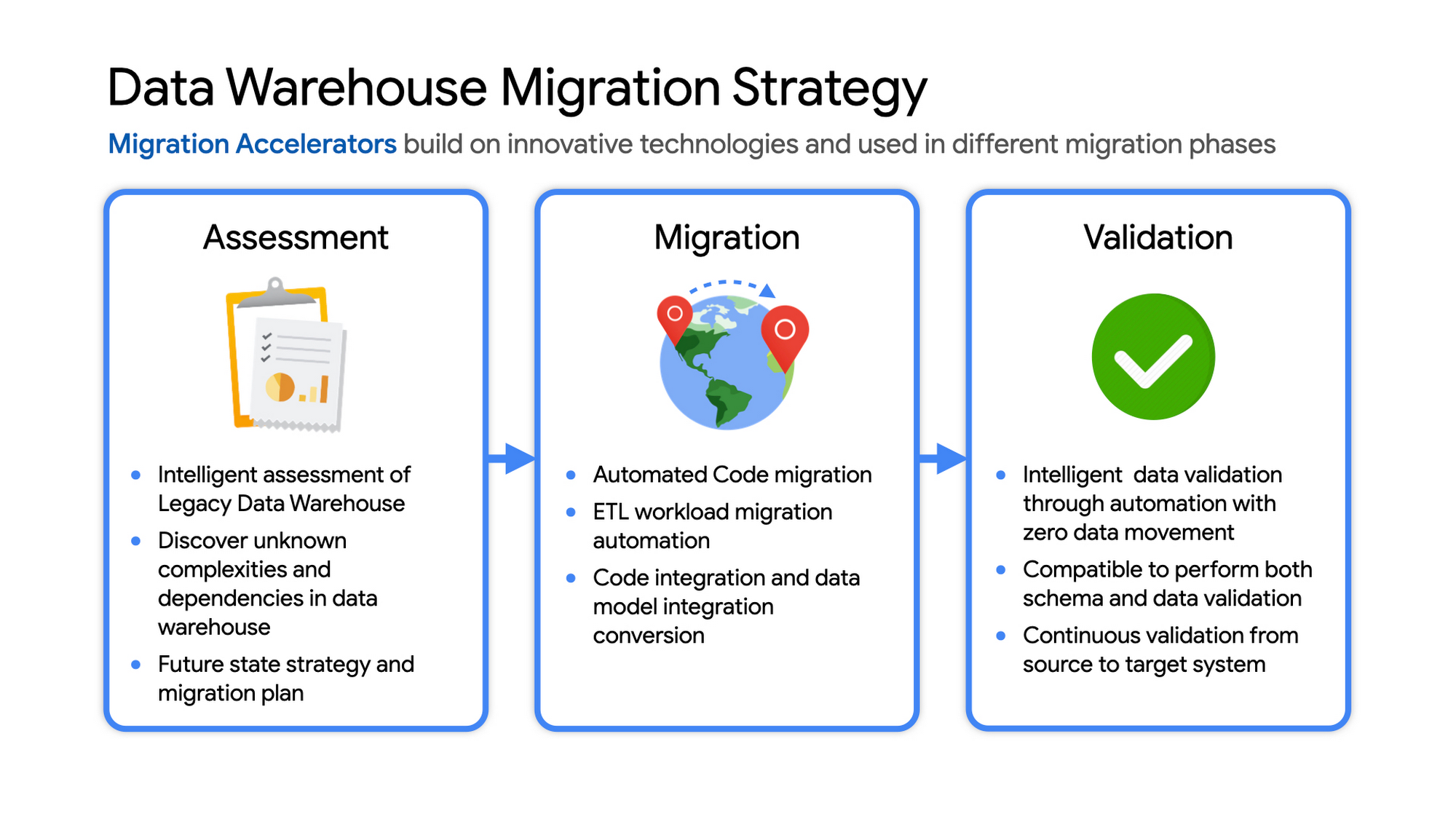
Data warehouse migration: Things to consider
- Financial benefits of open source: Target moving to ‘Open Source’ where none of the services have license fees. For example BigQuery uses Standard SQL; Cloud Composer is managed Apache Airflow, Dataflow is based on Apache Beam. Taking these as managed services provides the financial benefits of open source, but avoids the burden of maintaining open source platforms internally.
- Serverless: Move to “serverless” big data services. The majority of the services used in a recommended GCP data architecture scale on demand allowing more cost effective alignment with needs. Using fully managed services lets you focus engineering time on business roadmap priorities, not building and maintaining infrastructure.
- Efficiencies of a Unified platform: Any data warehouse migration involves integration with services that surround the EDW for data ingest and pre-processing and advanced analytics on the data stored in the EDW to maximize business value. A cloud provider like GCP offers a full breadth of integrated and managed ‘big data’ services with built-in machine learning. This can yield significantly reduced long-term TCO by increasing both operational and cost efficiency when compared to EDW-specific point solutions.
- Establishing a solid cloud foundation: From the beginning, take the time to design a secure foundation that will serve the business and technical needs for workloads to follow. Key features include: Scalable Resource Hierarchy, Multi-layer security, multi-tiered network and data center strategy and automation using Infrastructure-as-Code. Also allow time to integrate cloud-based services into existing enterprise systems such as CI/CD pipelines, monitoring, alerting, logging, process scheduling, and service request management.
- Unlimited expansion capacity: Moving to cloud sounds like a major step, but really look at this as adding more data centers accessible to your teams. Of course, these data centers offer many new services that are very difficult to develop in-house and provide nearly unlimited expansion capacity with minimal up-front financial commitment. .
- Patience and interim platforms: Migrating an EDW is typically a long running project. Be ready to design and operate interim platforms for data synchronization, validation and application testing. Consider the impact on up-stream and down-stream systems. It might make sense to migrate and modernize these systems concurrent with the EDW migration since they are probably data sources and sinks and may be facing similar growth challenges. Also be ready to accommodate new business requirements that develop during the migration. Take advantage of the long duration to have existing your operational teams learn new services from the partner leading the deployment so your teams are ready to take over post-migration.
- Experienced partner: An EDW migration can be a major undertaking with challenges and risks during migration, but offers tremendous opportunities to reduce costs, simplify operations and offer dramatically improved capacities to internal and external EDW users. Selecting the right partner reduces the technical and financial risks, and allows you to plan for and possibly start leveraging these long-term benefits early in the migration process.
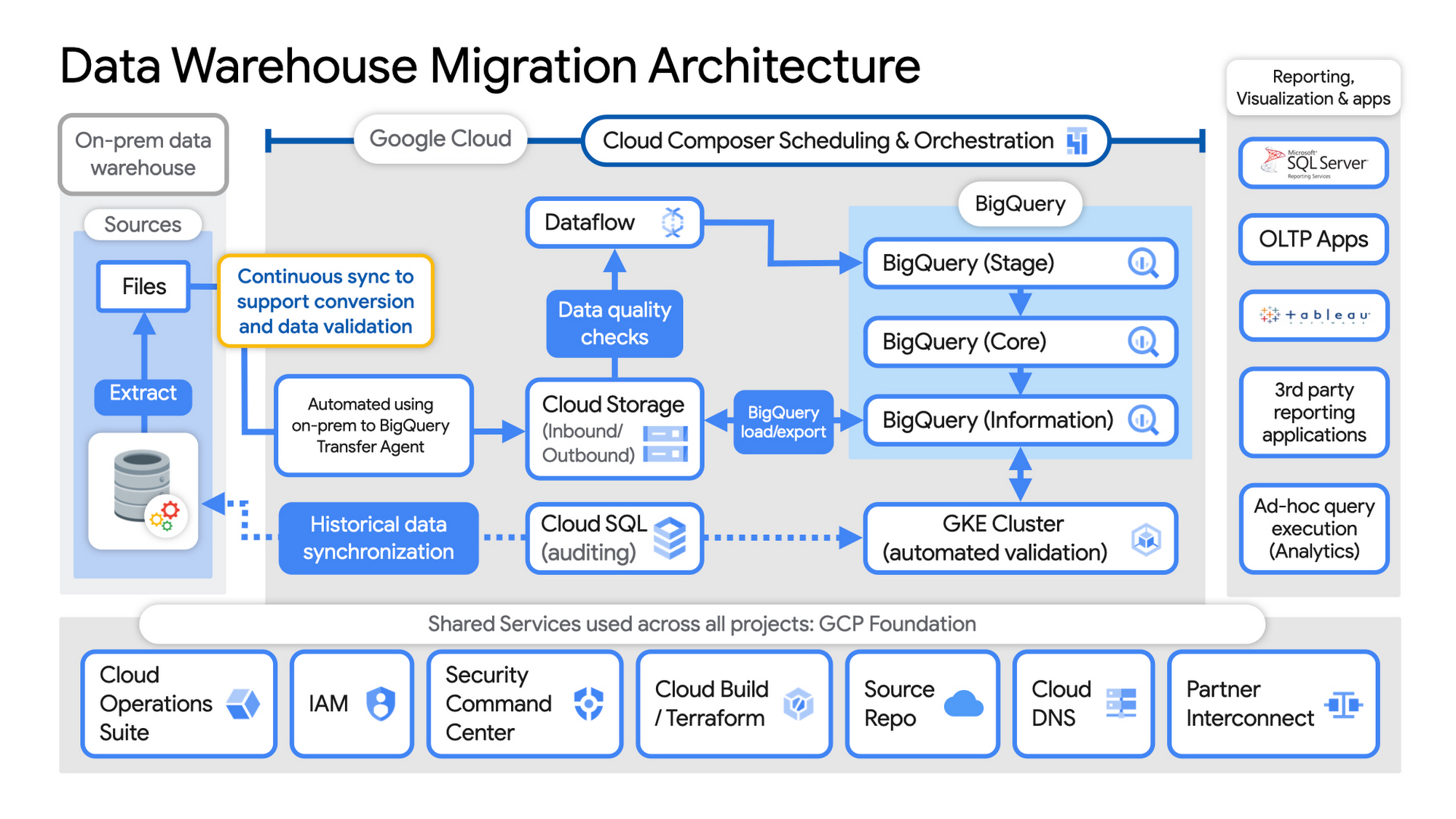
Example Data Warehouse Migration Architecture
- Setup foundational elements. In GCP these include, IAM for authorization and access, cloud resource hierarchy, billing, networking, code pipelines, Infrastructure as Code using Cloud Build with Terraform ( GCP Foundation Toolkit), Cloud DNS and a dedicated/partner Interconnect to connect to the current data centers.
- Activate monitoring and security scanning services before real user data is loaded using Cloud Operations for monitoring and logging and Security Command Center for security monitoring.
- Extract files from on-premise legacy EDW and move to Cloud Storage and establish on-going synchronization using Big Query Transfer services.
- From Cloud Storage, process the data in Dataflow and Load/Export data to BigQuery.
- Validate the export using Datametica’s validation utilities running in a GKE cluster and Cloud SQL for auditing and historical data synchronization as needed. Application teams test against the validated data sets throughout the migration process.
- Orchestrate the entire pipeline using Cloud Composer, integrated with on-prem scheduling services as needed to leverage established processes and keep legacy and new systems in sync.
- Maintain close coordination with teams/services ingesting new data into the EDW and down-streams analytics teams relying on the EDW data for on-going advanced analytics.
- Establish fine-grained access controls to data sets and start making the data in Big Query available to existing reporting, visualization and application consumption tools using BigQuery data connectors for ‘down-stream’ user access and testing.
- Incrementally increase Big Query flat-rate processing capacity to provide the most cost-effective utilization of resources during migration.
To learn more about migrating from on-premises Enterprise Data Warehouses (EDW) to Bigquery and GCP here.
Why–and How–You Should Migrate Oracle Workloads to Google Cloud
3952
Of your peers have already read this article.
1:20 Minutes
The most insightful time you'll spend today!
If you are like many of your peers you are looking to Google Cloud to reduce overheads, drive innovation, and agility with a wide variety of databases for your Oracle workloads. From Bare Metal Solution to cloud-native databases, Google Cloud offers the infrastructure to meet your needs.
The Benefits
Optimizing your Oracle workloads with Google Cloud solutions has a number of benefits.
Dramatically reduce TCO: Reduce up-front hardware, software, and maintenance costs. Migrating Oracle workloads to Google Cloud could result in up to 78% in TCO savings.
High scale and high availability: Mission-critical applications need dependable databases that scale with your business. Google Cloud offers SLA-backed databases to protect your apps.
Simplify operation: Reduce data center and database management by leveraging managed infrastructure and fully managed database services.
Migration Strategies
Google Cloud provides multiple strategies for your specific migration journey to help you with licensing, maintenance cost, and manageability.
Rehost: To migrate Oracle workloads with specific configurations, Google Cloud offers Bare Metal Solution, where you can simply lift and shift your workloads. Bare Metal Solution provides hardware, hardware support, and integrated billing and support. This infrastructure is connected with a highly resilient interconnect and connects to all native Google Cloud services with less than 2ms latency.
Replatform: Keep your core application code and migrate to compatible platforms to help reduce licensing fees and maintenance costs. You can migrate to an open source database such as Cloud SQL for PostgreSQL that has a certain amount of compatibility with PL/SQL and stored procedure. You can also offload data analytics-centric workloads to SQL-compatible data warehousing solutions like BigQuery.
Rewrite: Rewrite your application to take full advantage of cloud-native databases. If your application requires a relational database with global scalability, you can migrate to Cloud Spanner, which provides scalability with industry-leading high availability of 99.999% SLA.
Quick Recap on Google Cloud: Latest News, Launches, Updates, Events and More

12892
Of your peers have already read this article.
2:00 Minutes
The most insightful time you'll spend today!
Want to know the latest from Google Cloud? Find it here in one handy location. Check back regularly for our newest updates, announcements, resources, events, learning opportunities, and more.
Tip: Not sure where to find what you’re looking for on the Google Cloud blog? Start here: Google Cloud blog 101: Full list of topics, links, and resources.
Week of May 24-May 28 2021
- Google Cloud for financial services: driving your transformation cloud journey–As we welcome the industry to our Financial Services Summit, we’re sharing more on how Google Cloud accelerates a financial organization’s digital transformation through app and infrastructure modernization, data democratization, people connections, and trusted transactions. Read more or watch the summit on demand.
- Introducing Datashare solution for financial services–We announced the general availability of Datashare for financial services, a new Google Cloud solution that brings together the entire capital markets ecosystem—data publishers and data consumers—to exchange market data securely and easily. Read more.
- Announcing Datastream in Preview–Datastream, a serverless change data capture (CDC) and replication service, allows enterprises to synchronize data across heterogeneous databases, storage systems, and applications reliably and with minimal latency to support real-time analytics, database replication, and event-driven architectures. Read more.
- Introducing Dataplex: An intelligent data fabric for analytics at scale–Dataplex provides a way to centrally manage, monitor, and govern your data across data lakes, data warehouses and data marts, and make this data securely accessible to a variety of analytics and data science tools. Read more.
- Announcing Dataflow Prime–Available in Preview in Q3 2021, Dataflow Prime is a new platform based on a serverless, no-ops, auto-tuning architecture built to bring unparalleled resource utilization and radical operational simplicity to big data processing. Dataflow Prime builds on Dataflow and brings new user benefits with innovations in resource utilization and distributed diagnostics. The new capabilities in Dataflow significantly reduce the time spent on infrastructure sizing and tuning tasks, as well as time spent diagnosing data freshness problems. Read more.
- Secure and scalable sharing for data and analytics with Analytics Hub–With Analytics Hub, available in Preview in Q3, organizations get a rich data ecosystem by publishing and subscribing to analytics-ready datasets; control and monitoring over how their data is being used; a self-service way to access valuable and trusted data assets; and an easy way to monetize their data assets without the overhead of building and managing the infrastructure. Read more.
- Cloud Spanner trims entry cost by 90%–Coming soon to Preview, granular instance sizing in Spanner lets organizations run workloads at as low as 1/10th the cost of regular instances, equating to approximately $65/month. Read more.
- Cloud Bigtable lifts SLA and adds new security features for regulated industries–Bigtable instances with a multi-cluster routing policy across 3 or more regions are now covered by a 99.999% monthly uptime percentage under the new SLA. In addition, new Data Access audit logs can help determine whether sensitive customer information has been accessed in the event of a security incident, and if so, when, and by whom. Read more.
- Build a no-code journaling app–In honor of Mental Health Awareness Month, Google Cloud’s no-code application development platform, AppSheet, demonstrates how you can build a journaling app complete with titles, time stamps, mood entries, and more. Learn how with this blog and video here.
- New features in Security Command Center—On May 24th, Security Command Center Premium launched the general availability of granular access controls at project- and folder-level and Center for Internet Security (CIS) 1.1 benchmarks for Google Cloud Platform Foundation. These new capabilities enable organizations to improve their security posture and efficiently manage risk for their Google Cloud environment. Learn more.
- Simplified API operations with AI–Google Cloud’s API management platform Apigee applies Google’s industry leading ML and AI to your API metadata. Understand how it works with anomaly detection here.
- This week: Data Cloud and Financial Services Summits–Our Google Cloud Summit series begins this week with the Data Cloud Summit on Wednesday May 26 (Global). At this half-day event, you’ll learn how leading companies like PayPal, Workday, Equifax, and many others are driving competitive differentiation using Google Cloud technologies to build their data clouds and transform data into value that drives innovation. The following day, Thursday May 27 (Global & EMEA) at the Financial Services Summit, discover how Google Cloud is helping financial institutions such as PayPal, Global Payments, HSBC, Credit Suisse, AXA Switzerland and more unlock new possibilities and accelerate business through innovation. Read more and explore the entire summit series.
- Announcing the Google for Games Developer Summit 2021 on July 12th-13th–With a surge of new gamers and an increase in time spent playing games in the last year, it’s more important than ever for game developers to delight and engage players. To help developers with this opportunity, the games teams at Google are back to announce the return of the Google for Games Developer Summit 2021 on July 12th-13th. Hear from experts across Google about new game solutions they’re building to make it easier for you to continue creating great games, connecting with players and scaling your business. Registration is free and open to all game developers. Register for the free online event at g.co/gamedevsummit to get more details in the coming weeks. We can’t wait to share our latest innovations with the developer community. Learn more.
Migrating Hadoop to Dataproc by LiveRamp: Best Practices
2877
Of your peers have already read this article.
3:30 Minutes
The most insightful time you'll spend today!
Abstract
In this blog, we describe our journey to the cloud and share some lessons we learned along the way. Our hope is that you’ll find this information helpful as you go through the decision, execution, and completion of your own migration to the cloud.
Introduction
LiveRamp is a data enablement platform powered by identity, centered on privacy, integrated everywhere. Everything we do centers on making data safe and easy for businesses to use. Our Safe Haven platform powers customer intelligence, engages customers at scale, and creates breakthrough opportunities for business growth.
Businesses safely and securely bring us their data for enrichment and use the insights gained to deliver better customer experiences and generate more valuable business outcomes. Our fully interoperable and neutral infrastructure delivers end-to-end addressability for the world’s top brands, agencies, and publishers. Our platforms are designed to handle the variability and surge of the workload and guarantee service-level agreements (SLAs) to businesses.
We process petabytes of batch and streaming data daily. We ingest, process (join and enhance), and distribute this data. We receive and distribute data from thousands of partners and customers on a daily basis. We maintain the world’s largest and most accurate identity graph and work with more than 50 leading demand-side and supply-side platforms.
Our decision to migrate to Google Cloud and Dataproc
As an early adopter of Apache Hadoop, we had a single on-prem production managed Hadoop cluster that was used to store all of LiveRamp’s persistent data (HDFS) and run the Hadoop jobs that make up our data pipeline (YARN). The cluster consisted of around 2500 physical machines with a total of 30PB or raw storage, ~90,000 vcores, and ~300TB of memory. Engineering teams managed and ran multiple MapReduce jobs on these clusters.
The sheer volume of applications that LiveRamp ran on this cluster caused frequent resource contention issues, not to mention potentially widespread outages if an application was tuned improperly. Our business was scaling and we were running into constraints related to data center space and power in our on-premises environment. These constraints restricted our ability to meet our business objectives so a strategic decision was made to leverage elastic environments and migrate to the cloud. The decision required financial analysis and a detailed understanding of the available options, from do-it-yourself and vendor-managed distributions to leveraging cloud-managed services.
LiveRamp’s target architecture
We ultimately chose Google Cloud and Dataproc, a managed service for Hadoop, Spark, and other big data frameworks. During the migration we made a few fundamental changes to our Hadoop infrastructure:
Instead of 1 large persistent cluster managed by a central team, we have decentralized the cluster ownership to individual teams. This gave the teams flexibility to recreate, perform upgrades or change configurations as they see fit. This also gives us better cost attribution, less blast radius for errors, and less chance that – a rogue job from one team will impact the rest of the workloads.
Persistent data is no longer stored in HDFS on the clusters, it is in Google Cloud Storage, which, conveniently, served as a drop in replacement, as GCS is compatible with all the same APIs as HDFS. This means we can delete all the virtual machines that are part of the cluster without losing any data.
Introduced autoscaling clusters to control compute cost, and to dramatically decrease request latency. On premise you’re paying for the machines so you might as well use them. Cloud compute is elastic so you want to burst when there is demand and scale down when you can.
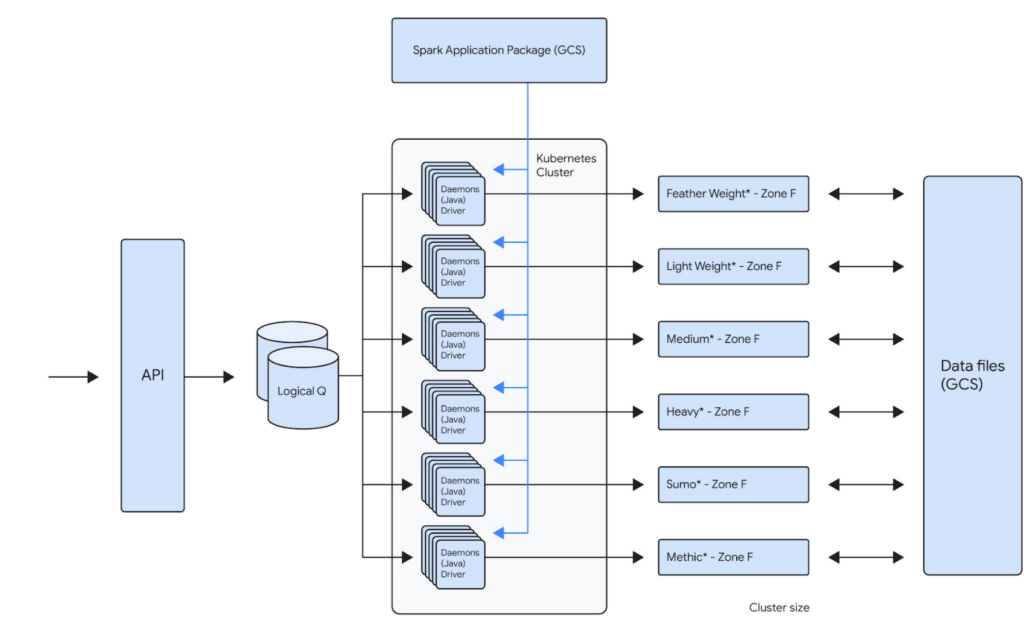
For example, one of our teams runs about 100,000 daily Spark jobs on 12 Dataproc clusters that each independently scale up to 1000 VMs. This gives that team a current peak capacity of about 256,000 cores. Because the team is bound to its own GCP Project inside of a GCP Organization, the cost attributed to that team is now very easy to report. The team uses architecture represented below to distribute the jobs across the clusters. This architecture allows them to bin similar workloads together so that they can be optimized together. Below is the logical architecture of the above workload:
Our approach
Overall migration and post migration stabilization/optimization of the largest of our workloads took us about several years to complete. We broadly broke down the migration into multiple phases.
Initial Proof-Of-Concept
When analyzing solutions for cloud-hosted big data services, any product had to meet our clear acceptance criteria:
- Cost: Dataproc is not particularly expensive compared to similar alternatives, but our discount with the existing managed Hadoop partner made it expensive. We have initially accepted that the cost would remain the same. We did see cost benefits post migration, after several rounds of optimizations.
- Features: Some key features (compared to current state) that we were looking for are built-in autoscaler, ease of creating/updating/deleting clusters, managed big data technologies etc.
- Integration with GCP: As we had already decided to move other LiveRamp-owned services to GCP, a big data platform with robust integration with GCP was a must. Basically, we’d like to be able to leverage GCP features without a lot of effort on our end (custom vms, preemptible vms, etc).
- Performance: Cluster creation, deletion, scale up, and scale down should be fast. This will allow teams to iterate and react quickly. These are some rough estimates of how fast the cluster operations should be:
- Cluster creation: <15 minutes
- Cluster Deletion: <15 minutes
- Adding 50 nodes: <20 minutes
- Removing 200 nodes: <10 minutes
- Reliability: Bug free and low downtime software that has concrete SLAs on clusters and a strong commitment to the correct functioning of all of its features.
An initial prototype to better understand Dataproc and Google Cloud helped us prove that target technologies and architecture will give us reliability and cost improvements. This also fed into our decisions around target architecture. This was then reviewed by the Google team before we embarked on the migration journey.
Overall migration
Terraform module
Our ultimate goal is to create self-service tooling that allows our data engineers to deploy infrastructure as easily and safely as possible. After defining some best practices around cluster creation and configuration, the central team’s first step was to build a terraform module that can be used by all the teams to create their own clusters. This module will create a dataproc cluster along with all supporting buckets, pods and datadog monitors:
- A dataproc cluster autoscaling policy that can be customized
- A dataproc cluster with LiveRamp defaults preconfigured
- Sidecar applications for recording job metrics from the job history server and for monitoring the cluster health
- Pre configured datadog cluster health monitors for alerting
This Terraform module is also composed of multiple supporting modules underneath. This allows users to call the supporting modules directly in your project terraform as well if such a need arises. The module can be used to create a cluster by just setting the parameters like project id, path to application source (Spark or Map/Reduce), subnet, VM instance type, auto scaling policy etc.
Workload migration
Based on our analysis of Dataproc, discussions with GCP team and the POC, we used following criteria:
- We prioritized applications that can use preemptibles to achieve cost parity to our existing workloads
- We prioritized some of our smaller workloads initially to build momentum within the organization. For example, we left the single workload that accounted for ~40% of our overall batch volume to the end, after we had gained enough experience as an organization.
- We combined the migration to Spark along with the migration to Dataproc. This has initially resulted in some extra dev work but helped reduce the effort for testing and other activities.
Our initial approach was to lift and shift from existing managed providers and Map/Reduce to Dataproc and Spark. We then later focused on optimizing the workloads for cost and reliability.
What’s working well
Cost Attribution
As is true with any business, it’s important to know where your cost centers are. Moving from a single cluster, made opaque by the number of teams loading work onto it, to GCP’s Organization/Project structure has made cost reporting very simple. The tool breaks down cost by project, but also allows us to attribute cost to a single cluster via tagging. As we sometimes deploy a single application to a cluster, this helps us to make strategic decisions on cost optimizations at an application level very easily.
Flexibility
The programmatic nature of deploying Hadoop clusters in a cloud like GCP dramatically reduces the time and effort involved in making infrastructure changes. LiveRamp’s use of a self-service Terraform module means that a data engineering team can very quickly iterate on cluster configurations. This allows a team to create a cluster that is best for their application while also adhering to our security and health monitoring standards. We also get all the benefits of infrastructure as code: highly complicated infrastructure state is version controlled and can be easily recreated and modified in a safe way.
Support
When our teams face issues with services that run on Dataproc, the GCP team is always quick to respond. They work very closely with LiveRamp to develop new features for our needs. They proactively provide LiveRamp with preview access to new features that help LiveRamp to stay ahead of the curve in the Data Industry.
Cost Savings
We have achieved around 30% cost savings in certain clusters by achieving the right balance between on-demand and PVMs. The cost savings were a result of our engineers building efficient A/B testing frameworks that helped us run the clusters/jobs in several configurations to arrive at the most reliable, maintainable and cost efficient configuration. Also, one of the applications is now 10x + faster.
Five lessons learned
Migration was a successful exercise that took about six months to complete, across all our teams and applications. While many aspects went really well, we also learned a few things along the way that we hope will help you when planning your own migration journey.
- Benchmark, benchmark, benchmark
It’s always a good idea to benchmark the current platform against the future platform to compare costs and performance. On-premises environments have a fixed capacity, while cloud platforms can scale to meet workload needs. Therefore, it’s essential to ensure that the current behavior of the key workload is clearly understood before the migration.
- Focus on one thing at a time
We initially focused on reliability while remaining cost-neutral during the migration process, and then focused on cost optimization post-migration. Google teams were very helpful and instrumental in identifying cost optimization opportunities.
- Be aware of alpha and beta products
Although there usually aren’t any guarantees of a final feature set when it comes to pre-released products, you can still get a sense of their stability and create a partnership if you have a specific use case. In our specific use case, Enhanced Flexibility Mode was in alpha stage in April 2019, beta in August 2020, and released in July 2021. Therefore, it was helpful to check in on the product offering and understand its level of stability so we could carry out risk analysis and decide when we felt comfortable adopting it.
- Think about quotas
Our Dataproc clusters could support much higher node counts than was possible with our previous vendor. This meant we often had to increase IP space and change quotas, especially as we tried out new VM and disk configurations.
- Preemptable and committed use discounts (CUDs)
CUDs make compute less expensive while preemptables make compute significantly less expensive. However, preemptibles don’t count against your CUD purchases, so make sure you understand the impact on your CUD utilization when you start to migrate to preemptables.
We hope these lessons will help you in your Data Cloud journey.
Power up Caching with Memorystore for Memcached

3932
Of your peers have already read this article.
2:30 Minutes
The most insightful time you'll spend today!
In-memory data stores are a fundamental infrastructure for building scalable, high-performance applications. Whether it is building a highly responsive ecommerce website, creating multiplayer games with thousands of users, or doing real-time analysis on data pipelines with millions of events, an in-memory store helps provide low latency and scale for millions of transactions. Redis is a popular in-memory data store for use cases like session stores, gaming leaderboards, stream analytics, API rate limiting, threat detection, and more. Another in-memory data store, open source Memcached, continues to be a very popular choice as a caching layer for databases and is used for its speed and simplicity.
We’re announcing Memorystore for Memcached in beta, a fully managed, highly scalable service that’s compatible with the open source Memcached protocol. We launched Memorystore for Redis in 2018 to let you use the power of open source Redis easily without the burden of management. This announcement brings even more flexibility and choice for your caching layer.
Highlights of Memorystore for Memcached
Memcached offers a simple but powerful in-memory key value store and is popular as a front-end cache for databases. Using Memcached as a front-end store not only provides an in-memory caching layer for faster query processing, but it can also help save costs by reducing the load on your back-end databases.
Using Memorystore for Memcached provides several important benefits:
- Memorystore for Memcached is fully open source protocol compatible. If you are migrating applications using self-deployed Memcached or other cloud providers, you can simply migrate your application with zero code changes.
- Memorystore for Memcached is fully managed. All the common tasks that you spend time on, like deployment, scaling, managing node configuration on the client, setting up monitoring, and patching, are all taken care of. You can focus on building your applications.
- Right-sizing a cache is a common challenge with distributed caches. The scaling feature of Memorystore for Memcached, along with detailed open source Memcached monitoring metrics, allows you to scale your instance up and down easily to optimize for your cache-hit ratio and price. With Memorystore for Memcached, you can scale your cluster up to 5 TB per instance.
- Auto-discovery protocol lets clients adapt to changes programmatically, making it easy to deal with changes to the number of nodes during scaling. This drastically reduces manageability overhead and code complexity.
- You can monitor your Memorystore for Memcached instances with built-in dashboards in the Cloud Console and rich metrics in Cloud Monitoring.
Memorystore for Memcached can be accessed from applications running on Compute Engine, Google Kubernetes Engine (GKE), App Engine Flex, App Engine Standard, and Cloud Functions.
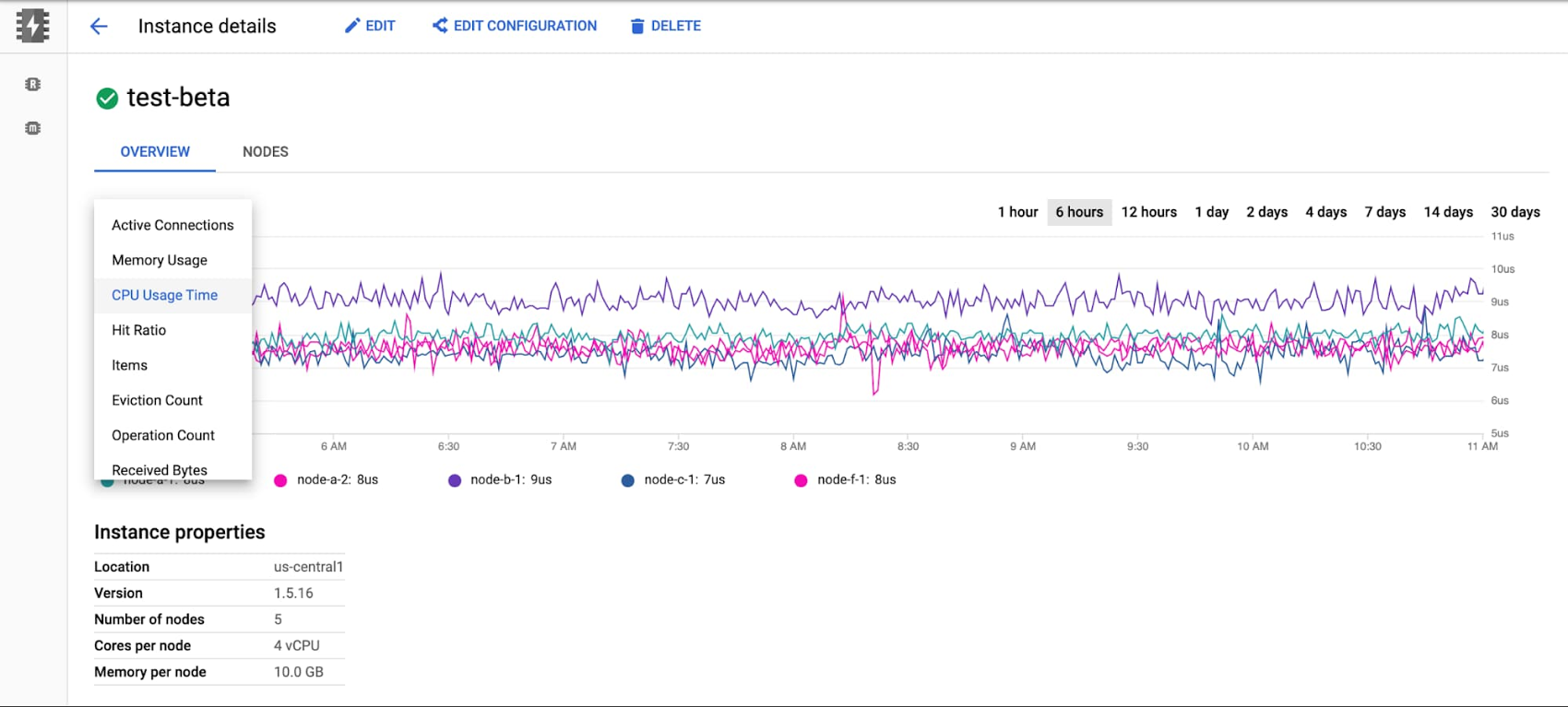
The beta launch is available in major regions across the U.S., Asia, and Europe, and will be available globally soon.
Getting started with Memorystore for Memcached
To get started with Memorystore for Memcached, check out the quick start guide. Sign up for a $300 credit to try Memorystore and the rest of Google Cloud. You can start with the smallest instance and when you’re ready, you can easily scale up to serve performance-intensive applications. Enjoy your exploration of Google Cloud and Memorystore for Memcached.
No More ‘Tab Game’ with Easy Tutorials on Google Cloud Console

3527
Of your peers have already read this article.
2:00 Minutes
The most insightful time you'll spend today!
When it comes to learning how to implement some technology, we all have our own version of what I call the “tab game”—that is, your setup for all the tabs and windows you need open at once. You may have several monitors so you can see documentation, your IDE, and terminal windows at the same time. You may have several guides and references open at once in one window to get all the information you need.

Personally, I like to work just from my laptop because I like to move around and work from various comfy spots. I think my tab game would probably enrage most devs because it involves a lot of swiping back and forth between windows *and* toggling tabs. It’s not pretty. That is, it wasn’t pretty until I discovered tutorials in the Google Cloud Console!
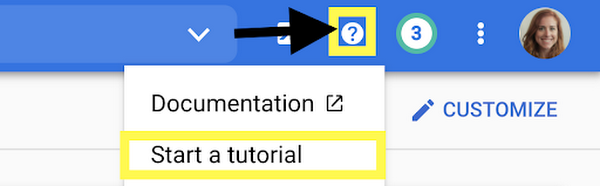
Jen really didn’t know about tutorials in the Google Cloud Console?
Yes, I honestly didn’t know about them! I’m sharing about it because if I can work for Google and not know, then I can’t be the only one, and it would be a shame to miss out on this because it’s a brilliant idea. Also I wrote some pretty sweet tutorials for the console, but I swear that the main reason I’m telling you is because it’s a cool thing!
There are several reasons that these tutorials are great:
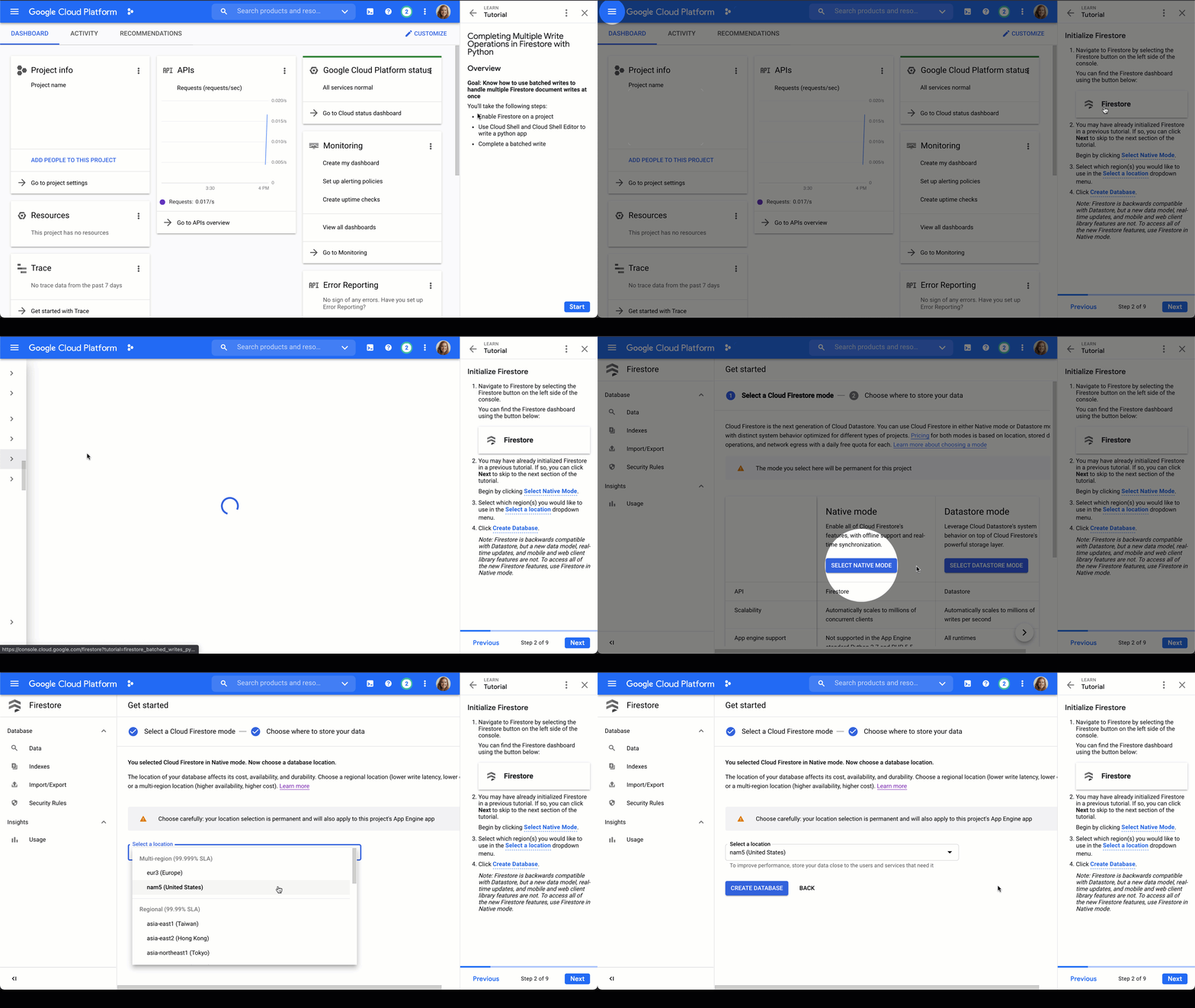
- You can view the instructions and the console at the same time. No more playing the tab game!
- The tutorials include links and highlights, making it easy to find the screens and buttons you’re looking for
- You can run code from Cloud Shell, so you don’t need a separate window for an IDE
- You can use the demo data provided to try things out, or you can apply the steps to your existing projects using data that suits your app’s needs
Firestore tutorials
I’m developing a series of tutorials in the Google Cloud Console designed to take you through everything you need to know about Firestore–from manually adding data in the Google Cloud Console to triggering Cloud Functions to make changes for you. Below are links and summaries for the currently available tutorials. Check back regularly to find the latest additions as they’re released!
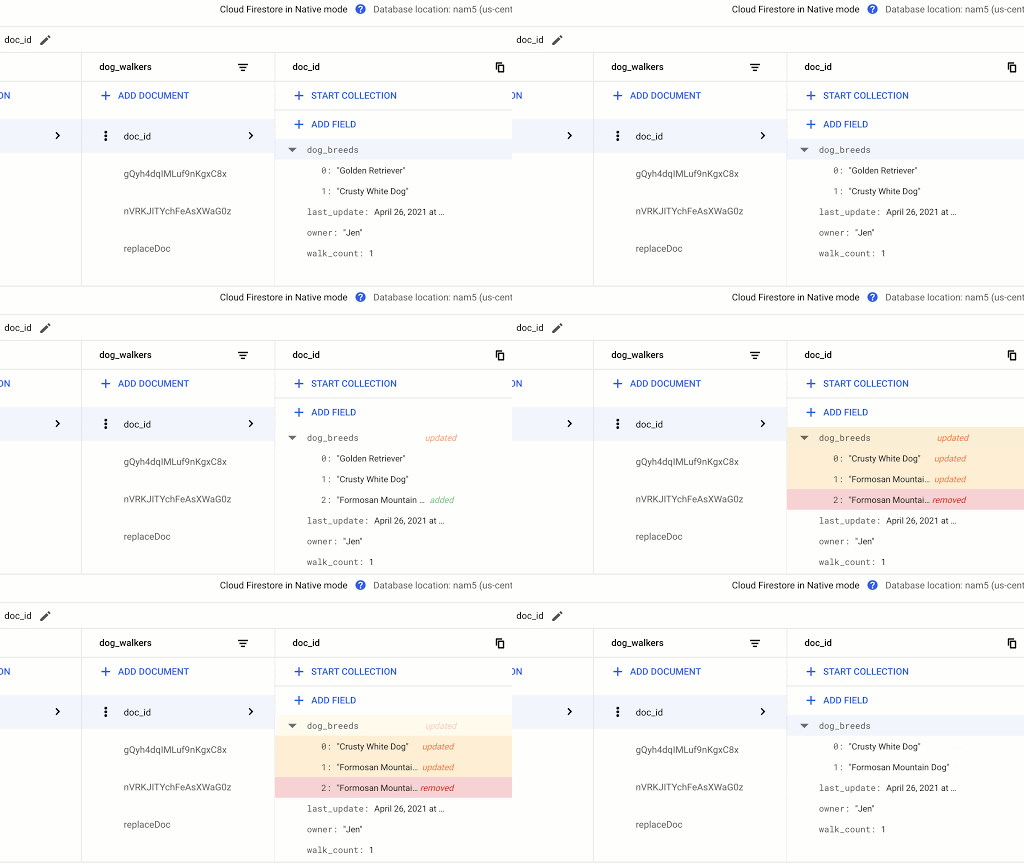
- Enable Firestore on a project
- Learn about the Firestore data model
- Add a collection of documents
- Add fields to a document
- Delete documents and collections
Updating Data in Firestore using Node.js or using Python
- Add a collection of documents
- Explore available data types
- Replace the data of document
- Replace fields in a document
- Handle special cases: incrementing, timestamps, and arrays
Reading Data from Firestore using Node.js or using Python
- Add a collection of documents
- Explore available data types
- Read a collection
- Read a single document
- Order documents
- Query documents
Transactions in Firestore using Node.js
- Add a collection of documents
- Update data without a transaction to observe issue
- Complete a transaction
- Complete a batched write
Batched Writes in Firestore using Node.js or using Python
- Use Cloud Shell and Cloud Shell Editor to write a Node.js or Python app
- Complete a batched write
Firestore triggers for Cloud Functions
- Initialize Cloud Functions using the Firebase CLI
- Write a Cloud Function triggered by a new document write to Firestore
- Add data to Firestore in the Cloud console Firestore dashboard
- Create a web app that uses Firestore using the Firebase SDK
- Deploy Firestore security rules that enable access to the required data
- Enable data persistence in the web app
- Observe app behavior with and without network connection
Chime in
Is there a particular action or concept in Firestore that you’d like to see a tutorial for? Is there another Google Cloud product that you want to learn more about? Tweet @ThatJenPerson and you may just see your suggestion come to life in the Google Cloud Console!
More Relevant Stories for Your Company

Scaling Your Spanner Databases: The Benefits of Read-Only Replicas and Zero-Downtime Moves
As Google Cloud’s fully managed relational database that offers near unlimited scale, strong consistency, and availability up to 99.999%, Cloud Spanner powers applications at any scale in industries such as financial services, games, retail, and healthcare. When you set up a Spanner instance, you can choose from two different kinds of configurations: regional and multi-regional.

Carbon Health: Transforming outcomes with Connected Sheets for Looker
Everyone wants affordable, quality healthcare but not everyone has it. A 2021 report by the Commonwealth Fund ranked the U.S. in last place among 11 high-income countries in healthcare access.1 Carbon Health is working to change that. We are doing so by combining the best of virtual care, in-person visits,

Mid-Sized B2B Firm Achieves the Business Trifecta with a Single Strategy
Thirteen years’ experience in e-commerce has given Teddy Chan, Chief Executive Officer and Chief Technology Officer, AfterShip, a deep understanding of the challenges of shipping and tracking packages to customers worldwide. “The key problem many merchants face is customers asking ‘where is my order?’ and ‘when I will get the package?’”

GCP Launches Datastream, A Serverless Change Data Capture and Replication Service
Today, we’re announcing Datastream, a serverless change data capture (CDC) and replication service, available now in preview. Datastream allows enterprises to synchronize data across heterogeneous databases, storage systems, and applications reliably and with minimal latency to support real-time analytics, database replication, and event-driven architectures. You can now easily and seamlessly deliver
