





Carbon Health: Transforming outcomes with Connected Sheets for Looker

3113
Of your peers have already read this article.
2:30 Minutes
The most insightful time you'll spend today!
Everyone wants affordable, quality healthcare but not everyone has it. A 2021 report by the Commonwealth Fund ranked the U.S. in last place among 11 high-income countries in healthcare access.1 Carbon Health is working to change that. We are doing so by combining the best of virtual care, in-person visits, and technology to support patients with their everyday physical and mental health needs.
Rethinking how data and analytics are accessed at Carbon Health
Delivering premium healthcare for the masses that’s accessible and affordable is an ambitious undertaking. It requires a commitment to operating the business in an efficient and disciplined way. To meet our goals, our teams across the company require detailed, daily insights into operating results.
In the last year, we realized our existing BI platform was inaccessible to most of our employees outside of R&D. Creating the analytics, dashboards, and reports needed by our clinic leaders and executives required direct help from our data scientists.
However, this has all changed since deploying Looker as our new BI platform. We initially used Looker to build tables, charts, and graphs that improved how people could access and analyze data about our operating efficiency. As we continued to evaluate how our data and analytics should be experienced by our in-clinic staff, we learned about Connected Sheets for Looker, which has unlocked an entirely new way of sharing insights across the company.
A new way to deliver performance reporting and drive results
Connected Sheets for Looker gives Carbon Health employees who work in Google Sheets—practically everyone—a familiar tool for working with Looker data. For instance, one of our first outputs using the Connected Sheets integration has been a daily and weekly performance push-report for the clinic’s operating leaders, including providers.
Essentially a scorecard, the report tracks the most important KPIs for measuring clinics’ successes, including appointment volume, patient satisfaction such as net promoter score (NPS), reviews, phone call answer rates, and even metrics about billing and collections. To provide easy access, we built a workflow through Google App Script that takes our daily performance report and automatically emails a PDF to key clinic leaders each morning.
Within the first 30 days of the report’s creation, clinic leaders were able to drive noticeable improvements in operating results. For instance, actively tracking clinic volume has enabled us to manage our schedules more effectively, which in turn drives more visits and enables us to better communicate expectations with our patients. Other clinics have dramatically improved their call answer rates by tracking inbound call volume, which has also led to better patient satisfaction.
Greater accountability, greater collaboration
As you can imagine, a report that holds people accountable for outcomes in such a visible way can create some anxiety. We’ve eased those concerns by using the information constructively, with the goal to use reporting as a positive feedback mechanism to bolster open collaboration and identify operational processes that need improvement. For example, data about our call answer rates initiated an investigation that led to an operational redesign of how phones are deployed and managed at more than 120 clinics across the U.S.
Looker as a scalable solution with endless applications
We’re now rolling out Connected Sheets for Looker to deliver performance push-reporting across all teams at Carbon Health. Additionally, we continue to find new ways to leverage Connected Sheets for Looker to meet other needs of the business.
For instance, we’ve recently been able to better understand our software costs by analyzing vendor spend from our accounting systems directly in Google Sheets. Going forward, this will allow us to build a basic workflow to monitor subscription spend and employee application usage, which will lead to us saving money on unnecessary licenses and underutilized software.
We’ve come a long way in the last year. Between Looker and its integration with Google Sheets, we can meet the data needs of all our stakeholders at Carbon Health. Connected Sheets for Looker has been an impactful solution that’s going to help us drive measurable results in how we deliver premium healthcare to the masses.
1. Mirror, Mirror 2021: Reflecting Poorly
2. HEALTHCARE EDITORS’ PICK Meet The Immigrant Entrepreneurs Who Raised $350 Million To Rethink U.S. Primary Care

Takeaways from Forrester’s Cloud Data Warehouse Q1 2021 Report
DOWNLOAD RESEARCH REPORTS5132
Of your peers have already downloaded this article
20:00 Minutes
The most insightful time you'll spend today!
Cloud data warehouse (CDW) solutions have transformed the delivery of modern analytics and are known to have the capabilities to provision data warehouse of any size in a matter of minutes, autotune queries, scale resources including compute and storage on demand and auto-upgrade to the latest version. As the need for integrated, real-time and self-service analytics scale, CDW vendors continue to focus on native integration with data lakes and object stores; self-service to simplify access and administration for larger and more complex warehouses; and advanced capabilities on parallel processing, compression, partitioning, indexing, query optimization, and dynamic resource provisioning. The most common CDW use cases include customer analytics, AI/machine learning (ML)-based analytics, vertical-specific analytics, and real-time analytics. Customers that are looking to select a CDW vendor need to consider couple of factors.
Download the report learn more 13 leading CDW providers in the Forrester Wave: Cloud Data Warehouse, Q1 2021 report and also explore Google Cloud’s BigQuery for data warehousing.
Data Cloud Skills to Pick Up in 2022: Google Experts Recommended

4960
Of your peers have already read this article.
3:00 Minutes
The most insightful time you'll spend today!
It’s 2022 and nanosatellites, NFTs, and autonomous cars that deliver your pizza are in full force. In a world where people rely on simple technology to untangle complex problems, companies must deliver simple experiences to be successful in today’s landscape. For many cloud providers this means enabling tightly integrated data offerings that simplify the data delivery process without losing sight of the sophisticated needs of the modern data consumer.
But while the name of the game is helping companies reach informed decisions from their data simpler and faster, what about the data practitioners – data analysts, data engineers, database administrators, developers, etc – who use these cloud data tools and technologies everyday? To proactively stay ahead of data cloud market trends in 2022 should data practitioners invest their time in specializing their data cloud skill sets (e.g. go deep in, say, data pipelining skills) or instead invest their time generalizing their data cloud skill sets (e.g. growing proficiencies in a mix of data analytics, databases, AI/ML, and more domains)?
Skill deep or wide with data – that is the question
For Abdul Razack, VP, Solutions Engineering, Technology Solutions and Strategy at Google Cloud, the answer is a bit of both.
“Data practitioners need to be broad in terms of their technology skills, but specialized with respect to the domain or domains in which they apply them. The reason why is because many things that used to be separate skill sets are now converging – like business analytics, streaming, machine learning, data pipelines, and data warehousing. Data practitioners need to be able to implement end-to-end workflows that solve specific business problems using skills from each category.”
It’s true, thousands of customers are choosing Google’s data cloud because it offers a unified and open approach to cloud that enables their practitioners to break down silos, begin and end projects without leaving the data platform, and innovate faster across their organization.
The data practitioners who mirror Google data cloud’s frame of mind of being smart and agile across data domains in their skilling and learning will reap the benefits of solving more nuanced problems – building out internet-scale applications, fine tuning smart processes with analytics and AI, constructing data meshes that make product building simple, etc – at a larger scale than they would if they specialized in just one or two areas alone.
“Of course at the end of the day it depends on what tools a data practitioner is using to complete their workflows. There’s only so much you can learn and skills you can develop when you’re using limited tools. Growing data proficiencies across the board is made a lot easier when you’re using a data platform like BigQuery to address all these needs. BigQuery eliminates the choices you have to make – for instance you don’t have to choose between streaming data and data at rest, batch and realtime, or business intelligence and data science. This freedom gives data professionals a huge advantage when they’re building their skill sets and taking on more complex projects.” -Abdul Razack – VP, Solutions Engineering, Technology Solutions and Strategy, Google Cloud
Knowing your value is half the battle when upskilling
While some experts think technology is the limiting factor of whether or not you can even go wide or go deep in the first place, others like Google Cloud’s Head of Data and Analytics Bruno Aziza purport that it also depends on who you are, who you wish to be, and what investments your company is making to ensure you can become that person.
“If you wish to set yourself up to be a Chief Data Officer, then you’ll want to understand how technologies fit together across your data estate first” said Aziza. “Only after you feel like you’re the go-to ‘data person’ can you then decide which part of the technology stack you want to double-down on.”
But technology isn’t everything. Aziza notes, “Make sure you focus on the business impact that your data work provides. You want to spend as much time as you can with your business counterparts to understand their business goals and challenges. The Harvard Business Review provides great guidance on how to succeed as a Chief Data Officer.”
Even if you don’t have your sights set on a C-suite role, both Aziza and Razack contend that the number one skill data practitioners should tackle in 2022 is actually a broad and perhaps abstract one: develop and exercise the curiosity to solve problems with a data-driven strategy.
That is, today’s data practitioners should always be interested in educating themselves in the industry and continually upskilling in something. And their employers should also be invested in helping practitioners develop those interests, most likely through exposure to learning materials, engaging in career conversations, subsidized courses, or incentives attached to pursuing a new certification or skill.
“Every industry is going through a digital transformation and the ability to identify what data to collect, how to prepare the data, and how to derive insights from it is critical. Therefore, the ability to find business challenges and formulate a data-driven approach to address those problems is the most important skill to have.” Abdul Razack – VP, Solutions Engineering, Technology Solutions and Strategy, Google Cloud.
Take the example of the “Data Mesh” I just wrote about in VentureBeat. You’ll find 3 types of attitudes towards this new concept. There are Disciples who encourage continued learning only from the source – like the author of a new book or the creator of a theory. There are Distractors who tell you that new skills, trends, and technologies are fake news. And there are Distorters like vendors who will sell you one easy fix solution. But it’s the data practitioner who needs to proceed with caution when interacting with all three types and forge their own path to discovering the truth when they’re learning and building skills. And for better or worse, this comes with trial and error, experimentation, and an eagerness to grow relative to where they began.”
Ready to start data upskilling? Start here.
For those interested in keeping up their data curiosities, check out our Data Journeys video series. Each week Bruno Aziza investigates a new authentic customer’s data journey – from migrating to cloud or building a data platform to carrying out new data for good initiatives. Learn how they did it, their data dos and don’ts, and what’s next for them on their journey. These videos include a flavor of both specializing your data competencies and broadening your data competencies.
For those interested in deepskilling, connect with Google’s data community at our upcoming virtual event: Latest Google Cloud data analytics innovations. Register and save your spot now to get your data questions answered live by GCP’s top data leaders and watch demos from our latest products and features including BigQuery, Dataproc, Dataplex, Dataflow, and more.
If you have any questions or need support along your learning journey – we’re here for you! Sign up to be a Google Cloud Innovator, and join the Google Cloud Data Analytics Community.
A Recap on Google Cloud Databases and Storage Options- Part 2
3952
Of your peers have already read this article.
6:00 Minutes
The most insightful time you'll spend today!
Isaac Newton said, “If I have seen farther than others it is because I have stood on the shoulders of giants.” He meant that in order to explain the Law of Gravity, he used the work of major thinkers who came before him in order to make intellectual progress (as-in giving credit). In the 1640’s (yes, the time of the English Civil War and the start of the mini Ice Age), we can say the Age of Reason began and the word “data” was also (re)born in a way.
Why? Hard to assert a specific reason, it could be apropos of all those events of that decade, and somewhere amidst all that, the scientists and Churchmen (rather Churchman, Henry Hammond who really coined the term data) started to pen down their credit in books and there was a continued proliferation of data to reason their finding (and most times to reason why their work was better than that of the others). And thus comes to us the word datum from the Latin verb dare (it means “to give”, not the English dare).
Dare to Recap History?
Data is history captured through language (it has become the future as well, but that is for another day). Now we all like history (well, most of us). But it is highly likely the context gets lost in the complexity and style of definition. One way to mitigate that risk is to have a clear set of definitions (language), sustained hold of events (history), a clean process of capture (extract) and a scalable process for translation and aggregation (transform). If we want our data to be successful and rise to the occasion, then we need to keep these ways to mitigate the risk of complexity in mind.
And this is exactly what we discussed in the Part 1 of this blog series, Data Modeling Basics—the various business attributes, technical aspects, design questions, and considerations for designing your database model.
In this blog…
We will look into the different databases and storage options in Google Cloud, a brief note on each one of them, when to choose one over the other, interesting alternatives, exceptions and if you make it to the end of the blog, a fun challenge to make sure we put this little tech nugget to an ACID test (see what I did there?). If you are a cloud enthusiast, a database practitioner, a data geek, or a general wonderer of life with computing, you may find this engaging…
Google Cloud Storage Options
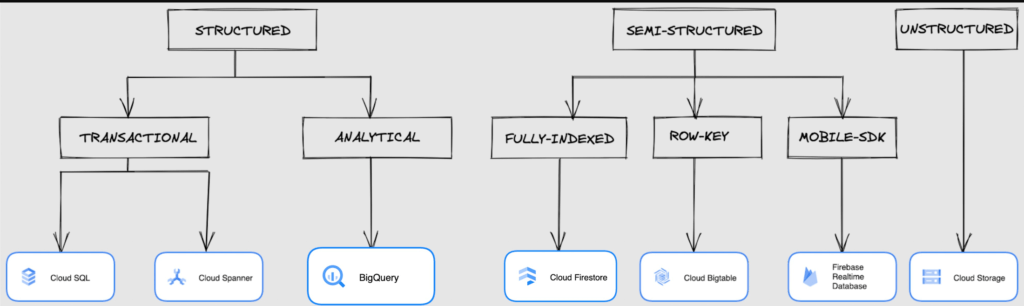
We at Google Cloud, have realized how hard it is to go through these laundry list assessment aspects and have made it simpler for you with a Decision Tree. (Of course, It ain’t Christmas if not for the tree):
If only the world was always “Structured”
In a structured world, you will know all the attributes on a first-name basis (I mean to say that you will have a well defined fixed set of attributes that can be modeled in a table of rows and columns), and the applications are transactional or analytical in orientation. Transactional Structured Data operate one row at a time generally and they need to adhere to ACID compliance. (Ah. Now you connect the dots, if not already.) ACID properties are Atomicity, Consistency, Isolation, and Durability. Cloud SQL and Cloud Spanner are our Google Cloud choices for Transactional Structured Data use cases.
Let’s look at the below aspects for each type and structure of data:
- Why that option? (highlights and key features)
- When to choose?
- When not to choose?
- Security aspects
Cloud SQL
- Fully Managed, cloud-native RDBMS (Relational DataBase Management System) that offers both MySQL, PostgreSQL, SQL Server engines
- Cloud SQL is accessible from apps running on App Engine, GKE, or Compute Engine
Note: A managed database is one that does not require as much administration and operational support (creating databases, performing backups, updating the operating system of database instances) as an unmanaged database.
When to use Cloud SQL?
- Typical online transaction processing (OLTP) workloads
- Lift and shift of on-premise SQL databases (or from anywhere else) to cloud
- Regional applications that do not need to store > 30 TB of data in a single instance
When not to use Cloud SQL?
Cloud SQL is not an appropriate storage system for online analytical processing (OLAP) workloads or data that requires dynamic schemas on a per-object basis.
Security
Data stored is encrypted both in transit and at rest. Have built-in support for access control, using network firewalls to manage database access.
Cloud Spanner
Relational, horizontally scalable, global database with strong consistency- Supports schemas, ACID transactions, and SQL queries (ANSI 2011)
- Scales horizontally in regions, but can also scale across regions for workloads that have more stringent availability requirements
When to use Cloud Spanner?
- For large amounts of data and when you require high transactional consistency
- When you require sharding for higher throughput, access and low latency
When not to use Cloud Spanner?
Cloud Spanner is not an appropriate storage system for online analytical processing (OLAP) workloads
Security
Security features in Spanner include data-layer encryption, audit logging, and Identity and Access Management (IAM) integration.
Analytical Structure is when we want the data to tell us an aggregated or enhanced story, for which we use limited columns and multiple rows and hence mostly use a Column-Oriented storage mechanism. Column-oriented storage is if we want to store the data in the tables by columns instead of by rows, and this column-oriented storage is done to efficiently access only a subset of columns for querying. BigQuery is the data warehouse option for analytics needs.
BigQuery
BigQuery is a fully managed Data Warehouse for analytics with built-in data transfer service- Peta-byte scale, low-cost warehouse that supports loading data through the web interface, command line tools, and REST API calls
- Incorporates features for machine learning, business intelligence, and geospatial analysis that are provided through BigQuery ML, BI Engine, and GIS.
Note: A data warehouse stores large quantities of data for query and analysis instead of transactional processing.
When to use BigQuery?
For use cases that cover process analytics and optimization, big data (Petabyte scale) processing and analytics, data warehouse modernization, machine learning-based behavioral analytics, and predictions
When not to use BigQuery?
BigQuery is not a Transactional database and is oriented on running analytical queries, not for simple CRUD operations and queries.
Security
BigQuery provides encryption at rest and in transit. Cloud Data Loss Prevention (Cloud DLP) can be used to scan the BigQuery tables and to protect sensitive data and meet compliance requirements. BigQuery supports access control of datasets and tables using Identity and Access Management (IAM).
And then we have the Semi-structured and the Unstructured world of data that we will address in the below sections.
Cloud Firestore (Cloud Datastore)
Firestore is the next major version of Datastore and a re-branding of the product. Taking the best of Datastore and the Firebase Realtime Database, Firestore is a NoSQL document database built for automatic scaling, high performance, and ease of application development.
- A fully managed, serverless NoSQL Google Cloud database designed for the development of serverless apps that stores JSON data
- Can be used to store, sync, and query data for web, mobile, and IoT applications
- Automatically handles sharding and replication making it highly available, durable, and scalable
- Provides ACID transactions, SQL-like queries, indexes, and more
- If a client does not have network connectivity, the Firestore API lets your app persist data to a local disk and synchronizes itself with the current server state once connectivity is reestablished
When to use?
For use cases of app development, live synchronization, offline support, multi-user collaborative applications, leader board, etc.
When not to use?
Not a relational database so not meant for relational structured data use cases.
Security
Firestore Security Rules support serverless authentication and authorization for the mobile and web client libraries. Identity and Access Management (IAM) manages database access.
Cloud Bigtable
- Bigtable is a wide-column, fully managed, high-performance NoSQL database service designed for terabyte- to petabyte-scale workloads
- Bigtable is battle tested on Google internal Bigtable database infrastructure that powers Google Search, Google Analytics, Google Maps, and Gmail
- Provides consistent, low-latency, and high-throughput storage for large-scale NoSQL data
When to use?
- For large amounts of single key data and is preferable for low-latency, high throughput workloads
- For real-time app serving workloads and large-scale analytical workloads
When not to use?
While Bigtable is considered an OLTP system, it doesn’t support multi-row transactions, SQL queries or joins. For those use cases, consider either Cloud SQL or Datastore.
Security
- All the data at rest in Cloud Bigtable is encrypted using Google’s default encryption, by default.
- Instead of Google managing the encryption keys that protect your data, your Bigtable instance can also be protected using a key that you manage (customer-managed encryption keys (CMEK)) in Cloud Key Management Service (Cloud KMS).
Cloud Storage
- Google Cloud Storage is an object storage system that is durable and highly available, persists unstructured data like images, videos, data files, videos, backup, and other data
- It is unstructured and so the files in the cloud storage are atomic that you read the entire file but you cannot access specific blocks in the files
- Cloud Storage is available in multiple classes, depending on the availability and performance required for apps and services
- Standard – Offers the highest levels of availability and is appropriate for storing data that requires low-latency access
Nearline – Low-cost, highly durable, fast-access storage service for storing data that you access less than once per month
Coldline – Very-low-cost, highly durable, fast-access storage service for storing data that you intend to access less than once per quarter
Archive – Lowest-cost, highly durable, fast-access storage service for storing data that you intend to access less than once per year
Security
Files in Cloud Storage are organized by project into individual buckets. These buckets can support either custom access control lists (ACLs) or centralized identity and access management (IAM) controls.
Firebase Realtime Database
- Firebase is a realtime, NoSQL, Google Cloud database that is a part of the Firebase platform that allows you to store and sync data in real-time and includes caching capabilities for offline use
- Data is stored as JSON and synchronized in real-time to every connected client and remains available when app goes offline
When to use?
For mobile and web app development, development of apps that work across devices
When not to use?
Not in relational dataset use cases. The Realtime Database is a NoSQL database and as such has different optimizations and functionality compared to a relational database. The Realtime Database API is designed to only allow operations that can be executed quickly.
Security
The Realtime Database provides a flexible, expression-based rules language, called Firebase Realtime Database Security Rules, to define how your data should be structured and when data can be read from or written to. When integrated with Firebase Authentication, developers can define who has access to what data, and how they can access it.
That’s a rather packed read. But I hope you find this useful to understand comprehensively the basics of data, storage options and databases in Google Cloud Platform.
Next Steps, before I go…
In the blog part 1 of the series, I ended with an action item – “How would you model a NoSQL solution for an application that needs to query the lineage between individual entities that are represented in pairs?”.
Well, my answer is Firestore. As part of this episode, why don’t you take some time to go over the options and key aspects that attribute to this.
Google’s Diversity Annual Report public dataset & BigQuery

3249
Of your peers have already read this article.
3:30 Minutes
The most insightful time you'll spend today!
Since 2014, tech companies have relied on metrics to identify trouble spots, establish baselines, and measure meaningful progress in diversity, including publishing DEI data directly through diversity annual reports. However, as our understanding of DEI has evolved over time each company’s report has diverged, creating a fragmented landscape of industry-wide data. This separation is problematic as no single company’s diversity dataset can solve tech’s DEI challenges. Instead, we need to build industry-wide systemic solutions to create sustainable change, and those start with establishing a common language for DEI data and standardizing and sharing DEI data across tech companies.
The challenge is most companies publish diversity data in a way that makes it difficult to analyze, such as using bar graphs and pie charts. Researchers, as a result, are unable to easily pull the real, detailed data or aggregate and analyze it for their unique needs (e.g. hiring trends for tech vs. nontechnical roles, representation of Asian women in leadership, and more). As we shared in our most recent Diversity Annual Report, external research shows that sustainable change will only come from solutions that encompass the entire tech industry and data transparency is a critical step in this work.
Google’s Diversity Annual Report public dataset & BigQuery
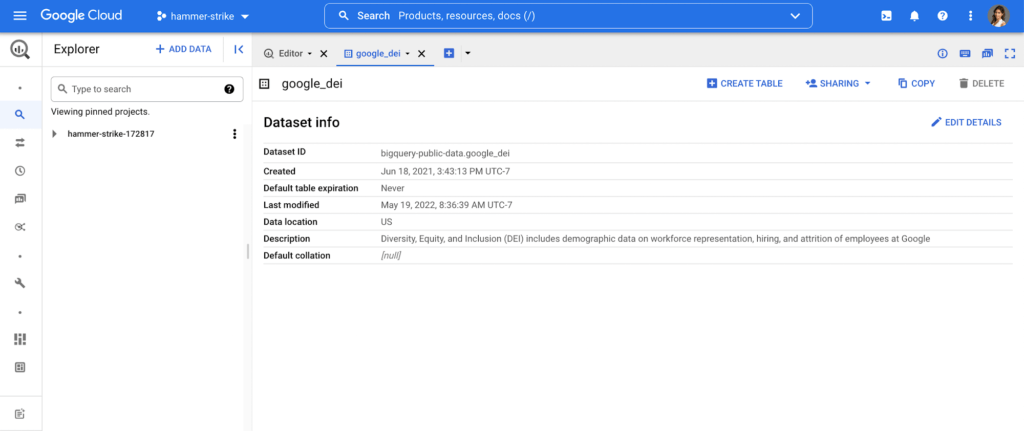
In May, we released our 2022 Diversity Annual Report, which includes demographic data on workforce representation, hiring, and attrition of employees at Google, including leadership. You can see our hiring data by race/ethnicity, gender, and intersectional hiring over time, by region, and more. In an effort to make this data more transparent and accessible for analysis, we have added it as a public dataset in BigQuery, Google Cloud’s powerful data warehousing tool. Our data is now even easier for researchers, community organizations, and industry groups to leverage and compare against external benchmarks to help contextualize our progress.
As one of the first in the industry, we are proud to have published our diversity data on BigQuery for the second year in a row. Our dataset, among others, is public, stored and paid for by Google so those who are interested can use BigQuery’s advanced analytic capabilities through the Google Cloud Public Dataset Program for free*.
Contextualizing diversity data is necessary to make meaningful conclusions
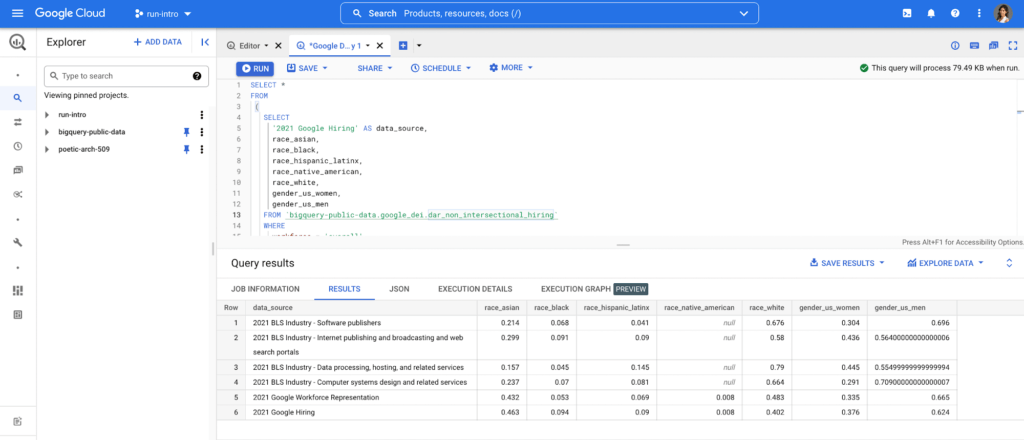
While Google’s diversity dataset can help users compare their own datasets to Google’s current and historical trends, DEI data is only useful when analyzed in the context of other relevant datasets. For example, concluding that Black+ hiring has increased from 8.8% to 9.4% has little meaning unless there is a point of reference, like US general census data, labor force participation rates or graduation rates. It’s why Google also includes other public datasets in BigQuery such as related industry DEI data, talent and graduation pools. By doing so, users can run a sample query that then compares Google’s hiring and representation to related industries (software publishers, data process services, etc.). Users can then better understand and contextualize areas of progress and opportunity, and they can more objectively identify where organizations can take a proactive role in addressing not only DEI in their companies, but also in the communities in which they call home.
Intersectional data and disaggregated baseline metrics
In the workplace, intersectional data is key to understanding the layers of exclusion and inequity that may exist for certain groups. This includes those with social identity overlap, like race, gender, and LGBTQ+, that create multiple levels of inequality or discrimination. It’s critical for DEI data to be disaggregated in a meaningful way to diagnose the true health of a system and to better understand how intersectionality contributes to the greater DEI landscape .
Google’s Diversity Annual Report public dataset includes Google’s intersectional hiring and representation data also broken down by tech, non-tech, and leadership roles. BigQuery’s friendly interface makes it easy to select the relevant parameters and join this data with other public or private datasets to help meaningfully contextualize Google’s data against the broader industry. Anyone from data scientists to DEI stewards can launch public datasets from the Google Cloud Marketplace and start querying them right away. Findings can be visualized through tools like Looker, Data Studio, or Tableau.
This is just the beginning
As DEI work continues to evolve into an industry-wide approach, we must encourage a standard of practice for collecting and reporting data across the board. At scale, data has the power to enable the tech industry to make real improvements collectively, in addition to inside our individual companies. We hope our dataset and sample queries give researchers and individuals a launchpad to become DEI practitioners of the tech industry, and ensure we have the right data to solve the right problems.
Footnote:
*The only time anyone would need to pay is for queries performed on the data after BigQuery’s 1TB/mo of free tier processing. This means that each user receives 1TB of free BigQuery processing every month, which can be used to run queries on this public dataset.
HarbourBridge Schema Assistant Allows Quick, Bulk Migration to Cloud Spanner

5461
Of your peers have already read this article.
1:30 Minutes
The most insightful time you'll spend today!
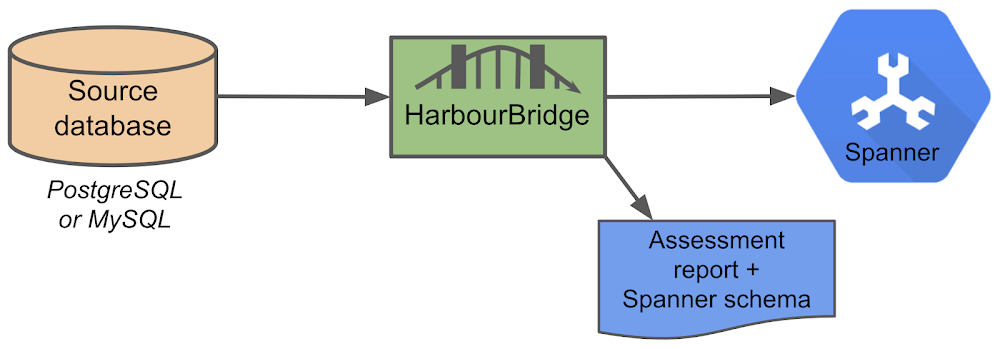
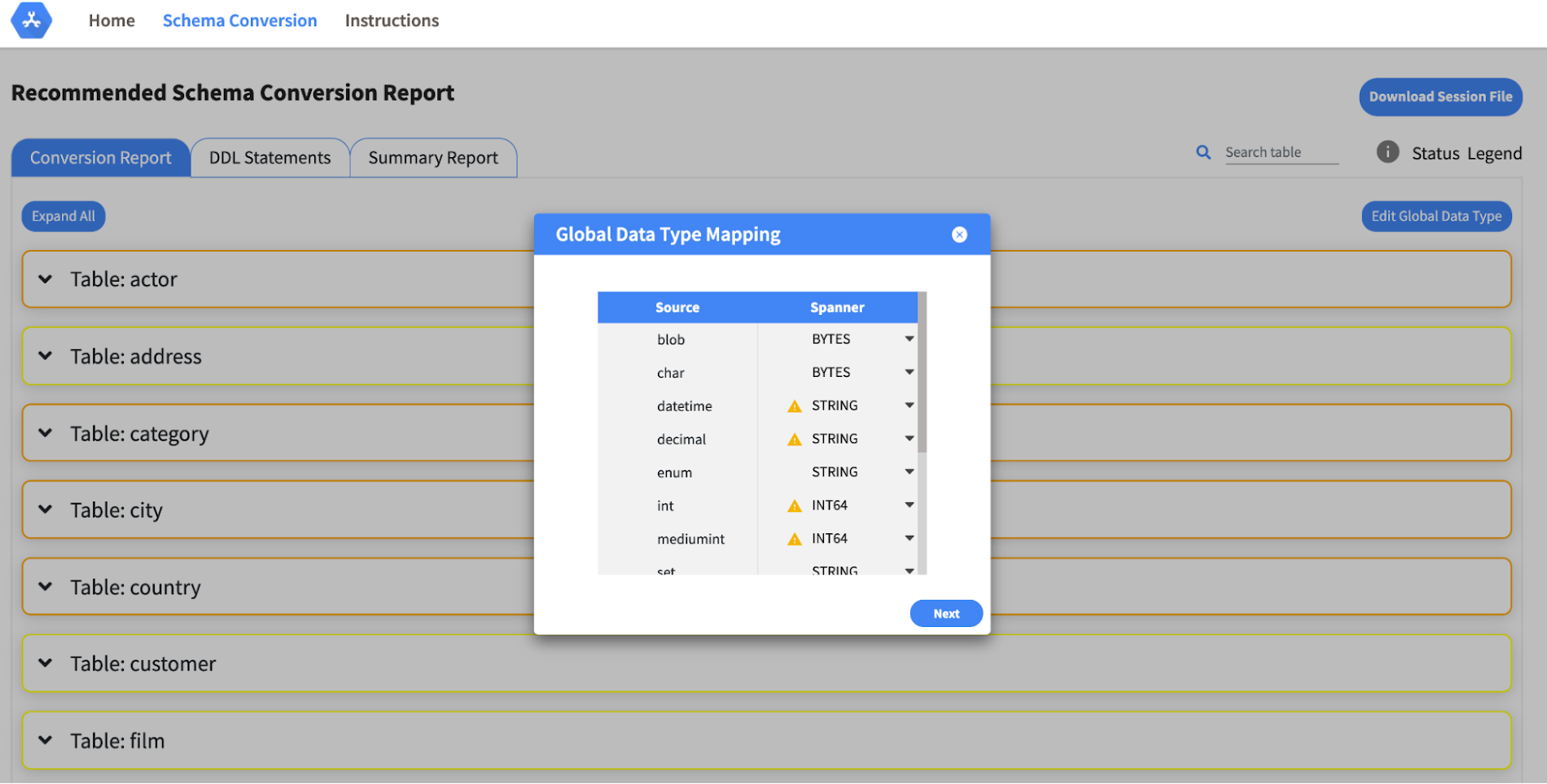
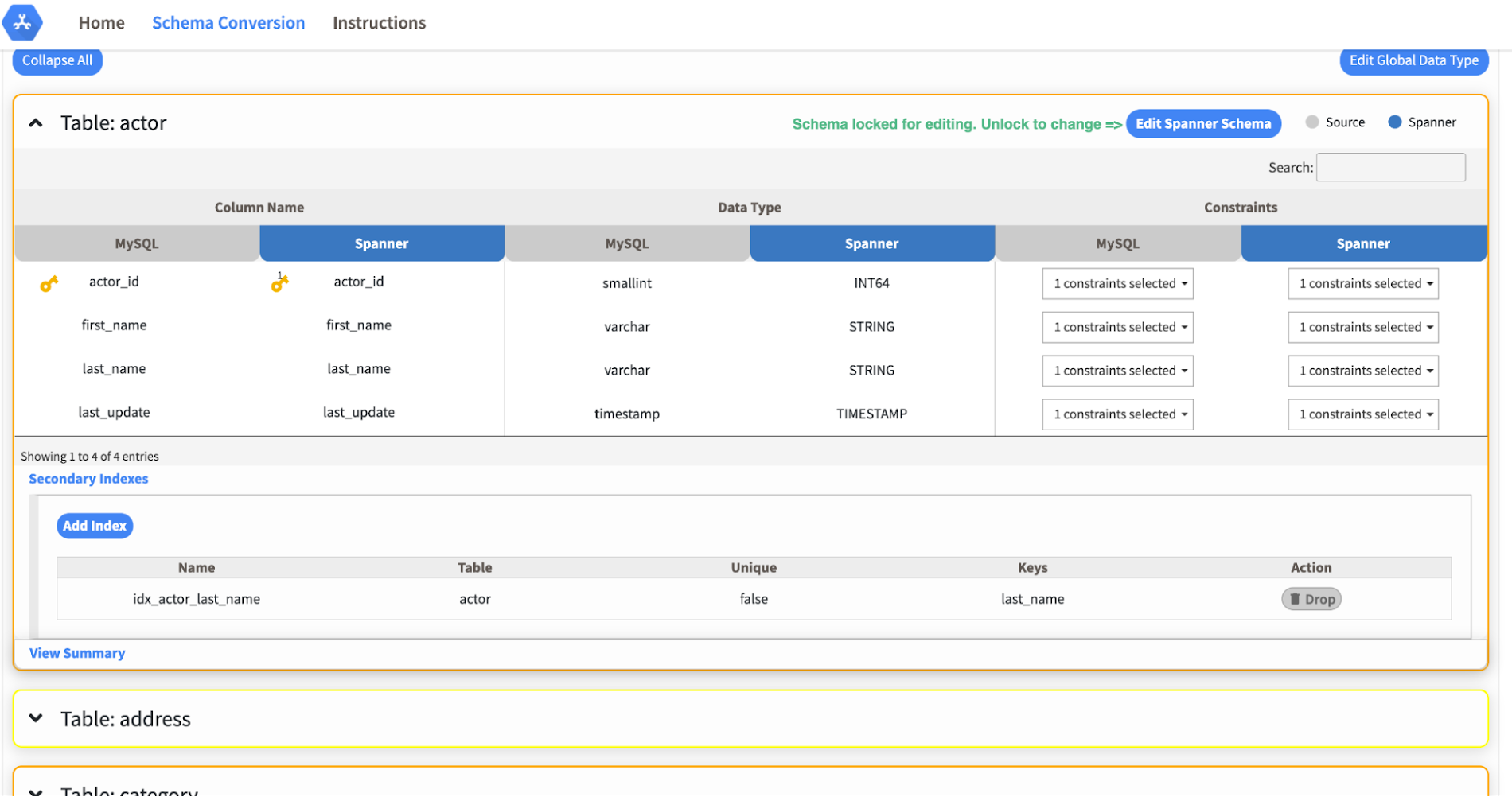
Today we’re announcing the HarbourBridge Schema Assistant, which provides a guided schema-design workflow for migrating from MySQL or PostgreSQL to Spanner. HarbourBridge imports dump files (from mysqldump or pg_dump) or directly connects to your source database, and converts the source database schema to an equivalent Spanner schema. The new Schema Assistant capability displays the source schema and Spanner schema side-by-side, highlights errors and walks you through a series of steps to validate and optimize your Spanner schema. It also produces a browsable assessment report with an overall migration-fitness score for Spanner, a table-by-table detailed analysis of type mappings and a list of features used in the source database that aren’t supported by Spanner. It supports editing of table and column names, column types, primary keys and constraints, as well as dropping of tables, columns, foreign keys and secondary indexes.
The new Schema Assistant complements HarbourBridge’s existing data and schema migration capabilities and is a critical step towards our goal of building a complete open-source migration toolkit. HarbourBridge continues to support command-line schema and data migration and turn-key Spanner evaluation.
Complementing the bulk data migration capabilities of HarbourBridge, we are also announcing the ability to migrate change events from MySQL to Cloud Spanner.
Supported Features in Schema Assistant
- Global type mapping. Users can customize the global mapping for how types should be mapped to Spanner consistently across the schema. For example, mapping large integers in source schema to Spanner’s NUMERIC.
- Local type mapping. Users can override the custom type mapping for a given table/column.
- Session management. A session keeps track of all the changes made to the schema mapping.
- Customization of secondary indexes. Users can add, edit and delete secondary indexes to optimize their Spanner performance.
- Customization of foreign keys and interleaved tables. Table interleaving is an important design consideration when migrating to Cloud Spanner as explained in more detail in this blog post.
Features in the pipeline
We are already working to further expand the supported set of schema editing features and welcome your feedback. We are particularly excited to expand the Schema Assistant’s design recommendations for optimizing Spanner schemas e.g. in-depth recommendations for primary key design.
HarbourBridge is open source and we gladly accept contributions from the wider community.
More Relevant Stories for Your Company

Mrs. T’s Pierogies Moves SAP Systems to Google Cloud for Faster Analytics Capabilities for its SAP Data
Pierogies might just be the ultimate comfort food. But when Mrs. T’s Pierogies — the leading manufacturer of frozen pierogies in the US — learned it needed to transition its existing on-premises SAP ECC to S/4HANA, the company sought a little comfort for itself. Founded in 1952, Mrs. T’s Pierogies

Developers and Practitioners’ Guide for Moving On-prem Data Warehouse to BigQuery
Data teams across companies have continuous challenges of consolidating data, processing it and making it useful. They deal with challenges such as a mixture of multiple ETL jobs, long ETL windows capacity-bound on-premise data warehouses and ever-increasing demands from users. They also need to make sure that the downstream requirements

The Query Execution Graph: Your Key to Better BigQuery Analytics
BigQuery offers strong query performance, but it is also a complex distributed system with many internal and external factors that can affect query speed. When your queries are running slower than expected or are slower than prior runs, understanding what happened can be a challenge. The query execution graph provides
How Moving Database to the Cloud Helped Recruit Technologies Gain Higher Availability and Lower Cost
There are just under 8 billion people on Earth, depending on the source. Here at Recruit, our work is to develop and maintain an email marketing system that sends personalized emails to tens of millions of customers of hundreds of web services, all with the goal of providing the best,
