





Data-first Digitization Helps Leverage the Cloud for Your Mainframe Assets

6477
Of your peers have already read this article.
2:00 Minutes
The most insightful time you'll spend today!
For many enterprises, the venerable mainframe is home to decades’ worth of data about the company’s customers, processes and operations. And it goes without saying that the business would like access to that mainframe data — to report on it, to analyze it with big data analysis tools, or to use it as the basis of new machine learning and artificial intelligence initiatives.
At Google Cloud, we are eager to work with organizations to help them transform their mainframe assets for the cloud era. Of course, we can help them modernize their mainframe applications by migrating them to the cloud. At the same time, working with partners and customers, we’ve developed another, more lightweight approach that can help them start to leverage the cloud for their mainframe assets much more quickly than performing a full-fledged migration. We call this approach data-first digitization.
In this rapidly evolving digital ecosystem, it’s imperative to understand the difference between ‘modernization’ and ‘digitization.’ With modernization you start with the current state and look forward, and rely on mainframe application migration approaches such as rehosting (emulation), refactoring (automated code transformation), reengineering — or simply replacing a custom application with a commercial package. With digitization, you start with the future state that you want to achieve, and work back to what is required to get there.
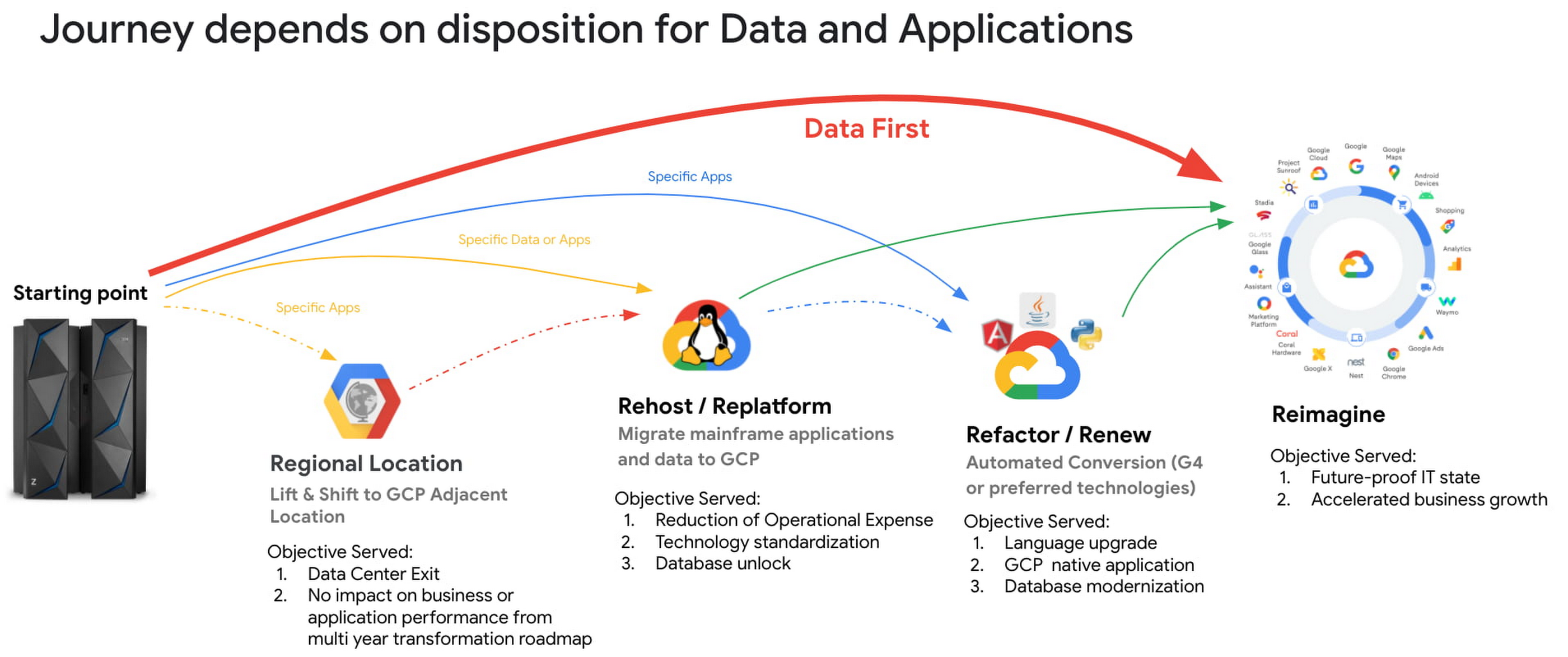
This data-first digitization approach includes a mainframe data-first integration framework comprising in-house and partner products and tools to migrate heterogeneous data sources from the mainframe to Google Cloud Storage. Once mainframe data has been copied to Cloud Storage, it can then be integrated and leveraged by Google Cloud tools such as BigQuery, AI and machine learning prodcuts and Smart and Stream analytics platforms. The integration framework covers both bulk batch data transfers and real-time data replication (change data capture).

Data-first digitization is based on the tenet that ‘applications are transient, data is permanent.’ By bringing data first to Google Cloud instead of traditional ways of modernizing applications (for example, with Gartner’s 7 options to Modernize), this allows organizations to leapfrog to new business models, use cases and innovative ways to serve end customers. For example:
- Making decisions with smart and stream analytics platforms and AI/ML engines. These tools need data to make decisions. Google is a pioneer in extracting information and value from the raw structured and unstructured data, and this approach opens up mainframe data for use by BigQuery and AI/ML models.
- Building new reporting applications. With access to mainframe data, you can use Google cloud products like Looker and Appsheet to build net-new reporting applications, expediting the process of retiring mainframe reporting applications, and accelerating your overall transformation.
In our experience, taking a data-first digitization approach to your mainframe offers a number of benefits:
- Faster time-to-business: Because data-first modernization is built on existing products, the implementation cycle is much shorter.
- Less capital investment: You spend your time integrating products, not developing applications.
- Minimized risk: Data-first integrates with existing, proven and reliable Google Cloud products.
- Faster overall mainframe transformation: When you shift your modernization center of gravity from the application to the data, you look at mainframe applications from a business perspective instead of just “keeping the lights on.” As a result, only the most business-critical applications are modernized and many support applications can be decommissioned, accelerating your transformation journey.
Taking a data-first approach to digitization is still relatively new, but we’re heartened by customers’ early successes. Watch this space for additional insights, reference architectures and technical white papers around data-first. And if you think this approach may be right for you, reach out to mainframe@google.com.
Learn more:
Leverage the Power of Looker to Extract Data Value at Web Scale

4451
Of your peers have already read this article.
3:00 Minutes
The most insightful time you'll spend today!
Data science can be applied to business problems to improve practices and help to strengthen customer satisfaction. In this blog, we address how the addition of Looker extends the value of your Google Cloud investments to help you understand your customer journey, unlock value from first-party data, and optimize existing cloud infrastructure.
Data is a powerful tool
While everyone doesn’t need to understand the nuts and bolts of data technologies, most people do care about the value data can create for them — how it can help them do their jobs better. Within the data space, we are seeing a trend of ongoing failure to make data accessible to “humans” – the industry still hasn’t figured out how to put data into the hands of people when and where they need it, how they need it.
What if everyone in your organization could analyze data at scale, and make more-informed, fact-based decisions? Data and insights derived from data are valuable but only if your users see it. We think Looker helps solve that.
Solutions tell a larger story of how it all fits together
Across all verticals and industries, businesses benefit from knowing and understanding their customers better. Many business goals are to increase revenue by improving product recommendations and pricing optimization, improving the user experience through targeted marketing and personalization, and reducing churn while improving retention rates. To help reach these goals, key strategies should focus on understanding customer needs, their motivations, likes and dislikes, and using all available data – in other words, put yourself in the shoes of your customer.
Our goal with Looker solutions is to offer the right level of out-of-box support that allows customers to get to value quickly, while maintaining the necessary flexibility. We aim to offer a library of data-driven solutions that accelerate data projects. Many solutions include Looker Blocks (pre-built pieces of code that accelerate data exploration environments) and Actions (custom integrations) that get customers up and running quickly and lets you build business-friendly access points for Google Cloud functionality like BQML, App Engine and Cloud Functions.
Below, you’ll find a sampling of the newest Looker solutions.
Listening to customers by looking at the data
Looker’s solution for Contact Center AI (CCAI), helps businesses gain a deeper understanding and appreciation of their customers’ full journey by unlocking insights from all their company’s first-party data. Call centers can converse naturally with customers and deliver outstanding experiences by leveraging artificial intelligence. CCAI‘s newest product —CCAI Insights — reviews conversations support agents are having, finding and annotating the data with the important information, and identifying the calls that need review. We’ve partnered with the product teams at CCAI to build Looker’s Block for CCAI Insights, which sets you on the path to integrating the advanced insights into your first-party data in Looker, overlaying business data with the customer experience.

Businesses can better understand contact center experiences and take immediate action when necessary to make sure the most valuable customers receive the best service.
Realizing full business value of First-Party data
Looker for Google Marketing Platform (GMP) provides marketers the power to unlock the value of their company’s first-party data to more effectively target audiences. The Looker Blocks and Actions for GMP offer interactive data exploration, slices of data with built-in ML predictions and activation paths back to the GMP. This strategic solution continues to evolve with the Looker Action for Google Ads (Customer Match), the Looker Action for Google Analytics (Data Import) and the Looker Block for Google Analytics 4 (GA4).
- The Looker Action for Customer Match allows marketers to send segments and audiences based on first-party data directly into Google Ads. Reach users cross-device and across the web’s most powerful channels such as Display, Video, YouTube, and Gmail. The entire process is performed within a single screen in Looker, and is able to be completed in a few minutes by a non-technical user.
- The Looker Action for Data Import can be used to enhance user segmentation and remarketing audiences in Google Analytics by taking advantage of user information accessible in Looker, such as in CRM systems or transactional data warehouses.
- The Looker Block for Google Analytics 4 (GA4) expands the solution’s support with out-of-the-box dashboards and pre-baked BigQuery ML models for the newest version of Google Analytics.The Looker Block offers up reports with flexible configuration capabilities to unlock custom insights beyond the standard GA reporting. Customize audience segments, define custom goals to track and share these reports with teams who do not have access to the GA console.
From clinical notes to patient insights at scale
Taking a look at the Healthcare vertical, the Looker Healthcare NLP API Block serves as a critical bridge between existing care systems and applications hosted on Google Cloud providing a managed solution for storing and accessing healthcare data in Google Cloud. The Healthcare NLP API uses natural language models to extract healthcare information from medical text, rapidly unlocking insights from unstructured medical text and providing medical providers with simplified access to intelligent insights. Healthcare providers, payers, and pharma companies can quickly understand the context and relationships of medical concepts within the text, such as medications, procedures, conditions, clinical history, and begin to link this to other clinical data sources for downstream AI/ML.
Specifically, the natural language processing (NLP) Patient View (pictured below) allows you to review a single selected patient of interest, surfacing their clinical notes history over time. It informs clinical diagnosis with family history insights, which is not currently captured in claims, and captures additional procedure coding for revenue cycle purposes.

The dashboard below shows the NLP Term View which allows users to focus on chosen medical terms across the entire patient population in the dataset so they can start to view trends and patterns across groups of patients.

This data can be used to:
- Enhance patient matching for clinical trials
- Identify re-purposed medications
- Drive advancements for research in cancer and rare diseases
- Identify how social determinants of health impact access to care
Managing Costs Across Clouds
Effective cloud cost management is important for reasons beyond cost control — it provides you the ability to reduce waste and predictably forecast both costs and resource needs. Looker’s solution for Cloud Cost Management offers quick access to necessary reporting and clear insights into cloud expenditures and utilization.
This solution brings together billing data from different cloud providers in a phased approach: get up and running quickly with Blocks optimized for where the data is today (Google Cloud, AWS or Azure) as you work towards more sophisticated analysis for cross-platform planning and even cloud spend optimization with the mapping of tags, labels and cost centers across clouds.
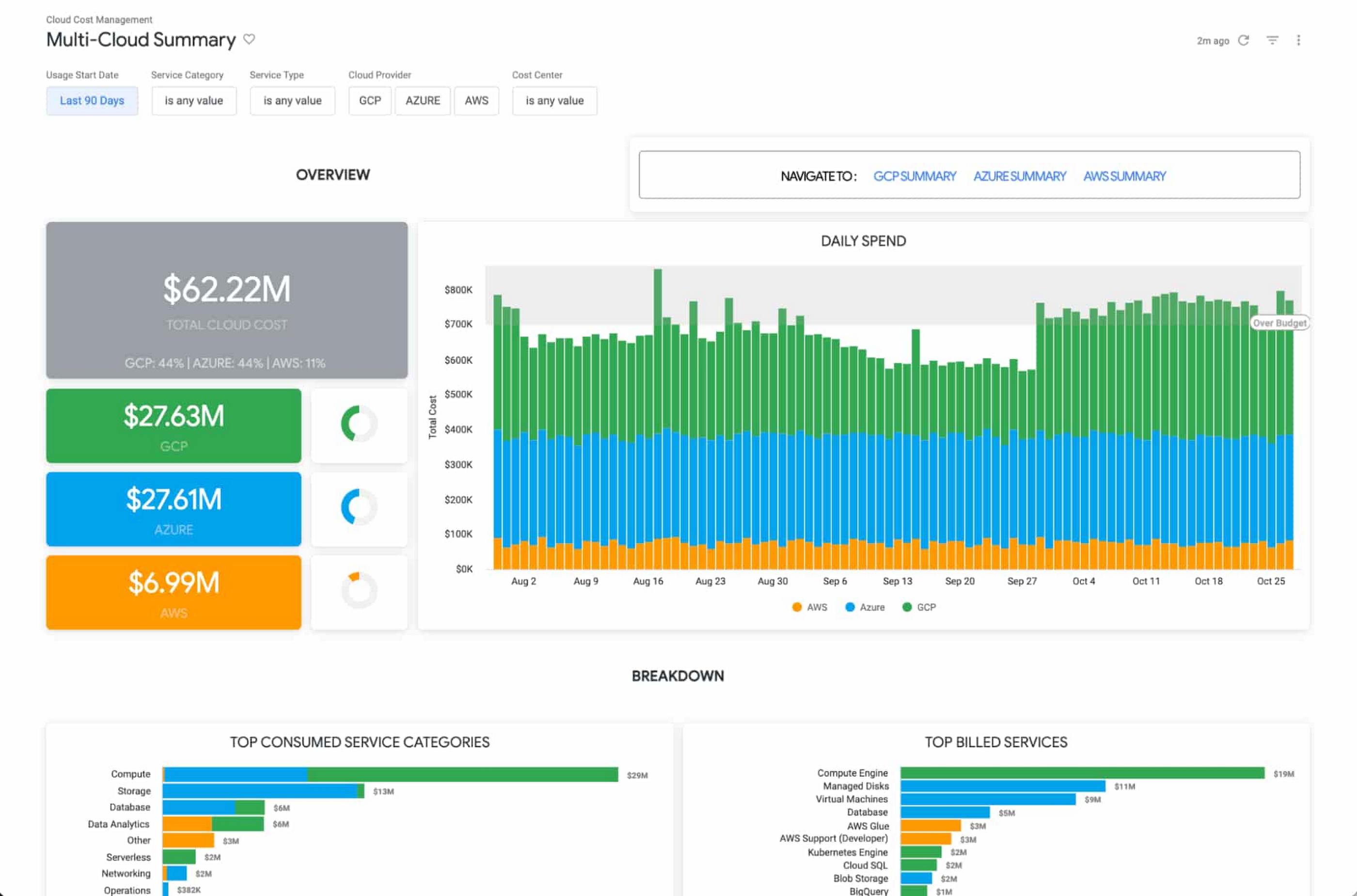
The Looker Cloud Cost Management solution provides operational teams struggling to monitor, understand, and manage the costs and needs associated with their cloud technology with a comprehensive view into what, where and why they are spending money.
Making better decisions with Looker-powered data
Leading companies are discovering ways to get value from all of that data beyond displaying it in a report or a dashboard. They want to enable everyone to make better decisions but that’s only going to happen if everyone can ask questions of the data, and get reliable, correct answers without using outdated or incomplete data and without waiting for it. People and systems need to have data available to them in the way that makes the most sense for them at that moment.
It’s clear that successful data-driven organizations will lead their respective segments not because they use data to create reports, but because they use it to power data experiences tailored to every part of the business, including employees, customers, operational workflows, products and services.
As people’s way of experiencing data has evolved, more than ever before, dashboards alone are not enough. You can use data as fuel for data-driven business workflows, and to power digital experiences that improve customer engagement, conversions, and advocacy.
From Nov. 9 – 11th, Looker is hosting its annual conference JOIN, where we’ll be showing new features, including how we help to:
- Build data experiences at the speed of business
- Accelerate the business value with packaged experiences
- Unleash more insights for more people in the right way – Deliver data experiences at scale
There is no cost to attend JOIN. Register here and learn how Looker helps organizations build and deliver custom data-driven experiences that goes beyond just reports and dashboards, scales and grows with your business, allows developers to build innovative data products faster, and ensures data reaches everyone.
Custom Voice Feature Can Help Brands Tweak IVR for Better Customer Experiences

5138
Of your peers have already read this article.
1:30 Minutes
The most insightful time you'll spend today!
With the rise of digital assistants and conversational interfaces, people have grown accustomed to hearing and speaking to synthetic voices. But what do those voices sound like? Often, pretty repetitive. We’re all familiar with the Google Assistant voice, for example.
That’s why we are excited to announce the general availability of Custom Voice in our Cloud Text-to-Speech (TTS) API, a new feature that lets you train custom voice models with your own audio recordings to create unique experiences.
For businesses looking to build a strong brand identity, establishing a unique voice can help turn mobile app interactions or customer service based on interactive voice responses (IVR) into differentiated customer experiences. Our TTS API has included a speech synthesis service with a static list of voices for some time, but now, with Custom Voice, moving beyond these predefined options is easier than ever.
Custom Voice lets you simply submit your audio recordings to get access to the new voice directly in the TTS API. Custom Voice TTS includes guidance on the audio requirements to help make sure you generate a high quality custom TTS voice model. Once this new model is trained, all you have to do to start using the newly trained voice is reference the model ID in your calls to the Cloud TTS API.
At Google, we are committed to building safe and accountable AI products, not only because it’s the right thing to do, but because it is a critical step in ensuring successful use in production. As part of Google Cloud’s Responsible AI governance process, we conducted a deep ethical evaluation of Custom Voice TTS, and its relation to synthetic media, in order to surface and mitigate potential harms that it may create. If you are interested in Custom Voice TTS, there is a review process to help ensure each use case is aligned with our AI Principles and adequate voice actor consent is given.
Additionally, to verify that voice actors are actually the ones producing the audio, you will need to submit an audio file producing a sentence that Google Cloud chooses (for example: “I agree that my voice will be used to create a synthetic custom Text-to-Speech voice).
We’re looking forward to seeing this API help businesses solve problems in an easy, fast, and scalable way. TTS Custom Voice is now GA in these languages:
English (US)
English (AU)
English (UK)
Spanish (US)
Spanish (Spain)
French (France)
French (Canada)
Italian (Italy)
German (Germany)
Portugues (Brazil)
Japanese (Japan)
We plan to continue expanding this lineup in order to meet your needs. Ready to try for yourself? Contact your seller to get started on your use case evaluation today!
6811
Of your peers have already watched this video.
2:30 Minutes
The most insightful time you'll spend today!
What is BigQuery?
BigQuery is Google Cloud’s enterprise data warehouse designed to help you ingest, store, analyze, and visualize big data with ease.
Organizations rely on data warehouses to aggregate data from disparate sources, process it, and make it readily available for data analysis that supports their strategic decision-making.
You can ingest data into BigQuery either through batch uploading or streaming data directly to deliver real-time insights.
As a fully-managed data warehouse, Google takes care of the infrastructure so you can focus on analyzing your data up to petabyte scale.
BigQuery supports the same Structured Query Language, or SQL, for analyzing your data, which you may be familiar with if you’ve worked with ANSI-compliant relational databases in the past.
If you’re looking to create machine learning models using your enterprise data, you can do so with BigQuery ML.
With only a few lines of SQL, you can train and execute models on your BigQuery data without needing to move it around.
When it comes time to visualize your data, BigQuery integrates with Looker, as well as several other business intelligence tools across our partner ecosystem.
Now, how do you use BigQuery?
Luckily, it’s straightforward to get up and running with BigQuery.
After creating a GCP project, you can immediately start querying public data sets, which Google Cloud hosts and makes available to all BigQuery users, or you can load your own data into BigQuery to analyze.
Interacting with BigQuery to load data, run queries, or even create ML models can be done in three different ways.
First is by using the UI and the Cloud Console. Second is by using the BigQuery command line tool. And third is by making calls to the BigQuery API, using client libraries available in several languages.
BigQuery is integrated with Google Cloud’s Identity and Access Management Service so you can securely share your data and analytical insights across the organization.
What does it cost to use BigQuery?
With BigQuery, you pay for storing and querying data and streaming inserts.
Loading and exporting data are free of charge.
Storage costs are based on the amount of data stored and have two rates based on how often the data is changing.
Query costs can be either on demand, meaning you are charged per query by the amount of data processed, or flat rate for customers who want to purchase dedicated resources.
Sopra Steria’s Next-gen Virtual Voice Assistants Powered by Google’s AI and Cisco Contact Center by Activeo

3072
Of your peers have already read this article.
1:30 Minutes
The most insightful time you'll spend today!
With people expecting to access products and services through easy, always-on experiences delivered across channels, transforming approaches to digital services is a must for every business. As a result, business leaders have to strive to provide employees with these same frictionless experiences.
Sopra Steria is a European leader in consulting, digital services and software development, with 46,000 employees in 25 countries that generated revenue of €4.3 billion in 2020. It provides end-to-end solutions that help customers drive their digital transformation to obtain tangible and sustainable benefits, by combining in-depth knowledge of a wide range of business sectors and innovative technologies.
To accomplish its goals, Sopra Steria planned to use conversational artificial intelligence as part of their strategy and began working closely with Google Cloud, Cisco, and Activeo. It believed that, by building out more advanced Virtual Agents for its customers to use to serve them, it could usher in a new era of frictionless experiences in the End-User support services.
“To address customer demands for office and business applications support services, we looked to integrate a new generation of virtual voice assistant into our platform,” says Xavier Leroux, CTO End User Services at Sopra Steria. “We did this using Google’s proven AI and integrated it with our Cisco Contact Center by Activeo.”
As many companies have learned, the need to provide customers with advanced experiences is directly attached to the services offered to their employees. By providing more contextual information and other forms of digital support to staff, those same team members will be better positioned to serve customers.
Solving a complex problem with ease
Sopra Steria sought to solve several challenges for its customers, enabling them to:
- Provide all their employees with seamless, quick access to IT and business support,
- Offer 24/7 phone support capabilities for employees,
- Make services easily deployable, flexible, agile, and available in multiple languages,
- Reduce costs associated with delivering better support services.
Sopra Steria chose Google Cloud Contact Center AI (CCAI), built by Google Cloud and Cisco, as the best option to achieve its vision. Google Cloud CCAI is currently used in some of the world’s largest call centers, building on Google’s expertise in natural language processing.
Sopra Steria implemented CCAI as its new Virtual Assistant on phone channels managed by a Cisco telephony solution, and used Activeo for its integration and implementation support.
The new Virtual Assistant allows Sopra Steria clients to qualify employee requests and direct them to the right agent based on Natural Language Understanding while offering self-service options for basic requests such as password resets. These Virtual Assistants also fully automate complex incident tickets creation in synchronization within the IT service management system.
Google Cloud CCAI covers three main use cases:
- Autonomously handles full-length conversations using natural language,
- Augments operator support through contextual assistance through a desktop application based on live conversation analysis,
- Semantic analysis of all audio and text conversations processed by customer service through Google Cloud machine learning.
Cisco provides native integration of CCAI within its Cisco Contact Center solution as a part of its global partnership with Google Cloud.
“The work we have done with Google Cloud has allowed Sopra Steria to create innovative and personalized conversational services to enhance both employee satisfaction and operator productivity without sacrificing security,” says Christian Laloy, EMEA Contact Center Sales Specialist at Cisco.
Unlocking new, more powerful contact center experiences
Since standing up the new CCAI solution, Sopra Steria has been able to enhance its service catalog through Virtual Assistants. The offering has generated immense interest among existing and new Sopra Steria clients because it can simultaneously reduce average waiting and handling and resolution times while dramatically decreasing service costs.
“The Virtual Assistant serves both the user and operator alike,” says Xavier Leroux. “The user gets a conversational experience like no other and a seamless journey to resolve their requests. With Google Cloud, Cisco and Activeo, we have increased operator efficiency, so they can focus more on adding value to every business interaction.”
3117
Of your peers have already watched this video.
23:30 Minutes
The most insightful time you'll spend today!
Pytorch at Scale on Cloud TPUs
Cloud TPU Pods are machine learning supercomputers that enable enterprises to train large machine learning models at a scale otherwise difficult or sometimes impossible.
They deliver business value through solving many machine learning problems including image search, neural architecture search and large-scale language models both for Google and Google Cloud customers.
However, until a few months ago TPU devices and pods were limited to Tensorflow models. Much awaited support for Pytorch was announced in Pytorch conference 2019.
In this session, Vaibhav Singh, ML Specialist, Cloud Customer Engineer, Google Cloud and Taylan Bilal, Software Engineer, Google Cloud demystify the art and science of training your Pytorch models on TPUs. They take you through a step-by-step walkthrough using an example, then explain how it works, and finally how to scale up Pytorch training with Cloud TPU Pods.
More Relevant Stories for Your Company

Architecting Data Pipelines Directly Improves Customer Experience at Universe.com
At Universe, we serve customers day and night and are always working to make sure they have a great experience, whether online or at one of our live events. Our technology has to make that possible, and our legacy systems weren’t cutting it anymore. What we needed was a consistent,

AI Booster: how Vodafone is supercharging AI & ML at scale
One of the largest telecommunications companies in the world, Vodafone is at the forefront of building next-generation connectivity and a sustainable digital future. Creating this digital future requires going beyond what’s possible today and unlocking significant investment in new technology and change. For Vodafone, a key driver is the use

Say Goodbye to Manual W2 & Payslip Processing with Document AI
Documents like payslips and W2s are crucial to processes such as employment and income verification for mortgage loans, personal loans, personal finance, and benefits processing. Unfortunately, efficiently extracting data from these documents at scale can be challenging and time-consuming, with many organizations relying on manual examination of documents or automated

How Toyota’s Google Cloud-powered Voice Assistant Gives a Turboboost to Drivers’ Experience
Over the decades, technology has helped us organize large amounts of physical information in ways that are streamlined, efficient, and easily accessible. Rows upon rows of encyclopedias are no longer needed; simply punch in or speak a query into Google Search and find numerous results at your fingertips. There’s no
