





AI Booster: how Vodafone is supercharging AI & ML at scale

3219
Of your peers have already read this article.
3:30 Minutes
The most insightful time you'll spend today!
One of the largest telecommunications companies in the world, Vodafone is at the forefront of building next-generation connectivity and a sustainable digital future.
Creating this digital future requires going beyond what’s possible today and unlocking significant investment in new technology and change. For Vodafone, a key driver is the use of artificial intelligence (AI) and machine learning (ML), enabling predictive capabilities in enhancing the customer experience, improving network performance, accelerating advances in research, and much more.
Following 18 months of hard work, Vodafone has made a huge leap forward in advancing its AI capabilities at scale with the launch of its “AI Booster” AI / ML platform. Led by the Global Big Data & AI organization under Vodafone Commercial, the platform will use the latest Google technology to enable the next generation of AI use cases, such as optimizing customer experiences, customer loyalty, and product recommendations.
Vodafone’s Commercial team has long focused on advancing its AI and ML capabilities to drive business results. Yet as demand grows, it is easier said than done to embed AI and ML into the fabric of the organization and rapidly build and deploy ML use cases at scale in a highly regulated industry. Accomplishing this task means not only having the right platform infrastructure, but also developing new skills, ways of working, and processes.
Having made meaningful strides in extracting value from data by moving it into a single source of truth on Google Cloud, Vodafone had already significantly increased efficiency, reduced data costs, and improved data quality. This enabled a plethora of use cases that generate business value using analytics and data science. The next step was building industrial scale ML capability, capable of handling thousands of ML models a day across 18+ countries, while streamlining data science processes and keeping up with technological growth.
Knowing they had to do something drastically different to scale successfully, along came the idea for AI Booster.
“To maximize business value at pace and scale, our vision was to enable fast creation and horizontal / vertical scaling of use cases in an automated, standardized manner. To do this, 18 months ago we set out to build a next-generation AI / ML platform based on new Google technology, some of which hadn’t even been announced yet.
“We knew it wouldn’t be easy. People said, ‘Shoot for the stars and you might get off the ground…’ Today, we’re really proud that AI Booster is truly taking off, and went live in almost double the markets we had originally planned. Together, we’ve used the best possible ML Ops tools and created Vodafone’s “AI Booster Platform” to make data scientists’ lives easier, maximise value and take co-creation and scaling of use cases globally to another level,” says Cornelia Schaurecker, Global Group Director for Big Data & AI at Vodafone.
AI Booster: a scalable, unified ML platform built entirely on Google Cloud
Google’s Vertex AI lets customers build, deploy, and scale ML models faster, with pre-trained and custom tooling within a unified platform. Built upon Vertex AI, Vodafone’s AI Booster is a fully managed cloud-native platform that integrates seamlessly with Vodafone’s Neuron platform, a data ocean built on Google Cloud.
“As a technology platform, we’re incredibly proud of building a cutting-edge MLOps platform based on best-in-class Google Cloud architecture with in-built automation, scalability and security. The result is we’re delivering more value from data science, while embedding reliability engineering principles throughout,” comments Ashish Vijayvargia, Analytics Product Lead at Vodafone
Indeed, while Vertex AI is at the core of the platform, it’s much more than that. With tools like Cloud Build and Artifact Registry for CI/CD, and Cloud Functions for automatically triggering Vertex Pipelines, automation is at the heart of driving efficiency and reducing operational overhead and deployment times. Today, users simply complete an online form, and then, within minutes, receive a fully functional AI Booster environment with all the right guardrails, controls, and approvals.
Not long ago it could take months to move a model from a proof of concept (PoC) to launching live in production. By focusing on ML operations (MLOps), the entire ML journey is now more cost-effective, faster, and flexible, all without compromising security. PoC-to-production can now be as little as four weeks, an 80% reduction.
Diving a bit deeper, Vodafone’s AI Booster Product Manager, Sebastian Mathalikunnel, summarizes key features of the platform: “Our overarching vision was a single ML platform-as-a-service that scales horizontally (business use cases across markets) and vertically (from PoC to Production). For this, we needed innovative solutions to make it both technically and commercially feasible. Selecting a few highlights, we:
- completely automated ML lifecycle compliance activities (drift / skew detection, explainability, auditability, etc.) via reusable pipelines, containers, and managed services;
- embedded security by design into the heart of the platform;
- capitalized on Google-native ML tooling using BQML, AutoML, Vertex AI and others;
- accelerated adoption through standardized and embedded ML templates.”
For the last point, Datatonic, a Google Cloud data and AI partner, was instrumental in building reusable MLOps Turbo Templates, a reference implementation of Vertex Pipelines, to accelerate building a production-ready MLOps solution on Google Cloud.
“Our team is devoted to solving complex challenges with data and AI, in a scalable way. From the start, we knew the extent of change Vodafone was embarking on with AI Booster. Through this open-source codebase, we’ve created a common standard for deploying ML models at scale on Google Cloud. The benefit to one data scientist alone is significant, so scaling this across hundreds of data scientists can really change the business,” says Jamie Curtis, Datatonic’s Practice Lead for MLOps.
Reimagining the data scientist & machine learning engineer experience
With the new technology platform in place, driving adoption across geographies and markets is the next challenge. The technology and process changes have a considerable impact on people’s roles, learning, and ways of working. For data scientists, non-core work now is supported by machines in the background—literally at the click of a button. They can spend time doing what they do best and discovering new tools to help them do the job.
With AI Booster, data scientists and ML engineers have already started to drive greater value and collaborate on innovative solutions. Supported by instructor-led and on-demand learning paths with Google Cloud, AI Booster is also shaping a culture of experimentation and learning.
Together We Can
Eighteen months in the making, AI Booster would not have happened without the dedication of teams across Vodafone, Datatonic, and Google Cloud. Googlers from across the globe were engaged in supporting Vodafone’s journey and continue to help build the next evolution of the platform.
Cornelia highlights that “all of this was only possible due to the incredible technology and teams at Vodafone and Google Cloud, who were flexible in listening to our requirements and even tweaking their products as a result. Alongside our ‘Spirit of Vodafone,’ which encourages experimenting and adapting fast, we’re able to optimize value for our customers and business. A huge thank you also to Datatonic, who were a critical partner throughout this journey and to Intel for their valuable funding contribution.”
The Google & Vodafone partnership continues to go from strength to strength, and together, we are accelerating the digital future and finding new ways to keep people connected.
“Vodafone’s flourishing relationship with Google Cloud is a vital aspect of our evolution toward becoming a world-leading tech communications company. It accelerates our ability to create faster, more scalable solutions to business challenges like improving customer loyalty and enhancing customer experience, whilst keeping Vodafone at the forefront of AI and data science,” says Cengiz Ucbenli, Global Head of Big Data and AI, Innovation, Governance at Vodafone.
Find out more about the work Google Cloud is doing to help Vodafone here, and to learn more about how Vertex AI capabilities continue to evolve, read about our recent Applied ML Summit.
Transcend from Prototype to Production: Train Your ML models with Vertex AI

2612
Of your peers have already read this article.
1:30 Minutes
The most insightful time you'll spend today!
You’re working on a new machine learning problem, and the first environment you use is a notebook. Your data is stored on your local machine, and you try out different model architectures and configurations, executing the cells of your notebook manually each time. This workflow is great for experimentation, but you quickly hit a wall when it comes time to elevate your experiments up to production scale. Suddenly, your concerns are more than just getting the highest accuracy score.
Sound familiar?
Developing production applications or training large models requires additional tooling to help you scale beyond just code in a notebook, and using a cloud service provider can help. But that process can feel a bit daunting.
To make things a little easier for you, we’ve created the Prototype to Production video series, which covers all the foundational concepts you’ll need in order to build, train, scale, and deploy machine learning models on Google Cloud using Vertex AI.
Let’s jump in and see what it takes to get from prototype to production!
Getting started with Notebooks for machine learning
Episode one of this series shows you how to create a managed notebook using Vertex AI Workbench. With your environment set up, you can explore data, test different hardware configurations, train models, and interact with other Google Cloud services.
Storing data for machine learning
When working on machine learning problems, it’s easy to be laser focused on model training. But the data is where it all really starts.
If you want to train models on Vertex AI, first you need to get your data into the cloud. In episode 2, you’ll learn the basics of storing unstructured data for model training and see how to access training data from Vertex AI Workbench.
Training custom models on Vertex AI
You might be wondering, why do I need a training service when I can just run model training directly in my notebook? Well, for models that take a long time to train, a notebook isn’t always the most convenient option. And if you’re building an application with ML, it’s unlikely that you’ll only need to train your model once. Over time, you’ll want to retrain your model to make sure it stays fresh and keeps producing valuable results.
Manually executing the cells of your notebook might be the right option when you’re getting started with a new ML problem. But when you want to automate experimentation at scale, or retrain models for a production application, a managed ML training option will make things much easier.
Episode 3 shows you how to package up your training code with Docker and run a custom container training job on Vertex AI. Don’t worry if you’re new to Docker! This video and the accompanying codelab will cover all the commands you’ll need.
CODELAB: Training custom models with Vertex AI
How to get predictions from an ML model
Machine learning is not just about training. What’s the point of all this work if we don’t actually use the model to do something?
Just like with training, you could execute predictions directly from a notebook by calling model.predict. But when you want to get predictions for lots of data, or get low latency predictions on the fly, you’re going to need something more than a notebook. When you’re ready to use your model to solve a real world problem with ML, you don’t want to be manually executing notebook cells to get a prediction.
In episode 4, you’ll learn how to use the Vertex AI prediction service for batch and online predictions.
CODELAB: Getting predictions from custom trained models
Tuning and scaling your ML models
By this point, you’ve seen how to go from notebook code, to a deployed model in the cloud. But in reality, an ML workflow is rarely that linear. A huge part of the machine learning process is experimentation and tuning. You’ll probably need to try out different hyperparameters, different architectures, or even different hardware configurations before you figure out what works best for your use case.
Episode 5, covers the Vertex AI features that can help you with tuning and scaling your ML models. Specifically, you’ll learn about hyperparameter tuning, distributed training, and experiment tracking.
CODELAB: Hyperparameter tuning on Vertex AI
CODELAB: Distributed Training on Vertex AI
We hope this series inspires you to create ML applications with Vertex AI! Be sure to leave a comment on the videos if you’d like to see any of the concepts in more detail, or learn how to use the Vertex AI MLOps tools.
If you’d like try all the code for yourself, check out the following codelabs:
Scaling Machine Learning Operations with Vertex AI AutoML and Pipeline

2548
Of your peers have already read this article.
2:30 Minutes
The most insightful time you'll spend today!
When you build a Machine Learning (ML) product, consider at least two MLOps scenarios. First, the model is replaceable, as breakthrough algorithms are introduced in academia or industry. Second, the model itself has to evolve with the data in the changing world.
We can handle both scenarios with the services provided by Vertex AI. For example:
- AutoML capability automatically identifies the best model based on your budget, data, and settings.
- You can easily manage the dataset with Vertex Managed Datasets by creating a new dataset or adding data to an existing dataset.
- You can build an ML pipeline to automate a series of steps that start with importing a dataset and end with deploying a model using Vertex Pipelines.
This blog post shows you how to build this system. You can find the full notebook for reproduction here. Many folks focus on the ML pipeline when it comes to MLOps, but there are more parts to building MLOps as a “system”. In this post, you will see how Google Cloud Storage (GCS) and Google Cloud Functions manage data and handle events in the MLOps system.
Architecture
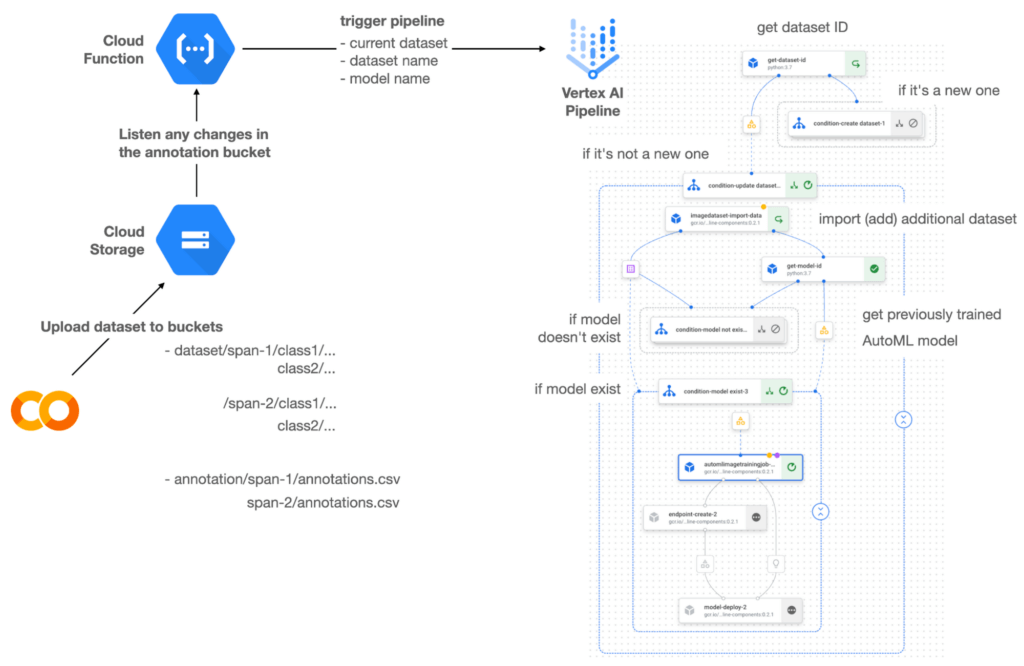

Figure 1 shows the overall architecture presented in this blog. We cover the components and their connection in the context of two common workflows of the MLOps system.
Components
Vertex AI is at the heart of this system, and it leverages Vertex Managed Datasets, AutoML, Predictions, and Pipelines. We can create and manage a dataset as it grows using Vertex Managed Datasets. Vertex AutoML selects the best model without your knowing much about modeling. Vertex Predictions creates an endpoint (RestAPI) to which the client communicates.
It is a simple, fully managed yet somewhat complete end-to-end MLOps workflow moves from a dataset to training a model that gets deployed. This workflow can be programmatically written in Vertex Pipelines. Vertex Pipelines outputs the specification for an ML pipeline allowing you to re-run the pipeline whenever or wherever you want. Specify when and how to trigger the pipeline using Cloud Functions and Cloud Storage.
Cloud Functions is a serverless way to deploy your code in Google Cloud. In this particular project, it triggers the pipeline by listening to changes on the specified Cloud Storage location. Specifically, if a new dataset is added, for example, a new span number is created; the pipeline is triggered to train the dataset, and a new model is deployed.
Workflow
This MLOps system prepares the dataset with either Vertex Dataset’s built-in user interface (UI) or any external tools based on your preference. You can upload the prepared dataset into the designated GCS bucket with a new folder named SPAN-NUMBER. Cloud Functions then detects the changes in the GCS bucket and triggers the Vertex Pipeline to run the jobs from AutoML training to endpoint deployment.
Inside the Vertex Pipeline, it checks if there is an existing dataset created previously. If the dataset is new, Vertex Pipeline creates a new Vertex Dataset by importing the dataset from the GCS location and emits the corresponding Artifact. Otherwise, it adds the additional dataset to the existing Vertex Dataset and emits an artifact.
When the Vertex Pipeline recognizes the dataset as a new one, it trains a new AutoML model and deploys it by creating a new endpoint. If the dataset isn’t new, it tries to retrieve the model ID from Vertex Model and determines whether a new AutoML model or an updated AutoML model is needed. The second branch determines whether the AutoML model has been created. If it hasn’t been created, the second branch creates a new model. Also, when the model is trained, the corresponding component emits the artifact as well.
Directory structure that reflects different distributions
In this project, I have created two subsets of the CIFAR-10 dataset, SPAN-1 and SPAN-2. A more general version of this project can be found here, which shows how to build training and batch evaluation pipelines pipelines. The pipelines can be set up to cooperate so they can evaluate the currently deployed model and trigger the retraining process.
ML Pipeline with Kubeflow Pipelines (KFP)
We chose to use Kubeflow Pipelines to orchestrate the pipeline. There are a few things that I would like to highlight. First, it’s good to know how to make branches with conditional statements in KFP. Second, you need to explore AutoML API specifications to fully leverage AutoML capabilities, such as training a model based on the previously trained one. Last, you also need to find a way to emit artifacts for Vertex Dataset and Vertex Model to consume that Vertex AI can recognize them. Let’s go through these one by one.
Branching strategy
In this project, there are two main conditions and two sub-branches inside the second main branch. The main branches split the pipeline based on a condition if there is an existing Vertex Dataset. The sub-branches are applied in the second main branch, which is selected when there is an exciting Vertex Dataset. It looks up the list of models and decides to train an AutoML model from scratch or a previously trained one.
ML pipelines written in KFP can have conditions with a special syntax of kfp.dsl.Condition. For instance, we can define the branches as follows:
from google_cloud_pipeline_components import aiplatform as gcc_aip


# try to get Vertex Dataset ID
dataset_op = get_dataset_id(...)

with kfp.dsl.Condition(name="create dataset",
                       dataset_op.outputs['Output'] == 'None'):
    # Create Vertex Dataset, train AutoML from scratch, deploy model

with kfp.dsl.Condition(name="update dataset",
                       dataset_op.outputs['Output'] != 'None'):
    # Update existing Vertex Dataset
    ...

    # try to get Vertex Model ID
    model_op = get_model_id(...)

    with kfp.dsl.Condition(name='model not exist',
                           model_op.outputs['Output'] == 'None'):
    # Create Vertex Dataset, train AutoML from scratch, deploy model

    with kfp.dsl.Condition(name='model exist',
                           model_op.outputs['Output'] != 'None'):
        # Create Vertex Dataset, train AutoML based on trained one, deploy model
get_dataset_id and get_model_id are custom KFP components used to determine if there is an existing Vertex Dataset and Vertex Model respectively. Both return “None” if a model is found and some other value if a model isn’t found. They also emit Vertex AI-aware artifacts. You will see what this means in the next section.
Emit Vertex AI-aware artifacts
Artifacts track the path of each experiment in the ML pipeline and display metadata in the Vertex Pipeline UI. When Vertex AI aware artifacts are released into in the pipeline, Vertex Pipeline UI displays links for its internal services such as Vertex Dataset, so that users can visit a web page for more information.
So how could you write a custom component to generate Vertex AI-aware artifacts? To do this, custom components should have Output[Artifact] in their parameters. Then you need to replace the resourceName of the metadata attribute with a special string format.
The following code example is the actual definition of get_dataset_id used in the previous code snippet:
@component(
    packages_to_install=["google-cloud-aiplatform",
                         "google-cloud-pipeline-components"]
)
def get_dataset_id(project_id: str,
                     location: str,
                 dataset_name: str,
                 dataset_path: str,
                      dataset: Output[Artifact]) -> str:
    from google.cloud import aiplatform
    from google.cloud.aiplatform.datasets.image_dataset import ImageDataset
    from google_cloud_pipeline_components.types.artifact_types import VertexDataset


    aiplatform.init(project=project_id, location=location)

    datasets = aiplatform.ImageDataset.list(project=project_id,
                                            location=location,
                                            filter=f'display_name={dataset_name}')

    if len(datasets) > 0:
        dataset.metadata['resourceName'] =
               f'projects/{project_id}/locations/{location}/datasets/{datasets[0].name}'
        return f'projects/{project_id}/locations/{location}/datasets/{datasets[0].name}'
    else:
        return 'None'
As you see, the dataset is defined in the parameters as Output[Artifact]. Even though it appears in the parameter, it is actually emitted automatically. You just need to provide the necessary data as if it is a function variable.
The dataset component retrieves the list of Vertex Dataset by calling the aiplotform.ImageDataset.list API. If the length of it is zero, it simply returns ‘None’. Otherwise, it returns the found resource name of the Vertex Dataset and provides the dataset.metadata[‘resourceName’] with the resource name at the same time. The Vertex AI-aware resource name follows a special string format, which is ‘projects/<project-id>/locations/<location>/<vertex-resource-type>/<resource-name>’.
The <vertex-resource-type>can be anything that points to an internal Vertex AI service. For instance, if you want to specify that the artifact is the Vertex Model, then you should replace <vertex-resource-type> with models. The <resource-name> is the unique ID of the resource, and it can be accessed in the name attribute of the resource found by the aiplatform API. The other custom component, get_model_id, is written in a very similar way as well.
AutoML based on the previous model
You sometimes want to train a new model on top of the previously best model. If that is possible, the new model will probably be much better than the one trained from scratch, because it leverages previously learned knowledge.
Luckily, Vertex AutoML comes with the ability to train a model using a previous model. AutoMLImageTrainingJobRunOp component lets you train a model by simply providing the base_model argument as follows:
training_job_run_op =
gcc_aip.AutoMLImageTrainingJobRunOp(
…,
base_model=model_op.outputs['model'],
…
)
When training a new AutoML model from scratch, you pass ‘None‘ in the base_model argument, and it is the default value. However, you can set it with a VertexModel artifact, and the component will trigger an AutoML training job based on the other model.
One thing to be careful of is that VertexModel artifacts can’t be constructed in a typical way of Python programming That means you can’t create an instance of VertexModel artifact by setting the id found in the Vertex Model dashboard. The only way you can create one is to set the metadata[‘resourceName’] parameters properly. The same rule applies to other Vertex AI-related artifacts such as VertexDataset. You can see how the VertexDataset artifact is constructed properly to get an existing Vertex Dataset to import additional data into it. See the full notebook of this project here.
Cost
You can reproduce the same result from this project with the free $300 credit when you create a new GCP account.
At the time of this blog post, Vertex Pipelines costs about $0.03/run, and the type of underlying VM for each pipeline component is e2-standard-4, which costs about $0.134/hour. Vertex AutoML training costs about $3.465/hour for image classification. GCS holds the actual data, which costs about $2.40/month for 100GiB capacity, and Vertex Dataset is free.
To simulate two different branches, the entire experiment took about one to two hours, and the total cost for this project is approximately $16.59. Please find more detailed pricing information about Vertex AI here.
Conclusion
Many people underestimate the capability of AutoML, but it is a great alternative for app and service developers who have little ML background. Vertex AI is a great platform that provides AutoML as well as Pipeline features to automate the ML workflow. In this article, I have demonstrated how to set up and run a basic MLOps workflow, from data injection to training a model based on the previously-achieved best one, to deploying the model to a Vertex AI platform. With this, we can let our ML model automatically adapt to the changes in a new dataset. What’s left for you to implement is to integrate a model monitoring system to detect data/model drift. One example is found here.
Experts’ Guideline for Personalizing Platforms with the Right Recommendation System on Google Cloud

4995
Of your peers have already read this article.
5:00 Minutes
The most insightful time you'll spend today!
Over the past two decades, consumers have become accustomed to receiving personalized recommendations in all facets of their online life. Whether that be recommended products while shopping on Amazon, a curated list of apps in the Google Play store, or relevant videos to watch next on YouTube. In fact, in a Verge article “How YouTube perfected the feed: Google Brain gave YouTube new life,” the Google Brain team reveals how their recommendation engine has impacted the platform with “more than 70 percent of the time people spend watching videos on the site being driven by YouTube’s algorithmic recommendations” thereby increasing time spent on the platform by 20X in three years.
It’s become clear that personalized recommendations are no longer a differentiator for an organization but rather something consumers have come to expect in their day-to-day experiences online. So what should you do if you are behind the curve and want to get started or simply want to improve upon what you already have? While there are all sorts of techniques, from content-based systems to deep learning methods, our goal in this recommender-focused blog series is to demystify three available approaches to building recommendation systems on Google Cloud: Matrix Factorization in BigQuery Machine Learning (BQML), Recommendations AI, and deep retrieval techniques available via the Two-Tower built-in algorithm.
One of these approaches can be used to meet you where you are in your personalization journey, no matter if you are just starting or if you are well into it. This first blog post will introduce our three approaches and when to use them.
What is Matrix Factorization and how does it work?
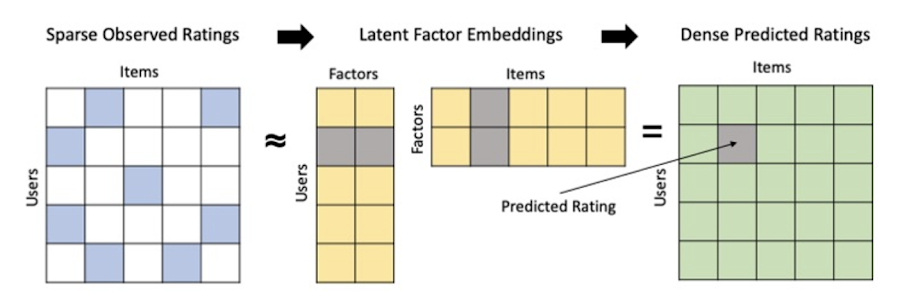
Collaborative filtering is a foundational model for building a recommendation system as the input dataset is simple and the embeddings are learned for you. How does Matrix factorization fit into the mix you might be wondering? Matrix factorization is simply the model that applies collaborative filtering. BQML enables users to create and execute a matrix factorization model by using standard SQL directly in the data warehouse.
Collaborative filtering begins by creating an interaction matrix. The interaction matrix represents users as a row and items as columns in your dataset. This interaction matrix often is sparse in nature as not all users will have interacted with many items in your catalog. This is where embeddings come into play. Generating embeddings for users and items not only allows you to collapse many sparse features into a lower dimensional space but they also allow you to derive a similarity measure so that similar users/items fall nearby in the embedding space. These similarity measures are key as collaborative filtering uses similarities between users and items to make the end recommendations. The underlying assumption being that similar users will like similar items whether that be movies or handbags.
What’s required to get started?
To train a matrix factorization model you need a table that includes three input columns: user(s), item(s), and an implicit or explicit feedback variable (e.g., ratings is an example of explicit feedback). With the base input dataset in place, you can then easily run your model in BigQuery after specifying several hyperparameters in your CREATE MODEL SQL statement. Hyperparameters are available to specify the number of embeddings, the feedback type, the amount of L2 regularization applied and so on.
Why use this approach and who is it a good fit for?
As mentioned earlier, Matrix Factorization in BQML is a great way for those new to recommendation systems to get started. Matrix factorization has many benefits:
- Little ML Expertise: Leveraging SQL to build the model lowers the level of ML expertise needed
- Few Input Features: Data inputs are straightforward, requiring a simple interaction matrix
- Additional Insight: Collaborative filtering is adept at discovering new interests or products for users
While Matrix Factorization is a great tool for deriving recommendations it does come with additional considerations and potential drawbacks depending upon the use case.
- Not Amenable to Large Feature Sets: The input table can only contain two feature columns (e.g., user(s), item(s)). If there is a need to include additional features such as contextual signals, Matrix factorization may not be the right method for you.
- New Items: If an item is not available in the training data, the system can’t create an embedding for it and will have difficulty recommending similar items. While there are some workarounds available to address this cold-start issue, if your item catalog often includes new items, Matrix factorization may not be a good fit.
- Input Data Limitations: While the input matrix is expected to be sparse, training examples without feedback can cause problems. Filtering for items and users that have at least a handful of feedback (e.g., ratings) examples can improve the model. More information on limitations can be found here.
In summary, for users with a simplified dataset looking to iterate quickly and develop a baseline recommendation system, Matrix Factorization is a great approach to begin your personalization AI journey.
What is Recommendations AI and how does it work?
Recommendations AI is a fully managed service which helps organizations deploy scalable recommendation systems that use state-of-the-art deep learning techniques, including cutting-edge architectures such as two-tower encoders, to serve personalized and contextually relevant recommendations throughout the customer journey.
Deep learning models are able to improve the context and relevance of recommendations in part because they can easily address the previously mentioned limitations of Matrix Factorization. They incorporate a wide set of user and item features, and by definition they emphasize learning successive layers of increasingly meaningful representations from these features. This flexibility and expressivity allows them to capture complex relationships like short-lived fashion trends and niche user behaviors. However, this increased relevance comes at a cost, as deep learning recommenders can be difficult to train and expensive to serve at scale.
Recommendations AI helps organizations take advantage of serving these deep learning models and handles the MLOps required to serve these models globally with low latency. Models are automatically retrained daily and tuned quarterly to capture changes in customer behavior, product assortment, pricing, and promotions. Newly trained models follow a resilient CI/CD routine which validates they are fit to serve and promotes them to production without service interruption. The models achieve low serving latency by using a scalable approximate nearest neighbors (ANN) service for efficient item retrieval at inference time. And, to maintain consistency between online and offline tasks, a scalable feature store is used, preventing common production challenges such as data leakage and training-serving skew.
What’s required to get started?
To get started with Recommendations AI we first need to ingest product and user data into the API:
- Import product catalog: For large product catalog updates, ingest catalog items in bulk using the catalogItems.import method. Frequent catalog updates can be schedule with Google Merchant Center or BigQuery
- Record user events: User events track actions such as clicking on a product, adding items to cart, or even purchasing an item. These events need to be ingested in real time to reflect the latest user behavior and then joined to items imported in the product catalog
- Import historical user events: The models need sufficient training data before they can provide accurate predictions. The recommended user event data requirements are different across model types (learn more here)
Once the data requirements are met, we are able to create one or multiple models to serve recommendations:
- Determine your recommendation types and placements: The location of the recommendation panel and the objective for that panel impact model training and tuning. Review the available recommendations types, optimization objectives, and other model tuning options to determine the best options for your business objectives.
- Create model(s): Initial model training and tuning can take 2-5 days depending on the number of user events and size of the product catalog
- Create serving configurations and preview recommendations: After the model is activated, create serving configurations and preview the recommendations to ensure your setup is functioning as expected before serving to production traffic
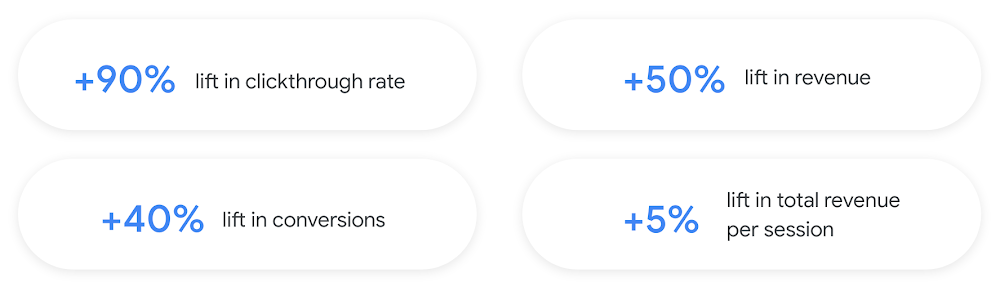
Once models are ready to serve, consider setting up A/B experiments to understand how newly trained models impact your customer experience before serving them to 100% of your traffic. In the Recommendations AI console, see the Monitoring & Analytics page for summary and placement-specific metrics (e.g., recommender-engaged revenue, click-through-rate, conversion rate, and more).
Why use this approach and who is it a good fit for?
Recommendations AI is a great way to engage customers and grow your online presence through personalization. It’s used by teams who lack technical experience with production recommendation systems, as well as customers who have this technical depth but want to allocate their team’s effort towards other priorities and challenges. No matter your team’s technical experience or bandwidth, you can expect several benefits with Recommendations AI:
- Fully managed service: no need to preprocess data, train or hypertune machine learning models, load balance or manually provision you infrastructure – this is all taken care of for you. The recommendation API also provides a user-friendly console to monitor performance over time.
- State-of-the-art AI: take advantage of the same modeling techniques used to serve recommendations across Google Ads, Google Search, and YouTube. These models excel in scenarios with long-tail products and cold-starts users and items
- Deliver at any touchpoint: serve high-quality recommendations to both first-time users and loyal customers anywhere in their journey via web, mobile, email, and more
- Deliver globally: serve recommendations in any language anywhere in the world at low-latency with a fully automated global serving infrastructure
- Your data, your models: Your data and models are yours. They’ll never be used for any other Google product nor shown to any other Google customer
For users looking to leverage state of the art AI to fuel their recommendation systems but need an existing solution to get up and running more quickly, Recommendations AI is the right solution for you.
What are Two Tower encoders and how do they work?
As a reminder, in recommendation system design, our objective is to surface the most relevant set of items for a given user or set of users. The items are usually referred to as the candidate(s) where we might include information about the items such as the title or description of the item, other metadata about the item like language, number of views, or even clicks on the item over time. User(s) are often represented in the form of a query to a recommendation system where we might provide details about the user such as the location of the user, preferred languages, and what they have searched for in the past.
Let’s start with a common example. Imagine that you are creating a movie recommendation system. The input candidates for such a system would be thousands of movies and the query set can consist of millions of viewers. The goal of the retrieval stage is to select a smaller subset of movies(candidates) for each user and then score and rank order them before presenting the final recommended list to the query/user.
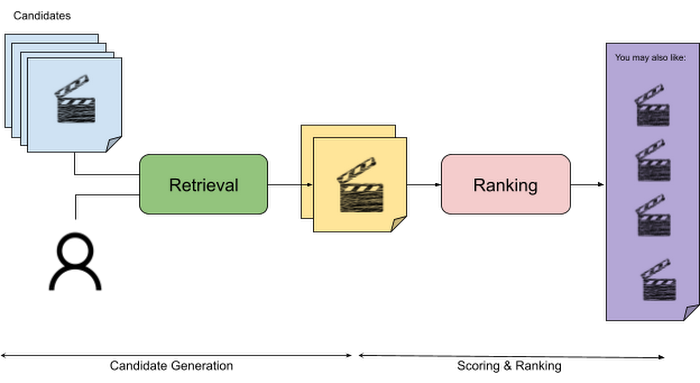
The retrieval stage is able to refine our list of candidates by encoding both the candidate and the query data so they share the same embedding space. A good embedding space will place candidates which are similar to one another closer together and dissimilar items/queries farther apart in the embedding space.
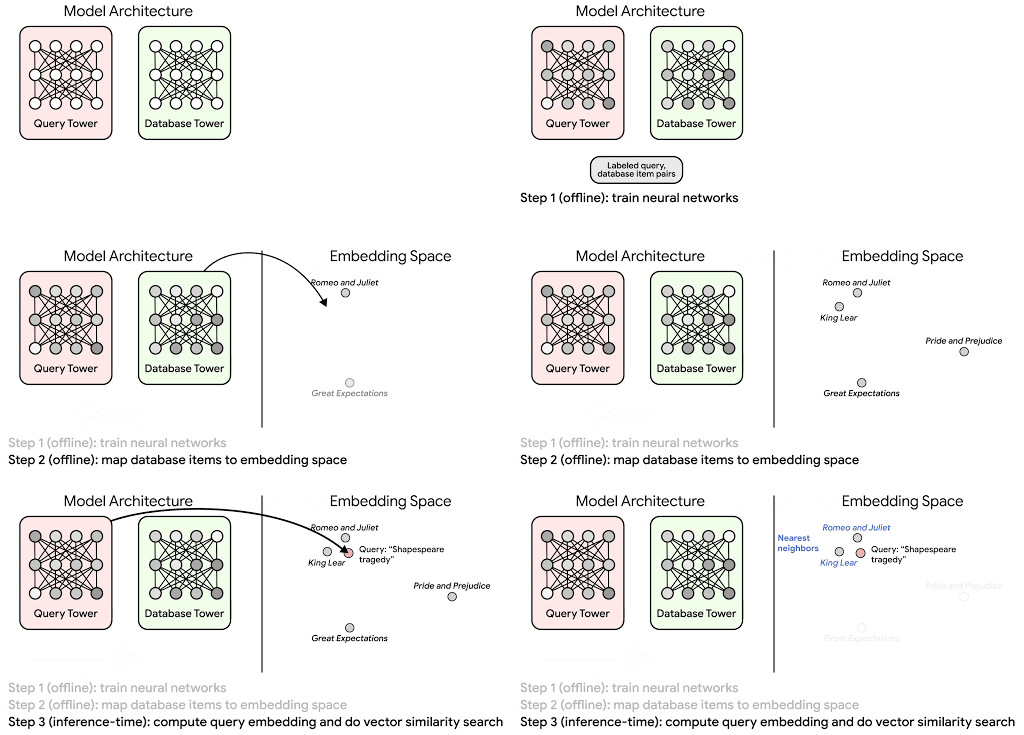
Once we have a database of query and candidate embeddings we can then use an approximate nearest neighbor search method to then generate a list of final “like” candidates, i.e. find a certain number of nearest neighbors for a given query/user and surface final recommendations.
What’s required to get started?
At the most basic level, in order to train a two-tower model you need the following inputs:
- Training Data: Training data is created by combining your query/user data with data about the candidates/items. The data must include matched pairs, cases where both user and item information is available. Data in the training set can include many formats from text, numeric data, or even images.
- Input Schema: The input schema describes the schema of the combined training data along with any specific feature configurations.
Several services within Vertex AI have come available that complement the existing Two-Tower built-in algorithm and can be leveraged in your execution:
- Nearest Neighbor (ANN) Service: Vertex AI Matching Engine and ScANN provide a high-scale and low-latency Approximate Nearest Neighbor (ANN) service so you can more easily identify similar embeddings.
- Hyperparameter Tuning Service: A hyperparameter tuning service such as Vizier can help you identify the optimal hyperparameters such as the number of hidden layers, the size of the hidden layers, and the learning rate in fewer trials.
- Hardware Accelerators: Specialized hardware, such as GPUs or TPUs, can be valuable in your recommendation system to help accelerate experiments and improve the speed of training cycles.
Why use this approach and who is it a good fit for?
The Two-Tower built-in algorithm can be considered the “custom sports car” of recommendation systems and comes with several benefits:
- Greater Control: While Recommendations AI uses the two-tower architecture as one of the available architectures it doesn’t provide granular control or visibility into model training, example generation, and model validation details. In comparison, the Two-Tower built in algorithm provides a more customizable approach as you are training a model directly in a notebook environment.
- More Feature Options: The Two Tower approach can handle additional contextual signals ranging from text to images.
- Cold Start Cases: Leveraging a rich set of features not only enhances performance but also allows the candidate generation to work for new users or new candidates.
While the Two-Tower built in algorithm is an excellent and best-in class solution for deriving recommendations, it does come with additional considerations and potential drawbacks depending upon the use case.
- Technical ML Expertise Required: Two tower encoders are not a “plug and play” solution like the other approaches mentioned above. In order to effectively leverage this approach, appropriate coding and ML expertise is required.
- Speed to Insight: Building out a custom solution via two-tower encoders may require additional time as the solution is not pre-built for the user.
For users looking for greater control, increased flexibility, and have the technical chops to easily work within a managed notebook environment – the two-tower built in algorithm is the right solution for them.
What’s next?
In this article, we explored three common methods for building recommendation systems on Google Cloud Platform. As you can see thus far, there are alot of considerations to take into account before choosing a final approach. In an effort to help you align more quickly we have distilled the decision criteria down to a few simple steps (see below for more details).
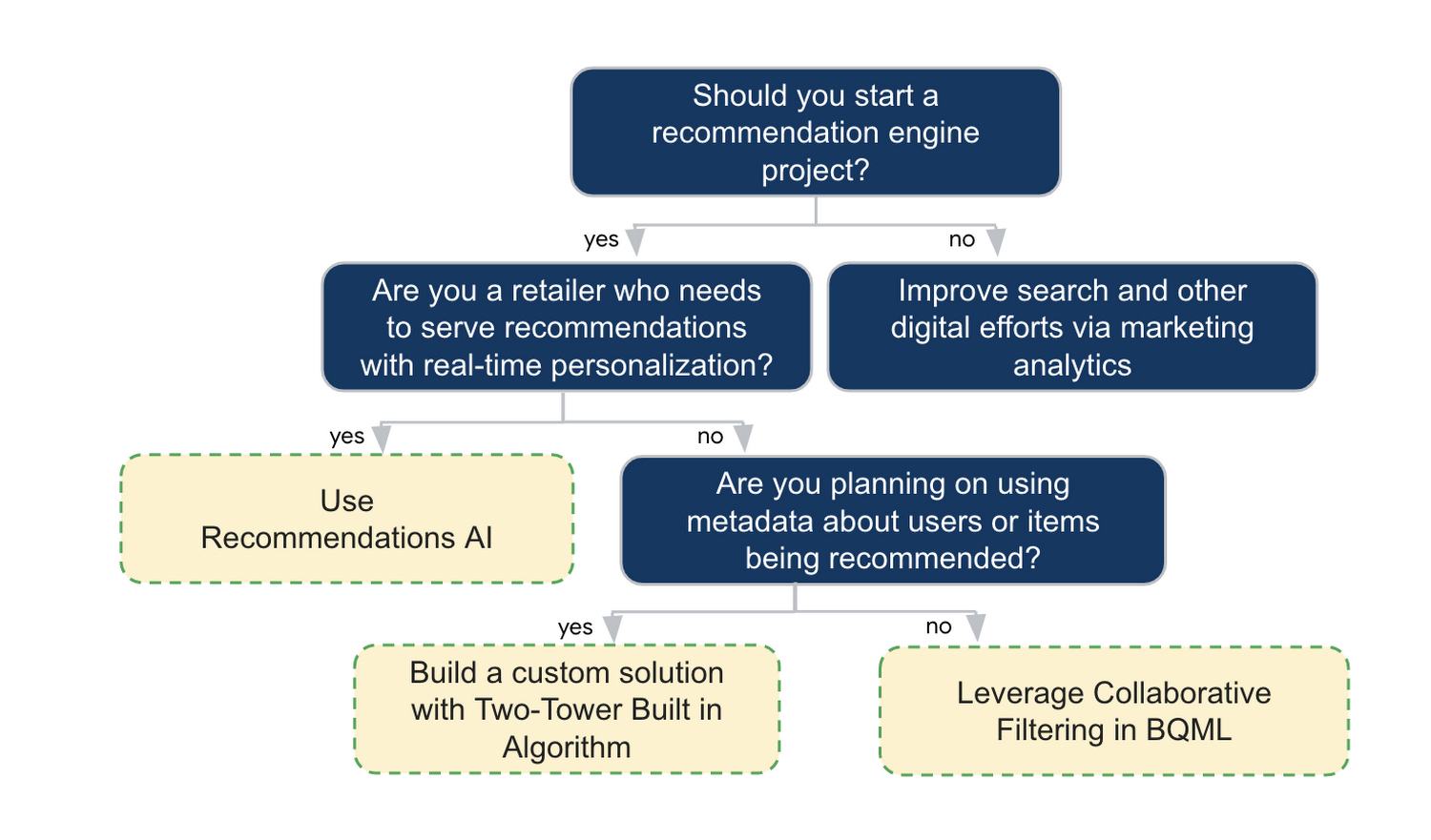
In the next installments of this series, we will dive more deeply into each method, explore how hardware accelerators can play a key role in recommendation system design, and discuss how recommendation systems may be leveraged in key verticals. Stay tuned for future posts in our recommendation systems series. Thank you for reading! Have a question or want to chat? Find authors here – R.E. [Twitter | LinkedIn], Jordan [LinkedIn], and Vaibhav [LinkedIn].
Acknowledgements
Special thanks to Pallav Mehta, Henry Tappen,Abhinav Khushraj, and Nicholas Edelman for helping to review this post.
References

New Technology: The Projected Total Economic Impact™ Of Google Cloud Contact Center AI
DOWNLOAD RESEARCH REPORTS3364
Of your peers have already downloaded this article
15:30 Minutes
The most insightful time you'll spend today!
According to Forrester Research, customers expect easy and effective customer service that builds positive emotional connections every time they interact with a brand or organization. Additionally, 40% of surveyed business leaders say that improving their organization’s customer experience (CX) is a high priority, ahead of initiatives like improving products and differentiation and reducing costs.
While this is a huge opportunity, improving CX in contact centers presents a significant challenge to organizations because most legacy interactive voice response (IVR) systems were never designed with CX in mind, and they are often left unchanged for years at a time except for the addition of more options when a new product or service is launched.
Providing great CX is a top priority for most organizations, but because contact centers typically operate 24/7, decision makers are hesitant to make significant changes or upgrades out of fear of breaking their already overtaxed systems. This paradox has left many organizations to rely on outdated or bloated IVR systems far too long. And with constantly rising customer expectations around service and support, these organizations are falling further and further behind competitors that are investing in next-generation solutions.
Google Cloud Contact Center Artificial Intelligence (CCAI) provides a cloud-based platform that leverages Google Cloud’s artificial intelligence (AI) and machine learning (ML) capabilities, including natural language processing and speech capabilities to augment, support, and assist contact center agents, and to deploy voice bots and chatbots that can naturally converse with customers to understand their intent and help resolve their calls with minimal intervention from an agent.
CCAI also has the ability to tie into an organization’s back-end data to enable bots to perform higher-value tasks, identify and authenticate customers, and augment agent desktops to provide relevant information and turn-by-turn guidance through different scenarios.
Google commissioned Forrester Consulting to conduct a New Technology: Projected Total Economic Impact™ (New Tech TEI) study and examine the projected return on investment (PROI) enterprises may realize by deploying CCAI.
Read the report and find out:
- Why businesses say their traditional contact center tools introduced challenges
- How Google’s Contact Center AI overcomes these challenges
- What effect the switch had to their financial and productivity investments

5831
Of your peers have already downloaded this article
4:23 Minutes
The most insightful time you'll spend today!
As a customer experience platform, Genesys helps clients nurture great relationships with customers, and creates seamless user journeys across all channels and devices. Its technologies are used by more than 10,000 companies in over 100 countries, making Genesys the top provider of its kind for 25 years in a row.
To improve data efficiency and communication across the company, Genesys turned to Analytics Pros, a digital analytics agency. Together, they used the power of Google Data Studio to transform the way teams across Genesys accessed and used data.
Communicating With Data
The marketing and product teams at Genesys had always been passionate about using data to optimize their user experience and marketing channels. But the problem was showing the data. The different offices and executives around the world had trouble logging in to view the data—and once they did, the reports were intimidating and confusing.
After learning more about the capabilities of Data Studio, Genesys decided to run a pilot project. Analytics Pros helped the company combine multiple data sets into self-service, fully-customizable dashboards on Data Studio. And it was a huge success. Regional teams were thrilled to have meaningful dashboards, and even executives started using and sharing reports.
More Relevant Stories for Your Company


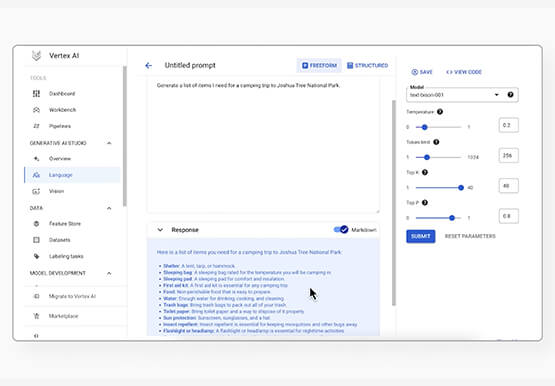

Prototyping Language Applications Made Easy with Generative AI
Did you know generative AI allows developers to prototype applications quickly? With Generative AI Studio on Google Cloud, developers can quickly explore and customize AI models that can be leveraged in Google Cloud applications. Watch along and see how developers, with the right tools, can experiment with new ideas in


Creating Value With the Breadth and Depth of AI Platform
Watch Craig Wiley, Director of Product Management - Google Cloud, as he breaks down and simplifies AI for enterprises and the adoption of AI. “As I think about AI, fundamentally AI only does two things. One it helps you grow your market, increase subscribership, increase users, increase their spend or



Transitioning Kagglers to TPU with TF 2.x
Kaggle has, historically, become synonymous with machine learning competitions but it's much more than that. Kaggle is a data science platform. Over 5 million data scientists from all over the world come to Kaggle to not only not only participate in machine learning competitions but to learn data science build

Architecting Data Pipelines Directly Improves Customer Experience at Universe.com
At Universe, we serve customers day and night and are always working to make sure they have a great experience, whether online or at one of our live events. Our technology has to make that possible, and our legacy systems weren’t cutting it anymore. What we needed was a consistent,
