





Data Cloud Skills to Pick Up in 2022: Google Experts Recommended

4950
Of your peers have already read this article.
3:00 Minutes
The most insightful time you'll spend today!
It’s 2022 and nanosatellites, NFTs, and autonomous cars that deliver your pizza are in full force. In a world where people rely on simple technology to untangle complex problems, companies must deliver simple experiences to be successful in today’s landscape. For many cloud providers this means enabling tightly integrated data offerings that simplify the data delivery process without losing sight of the sophisticated needs of the modern data consumer.
But while the name of the game is helping companies reach informed decisions from their data simpler and faster, what about the data practitioners – data analysts, data engineers, database administrators, developers, etc – who use these cloud data tools and technologies everyday? To proactively stay ahead of data cloud market trends in 2022 should data practitioners invest their time in specializing their data cloud skill sets (e.g. go deep in, say, data pipelining skills) or instead invest their time generalizing their data cloud skill sets (e.g. growing proficiencies in a mix of data analytics, databases, AI/ML, and more domains)?
Skill deep or wide with data – that is the question
For Abdul Razack, VP, Solutions Engineering, Technology Solutions and Strategy at Google Cloud, the answer is a bit of both.
“Data practitioners need to be broad in terms of their technology skills, but specialized with respect to the domain or domains in which they apply them. The reason why is because many things that used to be separate skill sets are now converging – like business analytics, streaming, machine learning, data pipelines, and data warehousing. Data practitioners need to be able to implement end-to-end workflows that solve specific business problems using skills from each category.”
It’s true, thousands of customers are choosing Google’s data cloud because it offers a unified and open approach to cloud that enables their practitioners to break down silos, begin and end projects without leaving the data platform, and innovate faster across their organization.
The data practitioners who mirror Google data cloud’s frame of mind of being smart and agile across data domains in their skilling and learning will reap the benefits of solving more nuanced problems – building out internet-scale applications, fine tuning smart processes with analytics and AI, constructing data meshes that make product building simple, etc – at a larger scale than they would if they specialized in just one or two areas alone.
“Of course at the end of the day it depends on what tools a data practitioner is using to complete their workflows. There’s only so much you can learn and skills you can develop when you’re using limited tools. Growing data proficiencies across the board is made a lot easier when you’re using a data platform like BigQuery to address all these needs. BigQuery eliminates the choices you have to make – for instance you don’t have to choose between streaming data and data at rest, batch and realtime, or business intelligence and data science. This freedom gives data professionals a huge advantage when they’re building their skill sets and taking on more complex projects.” -Abdul Razack – VP, Solutions Engineering, Technology Solutions and Strategy, Google Cloud
Knowing your value is half the battle when upskilling
While some experts think technology is the limiting factor of whether or not you can even go wide or go deep in the first place, others like Google Cloud’s Head of Data and Analytics Bruno Aziza purport that it also depends on who you are, who you wish to be, and what investments your company is making to ensure you can become that person.
“If you wish to set yourself up to be a Chief Data Officer, then you’ll want to understand how technologies fit together across your data estate first” said Aziza. “Only after you feel like you’re the go-to ‘data person’ can you then decide which part of the technology stack you want to double-down on.”
But technology isn’t everything. Aziza notes, “Make sure you focus on the business impact that your data work provides. You want to spend as much time as you can with your business counterparts to understand their business goals and challenges. The Harvard Business Review provides great guidance on how to succeed as a Chief Data Officer.”
Even if you don’t have your sights set on a C-suite role, both Aziza and Razack contend that the number one skill data practitioners should tackle in 2022 is actually a broad and perhaps abstract one: develop and exercise the curiosity to solve problems with a data-driven strategy.
That is, today’s data practitioners should always be interested in educating themselves in the industry and continually upskilling in something. And their employers should also be invested in helping practitioners develop those interests, most likely through exposure to learning materials, engaging in career conversations, subsidized courses, or incentives attached to pursuing a new certification or skill.
“Every industry is going through a digital transformation and the ability to identify what data to collect, how to prepare the data, and how to derive insights from it is critical. Therefore, the ability to find business challenges and formulate a data-driven approach to address those problems is the most important skill to have.” Abdul Razack – VP, Solutions Engineering, Technology Solutions and Strategy, Google Cloud.
Take the example of the “Data Mesh” I just wrote about in VentureBeat. You’ll find 3 types of attitudes towards this new concept. There are Disciples who encourage continued learning only from the source – like the author of a new book or the creator of a theory. There are Distractors who tell you that new skills, trends, and technologies are fake news. And there are Distorters like vendors who will sell you one easy fix solution. But it’s the data practitioner who needs to proceed with caution when interacting with all three types and forge their own path to discovering the truth when they’re learning and building skills. And for better or worse, this comes with trial and error, experimentation, and an eagerness to grow relative to where they began.”
Ready to start data upskilling? Start here.
For those interested in keeping up their data curiosities, check out our Data Journeys video series. Each week Bruno Aziza investigates a new authentic customer’s data journey – from migrating to cloud or building a data platform to carrying out new data for good initiatives. Learn how they did it, their data dos and don’ts, and what’s next for them on their journey. These videos include a flavor of both specializing your data competencies and broadening your data competencies.
For those interested in deepskilling, connect with Google’s data community at our upcoming virtual event: Latest Google Cloud data analytics innovations. Register and save your spot now to get your data questions answered live by GCP’s top data leaders and watch demos from our latest products and features including BigQuery, Dataproc, Dataplex, Dataflow, and more.
If you have any questions or need support along your learning journey – we’re here for you! Sign up to be a Google Cloud Innovator, and join the Google Cloud Data Analytics Community.
The Right Datawarehouse Helps Fight Climate Change, While Improving Customer Experience

7051
Of your peers have already read this article.
4:30 Minutes
The most insightful time you'll spend today!
When you think about climate change, you might not consider a daily commute to work or a drive around town as big contributing factors. And yet, transport is the fastest growing source of CO2 emissions from fossil fuel, which in turn is the largest contributor to climate change. This is the key insight behind the mission of Spanish carbon-neutral multinational Acciona. The group, which provides sustainable solutions for infrastructure and renewable energy projects across 65 countries, launched an electric scooter sharing service called Acciona Mobility in 2018.
Aiming to contribute to the decarbonization of the transport sector while helping relieve traffic congestion within cities, Acciona Mobility enables users to rent electric scooters powered 100% by energy from renewable sources. Users can find, reserve, and rent the scooters at the tap of their mobile screens via the Acciona Mobility application and pay on the basis of minutes spent riding. The app, which is available free to download online, is also the gateway through which new users can register for the service, which welcomes anyone with a valid driver’s license for motorbikes. After having their right to drive, identity, and card details validated, citizens can start enjoying the service, available 24 hours a day, every day of the year.
“We needed to deploy a reliable infrastructure for a new service before understanding exactly what its scale and demand would be. Our strategy was to adopt a serverless architecture that can grow with us to sustain our long-term vision. This kind of thinking led us directly to Google Cloud.”
—Jose Luis Rosell, CIO Services Division, Acciona
“Acciona Mobility is exciting because it stems from our vision to make people’s lives easier in a sustainable way,” says Jose Luis Rosell, CIO of Acciona’s Services Division. “40% of the pollution near cities comes from private transportation. We want to help solve that problem with zero-carbon, electric, multimodal transportation that’s also convenient for people to use.”
However, Jose Luis says that building the appropriate IT infrastructure to bring the new service to life required external support. “We needed to deploy a reliable infrastructure for a new service before understanding exactly what its scale and demand would be. Our strategy was to adopt a serverless architecture that can grow with us to sustain our long-term vision,” he explains. “This kind of thinking led us directly to Google Cloud.”
Developing the transportation platform of the future
Because Acciona was already a Google Cloud customer, Jose Luis and his team reached the decision to develop the new service on Google Cloud with ease, as he explains: “We had a very positive experience working closely with the Google Cloud team during Acciona’s first project on Google Cloud, and that collaborative mentality is very important for us. We feel Google Cloud is a trustworthy partner that is willing to take risks with us and is flexible enough to lead us through business uncertainty with the right technology,” he says. “So we were confident that its technology and people could help us bring the Acciona Mobility service from theory to reality.”
This time, Acciona partnered with cloud consultancy Altostratus as well, to consult on a selection of Google Cloud products that would help develop the application quickly by making use of managed services. Acciona’s strategy was to launch the new services first in Madrid, where the company is headquartered, and then spread the vision across more cities later, if the idea worked out well in practice. Due to the scale of the project and its data needs, BigQuery was chosen as the primary data warehouse to store all the information related to the service, such as the location of scooters and their availability status. With all its data readily available on BigQuery, Acciona is able to run specific queries that help it to gain insights such as which urban areas have the highest volume of scooters being rented. Knowing this, Acciona can reorganize availability to make sure there are always enough scooters in that specific location.
Integrating it with Pub/Sub and Dataflow, Acciona ensures that the data generated by scooters is ingested and processed in real time so that users searching for scooters nearby, using the Acciona Mobility application on their phones, can always have up-to-date information at hand. Using Google Maps Platform APIs such as the Directions API, Acciona’s mobile app translates the geographical coordinates of scooters into an easy-to-read address displayed beside a visual map. Using Cloud SQL, Acciona automates the storage capacity management of the database as the number of scooters and active users grow.
Meanwhile, Google Cloud Armor protects the service against cyber breaches and distributed denial of service attacks to keep it running uninterrupted. In addition, Google Cloud itself helps to reinforce the cyber security measures with secure-by-default managed services, such as data encryption. “The managed services mean more resilience and more uptime, because we don’t need to worry about maintenance or external threats,“ says Jose Luis of the solutions protecting all information generated by the new service, which as CIO is a topic he holds dearly. “I face cybersecurity issues more confidently as a Google Cloud partner,” he adds.
“Today, we have data coming in every 15 seconds from 10,000 electric scooters around Europe. BigQuery and Cloud SQL-managed services help us handle that data very carefully and with precision so that our users don’t experience any lags when searching for scooters or returning them.”
—Jose Luis Rosell, CIO Services Division, Acciona
Expanding an 100% sustainable transport solution throughout Spain
Within two months of the decision to deploy Acciona Mobility on Google Cloud, the service was ready for launch, filling the streets of Madrid with 500 electric scooters that run 100% on renewable energy. By 2020, the number of scooters has grown to 10,000 and the service has scaled to multiple cities in and outside of Spain, including Lisbon, Milan, and Rome. To date, more than 3.5 million intracity rides have used the Acciona Mobility app, reducing CO2 emissions by more than 1,000 tons.
“Today, we have data coming in every 15 seconds from 10,000 electric scooters around Europe. BigQuery and Cloud SQL-managed services help us handle that data very carefully and with precision so that our users don’t experience any lags when searching for scooters or returning them,” says Jose Luis of the fast-growing scale of the project.
“Google Cloud enables us to keep our services always available and to scale quickly to respond to its growing demand. Our ratings have been very positive as a result. More importantly, our vision of transportation as a cleaner, more sustainable commodity is really spreading and resonating with the public.”
—Jose Luis Rosell, CIO Services Division, Acciona
Set to continue expanding, Acciona is using Google Kubernetes Engine to make sure the Acciona Mobility application has the computing capacity it needs to continue scaling to reach new markets and serve more users. On that note, Google operations tools (formerly Stackdriver) are also being deployed to help monitor, troubleshoot, and improve the performance of the application as it scales.
“Google Cloud enables us to keep our services always available and to scale quickly to respond to its growing demand. Our ratings have been very positive as a result. More importantly, our vision of transportation as a cleaner, more sustainable commodity is really spreading and resonating with the public,” he concludes.
Countries can Tackle Food Wastage Crisis Using Google’s Data Analytics

4970
Of your peers have already read this article.
4:00 Minutes
The most insightful time you'll spend today!
With over ⅓ of the food in the USA ending up as waste according to the USDA, it is a compelling challenge to address this travesty. What will happen to hunger, food prices, trash reduction, water consumption, and overall sustainability when we stop squandering this abundance?

Beginning with the departure from the farm to the back of the store, the freshness clock continues to run. Grocers work very hard to purchase high quality produce items for their customers and the journey to the shelf can take a toll in both quality and remaining shelf life. Suppliers focus on delivering their items through the arduous supply chain journey to the store with speed and gentle handling. The baton is then passed to the store to unload and present the items to customers with care to sell through each lot significantly before the expiration or sell by date. This is to ensure that the time spent in the customer’s home is ample to ensure a great eating experience as well. Food waste is a farm to fork problem with opportunity at every step of the chain, but today we will focus on the segment that the grocery industry oversees.
With the complexities of weather, geopolitical issues, distribution, sales variability, pricing, promotions, and inventory management, it seems daunting to impact waste. Fortunately, data analytics and machine learning in the cloud is a powerful weapon in the fight against food waste. Data Scientists harness knowledge to draw meaning from data turning that data into decision driving information.
One key Google has been working on to accelerate value is to break down data silos and leverage machine learning to realize better outcomes, using our Google Data Cloud platform. This enables better planning through demand forecasting, Inventory management, assortment planning, and dynamic pricing and promotions.
That sounds great but how does it work?
Let’s walk through a day in the life journey to see how the integrated Google Data Cloud platform can change the game for good. Our friendly fictitious grocer FastFreshFood is committed to selling high quality perishable items to their local market. Their goal is to minimize food waste and maximize revenue by selling as much perishable fresh food as possible before the sell by date. Our fictitious grocer in partnership with Google Cloud could build a solution that will take a significant bite out of their food waste volume and better satisfy customers.
- Sales through the register and online are processed in real time with Datastream, Dataflow to keep an accurate perpetual inventory by minute of every single item.
- A Demand forecasting model using machine learning algorithms in BigQuery then identifies needs for back room replenishment, so Direct Store Delivery and daily store Distribution Centers manage ordering more efficiently to ensure just the right amount of each product each day.
- Realtime reporting dashboards in Looker with alerting capabilities enable the system to operate with strong associate support and understanding. The reporting suite shows inventory levels into the future, daily orders, and at risk items.
The pricing algorithm could also alert store leadership concerning any items that will not sell through and suggest real time in store specials resulting in zero waste at shelf and maximized revenue.

This approach is not just for perishable categories and is a pattern that works well for in-store produced items and center store items. The key point is that by bringing ML/AI to difficult business problems grocers are reinventing what is possible for both their profitability and sustainability.
The technical implementation of this design pattern in Google Cloud leverages Datastream, Dataflow, BigQuery and Looker products, it is detailed in a technical tutorial accompanying this blog post.
In partnership with Google Cloud, retailers can solve complex problems with innovative solutions to achieve higher quality, lower cost, and provide great customer experiences. To learn more from this and other use cases, please visit our Design Patterns website.
Curious to learn more?
We’re excited to share what we know about tackling food waste at Google, a topic we’ve been working on in the last decade as we’ve embarked on reducing our own food waste in our operations in over 50 countries in the world. The Google Food for Good team works exclusively on Google Cloud Platform with our partners on this topic. Two additional articles below.
Silos are for food, not for data – tackling food waste with technology
This business Cloud blog directly addresses information silos that currently exist across many nodes in the food system and how to break down cultural and organizational barriers to sharing.
“Unsiloing” data to work toward solving food waste and food insecurity
This follow-on technical Cloud blog articulates the path to setting up data pipelines, translating between data sets (not everyone calls a tomato a tomato!) and making sense of emergent insights.
BigQuery Admin Reference Guide Series: How to Optimize Data in Your Native Storage
3722
Of your peers have already read this article.
4:00 Minutes
The most insightful time you'll spend today!
So far on the BigQuery Admin Reference Guide series, we’ve talked about the different logical resources available inside of BigQuery. Now, we’re going to begin talking about BigQuery’s architecture. In this post we’re diving into how BigQuery stores your data in native storage, and what levers you can pull to optimize how your data is stored.
Columnar storage format
BigQuery offers fully managed storage, meaning you don’t have to provision servers. Sizing is done automatically and you only pay for what you use. Because BigQuery was designed for large scale data analytics data is stored in columnar format.
Traditional relational databases, like Postgres and MySQL, store data row-by-row in record-oriented storage. This makes them great for transactional updates and OLTP (Online Transaction Processing) use cases because they only need to open up a single row to read or write data. However, if you want to perform an aggregation like a sum of an entire column, you would need to read the entire table into memory.
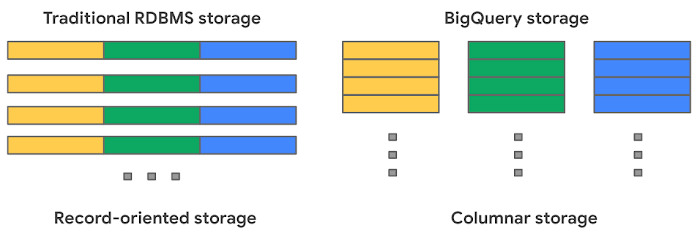
BigQuery uses columnar storage where each column is stored in a separate file block. This makes BigQuery an ideal solution for OLAP (Online Analytical Processing) use cases. When you want to perform aggregations you only need to read the column that you are aggregating over.
Optimized storage format
Internally, BigQuery stores data in a proprietary columnar format called Capacitor. We know Capacitor is a column-oriented format as discussed above. This means that the values of each field, or column, are stored separately so the overhead of reading the file is proportional to the number of fields you actually read. This doesn’t necessarily mean that each column is in its own file, it just means that each column is stored in a file block, which is actually compressed independently for increased optimization.
What’s really cool is that Capacitor builds an approximation model that takes in relevant factors like the type of data (e.g. a really long string vs. an integer) and usage of the data (e.g. some columns are more likely to be used as filters in WHERE clauses) in order to reshuffle rows and encode columns. While every column is being encoded, BigQuery also collects various statistics about the data — which are persisted and used later during query execution.
If you want to learn more about Capacitor, check out this blog post from Google’s own Chief BigQuery Officer.
Encryption and managed durability
Now that we understand how the data is saved in specific files, we can talk about where these files actually live. BigQuery’s persistence layer is provided by Google’s distributed file system, Colossus, where data is automatically compressed, encrypted, replicated, and distributed.
There are many levels of defense against unauthorized access in Google Cloud Platform, one of them being that 100% of data is encrypted at rest. Plus, if you want to control encryption yourself, you can use customer-managed encryption keys.
Colossus also ensures durability by using something called erasure encoding – which breaks data into fragments and saves redundant pieces across a set of different disks. However, to ensure the data is both durable and available, the data is also replicated to another availability zone within the same region that was designated when you created your dataset.
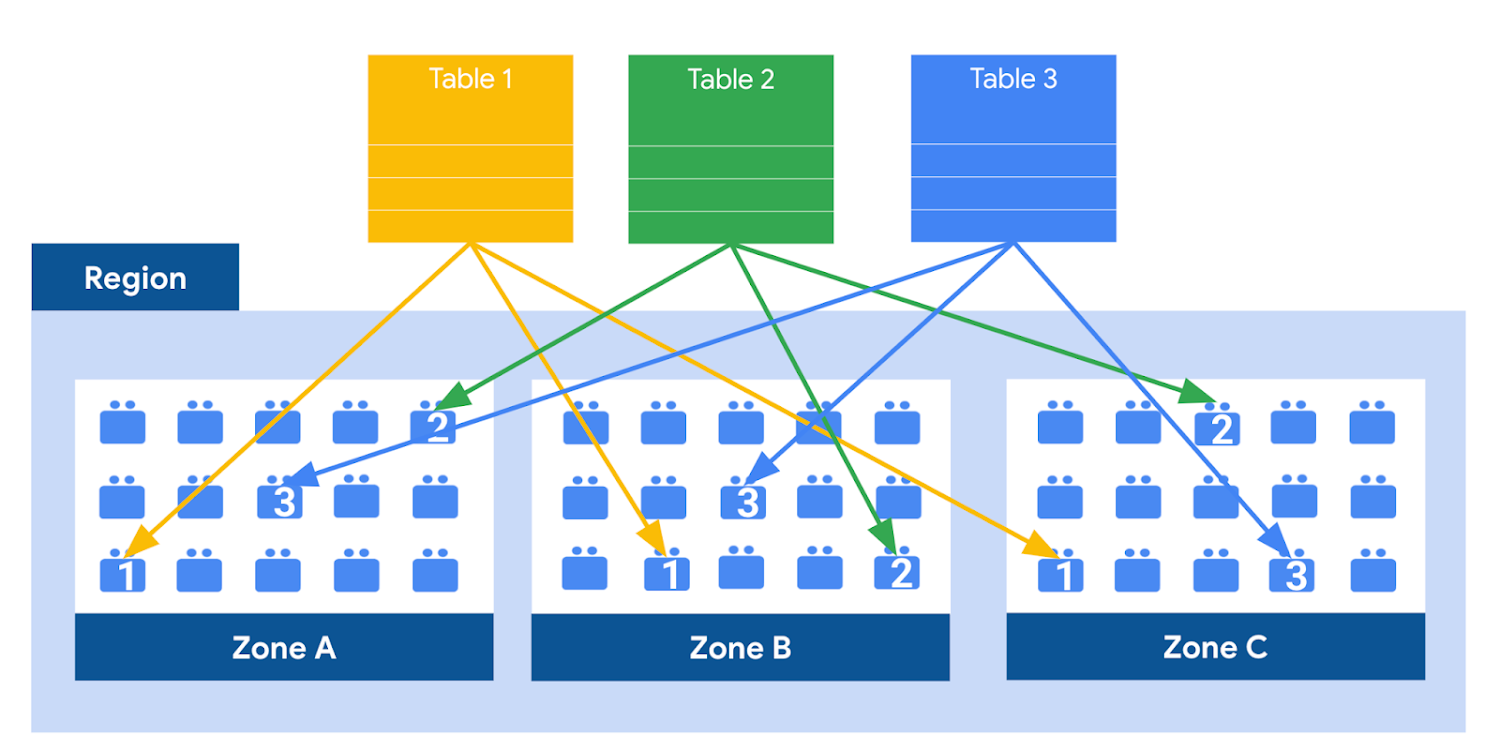
This means data is saved in a different building that has a different power system and network. The chances of multiple availability zones going offline at once is very small. But if you use “Multi-Region” locations – like the US or EU – BigQuery stores another copy of the data in an off-region replica. That way, the data is recoverable in the event of a major disaster.
This is all accomplished without impacting the compute resources available for your queries. Plus encoding, encryption and replication are included in the price of BigQuery storage – no hidden costs!
Optimizing storage for query performance
BigQuery has a built-in storage optimizer that helps arrange data into the optimal shape for querying, by periodically rewriting files. Files may be written first in a format that is fast to write but later BigQuery will format them in a way that is fast to query. Aside from the optimization happening behind the scenes, there are also a few things you can do to further enhance storage.
Partitioning
A partitioned table is a special table that is divided into segments, called partitions. BigQuery leverages partitioning to minimize the amount of data that workers read from disk. Queries that contain filters on the partitioning column can dramatically reduce the overall data scanned, which can yield improved performance and reduced query cost for on-demand queries. New data written to a partitioned table is automatically delivered to the appropriate partition.
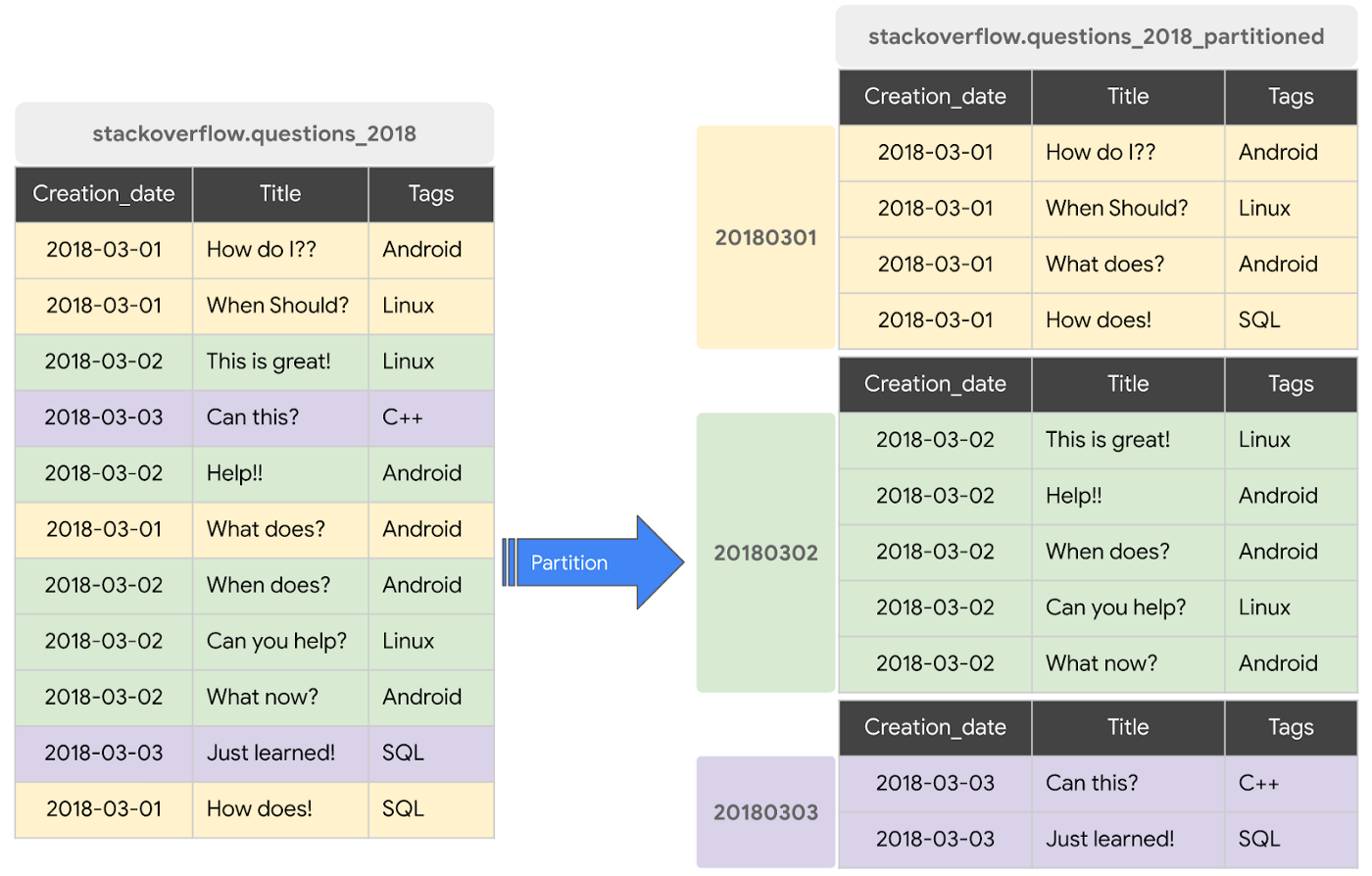
BigQuery supports the following ways to create partitioned tables:
- Ingestion time partitioned tables: daily partitions reflecting the time the data was ingested into BigQuery. This option is useful if you’ll be filtering data based on when new data was added. For example, the new Google Trends Dataset is refreshed each day, you might only be interested in the latest trends.
- Time-unit column partitioned tables: BigQuery routes data to the appropriate partition based on date value in the partitioning column. You can create partitions with granularity starting from hourly partitioning. This option is useful if you’ll be filtering data based on the date value in the table, for example looking at the most recent transactions by including a WHERE clause for transaction_created_date
- INTEGER range partitioned tables: Partitioned based on an integer column that can be bucketed. This option is useful if you’ll be filtering data based on an integer column in the table, for example focusing on specific customers using customer_id. You can bucket the integer values to create appropriately sized partitions, like having all customers with IDs from 0-100 in the same partition.
Partitioning is a great way to optimize query performance, especially for large tables that are often filtered down during analytics. When deciding on the appropriate partition key, make sure to consider how everyone in your organization is leveraging the table. For large tables that could cause some expensive queries, you might want to require partitions to be used.
Partitions are designed for places where there is a large amount of data and a low number of distinct values. A good rule of thumb is making sure partitions are greater than 1 GB. If you over partition your tables, you’ll create a lot of metadata – which means that reading in lots of partitions may actually slow down your query.
Clustering
When a table is clustered in BigQuery, the data is automatically sorted based on the contents of one or more columns (up to 4, that you specify). Usually high cardinality and non-temporal columns are preferred for clustering, as opposed to partitioning which is better for fields with lower cardinality. You’re not limited to choosing just one, you can have a single table that is both partitioned and clustered!
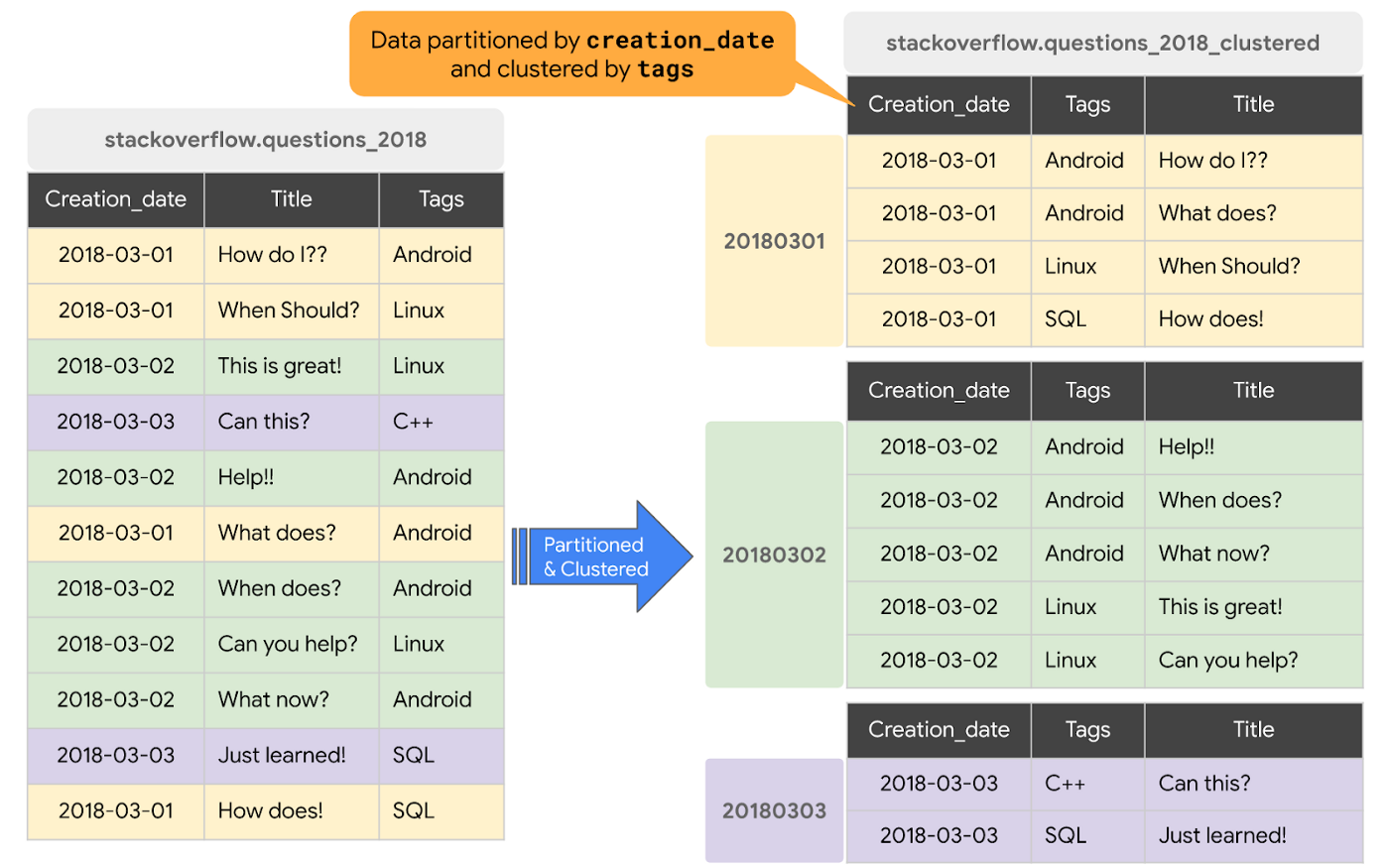
The order of clustered columns determines the sort order of the data. When new data is added to a table or a specific partition, BigQuery performs free, automatic re-clustering in the background. Specifically, clustering can improve the performance for queries:
- Containing where clauses with a clustered column: BigQuery uses the sorted blocks to eliminate scans of unnecessary data. The order of the filters in the where clause matters, so use filters that leverage clustering first
- That aggregate data based on values in a clustered column: performance is improved because the sorted blocks collocate rows with similar values
- With joins where the join key is used to cluster the table: less data is scanned, for some queries this offers a performance boost over partitioning!
Looking for some more information and example queries? Check out this blog post!
Denormalizing
If you come from a traditional database background, you’re probably used to creating normalized schemas – where you optimize your structure so that data is not repeated. This is important for OLTP workloads (as we discussed earlier) because you’re often making updates to the data. If your customer’s address is stored every place they have made a purchase, then it might be cumbersome to update their address if it changes.
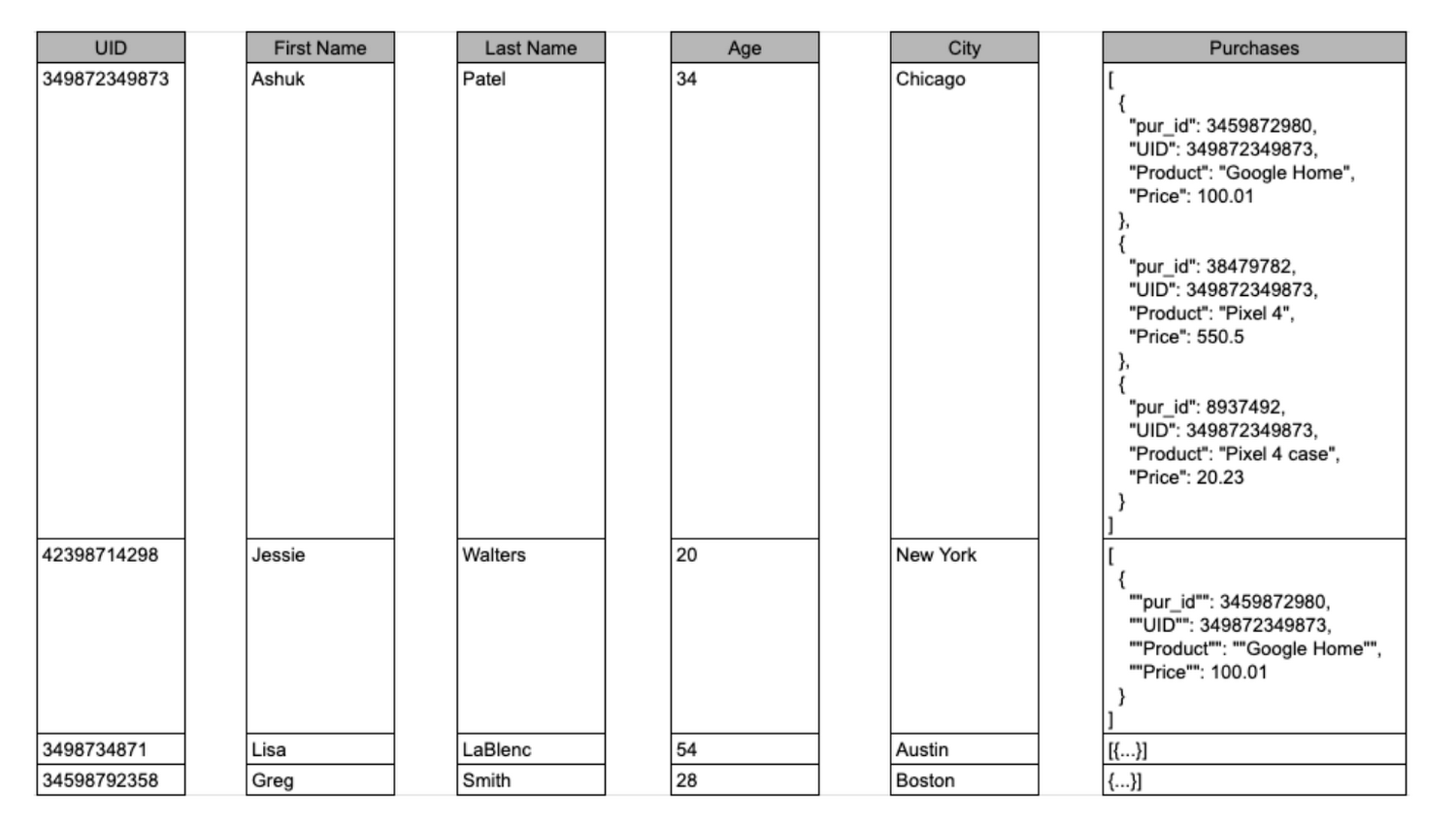
However, when performing analytical operations on normalized schemas, usually multiple tables need to be joined together. If we instead denormalize our data, so that information (like the customer address) is repeated and stored in the same table, then we can eliminate the need to have a JOIN in our query. For BigQuery specifically, we can also take advantage of support for nested and repeated structures. Expressing records using STRUCTs and ARRAYs can not only provide a more natural representation of the underlying data, but in some cases it can also eliminate the need to use a GROUP BY statement. For example, using ARRAY_LENGTH instead of COUNT.
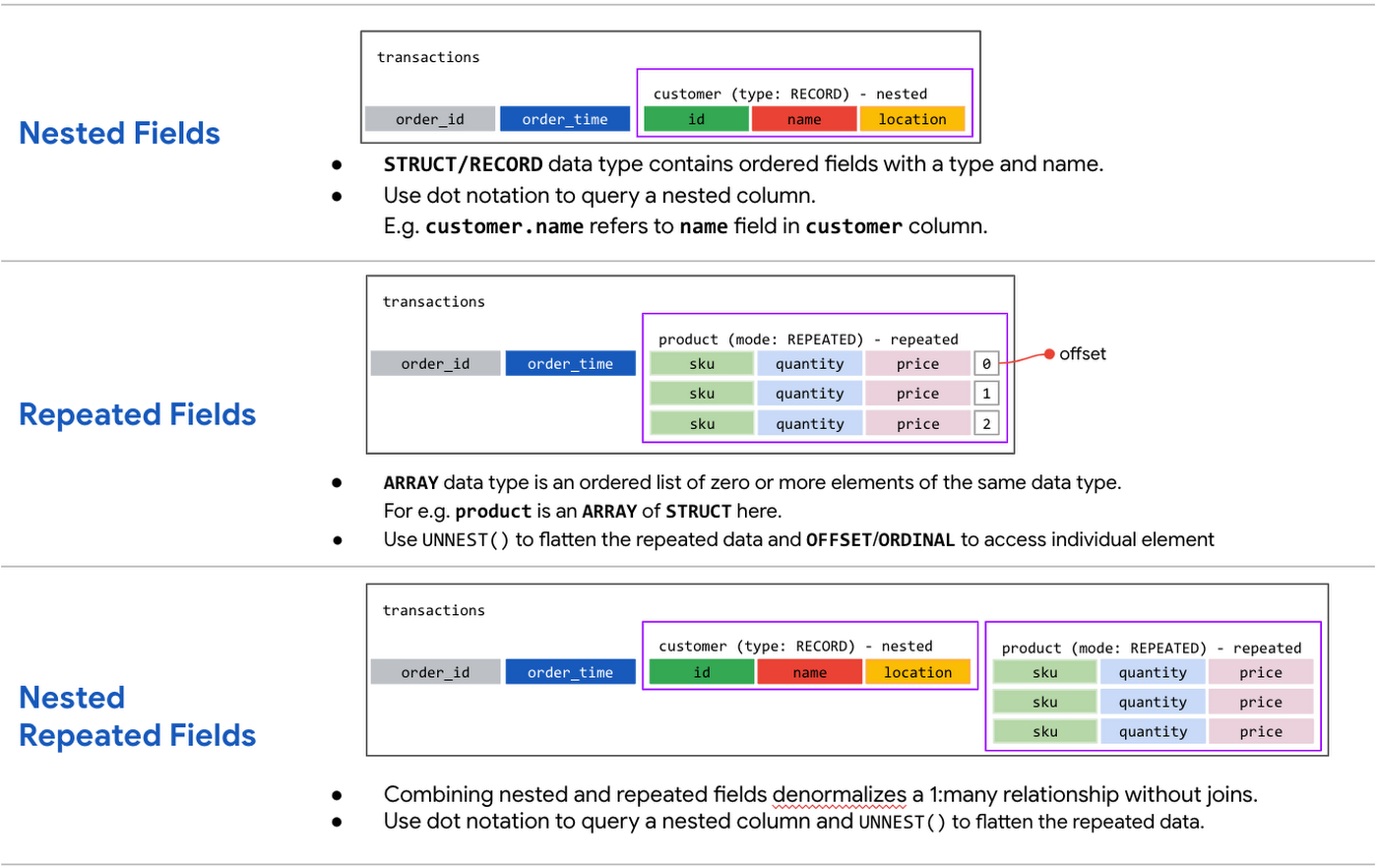
Keep in mind that denormalization has some disadvantages. First off, they aren’t storage-optimal. Although, many times the low cost of BigQuery storage addresses this concern. Second, maintaining data integrity can require increased machine time and sometimes human time for testing and verification. We recommend that you prioritize partitioning and clustering before denormalization, and then focus on data that rarely requires updates.
Optimizing for storage costs
When it comes to optimizing storage costs in BigQuery, you may want to focus on removing unneeded tables and partitions. You can configure the default table expiration for your datasets, configure the expiration time for your tables, and configure the partition expiration for partitioned tables. This can be especially useful if you’re creating materialized views or tables for ad-hoc workflows, or if you only need access to the most recent data.
Additionally, you can take advantage of BigQuery’s long term storage. If you have a table that is not used for 90 consecutive days, the price of storage for that table automatically drops by 50 percent to $0.01 per GB, per month. This is the same cost as Cloud Storage Nearline, so it might make sense to keep older, unused data in BigQuery as opposed to exporting it to Cloud Storage.Thanks for tuning in this week! Next week, we’re talking about query processing – a precursor to some query optimization techniques that will help you troubleshoot and cut costs. Be sure to stay up-to-date on this series by following me on LinkedIn and Twitter!
3500
Of your peers have already downloaded this article
19:30 Minutes
The most insightful time you'll spend today!
While data has influenced major business decisions throughout the ages, the term “data warehouse” isn’t even half a century old. But it’s an important concept; by centralizing data from many disparate sources, analysts can make more informed decisions. Traditionally, this has meant collecting data in on-premises infrastructure. But as data volumes have grown, these legacy systems have not been able to keep up with changing demands: They are difficult to scale, offer no support for machine learning and artificial intelligence initiatives, and are simply too expensive to maintain.
With increased advances in technology, the introduction of more cost-effective compute and storage options have changed the data warehouse landscape. Now more than ever, businesses need an agile and efficient analytics infrastructure that allows them to derive insights at a fraction of the cost of legacy systems. Modern data warehouses can give organizations the competitive edge, offering customers fast and easy access to business intelligence while seamlessly scaling to meet increased demands.
In this ebook, based on the keynote presentation featuring Forrester Analyst Michele Goetz at the 2019 Future of Your Data Warehouse digital conference, we’ll look at the evolution of data warehousing and how a cloud infrastructure can offer immense benefits for the future.
How We Built a Brand New Bank on Google Cloud and Cloud Spanner: The First Scalable, Enterprise-grade, Database Service

6540
Of your peers have already read this article.
6:30 Minutes
The most insightful time you'll spend today!
Editor’s note: Technology today lets companies of any size take on entire industries simply with an innovative business model plus digital distribution. Take Shine, a French startup whose platform helps freelancers manage their finances — and their administrative commitments. Here, Raphael Simon, Shine’s CTO and co-founder, talks about why Shine built a new bank on Google Cloud Platform, and in particular Cloud Spanner.
More and more people are deciding to take the plunge and start a freelance career. Some of them by choice, others out of necessity. One of their biggest pain points is dealing with administrative tasks.
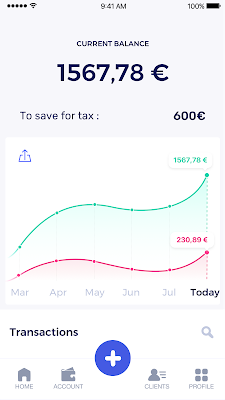
In some countries, especially in Europe, the administrative burden of being a freelancer is similar to what a company of 10 or more people deals with. A freelancer doesn’t necessarily have the time or skills to manage all this paperwork. So we are building a new bank for freelancers from the ground up that helps automate administrative tasks associated with their business.
Shine’s banking services and financial tools make it as easy to work as a freelancer as it is to work for a larger company. We deal with administrative tasks on behalf of the freelancer so that he or she can focus on their job: finding and wowing clients.

Building our infrastructure
As a new bank, we had the opportunity to build our infrastructure from the ground up. Designing an infrastructure and choosing a database presents tough decisions, especially in the financial services world. Financial institutions come under tremendous scrutiny to demonstrate stability and security. Even a tiny leak of banking data can have tremendous consequences both for the bank and its clients, and any service interruption can trigger a banking license to be suspended or a transaction to be declined.
At the same time, it’s vital for us to optimize our resources so we can maximize the time we spend developing user-facing features. In our first six months, we iterated and validated a prototype app using Firebase, and secured our seed funding round (one of the largest in Europe in 2017).
Based on our positive experience with Firebase, plus the ease-of-use and attractive pricing that Google Cloud offered, we decided to build our platform on Google Cloud Platform (GCP).
We were drawn to GCP because it has a simple, consistent interface that is easy to learn. We chose App Engine flexible environment with Google Cloud Endpoints for an auto-scaling microservices API. These helped us reduce the time, effort, and cost in terms of DevOps engineers, so we could invest more in developing features, while maintaining our agility.
We use Cloud Identity and Access Management (Cloud IAM) to help control developer access to critical parts of the application such as customer bank account data. It was quite a relief to lean on a reliable partner like Google Cloud for this.
Database decisions
Next came time to choose a database. Shine lives at the financial heart of our customers’ businesses and provides guidance on things like accounting and tax declaration. The app calculates the VAT for each invoice and forecasts the charges they must pay each quarter.
Due to the sensitivity of our customers’ data, the stakes are high. We pay careful attention to data integrity and availability and only a relational database with support for ACID transactions (Atomicity, Consistency, Isolation, Durability) can meet this requirement.
At the same time, we wanted to focus on the app and user experience, not on database administration or scalability issues. We’re trying to build the best possible product for our users, and administering a database has no direct value for our customers. In other words, we wanted a managed service.
Cloud Spanner combines a globally distributed relational database service with ACID transactions, industry-standard SQL semantics, horizontal scaling, and high availability. Cloud Spanner provided additional security, high-availability, and disaster recovery features out-of-the-box that would have taken months for us to implement on our own. Oh, and no need to worry about performance — Cloud Spanner is fast. Indeed, Cloud Spanner has been a real asset to the project, from the ease-of-use of creating an instance to scaling the database.
Cloud Spanner pro tips
We began working with Cloud Spanner and have learned a lot along the way. Here are some technical notes about our deployment and some best practices that may be useful to you down the road:
- Cloud Spanner allows us to change a schema in production without downtime. We always use a NOT NULL constraint, because we generally think that using NULL leads to more errors in application code. We always use a default value when we create an entity through our APIs and we use Cloud Dataflow to set values when we change a schema (e.g., adding a field to an entity).
- With microservices, it’s generally a good practice to make sure every service has its own database to ensure data isolation between the different services. However, we adopted a slightly different strategy to optimize our use of Cloud Spanner. We have an instance on which there are three databases — one for production, one for staging and one for testing our continuous integration (CI) pipeline. Each service has one or more interleaved tables that are isolated from others services’ tables (we do not use foreign-keys between tables from different services). This way our microservices data are not tightly “coupled”.
- We created an internal query service that performs read-only queries to Cloud Spanner to generate a dashboard or do complex queries for analytics. It is the only service where we allow joins between tables across services.
- We take advantage of Cloud Spanner’s scalability, and thus don’t delete any data that could one day be useful and/or profitable.
- We store all of our business logs on Cloud Spanner, for example connection attempts to the application. We append the ‘-Logs’ suffix to them.
- When possible, we always create an interleave.
In short, implementing Cloud Spanner has been a good choice for Shine:
- It’s saved us weeks, if not months, of coding.
- We feel we can rely on it since it’s been battle-tested by Google.
- We can focus on building a disruptive financial services product for freelancers and SMBs.
And because Cloud Spanner is fully managed and horizontally scalable, we don’t have to worry about hardware, security patches, scaling, database sharding, or the possibility of a long and risky database migration in the future. We are confident Cloud Spanner will grow with our business, particularly as we expand regionally and globally. I strongly recommend Cloud Spanner to any company looking for a complete database solution for business-critical, sensitive, and scalable data.
More Relevant Stories for Your Company

Choose the Right Google Database Service With This Chart
A growing number of Indian enterprises are leveraging the Google Cloud to run their database workloads. This is because Google Cloud offers fully managed, scalable database services to support all applications today and tomorrow. In fact, Forrester has named Google as a Leader in The Forrester Wave™: Database-as-a-Service, Q2 2019.

Google Cloud Data Heroes Series: Honoring Data Practitioner’s Journey and Learning with GCP
Google Cloud Data Heroes is a series where we share stories of the everyday heroes who use our data analytics tools to do amazing things. Like any good superhero tale, we explore our Google Cloud Data Heroes’ origin stories, how they moved from data chaos to a data-driven environment, what

Ahead of the Curve: 5 Data and AI Trends Set to Shape 2023
How will your organization manage this year's data growth and business requirements? Your actions and strategies involving data and AI will improve or undermine your organization's competitiveness in the months and years to come. Our teams at Google Cloud have an eye on the future as we evolve our strategies
Google Cloud Migration Speeds Up The New York Times’ Journey to New Normal
Like virtually every business across the globe, The New York Times had to quickly adapt to the challenges of the coronavirus pandemic last year. Fortunately, our data system with Google Cloud positioned us to perform quickly and efficiently in the new normal. How we use data We have an end-to-end type of
