





CARTO’s Data Visualization Powered by Google Cloud and deck.g

4094
Of your peers have already read this article.
7:00 Minutes
The most insightful time you'll spend today!
Editor’s note: Today’s blog post is from Alberto Asuero, CTO of CARTO, the location intelligence platform. Today he shares more details about the source of the data for advanced data visualizations created with Google Maps Platform and deck.gl and how the CARTO platform enables this workflow.
During Google Cloud Next in October, the Google team announced the newest release of the deck.gl visualization library, thanks to a collaboration with our geospatial company CARTO and the vis.gl Technical Steering Committee (TSC). The deck.gl release includes a deep integration with the new WebGL-powered features in the Maps JavaScript API that allows deck.gl to render 2D and 3D visualizations directly on the Google basemap.
Our team built an example app that visualizes a variety of data sources that show the potential for electrification of truck fleets in Texas. This app showcases the different types of advanced data visualizations that can be created with Google Maps Platform and deck.gl. Today, I want to share more details about the source of the data for these visualizations and how the CARTO platform enables this workflow.
Google Cloud provides a strong serverless data warehousing solution, BigQuery, with support for geospatial queries. When you are dealing with spatial data, creating maps to explore and visualize these datasets is an important and common need. The CARTO Spatial Extension for BigQuery provides an easy way to create connections to the data warehouse, design a map with data coming from BigQuery tables, and then add these visualizations to a web app using deck.gl.
Making a simple map
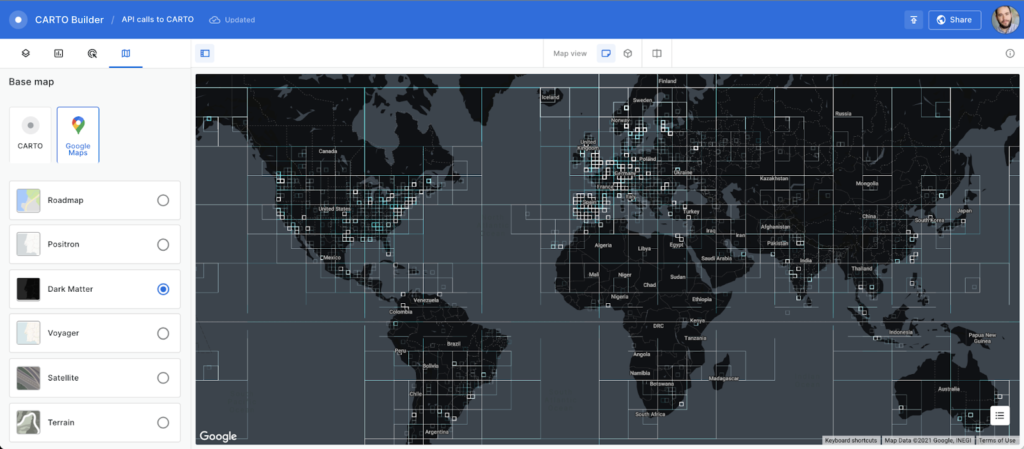
To create a simple map using the CARTO platform, you can sign up for a trial account. Once you have signed in, you can set up a connection to your BigQuery instance using a service account. Then, you can go to the Data Explorer and browse the available datasets to find the table you want to use as the datasource in your map. For more information, check out the CARTO documentation.
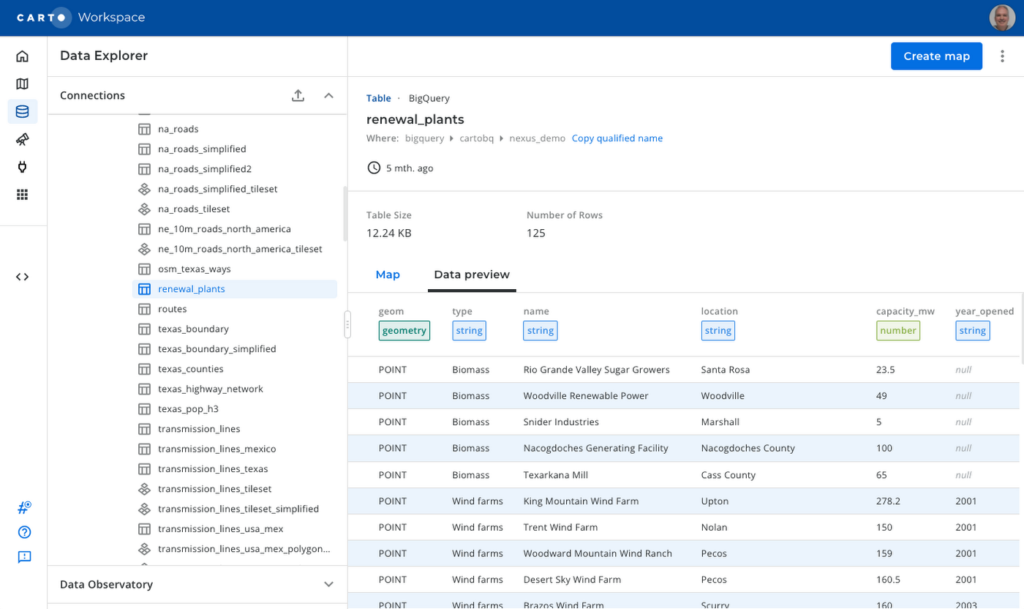
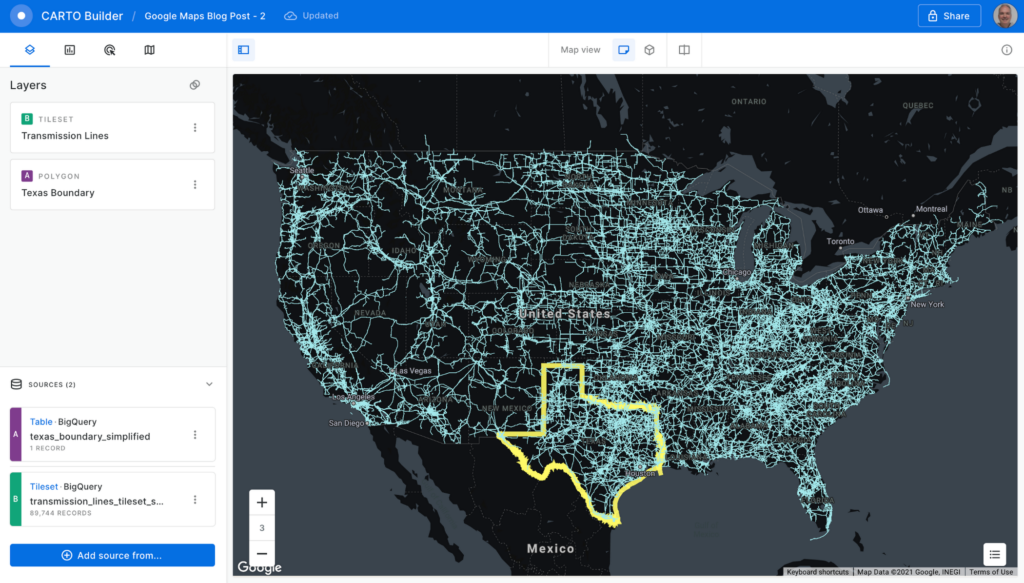
To create a visualization of power transmission lines in Texas, you can start with the Texas state boundary to provide some context. In the Data Explorer, you can preview the table and click the “Create map” button in the top-right corner to start designing your visualization.
Using the CARTO Builder map making tool, select one of the available Google vector basemap styles and customize the layer style.
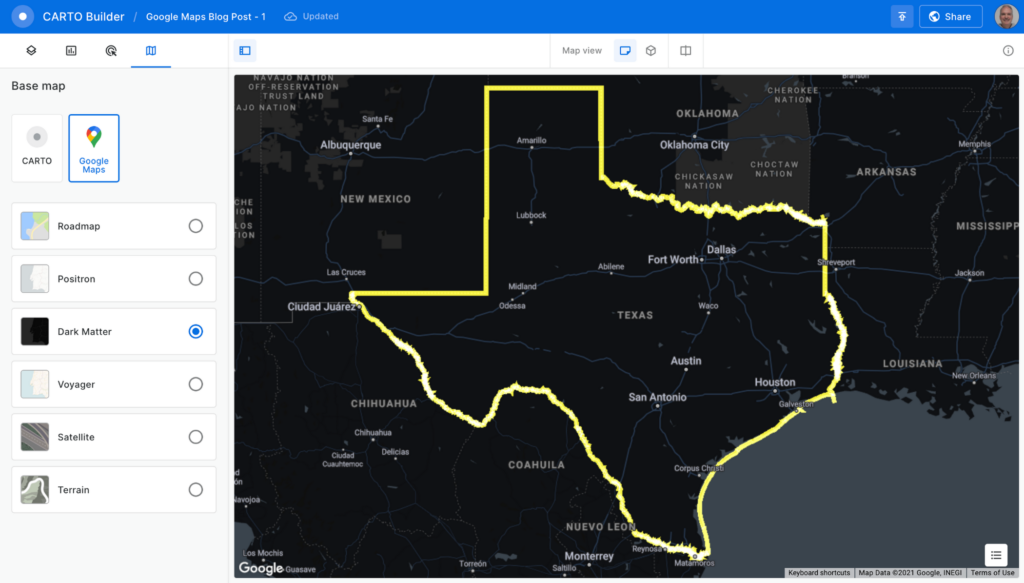
You can visualize tables and the results from queries executed in the data warehouse, which is a powerful feature because you can also execute spatial analysis functions using SQL, including those from the CARTO Analytics Toolbox. In this case, you can intersect the lines in the table containing all the U.S. transmission lines within the Texas boundary. Click on the “Add source from…” button and select the “Custom Query (SQL)” option to add the following query:
SELECT *FROM cartobq.nexus_demo.transmission_linesWHERE ST_INTERSECTS(geometry,(SELECT geom FROM cartobq.nexus_demo.texas_boundary_simplified));
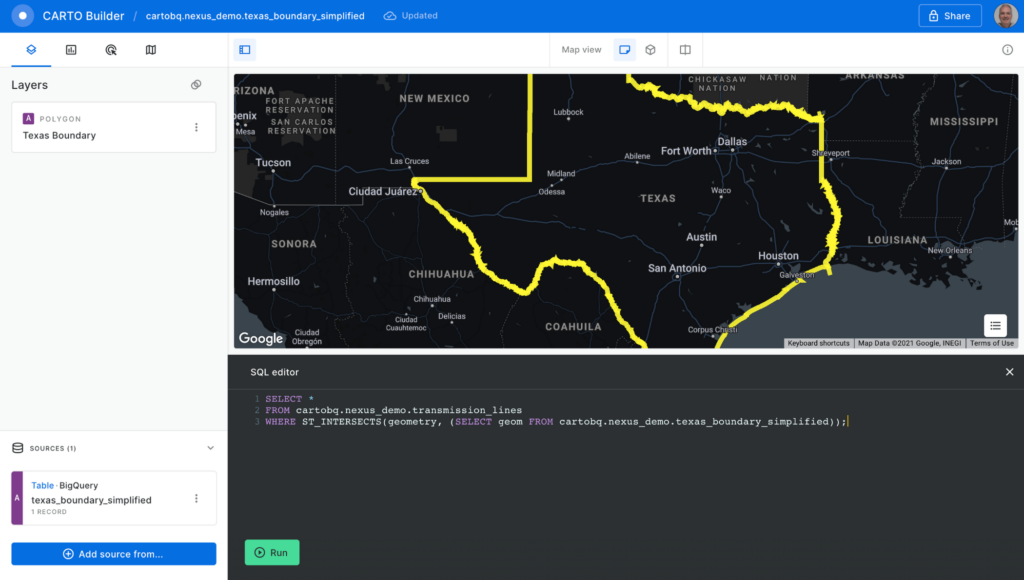
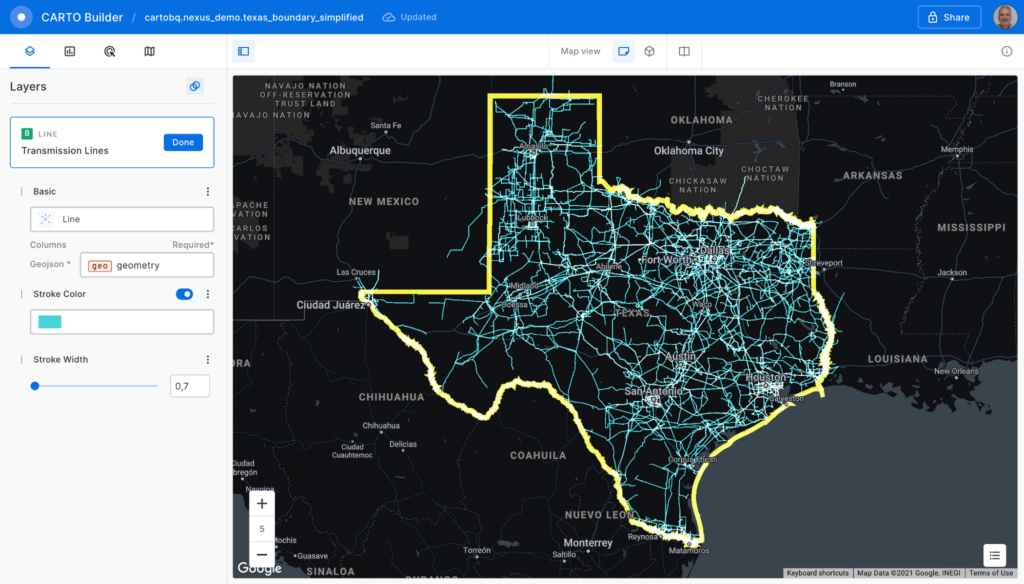
Click the “Run” button, and the query is executed in BigQuery. The results are sent back to the Builder tool. Perform some style customizations in the new layer, and your map is ready.
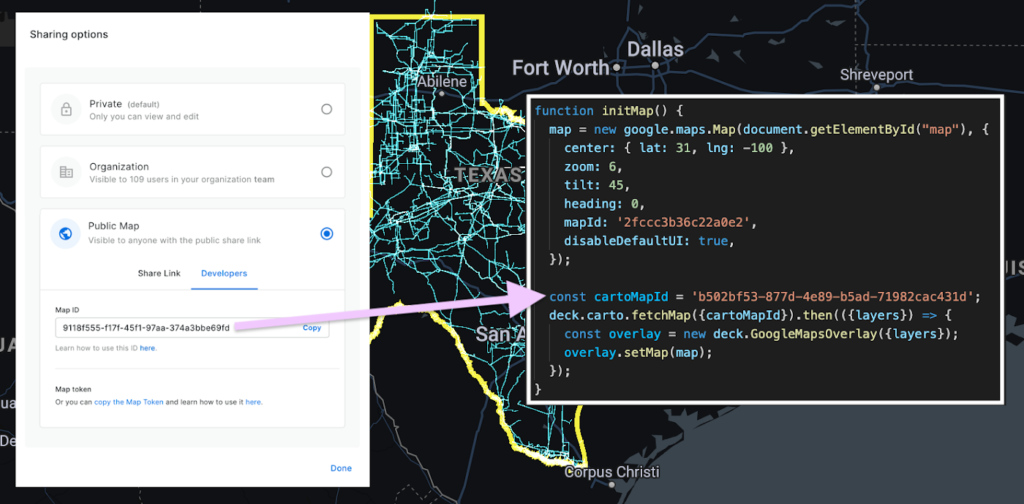
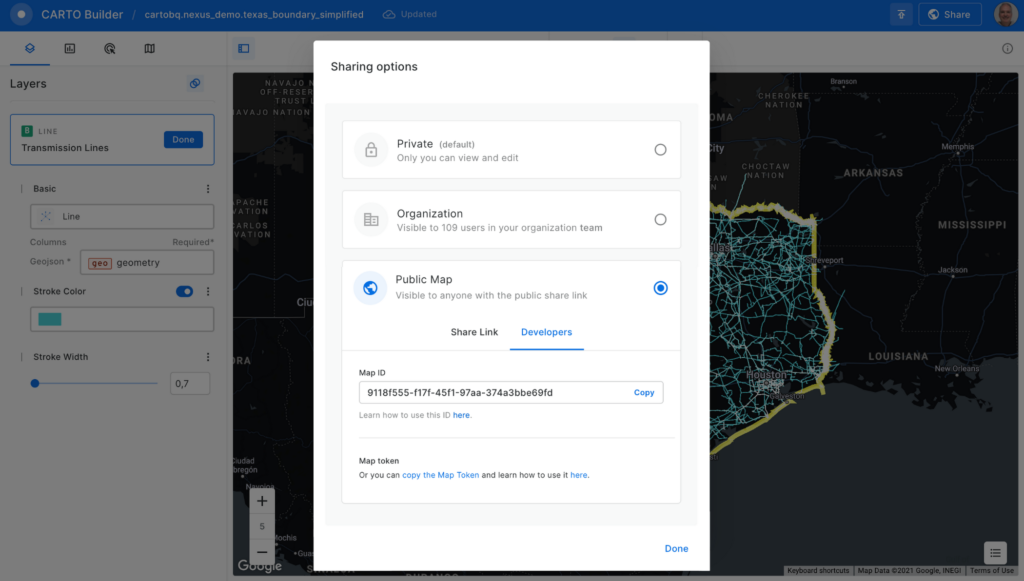
Before adding the map to the Google Maps Platform application, you’ll need to make it public. Click on the “Share” button and select the “Developers” tab to copy the map ID.
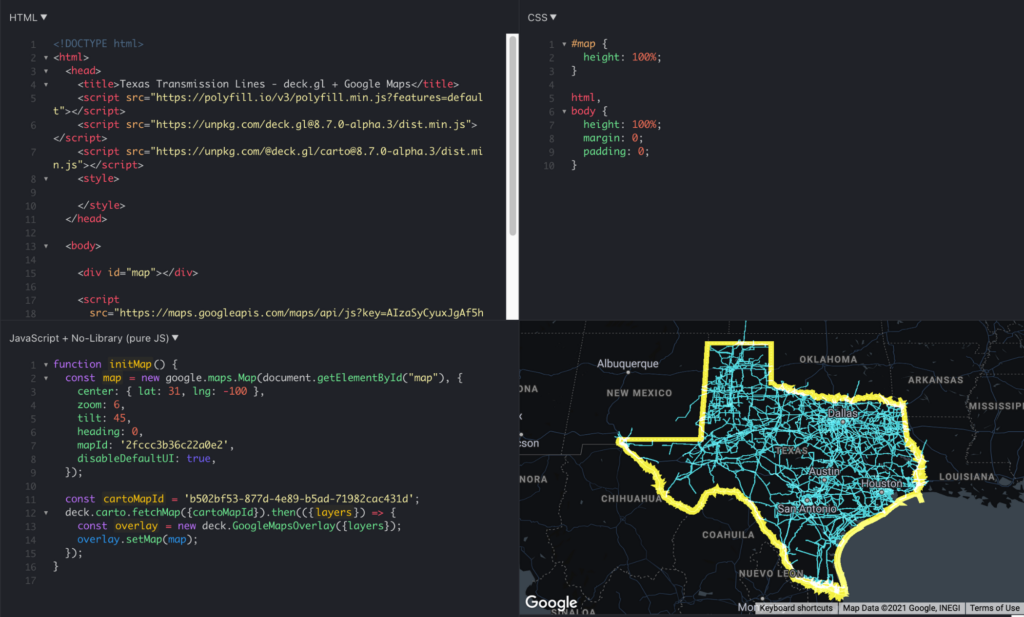
Now, you can add the visualization into your Google Maps Platform application, which is as easy as adding these four lines of code:
const cartoMapId = 'b502bf53-877d-4e89-b5ad-71982cac431d'; deck.carto.fetchMap({cartoMapId}).then(({layers}) => { const overlay = new deck.GoogleMapsOverlay({layers}); overlay.setMap(map); });
You can use the map ID copied from CARTO Builder to call the fetchMap function. This function connects to the platform and retrieves all the information needed for the visualization, including a collection of deck.gl layers with all the styling properties you’ve specified. Create an instance of the deck.gl GoogleMapsOverlay with this collection of layers and add it to the map.
You can see the full example in this fiddle.
Visualizing very large datasets
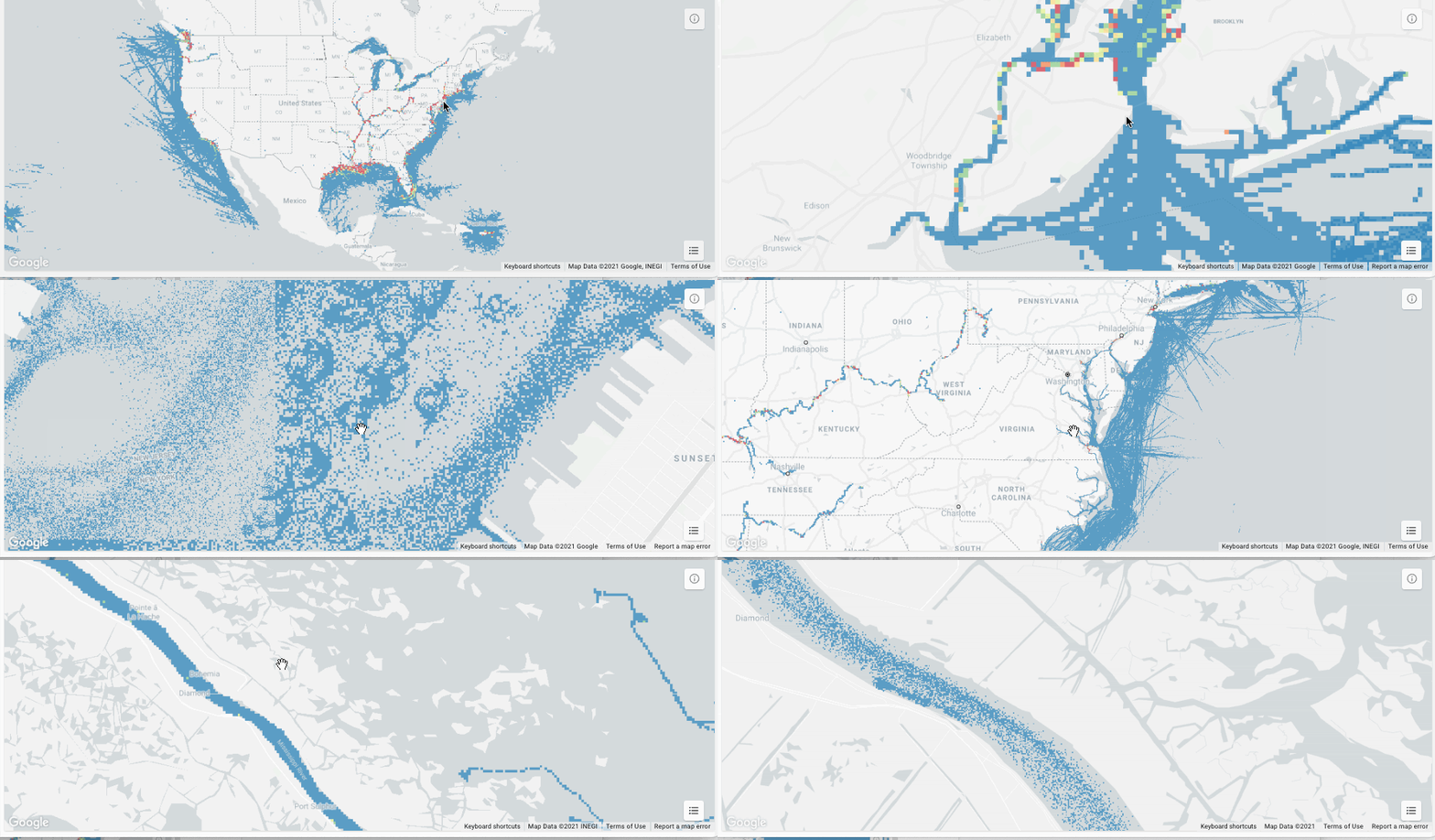
One of the main features of BigQuery is the ability to scale processing to massive datasets. With the CARTO platform, you can also visualize very large datasets using tilesets, an optimized data structure containing pre-generated vector tiles for fast visualization. Tilesets are generated within BigQuery using the Analytics Toolbox functions in a parallelized process that can handle billions of points.
For example, you can create a visualization using tilesets with the whole dataset of transmission lines for the U.S., more than 100MB of geometries.
The issue with these large datasets is that they do not fit in memory all at once, so you need to split them into tiles for them to be rendered progressively. CARTO takes care of this, allowing you to create tilesets directly in BigQuery or dynamically generate them on the fly.
This method for data loading in maps can scale as much as needed; for example, take a look at this 17 billion point visualization of vessel data.
What about live data?
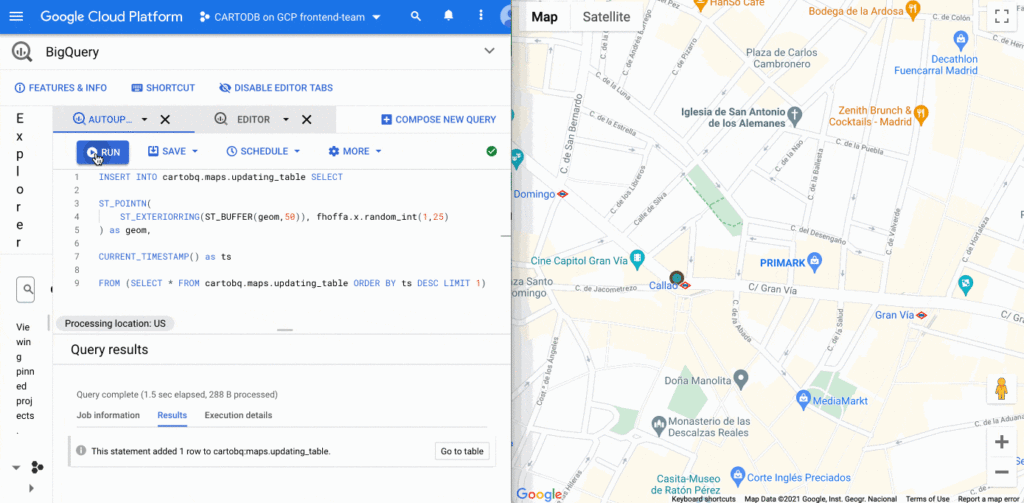
BigQuery supports streaming data that is continuously updated. In these scenarios, you want to be able to update your visualization at regular intervals, as the data changes. It’s easy to update this visualization using deck.gl. You just need to set the autoRefresh parameter to true when fetching the map and specify the function you want to execute when new data is downloaded:
const {layers} = await deck.carto.fetchMap({ cartoMapId, autoRefresh: true, onNewData: (parsedMap) => { … } });
You can add points to a table with an INSERT function on the BigQuery console and see the data updated on the map in real time.
Going further
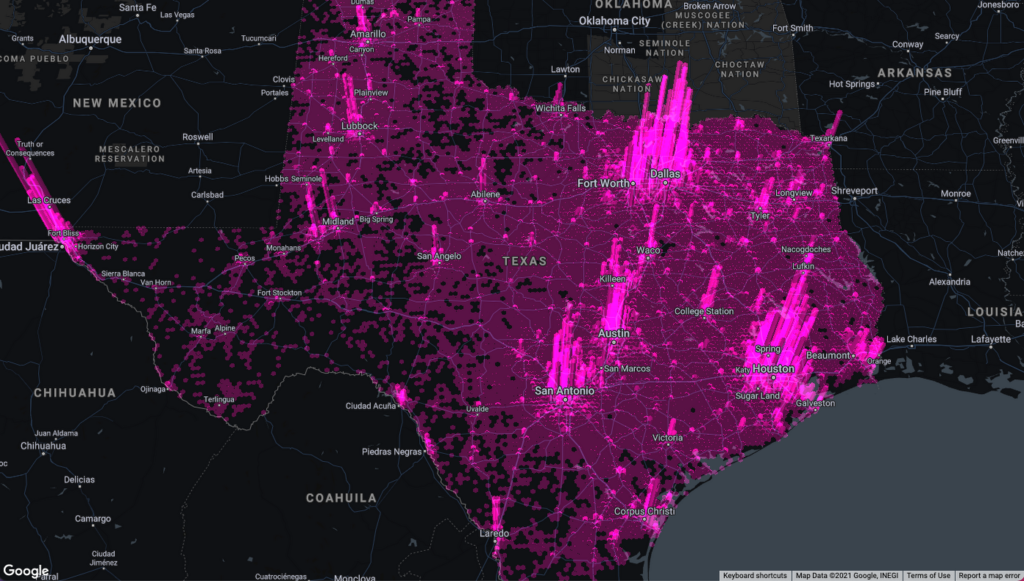
In addition to the simple ways to create visualizations shown above, deck.gl has the flexibility to create a wide variety of visualizations. The CARTO platform provides you with the functionality to access data from your data warehouse and create these data visualizations with advanced cartographic capabilities, but you can extend it and go beyond that using any of the advanced visualizations available in the deck.gl layer catalog.
There are two additional options that give you more control over the deck.gl code. The first one is to use the CartoLayer directly without fetchMap. You’ll need to indicate the connection to use from the CARTO platform and the data source type and name or query. Then we can specify the styling properties.
const overlay = new deck.GoogleMapsOverlay({layers: [new deck.carto.CartoLayer({connection: 'bqconn',type: deck.carto.MAP_TYPES.TABLE,data: `cartobq.public_account.retail_stores`,getFillColor: [238, 77, 90],pointRadiusMinPixels: 6,}),],});
The second option is to use the fetchLayerData function that allows you to have more control over the format used for data transfer between BigQuery and your application and can be used with advanced visualizations that require an specific data format like ArcLayer, H3HexagonLayer or TripsLayer.
deck.carto.fetchLayerData({type: deck.carto.MAP_TYPES.TABLE,source: `cartobq.geo_for_good_meetup.texas_pop_h3`,connection: 'bqconn',format: deck.carto.FORMATS.JSON,credentials: {accessToken: 'eyJhbGciOiJIUzI1NiJ9.eyJhIjoiYWNfbHFlM3p3Z3UiLCJqdGkiOiI1YjI0OWE2ZCJ9.Y7zB30NJFzq5fPv8W5nkoH5lPXFWQP0uywDtqUg8y8c'}}).then(({data}) => {const layers= [new deck.H3HexagonLayer({id: 'h3-hexagon-layer',data,extruded: true,getHexagon: d => d.h3,getFillColor: [182, 0, 119, 150],getElevation: d => d.pop,elevationScale: 2.5,parameters: {blendFunc: [luma.GL.SRC_ALPHA, luma.GL.DST_ALPHA],blendEquation: luma.GL.FUNC_ADD}})];const overlay = new deck.GoogleMapsOverlay({layers});overlay.setMap(map);});
For complete code using both options, take a look at these examples.
Learn more
You can access demos and documentation on the deck.gl docs website and the CARTO Documentation Center. If you have questions, you can ping the CARTO team on the CARTO Users Slack workspace.
For more information on Google Maps Platform, visit the Google Maps Platform website.

How Machine Learning in G Suite Helps Employees of Dalmia Bharat Discover the Next Big Idea
DOWNLOAD CASE STUDY5541
Of your peers have already downloaded this article
5:30 Minutes
The most insightful time you'll spend today!
Creating expense reports, Email management, formatting documents: Your time is caught in the quicksand of formatting, tracking, analysis or other mundane tasks. These are just some of the time-sinks that can affect your—and your employees’—productivity at work. At Google Cloud, this is referred to as “overhead”—time spent working on tasks that do not directly relate to creative output—and it happens a lot.
According to a Google Cloud study, the average worker spends only about 5 percent of his or her time actually coming up with the next big idea.
That’s where machine learning can help.
Machine learning algorithms observe examples and make predictions based on data. In G Suite—Google Cloud’s collaboration and productivity platform—machine learning models make your workday more efficient by taking over menial tasks, like scheduling meetings, or by predicting information you might need and surfacing it for you.
“Smart Reply, (in Gmail) for example, uses machine learning to generate three natural language responses to an email. So if you find yourself on the road or pressed for time and in need of a quick way to clear your inbox, let Smart Reply do it for you,” says Sunil Tewari, Head of Technology and Business Services, Dalmia Bharat.
There are 2 Key Traits You Need to Battle the Slowdown. FM Logistic Know How to Enable Them

6392
Of your peers have already read this article.
4:30 Minutes
The most insightful time you'll spend today!
FM Logistic provides its international customers with complete logistics solutions that cover everything from warehousing and handling, to transport and distribution, co-packing and co-manufacturing, and supply chain optimization. Operating in 14 countries including France, Russia, Poland, India, Vietnam, Brazil, and China, FM Logistic supports its clients by offering specialized services across a number of markets including consumer goods, retail, cosmetics, and health.
“We are in the process of transforming all our tools and integrating new solutions to be able to work faster and more efficiently. Two main IT priorities are mobility and openness, in terms of working from anywhere and being able to interact with other information systems.”
– Communication Manager, FM Logistic
As a business that has existed since 1967 and in 2018 achieved a turnover of €1.178 billion with 9.5% annual growth, FM Logistic is always looking to help secure the company’s position within an evolving sector. To better serve its customers, FM Logistic decided to launch an innovation project in 2017 to transform the internal digital tools of the company and replace its intranet, email, and productivity software. The company looked for an integrated solution that would enable more collaborative ways of working and bring its international operations closer together. The company found that implementing G Suite and LumApps social intranet was the perfect combination.
“We are in the process of transforming all our tools and integrating new solutions to be able to work faster and more efficiently,” says the Communication Manager at FM Logistic. “Two main IT priorities are mobility and openness, in terms of working from anywhere and being able to interact with other information systems.”
A global transformation
For large international companies with global operations, implementing a single integrated solution to enable collaboration across regions while respecting regional variations can be a real challenge.
“We have 26,000 employees spread across a broad geography, with a variation in cultures and technological maturity. There was an aspiration to work in collaboration, but the necessary tools were not in place,” says FM Logistic’s Communication Manager. FM Logistic looked for a solution to enable new, more collaborative work practices, which were flexible in terms of usage and that, most importantly, would work as part of an integrated solution.
To do that, FM Logistic worked with Google Partner Devoteam G Cloud to implement G Suite alongside the LumApps intranet portal. It took six months to complete the migration of 7,000 accounts, with employees accessing the Business or Basic G Suite edition according to their needs. “Before, with our physical infrastructure we found ourselves buying additional hard drives as we ran out of storage,” says the Technical Project Manager at FM Logistic. “That’s no longer a problem, and we can tailor access depending on whether or not employees need unlimited storage .”
“It’s a real advantage to be able to access your account from any device and work from anywhere. Hangouts Meet has been really transformational in that respect: it has reduced the need for travel significantly, even in the few months we’ve been using it so far.”
– Communication Manager, FM Logistic
“We followed Google’s G Suite migration advice and had early adopter ambassadors in every country. By the time we got around to the final country, very little input was needed as they were ready to go!” says the Technical Project Manager. “Many of them were already familiar with the product, so it was very intuitive. Our feedback surveys gave a satisfaction rating of almost 4.5 out of 5 in relation to the transition. We also had significant executive support, with two members of the executive committee on the steering board. That really helped the project to move quickly.”
As a result, employees were quick to understand the benefits of the new system. “It’s a real advantage to be able to access your account from any device and work from anywhere. That was clear from the start,” says the Communication Manager. “Hangouts Meet has been really transformational in that respect: it has reduced the need for travel significantly, even in the few months we’ve been using it so far.”
LumApps: a fully-integrated enterprise hub
One of FM Logistic’s main reasons for choosing G Suite was the seamless integration with LumApps’ intranet portal. LumApps adds value to G Suite, thereby boosting and sustaining employee adoption. FM Logistic chose LumApps to create a hub for its enterprise, where everything is centralized from internal communications to business apps.
“We didn’t want a patchwork of solutions, we needed a platform that worked as an integral whole,” says the Technical Project Manager. “With LumApps, employees access the intranet using their Google authentication and can access all their G Suite tools through the intranet. Moreover, LumApps is Google native, so the integration is seamless and we know that it will evolve to accommodate any changes that might take place.”
“The main advantages we see are communication and knowledge sharing,” says the Communication Manager. “With LumApps, all 26,000 of our employees are now able to access the portal in their own language and access local news.”
For the next step, FM Logistic is considering integrating social communities so that employees can express themselves and be more engaged in the corporate culture.
Supporting digital maturity
Thanks to Drive, employees can now work from wherever they are, and are able to work more efficiently and more collaboratively. “From an administrative point of view, users can benefit from automatic updates, so there is less pressure on the IT department,” says the Technical Project Manager. “And we’re seeing many innovative uses of the tools to work in more efficient ways: many services have gone paperless with Forms, so less time is wasted; commercial agents are using Drive to work together on tenders simultaneously; and with Sheets, tasks are automatically sent from the team manager’s file to employee’s Calendar.”
“G Suite and LumApps are the first step of our digital transformation, in terms of collaboration and moving into the cloud. We have real confidence in our partners LumApps and Google, and we’re investing in those relationships for the long-term benefit of the company.”
– Communication Manager, FM Logistic
Now, FM Logistic wants to further support its employees in exploring all the tools G Suite has to offer. “We are embarking on a second phase to give our employees the skills they need for advanced uses of Docs, Sheets, and Forms,” says the Communication Manager. “It’s a learning curve, but it’s key to our goal of transforming our everyday processes.”
“G Suite and LumApps are the first step of our digital transformation, in terms of collaboration and moving into the cloud. We have real confidence in our partners LumApps and Google, and we’re investing in those relationships for the long-term benefit of the company.”
Apigee Helps Bank BRI Rewrite its Digital Future and Achieve Financial Inclusion

6102
Of your peers have already read this article.
3:00 Minutes
The most insightful time you'll spend today!
About Bank BRI
Bank Rakyat Indonesia is one of the largest banks in Indonesia and is committed to increasing financial inclusions among un-banked Indonesians. Bank BRI specializes in using modern digital banking to facilitate microfinance lending across its network of over 10,000 branches and thousands of branchless agents.
Google Cloud Results
- Contributes $50M in revenue through the Apigee monetization feature
- Wins recognition for best digital bank in Indonesia from The Asian Banker in 2019
- Achieves ISO 27001 information security for open APIs, earning distinction as the only bank in ASEAN to receive certification to date
- Reduces partner onboarding from 6 months to under 1 hour with Apigee developer portal
Bank Rakyat Indonesia is making waves in Asia with its award-winning digital strategy. As a government-owned bank, Bank BRI is dedicated to changing the lives of its customers through accelerating financial inclusion across Indonesia. With an aggressive target of 84 percent of Indonesians participating in the banking system by 2022, Bank BRI is leapfrogging fintech competition thanks to its innovative digital strategy that has APIs at its core. By the end of 2019, Bank BRI expects to have reached a 70 percent financial inclusion rate among the country’s population, in part due to the adoption of the Cloud Apigee API Management Platform as the bank’s digital nucleus.
Transforming a legacy into a digital future
In the banking business, trust is essential, not only between the bank and its customers, but also between the bank and its partners. Recognizing that gaining and maintaining this trust would be key to customer and partner adoption of the new Bank BRI products and services, the bank decided to pursue ISO 27001 certification in 2018, becoming the first bank in ASEAN (the Association of Southeast Asian Nations) to become certified as information security compliant. Now the international community of partners and customers who use the bank’s APIs have yet another reason to place their trust Bank BRI.
“Apigee has become the central nervous system for all communications between the digital core banking, the microservices, the frontend, and the apps. Apigee has become our sun. Everything rotates around Apigee.”—Kaspar Situmorang, Executive Vice President, Bank Rakyat Indonesia
Kaspar Situmorang, Executive Vice President of Bank BRI, had the original vision for how the bank could transform itself into a fintech with digital technology and APIs. His team got started by implementing a web-native frontend over a new technology stack with Apigee as a second layer. This was a big change from the legacy technologies that existed when Situmorang joined the bank in 2017. Previously all of the bank’s products had their own public APIs, which were very difficult to manage, secure, and monetize.
Since deploying Apigee, it’s become much easier to manage the entire API lifecycle. Situmorang’s digital bank team of 15 uses the Apigee monetization and developer portal features while managing and securing APIs and conducting big data integrations. Apigee has become Bank BRI’s center of communications, handling all transactions between the bank and third parties.
Whereas previously it could take up to six months to onboard a new partner using host-to-host and VPN technology, now it takes less than an hour for partners to self-onboard using the Bank BRI Apigee developer portal. On the portal, partners can register, browse APIs, test in the sandbox, and go into production — all in less than an hour.
“Apigee has become the central nervous system for all communications between the digital core banking, the microservices, the frontend, and the apps. Apigee has become our sun. Everything rotates around Apigee,” says Situmorang.
Increasing financial inclusions
With more than 10,000 offices across Indonesia, Bank BRI has the largest network of any bank in ASEAN. The bank is also the biggest microfinance lender in the region. Though already present in even the most far-flung corners of Indonesia, Bank BRI is still working on increasing financial inclusion among un-banked Indonesians. With 56 million people that haven’t accessed banking services, Indonesia is in the bottom four countries for financial literacy in the world, along with Bangladesh, India, and China. It’s estimated that there is up to $8.3 billion in currency being held outside the banking system.
In order to reach this mostly rural, subset of the population, the bank launched Agent BRILink, a nationwide network of branchless agents. These agents can open new accounts, take deposits, pay out withdrawals, and process and disburse loans in under two minutes with the Pinang microfinance mobile app. To date, over 30,000 customers have received loans through Pinang. Handling its own risk-scoring and automatic payroll deductions for payments has translated into less risky and more profitable loans for Bank BRI.
“Customers download the app and scan their ID, capturing their credit score in just a few seconds. The digital offer letter says how much they’re approved for. They can then accept it, go to the approval screen, and do facial recognition. The money is disbursed immediately. GCP has transformed us into a fintech.”—Kaspar Situmorang, Executive Vice President, Bank Rakyat Indonesia
BRILink agents are bank customers who have been scored highly for reliability by the bank’s big data analyses and who maintain a minimum balance of around $800. Combining this data with the Google Maps API, Bank BRI is able to score all 75.5 million of its customers and identify which of them should be recruited as agents for underbanked areas. Since 2018, the bank has been able to appoint more than 200,000 branchless agents using the Agent BRILink app, eliminating the need for logistically challenging face-to-face meetings. This has resulted in an increase in loan volume from branchless business from $15 billion in 2017 to $26 billion in 2018.
To enable branchless agents to sign up new customers and provide banking services, all they need is a mobile phone and internet service. With many parts of rural Indonesia not covered by commercial 3G, Bank BRI has overcome this hurdle by operating its own satellite. With the connectivity the satellite guarantees, branchless agents can help customers obtain microfinancing and open new shops and businesses in all parts of the country. The satellite also provides internet service across the APAC region wherever the bank operates, from Sri Lanka to New Zealand. While it might seem unusual for a bank to operate a satellite, it’s reflective of Bank BRI’s commitment to reaching its financial inclusion targets and meeting its customers wherever they are.
“Pinang was created to win against fintechs trying to compete against us on speed, cost, and security,” says Situmorang. “The truth is that Indonesian regulators closed about 650 fintechs, mainly in the peer-to-peer lending space, because they were unsafe, too expensive, and very slow.”
Using APIs to create and monetize new products
Another way that Bank BRI is leveraging Google Cloud Platform solutions is through an innovative use of the Cloud Vision API, which enables the bank to integrate with the Indonesian government ID database. Identities of new customers — whether they’re coming in via a branch, a BRI Link Agent, or a mobile app — are automatically verified in seconds through facial recognition. With instant credit scoring and identity fraud concerns essentially eliminated, the bank can make more confident lending decisions.
“Monetization is very important to us. It enables us to define our pricing based on API calls and bill automatically based on usage. We’ve already recognized $50 million through the Apigee monetization feature.”—Kaspar Situmorang, Executive Vice President, Bank Rakyat Indonesia
“Customers download the app and scan their ID, capturing their credit score in just a few seconds,” explains Situmorang “The digital offer letter says how much they’re approved for. They can then accept it, go to the approval screen, and do facial recognition. The money is disbursed immediately. GCP has transformed us into a fintech.”
Bank BRI sees a bright digital future, in part thanks to the API product marketplace it’s creating to serve fintechs. With its digital technologies and massive customer base, the bank is sitting on a treasure trove of big data. Bank BRI already packages this data through more than 50 monetized open APIs for more than 70 ecosystem partners wanting to do credit scoring, business assessments, and risk management. Fintechs, insurance companies, and financial institutions don’t have the talent or the financial resources to do quality credit scoring and fraud detection on their own, so they are turning to Bank BRI.
“Monetization is very important to us. It enables us to define our pricing based on API calls and bill automatically based on usage. We’ve already recognized $50 million through the Apigee monetization feature,” says Situmorang.
Bank BRI is meeting and surpassing the goals it has set for itself for digitalization, increasing financial inclusion, and creating new revenue streams with APIs.
4689
Of your peers have already watched this video.
2:04 Minutes
The most insightful time you'll spend today!
Video: How Google App Maker Helps Businesses Build Mobile Apps in No Time
Analysts estimate that the right custom mobile app can save each employee 7.5 hours per week (that’s a week’s worth of lunch breaks!). Yet, too few businesses have the means, let alone the resources, to invest time and effort in building customized mobile apps. Why?
That’s because their budgets center on big enterprise apps like CRM, ERP, and SCM and beyond those priorities.
App Maker was created to enable your line-of-business teams to build apps for the jobs these bigger apps don’t tackle. With App Maker, you can revamp company processes like requesting purchase orders or filing and resolving help desk tickets, create quick marketing assets, and generate sales enablement apps, for example, as if you designed and built the processes yourself.
This low-code, simple, easy-to-use, drag and drop mobile app creator doesn’t need extensive coding knowledge and can build apps in a jiffy. Anyone can make it: As simple as that.
Reference Guide to Get You Started with Development on GKE

5576
Of your peers have already read this article.
1:30 Minutes
The most insightful time you'll spend today!
Getting started with Kubernetes is often harder than it needs to be. While working with a cluster “from scratch” can be a great learning exercise or a good solution for some highly specialized workloads, often the details of cluster management can be made easier by utilizing a managed service offering. Google Kubernetes Engine (GKE) allows for an easier end-to-end developer experience with convenient tooling and built-in integrations along with the convenience of offering Kubernetes clusters as a managed service.
GKE is the most mature container orchestration service available today, delivering a fully-managed service and hands-off experience with the GKE Autopilot mode of operation. GKE provides industry-first capabilities such as release channels, multi-cluster support, unique four-way auto scaling, node auto repair, and can support up to 15K nodes in a single cluster.
Our modern, end-to-end platform is built on cloud-native principles you are already familiar with and prioritizes speed, security, and flexibility, in ways that are highly differentiated from other cloud platforms.
We have put together a new reference guide for you as you begin your journey developing on GKE. It covers every step of your journey from writing, running, operating, to managing code. Even if it isn’t your first time using GKE, this e-book will be a valuable resource highlighting important considerations and best practices. By implementing the technical recommendations, following the steps, and utilizing the tools described, you can reach the following goals:
- Write, deploy, and debug code faster with Cloud Code and Cloud Shell
- Continuously integrate and deliver updates with Cloud Build
- Run easily, securly, cost effectively at scale with GKE
- Monitor and troubleshoot with Google Cloud’s operations suite
Kick-start your journey by downloading the e-book and join us live June 22 at 9am PDT for our half-day Cloud OnBoard event: Getting Started with Google Kubernetes Engine.
More Relevant Stories for Your Company

If You Run Your Country’s Largest Retail Franchise, How Do You Pull Together, in Sync?
In 1984, Mario Maio set up a small business manufacturing electrical transformers in his Johannesburg garage. Over the next two decades, the ACDC Dynamics company he created came to dominate manufacturing, import, and distribution in South Africa’s electrical goods sector. Then, in 2007, Mario’s son, Ricardo Maio, founded a retail arm to

Expert Takeaways on API Strategies from The State of API Economy 2021 Report
Did you know API traffic for Apigee customers increased 46% year-over-year, to 2.21 trillion calls, between 2019 and 2020? If you have more questions on APIs trends and their role in disrupting enterprises digitally, you can catch up on key take aways from the Google Cloud's State of API Economy

What Are India’s Biggest Companies Doing on Google Cloud?
In the last year, there’s been an upward trend in cloud adoption in India. In fact, NASSCOM finds that cloud spending in India is estimated to grow at 30% per annum to cross the US$7 billion mark by 2022. At Google, in our conversations with customers, discussions have evolved beyond cost savings


How L&T Financial Services Processes 95% of Motorcycle Loans in Less Than Two Minutes
L&T Financial Services is one of the largest lenders in India. India’s demonetization policy in recent years has led to a shift from cash transactions to digital payments. In 2016, the government withdrew 500 and 1000 rupee notes from circulation and encouraged a heavily cash-based population to deposit their canceled notes
