





Expert Takeaways on API Strategies from The State of API Economy 2021 Report

5739
Of your peers have already read this article.
8:00 Minutes
The most insightful time you'll spend today!
Did you know API traffic for Apigee customers increased 46% year-over-year, to 2.21 trillion calls, between 2019 and 2020? If you have more questions on APIs trends and their role in disrupting enterprises digitally, you can catch up on key take aways from the Google Cloud’s State of API Economy 2021 report and insights from Google’s experts on API-best practices.
How MobileOne Expanded its Stores by 340% in Just Three Years

4826
Of your peers have already read this article.
7:30 Minutes
The most insightful time you'll spend today!
The mobile industry is extremely fast-paced. New smartphones arrive at rapid speed. Smartphone OS updates regularly add new features and capabilities. And by the end of 2018, 5G wireless, the game-changing successor to 4G, will begin to be available in some markets.
With more than 125 T-Mobile premium retail stores across the United States, MobileOne is at the forefront of the mobile industry’s constant, rapid-fire changes. The company is growing quickly, too, expanding its number of stores by 340% in just 3 years.
In this high-growth, non-stop environment, MobileOne’s mission is to keep frontline employees trained, informed, and updated at all times so that they, in turn, can serve as trusted experts to customers. Ultimately, the end game is to stay competitive by delivering the kind of positive experience that encourages customers to return, and to recommend MobileOne to friends.
But fulfilling this mission had become a major operational challenge for MobileOne. Information was typically created in the company’s productivity software suite and shared in emailed file attachments through the company’s on-premises email system. The method was slow and inefficient, and it could introduce errors if an outdated file was emailed.
In addition, there were no central, shared, easily accessible repositories of company knowledge. Thus, to find information shared a few months ago, team members might have to search their email archives for the appropriate file, and the search capabilities of MobileOne’s legacy email system were far from robust. Worse, a file that one employee suddenly needed may exist only on the hard drive of another employee who might be away on vacation.
“Without G Suite, I can’t imagine how we could keep up with everything.”
– Revel Stark, Director of Recruiting and Marketing, MobileOne LLC
MobileOne leaders recognized that a digital workforce transformation was needed to help the company stay focused on delivering excellent customer service. In response, the company began moving all employees to G Suite with the help of Suitebriar, a Google Cloud – G Suite Premier partner.
Sharing docs in seconds
G Suite applications help MobileOne team members collaborate, share information, and receive the latest training. G Suite also helps MobileOne move at an accelerated pace. For example, on a recent Sunday, Revel Stark, Director of Recruiting and Marketing at MobileOne, was on his way to the beach with his family when someone in the company needed a document from him right away.
“It took just seconds to launch the Google Drive smartphone app, do a quick search, and share the requested document,” says Revel. “Before G Suite, I’d have to start up my laptop, assuming I even had it with me, and search for the file. If the file wasn’t on my laptop’s drive, it might be Monday before I could have found and shared it. That just doesn’t work for us. Without G Suite, I can’t imagine how we could keep up with everything.”
Creating central repositories
“Now, with Drive and Sheets, everyone has access to the most recent, business-critical information at the same time. Having live spreadsheets helps us ensure that no important information gets lost, despite the rapid pace in which we work.”
– Revel Stark, Director of Recruiting and Marketing, MobileOne LLC
Drive, coupled with G Suite apps such as Docs and Sheets, streamlines document sharing at MobileOne by enabling the company to create central repositories of information that are easily accessible and, with Google search technology, easily searchable.
For example, the company used to track operations, growth metrics, and performance in its legacy productivity suite’s spreadsheet application. The spreadsheet files were shared via email. But given MobileOne’s rapid growth, the information in those spreadsheet files could become outdated quickly. And there was confusion at times about which file was the most recent version.
“Now, with Drive and Sheets, everyone has access to the most recent, business-critical information at the same time,” Revel says. “Having live spreadsheets helps us ensure that no important information gets lost, despite the rapid pace in which we work.”
MobileOne has set up a Team Drive for each of the company’s departments, too. “With Team Drives, department heads can make sure their department’s documents are well organized, up to date, and easy to find,” Revel says. “And they can give access only to the people who need it.”
Streamlining interview schedules
The thousands of apps in the G Suite Marketplace enable businesses to add even more functionality to the G Suite apps that their employees use every day. MobileOne uses a third-party scheduling app that integrates with Calendar to streamline the scheduling of job applicant interviews. “Job applicants can look at our calendar and pick an open slot to schedule their interview,” says Revel. “It speeds up the process by not having to go back and forth in email, trying to find a time that’s mutually agreeable.”
Simplifying admin duties
“Before G Suite, it was time-consuming to add a new user to our email system,” Revel says. “I’d have to ask our service provider, then wait for them to do it. But with the easy-to-use G Suite admin panel, we can add someone to Gmail ourselves in a minute or two.”
Receiving personalized service
To support the rollout, MobileOne worked with Suitebriar, a Google Cloud – G Suite Premier Partner. Suitebriar efficiently set up MobileOne on G Suite and now provides webinars and on-going support to help MobileOne users get more out of G Suite. “Suitebriar is incredibly responsive,” says Revel. “They know our business, they give us personalized service, and they get back to me quickly when I have questions, sometimes in as soon as 30 seconds.”
Driving new business with Forms
MobileOne uses Forms to help it organize public events and, in combination with Sheets, to measure the success of those events.
Last year MobileOne held 200 events across the company’s 125 stores and is planning to hold up to 400 events this year. The events are designed to connect MobileOne associates with local residents and bring people into its stores who might not otherwise visit.
“We developed a pre-event form that stores use to communicate with our corporate office about what’s needed to set up their event,” Revel explains. “And we have a post-event form that stores can fill out to capture what worked and what didn’t work at the event. The information in that form gets dropped into a Sheets spreadsheet, so we can track the success of events across all stores. It helps us focus on the events that drive the most traffic into stores, where we can connect with locals and show them how we can help them.”
Using Hangouts to train — and applaud
“When a team member in the field does something fantastic, we can gather a bunch of people in a conference room, get that team member into Hangouts, and give him or her a round of applause. It’s a great way to give someone a pat on the back.”
– Revel Stark, Director of Recruiting and Marketing, MobileOne LLC
At MobileOne, Hangouts is among the most used G Suite app. The company uses Hangouts to bring executives together in different locations for a weekly briefing. “Hangouts breaks down the barriers that geographical distances create, so that everyone gets quality time together,” Revel says.
Training is another key Hangouts use case. “Because keeping our people well informed is so important, we use Hangouts frequently to train team members,” says Revel. “We’re currently using Hangouts with a Hangouts Meet hardware in our corporate office for training, and we’re considering expanding that by adding 20 to 30 Hangouts Meet hardware in training rooms across all seven states where we operate.”
MobileOne uses Slides for training presentations, which are often scheduled using Calendar and presented in Hangouts. “Calendar makes it easy to set up training events and to see the availability of people you want to invite,” Revel says. When people find a time that works, they simply add a Hangouts link to the calendar event. Then during the Hangouts session, a presenter can launch a Slides presentation, and attendees can ask questions with Hangouts chat. All of this is easy to set up and the training happens in real-time, which gives it more of an impact.
The company is also leveraging Hangouts in a less conventional way. “When a team member in the field does something fantastic, we can gather a bunch of people in a conference room, get that team member into Hangouts, and give him or her a round of applause,” says Revel. “It’s a great way to give someone a pat on the back.
Center for Internet Security’s Latest Benchmark for Securing Chrome
5387
Of your peers have already read this article.
1:30 Minutes
The most insightful time you'll spend today!
As the way people work continues to evolve, keeping security policies in place that protect organizations but give workers the ability to get things done is more important than ever. IT and security teams must aim to stay a step ahead of web-based security threats that come their organization’s way. To help, the Center for Internet Security (CIS) team has released the latest CIS Benchmark 2.1 for Google Chrome. This Benchmark offers independent recommendations on which Chrome policies to configure to help support organizations’ security and compliance needs. Thanks to Chrome being built with security at its core, in many cases, Chrome default settings are aligned with CIS recommendations.
Chrome is secure by default, but we also pride ourselves on providing customizations for enterprises to allow Chrome to better fit the needs of their business. And with hundreds of policies available through Chrome Browser Cloud Management and Group Policy Objects (Note: The CIS Benchmark is also available as a GPO), organizations can do just that.
Throughout the CIS guide you’ll notice that there are different designations for configuration profiles. Any labeled Level 1, are considered to be a good baseline for an organization. Level 2 profiles are recommended for deployments that require the highest level of security, but note that these settings could have a trade off on user productivity. We recommend looking at each setting and determining if it’s a good fit for your business.
The benchmark is made up of five sections:
- Enforced Defaults — Notes policies that are configured by default when you install Chrome. Enforcing these settings at an enterprise level can prevent these settings from being changed by business users to less secure options.
- Attack Surface Reduction — Details how to disable web features that may not be necessary in your enterprise environment and could reduce your overall attack surface.
- Privacy — Surfaces settings that improve user privacy.
- Data Loss Prevention — Contains settings that can help prevent data loss and protect your organization’s data. (Note: These recommendations cover additional capabilities that can be added to Chrome through BeyondCorp Enterprise).
- Forensics (Post Incident) — Shares recommendations on policies that give insights into post incident forensics and analysis.
Organizations can use these benchmarks to optimize the best way to secure Chrome in their environment. Download the CIS Benchmark here and check out our team’s configuration guide for additional recommendations on how to configure Chrome.
Note: This benchmark was created using a consensus review process composed of subject matter experts. Consensus participants provide perspective from a diverse set of backgrounds such as consulting, software development, audit and compliance, security research, operations, government, and legal. While these recommendations come from a trusted source, it’s important for each organization to weigh which policies make the most sense for their business.

4235
Of your peers have already downloaded this article
1:30 Minutes
The most insightful time you'll spend today!
Dr. Alan Hippe, CFO & CIO, Roche Group, shares how collaboration tools help healthcare firms like the Roche Group take timely decisions that help them focus on saving patients’ lives.
For over 110 years, Roche has been pioneering the discovery, development, production and marketing of novel healthcare solutions. Our focus has always been on innovation.
The way our employees communicate and collaborate is diverse, and our employees are spread globally.
Our two different email and calendaring platforms have often been an obstacle for effective collaboration. To end these platform interoperability issues, the Roche Corporate Executive Committee made the decision that all employees will move to G Suite as the single common platform for the Roche Group.
The integrated and socially-focused way that G Suite enables collaboration is very compelling, and we expect this to not only bring our company closer together but give us a strategic advantage. Additionally, being able to deploy G Suite features by simply enabling them via a control panel versus planning for and deploying complex infrastructure in our data-centers will help us focus on our core business–helping save patients’ lives.
Streamlining Your Experience: Enhanced Search and Navigation in Google Cloud Console
1370
Of your peers have already read this article.
4:30 Minutes
The most insightful time you'll spend today!
The Google Cloud console is a powerful platform that lets users manage their cloud projects end-to-end with an intuitive web-based UI. With over 120 Google Cloud products across thousands of pages, it can be challenging to navigate through the console quickly, and many users don’t like to use the command line interface. To help, Google Cloud console team recently made several improvements to our search and navigation features, making it easier to find what you need, when you need it.
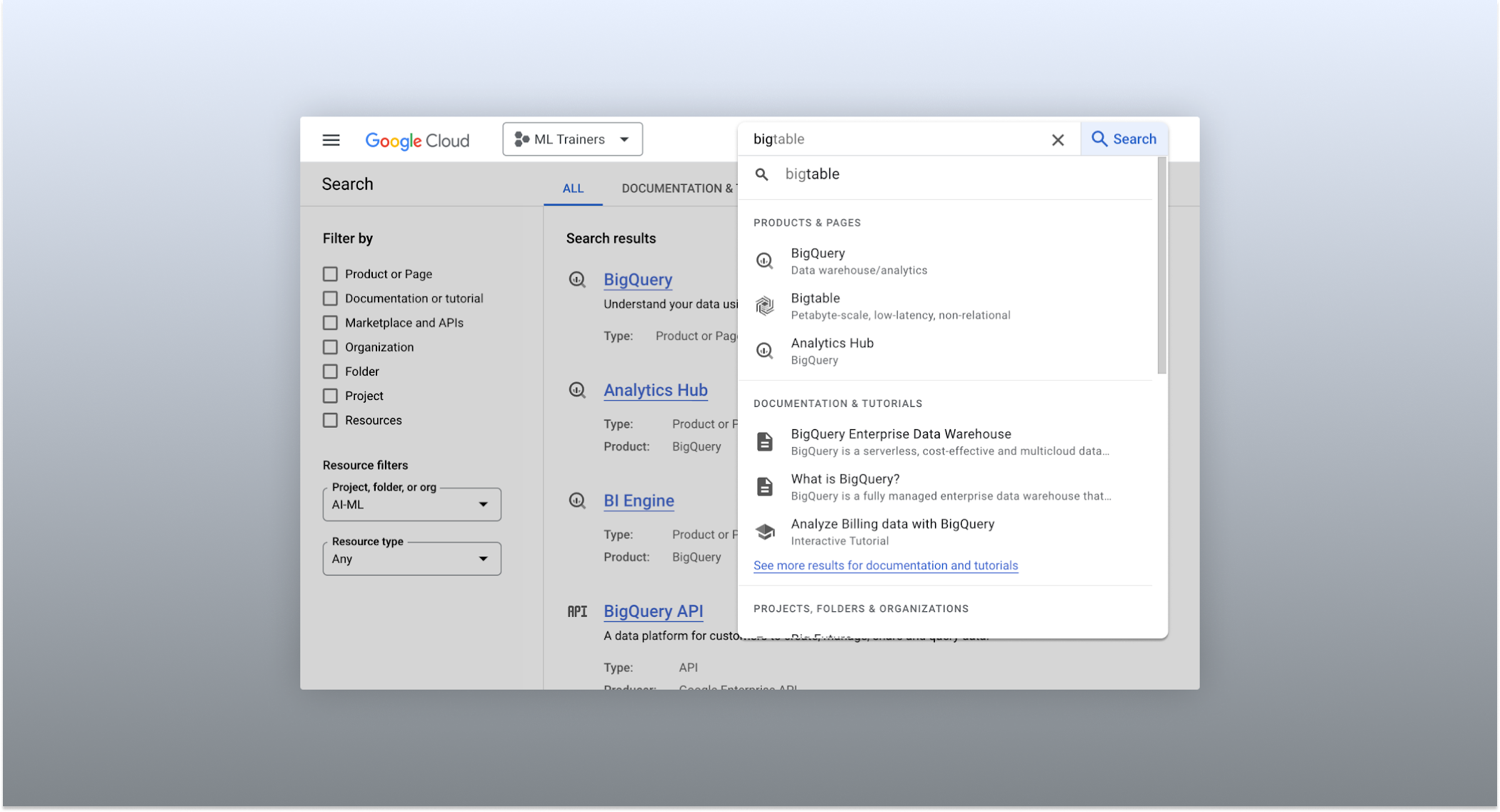
The Cloud console’s search dropdown and result page
Expanded resource-type search
One of the most significant improvements to the console’s search feature is the increased resource-type coverage. You can now find instances of nearly all of the over 120 products that Google Cloud offers directly from the search bar, rather than by manually clicking to the details section nested within specific product pages. This wider coverage saves you time compared to browsing through the different product categories to find what you’re looking for. This improvement also allows the console experience team to continuously add new resource types as we develop new features and capabilities in our various product offerings.
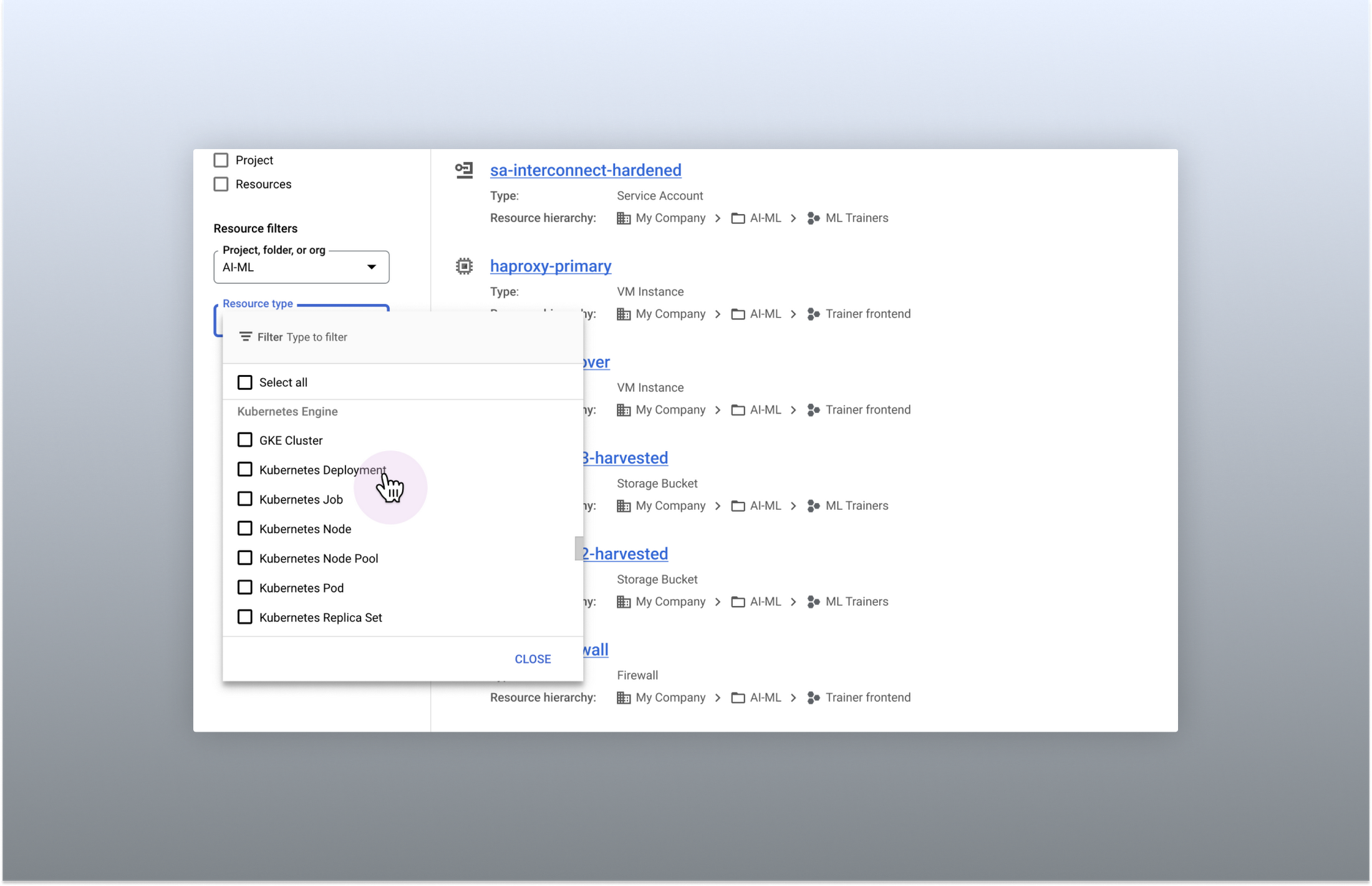
Search for more than 90 types of resources using Google Cloud console
Improved documentation search
We also improved the coverage and accuracy of the search experience for documentation, making it easier to find specific pages or interactive tutorials. Developers looking to get started with something they’re unfamiliar with may want to undertake tutorials in the context of their own working environment. Even experienced developers just looking for a quick answer to their question may not want to leave the console, so we expect these improvements can help users of all experience levels.
We’ve heard from you that finding the right documentation from within the console can be tricky, and so we hope this change can save you from needing to switch over to web search to be confident that they’ll find what you’re looking for.
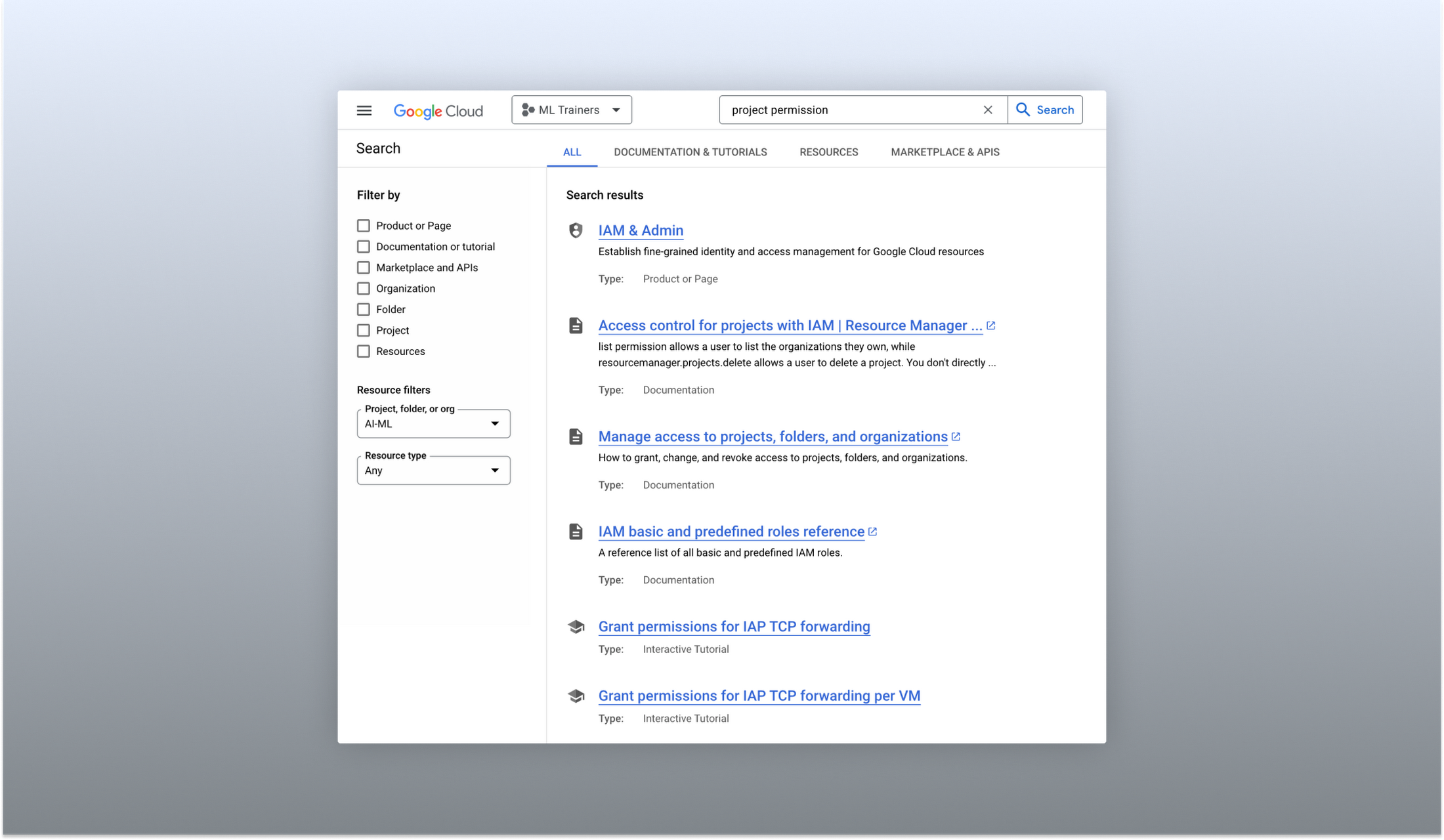
Cloud documentation and tutorials are available for search in the console
A refreshed search results page
To make browsing search results easier, we also overhauled our search results page by dividing results into tabs, similar to Google web search. This means that you can refine your search by diving into one of those categories individually. In addition to maintaining an “all results” tab, there are tabs for:
- Documentation and tutorials
- Resource instances, and
- Marketplace and APIs
Each tab also has a better filtering experience that’s unique to that search result category. For instance, the Resources tab lets you filter by metadata like the last time a resource was interacted with, while the Documentation tab allows you to search for interactive tutorials only. If you can’t find what you’re looking for in the autocomplete dropdown, try the search results page. It can provide additional results or context to help you find exactly what you’re looking for.
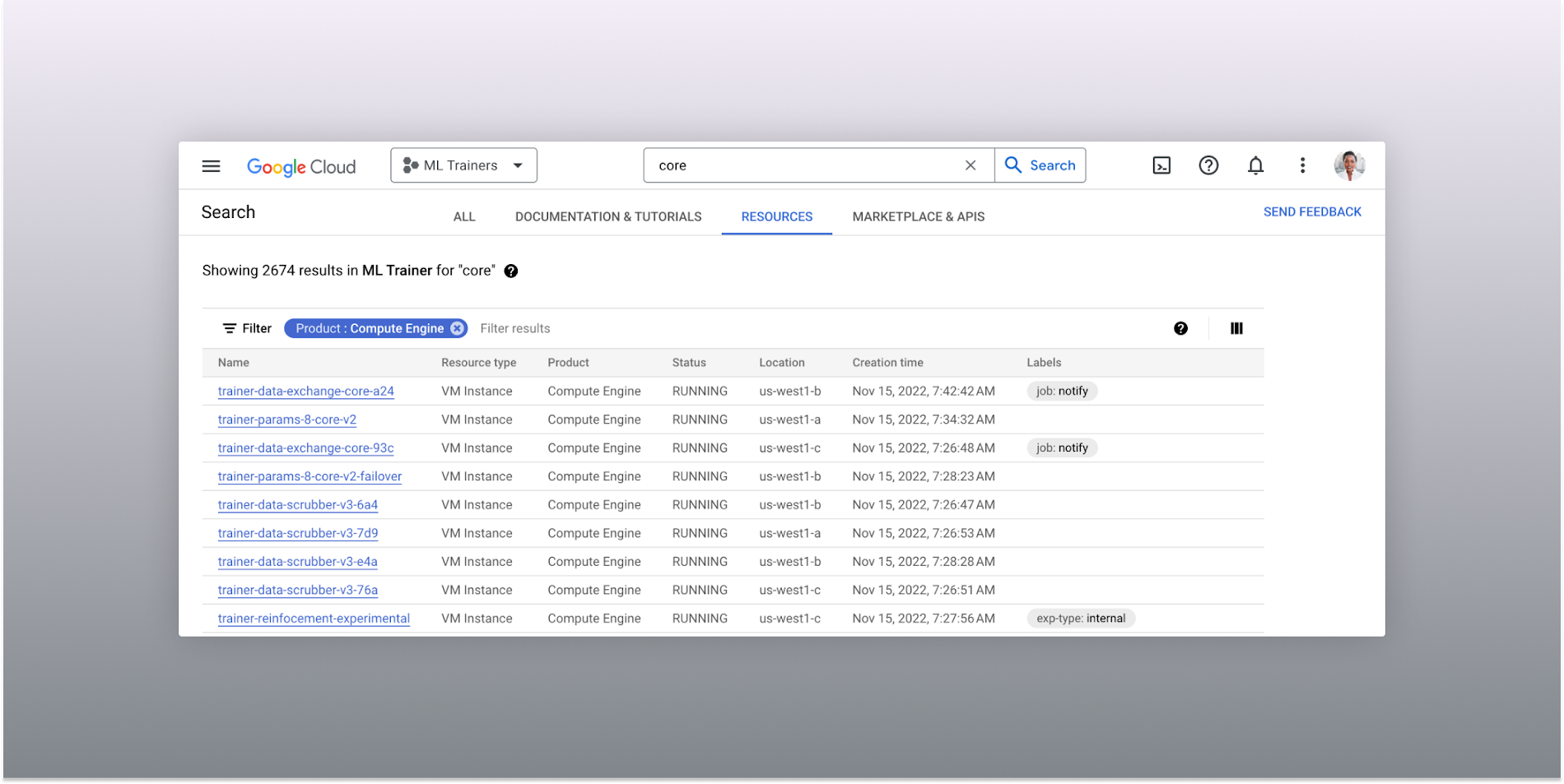
The Resources tab lists results in a denser, metadata-rich format with filtering available
Accurate industry-wide synonyms
Google Cloud console search now interprets industry-wide synonyms accurately — if you’re coming from AWS or Azure and know the name of a product in that ecosystem, searching for it will return the Google Cloud equivalent. A full list of synonyms can be found here.
General usability improvements
We also shipped several smaller quality-of-life improvements related to search, including:
- Improvements to accessibility, including better color contrast and zoom behaviors
- Faster latency targets and shorter load times for results
- A search keyboard shortcut — just type “/” to begin searching without using your mouse
- The ability to search for an API resource by its key
We also updated the look and feel of our platform bar to a cleaner, more modern experience that’s more in line with the branding across other Google Cloud interfaces.
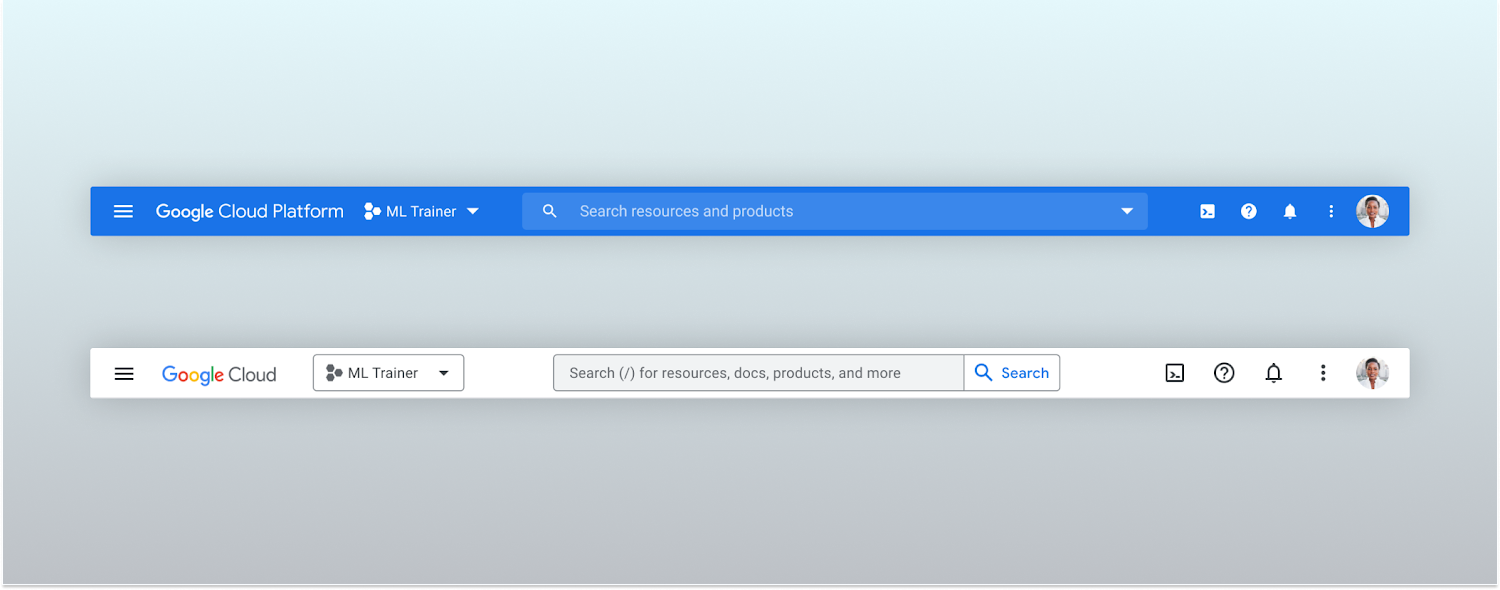
Google Cloud console’s old platform bar (top) and the updated version (bottom)
A customizable navigation menu
Finally, we made usability improvements to the left-hand navigation menu by allowing you to pin specific products. Products can be pinned from the left nav menu or our brand new All Product Page. This is a shift away from the default ordering of products that attempted a “one size fits all” approach to navigation. This customization feature lets you tailor the console to your specific needs and work more efficiently.
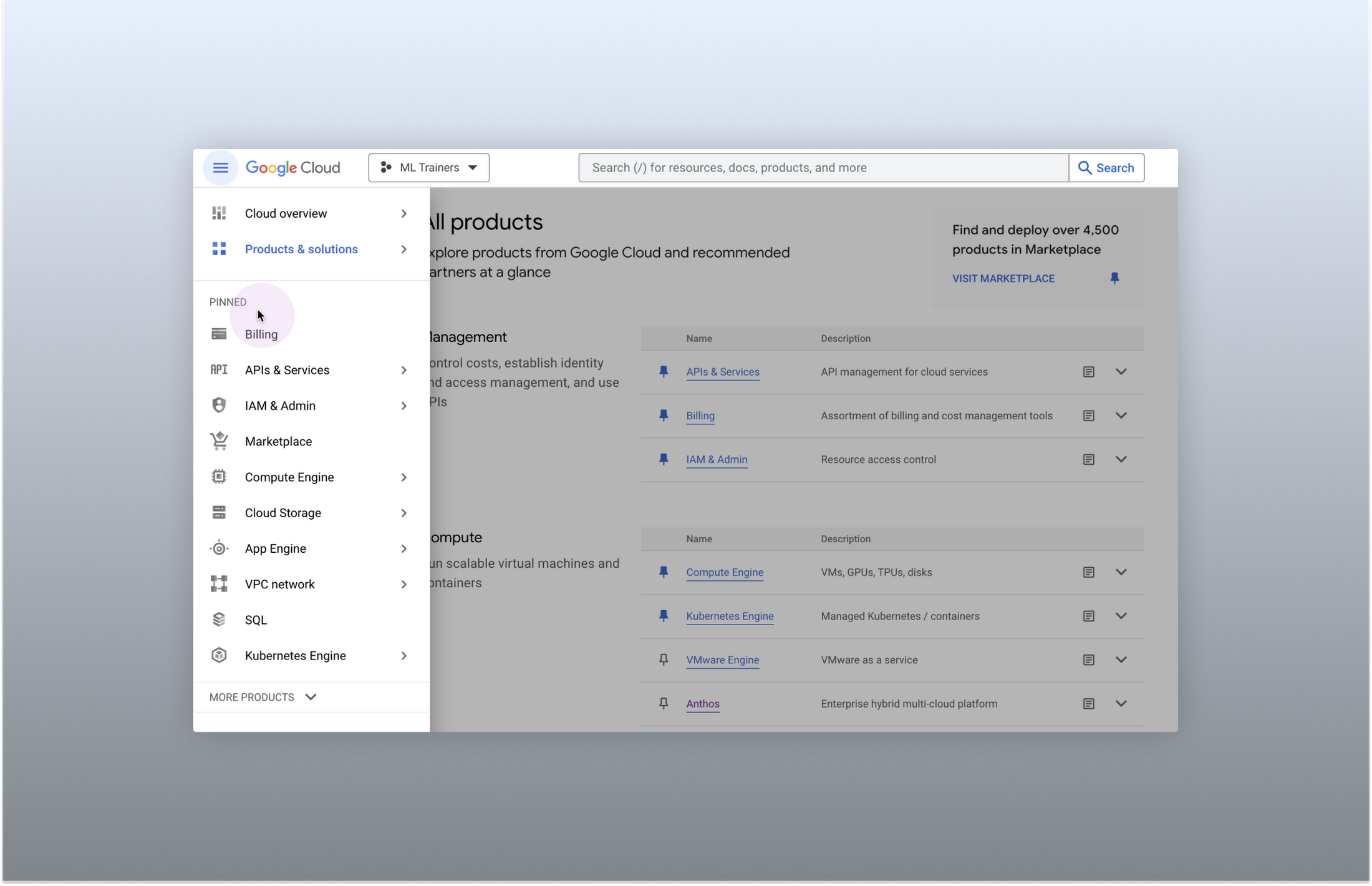
Products can be pinned to the left nav menu for easy access
Final thoughts
The Google Cloud console’s navigation and search features have come a long way. With these recent improvements, you can find what you need quickly and efficiently, making it easier to manage your cloud resources. From expanded resource-type search to improved documentation search and refined search results, the console is more user-friendly than ever before.
IT Leaders are Prioritizing Organizations’ Sustainability Goals: Study Finds

5141
Of your peers have already read this article.
2:00 Minutes
The most insightful time you'll spend today!
The global-wide interruptions of the coronavirus pandemic provided the opportunity for businesses to take a closer look at how we work, learn, live, and consume. With work stoppages and quarantine orders in place, carbon emissions and pollution levels saw significant reductions, highlighting how business and environmental sustainability are linked. As the world returns to work, businesses need to adjust to the new reality and make decisions that will ensure the continuing sustainability of our planet.
Understanding the need for sustainability
A recent Google-commissioned study by IDG, based on a global survey of more than 2,000 IT decision-makers, illustrated the importance of sustainability for organizations’ IT departments while also revealing that significant work is needed before businesses meet their sustainability goals. The good news is that ninety percent say that sustainability is a priority of their IT department and as more organizations consider the benefits of digital transformation and cloud migration, 75% report that sustainability is a “must-have” or “major consideration” when evaluating cloud providers.LEARN MOREIT Leaders Research ReportWhat are the biggest IT priorities in 2021? Explore insights from a survey of 2,000 Senior IT leaders conducted by IDG, in collaboration with Google Cloud.
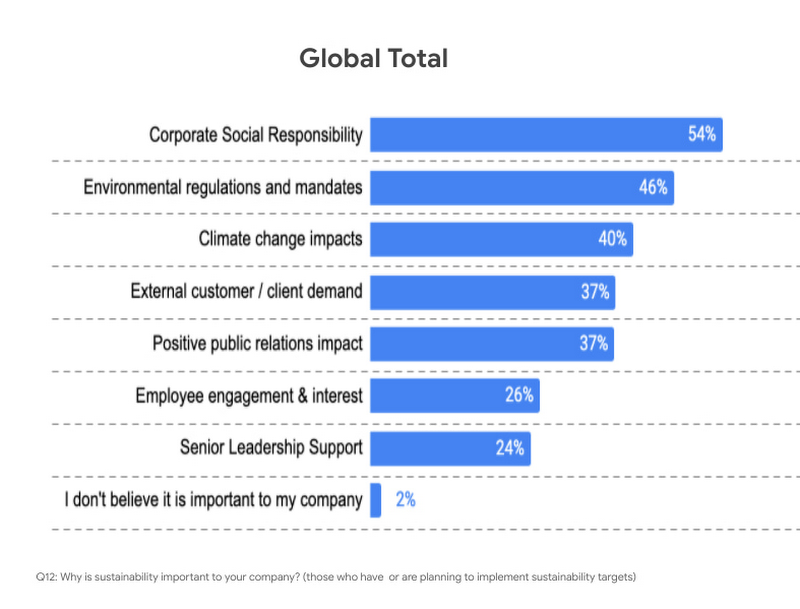
Businesses face both internal and external pressures to reform their practices and processes to meet new targets around sustainability, and IT leaders have an important role to play in that effort. Specifically, 54% said sustainability initiatives were important to their companies because of corporate social responsibility, 46% said it was because of environmental regulations and mandates, and 40% said it was due to the climate change impacts.
The research also examined the areas where IT leaders are looking to make positive changes for sustainability in their organizations. Not surprisingly, 62% said in their IT infrastructure and data centers, 53% their supply chain, and 46% in their facilities and building operations.
Facing the obstacles to progress
However, for many organizations, behaviors lag intent. Only 67% actually have environmental sustainability targets in place. The gap between behavior and intent widens when looking at digitally forward vs. digitally conservative organizations. For the purposes of the study, digitally forward companies were defined as either digital natives or those with a digital strategy and implementation in place. Digitally conservative organizations either have no strategy in place, or are in the process of considering or planning digital transformations, but haven’t reached the stage of implementation.
The study revealed that digital natives embracing cloud solutions were more likely than more conservative organizations to demonstrate a commitment to sustainability. Twenty percent of digital natives are implementing IT initiatives to reduce emissions to become more environmentally sustainable, while only 10% of digitally conservative organizations have done so.
When considering the effects of the COVID-10 pandemic, 20% of respondents from digital conservative organizations delayed or cancelled initiatives around reducing emissions to become more environmentally sustainable compared to only 12% for digitally forward respondents.
Sustainability is in our DNA
Sustainability has been a core value for Google since our inception. We were the first major company to become carbon neutral in 2007 and we were the first major company to match our energy use with 100 percent renewable energy in 2017 — and have continued to do so every year since. We are proud to operate the cleanest global cloud in the industry, and we’re the world’s largest corporate purchaser of renewable energy. It is this commitment that makes Google the leading choice for organizations with sustainability initiatives.
To learn more about the IDG findings and how IT leaders are implementing sustainable solutions, download the full report.
Interested in how Google Cloud’s commitment to providing sustainable solutions can help IT leaders and their organizations meet their own sustainability targets?
Google is focused on enhancing our products to help billions of people take action to reduce their environmental footprint.
- Google creates tools and invests in technology that will foster a carbon-free future for everyone and reduce carbon footprints.
- Google Cloud is the only major cloud provider to purchase enough renewable energy to cover our entire operations, enabling us to operate the cleanest cloud in the industry.
- When running on Google Cloud, an organization’s usage is net carbon neutral, and the electricity used to power workloads is matched 100% with renewable energy.
Looking for more? Check out our blog that introduces the Google Cloud Region Picker, which helps organizations choose a Google Cloud region based on carbon footprint, price, and latency.
More Relevant Stories for Your Company

ShareChat Builds its Diverse, Hyperlocal Social Network. Thanks to Google Cloud
Editor’s note: Today’s guest post comes from Indian social media platform ShareChat. Here’s the story of how they improved performance, app development, and analytics for serving regional content to millions of users using Google Cloud. How do you create a social network when your country has 22 major official languages and

How Barilla Created a Social Media Style App to Improve Efficiency
Google Cloud Results Replaced conflicting, time-consuming paper logs with a near real-time, transparent appScaled rapidly and easily to accommodate new teams thanks to Google App EngineEnables photographic and video communication to replace confusing textNew factory solution rolled out in just 15 days In 1877, Pietro Barilla set up a small

Active Assist Expands Globally: Unleashing Cloud Optimization Insights Worldwide
Active Assist provides insights and recommendations to help Google Cloud customers proactively optimize their cloud environments for cost, security, performance, and sustainability. If you’re like most customers, you’ve likely encountered these insights and recommendations in the console — either in the Recommendations Hub or embedded on a resource page, like IAM or




How G Suite Makes it Easy to Work with Microsoft Office and Exchange
A silent transformation is taking shape in organizations today. Employees are looking for new ways to discover new ideas, and work together anytime, anywhere to ensure businesses are always on. Without IT’s help that’s not possible. And to make this possible IT teams are working over-time to ensure seamless collaboration
