





Building a Stronger South Bend through Cloud Computing Education

3031
Of your peers have already read this article.
2:00 Minutes
The most insightful time you'll spend today!
The city of South Bend, Indiana has announced they are working with Google Cloud to connect 500 local job seekers with no-cost access to Google Cloud Skills Boost through Upskill SB. This initiative will train, upskill, and certify residents in cloud computing skills to create pathways to technical jobs.
As companies, nonprofits, and governments increasingly leverage cloud computing technology to strengthen their organizations, skilled cloud talent is in high demand both nationally, in Indiana, and in South Bend. According to Lightcast, there were 27,180 unique cloud roles open in the U.S. as of October 2022. Cloud skills are the most in-demand skill set by IT departments: more than one-third of tech learners said professionals with cloud skills are the most challenging to find.
“This partnership with Google Cloud will help residents get on a no-cost path to a cloud computing career at a time when the field is rapidly growing,” said Caleb Bauer, Executive Director of Community Investment for the City of South Bend. “This will help residents prepare to take the next step in their career with Google Cloud Skills Boost and will pave the way to build in-demand skills.”
Google Cloud Skills Boost is the destination for all Google Cloud learning and training opportunities. Local colleges and universities are also able to offer free access to Google Cloud Skills Boost for students through the Google Cloud Higher Education program. Students can request access to free online labs, quests, and courses. Faculty can take advantage of free Google Cloud Computing Foundations curriculum and coach their students to prepare for Google Cloud certifications.
“Google is proud to offer no-cost access to Google Cloud Skills Boost for jobseekers in South Bend,” said Alice Kamens, Workforce Development lead at Google Cloud. “Through this partnership, we’re advancing our work to ensure everyone has access to the technical training needed to pursue cloud computing careers.”
Those interested in learning more about the program or applying for Upskill SB should visit the Google Cloud page on Upskill SB. Scholarship recipients need access to a computer, hand-held device or smartphone and the internet.
5164
Of your peers have already watched this video.
24:00 Minutes
The most insightful time you'll spend today!
BK Medical’s Lift and Shift of SAP Environs on Google Cloud Results in Real-time Success
BK Medical is known for designing active imaging systems to help care providers visualize anatomy and provide real-time guidance to aid surgical interventions. After becoming an entity independent of the parent company, Analogic corporation, BK Medical decided to separate its SAP environs from the latter, and move into cloud. After assessing cloud vendors with Managecore, BK Medical chose Google Cloud as its managed service provider that could serve as a single source of truth and also help walk through the lift and shift of SAP ECC systems to the cloud. Watch the video to learn how the migration impacted BK Medical’s goals.
VMware Engine’s Exciting New Updates: A Google Cloud Journey

1341
Of your peers have already read this article.
2:30 Minutes
The most insightful time you'll spend today!
IT leaders today are being asked to simultaneously support their company’s infrastructure, find opportunities for growth, and meet their goals with fewer resources and smaller budgets than before. Recently we highlighted three customers who are leveraging Google Cloud VMware Engine to achieve these goals while lowering their TCO and transforming their organization.
It’s because of these successful customer outcomes that we have been awarded the 2023 VMware Cloud Innovation and SaaS Transformation partner achievement award for delivering solutions that accelerate customers’ digital transformation journey. We’re honored to receive this award and continue to stay focused on delivering tremendous value to our customers.
In the past few months, we’ve also made several updates to Google Cloud VMware Engine. Today’s post provides a recap of the latest milestones that make it easier for you to migrate and run your vSphere workloads in a cloud-first, enterprise-class VMware environment in Google Cloud.
Back in September 2022, we announced a number of updates including the preview of API/CLI support (which is now available). In February 2023, we also talked about how to use NetApp CVS as datastores for VMware Engine.
Key updates this time around include:
Availability of VMware Engine in Delhi, Santiago and Milan regions: This brings the availability of VMware Engine to 17 regions worldwide, each supporting 4 9’s of uptime SLA for clusters 5 or more, serving the needs of our regional and multi-national customers. In addition, we have also added a second zone in the London region.
Filestore datastore support for VMware Engine: Generally Available in all VMware Engine regions, you can use Filestore High Scale and Enterprise tier instances as external NFS datastores for VMware Engine nodes. Filestore is VMware certified as an NFS datastore with VMware Engine. You can size compute and storage capacity independently to meet your workload requirements for your storage-intensive VMs. You can also leverage vSAN for low-latency VM requirements and scale Filestore from TBs to PBs for the capacity hungry VMs. If interested in this feature, please contact your Google account team.
Stretched private clouds: These private clouds stretch across two data zones and a witness zone all within the same Google Cloud region. Stretched private clouds use vSphere and vSAN stretched clusters to provide compute and storage high availability against zone-level failures. This capability is now available in Frankfurt and Sydney regions. Learn more here.
Zerto solution version 9.5u1 support: This recovery solution allows critical infrastructure and application virtual machines (VMs) to be replicated continuously from your on-premises vCenter to your private cloud. Learn more about setting up Zerto here.
Google Cloud Backup and Disaster Recovery (GCBDR): GCBDR is available to protect applications running in VMware Engine, and can be managed within the Google Cloud Console. We recently launched GCBDR under Google Cloud Platform Terms of Service simplifying customers’ purchasing and support experience.
vTPM support: Google Cloud VMware Engine private clouds now support the addition of a Trusted Platform Module (TPM) 2.0 virtual cryptoprocessor to a virtual machine. You can add vTPMs to VMs by following VMware instructions or upgrading your existing VMs to include a vTPM. You can read more about this in the VMware blog.
This brings us to the end of our updates this time. For the latest updates to the service, please bookmark our release notes.
4910
Of your peers have already watched this video.
9:37 Minutes
The most insightful time you'll spend today!
L’Oréal: Managing Big-data Complexity with Google Cloud
L’Oreal is a global company with a presence in 150 countries worldwide. Between managing all of its brands and requirements for different countries, L’Oreal looks to data to make insightful business decisions. How does L’Oreal unify its data across all its systems and databases? How does L’Oreal make the data accessible to thousands of employees? In this video, Antoine Castex, Enterprise Architect at L’Oreal, discusses with Martin Omander how L’Oreal built a serverless, multi-cloud warehouse based on Google Cloud.
Chapters:
0:00 – Intro
0:23 – Why does L’Oreal need a new data warehouse?
0:51 – Who is the L’Oreal group?
1:35 – Which systems does L’Oreal use?
2:14 – How does L’Oreal manage complexity?
3:59 – What is ELT?
4:57 – Who are L’Oreal’s data consumers?
5:41 – How L’Oreal built the data warehouse
8:51 – L’Oreal’s future plans
9:10 – Wrap up
Google Cloud Workflows → https://goo.gle/3q20M1V
Cloud Run → https://goo.gle/3CSWbXG
Eventarc → https://goo.gle/3B7qhFy
BigQuery → https://goo.gle/3KHgyJ3
Looker → https://goo.gle/3Rx4Ind
Checkout more episodes of Serverless Expeditions → https://goo.gle/ServerlessExpeditions
Subscribe to Google Cloud Tech → https://goo.gle/GoogleCloudTech
Hybrid Work with Google Workspace: What Customers can Expect

5858
Of your peers have already read this article.
4:00 Minutes
The most insightful time you'll spend today!
In June, we shared our vision for navigating the future of hybrid work with a single connected experience in Google Workspace. Now, as many of our customers begin to embark on their own hybrid journeys, I wanted to share how we’re helping them bridge the gaps in this new way of working.
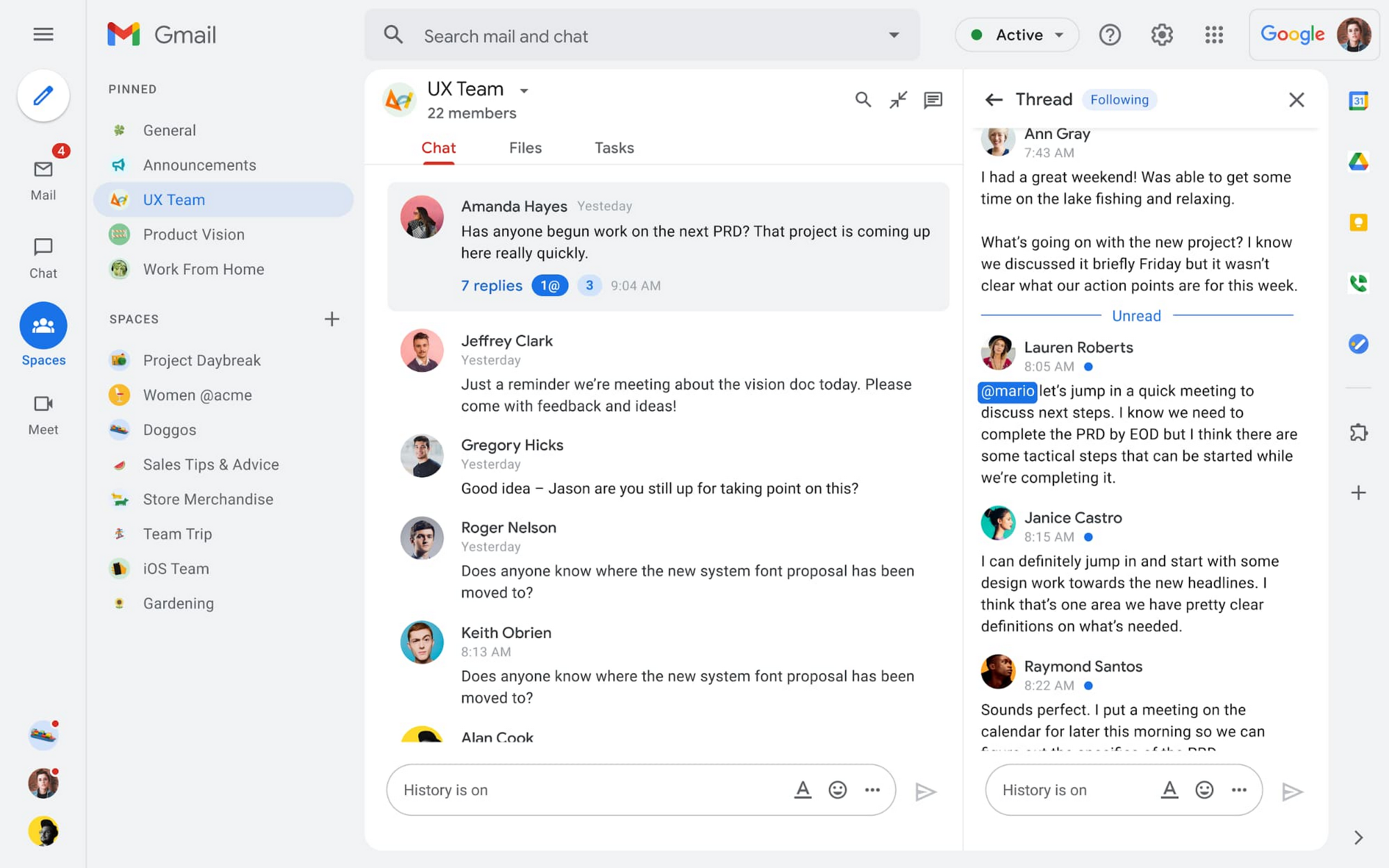
A dedicated place for team collaboration: Spaces are now live
Spaces are the central place for team collaboration in Workspace and starting today, Spaces are live for all users. Spaces are unique in that they are tightly integrated with Google Workspace tools like Calendar, Drive, Docs, Sheets, Slides, Meet, and Tasks, providing a better way for people to engage in topic-based discussions, share knowledge and ideas, move projects forward and build communities and team culture.
We hear from our customers that they’re continuing to work across a broad range of locations and working hours, and that Spaces can be a central hub for collaboration, both in real time and asynchronously. Instead of starting an email chain or scheduling a video meeting, teams can come together directly in a Space to move projects and topics along, whether it’s a team of 10 for “2022 Roadmap Planning” or a team of 1,000 for the “Company-wide All-Hands.”
With Spaces, teams can share ideas, collaborate on documents, and manage tasks from a single place. Because all their work is preserved for future reference, team members can easily jump in and contribute at a time that works best for them, seeing a full history of the conversations, context, and content along the way. Using Spaces has already helped my own team, which is spread across time zones and varied in its working styles. It’s been helpful to rely on Spaces to retain and structure foundational knowledge, whether it’s for onboarding a new teammate or preserving context when someone moves to a new role.
We’re just getting started with Spaces and I’m excited to share a little more about where we’ll take it next.
In the coming months, our users will see:
- Streamlined navigation: A flexible user interface helps users easily access their inbox, chats, Spaces and meetings—all from a single location—so they can stay on top of everything that’s important.
- Discoverable Spaces: Spaces and their content can be made discoverable to all members of an organization, so other people can find and join the conversation. Administrators can also set discoverability as the default for their organization.
- Enhanced search: Allows users to easily find content from within and across Spaces, or even discover new Spaces to join. “Search everything” in Spaces opens up powerful new collaboration possibilities and makes it easier to access the team’s collective knowledge base.
- In-line topic threading: The ability to reply to any message within a Space fuels deeper discussions and collaboration across teams and organizations.
- Robust security & admin features: Tools for content moderation, managing Spaces, and establishing the right rules for healthy communication across domains and companies.
Making meetings more hybrid friendly
Spaces will play an important role in laying the groundwork for meetings and, in some cases, reduce the number of meetings a team needs to gain alignment. Having a dedicated space for asynchronous collaboration, with access to all the right content and context, will help teams be more deliberate about scheduling meetings. This is top of mind for us and many of our customers given the rise in meeting fatigue over the last 18 months. But when having a meeting genuinely feels worthwhile, the experience of transitioning into (and out of) it from different collaboration touchpoints should be seamless.
Over the past few months, in collaboration with many customers and across teams within Google, we developed a handbook for navigating hybrid work that includes best-practice blueprints for the five most common hybrid meeting types. Because meetings are a foundational piece of hybrid work, our goal is to make them as productive, immersive and inclusive as possible.
Scheduling meetings that work across the entire team
With hybrid work, many teams—my own included—have locations and working hours that can change daily. When many of us were together in the office, we might have tended to schedule meetings at a time that favored the “in-office majority,” but now it’s especially important to schedule meetings that scale across the entire distributed team.
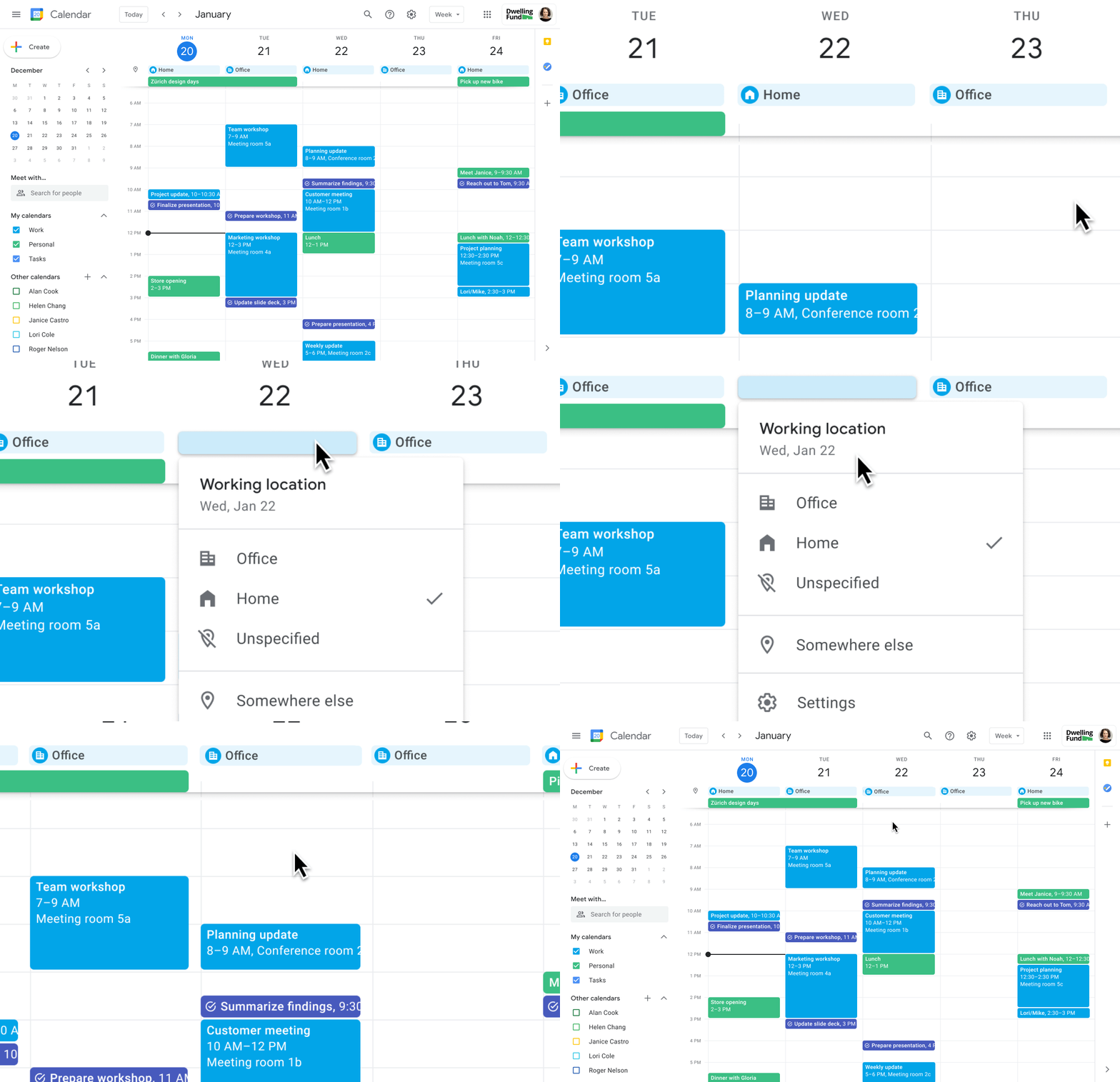
Now, beyond indicating their virtual or physical presence when accepting meeting invites, team members can set their location for each work day in Calendar. When combined, these capabilities allow meeting organizers and on-site support teams to plan for the right mix of in-person and virtual attendance. They can also provide greater visibility and help set expectations across hybrid teams.
Making meetings more spontaneous
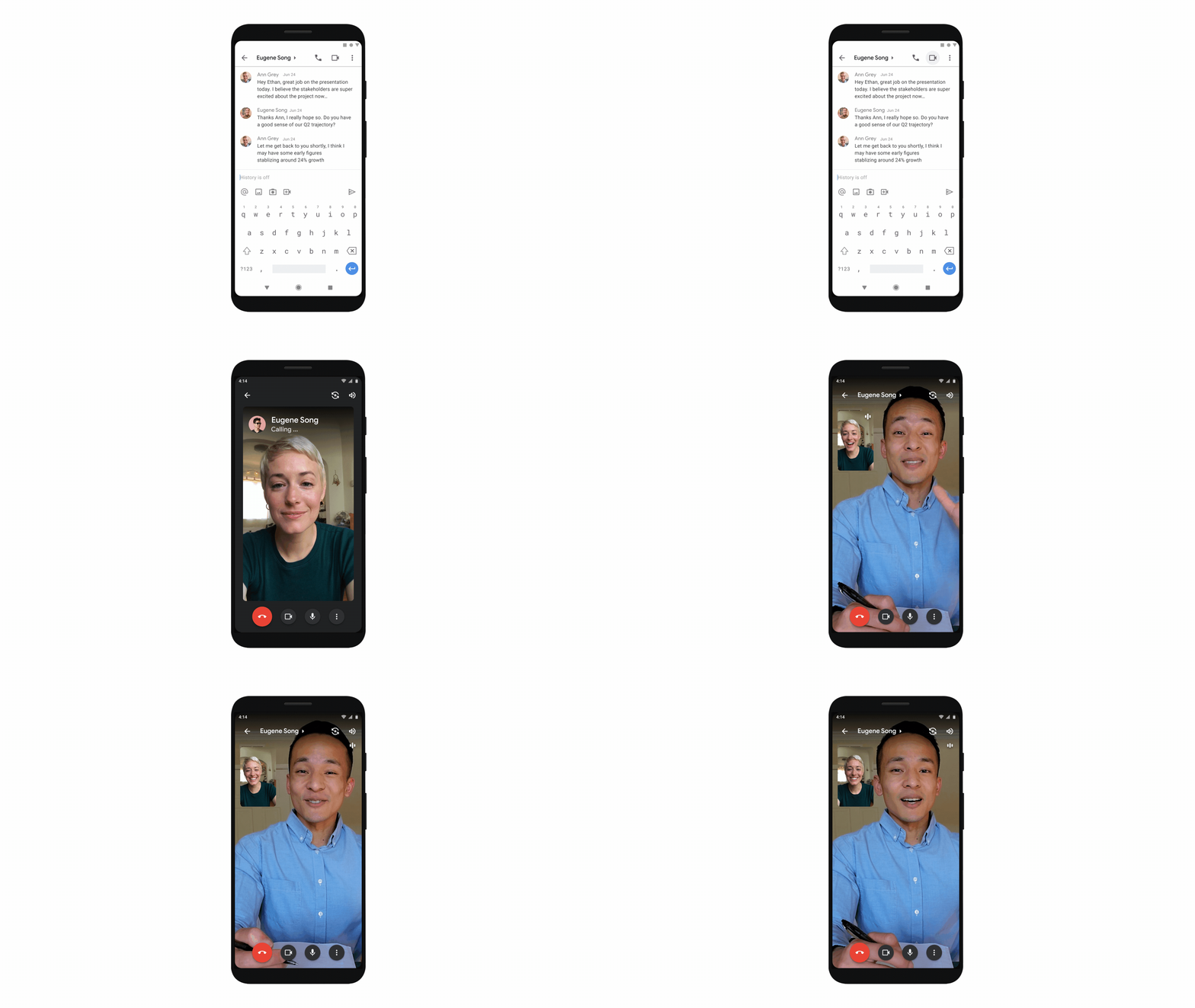
Remember when you’d casually bump into a colleague in the office hallway or a break room and start a conversation that sparked new ideas? That’s perhaps the thing I’m looking forward to most as more of my team plan their part-time return to the office. These casual encounters were always a great way to build relationships and learn about topics that might not come up in structured meetings. To help enable these spontaneous connections when teammates aren’t in the office together, we’re bringing Google Meet calling to Workspace.
Google Meet calling is a seamless experience of initiating a video or audio call between one or more participants, complementing more structured, scheduled video meetings. Our intention is to bring Meet calling to all the natural endpoints in Workspace where you’d initiate an ad-hoc call including chats, people cards, and Spaces, but this will come first to one-to-one chats within the Gmail mobile app. Soon I’ll be able to call members of my team directly from a one-to-one chat. This will ring their device running the Gmail mobile app and send a call chip to our chat on their laptop, so they can easily answer from any device. It’s not quite the same as a spontaneous hallway conversation, but it might be the next best thing in a hybrid setting.
Ensuring collaboration equity in hybrid meetings
How do we ensure that hybrid meetings aren’t two meetings in one, divided between those in-person and those who are remote? Effective hybrid meetings need a unified experience so that the people sitting together in the same room can interact with their remote colleagues seamlessly, without it ever feeling like there are two parallel conversations.
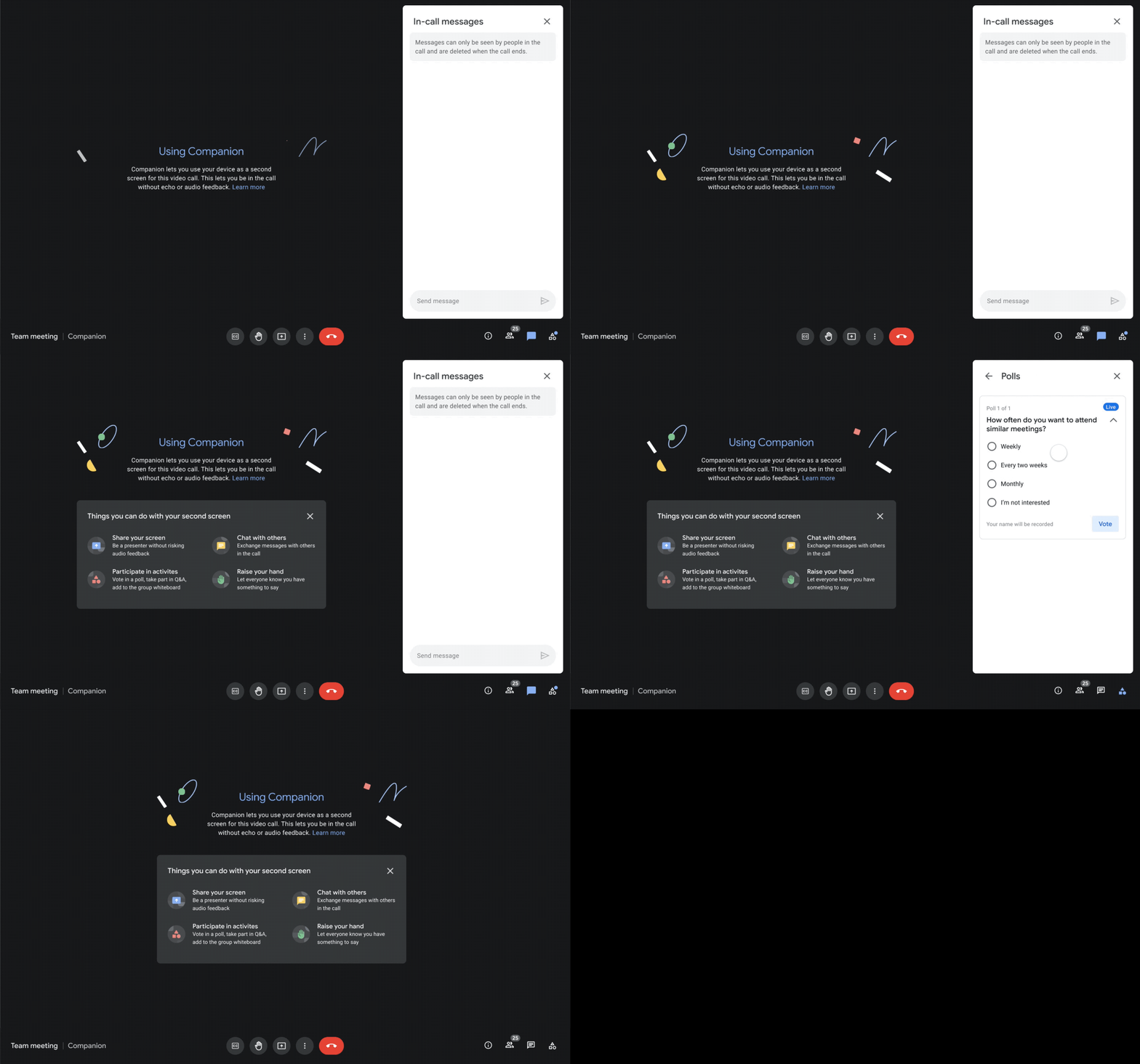
We designed Companion mode in Google Meet to specifically meet this challenge and we’ll start rolling it out to customers in November. With Companion mode I can host or join a meeting from within a conference room using my laptop while leveraging the in-room audio and video—and it all happens without any awkward audio feedback. This functionality lets me share content or see presentations up close on my own device, access the meeting chat and whiteboard, initiate and vote on polls, or post a question in Q&A, just as I would from home. And to ensure that users have greater choice over how they participate in meetings, live-translated captions will be available in Meet and through Companion mode by the end of the year. We’re currently working on translating meetings in English to French, German, Spanish and Portuguese, with many more languages coming in the future.
Expanding choice and flexibility for meeting hardware
While Companion mode keeps people in the room seamlessly connected to their remote colleagues, meeting hardware plays a crucial role in making hybrid meetings feel more immersive and human, with the ability for everyone to be clearly seen and heard. To provide more flexibility and choice on this foundation of how we come together in a hybrid work world, we’re announcing an expanded Google Meet hardware portfolio and interoperability with other conference room solutions.
First, we’re announcing two new all-in-one video conferencing devices to complement our Series One Room Kits. The Series One Desk 27 is an all-in-one 27” device that’s perfect for small shared spaces or your desktop, either in the office or at home. Series One Board 65 is an all-in-one 65” 4K device that can be paired with an optional stand for ultimate configuration flexibility—turning any room or space into a video collaboration hub in minutes.
Both devices feature collaboration capabilities with the Jamboard app built right in, and each can be used as an external display. While optimized for Google Meet, USB-C connection from your laptop gives you the flexibility to use the meeting app of your choice while leveraging the high-fidelity audio and high-definition video on Series One Desk 27 and Board 65. You can learn more about these devices developed in partnership with Avocor through our on-demand webinar starting at 9 AM PT today.
https://www.youtube.com/embed/BR81EAce5BQ?enablejsapi=1&
We’re also proud to announce new third-party devices coming to the Google Meet hardware ecosystem. Google has certified the Logitech Rally Bar Mini and Rally Bar for Google Meet, which provide complete room solutions for small and mid-sized rooms. You can learn more about these Google Meet-certified products in Logitech’s September 21 webinar. Additionally, the Rayz Rally Pro is a new mobile device speaker dock by Appcessori that will automatically launch Google Meet for video meetings and provide an improved audio experience from your mobile device.
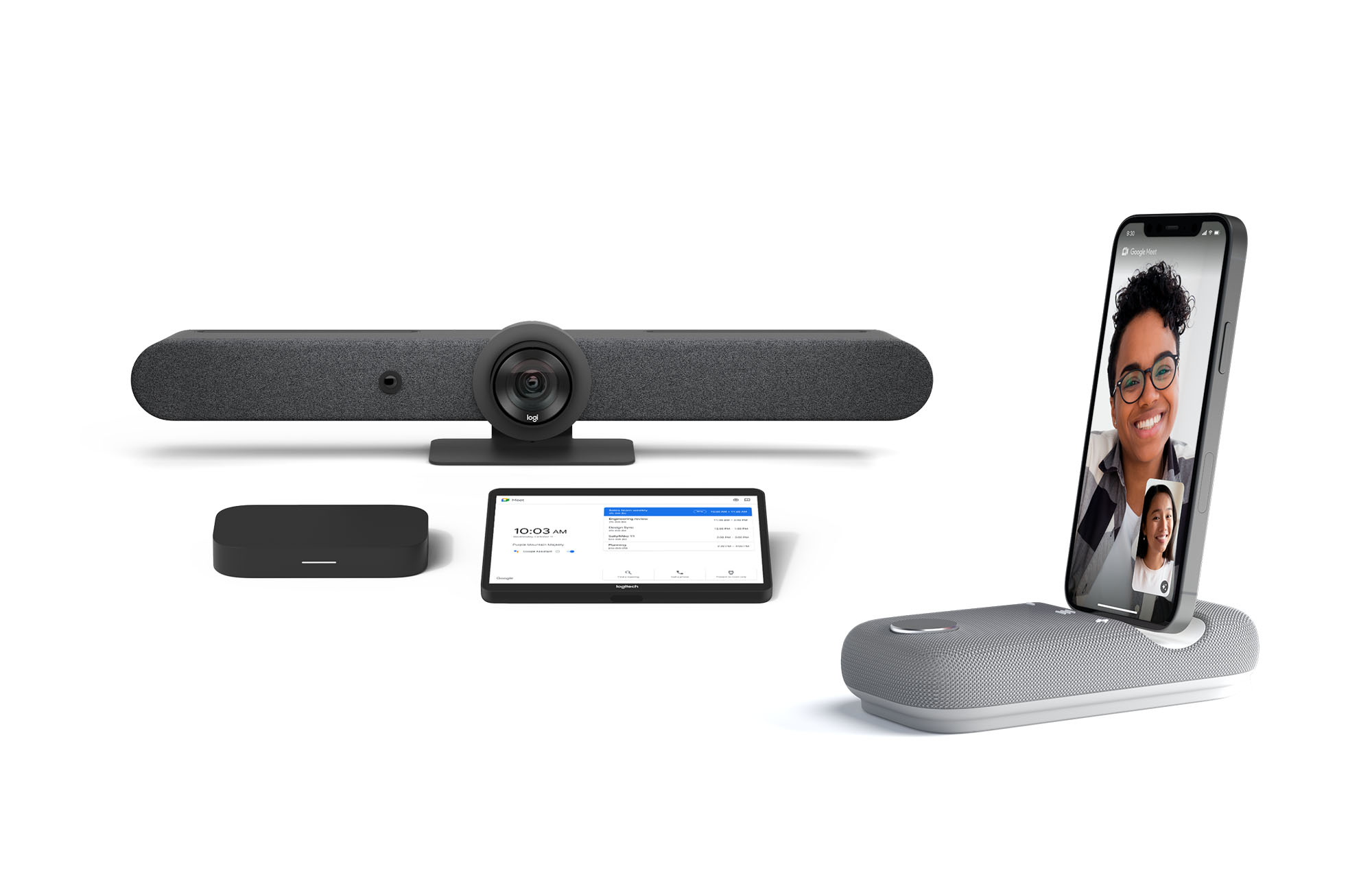
Certified Google Meet hardware ensures high-quality video and audio in meetings and is easy to deploy and manage. You can view our full Google Meet device portfolio and purchase directly from approved resellers by visiting the Google Meet Hardware website.
While Google Meet customers enjoy a full-featured experience on Meet hardware, we realize they sometimes need to connect with people outside of their video calling network. To enable this, organizations can use Pexip for Google Meet to seamlessly join Meet meetings from the widest range of third-party video conferencing solutions. Today, we’re also announcing support for bidirectional interoperability with devices from Webex by Cisco and Google Meet hardware. Soon you’ll be able to launch a Google Meet meeting on Webex hardware and a Webex meeting on Google Meet hardware. Calling interoperability between Meet and Webex is supported on Series One Board 65, Series One Desk 27, and the rest of the Google Meet hardware portfolio, as well as Webex Room Series, Room Kit Series, Desk Series and Board Series. We expect general availability later this year. You can find more details here. We plan to give Meet users even broader calling interoperability with support for other conferencing services in the near future.
Navigating hybrid work is a journey
We’re thrilled to bring these new Google Workspace experiences and devices to our customers, but we also realize that navigating hybrid work will be a journey of learning and adaptation for every organization. Two resources we recently developed can help along the way:
- Navigating hybrid work: A Google Workspace handbook
- The newly launched Future of Work site from Google Workspace, where you can keep up with all the ways work is changing.
Bridging the gaps in the emerging hybrid work world will necessarily be a combination of technology, workplace culture, and reimagining the use of physical spaces. But developing a “hybrid-first” mindset starts with the tools people use every day to connect, create, and collaborate, and Google Workspace will continue to play a crucial role in that evolution.
Explore the Complete Startups’ Technical Guide on Google Cloud Tech Channel

3380
Of your peers have already read this article.
1:30 Minutes
The most insightful time you'll spend today!
Bootstrap your Startup with our technical guided series
At Google Cloud, we want to provide you with the access to all the tools you need to grow your business. Through the Google Cloud Technical Guides for Startups, leverage industry leading solutions with how-to video guides and resource handbooks curated for startups.
This multi-series contains 3 chapters: Start, Build and Grow, which matches your startup’s stage of growth:
- The Start Series: Begin by building, deploying and managing new applications on Google Cloud from start to finish.
- The Build Series: Optimize and scale existing deployments to reach your target audiences.
- The Grow Series: Grow and attain scale with deployments on Google Cloud.
Kick off with The Start Series
The Start Series is designed to help your startup begin building, deploying and managing new applications on Google Cloud from start to finish. The series contains 12 videos and is dedicated to those who are starting out their cloud journey with Google Cloud. From setting up your project, to choosing the right compute option, to configuring your networking to managing your databases, and understanding support and billing – the Start Series guides you at every step of the journey.
Check out our website and our Google Cloud Technical Guides for Startups full playlist.
Coming up next – The Build Series
Launch into the next part of the journey continuing from the Start Series, with the upcoming Build Series, where we will be focusing on the optimization and scaling of existing deployments to help your startups reach your target audiences.
Join us by checking out the video series on the Google Cloud Tech channel, and subscribe to stay up to date.
See you in the cloud!
More Relevant Stories for Your Company

Prepare for the Unknown in Supply Chain with SAP IBP and Google Cloud
Responding to multiple, simultaneous disruptive forces has become a daily routine for most demand planners. To effectively forecast demand, they need to be able to predict the unpredictable while accounting for diverse and sometimes competing factors, including: Labor and materials shortagesGlobal health crisesShifting cross-border restrictionsUnprecedented weather impactsA deepening focus on

Cloud Bigtable Helps Fraud-detection Company Meet Scalability Demands and Secure Customer Data
Editor’s note: Today we are hearing from Jono MacDougall , Principal Software Engineer at Ravelin. Ravelin delivers market-leading online fraud detection and payment acceptance solutions for online retailers. To help us meet the scaling, throughput, and latency demands of our growing roster of large-scale clients, we migrated to Google Cloud and its
What is a Digital Business?
Every business is a digital business. That’s what you’ll hear from technology folks these days. But, what exactly is a digital business? How does one define it? Simply put, digital businesses are those that have thoroughly capitalized on the opportunity to connect people with technology. There are four parts to

Bharat Light & Power’s CEO Says Enough! It’s Time to Leverage AI and IoT
As community and business concern over global warming, sustainability, and energy security continues to rise, companies such as Bharat Light & Power (BLP) are working on answers. Founded in 2010 and located in Bangalore and Delhi, BLP is one of the leading clean energy generation companies in India. According to Tejpreet Singh
