





Bringing Multiple Security Elements Together: Chrome

5376
Of your peers have already read this article.
2:00 Minutes
The most insightful time you'll spend today!
Security and the way we’ve been able to advance user protections over the years is hands down one of my favorite topics when it comes to Chrome. I’ve been on the Chrome team for over 14 years and have seen the browser evolve to become a critical tool that helps people get work done at home or in the office. At the same time, Chrome is often the best line of defense to protect users against malicious software on the internet.
Now more than ever, security has to be top of mind for IT and security teams. Cybercrime is up 600% due to the COVID-19 pandemic, and remote work has increased the average cost of a data breach by $137,000. Those numbers are staggering. And IT teams need to make sure every piece of their tech stack helps support their security needs.
Chrome has worked for years to quickly mitigate risks, block malicious sites and content, and proactively improve web security to keep your users and corporate data safe, pioneering new layered defenses like sandboxing and site isolation. When we think of security and Chrome, we believe it takes multiple elements of security coming together to give organizations the best protection possible.
Security you don’t have to think about: Chrome has many built in protections in place by default that benefit all users. This includes our team’s work to minimize zero days and roll out fixes quickly. With auto updates enabled, Chrome offers enterprises fast and automatic fixes for zero day vulnerabilities. The Chrome security team recently published a post explaining the state of in-wild-bugs that’s worth a read. More examples of the defense-in-depth Chrome offers include capabilities like site isolation and sandboxing that keep malicious code from affecting other visited sites or impacting user machines. Our scanning infrastructure helps us detect and remove harmful extensions from the Chrome Web Store (in fact, last year we saw an almost 90% drop in malware) to prevent your end users from getting infected with malicious extensions. These are protections built directly into Chrome that automatically keep your users and organization safe.
Protections for Chrome users: We provide additional layers of protection that keep your end users safe while they’re on the web and give them helpful information whenever there are potential security risks. For example, Safe Browsing, offered natively in Chrome, helps protect devices by showing warnings to users when they attempt to navigate to dangerous sites or download malicious files. We also give users insights into the safety of their passwords, letting them know if their passwords have been compromised, or even prompting them to change their corporate password if they try to re-use it against company policies. You users are working hard to get things done, and Chrome’s layered security supports their workflows while helping them stay safe on the web.
Enterprise Controls: Every organization has unique security needs. That’s why Chrome provides enterprises with advanced safeguards and granular policy management to help meet those security goals. With hundreds of policy options, admins can use a variety of management tools, including Chrome Browser Cloud Management, to customize the browser. Chrome Browser Cloud Management goes even further, providing powerful enterprise extension management, a security priority for many organizations. Our extension request workflow allows end users to request extensions and admins to allow or deny extension requests. We also recently released extension pinning that allows admins to pin to specific versions of extensions to support any internal security review processes.
Visibility and reporting is another focus area to support IT teams. Through Chrome Browser Cloud Management, administrators can get more insight into their browser environment. This data can help IT teams make security decisions, better understand the devices running Chrome and investigate if issues arise.
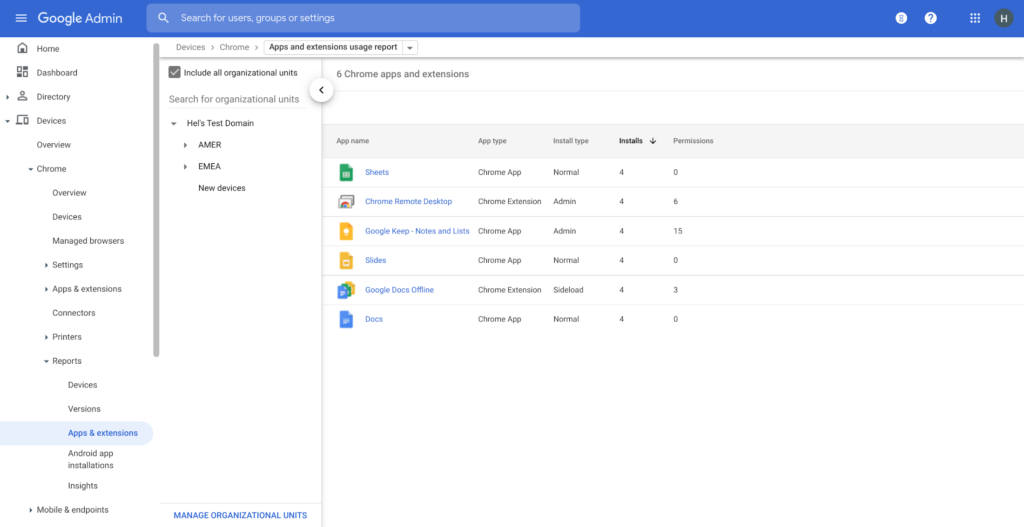
Zero trust security: Finally, Chrome can help modernize an enterprise’s security strategy by migrating to Zero Trust access models. BeyondCorp Enterprise helps secure endpoints by directly integrating Threat and Data Protection in Chrome. This protects against intentional or accidental data loss and prevents malware and phishing in real-time. Additionally, Chrome and BeyondCorp Enterprise provide device trust and endpoint security signals directly from the browser, significantly easing deployment of zero-trust in your environment. In 2022, we plan to partner with leading players in the cybersecurity and zero trust space to add additional integrations.
For security recommendations, check out the new Chrome 2.1 CIS Benchmark that covers independent recommendations on which Chrome policies to configure to help support organizations’ security and compliance needs.
Google Cloud to Implement European Commission’s New Privacy Clauses to Safeguard Cross-border Data Transfer

2957
Of your peers have already read this article.
1:30 Minutes
The most insightful time you'll spend today!
The European Commission (EC) has recently published new Standard Contractual Clauses (SCCs, also known as Model Contractual Clauses) to help safeguard European personal data. Following the applicable transition period, these new SCCs will replace the SCCs previously adopted by the EC. Google Cloud plans to incorporate the new SCCs into our contracts to help protect our customers’ data and meet the requirements of European privacy legislation.
Like the previous SCCs, these clauses can be used to facilitate lawful transfers of data under certain conditions. By imposing various contractual obligations, SCCs allow personal data subject to the EU’s General Data Protection Regulation (GDPR) to flow to recipients outside the European Economic Area (EEA). The GDPR is an important piece of EU privacy legislation that became applicable in 2018. It requires appropriate safeguards for EEA personal data moving from the EEA to any non-EEA countries that do not meet the EU ‘adequacy’ standard for privacy protection.
Google Cloud’s industry-leading controls, contractual commitments, and accountability tools have helped organizations across Europe meet stringent data protection regulatory requirements for years. We have provided customers with SCCs since 2012. In 2017, EU Data Protection Authorities confirmed that Google Cloud’s contractual commitments met the legal requirements for transfers of data from the EU to the rest of the world under EU Data Protection Directive 95/46/EC. Google Cloud remains committed to protecting the privacy of our customers and their users, and to helping thems address EU regulatory obligations.
To learn more about how Google Cloud can help organizations with their compliance efforts, visit our Cloud Compliance resource center.
You Need Enhanced Security for a Successful Cloud Transformation

2632
Of your peers have already read this article.
1:30 Minutes
The most insightful time you'll spend today!
Twenty years ago, organizations discovered the magic of server virtualization. Among the many benefits of virtualization, it heralded the end of the need for one physical server per application and the beginning of managing software-defined infrastructure. It helped automate building and installing systems, and it helped lay foundations for today’s Continuous Integration/Continuous Delivery mechanisms and DevOps practices. However, the adoption of virtualization was not always smooth and several hurdles stood in its path. Today’s organizations are facing similar obstacles in their journey to the cloud.
Organizations that wanted to virtualize their server environment two decades ago faced a significant challenge that was neither technical nor budgetary, but organizational, stretching across IT teams and beyond. The first team to be concerned about virtualization was the one in charge of installing the physical servers in the racks of the datacenter, managing the physical network connections and operating environmental controls, such as HVAC and power systems. These tasks were drastically reduced, if not outright eliminated.
The second team affected by this shift in technology was the one responsible for installing the operating system and running the post-install procedures. Their job almost completely disappeared as most virtual machines were automatically instantiated from templates.
As a result, successful adoption relied on the ability to smooth these organizational changes. Along the way, training the staff and making sure they acquire the new skills necessary to operate the virtualization infrastructure was critical. And usually, the affected teams eventually found that their new responsibilities were different but still essential to the organization, and perhaps even more appealing.
Virtualizations lessons for cloud transformation regulators
Discussions on virtualization didn’t end with these internal changes when organizations were operating in a regulated environment. They needed to engage closely with their regulators. Regulated organizations often considered the hypervisor solely as an additional layer of software with potential vulnerabilities.
This viewpoint raised risks (such as virtual machine escape) that didn’t exist with physical servers. Even if this is taken into account and the risks mitigated, it should have been considered in balance with all the benefits of machine virtualization, including security benefits such as asset identification, harmonization, and smoother patch management.
While the relevance and benefits of virtualization are now widely accepted, history has repeated itself as similar issues have arisen for organizations facing cloud migrations. When large cloud service providers (CSP) began supporting critical workloads for their customers, regulators increased their oversight over CSPs and issued guidance concerning cloud adoption. This happened in the European financial sector, with guidelines from the European Supervisory Authorities (European Banking Authority, European Securities and Market Authority and European Insurance and Occupational Pensions Authority,) and the coming Digital Operational Resilience Act regulation.
These regulations can help establish trust between providers and customers. As regulator decisions are vital for organizations, there is an opportunity now with cloud technology to balance the risks with the benefits and take into consideration all the ways CSPs can help organizations improve their overall security and compliance levels.
Cultural transformation can drive cloud transformation
Another similarity between cloud transformation and the journey to virtualization is the required internal transformation. When an organization decides to start its journey to the cloud, training its staff with the new technology and tools is a necessary step, but probably not the first nor the most arduous to make. A change of mindset is paramount to fully incorporate all the cloud benefits, in particular regarding security.
This new approach begins with a deep transformation at the organizational level. Organizations should avoid viewing the cloud as a datacenter because there’s so much more potential to cloud technology. This new approach and its accompanying organizational transformation is driven by two factors: The burdens that the CSP removes from the customer, and the new flexibility that software-defined infrastructure brings to the table.
The CSP directly manages several tasks and services, and their security, which means that they’re no longer a direct concern for the customer. These responsibilities include data center management, security-hardened hardware, default encryption for data at rest and data in transit, and resilient network management.
Since all the infrastructure used by the organization to manage its workloads is software defined, it brings much more flexibility to what can be done with it. Software-defined infrastructure can more easily enable security guardrails and continuous compliance that weren’t possible before.
While there’s a temptation to approach an organization’s cloud transformation as merely a “lift and shift” operation from on-premises infrastructure, the reality is that approach reduces the potential gains a cloud transformation can bring to an organization. Moving systems to the cloud accounts for a small portion of the potential impact, while updating the mindset can be truly transformational. Development, architecture and security processes need to be rebuilt; this inevitably requires a deeper transformation of the organization.
The next step is to transform the operations, to align them with the overall organization and the new defined processes, operationalize CI/CD and build DevOps practices. After that, the technological gap will be adjusted, moving the new tools and teaching teams how to best use them.
The important point here is the order of the transformation to manage: organization, operations and technologies (O-O-T) and not the other way round (T-O-O). Of course, these three steps should not be considered completely sequential, as technology plays an important role in the organization and the operations. However, it is essential to support the development of personnel and frameworks to take full advantage of the transformation opportunity, rather than primarily focusing on the tooling.
In addition, at Google Cloud, we believe in a shared fate that goes far beyond the usual shared responsibility model. We think it is part of our duty to help our customers to achieve their goals in their scope of responsibility. We prepare secure landing zones and guide the customers, we bring transparency to security controls and help them with cyber-insurance.
Our shared objective with our customers is to continuously improve security. Our Google Cybersecurity Action Team initiative helps us to be engaged alongside our customers, provide them with necessary guidance, support them in their security and compliance strategies, and assist their organizational and operational transformation in their cloud journey.
- Listen to a related podcast “How to Apply Lessons from Virtualization Transition to Make Cloud Transformation Better”
- Listen to “Preparing for Cloud Migrations from a CISO Perspective, Part 1”
- Read “The journey to the cloud mitigates enterprise risk”
- Also, review “Megatrends drive cloud adoption—and improve security for all”
- Visit Google Cybersecurity Action Team website
Your Cloud Defense Enhanced: Google Introduces End-to-End TDIR in Chronicle Security Operations

1170
Of your peers have already read this article.
4:30 Minutes
The most insightful time you'll spend today!
As cloud adoption continues to grow, so too does the number of cloud-born security threats. However, cloud environments can present significant opportunities to improve security with the right tools and processes in place.
When it comes to effective threat detection, investigation and response (TDIR) in the cloud, modern solutions must ensure that the entire security operations workflow — from data analysis through detection to response — are working in tandem to deliver the insights, context, and processes needed for cyber defenders to respond to threats with speed and precision.
At Google Cloud, we believe that modern security operations should rely less on customer engineering and more on packaged outcomes delivered by solution providers. With this in mind, we are excited to announce today at our annual Security Summit that Chronicle Security Operations now provides turnkey TDIR for Google Cloud. By integrating with our cloud-focused Security Command Center Premium (SCC) and Google Cloud telemetry, Chronicle can collect and analyze data from Google Cloud, detect and investigate threats, and automate responses to mitigate risks.
In our recent State of Cloud Threat Detection and Response Survey, 71% of respondents said that “entire classes of threats are eliminated by migrating to the cloud,” and 82% stated that “the cloud affords the ability to process more data, including on-prem data, which can improve detection across the board.”
To take advantage of all that the cloud can do for security, organizations should to do more than “lift and shift” their existing security tools and processes to the cloud. The cloud presents a different attack surface, often across several cloud services and data repositories, and each can have different attack tactics, potential misconfigurations, and context.
This update to Chronicle helps enable teams to:
- Detect with confidence. Out-of-the-box detection rule sets developed by Google threat researchers surface cloud attack vectors and provide high fidelity, contextualized alerts that quickly give insight into potential threats in your Google Cloud environment.
- Investigate with full context. Visualize threat storylines, complete with cloud-specific context that is correlated with additional data and context from across your environment for fast and efficient investigations.
- Respond with speed and precision. Streamline workflows and automate response actions with prebuilt playbooks and best practices designed specifically for Google Cloud. Chronicle SOAR’s case management and team collaboration help ensure fast and timely response.
- Simplify data ingestion. Chronicle automatically ingests, normalizes and contextualizes cloud telemetry from a variety of Google Cloud services (such as Cloud Asset Inventory, Google Kubernetes Engine, Google Compute Engine, cloud audit logs, and Cloud DLP), reducing the need for complex and time-consuming engineering.
Putting Google Cloud TDIR to work
Let’s take a closer look at how our end-to-end cloud TDIR workflow manages a potential Google Cloud attack.
Setting up cloud TDIR in Chronicle only takes a few clicks. Security Command Center’s built-in threat detection identifies attacks against Google Cloud resources. These findings, as well as audit, NAT, DNS, and firewall logs, are ingested into Chronicle to provide additional insight and context into Google Cloud threats.
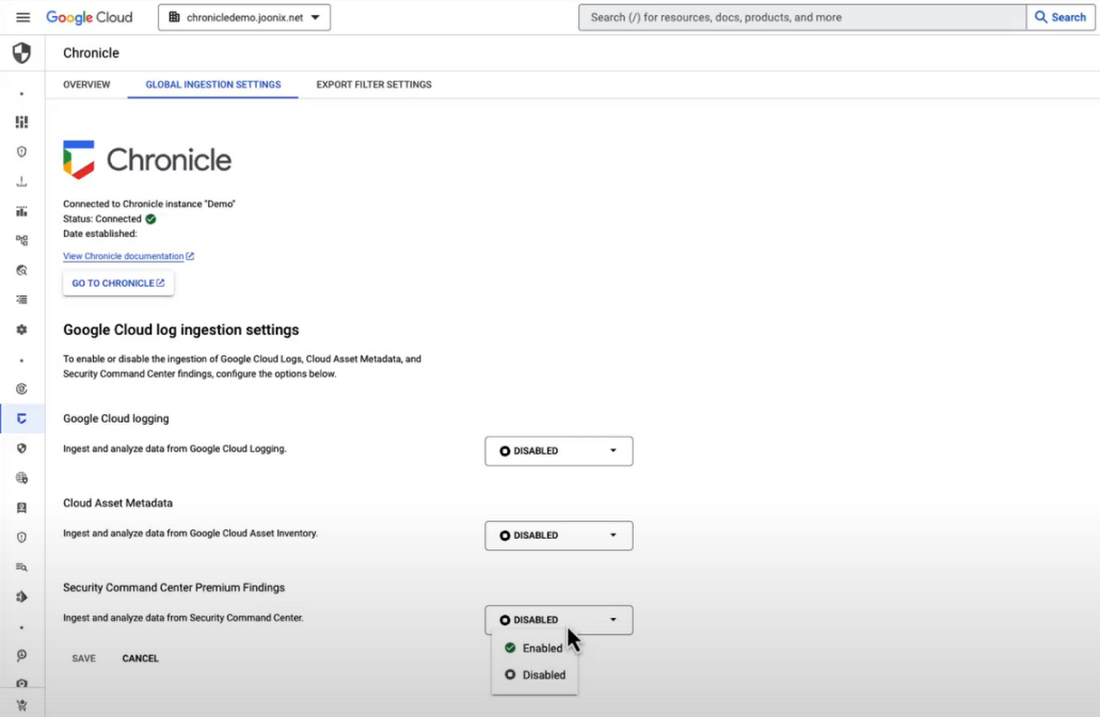
Chronicle now provides detection rules for Google Cloud threats. These rules correlate SCC findings with Chronicle’s advanced detection engine to reveal the broad scope of malicious activity, giving you visibility and more contextual information into what’s going on in your environment. In our example, Chronicle alerts on suspicious activity that can indicate an attempt to exfiltrate data from BigQuery.
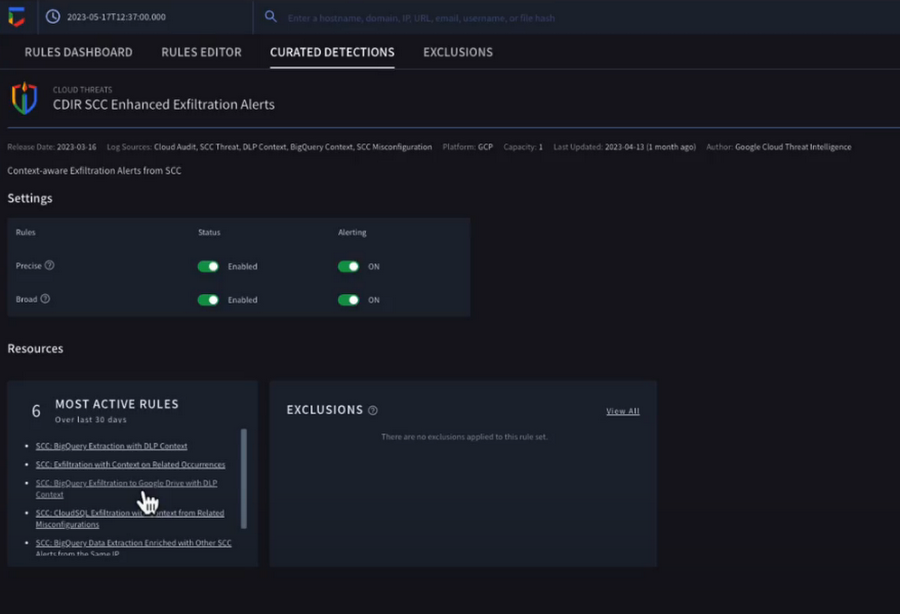
The new Chronicle Alert Graph surfaces key details of primary alerts you’re investigating in seconds. Combining cloud alerts and telemetry and correlating that with vital context from other sources (such as user data, endpoint data, and threat intelligence,) you can explore the visual representation of an alert’s relationship to other alerts and entities, dig into the potential attack paths, get quick summaries of implicated security artifacts, and pivot into your Google Cloud Console to do a deeper dive into potentially-impacted resources.
In our example, we can see a BigQuery exfiltration event associated with a customer and that it’s associated with a particular service account tied to a Google Cloud org. Alert context below tells us more about what’s been impacted. It shows us that cloud credentials in the form of encryption keys and email addresses were associated with the event.
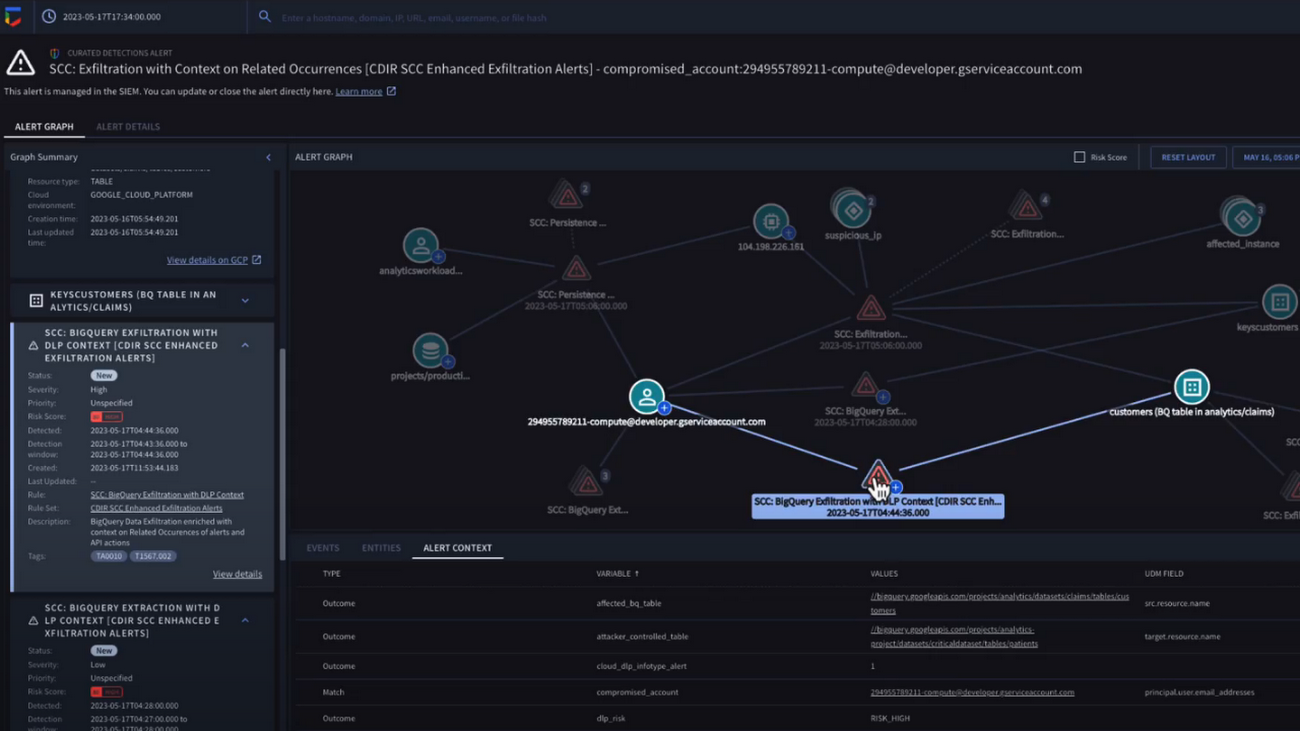
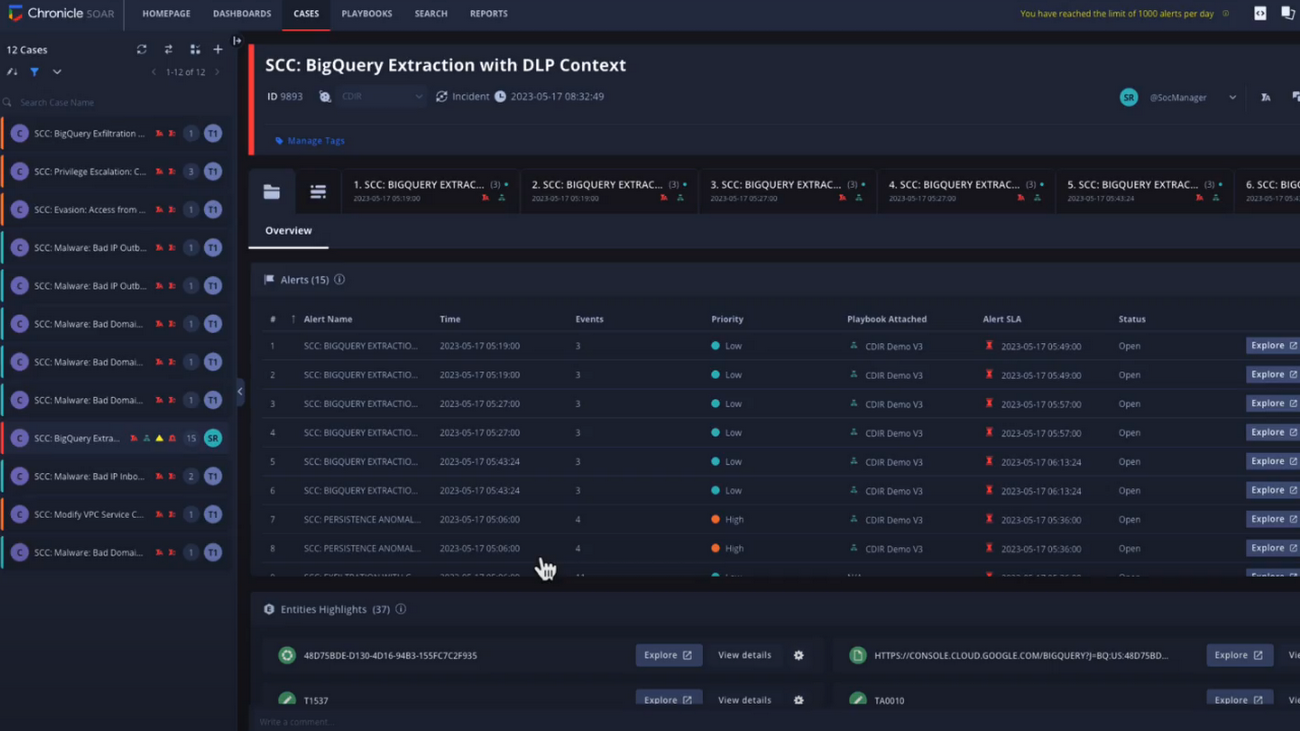
Chronicle case management automatically groups any related alerts into threat-centric cases, uniting the information that matters and making it simple for you to see and understand the scope of the event.
In our example, Chronicle groups these alerts together based on common source address and username, and the case wall provides the summary of the alerts and actions that are taking place across the entire case.
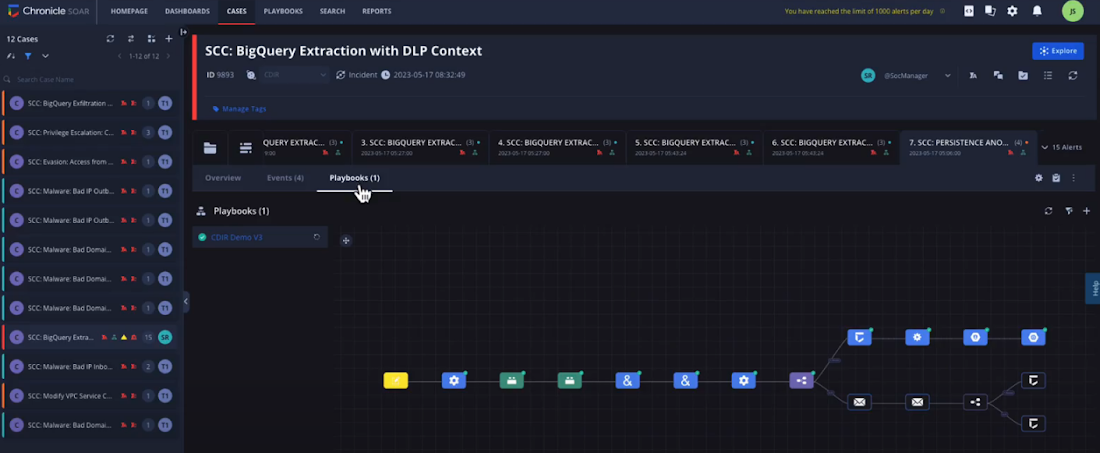
Chronicle playbooks, designed specifically for Google Cloud, automate your desired response processes. In our example, when an alert was generated a playbook automatically ran through predefined steps that gathered data, enrichment, and took automated remediation steps to prevent this service account and instance from continuing.
Ready to detect with confidence, investigate with broad context, respond with speed and precision, and simplify data ingestion? Chronicle Security Operations is your go-to for turnkey, end-to-end threat detection, investigation, and response on Google Cloud.
Tune in to our Security Summit session to learn more and see a demo of the new Google Cloud TDIR capabilities.
How Firewall Insights can Simplify Corporate Firewall Rules

3116
Of your peers have already read this article.
3:30 Minutes
The most insightful time you'll spend today!
Corporate firewalls typically include a massive number of rules, which accumulate over time as new workloads are added. When rules stack up piecemeal like this, misconfigurations occur that, at best, create headaches for security administrators, and at worst, create vulnerabilities that lead to security breaches.
To address this, we have introduced the Firewall Insights module in our Network Intelligence Center, which provides a single console for managing Google Cloud network visibility, monitoring and troubleshooting.
What are Firewall insights?
Historically, there hasn’t been an easy way to deal with the accumulation of complicated firewall rules. That was until we created Firewall Insights, which provides metrics reports and insight reports. These two reports contain information about firewall usage and the impact of various firewall rules on your VPC network. Even better, these insights and metrics are integrated into your Google Cloud Console for the VPC firewall and are also available via APIs.
You can use metrics reports to verify that firewall rules are being used appropriately and as intended. This report can uncover leftover rules from the past that are not actively used, review that the firewall rules allow or deny what is intended, perform live debugging of connections dropped, and leverage Cloud Monitoring to discover malicious attempts to access your network.
You can use insight reports to identify firewall misconfigurations, detect security attacks, and optimize and tighten your security rules.
Let’s take a look at how these reports work.
Metrics Report, a deeper dive
Metrics insights analyzes your VPC firewalls usage by tracking metrics such as firewall hit counts and last used. Let’s check this out with an example:
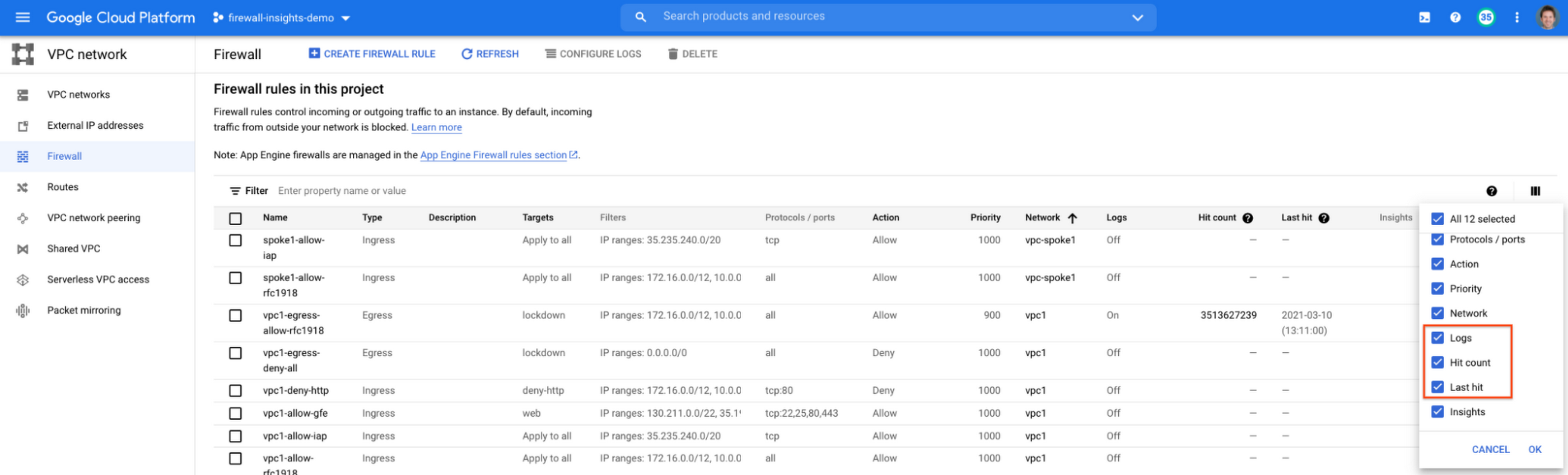
When you navigate to your VPC network and click on Firewall, ensure that you have selected Logs, Hit count and also Last hit in the column display options:
After this is enabled, now you should be able to see your VPC firewall rules with the hit count and last hit metrics. In the image below you can see that if logs are not enabled for rules, hit count and last hit metrics will not be collected. If logs are enabled, these details are collected, and shown in the VPC firewalls console.
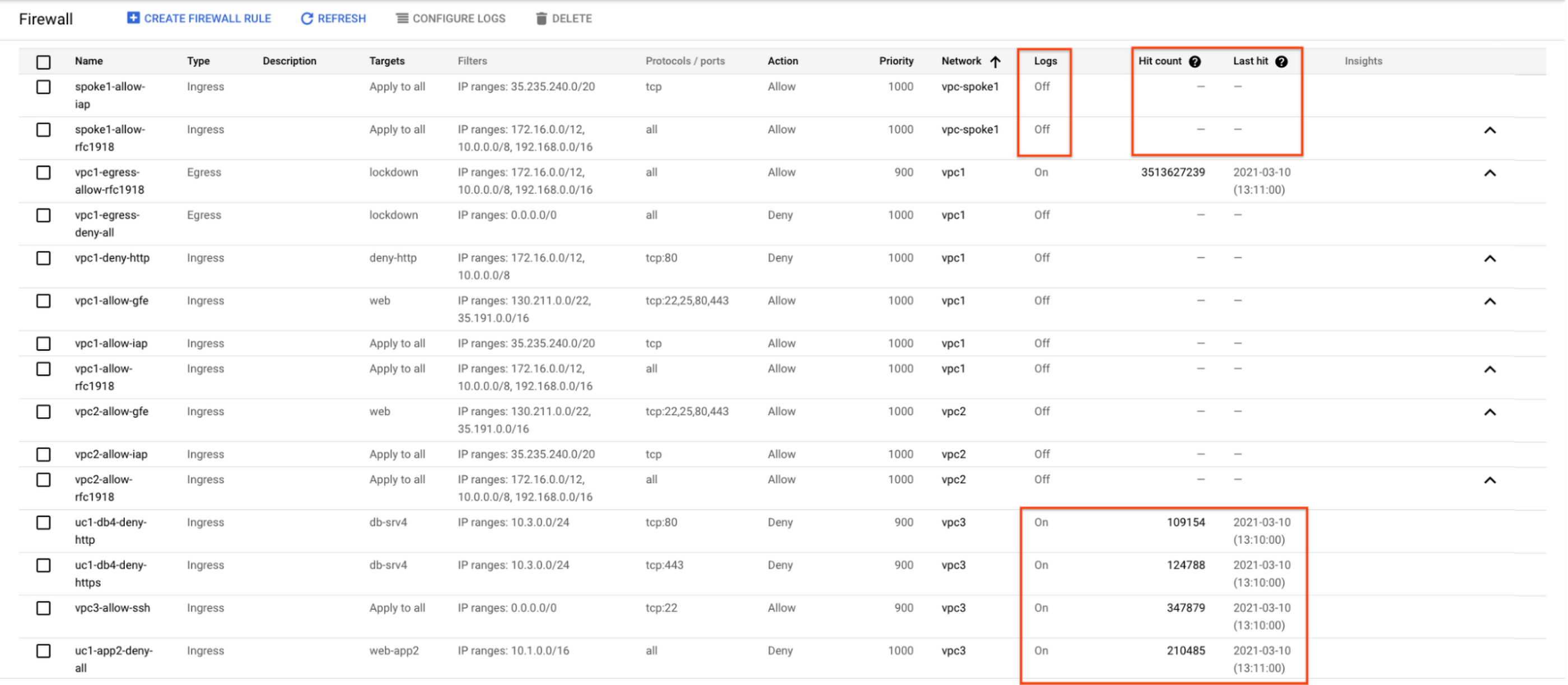
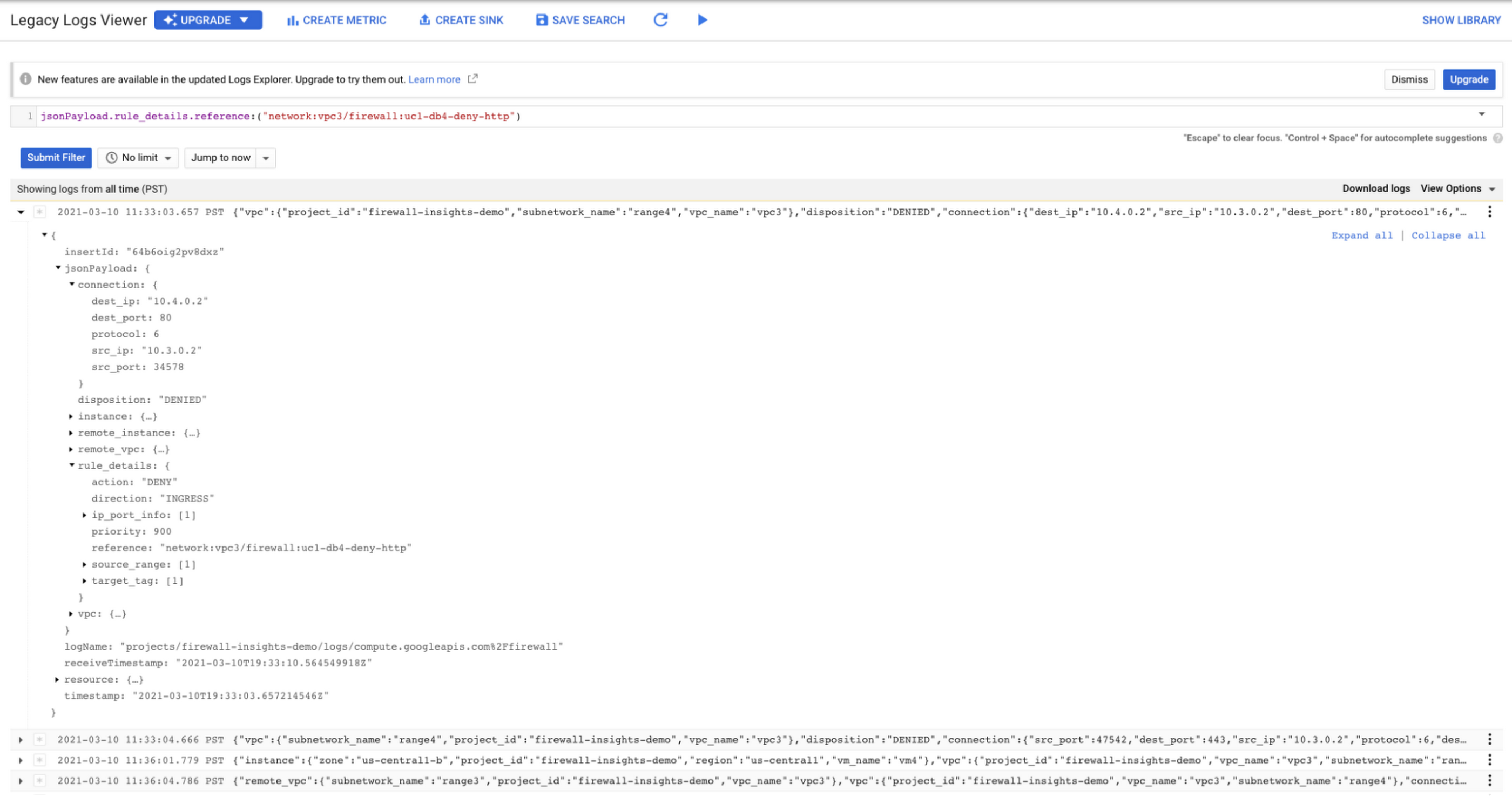
As you can see in Figure 1.2, each firewall rule which has logging enabled will show hit counts, so based on the example above, the rule “uc1-db4-deny-http” has been hit 109,154 times, the last time being 2021-03-10 (13:10:00). If you want to dive even deeper, you can click on the hit count and this will bring you to the logs viewer page where you can expand these logs and analyze all the details:
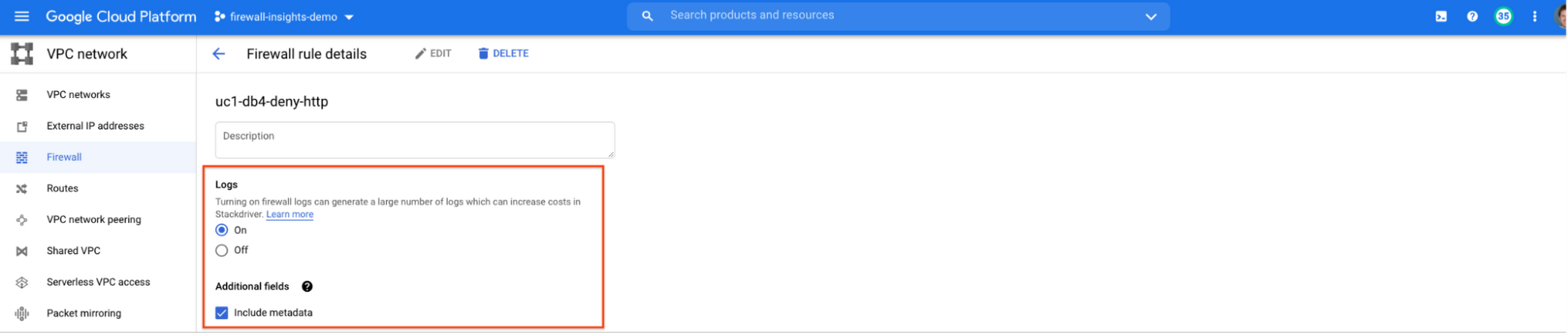
In order to enable logs for a particular firewall rule, you can edit it and turn logs on. By default, metadata is added in firewall logs. If you want to reduce the log size, you can do so by excluding these additional fields. Excluding these metadata fields will not impact the functionality of Firewall Insights.
From the “Firewall” page, you can also multi-select a group of firewall rules and turn on all logs at once.
Firewall rule usage metrics are accurate only for the period of time during which Firewall Rules Logging is enabled.
Insights Report, a deeper dive
Insights Report provides an intelligent analysis of the configuration of your firewalls. A report can contain one or more insights.
We will see examples now about the different insight reports which include:
- Shadowed firewall rules
- Allow rules with no hit in the last six weeks
- Deny rules with hits in the last 24 hours
By definition, a shadowed rule is a VPC firewall rule that is completely overshadowed by one or more firewall rules with higher or equal priority. We call that shadowing rules. Let’s see an example on how to find shadowed rules:Let’s say that you try to use ping between two VMs but it fails. Let’s take a look at the firewall rules applied to the VM:
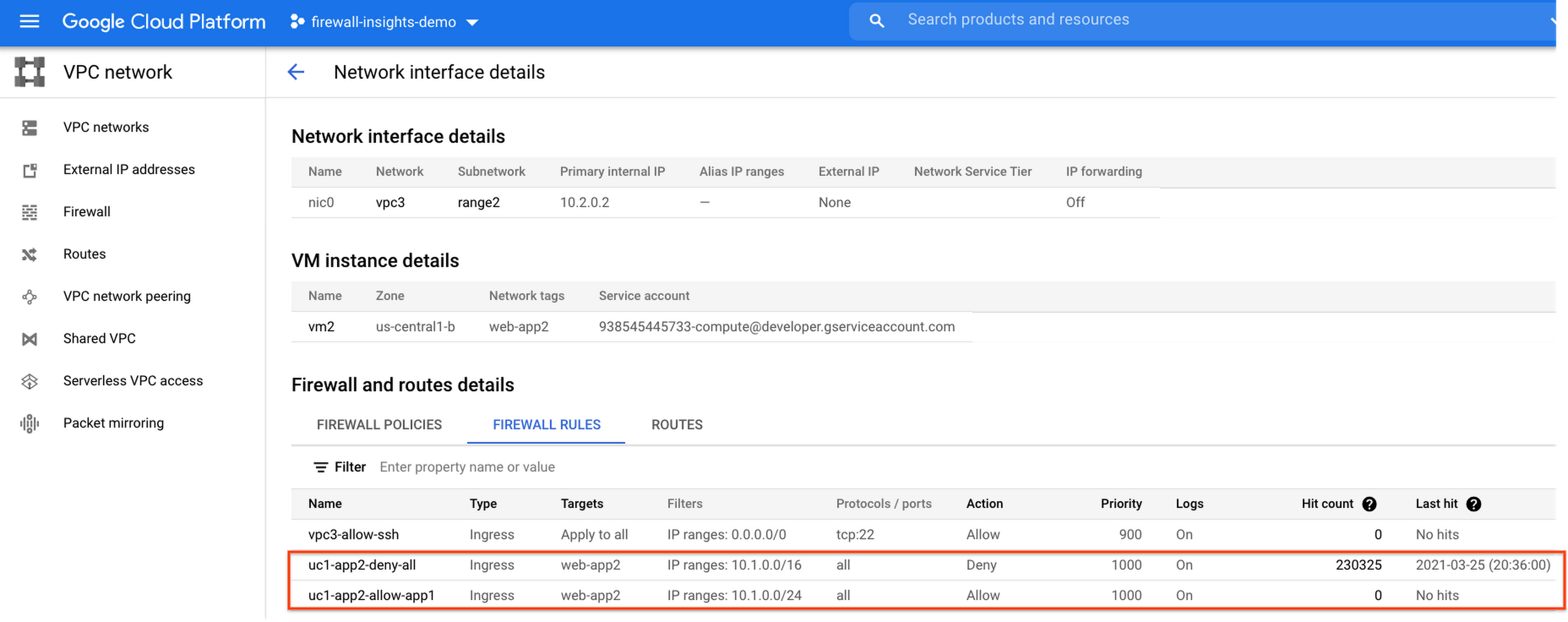
If we look closely, we can see that there are two rules with the same target tag, and those are almost identical except their source IP range. The IP range of the deny rule “uc1-app2-deny-all” includes the IP range of the rule allow “uc1-app2-allow-app1”. Therefore, we can see that “uc1-app2-allow-app1” is shadowed by “uc1-app2-deny-all”, and the ping between these VMs failed due to that.
To avoid such incidents in the future, Firewall Insights provides you with a convenient list of rules overshadowed by other firewall rules.
To see shadowed rules, you can click on the column selector, and add “Insights” to the firewall and route details:

Once this is applied, you will be able to see shadowed rules here:

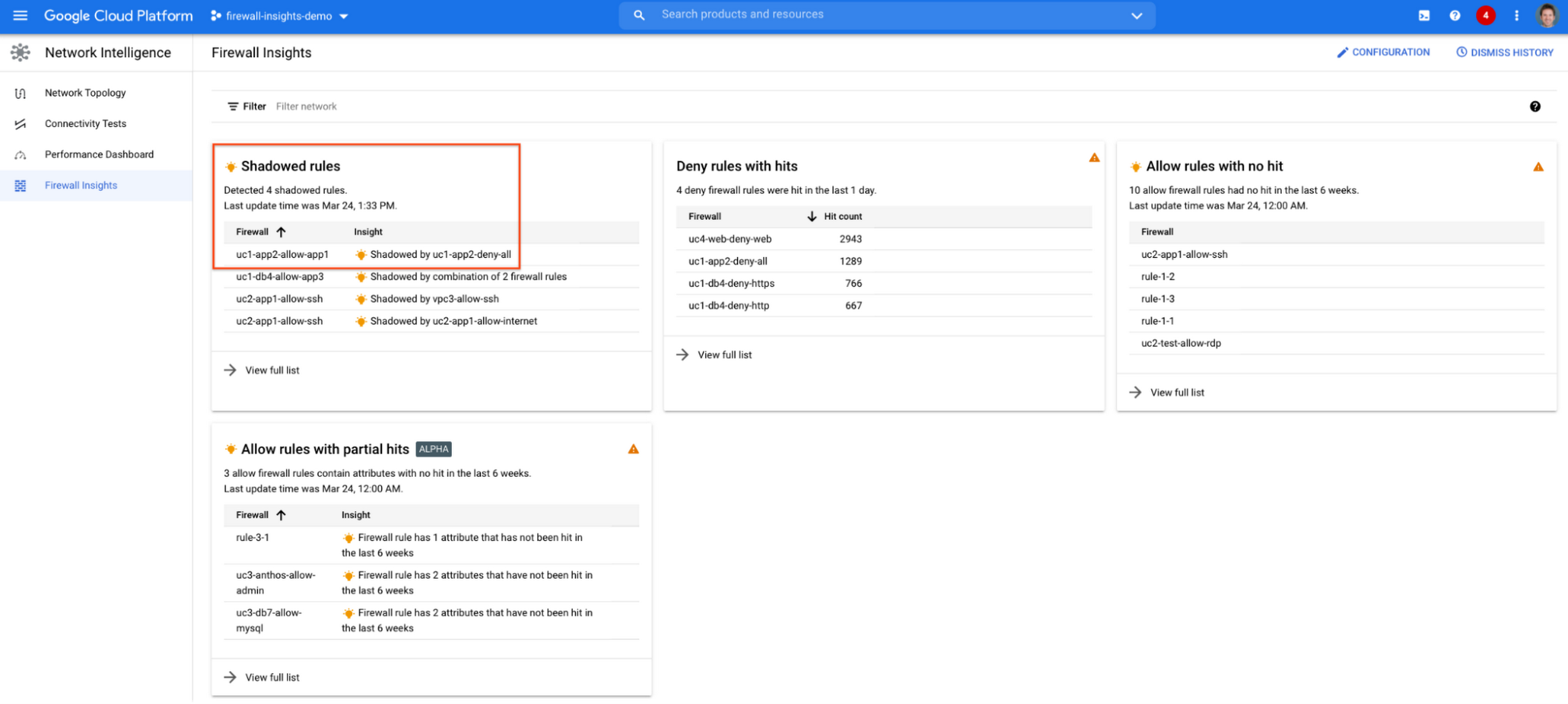
Alternatively, you can navigate to Network Intelligence > Firewall Insights, where we will see the shadowed rule report:
If we click on the insight we will get more details:

Going back to the firewall insights card (Figure 1.8), we can also identify that “uc1-db4-allow-app3” is shadowed by a combination of two rules and if we clicked on the insight this would provide all the details.
From the Firewall Insights dashboard, let’s move on to “allow rules with no hit”, where we can see firewall rules that have not logged any hits in the past six weeks. Such rules could be as a result of a misconfiguration, or leftover rules from past deployments. Tighten your security boundaries by identifying and removing such rules. If we go back to Network Intelligence > Firewall Insights, we can see allow rules with no hit:

We can drill down to view the full list of rules with no hit. We can see, for instance, one of the rules, the bottom one “uc2-app1-allow-internet”, might be a leftover rule to allow internet access from a past deployment, which means it has little likelihood of being hit in the future. So you may want to consider removing it from the rule set:

Click on the firewall rule to review all the details, and take a look at the prediction, which is made based on the hit pattern that we saw for similar rules in the same organization:

Let’s go back to the Firewall Insights dashboard and move on to the last category, “deny rules with hits in the last 24 hours”, which help you capture the traffic blocked by deny rules. These traffic types could indicate external attacks into your VPC network, or compromised VM instances attempting to send traffic out of your network. Let’s examine future hit prediction on a firewall rule. Navigate to Network Intelligence > Firewall Insights and take a look at the deny rules with hits card:

If your click on the “uc4-web-deny-web” rule, you can see the hit count monitoring, and if you click on the hit number we can dive deeper in the logs:
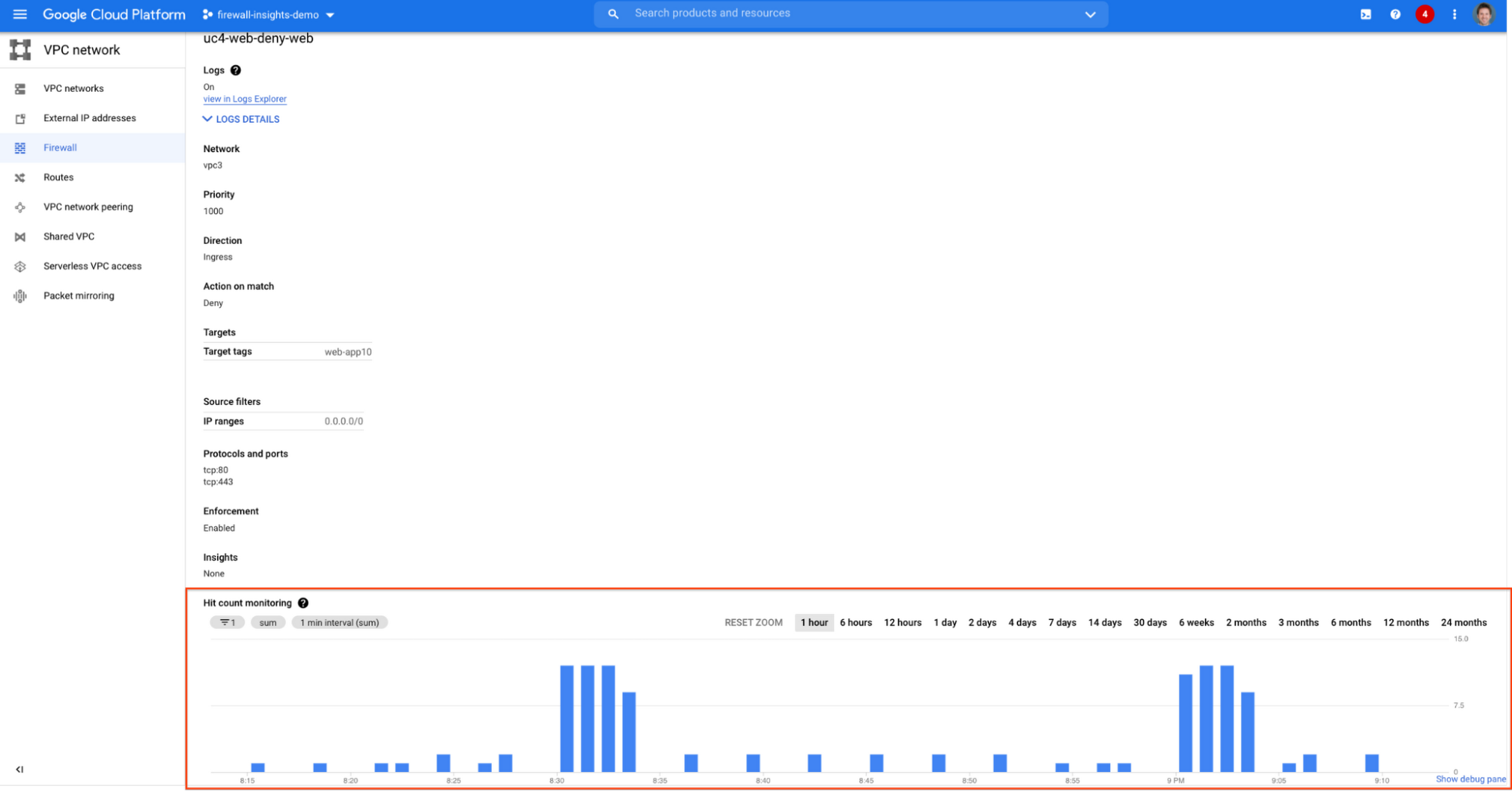

These tips should help you effectively leverage Firewall Insights to gain better control over a massive firewall rule set. Automate shadowed rule detection, quickly troubleshoot misconfigured rules, effortlessly pinpoint the overgranting rules hidden in the rule set, and identify the failed attempts to break into your network that were rejected by your firewall rules.
To learn more about Firewall Insights, please refer to our documentation. Additionally, to see how we’re advancing intelligent automation in network security, check our recent blog post.
3432
Of your peers have already watched this video.
2:30 Minutes
The most insightful time you'll spend today!
Learn to Use reCAPTCHA Enterprise to Protect Your Website from Fraud
One of the top questions enterprises have is: How can I use reCAPTCHA Enterprise to protect my website from online fraudulent activity?
Fraudulent web activities cost enterprises billions of dollars each year. Security teams need to keep the bad actors out of their websites and ensure that their customers can always get in.
Google reCAPTCHA has been defending millions of sites for almost a decade, and the reCAPTCHA Enterprise service built on this technology with capabilities designed specifically for enterprise security concerns.
In this demo, you can see how reCAPTCHA Enterprise identifies the difference between a real user and a bad actor and how you can view this within the Admin Analytics dashboard to see what is happening with your website.
More Relevant Stories for Your Company


How to Retrace the Steps of a Potential Phishing Attack with Threat Analytics
The majority of cyber attacks begin with phishing emails and websites. Attackers use many tricks, including by leveraging enterprise brand assets, such as company names and logos, to develop phishing websites that appear authentic and lure internet users to enter valuable information such as user names and passwords. Experts say

Improving Your Security Posture: Integrating Cloud DLP with Security Command Center
Our Cloud Data Loss Prevention (Cloud DLP) discovery service can monitor and profile your data warehouse to bring awareness of where sensitive data is stored and processed. Profiling is also useful for confirming that data is not being stored and processed where you don’t want it. But how can you

How to Detect and Eliminate New Cloud Security Threats: Tips for Your Security Teams
Why do we keep talking about security all the time? Why hasn’t anyone just gone and fixed it? You’ve probably heard these questions, whether from your leadership, or a board member or just from friends. Then you labor at explaining why security in the cloud is so complex and challenging,

Announcing New, Faster Search and Investigative Experience in Chronicle Security Operations
In cybersecurity, speed matters. Whether a security analyst is trying to understand the details of an alert that was triggered by an indicator of compromise (IoC), or find additional context for a suspicious asset, speed is often the critical factor that will help thwart a cyberattack before threat actors are
