





3337
Of your peers have already watched this video.
3:30 Minutes
The most insightful time you'll spend today!
How to Retrace the Steps of a Potential Phishing Attack with Threat Analytics
The majority of cyber attacks begin with phishing emails and websites. Attackers use many tricks, including by leveraging enterprise brand assets, such as company names and logos, to develop phishing websites that appear authentic and lure internet users to enter valuable information such as user names and passwords.
Experts say that today’s CISOs need to treat a potential phishing email like a crime scene. We need to use the evidence that we have to carry out the investigation. A common phishing email will sound like this: “Hello! Your security software has expired. Please click this link to renew it.”
This is where Google’s Backstory makes an entry. Find out how it can help trace the steps of what happened to conduct a thorough threat analysis of your network.
3354
Of your peers have already watched this video.
43:00 Minutes
The most insightful time you'll spend today!
A Security Practitioners Guide to Best Practice GCP Security
Building secure services using GCP is easy, when you know all the tools available to you. Selecting the right services and configurations to meet your security needs requires you to know your tools.
In this practical session, you will go beyond the theory, and will go through best practices for securing GCP using examples, real-world customer scenarios and practical tips and advice.
The video covers the breadth of offerings available to you, and recommend how you can use them to meet your security needs. We aim for you to leave with new ideas for securing your GCP environment that you can put into practice immediately.
Protect Users in Apps with Multi-Factor Authentication

3363
Of your peers have already read this article.
1:30 Minutes
The most insightful time you'll spend today!
These days, using a password alone to secure user accounts containing sensitive, identifiable, or private information just isn’t sufficient. Passwords are often subject to reuse and can easily be phished and stolen.
With this in mind, we recently teamed up with researchers from New York University and the University of California, San Diego to find out just how effective basic account hygiene is at preventing account takeovers. The research showed that simply adding a SMS as a second factor to a Google account can block up to 100% of automated bots, 96% of bulk phishing attacks, and 76% of targeted attacks that occurred during our investigation.
To help you enhance the security of your apps and protect your users, Identity Platform now supports multi-factor authentication (MFA) with SMS in beta.
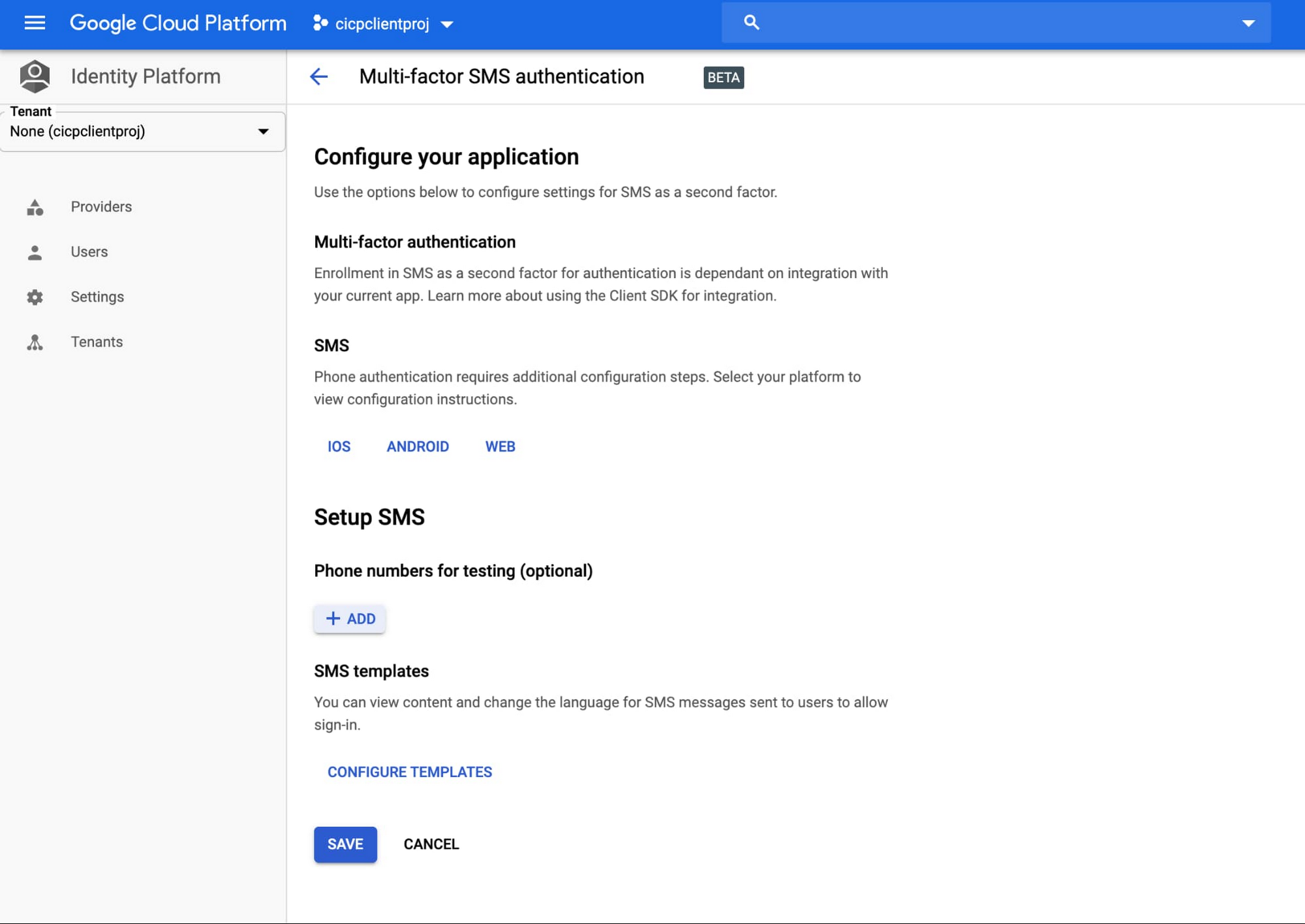
You can now configure Identity Platform to require users who attempt to login to your application to self-enroll in MFA—also known as two-factor authentication (2FA)—and register a device that is capable of receiving SMS messages. When users attempt to sign-in to your app with their first-factor credential (email/password, social login, SAML, OIDC), Identity Platform will require them to enter the six-digit authentication code that it sends via SMS to their registered devices before they can sign-in to your apps and services.
Getting started
You can learn more about this new feature by checking out the documentation page. To get started with Identity Platform, enable it in GCP Marketplace, watch our Cloud Next ‘19 presentation, and read the quickstart.
Announcing easier de-identification of Google Cloud Storage data
2876
Of your peers have already read this article.
2:30 Minutes
The most insightful time you'll spend today!
Many organizations require effective processes and techniques for removing or obfuscating certain sensitive information in the data they store. An important tool to achieve this goal is de-identification. Defined by NIST as a technique that “removes identifying information from a dataset so that individual data cannot be linked with specific individuals. De-identification can reduce the privacy risk associated with collecting, processing, archiving, distributing or publishing information.
Always striving to make data security easier, today we are happy to announce the availability of a de-identification action for our Cloud Storage inspection jobs. Now, you can de-identify Cloud Storage objects, folders, and buckets without needing to run your own pipeline or custom code. Additionally, we have enhanced our transforms by adding a new dictionary replacement method that can help you achieve stronger privacy protection – especially with unstructured data you might store like customer support chat logs.
The “De-identify findings” Action
The “de-identify findings” action for Cloud DLP inspection jobs is a fully managed feature that creates a de-identified copy of the data objects that are inspected. This means that you can inspect a Cloud Storage bucket for sensitive data like Personal Identifiable Information (PII) and then create a redacted copy of these objects all with a few clicks in the Console UI. No need to write custom code or manage complex pipelines and since it’s fully managed, it will auto-scale for you without you needing to manage quota.
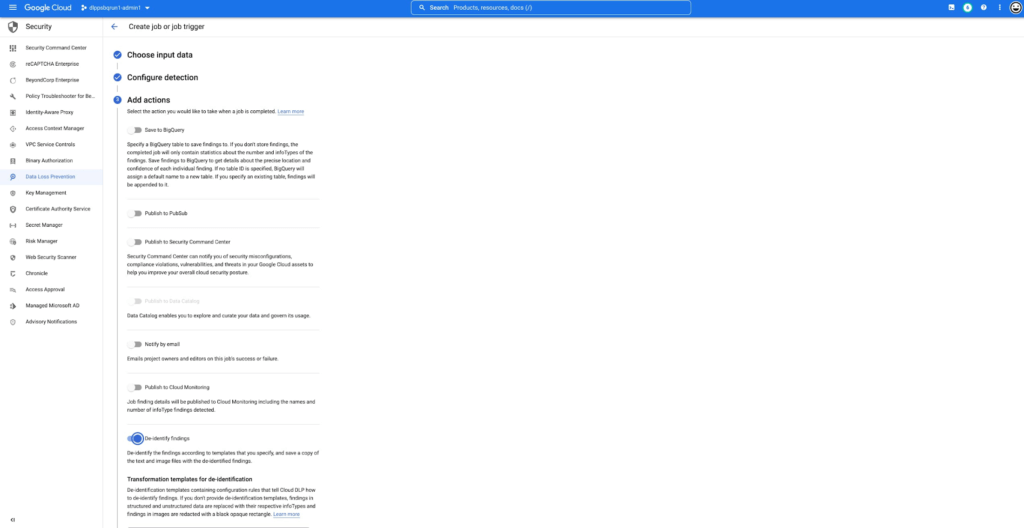
This new action supports the following data types:
- Text files
- Comma- or tab-separated values
- Images (see regional limitations)
Once enabled, the DLP job will perform an inspection of the data and produce a de-identified copy of all supported files into the output bucket or folder.
You can also use the new de-identify action on Job Triggers to automatically de-identify new content as it appears on a recurring schedule. This is useful for creating a workflow with a safe drop zone for incoming files that need to be de-identified before being made accessible.
What can automatic De-identification do?
Cloud DLP provides a set of transformation techniques to de-identify sensitive data while attempting to make the data still useful for your business. These techniques include:
- Redaction: Deletes all or part of a detected sensitive value.
- Replacement: Replaces a detected sensitive value with a specified surrogate value.
- Masking: Replaces a number of characters of a sensitive value with a specified surrogate character, such as a hash (#) or asterisk (*).
- Crypto-based tokenization: Encrypts the original sensitive data value using a cryptographic key. Cloud DLP supports several types of tokenization, including transformations that can be reversed, or “re-identified.”
- Bucketing: “Generalizes” a sensitive value by replacing it with a range of values. (For example, replacing a specific age with an age range, or temperatures with ranges corresponding to “Hot,” “Medium,” and “Cold.”)
- Date shifting: Shifts sensitive date values by a random amount of time.
- Time extraction: Extracts or preserves specified portions of date and time values.
New Dictionary Replace method
When a sensitive data element is found, dictionary replacement replaces it with a randomly selected value from a list of words that you provide. This transformation method is especially useful if you want the redacted output to have more realistic surrogate values.
Consider the following example: You collect customer support chat logs as part of providing service to your customers. These support chat logs contain various types of Personal Identifiable Information (PII) including people’s names and email addresses. Cloud DLP can find and de-identify the sensitive elements with static replacements such as “[REDACTED]” to help prevent someone from seeing this sensitive data.
With the new dictionary replacement method you can instead replace these findings with a randomly selected value from a dictionary. This dictionary replacement provides two key benefits over static replacement:
- The resulting output can look more realistic
- Because the output looks more realistic, it can help conceal any residual names (a privacy de-identification technique sometimes referred to as “hiding in plain sight”)
An example of this:
Input:
[Agent] Hi, my name is Jason, can I have your name?
[Customer] My name is Valeria
[Agent] In case we need to contact you, what is your email address?
[Customer] My email is v.racer@example.org
[Agent] Thank you. How can I help you?
De-identified Output:
[Agent] Hi, my name is Gavaia, can I have your name?
[Customer] My name is Bijal
[Agent] In case we need to contact you, what is your email address?
[Customer] My email is happy.elephant44@example.org
[Agent] Thank you. How can I help you?
As you can see in the output, the names and email addresses have been replaced with a random value that both protects the original sensitive information but also makes the output look more realistic. This can make the data more useful and help “hide” any residual PII.
Next Steps:
To learn more about De-Identification check out our Technical Docs, try De-identification of Storage in the Cloud Console and Watch a recent Google I/O talk on De-identification of data.
Google Cloud Next ’22 to Commence in October: Block Your Calendar!
7914
Of your peers have already read this article.
1:30 Minutes
The most insightful time you'll spend today!
We’re excited to announce that Google Cloud Next returns on October 11–13, 2022.
Join us for keynotes from industry luminaries and engage live with Google developers. Explore dynamic content across various learning levels, and dive deep into technologies and solutions spanning the Google Cloud and Google Workspace portfolios. Participate in breakout sessions, demos, and hands-on training. Hear from the world’s leading companies about their digital transformation journeys. You’ll have opportunities to connect with experts, get inspired, and boost your skills. We can’t wait to see you at Next ’22!
It’s too early to determine how the event experience will span the digital and physical worlds, so please stay tuned for updates as we plan with the health and safety of the attendees in mind. In the meantime, mark October 11–13 in your calendar, and visit our event site for updates. For more inspiration, rediscover Next ’21, now available on demand.
3338
Of your peers have already watched this video.
3:30 Minutes
The most insightful time you'll spend today!
How to Retrace the Steps of a Potential Phishing Attack with Threat Analytics
The majority of cyber attacks begin with phishing emails and websites. Attackers use many tricks, including by leveraging enterprise brand assets, such as company names and logos, to develop phishing websites that appear authentic and lure internet users to enter valuable information such as user names and passwords.
Experts say that today’s CISOs need to treat a potential phishing email like a crime scene. We need to use the evidence that we have to carry out the investigation. A common phishing email will sound like this: “Hello! Your security software has expired. Please click this link to renew it.”
This is where Google’s Backstory makes an entry. Find out how it can help trace the steps of what happened to conduct a thorough threat analysis of your network.
More Relevant Stories for Your Company

Tips and Best Practices: Ensuring Cloud Configuration Compliance
Security is often seen as a zero-sum game between “go fast” or “stay secure.” We would like to challenge this school of thought and introduce a framework to change that paradigm to a “win-win game,” so you can do both—“go fast” and “stay secure.” Historically, application security tools have been

AirAsia’s CIO Speaks Up: Why He Decided, What He Did
At AirAsia, we operate a fleet of more than 270 aircraft across 23 markets, fly to more than 150 destinations and carry 100m guests each year. We’ve also been named the world’s best low-cost carrier for 11 years running. To accomplish all of this, we rely heavily on our 22,000

Strengthening Your Network: The Benefits of Network Firewall Policies Over VPC Firewall Rules
In the fall of 2022, we announced new policy constructs for Google Cloud Firewall, a scalable, cloud-first firewall service that helps secure traffic flow to and from workloads in Google Cloud, and whose distributed architecture enables simplified, granular control including micro-segmentation. Whereas legacy VPC firewall rules included network tags that were not governed

How Ocado Technology revolutionized the online grocery space by applying technology and automation
Grocery shopping has changed for good and Ocado Group has played a major role in this transformation. We started as an online supermarket, applying technology and automation to revolutionise the online grocery space. Today, after two decades of innovation, we are a global technology company providing state-of-the-art software, robotics, and
