





Best Practices for Cost Optimization in the Cloud

5433
Of your peers have already read this article.
3:30 Minutes
The most insightful time you'll spend today!
When customers migrate to Google Cloud Platform (GCP), their first step is often to adopt Compute Engine, which makes it easy to procure and set up virtual machines (VMs) in the cloud that provide large amounts of computing power. Launched in 2012, Compute Engine offers multiple machine types, many innovative features, and is available in 20 regions and 61 zones!
Compute Engine’s predefined and custom machine types make it easy to choose VMs closest to your on-premises infrastructure, accelerating the workload migration process cost effectively. Cloud allows you the pricing advantage of ‘pay as you go’ and also provides significant savings as you use more compute with Sustained Use Discounts.
As Technical Account Managers, we work with large enterprise customers to analyze their monthly spend and recommend optimization opportunities. In this blog, we will share the top recommendations that we’ve developed based on our collective experience working with GCP customers.
Getting ready to save
Before you get started, be sure to familiarize yourself with the VM instance pricing page—required reading for anyone who needs to understand the Compute Engine billing model and resource-based pricing. In addition to those topics, you’ll also find information about the various Compute Engine machine types, committed use discounts and how to view your usage, among other things.
Another important step to gain visibility into your Compute Engine cost is using Billing reports in the Google Cloud Console and customizing your views based on filtering and grouping by projects, labels and more. From there you can export Compute Engine usage details to BigQuery for more granular analysis. This allows you to query the datastore to understand your project’s vCPU usage trends and how many vCPUs can be reclaimed. If you have defined thresholds for the number of cores per project, usage trends can help you spot anomalies and take proactive actions. These actions could be rightsizing the VMs or reclaiming idle VMs.
Now, with these things under your belt, let’s go over the five ways you can optimize your Compute Engine resources that we believe will give you the most immediate benefit.
1. Apply Compute Engine rightsizing recommendations
Compute Engine’s rightsizing recommendations feature provides machine type recommendations that are generated automatically based on system metrics gathered by Stackdriver Monitoring over the past eight days. Use these recommendations to resize your instance’s machine type to more efficiently use the instance’s resources. It also recommends custom machine types when appropropriate. Compute Engine makes viewing, resizing and other actions easier right from the Cloud Console as shown below.
Recently, we expanded Compute Engine rightsizing capabilities from just individual instances to managed instance groups as well. Check out the documentation for more details.

For more precise recommendations, you can install the Stackdriver Monitoring agent which collects additional disk, CPU, network, and process metrics from your VM instances to better estimate your resource requirements. You can also leverage the Recommender API for managing recommendations at scale.
2. Purchase Commitments
Our customers have diverse workloads running on Google Cloud with differing availability requirements. Many customers follow a 70/30 rule when it comes to managing their VM fleet—they have constant year-round usage of ~70%, and a seasonal burst of ~30% during holidays or special events.
If this sounds like you, you are probably provisioning resources for peak capacity. However, after migrating to Google Cloud, you can baseline your usage and take advantage of deeper discounts for Compute workloads. Committed Use Discounts are ideal if you have a predictable steady-state workload as you can purchase a one or three year commitment in exchange for a substantial discount on your VM usage.
We recently released a Committed Use Discount analysis report in the Cloud Console that helps you understand and analyze the effectiveness of the commitments you’ve purchased. In addition to this, large enterprise customers can work with their Technical Account Managers who can help manage their commitment purchases and work proactively with them to increase Committed Use Discount coverage and utilization to maximize their savings.
3. Automate cost optimizations
The best way to make sure that your team is always following cost-optimization best practices is to automate them, reducing manual intervention.
Automation is greatly simplified using a label—a key-value pair applied to various Google Cloud services. For example, you could label instances that only developers use during business hours with “env: development.” You could then use Cloud Scheduler to schedule a serverless Cloud Function to shut them down over the weekend or after business hours and then restart them when needed. Here is an architecture diagram and code samples that you can use to do this yourself.
Using Cloud Functions to automate the cleanup of other Compute Engine resources can also save you a lot of time and money. For example, customers often forget about unattached (orphaned) persistent disk, or unused IP addresses. These accrue costs, even if they are not attached to a virtual machine instance. VMs with the “deletion rule” option set to “keep disk” retain persistent disks even after the VM is deleted. That’s great if you need to save the data on that disk for a later time, but those orphaned persistent disks can add up quickly and are often forgotten! There is a Google Cloud Solutions article that describes the architecture and sample code for using Cloud Functions, Cloud Scheduler, and Stackdriver to automatically look for these orphaned disks, take a snapshot of them, and remove them. This solution can be used as a blueprint for other cost automations such as cleaning up unused IP addresses, or stopping idle VMs.
4. Use preemptible VMs
If you have workloads that are fault tolerant, like HPC, big data, media transcoding, CI/CD pipelines or stateless web applications, using preemptible VMs to batch-process them can provide massive cost savings. In fact, customer Descartes Labs reduced their analysis costs by more than 70% by using preemptible VMs to process satellite imagery and help businesses and governments predict global food supplies.
Preemptible VMs are short lived— they can only run a maximum of 24 hours, and they may be shut down before the 24 hour mark as well. A 30-second preemption notice is sent to the instance when a VM needs to be reclaimed, and you can use a shutdown script to clean up in that 30-second period. Be sure to fully review the full list of stipulations when considering preemptible VMs for your workload. All machine types are available as preemptible VMs, and you can launch one simply by adding “-preemptible” to the gcloud command line or selecting the option from the Cloud Console.
Using preemptible VMs in your architecture is a great way to scale compute at a discounted rate, but you need to be sure that the workload can handle the potential interruptions if the VM needs to be reclaimed. One way to handle this is to ensure your application is checkpointing as it processes data, i.e., that it’s writing to storage outside the VM itself, like Google Cloud Storage or a database. As an example, we have sample code for using a shutdown script to write a checkpoint file into a Cloud Storage bucket. For web applications behind a load balancer, consider using the 30-second preemption notice to drain connections to that VM so the traffic can be shifted to another VM. Some customers also choose to automate the shutdown of preemptible VMs on a rolling basis before the 24-hour period is over, to avoid having multiple VMs shut down at the same time if they were launched together.
5. Try autoscaling
Another great way to save on costs is to run only as much capacity as you need, when you need it. As we mentioned earlier, typically around 70% of capacity is needed for steady-state usage, but when you need extra capacity, it’s critical to have it available. In an on-prem environment, you need to purchase that extra capacity ahead of time. In the cloud, you can leverage autoscaling to automatically flex to increased capacity only when you need it.
Compute Engine managed instance groups are what give you this autoscaling capability in Google Cloud. You can scale up gracefully to handle an increase in traffic, and then automatically scale down again when the need for instances is lowered (downscaling). You can scale based on CPU utilization, HTTP load balancing capacity, or Stackdriver Monitoring metrics. This gives you the flexibility to scale based on what matters most to your application.
High costs do not compute
As we’ve shown above, there are many ways to optimize your Compute Engine costs. Monitoring your environment and understanding your usage patterns is key to understanding the best options to start with, taking the time to model your baseline costs up front. Then, there are a wide variety of strategies to implement depending on your workload and current operating model.
For more on cost management, check out our cost management video playlist. And for more tips and tricks on saving money on other GCP services, check out our blog posts on Cloud Storage, Networking and BigQuery cost optimization strategies. We have additional blog posts coming soon, so stay tuned!
Google Cloud Celebrates Journey of 3 Inspiring Founders for the Asian Pacific American Heritage Month

8162
Of your peers have already read this article.
1:30 Minutes
The most insightful time you'll spend today!
May is Asian Pacific American Heritage Month —a time for us to come together to celebrate and remember the important people and history of Asian and Pacific Island heritage. This feature highlights three AAPI founders from the Google For Startups community.
Read on to learn how these three founders built their businesses, leverage Google tech, and suggestion they have for aspiring entrepreneurs.
CultivatePeople
Founder: Lola Han
Description: CultivatePeople’s compensation software, Kamsa, provides global market pay rate data and helps companies make data-driven salary decisions so they can attract and retain their most valuable asset: employees.
Why GCP: “CultivatePeople began using GCP when integrating SSO/SAML authentication after our SaaS product became a high priority. We were able to exceed our clients’ expectations and increase their level of trust in our platform’s capabilities. We’re currently investigating additional machine learning products, such as Cloud AutoML, that will allow us to quickly deliver exciting features.”
Note from the Founder: “I grew up with immigrant parents who value stability and are risk-averse. My parents discouraged me from starting my own company because they didn’t want to see me struggle financially or see my health suffer (due to stress). I felt strongly about what CultivatePeople could do, so I started the company as a sole founder in 2017 and watched it double in size year over year since. While the ones I love most may not have cheered me on initially, it was important for me to hang on to the encouraging words of former bosses, executives, and founders to keep me focused on my mission.
My advice for other AAPI founders is to be a “silent assassin” and believe in the mission and values of your organization. Always remember to stop along the way and:
1) Enjoy the journey by celebrating wins and giving yourself credit;
2) Follow your intuition—it’s (almost) always right;
3) Recognize and invest in your people regularly (ie. give increases more than once a year, if warranted);
4) Give regular words of affirmation to employees on even small achievements.”
Swit
Founder: Josh Lee and Max Lim
Description: Swit is a team collaboration platform that seamlessly combines team chat with task management by allowing teams to turn their conversations into trackable tasks and share tasks to chat with simple drag-and-drop functionality, ensuring everyone is on the same page and projects get done faster.
Why GCP: “Swit is a cross-category hybrid work tool for chat and tasks. This functionality requires more complicated and heavier architecture for performance. So, configuring and managing virtual machines was really challenging to scale up our systems, while handling occasional unexpected traffic surges and frequent updates. Eventually we divided our monolithic architecture into 35 microservices when we launched our official product. The migration to GKE took around one month, and it turned out to be well worth the effort—our systems became able to offer high scalability and enough resilience to keep its uptime no matter what happened. Now we’re operating 84 workloads and 252 microservices with high stability with remarkably low downtime – less than 0.00001%/year.”
Note from the Founder: “As an AAPI founder based in Silicon Valley, I feel proud of the work ethics and diligence fellow Korean American entrepreneurs and professionals have long demonstrated here. Especially with K-pop breaking into the mainstream, I feel even more proud of our culture that strives toward an absolute perfection molded through years of training and dedication. The mission-driven culture of Silicon Valley coupled with Google’s edging technology and creativity really helped us build a product that not only encompasses verticals but also transcends cultures. Swit is growing at an unprecedented rate, and we hope to join the long list of successful AAPI entrepreneurs here. Swit’s close network with the AAPI community wouldn’t have been possible without Google support. We are grateful for this collaborative environment, and we hope to become the next-generation ambassador for collaboration after Google.”
Check out more from Swit in their founder story.

WISY
Founder: Min Chen
Description: Wisy develops technology to bring digital efficiency into the physical world, supporting consumer products businesses and making them thrive in the new economy. All of us have a bad experience when we can’t find the product we want to buy. That is a $1.9T problem in the consumer-packaged goods industry that Wisy is solving with AI and analytics to help manufacturers and retailers sell more by reducing out-of-stocks and waste at a global scale.
Why GCP: “GCP has an intuitive, easy to use interface, was lower cost, and offered preemptible instances with flexible compute options. Some of the reasons why Wisy decided to use GCP include instance and payment configurability, privacy and traffic security, cost-efficiency, and Machine Learning.
Wisy has been able to advance quickly with product development, as well as collaborate better and iterate faster in the creation of our AI models, while reducing costs by 40%. At Wisy, we are solving a problem that affects everyone who shops at a store.“
Note from the Founder: “Two years ago, I moved to San Francisco to expand my second startup, Wisy. This is when I learned that my name ‘Min’ stands for ‘minority.’ I was born in China, raised in a Black community in Panama, received scholarships to attend both Carnegie Mellon and UC Berkeley. I worked for 20 years in several countries, but I have never felt so discriminated against due to my race, ethnicity, gender and age than during my time in Silicon Valley. However, this is also the place I learned that my diverse life experience is my competitive advantage. My background enables me to recruit and relate to people in different countries, create scalable and flexible products for multinational customers, and run global operations efficiently.
My recommendation to AAPI founders is to find strength in their multicultural background. Don’t hide what makes you unique, do not limit yourselves, and do not let others limit you. You will lose your edge when trading authenticity for validation. Be proud and own your story.”
If you want to learn more about how Google Cloud can help your startup, visit our Startup Program application page here and sign up for our monthly startup newsletter to get a peek at our community activities, digital events, special offers, and more.To learn more about how you can help #StopAsianHate during Asian Pacific American Heritage Month and beyond, visit their website here.
3345
Of your peers have already watched this video.
25:30 Minutes
The most insightful time you'll spend today!
How to Build a Platform on Google Cloud from the Ground Up
Building distributed applications is hard! Building globally scalable distributed applications is harder. Maintaining and growing these services as your business grows is even harder.
Watch this video to know how to create a globally scalable platform for your business on Google Cloud using service meshes. It shows how to build a platform on Google Cloud from the ground up.
This content is agreed upon and a combined effort between SA, Anthos PM (specifically Istio and Anthos Service Mesh), and Anthos engineering.
Join Ameer Abbas, Solutions Architect at Google Cloud, as he goes through (design opinions and reasonings for) project hierarchy in a Google Cloud org, setting up global networking and GKE cluster, service mesh (Istio and ASM), observability, and, common tools and golden signals. After watching this video, you will be able to learn how to think about SLOs, SLAs, security and how to secure traffic between services (mTLS) or from an end user to a service running in your mesh. You will also learn routing and other multicluster routing considerations and, other common operational tasks like adding or migrating an application to the mesh, rolling out new versions of applications, DR and other hybrid or multi-cloud considerations.
2022’s First Cloud CISO Perspectives: Recap of the Megatrends, Releases and News

9377
Of your peers have already read this article.
3:00 Minutes
The most insightful time you'll spend today!
I’m excited to share our first Cloud CISO Perspectives post of 2022. It’s already shaping up to be an eventful year for our industry and we’re only in month one. There’s a lot to recap in this post, including the U.S. government’s recent efforts to address critical security issues, like open source software security and zero trust architectures. We’ve also released new resources from our Google Cybersecurity Action Team like the Cloud Security Megatrends and the Boards of Directors whitepaper on cloud risk governance.
Cloud Security Megatrends
We’re often asked if the cloud is more secure than on-prem (and why) so we shared our answer in a recent blog post. At Google Cloud, security by design is our priority. We’ve long adopted zero-trust principles for our baseline security architectures and built a global network that relies on defense in depth layers to protect against configuration errors and attacks. But security is always evolving and that is why we also take advantage of the following megatrends:
- Economy of scale: Decreasing the marginal cost of security raises the baseline level of security.
- Shared fate: A flywheel of increasing trust drives more transition to the cloud, which compels even higher security and even more skin-in-the-game from the cloud provider.
- Healthy competition: The race by deep-pocketed cloud providers to create and implement leading security technologies is the tip of the spear of innovation.
- Cloud as the digital immune system: Every security update the cloud gives the customer is informed by some threat, vulnerability, or new attack technique often identified by someone else’s experience. Enterprise IT leaders use this accelerating feedback loop to get better protection.
- Software-defined infrastructure: Cloud is software defined, so it can be dynamically configured without customers having to manage hardware placement or cope with administrative toil. From a security standpoint, that means specifying security policies as code, and continuously monitoring their effectiveness.
- Increasing deployment velocity: Because of cloud’s vast scale, providers have had to automate software deployments and updates, usually with automated continuous integration/continuous deployment (CI/CD) systems. That same automation delivers security enhancements, resulting in more frequent security updates.
- Simplicity: Cloud becomes an abstraction-generating machine for identifying, creating and deploying simpler default modes of operating securely and autonomically.
- Sovereignty meets sustainability: The cloud’s global scale and ability to operate in localized and distributed ways creates three pillars of sovereignty. This global scale can also be leveraged to improve energy efficiency.
If you’re an IT decision maker, pay attention to these megatrends that will continue to drive and reinforce cloud security and will outpace the security of on-prem infrastructure well into the future.
U.S. Federal government cybersecurity momentum
- Open source software security: Earlier this month, Google participated in the White House Summit on open source software security. The meeting came at a critical time for the industry following December’s Log4j vulnerabilities and was both a recognition of the challenge and an important first step towards addressing it. The open source software ecosystem is not homogenous, despite the fact that the industry often thinks of or treats it this way. Some of it, like Linux, is highly curated, while other critical software is supported through diffuse communities including technology companies and other stakeholders. There is also a long tail of many other critical projects driven by a dedicated community of maintainers around the world, including Googlers. In light of this reality, we welcomed the chance to share our recommendations to advance the future of open source software security. Some work we’ve done includes founding the Open Source Security Foundation, which has been instrumental already in making security improvements. We’ve also helped drive a number of key security initiatives within the open source community including security scorecards, the SLSA framework to improve the security and integrity of open source packages, and Secure Open Source Rewards to financially incentivize improvements to critical open source security projects.
- OMB’s Federal zero trust strategy: The publication of the Office of Management and Budget’s zero trust architecture strategy marks an important step for the U.S. federal government’s efforts to modernize under Executive Order 14028. Google Cloud supports this approach, which recognizes the immense security benefits offered by modern computing architectures. For the past decade, Google has successfully applied zero trust principles through our BeyondCorp and BeyondProd frameworks for providing end-user access and securing our cloud workloads. And we’ve brought these best practices from our own journey to global governments and businesses of any size through solutions like BeyondCorp Enterprise and capabilities like Binary Authorization and Anthos Service Mesh, which are embedded in Anthos, our managed application platform. For Federal agencies embarking on this zero trust journey, the Google Cybersecurity Action Team will offer our expertise by conducting Zero Trust Foundations strategy workshops, which can help organizations in the public and private sectors develop actionable and achievable strategies and plans for zero trust implementation.
Google Cybersecurity Action Team Highlights
Here are the latest updates, products, services and resources across our security teams this month:
Security
- Democratizing security operations: We recently announced that Siemplify, a leading security orchestration, automation and response (SOAR) provider, is joining Google Cloud to help companies better manage their threat response. Providing a proven SOAR capability with Chronicle’s approach to security analytics is an important step forward in our vision to advance invisible security and democratize security operations for every organization.
- Security by design: The Highmark Health security team is using “secure-by-design” techniques to address the security, privacy, and compliance aspects of its Living Health solution with Google Cloud’s Professional Services Organization (PSO). Google has long advocated for and followed security by design principles, which is why we’re continuously building enhanced security, controls, resiliency and more into our cloud products and services.
- Secure collaboration for hybrid work environments: The Google Workspace team shared its recommendations for businesses as they prepare for the future of work, where the hybrid/flexible work model is becoming standard practice and a new approach to security is essential.
- Anthos Policy Controller CIS Benchmark enforcement: A big part of our shared fate philosophy is to build secure products and not just security products. A recent example of this in action is embedding CIS benchmark policy conformance in the Anthos Policy Controller. We believe the more we embed approaches like this into our products, the more application and infrastructure teams can intrinsically embed security at the start and reduce toil for the security team.
- DevOps for technology-driven organizations and startups: A key success factor for many security programs is the partnership and integration with development teams, and there are some great resources and lessons in our DORA research.
- Security by design with Chrome OS: ABN AMRO’s Asia-Pacific region team recently shared how they are using Chrome OS and CloudReady to work securely in the cloud, reduce total cost of ownership, and add flexibility for employees. This is a great example of secure by design principles in the use of Chromium.
Risk & Compliance
- Boards of Directors summary guide to cloud risk governance: The latest whitepaper from the Google Cybersecurity Action Team outlines how boards of directors can prioritize safe, secure, and compliant adoption processes for cloud technologies within their organizations.
- TruSight Risk Assessment of Google Cloud: TruSight recently released a comprehensive
risk assessment report on Google Cloud. Our Enterprise Trust team collaborated on this robust assessment of Google Cloud services to validate the design and implementation of controls. TruSight’s risk assessment of our security controls will help customers accelerate and complete their risk management due diligence. - Data governance: Check out this new blog series on data governance where our teams explain the role of data governance, its importance, and the necessary processes to run an effective data governance program. Implementing data governance will help maximize value derived from business data, build user trust, and ensure compliance with required security measures.
Controls and Products
- Encrypting Data Fusion: To help meet the security, privacy and compliance requirements of customers in regulated industries like finance or public sector, we announced the general availability of Customer Managed Encryption Keys (CMEK) integration for Cloud Data Fusion, which enables encryption of both user data and metadata at rest with a key that customers can control through our Cloud Key Management Service (KMS).
Don’t forget to sign-up for our newsletter if you’d like to have our Cloud CISO Perspectives post delivered every month to your inbox. We’ll be back next month with more updates and security-related news.
Budget-Friendly Log Management: Four Steps to Cost Optimization in Google Cloud

1217
Of your peers have already read this article.
4:30 Minutes
The most insightful time you'll spend today!
As part of our ongoing series on cost management for observability data in Google Cloud, we’re going to share four steps for getting the most out of your logs while on a budget. While we’ll focus on optimizing your costs within Google Cloud, we’ve found that this works with customers with infrastructure and logs on prem and in other clouds as well.
Step 1: Analyze your current spending on logging tools
To get started, create an itemized list of what volume of data is going where and what it costs. We’ll start with the billing report and the obvious line items including those under Operations Tools/Cloud Logging:
- Log Volume – the cost to write log data to disk once (see our previous blog post for an explanation)
- Log Storage Volume – the cost to retain logs for more than 30 days
If you’re using tools outside Cloud Logging, you’ll also need to include any costs related to these solutions. Here’s a list to get you started:
- Log vendor and hardware costs — what are you paying to observability vendors? If you’re running your own logging solution, you’ll want to include the cost of compute and disk.
- If you export logs within Google Cloud, include Cloud Storage and BigQuery costs
- Processing costs — consider the costs for Kafka, Pub/Sub or Dataflow to process logs. Network egress charges may apply if you’re moving logs outside Google Cloud.
- Engineering resources dedicated to managing your logging tools across your enterprise often are significant too!
Step 2: Eliminate waste — don’t pay for logs you don’t need
While not all costs scale directly with volume, optimizing your log volume is often the best way to reduce spend. Even if you are using a vendor with a contract that locks you into a fixed price for a period of time, you may still have costs in your pipeline that can be reduced by avoiding wasteful logs such as Kafka, Pub/Sub or Dataflow costs.
Finding chatty logs in Google Cloud
The easiest way to understand which sources are generating the highest volume of logs within Google Cloud is to start with our pre-built dashboards in Cloud Monitoring. To access the available dashboards:
- Go to Monitoring -> Dashboards
- Select “Sample Library” -> “Logging”
This blog post has some specific recommendations for optimizing logs for GKE and GCE using prebuilt dashboards.
As a second option, you can use Metrics Explorer and system metrics to analyze the volume of logs. For example, type “log bytes ingested” into the filter. This specific metric corresponds to the Cloud Logging “Log Volume” charge. There are many ways to filter this data. To get a big picture, we often start with grouping by both “resource_type” and “project_id”.
To narrow down the resource type in a particular project, add a “project_id” filter. Select “sum” under the Advanced Options -> Click on Aligner and select “sum”. Sort by volume to see the resources with the highest log volume.
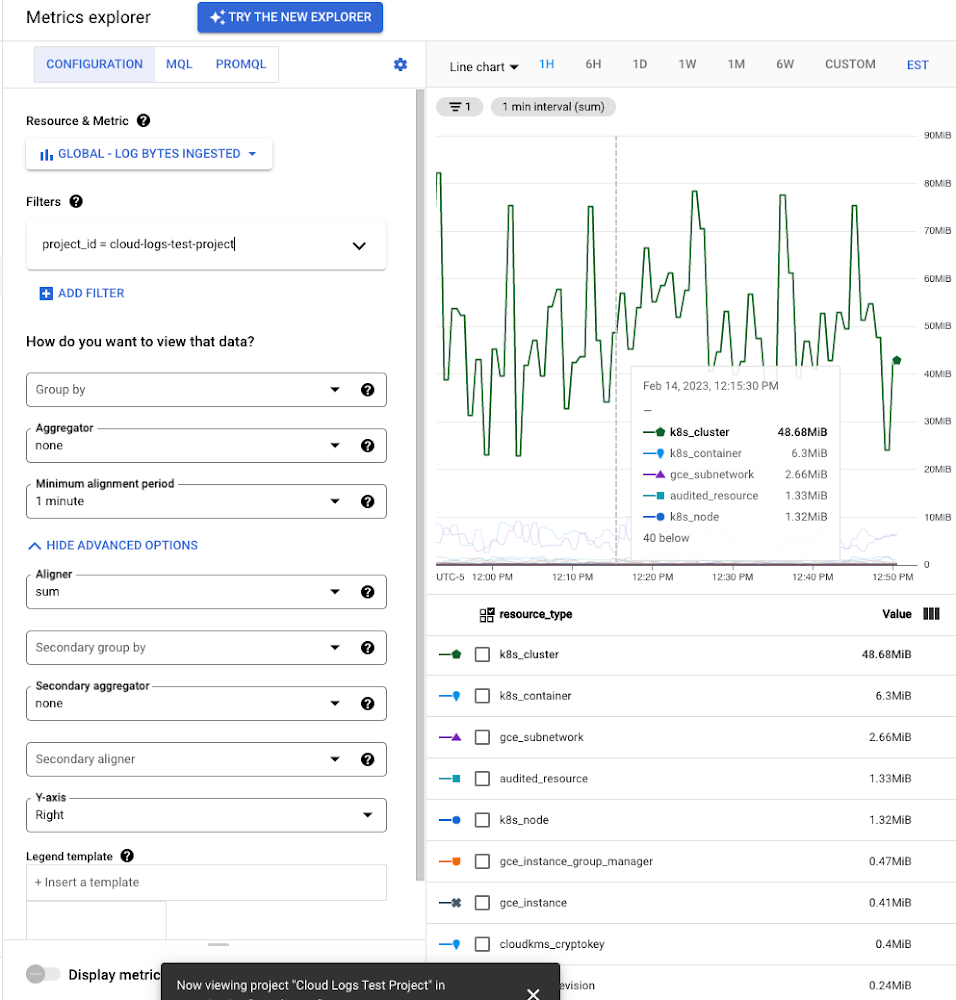
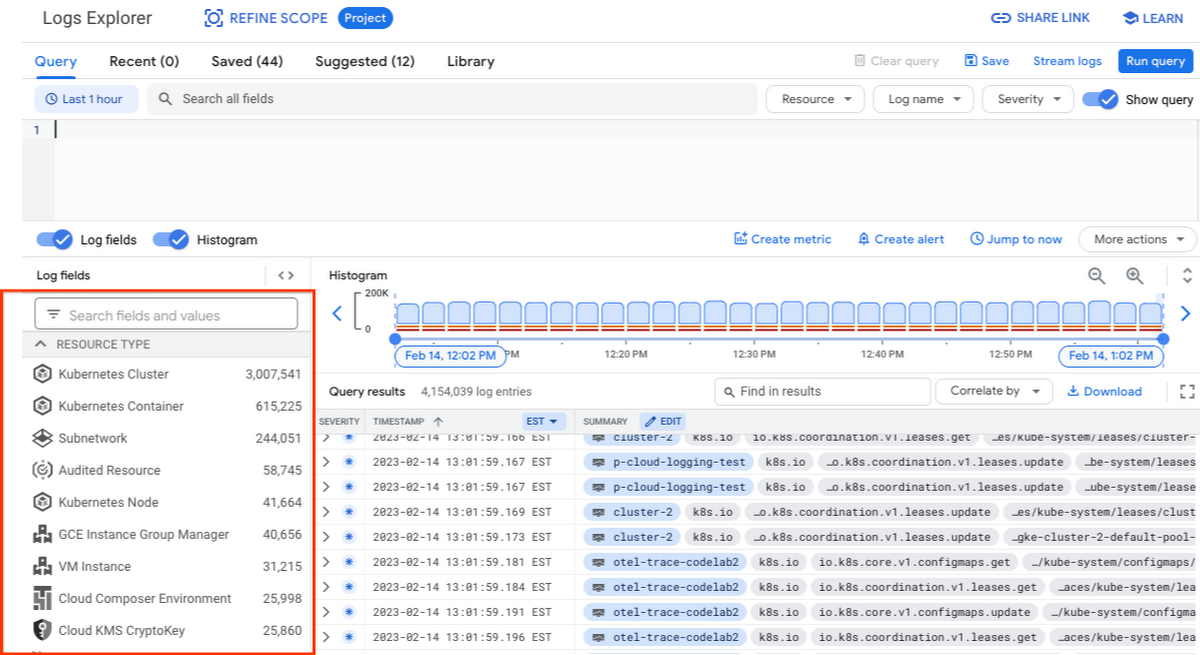
While these rich metrics are great for understanding volumes, you’ll probably want to eventually look at the logs to see whether they’re critical to your observability strategy. In Logs Explorer, the log fields on the left side help you understand volumes and filter logs from a resource type.
Reducing log volume with the Logs Router
Now that we understand what types of logs are expensive, we can use the Log Router and our sink definitions to reduce these volumes. Your strategy will depend on your observability goals, but here are some general tools we’ve found to work well.
The most obvious way to reduce your log volume is not to send the same logs to multiple storage destinations. One common example of this is when a central security team uses an aggregated log sink to centralize their audit logs but individual projects still ingest these logs. Instead, use exclusion filters on the _Default log sink and any other log sinks in each project to avoid these logs. Exclusion filters also work on log sinks to BigQuery, Pub/Sub, or Cloud Storage.
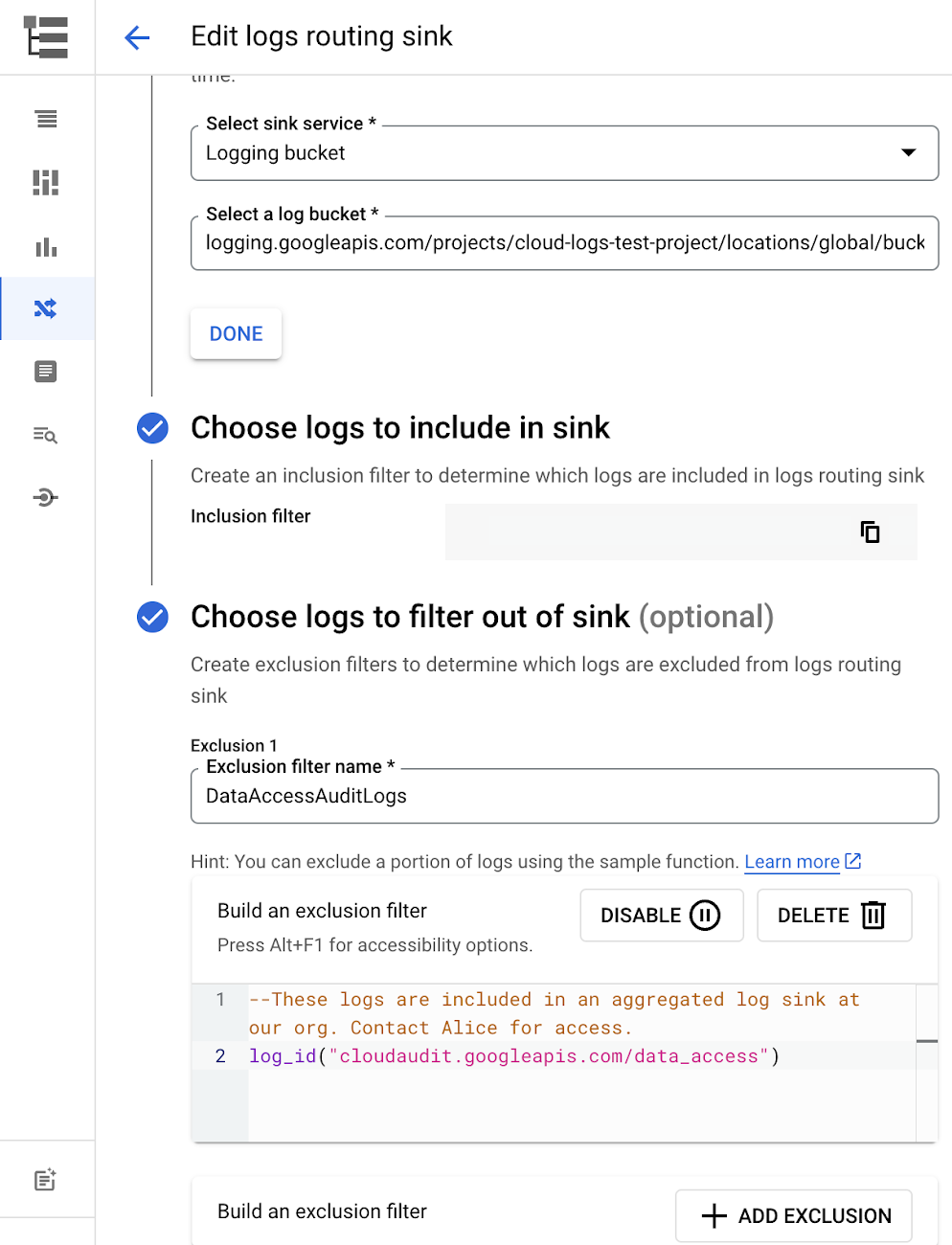
Similarly, if you’re paying to store logs in an external log management tool, you don’t have to save these same logs to Cloud Logging. We recommend keeping a small set of system logs from GCP services such as GKE in Cloud Logging in case you need assistance from GCP support but what you store is up to you, and you can still export them to the destination of your choice!
Another powerful tool to reduce log volume is to sample a percentage of chatty logs. This can be particularly useful with 2XX log balancer logs, for example. This can be a powerful tool, but we recommend you design a sampling strategy based on your usage, security and compliance requirements and document it clearly.
Step 3: Optimize costs over the lifecycle of your logs
Another option to reduce costs is to avoid storing logs for more time than you need them. Cloud Logging charges based on the monthly log volume retained per month. There’s no need to switch between hot and cold storage in Cloud Logging; doubling the default amount of retention only increases the cost by 2%. You can change your custom log retention at any time.
If you are storing your logs outside of Cloud Logging, it is a good idea to compare the cost to retain logs and make a decision.
Step 4: Setup alerts to avoid surprise bills
Once you are confident that the volume of logs being routed through log sinks fit in your budget, set up alerts so that you can detect any spikes before you get a large bill. To alert based on the volume of logs ingested into Cloud Logging:
- Go to the Logs-based metrics page. Scroll down to the bottom of the page and click the three dots on “billing/bytes_ingested” under System-defined metrics.
- Click “ Create alert from metric”
- Add filters (For example: use resource_id or project_id. This is optional).
- Select the logs based metric for the alert policy.
You can also set up similar alerts on the volume for log sinks to Pub/Sub, BigQuery or Cloud Storage.
Conclusion
One final way to stretch your observability budget is to use more Cloud Operations. We’re always working to bring our customers the most value possible for their budget such as our latest feature, Log Analytics, which adds querying capabilities but also makes the same data available for analytics, reducing the need for data silos. Many small customers can operate entirely on our free tier. Larger customers have expressed their appreciation for the scalable Log Router functionality available at no extra charge that would otherwise require an expensive event store to process data. So it’s no surprise that a 2022 IDC report showed that more than half of respondents surveyed stated that managing and monitoring tools from public cloud platforms provide more value compared to third-party tools. Get started with Cloud Logging and Monitoring today.
Google Launches Product Locator and Gives Store Locator Plus an Upgrade to Expand Retail Offerings

5854
Of your peers have already read this article.
1:30 Minutes
The most insightful time you'll spend today!
We all experienced, first hand, how Covid-19 has impacted the world and our communities. Last year, store closures, reduced hours, and social-distancing requirements drove people to adopt more e-commerce options, which, according to eMarketer, grew 27.6% worldwide in 2020. Meanwhile, consumer desires to shop locally also grew with Google searches for “____ near me” up 100% year over year,1 and 1 in 3 consumers having tried curbside pickup over the last year.2
As countries begin to lift Covid-19 restrictions, businesses are looking toward a post-pandemic future and asking ‘Which of these shopping trends will stick and how should I adapt?’ At Google, we expect consumers to continue demanding helpful shopping experiences that blur the line between the physical retail and digital experience, as well as help them to continue shopping locally.3 To address these changes in shopper behavior, we refreshed our retail solutions—adding a new solution, Product Locator, and updating Store Locator Plus—to help you offer the best possible online-to-offline experience and drive shoppers to your stores.
Introducing Product Locator solution: connecting online shopping to nearby stores
Under Covid restrictions, consumers have grown accustomed to having a myriad of shopping options, from curbside pickup to same-day delivery. Increased searches for ‘along my route’ and ‘in stock’ tell us that convenience is king for today’s consumer.4 Retailers can increase online conversion rates and drive store visits by including product availability and pick-up options on each of their product description pages (PDP); emphasizing the speed and convenience of these options and saving on significant shipping costs.
Our newest retail solution, Product Locator, can further help drive customers to visit by showing the exact distance stores are to the shopper and even estimated driving time, to further highlight the convenience of a store visit. A study conducted by Shopify found that showcasing local inventory boosted key store metrics including 45% of local pickup who made an additional purchase upon arrival.5 See the Product Locator solution guide to get started today.

Update your store locator page to address more of shoppers’ needs
Store locators allow shoppers to more easily find your stores and can be made even more helpful with our Store Locator Plus solution. Our updated Store Locator Plus solution refreshes the store locator page to be more informative and engaging by integrating offers redeemable in-store, online scheduling for appointments and services, and text me directions services. Implement Store Locator Plus today using the guide.
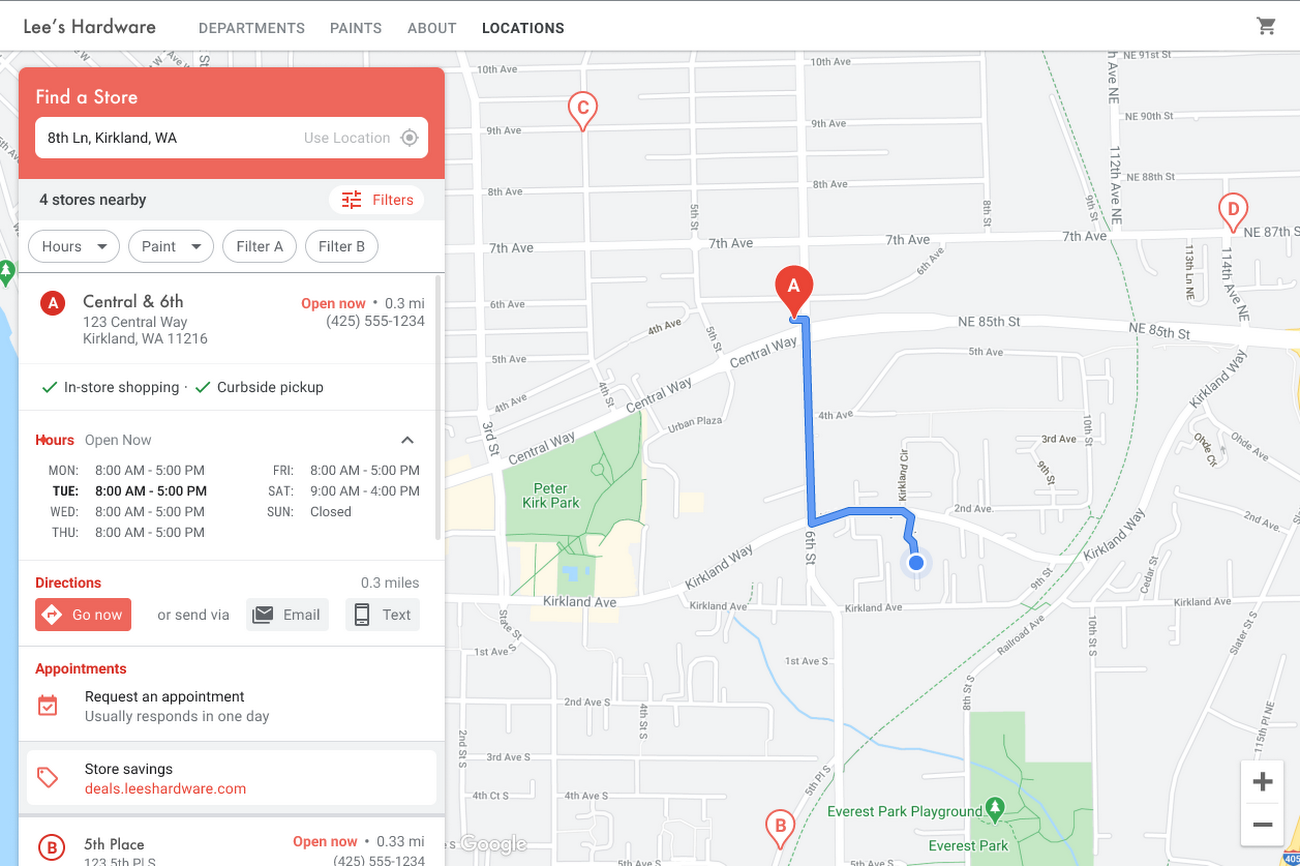
Build and customize Store Locator Plus for your business in minutes
At Google Maps Platform, we are always thinking of ways to make building a map easier and faster for our customers. In May at I/O we made Cloud-based Maps Styling generally available, enabling map updates to happen without touching a line of code. Today we’re excited to introduce Quick Builder, our free, low code builder which allows you to demo, customize and build a version of the Store Locator Plus solution for your website in minutes. Experience Quick Builder today.
To learn more about how you can start adopting these retail solutions, visit our retail solutions page.
For more information on Google Maps Platform, visit our website.
1 Global Insights Briefing: Getting back out there
2 https://www.shopify.com/pos/future-of-retail-2021
3 https://www.thinkwithgoogle.com/future-of-marketing/digital-transformation/covid-trends-1-year/
4 https://www.thinkwithgoogle.com/consumer-insights/consumer-trends/pandemic-shopping-behavior/
5 https://www.shopify.com/pos/future-of-retail-2021
More Relevant Stories for Your Company

Enhance Your GKE Deployment with Improved Control Plane Connectivity and Isolation
Once upon a time, all Google Kubernetes Engine (GKE) clusters used public IP addressing for communication between nodes and the control plane. Subsequently, we heard your security concerns and introduced private clusters enabled by VPC peering. To consolidate the connectivity types, starting in March 2022, we began using Google Cloud’s

Google Cloud Accelerates Financial Organizations’ Journey towards Digital Transformation
When I reflect back on the past year and the pandemic, I’m struck by how the reliance on remote work and operations has changed the fundamentals of business forever. For the financial services industry, this rings particularly true. Many conversations I’m having right now with organizations revolve around embracing a transformation

A Pro’s Tip on Choosing the Right Google Cloud Compute Options
Where should you run your workload? It depends...Choosing the right infrastructure options to run your application is critical, both for the success of your application and for the team that is managing and developing it. This post breaks down some of the most important factors that you need to consider

Cadbury Worldwide Hide: How the Chocolatier Made the Hiding Eggs Ritual Possible with Google Maps
Editor’s note: Today’s post is a Q&A with the VCCP London and VCCP CX team. VCCP London conceived of and built the Cadbury Worldwide Hide platform using Google Maps Platform as a way to get consumers ‘hiding’ eggs and engaging with loved ones during a time when they could not
