





Google Cloud Accelerates Financial Organizations’ Journey towards Digital Transformation

10482
Of your peers have already read this article.
2:00 Minutes
The most insightful time you'll spend today!
When I reflect back on the past year and the pandemic, I’m struck by how the reliance on remote work and operations has changed the fundamentals of business forever. For the financial services industry, this rings particularly true. Many conversations I’m having right now with organizations revolve around embracing a transformation cloud, and thinking of cloud computing not just as an infrastructure decision, but also as the locus for transformation throughout the company.
Today, as we welcome the industry to our Financial Services Summit, we’ll demonstrate just how Google Cloud accelerates a financial organization’s digital transformation through app and infrastructure modernization, data democratization, people connections, and trusted transactions. We hope you’ll join us.
How we’re helping financial services firms build their transformation clouds
At Google Cloud, we continue to focus on areas where we can bring the best of our capabilities to banking, capital markets, insurance, and payments customers around the world. Our work with financial services industry customers has given us a deep understanding of the real-world, specific use cases that matter most to them. This groundwork led us to engineer products and solutions that are open and flexible, not ones that force them to rip out existing investments in ERP or other early IaaS cloud implementations.
It’s why we’ve engineered solutions such as Lending DocAI, Open Banking with Apigee, and Datashare for financial services to help transform the industry. These solutions were created with our customers’ security and compliance top-of-mind and are built at the intersection of user-optimized experience, technology, and sovereignty.
At their core, financial institutions want to drive growth, reduce costs, mitigate risk, stay compliant, and increase efficiency. As a result, when we partner with them on their transformation journeys, we consider three essential focus areas:
- Enabling the human experience and connected interactions
- Building an open and intelligent data foundation for better insights
- Providing the most trusted and secure cloud in the industry
Enabling humans and connected interactions
A company’s transformation is about more than technology; people and culture ultimately drive change. HSBC, for example, recognized its business users would benefit from guided answers to common questions around risk policy compliance, and turned to Google Cloud to leverage AI and machine learning bots to assist employees, ease the burden on policy experts, and improve the user experience. Using Dialogflow, a core component of Contact Center AI, HSBC was able to build a conversational platform that quickly and accurately addresses user needs at scale.
Another example is Equifax, which used Google Workspace to support collaboration not only internally between employees, but also externally with customers. Customers can use Google Cloud solutions for financial services to build these sorts of technology-enabled human interactions quickly and easily—supporting organizational change at scale.
Building an open and intelligent data foundation for smarter, faster insights
The real impact of Google Cloud solutions for financial services comes when the whole company has access to the right information at the right time, and can act more intelligently on that data. Our solutions help businesses safely leverage their data and get a complete 360-degree view of their customers’ information, which can often be scattered across multiple systems (CRM, lending, credit, etc.). This helps financial institutions improve the overall customer experience—and sometimes even develop new products quickly.
Indeed, all financial institutions are looking for ways to grow revenue and reduce expenses, and data can be a critical ingredient to doing both effectively. As daily transactions rise, so does the volume and complexity of data. But to implement new customer experience innovations (and new revenue streams), financial institutions must first capture data effectively. This is why AXA Switzerland, for example, uses real-time analytics on Google Cloud to gain cross-industry insights about future trends and customer preferences.
Financial services organizations also need the confidence of building on a platform that provides choice, flexibility, and agility to move fast. It’s why we have an open cloud approach that allows Google Cloud services to run in different physical locations such as on-premises, other public clouds, and the edge. Customers can also harness the power of data and AI through our open APIs, machine-learning services, and analytics engines on any major cloud platform. This is why companies like Macquarie Bank are taking advantage of Google Cloud’s open, hybrid architecture to modernize and empower its developers.
Compliant and secure to address risk and regulatory needs
As a highly regulated industry, financial services is focused on security and compliance, risk and regulations, and fraud detection and prevention. Google Cloud offers unique capabilities to earn customers’ trust as part of our continuing work to be the most trusted cloud in the industry. Google Cloud provides a secure foundation that you can verify and independently control. Our cloud technology reduces risk and data loss, because it is built on comprehensive zero-trust architecture. Finally, we offer a shared-fate model built on best practices in risk management via automation, guidance, and insurance. This is why customers like BBVA have confidence anywhere their systems may operate.
On the regulatory front, global legislators and regulators continue to focus on the stability of the industry that only a decade ago went through one of the biggest liquidity crises in history. With this oversight comes strong expectations of risk mitigation. Google Cloud offers a single, global set of controls, reviewed by financial institutions and regulators around the world, and verified in collaborative audits—making compliance simpler and less costly for our customers.
Finally, Google Cloud allows financial services firms to operate confidently with advanced security tools that help protect data, applications, and infrastructure, as well as their customers from fraudulent activity, spam, and abuse. We help protect your data against threats, using the same infrastructure and security services we use for our own operations, ensuring you never have to trade-off between ease of use and security. Google Cloud encrypts data at-rest and in-transit. And we now also offer the ability to encrypt data-in use, while it’s being processed for customer VM and container workloads.
Let us help you with your transformation cloud journey
We’ve seen leading financial services companies embrace Google Cloud to help them move beyond infrastructure toward the next phase of their cloud evolution. This is an era where no company is better positioned to lead than Google Cloud, and we’re excited to help you with your journey.
Learn more about Google Cloud for financial services.
Manage Packages Using Artifact Registry in Google Cloud Functions with Private Dependencies

3390
Of your peers have already read this article.
2:30 Minutes
The most insightful time you'll spend today!
Late last year, we announced that Artifact Registry was going GA, allowing GCP customers to manage their packages within the same platform as they were being deployed. In this blogpost, we want to show you how to do exactly that with a private dependency.
Private dependencies allow your packages to be shared with only a select group of viewers. If your codebase is already private, a private dependency can help modularize functionality using the same methodologies you use in your open source projects. Furthermore, you can experimentally develop your private dependency without breaking your overall codebase by pinning the version of the dependency on a working release. It can also provide necessary and durable abstraction if multiple projects depend on the same functionality. It does so by allowing multiple teams access to up-to-date and tested code rather than relying on copying and pasting fragmented code snippets.
With Artifact Registry, you can now wire together your serverless processes with your private dependencies without ever leaving Google Cloud Platform. This blogpost will discuss one example of how you can host your private dependency and later deploy to a serverless host like Google Cloud Functions using Cloud Build to automate the deployment.
Before getting started, take a look at the sample code here to copy and follow along.
Creating a package
Let’s walk through deploying a Google Cloud Function with a simple private dependency written in Node. Our example dependency will return the input given in unicode. It’s index.js file will look like this:
const unicode = require('to-unicode');// This function returns the input in unicode.module.exports = (input) => {return unicode(input);};
First, you’ll want to prepare your package to upload to Artifact Registry. For Node, this package should have a package.json file, which should dictate the entry point and information about the package. You can create a simple one like the one below by running the command npm init -y.
For the name of the package you should specify your scope. A scope allows you to group packages, which is helpful if you want to publish a private package; alternatively, publishing without a scope would make the repository public by default. In this blogpost, we’re going to use the scope @example, but you should name it after your private dependency’s group (i.e., your company, team or project).
{"name": "@example/blog-repo","version": "1.0.0","description": "A sample repository for blogpost demonstration purposes.","main": "index.js","scripts": {"test": "echo \"Error: no test specified\" && exit 1","artifactregistry-login": "npx google-artifactregistry-auth"},"author": "Blogpost Authors","license": "ISC","devDependencies": {"google-artifactregistry-auth": "^2.1.0"},"dependencies": {"to-unicode": "^1.0.2"}}
Another important detail in this file is that the devDependencies property contains the dependency for authenticating to the google artifact registry. To authenticate, you will use the command in the scripts section later in this tutorial.
Uploading the package to Artifact Registry & setting up authentication
Follow the instructions on these guides for creating an npm package repository on Artifact Registry, without configuring npm or pushing the repository. Next, you’ll want to configure the .npmrc file. To do so, simply add an empty file titled .npmrc, which should live at the base of your repository. To configure this file to deploy to the registry you just created, run the following command, and add the output to the .npmrc file. (Note: you may need to install the Google Cloud SDK before running the command.)
gcloud alpha artifacts print-settings npm –scope=@example
—repository=blog-repo —location=”us-central1”
Copy that output into your .npmrc file. Ultimately, it should look like this, substituting <projectId> for your Google Cloud Platform project ID.
@example:registry=https://us-central1-npm.pkg.dev/<projectId>/blog-repo///us-central1-npm.pkg.dev/<projectId>/blog-repo/:_authToken=""//us-central1-npm.pkg.dev/<projectId>/blog-repo/:always-auth=true
Then, you can push the package to the artifact repository. To do so, run this command (ensuring that you’ve copied the scripts portion from the package.json file above):
npm run artifactregistry-login <path to your .npmrc file>
This command allows you to refresh your access token when pushing your repository.
Then, simply publish by running:
npm publish
You can confirm you’ve deployed your library by searching for the repo in Artifact Registry in your Google Cloud Platform dashboard.
Setting up your Google Cloud Function
Once you have set up a repository in Artifact Registry, you can start to build your applications on top of it. Take a simple serverless example, like a Google Cloud Function:
const unicode = require('@example/blog-repo');const escapeHtml = require('escape-html');exports.mygcf= (req, res) => {res.send(`Hello ${escapeHtml(unicode(req.query.name || req.body.name || 'World'))}!`);};
This simple Cloud Function uses our private dependency to print out “Hello World” to the specified URL in unicode (it actually uses the same example in this tutorial). But how will Cloud Function successfully pull the private dependency? By using the .npmrc file you created in your original repository.
To see it in action, follow instructions for creating a simple Google Cloud Function. You can follow the tutorial exactly, ensuring that the following three key elements are in your function:
- When you create the index.js file (as done in the tutorial), it should live at the base of the repository, and should use the private dependency you’ve set up in artifact registry (like the example above),
- Its package.json should list:
- Your dependency with the version as listed in Artifact Registry
- A script to authenticate with artifact registry (just as for your dependency)
{"name": "mygcf","version": "1.0.0","description": "","main": "index.js","scripts": {"test": "echo \"Error: no test specified\" && exit 1","artifactregistry-login": "npx google-artifactregistry-auth .npmrc"},"author": "","license": "ISC","dependencies": {"escape-html": "^1.0.3","@example/blog-repo": "1.0.0","ini":: "^2.0.0"}}
- And, most importantly, you should copy over your
.nmprcfile to the base of this Google Cloud Function to authenticate your npmrc token.
Then, you can deploy the function using the following command:
gcloud functions deploy mygcf --runtime nodejs12 --trigger-http --allow-unauthenticated
To see it in action, simply follow the http trigger link (from the tutorial) and check out your input in unicode.
Automate and protect your Cloud Function
The command above will deploy the function, but it does so by exposing your token in your .npmrc file, and by forcing you to manually re-authenticate each time you redeploy the function. To automate the redeployment of the function in a safe manner, you can add a cloudbuild.yaml file to the root of your Cloud Function package.
First, let’s start by creating a helper function to modify the .npmrc file. You should save the following file to the root of your Cloud Function package, and name it npmrc-parser.js:
const fs = require('fs');const ini = require('ini');function main(pathToAuthToken, pathToNpmrc) {const config = ini.parse(fs.readFileSync(pathToNpmrc, 'utf-8'));const token = config[pathToAuthToken];config[pathToAuthToken] = "${TOKEN}";fs.writeFileSync(pathToNpmrc, ini.stringify(config));console.log(token);return token;}const args = process.argv.slice(2);main(...args);
Next, let’s create the file cloud build file. To do so, copy the following file in the root of your directory, and title it cloudbuild.yaml:
steps:- name: nodeentrypoint: npmargs: ['run', 'artifactregistry-login']- name: nodeentrypoint: npmargs: ['install']- name: nodeentrypoint: /bin/bashargs:- -c- |token=$(node npmrc-parser.js ${_PATHTOTOKEN} ${_PATHTONPMRC})echo $tokenecho $token > _TOKEN- name: gcr.io/cloud-builders/gcloudentrypoint: /bin/bashargs:- -c- |gcloud functions deploy "${_FUNCTIONNAME}" \--trigger-http \--runtime nodejs12 \--allow-unauthenticated \--set-build-env-vars TOKEN="$(cat _TOKEN)"
The first two steps of the build file will authenticate your private dependency, and install all dependencies on the project. The third step will call the custom helper function we created above to prepare your .npmrc file. This function takes two arguments, pathToAuthToken, and pathToNpmrc. The pathToAuthToken is the left-hand side of the authToken assignment in your .npmrc file. It should look something like this, replacing projectId with your own project:
"//us-central1-npm.pkg.dev/<projectId>/blog-repo/:_authToken"
The pathToNpmrc would be wherever you’ve saved your .npmrc file. In this case, the value would look like so:
".npmrc"
This build step removes the token value on the file and saves it to a variable, and replaces the .npmrc file with the environment variable TOKEN. So, the Cloud Function never stores the actual token in the source code, and the .npmrc file that is saved locally looks like this:
@example:registry=https://us-central1-npm.pkg.dev/<projectId>/blog-repo/
//us-central1-npm.pkg.dev/<projectId>/blog-repo/:_authToken=””
//us-central1-npm.pkg.dev/<projectId>/blog-repo/:always-auth=true
The last step in the build file redeploys the function, replacing the environment variable in the .npmrc file with the token value we just created. To run the build steps, you can set up a trigger, or run the following command manually, replacing the variables as we’ve described above:
gcloud builds submit --config=cloudbuild.yaml \ --substitutions=_PATHTOTOKEN="<PATHTOTOKEN>",_PATHTONPMRC="<PATHTONPMRC>",_FUNCTIONNAME="<CLOUDFUNCTIONNAME>"
Before running, make sure you’ve set the appropriate permissions for your Cloud Build function.
That’s all there is to it! Once set up this way, your Google Cloud Function can pull in your private dependency from Artifact Registry without hosting on any external package managers, and without any manual deployment steps.
Automate publishing your private dependency
To speed up the deployment of your local package to Artifact Registry, you can also add a Cloud Build file to your Artifact Registry package that will trigger a publishing event when changes are saved to your package. You can follow the setup steps here, but here is a snippet of a sample cloudbuild.yaml file that would live in your private dependency:
steps:- name: gcr.io/cloud-builders/npmargs: ['run', 'artifactregistry-login']- name: gcr.io/cloud-builders/npmargs: ['publish','${_PACKAGE}']
What about other languages and runtimes?
Even though this blog post focuses on Node.js, Cloud Functions and Artifact Registry support other runtimes as well, like Python and Java. For example, with Python the steps for deploying the module to Python aren’t much more complicated than Node. Once you’ve readied your private dependency and published to Artifact Registry, you can start creating a Google Cloud Function like the one above, but in Python. Next, you will want to fetch and package these dependencies locally.
Three Reasons Why Enterprises Must Think Next-gen Serverless

4921
Of your peers have already read this article.
2:00 Minutes
The most insightful time you'll spend today!
As we reflect on the past year, Heraclitus’ phrase “The only constant in life is change” has never rang more true. With the pandemic, companies had to shift operations, launch new products and adapt to extreme demand patterns, sometimes within a matter of weeks.
To respond to customer needs faster and more efficiently, many companies turned to serverless technology, designing applications with real-time signals and intelligence built in. From apps and sites for healthcare appointments and vaccinations, public-sector employment benefits, contact tracing, retail logistics, curbside delivery, hotel and travel booking—you name it, companies built it with serverless.
Redefining serverless
The world changed, the market changed, our lives changed and we here at Google Cloud also changed, introducing new products to meet our customers’ needs and grow with them.
Serverless technology, in particular, has changed a lot since it was first introduced. Google first launched serverless compute in 2008 with the launch of App Engine, helping customers scale their applications faster and seamlessly. We then added the ability to run Functions as a Service with Cloud Functions, giving customers a simple developer experience with integrated telemetry and observability. In parallel, we also introduced innovations to the container market with Kubernetes. Pretty soon, customers started asking us if we could combine the awesome serverless attributes of auto-scaling and developer experience with the flexibility of containers.
Enter Cloud Run, the next generation of serverless. Serverless is now no longer just about event-driven programming or microservices. It’s also about running complex workloads at scale while still preserving a delightful developer experience. In fact, serverless with Cloud Run is about having a true developer platform with the flexibility to run any language, any library, any binary.
There are three capabilities that make Cloud Run the next-generation of serverless, and not the same ‘serverless’ you find elsewhere:
- A great developer-centric experience
- Versatility: expanding to a broader set of containerized apps
- Built-in DevOps and security
Let’s take a look at the attributes in greater depth.
A great developer experience
Being developer-centric comes from having fully-managed self-operating infrastructure and a great developer experience. We want everyone to be able to develop smart applications and for that we have to make it easy. We also want to be sure we are bringing your technical talent closer to where you generate your business value.
To make things easy, last year we introduced buildpacks, which creates container images directly from source code. No need to learn Docker or containers. Although there are containers underneath, they’re transparent to the developer.
To simplify things further, we also introduced a single “gcloud run deploy” command to build and deploy code to Cloud Run. These types of features are some of the reasons why 98% of Cloud Run users deploy an application on their first try in less than 5 minutes.
In fact, in the past year alone, we added over 25 new features and services to our serverless stack, making development of complex apps easier. One of our main launches was Workflows, which lets you combine Cloud Run with any Google Cloud product or any HTTP-based API service. As a developer, this is very useful when automating complex processes, or integrating GCP’s analytic services across a variety of systems.
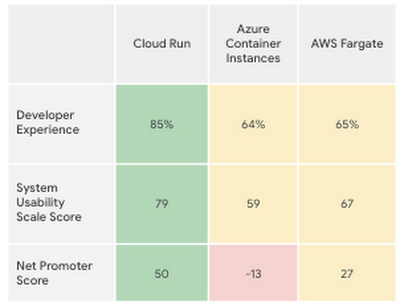
Taken together, all these new features make the Cloud Run developer experience far easier than its competitors’, according to a recent report by User Research International.
Versatility
Next-generation serverless is also about versatility. It supports a wider variety of applications and caters to enterprise requirements. Functions and web apps of course, but also heavyweight applications, and in the fullness of time, also brownfield and third-party containerized apps. This versatility is enabled by the container primitive, which removes restrictions on languages, run times, and hardware.
Being able to run a greater variety of apps on our serverless stack means you can optimize for predictable usage. Today, we announced new spend-based committed use discounts for Cloud Run. Enterprises with stable, steady-state, and predictable usage can now purchase committed use contracts directly in the billing UI. There are no upfront payments, so these discounts are a perfect way to reduce your spend by as much as 17%. RELATED ARTICLEMaximize your Cloud Run investments with new committed use discountsCommitted use discounts in Cloud Run enable predictable costs—and a substantial discount!
Another way we provide versatility is with support for WebSockets and gRPC in Cloud Run. With these new additions, you get the benefits of serverless infrastructure to build responsive, high-performance applications. We also added the use of min instances with Cloud Run. This feature allows you to cut cold-start times and run latency-sensitive applications on Cloud Run! At the same time, you can still scale to zero, or keep a minimum amount of compute available, for example when running brownfield Java applications.
Built-in DevOps
Serverless doesn’t just make it faster for developers to set up their apps—it also helps once the application is up and running, taking a big management load off of operations teams. Notably, serverless systems take care of “scaling” an application up or down. That means that if your application suddenly starts fielding a lot of traffic, the serverless platform automatically spins up more resources to handle the load. No more dreaded timeouts, wheels or hourglasses—or work for your operations team. Likewise, as soon as demand goes down, the platform takes care of decommissioning resources, i.e., scaling down, so that you’re not paying for resources that you no longer need. Want to run your service globally with low latency, without an operations team, and zero stranded costs? Cloud Run takes care of global load balancing and autoscaling to zero for you in every Google Cloud region.
Further, features like support for gradual rollouts and rollbacks allow developers to experiment and test ideas quickly, as well as sophisticated traffic management in Cloud Run. Likewise, Cloud Run provides access to distributed tracing with no setup or configuration, allowing developers to find performance bottlenecks in production.
Next up: serverless security
As part of DevOps best practices, we build in security for your serverless applications at every layer: deployment time, runtime and networking. For example, built-in vulnerability scanning ensures you only deploy artifacts you trust.
Today, we are announcing Cloud Run support for Google Secret Manager and customer-managed encryption keys (CMEK), making it easy to protect data at rest and store sensitive data. We’re also integrating Cloud Run with Binary Authorization, which lets you enforce specific policies to make sure only verified images make it to production. And finally, we added a new integration with Identity-Aware Proxy, support for VPC-SC, and egress controls that you can use to enforce a security perimeter, limiting both who can access specific services and what resources can be accessed when these services run in production. You can read more about these security enhancements here. RELATED ARTICLE4 new features to secure your Cloud Run servicesWe’re improving the security of your Cloud Run environment with things like support for Secret Manager and Binary Authorization.
In summary, the next generation of serverless combines the best of serverless with containers to run a broad spectrum of apps, with no language, networking or regional restrictions. The next generation of serverless will help developers build the modern applications of tomorrow—applications that adapt easily to change, scale as needed, respond to the needs of their customers faster and more efficiently, all while giving developers the best developer experience. Learn more by attending The Power of Serverless, a two-hour virtual event where we’ll lay out our vision for serverless compute, and where serverless subject matter experts will present on in-depth serverless development topics. Hope to see you there!
Want to learn even more about serverless and cloud-native application development? Check out the upcoming Modern App Dev & Delivery workshop, and our Ask the Experts roundtable.
Google Products Helps HMH’s Healthcare Staff Work from Anywhere Efficiently and Securely!

10230
Of your peers have already read this article.
3:00 Minutes
The most insightful time you'll spend today!
Hackensack Meridian Health (HMH) executive Mark Eimer explains how an ambitiously-timed rollout of a comprehensive suite of Google products helped the entire organization—from doctors to IT staff—achieve better security, cultivate a more equitable work environment, and ultimately, improve patient outcomes.
How does a recently merged, 17-hospital healthcare system fast-track a platform migration and hardware rollout securely and in a way that improves work for everyone, regardless of location or role? These are the questions that kept me up at night in early 2020, when the pandemic demanded a “big bang”—something our legacy laptops and operating systems couldn’t handle.
We began our work with Google in 2020 with the adoption of Chrome as our default browser. As we migrated platforms, keeping patient data safe was of the utmost importance to us, along with providing every staff member with the tools they needed to work virtually. Our staff often experienced issues accessing our web-based applications using Internet Explorer or Edge Browser, a problem that went away when we switched to Chrome. Chrome’s versatile compatibility also made it easier for my team to migrate all of our web-based operations, and Chrome’s security and manageability were key components to making this switch a huge win for the organization.
The success of this migration led us to extend our Google partnership to patient care applications—where Google’s expertise in AI and ML helps scale the use of diagnostics tools and improve other aspects of the patient journey.

Achieving security at every step
Like so many other healthcare organizations, we’ve been concerned about ransomware attacks. This is part of why we moved to Google Workspace and distributed over 3,000 Chrome OS devices in kiosk mode in March of 2020, when many of us went remote due to the pandemic. We were very concerned about team members accessing corporate applications through home devices that were running EOL operating systems (WIN7), as well as a general lack of antivirus and encryption measures.
We were protected by the fact that Google’s software and hardware both had built-in security features that we needed to stave off sophisticated attackers. For example, Chrome OS automatically updates to the latest security update and encrypts data living outside the cloud on the hardware. These features protected us from security-related disruptions, letting us securely move a huge library of file shares and emails across thousands of accounts to Google Chrome OS in just four months.
A year later, in March 2021, we migrated the enterprise over to Google Workspace and saw an immediate reduction in spam by 30% from the inherent built-in AI/ML. This meant staff were less likely to receive (and click through) phishing attempts. My team could connect, create, and collaborate easily and securely—even as more of us were working from home and needed to access sensitive data remotely.
Leveling the playing field
As an organization, we were surprised by how many team members didn’t have personal computers at home. We quickly decided that if we needed team members to work from home, the health network would have to supply hardware. Chromebooks’ lower price tag compared to PCs—on top of their built-in security controls—allowed us to purchase, deploy, and support that initial distribution of 3,000 Chromebooks to team members in less than three weeks, providing devices to every eligible remote employee instead of just a select few. This was vital to reaching our equitable technology goal as part of our diversity and inclusion initiative: everybody has the same tools to do good work.
When all employees have what they need to do their jobs well, we get better patient outcomes. Before we began this cloud adoption journey, patient and staff experiences were different within the hospitals and outside of them.
Now it’s the same wherever our staff is, and we’ve seen efficiency and accessibility benefits extend to the patient side. For example, we built a web-based contact center that supports 80 locations that use Workspace and Chrome OS devices. Since customer service, admin, and providers are all on the same system, it has become a one-stop shop for patients.
Furthermore, through the Grow with Google program, we were able to provide another benefit to employees that drove our equity goals. Google trained 50 non-IT staff members—from environmental services, food and nutrition, and other non-tech areas who were interested in making a career change to IT—on the Google products we were using. They may not have thought about switching to a career in IT before the Grow with Google program came to our organization, but through this partnership, they now have that opportunity.
A strategic, long-term partner
With any large-scale rollout, the work doesn’t end once laptops are in employee hands. Google has shown their commitment to long-term collaboration as they continuously optimize their products for the unique needs of healthcare providers and go the extra mile in tailoring tools to our staff’s workflows.
For example, on the Chrome OS side, the Google team has helped our registration desks and document centers with device integration for hardware like credit card readers and e-signature pads. They’ve also helped us meet security and privacy requirements mandated by state and federal governments around HIPAA, Medicaid, and Medicare reimbursements. Over this next year, we’ll look at a feature roadmap with Google Cloud to deliver further enhancements, iterating on the product itself to meet our needs for the present and the future.

Delivering the future of healthcare
The benefits we’ve seen around security and usability—and the ability to provide all staff with equal access to Google’s technology—are why we’re expanding our partnership with Google to both the administrative and clinical sides of HMH. In addition to further Google rollouts with corporate, next year we’re distributing Chromebooks to all 350 of our ambulatory clinics.
We’re also working with the Google professional services team to create a custom AI model that analyzes 3D mammogram images. This AI model will enable two providers to read mammograms—which adheres to international best practices but is currently rare in the US—without requiring additional time. Conducting double readings of mammograms will yield better health outcomes for our patients, such as a lower patient recall rate and an increased accuracy in detecting breast cancer.
We’re currently building the model using a variety of Google Cloud products, including Cloud Healthcare API. Once complete, this model is expected to be trained, deployed, and maintained in Google’s Vertex AI, allowing our providers to be more productive as they make clinical decisions with AI support. As the model is proven over time, we plan to make the predictive services accessible to other healthcare organizations.
With Google, we’re able to achieve a unified architecture for storing data as well as training and deploying AI models, which enable our staff to work more efficiently and securely from anywhere. While I may not be able to predict the future as accurately as AI can, I foresee our continued partnership with Google as a key part of HMH’s improved provider and patient outcomes.
4052
Of your peers have already watched this video.
2:20 Minutes
The most insightful time you'll spend today!
Telstra Leverages APIs To Accelerate Digital Transformation
Telstra is Australia’s leading telecommunications and technology company, offering a full range of communication services and competing in all telecommunications markets.
In Australia, it provides 17.7 million retail mobile services, 4.9 million retail fixed voice services and 3.6 million retail fixed broadband services.
But owing to legacy infrastructure the company was unable to boost business efficiency and agility. To address these challenges, the company decided to leverage the Apigee platform.
“One of the key challenges that Apigee helped us solve was ensuring greater efficiency. Efficiency in business is absolutely critical. The more efficient you become the quicker you can solve problems and hence lower costs of solving those problems,” says David Freeman, General Manager of API enablement, Telstra.
Freeman also highlights that the Apigee platform has helped Telstra reduce the cycle time of delivery from months to days and sometimes even minutes. It also empowered the organization to efficiently track their developer community as well.
“Apigee was not only able to take systems and services and turn them into APIs but it also provided an analytics capability where we could keep an eye on the developer community, we could see what the developers were doing with APIs. On top of that, it also provided a great way to monetize APIs. This ensures that our developers can quickly and easily consume APIs,” says Freeman.
Watch this short video and get greater insights into how Apigee is helping Telstra accelerate digital transformation.
6348
Of your peers have already watched this video.
2:00 Minutes
The most insightful time you'll spend today!
Google Cloud’s ML-based Image Classification App: A Key to Global Wildlife Conservation
Wildlife provides critical benefits to support nature and people. Unfortunately, wildlife is slowly but surely disappearing from our planet and we lack reliable and up-to-date information to understand and prevent this loss. By harnessing the power of technology and science, we can unite millions of photos from [motion sensored cameras] around the world and reveal how wildlife is faring, in near real-time…and make better decisions
wildlifeinsights.org/about
More Relevant Stories for Your Company

APIs and IT Rationalization: Cost Avoidance and Cost Savings for Enterprise IT
The dynamic and fast-moving business environments of today demands that technology leaders and teams deliver more at a lightning speed, all the while working within the constraints of shoe-string budgets and tight project timelines. Winning in today’s environment requires a more strategic approach to optimize utilization of resources, remove unnecessary

Why Your Company Needs an Enterprise Gearbox
For most established businesses today, the disruptive start-up has emerged as the biggest and most intimidating competition. A start-up's digital prowess and astounding ability to innovate and scale massively in weeks, for what takes conventional businesses quarters, is daunting. How does one compete with that? To play in today’s digitally-connected

All About Cloud Run, its Scalability and Management Features
Mindful Containers is a fictitious company that is creating containerized microservice applications. They need a fully managed compute environment for deploying and scaling serverless containerized microservices. So, they are considering Cloud Run. They are excited about Cloud Run because it abstracts away the cluster configuration, monitoring, and management so they

How APIs Helped PWC Open New Revenue Streams Using Existing Data
PwC, one of the “Big Four” accounting firms, is well-known for professional services structured around auditing, insurance, tax, legal, and traditional management consulting. In Australia, the PwC Innovation and Ventures group has taken the global lead in building new, technology-based, turnkey lines of business outside of PwC’s traditional service areas.
