





A Pro’s Tip on Choosing the Right Google Cloud Compute Options

5724
Of your peers have already read this article.
2:00 Minutes
The most insightful time you'll spend today!
Where should you run your workload? It depends…Choosing the right infrastructure options to run your application is critical, both for the success of your application and for the team that is managing and developing it. This post breaks down some of the most important factors that you need to consider when deciding where you should run your stuff!
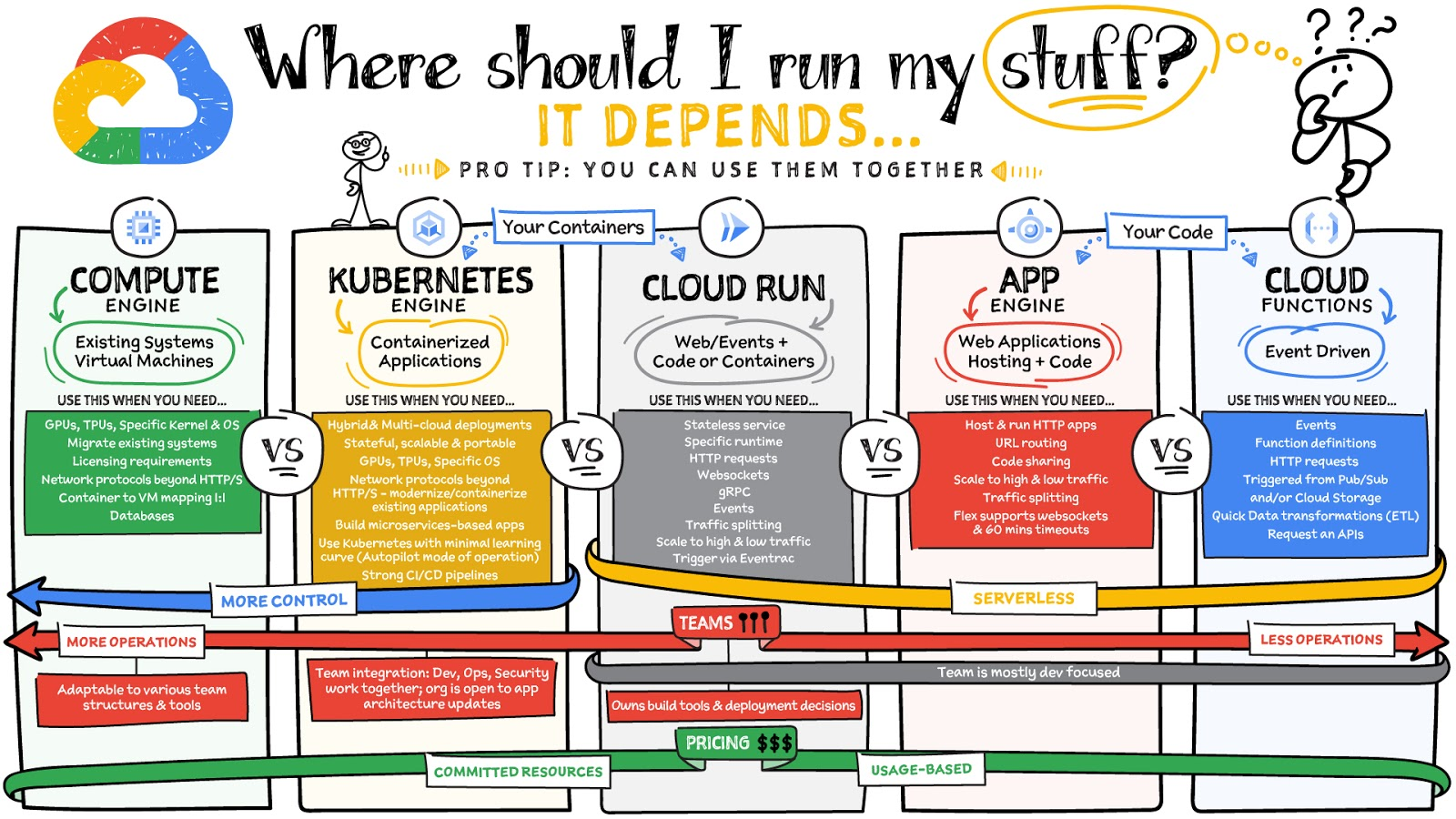
What are these services?
- Compute Engine – Virtual machines. You reserve a configuration of CPU, memory, disk, and GPUs, and decide what OS and additional software to run.
- Kubernetes Engine – Managed Kubernetes clusters. Kubernetes is an open-source system for automating deployment, scaling, and management of containerized applications. You create a cluster and configure which containers to run; Kubernetes keeps them running and manages scaling, updates and connectivity.
- Cloud Run – A fully managed serverless platform that runs individual containers. You give code or a container to Cloud Run, and it hosts and auto scales as needed to respond to web and other events.
- App Engine – A fully managed serverless platform for complete web applications. App Engine handles the networking, application scaling, and database scaling. You write a web application in one of the supported languages, deploy to App Engine, and it handles scaling, updating versions, and so on.
- Cloud Functions – Event-driven serverless functions. You write individual function code and Cloud Functions calls your function when events happen (for example, HTTP, Pub/Sub, and Cloud Storage changes, among others).
What level of abstraction do you need?
- If you need more control over the underlying infrastructure (for example, the operating system, disk images, CPU, RAM, and disk) then it makes sense to use Compute Engine. This is a typical path for legacy application migrations and existing systems that require a specific OS.
- Containers provide a way to virtualize an OS so that multiple workloads can run on a single OS instance. They are fast and lightweight, and they provide portability. If your applications are containerized then you have two main options.
- You can use Google Kubernetes Engine, or GKE, which gives you full control over the container down to the nodes with specific OS, CPU, GPU, disk, memory, and networking. GKE also offers Autopilot, when you need the flexibility and control but have limited ops and engineering support.
- If, on the other hand, you are just looking to run your application in containers without having to worry about scaling the infrastructure, then Cloud Run is the best option. You can just write your application code, package it into a container, and deploy it.
- If you just want to code up your HTTP-based application and leave the scalability and deployment of the app to Google Cloud then App Engine — a serverless, fully-managed option that is designed for hosting and running web applications — is a good option for you.
- If your code is a function and just performs an action based on an event/trigger, then deploying it with Cloud Functions makes sense.
What is your use case?
- Use Compute Engine if you are migrating a legacy application with specific licensing, OS, kernel, or networking requirements. Examples: Windows-based applications, genomics processing, SAP HANA.
- Use GKE if your application needs a specific OS or network protocols beyond HTTP/s. When you use GKE, you are using Kubernetes, which makes it easy to deploy and expand into hybrid and multi-cloud environments. Anthos is a platform specifically designed for hybrid and multi-cloud deployments. It provides single-pane-of-glass visibility across all clusters from infrastructure through to application performance and topology. Example: Microservices-based applications.
- Use Cloud Run if you just need to deploy a containerized application in a programming language of your choice with HTTP/s and websocket support. Examples: websites, APIs, data processing apps, webhooks.
- Use App Engine if you want to deploy and host a web based application (HTTP/s) in a serverless platform. Examples: web applications, mobile app backends
- Use Cloud Functions if your code is a function and just performs an action based on an event/trigger from Pub/Sub or Cloud Storage. Example: Kick off a video transcoding function as soon as a video is saved in your Cloud Storage bucket.
Need portability with open source?
If your requirement is based on portability and open-source support take a look at GKE, Cloud Run, and Cloud Functions. They are all based on open-source frameworks that help you avoid vendor lock-in and give you the freedom to expand your infrastructure into hybrid and multi-cloud environments. GKE clusters are powered by the Kubernetes open-source cluster management system, which provides the mechanisms through which you interact with your cluster. Cloud Run for Anthos is powered by Knative, an open-source project that supports serverless workloads on Kubernetes. Cloud Functions use an open-source FaaS (function as a service) framework to run functions across multiple environments.
What are your team dynamics like?
If you have a small team of developers and you want their attention focused on the code, then a serverless option such as Cloud Run or App Engine is a good choice because you won’t have to have a team managing the infrastructure, scale, and operations. If you have bigger teams, along with your own tools and processes, then Compute Engine or GKE makes more sense because it enables you to define your own process for CI/CD, security, scale, and operations.
What type of billing model do you prefer?
Compute Engine and GKE billing models are based on resources, which means you pay for the instances you have provisioned, independent of usage. You can also take advantage of sustained and committed use discounts.
Cloud Run, App Engine, and Cloud Functions are billed per request, which means you pay as you go.
Conclusion
It’s important to consider all the relevant factors that play a role in picking appropriate compute options for your application. Remember that no decision is necessarily final; you can always move from one option to another.
To explore these points in more detail, please take a look at the “Where Should I Run My Stuff?” video.
For more #GCPSketchnote, follow the GitHub repo & thecloudgirl.dev. For similar cloud content follow us on Twitter at @pvergadia and @briandorsey
Elevating SAP Operations: Cardinal Health Implements Google Cloud Bare Metal Solution

2004
Of your peers have already read this article.
1:30 Minutes
The most insightful time you'll spend today!
Over the past few years, Google Cloud has become the platform of choice for a growing number of SAP enterprise customers. That’s especially true for companies looking to migrate large and challenging SAP workloads, including those moving to S/4HANA systems as part of a cloud modernization strategy.
Google Cloud’s Bare Metal Solution (BMS) for SAP systems plays an important role in our success with these customers. Our BMS offerings are dedicated, single-tenant systems that combine uncompromising performance with the advantages of fully managed cloud infrastructure solutions. With SAP-certified BMS offerings available in North America and Europe, we’re offering SAP customers a set of high-end infrastructure capabilities.
Cardinal Health: Building for the future
Cardinal Health, Inc. is a distributor of pharmaceuticals, a global manufacturer and distributor of medical and laboratory products, and a provider of performance and data solutions for healthcare facilities. With operations in more than 30 countries and approximately 46,500 employees, Cardinal Health is a crucial link between the clinical and operational sides of healthcare. The company serves 90% of U.S. hospitals, more than 60,000 U.S. pharmacies and more than 10,000 specialty physician offices and clinics.
Over the past several years, a series of acquisitions drove a major expansion of Cardinal Health’s business. These acquisitions also created an increasingly complex and unwieldy IT environment that included a variety of ERP systems and dozens of other legacy applications, in addition to multiple ERP instances.
Cardinal Health’s technology modernization strategy will migrate its business away from these legacy systems to a single, modern digital platform. This includes leveraging the Google Cloud Large Memory Bare Metal Solution to modernize and consolidate its SAP application architecture within its Pharma segment with a single, massively scalable SAP S/4HANA system and BigQuery to unify SAP data with a fully managed enterprise data warehouse.
Scaling up to support SAP consolidation goals
Cardinal Health’s SAP modernization effort presented significant challenges. The migration process had to take place within a very narrow window and at 100% accuracy to avoid significant financial and operational impacts. Additionally, Cardinal Health’s strategy of consolidating its pharma business onto a single SAP HANA scale-up instance, with no performance or capacity issues, would require Google Cloud to scale its SAP-certified server systems beyond their previous 12TB upper limit.
Google Cloud raised the bar with its SAP-certified Bare Metal Solution server options—one that supports up to 672 vCPUs and 18TB of memory, and another with up to 896 vCPUs and 24TB of memory. Additionally, customers have multiple storage options, offering up to a maximum of 96TB and 400,000 IOPS per system. Both offerings, along with a high-performance storage SKU, are certified for SAP HANA online transaction processing (OLTP) and meet SAP standard sizing requirements.
Our work with Cardinal Health involved some of the first production deployments of Google Cloud Large Memory Bare Metal Solution 24TB VMs to run the company’s SAP HANA in-memory database. Cardinal Health got what it needed: modern, fully managed, and SAP-certified cloud infrastructure that can support a single, consolidated scale-up SAP HANA instance for the company’s pharma operations. Google Cloud BMS also ensures that Cardinal Health’s SAP environment can scale effortlessly to support its goals, including plans to transform and migrate 200+ million business records onto its HANA system.
In addition, Cardinal Health leveraged Google Cloud’s ability to run SAP application servers on virtualized systems alongside its SAP HANA instance running on a 24TB BMS server. This hybrid approach to SAP cloud infrastructure offered significant advantages in terms of efficiency and cost-effectiveness: Cardinal Health’s use of the BMS server played a big role in achieving significant improvements in reporting and decision-making efficiency, as well as millions in cost savings over the first five years of the effort.
On top of these quantitative improvements, Google Cloud delivered the SAP migration for Cardinal Health in a single weekend—without user impacts or business disruptions.
An even bigger future for bare metal on Google Cloud
Based on raw performance, the Google Cloud server offerings define the cutting edge for our SAP customers. In fact, SAP’s certification of our 24TB Bare Metal Solution configuration earned us a world-record SAP HANA benchmark for Intel-based servers of 892,270 SAPS. And customers that combine our BMS server and high-performance storage offerings can expect to reload even the biggest SAP HANA datasets, following a full system restart, in as little as 30 minutes—a fraction of the time required in the past for an SAP HANA “rehydration” procedure.
More SAP customers are facing the same challenges that drove Cardinal Health to embark upon its modernization efforts: rapid business growth, pressure to consolidate sprawling and often chaotic SAP environments, and SAP HANA systems that now routinely require multi-TB memory capacities to run efficiently. For Google Cloud Bare Metal Solution customers, these industry-leading benchmarks translate directly into success with real-world SAP cloud modernization and growth initiatives.
It probably won’t take long for today’s boundary-pushing 24TB Bare Metal Solution systems to become tomorrow’s mainstream SAP HANA infrastructure. What we know for sure is that Google Cloud will be ready with cutting-edge solutions for our biggest and most demanding SAP customers.
Introducing a strong alternative to CentOS: Rocky Linux Optimized for Google Cloud

3338
Of your peers have already read this article.
3:30 Minutes
The most insightful time you'll spend today!
As CentOS 7 reaches end of life, many enterprises are considering their options for an enterprise-grade, downstream Linux distribution on which to run their production applications. Rocky Linux has emerged as a strong alternative that, like CentOS, is 100% compatible with Red Hat Enterprise Linux.
In April 2022, we announced a customer support partnership with CIQ, the official support and services partner and sponsor of Rocky Linux, as the first step in providing a best-in-class enterprise-grade supported experience for Rocky Linux on Google Cloud. Today we’re excited to announce the general availability of Rocky Linux Optimized for Google Cloud. We developed this collection of Compute Engine virtual machine images in close collaboration with CIQ so that you get optimal performance when using Rocky Linux on Compute Engine to run your CentOS workloads.
These new images contain customized variants of the Rocky Linux kernel and modules that optimize networking performance on Compute Engine infrastructure, while retaining bug-for-bug compatibility with Community Rocky Linux and Red Hat Enterprise Linux. The high bandwidth networking enabled by these customizations will be beneficial to virtually any workload, and are especially valuable for clustered workloads such as HPC (see this page for more details on configuring a VM with high bandwidth).
Going forward, we’ll collaborate with CIQ to publish both the community and Optimized for Google Cloud editions of Rocky Linux for every major release, and both sets of images will receive the latest kernel and security updates provided by CIQ and the Rocky Linux community. And of course, we’ll offer support with CIQ for both these images, per our partnership.
Rocky Linux Optimized for Google Cloud lets you take advantage of everything Compute Engine has to offer, including day-one support for our latest VM families, GPUs, and high-bandwidth networking. And for customers building for a multi-cloud deployment environment, the community Rocky images have you covered.
Starting today, Rocky Linux 8 Optimized for Google Cloud is available for all x86-based Compute Engine VM families (and soon for the new Arm-based Tau T2A), with version 9 soon to follow. Give it a try and let us know what you think.
3429
Of your peers have already watched this video.
1:30 Minutes
The most insightful time you'll spend today!
Lowe’s: Building a Centralized Price Management Solution
Watch how American retail company specializing in home improvement Lowe’s used Google Cloud to build a centralized price management solution. The company’s application development team leveraged Google Cloud to enable the improvement of their software development life cycle – from code development to CI/CD and monitoring.
How Eventrac and Workflows Integration Helps Implement Hybrid Architecture in Google Cloud

6530
Of your peers have already read this article.
3:00 Minutes
The most insightful time you'll spend today!
I previously talked about Eventarc for choreographed (event-driven) Cloud Run services and introduced Workflows for orchestrated services.
Eventarc and Workflows are very useful in strictly choreographed or orchestrated architectures. However, you sometimes need a hybrid architecture that combines choreography and orchestration.
For example, imagine a use case where a message to a Pub/Sub topic triggers an automated infrastructure workflow or where a file upload to a Cloud Storage bucket triggers an image processing workflow. In these use cases, the trigger is an event but the actual work is done as an orchestrated workflow.
How do you implement these hybrid architectures in Google Cloud? The answer lies in Eventarc and Workflows integration.
Eventarc triggers
To recap, an Eventarc trigger enables you to read events from Google Cloud sources via Audit Logs and custom sources via Pub/Sub and direct them to Cloud Run services:

One limitation of Eventarc is that it currently only supports Cloud Run as targets. This will change in the future with more supported event targets. It’d be nice to have a future Eventarc trigger to route events from different sources to Workflows directly.
In absence of such a Workflows enabled trigger today, you need to do a little bit of work to connect Eventarc to Workflows. Specifically, you need to use a Cloud Run service as a proxy in the middle to execute the workflow.
Let’s take a look at a couple of concrete examples.
Eventarc Pub/Sub + Workflows integration
In the first example, imagine you want a Pub/Sub message to trigger a workflow.
Define and deploy a workflow
First, define a workflow that you want to execute. Here’s a sample workflows.yaml that simply decodes and logs the Pub/Sub message body:
main:params: [args]steps:- init:assign:- headers: ${args.headers}- body: ${args.body}...- pubSubMessageStep:call: sys.logargs:text: ${"Decoded Pub/Sub message data is " + text.decode(base64.decode(args.body.message.data))}severity: INFODeploy the workflow with a single command:gcloud workflows deploy ${WORKFLOW_NAME} --source=workflow.yaml --location=${REGION}
Deploy a Cloud Run service to execute the workflow
Next, you need a Cloud Run service to execute this workflow. Workflows has an execution API and client libraries that you can use for your favorite language. Here’s an example of the execution code from a Node app.js file. It simply passes the received HTTP request headers and body to the workflow and executes it:
const execResponse = await client.createExecution({parent: client.workflowPath(GOOGLE_CLOUD_PROJECT, WORKFLOW_REGION, WORKFLOW_NAME),execution: {argument: JSON.stringify({headers: req.headers, body: req.body})}});
Deploy the Cloud Run service with the Workflows name and region passed as environment variables:
gcloud run deploy ${SERVICE_NAME} \--image gcr.io/${PROJECT_ID}/${SERVICE_NAME} \--region=${REGION} \--allow-unauthenticated \--update-env-vars GOOGLE_CLOUD_PROJECT=${PROJECT_ID},WORKFLOW_REGION=${REGION},WORKFLOW_NAME=${WORKFLOW_NAME}
Connect a Pub/Sub topic to the Cloud Run service
With Cloud Run and Workflows connected, the next step is to connect a Pub/Sub topic to the Cloud Run service by creating an Eventarc Pub/Sub trigger:
gcloud eventarc triggers create ${SERVICE_NAME} \--destination-run-service=${SERVICE_NAME} \--destination-run-region=${REGION} \--location=${REGION} \--event-filters="type=google.cloud.pubsub.topic.v1.messagePublished"
This creates a Pub/Sub topic under the covers that you can access with:
export TOPIC_ID=$(basename $(gcloud eventarc triggers describe ${SERVICE_NAME} --format='value(transport.pubsub.topic)'))
Trigger the workflow
Now that all the wiring is done, you can trigger the workflow by simply sending a Pub/Sub message to the topic created by Eventarc:
gcloud pubsub topics publish ${TOPIC_ID} --message="Hello there"
In a few seconds, you should see the message in Workflows logs, confirming that the Pub/Sub message triggered the execution of the workflow:

Eventarc Audit Log-Storage + Workflows integration
In the second example, imagine you want a file creation event in a Cloud Storage bucket to trigger a workflow. The steps are similar to the Pub/Sub example with a few differences.
Define and deploy a workflow
As an example, you can use this workflow.yaml that logs the bucket and file names:
main:params: [args]steps:...- log:call: sys.logargs:text: ${"Workflows received event from bucket " + bucket + " for file " + file}severity: INFO
Deploy a Cloud Run service to execute the workflow
In the Cloud Run service, you read the CloudEvent from Eventarc and extract the bucket and file name in app.js using the CloudEvent SDK and the Google Event library:
const cloudEvent = HTTP.toEvent({ headers: req.headers, body: req.body });//"protoPayload" : {"resourceName":"projects/_/buckets/events-atamel-images-input/objects/atamel.jpg}";const logEntryData = toLogEntryData(cloudEvent.data);const tokens = logEntryData.protoPayload.resourceName.split('/');const bucket = tokens[3]
Executing the workflow is similar to the Pub/Sub example, except you don’t pass in the whole HTTP request but rather just the bucket and file name to the workflow:
const execResponse = await client.createExecution({parent: client.workflowPath(GOOGLE_CLOUD_PROJECT, WORKFLOW_REGION, WORKFLOW_NAME),execution: {argument: JSON.stringify({bucket: bucket, file: file})}});
Connect Cloud Storage events to the Cloud Run service
To connect Cloud Storage events to the Cloud Run service, create an Eventarc Audit Logs trigger with the service and method names for Cloud Storage:
gcloud eventarc triggers create ${SERVICE_NAME} \--destination-run-service=${SERVICE_NAME} \--destination-run-region=${REGION} \--location=${REGION} \--event-filters="type=google.cloud.audit.log.v1.written" \--event-filters="serviceName=storage.googleapis.com" \--event-filters="methodName=storage.objects.create" \--service-account=${PROJECT_NUMBER}-compute@developer.gserviceaccount.com
Trigger the workflow
Finally, you can trigger the workflow by creating and uploading a file to the bucket:
echo "Hello World" > random.txtgsutil cp random.txt gs://${BUCKET}/random.txt
In a few seconds, you should see the workflow log the bucket and object name.
Conclusion
In this blog post, I showed you how to trigger a workflow with two different event types from Eventarc. It’s certainly possible to do the opposite, namely, trigger a Cloud Run service via Eventarc with a Pub/Sub message (see connector_publish_pubsub.workflows.yaml) from Workflows or a file upload to a bucket from Workflows.
All the code mentioned in this blog post is in eventarc-workflows-integration. Feel free to reach out to me on Twitter @meteatamel for any questions or feedback.
How This Leading Trading Company Uses APIs to Build Fintech Apps Quickly and Cost-Effectively

4598
Of your peers have already read this article.
5:10 Minutes
The most insightful time you'll spend today!
Tradier uses the Apigee API management platform from Google to abstract the legacy complexities of capital markets so that developers can build FinTech applications in an agile, nimble, and quick fashion at minimal cost. The company embodies the evolution of what cloud technology can enable in the form of an API-first business delivered as a service.
The rise of API-powered FinTech
Historically, companies that wanted to build systems, applications, or services to interact with the stock market would have to build an entire brokerage operation from scratch. This would include data infrastructure, compliance infrastructure, and storage capabilities. It could take years and massive capital expense to accomplish everything that was required to be ready to serve customers.
Tradier provides this infrastructure as an API-based service so that the same companies can launch investor applications in as little as a few weeks. This democratized access means that FinTech innovation can come from anywhere, giving the same opportunities to create new products to everyone, from enterprise customers to startups.
“Financial markets are becoming fundamentally decentralized and unbundled,” says Dan Raju, co-founder, CEO, and chairman at Tradier. “The services that large legacy banks and brokerage firms used to offer are being supplanted by Tradier’s microservices and APIs, which power innovation.”
More than 200 companies use Tradier to develop and launch new products, or to add new features and functions that they traditionally would not have offered in existing products. With a large and diverse user base, Tradier faced the challenge of managing its partners in way that helps ensure it can grant credentials, track, monitor, and report in an efficient and equitable manner.
At the same time, the company recognized the inherent value of its partners for their power to leverage Tradier APIs to innovate. Tradier’s fundamental market disruption is the partner ecosystem, where the company is engaged along with its partners to deliver value to the entire ecosystem in the form of new products and services.
Embracing an API-powered ecosystem
Tradier has moved beyond providing great APIs toward engaging its ecosystem. If a customer wants a specific dataset, the company doesn’t automatically build a new product. Instead, Tradier looks to the ecosystem to build the product. With this approach, Tradier has taken its capabilities and multiplied them by hundreds.
“The fundamental difference between thinking about an API ecosystem versus an API product is the difference between being a participant who’s enabling innovation and not just a company delivering a set of technical capabilities,” Raju says.
Tradier takes an outside-in approach toward engaging its API ecosystem. Constantly listening to participants and helping to enable and empower them to create value is fundamental to the company’s business model. Rather than simply focusing on building new capabilities on its own, Tradier listens to what functionalities customers need and facilitates development. In many cases, the ecosystem generates the requested product organically rather than Tradier needing to do it.
“I love APIs because they allow you to empower others to create value. The concept of empowering others to create value along with you is what is the most satisfying, and the most fascinating, thing about APIs,” says Raju.
Delivering value at scale
Tradier handles between 500 million to 1 billion API calls and a billion dollars in transactions a month, and all of them run through the Apigee API management platform. Apigee’s last mile forms the single layer that manages Tradier’s infrastructure, including security, analytics, developer interactions, and execution. The company also uses Apigee to comply with an array of regulatory reporting, mandated by Tradier’s status as a FINRA (Financial Industry Regulatory Authority)-regulated entity.
“Apigee is integral to the Tradier offering. They have been great partners and have always collaborated and enabled us to innovate at a pace that helped Tradier attract developers and innovative companies. We see tremendous potential in the synergy of Apigee and Google as it brings to the market a vast extended capability set based on the Google Cloud Platform.”
Tradier is an API-centric ecosystem that delivers value to an entire set of players where the nucleus is the Apigee API management suite, which helps deliver, innovate, publish, manage, monitor, and secure the ecosystem on a day-to-day basis. Simplicity combined with product evangelism is the key to success in the API space, Raju says.
Tradier’s capabilities to innovate, iterate, and travel the journey with its customers, partners, and developers has yielded many rewards. The company’s long history of working with Apigee has enabled it to assemble a set of people and resources for creating engagement, as well as to create a winning set of APIs for delivering FinTech capabilities.
Considering the transformative future
Looking toward a future in which the financial services industry will experience ongoing disruption, Raju predicts that Tradier will continue to leverage APIs to lead the way.
“I think traditional banks are under attack. They are being replaced by a set of nimble, agile players that are offering a lot of new functionality to customers. This is forcing banks to think about how they can digitize their products through APIs so that they can provide the same functionalities as newer players.”
With companies like Tradier and others offering functionality that used to be in-house and exposing it outside, traditional brokerage firms are also being forced to rethink their model. Raju believes that this line of thinking also extends to the Blockchain.
“Exposing Blockchain-like capabilities through APIs is going to be a disruptive influence, and it will be critical for companies to think about how APIs, and more importantly Blockchain, can create value for us.”
More Relevant Stories for Your Company

Google Cloud Accelerates Financial Organizations’ Journey towards Digital Transformation
When I reflect back on the past year and the pandemic, I’m struck by how the reliance on remote work and operations has changed the fundamentals of business forever. For the financial services industry, this rings particularly true. Many conversations I’m having right now with organizations revolve around embracing a transformation

Ten Videos to Help You Get Started with Anthos
Do you need to develop, run and secure applications across your hybrid and multicloud environments? Look no further than Anthos, our managed application platform that extends Google Cloud services and engineering practices to your environments so you can modernize apps faster and establish operational consistency across them. To help you




Google Cloud’s ML-based Image Classification App: A Key to Global Wildlife Conservation
Wildlife provides critical benefits to support nature and people. Unfortunately, wildlife is slowly but surely disappearing from our planet and we lack reliable and up-to-date information to understand and prevent this loss. By harnessing the power of technology and science, we can unite millions of photos from [motion sensored cameras]

How Barilla Created a Social Media Style App to Improve Efficiency
Google Cloud Results Replaced conflicting, time-consuming paper logs with a near real-time, transparent appScaled rapidly and easily to accommodate new teams thanks to Google App EngineEnables photographic and video communication to replace confusing textNew factory solution rolled out in just 15 days In 1877, Pietro Barilla set up a small
