





Aiming for successful cloud security transformations to help CISOs prepare for future threats

2946
Of your peers have already read this article.
3:30 Minutes
The most insightful time you'll spend today!
Many security leaders head into the cloud armed mostly with tools, practices, skills and ultimately the mental models for how security works that were developed on premise. This leads to cost and efficiency problems that can be solved by mapping their existing mental models to those of the cloud.
When it comes to understanding the differences between on-premises cybersecurity mental models and their cloud cybersecurity counterparts, a helpful place to start is by looking at the kinds of threats each one is attempting to block, detect, or investigate.
Traditional on-premise threats focused on stealing data from databases, file storage, and other corporate resources. The most common defenses of these resources rely on layers of network, endpoint, and sometimes application security controls. The proverbial “crown jewels” of corporate data were not made accessible with an API to the outside world or stored in publicly accessible storage buckets. Other threats aimed to disrupt operations or deploy malware for various purposes, ranging from outright data theft to holding data for ransom.
There are some threats that are specifically aimed at the cloud. Bad actors are always trying to take advantage of the ubiquitous nature of the cloud. One common cloud-centered attack vector that they pursue is constantly scanning IP address space for open storage buckets or internet-exposed compute resources.
As Gartner points out, securing the cloud requires significant changes in strategy from the approach we take to protect on-prem data centers. Processes, tools, and architectures need to be designed using cloud-native approaches to protect critical cloud deployments. And when you are in the early stages of cloud adoption, it’s critical for you to be aware of the division of security responsibilities between your cloud service provider and your organization to make sure you are less vulnerable to attacks targeting cloud resources.
Successful cloud security transformations can help better prepare CISOs for threats today, tomorrow, and beyond, but they require more than just a blueprint and a set of projects. CISOs and cybersecurity team leaders need to envision a new set of mental models for thinking about security, one that will require you to map your current security knowledge to cloud realities.
As a way to set the groundwork for this discussion, the cloud security transformation can start with a meaningful definition of what “cloud native” means. Cloud native is really an architecture that takes full advantage of the distributed, scalable, and flexible nature of the public cloud. (To be fair, the term implies that you need to be born in the cloud to be a native, but we’re not trying to be elitist about it. Perhaps a better term would be “cloud-focused” or doing the security “the cloudy way.”)
However we define it, adopting cloud is a way to maximize your focus on writing code, creating business value, and keeping your customers happy while taking advantage of cloud-native inherent properties—including security. One sure way to import legacy mistakes, some predating cloud by decades, into the future would be to merely lift-and-shift your current security tools and practices into the public cloud environment.
Going cloud-native means abstracting away many layers of infrastructure, whether it’s network servers, security appliances, or operating systems. It’s about using modern tools built for the cloud and built in the cloud. Another way to think about it: You’ll worry less about all these things because you’re going to build code on top of that to help you move more quickly. Abandoning legacy security hardware maintenance requirements is part of the win here. To put another way, security will follow in the steps of IT that has been transformed by the SRE and DevOps revolution.
You can extend this thinking to cloud native security, where some of your familiar tools combine with solutions provided by cloud service providers to take advantage of cloud native architecture to secure what’s built and launched in the cloud. While we talked about the differences between on-prem targeted threats compared to threats targeting cloud infrastructure, here are other vital areas to re-evaluate in terms of a cloud security mental model.
Network security
Some organizations practice network security in the cloud as if it were a rented data center. While many traditional practices that worked reasonably well on-premise for decades, along with many traditional network architectures, are either not applicable in the cloud or not optimal for cloud computing.
However, concepts like a demilitarized zone (DMZ) can be adapted to today’s cloud environments. For example, a more modern approach to DMZ would use microsegmentation and govern access by identity in context. Making sure that the right identity, in the right context, has access to the correct resource gives you strong control. Even if you get it wrong, microsegmentation can limit a breach blast radius.
Becoming cloud native also drives the adoption of new approaches to enterprise network security, such as BeyondProd. It also benefits organizations because it gets them away from traditional network perimeter security to focus on who and what can access your services—rather than where requests for access originated.
Although network security changes driven by cloud adoption can be enormous and transformational, not all areas shift in the same way.
Endpoint security
In the cloud, the concept of a security endpoint changes. Think of it this way: A virtual server is a server. But what about a container? What about microservices and SaaS? With software as a service cloud model, there’s no real endpoint there. All along your cloud security path, users only need to know what happens where.
Here is a helpful mental model translation: An API can be seen as sort of an endpoint. Some of the security thinking developed for endpoints applies to cloud APIs as well. Securing access, permissions, privileged access thinking can be carried over, but the concept of endpoint operating system maintenance does not.
Even with automation of service agents on virtual machines in the cloud, insecure agents may increase risks because they are operating at scale in the cloud. Case in point: This major Microsoft Azure cross-tenant vulnerability highlighted a new type of risk that wasn’t even on the radar of many of its customers.
In light of this, across the spectrum of endpoint security approaches, some disappear (such as patching operating systems for SaaS and PaaS), some survive (such as the need to secure privileged access,) and yet others are transformed.
Detection and response
With a move to the cloud comes changes to the threats you’ll face, and changes to how you detect and respond to them. This means that using on-prem detection technology and approaches as a foundation for future development may not work well. Copying all your on-premises detection tools and their threat detection content won’t reduce risks in the way that most cloud-first organizations will need..
Moving to the cloud provides the opportunity to rethink how you can achieve your security goals of confidentiality, integrity, availability, and reliability with the new opportunities created by cloud process and technology.
Cloud is distributed, often immutable, API-driven, automatically scalable, and centered on the identity layer and often contains ephemeral workloads created for a particular task. All these things combine to affect how you handle threat detection for the cloud environment and necessitate new detection methods and mechanisms.
There are six key domains where threats in the cloud can be best detected: identify, API, managed services, network, compute, and Kubernetes. These provide the coverage needed related to network, identity, compute, and container infrastructure. They also provide specific detection mechanisms for API access logs and network traffic captures.
As with endpoint security, some approaches become less important (such as network IDS on encrypted links), others can grow in importance (such as detecting access anomalies,) while others transform (such as detecting threats from the provider backplane).
Data security
The cloud is changing data security in significant ways, and that includes new ways of looking at data loss prevention, data encryption, data governance, and data access.
Cloud adoption sets you on a path to what we at Google call “autonomic data security.” Autonomic data security means security has been integrated throughout the data lifecycle and is improving over time. At the same time, it makes things easier on users, freeing them from having to define and redefine myriad rules about who can do what, when, and with which data. It lets you keep pace with constantly evolving cyberthreats and business changes, so you can keep your IT assets more secure and make your business decisions faster.
Similar to other categories, some data security approaches wane in importance or disappear (such as manual data classification at cloud scale), some retain their importance from on-prem to cloud unchanged, while others transform (such as pervasive encryption with effective and secure key management).
Identity and access management
The context for identity and access management (IAM) in the cloud is obviously different from your on-premise data center. In the cloud, every person and service has its own identity and you want to be able to control access.
Within the cloud, IAM gives you fine-grained access control and visibility for centrally managing cloud resources. Your administrators authorize who can act on specific resources, giving you full control and visibility to manage cloud resources centrally. What’s more, if you have complex organizational structures, hundreds of workgroups, and a multitude of projects, IAM gives you a unified view into security policy across your entire organization.
With identity and access management tools, you’re able to grant access to cloud resources at fine-grained levels, well beyond project-level access. You can create more granular access control policies to resources based on attributes like device security status, IP address, resource type, and date and time. These policies help ensure that the appropriate security controls are in place when granting access to cloud resources.
The concept of Zero Trust is strongly in play here. It’s the idea that implicit trust in any single component of a complex, interconnected system can create significant security risks. Instead, trust needs to be established via multiple mechanisms and continuously verified. To protect a cloud-native environment, a zero trust security framework requires all users to be authenticated, authorized, and validated for security configuration and posture before being granted or keeping access to cloud-based applications and data.
This means that IAM mental models from on premise security mostly survive, but a lot of underlying technology changes dramatically, and the importance of IAM in security grows significantly as well.
Shared fate for greater trust in cloud security
Clearly, cloud is much more than “someone else’s computer.” That’s why trust is such a critical component of your relationship with your chosen cloud service providers. Many cloud service providers acknowledge shared responsibility, meaning that they supply the underlying infrastructure but leave you responsible for many seemingly inscrutable security tasks.
With Google Cloud, we operate in a shared fate model for risk management in conjunction with our customers. We believe that it’s our responsibility to be active partners as our customers deploy securely on our platform, not delineators of where our responsibility ends. We stand with you from day one, helping you implement best practices for safely migrating to and operating in a trusted cloud.
Get ready to go cloud native
We offer you several great resources to help you prepare for cloud migration, and guide you as you review your current security approaches for signs of on-prem thinking.
Listen to our podcast series where Phil Venables, Vice President, CISO at Google Cloud, and
Nick Godfrey, Director, Financial Services Security & Compliance and member of Office of the CISO at Google Cloud, join me in a discussion on preparing for cloud migration (Podcast 1, Podcast 2). You can deepen your cloud native skills by earning a Professional Cloud Security Engineer certification from Google.
New Study Suggests Public Sector Firms Must Move Over Legacy Productivity Tools

5010
Of your peers have already read this article.
6:00 Minutes
The most insightful time you'll spend today!
Prior to joining Google Cloud, I spent 20 years in the public sector serving in various security roles, most recently as the head of the cybersecurity division at the newly established Cybersecurity and Infrastructure Security Agency (CISA). I was responsible for delivering services and capabilities to about 100 civilian agencies, as well as our critical infrastructure for state and local partners across the country.
Throughout my time serving in the U.S. government, I spent a great deal of energy working to keep bad actors out of our systems. What I eventually realized was that we were at a disadvantage. We didn’t just have legacy systems to deal with; we also had a legacy mindset. Our policies and capabilities were overly reliant on a perimeter-based approach to defense and introduced layers of friction with tools like VPNs, which inhibited productivity and increased frustration.
I spent the last few years of my time in the government doing my best to modernize this approach to security and supporting the many people who shared this vision. While most of them are still there, doing excellent work, repeated cybersecurity breaches of U.S. government systems have interrupted vital work and cost taxpayers billions of dollars. The SolarWinds breach in 2020, for example, may have cost governments and businesses more than $100 billion and the loss of vital national security information. Yet many government agencies continue to rely on the same legacy productivity software.
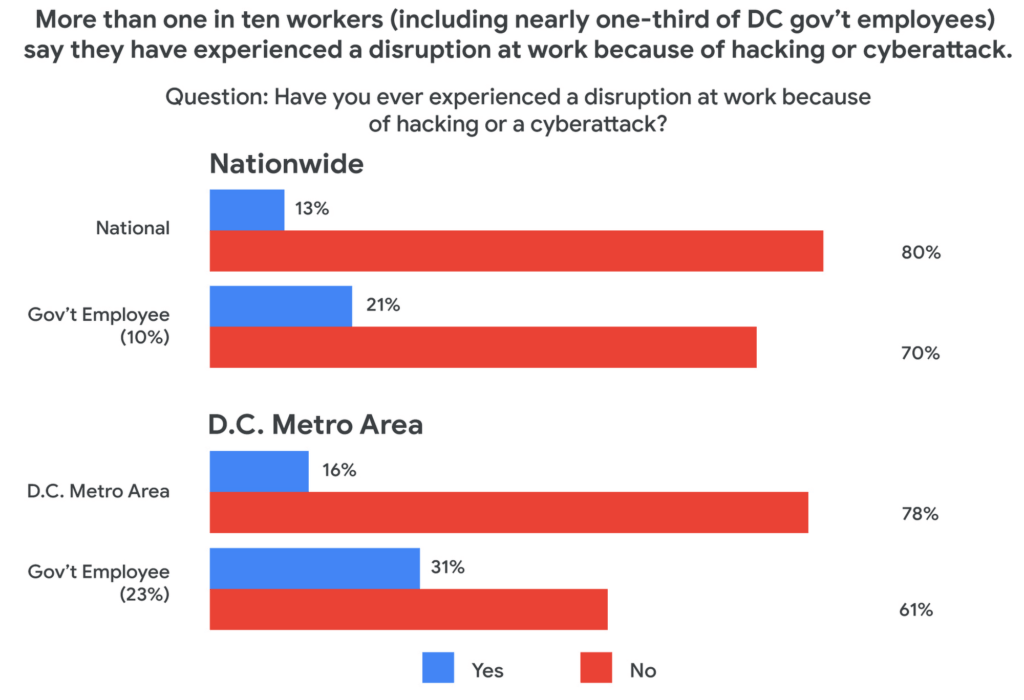
Today, a new survey conducted by Public Opinion Strategies and commissioned by Google Cloud shows that many government workers echo these concerns. The survey—which polled 2,600 working Americans, includes 600 workers from the D.C. metro area and 338 workers employed by federal, state, or local governments across the country—found that the majority of government employees surveyed reported being “very” concerned about cyberattacks striking their employers in the coming years. And nearly one-third of surveyed government employees in the D.C. metro area say they have experienced a disruption at work because of a cyberattack.
Results from the survey also showed a lack of satisfaction with legacy software, with more than 50% of government workers nationally responding that there are other products and services that could help them do their jobs better.
These new findings not only speak to the challenges our government employees face, but also outline an opportunity for improved innovation and security that can help government employees better achieve their missions.
Concerns about cybersecurity
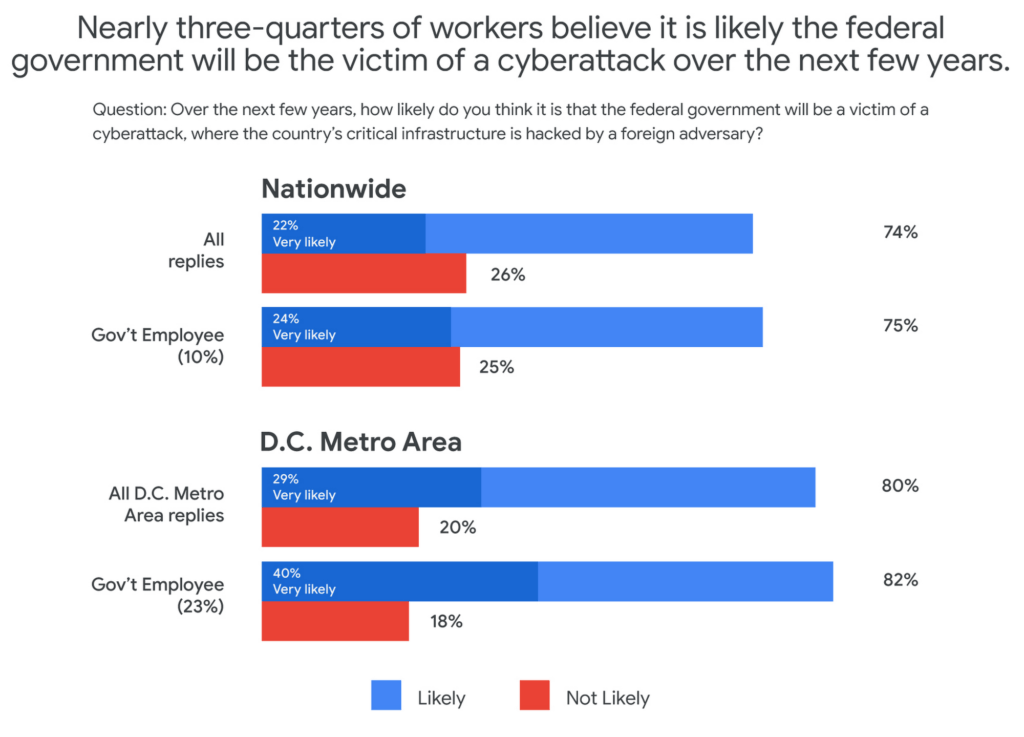
The majority of respondents said they believed it was likely that the federal government would be the victim of a cyberattack in the next few years. This percentage was even higher in the D.C. metro area and among government employees, with 40% of government workers living in metro D.C. saying it was “very likely.”
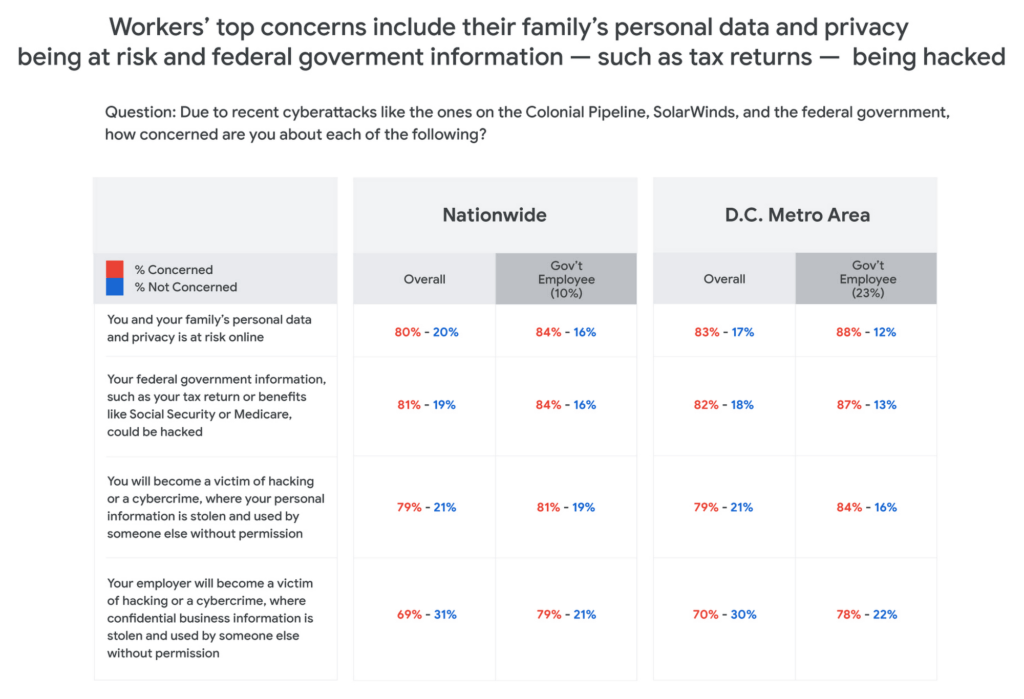
Respondents in all groups—national, D.C. metro, and government employees—were more likely to be concerned about cyberattacks as the perceived threat moved closer to home. For example, 80% of those surveyed said that recent attacks have them concerned about their personal data and privacy, and that of their family members. And for those in the D.C. area or in government jobs, the numbers were consistently higher than the national average.
One likely reason for such broad concern about cyberattacks is that many respondents reported experiencing a cyberattack at work. And while more than one-in-ten workers nationally have experienced disruptions from a cyberattack, the number increased to nearly one-in-three for D.C.-based government employees—nearly three times higher than the national average.
The problem with IT ‘monoculture’
According to survey respondents, 84% of D.C. metro government employees primarily use Microsoft products at work, including Word, Outlook, Teams, and OneDrive. This is confirmed by another recent study by Omdia that found 85% of government employees use Microsoft productivity software, far and away the largest IT productivity vendor by market share.
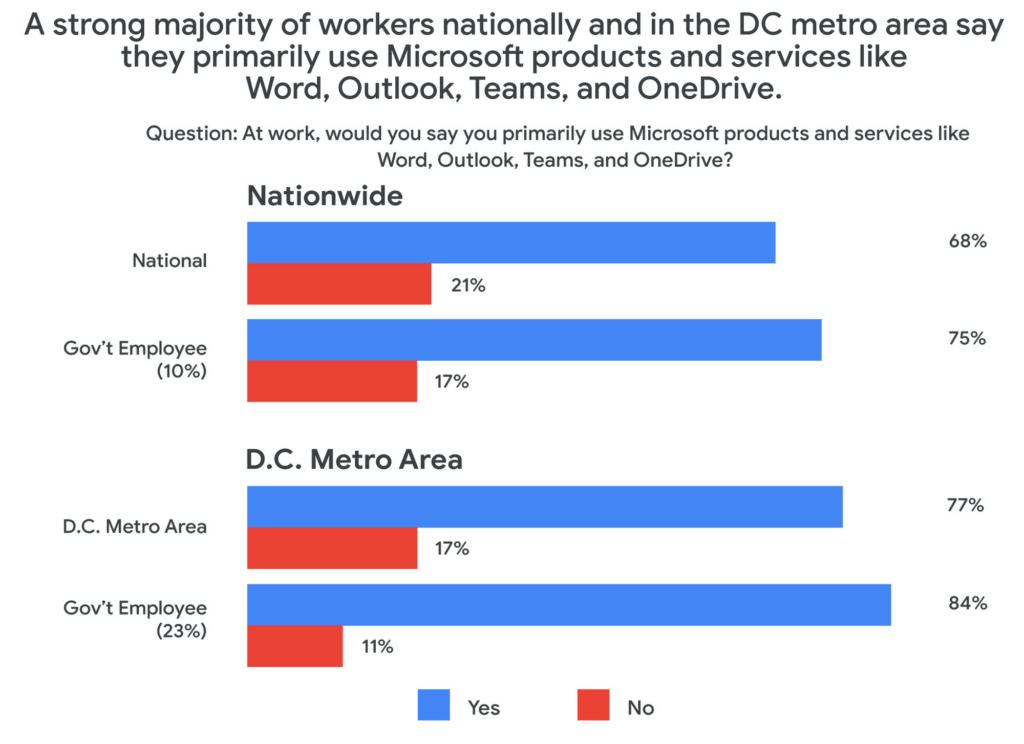
This reliance on a single software suite might suggest that these products are safe and secure, but the Public Opinion Strategies survey found that more than half of all respondents said that the government’s reliance on these Microsoft products actually made the federal government more vulnerable to hacking or cyberattacks.
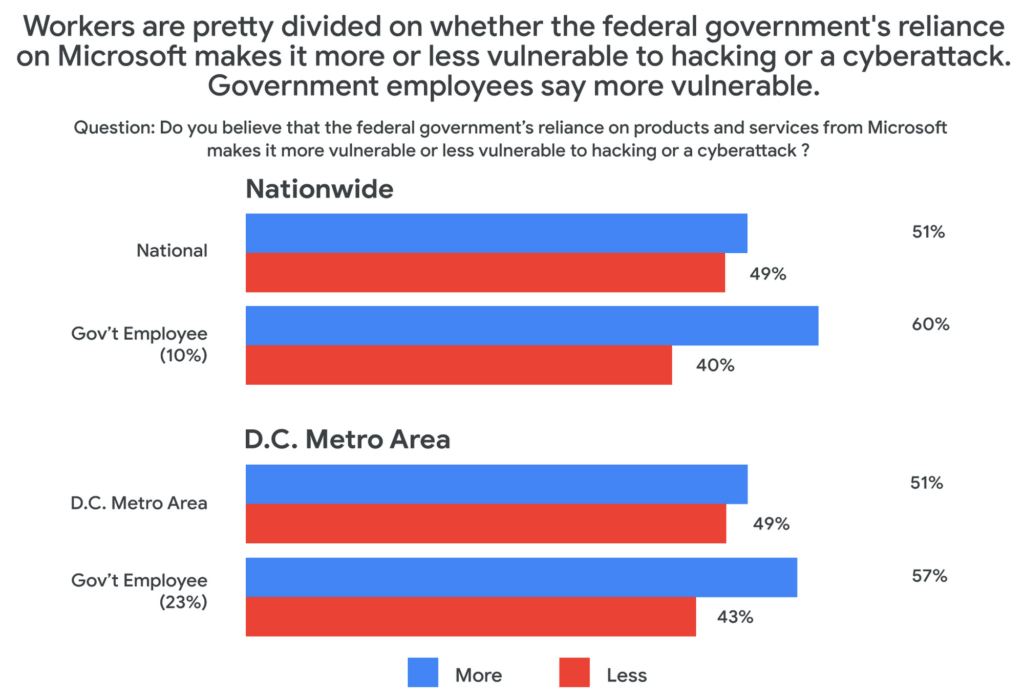
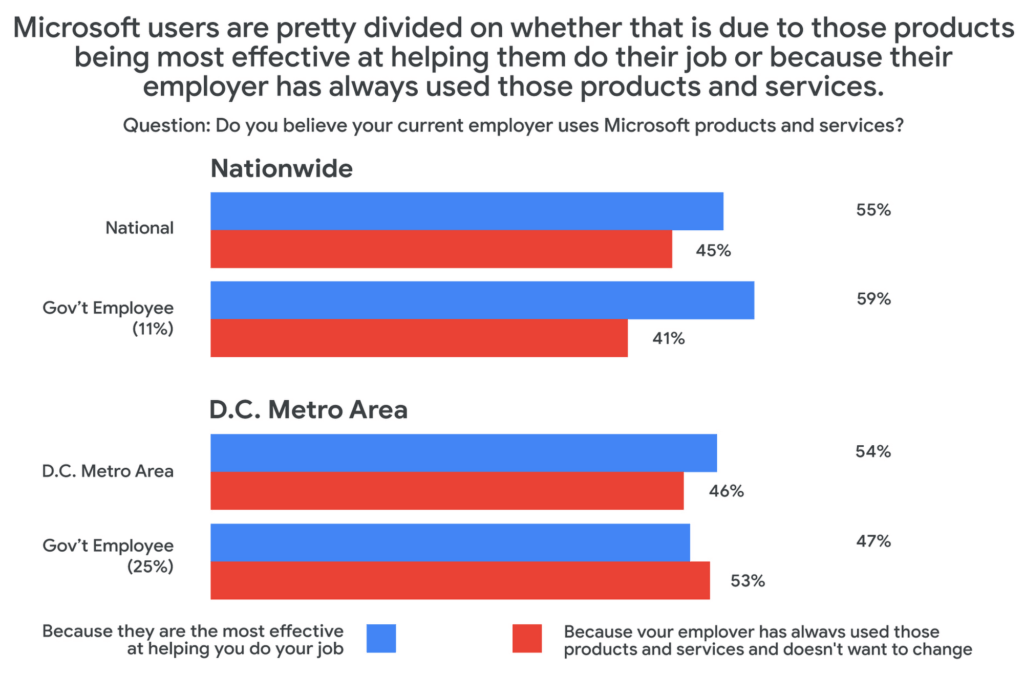
Given these vulnerabilities, why does government IT continue to rely on the same set of productivity tools in the workplace? The reason, according to survey respondents, has more to do with inertia than innovation. When asked why their employers used Microsoft services, around half said that the reason their employer continues to choose legacy, incumbent vendors was more about not wanting to change than wanting the most effective tool for the job.
Choice and shadow IT
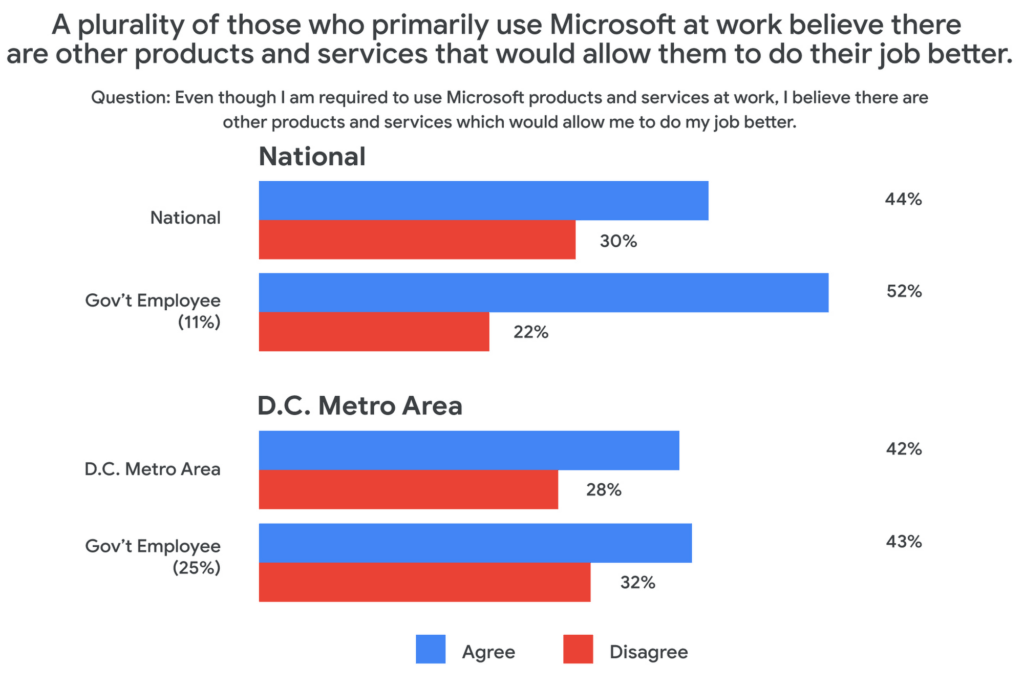
Coupled with these concerns about vulnerabilities comes a noted sentiment among those surveyed that their current IT solutions are not best for their needs. About half of those surveyed who primarily use Microsoft at work said that they would prefer to have a choice to use products and services from other companies. And among those who use Microsoft at work, 43% believe there are other products and services that would allow them to do their job better.
This may be leading workers to adopt “shadow IT,” or using products and services that are not officially approved or endorsed by their IT departments. In fact, the Public Opinion Strategies survey found that 35% of D.C. metro government workers have used shadow IT to get their jobs done. And among workers aged 20 to 34, that number jumps to 41%.
Rethinking IT purchasing priorities
With so many survey respondents reporting that they are dissatisfied with their legacy IT solutions, it may be time for the government to rethink its approach to procurement. In a separate research survey from Omdia in December 2021, 250 people responsible for technology purchasing decisions in the U.S. federal, state, and local governments said that government technology and procurement practices often are more about making things easier for IT vs. choosing what employees feel would be the best solution. In fact, only 27% of officials surveyed in that research cited “user demand” as a factor affecting their purchasing decisions.
As governments work to meet the demands and preferences of their constituents—and their employees—it’s clear that there’s an overreliance on legacy solutions, despite a track record of cybersecurity vulnerabilities and poor user perception.
At Google Cloud, we believe it’s time for more diversity and choice in the tools available for our civil servants across the nation—70% of whom use Gmail outside of work, according to our survey. Government workers have the right to benefit from the same flexible, secure-by-design tools at the office that they use in their personal lives. You can learn more about Google Workspace for Government here.
Confidential Computing at Google Cloud

3121
Of your peers have already read this article.
2:00 Minutes
The most insightful time you'll spend today!
This blog includes content from Episode One “Confidentially Speaking” of our Cloud Security Podcast, hosted by Anton Chuvakin (Head of Solutions Strategy) and Timothy Peacock (Product Manager). You should listen to the whole conversation for more insights and deeper context.LEARN MORECloud Security Podcast – Confidentially SpeakingListen to the Cloud Security Podcast with guest Nelly Porter, Group Product Manager @ Google.
We all deal with a lot of sensitive data and today, enterprises must entrust all of this sensitive data to their cloud providers. With on-premises systems, companies used to have a very clear idea about who could access data and who was responsible for protecting that data. Now, data lives in many different places—on-premises, at the edge, or in the cloud.
You may already know that Google Cloud provides encryption for data when it is in transit or at rest by default, but did you also know we also allow you to encrypt data in use—while it’s being processed?
In this podcast episode, Product Manager Nelly Porter gave us a peek under the hood of confidential computing at Google Cloud.
What is confidential computing?
Google Cloud’s Confidential Computing started with a dream to find a way to protect data when it’s being used. We developed breakthrough technology to encrypt data when it is in use, leveraging Confidential VMs and GKE Nodes to keep code and other data encrypted when it’s being processed in memory. The idea is to ensure encrypted data stays private while being processed, reducing exposure.
During the episode, Nelly Porter explained that Google Cloud’s approach is based on hardware and CPU capability. Confidential Computing is built on the newest generation of AMD CPU processors, which have a Secure Encrypted Virtualization extension that enables the hardware to generate encryption keys that are ephemeral and associated with a single VM. Basically, they are never stored anywhere else and are not extractable—the software will never have access to those keys.
“You can do whatever you need to do, but you will be in a cryptographically isolated space that no other strangers passing by can see.”
Memory controllers use the keys to quickly decrypt cache lines when you need to execute an instruction and then immediately encrypts them again. In the CPU itself, data is decrypted but it remains encrypted in memory.
Confidential computing aims to mitigate gaps in data security
Nelly also shed some light on why confidential computing will continue to play a central role in the future of cloud computing. She pointed out that one of the biggest gaps companies are looking to cover is securing data when it is in use.
Data that is encrypted on-premises or in cloud storage, but the biggest risk for companies is when they start working with that data. For instance, imagine you encrypted your data on-premises and only you hold the keys. You upload that data into Cloud Storage buckets—simple, safe, and secure.
But now, you want to train machine learning models based on that data. When you upload it into your environment, it’s no longer protected. Specifically, data in reserved memory is not encrypted.We’re trying to ensure that your data is always protected in whatever state it exists, so fewer people have the opportunity to make mistakes or maliciously expose your data.
Top takeaways about confidential computing
Throughout the conversation, Nelly also shared interesting points about the development and direction of confidential computing at Google Cloud.
Here were our favorite takeaways from the podcast:
We worked hard to make Google Cloud’s approach simple.
We’ve invested a lot of time and effort into investigating the possibilities (and limitations) of confidential computing to avoid introducing residual risks to our approach. For instance, the early introduction of hardware capable of confidential computing in the industry required IT teams to have the resources to rewrite or refactor their app, severely limiting their ability to adopt it within their organizations.
With Confidential Computing, teams can encrypt data in use without making any code changes in their applications. All Google Cloud workloads can run as Confidential VMs, enabled with a single checkbox, making the transition to confidential computing completely simple and seamless.
“A lot of customers understand the values of confidential computing, but simply cannot support re-writing the entire application. It’s why Google Cloud, in particular, decided to take a different approach and use models that were incredibly easy to implement, ensuring that our customers would not have those barriers to cross.”
Confidential computing is for more than just fintech.
There is, of course, a compelling use case for confidential computing at highly-regulated companies in financial, government, life sciences, and public sectors. However, Nelly shared that her team didn’t anticipate that even verticals without significant regulation or compliance requirements would be so interested in this technology, mostly to pre-empt privacy concerns.
Many companies see confidential computing as a way to create cryptographic isolation in the public cloud, allowing them to further ease any user or client concerns about what they are doing to protect sensitive data. For instance, during COVID-19, there was an increase in small research organizations that wanted to collaborate across large datasets of sensitive data.
“Prior to confidential computing, it wasn’t possible to collaborate because you needed the ability to share very sensitive data sets among multiple parties while ensuring none of them will have access to this data, but the results will benefit all of them—and us.”
An open community, working together will be key for the future.
Nelly also shared that there are plans to extend memory protections beyond just CPUs to cover GPUs, TPUs, and FPGAs. Google Cloud is working with multiple industry vendors and companies to develop confidential computing solutions that will cover specific requirements and use cases.
Confidential computing will not be achieved by a single organization – it will require many people to come together. We are a member of the Confidential Computing Consortium, which aims to solve security for data in use and includes other vendors like Red Hat, Intel, IBM, and Microsoft.
“Google alone would not be able to accomplish confidential computing. We need to ensure that all vendors, GPU, CPU, and all of them follow suit. Part of that trust model is that it’s third parties’ keys and hardware that we’re exposing to a customer.”
There are no magic bullets when it comes to security.
Confidential computing is still an emerging, very new technology and unsurprisingly, there are a lot of questions about what it does and how it works. It’s important to remember that there is no such thing as the one-tool-fits-all-threats security solution. Instead, Nelly notes that confidential computing is yet another tool that can be added to your security arsenal.
“No solution will ever be the magic bullet that will make everyone happy and secure, guaranteed. But confidential computing is an addition to our toolbox of defense against gaps we have to take super seriously and invest in solving.”
Did you enjoy this blog post? To listen to the full conversation, head over to Episode One “Confidentially Speaking” of our Cloud Security Podcast, hosted by Anton Chuvakin (Head of Solutions Strategy) and Timothy Peacock (Product Manager).
We also recommend checking out other episodes of the Cloud Security Podcast by Google for more interesting stories and insights about security in the cloud, from the cloud, and of course, what we’re doing at Google Cloud.
8400
Of your peers have already watched this video.
21:00 Minutes
The most insightful time you'll spend today!
Journey to Transformation and Modernization with Google’s Distributed Cloud
Google Cloud has been leading the way of helping businesses make most from their cloud investments to drive digital transformation through modern application platforms that cater to today’s customer needs. Watch the video from the Next ’21 to explore three areas where companies are supported by Google Cloud throughout their cloud evolution journey–cloud migration and modernization, extension of services and engineering practices to hybrid and multicloud environments, and delivery of high performance with planet scale distributed infrastructure. Also, learn how Google Cloud is equipped for more complex and unique use cases, from datacenter to the edge. Hear the strategies and customer stories that can help your business modernize people, processes, and applications to fully leverage Google’s distributed cloud!
Ubuntu Pro Images Now Available on Google Cloud

4826
Of your peers have already read this article.
2:00 Minutes
The most insightful time you'll spend today!
Today, we’re pleased to announce the general availability of Ubuntu Pro images on Google Cloud, providing customers with an improved Ubuntu experience, expanded security coverage, and integration with critical Google Cloud features. In partnership with Canonical, we’re making it even easier for customers that have fully embraced open source to ensure security and compliance for their most mission-critical and enterprise workloads.
With Ubuntu Pro on Google Cloud, you now have access to features like:
- 10-year lifetime security updates – Canonical backs Ubuntu Pro for 10 years with security updates and a guaranteed upgrade path.
- FIPS & CC-EAL2 certification – Ubuntu Pro includes components that meet requirements from entities like FedRAMP, HIPAA, ISO, and PCI.
- Open-source security coverage – Protect your most important open-source workloads including MongoDB, Apache Kafka, Redis, NGINX, and PostgreSQL.
- Multi-version availability – Pro images are available for the three most popular Ubuntu Server distributions: 16.04 LTS, 18.04 LTS, and 20.04 LTS.
- Kernel Livepatch – Kernel patches are delivered immediately without having to reboot your VMs.
- Optional CIS and DISA STIG profiles – Choose from two leading profiles to harden your environment according to industry benchmarks.
- Cloud-based pricing – Ubuntu Pro does not require a contract, and pricing tracks with the underlying compute cost depending on the instance type.
Extended Security Maintenance (ESM) for Ubuntu 16.04 LTS with Ubuntu Pro
Availability of Ubuntu Pro images is especially important if you’re an Ubuntu 16.04 LTS customer and want extended security maintenance (ESM) for your virtual machines but don’t want to upgrade to Ubuntu 18.04 LTS or Ubuntu 20.04 LTS versions immediately. ESM is included with Ubuntu Pro 16.04. You can move your workloads from Ubuntu 16.04 LTS VM instances to Ubuntu Pro 16.04 instances to continue receiving ESM and all the above-mentioned benefits, without having to test your applications on a new version of the OS.

Gojek has evolved from offering just ride-hailing to a suite of more than 20 services today, serving everyday solutions for millions of users across Southeast Asia.
“We needed more time to comprehensively test and migrate our Ubuntu 16.04 LTS workloads to Ubuntu 20.04 LTS, which would mean stretching beyond the standard maintenance timelines for Ubuntu 16.04 LTS. With Ubuntu Pro on Google Cloud, we now have the ability to postpone this, and in moving our 16.04 workloads to Ubuntu Pro, we benefit from its live kernel patching and improved security coverage for our key open source components.”—Kartik Gupta, Engineering Manager for CI/CD & FinOps at Gojek
“With the launch of Ubuntu Pro on Google Cloud, we build on our joint investments with Google to optimize Ubuntu performance on Google Cloud, and add comprehensive security patching and Long Term Support for another 30,000 open source packages—the widest range of security-maintained open source on the planet,” said Mark Shuttleworth, CEO of Canonical. “As the world moves to open source for everything, Canonical offers the safety net of security maintenance that enterprises count on to unleash their developers.”
Getting started
Getting started with Ubuntu Pro on Google Cloud is simple. You can now purchase these premium images directly from Google Cloud by selecting Ubuntu Pro as the operating system straight from the Google Cloud Console.
To learn more about Ubuntu Pro on Google Cloud, please visit the documentation page and read the announcement from Canonical.
3242
Of your peers have already watched this video.
3:00 Minutes
The most insightful time you'll spend today!
Why CISOs Need to Know This to Protect Users From Unsafe Websites
Unsafe web resources include social engineering sites—such as phishing and deceptive sites—and sites that host malware or unwanted software. For CISOs and their teams, this can quickly become an insurmountable challenge if it’s not nipped in the bud.
But there’s a way to enable companies to find unsafe URLs before their users do, identify phishing and deceptive sites, as well as sites that host malware or unwanted software.
Google Cloud’s Web Risk API was built to help admins protect users from unsafe websites. If a URL is known to be unsafe, Web Risk API responds with the threat type and the amount of time during which the website should be considered unsafe.
The Web Risk API can be integrated into both cloud-based and on-premises hosted applications and websites.
Watch this three-minute video to find out how Web Risk APIs can break the chain of malicious attacks and protect the data of your customers and users.
More Relevant Stories for Your Company

Towards Superior Cybersecurity: How SLSA and SBOM Help Build a Resilient Healthcare Industry
Taking prescription medication at the direction of anyone other than a trained physician is very risky—and the same could be said for selecting technology used to run a hospital, to manage a drug manufacturing facility and, increasingly, to treat a patient for a medical condition. To pick the right medication,

Redefining and Simplifying Security Analytics
Today’s security professionals face not only an ever-expanding list of threats, old and new, but also an excruciating choice of security approaches and tools. Nearly 2000 security vendors are trying to sell to large enterprises and small businesses. Most organizations have already invested heavily in cybersecurity solutions. From firewalls to

Connected Data is the Lifeblood of Today’s Retailers: IDC’s 2022 Research
For a look ahead at the trends that will animate the retail industry this year, let’s take a look back at the 2022 National Retail Federation (NRF) "Big Show" in NYC. Attendees at January’s event were treated to tangible examples of how retail challenges are being solved today, including new

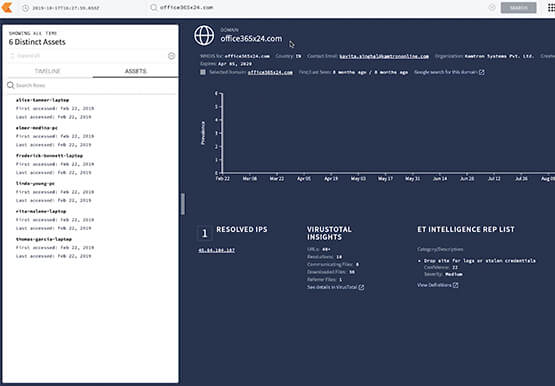

How to Retrace the Steps of a Potential Phishing Attack with Threat Analytics
The majority of cyber attacks begin with phishing emails and websites. Attackers use many tricks, including by leveraging enterprise brand assets, such as company names and logos, to develop phishing websites that appear authentic and lure internet users to enter valuable information such as user names and passwords. Experts say
