






New Research Shows Top Marketers Use Machine Learning to Drive Growth
READ FULL INTRODOWNLOAD AGAIN3734
Of your peers have already downloaded this article
8:30 Minutes
The most insightful time you'll spend today!
Use No-Cost Solutions To Bring ML Into Your Medical Research

2486
Of your peers have already read this article.
3:30 Minutes
The most insightful time you'll spend today!
There’s a lot we can learn from combining technology with science to help support the development of amazing discoveries. By using an AI system to predict protein shapes, we have the potential to accelerate research in every field of biology. Inside every cell in your body, billions of tiny molecular machines are hard at work. They are what allow your eyes to detect light, your neurons to fire, and the ‘instructions’ in your DNA to be read.
These intricate machines are known as proteins.
The protein folding puzzle
Protein folding is something that occurs naturally so that proteins become biologically functional, but it’s a complex process that sometimes fails. For decades, scientists have been trying to find a method to reliably predict a protein’s structure from its sequence of amino acids so we can better understand how proteins work.
The challenge? There are over 200 million known distinct proteins. Each one has a unique 3D shape that determines how it works and what it does. Because there are so many sequences and determining their 3-D structure experimentally is so time-consuming and expensive, scientists only know the exact structure of a tiny fraction of the proteins. And these experimental methods still fall far short of reliable statistical accuracy.
Deepmind’s gigantic leap
In 2020, Alphabet’s artificial intelligence research arm, DeepMind, made a massive breakthrough in predicting protein structures using a deep learning model called AlphaFold.
AlphaFold is trained on publicly available data consisting of about 170,000 protein structures, and is the first computational method that can regularly predict the 3D shape of a protein, at scale with a high degree of accuracy.
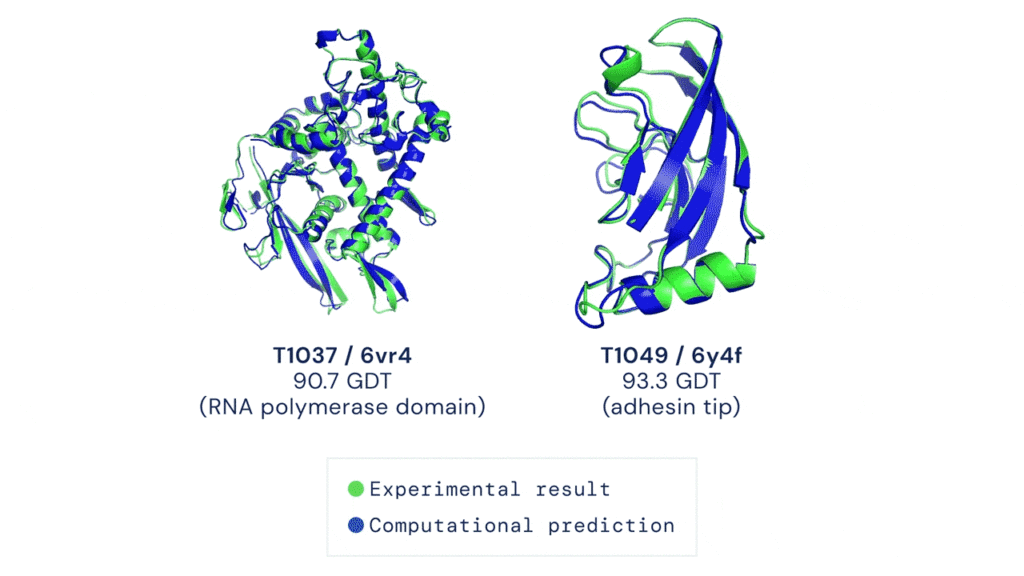
AlphaFold has already sent waves throughout the scientific community and has demonstrated the potential for AI to aid fundamental scientific discovery. Recently, Deepmind has made AlphaFold predictions available and open source to anyone. To date, more than 500,000 researchers from 190 countries have accessed the AlphaFold protein structure database to get closer to finding life-saving cures for diseases like Leishmaniasis and Chagas.
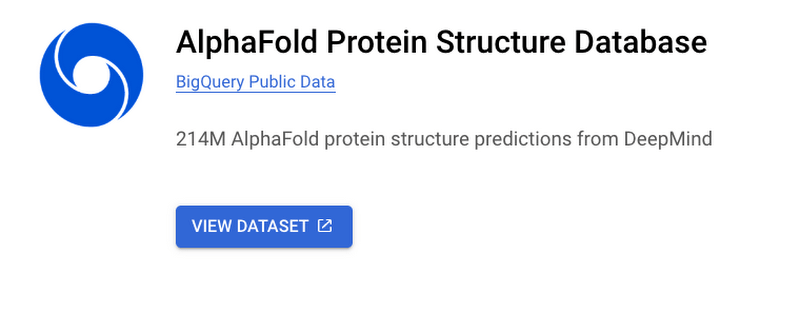
And now Deepmind has expanded the set of available predictions by more than 200 times (from nearly 1 million to nearly 214 million) to cover almost all cataloged proteins found in nature.
Open source predictions available on Google Cloud
Together, Google Cloud and Deepmind have released this dataset of predicted protein structures for plants, bacteria, animals, and other organisms as part of the Google Cloud Public Dataset program to enable bulk downloads at no cost. That means you can also create custom queries of the dataset using BigQuery!
Running AlphaFold on Google Cloud Vertex AI
Let’s say you want to run AlphaFold on your own in order to get protein structure predictions against your own set of data. There are a few challenges to keep in mind:
- You need to set up feature engineering against genetic sequence databases
- Preprocess data
- And run those inputs against pre-trained models
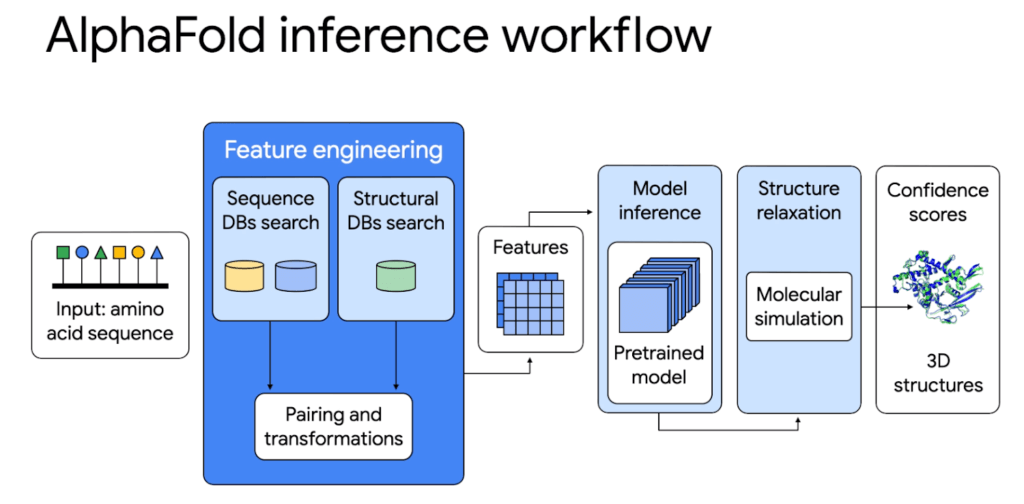
All of this requires allocating CPUs or GPUs, hosting a notebook environment, and scaling up for larger experiments. It’s hard to build and configure an on-premise system or cloud server to use AlphaFold whether you just want to try it out or run it at scale as a large organization.
That’s why we’re excited to share a deep integration between Google Cloud and Deepmind. On top of the Public Datasets program we have created end-to-end code samples for AlphaFold on Vertex AI, a managed end-to-end ML platform, to help address these challenges and speed up deployment. With AlphaFold on Vertex AI, you can manage a data science or machine learning workflow in a single development environment. You get access to pre-configured compute, storage, and end-to-end production notebooks. We have removed the heavy lifting needed to set up new ML environments, automate orchestration, and manage large clusters.
The AlphaFold inference workflow can be simplified with Vertex AI: from data preparation to feature engineering and deployment. Unlike the manual set up, the orchestrator makes it possible to parallelize steps, get predictions faster, and with better tracking.
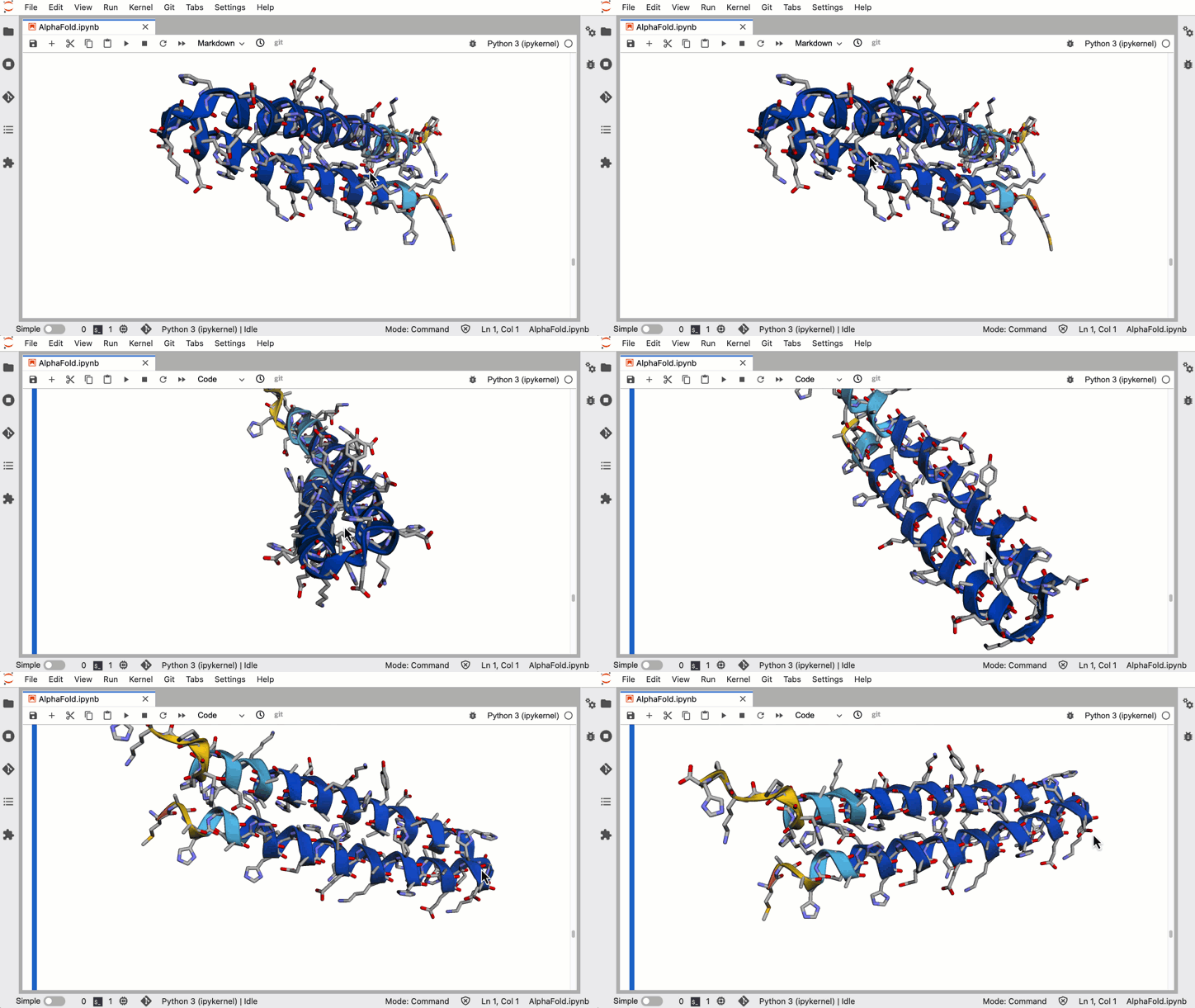
Try it out first using Vertex AI Workbench
For those of you who want to try out a simplified version of AlphaFold, we have a Colab notebook that uses no templates (homologous structures) and a selected portion of the BFD database. You can deploy right on Vertex AI Workbench, which lets you specify a custom container image that we’ve already created for you. You’ll be able to:
- Configure access to genetic databases
- Configure GPU acceleration
- Search against genetic databases
- Use the pre-processed results as inputs to the AlphaFold model locally
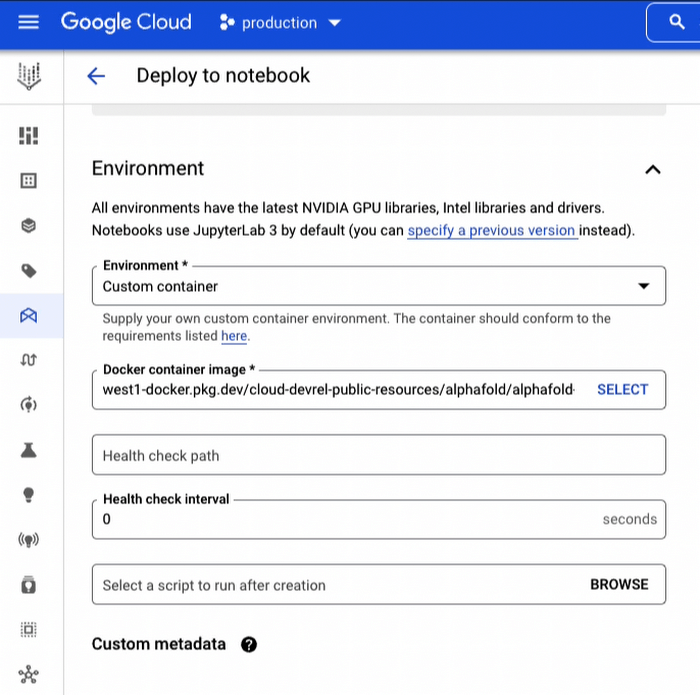
In a little over an hour you can harness the power of AlphaFold to generate 3-D protein structures from amino acid sequences.
Run hundreds of experiments reliably using Vertex AI Pipelines
For organizations that want to run a full blown version of AlphaFold for many protein folding experiments a week, you’ll want an ML pipeline orchestrator. The AlphaFold Batch Inference solution is a set of code samples that uses Vertex AI Pipelines to support hundreds of concurrent inference pipelines with higher throughput to help you run experiments at scale. The solution uses Vertex AI Pipelines as an orchestrator and runtime, Vertex ML Metadata for metadata and artifacts, and Cloud Filestore to manage databases.
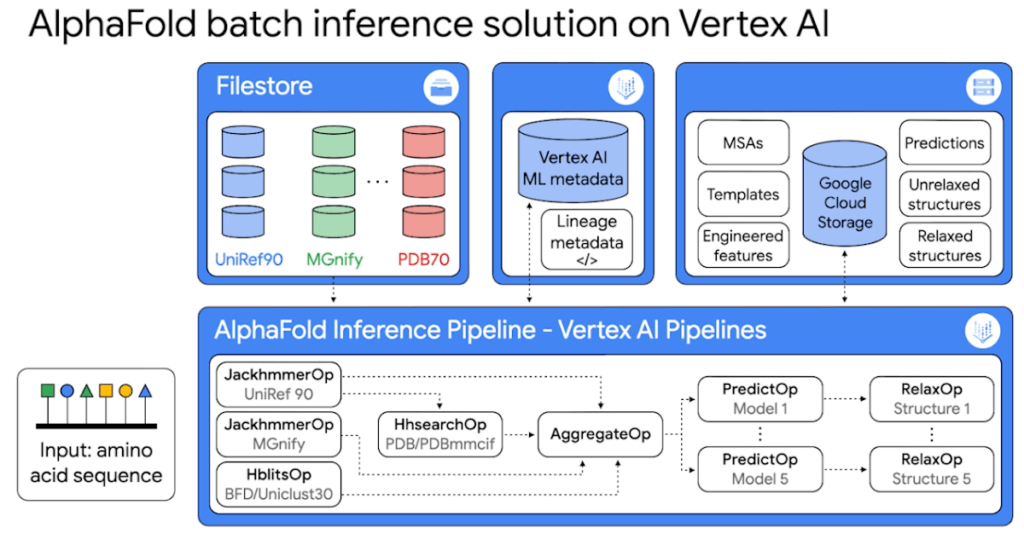
Because it’s built on Vertex AI Pipelines, you can automate, monitor, and experiment with interdependent parts of an ML workflow. The minimized inference elapsed times mean what normally would take you days, can now take you hours.
The solution includes two example pipelines:
1. The universal pipeline solution mirrors the exact logic in DeepMind’s open source inference script but decoupled into discrete tasks so you can run the same experiments faster, more efficiently, and with better tracking.
2. The customized pipeline solution shows you how to further optimize the inference workflow by parallelizing feature engineering steps so you can plug in your own database sources.
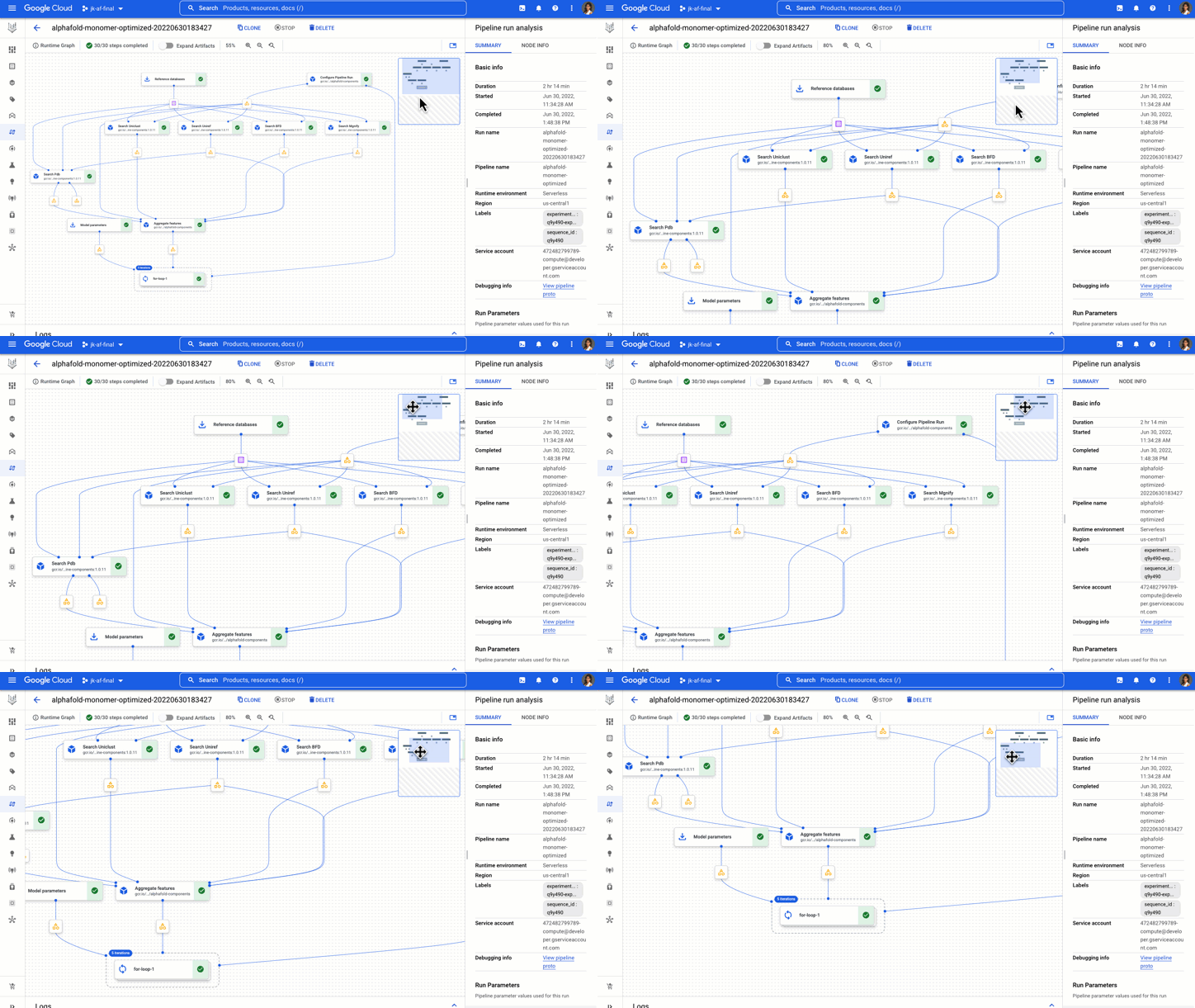
You get example components, pipelines, and notebooks to start, analyze, and recompile pipelines on different GPUs.
The AlphaFold Vertex AI Workbench solution is great for experimental use, while the AlphaFold Batch Inference solution on Vertex AI Pipelines is great for doing protein folding at scale with a strong process for reproducibility and tracking.
Now go forth and save the world!
Okay maybe that’s a bit hyperbolic, but this is inspiring stuff! What started as a 50 year challenge, to the discovery of AlphaFold, to being able to run it on Google Cloud, researchers, developers, and science enthusiasts now have access to one of the most pivotal advancements in the medical world. Even a non-specialist can easily use a Vertex AI notebook to exercise a simplified version of AlphaFold. The next answers to the mysteries of life and discovery of disease treatments have never felt more attainable. With these no-cost solutions to run AlphaFold on Vertex AI and the Public Dataset, you can help propel us in this worldwide endeavor.
Learn more about healthcare and life sciences solutions on Google Cloud here.
If you have feedback or want to share your experience with me, reach out to me at @stephr_wong.
Discover Latest Resources on Google Cloud’s Datasets Solution

6313
Of your peers have already read this article.
3:00 Minutes
The most insightful time you'll spend today!
Editor’s note: With Google Cloud’s datasets solution, you can access an ever-expanding resource of the newest datasets to support and empower your analyses and ML models, as well as frequently updated best practices on how to get the most out of any of our datasets. We will be regularly updating this blog with new datasets and announcements, so be sure to bookmark this link and check back often.
August 2021
New dataset: Google Cloud Release Notes
- Looking for a new way to access Google Cloud Release Notes besides the docs, the XML feed, and Cloud Console? Check out the Google Cloud Release Notes dataset. With up-to-date release notes for all generally available Google Cloud products, this dataset allows you to use BigQuery to programmatically analyze release notes across all products, exploring security bulletin updates, fixes, changes, and the latest feature releases.
- Access the dataset

July 2021
Best practice: Use Google Trends data for common business needs
- The Google Trends dataset represents the first time we’re adding Google-owned Search data into Datasets for Google Cloud. The Trends data allows users to measure interest in a particular topic or search term across Google Search, from around the United States, down to the city-level. You can learn more about the dataset here, and check out the Looker dashboard here! These tables are super valuable in their own right, but when you blend them with other actionable data you can unlock whole new areas of opportunity for your team. To learn how to make informed decisions with Google Trends data, keep reading.
- Access the dataset
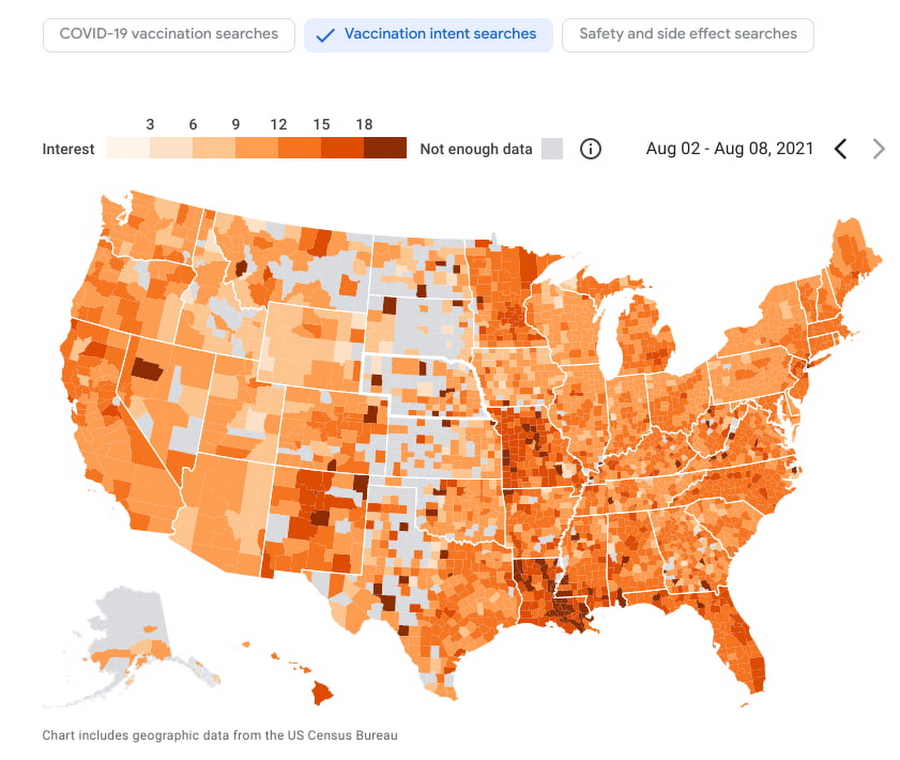
New dataset: COVID-19 Vaccination Search Insights
- With COVID-19 vaccinations being a topic of interest around the United States, this dataset shows aggregated, anonymized trends in searches related to COVID-19 vaccination and is intended to help public health officials design, target, and evaluate public education campaigns. Check out this interactive dashboard to explore searches for COVID-19 vaccination topics by region.
- Access the dataset
June 2021
New dataset: Google Diversity Annual Report 2021
- Since 2014, Google has disclosed data on the diversity of its workforce in an effort to bring candid transparency to the challenges technology companies like Google face in recruitment and retention of underrepresented communities. In an effort to make this data more accessible and useful, we’ve loaded it into BigQuery for the first time ever. To view Google’s Diversity Annual Report and learn more, check it out.
- Access the dataset
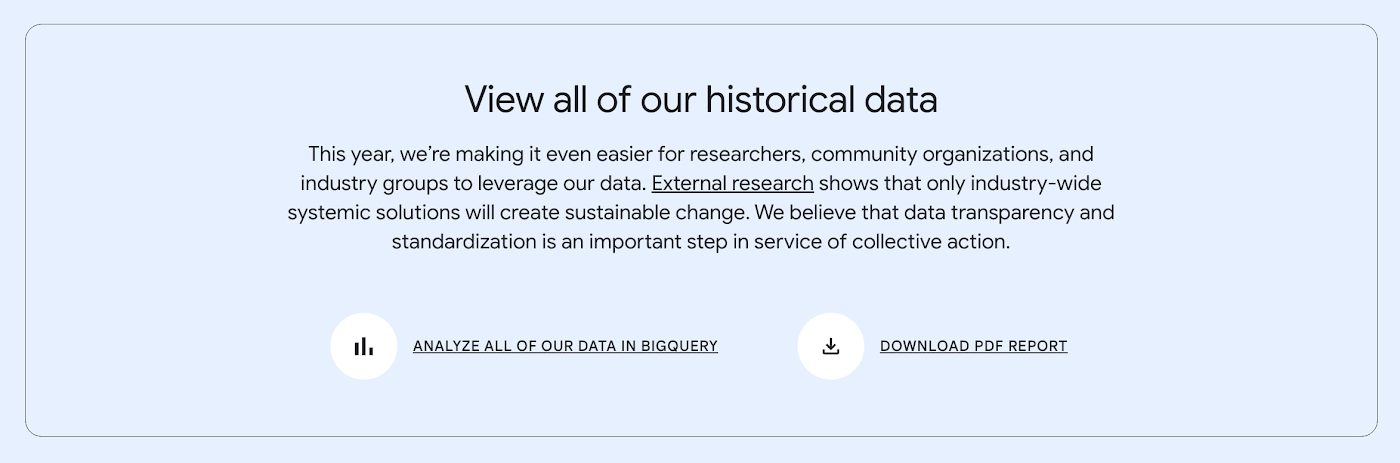
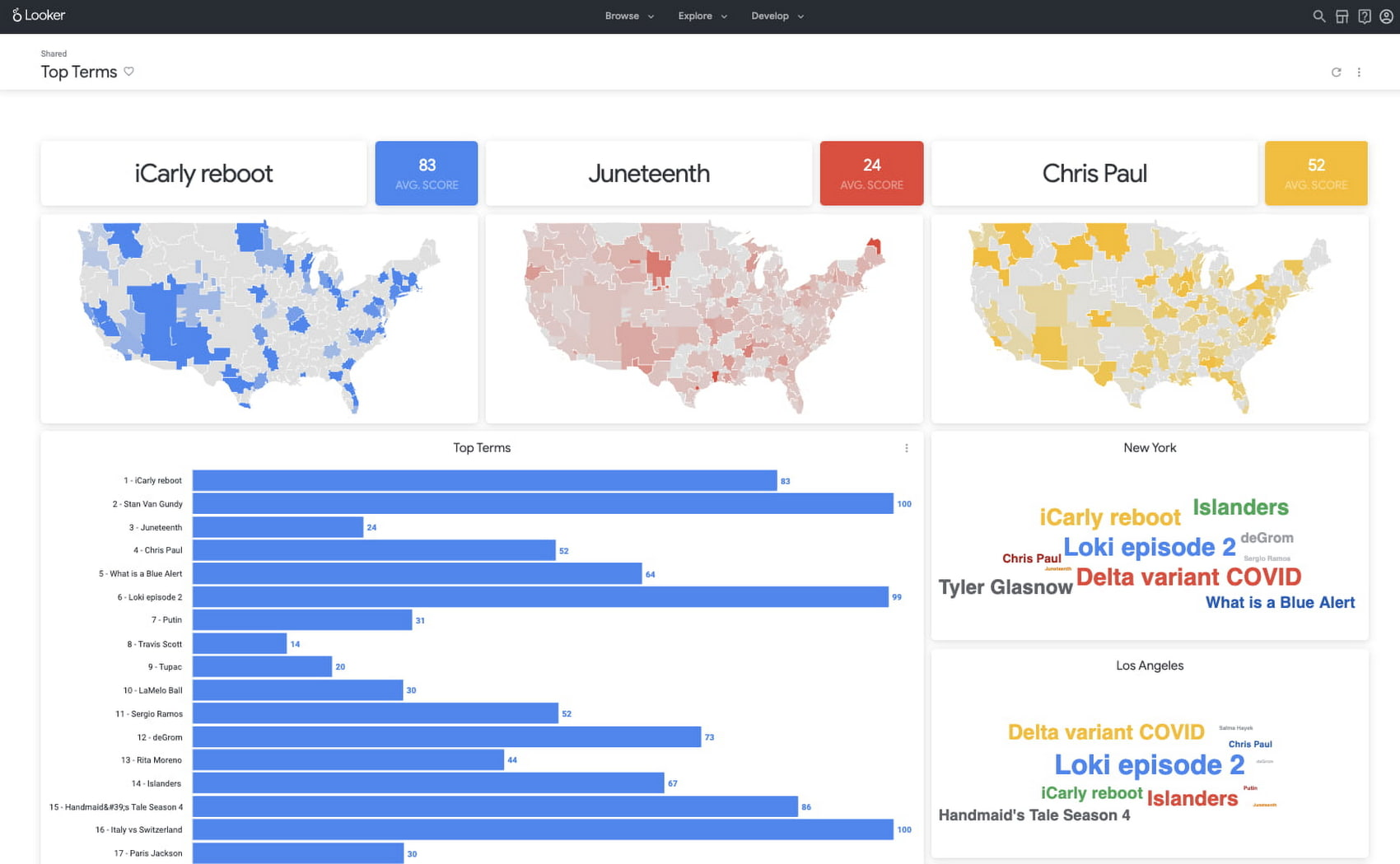
New dataset: Google Trends Top 25 Search terms
- The most popular and surging Google Search terms are now available in BigQuery as a public dataset. View the Top 25 and Top 25 rising queries from Google Trends from the past 30-days, including 5 years of historical data across the 210 Designated Market Areas (DMAs) in the US. Keep reading.
- Access the dataset
New dataset: COVID-19 Vaccination Access
- With metrics quantifying travel times to COVID-19 vaccination sites, this dataset is intended to help Public Health officials, researchers, and Healthcare Providers to identify areas with insufficient access, deploy interventions, and research these issues. Check out how this data is being used in a number of new tools.
- Access the dataset
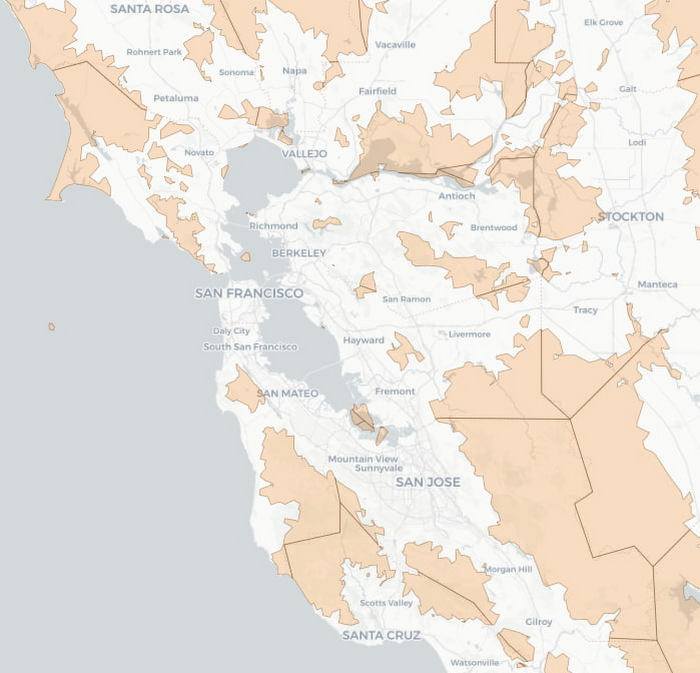

Best practice: Leveraging BigQuery Public Boundaries datasets for geospatial analytics
- Geospatial data is a critical component for a comprehensive analytics strategy. Whether you are trying to visualize data using geospatial parameters or do deeper analysis or modeling on customer distribution or proximity, most organizations have some type of geospatial data they would like to use – whether it be customer zipcodes, store locations, or shipping addresses. However, converting geographic data into the correct format for analysis and aggregation at different levels can be difficult. In this post, we’ll walk through some examples of how you can leverage the Google Cloud platform alongside Google Cloud Public Datasets to perform robust analytics on geographic data. Keep reading.
- Access the dataset

Get the metadata and try BigQuery sandbox
When you’ve learned about many of our datasets and pre-built solutions from across Google, you may be ready to start querying them. Check out the full dataset directory and read all the metadata at g.co/cloud/marketplace-datasets, then dig into the data with our free-to-use BigQuery sandbox account, or $300 in credits with our Google Cloud free trial.
Leave the Tax Filing to ML: Lending Doc AI’s Automation Classifying and Parsing IT Documents

2978
Of your peers have already read this article.
3:00 Minutes
The most insightful time you'll spend today!
In the United States, Tax Season descends upon the country every April, requiring millions of Americans to spend hours deciphering cryptic documents and performing complex math just to figure out what they owe. Wouldn’t it be grand if there was a way for a computer to take all the relevant documents and extract out exactly what the IRS is looking for? Lending Document AI from Google Cloud supports common document types used for Income Tax Filing, such as W-2s and 1099s. These advancements in machine learning technology now makes it possible to alleviate some anxiety leading up to April 15th.
Lending Document AI is a Document Understanding solution that allows for classification and parsing of documents commonly used in the mortgage lending industry. The data in these unstructured files is then converted into a structured format, which can be stored in a database or used for analysis and calculations. You can read more about the product in the announcement blog post. For this tax filing use case, we will focus on automatically classifying and parsing the 2020 editions of the following forms:
W-2
1099-DIV
1099-INT
1099-MISC
1099-NEC
This sample application creates an automated pipeline where the user can bulk upload a collection of PDFs, the Lending Document Splitter & Classifier will classify each document and send each PDF to the appropriate specialized parser to extract the data, which can then be used to calculate an individual tax return and fill out a 1040 Form.
Overview
Let’s explore how this application works. You can check out the sample code in this GitHub Repository.
Here is an outline of the architecture of this application. As you can see, it utilizes Cloud Run and Firestore in Native Mode for the web application in addition to Document AI.
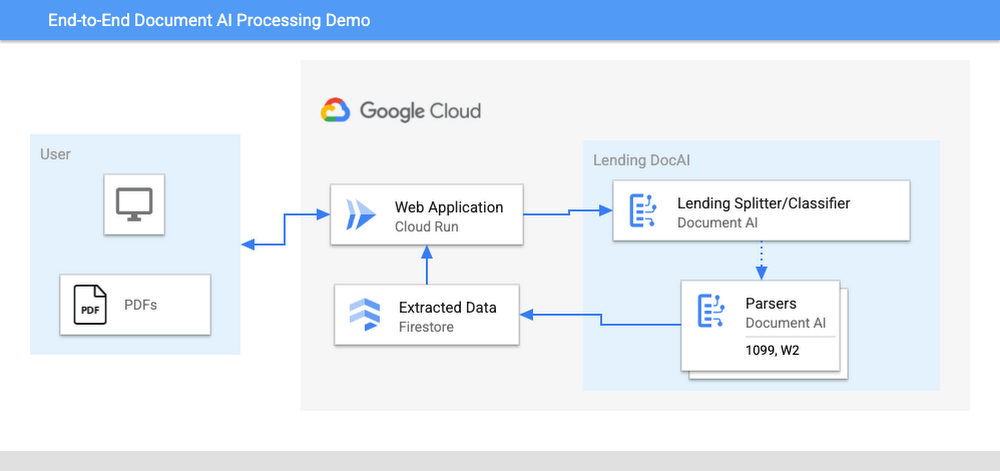
The User uploads multiple PDF files to the web application, hosted on Cloud Run.
An API call is made to the Lending Document Splitter & Classifier for each PDF file.
The output of the classifier (e.g. W-2, 1099-MISC, etc.) is then mapped to an appropriate specialized parser in the Google Cloud Project.
Each document file is sent to the appropriate specialized parser that matches the document type.
The entities are extracted by the parser processor and the data is written to Firestore.
The raw data is now retrieved from Firestore and displayed to the User showing the file classification and extracted values from each form.
The data values from all the forms are used together to calculate an individual income tax return.
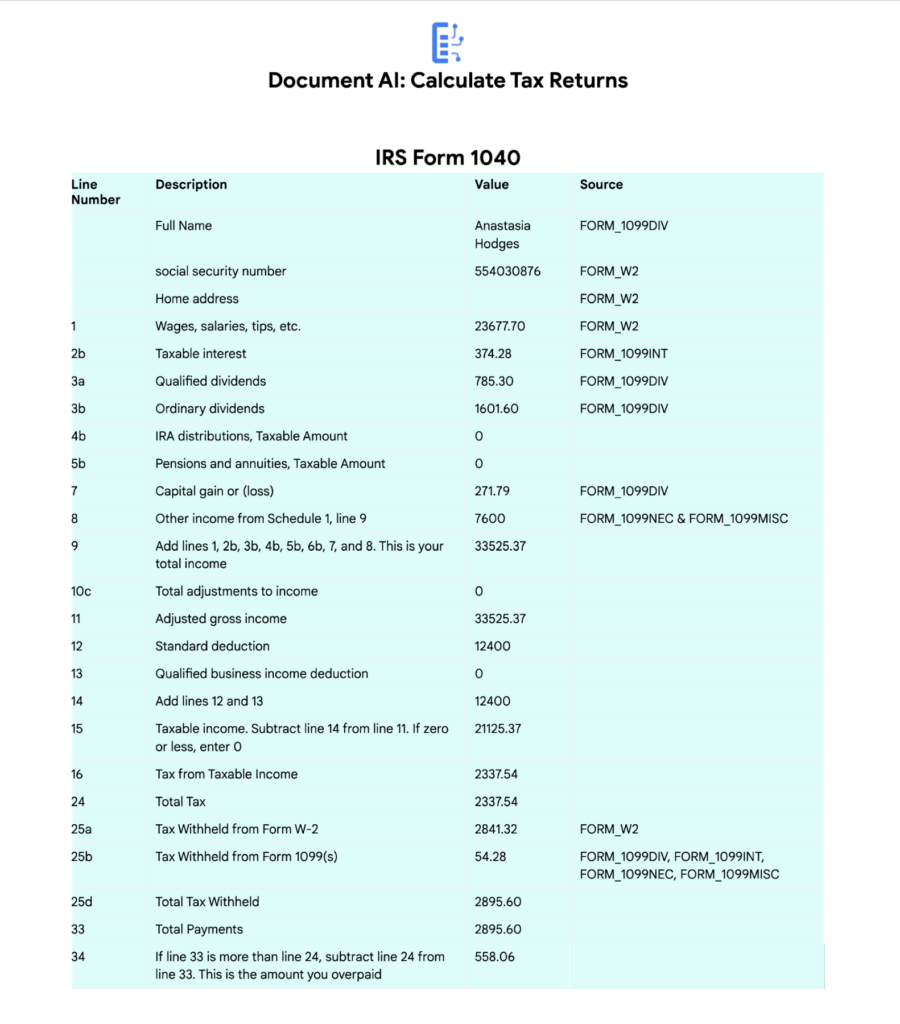
The Calculated Tax Rates/Incomes/Deductions are displayed to the User in a Tabular Format matching the IRS Form 1040. The app also displays which form data was used for each field. (Some output fields use values from multiple forms, such as line 25b.)
Step-by-Step directions
Want to try this out for yourself? Here’s how you can deploy and run this application using a Google Cloud Project. You can run this in Cloud Shell (Quickstart) or on your local machine.
NOTE: The Lending Processors in this Demo are in Limited GA as of March 2022. If you have a business use case for these processors, you can fill out and submit the Document AI limited access customer request form.
Install dependencies
- Clone the GitHub Repository to get the sample code.
git clone https://github.com/GoogleCloudPlatform/document-ai-samples.git
- Enter the directory for the tax pipeline demo
cd document-ai-samples/tax-processing-pipeline-python
- Install Python and the Google Cloud SDK if they aren’t already installed.
- Install the python libraries:
pip install -r requirements.txt
- Create a new Google Cloud project, and enable billing if you don’t already have one.
- Enable the Document AI API:
gcloud services enable documentai.googleapis.com
- Setup application default credentials:
gcloud auth application-default login
Deploy demo application
- Edit the config.yaml file, adding your own Project Details docai_processor_location: us # Document AI Processor Location (us OR eu)
docai_project_id: YOUR_PROJECT_ID # Project ID for Document AI Processors
firestore:
collection: tax_demo_documents # Set with your preferred Firestore Collection Name
project_id: YOUR_PROJECT_ID # Project ID for Firestore Database - Run setup scripts to create the processors and Cloud Run app in your project. python3 setup.py
gcloud run deploy tax-demo –source . - Visit the Deployed Web Page (You should get a link from the deployment command)
Calculate Tax Returns Homepage
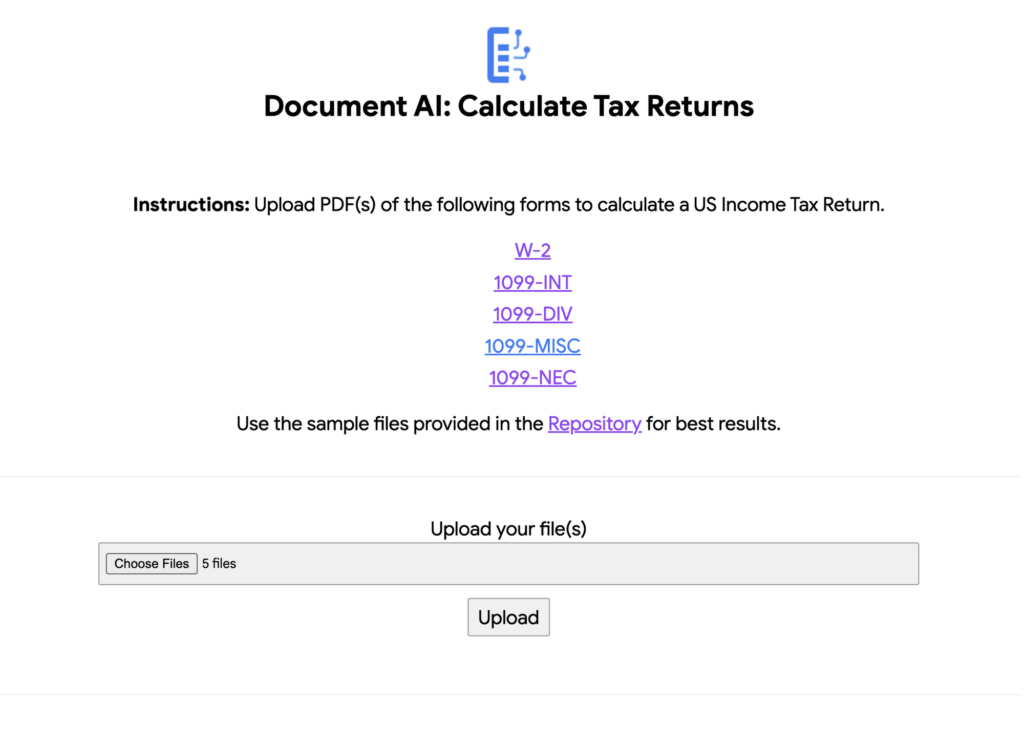
- Upload Documents. I created some sample documents you can download from the sample-docs folder of the repository.
This demo currently supports the following Document Types (2020 Editions)
W-2
1099-DIV
1099-INT
1099-MISC
1099-NEC
- Click “Upload” Button, wait for processing to complete.
The page will display the steps completed for each document file. These are also written to stdout for troubleshooting purposes.
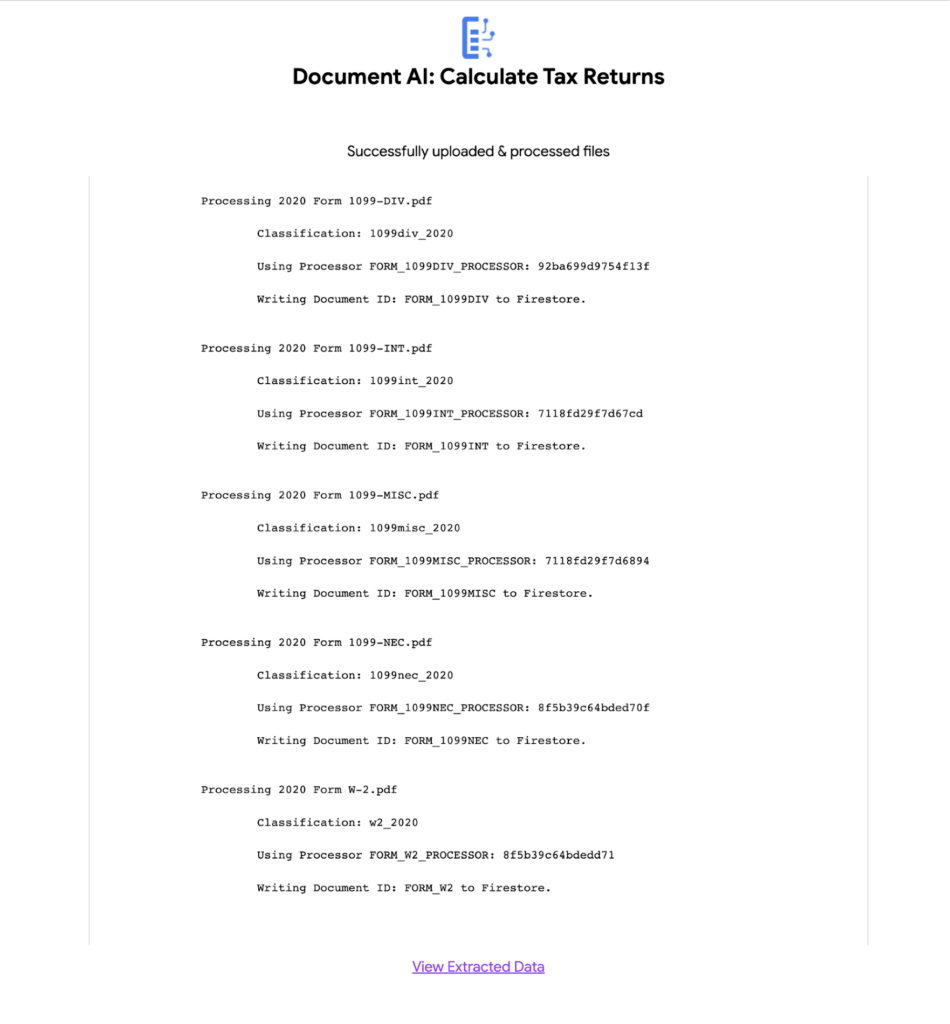
6. View the extracted values from each file.
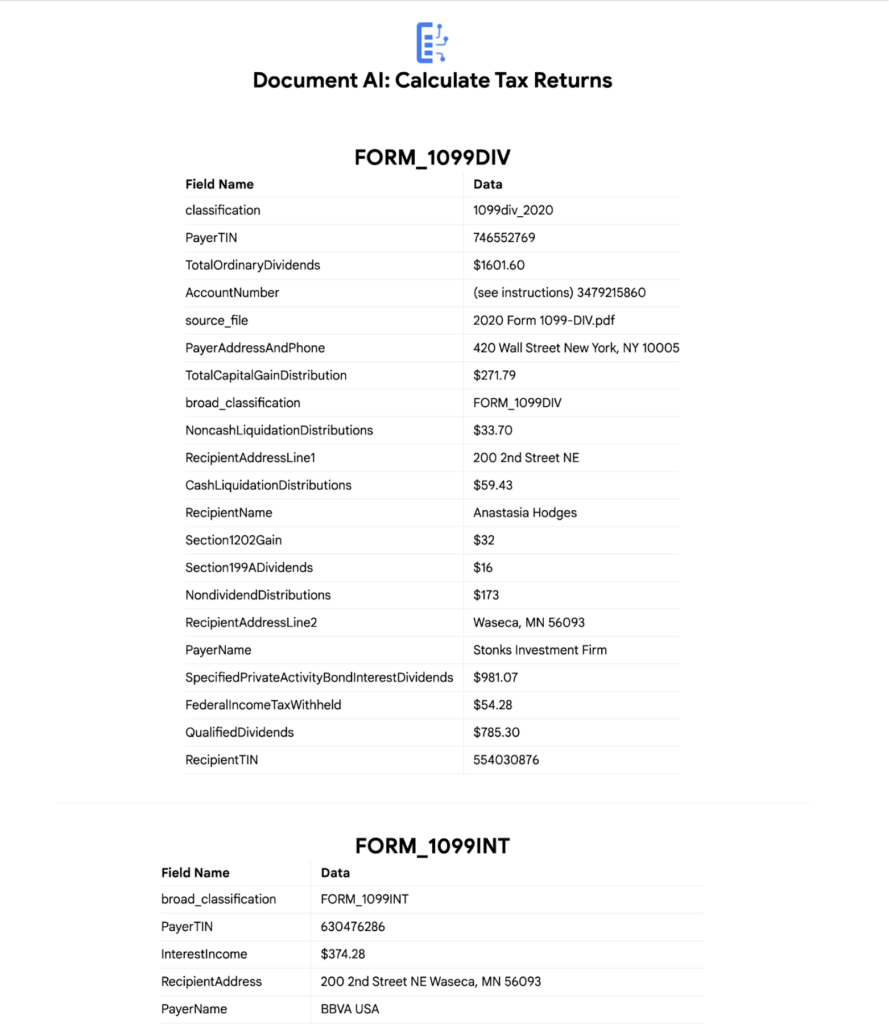
7. Click “Calculate Taxes” to see the tax calculation output
Conclusion
Warning: This is NOT financial advice, for educational purposes only.
Congratulations! You now have a fully functional tax processing application that can also be modified for use with other workflows that require data from multiple specialized documents.
The Document AI API is flexible and modular enough that most of the code in this example can be reused for any specialized processor.
Now tax returns can be filed with minimal manual effort!
If you want to learn more about Document AI, check out the Cloud Documentation and these videos:
- Getting started with the Document AI platform
- Process billions of pages and cut operational costs with DocAI
And if you want more hands-on experience, I recommend following these step-by-step codelabs to get started with the key features of Document AI:

3420
Of your peers have already downloaded this article
4:30 Minutes
The most insightful time you'll spend today!
Few industries grapple with the volume of information the financial services industry manages on a daily basis. Whether financial services organizations are analyzing market shifts, or protecting against fraud and money laundering, understanding data and quickly finding the right insights are critical to their success.
Their learnings can be put to use by CFOs across a range of industries.
From the need to analyze more accurately predict revenues based on a variety of market scenarios to finding ways to improve profitability, more CFOs are turning to data, analytics, and machine learning to aid decision-making.
Over the past year, Google has spent a lot of time working with its financial services customers—like HSBC, Citi, UBS, Scotiabank, Two Sigma, and more. And what they’ve found is whether they’re large or small, a startup or a global institution, there are universal themes shared by all.
Here are five ways CFO can use machine learning and the cloud in 2019:
Tackle data silos to unlock the power of their data.
Large, global institutions are using the cloud to overcome the incompatibilities, latencies and blind spots associated with traditional data silos, growing volumes of market data and alternative data sets.
In 2019, we expect to see an increasing number using serverless, advanced data platforms, open APIs, and machine learning capabilities, to make full use of their data for enterprise-wide decision-making with a minimal IT footprint. These decisions will be supported by market data, news and commentary, risk and regulatory data, company data and other specialized and alternative data.
To find out some of the other ways, download the PDF now!
Unifying Data and AI: Bringing Unstructured Data Analytics to BigQuery

4163
Of your peers have already read this article.
2:30 Minutes
The most insightful time you'll spend today!
Over one third of organizations believe that data analytics and machine learning have the most potential to significantly alter the way they run business over the next 3 to 5 years. However, only 26% of organizations are data driven. One of the biggest reasons for this gap is that a major portion of the data generated today is unstructured, which includes images, documents, and videos. It is estimated to cover roughly up to 80% of all data, which has so far remained untapped by organizations.
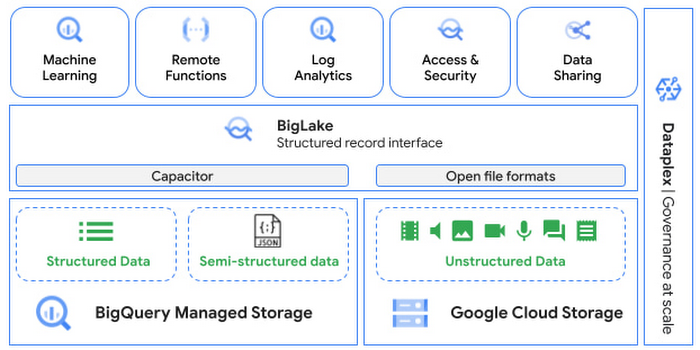
One of the goals of Google’s data cloud is to help customers realize value from data of all types and formats. Earlier this year, we announced BigLake, which unifies data lakes and warehouses under a single management framework, enabling you to analyze, search, secure, govern and share unstructured data using BigQuery.
At Next ‘22, we announced the preview of object tables, a new table type in BigQuery that provides a structured record interface for unstructured data stored in Google Cloud Storage. This enables you to directly run analytics and machine learning on images, audio, documents and other file types using existing frameworks like SQL and remote functions natively in BigQuery itself. Object tables also extend our best practices of securing, sharing and governing structured data to unstructured, without needing to learn or deploy new tools.
Directly process unstructured data using BigQuery ML
Object tables contain metadata such as URI (Uniform Resource Identifier), content type, and size that can be queried just like other BigQuery tables. You can then derive inferences using machine learning models on unstructured data with BigQuery ML. As part of preview, you can import open source TensorFlow Hub image models, or your own custom models to annotate the images. Very soon, we plan to enable this for audio, video, text and many other formats, and pre-trained models to enable out-of-the box analysis. Check out this video to learn more and watch a demo.
Create an object table
CREATE EXTERNAL TABLE my_dataset.object_table
WITH CONNECTION us.my_connection
OPTIONS(uris=["gs://mybucket/images/*.jpg"],
object_metadata="SIMPLE", metadata_cache_mode="AUTOMATIC");
# Generate inferences with BQML
SELECT * FROM ML.PREDICT(
MODEL my_dataset.vision_model,
(SELECT ML.DECODE_IMAGE(data) AS img FROM my_dataset.object_table)
);By analyzing unstructured data natively in BigQuery, businesses can
- Eliminate manual effort as pre-processing steps such as tuning image sizes to model requirements are automated
- Leverage the simple and familiar SQL interface to quickly gain insights
- Save costs by utilizing existing BigQuery slots without needing to provision new forms of compute
Adswerve is a leading Google Marketing, Analytics and Cloud partner on a mission to humanize data. Twiddy & Co. is Adswerve’s client – a vacation rental company in North Carolina. By combining structured and unstructured data, Twiddy and Adswerve used BigQuery ML to analyze images of rental listings and predict the click-through rate, enabling data-driven photo editorial decisions.
“Twiddy now has the capability to use advanced image analysis to stay competitive in an ever changing landscape of vacation rental providers – and can do this using their in-house SQL skills.” said Pat Grady, Technology Evangelist, Adswerve
Process unstructured data using remote functions
Customers today use remote functions (UDFs) to process structured data for languages and libraries that are not supported in BigQuery. We are extending this capability to process unstructured data using object tables.
Object tables provide signed URLs to allow remote UDFs running on Cloud Functions or Cloud Run to process the object table content. This is particularly useful for running Google’s pre-trained AI models, including Vision AI, Speech-to-Text, Document AI, open source libraries such as Apache Tika, or deploying your own custom models where performance SLAs are important.
Here’s an example of an object table being created over PDF files that are parsed using an open source library running as a remote UDF.
SELECT uri, extract_title(samples.parse_tika(signed_url)) AS title<br>FROM EXTERNAL_OBJECT_TRANSFORM(TABLE pdf_files_object_table,<br>["SIGNED_URL"]);
Extending more BigQuery capabilities to unstructured data
Business intelligence – The results of analyzing unstructured data either directly in BigQuery ML or via UDFs can be combined with your structured data to build unified reports using Looker Studio (at no charge), Looker or any of your preferred BI solutions. This allows you to gain more comprehensive business insights. For example, online retailers can analyze product return rates by correlating them with the images of defective products. Similarly, digital advertisers can correlate ad performance with various attributes of ad creatives to make more informed decisions.
BigQuery search index – Customers are increasingly using the search functionality of BigQuery to power search use cases. These capabilities now extend to unstructured data analytics as well. Whether you use BigQueryML to produce inference on images or use remote UDFs with Doc AI to produce document extraction, the results can now be search indexed and used to support search access patterns.
Here’s an example of search index on data that is parsed from PDF files:
CREATE SEARCH INDEX my_index ON pdf_text_extract(ALL COLUMNS);
SELECT * FROM pdf_text_extract WHERE SEARCH(pdf_text, "Google");Security and governance – We are extending BigQuery’s row-level security capabilities to help you secure objects in Google Cloud Storage. By securing specific rows in an object table, you can restrict the ability of end users to retrieve the signed URLs of corresponding URIs present in the table. This is a shared responsibility security model, for which administrators need to ensure that end users don’t have direct access to Google Cloud Storage, and use signed URLs from object tables as the only access mechanism.
Here’s an example of a policy for PII images that are secured to be first processed through a blur pipeline:
CREATE ROW ACCESS POLICY pii_data ON object_table_images
GRANT TO ("group:admin@example.com")
FILTER USING (ARRAY_LENGTH(metadata)=1 AND
metadata[OFFSET(0)].name="face_detected")
Soon, Dataplex will support object tables, allowing you to automatically create object tables in BigQuery and manage and govern unstructured data at scale.
Data sharing – You can now use Analytics Hub to share unstructured data with partners, customers and suppliers while not compromising on security and governance. Subscribers can consume the rows of object tables that are shared with them, and use signed URLs for unstructured data objects.
Getting Started
Submit this form to try these new capabilities that unlock the power of your unstructured data in BigQuery. Watch this demo to learn more about these new capabilities.
Special thanks to engineering leaders Amir Hormati, Justin Levandoski and Yuri Volobuev for contributing to this post.
More Relevant Stories for Your Company

Google Cloud and Climate Engine Collaborate to Support Climate Action in Public Sector
While there is uncertainty about how much the climate will change in the future, we know it won’t look like the past. Extreme weather events will increase in frequency and severity; the world will continue to warm, and the cost of climate change will increase. Government plays a vital role

Transcend from Prototype to Production: Train Your ML models with Vertex AI
You’re working on a new machine learning problem, and the first environment you use is a notebook. Your data is stored on your local machine, and you try out different model architectures and configurations, executing the cells of your notebook manually each time. This workflow is great for experimentation, but

How the Telegraph is Reimagining Media with Google Cloud
Whether they’re reading the newspaper on the way to work, or catching up on the latest headlines on their smartphones, readers expect up-to-the-minute news wherever and whenever makes the most sense for them. As a result, media companies are increasingly looking for ways to improve, expand, and simplify their offerings,

The Real Drivers of Efficiency, Growth, and Customer Experience
The increasing adoption of technologies like connected devices, augmented reality, and machine learning has changed the way we shop, and retailers are evolving how they do business to meet the needs of their customers. Retailers say it’s no longer enough to keep pace with shoppers’ growing expectations—they must get ahead
