





A Comprehensive Guide for Understanding and Optimizing Your Dataflow Costs

1177
Of your peers have already read this article.
3:30 Minutes
The most insightful time you'll spend today!
Dataflow is the industry-leading platform that provides unified batch and streaming data processing capabilities, and supports a wide variety of analytics and machine learning use cases. It’s a fully managed service that comes with flexible development options (from Flex Templates and Notebooks to Apache Beam SDKs for Java, Python and Go), and a rich set of built-in management tools. It seamlessly integrates with not just Google Cloud products like Pub/Sub, BigQuery, Vertex AI, GCS, Spanner, and BigTable, but also third-party services like Kafka and AWS S3, to best meet your analytics and machine learning needs.
Dataflow’s adoption has ramped up in the past couple of years, and numerous customers now rely on Dataflow for everything from designing small proof of concepts, to large-scale production deployments. As customers are always trying to optimize their spend and do more with less, we naturally get questions related to cost optimization for Dataflow.
In this post, we’ve put together a comprehensive list of actions you can take to help you understand and optimize your Dataflow costs and business outcomes, based on our real-world experiences and product knowledge. We’ll start by helping you understand your current and near-term costs. We’ll then share how you can continuously evaluate and optimize your Dataflow pipelines over time. Let’s dive in!
Understand your current and near-term costs
The first step in most cost optimization projects is to understand your current state. For Dataflow, this involves the ability to effectively:
- Understand Dataflow’s cost components
- Predict the cost of potential jobs
- Monitor the cost of submitted jobs
Understanding Dataflow’s cost components
Your Dataflow job will have direct and indirect costs. Direct costs reflect resources consumed by your job, while indirect costs are incurred by the broader analytics/machine learning solution that your Dataflow pipeline enables. Examples of indirect costs include usage of different APIs invoked from your pipeline, such as:
- BigQuery Storage Read and Write APIs
- Cloud Storage APIs
- BigQuery queries
- Pub/Sub subscriptions and publishing, and
- Network egress, if any
Direct and indirect costs influence the total cost of your Dataflow pipeline. Therefore, it’s important to develop an intuitive understanding of both components, and use that knowledge to adopt strategies and techniques that help you arrive at a truly optimized architecture and cost for your entire analytics or machine learning solution. For more information about Dataflow pricing, see the Dataflow pricing page.
Predict the cost of potential jobs
You can predict the cost of a potential Dataflow job by initially running the job on a small scale. Once the small job is successfully completed, you can use its results to extrapolate the resource consumption of your production pipeline. Plugging those estimates into the Google Cloud Pricing Calculator should give you the predicted cost of your production pipeline. For more details about predicting the cost of potential jobs, see this (old, but very applicable) blog post on predicting the cost of a Dataflow job.
Monitor the cost of submitted jobs
You can monitor the overall cost of your Dataflow jobs using a few simple tools that Dataflow provides out of the box. Also, as you optimize your existing pipelines, possibly using recommendations from this blog post, you can monitor the impact of your changes on performance, cost, or other aspects of your pipeline that you care about. Handy techniques for monitoring your Dataflow pipelines include:
- Use metrics within the Dataflow UI to monitor key aspects of your pipeline.
- For CPU intensive pipelines, profile the pipeline to gain insight into how CPU resources are being used throughout your pipeline.
- Experience real-time cost control by creating monitoring alerts on Dataflow job metrics which ship out of the box, and that can be good proxies for the cost of your job. These alerts send real-time notifications once the metrics associated with a running pipeline exceeds a predetermined threshold. We recommend that you only do this for your critical pipelines, so you can avoid notification fatigue.
- Enable Billing Export into BiqQuery, and perform deep, ad-hoc analyses of your Dataflow costs that help you understand not just the key drivers of your costs, but also how these drivers are trending over time.
- Create a labeling taxonomy, and add labels to your Dataflow jobs that help facilitate cost attribution during the ad-hoc analyses of your Dataflow cost data using BigQuery. Check out this blog post for some great examples of how to do this.
- Run your Dataflow jobs using a custom Service Account. While this is great from a security perspective, it also has the added benefit of enabling the easy identification of APIs used by your Dataflow job.
Optimize your Dataflow costs
Once you have a good understanding of your Dataflow costs, the next step is to explore opportunities for optimization. Topics to be considered during this phase of your cost optimization journey include:
- Your optimization goals
- Key factors driving the cost of your pipeline
- Considerations for developing optimized batch and streaming pipelines
Let’s look at each of these topics in detail.
Goals
The goal of a cost optimization effort may seem obvious: “reduce my pipeline’s cost.” However, your business may have other priorities that have to be carefully considered and balanced with the cost reduction goal. From our conversations with customers, we have found that most Dataflow cost optimization programs have two main goals:
1. Reduce the pipeline’s cost
2. Continue meeting the service level agreements (SLAs) required by the business
Cost factors
Opportunities for optimizing the cost of your Dataflow pipeline will be based on the key factors driving your costs. While most of these factors will be identified through the process of understanding your current and near term costs, we have identified a set of frequently recurring cost factors, which we have grouped into three buckets: Dataflow configuration, performance, and business requirements.
Dataflow configuration includes factors like:
- Should your pipeline be streaming or batch?
- Are you using Dataflow services like Streaming Engine, or FlexRS?
- Are you using a suitable machine type and disk size?
- Should your pipeline be using GPUs?
- Do you have the right number of initial and maximum workers?
Performance includes factors like:
- Are your SDK versions (Java, Python, Go) up to date?
- Are you using IO connectors efficiently? One of the strengths of Apache Beam is a large library of IO connectors to different storage and queueing systems. Apache Beam IO connectors are already optimized for maximum performance. However, there may be cases where there are trade-offs between cost and performance. For example, BigQueryIO supports several write methods, each of them with somewhat different performance and cost characteristics. For more details, see slides 19 – 22 of the Beam Summit session on cost optimization.
- Are you using efficient coders? Coders affect the size of the data that needs to be saved to disk or transferred to a dedicated shuffle service in the intermediate pipeline stages, and some coders are more efficient than others. Metrics like total shuffle data processed and total streaming data processed can help you identify opportunities for using more efficient coders. As a general rule, you should consider whether the data that appears in your pipeline contains redundant data that can be eliminated by both filtering out unused columns as early as possible, and using efficient coders such as AvroCoder or RowCoder. Also, remember that if stages of your pipeline are fused, the coders in the intermediate steps become irrelevant.
- Do you have sufficient parallelism in your pipeline? The execution details tab, and metrics like processing parallelism keys can help you determine whether your pipeline code is taking full advantage of Apache Beam’s ability to do massively parallel processing (for more details, see parallelism). For example, if you have a transform which outputs a number of records for each input record (“high fan-out transform”) and the pipeline is automatically optimized using Dataflow fusion optimization, the parallelism of the pipeline can be suboptimal, and may benefit from preventing fusion. Another area to watch for is “hot keys.” This blog discusses this topic in great detail.
- Are your custom transforms efficient? Job monitoring techniques like profiling your pipeline and viewing relevant metrics can help you catch and correct your inefficient use of custom transforms. For example, if your Java transform needs to check if the data matches a certain regular expression pattern, then compiling that pattern in the setup method and doing the matching using the precompiled pattern in the “process element” method is much more efficient. The simpler, but inefficient alternative is to use the String.matches() call in the “process element” method, which will have to compile the pattern every time. Another consideration regarding custom transforms is that grouping elements for external service calls can help you prepare optimal request batches for external API calls. Finally, transforms that perform multi-step operations (for example, calls to external APIs that require extensive processes for creating and closing the client for the API) can often benefit from splitting these operations, and invoking them in different methods of the ParDo (for more details, see ParDo life cycle).
- Are you doing excessive logging? Logs are great. They help with debugging, and can significantly improve developer productivity. On the other hand, excessive logging can negatively impact your pipeline’s performance.
Business requirements can also influence your pipeline’s design, and increase costs. Examples of such requirements include:
- Low end-to-end ingest latency
- Extremely high throughput
- Processing late arriving data
- Processing streaming data spikes
Considerations for developing optimized data pipelines
From our work with customers, we have compiled a set of guidelines that you can easily explore and implement to effectively optimize your Dataflow costs. Examples of these guidelines include:
Batch and streaming pipelines:
- Consider keeping your Dataflow job in the same region as your IO source and destination services.
- Consider using GPUs for specialized use cases like deep-learning inference.
- Consider specialized machine types for memory- or compute-intensive workloads.
- Consider setting the maximum number of workers for your Dataflow job.
- Consider using custom containers to pre-install pipeline dependencies, and speed up worker startup time.
- Where necessary, tune the memory of your worker VMs.
- Reduce your number of test and staging pipelines, and remember to stop pipelines that you no longer need.
Batch pipelines:
- Consider FlexRS for use cases that have start time and run time flexibility.
- Run fewer pipelines on larger datasets. Starting and stopping a pipeline incurs some cost, and processing a very small dataset in a batch pipeline can be inefficient.
- Consider defining the maximum duration for your jobs, so you can eliminate runaway jobs, which keep running without delivering value to your business.
Summary
In this post, we introduced you to a set of knowledge and techniques that can help you understand the current and near-term costs associated with your Dataflow pipelines. We also shared a series of considerations that can help you optimize your Dataflow pipelines, not just for today, but also as your business evolves over time. We shared lots of resources with you, and hope that you find them useful. We look forward to hearing about the savings and innovative solutions that you are able to deliver for your customers and your business.
A Look Back on Google Cloud’s Data Analytics Development Efforts from June

5948
Of your peers have already read this article.
4:00 Minutes
The most insightful time you'll spend today!
June is the month that holds the summer solstice, and some of us in the northern hemisphere get to enjoy the longest days of sunshine out of the entire year. We used all the hours we could in June to deliver a flurry of new features across BigQuery, Dataflow, Data Fusion, and more. Let’s take a look!
Simple, Sophisticated, and Secure
Usability is a key tenant of our data analytics development efforts. Our new user-friendly BigQuery improvements this month include:
- Flexible data type casting
- Formatting to change column descriptions
- GRANT/REVOKE access control commands using SQL
We hope this will delight data analysts, data scientists, DBAs, and SQL-enthusiasts who can find out more details in our blog here.
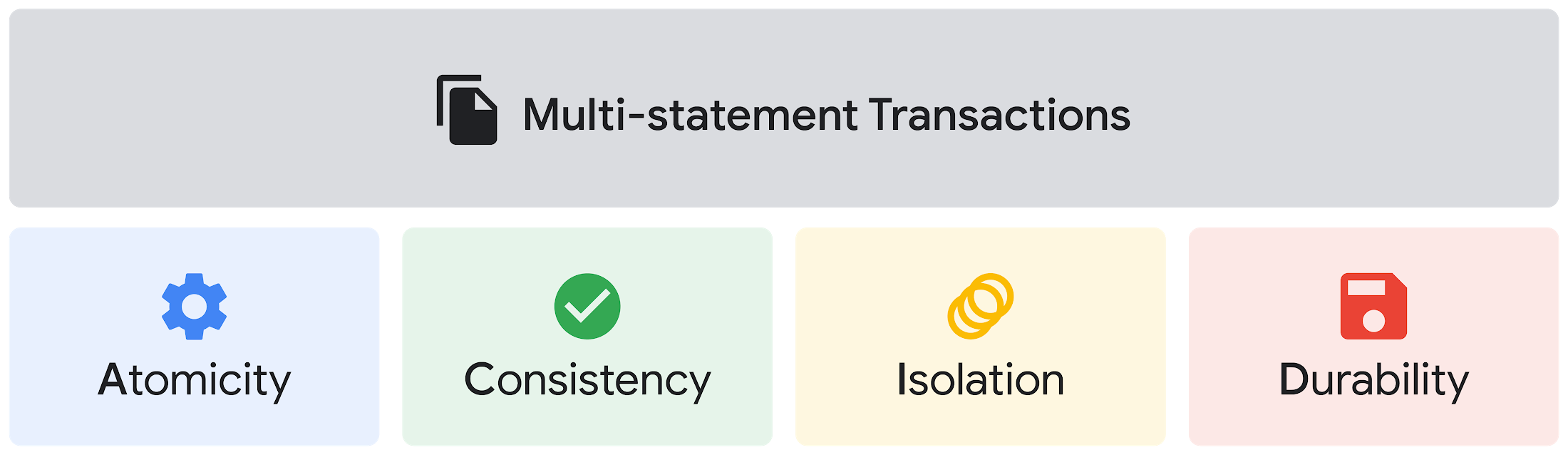
Beyond simplifying commands, we also recognize that it’s equally important to have more sophistication when dealing with transactions. That’s why we introduced multi-statement transactions in BigQuery.
As you probably know, BigQuery has long supported single-statement transactions through DML statements, such as INSERT, UPDATE, DELETE, MERGE and TRUNCATE, applied to one table per transaction. With multi-statement transactions, you can now use multiple SQL statements, including DML, spanning multiple tables in a single transaction.
This means that any data changes across multiple tables associated with all statements in a given transaction are committed atomically (all at once) if successful—or all rolled back atomically in the event of a failure.
We also know that organizations need to control access to data, down to the granular level and that, with the complexity of data platforms increasing day by day, it’s become even more critical to identify and monitor who has access to sensitive data.
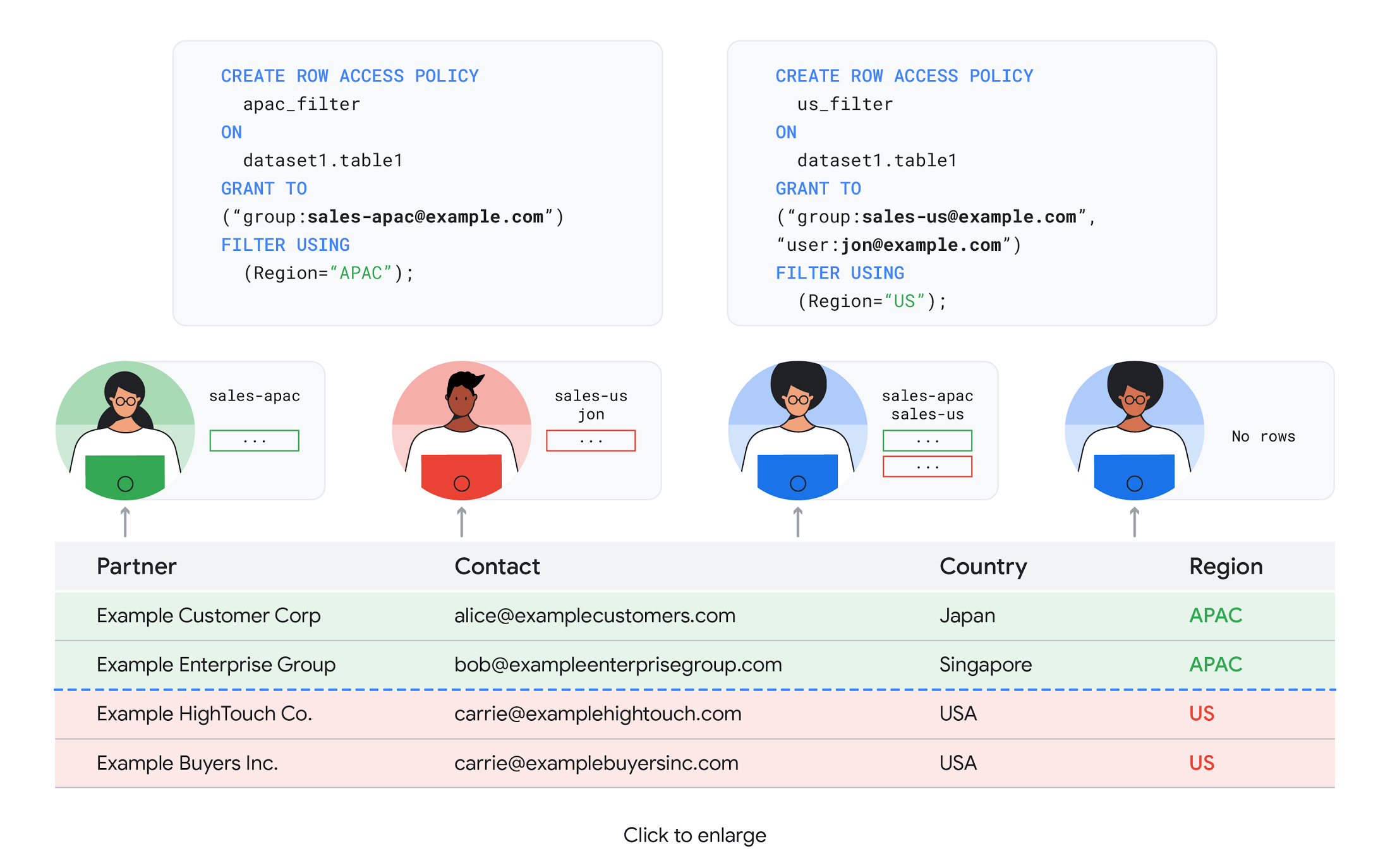
To help address these needs, we announced the general availability of BigQuery row-level security. This capability gives customers a way to control access to subsets of data in the same table for different groups of users. Row-level security in BigQuery enables different user personas access to subsets of data in the same table and can easily be created, updated, and dropped using DDL statements. To learn more, check out the documentation and best practices.
Simple, Safe, and Smart
Beyond building a simpler, more sophisticated and more secure data platform for customers, our team has been focused on providing solutions powered by built-in intelligence. One of our core beliefs is that for machine learning to be adopted and useful at scale, it must be easy to use and deploy.
BigQuery ML, our embedded machine learning capabilities, have been adopted by 80% of our top customers around the globe and it has become a cornerstone of their data to value journey.
As part of our efforts, we announced the general availability of AutoML tables in BigQuery ML. This no-code solution lets customers automatically build and deploy state-of-the-art machine learning models on structured data. With easy integration with Vertex AI, AutoML in BQML makes it simple to achieve machine learning magic in the background. From preprocessing data to feature engineering and model tuning all the way to cross validation, AutoML will “automagically” select and ensemble models so everyone—even non-data scientists—can use it.
Want to take this feature for a test drive? Try it today on BigQuery’s NYC Taxi public dataset following the instructions in this blog!
Speaking of public datasets, we also introduced the availability of Google Trends data in BigQuery to enable customers to measure interest in a topic or search term across Google Search. This new dataset will soon be available in Analytics Hub and will be anonymized, indexed, normalized, and aggregated prior to publication.
Want to ensure your end-cap displays are relevant to your local audience? You can take signals from what people are looking for in your market area to inform what items to place. Want to understand what new features could be incorporated into an existing product based on what people are searching for? Terms that appear in these datasets could be an indicator of what you should be paying attention to.
All this data and technology can be put to use to deploy critical solutions to grow and protect your business. For example, it can be difficult to know how to define anomalies during detection. If you have labeled data with known anomalies, then you can choose from a variety of supervised machine learning model types that are already supported in BigQuery ML.
But what if you don’t know what kind of anomaly to expect, and you don’t have labeled data? Unlike typical predictive techniques that leverage supervised learning, organizations may need to be able to detect anomalies in the absence of labeled data.
That’s why, we were particularly excited to announce the public preview of new anomaly detection capabilities in BigQuery ML that leverage unsupervised machine learning to help you detect anomalies without needing labeled data.
Our team has been working with a large number of enterprises who leverage machine learning for better anomaly detection. In financial services for example, customers have used our technology to detect machine-learned anomalies in real-time foreign exchange data.
To make it easier for you to take advantage of their best practices, we teamed up with Kasna to develop sample code, architecture guidance, and a data synthesizer that generates data so you can test these innovations right away.
Simple, Scalable, and Speedy
Capturing, processing and analyzing data in motion has become an important component of our customer architecture choices. Along with batch processing, many of you need the flexibility to stream records into BigQuery so they can become available for query as they are written.
Our new BigQuery Storage Write API combines the functionality of streaming ingestion and batch loading into a single API. You can use it to stream records into BigQuery or even batch process an arbitrarily large number of records and commit them in a single atomic operation.
Flexible systems that can do batch and real-time in the same environment is in our DNA: Dataflow, our serverless, data processing service for streaming and batch data was built with flexibility in mind.
This principle applies not just to what Dataflow does but also how you can leverage it—whether you prefer using Dataflow SQL right from the BigQuery web UI, Vertex AI notebooks from the Dataflow interface, or the vast collection of pre-built templates to develop streaming pipelines.
Dataflow has been in the news quite a bit recently. You might have noted the recent introduction of Dataflow Prime, a new no-ops, auto-tuning functionality that optimizes resource utilization and further simplifies big data processing. You might have also read that Google Dataflow is a Leader in The 2021 Forrester Wave™: Streaming Analytics, giving Dataflow a score of 5 out of 5 across 12 different criteria.
We couldn’t be more excited about the support the community has provided to this platform. The scalability of Dataflow is unparalleled and as you set your company up for more scale, more speed, and “streaming that screams”, we suggest you take a look at what leaders at Sky, RVU or Palo Alto Networks have already accomplished.
If you’re new to Dataflow, you’re in for a treat: this past month, Priyanka Vergadia (AKA CloudGirl) released a great set of resources to get you started. Read her blog here and watch her introduction video below!
https://youtube.com/watch?v=WRspZRG9e90%3Fenablejsapi%3D1%26
Simple structure that sticks together
We thrive to be the partner of choice for your transformation journey, regardless where your data comes from and how you choose to unify your data stack.
Our partners at Tata Consultancy Services (TCS) recently released research that highlights the importance of a unifying digital fabric and how data integration services like Google Cloud Data Fusion can enable their clients to achieve this vision.
We also announced SAP Integration with Cloud Data Fusion, Google Cloud’s native data integration platform, to seamlessly move data out of SAP Business Suite, SAP ERP and S4/HANA. To date, we provide more than 50 pipelines in Cloud Data Fusion to rapidly onboard SAP data.
This past month, we introduced our SAP Accelerator for Order to Cash. This accelerator is a sample implementation of the SAP Table Batch Source feature in Cloud Data Fusion and will help you get started with your end-to-end order to cash process and analytics.
It includes sample Cloud Data Fusion pipelines that you can configure to connect to your SAP data source, perform transformations, store data in BigQuery, and set up analytics in Looker. It also comes with LookML dashboards which you can access on Github.
Countless great organizations have chosen to work with Google for their SAP data. In June, we wrote about ATB Financial’s journey and how the company uses data to better serve over 800,000 customers, save over CA$2.24 million in productivity, and realize more than CA$4 million in operating revenue through “D.E.E.P”, a data exposure enablement platform built around BigQuery.
Finally, if you are an application developer looking for a unified platform that brings together data from Firebase Crashlytics, Google Analytics, Cloud Firestore, and third party datasets, we have good news!
This past month, we released a unified analytics platform that combines Firebase, BigQuery, Google Looker and FiveTran to easily integrate disparate data sources, and infuse data into operational workflows for greater product development insights and increased customer experience. This resource comes with sample code, a reference guide and a great blog! We hope you enjoy it. See you all next month!
https://youtube.com/watch?v=L25Vfzr2Ciw%3Fenablejsapi%3D1%26
Geospatial Data for Business Apps Drive Sustainable and Accurate Decision-making

4343
Of your peers have already read this article.
1:30 Minutes
The most insightful time you'll spend today!
Organizations that collect geospatial data can use that information to understand their operations, help make better business decisions, and power innovation. Traditionally, organizations have required deep GIS expertise and tooling in order to deliver geospatial insights. In this post, we outline some ways that geospatial data can be used in various business applications.
Assessing environmental risk
Governments and businesses involved in insurance underwriting, property management, agriculture technology, and related areas are increasingly concerned with risks posed by environmental conditions. Historical models that predict natural disasters like pollution, flooding, and wildfires are becoming less accurate as real-world conditions change. Therefore, organizations are incorporating real-time and historical data into a geospatial analytics platform and using predictive modeling to more effectively plan for risk and to forecast weather.
Selecting sites and planning expansion
Businesses that have storefronts, such as retailers and restaurants, can find the best locations for their stores by using geospatial data like population density to simulate new locations and to predict financial outcomes. Telecom providers can use geospatial data in a similar way to determine the optimal locations for cell towers. A site selection solution can combine proprietary site metrics with publicly-available data like traffic patterns and geographic mobility to help organizations make better decisions about site selection, site rationalization, and expansion strategy.
Planning logistics and transport
For freight companies, courier services, ride-hailing services, and other companies that manage fleets, it’s critical to incorporate geospatial context into business decision-making. Fleet management operations include optimizing last-mile logistics, analyzing telematics data from vehicles for self-driving cars, managing precision railroading, and improving mobility planning. Managing all of these operations relies extensively on geospatial context. Organizations can create a digital twin of their supply chain that includes geospatial data to mitigate supply chain risk, design for sustainability, and minimize their carbon footprint.
Understanding and improving soil health and yield
AgTech companies and other organizations that practice precision agriculture can use a scalable analytics platform to analyze millions of acres of land. These insights help organizations understand soil characteristics and help them analyze the interactions among variables that affect crop production. Companies can load topography data, climate data, soil biomass data, and other contextual data from public data sources. They can then combine this information with data about local conditions to make better planting and land-management decisions. Mapping this information using geospatial analytics not only lets organizations actively monitor crop health and manage crops, but it can help farmers determine the most suitable land for a given crop and to assess risk from weather conditions.
Managing sustainable development
Geospatial data can help organizations map economic, environmental, and social conditions to better understand the geographies in which they conduct business. By taking into account environmental and socio-economic phenomena like poverty, pollution, and vulnerable populations, organizations can determine focus areas for protecting and preserving the environment, such as reducing deforestation and soil erosion. Similarly, geospatial data can help organizations design data-driven health and safety interventions. Geospatial analytics can also help an organization meet its commitments to sustainability standards through sustainable and ethical sourcing. Using geospatial analytics, organizations can track, monitor, and optimize the end-to-end supply chain from the source of raw materials to the destination of the final product.
What’s next
Google Cloud provides a full suite of geospatial analytics and machine learning capabilities that can help you make more accurate and sustainable business decisions without the complexity and expense of managing traditional GIS infrastructure. Get started today by learning how you can use Google Cloud features to get insights from your geospatial data, see Geospatial analytics architecture.
Acknowledgements: We’d like to thank Chad Jennings, Lak Lakshmanan, Kannappan Sirchabesan, Mike Pope, and Michael Hao for their contributions to this blog post and the Geospatial Analytics architecture.
How Do You Cut Costs and Improve Staff Productivity, and Business Visibility? Ascend Money Has an Answer

10669
Of your peers have already read this article.
6:30 Minutes
The most insightful time you'll spend today!
Hundreds of millions of residents of South East Asia have only limited access to banking and finance services. However, help is at hand. One of South East Asia’s largest fintech businesses, Ascend Money is using digital technologies to realize its mission of enabling as many people as possible to access innovative financial services and live better lives.
According to Ascend Money, 60 percent of the region’s 620 million residents do not have access to a full suite of financial services. Even a relatively small proportion of this market represents a big opportunity for the business.
Ascend Money’s offerings include the TrueMoney regional payment platform for underserved and digital consumers. The TrueMoney platform supports more than 40 million consumers across six countries: Cambodia, Indonesia, Myanmar, the Philippines, Thailand, and Vietnam.
“We found, based on value, ease of use, effectiveness, and the skills and adaptability of our own team members, BigQuery and other Google Cloud Platform services were the best fit for our business.”
– Abraham Jarrett, Head of Engineering, Ascend Money
TrueMoney also provides an e-wallet app that provides easy ways to top up mobile phones, undertake online shopping, and pay for products and services; a network of 65,000 branded shops; and international remittances, initially between Thailand and Myanmar. In addition, Ascend Money offers financial products to small to medium businesses.
Ascend Money is part of the South East Asian online business Ascend Group, which also operates e-commerce, e-procurement, data centers, cloud services, fulfilment, and digital marketing services.
Cost is a key criteria
Ascend Money initially started operations using physical infrastructure and on-premises workforce productivity applications. However, as the business grew its customer base and expanded into new markets, its technology leaders began to explore options to improve value for money; reduce the maintenance load on in-house team members; improve its data management and analysis; and collaborate more effectively.
“Operating our own on-premises infrastructure entails a higher cost of ownership and maintenance, as well as requiring us to scale up our hardware as needed,” says Abraham Jarrett, Head of Engineering, Ascend Money. “We conducted an evaluation and found that moving to the cloud would deliver a range of benefits.”
G Suite and Google Cloud Platform the best fit
The business evaluated solutions available in the market and opted to move to G Suite and Google Cloud Platform.
“Moving to Google Cloud Platform was an optimization exercise, with lowering our costs our primary goal, and achieving better performance an added benefit,” says Jarrett. Google Cloud Platform monitoring, diagnostic, and analytics tools have enabled Ascend Money to reduce its infrastructure spending, becoming more efficient and cost-effective in the process.
“Managing software is a big cost for us. Through G Suite, we are significantly reducing our software deployment, licensing, and repair costs.”
– Abraham Jarrett, Head of Engineering, Ascend Money
The Ascend Money team saw Google Kubernetes Engine as enabling a seamless way of transitioning from an on-premises data center to a cloud service. “We considered industry trends such as what people were adopting and who we could hire when making our decision,” says Jarrett. “Engineering teams are focusing on using Kubernetes open source container management at scale and as a way of doing business, which was attractive to us.
“Google Kubernetes Engine presented the easiest way to manage and orchestrate our containers, and drive us away from our existing infrastructure.”
BigQuery best for cost and ease of use
Ascend Money also reviewed data infrastructure solutions, with its business intelligence and data platform teams considering a range of options. The teams quickly ruled out an on-premises solution due to the capital investment required and opted for a cloud service. Following a rigorous evaluation of Google Cloud Platform against the services offered by another cloud provider, Ascend Money opted to run on Google Cloud.
“We found, based on value, ease of use, effectiveness, and the skills and adaptability of our own team members, BigQuery and other Google Cloud Platform services were the best fit for our business,” says Jarrett. The business is now running an architecture comprising a BigQuery analytics data warehouse; Cloud Storage to store raw and archive data; Cloud Dataflow to process stream and batch data, and Cloud Pub/Sub for event ingestion and delivery.
“We’re expanding our utilization of BigQuery and other services on a daily basis,” says Jarrett.
Ascend Money is also using a range of Google Cloud Platform services for the infrastructure outside its data platform, including Stackdriver logging and monitoring; Cloud KMS to manage cryptographic keys for its cloud services, Cloud Build to undertake continuous integration, delivery, and deployment; Cloud DNS to provide domain name system services; and Cloud Functions to enable its developers to run and scale code in the cloud.
With Google Cloud Platform, Ascend Money is now processing about 12GB of batch data per day and streaming data from about 200 data marts per day in Thailand alone.
Cost effective scalability and faster to market
Google Kubernetes Engine has enabled the business to scale and deliver to market faster. “We can build on the platform, take the application and container and deploy them to scale out,” says Jarrett. “The Google Kubernetes Engine orchestration mechanism that provides containerized, elastic scalability is extremely important in allowing us to manage costs and expend our effort efficiently. Through Kubernetes, we can write once and deploy everywhere.”
With Google Cloud Platform, the business has saved 3,000,000 THB (about US$90,000) in licensing costs and, through automation tools, reduced the time to complete infrastructure activities by 50 percent.
“We don’t have as many meetings since we deployed G Suite and we can work effectively in a distributed fashion.”
– Abraham Jarrett, Head of Engineering, Ascend Money
Ascend Money’s entire workforce is now using G Suite to collaborate and operate productively. The business is achieving a range of benefits including being able to get new team members up and running more quickly and reduced cost. “Managing software is a big cost for us,” says Jarrett. “Through G Suite, we are significantly reducing our software deployment, licensing, and repair costs.” Meanwhile, the shorter time to onboard team members to G Suite is paying off with improved productivity and an accelerated ability to collaborate.
Ascend Money team members primarily use Sheets, Slides, and Docs to create internal materials, including product requirement documents in Docs and workforce and project planning spreadsheets in Sheets.
The organization also uses Hangouts Meet to collaborate when working from different locations. “We don’t have as many meetings since we deployed G Suite and we can work effectively in a distributed fashion,” says Jarrett. “People can work from home and we have five regions plus Thailand where they can collaborate live on a document, such as a slide deck for board meetings or meetings with our chief executive officer, head of engineering, or other senior managers.”
20 hours per week saved
Jarrett describes the time savings of using web browser-based productivity software and G Suite as saving them an average of 20 hours per week. This has improved productivity and the quality of life for Ascend Money’s hard-working team, increasing overall staff satisfaction.
“The ability to work remotely is a big win for us,” Jarrett says. “Our team members can keep one computer at work and one at home and access the same information, they can work in a plane while it sits on the tarmac, or update a Google Doc or a Google Sheet in real time on their phone. They can work anytime, from any location, as long as they have an internet connection. They have less dead time, meaning more uptime.”
With Google Cloud Platform and G Suite, Ascend Money is ideally positioned to support growing demand for its fintech services in South East Asia, particularly among people with limited access to banking. “We have the agility and dynamism to support rising demand and look forward to continuing to work with Google to realize our business ambitions,” says Jarrett.
IT Team Figures Out Easiest Way to Build Data Pipelines and Create ML Models

14049
Of your peers have already read this article.
5:15 Minutes
The most insightful time you'll spend today!
Building a strong brand in today’s hyper-competitive business environment takes vision. It also requires a flexible, easily managed approach to digital asset management (DAM), so marketing professionals and other stakeholders can easily share, store, track, and manipulate assets to build the brand.
Many of today’s leading companies, including JetBlue, Slack, TripAdvisor, Lyft, and HealthONE, rely on Brandfolder to deliver consistent, organized, and efficient brand experiences. Brandfolder provides an easy-to-use platform that can scale across an entire company with little end-user training, empowering customers to distribute digital assets wherever they are needed. Customers also gain much greater insight into how those assets are used, and how to use them more effectively in marketing campaigns and brand messaging.
“Google Cloud made it easy to build an ML platform to quickly iterate through different brand intelligence use cases and release data-driven product features into the Brandfolder platform.”
—Ajay Rajasekharan, Head of Data Science, Brandfolder
Brandfolder is constantly advancing its development efforts to introduce new data-driven features without complicating the user experience. Big data, artificial intelligence (AI), and machine learning (ML) are key to meeting customers’ unique business needs, and essential for Brandfolder to compete in the fast-moving DAM industry. To enhance these capabilities, Brandfolder sought a public cloud provider that could help it scale its data pipeline cost effectively while providing access to advanced AI technologies.
After graduating from the Techstars startup accelerator program in 2013, Brandfolder tried two other cloud providers before standardizing on Google Cloud Platform (GCP).
“We saw a difference with Google Cloud from the very beginning because the interactions felt like a strategic relationship,” says Jim Hanifen, Head of Product at Brandfolder. “Google gave us startup credits and a lot of face-to-face support, which we hadn’t experienced with other cloud providers. We decided to move our entire infrastructure to Google Cloud Platform.”
Building an ML platform for brand intelligence
After performing an initial lift-and-shift migration of virtual machines (VMs) onto Compute Engine, Brandfolder built an ML platform using GCP managed services to seamlessly deliver its data products. The platform leverages Cloud SQL, Cloud Storage as the data lake, Cloud Dataproc for cloud-native Apache Spark computing clusters, Cloud Composer as the batch job scheduler, Cloud Pub/Sub as the backbone data pipeline, Container Registry to store Docker images, and Google Kubernetes Engine (GKE) as the application orchestrator. Cloud Dataflow brings data into the data lake and into BigQuery for analysis.
“Google Cloud made it easy to build an ML platform to quickly iterate through different brand intelligence use cases and release data-driven product features into the Brandfolder platform,” says Ajay Rajasekharan, Head of Data Science at Brandfolder, who describes the architecture in a detailed blog. “We simply ingest raw application and event data on one end and output an ML service on the other.”
“Moving to Google Cloud Platform allows us to complete more sophisticated data analysis and ML models much faster, and at a much lower cost. We can create brand-specific ML models 12x faster and get them into production quickly to address our customers’ unique business needs.”
—Brett Nekolny, Head of Engineering, Brandfolder
For many general use cases, Brandfolder does not need to build custom ML models, and instead relies on pre-trained API models from GCP. For example, it uses Vision API and Video Intelligence API to auto-tag creative assets on import to enable fast, intuitive searches across images and videos. When more product- and brand-specific modeling is required to address unique customer use cases, Brandfolder builds and trains custom ML models using its GCP pipeline or Cloud AutoML, a suite of products built on Google transfer learning and neural architecture search technology. For example, if a Brandfolder customer makes different types of grills, Brandfolder can use AutoML Vision to train a model to recognize the different grills.
“Moving to Google Cloud Platform allows us to complete more sophisticated data analysis and ML models much faster, and at a much lower cost,” explains Brett Nekolny, Head of Engineering at Brandfolder. “We can create brand-specific ML models 12x faster and get them into production quickly to address our customers’ unique business needs.”
Industry-leading security and performance
Google Cloud’s security model helps Brandfolder give existing and prospective customers peace of mind that their data will be protected. Cloud Identity & Access Management (Cloud IAM) provides enterprise-grade access control, while Cloud Identity-Aware Proxy (Cloud IAP) enables remote users to work more securely without the hassles of a VPN client. GCP also isolates cloud resources into projects, making it easy to assign permissions and keep data and VMs organized and segregated.
“With Google Cloud, everything begins and ends with security, which makes things very easy for us,” says Jim. “If we’re under a security review, we can submit a Google security white paper. If a potential customer has security concerns, we tell them we are hosted on GCP, and those concerns go away.”
To give customers even better application performance for accessing their brand assets, Brandfolder uses Cloud Memorystore, an in-memory data store service for Redis, to cache data and provide sub-millisecond data access for production applications.
“It was much easier for us to use Cloud Memorystore versus running Redis on our compute instances,” says Brett. “The high availability, replication across zones, and automatic failover with no data loss are big for us.”
Global private network interconnects between Google Cloud and the Fastly content delivery network (CDN) dramatically reduce latency, allowing Brandfolder’s customers to deliver and update even very large creative assets quickly around the world.
“What’s beautiful about the relationship between Google and Fastly is that if one of our customers uploads a new version of an asset, we can propagate that out to Fastly, and the new version will automatically show up in all the places where it’s referenced,” says Brett.
“The ability to quickly solve problems with AI has a substantial impact on our revenue, and that’s more apparent every quarter. Few of our competitors are doing product- or brand-specific modeling because it takes a lot of time and resources. We overcame those hurdles with Google Cloud.”
—Jim Hanifen, Head of Product, Brandfolder
Improving employee and customer productivity
Brandfolder also uses Google solutions for real-time collaboration and productivity, using G Suite to connect employees with intuitive, cloud-based apps. Teams use Gmail, Calendar, Docs, Drive, Sheets, Slides, and Hangouts Meet every day to move the business forward. Many of Brandfolder’s customers are also G Suite users, and Brandfolder offers a plug-in that allows them to view their creative assets inside of Docs and pull images in as needed. Customers can also log into Brandfolder with their G Suite credentials, making the solution even easier to use.
“We’ve been using G Suite since the beginning, and it’s helped us collaborate efficiently to build a successful, growing company,” says Jim. “Our teams expect to have that kind of close collaboration, and everyone here enjoys the G Suite experience.”
Driving 99 percent annual business growth
With automated tagging and other innovative AI-based features, Brandfolder is helping customers locate and distribute assets faster. As a result, Brandfolder is building customer loyalty and increasing sales, growing its business by 99 percent year-over-year. Since moving to GCP, Brandfolder has been able to scale its analytics and data pipeline 50x without a corresponding increase in costs and has not had to expand its development team.
“The ability to quickly solve problems with AI has a substantial impact on our revenue, and that’s more apparent every quarter,” says Jim. “Few of our competitors are doing product- or brand-specific modeling because it takes a lot of time and resources. We overcame those hurdles with Google Cloud.”

4968
Of your peers have already downloaded this article
2:35 Minutes
The most insightful time you'll spend today!
One of the toughest challenges for data scientists, and big data engineers is gathering, preparing, and transforming data, and creating data pipelines.
Gathering data for a machine learning or big data initiative can be hard work. The mere act of getting it all together can leave data teams so excited that they can overlook critical safeguards. The result? You could have data that’s skewed, or biased, or data sets that are too small to generate accurate models.
This is why it’s important to have a pre-ML data checklist. A pre-machine-learning data checklist will ensure you have the right data sets for your models, thereby improving your chances of success.
Here are some other benefits:
You waste less time: A checklist allows you to save the time you would normally spend trying to work through your own mental checklist.
Fewer errors: A pre-ML data checklist ensures you have don’t overlook obvious mistakes, and have relevant, unbiased, and representative data.
Lower cognitive load: By using a checklist, you remove the burden of unnecessary cognitive load. This enables you to free up the brain power required for more productive tasks such as model selection and tuning.
More Relevant Stories for Your Company

Best Practices for ML Engineering: 43 Rules from the World’s Best
To make great products: do machine learning like the great engineer you are, not like the great machine learning expert you aren’t. Most of the problems you will face are, in fact, engineering problems. Even with all the resources of a great machine learning expert, most of the gains come

How to Build a BI Dashboard With Google Data Studio and BigQuery
For as long as business intelligence (BI) has been around, visualization tools have played an important role in helping analysts and decision-makers quickly get insights from data. In our current era of big data analytics, that premise still holds. To provide an integrated platform for building BI dashboards on top

Google Cloud and Univision Partnership to Up the Ante in UX for Spanish-speaking Audience
The past year has given everyone lots to think about—about our priorities as people and as businesses. As the world retreated behind closed doors, we saw how shared interests and experiences can bring us together. As the world grappled with a common enemy, we witnessed just how differently individuals, communities



What’s New in BigQuery, Google Cloud’s Modern Data Warehouse
The demands that today's enterprise has from data go far beyond the capabilities of traditional data warehousing. For many leaders, the need to digitally transform their businesses is a key driver for data analytics spending. Businesses want to make real-time decisions from fresh information as well as make predictions from
