





2907
Of your peers have already watched this video.
36:00 Minutes
The most insightful time you'll spend today!
What’s New in BigQuery, Google Cloud’s Modern Data Warehouse
The demands that today’s enterprise has from data go far beyond the capabilities of traditional data warehousing. For many leaders, the need to digitally transform their businesses is a key driver for data analytics spending.
Businesses want to make real-time decisions from fresh information as well as make predictions from their data in order to remain competitive.
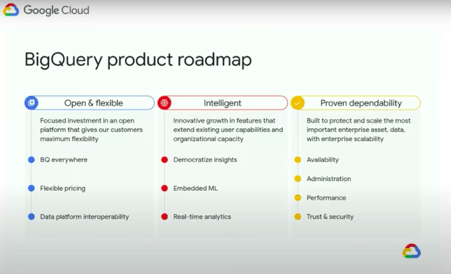
In this video, watch Sudhir Hasbe, Director of Product Management, Data Analytics, Google Cloud and Tino Tereshko, Product Manager, BigQuery, Google Cloud demonstrate what’s new in BigQuery, Google Cloud’s enterprise data warehouse, and hear about all the latest feature innovations and see some amazing demos.

Customer Voices: How Firms from Across Industries Leverage Google Cloud
DOWNLOAD CASE STUDY14069
Of your peers have already downloaded this article
1:30 Minutes
The most insightful time you'll spend today!
From powering everyday operations and accelerating application innovation, to providing tools for specific business needs and executing on big ideas, to advancing the security of technology solutions, companies from across industries have leveraged Google Cloud for business benefits.
Companies from across industries have turned to Google Cloud for transforming their business, modernizing their infrastructure, and gleaning intelligence from data. For instance:
- Johnson & Johnson achieved a 41% increase in search results from high-quality job applicants, significantly improving the company’s ability to quickly hire top talent.
- Sony Network Communications now processes 10 billion monthly queries faster, which advances data analysis.
- University College Dublin saw significant 6-figure savings by eliminating legacy hardware, software, and maintenance.
And there are many such examples. Read the collection of case studies to find out how companies from across industries and geographies leveraged Google Cloud for measurable business benefits and for solving complex problems.
New Capabilities in BigQuery to Ease Anomalies Detection in the Absence of Labeled Data

6316
Of your peers have already read this article.
4:00 Minutes
The most insightful time you'll spend today!
When it comes to anomaly detection, one of the key challenges that many organizations face is that it can be difficult to know how to define what an anomaly is. How do you define and anticipate unusual network intrusions, manufacturing defects, or insurance fraud? If you have labeled data with known anomalies, then you can choose from a variety of supervised machine learning model types that are already supported in BigQuery ML. But what can you do if you don’t know what kind of anomaly to expect, and you don’t have labeled data? Unlike typical predictive techniques that leverage supervised learning, organizations may need to be able to detect anomalies in the absence of labeled data.
Today we are announcing the public preview of new anomaly detection capabilities in BigQuery ML that leverage unsupervised machine learning to help you detect anomalies without needing labeled data. Depending on whether or not the training data is time series, users can now detect anomalies in training data or on new input data using a new ML.DETECT_ANOMALIES function (documentation), with the following models:
- Autoencoder model, now in Public Preview (documentation)
- K-means model, already GA (documentation)
- ARIMA_PLUS time series model, already GA (documentation)
How does anomaly detection with ML.DETECT_ANOMALIES work?
To detect anomalies in non-time-series data, you can use:
- K-means clustering models: When you use
ML.DETECT_ANOMALIESwith a k-means model, anomalies are identified based on the value of each input data point’s normalized distance to its nearest cluster. If that distance exceeds a threshold determined by the contamination value provided by the user, the data point is identified as an anomaly. - Autoencoder models: When you use
ML.DETECT_ANOMALIESwith an autoencoder model, anomalies are identified based on the reconstruction error for each data point. If the error exceeds a threshold determined by the contamination value, it is identified as an anomaly.
To detect anomalies in time-series data, you can use:
- ARIMA_PLUS time series models: When you use
ML.DETECT_ANOMALIESwith an ARIMA_PLUS model, anomalies are identified based on the confidence interval for that timestamp. If the probability that the data point at that timestamp occurs outside of the prediction interval exceeds a probability threshold provided by the user, the datapoint is identified as an anomaly.
Below we show code examples of anomaly detection in BigQuery ML for each of the above scenarios.
Anomaly detection with a k-means clustering model
You can now detect anomalies using k-means clustering models, by running ML.DETECT_ANOMALIES to detect anomalies in the training data or in new input data. Begin by creating a k-means clustering model:
Language: SQL
CREATE MODEL `mydataset.my_kmeans_model`OPTIONS(MODEL_TYPE = 'kmeans',NUM_CLUSTERS = 8,KMEANS_INIT_METHOD = 'kmeans++') ASSELECT* EXCEPT(Time, Class)FROM`bigquery-public-data.ml_datasets.ulb_fraud_detection`;
With the k-means clustering model trained, you can now run ML.DETECT_ANOMALIES to detect anomalies in the training data or in new input data.
To detect anomalies in the training data, use ML.DETECT_ANOMALIES with the same data used during training:
Language: SQL
SELECT*FROMML.DETECT_ANOMALIES(MODEL `mydataset.my_kmeans_model`,STRUCT(0.02 AS contamination),TABLE `bigquery-public-data.ml_datasets.ulb_fraud_detection`);
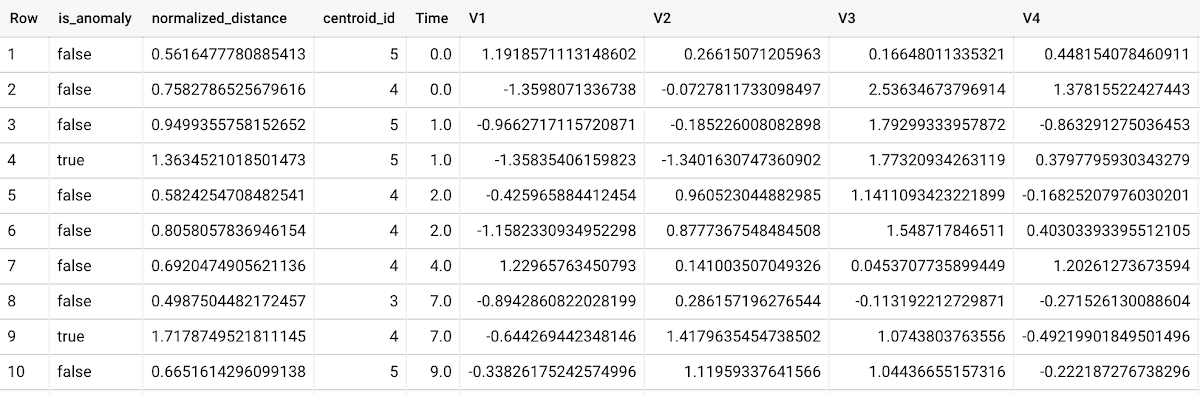
To detect anomalies in new data, use ML.DETECT_ANOMALIES and provide new data as input:
Language: SQL
SELECT*FROMML.DETECT_ANOMALIES(MODEL `mydataset.my_kmeans_model`,STRUCT(0.02 AS contamination),(SELECT * FROM `mydataset.newdata`));

How does anomaly detection work for k-means clustering models?
Anomalies are identified based on the value of each input data point’s normalized distance to its nearest cluster, which, if exceeds a threshold determined by the contamination value, is identified as an anomaly. How does this work exactly? With a k-means model and data as inputs, ML.DETECT_ANOMALIES first computes the absolute distance for each input data point to all cluster centroids in the model, then normalizes each distance by the respective cluster radius (which is defined as the standard deviation of the absolute distances of all points in this cluster to the centroid). For each data point, ML.DETECT_ANOMALIES returns the nearest centroid_id based on normalized_distance, as seen in the screenshot above. The contamination value, specified by the user, determines the threshold of whether a data point is considered an anomaly. For example, a contamination value of 0.1 means that the top 10% of descending normalized distance from the training data will be used as the cut-off threshold. If the normalized distance for a datapoint exceeds the threshold, then it is identified as an anomaly. Setting an appropriate contamination will be highly dependent on the requirements of the user or business.
For more information on anomaly detection with k-means clustering, please see the documentation here.
Anomaly detection with an autoencoder model
You can now detect anomalies using autoencoder models, by running ML.DETECT_ANOMALIES to detect anomalies in the training data or in new input data.
Begin by creating an autoencoder model:
Language: SQL
CREATE MODEL `mydataset.my_autoencoder_model`OPTIONS(model_type='autoencoder',activation_fn='relu',batch_size=8,dropout=0.2,hidden_units=[32, 16, 4, 16, 32],learn_rate=0.001,l1_reg_activation=0.0001,max_iterations=10,optimizer='adam') ASSELECT* EXCEPT(Time, Class)FROM`bigquery-public-data.ml_datasets.ulb_fraud_detection`;
To detect anomalies in the training data, use ML.DETECT_ANOMALIES with the same data used during training:
Language: SQL
SELECT*FROMML.DETECT_ANOMALIES(MODEL `mydataset.my_autoencoder_model`,STRUCT(0.02 AS contamination),TABLE `bigquery-public-data.ml_datasets.ulb_fraud_detection`);
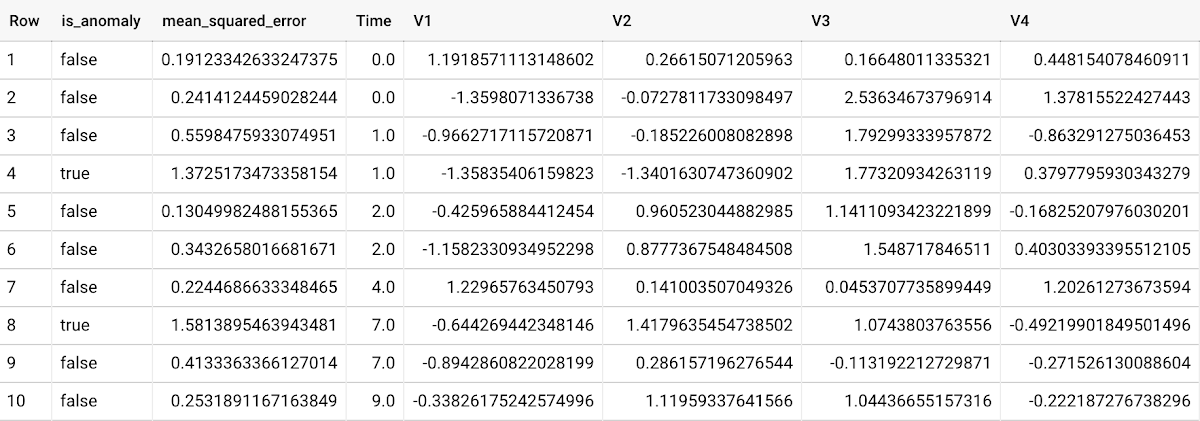
To detect anomalies in new data, use ML.DETECT_ANOMALIES and provide new data as input:
Language: SQL
SELECT*FROMML.DETECT_ANOMALIES(MODEL `mydataset.my_autoencoder_model`,STRUCT(0.02 AS contamination),(SELECT * FROM `mydataset.newdata`));

How does anomaly detection work for autoencoder models?
Anomalies are identified based on the value of each input data point’s reconstructed error, which, if exceeds a threshold determined by the contamination value, is identified as an anomaly. How does this work exactly? With an autoencoder model and data as inputs, ML.DETECT_ANOMALIES first computes the mean_squared_error for each data point between its original values and its reconstructed values. The contamination value, specified by the user, determines the threshold of whether a data point is considered an anomaly. For example, a contamination value of 0.1 means that the top 10% of descending error from the training data will be used as the cut-off threshold. Setting an appropriate contamination will be highly dependent on the requirements of the user or business.
For more information on anomaly detection with autoencoder models, please see the documentation here.
Anomaly detection with an ARIMA_PLUS time-series model
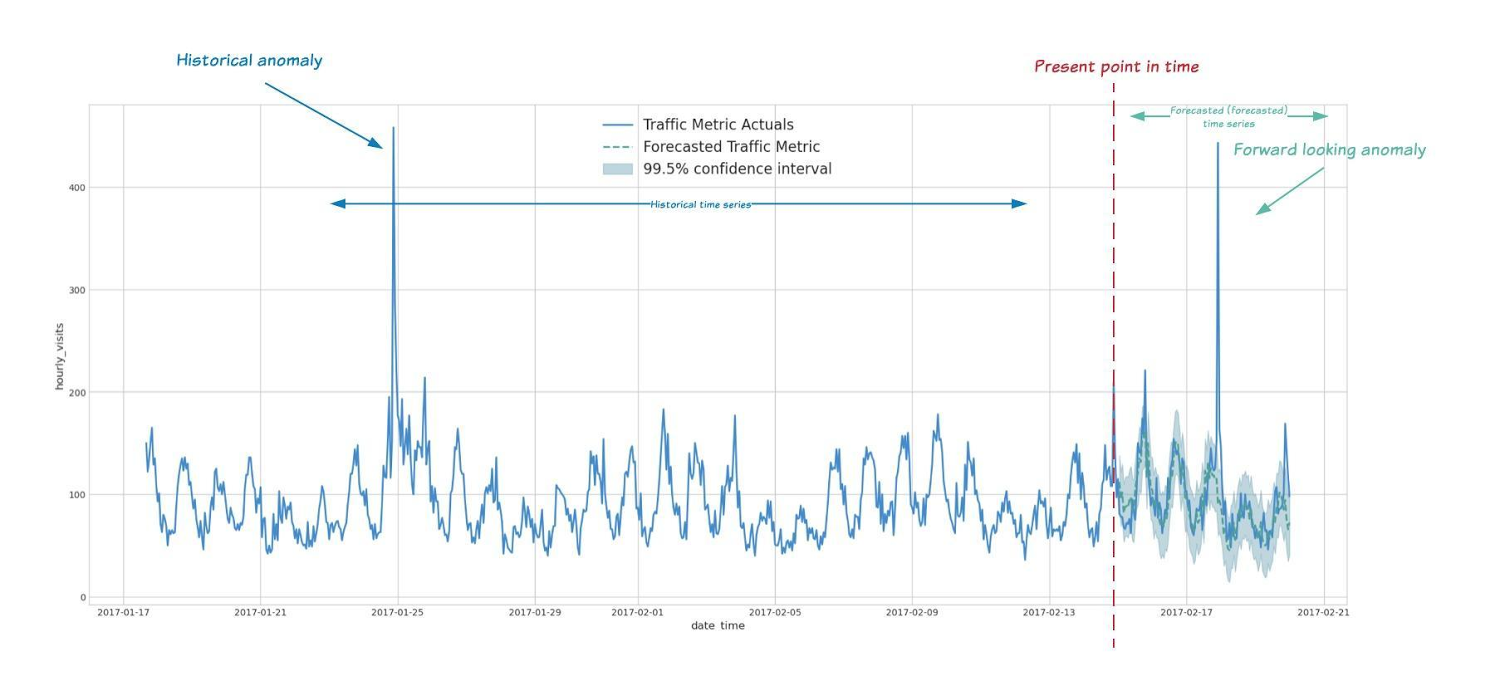
With ML.DETECT_ANOMALIES, you can now detect anomalies using ARIMA_PLUS time series models in the (historical) training data or in new input data. Here are some examples of when might you want to detect anomalies with time-series data:
Detecting anomalies in historical data:
- Cleaning up data for forecasting and modeling purposes, e.g. preprocessing historical time series before using them to train an ML model.
- When you have a large number of retail demand time series (thousands of products across hundreds of stores or zip codes), you may want to quickly identify which stores and product categories had anomalous sales patterns, and then perform a deeper analysis of why that was the case.
Forward looking anomaly detection:
- Detecting consumer behavior and pricing anomalies as early as possible: e.g. if traffic to a specific product page suddenly and unexpectedly spikes, it might be because of an error in the pricing process that leads to an unusually low price.
- When you have a large number of retail demand time series (thousands of products across hundreds of stores or zip codes), you would like to identify which stores and product categories had anomalous sales patterns based on your forecasts, so you can quickly respond to any unexpected spikes or dips.
How do you detect anomalies using ARIMA_PLUS? Begin by creating an ARIMA_PLUS time series model:
Language: SQL
CREATE OR REPLACE MODEL mydataset.my_arima_plus_modelOPTIONS(MODEL_TYPE='ARIMA_PLUS',TIME_SERIES_TIMESTAMP_COL='date',TIME_SERIES_DATA_COL='total_amount_sold',TIME_SERIES_ID_COL='item_name',HOLIDAY_REGION='US') ASSELECTdate,item_description AS item_name,SUM(bottles_sold) AS total_amount_soldFROM`bigquery-public-data.iowa_liquor_sales.sales`GROUP BYdate,item_nameHAVINGdate BETWEEN DATE('2016-01-04') AND DATE('2017-06-01')AND item_name IN ("Black Velvet", "Captain Morgan Spiced Rum","Hawkeye Vodka", "Five O'Clock Vodka", "Fireball Cinnamon Whiskey");
To detect anomalies in the training data, use ML.DETECT_ANOMALIES with the model obtained above:
Language: SQL
SELECT*FROMML.DETECT_ANOMALIES(MODEL `mydataset.my_arima_plus_model`,STRUCT(0.8 AS anomaly_prob_threshold));
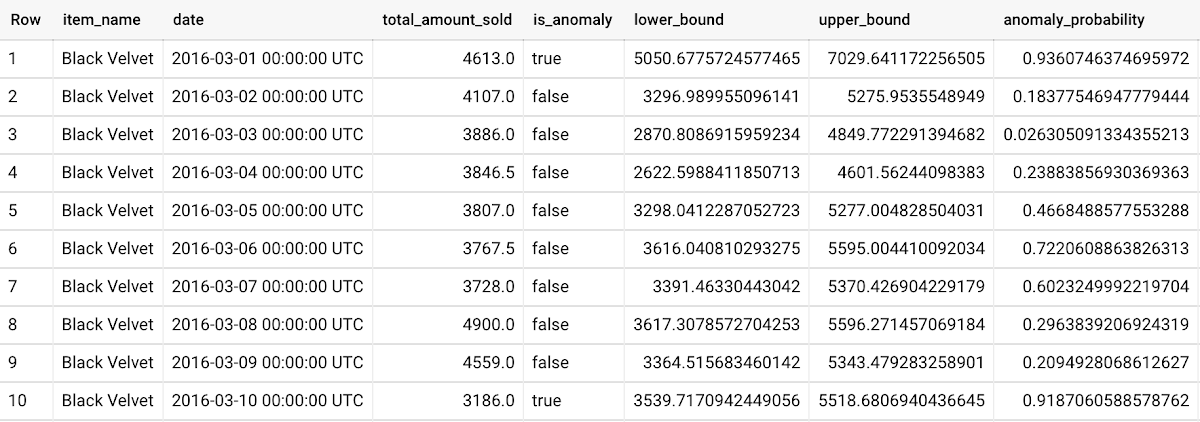
To detect anomalies in new data, use ML.DETECT_ANOMALIES and provide new data as input:
Language: SQL
WITHnew_data AS (SELECTdate,item_description AS item_name,SUM(bottles_sold) AS total_amount_soldFROM`bigquery-public-data.iowa_liquor_sales.sales`GROUP BYdate,item_nameHAVINGdate BETWEEN DATE('2017-06-02')AND DATE('2017-10-01')AND item_name IN ('Black Velvet','Captain Morgan Spiced Rum','Hawkeye Vodka',"Five O'Clock Vodka",'Fireball Cinnamon Whiskey') )SELECT*FROMML.DETECT_ANOMALIES(MODEL `mydataset.my_arima_plus_model`,STRUCT(0.8 AS anomaly_prob_threshold),(SELECT*FROMnew_data));
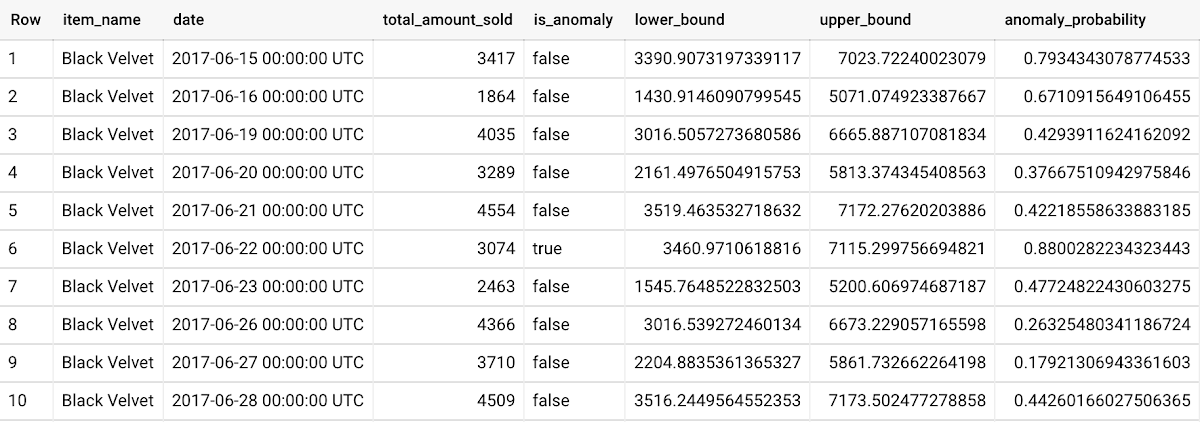
For more information on anomaly detection with ARIMA_PLUS time series models, please see the documentation here.
Thanks to the BigQuery ML team, especially Abhinav Khushraj, Abhishek Kashyap, Amir Hormati, Jerry Ye, Xi Cheng, Skander Hannachi, Steve Walker, and Stephanie Wang.
4523
Of your peers have already watched this video.
1:30 Minutes
The most insightful time you'll spend today!
AI-powered Cameras Help You Serve Your Pets Better. Learn How
Watch the video to learn how you can leverage Google Cloud platform and AI functions to build pet-detection cameras that can capture and send image-based alert messages on your phone to notify when your pets arrive or leave.
Google Cloud Accelerates Financial Organizations’ Journey towards Digital Transformation

10447
Of your peers have already read this article.
2:00 Minutes
The most insightful time you'll spend today!
When I reflect back on the past year and the pandemic, I’m struck by how the reliance on remote work and operations has changed the fundamentals of business forever. For the financial services industry, this rings particularly true. Many conversations I’m having right now with organizations revolve around embracing a transformation cloud, and thinking of cloud computing not just as an infrastructure decision, but also as the locus for transformation throughout the company.
Today, as we welcome the industry to our Financial Services Summit, we’ll demonstrate just how Google Cloud accelerates a financial organization’s digital transformation through app and infrastructure modernization, data democratization, people connections, and trusted transactions. We hope you’ll join us.
How we’re helping financial services firms build their transformation clouds
At Google Cloud, we continue to focus on areas where we can bring the best of our capabilities to banking, capital markets, insurance, and payments customers around the world. Our work with financial services industry customers has given us a deep understanding of the real-world, specific use cases that matter most to them. This groundwork led us to engineer products and solutions that are open and flexible, not ones that force them to rip out existing investments in ERP or other early IaaS cloud implementations.
It’s why we’ve engineered solutions such as Lending DocAI, Open Banking with Apigee, and Datashare for financial services to help transform the industry. These solutions were created with our customers’ security and compliance top-of-mind and are built at the intersection of user-optimized experience, technology, and sovereignty.
At their core, financial institutions want to drive growth, reduce costs, mitigate risk, stay compliant, and increase efficiency. As a result, when we partner with them on their transformation journeys, we consider three essential focus areas:
- Enabling the human experience and connected interactions
- Building an open and intelligent data foundation for better insights
- Providing the most trusted and secure cloud in the industry
Enabling humans and connected interactions
A company’s transformation is about more than technology; people and culture ultimately drive change. HSBC, for example, recognized its business users would benefit from guided answers to common questions around risk policy compliance, and turned to Google Cloud to leverage AI and machine learning bots to assist employees, ease the burden on policy experts, and improve the user experience. Using Dialogflow, a core component of Contact Center AI, HSBC was able to build a conversational platform that quickly and accurately addresses user needs at scale.
Another example is Equifax, which used Google Workspace to support collaboration not only internally between employees, but also externally with customers. Customers can use Google Cloud solutions for financial services to build these sorts of technology-enabled human interactions quickly and easily—supporting organizational change at scale.
Building an open and intelligent data foundation for smarter, faster insights
The real impact of Google Cloud solutions for financial services comes when the whole company has access to the right information at the right time, and can act more intelligently on that data. Our solutions help businesses safely leverage their data and get a complete 360-degree view of their customers’ information, which can often be scattered across multiple systems (CRM, lending, credit, etc.). This helps financial institutions improve the overall customer experience—and sometimes even develop new products quickly.
Indeed, all financial institutions are looking for ways to grow revenue and reduce expenses, and data can be a critical ingredient to doing both effectively. As daily transactions rise, so does the volume and complexity of data. But to implement new customer experience innovations (and new revenue streams), financial institutions must first capture data effectively. This is why AXA Switzerland, for example, uses real-time analytics on Google Cloud to gain cross-industry insights about future trends and customer preferences.
Financial services organizations also need the confidence of building on a platform that provides choice, flexibility, and agility to move fast. It’s why we have an open cloud approach that allows Google Cloud services to run in different physical locations such as on-premises, other public clouds, and the edge. Customers can also harness the power of data and AI through our open APIs, machine-learning services, and analytics engines on any major cloud platform. This is why companies like Macquarie Bank are taking advantage of Google Cloud’s open, hybrid architecture to modernize and empower its developers.
Compliant and secure to address risk and regulatory needs
As a highly regulated industry, financial services is focused on security and compliance, risk and regulations, and fraud detection and prevention. Google Cloud offers unique capabilities to earn customers’ trust as part of our continuing work to be the most trusted cloud in the industry. Google Cloud provides a secure foundation that you can verify and independently control. Our cloud technology reduces risk and data loss, because it is built on comprehensive zero-trust architecture. Finally, we offer a shared-fate model built on best practices in risk management via automation, guidance, and insurance. This is why customers like BBVA have confidence anywhere their systems may operate.
On the regulatory front, global legislators and regulators continue to focus on the stability of the industry that only a decade ago went through one of the biggest liquidity crises in history. With this oversight comes strong expectations of risk mitigation. Google Cloud offers a single, global set of controls, reviewed by financial institutions and regulators around the world, and verified in collaborative audits—making compliance simpler and less costly for our customers.
Finally, Google Cloud allows financial services firms to operate confidently with advanced security tools that help protect data, applications, and infrastructure, as well as their customers from fraudulent activity, spam, and abuse. We help protect your data against threats, using the same infrastructure and security services we use for our own operations, ensuring you never have to trade-off between ease of use and security. Google Cloud encrypts data at-rest and in-transit. And we now also offer the ability to encrypt data-in use, while it’s being processed for customer VM and container workloads.
Let us help you with your transformation cloud journey
We’ve seen leading financial services companies embrace Google Cloud to help them move beyond infrastructure toward the next phase of their cloud evolution. This is an era where no company is better positioned to lead than Google Cloud, and we’re excited to help you with your journey.
Learn more about Google Cloud for financial services.
AirAsia Flies High With Data Analytics and AI

6648
Of your peers have already read this article.
11:30 Minutes
The most insightful time you'll spend today!
AirAsia’s vision is simple: allow everyone to fly. Founded in 2001, the airline and sister company AirAsia X have grown to service 150+ destinations in 25 markets, using 274 aircraft to operate 11,000+ weekly flights from 23 hubs across the region. While the airline is known as a provider of low-cost airfares to locations across Asia, this is only one part of its value proposition. AirAsia also aims to deliver innovative, personalized products and services that meet the needs of each of its passengers.
Technology is key to AirAsia’s success and, with strong support from Group Chief Executive Officer Tony Fernandes, in 2016 the airline began a five-year program to become a data-first business and a digital airline.
“We wanted to better ensure we were using data correctly to become more agile, efficient, and customer oriented,” says Lye Kong Wei, Chief of Data Science, Group Head at AirAsia.
AirAsia needed technologies and services that could capture, process, analyze, and report on data, while delivering value for money and meeting its speed and availability requirements. The airline also wanted to minimize infrastructure management and system administration demands on its technology team.
“We knew data was a big part of making decisions in the future. So we needed a platform that could scale to meet our growing appetite for it. Google Cloud—in particular BigQuery—was ideal for this task.”
—Lye Kong Wei, Chief of Data Science, Group Head, AirAsia
Google Cloud the best fit
AirAsia realized only a cloud service could meet its needs and began evaluating the market. The airline then conducted a proof of concept and found Google Cloud was the best fit for its business. It was already familiar with Google Cloud, having deployed G Suite collaboration and productivity applications to its workforce in all countries except China. According to Kong Wei, products such as Forms, Docs, Sheets, and Gmail delivered a considerable improvement in collaboration between various departments, as well as streamlining and automating a range of processes.
The business was particularly excited by the potential of the BigQuery analytics data warehouse to power its digital transformation. “We knew data was a big part of making decisions in the future,” says Kong Wei. “So we needed a platform that could scale to meet our growing appetite for it. Google Cloud—in particular BigQuery—was ideal for this task.”
“With BigQuery, we could process queries and requests much faster than previously and tackle more complex problems.”
—Lye Kong Wei, Chief of Data Science, Group Head, AirAsia
The AirAsia technology team was impressed by the ease and flexibility with which it could extract, transform, and load customer data from its systems, websites, and mobile applications into BigQuery for analysis. Data, reports, and dashboards were delivered and visualized through Google Data Studio.
BigQuery also scaled seamlessly to support data growth and, as a managed service, required minimal administration from the airline’s technology team. “In addition, with BigQuery, we could process queries and requests much faster than previously and tackle more complex problems,” says Kong Wei. “As a result, we could be more innovative about realizing opportunities,” he adds, citing the benefits of being able to view and understand historical measures of booking curves—a measure of how long it took customers to book before a flight. This improves the airline’s ability to manage revenues.
A broad ecosystem
BigQuery and Data Studio are just two components of a broad ecosystem—powered largely by Google Cloud services—deployed by AirAsia. Pub/Sub provides a scalable message queue that enables AirAsia developers to integrate systems hosted on Google Cloud or externally. Apache Airflow enables the business to create, schedule, and monitor workflows, while Cloud Composer manages the dependencies of PHP and related libraries. App Engine allows AirAsia personnel to develop and host web applications. “Thanks to App Engine, we’ve easily been able to create new applications, services, and APIs powered by the data we have been collecting,” says Kong Wei.
AirAsia is also running the middleware for its APIs in a managed Google Kubernetes Engine environment for increased scalability, resource optimization, and reliability, while Cloud Storage provides storage for data from a range of systems and sources. Dataflow enables the business to transform and process data in stream and batch modes from its website search page as customers look for flights.
“With a minimal number of people involved, we can very quickly transform an idea or thought process into a deliverable. Prior to Google Cloud, bringing those ideas to fruition would have been impossible.”
—Lye Kong Wei, Chief of Data Science, Group Head, AirAsia
Faster deployment and testing
The stability of Google Cloud service means AirAsia has a reliable base from which to launch new products and features. “If we have consistent reliability from our core systems—and Google Cloud incorporates monitoring tools such Cloud Monitoring that enable us to identify issues quickly—developers and product engineers can focus on turning ideas into reality,” says Kong Wei. “With a minimal number of people involved, we can very quickly transform an idea or thought process into a deliverable. Prior to Google Cloud, bringing those ideas to fruition would have been impossible.”
Robust security
AirAsia is also relying on Security Health Analytics, a product that integrates with Security Command Center, to identify misconfigurations and compliance violations in its Google Cloud resources and take action. Security Health Analytics ensures the airline’s budgets go to keeping customers’ travel costs low rather than recovering from security breaches.
The product enables AirAsia to check that resources are configured properly and are compliant with CIS benchmarks as its critical workloads run in Google Kubernetes Engine and App Engine.
“Being able to go to the new Security Health Analytics dashboard eliminates the guesswork of what we have running and if it is secure,” says Muhammad Faeez Bin Azmi, Information Security and Automation Solution Architect. “Now anyone on our team, even non-security professionals, can go to this dashboard and see a list of the misconfigured assets and compliance violations across all of our Google Cloud resources. We can also see the severity of misconfigurations, which helps us prioritize our response.”
“Security Health Analytics has really helped us reduce the amount of time we spend trying to figure out what’s wrong with our resources. It’s allowed us to use our time more effectively to identify and resolve more security issues than we could before.”
A new identity solution
AirAsia had also used a legacy on-premises directory for many years. However, as the company grew and expanded to new markets and regions, it had to manage multiple servers across a number of on-premises data centers and the public cloud, which proved costly and time-consuming.
Its Allstars—the airline’s name for its employees—needed to easily access a number of legacy on-premises apps in addition to a growing number of SaaS apps. As a business, it also needed a more seamless integration between its HR system of record and its identity solution for user provisioning and life cycle management. Solving these challenges with its existing on-premises directory was simply not feasible.
AirAsia brought up its identity concerns with the Google Cloud team, and after a number of conversations, decided to deploy Cloud Identity, Google’s cloud-based Identity and Access Management solution, to help address the identity challenges it was facing.
The airline chose Cloud Identity for a number of reasons—first, it was eager to move to the cloud as quickly as possible. Moving identity management to the cloud was a key enabler of this and the airline’s broader digital transformation. Managing identities from the cloud also enabled the airline to have a single identity and set of credentials for each employee, which they could use to access all the applications they need to be productive, both in the cloud and on-premises.
In addition, deploying Cloud Identity was a key step towards enabling the zero trust security model, which the airline felt was the best approach to strengthen its security posture and fight modern threats. Cloud Identity also integrated seamlessly with its existing technologies, which include not only Google Cloud products like G Suite and Chrome OS but also third-party tools like Citrix, Papercut, and others.
And finally, Cloud Identity offered significant cost and resource savings. With Cloud Identity in place, AirAsia’s IT department could spend less time worrying about managing multiple on-premises directory servers and and could instead focus on delivering value to Allstar employees.
Machine learning employed to increase ancillary revenue
In March 2018, AirAsia established the groundwork to use machine learning to optimize pricing for a range of services and began by using AI Platform to sort and predict demand for ancillary services such as baggage, seats, and meals. “By using AI Platform, we can sort based on data about history to predict the future,” says Kong Wei.
Dialogflow in wide use
With Google Cloud well established within the business, AirAsia is using Dialogflow, a voice and conversational interface development suite (and one of the core components of Contact Center AI) that enables businesses to create engaging AI powered voice- and text-based interfaces such as chatbots and voice apps—to streamline operations and reduce costs
“Tony Fernandes, our Group Chief Executive Officer, motivated us to create a range of metrics that would enable us to respond more quickly and efficiently to customers,” says Yuashini Vellasamy, Product Manager at AirAsia.
This resulted in the initial deployment of Dialogflow in AirAsia’s operational areas, from crew scheduling to internal business tasks.
With Dialogflow, AirAsia is able to provide pilots, crew, catering, and other teams with flight times, capacity and any other relevant information about their assignments. Another bot accepts medical certificates and updates from pilots and crew members unable to make rostered assignments and switches those assignments to other pilots and crews. “This improves our on-time performance and operational efficiency, as we are able to optimize the creation of crew schedules,” says Vellasamy.
AirAsia also uses Dialogflow to power a “safety bot” for airport ground staff. “We tried a lot of tools to encourage staff to advise us when they saw a safety issue—but employee usage was low,” says Vellasamy. “However, when we set up the safety bot, which asks users just four questions about an issue they have observed, we saw an increase in employee interaction, which helps ensure proper safety measures.
Beyond crew optimization and overall safety, AirAsia’s HR department in Asia uses a Dialogflow-powered bot to run a post-orientation engagement program for new employees. The bot follows up with employees about issues from parking to AirAsia’s onboarding buddy program, saving HR employees time from scheduling one-on-one meetings. Dialogflow also powered an employee satisfaction survey of 3,000 team members, resulting in a 30% increase in response rate compared to the previous year.
One of Dialogflow’s benefits is its language coverage, which the airline’s marketing team uses to target customers and prospects across a region with diverse languages and cultures. “For weekly campaigns and promotions, our sales and marketing teams simply update the campaign materials and the changes are reflected automatically in Dialogflow and consequently to users,” says Vellasamy. “This enables us to quickly scale and reach our customers globally.”
An upward trajectory
AirAsia is poised to reap further benefits from Google Cloud as its deployment matures. “On the data side, we’re more advanced, while on the application and programming side we have a long way to go,” says Kong Wei. “We’re on a trajectory upwards—we’re looking at a lot of new ideas and how to embrace and deploy them so we can further our data-first and digital airline agendas.”
More Relevant Stories for Your Company
Apache and Dataflow Help with Real-time Indices Processing for Financial Institutions
Financial institutions across the globe rely on real-time indices to inform real-time portfolio valuations, to provide benchmarks for other investments, and as a basis for passive investment instruments including exchange-traded products (ETPs). This reliance is growing—the index industry dramatically expanded in 2020, reaching revenues of $4.08 billion. Today, indices are calculated and distributed by
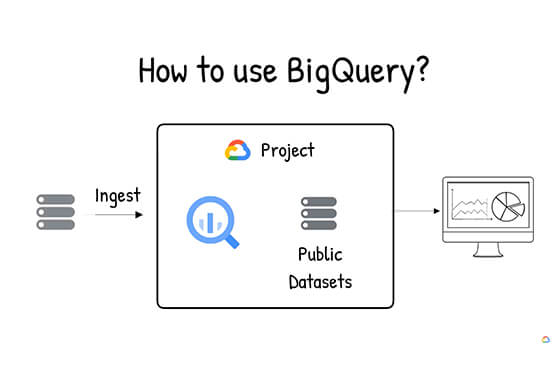

What is BigQuery?
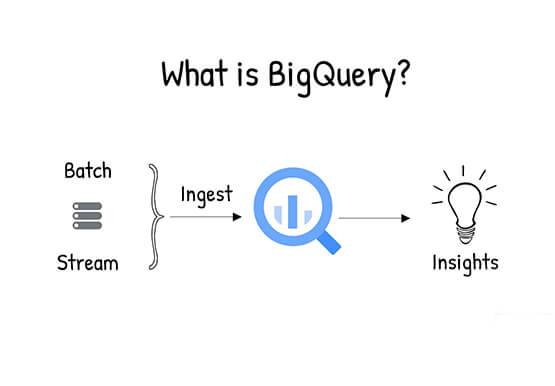
BigQuery is Google Cloud's enterprise data warehouse designed to help you ingest, store, analyze, and visualize big data with ease. Organizations rely on data warehouses to aggregate data from disparate sources, process it, and make it readily available for data analysis that supports their strategic decision-making. You can ingest data

Rubin Observatory Leverages Google Cloud to Power Astronomical Research
This week, the Vera C. Rubin Observatory is launching the first preview of its new Rubin Science Platform (RSP) for an initial cohort of astronomers. The observatory, which is located in Chile but managed by the U.S. National Science Foundation’s NOIRLab in Tucson, AZ and SLAC in California, is jointly funded by the NSF and the U.S. Department

Modernize the Data Stack to Transform the Data Experience
As organizations look to revolutionize how they analyze and utilize data, modernizing the data-centric technology stack is critical to success. Today, the traditional stack poses several challenges—too many steps, too many tools, and too many integrations—all leading to operational complexity, time delays, and high cost. Simplifying the data pipeline, data
