





A Breakdown of Cloud-based Data Ingestion Practices

8826
Of your peers have already read this article.
3:00 Minutes
The most insightful time you'll spend today!
Businesses around the globe are realizing the benefits of replacing legacy data silos with cloud-based enterprise data warehouses, including easier collaboration across business units and access to insights within their data that were previously unseen. However, bringing data from numerous disparate data sources into a single data warehouse requires you to develop pipelines that ingest data from these various sources into your enterprise data warehouse. Historically, this has meant that data engineering teams across the organization procure and implement various tools to do so. But this adds significant complexity to managing and maintaining all these pipelines and makes it much harder to effectively scale these efforts across the organization. Developing enterprise-grade, cloud-native pipelines to bring data into your data warehouse can alleviate many of these challenges. But, if done incorrectly, these pipelines can present new challenges that your teams will have to spend their time and energy addressing.
Developing cloud-based data ingestion pipelines that replicate data from various sources into your cloud data warehouse can be a massive undertaking that requires significant investment of staffing resources. Such a large project can seem overwhelming and it can be difficult to identify where to begin planning such a project. We have defined the following principles for data pipeline planning to begin the process. These principles are intended to help you answer key business questions about your effort and begin to build data pipelines that address your business and technical needs. Each section below details a principle of data pipelines and certain factors your teams should consider as they begin developing their pipelines.
Principle 1: Clarify your objectives
The first principle to consider for pipeline development is clarify your objectives. This can be broadly defined as taking a holistic approach to pipeline development that encompasses requirements from several perspectives: technical teams, regulatory or policy requirements, desired outcomes, business goals, key timelines, available teams and their skill sets, and downstream data users. Clarifying your objectives clearly identifies and defines requirements from each key stakeholder at the beginning of the process and continually checks development against these requirements to ensure the pipelines built will meet these requirements.This is done by first clearly defining the desired end state for each project in a way that addresses a demonstrated business need of downstream data users. Remember that data pipelines are almost always the means to accomplish your end state, rather than the end state itself. An example of an effectively defined end-state is “enabling teams to gain a better understanding of our customers by providing access to our CRM data within our cloud data warehouse” rather than “move data from our CRM to our cloud data warehouse”. This may seem like a merely semantic difference, but framing the problem in terms of business needs helps your teams make technical decisions that will best meet these needs.
After clearly defining the business problem you are trying to solve, you should facilitate requirement gathering from each stakeholder and use these requirements to guide the technical development and implementation of your ingestion pipelines. We recommend gathering stakeholders from each team, including downstream data users, prior to development to gather requirements for the technical implementation of the data pipeline. These will include critical timelines, uptime requirements, data update frequency, data transformation, DevOps needs, and security, policy, or regulatory requirements by which a data pipeline must meet.
Principle 2: Build your team
The second principle to consider for pipeline development is build your team. This means ensuring you have the right people with the right skills available in the right places to develop, deploy, and maintain your data pipelines. After you have gathered your pipeline requirements, you can begin to develop a summary architecture that will be used to build and deploy your data pipelines. This will help you identify the human talent you will need to successfully build, deploy, and manage these data pipelines and identify any potential shortfalls that would require additional support from either third-party partners or new team members.
Not only do you need to ensure you have the right people and skill sets available in aggregate, but these individuals need to be effectively structured to empower them to maximize their abilities. This means developing team structures that are optimized for each team’s responsibilities and their ability to support adjacent teams as needed.
This also means developing processes that prevent blockers to technical development whenever possible, such as ensuring that teams have all of the appropriate permissions they need to move data from the original source to your cloud data warehouse without violating the concept of least privilege. Developers need access to the original data source (depending on your requirements and architecture) in addition to the destination data warehouse. Examples of this are ensuring that developers have access to develop and/or connect to a Salesforce Connected App or read access to specific Search Ads 360 data fields.
Principle 3: Minimize time to value
The third principle to consider for pipeline development is minimize time to value. This means considering the long-term maintenance burden of a data pipeline prior to developing and deploying it in addition to being able to deploy a minimum viable pipeline as quickly as possible. Generally speaking, we recommend the following approach to building data pipelines to minimize their maintenance burden: Write as little code as possible. Functionally, this can be implemented by:
1. Leveraging interface-based data ingestion products whenever possible. These products minimize the amount of code that requires ongoing maintenance and empower users who aren’t software developers to build data pipelines. They can also reduce development time for data pipelines, allowing them to be deployed and updated more quickly.
- Products like Google Data Transfer Service and Fivetran allow for managed data ingestion pipelines by any user to centralize data from SaaS applications, databases, file systems, and other tooling. With little to no code required, these managed services enable you to connect your data warehouse to your sources quickly and easily.
- For workloads managed by ETL developers and data engineers, tools like Google Cloud’s Data Fusion provide an easy-to-use visual interface for designing, managing and monitoring advanced pipelines with complex transformations.
2. Whenever interface-based products or data connectors are insufficient, use pre-existing code templates. Examples of this include templates available for Dataflow that allow users to define variables and run pipelines for common data ingestion use cases, and the Public Datasets pipeline architecture that our Datasets team uses for onboarding.
3. If neither of these options are sufficient, utilize managed services to deploy code for your pipelines. Managed services, such as Dataflow or Dataproc, eliminate the operational overhead of managing pipeline configuration by automatically scaling pipeline instances within predefined parameters.
Principle 4: Increase data trust and transparency
The fourth principle to consider for pipeline development is increase data trust and transparency. For the purposes of this document, we define this as the process of overseeing and managing data pipelines across all tools. Numerous data ingestion pipelines that each leverage different tools or are not developed under a coordinated management plan can result in “tech sprawl”, which significantly increases the management overhead of data ingestion pipelines as the quantity of data pipelines increases. This becomes especially cumbersome if you are subject to service-level agreements, or legal, regulatory, or policy requirements for overseeing data pipelines. Preventing tech sprawl is, by far, the best strategy for dealing with it by developing streamlined pipeline management processes that automate reporting. Although this can theoretically be achieved by building all of your data pipelines using a single cloud-based product, we do not recommend doing so because it prevents you from taking advantage of features and cost optimizations that come with choosing the best product for your use case.
A monitoring service such as Google Cloud Monitoring Service or Splunk that automates metrics, events, and metadata collection from various products, including those hosted in on-premise and hybrid computing environments, can help you centralize reporting and monitoring of your data pipelines. A metadata management tool such as Google Cloud’s Data Catalog or Informatica’s Enterprise Data Catalog can help you better communicate the nuances of your data so users better understand which data resources are best fit for a given use case. This significantly reduces your pipeline’s governance burden by eliminating manual reporting processes that often result in inaccuracies or lagging updates.
Principle 5: Manage costs
The fifth principle to consider for pipeline development is manage costs. This encompasses both the cost of cloud resources and the staffing costs necessary to design, develop, deploy, and maintain your cloud resources. We believe that your goal should not necessarily be to minimize cost, but rather maximizing the value of your investment. This means maximizing the impact of every dollar spent by minimizing waste in cloud resource utilization and human time. There are several factors to consider when it comes to managing costs:
- Use the right tool for the job – Different data ingestion pipelines will have different requirements for latency, uptime, transformations, etc. Similarly, different data pipeline tools have different strengths and weaknesses. Choosing the right tool for each data pipeline can help your pipelines operate significantly more efficiently. This can reduce your overall cost, free up staffing time to focus on the most impactful projects, and make your pipelines much more efficient.
- Standardize resource labeling – Implement and utilize a consistent labeling schema across all tools and platforms to have the most comprehensive view of your organization’s spending. One example is requiring all resources to be labeled by the cost center or team at time of creation. Consistent labeling allows you to monitor your spend across different teams and calculate the overall value of your cloud spending.
- Implement cost controls – If available, leverage cost controls to prevent errors that result in unexpectedly large bills.
- Capture cloud spend – Capture your spend on all cloud resource utilization for internal analysis using a cloud data warehouse and a data visualization tool. Without it, you won’t understand the context of changes in cloud spend and how they correlate with changes in business.
- Make cost management everyone’s job – Managing costs should be part of the responsibilities of everyone who can create or utilize cloud resources. To do this well, we recommend making cloud spend reporting more transparent internally and/or implementing chargebacks to internal cost centers based on utilization.
Long-term, the increased granularity in cost reporting available within Google Cloud can help you better measure your key performance indicators. You can shift from cost-based reporting (i.e. – “We spent $X on BigQuery storage last month”) to value-based reporting (i.e. – “It costs $X to serve customers who bring in $Y revenue”).
To learn more about managing costs, check out Google Cloud’s “Understanding the principles of cost optimization” white paper.
Principle 6: Leverage continually improving services
The sixth principle is leverage continually improving services. Cloud services are consistently improving their performance and stability, even if some of these improvements are not obvious to users. These improvements can help your pipelines run faster, cheaper, and more consistently over time. You can take advantage of the benefits of these improvements by:
- Automating both your pipelines and pipeline management: Not only should data pipelines be automated, but almost all aspects of managing your pipelines can also be automated. This includes pipeline/data lineage tracking, monitoring, cost management, scheduling, access management and more. This helps reduce long-term operational costs of each data pipeline that can significantly alter your value proposition and prevent any manual configurations from negating the benefits of later product improvements.
- Minimizing pipeline complexity whenever possible: While ingestion pipelines are relatively easy to develop using UI-based or managed services, they also require continued maintenance as long as they are in use. The most easily maintained data ingestion pipelines are typically the ones that minimize complexity and leverage automatic optimization capabilities. Any transformation in a data ingestion pipeline is a manual optimization of the pipeline that may struggle to adapt or scale as the underlying services improve. You can minimize the need for such transformations by building ELT (extract, load, transform) pipelines rather than ETL (extract, transform, load) pipelines. This pushes transformations down to the data warehouse that is use a specifically optimized query engine to transform your data rather than manually configured pipelines.
Next steps
If you’re looking for more information about developing your cloud-based data platform, check out our Build a modern, unified analytics data platform whitepaper. You can also visit our data integration site to learn more and find ways to get started with your data integration journey.
Once you’re ready to begin building your data ingestion pipelines, learn more about how Cloud Data Fusion and Fivetran can help you make sure your pipelines address these principles.
World’s Largest Online-only Grocery Retailer Uses AI to Figure Which Customers Need Most Attention

9461
Of your peers have already read this article.
4:20 Minutes
The most insightful time you'll spend today!
In the United Kingdom, the popularity of online grocery shopping is expected to surge from about 6% of the market today to 9% by 2021, according to market research firm Mintel. One of the pioneers of online-only grocery retailing is Ocado, based in Hatfield, Hertfordshire in the U.K. Since starting commercial deliveries in 2002, the company has grown to 600,000 active customers, 260,000 weekly orders, and £1.39 billion in annual revenue.
Ocado takes supermarket trips out of the equation by enabling shoppers to purchase items online through its convenient web and mobile applications. Items are then picked and packed in automated warehouses and shipped directly to customers in a one-hour time slot of their choosing. Ocado’s delivery punctuality is 95%, order accuracy is 99%, and its service footprint now reaches more than 70% of the U.K. population.
“Google Cloud Platform gives us the flexibility and performance to tackle the large and complex data challenges unique to our business.”
—Paul Clarke, Chief Technology Officer, Ocado
The company achieved its success by building in-house almost all the technology and automation that powers its end-to-end e-commerce, fulfillment, and logistics platform. Ocado also developed a new platform, the Ocado Smart Platform (OSP), which offers large brick-and-mortar grocery retailers around the world access to a best-in-class solution for online grocery.
Democratizing machine learning
The shopping journey for online grocery retailing differs significantly from other e-businesses. Customers often buy dozens of products at once, a single household may have multiple buyers using multiple devices, and product shelf life may only be a couple of days.
“We often say that having built an end-to-end platform that can do online grocery scalably and profitably, we can do other forms of online retail; but the reverse does not necessarily follow,” says Paul Clarke, Chief Technology Officer at Ocado. “Google Cloud Platform gives us the flexibility and performance to tackle the large and complex data challenges unique to our business.”
The Ocado business model takes advantage of consumers’ shifting preferences and the links between digital technology and shopping experiences.
“Google Cloud Machine Learning Engine gives us the agility we need. Our developers were able to try out TensorFlow and see firsthand the benefits of machine learning in the cloud.”
—Paul Clarke, Chief Technology Officer, Ocado
The company has been building machine learning into its systems for over five years. Until recently, Ocado machine learning applications required specialist data scientists, typically with PhDs in machine learning, who would build these solutions from the ground up. It also required the specialist who set up the system and costly on-premises infrastructure to train and run these systems.
However, working with Google as a private alpha testing site for Google Cloud Machine Learning Engine accelerated its adoption of artificial intelligence (AI).
“We’ve been talking about how the cloud could democratize AI for some time,” says Paul. “Google Cloud Machine Learning Engine gives us the agility we need. Our developers were able to try out TensorFlow and see firsthand the benefits of machine learning in the cloud.”
TensorFlow is an open source software library for machine learning developed by the Google Brain team. Ocado developers, engineers, and data scientists now use TensorFlow for many of their machine learning projects. They deploy the models they build on Google Cloud Machine Learning Engine, which lets them train models faster across servers, desktop computers, and mobile devices through a single application program interface (API). Additionally, Google Cloud Machine Learning Engine integrates easily with the other Google Cloud Platform products used widely at Ocado.
What do customers really want?
One of the first TensorFlow models Ocado created was a machine learning algorithm that tags and categorizes customer emails and then prioritizes them for response.
The contact center receives thousands of emails each day and Ocado wanted to automate determining which ones needed to be answered immediately and which ones could wait.
For example, a first-time customer expressing their delight in using Ocado doesn’t need to be responded to with the same urgency as a customer who is missing an item from their order or who won’t be home to receive the delivery.
“Enabling agents to respond without having to sort through less-urgent emails improves Ocado’s responsiveness and customer service.”
—James Donkin, General Manager, Ocado
“We get a lot of emails from customers saying, ‘Our service was great,’ or ‘The driver was very courteous,'” says James Donkin, General Manager, Ocado. “But when issues like weather or road conditions potentially affect delivery, we often get surges of urgent questions. Enabling agents to respond without having to sort through less-urgent emails improves Ocado’s responsiveness and customer service.”
Using Google Cloud Machine Learning Engine, TensorFlow, and a large data set culled from several years’ worth of manually categorized customer emails, Ocado experimented on which kind of neural network architecture would best prioritize emails. After testing its models, Ocado implemented the highest-performing one and has been able to respond to urgent messages four times faster. The company also discovered that 7% of its emails don’t require a response at all, which means call center representatives now have more time to devote to higher priority messages.
“Without Google Cloud Machine Learning Engine, it would have been a lot harder to succeed on a project like email classification,” says Roland Plaszowski, who has recently managed several big data projects and initiatives at Ocado.
“Even if we invested significantly in infrastructure, it would be difficult to manage because of the computational intensity. It’s challenging and expensive to run machine learning projects at the same time without infrastructure that you can scale easily.”
Ocado also uses machine learning to predict customer behavior and improve experiences. By analyzing order data, Ocado makes shopping as frictionless as possible. For example, the ordering system can pre-populate customers’ shopping carts with items they are most likely to purchase, remind customers about items they may have forgotten, and notify them of multi-buy offers they haven’t completed, for example, only buying one of a buy one, get one free offer. Based on machine learning from previous purchase data, the Ocado system can also offer new products that are likely to delight customers.
“You will regularly see items that are more personally relevant to you instead of items that are being promoted more generally,” says James. “I’m a vegetarian, so I’m offered specials for vegetarian products that I normally buy and new ones that I’ve never bought. I’m also less likely to see things that I’m not interested in.”
Machines and machine learning
Within the Internet of Things (IoT), Ocado is looking to enhance its warehouse robots with machine learning. An integral part of the OSP, thousands of robots continually stream data into Google Cloud Storage and Google BigQuery.
Ocado data scientists apply machine learning to create a type of swarm intelligence that enables warehouse robots to work cooperatively to achieve a common goal. Projects include modules to search robot telemetry data, such as whether a battery pack is operating within standard tolerances or whether firmware has been successfully loaded, and use it to optimize maintenance schedules or detect patterns in wear and tear.
“Another challenge we’re looking at is how to embed machine learning directly into robots so they become smarter in terms of self-testing, exception handling, and error recovery,” says Paul. “This is a challenging combination of IoT, data analytics, and machine learning that we believe Google BigQuery and Google Cloud Machine Learning are particularly well suited to helping Ocado achieve.”
The company also discovered that 7% of its emails don’t require a response at all, which means call center representatives now have more time to devote to higher priority messages.
Scaling for new business
Scalability is also a major reason behind some of Ocado’s cloud initiatives, including the migration of all its on-premises data to the cloud. Ocado wanted to improve customer experiences, empower business teams with greater insight, and reduce IT overhead, so it consolidated onto Google Cloud Platform.
“The old databases just weren’t fast enough,” says Paul. “We needed a solution that could scale with the amount of data we generate and how we use it. Google Cloud Storage and Google BigQuery now provide the backbone, from a data point of view, for the Ocado Smart Platform.”
Ocado estimates its business, product, and transaction data is approaching two petabytes. Combining customer and supply chain data helps both internal Ocado operations and the company’s ambitions to commercialize OSP.
“When compared with other options for expansion internationally, selling OSP as a managed service lets us turn companies that could have been competitors into customers,” says Paul. “We want to build OSP once and then turn it on for multiple business-to-business customers.”
Each time Ocado adds a new hosting customer to OSP, it will launch a customized instance to fit that customer’s requirements. The capacity and performance of each new OSP instance must be able to scale quickly as the backend platform for established retailers with large numbers of products, customers, and transactions.
Ocado’s first OSP customer, Morrisons, is already benefiting from this first-of-a kind solution. Morrisons is one of the UK’s four largest supermarkets and uses OSP to power its online retail business. Using Google Cloud Platform, Ocado has stored, processed, and analyzed terabytes of Morrisons’ data using a dedicated data lake and Google BigQuery.
In addition to using Google Cloud Platform for OSP, Ocado also adopted it for its own online grocery retail business operation. Ocado originally used the Apache Spark and Apache Hadoop open-source frameworks on Google Compute Engine for its data platform. Moving to Google BigQuery frees Ocado business analysts from the complex query setup and workflows associated with Spark and Hadoop. Plus, it lets Ocado share data analytics with suppliers and partners.
Google BigQuery is well integrated with TensorFlow on Google Cloud Machine Learning Engine and Google Cloud Dataproc, the Apache Spark and Apache Hadoop service that lets Ocado use open source data tools for batch processing, querying, streaming, and machine learning. Google Cloud Dataflow and Google Cloud Dataproc handle cluster management, and provide an easy-to-use framework so developers can spend less time and money on administration and more time on delivering valuable business features.
Switching from Hadoop to Google BigQuery revealed a series of cost and performance improvements. For example, Ocado no longer needed to decide how many instances to bring up in a cluster or wait for the instances to spin up. Google handled everything.
“We simply ran our queries and paid for the resources that we use,” adds Roland. “One big win with Google BigQuery is we don’t have to do maintenance. Best of all, we saw Google BigQuery outperform our Hadoop cluster by over 80 times on our largest dataset, and for only two-thirds the cost.”
WayFair and Google Cloud Get Together to Raise the Bar on World-class Experience!

3008
Of your peers have already read this article.
2:00 Minutes
The most insightful time you'll spend today!
On Dec 9th and 10th, Wayfair and Google Cloud came together for the inaugural Wayfair-Google Cloud Machine Learning Hackathon. Wayfair firmly believes that hackathons are a great way to fuel a culture of collaboration and experimentation. To fuel Wayfair’s incredible pace of innovation at scale, it’s team of more than 3,000 technologists is constantly experimenting and taking smart risks. It’s test-and-learn culture empowers everyone to think critically and creatively, and take big swings to raise the bar on its world-class experience.
The Wayfair-Google Cloud Machine Learning Hackathon was all about getting Wayfairians excited about and enabled on new technology. More specifically, this event was a contained test environment for Wayfair innovators to validate AI and ML tools in order to understand how to get better insight from their data. The projects worked on during this hackathon will help Wayfair build new use cases that could impact the business and the end customer in new and productive ways. Google Cloud’s focus for this Hackathon was to enable Wayfairains to harness the power of Machine Learning and AI to enable their own goals around continual improvement and relentless customer focus.
Prior to the event, Wayfair Data Scientists and Machine Learning Engineers who signed up and submitted ideas for the Hackathon were invited to optional Google Cloud enablement and training sessions. Google Cloud set up classrooms in Qwiklabs on topics including, but not limited to, BigQuery, Vertex AI, and Natural Language AI, so that all Hackathon participants could try out new technologies and tools in a learning environment. Google Cloud subject matter experts were available to field any questions Wayfairians had about the use cases they were hacking on.
The Hackathon was a hybrid virtual & physical event that hosted 67+ innovators, 49 of which registered for Google Cloud supported ideas. 15 judges from both Google Cloud and Wayfair oversaw the event. The esteemed list of judges included Steven Conine, Wayfair’s Co-Founder and Co-Chairman who has helped pave the way for the development of practical applications of next-generation technologies like augmented reality. The judges measured and evaluated the success of a project based on the following criteria:
- “Wow Factor”: How innovative is the project?
- Impact: How impactful is the project to Wayfair?
- Polish: How complete is the project?
- Presentation Quality: How clear and consistent is the demo?
The theme of the Hackathon was Machine Learning and AI. Teams were able to collaborate with participants globally, either in-person or virtually, and work together on projects in five categories: Relentless Customer Focus, Always Improving, Google’s Choice, People’s Choice, and Hackers’ choice.
At the end of the two days there were winners in all 5 categories. The Google’s Choice award went to “Entity Extraction for Order Matching”. Team “Project Clippy” was named both Hackers’ Choice and the winners of the Relentless Customer Focus category. See below for the results of the 5 categories:
- Relentless Customer Focus and Hackers’ Choice
- Winning Team: Project Clippy
- Hackers: Misha Balyasin, Alex Saad, Leo Smerling, and Gabriele Lanaro
- This project provided a gamified experience to make the process of leaving a product review even more seamless.
- Always Improving
- Winning Team: Customer Causal MetaLeaners
- Hackers: Colin Gray, Irene Wang, Huy Vo Tran, Wenhao Xu, and Santiago Velez Ferro
- Team Customer Causal MetaLeaners worked to build lightweight procedure(s) for computationally distributed, multi-target, customized loss functions to make causal meta-learners more applicable to real-world Wayfair problems.
- Google’s Choice Award:
- Winning Team: Entity Extraction for Order Matching
- Hackers: Roger Bock, Bradley West, Sina Moeini, and Jonathan de Melker Worms
- This team built out a solution to use text models to extract and identify the products that customers purchased from user reviews.
- People’s Choice:
- Winning Team: KNN and ANN on Vertex AI
- Hackers: Santosh Jhingade, Ashrith Marpaka, Nikhil Bhaip, Adam Schulze, and Brandon Sanders
- This team used Vertex AI to expand the impact they can have on suppliers and customers by providing accurate and real-time information of products that match either description or image.
Wayfair leaders reflected on the two days and shared their input. Matt Ferrari, Head of Ad Tech, Customer Intelligence, and Machine Learning; Engineering and Product at Wayfair said, “Wayfair has a lot of vendors, but very few strategic partners, and Google is that. Our Partner.” “Thank you all for the participation! I’m grateful to Google, and the many others for helping lead a successful event.”
Wayfair partners with Google Cloud to optimize performance and resiliency, support scaling data-driven decisions, and Increase employee productivity. “Our category is ripe for innovation, and our partnership with Google Cloud helps us ensure that great ideas can come from anywhere by empowering our technologists with cutting-edge products and solutions,” said Ferrari. “We’re proud to partner on efforts like hackathons that align with our team’s eagerness to work on complex, rewarding problems that push the envelope and challenge us to always think big.”
At first Google Cloud won Wayfair over with the speed, reliability and performance of their technology. Hackathons like this one exemplify that what is equally as important is Google Cloud’s willingness to work side-by-side with Wayfair at every level to enable a culture of innovation. Learn more about the Wayfair-Google Cloud partnership here.
US County, the Size of Mangalore, Uses AI to Offer Voice-Enabled Virtual Agent

3066
Of your peers have already read this article.
5:30 Minutes
The most insightful time you'll spend today!
From the historic Gold Country to the rugged heights of the Sierra Nevada, Placer County encompasses more than 1,500 square miles—and provides services to nearly 400,000 residents. Across the county, residents access resources in person, over the phone, and through the county website. In 2018, the county piloted a suite of eServices through its Community Development Resource Agency (CDRA) with the goal of helping its geographically dispersed population more easily apply for permits, make appointments, and get immediate answers to specific questions.
Now, with the help of Google Cloud Dialogflow and Speech-to-Text API, the county has created a virtual agent that enables anyone, anywhere, to simply start a conversation by saying “Ask Placer County” into a variety of voice assistant hardware. This virtual agent builds on the success of eServices and helps the public access information through their smartphones or smart home devices, which is especially helpful for individuals without immediate access to a computer—such as the traveling public or a contractor working on-site, for example.
The pilot program has been an opportunity to explore new technology and create another communication channel to our citizens. “Our ambitious and long-term goal is that ‘Ask Placer County’ will be like having a personal assistant to everything related to Placer County. While the virtual agent is currently limited to a few departments, we plan to expand it countywide,” says Ben Palacio, senior IT analyst for Placer County.
“Our ambitious and long-term goal is that ‘Ask Placer County’ will be like having a personal assistant to everything related to Placer County. While the virtual agent is currently limited to a few departments, we plan to expand it countywide.”
—Ben Palacio, Senior IT Analyst, Placer County
New eServices get a boost from AI virtual agent
The CDRA, one of many departments and agencies within Placer County, deployed interactive eServices for residents. As part of this initiative, the CDRA made a special request to the information technology (IT) department: Build an AI-based virtual agent that would spotlight the eServices on the website and make them easily available through a conversational interface.
“Having a specific technology requirement voiced by an agency was visionary and very welcome. It meant they were engaged and excited about the possibilities that these new technologies had to offer,” says Mike Spak, IT Manager for Placer County.
Today, the CDRA’s eServices help residents answer important questions, such as: “Is my land zoned for adding a garage?” “What historical engineering work has been done on my property?” And, “How can I make an appointment at a permitting office?”
“Having a specific technology requirement voiced by an agency was visionary and very welcome. It meant they were engaged and excited about the possibilities that these new technologies had to offer.”
—Mike Spak, IT Manager, Placer County
Google Cloud fit easily into Placer County’s multivendor environment
With the help of consultants from Dito, a Google Cloud Premier Partner, Placer County chose Google Cloud to help with “Ask Placer County.”
Placer County runs a multivendor IT environment. “Especially with the cloud, the easier it is to integrate a vendor’s capabilities with others, the better for everybody,” says Palacio. “Google Cloud was able to integrate with other vendors’ capabilities for this project.”
For example, Placer County uses the Google Cloud operations suite (formerly Stackdriver) to monitor, troubleshoot, and improve its cloud infrastructure and application performance. And it uses Dialogflow, which powers the natural language processing (NLP) interface of the “Ask Placer County” virtual agent. Both integrate easily with tools from other vendors.
“Especially with the cloud, the easier it is to integrate a vendor’s capabilities with others, the better for everybody. Google Cloud was able to integrate with other vendors’ capabilities for this project.”
—Ben Palacio, Senior IT Analyst, Placer County
Real-time conversations powered by “Ask Placer County”
Dito got “Ask Placer County” up and running using App Engine and Datastore. Today, the “Ask Placer County” virtual agent provides information ranging from how to adopt a pet to short-term-rental compliance.
Users can say “Ask Placer County” into their smartphones or their computer microphones and access targeted information from the pilot departments. IT staff reviews the asked questions and are constantly updating the virtual agent to provide more accurate and responsive information.
“You could be in your backyard with a contractor trying to get a project started, and if the contractor has a question about permitting or zoning, they can use their smartphone to get an answer right then and there, rather than having to interrupt the meeting, get back in their car, and drive to a county office,” says Palacio.
The county hopes “Ask Placer County” will improve the efficiency of in-person interactions between the public and county employees as well. Because the public can access common questions and information online or through the virtual agent, employees’ interactions with the public can be more focused and productive.
“We are providing more effective and efficient service to our customers through 24/7 access to information and by reducing the proportion of staff’s time in responding to emails and voicemails to answer our customer questions,” says Shawna Purvines, Principal Planner for Placer County.
According to Placer County, the virtual agent currently answers a monthly average of around 200 questions for the CDRA, and the county continues to develop more and more complete answers across participating departments.
“We are providing more effective and efficient service to our customers through 24/7 access to information and by reducing the proportion of staff’s time in responding to emails and voicemails to answer our customer questions.”
—Shawna Purvines, Principal Planner, Placer County
Constantly evolving based on users’ needs
To best serve the needs of the CDRA, and potentially other departments over time, “Ask Placer County” continues to evolve. The county can add and retire questions based on the needs of constituents. This technology can be tailored to address current needs, such as responding to COVID-19. “Our hope is that, in quickly evolving situations, the virtual agent can be a resource for the public to access real-time information about public services,” says Palacio.
As a component of the eServices group, “Ask Placer County” has kept construction and development in Placer County operational during the COVID-19 pandemic, and it continues to provide opportunities for the public to access county resources without coming in to the counters, reducing the need for in-person visits. In fact, according to Placer County data, permit applications have increased by 17%.
Placer County also performs analytics using the Google Cloud operations suite to gain insights into the most popular questions and, just as importantly, the questions that are not being answered. “We get insight into what we’re missing—for those times when the virtual agent can’t find a response in our database,” says Palacio. Placer County uses these insights to improve answers and ultimately improve the efficacy of the virtual agent over time.
“This continual, real-time learning is the exciting part of the application that lets us help constituents in entirely new ways. It’s really cool,” says Palacio.
County IT workers actively analyze CDRA webpages to determine which are the most visited and to craft questions and answers to add to “Ask Placer County.” According to Placer County, the number of questions the virtual agent can answer is now more than 600. But the CDRA pages are just a small subset of the 5,000 pages that make up the Placer County website. A future goal is to provide a backstop for customer questions that can’t be answered, transferring those customers to county staff for resolution.
“Looking ahead, this technology has the ability to provide answers to thousands and thousands of questions,” says Palacio.
“This continual, real-time learning is the exciting part of the application that lets us help constituents in entirely new ways. It’s really cool.”
—Ben Palacio, Senior IT Analyst, Placer County
Scaling “Ask Placer County” countywide
The limited rollout of the virtual agent technology allowed IT to monitor its effectiveness and make initial adjustments. As the virtual agent evolves, the Placer County chief information officer sees opportunities for it to engage the public countywide.
The “Ask Placer County” virtual agent can truly be a concierge, helping the public navigate county resources. It can help citizens become more engaged with their elected officials, it can provide information, and it can more efficiently connect the public with the services they seek.
Some of the future possibilities include providing current information on board meetings and individual elected officials, checking on permit status and burn days, and getting the latest county news. “There are so many ways we can use this solution to tackle issues within the county that we’re going to have to somehow prioritize them,” says Palacio.
Google Cloud’s Recommendation AI Helps Bazaarvoice with 60 Percent increase in CTR

4497
Of your peers have already read this article.
2:00 Minutes
The most insightful time you'll spend today!
Not long ago, building AI into recommendation engines was a daunting, expensive task that could take years to get off the ground. But as Bazaarvoice has shown, with the help of cloud services, the time from AI investment to business outcomes is shorter than ever.
Bazaarvoice is the leading provider of product reviews and user-generated content (UGC) solutions that help brands and retailers understand and better serve customers. Its 2019 acquisition of Influenster.com, a community of consumer reviewers 6.5 million strong, expanded the Bazaarvoice portfolio with a platform where consumers can share their candid opinions — and share they have, over 54 million times.
After the acquisition, Bazaarvoice expanded the site’s product diversity by 53%, to more than 5.4 million unique products. To keep user engagement high, Influenster must be seen as both a source of trusted, transparent reviews and a place for customers to discover useful, relevant products for the first time. By introducing shoppers to new products Influenster not only provides value to customers but also helps brands collect consumer insights.
Influenster started out as a place where people gathered to share their honest thoughts on beauty products but quickly expanded to nearly every category, from Art to Wearables. Because of the much smaller scope, the site started and flourished under a rules-based recommendation engine. However, as Influenster expanded its scope under Bazaarvoice, a more robust recommendation system became necessary. In its earliest days, Influenster was successful because of the human perspective it offered: For every product there was a litany of reviews and images that made users feel as if they were getting an endorsement on a product from a friend.
The Bazaarvoice engineering team asked themselves how they could keep that same feeling of personalization with an ever-growing catalog of items and categories. They needed recommendations that could scale with the site, rather than requiring more rules be constructed each time a new product category was introduced. They also needed to ensure the Influenster experience would remain performant even towards unknown members.
Bazaarvoice tested out several recommendation engines, benchmarking each against their current rules-based system. In the end they decided on Google Cloud’s Recommendations AI because of its transparent billing, ease of integration and setup, and naturally, its proven results.
Transparent Billing
“Part of what the engineers loved was they knew exactly what it was going to cost as it scaled” says Nick Shiftan, SVP, Content Acquisition Services Product Unit for Influenster. The goal was to build once and innovate rather than leave a wake of technical debt only to be tackled when costs grew unexpectedly out of control. Google Cloud’s straightforward and pay-as-you-go billing allowed them to anticipate how costs would grow as user interactions did and plan accordingly.
Ease of integration

“I’m positively surprised how Google packed such a complex system in a very easy-to-use API” remarks Eralp Bayraktar, the Software Engineering team lead overseeing the project. Because the original team was made of just one full-time engineer the ease of integration became an even more critical feature. Not only does Recommendations AI pull from years of suggestion expertise in Google Search and YouTube, but in combination with Ad’s Merchant Center, it also creates a streamlined process for importing product metadata. From there, creating a model becomes a matter of picking the preferred recommendation type and then the business objective to optimize for. Once the model is created and the API integrated into the website, the code is already deployed at the global scale: There are no further architectural considerations to ensure recommendations are available to users worldwide. For Bazaarvoice, this meant going from ideation to production in one month.
Proven Results
“We have used it for product recommendations and off-loaded our DB-tiring business logic to Recommendations AI, which resulted in overall faster response times and much better recommendations as proven by our A/B tests,” Eralp continues.
Bazaarvoice began by A/B testing Recommendations AI against their rules-based system. Early on in the experimental phase they noticed a clear and consistent 60% increase in the click-through rate over their original recommendation system.
Even more impressive was the performance on Unknown Members. For every person that signs up for an account on Influenster.com there are many other visitors that come to the website and leave without fully registering. This is typically referred to as the “cold start” problem in the industry — how do you figure out what to recommend to those people without their history, behavior, or preferences? Recommendations AI gives you the option to input and train on unknown users, and by providing metadata on products, it can provide high-quality suggestions to registered members and first-time users alike.
With a mind to the future, Eralp concludes his thoughts on Bazaarvoice’s experience: “It enables discovery by adding an adjustable percentage of cross-category products [for] healthier [traffic distribution] across all our catalog. We are investing in data science and having the Recommendations AI as the baseline is a good challenge for us to thrive.”
To learn more about Recommendations AI and how it can help your organization thrive, check out our recently published 4 part guide which kicks off with an overview on “How to get better retail recommendations with Recommendations AI.” This series also covers data ingestion, modeling, as well as serving predictions & evaluating Recommendations AI. You can also easily get started with our Quickstart Guide.
Simplifying Unstructured Data Analytics with BigQuery ML and Vertex AI: A Comprehensive Guide

1549
Of your peers have already read this article.
6:30 Minutes
The most insightful time you'll spend today!
Unstructured data such as images, speech and textual data can be notoriously difficult to manage, and even harder to analyze. The analysis of unstructured data includes use cases such as extracting text from images using OCR, sentiment analysis on customer reviews and simplifying translation for analytics. All of this data needs to be stored, managed and made available for machine learning.
The new BigQuery ML inference engine empowers practitioners to run inferences on unstructured data using pre-trained AI models. The results of these inferences can be analyzed to extract insights and improve decision making. This can all be done in BigQuery, using just a few lines of SQL.
In this blog, we’ll explore how the new BigQuery ML inference engine can be used to run inferences against unstructured data in BigQuery. We’ll demonstrate how to detect and translate text from movie poster images, and run sentiment analysis against movie reviews.
BigQuery ML’s new inference engine
Google Cloud is home to a suite of pre-trained AI models and APIs. The BigQuery ML inference engine can call these APIs and manage the responses on your behalf. All you have to do is define the model you want to use and run inferences against your data. All of this is done in BigQuery using SQL. The inference results are returned in JSON format and stored in BigQuery for analysis.
Why run your inferences in BigQuery?
Traditionally, working with AI models to run inferences required expertise in programming languages like Python. The ability to run inferences in BigQuery using just SQL can make generating insights from your data using AI simple and accessible. BigQuery is also serverless, so you can focus on analyzing your data without worrying about scalability and infrastructure.
The inference results are stored in BigQuery, which allows you to analyze your unstructured data immediately, without the need to move or copy your data. A key advantage here is that this analysis can also be joined with structured data stored in BigQuery, giving you the opportunity to deepen your insights. This can simplify data management and minimize the amount of data movement and duplication required.
Which models are supported?
For now, the BigQuery ML inference engine can be used with these pre-trained Vertex AI models:
- Vision AI API: This model can be used to extract features from images managed by BigQuery Object Tables and stored on Cloud Storage. For example, Vision AI can detect and classify objects, or read handwritten text.
- Translation AI API: This model can be used to translate text in BigQuery tables into over one hundred languages.
- Natural Language Processing API: This model can be used to derive meaning from textual data stored in BigQuery tables. For example, features like sentiment analysis can be used to determine whether the emotional tone of text is positive or negative.
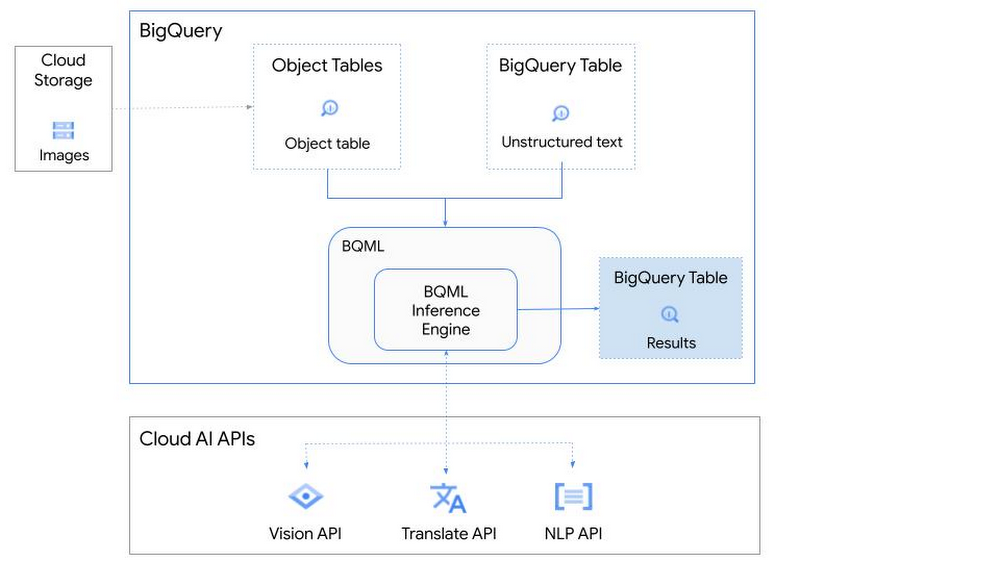
So, how does this work in practice? Let’s look at an example using images of movie posters

- We will define our pre-trained models for Vision AI, Translation AI and NLP AI in BigQuery ML.
- We’ll then use Vision AI to detect the text from some classic movie posters images.
- Next, we’ll use Translation AI to detect any foreign posters and translate them to a language of our choosing – English in this case.
- Finally, we’ll combine our unstructured data with structured data in BigQuery.
We’ll use the extracted movie titles from our movie posters to look up the viewer reviews from the BigQuery IMDB public dataset. We can then run sentiment analysis against these reviews using NLP AI.
Note: The BigQuery ML inference engine is currently in Preview. You will need to complete this enrollment form to have your project allowlisted for use with the BQML Inference Engine.
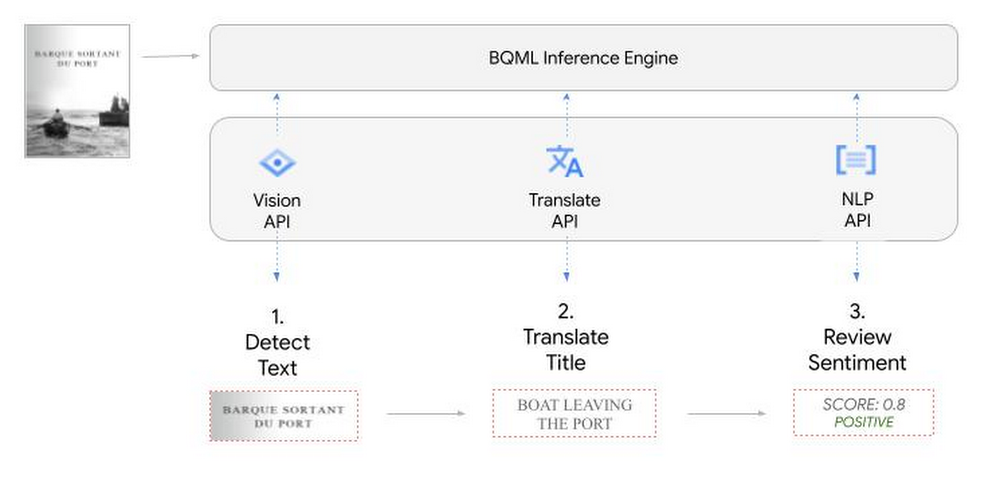
We’ll give examples of the BigQuery SQL needed to define your models and run your inferences. You’ll want to check out our notebook for a detailed guide on how to get this up and running in your Google Cloud project.
1. Define your AI Models in BigQuery
You will need to enable the APIs listed below, and also create a Cloud resource connection to enable BigQuery to interact with these services.
| API | Model Name |
| Vision AI API | Cloud_ai_vision_v1 |
| Translation AI API | Cloud_ai_translate_v3 |
| NLP AI API | Cloud_ai_natural_language_v1 |
You can then run the CREATE MODEL query for each AI service to create your pretrained models, replacing the model_name as required.
CREATE OR REPLACE MODEL
`{PROJECT_ID}.{DATASET_ID}.{VISION_MODEL_NAME}`
REMOTE WITH
CONNECTION `{PROJECT_ID}.{REGION}.{CONN_NAME}`
OPTIONS ( remote_service_type = '<model_name>' );
2. Use the Vision AI API to detect text in images stored in Cloud Storage
You will need to create an object table for your images in Cloud Storage. This read-only object table provides metadata for images stored in Cloud Storage:
CREATE OR REPLACE EXTERNAL TABLE
`{PROJECT_ID}.{DATASET_ID}.{OBJECT_TABLE_NAME}`
WITH
CONNECTION `{REGION}.{CONN_NAME}`
OPTIONS (object_metadata = 'SIMPLE', uris = ['{BUCKET_LOCATION}/*']);
To detect the text from our posters, you can then use ML.ANNOTATE_IMAGE and specify the text_detection feature.
SELECT
       ml_annotate_image_result.full_text_annotation.text AS text_content,
       *
FROM
       ML.ANNOTATE_IMAGE(
         MODEL `{PROJECT_ID}.{DATASET_ID}.{VISION_MODEL_NAME}`,
         TABLE `{DATASET_ID}.{OBJECT_TABLE_NAME}`,
         STRUCT(['TEXT_DETECTION'] AS vision_features));
A JSON response will be returned to BigQuery that includes the text content and language code of the text. You can parse the JSON to a scalar result using the dot annotation highlighted above.

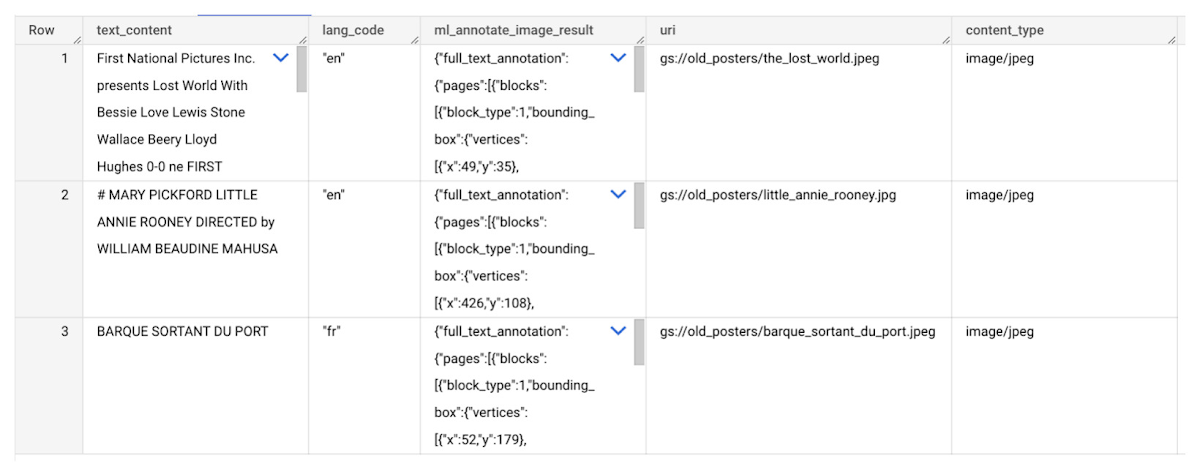
3. Use the Translation AI API to translate foreign movie titles
ML.TRANSLATE can now be used to translate the foreign titles we’ve extracted from our images into English. You just need to specify the target language and the table of the movie posters for translation:
SELECT
text_content,
STRING(ml_translate_result.translations[0].detected_language_code)
as original_language,
STRING(ml_translate_result.translations[0].translated_text)
as translated_title
FROM
  ML.TRANSLATE(
MODEL `{PROJECT_ID}.{DATASET_ID}.{TRANSLATE_MODEL_NAME}`,
TABLE `{DATASET_ID}.image_results`,
STRUCT('TRANSLATE_TEXT' as translate_mode, "en" as target_language_code));
Note: The table column with the text you want to translate must be named text_content:
The table of results will include json that can be parsed to extract both the original language and the translated text. In this case, the model has detected that title text is in French and has translated it to English:

4. Finally, use natural language processing (NLP) to run sentiment analysis against movie reviews
You can easily join inference results from your unstructured data with other BigQuery datasets to bolster your analysis. For example, we can now join the movie titles we extracted from our posters with thousands of movie reviews stored in BigQuery’s IMDB public dataset `bigquery-public-data.imdb.reviews`.
You can use ML.UNDERSTAND_TEXT with the analyze_sentiment feature to run sentiment analysis against some of these reviews to determine whether they are positive or negative:
SELECT
   primary_title, start_year, text_content AS review,
   FLOAT64(ml_understand_text_result.document_sentiment.score) AS score,
   FLOAT64(ml_understand_text_result.document_sentiment.magnitude) AS magnitude,
FROM
   ML.UNDERSTAND_TEXT(
     MODEL `{PROJECT_ID}.{DATASET_ID}.{NLP_MODEL_NAME}`,
           (
           SELECT
             primary_title, start_year, review AS text_content
           FROM
             `bigquery-public-data.imdb.title_basics` titles
           JOIN
             `bigquery-public-data.imdb.reviews` reviews
           ON
             reviews.movie_id = titles.tconst
           WHERE
             UPPER(titles.primary_title) = 'THE LOST WORLD' AND
             start_year = 1925
           ),
      STRUCT("analyze_sentiment" AS nlu_option)) ;
Note: The table column with the text you want to analyze must be named text_content:
The JSON response will include a score and magnitude. The score indicates the overall emotion of the text while the magnitude indicates how much emotional content is present:
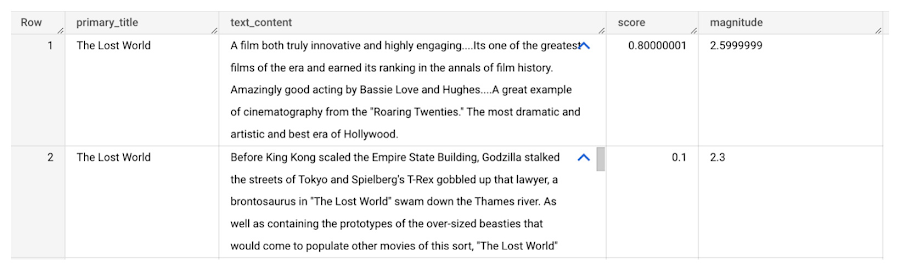
So, how did the Lost World compare with other movies that year?
To wrap up, we’ll compare the average review score of the 1925 Lost World movie to other movies released that year to see which was more popular. This can be done using familiar SQL analysis:
SELECT
 primary_title, start_year,
 AVG(FLOAT64(ml_understand_text_result.document_sentiment.score))AS av_score,
 AVG(FLOAT64(ml_understand_text_result.document_sentiment.magnitude)) AS av_magnitude
FROM
 ML.UNDERSTAND_TEXT(
   MODEL `{PROJECT_ID}.{DATASET_ID}.{NLP_MODEL_NAME}`,
         (
         SELECT
           primary_title, start_year, movie_id, review AS text_content
         FROM
           `bigquery-public-data.imdb.title_basics` titles
         JOIN
           `bigquery-public-data.imdb.reviews` reviews
         ON
           reviews.movie_id = titles.tconst
         WHERE
           start_year = 1925
         ),
   STRUCT("analyze_sentiment" AS nlu_option))
GROUP BY
   primary_title, start_year
ORDER BY
   av_score DESC;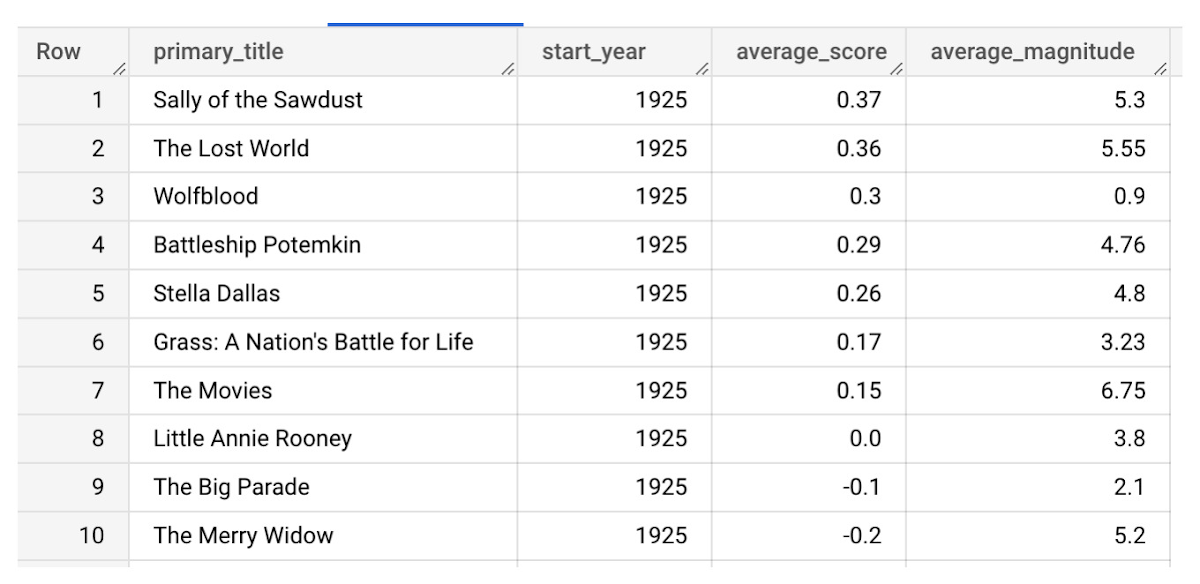
It looks like The Lost World narrowly missed out on the top spot to Sally of the Sawdust!
Want to learn more?
Check out our notebook for a step by step guide on using the BQML inference engine for unstructured data in Google Cloud. You can also check out our Cloud AI service table-valued functions overview page for more details. Curious about pricing? The BQML Pricing page gives a breakdown of how costs are applied across these services.
More Relevant Stories for Your Company


What’s Next for Personalization on Google Cloud
Customer shopping behavior has changed for good. With fewer in-store shopping visits retailers have had to shore up their digital storefronts and explore new ways to meaningfully engage with their customers. Delivering a superior customer experience has become even more of a differentiator for the early movers and personalized recommendations

How Google Cloud Solutions Help Retail Firms to ABP(Always Be Pivoting)
For years, retailers have been told that they must embrace a litany of new technologies, trends, and imperatives like online shopping, mobile apps, omnichannel, and digital transformation. In search of growth and stability, retailers adopted many of these, only to realize that for every box they ticked, there was another

Mercari’s Big Leap: Supercharging Growth with Google Cloud’s BigQuery
When peer-to-peer marketplace Mercari came to the US in 2014, it had its work cut out for it. Surrounded by market giants like eBay, Craigslist, and Wish, Mercari needed to carve out an approach to compete for new users. Furthermore, Mercari wanted to build a network for buyers and sellers to return

Make Meaningful Analysis with Geo Boundary Public Datasets on BigQuery
Geospatial data is a critical component for a comprehensive analytics strategy. Whether you are trying to visualize data using geospatial parameters or do deeper analysis or modeling on customer distribution or proximity, most organizations have some type of geospatial data they would like to use - whether it be customer
