





How Google Cloud Solutions Help Retail Firms to ABP(Always Be Pivoting)

6395
Of your peers have already read this article.
2:00 Minutes
The most insightful time you'll spend today!
For years, retailers have been told that they must embrace a litany of new technologies, trends, and imperatives like online shopping, mobile apps, omnichannel, and digital transformation. In search of growth and stability, retailers adopted many of these, only to realize that for every box they ticked, there was another one waiting.
And then the pandemic hit, along with rising social movements and increasingly harsh weather. Some retailers were more prepared to take on these disruptions than others, which crystallized a new universal truth across the industry: the ability to adapt on the fly became the most important trait to survive and thrive.
Today’s retail landscape has surfaced both existing and new challenges for specialty and department store retailers. Approximately 88% of purchases previously occurred within a store environment. Now, it’s closer to 59%, with the remainder done online or through other omni methods.
With such constant change and upheaval, it can feel like the mantra now is ABP: always be pivoting.
The big question isn’t just how to maintain constant momentum and agility—it’s how to do it without sapping your workforce, your inventory, or your profits in the process. The pivot is now a given. What matters is how you do it.
Adapting requires a flexible base of technology that allows retailers to shift and scale seamlessly with the needs of the moment.
They need to be able to leverage real-time insights and enhance customer experiences rapidly, online and in the real world (not to mention the growing hybridization that’s AR and VR). They need to modernize their stores to power engaging consumer and associate experiences. They need to enhance operations for rapid scaling between full operations and digital-only offerings.
To help retailers achieve these goals and more, Google Cloud is honing a trio of essential innovations: demand forecasting that harnesses the power of data analytics and artificial intelligence; enhanced product discovery to improve conversion across channels; and the tools to help create the modern store experience.
In other words, here’s some of the biggest ways we’re ready to help you pivot.
Pivot point 1: Harnessing data and AI for demand forecasting with Vertex AI
One of the greatest challenges for retailers when building organizational flexibility is managing inventory and the supply chain.
We are in the midst of one of the worst global supply chain crises, stemming from soaring demand and logistics issues brought on by the pandemic. This crisis has only heightened the challenge retailers face when assessing demand and product availability. Even in normal times, mismanagement of inventory can add up to a trillion-dollar problem, according to IHL Group (costing $634 billion in lost sales worldwide each year, while overstocks result in $472 billion in lost revenues due to markdowns).
On the flipside, optimizing your supply chain can lead to greater profits. For instance, McKinsey predicts that a 10% to 20% improvement in retail supply chain forecasting accuracy is likely to produce a 5% reduction in inventory costs and a 2% to 3% increase in revenues.
Some of the challenges related to demand forecasting include:
- Low accuracy leads to excess inventory, missed sales, and pressure on fragile supply chains.
- Real drivers of product demand are not included, because large datasets are hard to model using traditional methods.
- Poor accuracy for new product launches and products that have sparse or intermittent demand.
- Complex models are hard to understand, leading to poor product allocation and low return on investment on promotions.
- Different departments use different methods, leading to miscommunication and costly reconciliation errors.
AI-based demand forecasting techniques can help. Vertex AI Forecast supports retailers in maintaining greater inventory flexibility by infusing machine learning into their existing systems. Machine learning and AI-based forecasting models like Vertex AI are able to digest large sets of disparate data, drive analytics and automatically adjust when provided with new information.
With these machine learning models, retailers can not only incorporate historical sales data, but also use close to real-time data such as marketing campaigns, web actions like a customer clicking the “add to cart” button on a website, local weather forecasts, and much more.
Pivot point 2: Enhanced product discovery through AI-powered search and recommendations
If customers can’t easily find what they are looking for, whether online or at the store, they will turn to someone else. That’s a simple statement, but one with profound impacts.
In research conducted by The Harris Poll and Google Cloud, we found that over a six month period, 95% of consumers received search results that were not relevant to what they were searching for on a retail website. And roughly 85% of consumers view a brand differently after an unsuccessful search, while 74% say they avoid websites where they’ve experienced search difficulties in the past.
Each year, retailers lose more than $300 billion dollars from search abandonment, or when a consumer searches for a product on a retailer’s website but does not find what they are looking for. Our product discovery solutions help you surface the right products, to the right customers, at the right time. These solutions include:
- Vision Product Search, which is like bringing the augmented reality of Google Lens to a retailer’s own branded mobile app experience. Both shoppers and retail store associates can search for products using an image they’ve photographed or found online and receive a ranked list of similar items.
- Recommendations AI, which enables retailers to deliver highly personalized recommendations at scale across channels.
- Retail Search, which provides Google-quality search results on a retailer’s own website and mobile applications.
All three are powered by Google Cloud, leveraging Google’s advanced understanding of user context and intent, utilizing technology to deliver a seamless experience to every shopper. With these combined capabilities, retailers are able to reduce search abandonment and improve conversions across their digital properties.
Pivot point 3: Building the modern store
Stores are no longer places for just browsing and buying. They must be flexible operation centers, ready to pivot to address changing circumstances. The modern store must be multiple things at once: a mini-fulfillment and return center, a recommendation engine, a shopping destination, a fun place to work, and more.
Just as retail companies had to embrace omnichannel, stores are now becoming omnichannel centers on their own, mixing the digital and physical into a single location. Retailers can use physical stores as a vehicle to deliver superior customer experiences. This will demand heightened levels of collaboration and cooperation between stores, digital, and tech infrastructure teams, building on the agile ways they have worked together.
In many ways, it’s about allowing our physical spaces to function more like digital ones. Google Cloud can help by bringing the scalability, security, and reliability of the cloud to the store, allowing physical locations to upgrade infrastructure and modernize their internal and customer-facing applications.
Think of it as when a new OS gets released for your phone. It’s the same small, hard box, but the experience can feel radically different. Now, extend that same idea to a digitally enabled store. With the right displays, interfaces, and tools at a given retail location, the team only needs to send an over-the-air update to create radically fresh experiences, ranging from sales displays to fulfillment or employee engagement.
Such an approach can enable streamlined experiences for both customers and store associates. For instance, when it comes to the modern store’s evolving role as a fulfillment or return center, cloud solutions can help drive efficiency in stores through automation of ordering, replenishment, and fulfillment of omnichannel order selection.
Similar tools for personalized product discovery online can be applied to customers in the store, helping them to browse and explore, or even create a tailored shopping experience.
The impact of store associates can be maximized by equipping them with technology to provide expertise that drives value-added customer service, as well as increasing productivity in stores by streamlining operations, thus lowering overhead cost. At the register, customers should be able to enjoy frictionless checkout while ensuring reliable, accurate, secure transactions.
Google Cloud can help retailers transform
The ability to adapt and pivot to meet today’s changing consumer needs requires that retailers rely on modern tools to obtain operational flexibility. We believe that every company can be a tech company. That every decision is data driven. That every store is physical and digital all at once. That every worker is a tech worker.
Google Cloud works with retailers to help them solve their most challenging problems. We have the unique ability to handle massive amounts of unstructured data, in addition to advanced capabilities in AI and ML. Our products and solutions help retailers focus on what’s most important—from improving operations to capturing digital and omnichannel revenue.
Parent Company of Retail Luxury Brands Leverages Product Recommendation Algorithms and Integrated Client Platform to Entice Customers

3099
Of your peers have already read this article.
3:00 Minutes
The most insightful time you'll spend today!
Whether they meet customers online, offline, or in some combination, retailers share a big problem: How can they offer the right choices, when and how the customer wants, without overwhelming (and often losing) the buyer?
More than anything, this is an information problem. As such, it’s a good candidate for using artificial intelligence (AI) for greater success. Here’s how Richemont tackled the problem.
Richemont owns a portfolio of leading luxury goods brands, recognized for their distinctive heritage, craftsmanship and creativity. It has strengths and specialties in jewelry (Cartier, Van Cleef & Arpels), luxury watches (IWC, Jaeger-LeCoultre, Panerai, Vacheron Constantin), and fashion & accessories (Chloé, Montblanc, dunhill).
People shop for such goods in a number of ways, from online searching to individual meetings in boutiques, and Richemont must be prepared for every context. Understanding which shoppers are likely to buy or repurchase, when to engage directly, and what creation to suggest enables sales associates to spend quality time with clients, engaging at the right time with meaningful advice. Richemont solves these retail challenges with an integrated Client Platform leveraging Google Cloud and its AI/ML capabilities.
Enticing peoples’ desires with Machine Learning
Richemont began by posing two questions:
- Which prospects or clients need extra attention? Specifically, who is likely to convert or to repurchase?
- What would be meaningful items to suggest to each client and prospect?
Both questions were addressed with machine learning algorithms. Their challenges included deploying and monitoring algorithms at scale for several brands across the globe, while addressing the specific business needs for each brand. For instance, it may be more relevant to recommend in-season items for fashion brands, while for watchmakers it is more about cross-fertilization across each brand’s iconic creations.
This graph summarizes the prediction process implemented by Richemont:
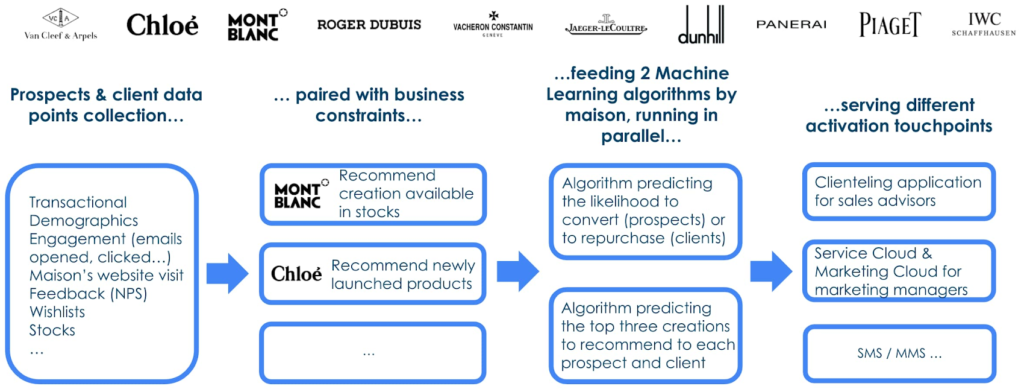
Engagement data (email opened, clicked, SMS/MMS, website visits…) was found crucial to predict conversion of prospects for whom per definition no transaction history is available. For website interactions Richemont leverages the Google x Salesforce Connector.
To deploy the Machine Learning algorithms and to monitor them, Richemont leveraged Vertex AI, along with BigQuery, Cloud Functions and Google Storage, all orchestrated with Google Cloud Composer.
The role of product recommendation algorithms
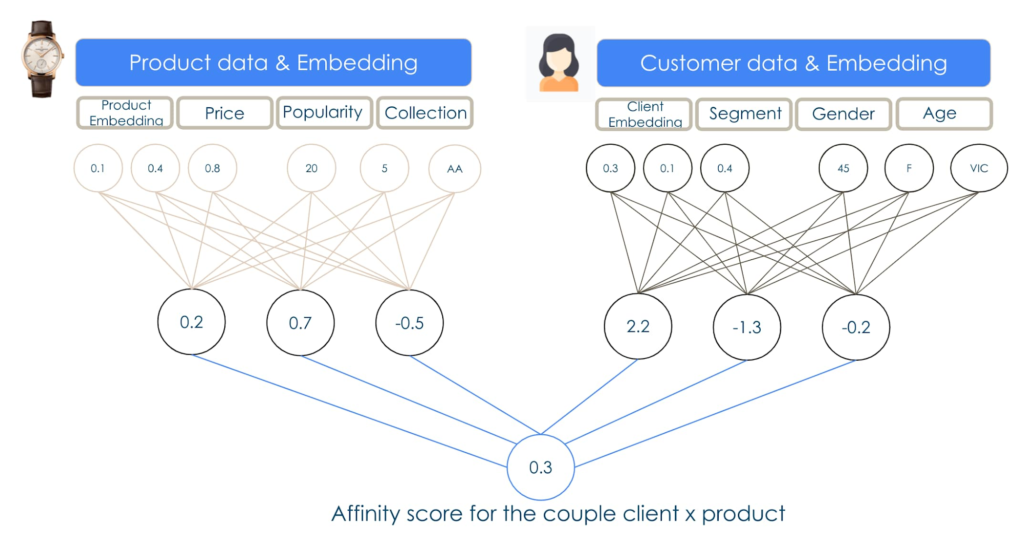
Richemont used the deep learning library TensorFlow Recommenders to perform the product recommendation tasks. This library enables companies to build state of the art deep learning algorithms to achieve relevant and robust predictions.
Unlocking client value with integrated technology
Richemont’s innovations show how technology that considers many parts of the customer experience creates more value. In this case, the company used in store applications to invite people with a strong propensity to buy for boutique visits, while others at a different point in the purchasing journey were offered different options more suited to their tastes and inclinations.This solution, now deployed across 11 brands in over 25 countries, shows just one way that AI can improve customer experience, for better customer loyalty.
Key to the process, here and elsewhere, is the way a retailer and its partners put customer understanding at the center of the process. As AI becomes more important not only in retail, but in every industry, this human understanding will become even more important as a fundamental organizing principle. Much is changing, but once again, the winners will be the companies that focus best on their customers.
BigQuery ML for Sentiment Analysis: How to Make the Most of Your Data

1802
Of your peers have already read this article.
4:30 Minutes
The most insightful time you'll spend today!
Introduction
We recently announced BigQuery support for sparse features which help users to store and process the sparse features efficiently while working with them. That functionality enables users to represent sparse tensors and train machine learning models directly in the BigQuery environment. Being able to represent sparse tensors is a useful feature because sparse tensors are used extensively in encoding schemes like TF-IDF as part of data pre-processing in NLP applications and for pre-processing images with a lot of dark pixels in computer vision applications.
There are numerous applications of sparse features such as text generation and sentiment analysis. In this blog, we’ll demonstrate how to perform sentiment analysis with the space features in BigQuery ML by training and inferencing machine learning models using a public dataset. This blog also highlights how easy it is to work with unstructured text data on BigQuery, an environment traditionally used for structured data.
Using sample IMDb dataset
Let’s say you want to conduct a sentiment analysis on movie reviews from the IMDb website. For the benefit of readers who want to follow along, we will be using the IMDb reviews dataset from BigQuery public datasets. Let’s look at the top 2 rows of the dataset.
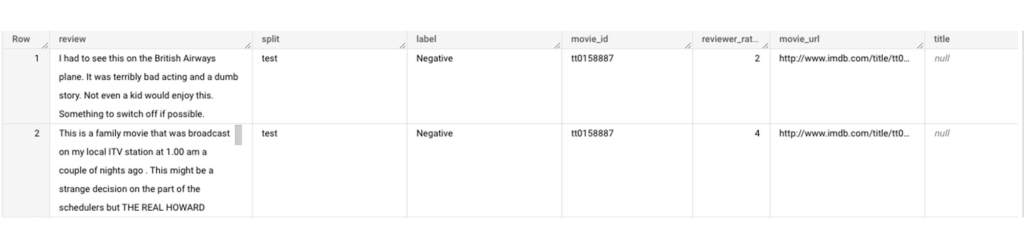
Although the reviews table has 7 columns, we only use reviews and label columns to perform sentiment analysis for this case. Also, we are only considering negative and positive values in the label columns. The following query can be used to select only the required information from the dataset.
SELECT
 review,
 label,
FROM
 `bigquery-public-data.imdb.reviews`
WHERE
 label IN ('Negative', 'Positive')
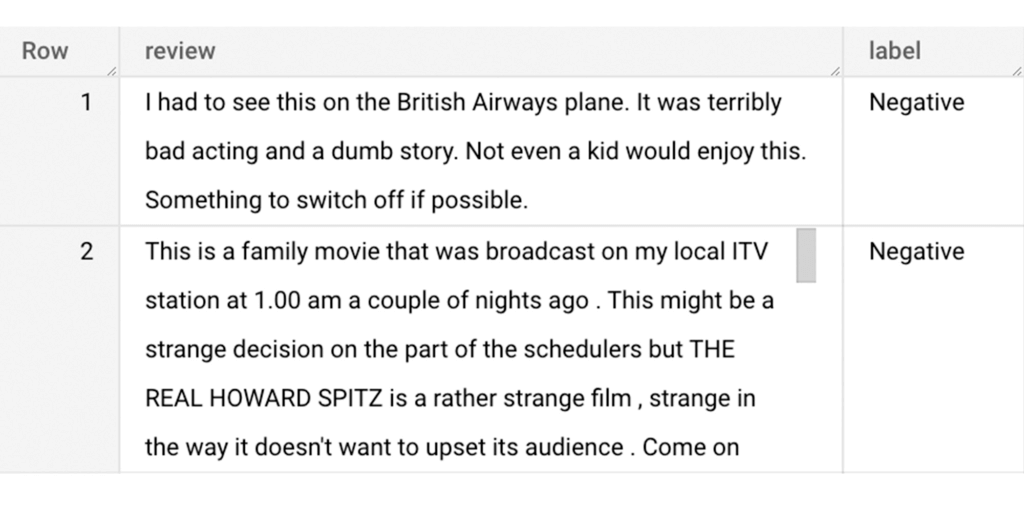
The top 2 rows of the result is as follows:
Methodology
Based on the dataset that we have, the following steps will be carried out:
- Build a vocabulary list using the review column
- Convert the review column into sparse tensors
- Train a classification model using the sparse tensors to predict the label (“positive” or “negative”)
- Make predictions on new test data to classify reviews as positive or negative.
Feature engineering
In this section, we will convert the text from the reviews column to numerical features so that we can feed them into a machine learning model. One of the ways is the bag-of-words approach where we build a vocabulary using the words from the reviews and select the most common words to build numerical features for model training. But first, we must extract the words from each review. The following code creates a dataset and a table with row numbers and extracted words from reviews.
-- Create a dataset named `sparse_features_demo` if doesn’t exist
CREATE SCHEMA IF NOT EXISTS sparse_features_demo;


-- Select unique reviews with only negative and positive labels
CREATE OR REPLACE TABLE sparse_features_demo.processed_reviews AS (
 SELECT
   ROW_NUMBER() OVER () AS review_number,
   review,
   REGEXP_EXTRACT_ALL(LOWER(review), '[a-z]{2,}') AS words,
   label,
   split
 FROM (
   SELECT
     DISTINCT review,
     label,
     split
   FROM
     `bigquery-public-data.imdb.reviews`
   WHERE
     label IN ('Negative', 'Positive')
 )
);
The output table from the query above should look like this:
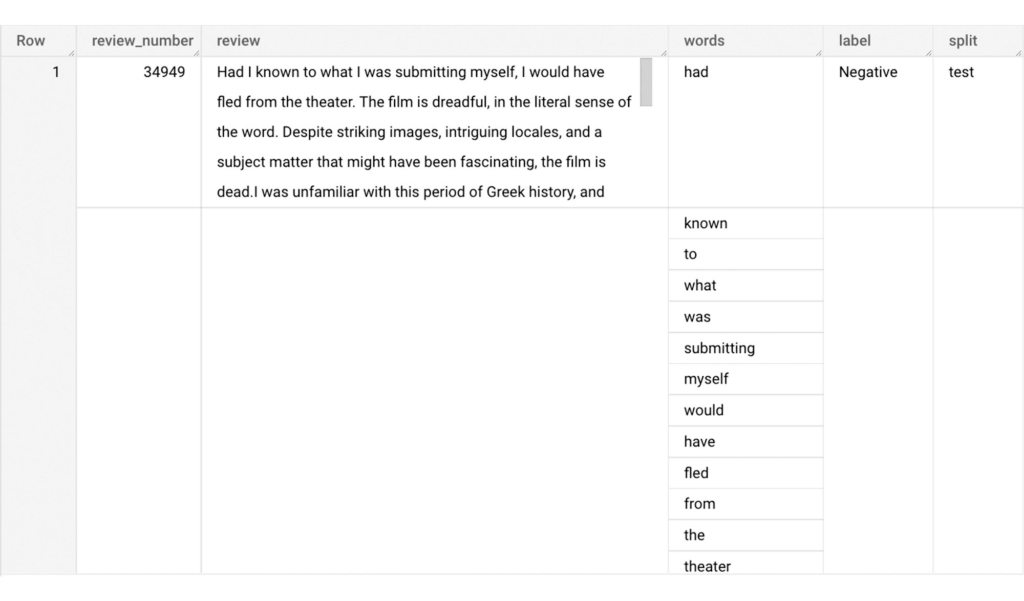
The next step is to build a vocabulary using the extracted words. The following code creates a vocabulary including word frequency and word index from reviews. For this case, we are going to select only the top 20,000 words to reduce the computation time.
-- Create a vocabulary using train dataset and select only top 20,000 words based on frequency
CREATE OR REPLACE TABLE sparse_features_demo.vocabulary AS (
 SELECT
   word,
   word_frequency,
   word_index
 FROM (
   SELECT
     word,
     word_frequency,
     ROW_NUMBER() OVER (ORDER BY word_frequency DESC) - 1 AS word_index
   FROM (
     SELECT
       word,
       COUNT(word) AS word_frequency
     FROM
       sparse_features_demo.processed_reviews,
       UNNEST(words) AS word
     WHERE
       split = "train"
     GROUP BY
       word
   )
 )
 WHERE
   word_index < 20000 # Select top 20,000 words based on word count
);
The following shows the top 10 words based on frequency and their respective index from the resulting table of the query above.
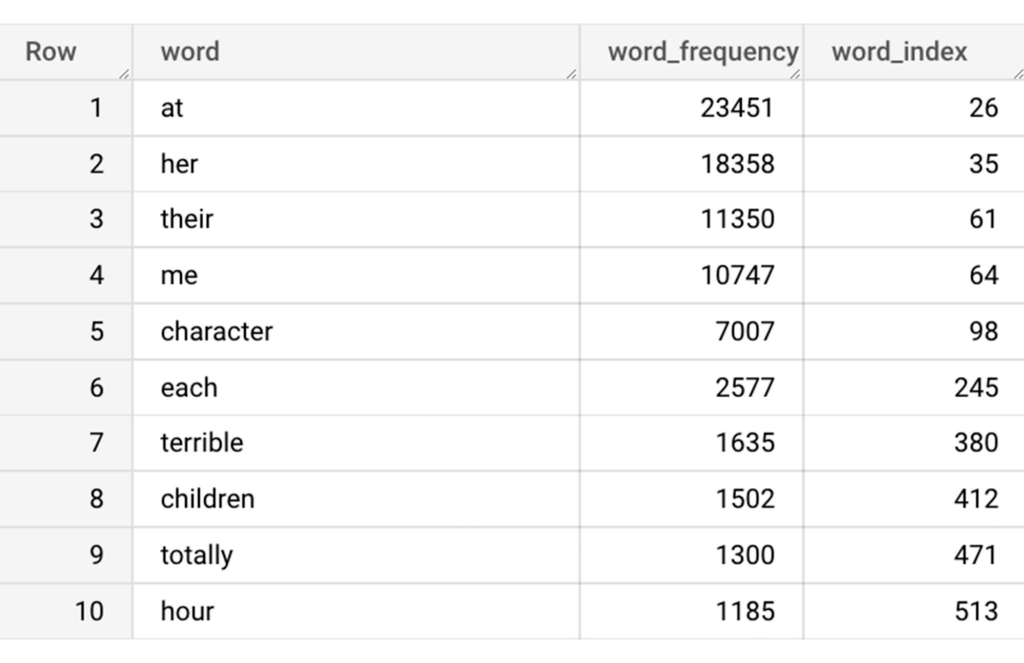
Creating a sparse feature
Now we will use the newly added feature to create a sparse feature in BigQuery. For this case, we aggregate word_index and word_frequency in each review, which generates a column as ARRAY[STRUCT] type. Now, each review is represented as ARRAY[(word_index, word_frequency)].
-- Generate a sparse feature by aggregating word_index and word_frequency in each review.
CREATE OR REPLACE TABLE sparse_features_demo.sparse_feature AS (
 SELECT
   review_number,
   review,
   ARRAY_AGG(STRUCT(word_index, word_frequency)) AS feature,
   label,
   split
 FROM (
   SELECT
     DISTINCT review_number,
     review,
     word,
     label,
     split
   FROM
     sparse_features_demo.processed_reviews,
     UNNEST(words) AS word
   WHERE
     word IN (SELECT word FROM sparse_features_demo.vocabulary)
 ) AS word_list
 LEFT JOIN
   sparse_features_demo.vocabulary AS topk_words
   ON
     word_list.word = topk_words.word
 GROUP BY
   review_number,
   review,
   label,
   split
);
Once the query is executed, a sparse feature named `feature` will be created. That `feature` column is an `ARRAY of STRUCT` column which is made of `word_index` and `word_frequency` columns. The picture below displays the resulting table at a glance.
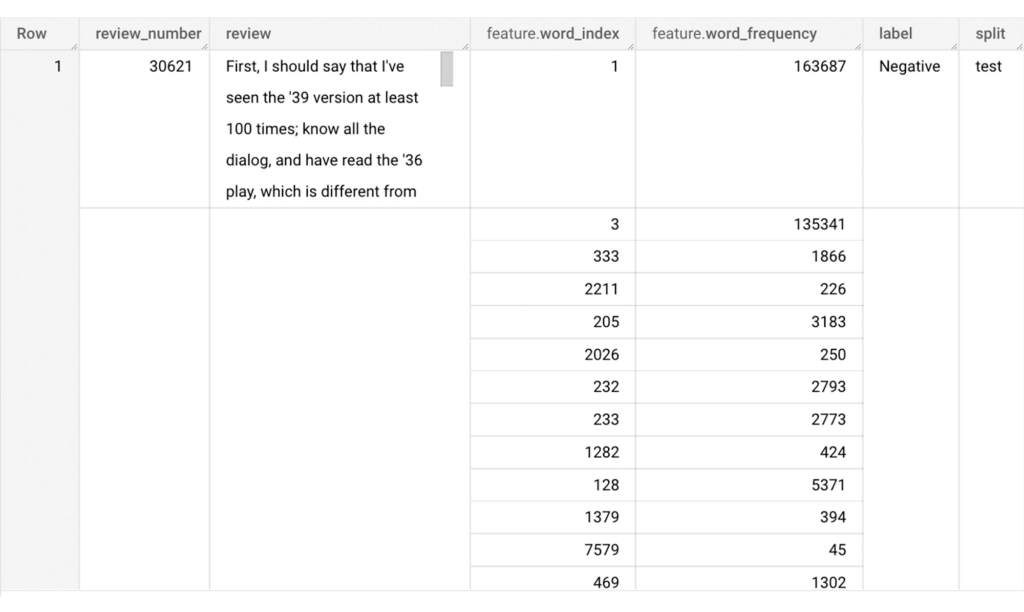
Training a BigQuery ML model
We just created a dataset with a sparse feature in BigQuery. Let’s see how we can use that dataset to train with a machine learning model with BigQuery ML. In the following query, we will train a logistic regression model using the review_number, review, and feature to predict the label:
-- Train a logistic regression classifier using the data with sparse feature
CREATE OR REPLACE MODEL sparse_features_demo.logistic_reg_classifier
 TRANSFORM (
   * EXCEPT (
       review_number,
       review
     )
 )
 OPTIONS(
   MODEL_TYPE='LOGISTIC_REG',
   INPUT_LABEL_COLS = ['label']
 ) AS
 SELECT
   review_number,
   review,
   feature,
   label
 FROM
    sparse_features_demo.sparse_feature
 WHERE
   split = "train"
;
Now that we have trained a BigQuery ML Model using a sparse feature, we evaluate the model and tune it as needed.
-- Evaluate the trained logistic regression classifier
SELECT * FROM ML.EVALUATE(MODEL sparse_features_demo.logistic_reg_classifier);
The score looks like a decent starting point, so let’s go ahead and test the model with the test dataset.

-- Evaluate the trained logistic regression classifier using test data
SELECT * FROM ML.EVALUATE(MODEL sparse_features_demo.logistic_reg_classifier,
 (
   SELECT
     review_number,
     review,
     feature,
     label
   FROM
     sparse_features_demo.sparse_feature
   WHERE
     split = "test"
 )
);
The model performance for the test dataset looks satisfactory and it can now be used for inference. One thing to note here is that since the model is trained on the numerical features, the model will only accept numeral features as input. Hence, the new reviews have to go through the same transformation steps before they can be used for inference. The next step shows how the transformation can be applied to a user-defined dataset.
Sentiment predictions from the BigQuery ML model
All we have left to do now is to create a user-defined dataset, apply the same transformations to the reviews, and use the user-defined sparse features to perform model inference. It can be achieved using a WITH statement as shown below.
WITH
 -- Create a user defined reviews
 user_defined_reviews AS (
   SELECT
     ROW_NUMBER() OVER () AS review_number,
     review,
     REGEXP_EXTRACT_ALL(LOWER(review), '[a-z]{2,}') AS words
   FROM (
     SELECT "What a boring movie" AS review UNION ALL
     SELECT "I don't like this movie" AS review UNION ALL
     SELECT "The best movie ever" AS review
   )
 ),


 -- Create a sparse feature from user defined reviews
 user_defined_sparse_feature AS (
   SELECT
     review_number,
     review,
     ARRAY_AGG(STRUCT(word_index, word_frequency)) AS feature
   FROM (
     SELECT
       DISTINCT review_number,
       review,
       word
     FROM
       user_defined_reviews,
       UNNEST(words) as word
     WHERE
       word IN (SELECT word FROM sparse_features_demo.vocabulary)
   ) AS word_list
   LEFT JOIN
     sparse_features_demo.vocabulary AS topk_words
     ON
       word_list.word = topk_words.word
   GROUP BY
     review_number,
     review
 )


-- Evaluate the trained model using user defined data
SELECT review, predicted_label FROM ML.PREDICT(MODEL sparse_features_demo.logistic_reg_classifier,
 (
   SELECT
     *
   FROM
     user_defined_sparse_feature
 )
);
Here is what you would get for executing the query above:
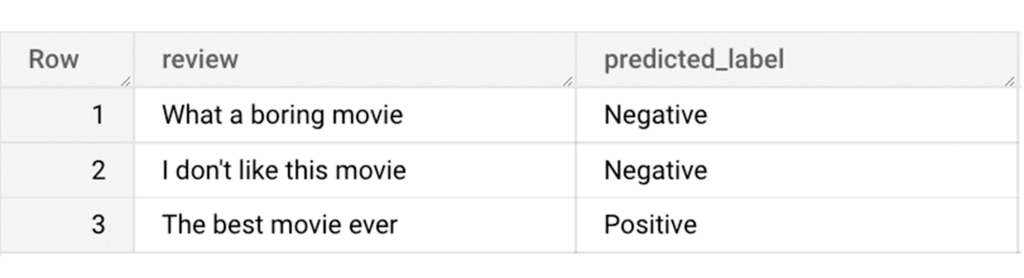
And that’s it! We just performed a sentiment analysis on the IMDb dataset from a BigQuery Public Dataset using only SQL statements and BigQuery ML. Now that we have demonstrated how sparse features can be used with BigQuery ML models, we can’t wait to see all the amazing projects that you would create by harnessing this functionality.
If you’re just getting started with BigQuery, check out our interactive tutorial to begin exploring.
3148
Of your peers have already watched this video.
2:00 Minutes
The most insightful time you'll spend today!
How Marketers Can Turn Information into Action with Machine Learning
The biggest challenge marketers face with machine learning is, “how to get starter”? Instead of getting overwhelmed, they should focus on the applied machine learning by using the algorithms that are already built.
Cassie Kozyrkov, the chief decision scientist with Google Cloud, says that marketers who are overwhelmed by everything they’re hearing about machine learning should focus on key ingredients, not building an entire kitchen.
New Visual Interface for Google Cloud’s Speech-to-Text API Makes API Easy to Use !

4653
Of your peers have already read this article.
2:00 Minutes
The most insightful time you'll spend today!
At Google Cloud, we’re committed to making artificial intelligence (AI) accessible to everyone and easier to harness for new use cases. That’s why we’re excited to announce the general availability of our intuitive, new visual user interface for Google Cloud’s Speech-to-Text (STT) API, right in Google Cloud Console, which makes the API much simpler and easier for developers to use.
The STT API lets developers convert speech into text by leveraging Google’s years of research in automatic speech recognition and transcription technology. As advancements in AI continue to bring speech to new interfaces and devices, the STT API helps developers add speech functionality to their applications in order to better meet consumer demands.
The STT API covers a wide variety of use cases, from dictation and short commands, to captioning and subtitles. Getting the most of STT, however, can be a complicated process. To achieve the highest accuracy on any AI use case requires careful testing and tuning.
Previously, developers building on the STT API had to do this work manually by carefully experimenting with our API. Just to get started, developers needed familiarity with GCP integration concepts and had to either build their own tools or manage various scripts and API calls to fully understand the API documentation. These actions required cumbersome and time-consuming effort and made measuring, customizing, and improving models even more difficult.
Today’s announcement significantly simplifies the process, facilitating iteration and integration of models into developers’ applications by letting developers perform every API function from within the Google Cloud Console. These tools will make it easier for developers to integrate the STT API with their products or services. This update also gives developers the ability to manage and quickly iterate on their STT model customizations with Model Adaptation.
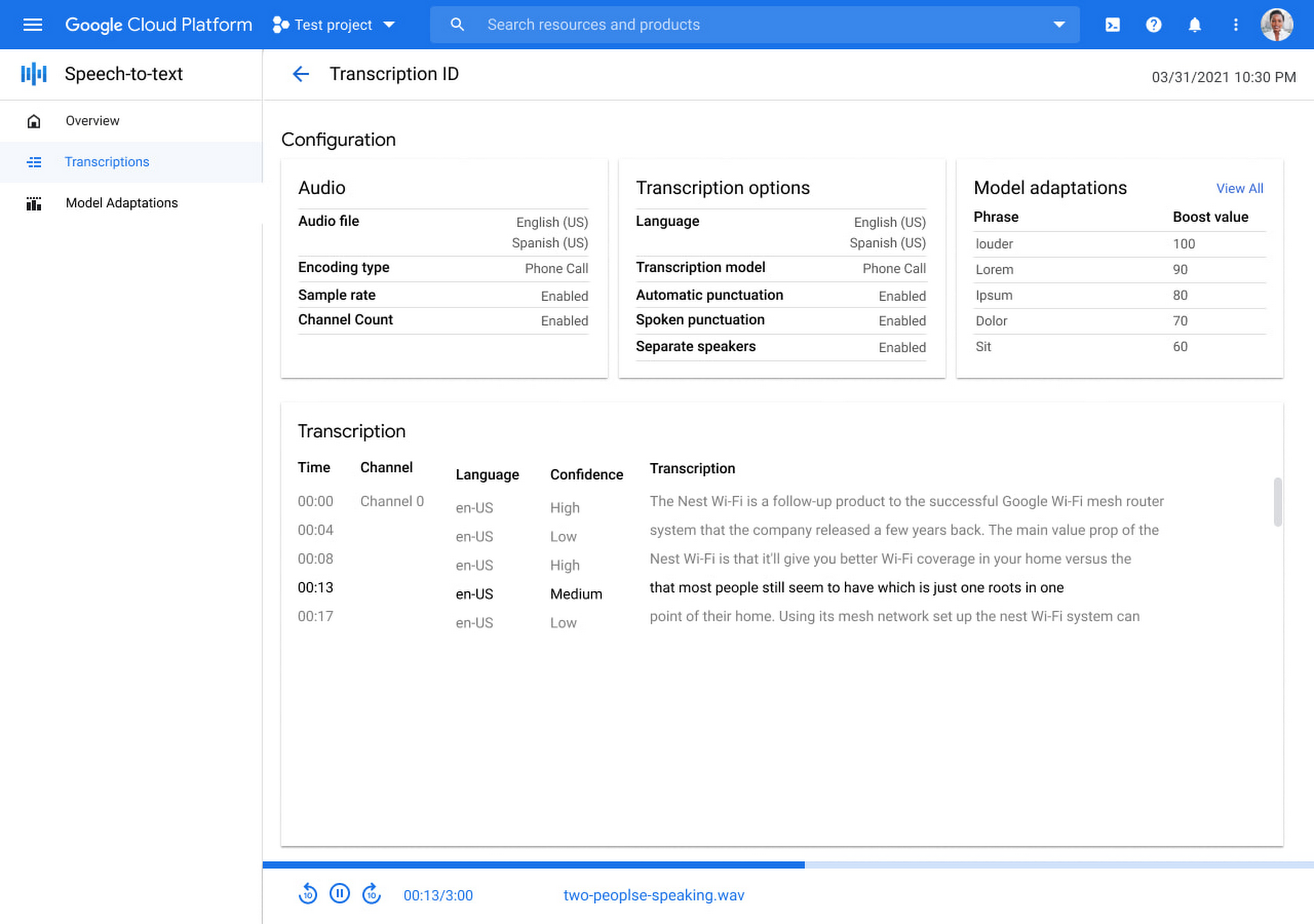
Model Adaptation allows developers to customize STT specifically for their domains or use cases. Developers can maintain lists of words and weights that will be applied to either every request or just single requests, depending on their needs. Model adaptations are reusable and composable, so once developers have seen good results in the STT Cloud Console, they can deploy to their entire solution.
The Speech-to-Text Cloud Console and Model Adaptation API is available now in all Google Cloud regions and languages and is accessible to all GCP users with no additional cost to that of the underlying API usage. The STT API supports over 70 languages in 120 different local variants. If you’re a developer looking for an easy to use, easy to integrate, and high-quality STT experience, sign up for our free trial and try our new interface on your own datasets today!
3120
Of your peers have already watched this video.
21:30 Minutes
The most insightful time you'll spend today!
Interpreting ML Models with Explainable AI
We often trust our high-accuracy ML models to make decisions for our users, but it’s hard to know exactly why or how these models came to specific conclusions.
Explainable AI provides a suite of tools to help you interpret your ML model’s predictions.
Listen to this discussion regarding how to use Explainable AI to ensure our ML models are treating all users fairly and how to analyze image, text, and tabular models from a fairness perspective, using Explanations on AI Platform.
Sara Robinson, Developer Advocate, Google Cloud defines explainability, and what it looks like for different data types. She also demonstrates the different Explainable AI offerings on Google Cloud, runs a demo, and shows how to use the What-if Tool, an open source visualization tool for optimizing your ML model’s performance and fairness.
More Relevant Stories for Your Company

An Out-of-the-box, End-to-end Solution for Contact Centers!
Providing best-in-class customer service is crucial for the success of your business. Contact centers are a critical touch point, as they have to balance between representing your brand and prioritizing customer care. When your customers seek help and support, they expect efficient service that is accessible through modern voice and

How Digital Simulation of Physical Stores Helped e-Commerce Companies Replenish Stocks and Fulfil Online Orders at Scale in 2020
Editor’s note: We’re inviting partners from across our retail ecosystem to share stories, best practices, and tips and tricks on how they are helping retailers transform during a time that has seen tremendous change. The original version of this blog was published by Trax Retail in October 2021. Please enjoy this updated


The Secret to Accelerated ML Model Training
As an infrastructure or a data science professional, it’s more critical than ever to keep abreast of the changes taking place to the infrastructure powering machine learning. If we take a step back, we will realize that there’s been a tremendous amount of progress in machine learning in the last

Elevating Voice Solutions: Google Cloud Introduces Speech-to-Text v2 API and Chirp for Businesses
As one of the most innate and ubiquitous forms of expression, speech is a fundamental pillar of human interaction. It comes as no surprise, then, that Google Cloud’s Speech API has become a crucial tool for enterprise customers, launched to general availability (GA) over six years ago and, now, processing over 1
