





6 Common Errors to Sidestep in RESTful API Design

3201
Of your peers have already read this article.
2:30 Minutes
The most insightful time you'll spend today!
Imagine ordering a “ready-to-assemble” table online, only to find that the delivery package did not include the assembly instructions. You know what the end product looks like, but have little to no clue how to start assembling the individual pieces to get there. A poorly designed API tends to create a similar experience for a consumer developer. Well designed APIs make it easy for consumer developers to find, explore, access, and use them. In some cases, good quality APIs even spark new ideas and open up new use cases for consumer developers.
There are methods to improve API design — like following RESTful practices. But time and again we are seeing customers unknowingly program minor inconveniences into their APIs. To help you avoid these pitfalls, here are six of the most common mistakes we have seen developers make while creating the API — and guidance on how to get it right.
#1 Thinking inside-out vs outside-in
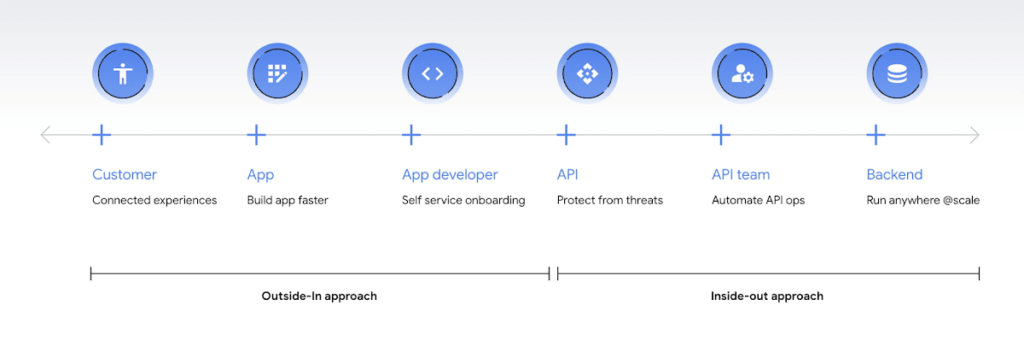
Being everything for everybody often means that nothing you do is the best it could be, and that is just as true for APIs. When customers turn to APIs, they are looking for specific solutions to make their work easier and more productive. If there is an API that better works to their needs, they will choose that one over yours. This is why it’s so important to know what your customers need to do their work better, and then building to fill those needs. In other words, start thinking Outside-in as opposed to Inside-Out. Specifically,
- Inside-out refers to designing APIs around internal systems or services you would like to expose.
- Outside-in refers to designing APIs around customer experiences you want to create. Read more about the Outside-in perspective in the API product mindset.
The first step to this is learning from your customers — be it internal consumer developers or external customers — and their use cases. Ask them about the apps they are building, their pain points, and what would help streamline or simplify their development. Write down their most significant use cases and create a sample API response that only gives them the exact data they need for each case. As you test this, look for overlap between payloads and adapt your designs to genericize them across common or similar use cases.
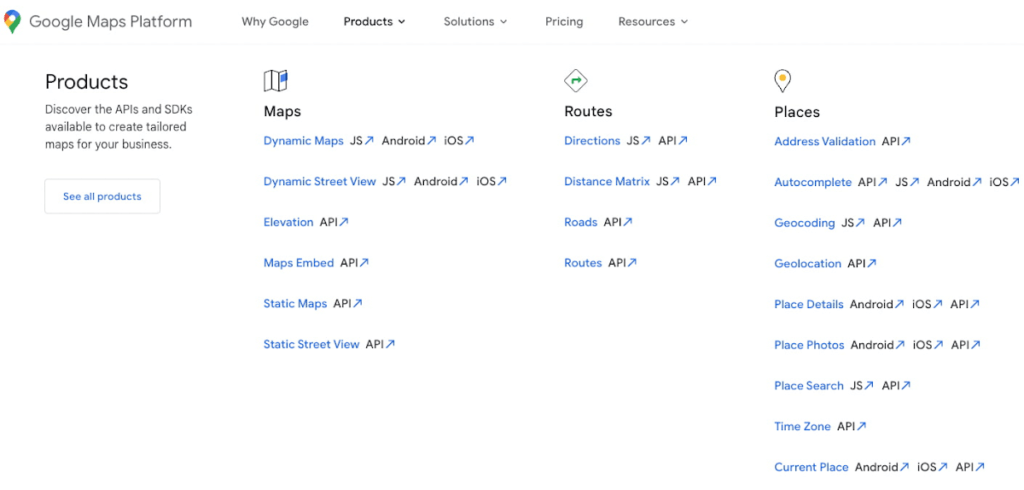
If you can’t connect with your customers — because you don’t have direct access, they don’t have time, or they just don’t know what they want — the best approach is to imagine what you would build with your APIs. Think big and think creatively. While you don’t want to design your APIs for vaporware, thinking about the big picture can make it easier to build non-breaking changes in the future. For example the image below showcases APIs offered by Google Maps. Even without diving into the documentation, looking at the names like “Autocomplete” or “Address Validation” clearly outlines the purposes and potential fit for a customer’s use case.
#2 Making your APIs too complex for users
Customers turn to APIs to bypass complicated programming challenges so they can get to the part they know how to do well. If they feel like using your API means learning a whole new system or language, then it isn’t fitting their needs and they will likely look for something else. It’s up to your team to make an API that is strong and smart enough to do what your customer wants, but also simple enough to hide how complicated the tasks your API solves for really are. For example if you know your customers are using your APIs to present information about recently open restaurants and highly rated pizzeria to their consumers, providing them with a simple API call as below would be of great help:
GET /restaurants?location=Austin&category=Pizzeria&open=true&sort=-priority,created_atTo see if your API design is simple enough, pretend you are building the whole system from scratch — or if you have a trusted customer who is willing to help, ask them to test it and report their results. If you can complete the workflow without having to stop to figure something out, then you’re good to go. On the other hand, if you catch rough edges caused by trying to code around system complexity issues, then keep trying to refactor. The API will be ready when you can say that nothing is confusing and that it either meets your customers’ needs or can easily be updated as needs change.
#3 Creating “chatty” APIs with too many calls
Multiple network calls slow down the process and creates higher connection overhead — which means higher operational costs. This is why it’s so important to minimize the number of API calls.
The key to this is outside-in design: simplify. Look for ways to reduce the number of API calls a customer must make in their application’s workflow. If your customers are building mobile applications, for example, they often need to minimize their network traffic to reduce battery drain, and requiring a couple calls instead of a dozen can make a big difference.
Rather than deciding between building distinct, data-driven microservices and streamlining API usage, consider offering both: fine-grained APIs for specific data types, and “experience APIs” (APIs that are designed to power user experiences. Here is a further theoretical discussion on Experience APIs) around common or customer-specific user interfaces. These experience APIs compose multiple smaller domains into a single endpoint; making it much simpler for your customers — especially those building user interfaces — to render their screens easily and quickly.
Another option here is to use something like GraphQL to allow for this type of customizability. Generally you should avoid building a unique endpoint for every possible screen, but common screens like home pages and user account information can make a world of difference to your API consumers.
#4 Not allowing for flexibility
Even if you’ve followed all of the steps above, you may find that there are edge cases that do not fit under your beautifully designed payloads. Maybe your customer needs more data in a single page of results than usual, or the payload has way more data than their app requires. You can’t create a one-size-fits-all solution, but you also don’t want a reputation for building APIs that are limiting. Here are 3 simple options to make your endpoints more flexible.
Filter out response properties: You can either use query parameters for sorting and pagination, or use GraphQL which provides these types of details natively. By giving customers the option to request only the properties they need, it guarantees that they won’t have to sort through tons of unnecessary data to get what they need. For example, if some of your customers only need the title, author, and bestseller ranking, give them the ability to retrieve only that data with a query string parameter.
GET /books?fields=title,author,ranking- Ability to sort with pagination. Generally, you don’t want to guarantee the order of objects in an API response because minor changes in logic or peculiarities in your data source might change the sort order at some point. In some cases, however, your customers may want to sort by a particular field. Giving them that option, combined with a pagination option, will give them a highly efficient API when they only want the top few results. For example Spotify API utilizes a simple offset and limit parameter set to allow pagination. A sample endpoint as shown in the documentation would look like this
$ curl https://api.spotify.com/v1/artists/1vCWHaC5f2uS3yhpwWbIA6/albums?album_type=SINGLE&offset=20&limit=10- Use mature compositions like GraphQL: Since customer data needs can differ, giving them on-the-fly composites lets them build to the combinations of data they need, rather than being restricted to a single data type or a pre-set combination of data fields. Using GraphQL can even bypass the need to build experience APIs, but when this isn’t an option, you can use query string parameter options like “expand” to create these more complex queries. Here is a sample response that demonstrates a collection of company resources with embedded properties included
"data": [
{
"CompanyUid": "27e9cf71-fca4",
"name": "ABCCo",
"status": "Active",
"_embedded": {
"organization": {
"CompanyUid": "27e9cf71-fca4",
"name": "ABCCo",
"type": "Company",
"taxId": "0123",
"city": "Portland",
"notes": ""
}
}
}
]
#5 Making design unreadable to humans
“K”eep “I”t “S”imply “S”tupid when you are designing your API. While APIs are meant for computer-to-computer interaction, the first client of an API is always a human, and the API contract is the first piece of documentation. Developers are more apt to study your payload design before they dig into your docs. Observation studies suggest that developers spend more than 51% of their time in editor and client as compared to ~18% on reference.
For example, if you skim through the payload below it takes some time to understand because instead of property names it includes an “id”. Even the property name “data” does not suggest anything meaningful aside from just being an artifact of the JSON design. A few extra bytes in the payload can save a lot of early confusion and accelerate adoption of your API. Notice how user-ids appearing on the left of the colon (in the position where other examples of JSON ideally have property names) creates confusion in reading the payload.
"{id-a}":
{ "data":
[
{
"AirportCode": "LAX",
"AirportName": "Los Angeles",
"From": "LAX",
"To": "Austin",
"departure": "2014-07-15T15:11:25+0000",
"arrival": "2014-07-15T16:31:25+0000"
}
… // More data
]
},
We think that JSON like this is more difficult to learn. If you want to eliminate any ambiguity in the words you choose to describe the data, keep the payload simple and if any of those labels could be interpreted in more than one way, adjust them to be more clear. Here is a sample response from Airlines endpoint of aviationstack API. Notice how the property names clearly explain the expected result while maintaining a simple JSON structure.
"data": [
{
"airline_name": "American Airlines",
"iata_code": "AA",
"iata_prefix_accounting": "1",
"icao_code": "AAL",
"callsign": "AMERICAN",
"type": "scheduled",
"status": "active",
"fleet_size": "963",
"fleet_average_age": "10.9",
"date_founded": "1934",
"hub_code": "DFW",
"country_name": "United States",
"country_iso2": "US"
},
[…]
]
#6 Know when you can break the RESTful rules
Being true to the RESTful basics — such as using the correct HTTP verbs, status codes, and stateless resource-based interfaces — can make your customers’ lives easier because they don’t need to learn an all new lexicon, but remember that the goal is just to help them get their job done. If you put RESTful design first over user experience, then it doesn’t really serve its purpose.
Your goal should be helping your customers be successful with your data, as quickly and easily as possible. Occasionally, that may mean breaking some “rules” of REST to offer simpler and more elegant interfaces. Just be consistent in your design choices across all of your APIs, and be very clear in your documentation about anything that might be peculiar or nonstandard.
Conclusion
Beyond these common pitfalls, we have also created a comprehensive guide packaging up our rich experience designing and managing APIs at incredible scale with Google Cloud’s API management product, Apigee.
Apigee — Google Cloud’s native API management platform — helps you build, manage, and secure APIs — for any use case, scale or environment. Get started with Apigee today or check out our documentation for additional information.

3933
Of your peers have already downloaded this article
1:30 Minutes
The most insightful time you'll spend today!
One of the great opportunities of cloud technology is the ability to combine and integrate different tools, services, and platforms. But, the question of which cloud tools and platforms to use—and how to ensure they work together seamlessly and securely still persists.
According to recent research, 82 percent of enterprises have a hybrid cloud strategy, running applications in an average of 1.5 public clouds and 1.7 private clouds; and IDC predicts increasing adoption of hybrid cloud architectures. As a result, many large organizations already depend on mixed networks composed of multiple cloud service providers, third-party cloud platform vendors, and on-premises systems.
So, how do organizations implement a successful multi-cloud strategy while deriving the full benefits of the cloud?
What enterprises need is an open-source strategy and consistent governance that will help companies use multi-clouds to compete in the digital world. Download this Harvard Business Review whitepaper to know more.
Introducing a strong alternative to CentOS: Rocky Linux Optimized for Google Cloud

3340
Of your peers have already read this article.
3:30 Minutes
The most insightful time you'll spend today!
As CentOS 7 reaches end of life, many enterprises are considering their options for an enterprise-grade, downstream Linux distribution on which to run their production applications. Rocky Linux has emerged as a strong alternative that, like CentOS, is 100% compatible with Red Hat Enterprise Linux.
In April 2022, we announced a customer support partnership with CIQ, the official support and services partner and sponsor of Rocky Linux, as the first step in providing a best-in-class enterprise-grade supported experience for Rocky Linux on Google Cloud. Today we’re excited to announce the general availability of Rocky Linux Optimized for Google Cloud. We developed this collection of Compute Engine virtual machine images in close collaboration with CIQ so that you get optimal performance when using Rocky Linux on Compute Engine to run your CentOS workloads.
These new images contain customized variants of the Rocky Linux kernel and modules that optimize networking performance on Compute Engine infrastructure, while retaining bug-for-bug compatibility with Community Rocky Linux and Red Hat Enterprise Linux. The high bandwidth networking enabled by these customizations will be beneficial to virtually any workload, and are especially valuable for clustered workloads such as HPC (see this page for more details on configuring a VM with high bandwidth).
Going forward, we’ll collaborate with CIQ to publish both the community and Optimized for Google Cloud editions of Rocky Linux for every major release, and both sets of images will receive the latest kernel and security updates provided by CIQ and the Rocky Linux community. And of course, we’ll offer support with CIQ for both these images, per our partnership.
Rocky Linux Optimized for Google Cloud lets you take advantage of everything Compute Engine has to offer, including day-one support for our latest VM families, GPUs, and high-bandwidth networking. And for customers building for a multi-cloud deployment environment, the community Rocky images have you covered.
Starting today, Rocky Linux 8 Optimized for Google Cloud is available for all x86-based Compute Engine VM families (and soon for the new Arm-based Tau T2A), with version 9 soon to follow. Give it a try and let us know what you think.

3460
Of your peers have already downloaded this article
1:30 Minutes
The most insightful time you'll spend today!
Banking, insurance and fintech companies strive to deliver superior customer experience. By adopting a human centered design for the digital customer journey, platform providers can drive monetization by focusing on interactions, behaviors and events!
Google Cloud Offering a Natural Migration Path for Developers Accustomed to Heroku

2783
Of your peers have already read this article.
1:30 Minutes
The most insightful time you'll spend today!
Modern developers worldwide have grown accustomed to the comfort of writing code, pushing to a remote Git repository and having that code be deployed at an accessible URL without having to worry about how it is deployed. This was a workflow popularized by Heroku years ago which brought joy and productivity to developers even if it did impose some loss of flexibility for operation teams.
To address that loss of flexibility when meeting security and integration requirements, Heroku introduced Private Spaces. Private Spaces provide network isolation from the internet since any application or datastore provisioned by Heroku is accessible to the internet by default.
Cloud Run is quickly becoming the “swiss army knife” of serverless here at Google Cloud and it’s a natural migration path for developers accustomed to Heroku. The fundamentals are all there:
- Continuously Deploy via Git push using open source Buildpacks or Dockerfiles
- Set CPU and Memory requirements for each instance
- Horizontally scalable apps that scale from zero to thousands of instances to meet traffic demands automatically
So while devs are kept happy, can Cloud Run do something for the Ops folks? Yes. Here are some things available right in the Cloud Run UI:
- Proper Secret Management with IAM based access control. No more setting secrets as environment variables.
- Traffic management between different revisions for blue-green or canary deployments.
- Define SLIs and SLOs with ease. Eg: 90% of requests have to be served under 200ms in a calendar month.
- Secure your service with tools such as Software Delivery Shield, Binary Authorization, and Cloud Armor. Definitely deserves its own blog post.
Recreating Private Spaces on Cloud Run
Let’s focus on network isolation now, let’s say you have an internet-facing app and a private backend API that talks to a private database. Simplest architecture ever, it conceptually looks a bit like this:
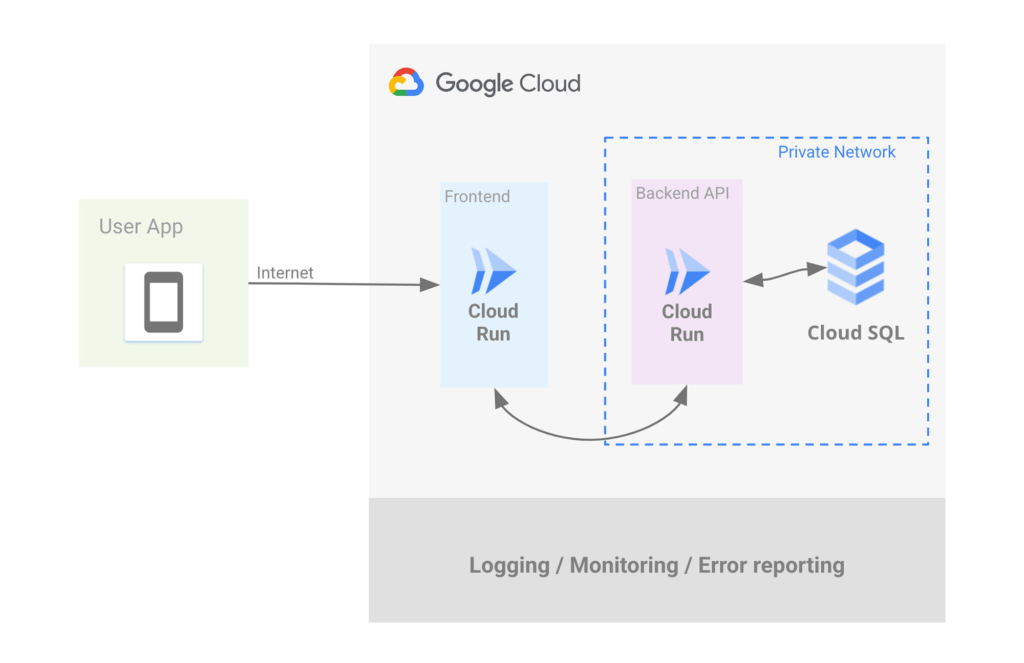
Let’s address the database first. If you want to use Postgres then Cloud SQL is most likely what you want, but do keep in mind that we have other datastores that speak Postgres such as AlloyDB and Spanner.
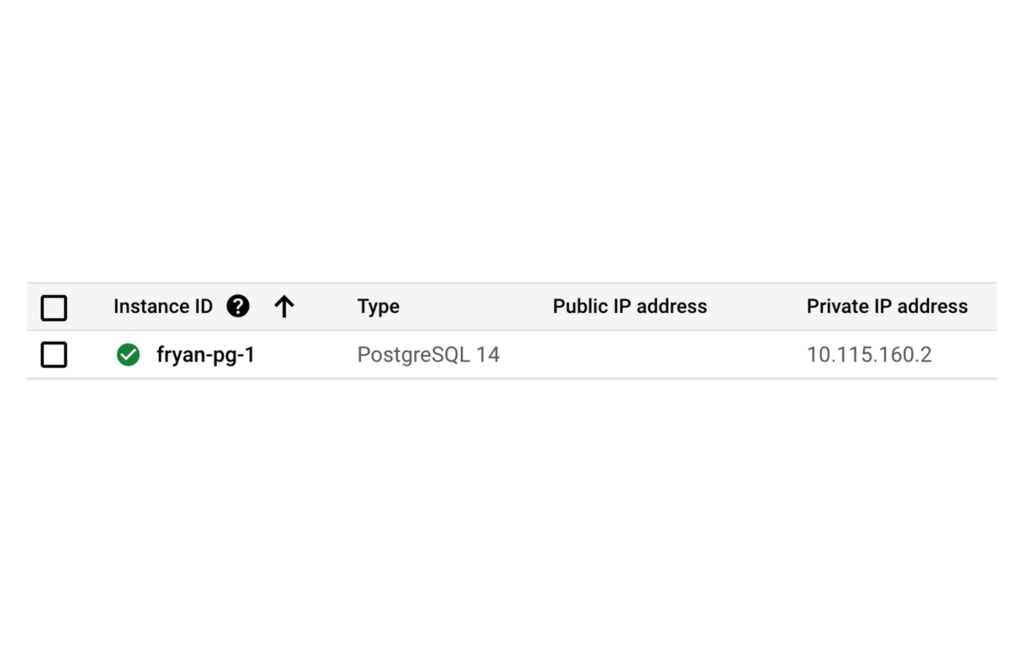
Cloud SQL allows you to create a Postgres instance that’s isolated from the internet by simply unchecking the Public IP checkbox and checking the Private IP checkbox. This will assign an IP address to your Postgres instance on your project’s network.
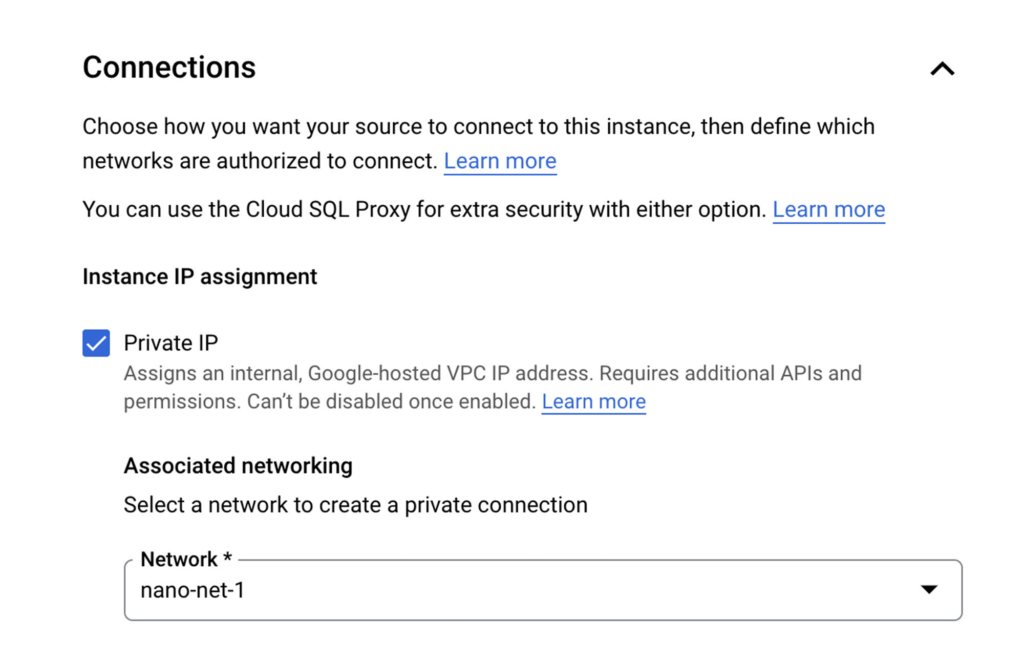
Once the DB is provisioned you’ll see the IP clearly listed, such as:
Of course there’s so much more to say about CloudSQL, to learn more please take a look at our documentation.
Ok now that you’ve dealt with Postgres, let’s address the private backend API on Cloud Run.
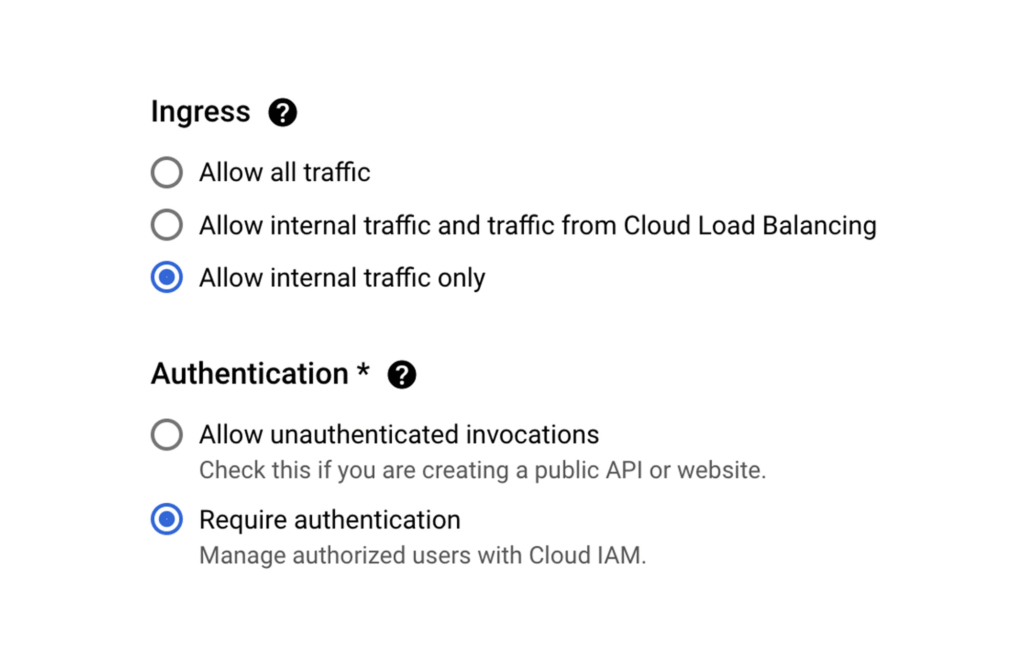
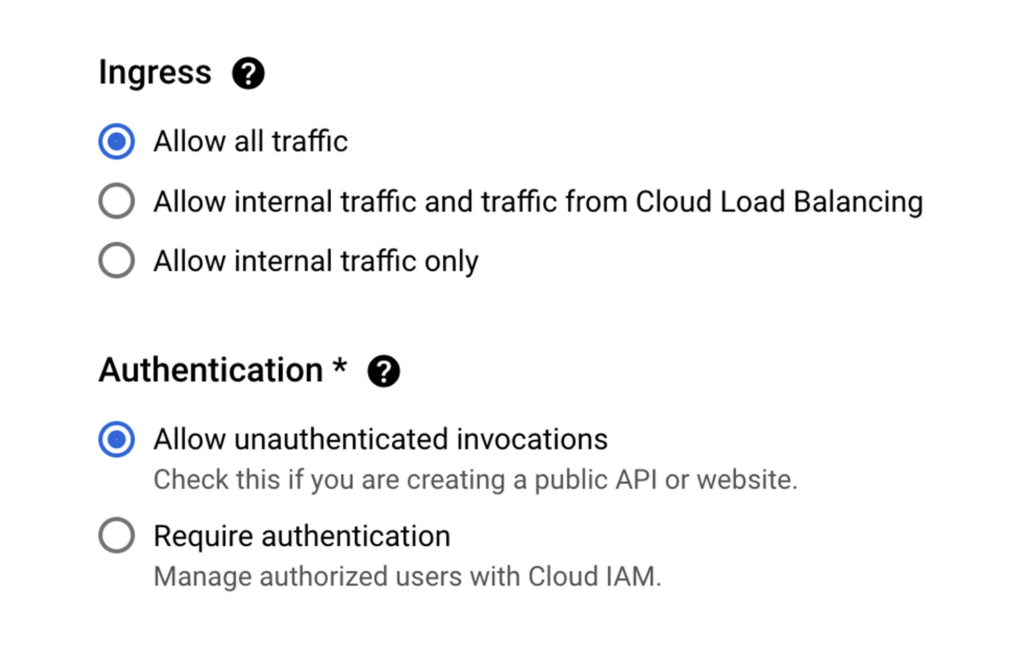
When creating a new Cloud Run service via the Google Cloud Console, Ingress can be limited to “Internal traffic only” so only traffic from internal sources, including your VPC, can access the service. In other words, the internet can not touch it.
As an additional level of security, it’s also possible to enforce that only requests from authorized users be served, In this case a “user” is most likely another service using its associated service account which will need the “roles/run.invoker” in order to call this service.
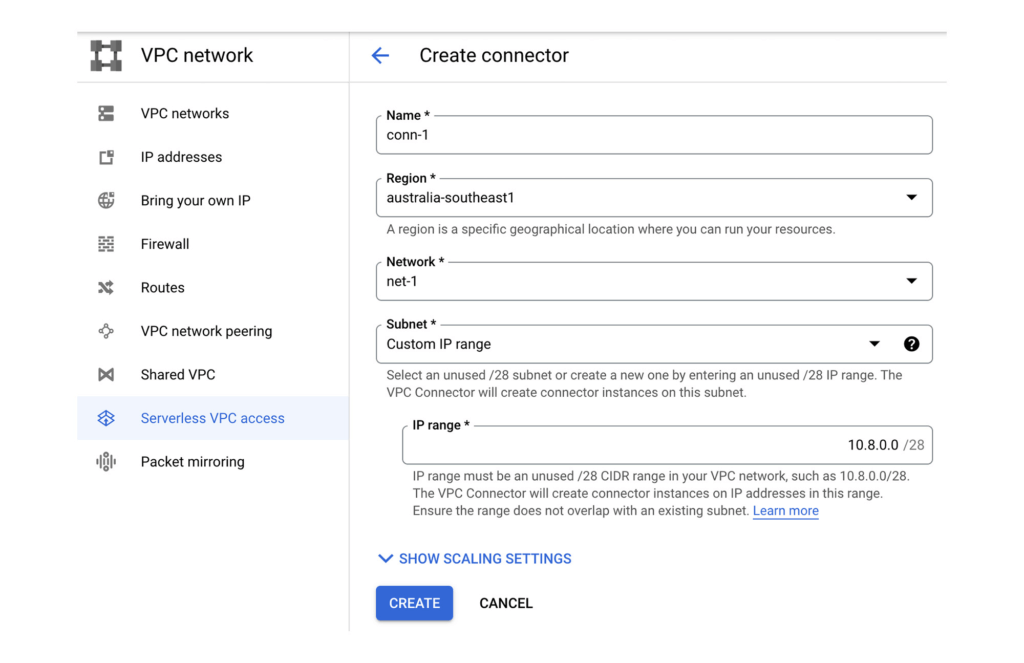
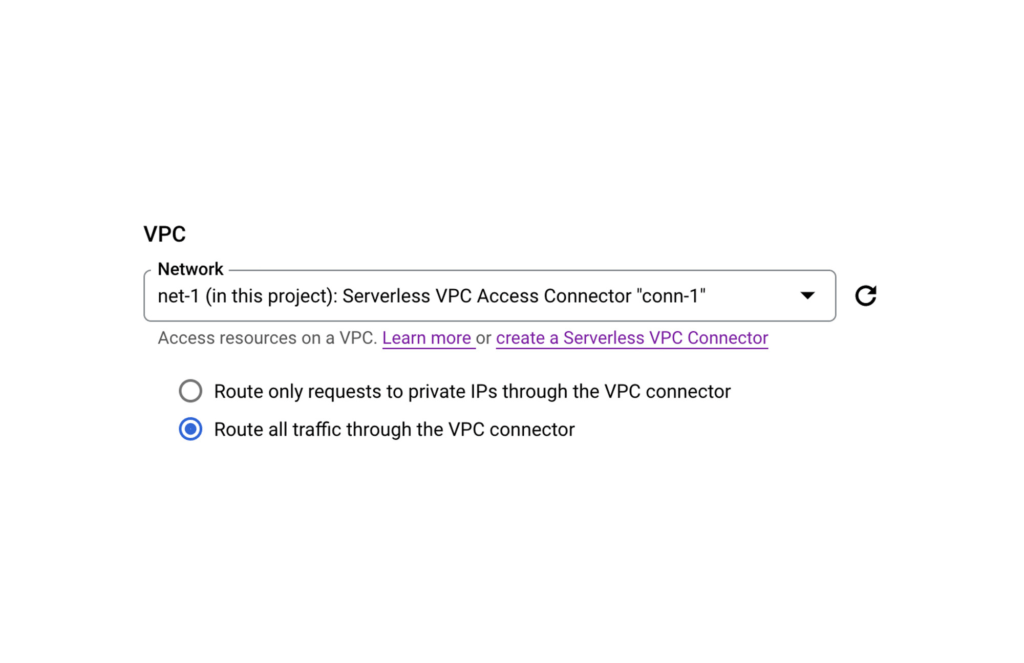
Now let’s make sure that our Backend API Service can reach the Postgres instance by configuring a VPC Connector. This will allow Cloud Run services to reach into the VPC and therefore, the internal IP for the Postgres instance.
Once the VPC Connector is created, you can associate it with a Cloud Run service.
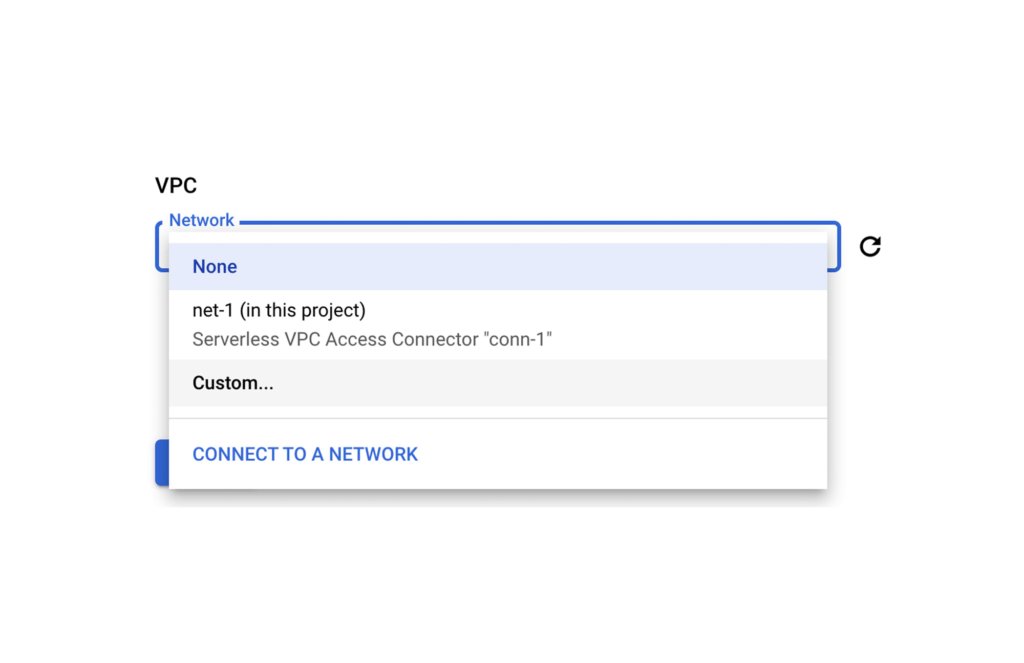
Then it’s just a matter of configuring your code to use the Postgres instance’s private IP address. A good 12-Factor app friendly spot to do that is with a connection string in an environment variable as part of the Cloud Run service configuration. Better yet, as this may contain a DB password, you can use Secret Manager to mount this environment variable from an encrypted and protected secret.
Finally, let’s now set up that Front End Cloud Run service which will respond to requests from the internet, and securely communicate with the backend API service.
For the frontend service choose to “Allow all traffic” and also “Allow unauthenticated invocations” so anyone on the web can access our URL. We could of course choose the middle option and use Cloud Load Balancing in conjunction with Cloud Armor which provides defenses against DDoS and application attacks, and offers a rich set of WAF rules. However, let’s keep it simple for now.
Keep in mind that our Backend service will only accept requests from within our VPC network, and that we don’t have a private IP address for Cloud Run.
So let’s ensure that all egresses from our Frontend actually get routed to the VPC Connector, this way when our Frontend calls a Backend API via it’s URL endpoint, the Backend will receive the request from within the VPC and allow it in.
PS: If your Backend requires authentication don’t forget to create a Service Account for your Frontend Service and then give it the necessary role following a service-to-service auth pattern.
And that’s it. You now have an operationally acceptable private space like environment with an app composed of two Cloud Run services where the Backend service and Postgres instance are network isolated from the Internet. If after reading this blog you would like to get hands-on experience with the technologies mentioned above, then take a look at Google Cloud Skills Boost. There you will find learning paths, quests, and labs curated to boost your cloud skills in a particular area.
For example here’s a great lab that takes you through developing a REST API on Cloud Run using Go.
Bit Capital Rolls Out a Digital Financial Solution in Under 3 Months and at 2/3 the Cost

5677
Of your peers have already read this article.
4:00 Minutes
The most insightful time you'll spend today!
In the past few years, a series of new technologies and regulatory changes has been transforming Brazil’s financial industry. The concept of blockchain added security and agility to financial transactions. The open banking system being deployed by the country’s Central Bank (BC) allows for platform integration and data sharing -with the user’s consent- between financial institutions. Recently, the launch of Pix, also by the BC, has shaken the market by creating a new payment method that is instant, free for individuals and 24/7.
Since 2018, the startup Bit Capital has been working on the development of 100%-digital financial solutions in the cloud to help its clients adapt to this new scenario in a convenient way, without the need to build an infrastructure for that or hiring different providers. Pix was not the exception.
In less than 3 months, the team was able to build and go live with a solution that can be used by both direct participants (i.e. those with banking licenses granted by BC) and indirect participants (i.e. companies depending on direct participants to offer payments on Pix) through Bit Capital’s platform.
Besides this differential, Pix and the startup’s other solutions are based on blockchain and Google Cloud’s cloud, ensuring greater security, scalability and availability for customers and allowing for an easy integration between Bit Capital’s platform’s solutions and those from other companies.
“Now we have a platform with an API and various microsservices, allowing clients to connect and develop their own financial product without having to start from scratch.”
—Francesco Miolo, CFO, Bit Capital
A robust structure to handle Pix’s high demand
Bit Capital was established with a certain urgency to develop its platform. The idea was well-developed and customers were interested. The fast deployment of Google Cloud’s tools was one of the main factors that attracted the company to use it as a basis for its infrastructure.
“We managed to deliver everything we have today in Google Cloud with a small team. That was another challenge: being able to grow with a few people,” says Juliano Souza, the startup’s head of IT infrastructure. “We sought other cloud partners, but they had a steep curve. We chose Google Cloud because we needed quick, quality scaling.”
The same thing happened when they built the solution for Pix, despite the specific challenges involved. The BC had performance requirements that led the company to spend some time experimenting until they reached the best suite of tools to meet those requirements. The startup wanted to create a unique architecture that could help both large and small customers and be integrated to the platform’s other microservices.
With the support from Google Cloud’s team to answer doubts and make the best decisions, the solution was built in a few months, at a cost about two-thirds lower than other providers.
The solution’s architecture is based on apps running in Docker in Google Kubernetes Engine (GKE), with interconnected microservices. The blockchain system runs on Compute Engine, its rows are managed in Pub/Sub and Dataflow, and persistent data, in Cloud SQL. Cloud Interconnect is used for the connection with BC. Cloud KMS and Secrets Management store the company’s pre-credentials. All of this is supported by Cloud Load Balancing for load balancing and autoscaling.
According to the team, GKE was essential for the solution’s success. Using infrastructure as code in the tool made uploading of a group of microservices significantly easier. Developers are able to help set up this environment, which has helped spread the DevOps culture in the team. Besides orchestrating and integrating apps, GKE also provides an elastic structure to handle demand peaks and visibility to monitor internal components.
“Google Kubernetes Engine was the only way to ensure availability, observability and elasticity for all clients, whether small, middle-sized or large.”
—Juliano Souza, Head of IT Infrastructure, Bit Capital
Nowadays, the solution’s environment has 20 clusters with over 1,500 pods – 250GB in data per month, providing a robust structure to support a service involving periods of intense demand such as Black Friday.
Ease to monitor, fix and improve
Just 10 days after Pix’s official launch date, the company had its first test: Black Friday. This allowed a major e-commerce customer to test the scale and see the success of the architecture that had been built. “It worked great regarding what the cloud could deliver. And we found what we needed to fix very quickly. Operations [formerly Stackdriver], in particular Cloud Trace, showed us clearly what needed to be done to improve performance,” Souza explains.
Using Operations added reliability by putting deliveries into production. Checking Cloud Trace to see if there were any performance issues and the exact point where they were happening became routine for Bit Capital’s developers. Google Cloud’s security tools and Google Safety Center provided the resources needed to monitor and secure the environment, with automatic data encryption at rest and in transit.
“Google Cloud has security as a premise. When we upload any kind of component, like a database or a virtual machine, the drive is encrypted by default. With other providers, you must specify that you want it encrypted.
”—Juliano Souza, Head of IT Infrastructure, Bit Capital
The easy service monitoring and management accelerates product and technology development because the team no longer needs to worry about infrastructure. Automated management allows professionals to spend more time on new projects and the company’s business. Also, the deployment of services in a Google Cloud multi-region impacts on customer experience, providing high availability for their solutions.
In the coming months, Bit Capital aims to ramp up service usage and the creation of new projects in Google Cloud by adding more customers to Pix’s solution and Banking as a Service (BaaS) solutions. Anthos will be incorporated to the tool suite to make it easier to connect apps with the customers’ on-prem environments. And the deployment of open banking has the potential to be a business driver for the company.
“We joke that we’re already doing open banking, because we have various connections with different providers, which allows us to offer an integrated solution,” says Francesco Miolo, the startup’s CFO. “With the arrival of the new regulations, something we are waiting for since we started out, we will be able, through our platform, to take our customers to the open finance ecosystem, enabling the development of disruptive business models.”
More Relevant Stories for Your Company

Rollouts Made Simple: Cloud Deploy’s Deploy Hooks
Cloud Deploy is a fully managed continuous delivery platform that automates the delivery of your application. Recently, we’ve heard from users that they want Cloud Deploy to also perform self-defined pre- and post-deployment operations to reduce the amount of additional toil required for each rollout. Examples of such operations include database schema

Apigee and Vision API: ICICI Prudential Life Insurance’s Journey of Speeding Document Processing
Google Cloud results Helps enable instant document approval with optical character recognition by Vision APIProcesses 100,000 documents in 20 minutes with automated document processing product Recognic, powered by Vision API and ApigeeHelps increase the number of applications processed by 30% within the same timeframe The insurance landscape in India has seen




Building a Powerful Digital Payments Solution
See how the Payeezy business platform, which enables merchants to establish and grow their eCommerce business, was set up and how it works. The platform enables the exposure of First Data services, processes, and data to partners. The Payeezy API provides all the tools partners need to set up payments

Rubin Observatory Leverages Google Cloud to Power Astronomical Research
This week, the Vera C. Rubin Observatory is launching the first preview of its new Rubin Science Platform (RSP) for an initial cohort of astronomers. The observatory, which is located in Chile but managed by the U.S. National Science Foundation’s NOIRLab in Tucson, AZ and SLAC in California, is jointly funded by the NSF and the U.S. Department
