





reCAPTCHA Keeps Unemployment Claims and COVID Vaccine Registration Portals Threat-free

3004
Of your peers have already read this article.
1:30 Minutes
The most insightful time you'll spend today!
More people than ever have been conducting more of their lives online due to the COVID-19 pandemic. This creates a new landscape for fraudsters to create and release new attacks. Research commissioned by Forrester Consulting showed 84% of companies have seen an increase in bot attacks. 71% of organizations have seen an increase in the amount of successful attacks. 65% of businesses have experienced more frequent attacks and greater revenue loss due to bot attacks. With so many people visiting government websites to learn more about the COVID-19 vaccine, make vaccine appointments, or file for unemployment, these web pages have become prime targets for bot attacks and other abusive activities. But reCAPTCHA Enterprise has helped state governments protect COVID-19 vaccine registration portals and unemployment claims portals from abusive activities.
Assisting with unemployment claims during COVID-19
Alongside the wave of unemployment claims caused by COVID-19, many state government agencies, such as Wisconsin’s Workforce Development, have seen an increase in attempted malicious bot logins on their external websites. Many states have had malicious actors visit unemployment claims portals and enter stolen credentials to file fraudulent unemployment claims. Because many unemployment claims portals are mandated to pay a recipient within 2 weeks, the claims portal processes this fraudulent information and bad actors receive unemployment checks weeks before their false claims are recognized. By then, the fraudsters have their money and have repeated this process using other stolen credentials.
reCAPTCHA Enterprise helps state governments reduce false claims by preventing adversaries from automatically reusing credentials on unemployment claims portals. reCAPTCHA Enterprise’s scale and speed to determine fraudster behavior across the Internet helped some of the largest states in the United States, such as Texas.
Registering for the COVID-19 Vaccine and accessing state-sponsored resources
Several states, such as Pennsylvania, are challenged by web traffic that fluctuates based on the COVID-19 Vaccine Phase. For example, during Phase 1, there was a large increase in web traffic from both humans and bots because of the demand for the very few available vaccination slots. As more states move into Phase 2 and Phase 3, and the vaccine is more widely available, traffic is increasing because bad actors know more people are coming to these websites to register to be vaccinated.
reCAPTCHA Enterprise was implemented to stop bad actors from scripting bots to book vaccine appointments and then sell those appointment slots on another website for profit. These fake web pages are falsely promoted as websites where people can register for the vaccine. Vaccine appointments are not the only government system from which fraudsters try to profit. Transportation and social service departments also face frequent attacks, wherein fraudsters try to profit by booking and then selling appointments with those organizations.
Fending off these attacks was made easier thanks to reCAPTCHA Enterprise, a frictionless fraud detection service that leverages our experience from more than a decade of defending the internet and data for our network of more than 5 million sites. The reCAPTCHA Enterprise platform can understand fraudulent behavior, introduce friction to block bots from booking appointments, and allow legitimate users to access the vaccine portals and other state portals.
Because reCAPTCHA Enterprise does not require end users to complete captcha challenges, several state governments installed reCAPTCHA Enterprise across search, login, and registration web pages. State governments are also placing reCAPTCHA Enterprise on webpages where end users can access healthcare, receive assistance for housing or food, register motor vehicles, or propose legislation. With reCAPTCHA Enterprise on more pages, it becomes more difficult for malicious software or bots to carry out their attacks against different pages, but not for end users to browse, login into accounts, book appointments, or apply for resources. Because reCAPTCHA Enterprise requires no action from end users to stop fraud, state governments implemented reCAPTCHA Enterprise on all points of interaction on their webpages to ensure maximum security without impacting the user experience.
Providing security everywhere and pricing for all
Many state governments are familiar with buying cloud services in a pay-as-you-go model. reCAPTCHA Enterprise eased the purchasing process by providing state governments with predictable, scalable, and customizable pricing. State governments know up front how much they can expect to pay each month based on the number of assessments reCAPTCHA Enterprise performs. reCAPTCHA Enterprise’s flexible pricing model keeps pace with the natural fluctuations of visitors to vaccination registration and unemployment claims. reCAPTCHA Enterprise has a dedicated sales team that can tailor pricing to your specific use cases so both your webpages and budget are not compromised.
reCAPTCHA Enterprise has helped many state governments serve their constituents by making it easier to get vaccinated and collect unemployment. It helps constituents take advantage of public services and makes it more difficult for fraudsters to manipulate and interfere with them.
To start protecting your web pages from credential stuffing and other attacks, get started with reCAPTCHA Enterprise today.
5131
Of your peers have already watched this video.
18:00 Minutes
The most insightful time you'll spend today!
Trusted Collaboration for Hybrid Workplace with Google Workspace
Hybrid workspace need high levels of security, data privacy, and trust for seamless collaboration across workforce. As we navigate to the new normal, your enterprise can learn about the security and privacy specific innovations Google Workspace utilizes to help customers realize powerful, trusted, cloud-native collaboration.
Your Cloud Defense Enhanced: Google Introduces End-to-End TDIR in Chronicle Security Operations

1174
Of your peers have already read this article.
4:30 Minutes
The most insightful time you'll spend today!
As cloud adoption continues to grow, so too does the number of cloud-born security threats. However, cloud environments can present significant opportunities to improve security with the right tools and processes in place.
When it comes to effective threat detection, investigation and response (TDIR) in the cloud, modern solutions must ensure that the entire security operations workflow — from data analysis through detection to response — are working in tandem to deliver the insights, context, and processes needed for cyber defenders to respond to threats with speed and precision.
At Google Cloud, we believe that modern security operations should rely less on customer engineering and more on packaged outcomes delivered by solution providers. With this in mind, we are excited to announce today at our annual Security Summit that Chronicle Security Operations now provides turnkey TDIR for Google Cloud. By integrating with our cloud-focused Security Command Center Premium (SCC) and Google Cloud telemetry, Chronicle can collect and analyze data from Google Cloud, detect and investigate threats, and automate responses to mitigate risks.
In our recent State of Cloud Threat Detection and Response Survey, 71% of respondents said that “entire classes of threats are eliminated by migrating to the cloud,” and 82% stated that “the cloud affords the ability to process more data, including on-prem data, which can improve detection across the board.”
To take advantage of all that the cloud can do for security, organizations should to do more than “lift and shift” their existing security tools and processes to the cloud. The cloud presents a different attack surface, often across several cloud services and data repositories, and each can have different attack tactics, potential misconfigurations, and context.
This update to Chronicle helps enable teams to:
- Detect with confidence. Out-of-the-box detection rule sets developed by Google threat researchers surface cloud attack vectors and provide high fidelity, contextualized alerts that quickly give insight into potential threats in your Google Cloud environment.
- Investigate with full context. Visualize threat storylines, complete with cloud-specific context that is correlated with additional data and context from across your environment for fast and efficient investigations.
- Respond with speed and precision. Streamline workflows and automate response actions with prebuilt playbooks and best practices designed specifically for Google Cloud. Chronicle SOAR’s case management and team collaboration help ensure fast and timely response.
- Simplify data ingestion. Chronicle automatically ingests, normalizes and contextualizes cloud telemetry from a variety of Google Cloud services (such as Cloud Asset Inventory, Google Kubernetes Engine, Google Compute Engine, cloud audit logs, and Cloud DLP), reducing the need for complex and time-consuming engineering.
Putting Google Cloud TDIR to work
Let’s take a closer look at how our end-to-end cloud TDIR workflow manages a potential Google Cloud attack.
Setting up cloud TDIR in Chronicle only takes a few clicks. Security Command Center’s built-in threat detection identifies attacks against Google Cloud resources. These findings, as well as audit, NAT, DNS, and firewall logs, are ingested into Chronicle to provide additional insight and context into Google Cloud threats.
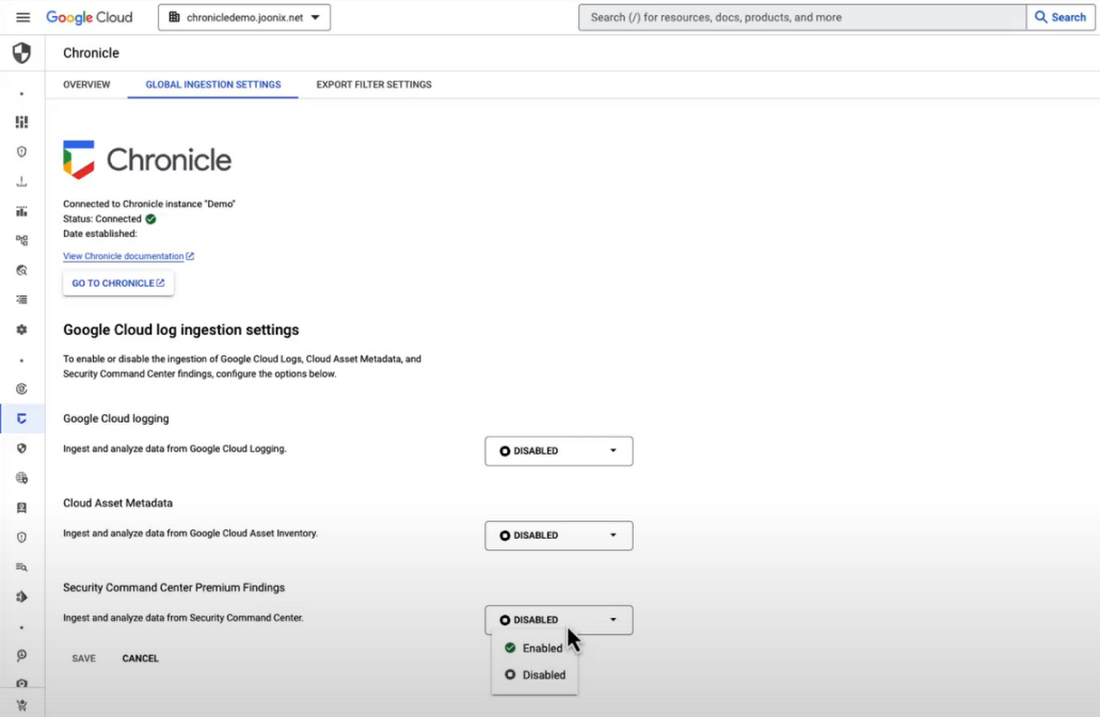
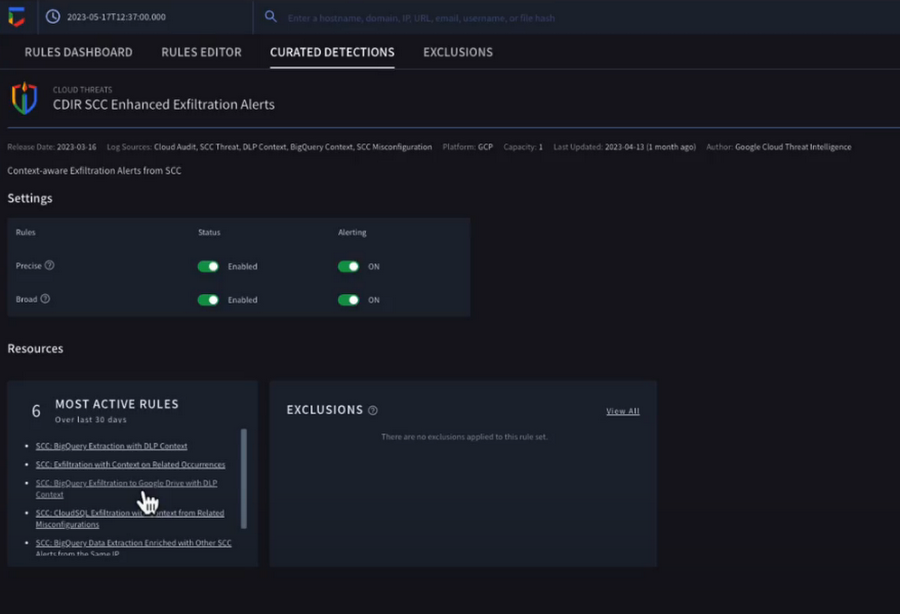
Chronicle now provides detection rules for Google Cloud threats. These rules correlate SCC findings with Chronicle’s advanced detection engine to reveal the broad scope of malicious activity, giving you visibility and more contextual information into what’s going on in your environment. In our example, Chronicle alerts on suspicious activity that can indicate an attempt to exfiltrate data from BigQuery.
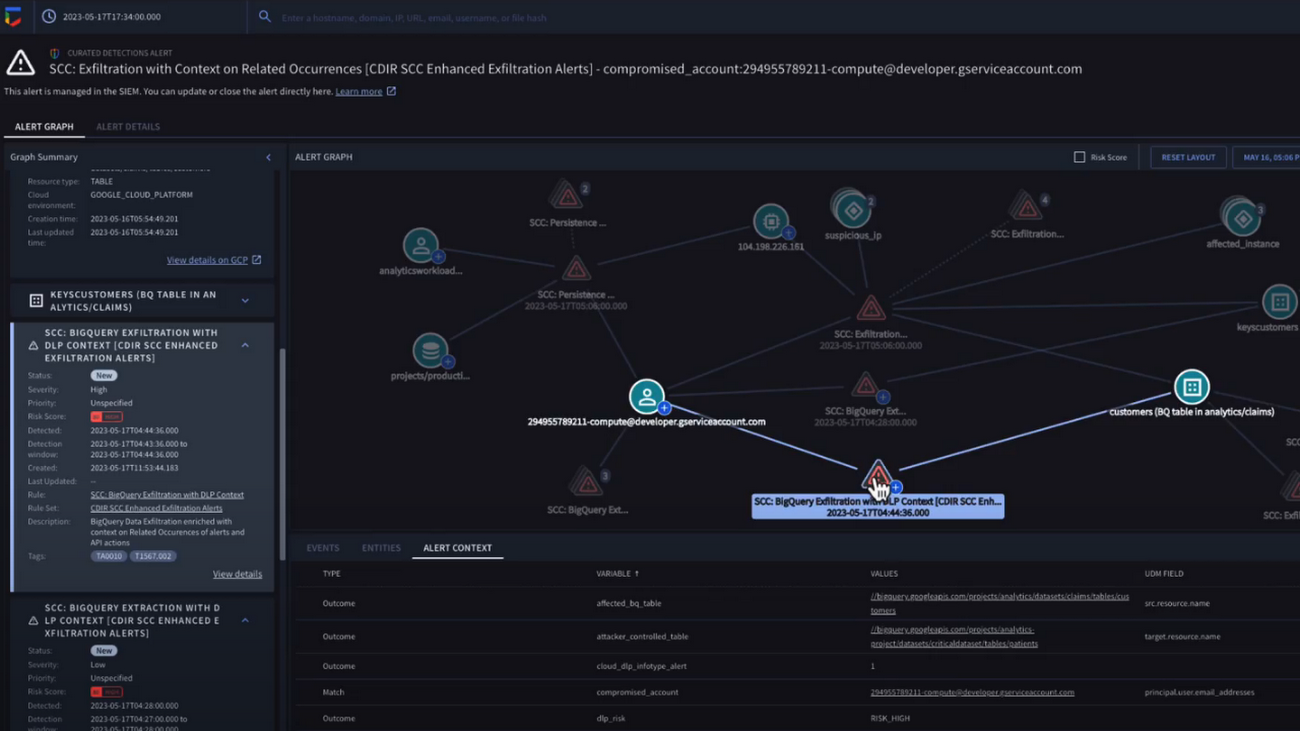
The new Chronicle Alert Graph surfaces key details of primary alerts you’re investigating in seconds. Combining cloud alerts and telemetry and correlating that with vital context from other sources (such as user data, endpoint data, and threat intelligence,) you can explore the visual representation of an alert’s relationship to other alerts and entities, dig into the potential attack paths, get quick summaries of implicated security artifacts, and pivot into your Google Cloud Console to do a deeper dive into potentially-impacted resources.
In our example, we can see a BigQuery exfiltration event associated with a customer and that it’s associated with a particular service account tied to a Google Cloud org. Alert context below tells us more about what’s been impacted. It shows us that cloud credentials in the form of encryption keys and email addresses were associated with the event.
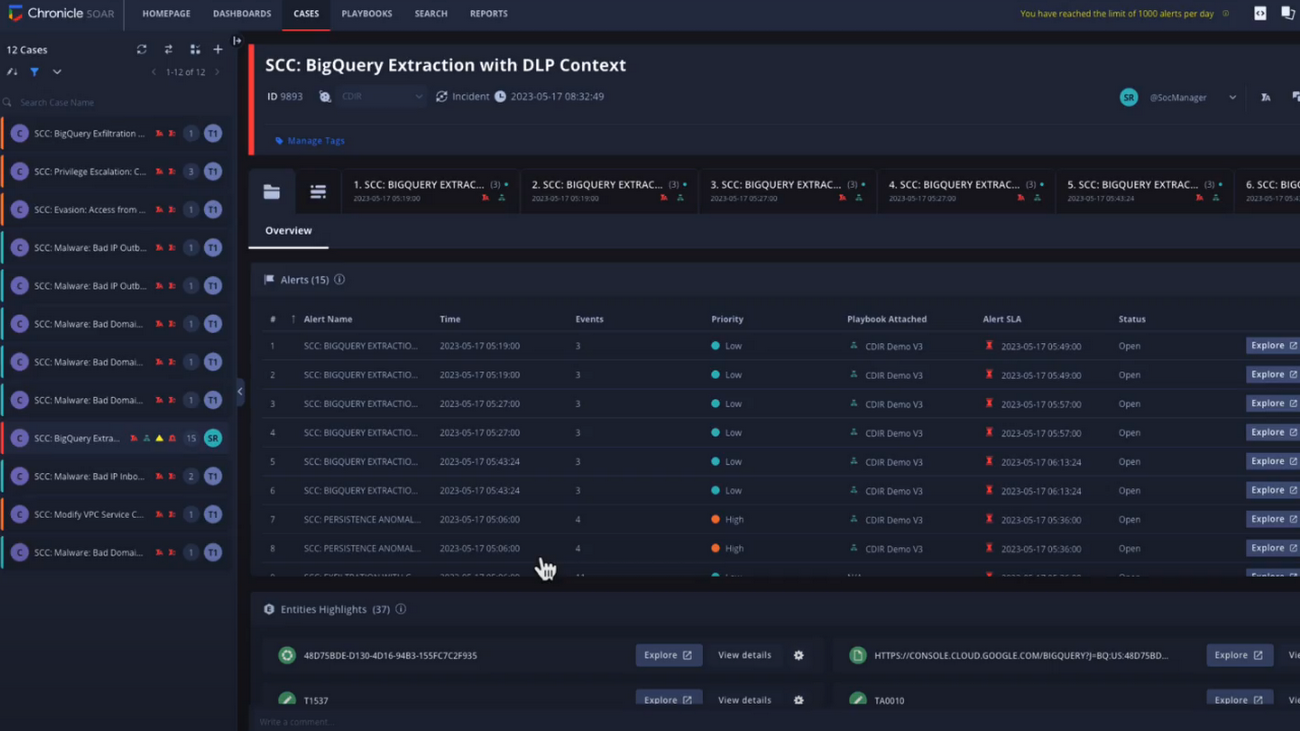
Chronicle case management automatically groups any related alerts into threat-centric cases, uniting the information that matters and making it simple for you to see and understand the scope of the event.
In our example, Chronicle groups these alerts together based on common source address and username, and the case wall provides the summary of the alerts and actions that are taking place across the entire case.
Chronicle playbooks, designed specifically for Google Cloud, automate your desired response processes. In our example, when an alert was generated a playbook automatically ran through predefined steps that gathered data, enrichment, and took automated remediation steps to prevent this service account and instance from continuing.
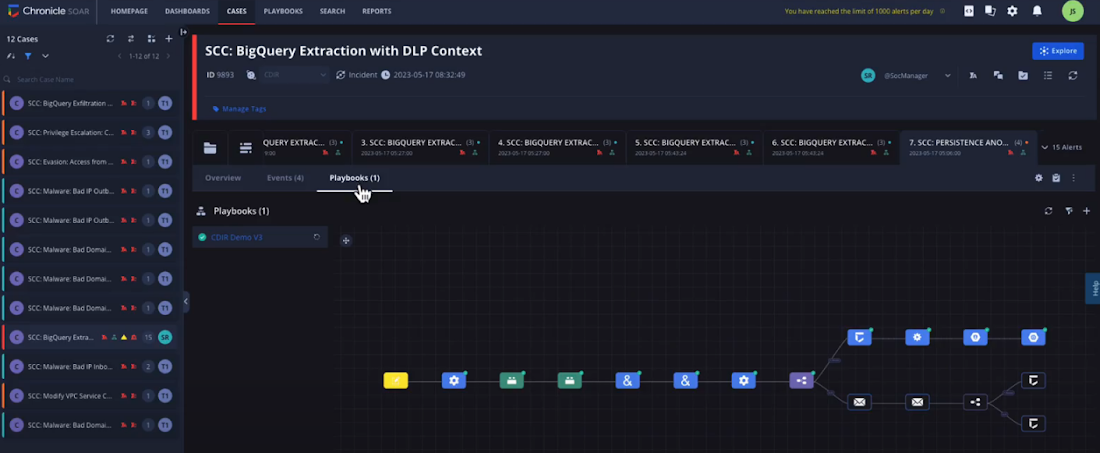
Ready to detect with confidence, investigate with broad context, respond with speed and precision, and simplify data ingestion? Chronicle Security Operations is your go-to for turnkey, end-to-end threat detection, investigation, and response on Google Cloud.
Tune in to our Security Summit session to learn more and see a demo of the new Google Cloud TDIR capabilities.
New Study Suggests Public Sector Firms Must Move Over Legacy Productivity Tools

5013
Of your peers have already read this article.
6:00 Minutes
The most insightful time you'll spend today!
Prior to joining Google Cloud, I spent 20 years in the public sector serving in various security roles, most recently as the head of the cybersecurity division at the newly established Cybersecurity and Infrastructure Security Agency (CISA). I was responsible for delivering services and capabilities to about 100 civilian agencies, as well as our critical infrastructure for state and local partners across the country.
Throughout my time serving in the U.S. government, I spent a great deal of energy working to keep bad actors out of our systems. What I eventually realized was that we were at a disadvantage. We didn’t just have legacy systems to deal with; we also had a legacy mindset. Our policies and capabilities were overly reliant on a perimeter-based approach to defense and introduced layers of friction with tools like VPNs, which inhibited productivity and increased frustration.
I spent the last few years of my time in the government doing my best to modernize this approach to security and supporting the many people who shared this vision. While most of them are still there, doing excellent work, repeated cybersecurity breaches of U.S. government systems have interrupted vital work and cost taxpayers billions of dollars. The SolarWinds breach in 2020, for example, may have cost governments and businesses more than $100 billion and the loss of vital national security information. Yet many government agencies continue to rely on the same legacy productivity software.
Today, a new survey conducted by Public Opinion Strategies and commissioned by Google Cloud shows that many government workers echo these concerns. The survey—which polled 2,600 working Americans, includes 600 workers from the D.C. metro area and 338 workers employed by federal, state, or local governments across the country—found that the majority of government employees surveyed reported being “very” concerned about cyberattacks striking their employers in the coming years. And nearly one-third of surveyed government employees in the D.C. metro area say they have experienced a disruption at work because of a cyberattack.
Results from the survey also showed a lack of satisfaction with legacy software, with more than 50% of government workers nationally responding that there are other products and services that could help them do their jobs better.
These new findings not only speak to the challenges our government employees face, but also outline an opportunity for improved innovation and security that can help government employees better achieve their missions.
Concerns about cybersecurity
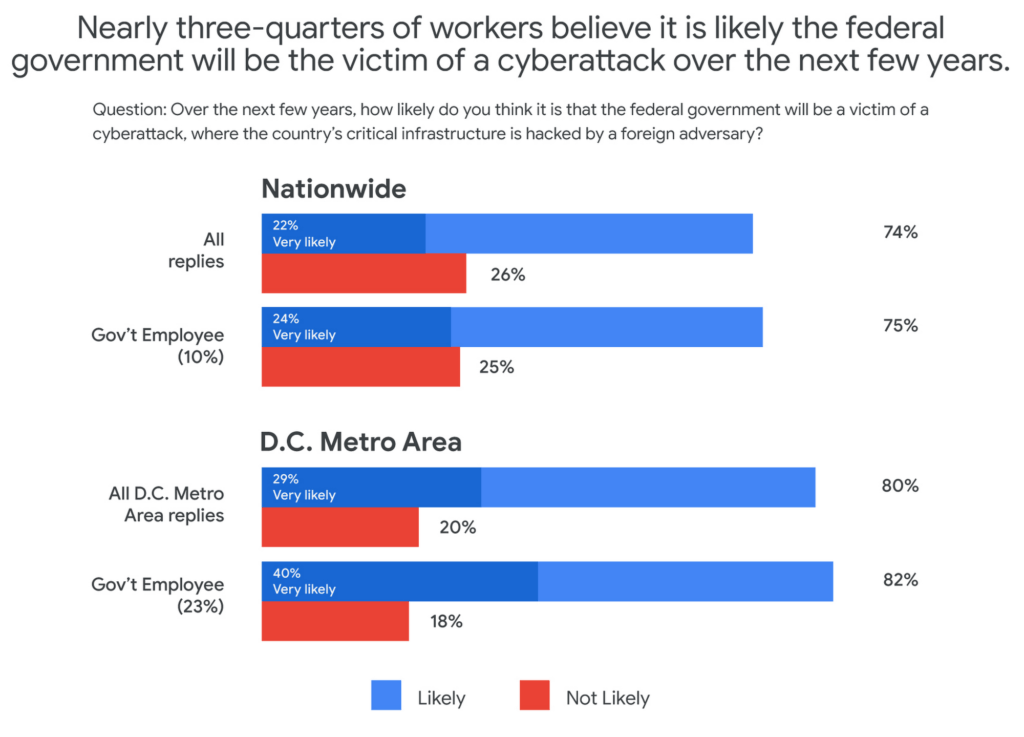
The majority of respondents said they believed it was likely that the federal government would be the victim of a cyberattack in the next few years. This percentage was even higher in the D.C. metro area and among government employees, with 40% of government workers living in metro D.C. saying it was “very likely.”
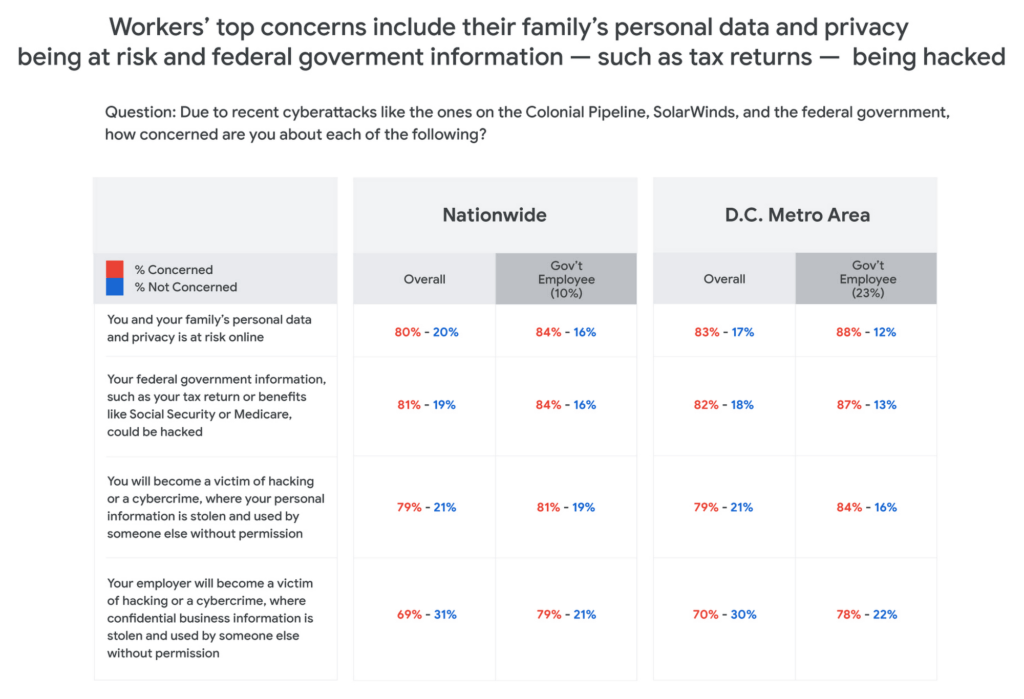
Respondents in all groups—national, D.C. metro, and government employees—were more likely to be concerned about cyberattacks as the perceived threat moved closer to home. For example, 80% of those surveyed said that recent attacks have them concerned about their personal data and privacy, and that of their family members. And for those in the D.C. area or in government jobs, the numbers were consistently higher than the national average.
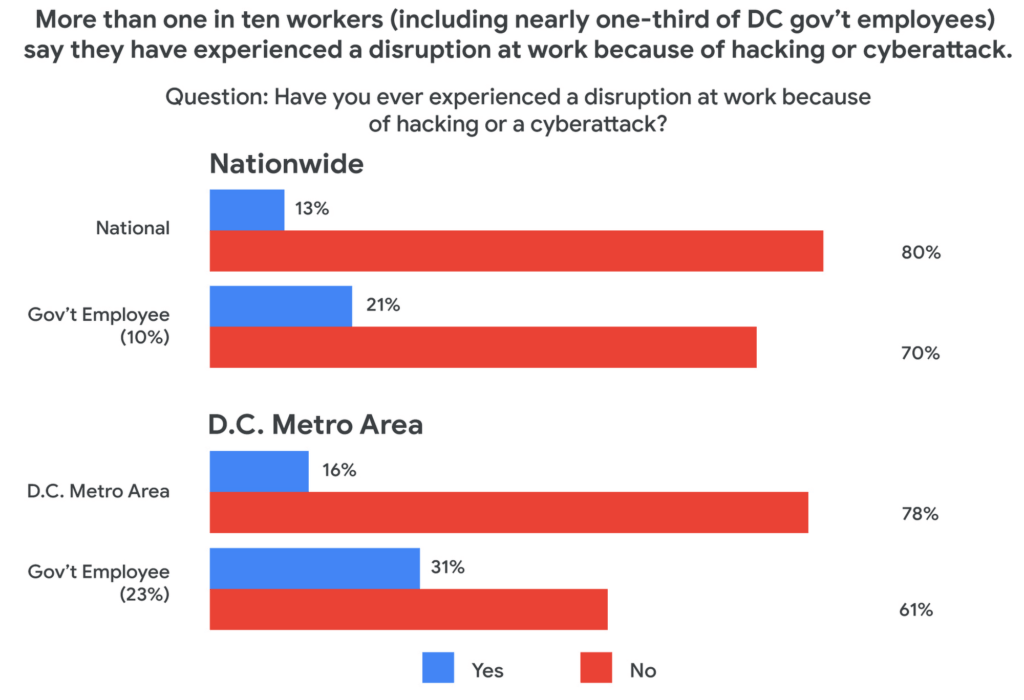
One likely reason for such broad concern about cyberattacks is that many respondents reported experiencing a cyberattack at work. And while more than one-in-ten workers nationally have experienced disruptions from a cyberattack, the number increased to nearly one-in-three for D.C.-based government employees—nearly three times higher than the national average.
The problem with IT ‘monoculture’
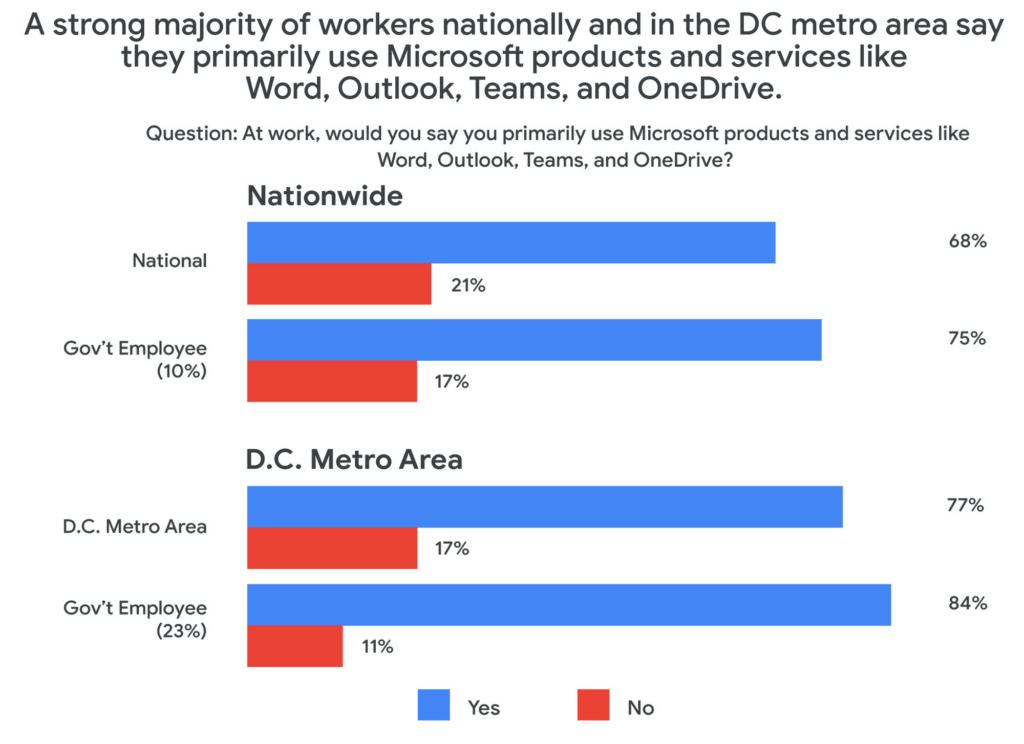
According to survey respondents, 84% of D.C. metro government employees primarily use Microsoft products at work, including Word, Outlook, Teams, and OneDrive. This is confirmed by another recent study by Omdia that found 85% of government employees use Microsoft productivity software, far and away the largest IT productivity vendor by market share.
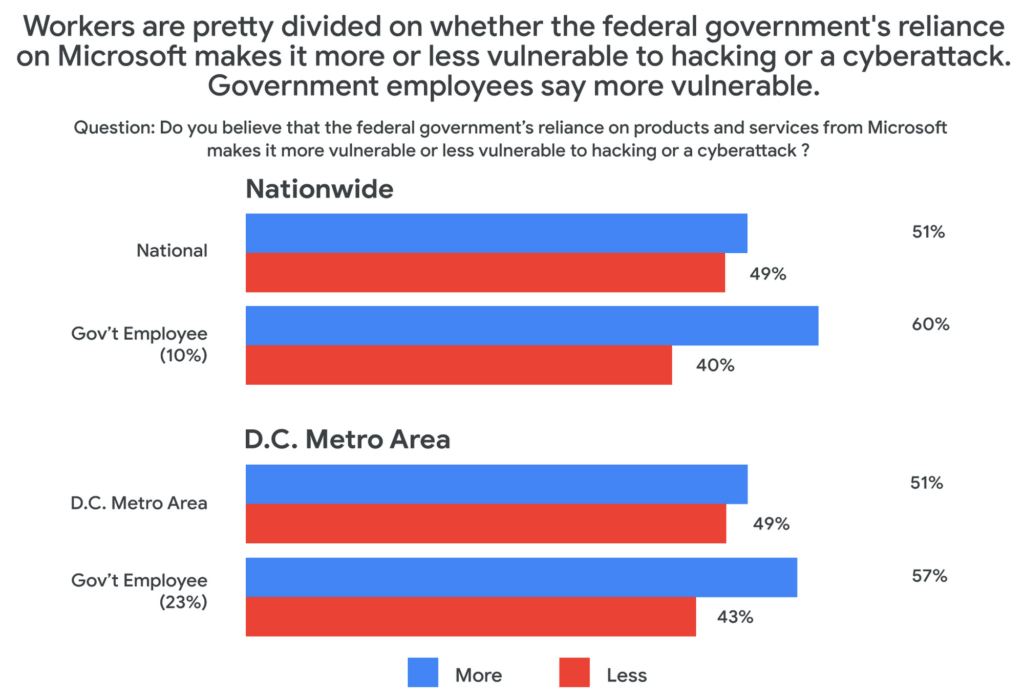
This reliance on a single software suite might suggest that these products are safe and secure, but the Public Opinion Strategies survey found that more than half of all respondents said that the government’s reliance on these Microsoft products actually made the federal government more vulnerable to hacking or cyberattacks.
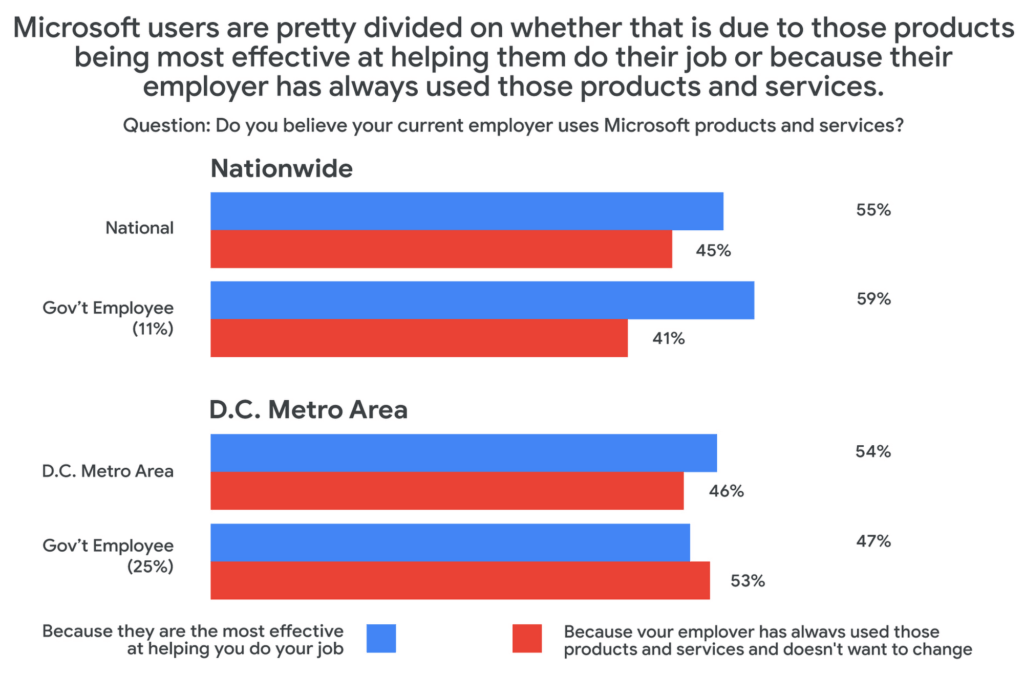
Given these vulnerabilities, why does government IT continue to rely on the same set of productivity tools in the workplace? The reason, according to survey respondents, has more to do with inertia than innovation. When asked why their employers used Microsoft services, around half said that the reason their employer continues to choose legacy, incumbent vendors was more about not wanting to change than wanting the most effective tool for the job.
Choice and shadow IT
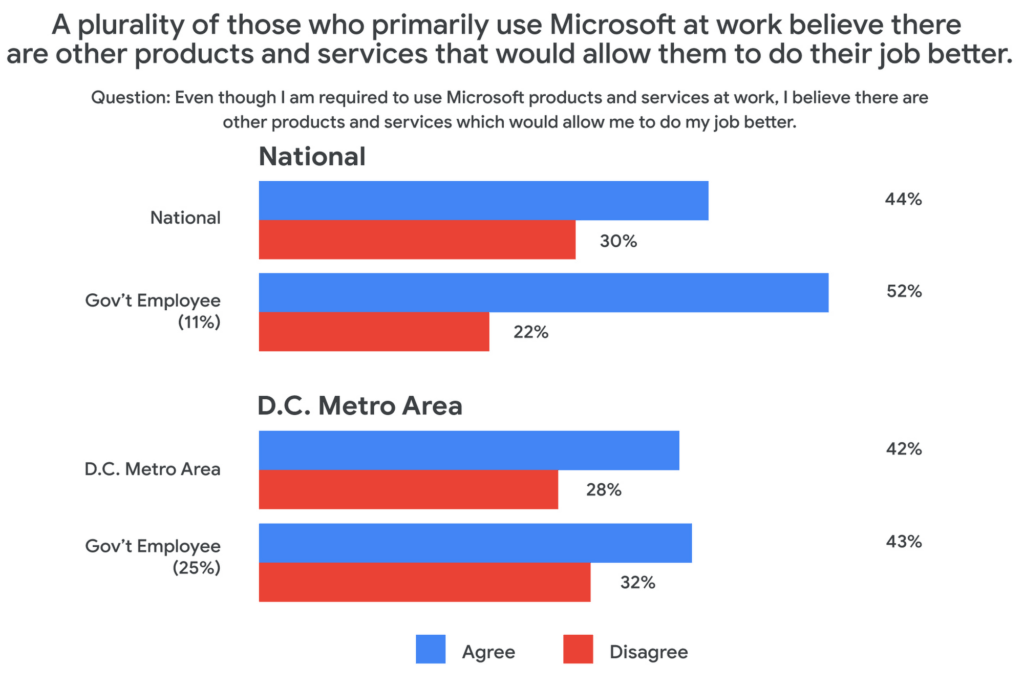
Coupled with these concerns about vulnerabilities comes a noted sentiment among those surveyed that their current IT solutions are not best for their needs. About half of those surveyed who primarily use Microsoft at work said that they would prefer to have a choice to use products and services from other companies. And among those who use Microsoft at work, 43% believe there are other products and services that would allow them to do their job better.
This may be leading workers to adopt “shadow IT,” or using products and services that are not officially approved or endorsed by their IT departments. In fact, the Public Opinion Strategies survey found that 35% of D.C. metro government workers have used shadow IT to get their jobs done. And among workers aged 20 to 34, that number jumps to 41%.
Rethinking IT purchasing priorities
With so many survey respondents reporting that they are dissatisfied with their legacy IT solutions, it may be time for the government to rethink its approach to procurement. In a separate research survey from Omdia in December 2021, 250 people responsible for technology purchasing decisions in the U.S. federal, state, and local governments said that government technology and procurement practices often are more about making things easier for IT vs. choosing what employees feel would be the best solution. In fact, only 27% of officials surveyed in that research cited “user demand” as a factor affecting their purchasing decisions.
As governments work to meet the demands and preferences of their constituents—and their employees—it’s clear that there’s an overreliance on legacy solutions, despite a track record of cybersecurity vulnerabilities and poor user perception.
At Google Cloud, we believe it’s time for more diversity and choice in the tools available for our civil servants across the nation—70% of whom use Gmail outside of work, according to our survey. Government workers have the right to benefit from the same flexible, secure-by-design tools at the office that they use in their personal lives. You can learn more about Google Workspace for Government here.
5159
Of your peers have already watched this video.
14:00 Minutes
The most insightful time you'll spend today!
How Google Workspace Helps Manage, Govern and Protect Sensitive Data
The shift towards a hybrid work style and trends accelerated by the pandemic has resulted in data deluge. With companies and individuals sharing increasingly large volumes of information and collaborating with internal and external stakeholders, the need for innovations for higher security also escalates. View this video to learn how Google Workspace approaches security across content lifecycle from client-side encryption updates, data loss prevention, Google Vault, data regions, labels, and more!
3178
Of your peers have already watched this video.
26:27 Minutes
The most insightful time you'll spend today!
Redefining the approach to mobile security
When it comes to mobile security, everyone assumes open means unsecure.
There are three terms that people often confuse: vulnerability, malware, and exploit.
A vulnerability is really nothing more than a software flaw that is potentially exposed, where there is a possibility of it being attacked. It doesn’t mean it will ever be attacked and it doesn’t mean it will ever be exposed.
Malware is software–again, it’s software–that is designed to disrupt, damage, or gain unauthorized access to a computer system.
An exploit is also software and it’s designed to take advantage of a vulnerability. And in most cases, it’s designed to typically do malicious things, such as install malware.
So, a vulnerability does not equal an exploit. A vulnerability is a chance.
Discover how to debunk these security myths and learn how the latest multi-layered security protections, encompassing software, and hardware and application levels now leverage the power of machine learning to protect your device fleet. Mark Burr, an Android expert, shares the latest on enterprise security innovations, backed by third-party validation.
More Relevant Stories for Your Company

You Need Enhanced Security for a Successful Cloud Transformation
Twenty years ago, organizations discovered the magic of server virtualization. Among the many benefits of virtualization, it heralded the end of the need for one physical server per application and the beginning of managing software-defined infrastructure. It helped automate building and installing systems, and it helped lay foundations for today’s

Strengthening Your Network: The Benefits of Network Firewall Policies Over VPC Firewall Rules
In the fall of 2022, we announced new policy constructs for Google Cloud Firewall, a scalable, cloud-first firewall service that helps secure traffic flow to and from workloads in Google Cloud, and whose distributed architecture enables simplified, granular control including micro-segmentation. Whereas legacy VPC firewall rules included network tags that were not governed

Google Cloud Leads the Pack Among Data Security Vendors: Forrester
In its 25-criterion evaluation of data security portfolio providers, Forrester identified the 13 most significant ones and researched, analyzed, and scored them. Here's a summary of what Forrester said about Google Cloud Google puts cloud and cloud security at the center of its strategy. Capabilities from Google Cloud Platform, G Suite,

Five Ways Cloud Computing Helps Companies Optimize Operations and Lower IT Costs
There is no one way to recover. The past year has seen unprecedented challenges for business across the world, with social distancing and quarantine measures forcing many organizations to quickly adapt to remote working. A new report from BCG Platinion, titled “Finding a New Normal in the Cloud”, points out that while companies
