





3855
Of your peers have already watched this video.
14:49 Minutes
The most insightful time you'll spend today!
Helpful and human: G Suite’s vision for your future workspace
With an accelerated shift to remote working brought on by COVID-19, it’s clearer than ever that an organization’s success relies on its people and how they work. No matter where they’re working from, who they’re working with, or what projects they’re working on, organizations need to enable their employees to have impact.
That’s why, schools are figuring out remote learning models. Doctors are using Google Meet to consult with patients via video call. I believe COVID-19 is the catalyst that will accelerate the transition to more flexible and distributed teams. We’re seeing this trend clearly from both employers and employees. 80% of the workforce would really like the flexibility to work from home at least some of the time, and 74% of CFOs intend to shift some employees to work from home permanently after COVID-19.
From the beginning, G Suite was designed with human impact in mind: to help people work together from anywhere to achieve bigger things in work and in life.
G Suite’s Vice President and General Manager, Javier Soltero, talks about what the future of G Suite means for your organization. Get a window into the newest, most exciting innovations and hear how G Suite is helping organizations navigate what’s next.
15 Companies–from Korean Air to Salesforce–Share How G-Suite and Google Meet Help Them Battle COVID-19

5054
Of your peers have already read this article.
4:30 Minutes
The most insightful time you'll spend today!
More than a decade ago we introduced secure, easy-to-use business collaboration and productivity apps (now known as G Suite), and we envisioned a new way of working in the cloud. And although we always knew the value of cloud-based collaboration, it is more important than ever at a time like this.
Over the past several weeks, we’ve seen Google Meet—G Suite’s video conferencing solution—help millions of people stay connected, whether it’s colleagues working at home, companies livestreaming to global employees, doctors caring for patients, banks providing loans, retailers and restaurants helping the elderly place orders for home delivery or curbside pickup, social services conducting welfare checks, governments serving citizens, or schools staying in session.
In the first week of April Earlier this week, we surpassed a new milestone, with more than 2 million new users connecting on Google Meet every day, and they’re spending over 2 billion minutes together—that’s more than 3,800 years of secure meetings in a single day. We’re humbled by the huge responsibility that comes with this growth, and we’re determined to continue doing our part to help.
Here’s a little more on what that means.
Meet, and all of G Suite, runs on Google’s secure, resilient global infrastructure, which helps us reliably manage our capacity to keep our services up and running. With Meet, organizations around the world can take advantage of the same secure-by-design infrastructure, built-in protection, and global network that Google uses to secure your information and safeguard your privacy. You can learn more in our Google Meet security blog post.
Last month, we made advanced Google Meet video-conferencing capabilities available at no cost to all G Suite and G Suite for Education customers. We’ve now extended that availability to September 30, 2020 to ensure businesses, organizations, institutions, and educators continue to be supported during this time.
Earlier this year, G Suite also hit another important milestone, surpassing six million paying businesses and organizations. We’re acutely aware of our responsibility to these teams as they support their own constituents, patients, students, and customers during this pandemic. Here are a few stories they’ve shared.
Cambridge Health Alliance, a health system with 140,000 patients in Cambridge, Somerville, and Boston’s Metro North region, has relied on G Suite to support its staff and caregivers. “We didn’t realize how integral G Suite had become to our daily work until dealing with a pandemic where consistent communication with our CHA staff was of utmost importance,” said James LaPlante, Sr. Director, Technology and Biomedical Services. “With one click, staff have been able to connect from their Gmail, Calendar, or from Meet-enabled conference rooms across three hospitals, 15 health centers, or from home.”
In the UK, Hackney Council is using G Suite, Meet and Chromebooks to keep its team of 4,000 staff connected and to make sure that essential services can still be delivered for its citizens.
In Peru, the Judiciary branch is using Meet to continue operating during the nation-wide quarantine. Through video conferences they are carrying out both internal meetings and also hearings. By doing this, attorneys, lawyers and judiciary clerks don’t have to physically attend court, keeping the virus from spreading, while maintaining the administration of justice in the country.
Korean Air has transformed its internal business system with G Suite since July 2019, creating a positive company culture. Employees communicate effectively with G Suite in a variety of ways, including chat, voice, and video, which reduces decision-making time. Korean Air recently opened a ‘Google G Suite Meeting Room’ within the company to further enhance its cloud-native communication capabilities and accelerate mobile-based collaboration.
German manufacturing company KAESER Compressors adopted G Suite in 2018, which allowed them to transition 4,000 employees to working from home smoothly, with minimal disruption. They are using G Suite to connect with customers and job applicants.
When their news anchor voluntarily self-quarantined after suspecting he had been in contact with a person with COVID-19 during a convention, Milenio Televisión, a Mexican television cable news channel, had to figure out how to keep their show on the air. They chose Meet for its security, and high quality image and sound. Milenio Televisión is now broadcasting multiple shows through Meet and has been using the tool to have video conferences with correspondents in other countries.
To help its staff cope with the impact of COVID-19, Italian bank Credem (Credito Emiliano S.p.A.) relied on G Suite, in particular Drive, Docs, and Meet, to seamlessly adapt to a collaborative work-from-home environment. It’s also helping them maintain business continuity, relying on Meet to continue to meet one-on-one with customers.
In the Philippines, the Department of ICT (DICT) is responsible for the planning and development of information and communications technology. As a result of COVID-19, the department has been continuously seeking ways to improve its programs and services to help quarantined workers and citizens, including use of GovMail, which is built on G Suite, Google Chat, and Google Meet. “The migration to cloud-based GovMail which started last year has proven to be particularly useful for remote government operations in this time. Coordination between government agencies is more organized, resulting in faster responses benefitting their constituents,” said Emmanuel Rey Caintic, DICT Assistant Secretary for Digital Philippines.
Kärcher, a German company known for its wide range of cleaning products, had initially planned to roll out G Suite to its workforce by 2021. In response to the pandemic, Kärcher rapidly accelerated their rollout, deploying G Suite to its entire 14,000 workforce in only five days. As of the end of March, Kärcher’s number of weekly active Meet and Chat users has grown by 20X.
Salesforce’s CRM solution brings companies and customers together, and they turned to G Suite to bring their own teams together. “With Salesforce employees working from home given COVID-19, innovative solutions like Meet are even more critical for effective virtual collaboration,” said Andy White, VP, Platform Engineering Salesforce. “Even with 2x our daily video calls—50,000 every workday—Google Cloud’s scale and support keep our teams reliably and seamlessly connected.”
The team at Shopify, a leading global commerce company, is relying on Meet to help them keep their workforce connected. “Even with the demand surges seen around the world, recently we had a 20 person meeting livestream to 4,000 people and there were no issues,” said Garth Pyper, Director of Technical Infrastructure. “Google Meet is our primary means of video conferencing across 5,000 people at Shopify, and we are grateful for the security, reliability, and flexibility it provides.”
With the global move to a fully remote workforce during COVID-19, software company Xero has embraced G Suite to help them make a smooth transition. “Google Meet is vital in keeping our teams socially connected, and Docs, Gmail and the full G Suite family of apps has the team’s productivity and collaboration working as if we were in the office. The reliability and performance of G Suite has allowed the IT team to focus on other challenges we face with a remote workforce.”
In Singapore, NTUC Fairprice Co-Operative, the largest supermarket chain of the island nation, has experienced a surge of 400%+ increase in capacity needs as customers urgently prepare for COVID-19 with in store and online purchases of all the necessities. With the help of G Suite, NTUC was able to handle this increased demand even as they transitioned the vast majority of their workforce to remote work.
Schnucks, a family-owned supermarket retailer with 100 stores in Missouri, Illinois, Indiana, Iowa and Wisconsin, was able to think outside the box to keep their business running and employees safe and connected. “We are running our Helpdesk 24/7 on Google Meet so that both our corporate and in-store employees can join in and get questions answered quickly. Our transportation department is able to practice social distancing by using a Google Meet ‘hotline’ as the WFH dispatch platform.”
Meet had long been the standard collaboration tool for TELUS International, which provides customer experience solutions for global brands. “The Meet platform has helped us maintain and foster our caring culture as we transitioned from an on-site workforce to a work from home model,” said Michael Ringman, Chief Information Officer. “Whether through real-time collaboration, live meetings or a little stress relief with some virtual happy hours, our team’s ability to reliably connect ‘face-to-face’ through Google Meet has been integral to keeping us engaged despite the distance between us.”
These are just a few of the many stories we’ve heard. We’ll continue to support all our users to stay connected in the cloud. Read more on how Google Cloud is supporting businesses and communities here.
How PLAID’S Multi-cloud Approach with Anthos Clusters on AWS Drives Higher Business Growth

5450
Of your peers have already read this article.
3:00 Minutes
The most insightful time you'll spend today!
Editor’s note: Today’s post comes from Naohiko Takemura, Head of Engineering, and Kosukex Oya, Engineer, both from Japanese customer experience platform PLAID. The company runs its platform in a multicloud environment through Anthos clusters on AWS and shares more on its experiences and best practices.
At PLAID, our mission is to maximize the value of people through data, and we are developing a range of products that focus on improving customer experience. Our core product is a customer experience platform, KARTE, that can analyze the behavior and emotions of website visitors and application users, enabling businesses to deliver relevant communications in real time. We make KARTE available as a service to functions such as human resources and industries such as real estate and finance, and run the platform in a multicloud environment to achieve high-speed response and meet availability requirements. This is where Anthos comes in.
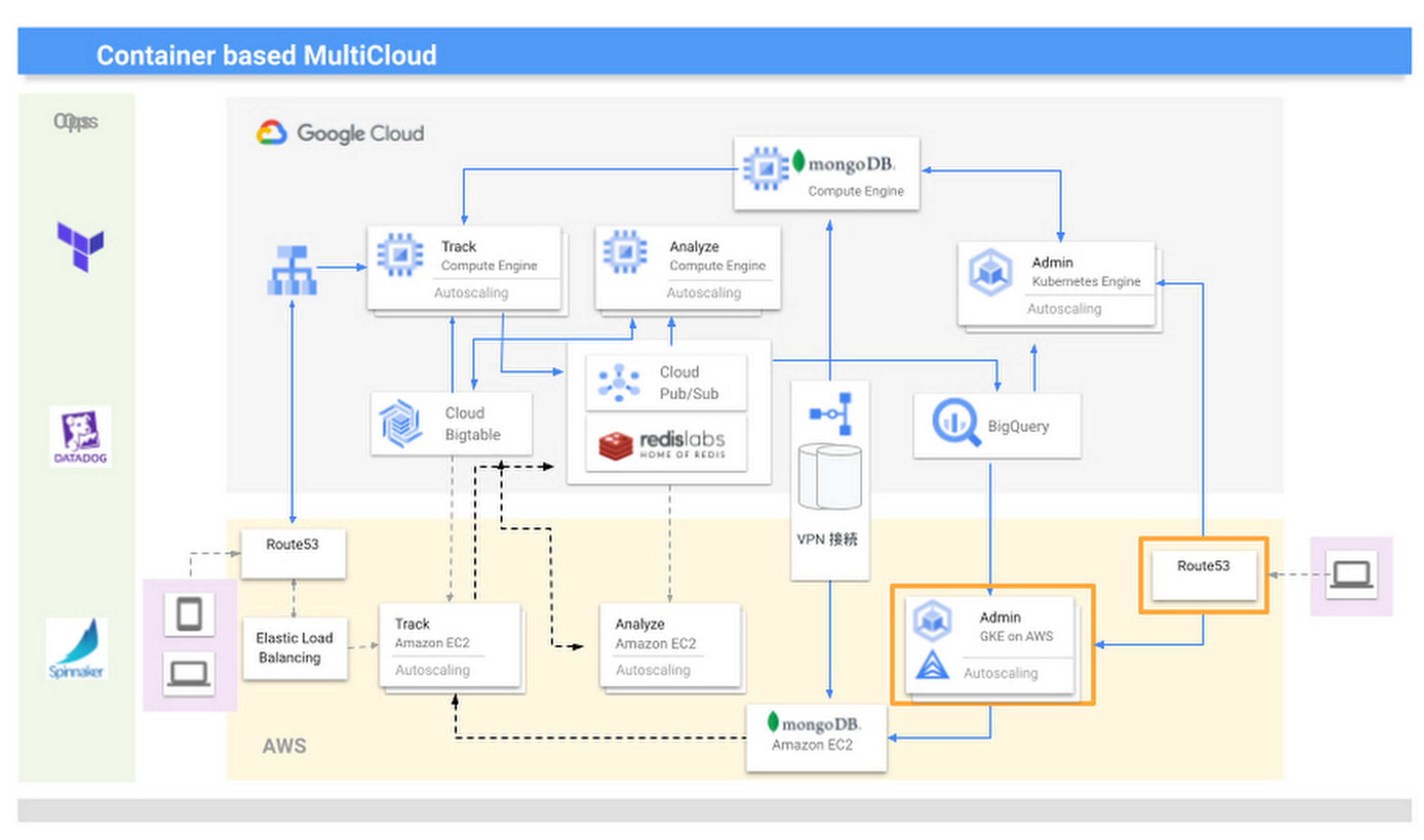
We introduced KARTE in 2015 and updated the system configuration in line with the addition of new functions and the need to increase scale. Our multicloud configuration is optimized through Anthos clusters on AWS, which give us access to the capabilities of Google Kubernetes Engine (GKE).
KARTE runs in two groups of server instances in each cloud; one group runs the management screens used by clients, and the other provides content for visitors to our website. In Google Cloud, the management system runs in GKE and content is delivered through Compute Engine.
We initially developed and operated the core of our services on another provider and from 2016 began to transition to Google Cloud due to its strong data processing capabilities. The products that handled big data, such as Cloud Bigtable and BigQuery, were attractive because they could handle data in real time and were compatible with KARTE. Now most functions, including peripheral aspects, run in Google Cloud, because we thought if we built a system centered on these products, it would become efficient to build other parts on Google Cloud.
While we considered migrating everything to Google Cloud, we decided to leverage its strengths alongside those of our existing provider, AWS. We felt a multicloud approach could create more opportunities and deliver higher growth than a mono-cloud environment.
We completed our move to a multicloud environment in 2017 and found that by building systems with almost the same content on two cloud services to leverage the strengths of each, we could reduce costs and improve performance and availability.
However, as KARTE grew, and the content of the service increased in complexity, we began to experience new problems. The increased load on the system due to an influx of in-house engineers from 2018 onwards impacted the scalability and development speeds of our conventional monolithic architecture running in virtual machines. We opted for an approach based on microservices and containerization, excluding the components that enabled real-time analysis as these had been modernized since initially being deployed in 2016, and the management screens, as the infrastructure running these did not require crisp tuning. Our key priority was to improve the ability of our engineers to deliver quickly.
From 2019, we turned to promoting microservices that make full use of container technology. When deciding to move from a target built on virtual machines to containerization, we evaluated the ease of use of GKE and decided to build in Google Cloud. At the same time, the number of systems with strict service level obligations was increasing, so to ensure higher availability, we considered running these in a multi cloud environment. The announcement of Anthos clusters on AWS at Google Cloud Next ‘19 in San Francisco provided an answer.
We had been wondering how to achieve the equivalent smooth operation of GKE in our AWS environment, and welcomed the Anthos clusters on AWS announcement. We consulted with a Google Cloud customer engineer through an early access program and quickly gained an opportunity to work with this version of Anthos. This allowed us to provide feedback and requests for improvement, and this paved the way for us to implement the product to take advantage of its functionality and future enhancements. With Google Cloud, we have been able to continue to interact closely with the development team to understand and provide input into the product roadmap.
We are now realizing the benefits of multicloud, including faster development speeds and higher availability. For businesses in general, we recommend they take a thoughtful approach to multicloud—while for us, multicloud is a useful mechanism that enables us to provide large-scale data analysis in real time, other businesses should consider whether multicloud is right for them and if so, the role of a technology like Anthos. They should also start small before ramping up. Moving forward, we are keen to see what other products Google Cloud is creating that can help drive our business to a higher level.
Ways to Manage Extensions on Windows and Mac If You Haven’t Moved to Chrome Browser Cloud Management

3880
Of your peers have already read this article.
2:00 Minutes
The most insightful time you'll spend today!
Many enterprises are looking to better manage extensions on their corporate devices. Extensions themselves are a great tool for productivity and customization of Chrome. However, some extensions can have the potential for far reaching rights to sites your users visit and devices they browse from, giving IT the desire to closely manage which extensions are in their environment and how they behave.
In an earlier post in this series, we’ve detailed how Chrome Browser Cloud Management is the easiest way to audit installed extensions and manage them. However, some enterprises may need to still use Group Policy on Windows or plists on Mac to manage extensions. So lets touch on management through those methods, for organizations that haven’t quite made the move to Chrome Browser Cloud Management yet.
For starters, here are some of the most used options for managing extensions (some also apply to apps) via Windows Group Policy or via Plists on Macs:
Installing or allowing extensions
- Extension Install Allow List: These are the extensions that you have approved to be installed within your environment.
- Extension Install Force List: This will install the extension in the managed instance of Chrome. This setting overrides the extension block list policy, and the extension can’t be disabled on uninstalled.
- Extension Allowed Types: Here you can create a list of what types of extensions and apps you will allow to be installed. Extensions, themes, user scripts, hosted applications, legacy packaged applications and platform applications are the values that are supported. Note that whatever you want to allow must be included in the list. Anything left off the list will not be installed. For more information on the different types, here is a link on Extensions and Apps in the Chrome web store.
- Extension Install Sources: This policy allows you to get that older install functionality for specific URLs that you specify in this policy. Here is a link on the URL match patterns that can be used in this policy.
Blocking extensions
- Extension Install Block List: These are the extensions that you will not allow to be installed. If they are installed already, they will be disabled. If a user tries to install them, it will be blocked. In the Chrome web store, the Add to Chrome button will be red and advise the user that the extension can’t be installed.
- Block External Extensions: This setting will block extensions from external sources being installed. An example of this is if an installed application is adding an extension to Chrome via the registry, this setting will block that extension from loading.
Advanced management options
- Extensions Settings: This policy provides a varied amount of functionality and requires a JSON script to be created and formatted in a single line string. This setting can be complex. We recommend using Chrome Browser Cloud Management as almost all of the functionality is included without needing to write JSON as well as the ability to audit installed extensions. If you do want to use this policy, it is covered in detail in the Managing Extensions in your Enterprise technical document. Some of the functionality that you can use within this policy are:
- Install types: (Allowed, Blocked, Force Installed, Normal Installed)
- You can also display a custom message when the extension is blocked via the blocked installed message function.
- Prevent extensions from altering websites: You can prevent all or specific extensions from running on specific websites.
- Managing by permissions: You can allow or block extensions by the specific rights or “permissions” that they require to run.
- This provides a baseline of functionality that you will or will not allow extensions to run on your users machines.
- If an extension is updated, bought, sold and updates the permissions that it requires, this will dynamically protect your users from permissions that you will not allow.
- Install types: (Allowed, Blocked, Force Installed, Normal Installed)
Even if you decide that on-premises policy management is how you want to manage extensions long term, you can still use Chrome Browser Cloud Management to get much needed visibility into extensions that may exist in your environment. The newly improved apps and extension list is a great way to get a view of your current extension landscape, giving you more data to make better decisions around extension management.
You can enroll browsers to see this information, but still set policy through your existing tools if that’s your preference.
Well, that’s it for this edition of Chrome Insider. Here’s where you can find more posts in the series, or you can learn more about Chrome Browser Cloud Management.
A note on Google’s commitment to inclusive naming conventions. The following policies have been deprecated, however will still continue to work until Chrome 95 to give administrators time to migrate to the new policies.– ExtensionInstallWhitelist replaced with ExtensionInstallAllowlist
– ExtensionInstallBlacklist replaced with ExtensionInstallBlocklist
Iroquois Healthcare Association Leverages Chrome OS to Keep Staff, Patients and Families Remotely Connected

3976
Of your peers have already read this article.
3:00 Minutes
The most insightful time you'll spend today!
Editor’s note: Today’s post is by Eileen Murphy, Senior Director of Special Projects, and Andrew Nault, Director of Business Development, both from Iroquois Healthcare Association Workforce Investment Organization (IHA WIO). The health association represents 44 hospitals in 32 counties in New York State, providing advocacy, cost-saving initiatives, and business solutions. IHA WIO has provided its participating long-term care organizations with more than 5,000 Chromebooks to support 80 organizations in several ways, including training staff, connecting nursing home residents to their families, and helping administrative staff work safely from home.
Since early 2020, clinicians and staff at IHA WIO participant organizations have had to adapt to constant change—everything from implementing pandemic safety protocols to helping nursing-home residents stay in touch with families. We’re proud of the wonderful work they’ve done and continue to do.
During the pandemic, our use of Chrome OS and Chrome devices was expanded and changed to meet the needs of organizations dealing with an unprecedented event. Chrome devices were used to not only train staff but to enable remote work, as well as to connect residents to their friends and families during long periods of isolation. In the morning, a Chromebook could be in a managed guest session mode, helping a grandmother virtually attend her grandkids’ birthday party; at lunch, a nursing assistant could log in to her latest continuing education classes on that same Chromebook.
That evening, the Chrome OS devices could be found at check-in desks, helping visitors fill out a COVID-19 survey. All it took to change a device’s purpose were a few clicks in the Google Admin console, all of which could be done remotely.
Chrome OS for training
Most of our 5,000 Chrome OS devices came from a New York State grant to provide continued education training for long-term care organizations and its employees. We wanted to offer online classes, which meant we’d have to give people the technology to access that training. Our partner, CDW, recommended Chrome OS for us because it’s an operating system built for the cloud. In addition, devices running Chrome OS are easy to use, easily shared, and cost-effective.
Best of all, Chromebook Enterprise came with all the enterprise capabilities of Chrome OS unlocked. This allowed us to use the Google Admin console to manage our entire Chromebook Enterprise fleet remotely. We were able to set up one high-level organizational unit across IHA, with almost 80 organizational units for facilities and groups.
To support training, Lenovo helped us create a five-minute video that we added to our HealthStream learning platform so staff could learn the basics of using Chromebooks. This video was created because we didn’t realize there were people who have never touched a laptop before. The video and Chrome OS ease of use made it possible to get the folks who needed the most help up to speed quickly.
Chrome OS for connecting residents to loved ones
Once the pandemic began and people could no longer visit nursing home residents, the staff for one of our facilities asked about using a training Chromebook for video calls between residents and families. We loved this idea as it was still in line with our mission: to enable the workforce to provide higher-quality care.
With the Admin console, the process was easy. We changed the managed guest session to auto load, and changed what is populated on startup. With help from healthcare staff, residents were able to choose from several video apps including Google Meet, Zoom, and Facebook.
Chrome OS for remote workers
When office and administrative staff had to work remotely, Chromebooks again came to the rescue. Since staff could access all their work applications via Citrix—like Outlook, office phone systems, and other public documents—we placed the remote-work laptops in managed guest session mode and loaded the Citrix app at startup. All the employees had to do was connect to Wi-Fi and log into Citrix, and they were ready to work.
With our training program still running and virtual remote ability on the rise, we realized we would need more Chromebooks. CDW informed us that Chrome OS device supply was running low, but they located 1,000 Chromebooks for us and sent them to our home office in Clifton Park, New York.
Normally, the job of configuring and shipping 1,000 laptops would strike fear into the hearts of the IT team. Not this time: With zero-touch enrollment, all of the Chromebooks were enrolled in our high-level organizational unit before the boxes arrived at our Clifton Park office. We created a list of Chromebook serial numbers for each IHA location getting a shipment, then packed up the boxes. We never had to open a Chromebook box, or even turn the devices on before preparing them for use by employees.
Chrome OS for telehealth and clinic kiosks
There were more Chromebook transformations to come. In the interest of keeping residents and medical professionals safe, we enabled Chromebooks for non-urgent telehealth sessions. Doctors and nurses could see and talk to nursing home residents, using the same video conferencing apps that residents used to talk to loved ones. In these cases, we had PointClickCare, our electronic medical records app, loaded at startup on doctors’ Chromebooks.
We even turned a few Chromebooks into guest kiosks at IHA member hospitals that have walk-in clinics. If the clinics required visitors to fill out a COVID-19 screening form, the Chromebook, in kiosk mode, was stationed at the front desk. Once visitors submitted the form, a new blank form appeared, ready for the next visitor without any data stored on the device.
Chrome OS for whatever’s needed next
What’s amazing is that we could help people in all these different ways in just a few minutes—without visiting a nursing home, getting someone to ship laptops back to us, or loading software. Chromebooks are so versatile that sometimes they’re used in various modes several times a day. One user can log in, while another user can use managed guest sessions to login as a guest user. No matter what changes come to our healthcare association in the future, we’ll be ready.
AI-powered Business Messages for Timely, Engaging and Helpful Conversations with Customers

9398
Of your peers have already read this article.
2:00 Minutes
The most insightful time you'll spend today!
Over the last two years, we’ve seen a significant uptick in the number of people using messaging to connect with businesses. Whether it was checking hours of operation, verifying what was in stock, or scheduling a pick-up, the pandemic caused a significant shift in consumer behavior.
- 45% of users are spending more time on messaging services because of the pandemic
- 85% of consumers would like to message brands directly
With the rise in demand for messaging, consumers expect communication with businesses to be speedy, simple, and convenient. For businesses, keeping up with customer inquiries can be a labor-intensive process, and offering 24/7 support outside of store hours can be costly.
To help businesses seamlessly deliver helpful, timely, and engaging conversations with customers when and where they need help, we introduced AI-powered Business Messages.
https://youtube.com/watch?v=fcgP3RHjBLY%3Fenablejsapi%3D1%26
What is AI-powered Business Messages?
With AI-powered Business Messages, you can connect with your customers in their moment of need, in the places they’re looking for answers—such as Google Search, Google Maps, or any brand-owned channel. For instance, check out how Walmart customers in the US are able to receive real-time information on product availability, straight from a search results page.
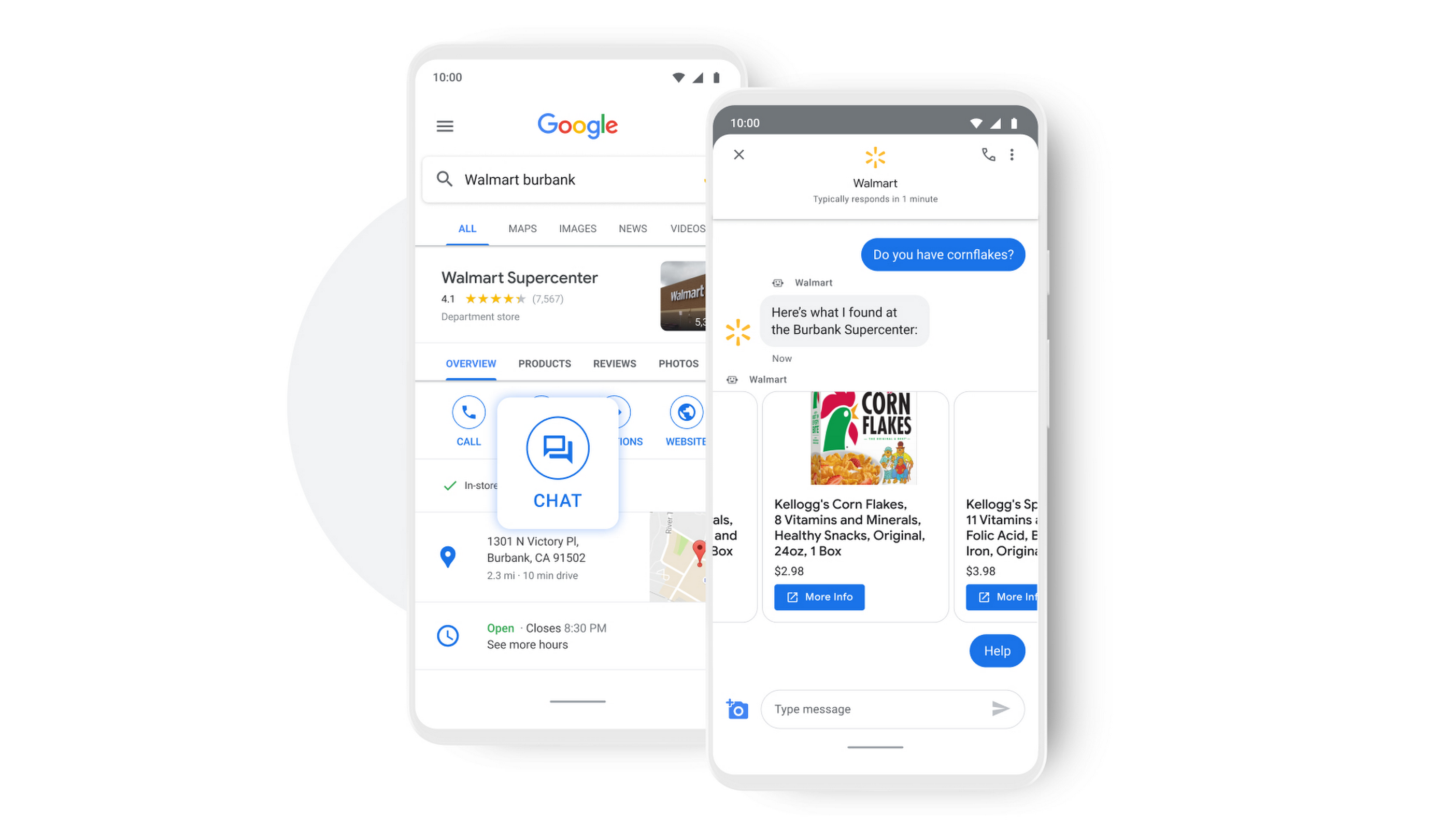
People turn to Google when they are searching for answers to their questions, looking to buy something, or trying to accomplish a particular task with one of our many tools. In fact, 68% of all online experiences begin with a search engine.
At Google, we know how important it is for interactions with a brand to be personalized, helpful, and simple. With AI-powered Business Messages, customers are able to chat with virtual agents that understand, interact, and respond in natural ways.
We are also combining smart automation with the ability for customers to chat with live agents when it’s really needed. This approach saves your customers precious time, while also saving you money. And with Business Messages automatically handling many customer inquiries in the background, businesses have the option to distribute their human customer service agents to address other needs.
Getting started with conversational AI is easy with Bot-in-a-Box
We know it can be difficult to get started with AI. That’s why we are utilizing existing Google AI tools like Dialogflow—part of Google Cloud Contact Center AI—to create the capability within Google’s Business Messages called Bot-in-a-Box, which makes getting started with Conversational AI easy. Bot-in-a-Box allows for fast and effective adoption of automation for businesses of all sizes.
Enabling Business Messages with Bot-in-a-Box can be as simple as leveraging an existing customer FAQ document you already have, whether it’s from a web page or an internal document. And since the conversational AI is powered by Business Messages and Dialogflow working together, your chat bot is able to understand and respond to customer questions automatically without the need to write code.
Bot-in-a-Box also supports other critical journeys like “Custom Intents.” That means that your bot is able to understand the different ways customers express a similar question and respond accurately by using machine learning capabilities.

Finding success
In April 2021, Wake County courthouses in North Carolina partnered with Tango Technology to implement Business Messages when it became apparent that being able to provide the public and attorneys with around-the-clock access to information would significantly reduce the pressure on courthouse staff. Using Bot-in-a-Box, Tango Technology was able to customize a solution for Wake County Courthouse, Justice Center, and Clerk of Superior Court in just four days.
“With the combination of Google’s Business Messages, GCP, and Dialogflow, we were able to spin up an AI-driven bot for the courts in days. And the technology stack allows us to continually improve by adding functionality in an agile process.”— Mike Lotz, Co-Founder, Tango Technology
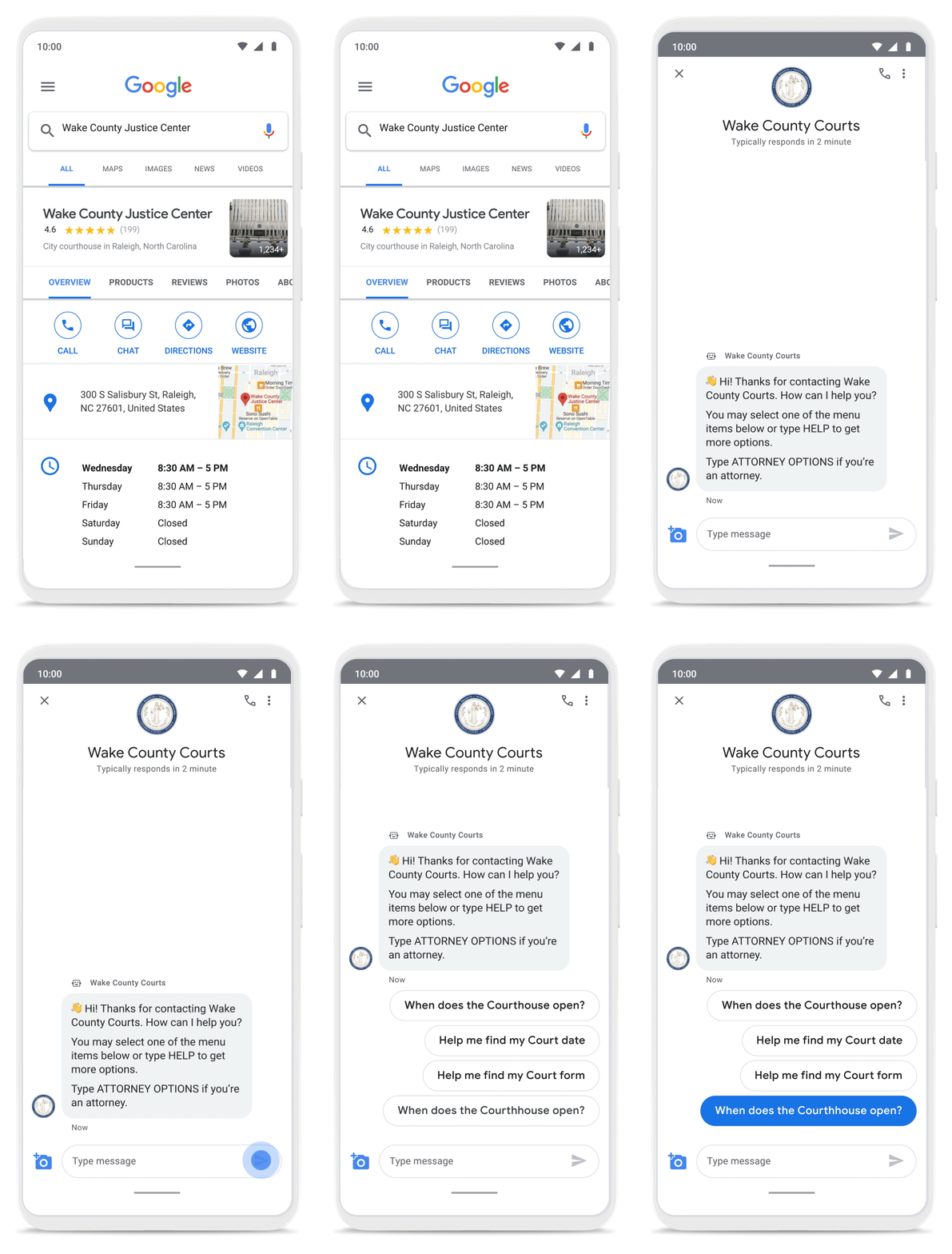
With Business Messages, North Carolina courthouses saw a 37% decrease in the call volume handled by courthouse staff. With 398,298 fewer phone calls during the first year of operation, the AI-based messages helped Wake County Courthouse work more efficiently and productively.
We’ve seen many brands benefiting from AI-powered Business Messages. For instance, Levi’s saw a 30% increase in off-hours shoppers and surpassed 85% customer satisfaction scores after implementing Business Messages. They also drove 30x more store-related questions than Levi’s website chat.
Bring Google’s conversational AI to your storefront with Business Messages
Google’s Business Messages makes it easier for businesses of all sizes to engage their existing or potential customers in a virtual conversation, when and where they need it.
To learn more, watch our Cloud Next session here or visit us at g.co/businessmessages. We have specialized services to help you get started and can share the wisdom of our channel partners and dedicated experts who specialize in unleashing the potential of conversational AI.
More Relevant Stories for Your Company

6 ways Google Workspace helps IT admins safely use BYOD
Many organizations, including Google, have moved quickly to embrace working from home. With this widespread remote work, it’s never been more important for IT admins to be certain that every device in their organization is secure, even when that device isn’t company-owned. We pioneered zero-trust security through our BeyondCorp strategy and leverage
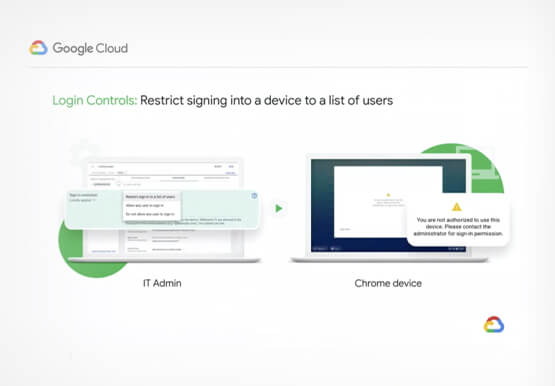

Securing Remote Workers with Google and Chrome Enterprise
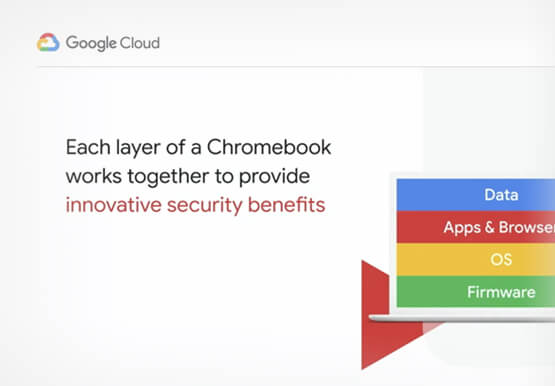
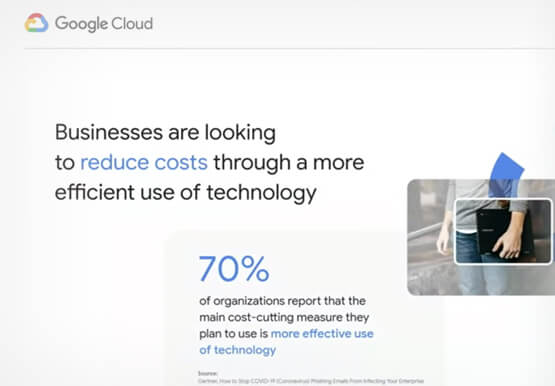
With the proliferation of COVID-19 across the globe, the need for a remote working strategy has become paramount to keep businesses running. A Gartner survey found that 88% of organizations have asked their employees to work remotely. And 97% of the organizations canceled work-related travel. However, only 10% of the

How the Telegraph is Reimagining Media with Google Cloud
Whether they’re reading the newspaper on the way to work, or catching up on the latest headlines on their smartphones, readers expect up-to-the-minute news wherever and whenever makes the most sense for them. As a result, media companies are increasingly looking for ways to improve, expand, and simplify their offerings,

A Breakdown of Cloud-based Data Ingestion Practices
Businesses around the globe are realizing the benefits of replacing legacy data silos with cloud-based enterprise data warehouses, including easier collaboration across business units and access to insights within their data that were previously unseen. However, bringing data from numerous disparate data sources into a single data warehouse requires you
