





6 ways Google Workspace helps IT admins safely use BYOD

4180
Of your peers have already read this article.
6:30 Minutes
The most insightful time you'll spend today!
Many organizations, including Google, have moved quickly to embrace working from home. With this widespread remote work, it’s never been more important for IT admins to be certain that every device in their organization is secure, even when that device isn’t company-owned.
We pioneered zero-trust security through our BeyondCorp strategy and leverage it to offer advanced security for G Suite* users to protect secure access for all devices. Admins can enforce these controls across G Suite and other corporate applications and data, ensuring consistent security and user experience across your organization.
Today, we’re laying out six key controls that IT admins can use within G Suite to help keep their organizations safe when using the bring your own device approach (BYOD). You can also review our detailed security checklist here, and learn more from our course on Managing G Suite here.
Secure mobile and desktop devices with endpoint management

BYOD devices can differ widely across an organization, with a range of OS versions, hardware modes, patch versions, and more, so it’s impossible to rely on a one-size-fits-all approach to device management. With Google endpoint management, IT admins can easily support a variety of mobile and desktop devices by enforcing measures like minimum software versions and blocking jailbroken or rooted devices, in many cases without requiring full device rights for employee privacy.
When it comes to managing mobile devices, G Suite offers basic and advanced mobile device management:
- With basic mobile device management, BYOD devices are secured with baseline security features with no end user friction. Admins can enforce a passcode, get a device inventory, wipe Google accounts remotely, and even remotely install applications on Android devices.
- With advanced mobile device management, admins can apply more policy controls over BYOD devices, and Android users can keep their personal data private and separate from their work data with Android Work Profiles. You can also allow and manage work apps on iOS and Android devices.
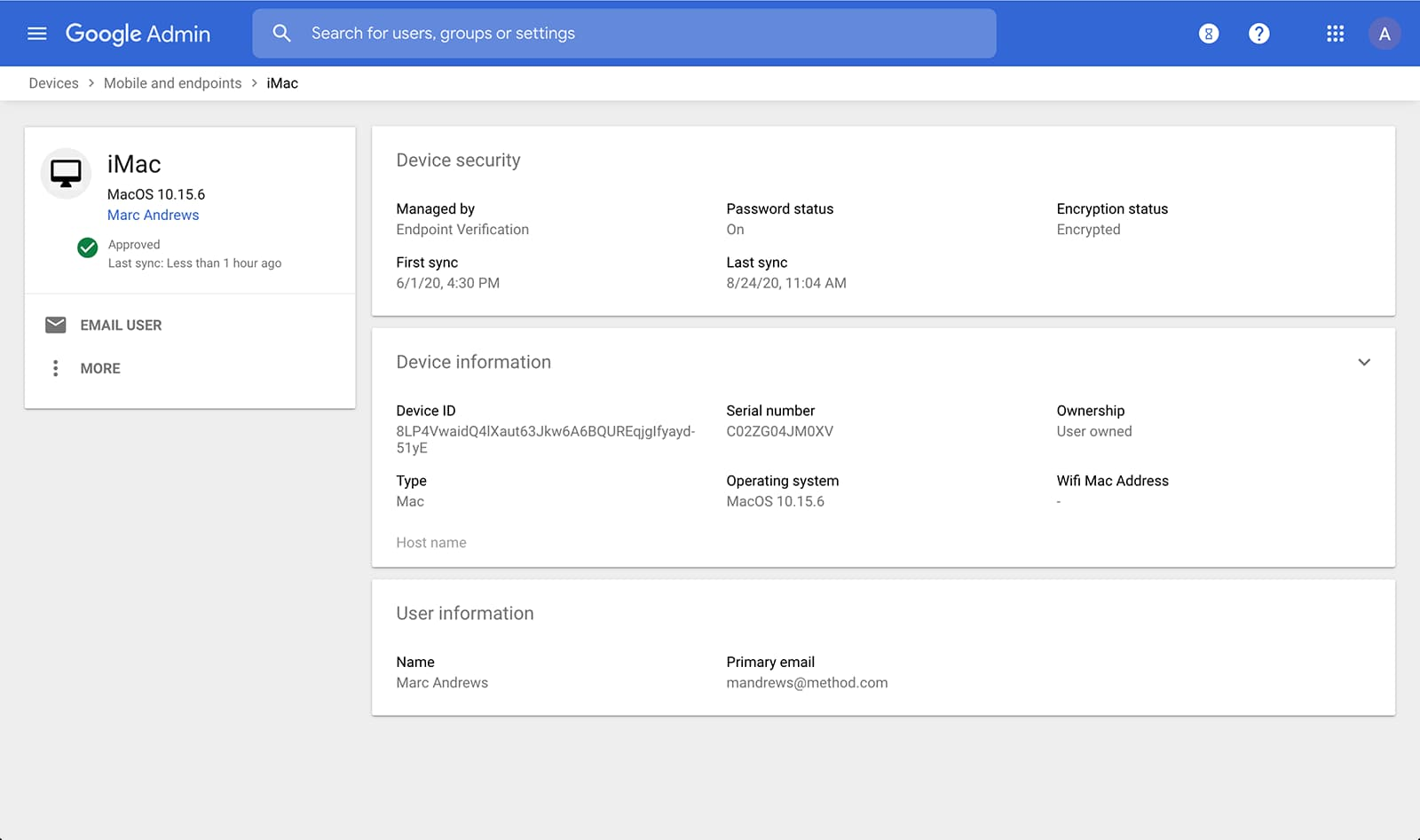
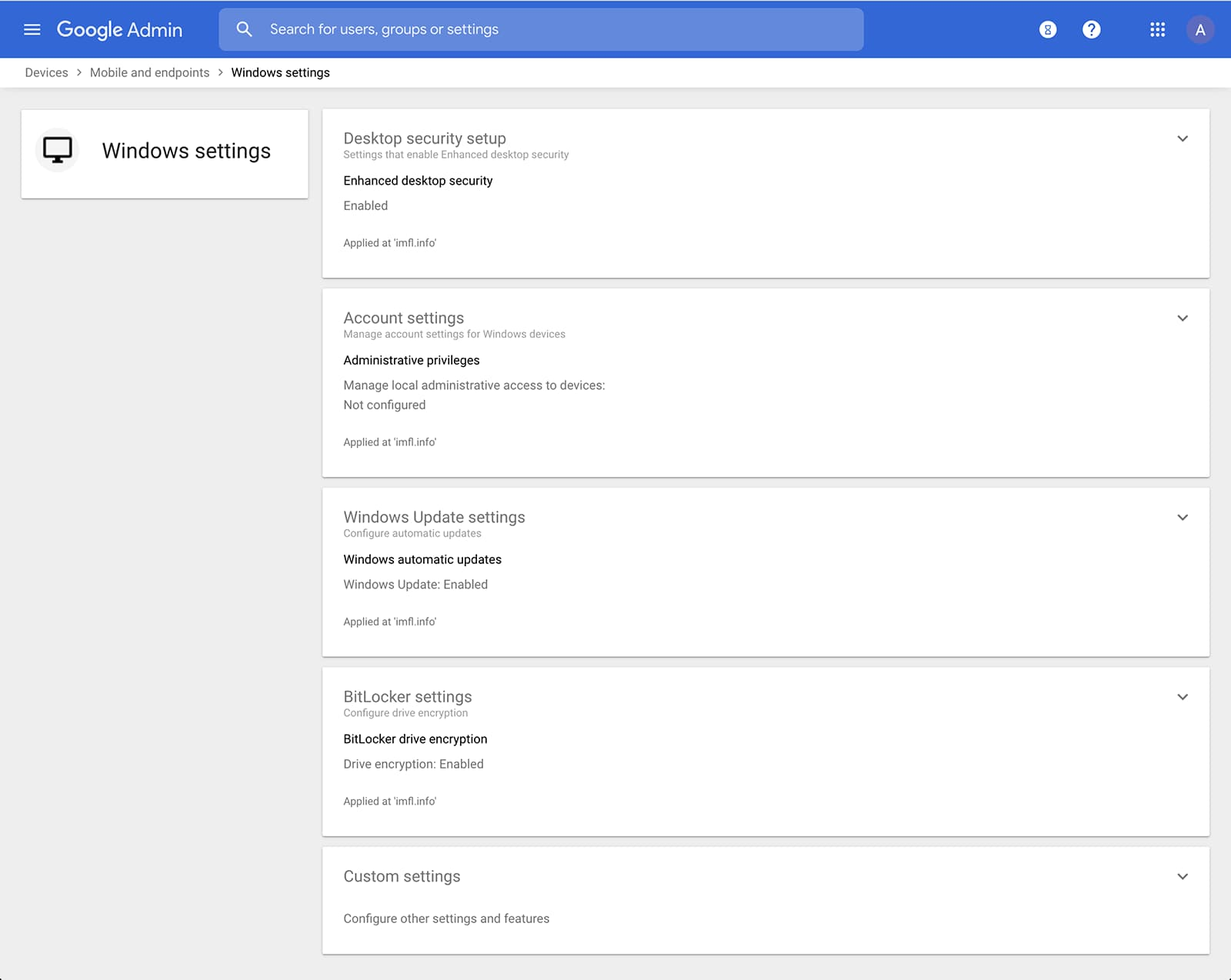
Admins can also manage and secure desktop devices with fundamental device management and enhanced desktop security for Windows. With fundamental device management, when a user logs into G Suite through any browser on a Windows, Mac, Chrome, or Linux device, that device will be automatically enrolled with endpoint management. This provides a base level of security to every desktop device that accesses G Suite data. With enhanced desktop security for Windows, admins can easily manage and secure Windows 10 devices through the admin console.
Enable secure connections without a corporate VPN using context-aware access
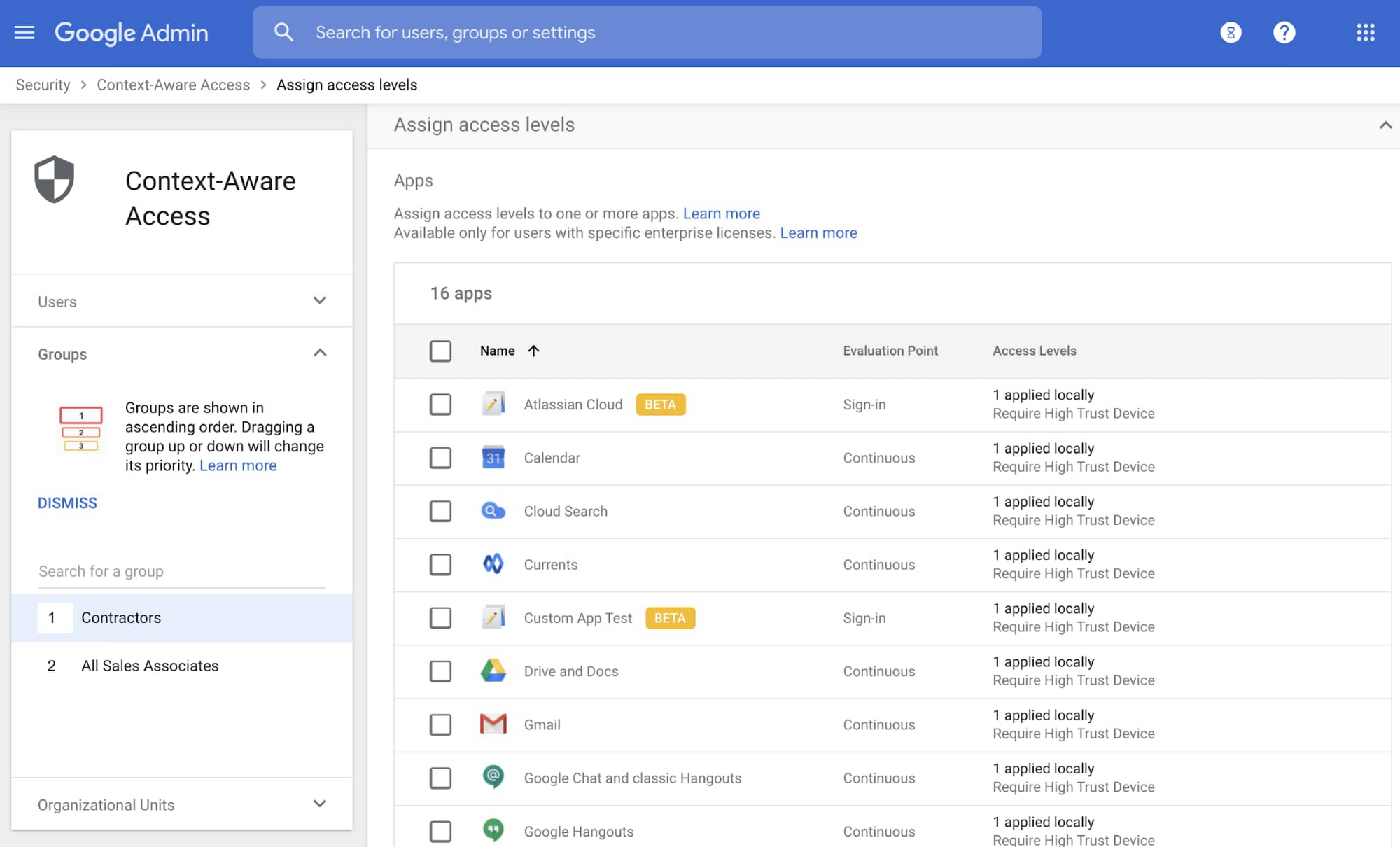
Context-aware access offers protection from unwanted access to G Suite services without the need for a VPN, and allows admins to set up different access levels based on a user’s identity and the context of the request, taking into account factors such as the country, device security status, and IP address of the request. For example, you can require BYOD devices accessing G Suite to meet encryption and password requirements, or restrict contractors from accessing G Suite from company managed Chromebooks.
Control data access with app access control
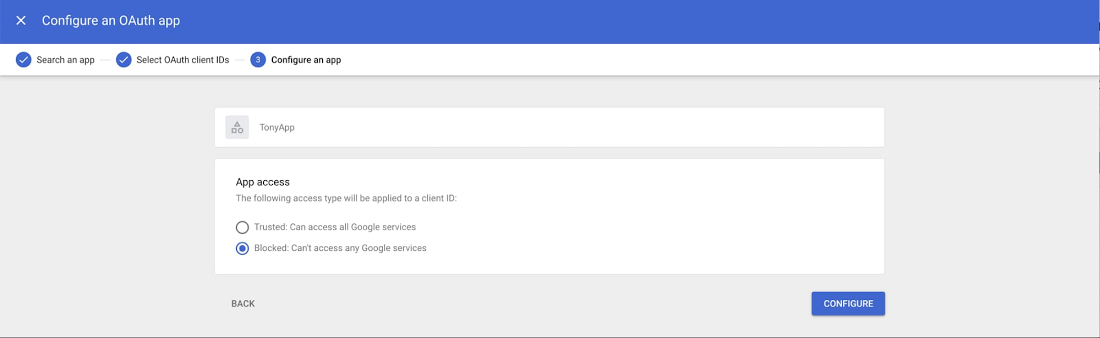
It’s important to protect all devices in your organization—corporate or BYOD—from malicious apps trying to gain access to corporate data. Using app access control, admins can take steps to prevent these apps from tricking users into mistakenly granting access to corporate data. With this feature, admins can choose which third-party apps are allowed to access users’ G Suite data by explicitly trusting, limiting, or blocking access for apps.
Enforce 2-Step Verification
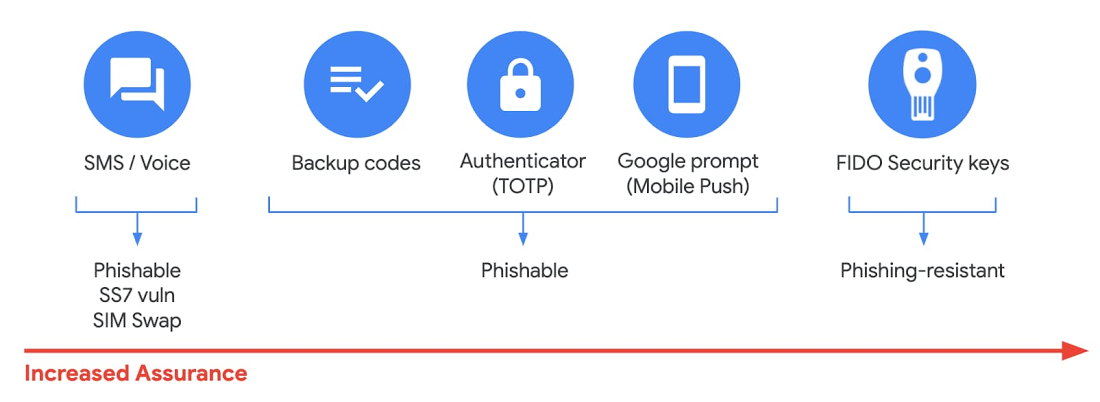
With 2-Step Verification, admins can reduce the risk of unauthorized access by asking users for additional proof of identity when signing in. And you can now use the Advanced Protection Program—our strongest protection for users at risk of targeted attacks. With the Advanced Protection Program for the enterprise, we’ll enforce a specific set of policies for enrolled users including security key enforcement, blocking access to untrusted apps and enhanced scanning for email threats
If you choose not to use security keys for any reason, you have multiple other options to enforce 2-Step Verification on BYOD devices. For Android and iOS, you can use Google prompt, Google Authenticator, text message, or phone call options for a second verification step.
Prevent data loss and leakage with data loss prevention
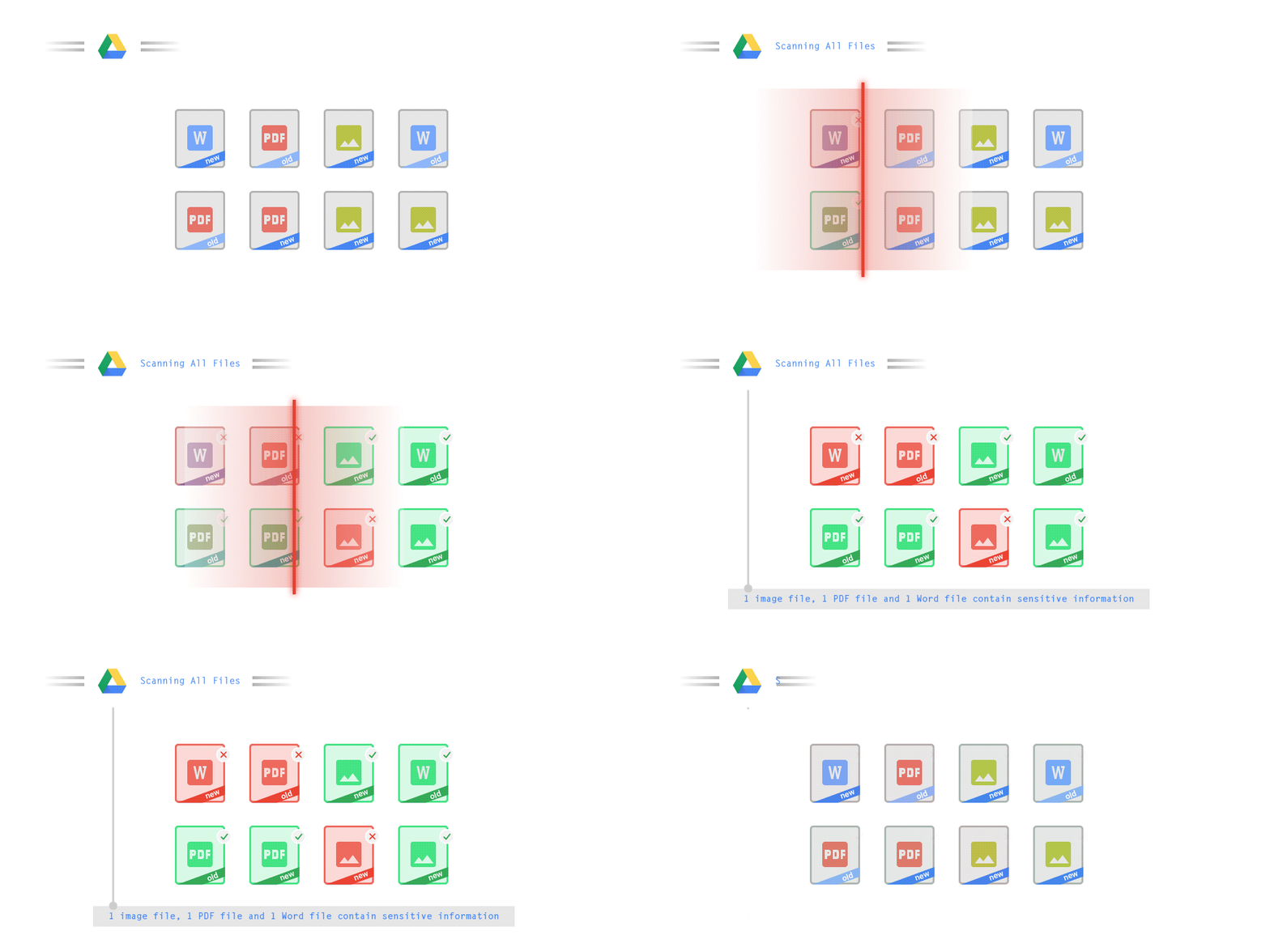
We know that as an admin, one of your highest priorities is to keep internal information safe and secure. That’s why we developed data loss prevention (DLP) policies to help protect sensitive information in Drive, Docs, Sheets, Slides, and Gmail from loss, misuse, or being accessed by unauthorized users. With G Suite DLP, admins can choose which types of data are sensitive and exactly how to protect them. Our controls enable easy detection of a wide variety of common info types, and administrators can supplement this with custom content detectors to meet their organization’s needs. You can also classify files in Drive automatically using DLP rules (beta) to categorize your data by sensitivity levels. DLP works on all the devices in your organization, including BYOD ones, since the protection is at the data and application level.
In addition to DLP, you can use DXP for iOS devices to restrict the copy/pasting of G Suite data to other accounts, personal or otherwise. DXP for iOS can also restrict users’ ability to drag and drop files from specific apps within their G Suite account. Similarly, you can use Google endpoint management to configure Android devices to prevent data sharing between personal and work profiles.
Make retention and eDiscovery possible on all your devices with Vault

To support your organization’s retention and eDiscovery needs, Vault enables corporate data that’s stored in G Suite and accessed by BYOD devices to be available for all your information governance needs. No matter the owner of the device, your organization’s data stored in Gmail, Drive, Chat, Groups, Voice, and Meet are accessible to Vault.
Using the zero-trust security model, the G Suite features above work together to keep your data protected and organization secure across all devices, whether they’re corporate-owned or BYOD.
(*Google Workspace was previously G Suite)
Canva: Democratizing design and collaborating closely with Google Workspace

3995
Of your peers have already read this article.
3:30 Minutes
The most insightful time you'll spend today!
Launched in 2013, Canva is a free online design platform with a mission to empower everyone in the world to design. Featuring a simple drag-and-drop user interface and a vast range of templates ranging from presentations, social media graphics, posters, apparel to videos, plus a huge library of fonts, stock photography, illustrations, video footage and audio clips, anyone can take an idea and create something beautiful. The Canva team is located across the globe with offices in the United States, China, the Philippines and Australia.
A long-term user
“To empower our team to undertake deep work, we have a recurring weekly Calendar invitation that keeps an entire day free of meetings across the business.” – Jeff Lai, Internal Infrastructure Specialist, Canva
A business that enables collaboration, innovation, and creativity is a natural fit for Google Workspace, an integrated suite of secure, cloud-native collaboration and productivity applications. Canva is a long-term user of the application suite and Jeff Lai, Internal Infrastructure Specialist, says “being a global business from day one, the company wanted to ensure any technology we used would be able to grow and scale with us.
“Google Workspace certainly met the brief. For example, creating new Google Workspace instances is very easy, you simply connect them to your domain and away you go.”
Canva has 1,850 Google Workspace licenses to cover its approximately 1,200-strong workforce, plus service accounts and shared accounts. The application suite covers the organization’s communication, connectivity and productivity needs, with enough storage to enable the business not to have to pay for supplementary storage services or deploy storage in-house. Canva’s team of designers, developers, marketers, investors and advisers uses Google Workspace for tasks such as scheduling meetings, emailing and chatting to internal and external parties, storing files and tracking activity on spreadsheets.
“Google Workspace is like air and water to us,” says Jeff. “it is part of the natural environment of our workplace.”
Reviewing licensing
With Google Workspace enabling Canva’s global workforce model, the business is exploring ways of further leveraging the features available through the application suite; Jeff reveals Canva is exploring the use of enterprise-class licenses that provide additional reporting and auditing capabilities.
Near-100% availability
“We expect Google Workspace to continue to play a key role in our operations and in supporting an increasingly international workforce.” – Jeff Lai, Internal Infrastructure Specialist, Canva
Supporting a distributed model with an increasing number of employees based outside Australia also requires Canva to use collaboration and productivity tools available 24 hours a day, seven days a week.
Google Workspace applications help the business drive continuous improvement from the bottom up, as well as the top down. Canva uses Forms to capture — in what Jeff describes as ‘no-judgement’ fashion — new ideas, callouts of broken processes, or areas of improvement. These comments and suggestions go directly to founders and senior management for action.
Furthermore, Google Workspace enables Canva to run a continuously productive working environment. “To empower our team to undertake deep work, we have a recurring weekly Calendar invitation that keeps an entire day free of meetings across the business,” says Jeff.
Growth example of ‘new normal’
Canva’s team believes the organization’s accelerated growth is indicative of the ‘new normal’, as more teams realize the need for a more scalable, more collaborative, more affordable and more user-friendly design platform.
Organizations of all sizes are doubling down on building a reliable remote workplace, and are turning to modern productivity and collaboration platforms like Canva to ensure they remain flexible and scalable.
Google Workspace and other Google Cloud products and services also enable Canva to increase the value of its own platform. The business uses Translation API to translate non-English searches into English, allowing it to display appropriate images and other elements.
Furthermore, the Canva editing tool enables users to pull files from Drive to be refined, while the platform also integrates with Google Maps and YouTube to give end users the ability to easily create items such as online brochures with these products integrated into them. Finally, Canva for Education — a tailored product to support student learning — integrates with Google Classroom, helping educators efficiently manage progress and connect with students at school, from home or on the go.
With Google Workspace, Canva is ideally positioned to continue growing its user base and build on the success of a platform that has thousands of templates and fonts, and millions of stock photos, icons and illustrations. Jeff says the business remains focused on the same goal as its founders had right at the start — making design accessible to everyone. “We expect Google Workspace to continue to play a key role in our operations and in supporting an increasingly international workforce,” he says.
Hybrid Work with Google Workspace: What Customers can Expect

5840
Of your peers have already read this article.
4:00 Minutes
The most insightful time you'll spend today!
In June, we shared our vision for navigating the future of hybrid work with a single connected experience in Google Workspace. Now, as many of our customers begin to embark on their own hybrid journeys, I wanted to share how we’re helping them bridge the gaps in this new way of working.
A dedicated place for team collaboration: Spaces are now live
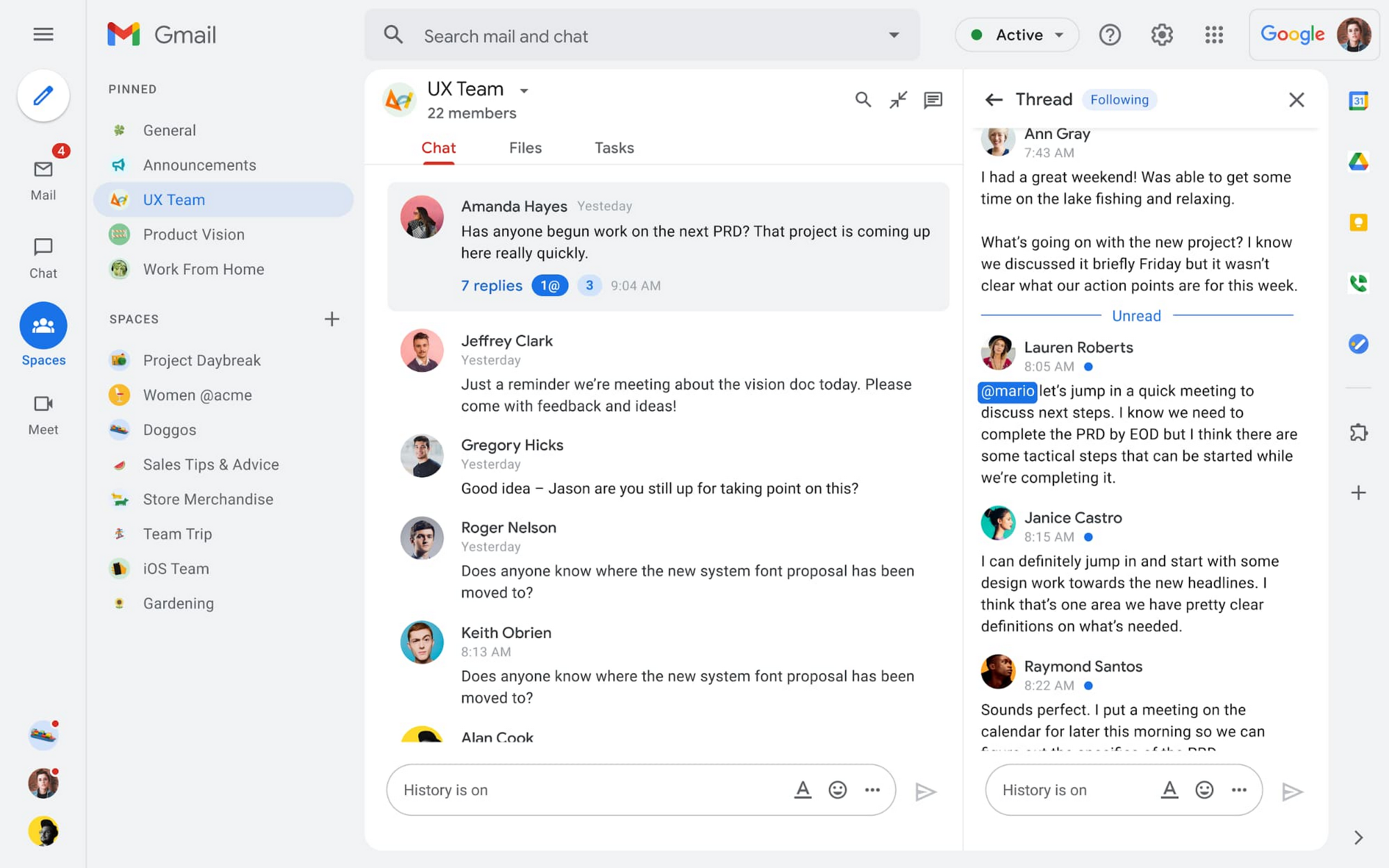
Spaces are the central place for team collaboration in Workspace and starting today, Spaces are live for all users. Spaces are unique in that they are tightly integrated with Google Workspace tools like Calendar, Drive, Docs, Sheets, Slides, Meet, and Tasks, providing a better way for people to engage in topic-based discussions, share knowledge and ideas, move projects forward and build communities and team culture.
We hear from our customers that they’re continuing to work across a broad range of locations and working hours, and that Spaces can be a central hub for collaboration, both in real time and asynchronously. Instead of starting an email chain or scheduling a video meeting, teams can come together directly in a Space to move projects and topics along, whether it’s a team of 10 for “2022 Roadmap Planning” or a team of 1,000 for the “Company-wide All-Hands.”
With Spaces, teams can share ideas, collaborate on documents, and manage tasks from a single place. Because all their work is preserved for future reference, team members can easily jump in and contribute at a time that works best for them, seeing a full history of the conversations, context, and content along the way. Using Spaces has already helped my own team, which is spread across time zones and varied in its working styles. It’s been helpful to rely on Spaces to retain and structure foundational knowledge, whether it’s for onboarding a new teammate or preserving context when someone moves to a new role.
We’re just getting started with Spaces and I’m excited to share a little more about where we’ll take it next.
In the coming months, our users will see:
- Streamlined navigation: A flexible user interface helps users easily access their inbox, chats, Spaces and meetings—all from a single location—so they can stay on top of everything that’s important.
- Discoverable Spaces: Spaces and their content can be made discoverable to all members of an organization, so other people can find and join the conversation. Administrators can also set discoverability as the default for their organization.
- Enhanced search: Allows users to easily find content from within and across Spaces, or even discover new Spaces to join. “Search everything” in Spaces opens up powerful new collaboration possibilities and makes it easier to access the team’s collective knowledge base.
- In-line topic threading: The ability to reply to any message within a Space fuels deeper discussions and collaboration across teams and organizations.
- Robust security & admin features: Tools for content moderation, managing Spaces, and establishing the right rules for healthy communication across domains and companies.
Making meetings more hybrid friendly
Spaces will play an important role in laying the groundwork for meetings and, in some cases, reduce the number of meetings a team needs to gain alignment. Having a dedicated space for asynchronous collaboration, with access to all the right content and context, will help teams be more deliberate about scheduling meetings. This is top of mind for us and many of our customers given the rise in meeting fatigue over the last 18 months. But when having a meeting genuinely feels worthwhile, the experience of transitioning into (and out of) it from different collaboration touchpoints should be seamless.
Over the past few months, in collaboration with many customers and across teams within Google, we developed a handbook for navigating hybrid work that includes best-practice blueprints for the five most common hybrid meeting types. Because meetings are a foundational piece of hybrid work, our goal is to make them as productive, immersive and inclusive as possible.
Scheduling meetings that work across the entire team
With hybrid work, many teams—my own included—have locations and working hours that can change daily. When many of us were together in the office, we might have tended to schedule meetings at a time that favored the “in-office majority,” but now it’s especially important to schedule meetings that scale across the entire distributed team.
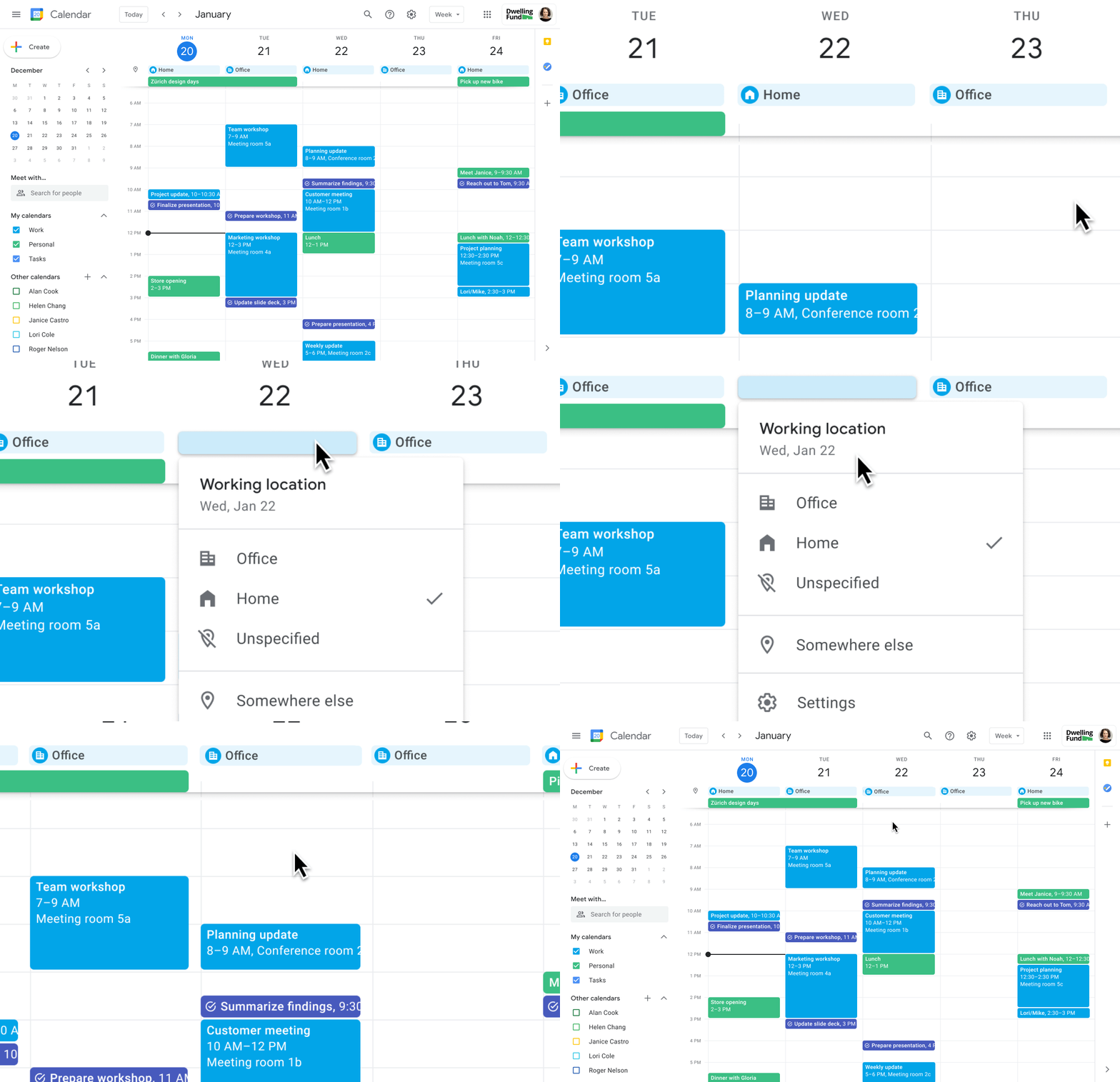
Now, beyond indicating their virtual or physical presence when accepting meeting invites, team members can set their location for each work day in Calendar. When combined, these capabilities allow meeting organizers and on-site support teams to plan for the right mix of in-person and virtual attendance. They can also provide greater visibility and help set expectations across hybrid teams.
Making meetings more spontaneous
Remember when you’d casually bump into a colleague in the office hallway or a break room and start a conversation that sparked new ideas? That’s perhaps the thing I’m looking forward to most as more of my team plan their part-time return to the office. These casual encounters were always a great way to build relationships and learn about topics that might not come up in structured meetings. To help enable these spontaneous connections when teammates aren’t in the office together, we’re bringing Google Meet calling to Workspace.
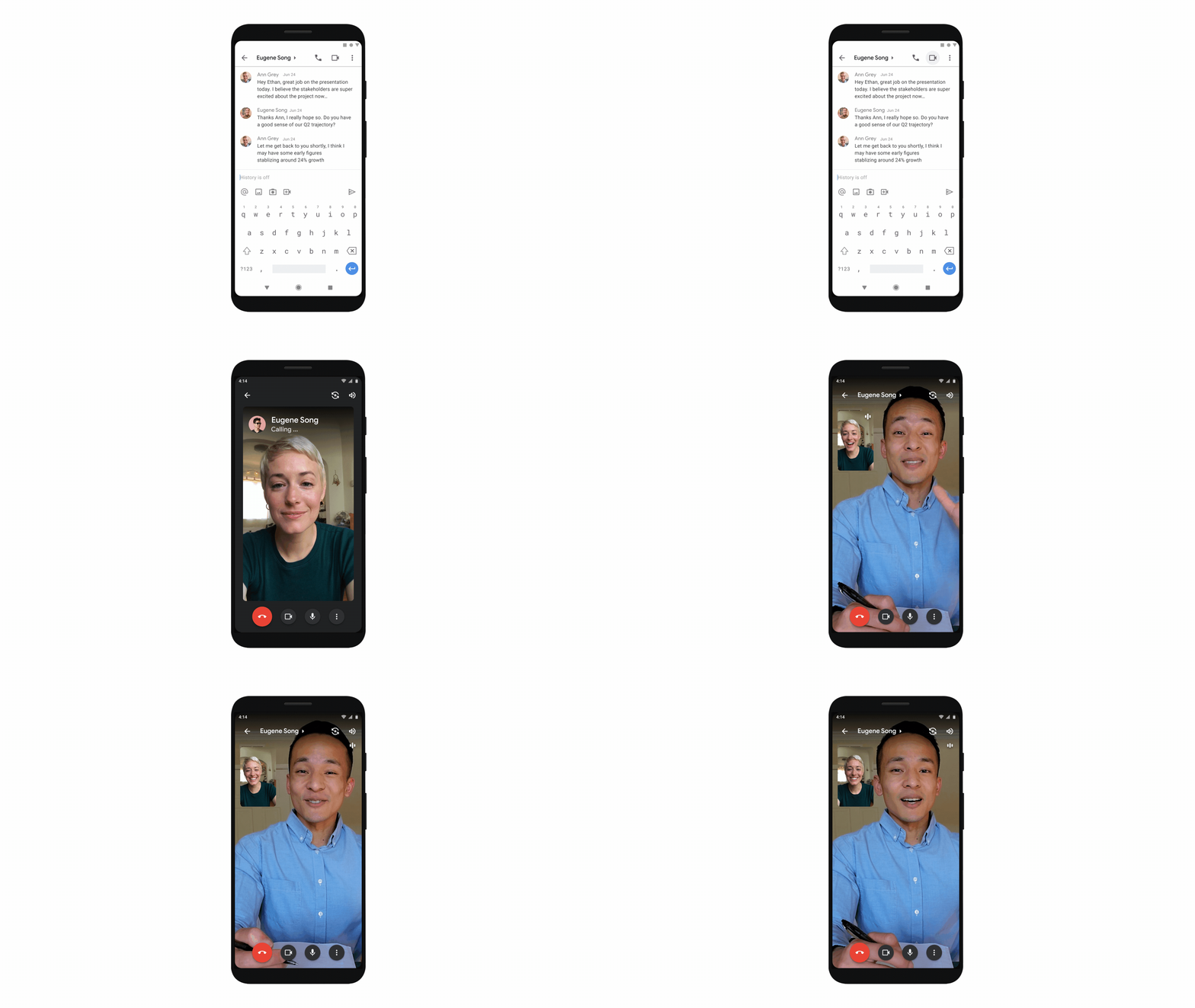
Google Meet calling is a seamless experience of initiating a video or audio call between one or more participants, complementing more structured, scheduled video meetings. Our intention is to bring Meet calling to all the natural endpoints in Workspace where you’d initiate an ad-hoc call including chats, people cards, and Spaces, but this will come first to one-to-one chats within the Gmail mobile app. Soon I’ll be able to call members of my team directly from a one-to-one chat. This will ring their device running the Gmail mobile app and send a call chip to our chat on their laptop, so they can easily answer from any device. It’s not quite the same as a spontaneous hallway conversation, but it might be the next best thing in a hybrid setting.
Ensuring collaboration equity in hybrid meetings
How do we ensure that hybrid meetings aren’t two meetings in one, divided between those in-person and those who are remote? Effective hybrid meetings need a unified experience so that the people sitting together in the same room can interact with their remote colleagues seamlessly, without it ever feeling like there are two parallel conversations.
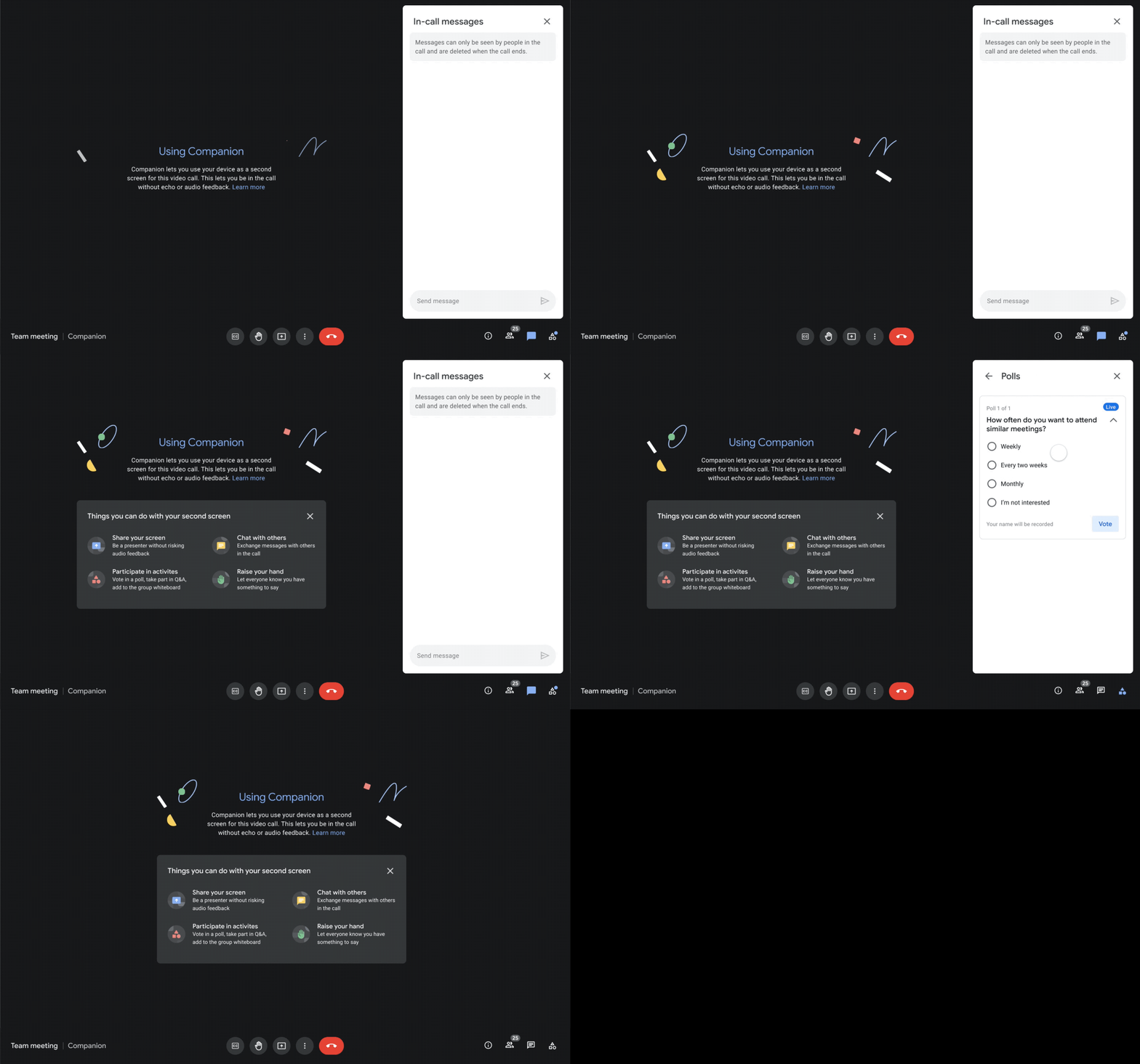
We designed Companion mode in Google Meet to specifically meet this challenge and we’ll start rolling it out to customers in November. With Companion mode I can host or join a meeting from within a conference room using my laptop while leveraging the in-room audio and video—and it all happens without any awkward audio feedback. This functionality lets me share content or see presentations up close on my own device, access the meeting chat and whiteboard, initiate and vote on polls, or post a question in Q&A, just as I would from home. And to ensure that users have greater choice over how they participate in meetings, live-translated captions will be available in Meet and through Companion mode by the end of the year. We’re currently working on translating meetings in English to French, German, Spanish and Portuguese, with many more languages coming in the future.
Expanding choice and flexibility for meeting hardware
While Companion mode keeps people in the room seamlessly connected to their remote colleagues, meeting hardware plays a crucial role in making hybrid meetings feel more immersive and human, with the ability for everyone to be clearly seen and heard. To provide more flexibility and choice on this foundation of how we come together in a hybrid work world, we’re announcing an expanded Google Meet hardware portfolio and interoperability with other conference room solutions.
First, we’re announcing two new all-in-one video conferencing devices to complement our Series One Room Kits. The Series One Desk 27 is an all-in-one 27” device that’s perfect for small shared spaces or your desktop, either in the office or at home. Series One Board 65 is an all-in-one 65” 4K device that can be paired with an optional stand for ultimate configuration flexibility—turning any room or space into a video collaboration hub in minutes.
Both devices feature collaboration capabilities with the Jamboard app built right in, and each can be used as an external display. While optimized for Google Meet, USB-C connection from your laptop gives you the flexibility to use the meeting app of your choice while leveraging the high-fidelity audio and high-definition video on Series One Desk 27 and Board 65. You can learn more about these devices developed in partnership with Avocor through our on-demand webinar starting at 9 AM PT today.
https://www.youtube.com/embed/BR81EAce5BQ?enablejsapi=1&
We’re also proud to announce new third-party devices coming to the Google Meet hardware ecosystem. Google has certified the Logitech Rally Bar Mini and Rally Bar for Google Meet, which provide complete room solutions for small and mid-sized rooms. You can learn more about these Google Meet-certified products in Logitech’s September 21 webinar. Additionally, the Rayz Rally Pro is a new mobile device speaker dock by Appcessori that will automatically launch Google Meet for video meetings and provide an improved audio experience from your mobile device.
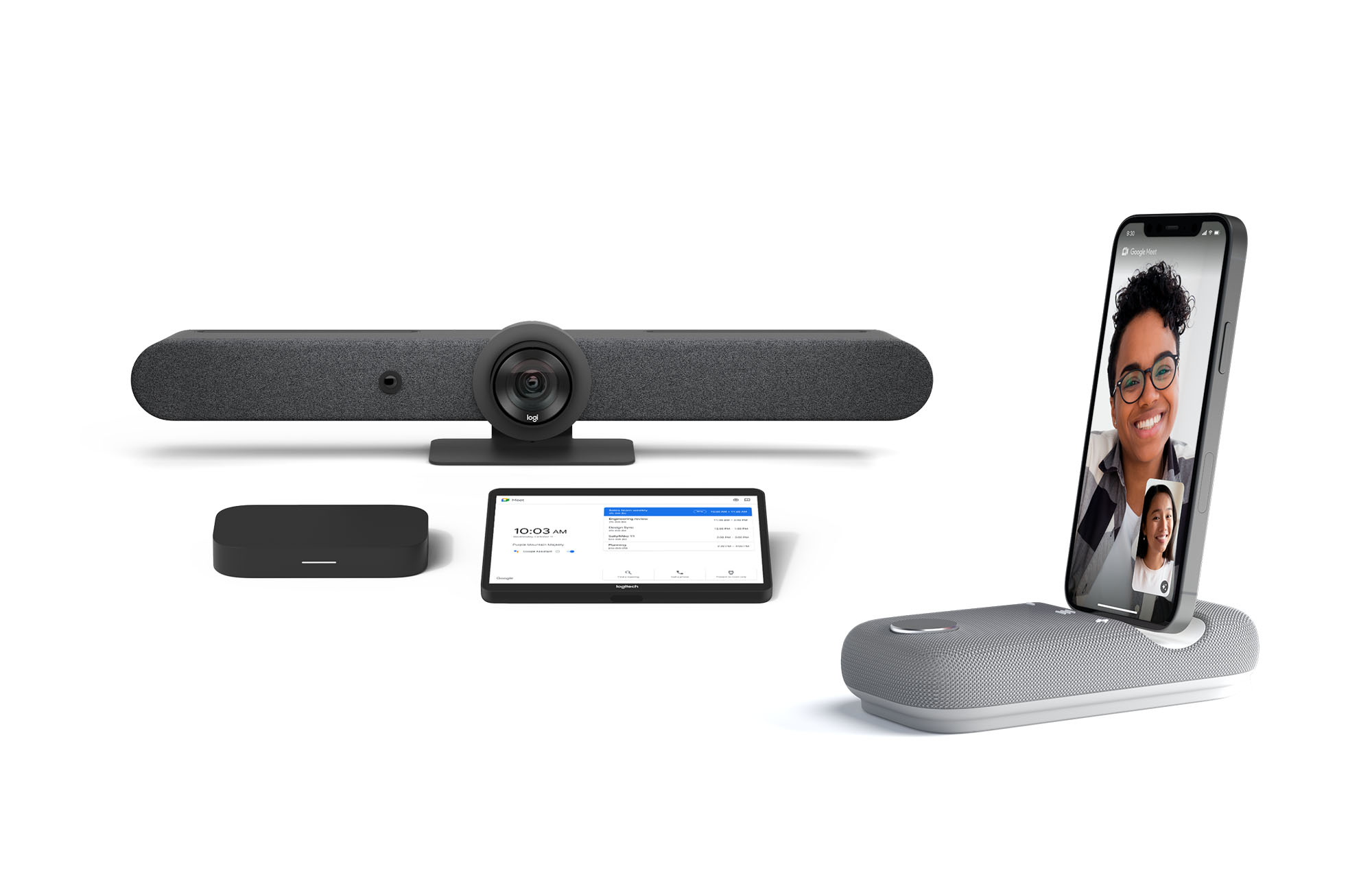
Certified Google Meet hardware ensures high-quality video and audio in meetings and is easy to deploy and manage. You can view our full Google Meet device portfolio and purchase directly from approved resellers by visiting the Google Meet Hardware website.
While Google Meet customers enjoy a full-featured experience on Meet hardware, we realize they sometimes need to connect with people outside of their video calling network. To enable this, organizations can use Pexip for Google Meet to seamlessly join Meet meetings from the widest range of third-party video conferencing solutions. Today, we’re also announcing support for bidirectional interoperability with devices from Webex by Cisco and Google Meet hardware. Soon you’ll be able to launch a Google Meet meeting on Webex hardware and a Webex meeting on Google Meet hardware. Calling interoperability between Meet and Webex is supported on Series One Board 65, Series One Desk 27, and the rest of the Google Meet hardware portfolio, as well as Webex Room Series, Room Kit Series, Desk Series and Board Series. We expect general availability later this year. You can find more details here. We plan to give Meet users even broader calling interoperability with support for other conferencing services in the near future.
Navigating hybrid work is a journey
We’re thrilled to bring these new Google Workspace experiences and devices to our customers, but we also realize that navigating hybrid work will be a journey of learning and adaptation for every organization. Two resources we recently developed can help along the way:
- Navigating hybrid work: A Google Workspace handbook
- The newly launched Future of Work site from Google Workspace, where you can keep up with all the ways work is changing.
Bridging the gaps in the emerging hybrid work world will necessarily be a combination of technology, workplace culture, and reimagining the use of physical spaces. But developing a “hybrid-first” mindset starts with the tools people use every day to connect, create, and collaborate, and Google Workspace will continue to play a crucial role in that evolution.
10 Reasons that Make Google Cloud the Champion of IaaS

10378
Of your peers have already read this article.
5:00 Minutes
The most insightful time you'll spend today!
When you choose to run your business on Google Cloud you benefit from the same planet-scale infrastructure that powers Google’s products such as Maps, YouTube, and Workspace.
We have picked 10 ways in which Google Cloud Infrastructure services outshine alternatives in the market in how they simplify your operations, save money, and secure your data.
1. Custom Machine Types means no wasted resources
Compute Engine offers predefined machine types that you can use when you create a VM instance. A predefined machine type has a preset number of vCPUs and a preset amount of memory; each type is billed at a set price as described on the Compute Engine pricing page.
If predefined machine types don’t meet your needs, you can create a VM instance with a custom number of vCPUs and custom amount of memory, effectively building a custom machine type. Custom machine types are available only for general-purpose machine families. When you create a custom machine type, you are deploying a custom machine type from the E2, N2, N2D, or N1 machine family on GCP. No other leading cloud vendor offers custom machine types so extensively.
Custom machine types are a good idea for workloads that aren’t a good fit for the predefined machine types and for workloads that require more processing power or memory but don’t need all of the upgrades provided by the next machine type level. This translates into lower operating costs. They are also useful for controlling software licensing costs that are based on the number of underlying compute cores.
Jeremy Lloyd, Infrastructure and Application Modernization Lead at Appsbroker, a Google partner:
“Custom machine types coupled with Google’s StratoZone data center discovery tool provides Appsbroker with the flexibility we need to provide cost efficient virtual machines matched to a virtual machine’s actual utilization. As a result, we are able to keep our customers’ operating costs low while still providing the ability to scale as needed.”
2. Compute Engine Virtual Machines are optimized for scale-out workloads
For scale-out workloads, T2D, the first instance type in the Tau VM family, is based on 3rd Gen AMD EPYC processors and leapfrogs VMs for scale-out workloads of any leading public cloud provider today, both in terms of performance and price-performance. Tau VMs offer 56% higher absolute performance and 42% higher price-performance compared to general-purpose VMs from any leading public cloud vendor (source). The x86 compatibility provided by these AMD EPYC processor-based VMs gives you market-leading performance improvements and cost savings, without having to port your applications to a new processor architecture. Sign up here if you are interested in trying out T2D instances in Preview.
For SAP HANA, Google Cloud has demonstrated with SAP how we can run the world’s largest scale-out HANA system in the public cloud (96TB). With such innovation, you are covered as your business grows exponentially.
3. Largest single node GPU-enabled VM
Google is the only public cloud provider to offer up to 16 NVIDIA A100 GPUs in a single VM, making it possible to train very large AI models. Users can start with one NVIDIA A100 GPU and scale to 16 GPUs without configuring multiple VMs for single-node ML training, without crossing the VM layer.
Additionally, customers can choose smaller GPU configurations—1, 2, 4 and 8 GPUs per VM—providing the flexibility to scale their workload as needed.
The A2 VM family was designed to meet today’s most demanding applications—workloads like CUDA-enabled machine learning (ML) training and inference, for example. This family is built on the A100 GPU which offers up to 20x the compute performance compared to the previous generation GPU and comes with 40 GB of high-performance HBM2 GPU memory. To speed up multi-GPU workloads, the A2 VMs use NVIDIA’s HGX A100 systems to offer high-speed NVLink GPU-to-GPU bandwidth that delivers up to 600 GB/s. A2 VMs come with up to 96 Intel Cascade Lake vCPUs, optional Local SSD for workloads requiring faster data feeds into the GPUs and up to 100 Gbps of networking. A2 VMs provide full vNUMA transparency into the architecture of underlying GPU server platforms, enabling advanced performance tuning. Google Cloud offers these GPUs globally.
4. Non-disruptive maintenance means you worry less about planned downtime
Compute Engine offers live migration (non-disruptive maintenance) to keep your virtual machine instances running even when a host system event, such as a software or hardware update, occurs. Google’s Compute Engine live migrates your running instances to another host in the same zone without requiring your VMs to be rebooted. Live migration enables Google to perform maintenance that is integral to keeping infrastructure protected and reliable without interrupting any of your VMs. When a VM is scheduled to be live-migrated, Google provides a notification to the guest that a migration is imminent.
Live migration keeps your instances running during:
- Regular infrastructure maintenance and upgrades
- Network and power grid maintenance in the data centers
- Failed hardware such as memory, CPU, network interface cards, disks, power, and so on. This is done on a best-effort basis; if a hardware component fails completely or otherwise prevents live migration, the VM crashes and restarts automatically and a hostError is logged.
- Host OS and BIOS upgrades
- Security-related updates
- System configuration changes, including changing the size of the host root partition, for storage of the host image and packages
Live migration does not change any attributes or properties of the VM itself. The live migration process transfers a running VM from one host machine to another host machine within the same zone. All VM properties and attributes remain unchanged, including internal and external IP addresses, instance metadata, block storage data and volumes, OS and application state, network settings, network connections, and so on. This has the benefit of reducing operational and maintenance overhead, helps you build a more robust security posture where infrastructure can be consciously revamped from a known good state and minimizes risks for advanced persistent threats.
Refer to Lessons learned from a year of using live migration in production on Google Cloud from the Google engineering team.
5. Trusted Computing: Shielded VMs guard you against advanced, persistent attacks
Establishing trust in your environment is multifaceted, involving hardware and firmware, as well as host and guest operating systems. Unfortunately, threats like boot malware or firmware rootkits can stay undetected for a long time, and an infected virtual machine can continue to boot in a compromised state even after you’ve installed legitimate software.
Shielded VMs can help you protect your system from attack vectors like:
- Malicious guest OS firmware, including malicious UEFI extensions
- Boot and kernel vulnerabilities in the guest OS
- Malicious insiders within your organization
To guard against these kinds of advanced persistent attacks, Shielded VMs use:
- Unified Extensible Firmware Interface (UEFI) BIOS: Helps ensure that firmware is signed and verified
- Secure and Measured Boot: Helps ensure that a VM boots an expected, healthy kernel
- Virtual Trusted Platform Module (vTPM): Establishes root-of-trust, underpins Measured Boot, and prevents exfiltration of vTPM-sealed secrets
- Integrity Monitoring: Provides tamper-evident logging, integrated with Stackdriver, to help you quickly identify and remediate changes to a known integrity state
The Google approach allows customers to deploy Shielded VMs with only a simple click, thereby easing implementation.
6. Confidential Computing encrypts data while in use
Google Cloud was a founding member of the Confidential Computing Consortium. Along with encryption of data in transit and at rest using customer-managed encryption keys (CMEK) and customer-supplied encryption keys (CSEK), Confidential VM adds a “third pillar” to the end-to-end encryption story by encrypting data while in use. Confidential Computing uses processor-based technology that allows data to be encrypted in use while it is being processed in the public cloud. Confidential VM allows you to to encrypt memory in use on a Google Compute Engine VM by checking a single checkbox.
All Confidential VMs support the previously mentioned Shielded VM features under the covers—you can think of Shielded VM as helping to address VM integrity, while Confidential VM addresses the memory encryption aspect which relies on CPU features. With the confidential execution environments provided by Confidential VM and AMD Secure Encrypted Virtualization (SEV), Google Cloud keeps customers’ sensitive code and other data encrypted in memory during processing. Google does not have access to the encryption keys. In addition, Confidential VM can help alleviate concerns about risk related to either dependency on Google infrastructure or Google insiders’ access to customer data in the clear.
See what Google Cloud partners say about Confidential Computing here.
7. Advanced networking delivers full-stack networking and security services with fast, consistent, and scalable performance
Google Cloud’s network delivers low latency, reduces operational costs and ensures business continuity, enabling organizations to seamlessly scale up or down in any region to meet business needs. Our planet-scale network uses advanced software-defined networking and security with edge caching services to deliver fast, consistent, and scalable performance. With 28 regions, 85 zones, and 146 PoPs connected by 16 subsea fiber cables around the world, Google Cloud’s network offers a full stack of layer 1 to layer 7 services for enterprises to run their workloads anywhere. Enterprises can be assured that they have best-in-class networking and security services connecting their VMs, containers, and bare metal resources in hybrid and multi-cloud environments with simplicity, visibility, and control.
Google Cloud’s network has protected customers from one of the world’s largest DDoS attacks at 2.54 Tbps. With our multi-layer security architecture and products such as Cloud Armor, our customers ran their business with no disruptions. Furthermore, our recent integration of Cloud Armor with reCAPTCHA Enterprise adds best-in-class bot and fraud management to prevent volumetric attacks. Cloud Armor is deployed with our Cloud Load Balancer and Cloud CDN, extending the secure benefits at the network edge for traffic coming into Google Cloud so customers have security, performance, and reliability all built in. Furthermore, we are excited to offer Cloud IDS in preview, which was co-developed with security industry leader, Palo Alto Networks, to run natively in Google Cloud.
Our advanced networking capabilities also extends to GKE and Anthos networking. With the GKE Gateway controller, customers can manage internal and external HTTPS load balancing for a GKE cluster or a fleet of GKE clusters with multi-tenancy while maintaining centralized admin policy and control. Unlike other Kubernetes offerings, we offer eBPF dataplane which brings powerful tooling such as Kubernetes network policy and logging to GKE. eBPF is known to kernel engineers as a “superpower” for its unique architecture to load and unload modules in kernel space, and now this capability is built in with Google Cloud networking.
For observability and monitoring, our customers deploy Network Intelligence Center, Google Cloud’s comprehensive network monitoring, verification and optimization platform. With four key modules in Network Intelligence Center, and several more to come, we are working towards realizing our vision of proactive network operations that can predict and heal network failures, driven by AI/ML recommendations and remediation. Network Intelligence Center provides unmatched visibility into your network in the cloud along with proactive network verification. Centralized monitoring cuts down troubleshooting time and effort, increases network security and improves the overall user experience.
8. Regional Persistent Disk for High Availability
Regional Persistent Disk is a storage option that provides synchronous replication of data between two zones in a region. Regional Persistent Disks can be a great building block if you need to ensure high availability of your critical applications as they offer cost-effective durable storage and replication of data between two zones in the same region.
Regional Persistent Disks are also easy to set up within the Google Cloud Console. If you are designing robust systems or high availability services on Compute Engine, Regional Persistent Disks combined with other best practices such as backing up your data using snapshots enable you to build an infrastructure that is highly available and recoverable in a disaster. Regional Persistent Disks are also designed to work with regional managed instance groups. In the unlikely event of a zonal outage, Regional Persistent Disks allow continued I/O through failover of your workloads to another zone. Regional Persistent Disks can help meet zero RPO and near-zero RTO requirements and other stringent SLAs that your critical applications might require by maximizing application availability and protection of data during events such as host/VM failures and zonal outages.
9. Cloud Storage’s single namespace for dual-region and multi-region means managing regional replication is incredibly simple
Similar to how Persistent Disk makes data more available by replicating data across zones, Cloud Storage provides similar benefits for object storage. Cloud Storage within a region is cross-zone by definition, reducing the risk that a zonal outage would take down your application. Cloud Storage adds to this by also providing a cross-region option that can protect against a regional outage and gets your data closer to distributed users. This comes in the form of Dual-region or Multi-region settings for a bucket. These are the simplest to implement cross-region replication offerings in the industry—just a simple button or API call to enable them. In addition to being simple to implement, they offer an added advantage of using a single bucket name that spans regions.
This is unique in the industry. Competitive offerings currently require setting up and managing two distinct buckets, one in each region and they don’t offer the strong consistency properties Cloud Storage offers across regions. Operations and app development are burdened by this design. Google’s single namespace approach dramatically simplifies application development (the app runs on single region or dual/multi-region without any changes), and provides simpler application restarts and testing for DR.
10. Predictive autoscaling
Customers use predictive autoscaling to improve response times for applications with long initialization times or for applications with workloads that vary predictably with daily or weekly cycles. When you enable predictive autoscaling, Compute Engine forecasts future load based on your Managed Instance Group’s history and scales out the MIG’s in advance of predicted load, so that new instances are ready to serve when the load arrives. Without predictive autoscaling, an autoscaler can only scale a group reactively, based on observed changes in load in real time.
With predictive autoscaling enabled, the autoscaler works with real-time data as well as with historical data to cover both the current and forecasted load. Forecasts are refreshed every few minutes (faster than competing clouds) and consider daily and weekly seasonality, leading to more accurate forecasts of load patterns.
For more information, see How predictive autoscaling works and Checking if predictive autoscaling is suitable for your workload.
These are just a few examples of customer-centric innovation that set Google Cloud infrastructure apart. Bring your applications and let the platform work for you.
Get started by learning about your options for migration, or talk to our sales team to join the thousands of customers who have embarked upon this journey.
Acknowledgement
Special thanks to Dheeraj Konidena (Google) for contributing to this article.
100 Stores. 5 States. How Schnucks Pulled Off a Mammoth Collaboration Feat

4399
Of your peers have already read this article.
4:30 Minutes
The most insightful time you'll spend today!
As a family supermarket chain since 1939, Schnuck Markets Inc. depends on driving efficiency and volume sales to achieve its mission, identifying customer service and community partnerships among its key differentiators.
In order to commit its maximum resources for success, Schnucks continues to focus on streamlining operations and achieving greater efficiency. Management and administrative staff throughout the company’s 100 stores in five states need to be able to collaborate effortlessly while enjoying an accurate, centralized information exchange platform. These efficiencies have the potential to impact productivity, customer service, and employee engagement.
Fast-tracking data sharing
Before adopting G Suite, Schnucks found collaborative workflows to be a challenge. Managers from different stores, often in different states, had to provide data that could be compiled and shared. Collaborative documents on traditional platforms faced challenges at Schnucks, where limits of simultaneous users would result in user lockouts. Schnucks managers often exchanged many different versions of the same documents and spreadsheets. However, reconciling all those versions was time-consuming and limited real-time collaboration.
“When we share a Google sheet and request data, 200 people can add their responses immediately at the same time from any device. They don’t walk away and forget and need a reminder. The result is near-effortless compliance,” says Kim Anderson, Director of Procurement and Replenishment at Schnucks.
Schnucks has been successful using the entire range of G Suite tools, with Drive, Docs, Slides, Sheets, and Forms contributing to enhanced collaboration. Google Keep is a popular productivity tool for meeting notes and tasks and creating reminders. Schnucks also uses Hangouts Meet and Hangouts Chat to reduce time and costs spent in face-to-face meetings, and Calendar as the central source for scheduling company events and meetings.
The partnership between Schnucks and Agosto helped with a successful G Suite deployment for the retailer. Agosto helped coordinate the logistics of the move and tackled the G Suite migration with a three-part strategy: IT staffers would move to Google first before employee “Google Guide” experts came in who could help answer teammate G Suite questions.
“Agosto’s deployment plan helped our G Suite deployment run smoothly,” says Dave Steck, Schnucks Vice President of Development and IT Infrastructure. “Their thorough planning helped mitigate the inevitable disruption a change of this size would make.”
Enhanced security and reliability
Previously, Schnucks relied on email to exchange information and any outages added even more lag time to its operations. With Gmail and the entire G Suite, Schnucks now experiences virtually no downtime, allowing for effective communication with enhanced levels of reliability and security.
“We were able to take advantage of the security benefits of G Suite right away,” says Joey Smith, Vice President and Chief Information Security Officer at Schnucks. “Our administrators are able to quickly configure, test, and manage our G Suite security settings to fit the security needs of our business while maintaining compliance with all regulatory obligations.”
On top of the CapEx and OpEx savings with Google providing infrastructure for its office productivity software, Schnucks has gained increased security and high availability, as well as robust disaster recovery. These features are included in G Suite, without any need for IT intervention.
“G Suite automatically encrypts our data with a unique encryption key for each piece and distributes it across multiple data centers for performance, security, and reliability,” says Joey. “This saves us a significant amount of time and money while achieving top notch security.”
Another way Schnucks benefits from Google security is the availability of data loss protection (DLP) features native to Gmail. With DLP, Schnucks can automatically audit outgoing emails for Personal Identifiable Information (PII), Protected Health Information (PHI), and other information the store requires.
“DLP is very powerful because it provides detailed visibility,” says Joey. “We can isolate emails, analyze patterns of false positives, and follow up with education or enhanced restrictions to increase security.”
Spam reduction
An unexpected advantage of adopting G Suite was an instantaneous reduction in spam emails. That’s more administrative time saved for employees. In fact, Gmail native spam prevention is so effective that Schnucks was able to replace its third-party spam filter with a simpler technology that costs 80% less.
Savings on hardware and software
Converting to G Suite saves Schnucks the operational costs of an infrastructure for office and communications solutions, but its web interface also provides substantial savings on application maintenance, anti-virus software, and hardware.
With G Suite files and applications residing in the cloud, the need for employees to use heavyweight installable applications is increasingly rare. As laptops age, Schnucks is replacing them with Chromebooks, saving approximately $1,250 per computer. Because Chromebooks don’t require additional anti-virus software or many other endpoint security measures, the need for software licenses and other security and maintenance costs are simultaneously reduced.
Schnucks also finds that Chromebooks instantly increase productivity. “What’s great about the Chromebook is the productivity savings we get from the speed and ease of use and management,” says Dave Steck, Vice President of Development and IT Infrastructure at Schnucks. “You’re not waiting for applications to start up. As a result, Chromebooks are the only laptops we need for the majority of our teammates.”
Aligning the company across sites
More than just providing a common set of office tools, intuitive collaboration in G Suite enables the grocery chain to provide consistent messaging and a central information hub across all store locations. With posters, presentations, and communications, Schnucks worked hard to help ensure that the entire company understood the value of the tools. The Operations and IT teams rolled out the changeover in three phases, using Google Guides to show the benefits of adoption and then rolling out to larger groups over time.
“Adopting G Suite as a collaborative platform helped us to integrate individual store activities and increase operational efficiency,” says Dave.
Investing in the future
Employees who were already familiar with G Suite because they used it in school or in their personal lives have found the move eases communications company-wide, and Schnucks believes that the move will also help attract prospective employees who already use G Suite.
“Knowing that more and more prospective employees are already familiar with G Suite is a big win for us,” says Joey. “To them, it helps demonstrate our commitment to innovation.”
How Barilla Created a Social Media Style App to Improve Efficiency

5632
Of your peers have already read this article.
3:30 Minutes
The most insightful time you'll spend today!
Google Cloud Results
- Replaced conflicting, time-consuming paper logs with a near real-time, transparent app
- Scaled rapidly and easily to accommodate new teams thanks to Google App Engine
- Enables photographic and video communication to replace confusing text
- New factory solution rolled out in just 15 days
In 1877, Pietro Barilla set up a small bakery to make pasta and baked goods for the people of Parma, Italy. Today, Barilla applies its 140 years of baking knowledge on a global scale, with six major manufacturing sites in Italy and an international network employing over 8,000 people. As the world’s leading producer of pasta, Barilla knows that when it comes to making quality food, great communication is key. That’s why the company plans to become a completely digital, looking to technology to improve the way it works.
Teams at the Barilla factory in Cremona work along a production line more than one-kilometer long, staffed by three shifts of workers a day. When one shift handed over to the next or requested machine maintenance teams, they used paper notebooks and unofficial instant messaging to communicate. That meant there was no authoritative, real-time record of events, communication was messy, oversight was poor, and teams had to hold daily morning meetings to synchronise notes.
Barilla worked with the Google Cloud Partner Injenia to create a solution, beginning with a consultative process on the factory floor.
“We had the idea to to start from the bottom and work up,” says Cristiano Boscato at Injenia. “Barilla’s top staff were brilliant about letting us do it. Eight of us from Injenia spent months on the factory lines with Barilla workers, collecting ideas on Google Docs, making presentations with Slides and collecting feedback with Forms. The CollaborAction app we created is the result of an amazing partnership.”
Co-designing a team social network
“Everything at the Cremona plant was managed offline, with paper,” explains Alessandra Ardrizzoia, Digital Engagement Senior Manager at Barilla. “Workers on the line would track events in notebooks, the shift leader would have another notebook, and the leader of the maintenance team would have yet another notebook. Everybody wrote their own text description of events, so there would be mismatches in the information going around.”
To resolve this, teams would meet at 8:30am every day to reconstruct a consistent narrative. In addition, machine maintenance workers were already using instant messaging to communicate with the line. Barilla and Injenia looked for a solution that could deliver a searchable, single version of events, with the ease of use of a mobile messaging application.
After consulting factory workers for ideas, Injenia created CollaborAction, a custom-built app that brought G Suite collaboration tools together on an Google App Engine platform, using Google Cloud SQL to index files. Google+, Google Drive and Hangouts were not only highly available and easy-to-use, they also “helped with fast adoption, with interfaces that workers could already relate to.” Meanwhile Google App Engine enabled the Injenia team to deliver updates and new versions at speed, as part of a feedback process with workers who offered suggestions through a link to Forms embedded in the app.
Google+ provides an intuitive social media dashboard that workers felt comfortable with. Now teams use company tablets placed at intervals along the line to log in, report issues to other teams, photograph problems, schedule maintenance, give status updates through Hangouts chat, and have visibility on the whole process as it takes place.
“Everyone in the Cremona plant was really happy with the new social collaboration process. Because they were involved in designing the solution, they felt involved and really engaged with the process,” says Alessandra. “And now that everyone is aligned with CollaborAction, all the work in the plant is more effective. They are more agile and can use their time in more added-value activities.”
Optimization and a national roll-out
Created in Cremona, now CollaborAction connects over 1,000 users in six of Barilla’s factories in Italy. “The pilot at Cremona took one month, and adoption has been easier and faster in every plant we’ve taken it to,” says Cristiano. “We have another five or six plants more, and it takes no more than 15 days to introduce. That’s incredible.”
Because CollaborAction is a mobile app built on Google App Engine, scaling to meet new demand has been simple. Now maintenance teams use the app on smartphones, line workers use it on tablets, and shift leaders use it on laptops, so the entire team is aligned in close to real-time on a single version of events. And now teams communicate with video and photographs as well as text, there’s less room for confusion, as Alessandra explains. “It’s no problem understanding what’s happening in a video or picture, compared to a message that just says ‘something is going wrong.’ On a production line, where one part leads into the next, that speed makes a difference, and means we don’t have to throw as much food away when something breaks down.”
“Now we’re collecting feedback from all of the plants using CollaborAction and using it to create a standardised solution that we can apply across all of our plants,” says Alessandra. “We’re side-by-side with the workers in that sense, trying to address their needs with new features. It’s a way to make the workers feel like part of the solution, and that the app represents their needs and their voice.”
Solving a universal problem
By the end of 2018, Barilla and Injenia aim to have deployed CollaborAction to 2,700 employees at 18 factories worldwide. Barilla has already collected more than 50,000 posts with the app, including around 20,000 photographs and videos, and is now considering ways to apply Cloud Machine Learning Engine to create a maintenance chatbot or direct IoT connection with machinery.
“CollaborAction hasn’t just made our maintenance processes faster and more efficient, its also exponentially increased the knowledge and understanding employees have about their work,” says Alessandra. “It’s improving team spirit, too, such as when employees use CollaborAction to arrange to play soccer. It’s become the main communication tool for the entire plant.”
More Relevant Stories for Your Company

How Google Maps Platform Boosts Domino’s Operations and Fast Growing Franchise across Indonesia
Editor’s note: Today’s blog post is from Mayank Singh, Chief Digital Officer and VP Marketing and IT at pizza delivery group Domino's Indonesia. He explains how Google Maps Platform is enabling their business to optimize their operations and supporting the franchise's ambitious expansion strategy in one of the world's most

How MobileOne Expanded its Stores by 340% in Just Three Years
The mobile industry is extremely fast-paced. New smartphones arrive at rapid speed. Smartphone OS updates regularly add new features and capabilities. And by the end of 2018, 5G wireless, the game-changing successor to 4G, will begin to be available in some markets. With more than 125 T-Mobile premium retail stores

A set of new capabilities to build a differentiated data platform: BigLake, now generally available
Data continues to grow in volume and is increasingly distributed across lakes, warehouses, clouds, and file formats. As more users demand more use cases, the traditional approach to build data movement infrastructure is proving difficult to scale. Unlocking the full potential of data requires breaking down these silos, and is

Reference Guide to Get You Started with Development on GKE
Getting started with Kubernetes is often harder than it needs to be. While working with a cluster “from scratch” can be a great learning exercise or a good solution for some highly specialized workloads, often the details of cluster management can be made easier by utilizing a managed service offering. Google Kubernetes Engine (GKE)
