





3347
Of your peers have already watched this video.
17:30 Minutes
The most insightful time you'll spend today!
An App Modernization Story with Cloud Run
Back in 2016, an ASP.NET monolith app was deployed to IIS on Windows. While it worked, it was clunky in every sense of the word.
Over the years, the app was freed from Windows (thanks to .NET Core), containerized to run consistently in different environments (thanks to Docker) and decomposed into a set of loosely-coupled, event-driven, microservices (thanks to Cloud Run). The end result is a simpler and portable serverless architecture that’s much cheaper to run and maintain.
Watch the modernization journey, explore the decision points, and deep dive into the final architecture and code.
Learn to Easily Administer Multi-cluster Kubernetes Environs: Part 4 KRM Series

5570
Of your peers have already read this article.
4:00 Minutes
The most insightful time you'll spend today!
This is part 4 in a multi-part series about the Kubernetes Resource Model. See parts 1, 2, and 3 to learn more.
Kubernetes clusters can scale. Open-source Kubernetes supports up to 5,000 Nodes, and GKE supports up to 15,000 Nodes. But scaling out a single cluster can only get you so far: if your cluster’s control plane goes down, your entire platform goes down; if the Cloud region running your cluster has a service interruption, so does your app.
Many organizations choose, instead, to operate multiple Kubernetes clusters. Besides availability, there are lots of reasons to consider multi-cluster, such as allocating a cluster to each development team, splitting workloads between cloud and on-prem, or providing burst capability for traffic spikes.
But operating a multi-cluster platform comes with its own challenges. How to consistently administer many clusters at once? How to keep the clusters secure? How to deploy and monitor applications running across multiple clusters? How to seamlessly fail over from one region to another?
This post introduces a few tools that can help platform teams more easily administer a multi-cluster Kubernetes environment.
The platform base layer, with Config Sync
In the last post, we explored how thoughtful platform abstractions can help reduce toil for app developers- including for a multi-cluster environment, where automation such as CI/CD handles all interactions with the staging and production clusters. But equally important is the platform base layer, the Kubernetes resources and configuration that are shared across services. Your platform base layer might consist of Namespaces, role-based access control, and shared workloads like Prometheus.
Platform abstractions depend on the existence of these base-layer resources. And so does the security and stability of your platform as a whole. It’s important that these resources not only get deployed, but also stay put. CI/CD is great for deploying resources, but what about making sure resources stay deployed? What if a Kubernetes Namespace gets deleted? Or a Prometheus StatefulSet is modified?
Kubernetes’ job is to ensure that the cluster’s actual state matches the desired state. But sometimes, the “desired” state isn’t desired at all – it’s a developer who mistakenly modified a resource, or a bad actor that’s gained access into the system. For this reason, a platform base layer needs more than a one-and-done CI/CD pipeline. A tool called Config Sync can help with this.
Config Sync is a Google Cloud product that can sync Kubernetes resources from a Git repository to one or more GKE or Anthos clusters. Unlike CI/CD tools like Cloud Build, Config Sync watches your clusters constantly, making sure that the intended resource state in the cluster always matches what’s in Git. Config Sync is designed primarily for base-layer resources like namespaces and RBAC. In this way, Config Sync is complementary to, not a replacement for, CI/CD.
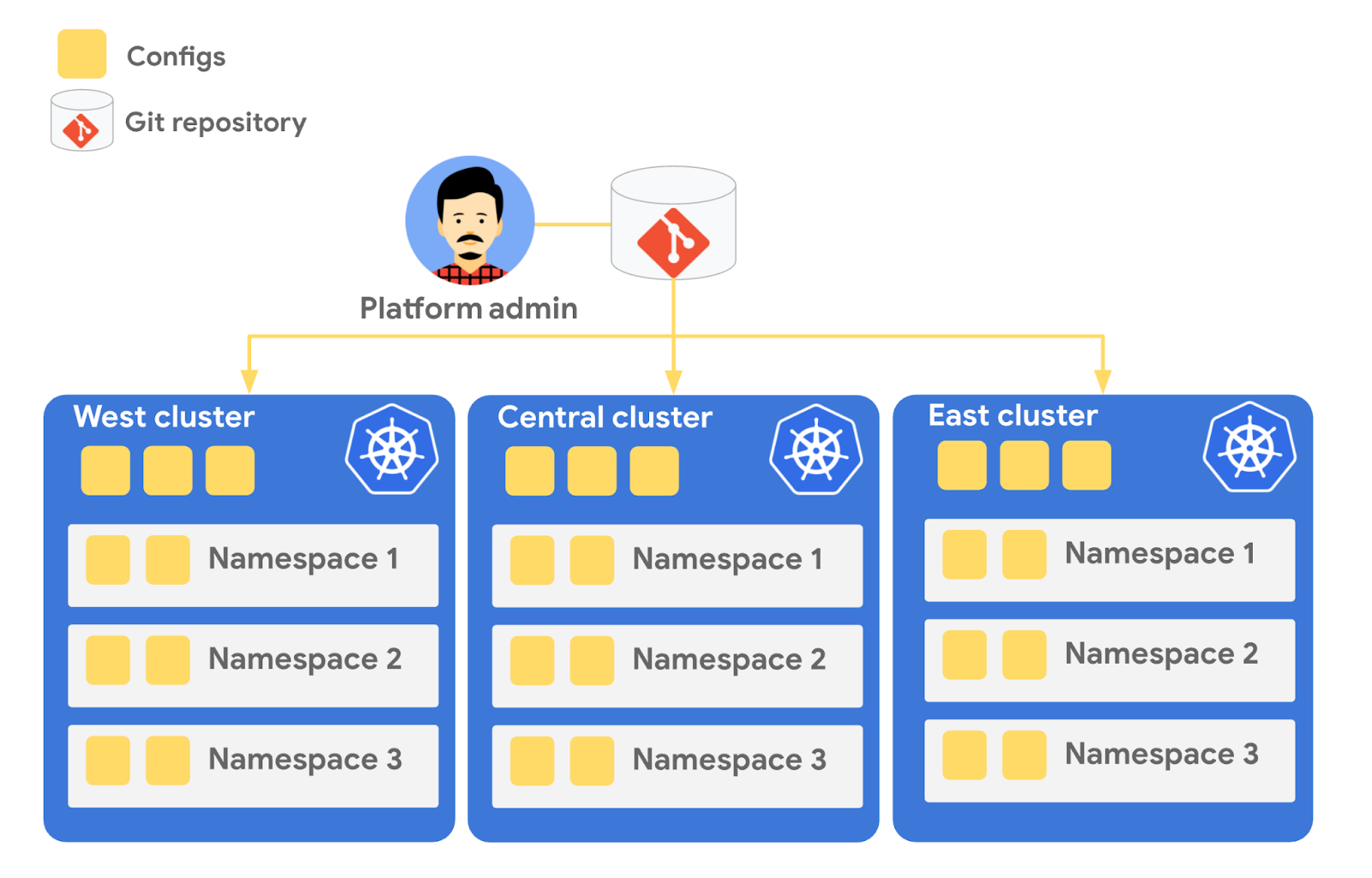
Config Sync runs in a Pod inside your Kubernetes cluster, watching your Git config repo for changes, and also watching the cluster itself for any divergence from your desired state in Git. If any configuration drift is detected from what’s stored in Git, Config Sync will update the API Server accordingly.
You can point multiple Config Sync deployments at the same Git repo, allowing you to manage the base-layer platform resources for multiple clusters using the same source of truth. And by using Git as the landing zone for config, you can benefit from some of the GitOps principles we discussed in part 2, including the ability to audit and roll back configuration changes.
Let’s walk through an example of how to manage base-layer resources with Config Sync.
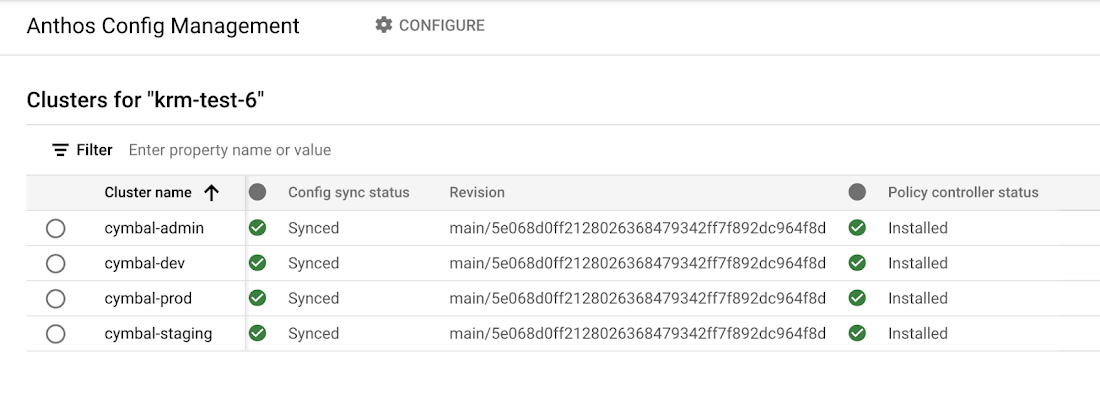
The Cymbal Bank platform consists of four GKE clusters: admin, dev, staging, and prod. We can install Config Sync on all four clusters using the gcloud tool or the Google Cloud Console, pointing all four clusters at a single Git repository, called cymbalbank-policy. Note that this repo is separate from the application source and config repos, and is managed by the platform team. From the Console, we can see that all four clusters are synced to the same commit of the cymbalbank-policy repo.
Now, let’s say that the Cymbal Bank platform team wants to limit the amount of CPU and memory resources each application team can request for their service. Kubernetes ResourceQuotas help impose these limits, and prevent unexpected Pod evictions.
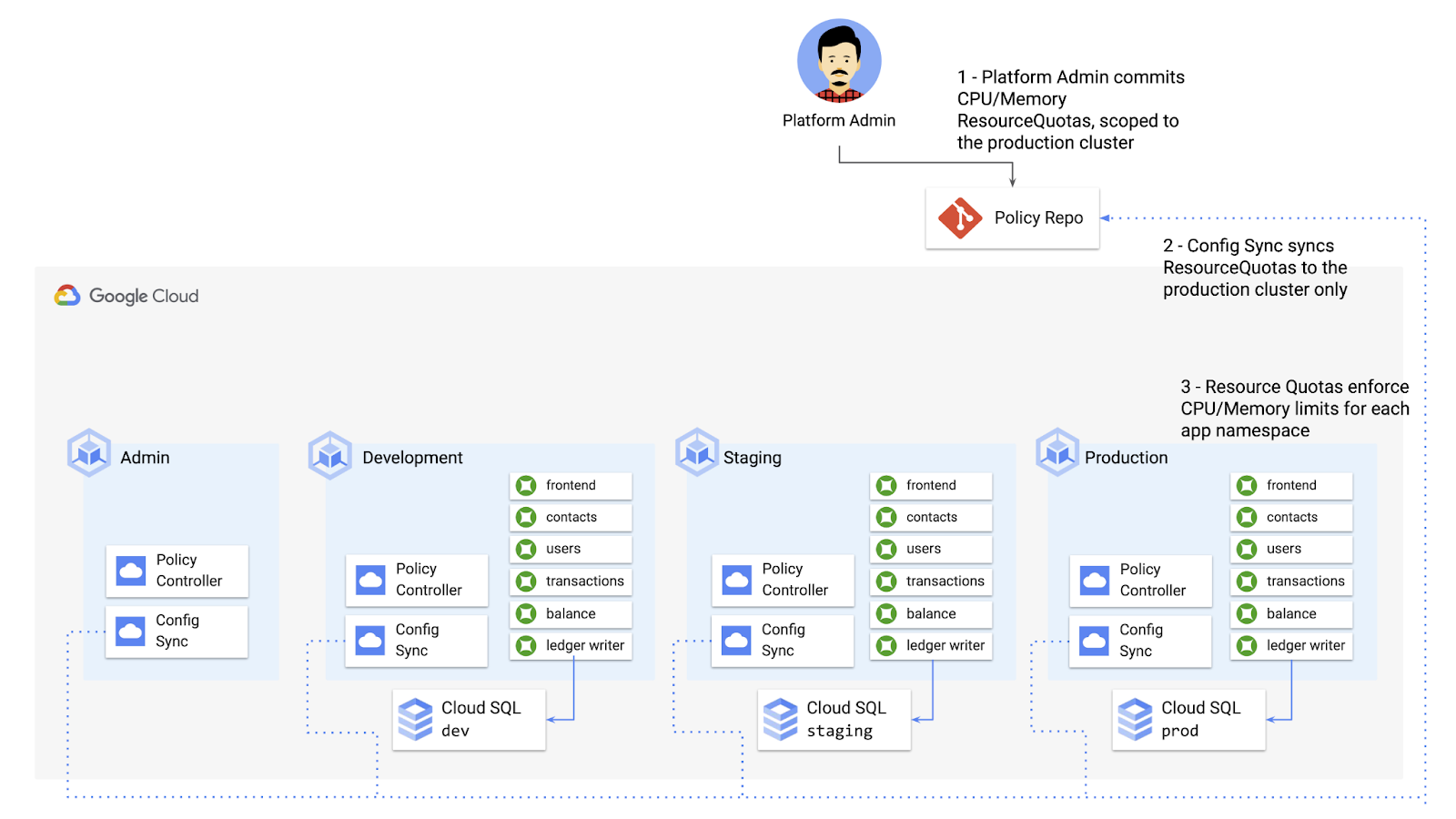
The platform team can define a set of ResourceQuotas for each application namespace. They can also scope the resources to only be applied to a subset of clusters – for instance, to the production cluster only. (If no cluster name selector is specified, Config Sync will deploy the resource to all clusters by default.)
apiVersion: v1kind: ResourceQuotametadata:name: production-quotanamespace: frontendannotations:configsync.gke.io/cluster-name-selector: cymbal-prodspec:hard:cpu: 700mmemory: 512Mi
From here, the platform team can commit the resources to the cymbalbank-policy repo, and Config Sync, always watching the policy repo, will deploy the resources to the production cluster:
NAMESPACE NAME AGE REQUEST LIMITbalancereader production-quota 6m56s cpu: 300m/700m, memory: 612Mi/512Mi
If a developer tries to delete one of the ResourceQuotas, Config Sync will block the request, helping to ensure that these base-layer resources stay put.
error: You must be logged in to the server (admission webhook "v1.admission-webhook.configsync.gke.io" denied the request: requester is not authorized to delete managed resources)
In this way, Config Sync can help platform teams ensure the stability of that platform base-layer, as well as ensure resource consistency across multiple clusters at once. This, in turn, can help organizations mitigate the complexity of adding new clusters to their environment.
Enforce policies on Kubernetes resources
Config Sync is a powerful tool on its own, and can work with any Kubernetes resource that your cluster recognizes. This includes Custom Resource Definitions (CRDs) installed with add-ons like Anthos Service Mesh.
But Config Sync, by default, doesn’t have an idea of “good or bad” Kubernetes resources. It will deploy whatever resources land in Git, even resources that might pose a security risk to your organization. Security is an essential feature of any developer platform, and when it comes to Kubernetes, it’s important to think about security from the initial software design stages, and set up your clusters with security best-practices in mind.
But it’s just as important to think about security at deploy-time. Who and what can access your clusters? What kinds of Kubernetes resources – and fields within those resources- are allowed? These decisions will depend on lots of factors, including the kinds of data your application deals with, and any industry-specific regulations.
One common security use case for KRM is the need to monitor incoming Kubernetes resources, whether they’re coming in through kubectl, CI/CD, or Config Sync. But if you have multiple clusters, your Kubernetes environment has multiple API Servers, and therefore multiple entry points.
A Google tool called Policy Controller can help automate resource monitoring across multiple clusters. Policy Controller is a Kubernetes admission controller that can accept or reject incoming resources based on custom policies you define. Policy Controller is based on the OpenPolicyAgent Gatekeeper project, and it allows you to define policies, or “Constraints,” as KRM. This means you can deploy them using Config Sync, via Git. Once deployed, Policy Controller uses your Constraints as a set of rules to evaluate all incoming KRM, rejecting resources that fall out of compliance.
Let’s walk through an example. Say that the Cymbal Bank security team wants to ensure that no code in development is accessible to the public. Kubernetes Services of type LoadBalancer expose public IP addresses by default, so the platform team wants to define a PolicyController constraint that blocks Services of that type on the development GKE cluster.
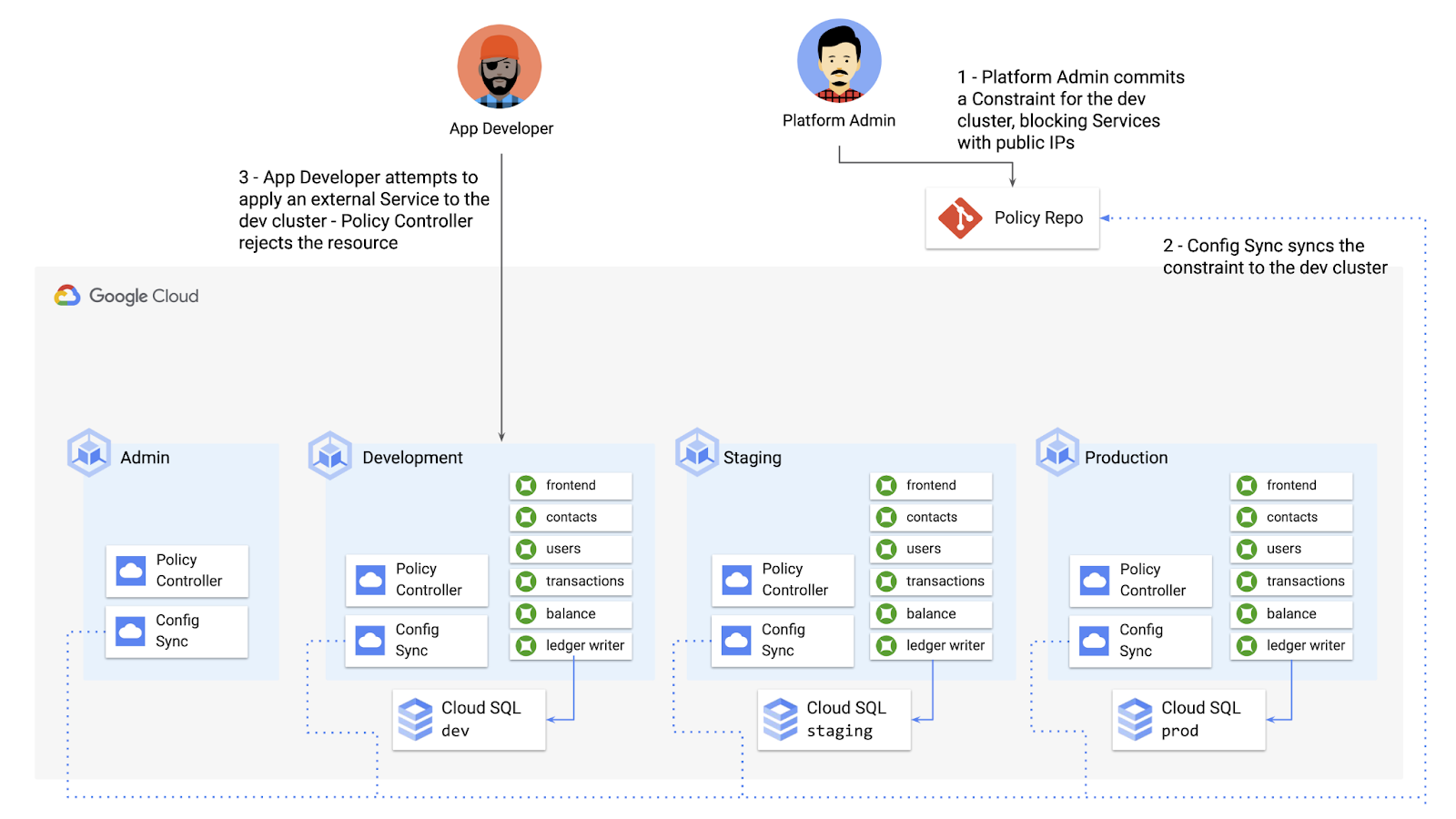
To do this, the platform team can define a Policy Controller Constraint as KRM. This Constraint uses a Constraint Template, provided through the pre-installed Constraint Template library. The ConstraintTemplate defines the logic of the policy itself, and the Constraint makes the template concrete, populating any variables needed to execute the policy logic. Here, we’re also adding a Config Sync cluster name annotation, to scope this resource to apply only to the development cluster.
apiVersion: constraints.gatekeeper.sh/v1beta1kind: K8sNoExternalServicesmetadata:name: dev-no-ext-servicesannotations:configsync.gke.io/cluster-name-selector: cymbal-devspec:internalCIDRs: []
The platform team can then commit the resource to the cymbalbank-policy repo, and Config Sync will deploy the resource to the development cluster.
From here, if an app developer tries to create an externally-accessible Kubernetes Service, Policy Controller will block the resource from being created.
for: "constraint-ext-services/contacts-svc-lb.yaml": admission webhook "validation.gatekeeper.sh" denied the request: [denied by dev-no-ext-services] Creating services of type `LoadBalancer` without Internal annotation is not allowed
The platform team can define as many of these Constraints as they want, each defining a separate policy.
Writing custom policies
The Policy Controller Constraint Template library provides a lot of functionality, from blocking privileged containers, to requiring certain resource labels, to preventing app teams from deploying into certain namespaces. But if you want to enforce custom logic on your organization’s KRM, you can do so by writing a custom Constraint Template.
Constraint Templates are written in a query language called Rego. Rego was designed for policy rule evaluation, and it can introspect Kubernetes resource fields to make a conclusion as to whether the resource is allowed or not.
For instance, let’s say that the platform team wants to limit the number of containers allowed inside a single application Pod. Too many containers per Pod can cause outage risks— when one container crashes, the entire Pod crashes.
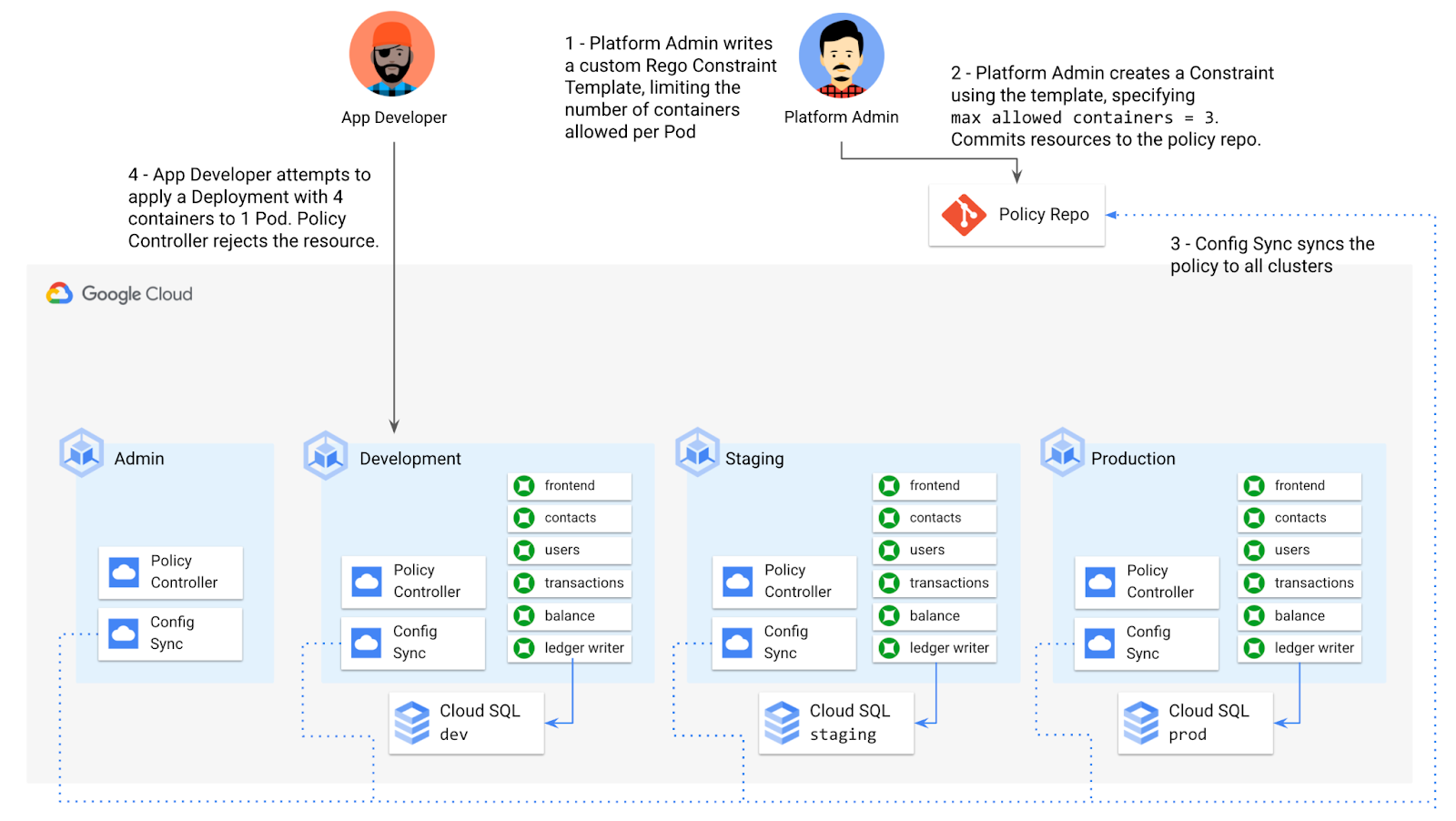
To enforce this policy, the platform team can define a Constraint Template, using the Rego language, that looks inside a resource to ensure that the number of containers per Pod is within the allowed limit:
apiVersion: templates.gatekeeper.sh/v1beta1kind: ConstraintTemplatemetadata:name: k8slimitcontainersperpodspec:crd:spec:names:kind: K8sLimitContainersPerPodvalidation:openAPIV3Schema:properties:allowedNumContainers:type: integertargets:- target: admission.k8s.gatekeeper.shrego: |package k8slimitcontainersperpodnumTemplateContainers := count(input.review.object.spec.template.spec.containers)numRunningContainers := count(input.review.object.spec.containers)containerLimit := input.parameters.allowedNumContainerstemplate_containers_over_limit = true {numTemplateContainers > containerLimit}running_containers_over_limit = true {numRunningContainers > containerLimit}violation[{"msg": msg}] {template_containers_over_limitmsg := sprintf("Number of containers in template (%v) exceeds the allowed limit (%v)", [numTemplateContainers, containerLimit])}violation[{"msg": msg}] {running_containers_over_limitmsg := sprintf("Number of running containers (%v) exceeds the allowed limit (%v)", [numRunningContainers, containerLimit])}Then, the platform team can define a concrete Constraint, using this Constraint Template, to set the number of allowed containers per Pod to 3:apiVersion: constraints.gatekeeper.sh/v1beta1kind: K8sLimitContainersPerPodmetadata:name: limit-three-containersspec:parameters:allowedNumContainers: 3
Finally, the platform team can push these resources to the cymbalbank-policy repo, and Config Sync will deploy the policy to all four clusters. If a developer tries to define a Kubernetes Deployment containing more containers per pod than what’s allowed, the resource will be blocked at deploy time:
Error from server ([limit-three-containers] Number of containers in template (4) exceeds the allowed limit (3)): error when creating "constraint-limit-containers/test-workload.yaml": admission webhook "validation.gatekeeper.sh" denied the request: [limit-three-containers] Number of containers in template (4) exceeds the allowed limit (3)
Custom Constraint Templates can give platform teams lots of flexibility in the types of policies they define and enforce in a Kubernetes environment.
Integrating policy checks into CI/CD
As we explored earlier, Config Sync and CI/CD are complementary tools. Config Sync works great for base-layer platform resources and policies, whereas CI/CD works well for application tests and deployment.
But one pitfall of having two separate KRM deployment mechanisms is that app developers may not know that their resources are out of policy until they try to deploy them into production. This is especially true if some policies are scoped only to production, as we saw with the ResourceQuota example. Ideally, the platform team has a way to empower developers and code reviewers to know ahead of time whether new or modified resources are still in compliance. We can enable this use case by integrating policy checks into the existing Cymbal Bank CI/CD.
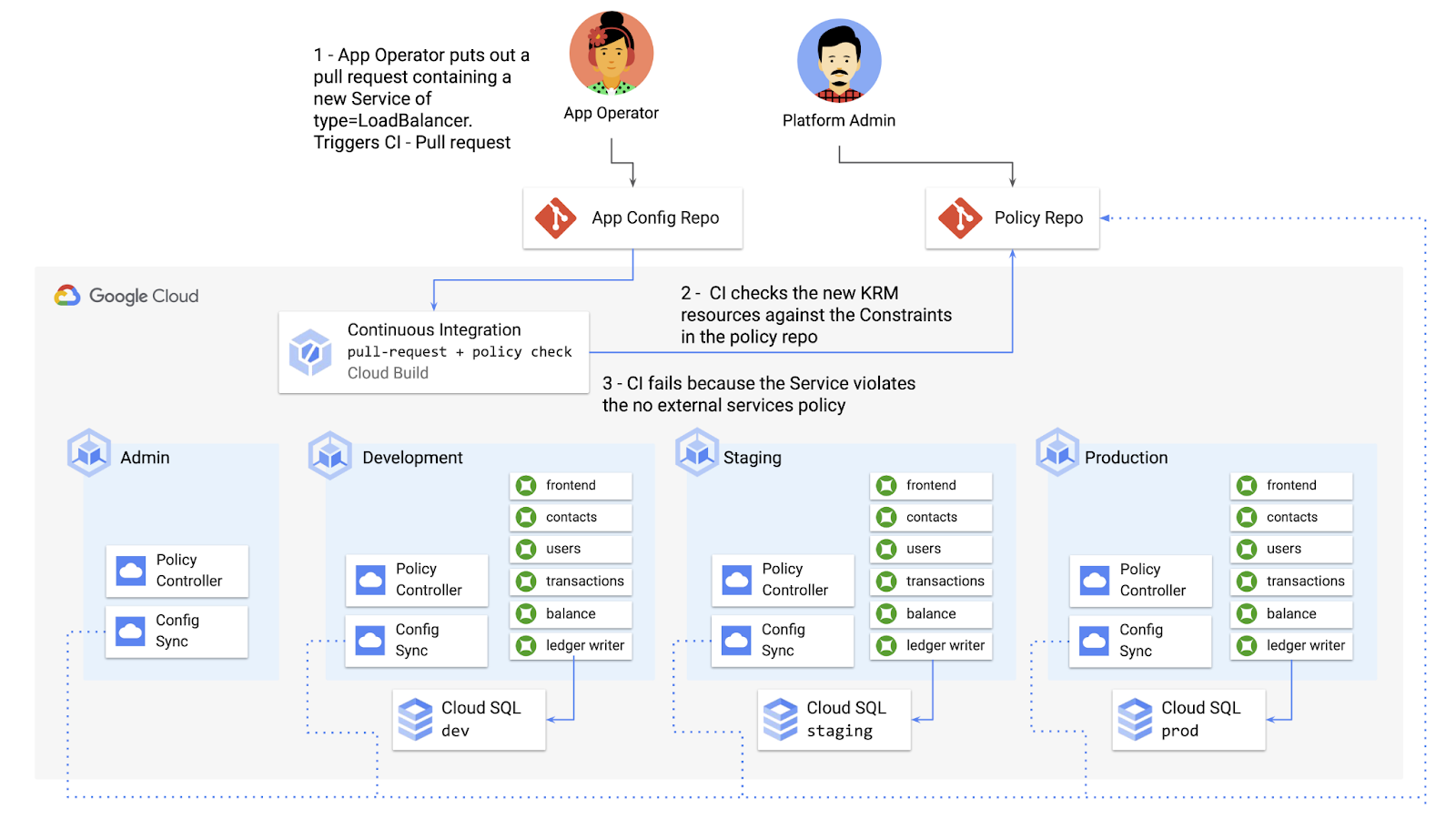
Policy Controller operates, by default, as a Kubernetes Admission Controller running inside the cluster. But Policy Controller also provides a “standalone” mode, running inside a container, that can be used outside of a cluster, such as from inside a Cloud Build pipeline.
In the example below, Cloud Build executes Policy Controller checks by getting the cymbalbank-app-config manifests, cloning the cymbalbank-policy resources, and using the “policy-controller-validate” container image to evaluate the app manifests against the policies.
steps:- id: 'Render prod manifests'name: 'gcr.io/google.com/cloudsdktool/cloud-sdk'entrypoint: '/bin/sh'args: ['-c', 'mkdir hydrated-manifests && kubectl kustomize overlays/prod > hydrated-manifests/prod.yaml']- id: 'Clone cymbalbank-policy repo'name: 'gcr.io/kpt-dev/kpt'entrypoint: '/bin/sh'args: ['-c', 'kpt pkg get https://github.com/$$GITHUB_USERNAME/cymbalbank-policy.git@main constraints&& kpt fn source constraints/ hydrated-manifests/ > hydrated-manifests/kpt-manifests.yaml']secretEnv: ['GITHUB_USERNAME']- id: 'Validate prod manifests against policies'name: 'gcr.io/config-management-release/policy-controller-validate'args: ['--input', 'hydrated-manifests/kpt-manifests.yaml']availableSecrets:secretManager:- versionName: projects/${PROJECT_ID}/secrets/github-username/versions/1env: 'GITHUB_USERNAME'timeout: '1200s' #timeout - 20 minutes
From here, an app developer or operator can know if their resources violate org-wide policies, by looking at the Cloud Build output for their Pull Request:
Status: Downloaded newer image for gcr.io/config-management-release/policy-controller-validate:latestError: Found 1 violations:[1] Number of containers in template (4) exceeds the allowed limit (3)
By integrating policy checks into CI/CD, app development teams can understand whether their resources are in compliance, and platform teams add an additional layer of policy checks to the platform.
Overall, Config Sync and Policy Controller can provide a powerful toolchain for standardizing base-layer config across a multi-cluster environment. Check out the Part 4 demo to try out each of these examples.
And stay tuned for Part 5, where we’ll learn how to use KRM to manage cloud-hosted resources.
AI Features in Apigee X Helps Build and Manage APIs at Scale

5260
Of your peers have already read this article.
2:00 Minutes
The most insightful time you'll spend today!
APIs are the backbone of digital transformation. Via APIs, you can securely share data and functionality with developers both inside and outside of your organizational boundaries, letting you build applications faster, seamlessly connect and interact with partners, and drive new business revenue.
Because APIs encompass business-critical information, any downtime or performance degradation can lead to significant loss in revenue, customers, and brand value. Therefore, there’s mounting pressure on operations teams to ensure that APIs are always available and performing as expected. If the APIs go down, so too do the services that fuel customer experiences and on which the organization relies for collaboration and business processes.
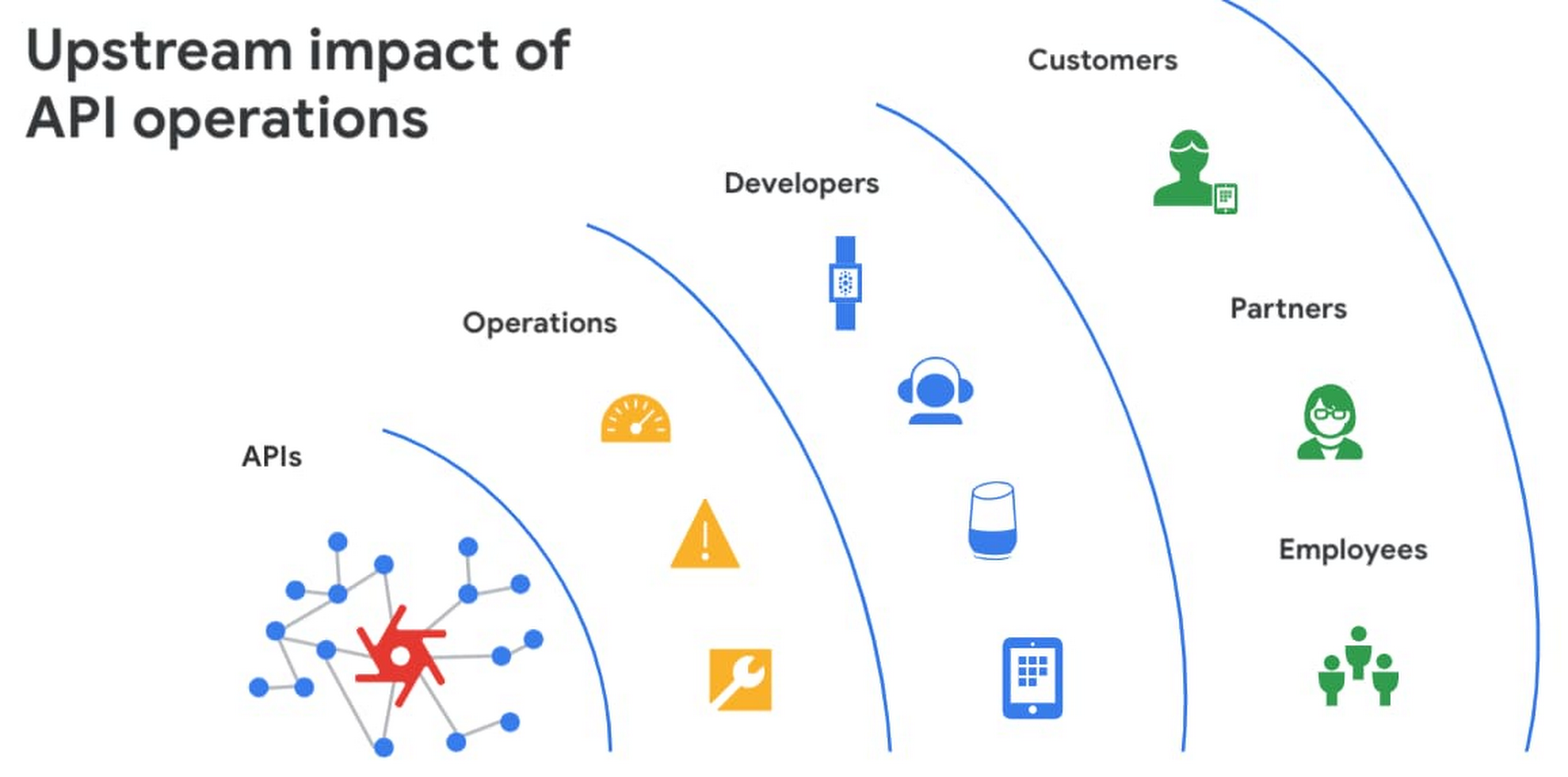
However, as you build and scale your API programs, it becomes practically impossible for API operators to manually monitor and manage all your APIs. To help, we brought the power of industry-leading AI and ML technologies to API operations via Apigee X, a major release of our API management platform. Apigee X seamlessly weaves together Google Cloud’s expertise in AI, security and networking to help you efficiently build and manage APIs at scale.
Put your API data into action
Apigee applies machine learning to your API metadata and provides you the required tools that simplify various aspects of API operations. A great example of AI for APIs is anomaly detection:
- AI-powered rules trigger alerts based on a set of predefined conditions that are determined by applying Google’s industry-leading machine learning models to your historical API data.
- Auto-thresholds adjust the monitoring criteria of your APIs and set them to pattern-based values.
- Reduce overhead results because operators don’t have to manually monitor anomalies or adjust the monitoring thresholds on APIs.
“By applying AI and ML models to our historical API data, these advanced features are able to alert us about scenarios we haven’t thought of. Such automation capabilities significantly reduce our upfront efforts. And from a security perspective, the actionable insights help us ensure that our proxies are exposed only over secure HTTPs ports and adhere to compliance requirements. We’re also able to closely monitor user activity and quickly pull out reports during audits.” – Adam Brancato, Sr. Manager, Global Technology and Security at Citrix

As our customers scale their API programs, they find it extremely useful to harness AI-powered capabilities. In our recent State of the API Economy 2021 report, we found a 230% increase in enterprises’ use of anomaly detection, bot protection, and security analytics features.

To learn more about Apigee X, and see AI and machine learning in action, check out this video, and to try Apigee X for free, click here.
Kitabisa is shaping the future of fundraising with Google Cloud

3115
Of your peers have already read this article.
3:30 Minutes
The most insightful time you'll spend today!
The name Kitabisa means “we can” in Bahasa Indonesia, the official language of Indonesia, and captures our aspirational ethos as Indonesia’s most popular fundraising platform. Since 2013, Kitabisa has been collecting donations in times of crisis and natural disasters to help millions in need. Pursuing our mission of “channeling kindness at scale,” we deploy AI algorithms to foster Southeast Asia’s philanthropic spirit with simplicity and transparency.
Unlike e-commerce platforms that can predict spikes in demand, such as during Black Friday, Kitabisa’s mission of raising funds when disasters like earthquakes strike is by definition unpredictable. This is why the ability to scale up and down seamlessly is critical to our social enterprise.
In 2020, Indonesia’s COVID-19 outbreak coincided with Ramadan. Even in normal times, this is a peak period, as the holy month inspires charitable activity. But during the pandemic, the crush of donations pushed our system beyond the breaking point. Our platform went down for a few minutes just as Indonesia’s giving spirit was at its height, creating frustrations for users.
A new cloud beginning
That’s when we realized we needed to embark on a new cloud journey, moving from our monolithic system to one based on microservices. This would enable us to scale up for surges in demand, but also scale down when a wave of giving subsides. We also needed a more flexible database that would allow us to ingest and process the vast amounts of data that flood into our system in times of crisis.
These requirements led us to re-architect our entire platform on Google Cloud. Guided by a proactive Google Cloud team, we migrated to Google Kubernetes Engine (GKE) for our overall containerized computing infrastructure, and from Amazon RDS to Cloud SQL for MySQL and PostgreSQL, for our managed database services.
The result surpassed our expectations. During the following year’s Ramadan season, we gained a 50% boost in computing resources to easily handle escalating crowdfunding demands on our system. This was thanks to both the seamless scaling of GKE and recommendations from the Google Cloud Partnership team on deploying and optimizing Cloud SQL instances with ProxySQL to optimize our managed database instances.
A progressive journey to kindness at scale
While Kitabisa’s mission has never wavered, our journey to optimized performance took us through several stages before we ultimately landed on our current architecture on Google Cloud.
Origins on a monolithic provider
Kitabisa was initially hosted on DigitalOcean, which only allowed us to run monolithic applications based on virtual machines (VMs) and a stateful managed database. This meant manually adding one VM at a time, which led to challenges in scaling up VMs and core memory when a disaster triggered a spike in donations.
Conversely, when a fundraising cycle was complete, we could not scale down automatically from the high specs of manually provisioned VMs, which was a strain on manpower and budgetary resources.
Transition to containers
To improve scalability, Kitabisa migrated from DigitalOcean to Amazon Web Services (AWS), where we hoped deploying load balancers would provide sufficient automated scaling to meet our network needs. However, we still found manual configurations to be too costly and labor-intensive.
We then attempted to improve automation by switching to a microservices-based architecture. But on Amazon Elastic Container Service (Amazon ECS) we hit a new pain point: when launching applications, we needed to ensure that they were compatible with CloudFormation in deployment, which reduced the flexibility of our solution building due to vendor locking.
We decided it was “never too late” to migrate to Kubernetes, which is a more agile containerized solution. Given that we were already using AWS, it seemed natural to move our microservices to Amazon Elastics Kubernetes Service (Amazon EKS). But we soon found that provisioning Kubernetes clusters with EKS was still a manual process that required a lot of configuration work for every deployment.
Unlocking automated scalability
At the height of the COVID-19 crisis, faced with mounting demands on our system, we decided it was time to give Google Kubernetes Engine (GKE) a try. Since Kubernetes is a Google-designed solution, it seemed likeliest that GKE would provide the most flexible microservices deployment, alongside better access to new features.
Through a direct comparison with AWS, we discovered that everything from provisioning Kubernetes clusters to deploying new applications became fully automated, with the latest upgrades and minimal manual setups. By switching to GKE, we can now absorb any unexpected surge in donations, and add new services without expanding the size of our engineering team. The transformative value of GKE became apparent when severe flooding hit Sumatra in November 2021, affecting 25,000 people. Our system easily handled the 30% spike in donations.
Moving to Cloud SQL and ProxySQL
Kitabisa was also held back by its monolithic database system, which was prone to crashing under heavy demand. We started to solve the problem by moving from a stateful DigitalOcean database to a stateless Redis one, which freed us from relying on a single server, giving us better agility and scale.
But the strategy left a major pain point because it still required us to self-manage databases. In addition, we were experiencing high database egress costs due to the need to execute data transfers from a non-Google Cloud database into BigQuery.
In December 2021, we migrated our Amazon RDS to Cloud SQL for MySQL, and immediately saved 10% in egress costs per month. But one of the greatest benefits came when the Google Cloud team recommended using the open source proxy for MySQL to improve the scalability and stability of our data pipelines.
Cloud SQL’s compatibility allowed us to use connection pooling tools such as ProxySQL to better load balance our application. Historically, creating a direct connection to a monolithic database was a single point of failure that could end up in a crash. With Cloud SQL plus ProxySQL, we create layers in front of our database instances. It serves as a load balancer that allows us to connect simultaneously to multiple database instances, by creating a primary and a read replica instance. Now, whenever we have a read query, we redirect the query to our read replica instance instead of the primary instance.
This configuration has transformed the stability of our database environment because we can have multiple database instances running at the same time, with the load distributed across all instances. Since switching to Cloud SQL as our managed database, and using ProxySQL, we have experienced zero downtime on our fundraising platform even when a major crisis hits.
We are also saving costs. Rather than having a separate database for each different Kubernetes cluster, we’ve merged multiple database instances into one instance. We now group databases according to business units instead of per service, yielding database cost reductions of 30%.
Streamlining with Terraform deployment
There’s another key way in which Google Cloud managed services have allowed us to optimize our environment: using Terraform as an infrastructure-as-a-code tool to create new applications and upgrades to our platform.
We also managed to automate the deployment of Terraform code into Google Cloud with the help of Cloud Build, and no human intervention. That means our development team can focus on creative tasks, while Cloud Build deploys a continuous stream of new features to Kitabisa.
The combination of seamless scalability, resilient data pipelines, and creative freedom is enabling us to drive the future of our platform, expanding our mission to inspire people to create a kinder world in other Asian regions.
We believe that having Google Cloud as our infrastructure backbone will be a critical part of our future development, which will include adding exciting new insurtech features. Now firmly established on Google Cloud, we can go further in shaping the future of fundraising to overcome turbulent times.
Introducing a strong alternative to CentOS: Rocky Linux Optimized for Google Cloud

3339
Of your peers have already read this article.
3:30 Minutes
The most insightful time you'll spend today!
As CentOS 7 reaches end of life, many enterprises are considering their options for an enterprise-grade, downstream Linux distribution on which to run their production applications. Rocky Linux has emerged as a strong alternative that, like CentOS, is 100% compatible with Red Hat Enterprise Linux.
In April 2022, we announced a customer support partnership with CIQ, the official support and services partner and sponsor of Rocky Linux, as the first step in providing a best-in-class enterprise-grade supported experience for Rocky Linux on Google Cloud. Today we’re excited to announce the general availability of Rocky Linux Optimized for Google Cloud. We developed this collection of Compute Engine virtual machine images in close collaboration with CIQ so that you get optimal performance when using Rocky Linux on Compute Engine to run your CentOS workloads.
These new images contain customized variants of the Rocky Linux kernel and modules that optimize networking performance on Compute Engine infrastructure, while retaining bug-for-bug compatibility with Community Rocky Linux and Red Hat Enterprise Linux. The high bandwidth networking enabled by these customizations will be beneficial to virtually any workload, and are especially valuable for clustered workloads such as HPC (see this page for more details on configuring a VM with high bandwidth).
Going forward, we’ll collaborate with CIQ to publish both the community and Optimized for Google Cloud editions of Rocky Linux for every major release, and both sets of images will receive the latest kernel and security updates provided by CIQ and the Rocky Linux community. And of course, we’ll offer support with CIQ for both these images, per our partnership.
Rocky Linux Optimized for Google Cloud lets you take advantage of everything Compute Engine has to offer, including day-one support for our latest VM families, GPUs, and high-bandwidth networking. And for customers building for a multi-cloud deployment environment, the community Rocky images have you covered.
Starting today, Rocky Linux 8 Optimized for Google Cloud is available for all x86-based Compute Engine VM families (and soon for the new Arm-based Tau T2A), with version 9 soon to follow. Give it a try and let us know what you think.
New Map Customization Features for Enhanced User Experiences

5556
Of your peers have already read this article.
1:30 Minutes
The most insightful time you'll spend today!
A customized map can be key to delivering a frictionless experience that engages users and sets you apart in users’ minds–whether you’re a real estate company fine-tuning points of interest (POIs) on a map to help buyers decide where to live, or a regional pharmacy styling a map to ensure your locations stand out from the competition. That’s why we’ve focused on empowering you with these capabilities through features like POI density and POI filtering controls, zoom level customization, and even industry-optimized map styles. But we’re not done helping you take your map to the next level. Today, we’re making two updates generally available—a new Maps SDK for Android and the extension of Cloud-based maps styling features to our Android and iOS SDKs. Together they enhance the native mobile map experience and make it easier for you to deliver consistent, optimized maps across all your platforms. We’ll also give you an early look at additional features that we’re working on.
Update your Maps SDKs for Android for an enhanced user experience
Developers around the world depend on the Maps SDK for Android to power critical experiences like helping drivers make a delivery or helping retailers visually confirm an order’s shipping address. With consumers spending an increasing amount of time in apps, it’s more important than ever that mobile experiences meet the high consumer expectations that come with essential, everyday use.
Today we released version 18.0.0 of the Maps SDK for Android, which delivers an enhanced map experience to app users, thanks to a new renderer. The new renderer introduces optimizations to our tile serving and rendering architecture, reducing payload size. This can help to reduce network load, on-device processing, and memory consumption for a more stable and smoother end-user experience. You’ll also see specific improvements with map labels. Now more fluid and clearly positioned, they pave the way for future marker management features. We’ve also enhanced overall gesture handling for better animations and smoother panning and zooming.
Because the Maps SDK for Android continues to be distributed as part of the Google Play services SDK, you can upgrade to v18.0.0 along with all its improvements with no increase to your APK size.
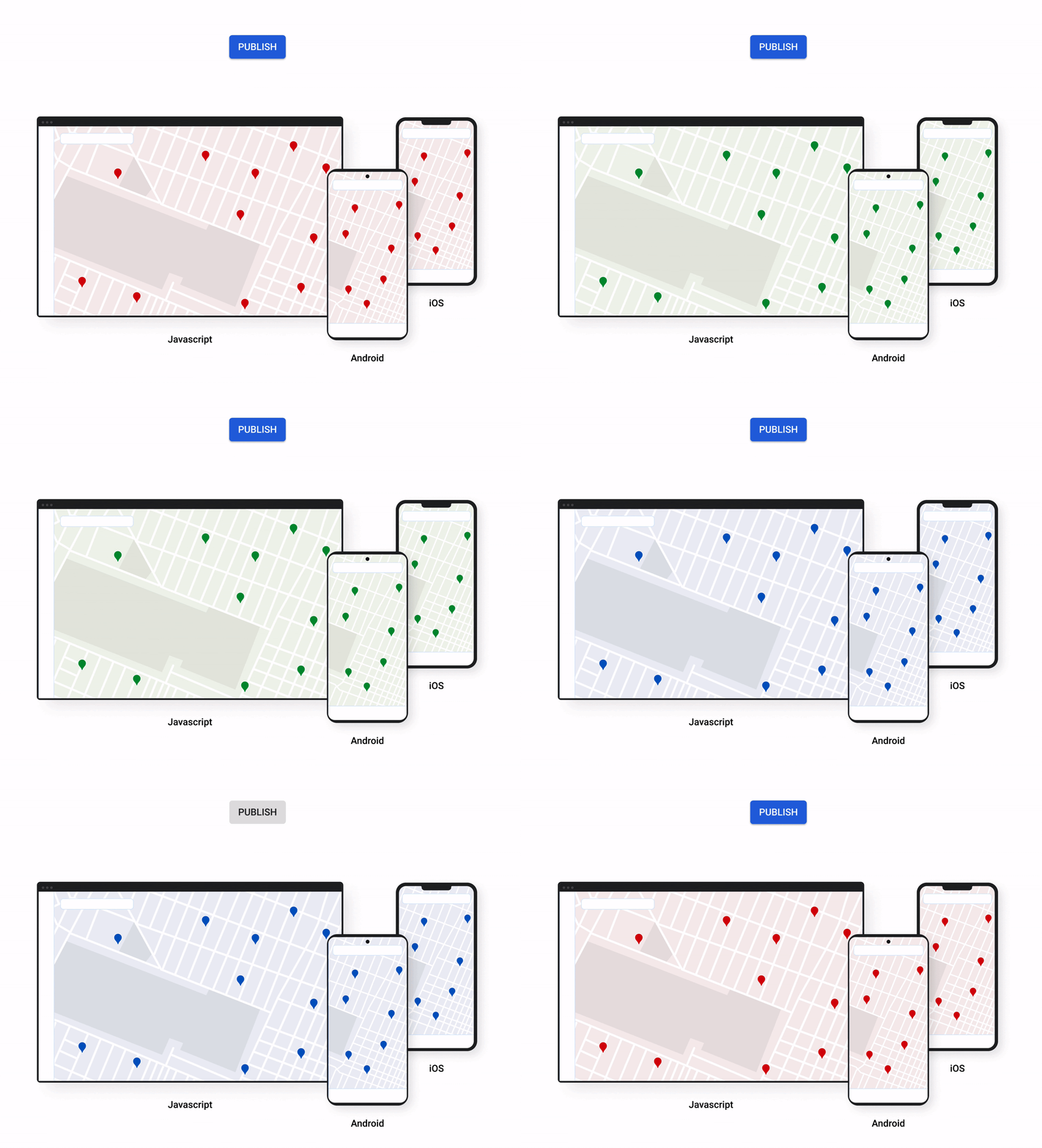
A consistent cross-platform maps experience with Cloud-based maps styling for mobile
Earlier this year at Google I/O, we announced the general availability of Cloud-based maps styling for JavaScript. Since then customers have used the richer customization capabilities and efficient cloud-enhanced deployment workflow to power millions of mapping experiences, from a curated interactive map of Munich to fun virtual Easter egg hunts hosted by Cadbury. Starting today, Cloud-based maps styling features are supported in the GA versions of our Maps SDK for Android (v18+) and Maps SDK for iOS (V5.0+).
Cloud-based maps styling moves map customization code off the client and into the cloud–where it can be easily modified to use new features or test new configurations. This decoupling of client code and customization code makes it easy to manage a single branded and optimized style across any number of apps across all supported platforms. It also makes it possible to simultaneously publish changes to a map style across platforms and install bases with the click of a button. Cloud-based maps styling is the foundation for a growing set of new customization features including POI filtering and POI boosting, zoom level customization, landmarks, and commercial corridor styling.
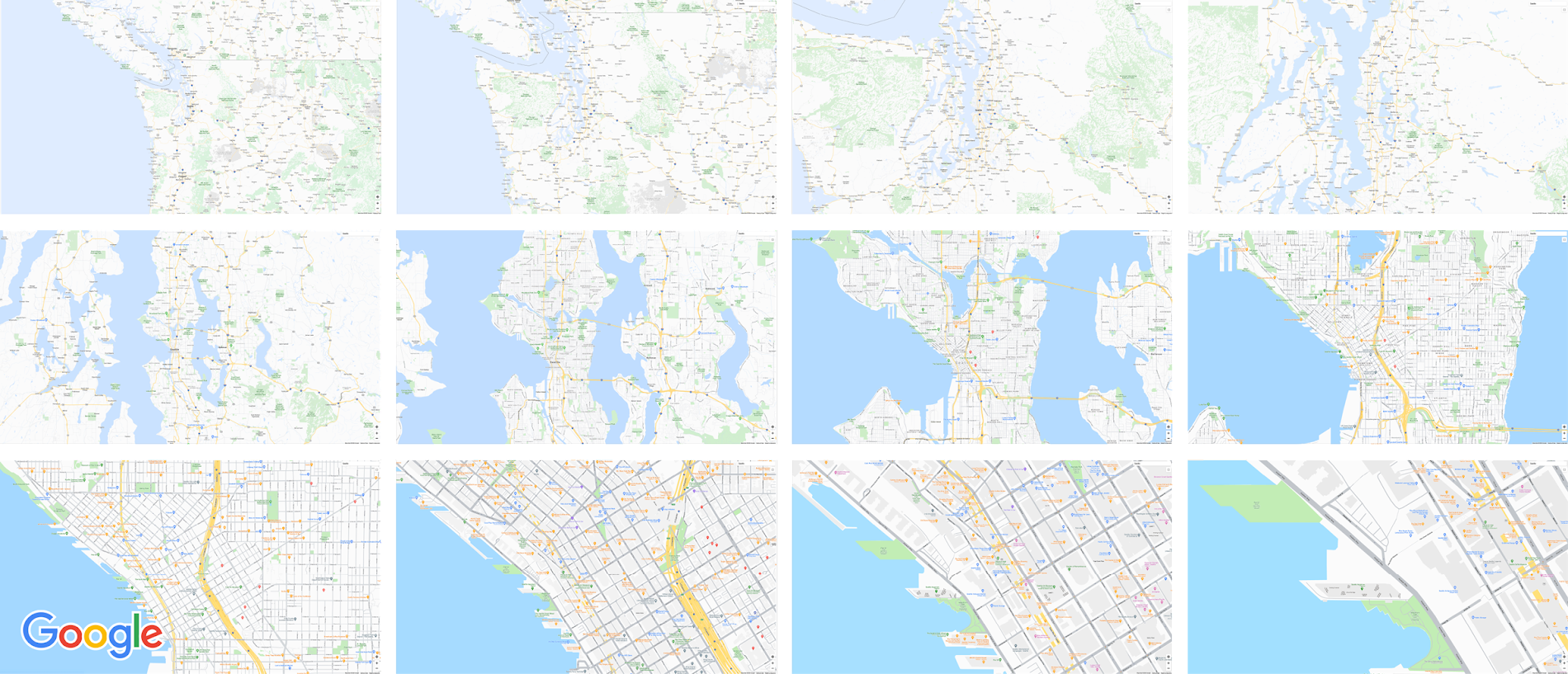
Mobile developers can now take advantage of Cloud-based maps styling features and simple cross-platform customizations for their Dynamic Maps by creating a MapID in Google Cloud Console and using it within their Maps SDK for Android or Maps SDK for iOS. Dynamic maps loaded with a Map ID via our Maps SDK for Android or Maps SDK for iOS will be billed to the same SKU as Maps JavaScript API (Dynamic Maps) and covered under the same $200 monthly credit and volume pricing. Developers can upgrade to the new Maps SDK for Android and continue using client-styled maps for no charge as they always have.
Additional capabilities we’re working on¹
We know you have a range of map customization needs to engage your users with differentiated experiences. We’re working on developing more Cloud-based maps styling features–focused on marker capabilities, map elements, and data-driven styling–to help you do just that. We’re working on a new set of markers capabilities, easier pin customizations, marker collision management, performance optimizations, and the ability to build custom marker elements that you can use to quickly deploy deeply customized, highly optimized marker-driven experiences. For those seeking greater detail in their maps, we’re working on expanding the availability and customization of detailed street maps to even more cities. We’re also working on features to make it easier to programmatically style map elements by exposing new APIs to enable things like the simple creation of choropleths by styling Google geographical boundaries based on your data.
This is just a peek into what we’re excited to be building for our developer community. While we’re working hard to bring these additional features to life, visit our website to learn more and our developer documentation to start customizing and enhancing your mobile maps.
¹Product capabilities, timeframes, and features are subject to change.
More Relevant Stories for Your Company

Google Extends Support for Windows Server Containers on Anthos for Faster App Modernization and Consistent Dev Experience
Today, many applications in organizations’ data centers run on Windows Server. Modernizing these traditional Windows apps onto Kubernetes promises a host of benefits: a consistent platform across environments, better portability, scalability, availability, simplified management and speed of deployment, just to name a few. But how? Rewriting traditional .NET applications to


5 Best Practices for Cloud Cost Optimization
When customers migrate to Google Cloud Platform (GCP), their first step is often to adopt Compute Engine, which makes it easy to procure and set up virtual machines (VMs) in the cloud that provide large amounts of computing power. Launched in 2012, Compute Engine offers multiple machine types, many innovative features, and is available in



Building a Bank with Kubernetes: How Monzo is Creating the Best Banking App Ever
Based in London, Monzo is a bank that lives on the smartphone and is built for the way modern customers live today. By solving their problems, treating them fairly and being totally transparent, Monzo believes it can transform the way people bank. “We are building a full retail bank. What
