





How Cleartrip.com is leveraging Google Cloud to survive the slump in the travel industry
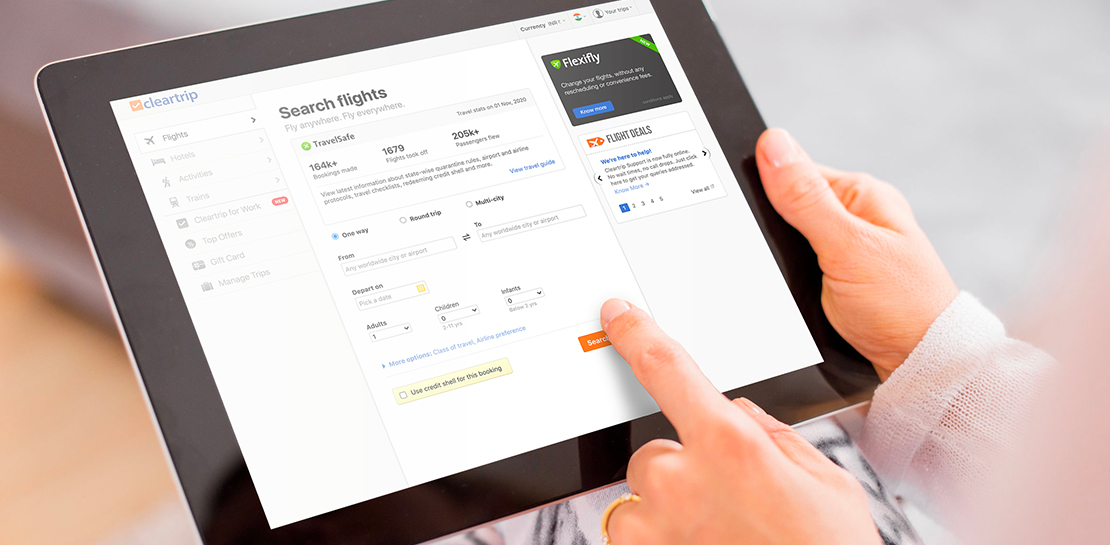
5163
Of your peers have already read this article.
5:30 Minutes
The most insightful time you'll spend today!
With the novel coronavirus COVID-19 sweeping across continents and fatalities climbing every day, it was only a matter of time before countries closed their borders to contain its spread.
In the wake of this decision, travel and tourism, the linchpins of many economies, were among the worst affected.
According to the United Nations World Tourism Organization (UNWTO), the COVID-19 pandemic caused a 22 percent fall in international tourist arrivals during the first quarter of 2020, and could see an annual decline of between 60 percent and 80 percent when compared with 2019.
The impact on the economy and to livelihoods that are dependent on tourism and hospitality has been significant. Prior to the pandemic, the outlook was quite different. Research by UNWTO in 2018 estimated that India would have 50 million outbound tourists by 2020.
Technology was also set to play a huge part in that growth. A Google Travel study showed that 74 percent of travellers were planning their trips on the Internet, and technologies like AI, IoT and VR were all set to be key trends this year.
Now, as borders slowly reopen and travel restrictions are gradually lifted, technology could once again be the game-changer. Manoj Sharma CTO, Cleartrip.com spoke to YourStory about the industry’s road to recovery and how technology will aid that journey.
Read the Full Story on YourStory
How One Company Improved Security Significantly–Without Increasing Staff

6465
Of your peers have already read this article.
2:45 Minutes
The most insightful time you'll spend today!
Quanta Services is the leading specialty contractor with the largest and highly-skilled trained workforce in North America. It provides fully-integrated solutions for the electric power
pipeline industrial and telecommunications industries the company’s geographic footprint which includes North America Latin America and Australia.
It’s network of companies ensures world-class execution with local delivery and has over 40,000 employees.
“The exciting thing about Backstory is it allows us to land massive amounts of data from all of our different security tools and then Chronicle worries about how to correlate and aggregate this information for us. We can then focus on the highest priority threats.”
Richard Breaux, Manager Security Operations Quanta Services
Because Quanta Services’ customers provide energy and telecommunications to their customers, they have world-class cybersecurity requirements.
“We must ensure that Quanta leads the industry given the fact that our business is building the core infrastructure that powers people’s lives. It’s crucial that we meet their cybersecurity requirements,” says James Stinson, VP-IT, Quanta Services.
To support this goal Quanta implemented a number of security tools that generate terabytes of security telemetry. Over time, however, these systems generated an information overload for the company’s limited pool of qualified security resources.
“Our logging tools also couldn’t keep up with the rapidly growing information. With limited resources we need to focus our security analysts time on high quality work instead of digging through mountains of data,” says Stinson.
They achieve this by implementing Backstory and Chronicle, which is on Google Cloud.
“The exciting thing about Backstory is it allows us to land massive amounts of data from all of our different security tools and then Chronicle worries about how to correlate and aggregate this information for us. We can then focus on the highest priority threats,” says Richard Breaux, Manager Security Operations Quanta Services.
As a result, the company’s security team spends less time getting to the core information they need to address these incidents.
“What used to take us 15 minutes or more, we can now accomplish in seconds,” says Breaux.
Explore Google Cloud’s Bi-monthly Technical Learning Series for Innovators in Public Sector

3360
Of your peers have already read this article.
1:30 Minutes
The most insightful time you'll spend today!
Cloud engineers face a constant barrage of new cloud services, products, and innovations. By late 2021, Google Cloud alone had released thousands of new features across hundreds of services. Couple this with other technologies and service releases, and it quickly becomes a herculean task for engineers to navigate, consume, and stay current on the ever changing technology landscape. We have heard from engineers this often leads to anxiety and frustration as engineers struggle to keep up. They are faced with a plethora of training options but often lack the time and funding.
Google Cloud has reinvigorated technical training to make it more informative and applicable to public sector customers and partners. We aim to maximize your training experience so you can get targeted training when you need it. The Google Cloud Public Sector Technical Learning Series addresses customer feedback and provides fun and practical training. Sessions are currently running every two weeks.
“Short and sweet” technical topics geared to subjects you care about
Generic training doesn’t always resonate with public sector technologists. Our new curriculum targets specific public sector use cases, is delivered by customer engineers, and can be accomplished in less than two hours. This means participants can apply the learnings directly to real-life challenges quickly.
Easy to find, easy to enroll
Training opportunities should always be at your fingertips. Our automated training platform will ensure that you only need to enroll once. The system will automatically notify you of upcoming sessions so you can plan in advance and at your convenience. Sessions will be offered on a recurring basis to meet the needs of your organization.
Fun and engaging
Typical training sessions often include a sea of glazed eyes, unresponsive to basic prompts, falling asleep at our desks, we have all been there. But it doesn’t have to be this way. Our goal is to infuse Google culture into our training through interactive exchanges and tangible rewards to keep participants inspired and engaged.
Traditional technology training doesn’t always help you navigate the nuts and bolts of how to effectively introduce a product into an organization. But we know that technology doesn’t operate in isolation; it supports and becomes part of a living organism, managed by humans and confined by other components of an organization’s structure (e.g. existing systems or decentralized business units).
Part of a larger community of like-minded engineers
Learning with – and from – a community of peers is one way to overcome the challenges and complexities of applying new technology within a complex organization. We created the Public Sector Connect community for this very reason. It is one example of how we surface best practices for public sector innovators. During weekly “Coffee Hours” and working sessions, our community members share their journey and lessons learned with each other. We know that innovation evolves through iteration and diverse perspectives, and Public Sector Connect is committed to helping surface critical challenges and solutions, and connecting those who are solving similar problems. Join the community today.
How Google Cloud Helps SAP Admins Create Scalable, Secure Networks

6662
Of your peers have already read this article.
3:00 Minutes
The most insightful time you'll spend today!
SAP forms the critical backbone of thousands of enterprises, supporting critical business functions such as finance, supply chain, warehouse management, and more. Google Cloud provides a highly scalable and resilient infrastructure to run such workloads and offers tools, such as Smart Analytics and Machine Learning that can accelerate your organization’s digital transformation.
In fact, a recent study by Forrester found that running SAP on Google Cloud can generate a 160% return on investment and a payback period of six months or less, thanks to legacy infrastructure cost savings, downtime avoidance, and productivity improvements.
How you deploy your SAP systems across your network has a tremendous impact on its availability, resilience, and performance. In addition to separate production and high-availability (HA) environments, SAP deployments typically include sandbox, development, quality assurance (QA), and disaster recovery environments as well.
Because most of the Google network is virtual, SAP administrators can easily design complex landscapes that suit your organization’s SAP deployment and organizational structure while also meeting security and operational requirements.
As you get started with SAP on Google Cloud, you’ll need to decide how to configure your networking to ensure the availability and performance of various SAP systems. Here’s a look at your options.
VPC and shared VPC
A virtual private cloud (VPC) is a secure, isolated private network hosted within Google Cloud. VPCs are global in Google Cloud, so a single VPC can span multiple regions without communicating across the public internet. Similarly, subnets can span across zones within a region. A zone represents a single failure domain, so typical SAP deployments place production and HA systems in different zones to ensure resiliency. Google Cloud simplifies this type of deployment, because subnets containing both production and HA systems can span multiple zones.
This capability also simplifies SAP clustering, since the cluster’s virtual IP (VIP) address can be in the same range as those of the production and HA machines. This configuration shields the floating IP using Google internal load balancers and is applicable to HA clustering of the application layer (ASCS and ERS) and the HANA database layer (HANA Primary and Secondary).
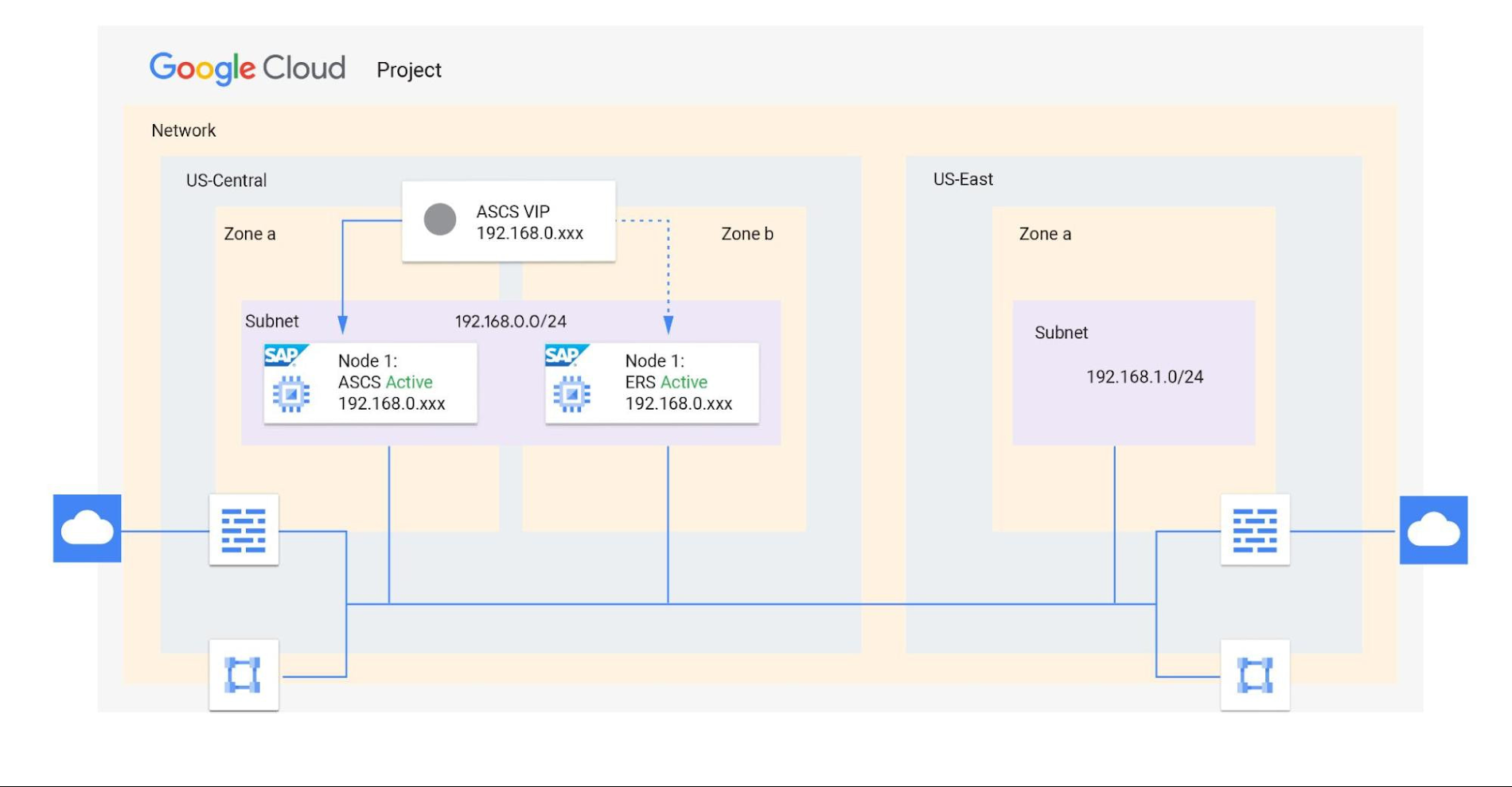
Shared VPCs are a feature unique to Google Cloud that allows an organization to connect resources from multiple projects to a common VPC network. This lets them communicate with each other securely and efficiently using internal IPs. You can also centrally control the network for all SAP projects (service) from the Host project while using firewalls to inspect communication between compute engines in the same subnet, and between those in different subnets. (Best practice is to limit the communication between these systems to only the required ports — typically via SAP remote function call (RFC) communication at Layer 4.)
When designing your network, start with a host project containing one or more Shared VPC networks. You can attach additional service projects to a host project, which allows them to participate in the Shared VPC. It’s common practice to have multiple service projects operated and administered by various departments or teams in your organization.
Depending on your needs, you can deploy SAP on a single Shared VPC or multiple ones. The two scenarios differ in terms of network control, SAP environment isolation, and network inspection. Let’s look more closely at these differences.
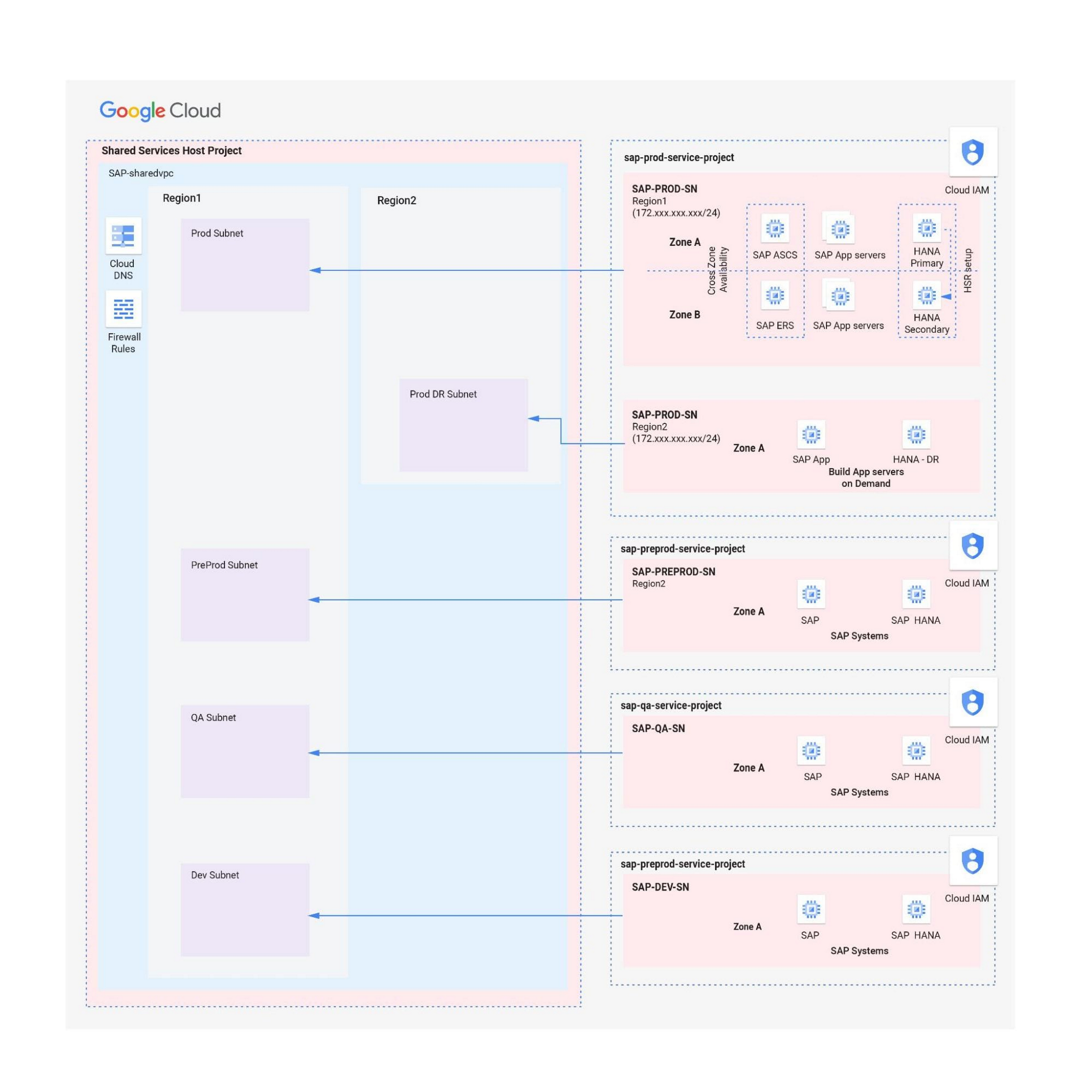
Scenario 1: Deploying SAP on a single Shared VPC
If you require only a single network inspection, deploying SAP on a single Shared VPC has the advantage of simplicity and reduces administrative overhead.
- Network control: The Shared VPC serves as the network hub, allowing central network management based on identity access management (IAM) roles for the network team(s) in both production and non-production environments.
- SAP environment isolation: You can create projects and subnets for each SAP environment. Projects help group resources together for finer IAM control and billing visibility, while subnets provide network isolation for individual SAP environments. In service projects, compute engines can communicate by default; however, you can adopt simple firewall rules to block communication between compute engines within a subnet or in separate subnets.
- Network inspection: Use Google Cloud firewalls to allow only the required ports for communication between SAP systems. Leverage network tags and service accounts to define granular control for both north-south and east-west traffic.
Scenario 2: Multiple Shared VPCs for SAP deployment
In scenarios requiring additional network inspections, you can create multiple Shared VPCs, typically one per environment. Use peering between these Shared VPCs to enable RFC communication among the SAP development, QA, and production systems.
- Network isolation: Multiple Shared VPCs are completely isolated from each other except via specific ports opened in Google Cloud firewalls. This allows additional East-West traffic inspection by a Network Virtual Appliance (NVA) within a Google Cloud network.
- Network control:As the number of Shared VPCs increases, activities such as peering and firewall policies also increase. This diminishes the central network control that Shared VPCs offer, so the network team should plan to manage the policies in each VPC separately.
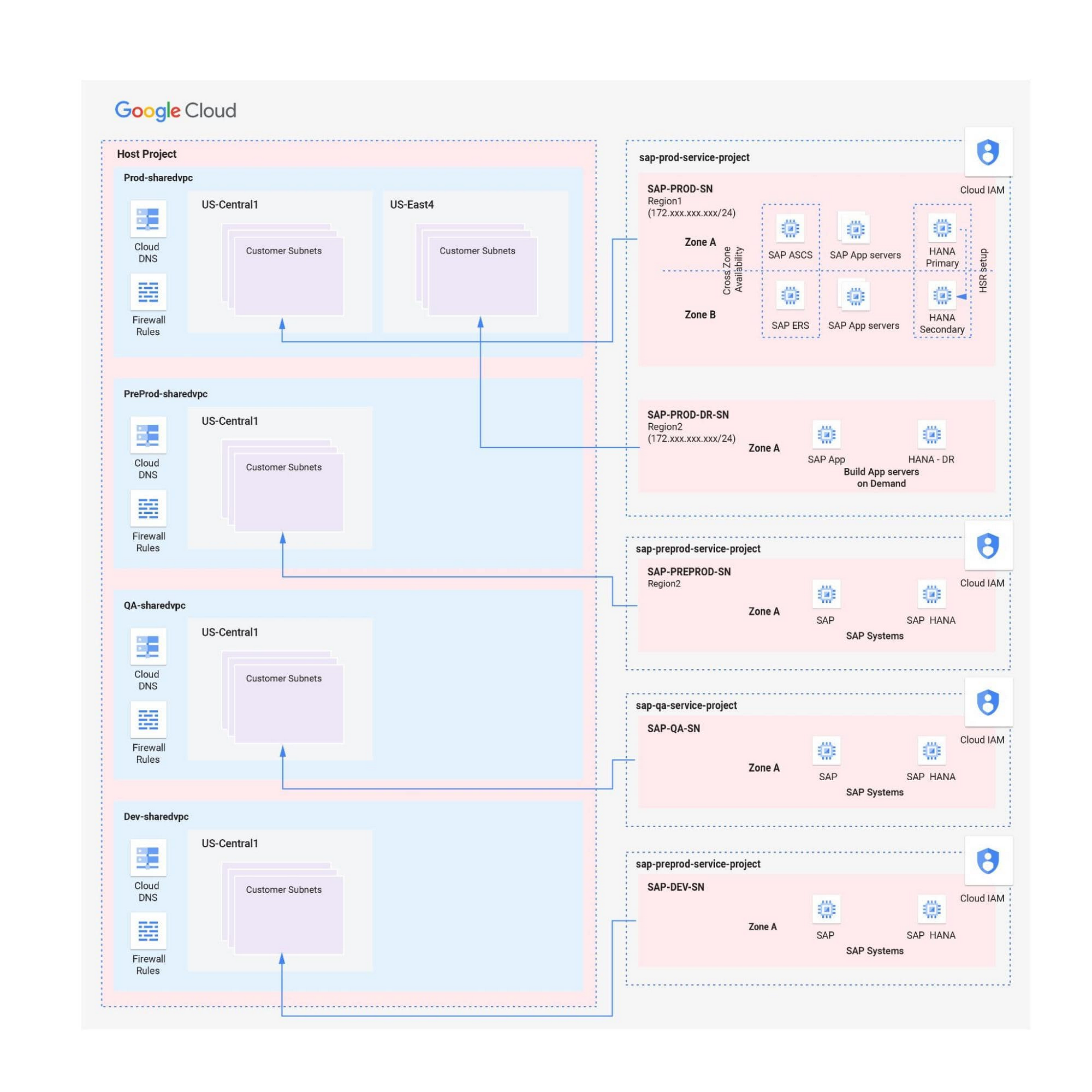
Hybrid scenarios – for example, one Shared VPC for the production environment and one Shared VPC for all non-production systems — are also possible. This arrangement allows network inspection between production and non-production systems, and limits the number of central network administration layers to two.
Configuring the networking environment for multiple SAP systems can be a complex process. Thanks to Google Cloud’s Shared Virtual Clouds and other tools, SAP administrators can create scalable, secure networks that provide logic, resilience, and visibility to their cloud deployments.Learn more about these networking capabilities and our full offerings for SAP customers.
How Vertex Vizier’s Automated Hyperparameter Tuning Improves ML Models

5053
Of your peers have already read this article.
1:30 Minutes
The most insightful time you'll spend today!
We recently launched Vertex AI to help you move machine learning (ML) from experimentation into production faster and manage your models with confidence—speeding up your ability to improve outcomes at your organization.
But we know many of you are just getting started with ML and there’s a lot to learn! In tandem with building the Vertex AI platform, our teams are dropping as much best practices content as we can to help you come up to speed. Plus, we have a dedicated event on June 10th, Applied ML Summit, with sessions on how to apply ML technology in your projects, as well as grow your skills in this field.
In the meantime, we couldn’t resist a quick lesson on hyperparameter tuning, because (a) it’s incredibly cool (b) you will impress your coworkers (c) Google Cloud has some unique battle tested tech in this area and (d) you will save time by getting better ML models into production faster. Vertex Vizier, on average, finds optimal parameters for complex functions in over 80% fewer trials than traditional methods.
So it’s incredibly cool, but what is it?
While machine learning models automatically learn from data, they still require user-defined knobs which guide the learning process. These knobs, commonly known as hyperparameters, control, for example, the tradeoff between training accuracy and generalizability. Examples of hyperparameters are the optimizer being used, its learning rate, regularization parameters, the number of hidden layers in a DNN, and their sizes.
Setting hyperparameters to their optimal values for a given dataset can make a huge difference in model quality. Typically, optimal hyperparameter values are found via grid searching a small number of combinations, or tedious manual experimentation. Hyperparameter tuning automates this work for you by searching for the best configuration of hyperparameters for optimal model performance.
Vertex Vizier enables automated hyperparameter tuning in several ways:
- “Traditional” hyperparameter tuning: by this we mean finding the optimal value of hyperparameters by measuring a single objective metric which is the output of an ML model. For example, Vizier selects the number of hidden layers and their sizes, an optimizer and its learning rate, with the goal of maximizing model accuracy.
- When hyperparameters are evaluated, models are trained and evaluated on splits of the data set. If evaluation metrics are streamed to Vizier (e.g. as a function of epoch) as the model is trained, Vizier’s early stopping algorithms can predict the final objective value, and recommend which unpromising trials should be early stopped. This conserves compute resources and speeds up convergence.
- Oftentimes, models are tuned sequentially on different data sets. Vizier’s built in transfer learning learns priors from previous hyperparameter tuning studies, and leverages them to converge faster on subsequent hyperparameter tuning studies.
- AutoML is a variant of #1, where Vertex Vizier performs both model selection, and also tunes architectures/non-architecture modifying hyperparameters. AutoML usually requires more code on top of Vertex Vizier (to ingest data etc), but Vizier is in most cases the “engine” behind the process. AutoML is implemented by defining a tree like (DAG) search space, rather than a “flat” search space (like in #1). Note that you can use DAG search spaces for any other purpose where searching over a hierarchical space makes sense.
- There are times when you may wish to optimize more than one metric. For example, we would like to optimize model accuracy, while minimizing model latency. Vizier can find the Pareto frontier, which presents tradeoffs for multiple metrics, allowing users to choose the appropriate tradeoff. Simple example: I want to make a more accurate model, but would like to minimize serving latency. I do not know ahead of time what’s the tradeoff between the two metrics. Vizier can be used to explore and plot a tradeoff curve, so users can select on the most appropriate one. For example, “a latency decrease of 200ms will only decrease accuracy by 0.5%”
Google Vizier is all yours with Vertex AI
Google published the Vizier research paper in 2017, sharing our work and use cases for black-box optimization—i.e. The process of finding the best settings for a bunch of parameters or knobs when you can’t peer inside a system to see how well the knobs are working. The paper discusses our requirements, infrastructure design, underlying algorithms, and advanced features such as transfer learning that the service provides. Vizier has been essential to our progress with machine learning at Google, which is why we are so excited to make it available to you on Vertex AI.
Vizier has already tuned millions of ML models at Google, and its algorithms are continuously improved for faster convergence and handling of real-life edge cases. Vertex Vizier’s models are very well calibrated and are self-tuning (they adapt to user data), and offer unique power features, such as hierarchical search spaces and multi-objective optimization. We believe Vertex Vizier’s set of features is a unique capability to Google Cloud, and look forward to optimizing the quality of your models by automatically tuning hyperparameters for you.
To learn more about Vertex Vizier, check out these docs and if you are interested in what’s coming in machine learning over the next five years, tune in to our Applied ML Summit on June 10th, or watch the sessions on demand in your own time.
Google Cloud’s Metric Scope Makes Multi-project Monitoring Simple

4761
Of your peers have already read this article.
2:00 Minutes
The most insightful time you'll spend today!
Customers need scale and flexibility from their cloud and this extends into supporting services such as monitoring and logging. Google Cloud’s Monitoring and Logging observability services are built on the same platforms used by all of Google that handle over 16 million metrics queries per second, 2.5 exabytes of logs per month, and over 14 quadrillion metric points on disk, as of 2020. However, you let us know through consistent feedback that the previous construct of Workspaces for Cloud Monitoring was not providing the flexibility needed for your larger scale projects.
Cloud Operation’s New Approach to Multi-Project Monitoring
We’re happy to announce a new model for multi-project monitoring, which replaces the concept of Workspaces. This overhaul is geared toward maximizing the flexibility you have to manage your monitoring environments by introducing Metrics Scopes. Starting today you can associate your Google Cloud projects with multiple Metrics Scopes! Like Workspaces, Metrics Scopes will still be used to store all of the configuration content for dashboards, alerting policies, uptime checks, notification channels, and group definitions. However there is no limit to the number of Metrics Scopes to which you can associate a project. Prior to this change, a project could only be scoped with a single Workspace. Now, there are virtually unlimited possibilities for how you can set up multi-project monitoring. This unlocks a large variety of options, from more granular permissions to mission-focused configurations. At its most simple implementation though: operators/SREs can now create org-wide Metrics Scopes with monitoring configurations focused on infrastructure health. And developers can leverage Metrics Scopes built on a subset of their organization’s projects that allow them to focus on their application’s performance.
How it works
- When you have a collection of projects, Metrics Scopes enable you to view each project’s metrics in isolation as well as in combination with metrics stored by other projects.
- The Metrics Scope is hosted by a scoping project. This scoping project is the Cloud project that is selected in the Cloud Console project picker.
Example
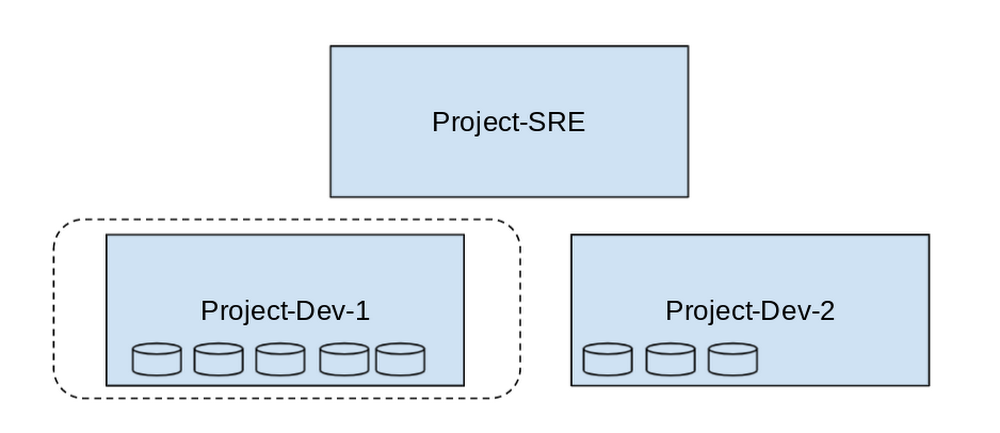
- In this example, Project-SRE is the name of a scoping project to monitor your fleet. You added two developer teams’ projects: Project-Dev-1 and Project-Dev-2, to Project-SRE’s Metrics Scope. If you select Project-SRE with the Cloud Console project picker and then go to the Monitoring page, you view the metrics for all three projects:

- If you select Project-Dev-1 with the Cloud Console project picker and then go to the Monitoring page, you view the Metrics Scope for Project-Dev-1 and you can only see the metrics for that project:
What else is new?
- Metrics Scopes can now monitor up to 375 projects (up from 100).
- New projects automatically start working in Cloud Monitoring without the previous 60-second Workspace creation process.
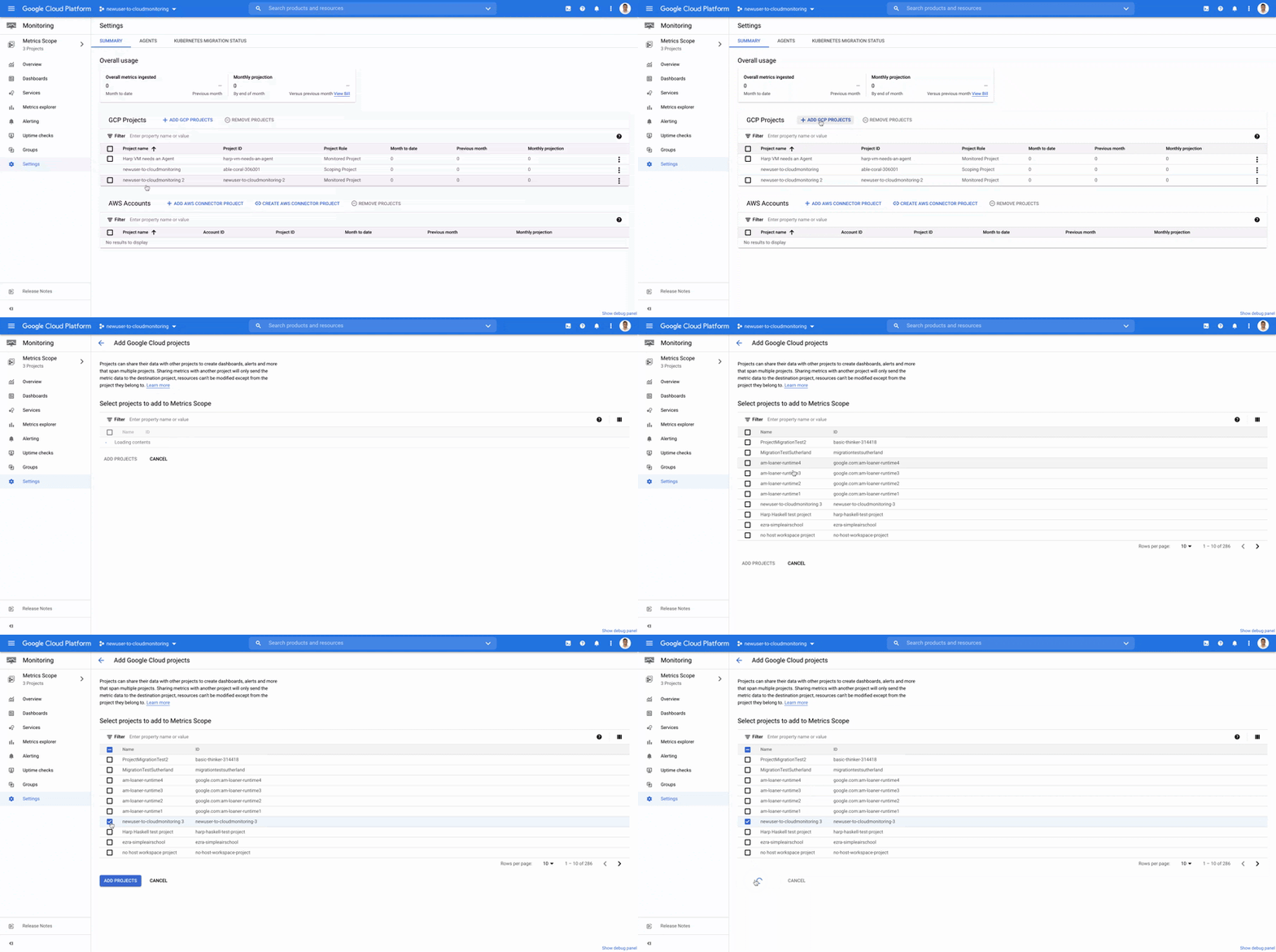
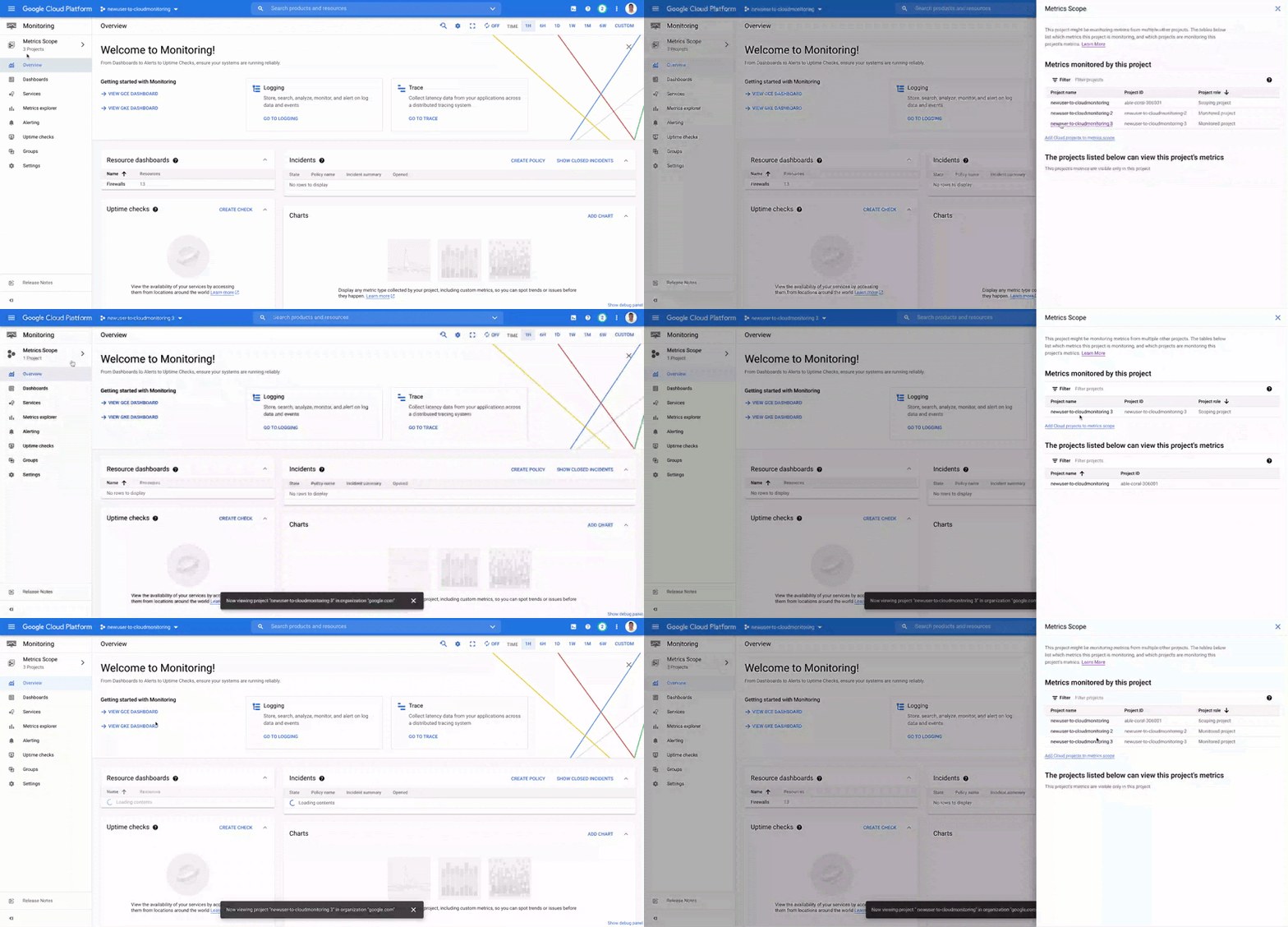
- If you want to monitor more than one project simply add it to your Metrics Scope:
Navigation
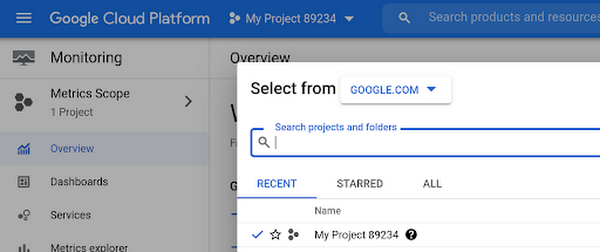
- Mentioned earlier, the Project Picker in the Cloud Console can be used to navigate between Metrics Scopes in Cloud Monitoring:
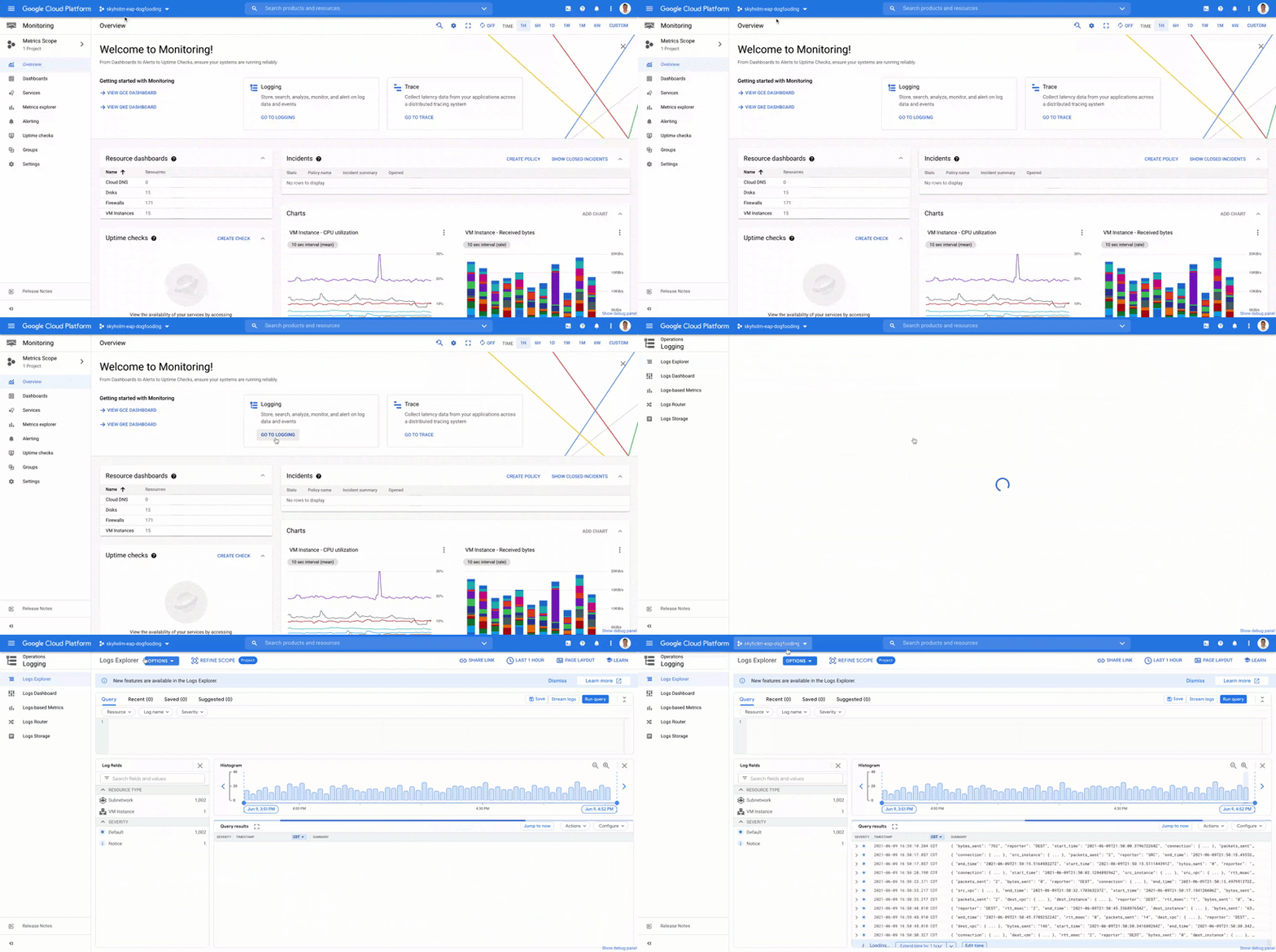
- This is now consistent with many other services across Google Cloud. Specifically, you can see how the project picker stays consistent when navigating from Cloud Monitoring to Cloud Logging:
- Additionally, to make your navigation between Metrics Scopes easy we’ve added the new Metrics Scope Tab and Panel in the UI:
Coming Soon
- The Metrics Scope API is coming within the next quarter! This API will enable you to programmatically manage your monitoring configurations and Metrics Scopes.
Current Workspaces users
If you are already using Workspaces in Cloud Monitoring you may have noticed that they converted to Metrics Scopes weeks ago. There is no additional action required and you can start taking advantage of the additional features of Metrics Scopes today.
Get Started
Companies that are digitally native or in the process of digital transformation have placed an increased operational role on developers and this often creates overlapping sets of responsibilities with Operations and SRE teams. Now multiple developer teams can focus on optimizing the performance of their applications while operators can take a fleet-wide view when maintaining and improving the performance of all of the infrastructure under their purview.For information on configuring a Metrics Scope to include metrics for multiple projects, see Viewing metrics for multiple projects.
More Relevant Stories for Your Company

Expect 40 Percent Higher Price-performance than General Purpose VM with Google TAU VMs!
In November 2021, we announced the general availability of Tau VMs. Since then, Google Cloud’s Tau VMs with Google Kubernetes Engine (GKE) have unlocked value for many customers who are now using Tau VMs for their production workloads, such as: Ascend, who achieved over 125% higher performance; Nylas, who gained

Hybrid Cloud: The Trade-offs IT Leaders Hate–and a Way Around Them
What do CIOs and CTOs deliver for the company? If you said “technology,” that’s just the beginning. According to their research, McKinsey found that 85% of CIOs and CTOs interviewed in the spring of 2019 said they were essential for at least two of the three most common CEO priorities—revenue acceleration,



Greenovation: Adani and Google Cloud Join Forces for a Sustainable and Data-Driven India
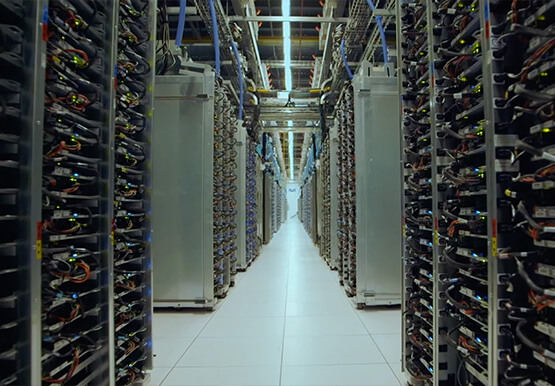
As the biggest renewable energy developer, Adani aims to put India on the green map. Working with the world's cleanest cloud inspired the organisation to solve their own efficiency issues, and better manage their facilities across the country to lower their carbon footprint. For more on Adani, visit: https://www.adani.com/ For

The Fantastic Story of How BMG Enables a Micropayments Strategy So Music Artists Get Paid
The music industry is rapidly changing. Only 20 years ago, the availability of music and the infrastructure that was required to make an album a sales success were incredibly complex and expensive. With the decline of physical sales and a fundamental shift to digital, music streaming now accounts for more
