





11 Reasons Why Developers and DB Admins in APAC Are Moving to Google Cloud SQL From AWS RDS

4672
Of your peers have already read this article.
1:45 Minutes
The most insightful time you'll spend today!
We wanted to find out which of the most popular database services on two of the biggest cloud provider (AWS and Google), developers preferred to use.
More specifically, we wanted views from enterprises in the region (it’s hard to impossible to find data that’s specific to India.)
To simplify our quest, we looked at the most popular database services on AWS and then looked at the equivalent Google Cloud offering.
That’s how we came to pit AWS RDS and Google Cloud SQL.
For the uninitiated: Cloud SQL is a fully managed database service that makes it easy to set up and manage your relational PostgreSQL, MySQL, and SQL Server databases in the cloud.
It is ideal for: WordPress, backends, game states, CRM tools, MySQL, PostgreSQL, and Microsoft SQL Servers.
Based on real feedback from companies in the APAC region, there are 11 reasons why Google Cloud SQL is better.
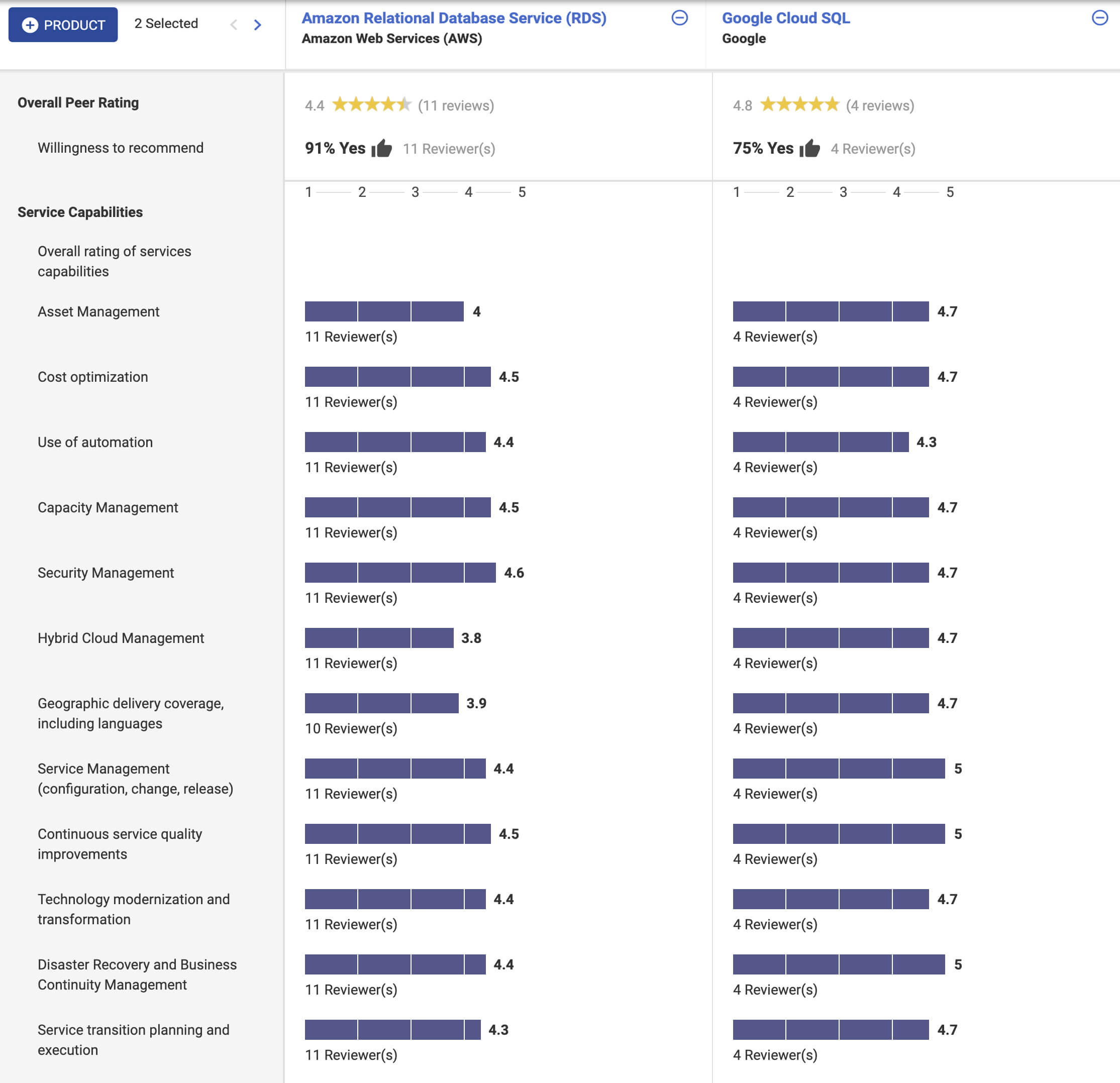
In addition, according to Stackshare and ITcentralstation, the biggest reason developers prefer Google Cloud SQL? Because it’s fully managed, easy to set up, easy to manage and it’s really scalable.
As one user says:
Its most valuable feature is that it’s scalable. I can start off with a base of a lot of data and move as much as I want and it’s the same as if asked to do a lot of infrastructure changes… it’s easy to use, simple, and user-friendly. The setup was straightforward. Just a couple of clicks, and we were done. My suggestion to anyone thinking about this solution is to jump into it head-first!
AI Solutions for Government Organizations: How to Get Started

4380
Of your peers have already read this article.
3:00 Minutes
The most insightful time you'll spend today!
Cloud-native features are helping public sector teams innovate faster than ever. Ideas discussed in a morning meeting can be a working proof of concept later that day. Managed services can remove administrative burden and reduce the steps needed to design and provision cloud infrastructure. Security can be built-in from the beginning with Identity and Access Management (IAM), Virtual Private Cloud Service Controls (VPC-SC), and Data Loss Prevention (DLP). Short-lived services and infrastructure-as-code allow rapid and cost-effective prototyping. These technologies can be used to architect a solution that follows the principle of least privilege and helps you secure your data.
So the question becomes: given the complex problems agencies face, where do you start? Google Public Sector now offers “Getting Started” and “Scaling” service offerings for CCAI, DocAI, and BigQuery to help you jumpstart your AI journey, based on where you are.
Complex problems, simpler AI-based solutions
Solving more challenging problems with cloud-native technology doesn’t have to be overwhelming. You can approach them the same way you might solve a puzzle: start with one piece that follows another until the larger picture takes shape. Though you can simplify the steps, solving these problems still requires powerful tools. Google Cloud’s AI/ML capabilities may be the answer for your team.
Google Public Sector is making it easier to get started with advanced technologies, beginning with artificial intelligence and machine learning (AI/ML) workloads for government organizations, and it’s something you can do now, one piece at a time.
Automating your FAQs with CCAI
Does your agency require a team to answer commonly asked questions? What if you could train an agent to answer questions immediately and operate 24/7? Contact Center AI (CCAI) can do this and more. Already using CCAI and need the agent to level up to address complex interactive dialogs? Getting Started with CCAI and Scaling with CCAI are new Google service offerings specifically designed to help public sector organizations tackle situations like these.
Automate data entry with DocAI
How many hours does your team spend manually reviewing or entering data from standardized forms? What if you could automatically pull data right from the page? Google Document AI (DocAI) specializes in exactly this—even if the form has handwritten text. Getting Started with DocAI and Scaling with DocAI are new service offerings that help you remove this burden from your team. DocAI automates data entry and makes that data available to other teams while prioritizing both security and ease of use.
Making data and insights accessible with BigQuery
Then there’s all your existing data. You may have years of it stored in many places, and you may not have a way to make use of it when you need it. BigQuery is Google’s enterprise data warehouse. It was designed for data analytics—looking back at historical data to make conclusions about it. But BigQuery’s analytics don’t stop there. It can also look forward in time to make predictions, often using the same datasets. Getting Started with BigQuery and Scaling with BigQuery are new service offerings that help you take your first steps toward AI/ML capabilities by starting with a single table or pipeline that can help make sense of all your data.
The best help is the kind that meets you where you are and gets you where you want to be. Google Public Sector’s new service offerings do just that: help you work through complex problems by meeting you wherever your starting line is, whether you’re ready to start or ready to scale. Let us know if you would like us to contact you about the services mentioned in this article. Let’s solve your highest impact problems together, one puzzle piece at a time.
World’s Largest Online-only Grocery Retailer Uses AI to Figure Which Customers Need Most Attention

9451
Of your peers have already read this article.
4:20 Minutes
The most insightful time you'll spend today!
In the United Kingdom, the popularity of online grocery shopping is expected to surge from about 6% of the market today to 9% by 2021, according to market research firm Mintel. One of the pioneers of online-only grocery retailing is Ocado, based in Hatfield, Hertfordshire in the U.K. Since starting commercial deliveries in 2002, the company has grown to 600,000 active customers, 260,000 weekly orders, and £1.39 billion in annual revenue.
Ocado takes supermarket trips out of the equation by enabling shoppers to purchase items online through its convenient web and mobile applications. Items are then picked and packed in automated warehouses and shipped directly to customers in a one-hour time slot of their choosing. Ocado’s delivery punctuality is 95%, order accuracy is 99%, and its service footprint now reaches more than 70% of the U.K. population.
“Google Cloud Platform gives us the flexibility and performance to tackle the large and complex data challenges unique to our business.”
—Paul Clarke, Chief Technology Officer, Ocado
The company achieved its success by building in-house almost all the technology and automation that powers its end-to-end e-commerce, fulfillment, and logistics platform. Ocado also developed a new platform, the Ocado Smart Platform (OSP), which offers large brick-and-mortar grocery retailers around the world access to a best-in-class solution for online grocery.
Democratizing machine learning
The shopping journey for online grocery retailing differs significantly from other e-businesses. Customers often buy dozens of products at once, a single household may have multiple buyers using multiple devices, and product shelf life may only be a couple of days.
“We often say that having built an end-to-end platform that can do online grocery scalably and profitably, we can do other forms of online retail; but the reverse does not necessarily follow,” says Paul Clarke, Chief Technology Officer at Ocado. “Google Cloud Platform gives us the flexibility and performance to tackle the large and complex data challenges unique to our business.”
The Ocado business model takes advantage of consumers’ shifting preferences and the links between digital technology and shopping experiences.
“Google Cloud Machine Learning Engine gives us the agility we need. Our developers were able to try out TensorFlow and see firsthand the benefits of machine learning in the cloud.”
—Paul Clarke, Chief Technology Officer, Ocado
The company has been building machine learning into its systems for over five years. Until recently, Ocado machine learning applications required specialist data scientists, typically with PhDs in machine learning, who would build these solutions from the ground up. It also required the specialist who set up the system and costly on-premises infrastructure to train and run these systems.
However, working with Google as a private alpha testing site for Google Cloud Machine Learning Engine accelerated its adoption of artificial intelligence (AI).
“We’ve been talking about how the cloud could democratize AI for some time,” says Paul. “Google Cloud Machine Learning Engine gives us the agility we need. Our developers were able to try out TensorFlow and see firsthand the benefits of machine learning in the cloud.”
TensorFlow is an open source software library for machine learning developed by the Google Brain team. Ocado developers, engineers, and data scientists now use TensorFlow for many of their machine learning projects. They deploy the models they build on Google Cloud Machine Learning Engine, which lets them train models faster across servers, desktop computers, and mobile devices through a single application program interface (API). Additionally, Google Cloud Machine Learning Engine integrates easily with the other Google Cloud Platform products used widely at Ocado.
What do customers really want?
One of the first TensorFlow models Ocado created was a machine learning algorithm that tags and categorizes customer emails and then prioritizes them for response.
The contact center receives thousands of emails each day and Ocado wanted to automate determining which ones needed to be answered immediately and which ones could wait.
For example, a first-time customer expressing their delight in using Ocado doesn’t need to be responded to with the same urgency as a customer who is missing an item from their order or who won’t be home to receive the delivery.
“Enabling agents to respond without having to sort through less-urgent emails improves Ocado’s responsiveness and customer service.”
—James Donkin, General Manager, Ocado
“We get a lot of emails from customers saying, ‘Our service was great,’ or ‘The driver was very courteous,'” says James Donkin, General Manager, Ocado. “But when issues like weather or road conditions potentially affect delivery, we often get surges of urgent questions. Enabling agents to respond without having to sort through less-urgent emails improves Ocado’s responsiveness and customer service.”
Using Google Cloud Machine Learning Engine, TensorFlow, and a large data set culled from several years’ worth of manually categorized customer emails, Ocado experimented on which kind of neural network architecture would best prioritize emails. After testing its models, Ocado implemented the highest-performing one and has been able to respond to urgent messages four times faster. The company also discovered that 7% of its emails don’t require a response at all, which means call center representatives now have more time to devote to higher priority messages.
“Without Google Cloud Machine Learning Engine, it would have been a lot harder to succeed on a project like email classification,” says Roland Plaszowski, who has recently managed several big data projects and initiatives at Ocado.
“Even if we invested significantly in infrastructure, it would be difficult to manage because of the computational intensity. It’s challenging and expensive to run machine learning projects at the same time without infrastructure that you can scale easily.”
Ocado also uses machine learning to predict customer behavior and improve experiences. By analyzing order data, Ocado makes shopping as frictionless as possible. For example, the ordering system can pre-populate customers’ shopping carts with items they are most likely to purchase, remind customers about items they may have forgotten, and notify them of multi-buy offers they haven’t completed, for example, only buying one of a buy one, get one free offer. Based on machine learning from previous purchase data, the Ocado system can also offer new products that are likely to delight customers.
“You will regularly see items that are more personally relevant to you instead of items that are being promoted more generally,” says James. “I’m a vegetarian, so I’m offered specials for vegetarian products that I normally buy and new ones that I’ve never bought. I’m also less likely to see things that I’m not interested in.”
Machines and machine learning
Within the Internet of Things (IoT), Ocado is looking to enhance its warehouse robots with machine learning. An integral part of the OSP, thousands of robots continually stream data into Google Cloud Storage and Google BigQuery.
Ocado data scientists apply machine learning to create a type of swarm intelligence that enables warehouse robots to work cooperatively to achieve a common goal. Projects include modules to search robot telemetry data, such as whether a battery pack is operating within standard tolerances or whether firmware has been successfully loaded, and use it to optimize maintenance schedules or detect patterns in wear and tear.
“Another challenge we’re looking at is how to embed machine learning directly into robots so they become smarter in terms of self-testing, exception handling, and error recovery,” says Paul. “This is a challenging combination of IoT, data analytics, and machine learning that we believe Google BigQuery and Google Cloud Machine Learning are particularly well suited to helping Ocado achieve.”
The company also discovered that 7% of its emails don’t require a response at all, which means call center representatives now have more time to devote to higher priority messages.
Scaling for new business
Scalability is also a major reason behind some of Ocado’s cloud initiatives, including the migration of all its on-premises data to the cloud. Ocado wanted to improve customer experiences, empower business teams with greater insight, and reduce IT overhead, so it consolidated onto Google Cloud Platform.
“The old databases just weren’t fast enough,” says Paul. “We needed a solution that could scale with the amount of data we generate and how we use it. Google Cloud Storage and Google BigQuery now provide the backbone, from a data point of view, for the Ocado Smart Platform.”
Ocado estimates its business, product, and transaction data is approaching two petabytes. Combining customer and supply chain data helps both internal Ocado operations and the company’s ambitions to commercialize OSP.
“When compared with other options for expansion internationally, selling OSP as a managed service lets us turn companies that could have been competitors into customers,” says Paul. “We want to build OSP once and then turn it on for multiple business-to-business customers.”
Each time Ocado adds a new hosting customer to OSP, it will launch a customized instance to fit that customer’s requirements. The capacity and performance of each new OSP instance must be able to scale quickly as the backend platform for established retailers with large numbers of products, customers, and transactions.
Ocado’s first OSP customer, Morrisons, is already benefiting from this first-of-a kind solution. Morrisons is one of the UK’s four largest supermarkets and uses OSP to power its online retail business. Using Google Cloud Platform, Ocado has stored, processed, and analyzed terabytes of Morrisons’ data using a dedicated data lake and Google BigQuery.
In addition to using Google Cloud Platform for OSP, Ocado also adopted it for its own online grocery retail business operation. Ocado originally used the Apache Spark and Apache Hadoop open-source frameworks on Google Compute Engine for its data platform. Moving to Google BigQuery frees Ocado business analysts from the complex query setup and workflows associated with Spark and Hadoop. Plus, it lets Ocado share data analytics with suppliers and partners.
Google BigQuery is well integrated with TensorFlow on Google Cloud Machine Learning Engine and Google Cloud Dataproc, the Apache Spark and Apache Hadoop service that lets Ocado use open source data tools for batch processing, querying, streaming, and machine learning. Google Cloud Dataflow and Google Cloud Dataproc handle cluster management, and provide an easy-to-use framework so developers can spend less time and money on administration and more time on delivering valuable business features.
Switching from Hadoop to Google BigQuery revealed a series of cost and performance improvements. For example, Ocado no longer needed to decide how many instances to bring up in a cluster or wait for the instances to spin up. Google handled everything.
“We simply ran our queries and paid for the resources that we use,” adds Roland. “One big win with Google BigQuery is we don’t have to do maintenance. Best of all, we saw Google BigQuery outperform our Hadoop cluster by over 80 times on our largest dataset, and for only two-thirds the cost.”
Simplifying Unstructured Data Analytics with BigQuery ML and Vertex AI: A Comprehensive Guide

1539
Of your peers have already read this article.
6:30 Minutes
The most insightful time you'll spend today!
Unstructured data such as images, speech and textual data can be notoriously difficult to manage, and even harder to analyze. The analysis of unstructured data includes use cases such as extracting text from images using OCR, sentiment analysis on customer reviews and simplifying translation for analytics. All of this data needs to be stored, managed and made available for machine learning.
The new BigQuery ML inference engine empowers practitioners to run inferences on unstructured data using pre-trained AI models. The results of these inferences can be analyzed to extract insights and improve decision making. This can all be done in BigQuery, using just a few lines of SQL.
In this blog, we’ll explore how the new BigQuery ML inference engine can be used to run inferences against unstructured data in BigQuery. We’ll demonstrate how to detect and translate text from movie poster images, and run sentiment analysis against movie reviews.
BigQuery ML’s new inference engine
Google Cloud is home to a suite of pre-trained AI models and APIs. The BigQuery ML inference engine can call these APIs and manage the responses on your behalf. All you have to do is define the model you want to use and run inferences against your data. All of this is done in BigQuery using SQL. The inference results are returned in JSON format and stored in BigQuery for analysis.
Why run your inferences in BigQuery?
Traditionally, working with AI models to run inferences required expertise in programming languages like Python. The ability to run inferences in BigQuery using just SQL can make generating insights from your data using AI simple and accessible. BigQuery is also serverless, so you can focus on analyzing your data without worrying about scalability and infrastructure.
The inference results are stored in BigQuery, which allows you to analyze your unstructured data immediately, without the need to move or copy your data. A key advantage here is that this analysis can also be joined with structured data stored in BigQuery, giving you the opportunity to deepen your insights. This can simplify data management and minimize the amount of data movement and duplication required.
Which models are supported?
For now, the BigQuery ML inference engine can be used with these pre-trained Vertex AI models:
- Vision AI API: This model can be used to extract features from images managed by BigQuery Object Tables and stored on Cloud Storage. For example, Vision AI can detect and classify objects, or read handwritten text.
- Translation AI API: This model can be used to translate text in BigQuery tables into over one hundred languages.
- Natural Language Processing API: This model can be used to derive meaning from textual data stored in BigQuery tables. For example, features like sentiment analysis can be used to determine whether the emotional tone of text is positive or negative.
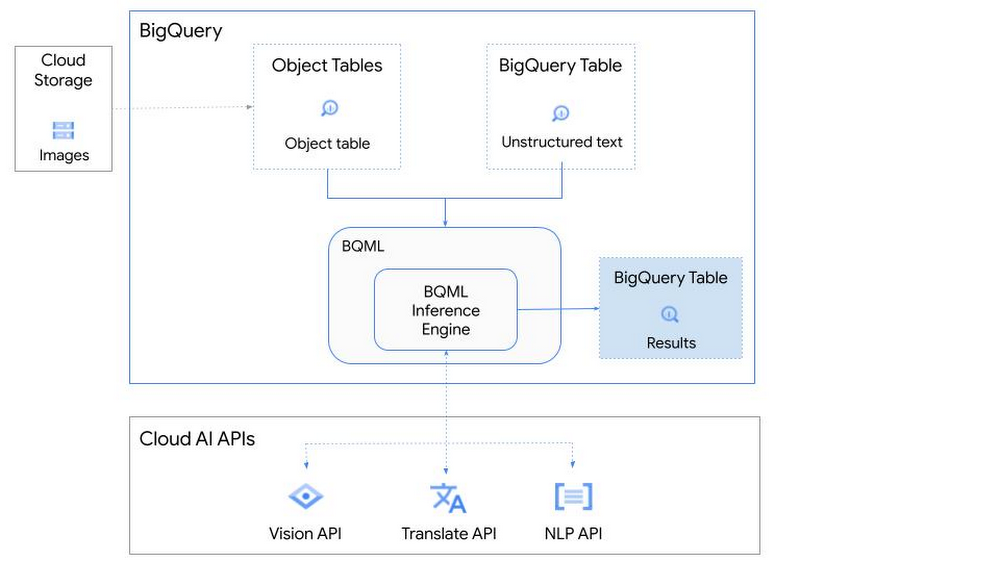
So, how does this work in practice? Let’s look at an example using images of movie posters

- We will define our pre-trained models for Vision AI, Translation AI and NLP AI in BigQuery ML.
- We’ll then use Vision AI to detect the text from some classic movie posters images.
- Next, we’ll use Translation AI to detect any foreign posters and translate them to a language of our choosing – English in this case.
- Finally, we’ll combine our unstructured data with structured data in BigQuery.
We’ll use the extracted movie titles from our movie posters to look up the viewer reviews from the BigQuery IMDB public dataset. We can then run sentiment analysis against these reviews using NLP AI.
Note: The BigQuery ML inference engine is currently in Preview. You will need to complete this enrollment form to have your project allowlisted for use with the BQML Inference Engine.
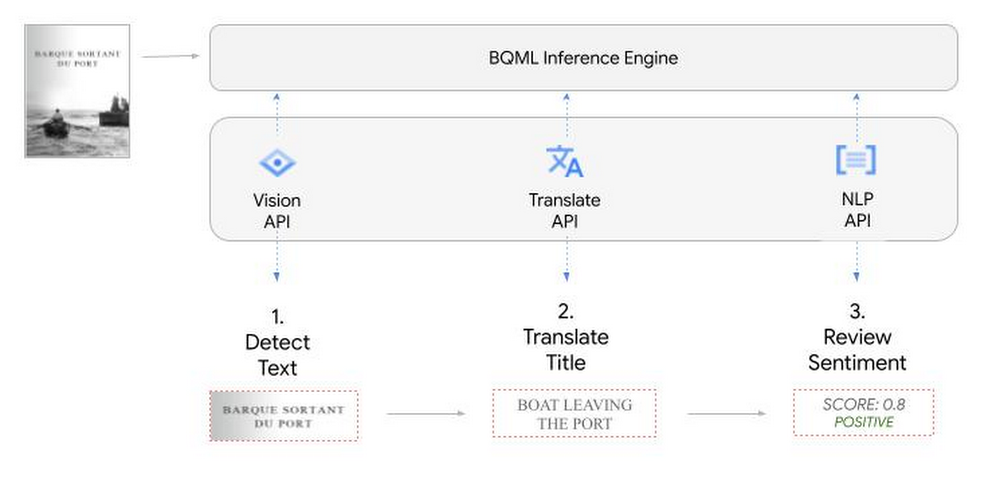
We’ll give examples of the BigQuery SQL needed to define your models and run your inferences. You’ll want to check out our notebook for a detailed guide on how to get this up and running in your Google Cloud project.
1. Define your AI Models in BigQuery
You will need to enable the APIs listed below, and also create a Cloud resource connection to enable BigQuery to interact with these services.
| API | Model Name |
| Vision AI API | Cloud_ai_vision_v1 |
| Translation AI API | Cloud_ai_translate_v3 |
| NLP AI API | Cloud_ai_natural_language_v1 |
You can then run the CREATE MODEL query for each AI service to create your pretrained models, replacing the model_name as required.
CREATE OR REPLACE MODEL
`{PROJECT_ID}.{DATASET_ID}.{VISION_MODEL_NAME}`
REMOTE WITH
CONNECTION `{PROJECT_ID}.{REGION}.{CONN_NAME}`
OPTIONS ( remote_service_type = '<model_name>' );
2. Use the Vision AI API to detect text in images stored in Cloud Storage
You will need to create an object table for your images in Cloud Storage. This read-only object table provides metadata for images stored in Cloud Storage:
CREATE OR REPLACE EXTERNAL TABLE
`{PROJECT_ID}.{DATASET_ID}.{OBJECT_TABLE_NAME}`
WITH
CONNECTION `{REGION}.{CONN_NAME}`
OPTIONS (object_metadata = 'SIMPLE', uris = ['{BUCKET_LOCATION}/*']);
To detect the text from our posters, you can then use ML.ANNOTATE_IMAGE and specify the text_detection feature.
SELECT
       ml_annotate_image_result.full_text_annotation.text AS text_content,
       *
FROM
       ML.ANNOTATE_IMAGE(
         MODEL `{PROJECT_ID}.{DATASET_ID}.{VISION_MODEL_NAME}`,
         TABLE `{DATASET_ID}.{OBJECT_TABLE_NAME}`,
         STRUCT(['TEXT_DETECTION'] AS vision_features));
A JSON response will be returned to BigQuery that includes the text content and language code of the text. You can parse the JSON to a scalar result using the dot annotation highlighted above.

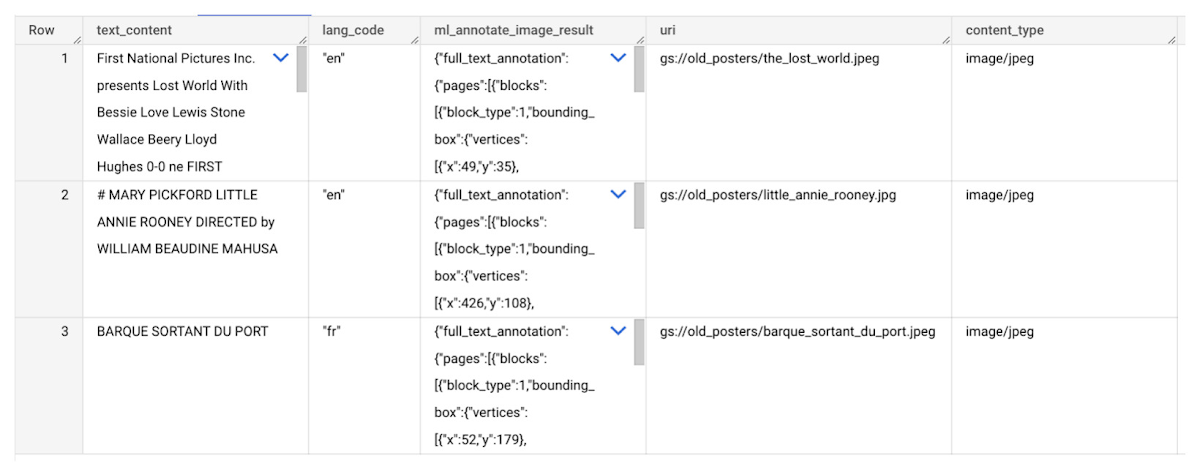
3. Use the Translation AI API to translate foreign movie titles
ML.TRANSLATE can now be used to translate the foreign titles we’ve extracted from our images into English. You just need to specify the target language and the table of the movie posters for translation:
SELECT
text_content,
STRING(ml_translate_result.translations[0].detected_language_code)
as original_language,
STRING(ml_translate_result.translations[0].translated_text)
as translated_title
FROM
  ML.TRANSLATE(
MODEL `{PROJECT_ID}.{DATASET_ID}.{TRANSLATE_MODEL_NAME}`,
TABLE `{DATASET_ID}.image_results`,
STRUCT('TRANSLATE_TEXT' as translate_mode, "en" as target_language_code));
Note: The table column with the text you want to translate must be named text_content:
The table of results will include json that can be parsed to extract both the original language and the translated text. In this case, the model has detected that title text is in French and has translated it to English:

4. Finally, use natural language processing (NLP) to run sentiment analysis against movie reviews
You can easily join inference results from your unstructured data with other BigQuery datasets to bolster your analysis. For example, we can now join the movie titles we extracted from our posters with thousands of movie reviews stored in BigQuery’s IMDB public dataset `bigquery-public-data.imdb.reviews`.
You can use ML.UNDERSTAND_TEXT with the analyze_sentiment feature to run sentiment analysis against some of these reviews to determine whether they are positive or negative:
SELECT
   primary_title, start_year, text_content AS review,
   FLOAT64(ml_understand_text_result.document_sentiment.score) AS score,
   FLOAT64(ml_understand_text_result.document_sentiment.magnitude) AS magnitude,
FROM
   ML.UNDERSTAND_TEXT(
     MODEL `{PROJECT_ID}.{DATASET_ID}.{NLP_MODEL_NAME}`,
           (
           SELECT
             primary_title, start_year, review AS text_content
           FROM
             `bigquery-public-data.imdb.title_basics` titles
           JOIN
             `bigquery-public-data.imdb.reviews` reviews
           ON
             reviews.movie_id = titles.tconst
           WHERE
             UPPER(titles.primary_title) = 'THE LOST WORLD' AND
             start_year = 1925
           ),
      STRUCT("analyze_sentiment" AS nlu_option)) ;
Note: The table column with the text you want to analyze must be named text_content:
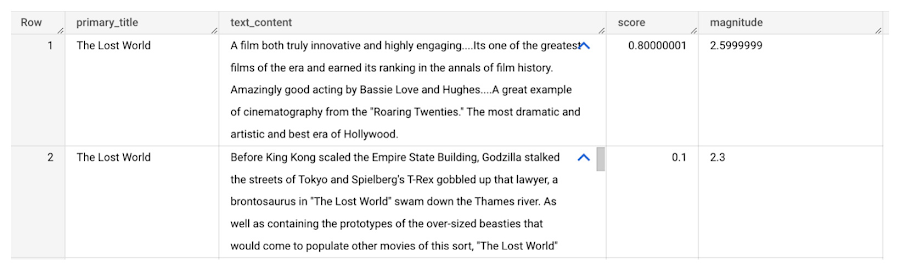
The JSON response will include a score and magnitude. The score indicates the overall emotion of the text while the magnitude indicates how much emotional content is present:
So, how did the Lost World compare with other movies that year?
To wrap up, we’ll compare the average review score of the 1925 Lost World movie to other movies released that year to see which was more popular. This can be done using familiar SQL analysis:
SELECT
 primary_title, start_year,
 AVG(FLOAT64(ml_understand_text_result.document_sentiment.score))AS av_score,
 AVG(FLOAT64(ml_understand_text_result.document_sentiment.magnitude)) AS av_magnitude
FROM
 ML.UNDERSTAND_TEXT(
   MODEL `{PROJECT_ID}.{DATASET_ID}.{NLP_MODEL_NAME}`,
         (
         SELECT
           primary_title, start_year, movie_id, review AS text_content
         FROM
           `bigquery-public-data.imdb.title_basics` titles
         JOIN
           `bigquery-public-data.imdb.reviews` reviews
         ON
           reviews.movie_id = titles.tconst
         WHERE
           start_year = 1925
         ),
   STRUCT("analyze_sentiment" AS nlu_option))
GROUP BY
   primary_title, start_year
ORDER BY
   av_score DESC;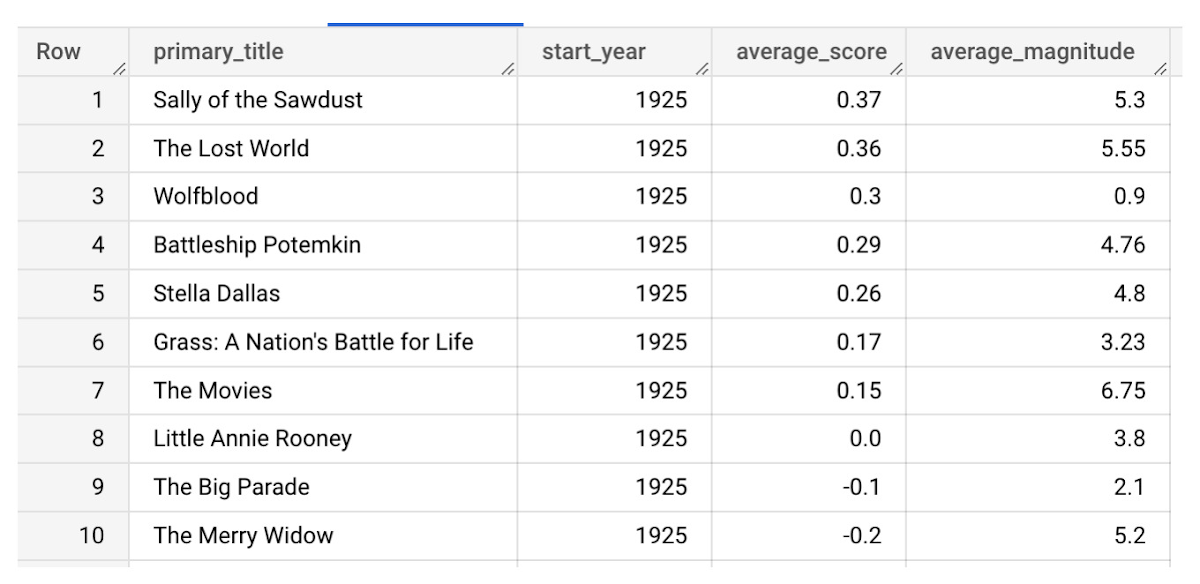
It looks like The Lost World narrowly missed out on the top spot to Sally of the Sawdust!
Want to learn more?
Check out our notebook for a step by step guide on using the BQML inference engine for unstructured data in Google Cloud. You can also check out our Cloud AI service table-valued functions overview page for more details. Curious about pricing? The BQML Pricing page gives a breakdown of how costs are applied across these services.
How to Pick a Database that is Suitable for Your Application

7021
Of your peers have already read this article.
2:30 Minutes
The most insightful time you'll spend today!
Picking the right database for your application is not easy. The choice depends heavily on your use case—transactional processing, analytical processing, in-memory database, and so on—but it also depends on other factors. This post covers the different database options available within Google Cloud across relational (SQL) and non-relational (NoSQL) databases and explains which use cases are best suited for each database option.

Relational databases
In relational databases information is stored in tables, rows and columns, which typically works best for structured data. As a result they are used for applications in which the structure of the data does not change often. SQL (Structured Query Language) is used when interacting with most relational databases. They offer ACID consistency mode for the data, which means:
- Atomic: All operations in a transaction succeed or the operation is rolled back.
- Consistent: On the completion of a transaction, the database is structurally sound.
- Isolated: Transactions do not contend with one another. Contentious access to data is moderated by the database so that transactions appear to run sequentially.
- Durable: The results of applying a transaction are permanent, even in the presence of failures.
Because of these properties, relational databases are used in applications that require high accuracy and for transactional queries such as financial and retail transactions. For example: In banking when a customer makes a funds transfer request, you want to make sure the transaction is possible and it actually happens on the most up-to-date account balance, in this case an error or resubmit request is likely fine.
There are three relational database options in Google Cloud: Cloud SQL, Cloud Spanner, and Bare Metal Solution.
Cloud SQL: Provides managed MySQL, PostgreSQL and SQL Server databases on Google Cloud. It reduces maintenance cost and automates database provisioning, storage capacity management, back ups, and out-of-the-box high availability and disaster recovery/failover. For these reasons it is best for general-purpose web frameworks, CRM, ERP, SaaS and e-commerce applications.
Cloud Spanner: Cloud Spanner is an enterprise-grade, globally-distributed, and strongly-consistent database that offers up to 99.999% availability, built specifically to combine the benefits of relational database structure with non-relational horizontal scale. It is a unique database that combines ACID transactions, SQL queries, and relational structure with the scalability that you typically associate with non-relational or NoSQL databases. As a result, Spanner is best used for applications such as gaming, payment solutions, global financial ledgers, retail banking and inventory management that require ability to scale limitlessly with strong-consistency and high-availability.
Bare Metal Solution: Provides hardware to run specialized workloads with low latency on Google Cloud. This is specifically useful if there is an Oracle database that you want to lift and shift into Google Cloud. This enables data center retirements and paves a path to modernize legacy applications.
Non-relational databases
Non-relational databases (or NoSQL databases) store compex, unstructured data in a non-tabular form such as documents. Non-relational databases are often used when large quantities of complex and diverse data need to be organized. Unlike relational databases, they perform faster because a query doesn’t have to access several tables to deliver an answer, making them ideal for storing data that may change frequently or for applications that handle many different kinds of data.
For example, an apparel store might have a database in which shirts have their own document containing all of their information, including size, brand, and color with room for adding more parameters later such as sleeve size, collars, and so on.
Qualities that make NoSQL databases fast:
- Eventual consistency: stores usually exhibit consistency at some later point (e.g., lazily at read time)
- Horizontal scaling, usually using hashed distributions
- Typically, they are optimized for a specific workload pattern (i.e., key-value, graph, wide-column)
- Typically, they don’t support cross shard transactions or flexible isolation modes.
Because of these properties, non-relational databases are used in applications that require large scale, reliability, availability, and frequent data changes.They can easily scale horizontally by adding more servers, unlike some relational databases, which scale vertically by increasing the machine size as the data grows. Although, some relations databases such as Cloud Spanner support scale-out and strict consistency.
Non-relational databases can store a variety of unstructured data such as documents, key-value, graphs, wide columns, and more. Here are your non-relational database options in Google Cloud:
- Document databases: Store information as documents (in formats such as JSON and XML). For example: Firestore
- Key-value stores: Group associated data in collections with records that are identified with unique keys for easy retrieval. Key-value stores have just enough structure to mirror the value of relational databases while still preserving the benefits of NoSQL. For example: Datastore, Bigtable, Memorystore
- In-memory database: Purpose-built database that relies primarily on memory for data storage. These are designed to attain minimal response time by eliminating the need to access disks. They are ideal for applications that require microsecond response times and can have large spikes in traffic. For example: Memorystore
- Wide-column databases: Use the tabular format but allow a wide variance in how data is named and formatted in each row, even in the same table. They have some basic structure while preserving a lot of flexibility. For example: Bigtable
- Graph databases: Use graph structures to define the relationships between stored data points; useful for identifying patterns in unstructured and semi-structured information. For example: JanusGraph
There are three non-relational databases in Google Cloud:
- Firestore: Is a serverless document database which scales on demand and acts as a backend-as-a-service. It is DBaaS that increases the speed of building applications. It is perfect for all general purpose uses cases such as ecommerce, gaming, IoT and real time dashboards. With Firestore users can interact with and collaborate on live and offline data making it great for real-time application and mobile apps.
- Cloud Bigtable: Cloud Bigtable is a sparsely populated table that can scale to billions of rows and thousands of columns, enabling you to store terabytes or even petabytes of data. It is ideal for storing very large amounts of single-keyed data with very low latency. It supports high read and write throughput at sub-millisecond latency, and it is an ideal data source for MapReduce operations. It also supports the open-source HBase API standard to easily integrate with the Apache ecosystem including HBase, Beam, Hadoop and Spark along with Google Cloud ecosystem.
- Memorystore: Memorystore is a fully managed in-memory data store service for Redis and Memcached at Google Cloud. It is best for in-memory and transient data stores and automates the complex tasks of provisioning, replication, failover, and patching so you can spend more time coding. Because it offers extremely low latency and high performance, Memorystore is great for web and mobile, gaming, leaderboard, social, chat, and news feed applications.
Conclusion
Choosing a relational or a non-relational database largely depends on the use case. Broadly, if your application requires ACID transactions and your data structure is not going to change much, select a relational database.
In Google Cloud use Cloud SQL for any general-purpose SQL database and Cloud Spanner for large-scale globally scalable, strongly consistent use cases. In general, if your data structure may change later and if scale and availability is a bigger requirement than consistency then a non-relational database is a preferable choice. Google Cloud offers Firestore, Memorystore, and Cloud Bigtable to support a variety of use cases across the document, key-value, and wide column database spectrum.
For more comparison resources on each database check out the overview. For more hands-on experience with Bigtable, check out our on-demand training here and learn about migrating databases to managed services check out this whitepaper.
https://youtube.com/watch?v=2TZXSnCTd7E%3Fenablejsapi%3D1%26
For more #GCPSketchnote, follow the GitHub repo. For similar cloud content follow me on Twitter @pvergadia and keep an eye out on thecloudgirl.dev.
Migrating From Oracle OLTP System to Cloud Spanner

3976
Of your peers have already read this article.
8:30 Minutes
The most insightful time you'll spend today!
Spanner uses certain concepts differently from other enterprise database management tools, so you might need to adjust your application to take full advantage of its capabilities. You might also need to supplement Spanner with other services from Google Cloud to meet your needs.
Migration constraints
When you migrate your application to Spanner, you must take into account the different features available. You probably need to redesign your application architecture to fit with Spanner’s feature set and to integrate with additional Google Cloud services.
Stored procedures and triggers
Spanner does not support running user code in the database level, so as part of the migration, you must move business logic implemented by database-level stored procedures and triggers into the application.
Sequences
Spanner does not implement a sequence generator, and as explained below, using monotonically increasing numbers as primary keys is an anti-pattern in Spanner. An alternative way to generate a unique primary key is to use a random UUID.
If sequences are required for external reasons, then you must implement them in the application layer.
Access controls
Spanner supports only database-level access controls using IAM access permissions and roles. Predefined roles can give read-write or read-only access to the database.
If you require finer grained permissions, you must implement them at the application layer. In a normal scenario, only the application should be allowed to read and write to the database.
If you need to expose your database to users for reporting, and want to use fine-grained security permissions (such as table- and view-level permissions), you should export your database to BigQuery.
Read the full article for more, including
- Data validation constraints
- Supported data types
- Migration process
- Transferring your data from Oracle to Spanner
- Maintaining consistency between both databases
- Verifying data consistency
- and more.
More Relevant Stories for Your Company
5 Reasons Your Legacy Data Warehouse Won’t Cut It
As we engage with enterprises across the globe, one thing is becoming clear: Today’s businesses are solving complex business problems that are data-intensive. But often, their data platform infrastructure is holding them back. Data platform architectures that were designed in the 1990s are not ready to solve business problems for

Power up Caching with Memorystore for Memcached
In-memory data stores are a fundamental infrastructure for building scalable, high-performance applications. Whether it is building a highly responsive ecommerce website, creating multiplayer games with thousands of users, or doing real-time analysis on data pipelines with millions of events, an in-memory store helps provide low latency and scale for millions

Held Back by Database Scalability, This Financial Services Company Switches to Google Cloud and Cloud Spanner
Azimut Group operates an international network of companies handling investment and asset management, mutual funds, hedge funds, and insurance. Founded in Milan, Italy in 1988, Azimut Group today has branches in fifteen countries, including Brazil, China, and the USA. “We have subsidiaries and manage funds all over the world,” explains Simone
Unlocking Data Value: Latest Data Platforms and Announcements at the Next 21
Today at Google Cloud Next we are announcing innovations that will enable data teams to simplify how they work with data and derive value from it faster. These new solutions will help organizations build modern data architectures with real-time analytics to power innovative, mission-critical, data-driven applications. Too often, even the best minds
