





4297
Of your peers have already watched this video.
1:43 Minutes
The most insightful time you'll spend today!
The Amazing Tech Behind This Animal Rescue Center Helps Save Costs and Rescue More Animals
The Royal Society for the Prevention of Cruelty to Animals (RSPCA) is the UK’s largest animal welfare charity. Each year, it finds new homes for more than 50,000 animals in need.
Streamlining the charity’s IT systems is the job of Billie Laidlaw, Assistant Director IT Resources. “Every pound we save with our solutions helps to rescue, rehabilitate and re-home animals across England and Wales,” says Billie.
Google Apps for Work was introduced to replace the legacy email system, and the move has saved the charity hundreds of thousands of pounds and introduced more effective ways of working. With Apps for Work on Android phones and Chromebooks, RSPCA inspectors can use Drive and Gmail on the go to connect, check documentation, share information, and request temporary shelter for rescued animals.
With Slides and Chromebox, rescue centre managers can quickly and easily create promotional screens to display in their reception areas showcasing animals that need new owners. And the slides can be pushed simultaneously to RSPCA charity shop screens to help ensure the best chance of finding the animals loving new homes.
“Every time a supporter puts a pound in one of our collection tins, they want it to be spent wisely,” says Billie. “By streamlining our services with Google Apps for Work, we make sure that more of that money serves the animals who need it.”
Watch this video to find out the tech that helps RSPCA make a difference.
3845
Of your peers have already watched this video.
14:49 Minutes
The most insightful time you'll spend today!
Helpful and human: G Suite’s vision for your future workspace
With an accelerated shift to remote working brought on by COVID-19, it’s clearer than ever that an organization’s success relies on its people and how they work. No matter where they’re working from, who they’re working with, or what projects they’re working on, organizations need to enable their employees to have impact.
That’s why, schools are figuring out remote learning models. Doctors are using Google Meet to consult with patients via video call. I believe COVID-19 is the catalyst that will accelerate the transition to more flexible and distributed teams. We’re seeing this trend clearly from both employers and employees. 80% of the workforce would really like the flexibility to work from home at least some of the time, and 74% of CFOs intend to shift some employees to work from home permanently after COVID-19.
From the beginning, G Suite was designed with human impact in mind: to help people work together from anywhere to achieve bigger things in work and in life.
G Suite’s Vice President and General Manager, Javier Soltero, talks about what the future of G Suite means for your organization. Get a window into the newest, most exciting innovations and hear how G Suite is helping organizations navigate what’s next.
A set of new capabilities to build a differentiated data platform: BigLake, now generally available

3577
Of your peers have already read this article.
3:30 Minutes
The most insightful time you'll spend today!
Data continues to grow in volume and is increasingly distributed across lakes, warehouses, clouds, and file formats. As more users demand more use cases, the traditional approach to build data movement infrastructure is proving difficult to scale. Unlocking the full potential of data requires breaking down these silos, and is increasingly a top priority for enterprises.
Earlier this year, we previewed BigLake, a storage engine that extends innovations in BigQuery storage to open file formats running on public cloud object stores. This allows customers to build secure multi-cloud data lakes over open file formats. BigLake provides consistent, fine-grained security controls for Google Cloud and open-source query engines to interact with data. Today, we are excited to announce General Availability for BigLake, and a set of new capabilities to help you build a differentiated data platform.
“We are using GCP to build and extend one of the street’s largest risk systems. During several tests we have seen the great potential and scale of BigLake. It is one of the products that could support our cloud journey and drive application’s future efficiency” – Scott Condit, Director, Risk CTO Deutsche Bank.
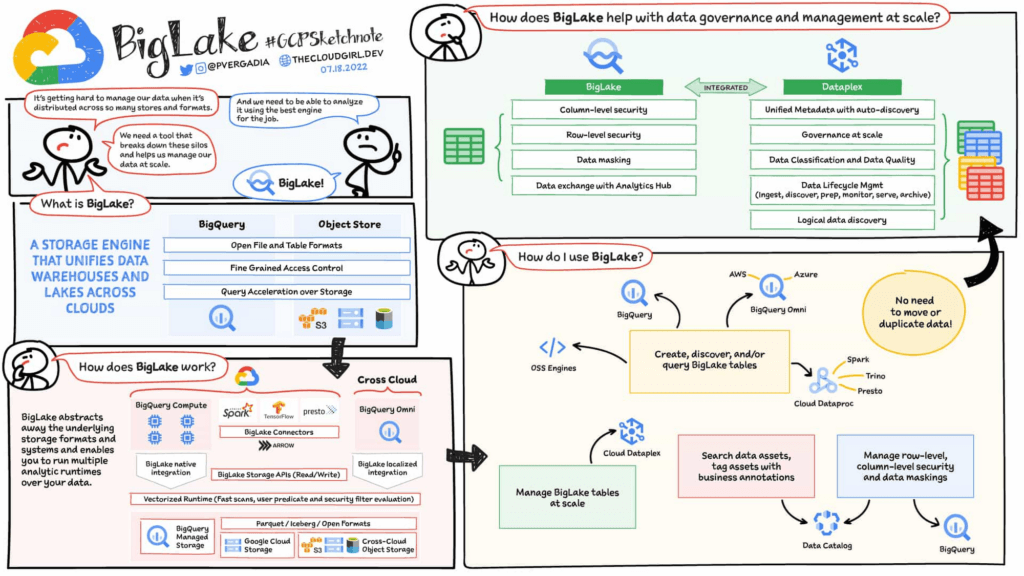
Build a distributed data lake that spans across warehouses, object stores & clouds with BigLake
Customers can create BigLake tables on Google Cloud Storage (GCS), Amazon S3 and ADLS Gen 2 over supported open file formats, such as Parquet, ORC and Avro. BigLake tables are a new type of external table that can be managed similar to data warehouse tables. Administrators do not need to grant end users access to files in object stores, but instead manage access at a table, row or a column level. These tables can be created from a query engine of your choice, such as BigQuery or open-source engines using the BigLake connector. Once these tables are created, BigLake and BigQuery tables can be centrally discovered in the data catalog and managed at scale using Dataplex.
BigLake extends the BigQuery storage API to object stores to help you build a multi-compute architecture. BigLake connectors are built on the BigQuery storage API and enable Google Cloud DataFlow and open-source query engines (such as Spark, Trino, Presto, Hive) to query BigLake tables by enforcing security. This eliminates the need to move the data to a query engine specific use case and security only needs to be configured at one place and is enforced everywhere.
“We are using GCP to design datalake solutions for our customers and transform their digital strategy to create a data-driven enterprise. Biglake has been critical for our customers to quickly realize the value of analytical solutions by reducing the need to build ETL pipelines and cutting-down time-to-market. The performance & governance features of BigLake enabled a variety of data lake use cases for our customers.” – Sureet Bhurat, Founding Board member – Synapse LLC
BigLake unlocks new use cases using Google Cloud and OSS Query engines
During the preview, we saw a large number of customers use BigLake in various ways. Some of the top use cases include:
Building secure and governed data lakes for open-source workloads – Workloads migrating from Hadoop, Spark first customers, or those using Presto/Trino, can now use BigLake to build secure, governed and performant data lakes on GCS. BigLake tables on GCS provide fine-grained security, table management (vs giving access to files), better query performance and integrated governance with Dataplex. These characteristics are accessible across multiple OSS query engines when using the BigLake connectors.
“To support our data driven organization, Wizard needs a data lake solution that leverages open file formats and can grow to meet our needs. BigLake allows us to build and query on open file formats, scales to meet our needs, and accelerates our insight discovery. We look forward to expanding our use cases with future BigLake features” – Rich Archer, Senior Data Engineer – Wizard
Eliminate or reduce data duplication across data warehouses and lakes – Customers who use GCS, and BigQuery managed storage had to previously create two copies of data to support users using BigQuery and OSS engines. BigLake makes the GCS tables more consistent with BigQuery tables, reducing the need to duplicate data. Instead, customers can now keep a single copy of data split across BigQuery storage and GCS, and data can be accessed by BigQuery or OSS engines in either places in a consistent, secure manner.
Fine-grained security for multi-cloud use cases – BigQuery Omni customers can now use BigLake tables on Amazon S3, and ADLS Gen 2 to configure fine grained security access control, and take advantage of localized data processing, and cross cloud transfer capabilities to do multi-cloud analytics. Tables created on other clouds are centrally discoverable on Data catalog for ease of management & governance
Interoperability between analytics and data science workloads – Data science workloads, using either Spark or Vertex AI notebooks can now directly access data in BigQuery or GCS through the API connector, enforcing security & eliminating the need to import data for training models. For BigQuery customers, these models can be imported back into BigQuery ML to produce inferences.
Build a differentiated data platform with new BigLake capabilities
We are also excited to announce new capabilities as part of this General Availability launch. These include:
- Analytics Hub support: Customers can now share BigLake tables on GCS with partners, vendors or suppliers as linked data sets. Consumers can access this data in place through the preferred query engine of their choice (BigQuery, Spark, Presto, Trino, Tensorflow).
- BigLake tables is now the default table type BigQuery Omni, and has been upgraded from the previous default of external tables.
- BigQuery ML support: BigQuery customers can now train their models on GCS BigLake tables using BigQuery ML, without needing to import data, and accessing the data in accordance to the access policies on the table.
- Performance acceleration (preview): Queries for GCS BigLake tables can now be accelerated using the underlying BigQuery infrastructure. If you would like to use this feature please get in touch with your account team or fill out this form.
- Cloud Data Loss Prevention (DLP) profiling support (coming soon): Cloud DLP can soon scan BigLake tables to identify and protect sensitive data at scale. If you would like to use this feature please get in touch with your account team.
- Data masking and audit logging (Coming soon): BigLake tables now support dynamic data masking, enabling you to mask sensitive data elements to meet compliance needs. End user query requests to GCS for BigLake tables are now audit logged and are available to query via logs.
Next steps
Refer to BigLake documentation to learn more, or get started with this quick start tutorial. If you are already using external tables today, consider upgrading them to BigLake tables to take advantage of above mentioned new features. For more information, reach out to the Google cloud account team to see how BigLake can add value to your data platform.
New research reveals who’s targeted by email attacks
4080
Of your peers have already read this article.
03:30 Minutes
The most insightful time you'll spend today!
Every day, we stop more than 100 million harmful emails from reaching Gmail users. Last year, during the peak of the pandemic crisis we saw 18 million daily malware and phishing emails related to COVID-19. This is in addition to more than 240 million COVID-related daily spam messages. Our ML models evolve to understand and filter new threats, and we continue to block more than 99.9% of spam, phishing, and malware from reaching our users.
We wanted to explore what factors influence being targeted by email phishing and malware and whether higher-risk users are adopting the strongest protections we have to offer. To do this, we teamed up with researchers at Stanford University to study over a billion phishing and malware emails and their anonymized targets. We recently presented our study at the Internet Measurement Conference (IMC), and it’s now available here.
We found that multiple factors correlate with higher risk: where you live, what devices you use, and whether your information appeared in previous third-party data breaches.
Phishing and malware evolves faster than you think
We aggregated and analyzed all of the phishing and malware campaigns that Gmail automatically blocked over a five-month period to identify patterns.
- We found that users in the United States were the most popular targets (42% of attacks), followed by the United Kingdom (10% of attacks), and Japan (5% of attacks).
- Most attackers don’t localize their efforts, using the same English email template for users in multiple countries.
- There is, however, some evidence of regional attackers: 78% of the attacks targeting users in Japan occurred in Japanese, while 66% of attacks targeting Brazilian users occurred in Portuguese.
We also noticed some patterns among attackers and botnets that distribute phishing and malware emails:
- They rely on fast-churning campaigns. A similar email based on a template is sent to 100–1,000 targets on average.
- The campaigns are brief and bursty, lasting just one to three days on average.
- In a single week, these small-scale campaigns accounted for over 100 million phishing and malware emails in aggregate, targeting Gmail users around the globe.
While the users that attackers target change from week to week, in aggregate these patterns remain largely stable over time.
Factors that correlate with heightened risk
Beyond how attackers operate phishing and malware campaigns, we also analyzed what factors put a user at higher risk of attack. In order to avoid singling out any individual user or their personal data, we used an anonymization technique called “k-anonymity” to ensure any risk trends that we identified applied to a broad group of similar users. We modeled the likelihood of receiving any phishing or malware emails in a given week as a function of geographic location, demographics, security posture, device access, and prior security incidents (such as having personal data revealed by a third-party data breach).
Here is what our model found:
- Having your email or other personal details exposed in a third-party data breach increased the odds of being targeted by phishing or malware by 5X.
- Where you live also affects risk. In Australia, users faced 2X the odds of attack compared to the United States, despite the United States being the most popular target by volume (not per capita).
- With respect to demographics, the odds of experiencing an attack was 1.64X higher for 55- to 64-year-olds, compared to 18- to 24-year-olds.
- Mobile-only users experienced lower odds of attack: 0.80X compared to multi-device users. This may stem from socioeconomic factors related to device ownership and attackers targeting wealthier groups.
These correlations help us understand that risk is not evenly spread across geographic and demographic boundaries.
How to stay safer
Gmail’s phishing and malware protections are automatically turned on by default. Here’s our top recommendations for what you can do today to stay safer.
For individual users:
- Complete a Security Checkup for personalized and actionable security advice.
- If appropriate, consider enrolling in Google’s Advanced Protection program, which provides Google’s strongest security to users at increased risk of targeted online attacks.
- Enable Enhanced Safe Browsing Protection in Google Chrome to substantially increase your defenses against dangerous websites and downloads on the web.
- Browse these additional tips to manage your online security and choose the right level of protection for yourself.
For Workspace admins:
- New research reveals who’s targeted by email attacks. Take a look at our advanced phishing and malware protection. These are turned on by default across all Google Workspace licenses, and you can further customize them according to the unique needs of your organization.
Gmail’s BIMI Increases Confidence about Security and Delivers Immersive Email Experiences

5451
Of your peers have already read this article.
3:00 Minutes
The most insightful time you'll spend today!
Creating a secure-by-default experience based on robust defenses has always been a core design principle for Gmail. That’s why we’ve established a strong baseline of security in Gmail, with built-in protections to help automatically filter out potentially malicious messages. While these defenses help keep Gmail users safe, email functions as part of a large, complex, interconnected ecosystem that we continually invest in and work to protect. After first announcing Gmail’s Brand Indicators for Message Identification (BIMI) pilot last year, today we’re announcing that over the coming weeks we’re rolling out Gmail’s general support of BIMI, an industry standard that aims to drive adoption of strong sender authentication for the entire email ecosystem. BIMI provides email recipients and email security systems increased confidence in the source of emails, and enables senders to provide their audience with a more immersive experience.


“Bank of America has a wide range of security measures in place to support our customers, and we constantly evolve our program to deliver best in class protection. Part of this effort is our partnership with Google on BIMI, which provides an easy way to validate if correspondence is from us.” — Bank of America
BIMI enables organizations that authenticate their emails using Domain-based Message Authentication, Reporting, and Conformance (DMARC)—a standard for providing strong sender authentication that allows security systems to perform better filtering, separating legitimate messages from potentially spoofed ones—to validate ownership of their logos and securely transmit them to Google. BIMI is designed to be easy: for organizations with DMARC in place, validated logos display on authenticated emails from their domains and subdomains.
Here’s how it works: Organizations who authenticate their emails using Sender Policy Framework (SPF) or Domain Keys Identified Mail (DKIM) and deploy DMARC can provide their validated trademarked logos to Google via a Verified Mark Certificate (VMC). BIMI leverages Mark Verifying Authorities, like Certification Authorities, to verify logo ownership and provide proof of verification in a VMC. Once these authenticated emails pass our other anti-abuse checks, Gmail will start displaying the logo in the existing avatar slot.
“Gmail’s support of BIMI is a win for email authentication, brand trust, and consumers alike. BIMI gives organizations the opportunity to provide their customers with a more immersive email experience, strengthening email sender authentication across the entire email ecosystem.” — Seth Blank, Chair of the AuthIndicators Working Group
This is just the start for BIMI. The standard expects to expand support across logo types and validators. For logo validation, BIMI is starting by supporting the validation of trademarked logos, since they are a common target of impersonation. Today, Entrust and DigiCert support BIMI as Certification Authorities, and in the future the BIMI working group expects this list of supporting validation authorities to expand further. To learn more about BIMI and see the latest news, visit the working group’s website.
To take advantage of BIMI, ensure that your organization has adopted DMARC, and that you have validated your logo with a VMC. For Gmail users, no action is required. We’re proud to be one of the leading members in both establishing and supporting the BIMI standard and will continue to support efforts that contribute to security for the entire email ecosystem.
No-code Development Platforms Help Employees Reclaim their Time and Talent

3888
Of your peers have already read this article.
4:00 Minutes
The most insightful time you'll spend today!
As offices reopen, businesses aren’t keeping to a single formula. Many are embracing hybrid models, with employees splitting time between home and the office. Some are staying 100% remote. Others are returning the full workforce to offices with a greater focus on digitization.
Regardless of their model, one thing is certain: technology is more central than ever to organizations’ ability to work smarter and more effectively. In particular, organizations need technology that can be tailored to specific business needs. For example, a retail store manager may need a way to ensure improved sanitation practices, or office workers may need to create an app to manage desk reservations.
Google Workspace can help by bringing together everything you need to get things done, all in one place—including the ability to build custom apps and automations with AppSheet. AppSheet, Google Cloud’s no-code development platform, lets employees–even those with no programming experience–reclaim their time and talent by building custom apps and automations.
Building solutions with AppSheet is often easier and faster than traditional coding, as AppSheet leverages Google’s machine learning expertise to help you quickly go from idea to solution, helping your business to match the pace and agility that today’s landscape requires. In this article, we’ll explore how you can use AppSheet to create custom solutions that will help your business adapt to shifting business needs. To illustrate, we’ll focus on a use case many businesses face: reservation and management of meeting rooms and other office resources, but this process can easily be adapted for a wide variety of use cases, from apps for retail pickup to incident reporting and more.
Simplify and centralize with apps
The first thing to consider is whether your solution would be best managed via a custom interface. If you’re trying to simplify a process for someone, such as inspections or inventory tracking, or centralize information, such as resource portals or events calendars, creating a custom app is the way to go.
For this example app, we created a simple Google Sheet to hold our backend data. Sheets are ideal backend data sources when we know the amount of data will not grow exponentially, especially when piloting to a first office or group of users. We can switch our data seamlessly at any time to a scalable Google Cloud SQL database or other database if needed.
The example app has several worksheets to manage the different buildings, rooms, checkpoints and people (including their roles).

We can build an app in AppSheet directly from our Sheet by selecting Tools > AppSheet > Create an App.
After creating our app, we see an overview of the data that we’ve connected, how pieces of data relate to each other, the views that are presented to the user, and a live interactive preview of the app. Refining the app is intuitive. When you input keywords, for instance, AppSheet surfaces appropriate functionality options that can be further customized. If we have address or location data, it’s automatically turned into a map view that we can further customize.
Our office management app will offer building managers and cleaners administrative features for managing equipment, disinfection schedules, and maintenance information, and it will also offer views for employees to check occupancy and safely reserve desks and equipment.
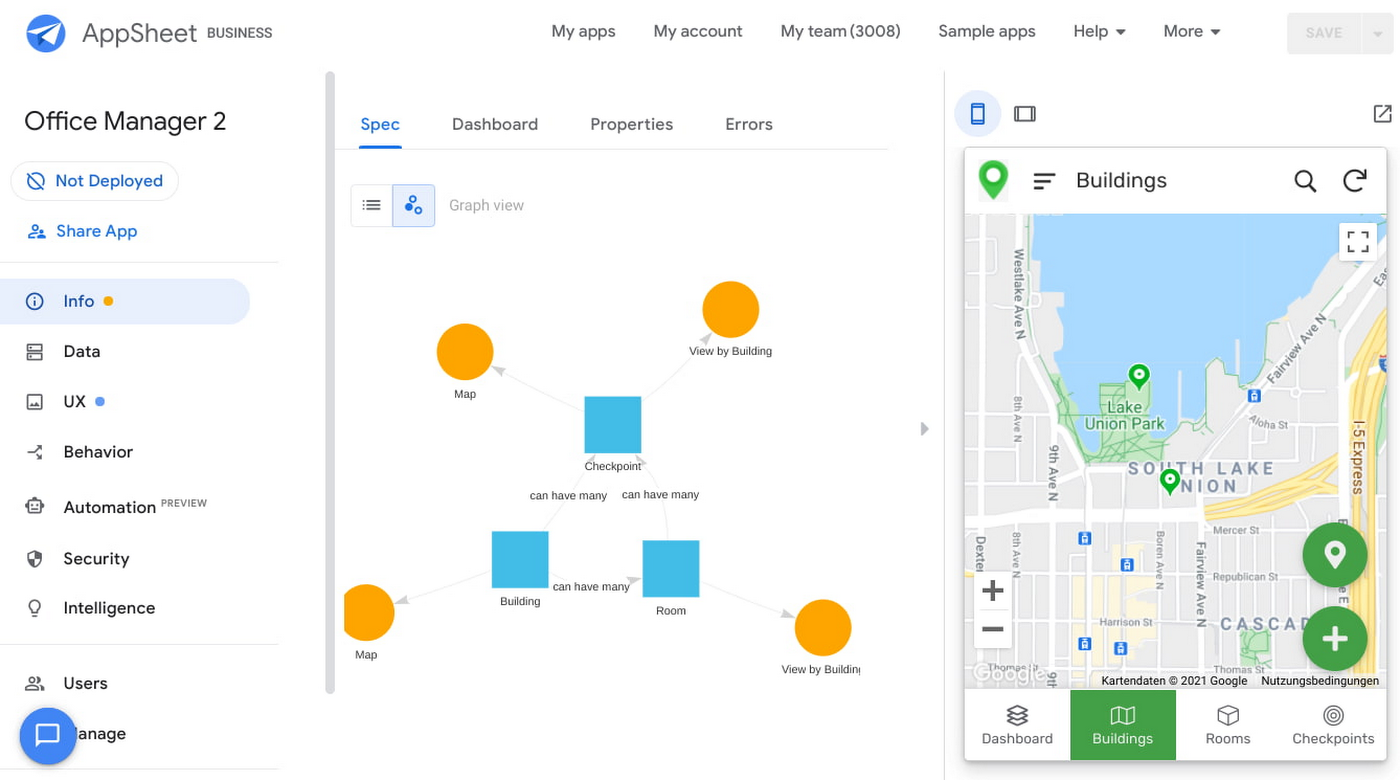
Opening an office and then a room in the app gives us an overview of both the floorplan and the occupancy and reservations for spaces and equipment in the room.
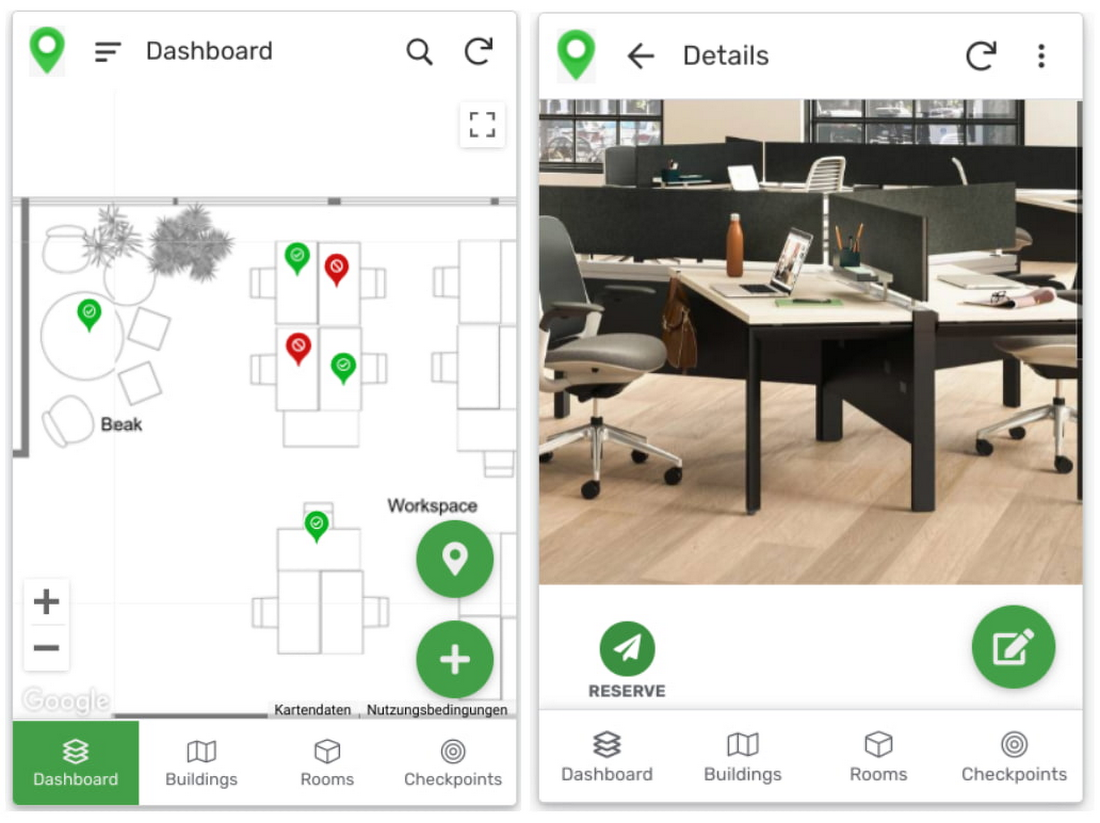
Users can then reserve spaces and equipment in the app, without having to first search for a form or page in the intranet, or even log onto their work computer. The reservation is an automation routine in AppSheet, which performs pre-configured actions when triggered.
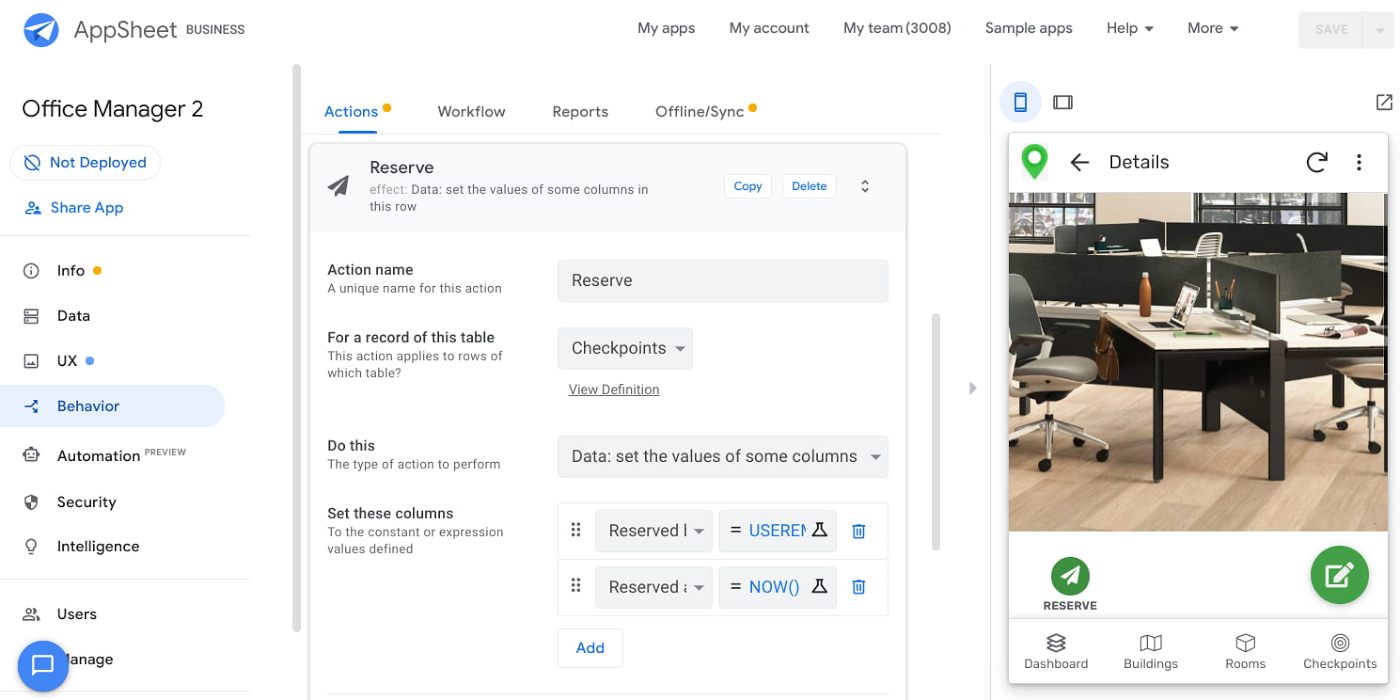
As illustrated in the screenshot above, when the action is triggered either by pressing a button in the app, scanning a QR code, or tapping an RFC tag, the action simply sets the “Reserved by” and “Reserved at” columns to the current user and timestamp.
Streamline with automations
AppSheet Automation, which was recently made generally available, makes it possible to reduce repetitive tasks and streamline processes even further.
In this example, one challenge you may encounter is that users often forget to release a desk or resource when they’re finished, which means those reservations stay blocked until an administrator releases all blocked reservations. However, it’s also important that resources aren’t immediately released, as they first need to be cleaned and disinfected before being made available to new users.
AppSheet Automation can solve this challenge by periodically checking all resources that have been reserved for longer than four hours, then alerting the user to either re-reserve them or release them to be cleaned. If there is no answer, the automation can trigger the resources to be cleaned, then released.

We can configure this as a recurring event, and create a bot that sends the notifications and triggers actions based on the user input (or lack of input).
Optimize for multiple roles
Creating an app for one user is one thing–creating an app that fits the needs of multiple types of users is another. AppSheet has you covered for this kind of complexity because it lets you build multiple roles into a single app.
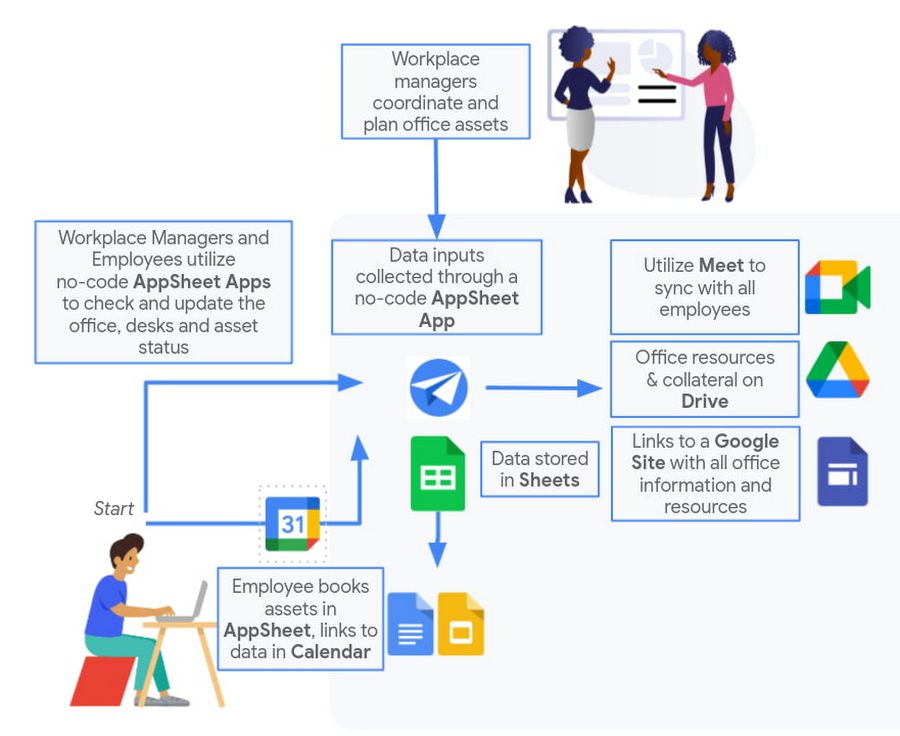
In our office management app, for example, the office manager can have a particular view and dashboard, and workers in the office can have their own views and functionalities front and center. This makes it possible to automate tasks for all types of users with a single app.
Likewise, AppSheet Automation lets you easily react to real-time changes in data, send notifications to groups of users, and initiate additional workflows using data shared between the app and the users. If a group needs to reserve a conference space for an important late-breaking meeting, for example, there might be ripple effects across a number of user groups. The ability to automate all these updates and interactions can ultimately save a lot of time and effort.
AppSheet also supports advanced features such as QR codes, NFC, and bluetooth sensor integration. This could help users check into locations or workspaces, further streamlining the task of helping people safely navigate and collaborate within the office.
Mission critical solutions, faster than ever
In the past, the type of app explored in this article would have required a central data store, distribution to specific groups of users, management and dashboard capabilities, as well as smartphone sensor integration for NFC and image capturing. This would have necessitated a mammoth implementation project and a team of professional coders.
But with no-code, you can effectively design and implement these requirements in hours and days rather than months and years. Changes can be made on the fly in any browser, including pushing out new versions to users. Though AppSheet opens up app building and digital automations to any knowledge worker, it also includes robust security and governance controls, ensuring that as you manage getting employees back into office, you don’t neglect IT security.
Try out your own back-to-the-office app for free today at AppSheet.com, or explore and copy our sample app.
More Relevant Stories for Your Company

Gmail Turns 18, Has 3 Billion Users! A Product Lead Breaks Down How Gmail Stays Interesting
This April, Gmail will be 18 years old. That’s a big milestone, given that email as a medium just turned 50. Launched in 2004—with its 1 GB free storage, conversation based grouping, and enhanced search capabilities—Gmail quickly became one of the most popular email services in the world. What started off

Google’s Latest ‘Carbon Footprint’ can Flag Users about Carbon Emission Levels from their Cloud Usage
Google Cloud is proud to support our customers with the cleanest cloud in the industry. For the past four years, we’ve matched 100% of our electricity use with renewable energy purchases, and we were the first company of our size to commit going even further by running on carbon-free energy 24/7

Usha Martin Consolidates and Modernizes with Google
Usha Martin operates several wire and rope manufacturing plants in India, Thailand, the United Arab Emirates, and the United Kingdom. In 1974, Usha Martin established an integrated alloy steel plant in Jamshedpur, India. The business operates a range of joint ventures internationally, including a partnership with Joh Pengg AG of

Two Ways to Deploy SAP HANA System on Google Cloud
Many of the world’s leading companies run on SAP—and deploying it on Google Cloud extends the benefits of SAP even further. Migrating your current SAP S/4HANA deployment to Google Cloud—whether it resides on your company’s on-premises servers or another cloud service—provides your organization with a flexible virtualized architecture that lets
