





The Story Behind How Woolworth Innovates to Better Customer Experience

4389
Of your peers have already read this article.
2:30 Minutes
The most insightful time you'll spend today!
As one of Australia and New Zealand’s most innovative retailers, Woolworths is always looking for ways to use technology to give its customers more convenient ways to shop. This innovative approach does not stop with our customers. Our extensive staff needs intuitive technology to enable them to work more efficiently, collaboratively and effectively. To do this, they need to be able to access the right applications and information, from any location, using any device.
This is why we’ve decided to move to G Suite and Chrome. Changing to a cloud-based suite of tools is a key part of our strategy to use technology to promote greater collaboration, productivity, and effectiveness. Over the next 12 months, we will be rolling out Gmail, Google Calendar and Google Hangouts Meet to the staff in our national and state offices. This is the first phase of what we hope will be a company-wide transformation of our workplace technology.
We are also actively looking at how we can innovate with Google+, Google Drive and Google Sites to transform the way we approach other aspects of our business.
The move to G Suite and Chrome builds on the successful roll-out of Gmail and our ‘Tap to Support’ app on iPads to Woolworths supermarket store managers last year. The custom-made application, built on Google App Engine, helps our managers stay on the shop floor and focused on customers by allowing them to log a support ticket with our national support office in just one click rather than being tied to a PC in the back office.
Soon more of our staff will be able to experience the productive and collaborative benefits of being able to work from any device, anywhere. Geographically dispersed teams, like our merchandising or state-based workers, will be able to use Google Docs to collaborate in real-time.
Going Google will transform the way our employees interact with technology and collaborate with each other at every level of the organization. We’re looking forward to providing our staff with access to intuitive consumer technology at work and see the move to Google as the beginning of our journey towards a more efficient and innovative style of working.
Workspace powers business as usual for Optiva during COVID-19

3817
Of your peers have already read this article.
3:30 Minutes
The most insightful time you'll spend today!
Established companies in any industry, including telecommunications, often take a cautious approach when it comes to adopting new technology. This is true of any technology and especially of tools used across entire organizations and at all levels—like collaboration and communication tools. I joined Optiva Inc. as its Chief Marketing Officer in August 2018, and right off the bat I faced the need for cloud-based productivity and collaboration tools like Google Workspace (formerly G Suite), which was new to me.
Optiva was in the midst of making an organization-wide change to implement Google Workspace productivity and collaboration tools. Employees at that time—at Optiva and across other organizations I used to work with—primarily collaborated by attaching documents to company emails and meeting their colleagues in office corridors. Meetings were almost always in person or via phone. These processes were inefficient and contributed to version-control confusion and decreased overall productivity. They were also based on our pre-COVID world.
Today, Optiva is a fully remote-first organization, and our employees use all the tools in Google Workspace. Collaboration has increased dramatically, surprising even initial skeptics. Occasionally we still encounter resistance from new employees who are used to a different way of working. This is logical, but more often than not, they thank us later, and many have told me that they see the value for their productivity and the entire organization’s collaboration.
Google Workspace has become a real advantage, especially for a global company like Optiva with employees across the world and in so many different time zones. Instead of waiting for team members’ availability to review or collaborate on a document, wasting time coordinating who works on the latest version, or who is the “owner” of a deck, employees can open a document, view new changes, and add updates, even when others are working on the same document in parallel.
Google Workspace promotes business as usual during COVID-19
The combination of Optiva’s remote-first policy and Google Workspace collaboration tools proved a welcome addition during the challenges posed by COVID-19. Optiva was ahead of the curve of remote working policies in the telecommunications industry and in the software industry as a whole, so when the work-at-home orders went into effect in March last year, Optiva’s business charged ahead without missing a beat.
Google Meet has helped us maintain a strong corporate culture during this challenging time. For example, we constantly use video conferencing, which has been a great way to see the entire team and get a real sense for how each employee is doing—professionally as well as personally. Using Google Chat allowed us to keep in touch with everyone across our global teams. It helps us ensure that everyone feels secure and can work during this challenging time. Also, we have continued to create new teams with employees all around the world. If we attempted to onboard or train them using conference calls or emails, the experience wouldn’t be the same. Meet has helped us develop the strongest teams possible, faster, and much more effectively.
We also use Google Workspace tools to cross-train employees on tasks and processes in departments outside their own. That way, if one of our employees has to be out of the office unexpectedly, the company benefits from full business continuity. To make this possible, various teams and departments documented their specific processes, held training sessions on Meet, and recorded them so any employee could access them on demand.
Many struggled in the early days of the self-quarantine orders, especially when it came to the sudden need to select and deploy new technologies for remote collaboration and, more importantly, to keep supporting their customers. We were fortunate that our business was unphased—and we owe a lot of this success to Google Workspace.
Why settle for the status quo?

3960
Of your peers have already read this article.
2:30 Minutes
The most insightful time you'll spend today!
Virtual meetings, remote collaboration, flexible hours: it’s becoming clear that these new ways of working are here to stay.
Business leaders, since the onset of COVID-19, have seen workplace transformation go from an almost theoretical long-term goal to an urgent priority. Employers and employees want more flexible ways of working, and delivering on this requires the right technology.
But flexibility isn’t the only thing that employees want. Remote working has significantly increased the demands we’re getting from many directions—in both our professional and our personal lives. Employees feel overloaded with too much information and too many tasks across too many different tools. Instead of learning another tool, we need the tools we already use to be even more helpful, and work together, in an integrated, intuitive way.
Today’s teams need to re-imagine not only how they communicate and collaborate with each other remotely, but also how they continue to serve their own customers and support the communities they belong to. From doctors consulting with patients, to financial institutions providing critical advice to customers, to teachers delivering distant learning, to car dealerships creating virtual showrooms—it’s clear that these new ways of working are here to stay.
The future of work is here. COVID-19 has accelerated a shift in how organizations like yours get work done. Take this 2-minute assessment below to see where you’re at on the journey to the future of work, and get a free guide to help you take the next step.
CARTO’s Data Visualization Powered by Google Cloud and deck.g

4082
Of your peers have already read this article.
7:00 Minutes
The most insightful time you'll spend today!
Editor’s note: Today’s blog post is from Alberto Asuero, CTO of CARTO, the location intelligence platform. Today he shares more details about the source of the data for advanced data visualizations created with Google Maps Platform and deck.gl and how the CARTO platform enables this workflow.
During Google Cloud Next in October, the Google team announced the newest release of the deck.gl visualization library, thanks to a collaboration with our geospatial company CARTO and the vis.gl Technical Steering Committee (TSC). The deck.gl release includes a deep integration with the new WebGL-powered features in the Maps JavaScript API that allows deck.gl to render 2D and 3D visualizations directly on the Google basemap.
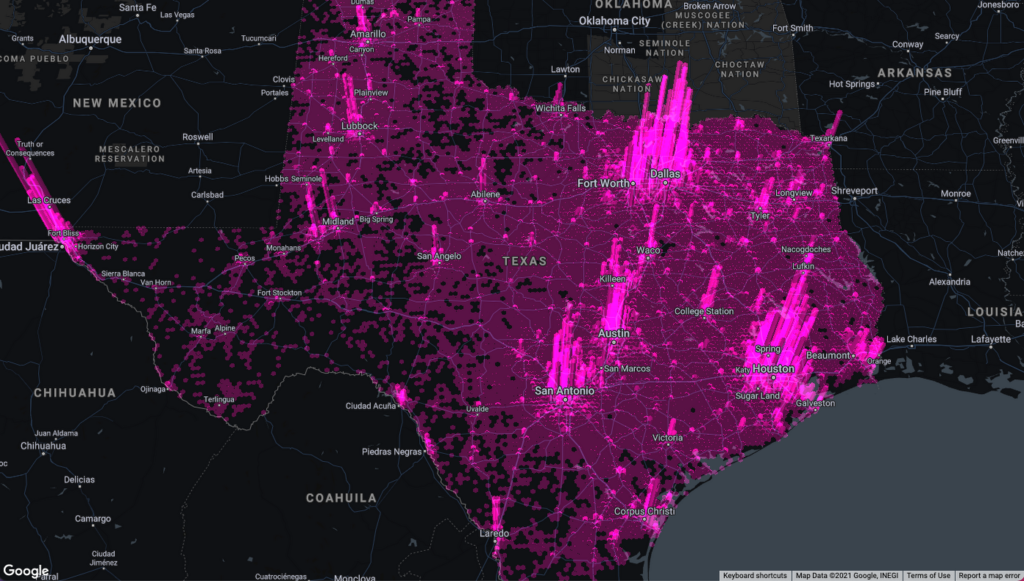
Our team built an example app that visualizes a variety of data sources that show the potential for electrification of truck fleets in Texas. This app showcases the different types of advanced data visualizations that can be created with Google Maps Platform and deck.gl. Today, I want to share more details about the source of the data for these visualizations and how the CARTO platform enables this workflow.
Google Cloud provides a strong serverless data warehousing solution, BigQuery, with support for geospatial queries. When you are dealing with spatial data, creating maps to explore and visualize these datasets is an important and common need. The CARTO Spatial Extension for BigQuery provides an easy way to create connections to the data warehouse, design a map with data coming from BigQuery tables, and then add these visualizations to a web app using deck.gl.
Making a simple map
To create a simple map using the CARTO platform, you can sign up for a trial account. Once you have signed in, you can set up a connection to your BigQuery instance using a service account. Then, you can go to the Data Explorer and browse the available datasets to find the table you want to use as the datasource in your map. For more information, check out the CARTO documentation.
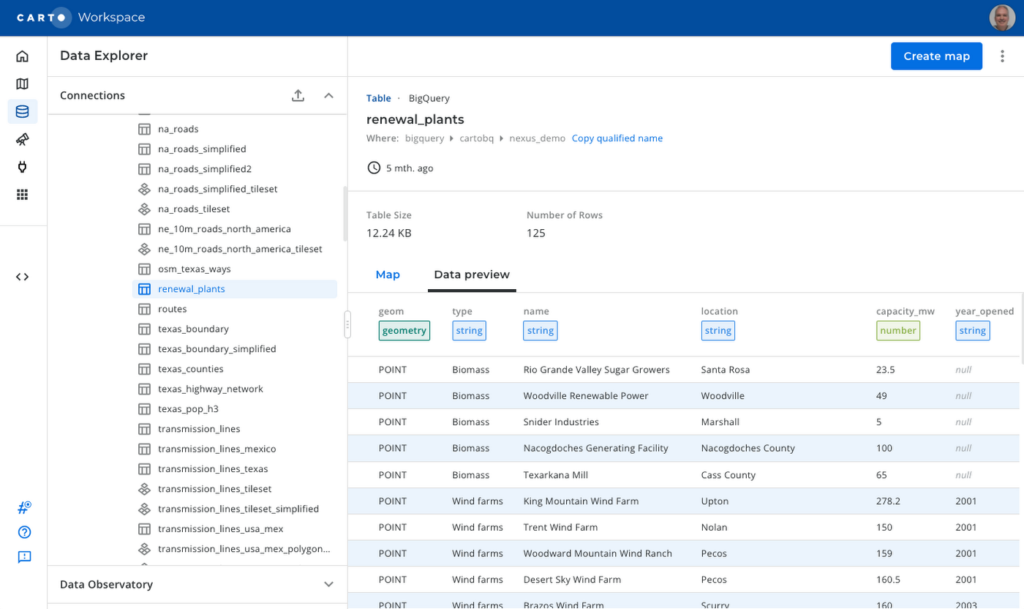
To create a visualization of power transmission lines in Texas, you can start with the Texas state boundary to provide some context. In the Data Explorer, you can preview the table and click the “Create map” button in the top-right corner to start designing your visualization.
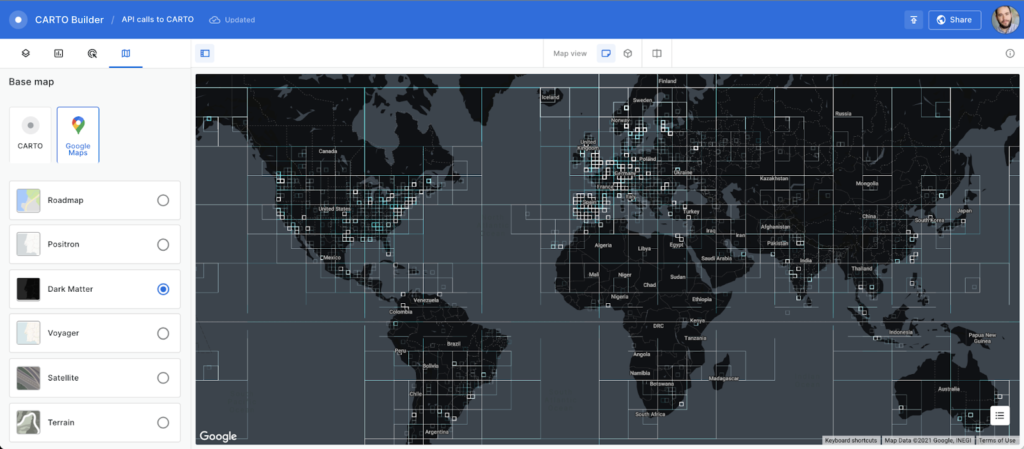
Using the CARTO Builder map making tool, select one of the available Google vector basemap styles and customize the layer style.
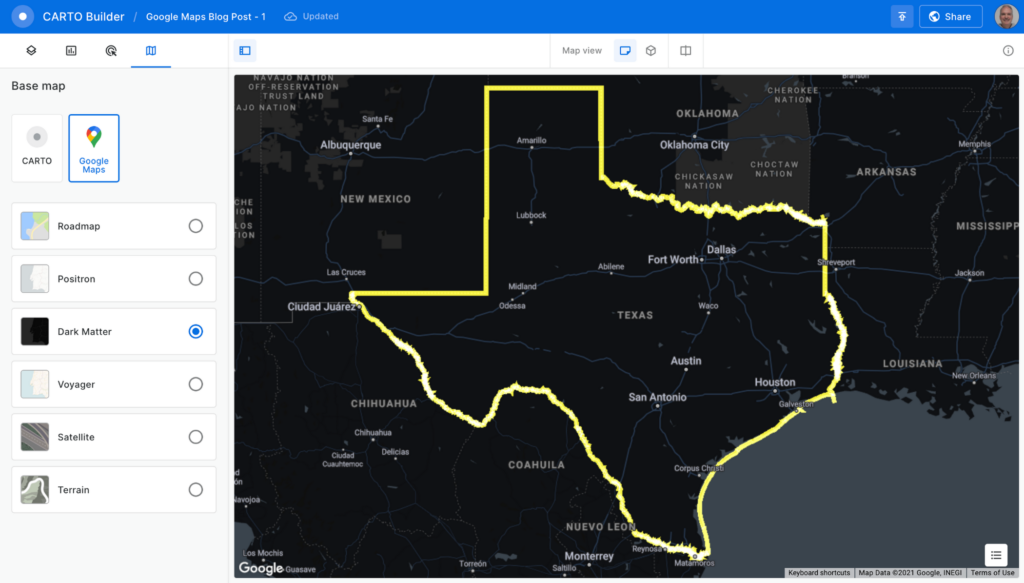
You can visualize tables and the results from queries executed in the data warehouse, which is a powerful feature because you can also execute spatial analysis functions using SQL, including those from the CARTO Analytics Toolbox. In this case, you can intersect the lines in the table containing all the U.S. transmission lines within the Texas boundary. Click on the “Add source from…” button and select the “Custom Query (SQL)” option to add the following query:
SELECT *FROM cartobq.nexus_demo.transmission_linesWHERE ST_INTERSECTS(geometry,(SELECT geom FROM cartobq.nexus_demo.texas_boundary_simplified));
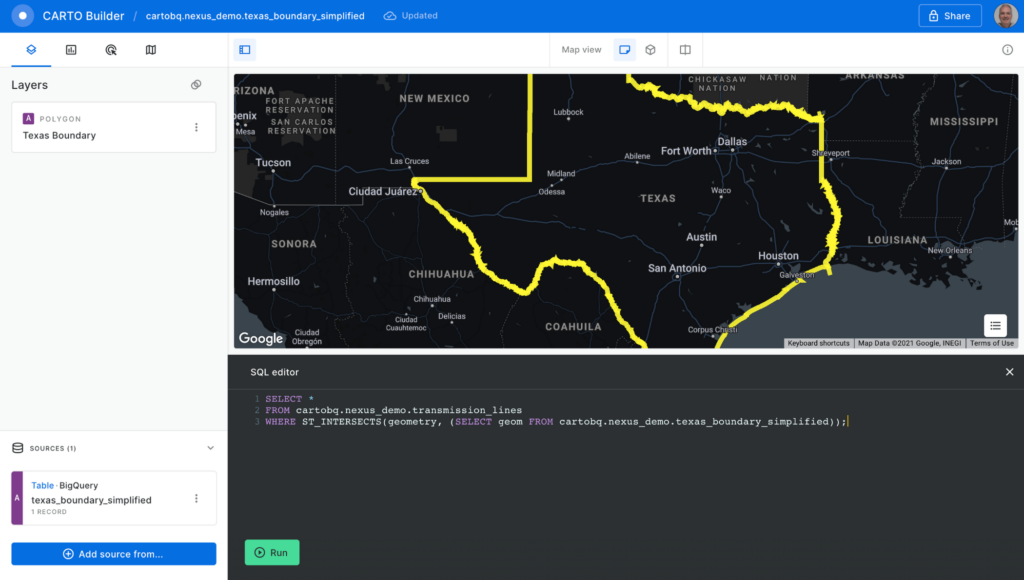
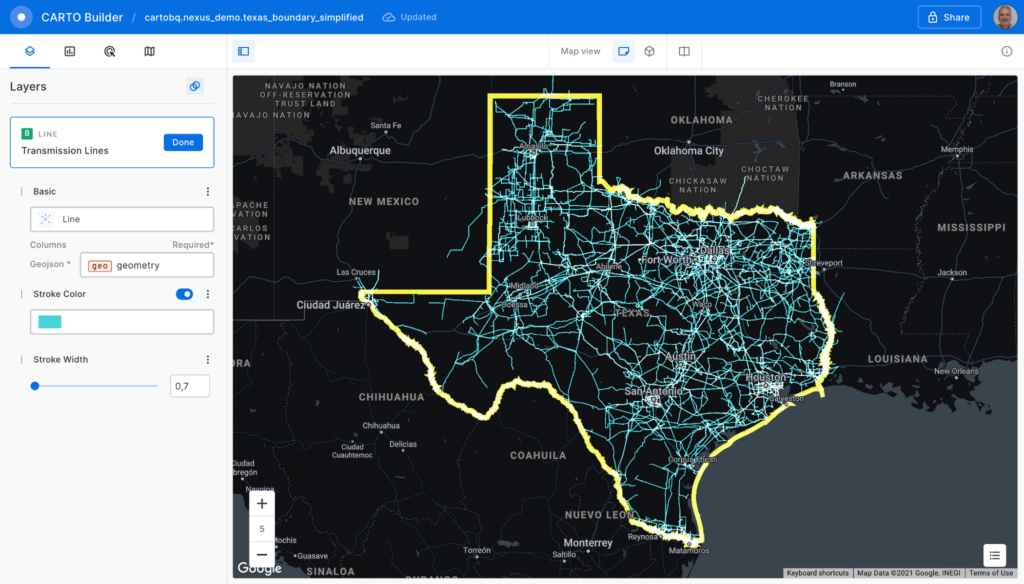
Click the “Run” button, and the query is executed in BigQuery. The results are sent back to the Builder tool. Perform some style customizations in the new layer, and your map is ready.
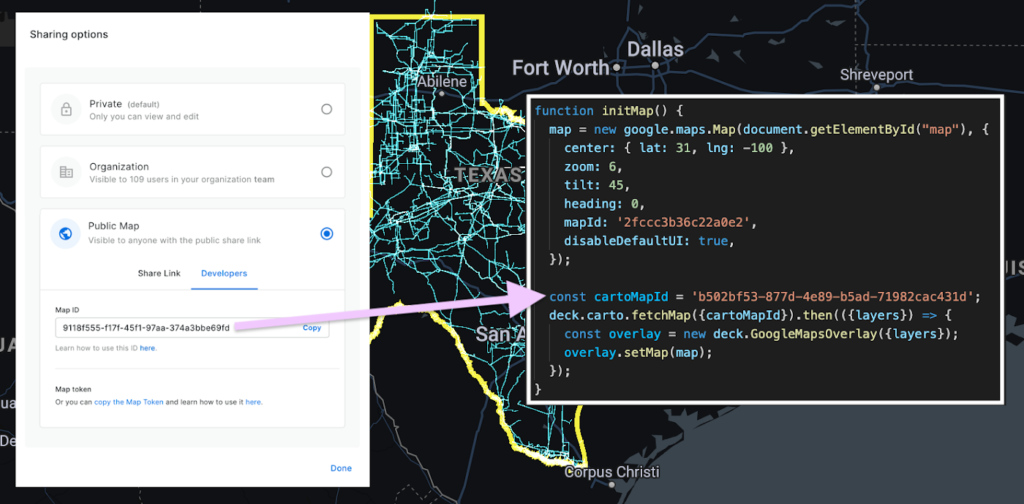
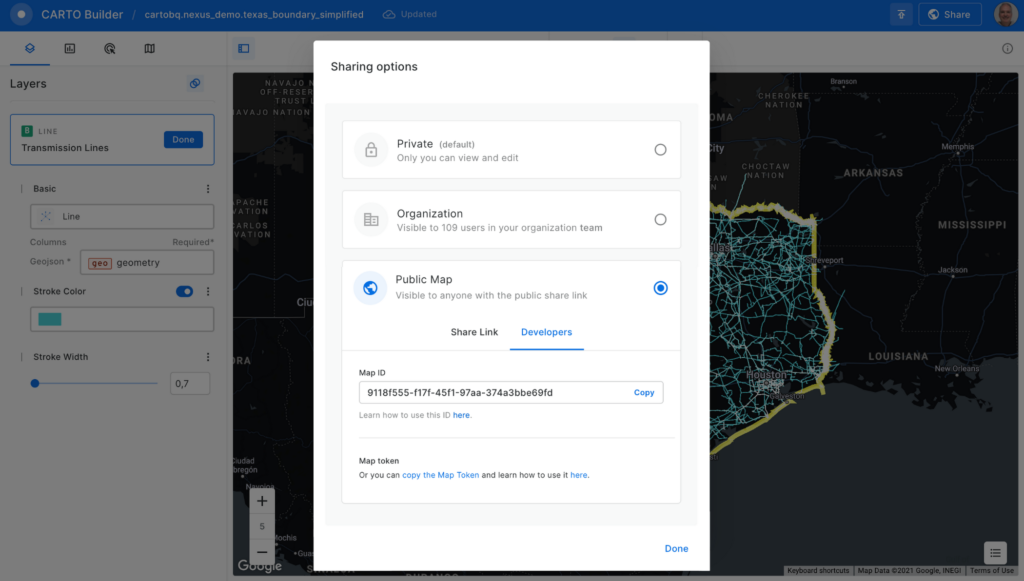
Before adding the map to the Google Maps Platform application, you’ll need to make it public. Click on the “Share” button and select the “Developers” tab to copy the map ID.
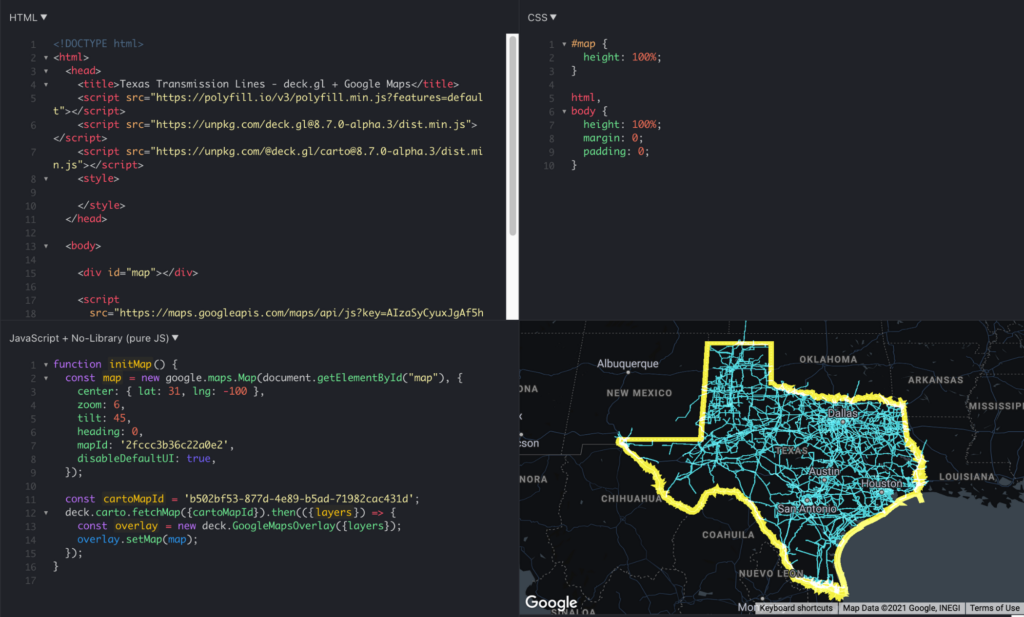
Now, you can add the visualization into your Google Maps Platform application, which is as easy as adding these four lines of code:
const cartoMapId = 'b502bf53-877d-4e89-b5ad-71982cac431d'; deck.carto.fetchMap({cartoMapId}).then(({layers}) => { const overlay = new deck.GoogleMapsOverlay({layers}); overlay.setMap(map); });
You can use the map ID copied from CARTO Builder to call the fetchMap function. This function connects to the platform and retrieves all the information needed for the visualization, including a collection of deck.gl layers with all the styling properties you’ve specified. Create an instance of the deck.gl GoogleMapsOverlay with this collection of layers and add it to the map.
You can see the full example in this fiddle.
Visualizing very large datasets
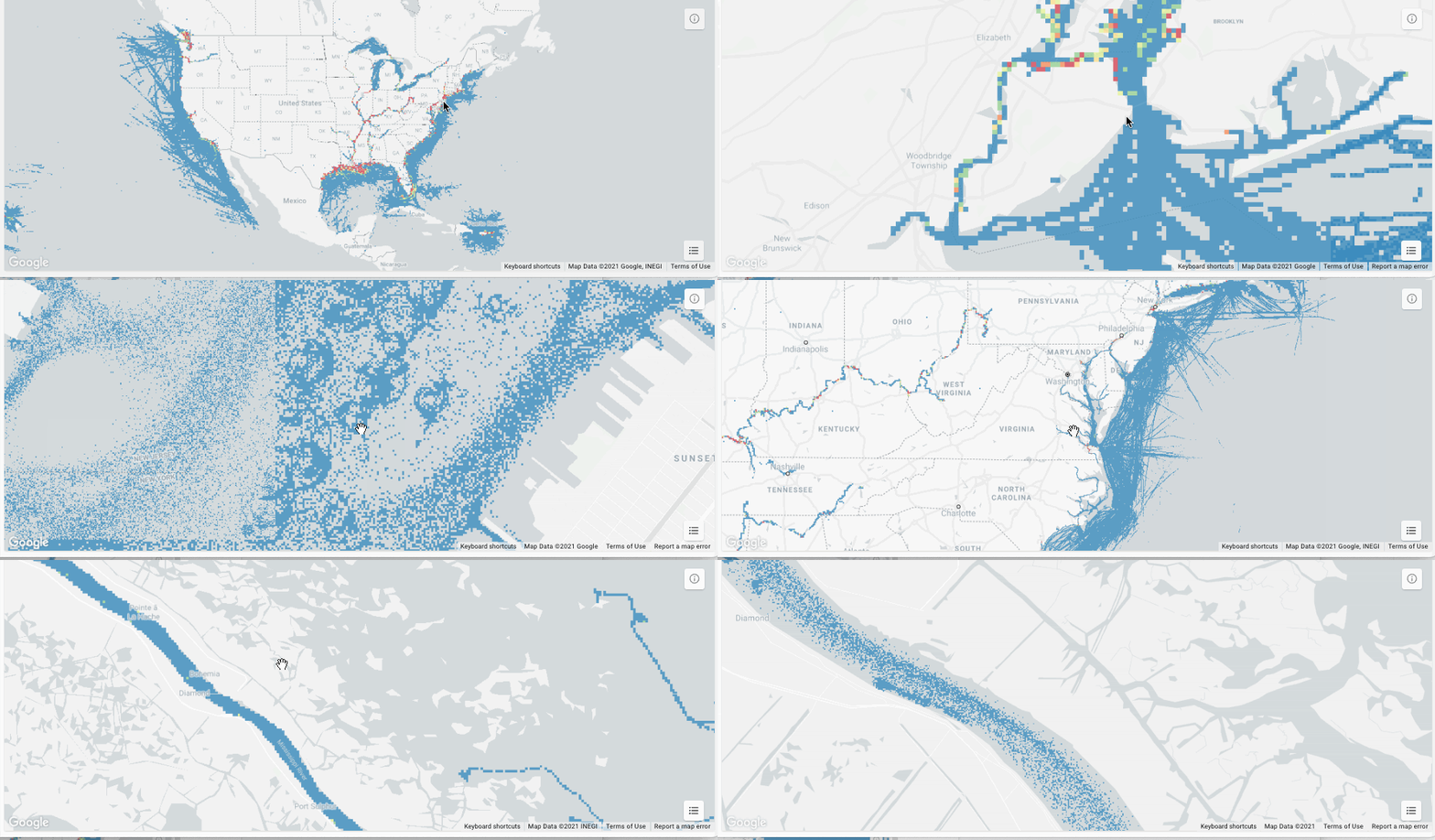
One of the main features of BigQuery is the ability to scale processing to massive datasets. With the CARTO platform, you can also visualize very large datasets using tilesets, an optimized data structure containing pre-generated vector tiles for fast visualization. Tilesets are generated within BigQuery using the Analytics Toolbox functions in a parallelized process that can handle billions of points.
For example, you can create a visualization using tilesets with the whole dataset of transmission lines for the U.S., more than 100MB of geometries.
The issue with these large datasets is that they do not fit in memory all at once, so you need to split them into tiles for them to be rendered progressively. CARTO takes care of this, allowing you to create tilesets directly in BigQuery or dynamically generate them on the fly.
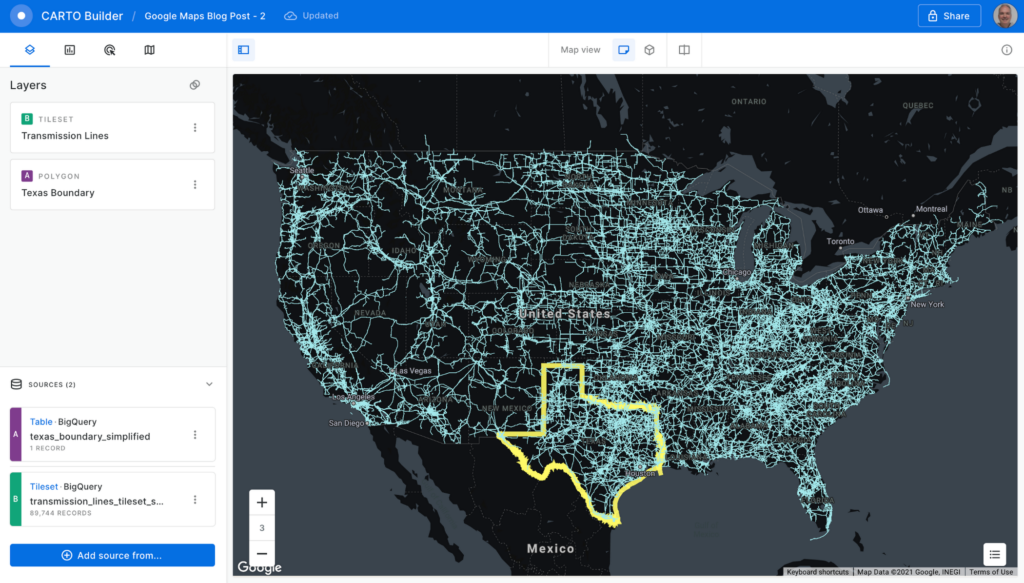
This method for data loading in maps can scale as much as needed; for example, take a look at this 17 billion point visualization of vessel data.
What about live data?
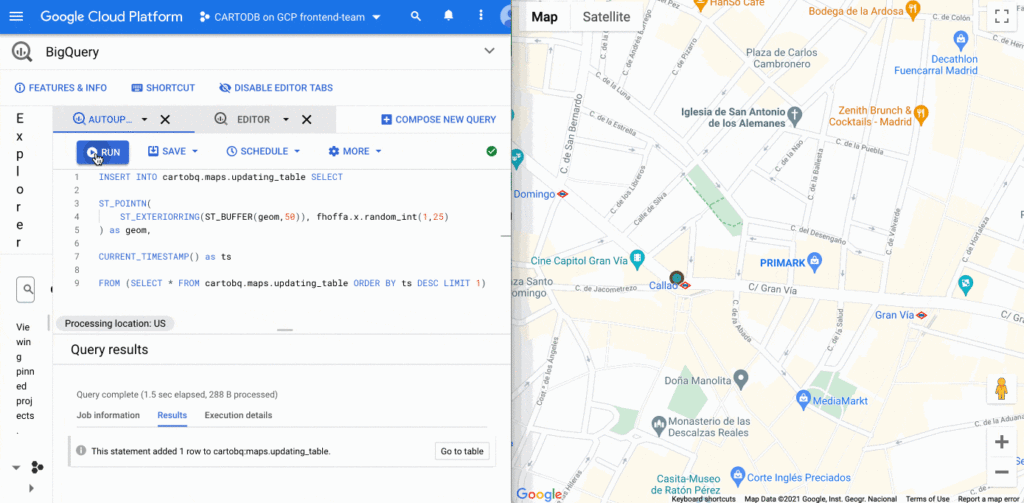
BigQuery supports streaming data that is continuously updated. In these scenarios, you want to be able to update your visualization at regular intervals, as the data changes. It’s easy to update this visualization using deck.gl. You just need to set the autoRefresh parameter to true when fetching the map and specify the function you want to execute when new data is downloaded:
const {layers} = await deck.carto.fetchMap({ cartoMapId, autoRefresh: true, onNewData: (parsedMap) => { … } });
You can add points to a table with an INSERT function on the BigQuery console and see the data updated on the map in real time.
Going further
In addition to the simple ways to create visualizations shown above, deck.gl has the flexibility to create a wide variety of visualizations. The CARTO platform provides you with the functionality to access data from your data warehouse and create these data visualizations with advanced cartographic capabilities, but you can extend it and go beyond that using any of the advanced visualizations available in the deck.gl layer catalog.
There are two additional options that give you more control over the deck.gl code. The first one is to use the CartoLayer directly without fetchMap. You’ll need to indicate the connection to use from the CARTO platform and the data source type and name or query. Then we can specify the styling properties.
const overlay = new deck.GoogleMapsOverlay({layers: [new deck.carto.CartoLayer({connection: 'bqconn',type: deck.carto.MAP_TYPES.TABLE,data: `cartobq.public_account.retail_stores`,getFillColor: [238, 77, 90],pointRadiusMinPixels: 6,}),],});
The second option is to use the fetchLayerData function that allows you to have more control over the format used for data transfer between BigQuery and your application and can be used with advanced visualizations that require an specific data format like ArcLayer, H3HexagonLayer or TripsLayer.
deck.carto.fetchLayerData({type: deck.carto.MAP_TYPES.TABLE,source: `cartobq.geo_for_good_meetup.texas_pop_h3`,connection: 'bqconn',format: deck.carto.FORMATS.JSON,credentials: {accessToken: 'eyJhbGciOiJIUzI1NiJ9.eyJhIjoiYWNfbHFlM3p3Z3UiLCJqdGkiOiI1YjI0OWE2ZCJ9.Y7zB30NJFzq5fPv8W5nkoH5lPXFWQP0uywDtqUg8y8c'}}).then(({data}) => {const layers= [new deck.H3HexagonLayer({id: 'h3-hexagon-layer',data,extruded: true,getHexagon: d => d.h3,getFillColor: [182, 0, 119, 150],getElevation: d => d.pop,elevationScale: 2.5,parameters: {blendFunc: [luma.GL.SRC_ALPHA, luma.GL.DST_ALPHA],blendEquation: luma.GL.FUNC_ADD}})];const overlay = new deck.GoogleMapsOverlay({layers});overlay.setMap(map);});
For complete code using both options, take a look at these examples.
Learn more
You can access demos and documentation on the deck.gl docs website and the CARTO Documentation Center. If you have questions, you can ping the CARTO team on the CARTO Users Slack workspace.
For more information on Google Maps Platform, visit the Google Maps Platform website.
6558
Of your peers have already watched this video.
1:25 Minutes
The most insightful time you'll spend today!
How This 70-Year Old Japanese Shoe-maker Uses Collaboration to Beat Competition
For over six decades now, ASICS, a Japanese footwear, and sports equipment provider—for some of the biggest names in the sporting world—has been in the business of making sport a part of people’s lives. From manufacturing basketball shoes in 1949, ASICS soon began to design sports shoes for Olympians.
Headquartered in Kobe, Japan, ASICS is an acronym for the Latin phrase Anima Sana In Corpore Sano, meaning Sound Mind in a Sound Body.
“With over 65 years of history in the sporting goods business, we care for more than just quality products. We’re obsessed with customer experience,” says Paul Miles, Senior General Manager, Global Marketing Division, ASICS.
And without technology that’s not possible.
“Technology is helping us work better with athletes wherever they are. Whether it’s studying their performance, predicting the needs of customers through data, developing our products or simply inventing. Tech is enabling a new realm of possibility. When tech enables collaboration without limitation, the customer wins,” says Miles.
Watch the video to find out how ASICS has retained its place and how it continues to beat competition in a crowded sports market.
Lucent Bio: Boosting collaboration and sustainability with Google Workspace

4680
Of your peers have already read this article.
2:30 Minutes
The most insightful time you'll spend today!
From electrifying transportation to shifting the grid to renewable energy, environmental sustainability is one of the greatest challenges of our generation. A critical but often forgotten goal is the development of sustainable agricultural practices, especially given increasing water shortages and soil degradation around the world.
Lucent Bio was born to solve some of these threats to humanity’s ability to feed itself. It delivers crop nutrition solutions that accelerate the transition to sustainable agriculture. Lucent Bio developed novel technology for bioactive crop nutrition products, including its flagship product—Soileos®—which boosts nutrient density in crops, regenerates soil, avoids polluting agro-ecosystems, and enables the circular economy. Soileos is a plant-based product that is made by upcycling food processing co-products such as lentil and pea hulls into bioactive nutrients that then create the next harvest.
As a start-up, Lucent Bio has used Google Workspace since day one to drive collaboration, streamline operations, and scale. As an organization, it is also closely aligned with Google’s sustainability goals. Google is carbon-neutral for its operations and has made a public commitment with detailed plans to run on carbon-free energy by 2030, meaning clean power every hour of every day.
Google Workspace has been an invaluable resource to fuel collaboration between the engineers at the Lucent Bio pilot plant, the scientists at the research lab and greenhouse, and on-field agronomists as they conduct trials on Soileos across North America. Without the use of Google Workspace during the COVID 19 pandemic, Lucent Bio would not have been able to achieve their current scale.
“In just 18 months, Lucent Bio has been able to scale manufacturing from 1 kg to 1,000 kg of product per day. This year, we’re poised to take the next big step to 20,000 kg per day. During this scale-up process, we went through several iterations of improvements, resulting in a completely zero-waste manufacturing process—a hugely difficult but impressive achievement in line with our mission to accelerate the transformation of agriculture to sustainability. Every step of the way, Google Workspace has been an essential part of our innovation and growth strategy.”
Michael Riedijk, CEO Lucent Bio
Google Workspace runs on the cleanest cloud in the industry. It helps teams of all sizes, and across all industries, connect, create, and collaborate from anywhere. Workspace recently launched AI-generated summaries in Spaces, which help distributed teams stay focused while quickly catching up on chat messages they might have missed. Innovations like these keep the scientists at Lucent Bio collaborating as they build a more sustainable future for agriculture.
You can find more about Google’s commitment to sustainability here, including our goal to become not just carbon-neutral, but carbon-free by 2030, efforts to combat deforestation, and how we’re supporting clean energy.
More Relevant Stories for Your Company


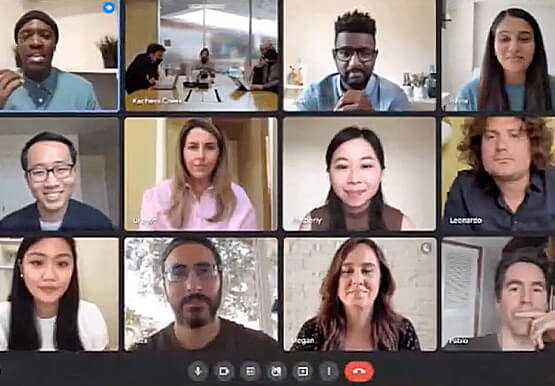

Workspace: Embedding Inclusion and Equity throughout Product Design and Development
Google's products are built for everyone! Watch the video to hear what the experts at Google say about embedding inclusion throughout the design to product development process, and how Google Workspace is built on product equity principles that takes into consideration the challenges and requirements of users across demographics.



Hospitals Can Offer Interconnected Patient Experiences Using Google’s Natural Language Services
Machine Learning (ML) in healthcare helps extract data from conversations, medical records, forms, research reports, insurance claims and other documents across the care value-chain to help care providers have a holistic view of their patients to draw insights for diagnoses and treatments. With Natural Language Processing(NLP), healthcare organizations can program

New Google Research Innovators tackle wide range of challenges
Now in its third year, the Google Cloud Research Innovators program has invited 37 new participants to work with each other and Google experts to accelerate their most promising projects. The program offers select researchers expanded technical and networking support from Google professionals, access to Google’s latest cloud technologies, and additional Google

Scaling Your Startup: Strategies for Optimization and Growth
Reboot your Startup with our technical guided series At Google Cloud, we want to provide you with the access to all the tools you need to grow your business. Through the Google Cloud Technical Guides for Startups, leverage industry leading solutions with how-to video guides and resources curated for startups. This multi-series contains 3
