





YoungCapital CIO: Why I Moved to Google Cloud and G Suite to Grow Our Business

7317
Of your peers have already read this article.
4:30 Minutes
The most insightful time you'll spend today!
When your business is rapidly adding new employees, expanding to new countries, and always focused on staying ahead of the competition, you have to take a hard look at the tools that are slowing you down—and swap them out for better ones that can keep pace with the company. We’re expanding YoungCapital in Germany, which means more offices, more people, and more technology to make the business run smoothly.
As we scale, Google Cloud tools like Chromebooks and G Suite help us grow our business efficiently. They free us up from sluggish, time-intensive technology that’s hard to maintain and repair, and give us the freedom to work together in faster, smarter ways.
Free from hours of device setup. Some months, there are as many as 40 new employees starting at YoungCapital—and as we continue to expand that number will continue to rise, especially now that we’ve opened three new offices in Germany. With our old Windows desktops, setting up new computers could take up to an hour per employee (which can add up to about 40 hours a month for IT). Today, using Chrome Enterprise tools, it takes about five minutes to get an Acer Spin or Pixelbook ready to hand off to a new hire—saving us more than three months per year of device setup time.
Free from VPNs. Our previous Windows machines required a complicated virtual private network (VPN) for accessing corporate files outside of the office. Using a VPN was complicated for our employees because the software wasn’t intuitive; if an employee had trouble signing into the VPN while at home or traveling, they could not log in and work as quickly as they needed to. With Chromebooks, all you need is an online connection to sign into G Suite to access files and work from anywhere.
From our perspective, Chromebooks are resistant to threats like ransomware and phishing attacks, giving us confidence that our data can stay secure. With Chrome Enterprise Upgrade, our IT admins can strengthen security even further: for example, by enabling advanced security features that help block vulnerabilities, locking down lost or stolen devices right away, and setting device security policies in the cloud so devices everywhere are safer.
Free from infrastructure. We used to have to invest in servers, and then add more time and money to keep them running. Now we don’t have to run the business on infrastructure or hire people to maintain it—we can just use Google’s cloud. NextNovate is helping us make the most of Google Cloud Platform, like integrating some of our proprietary applications with G Suite and building our own add-ons. For example, we created a button for Gmail that connects to our job candidate database; when candidates email us, we can click on the button and see their profiles and work experience.
Free from multiple passwords and logins. Chrome Browser and G Suite with single sign-provider SAML are the portal to all the productivity apps our employees need. Once people log in to G Suite, they don’t have to remember a bunch of other user names and passwords. The IT team loves it too, because we don’t have to spend hours zeroing out passwords and creating new ones.
Free to manage cross-country devices easily in the cloud. Our four-person IT support team, which keeps our systems humming, hasn’t grown, even though we’ve doubled the number of employees. When we were on Windows devices, we fielded roughly 1,800 IT support requests every month. Now we get about 1,300 requests a month, from a much bigger employee base. This translates to nearly 30% fewer requests for our lean support team, which reduces their workload significantly even though we have roughly 20% more employees—all made possible with Chrome Enterprise.
Being free of slow, high-maintenance technology doesn’t just make the IT department happy—people are actually changing how they work. They no longer send files to each other by email or struggle to keep track of versions; they store everything in Google Drive and work together in Google Docs on a single document at the same time. And instead of traveling to other offices, connecting with each other in video conferences on Hangouts Meet has become a completely natural way to do business.
With Chromebooks and G Suite, we’re ready for anything: more new markets, more employees, and more-flexible ways to work together and shake up the staffing industry.
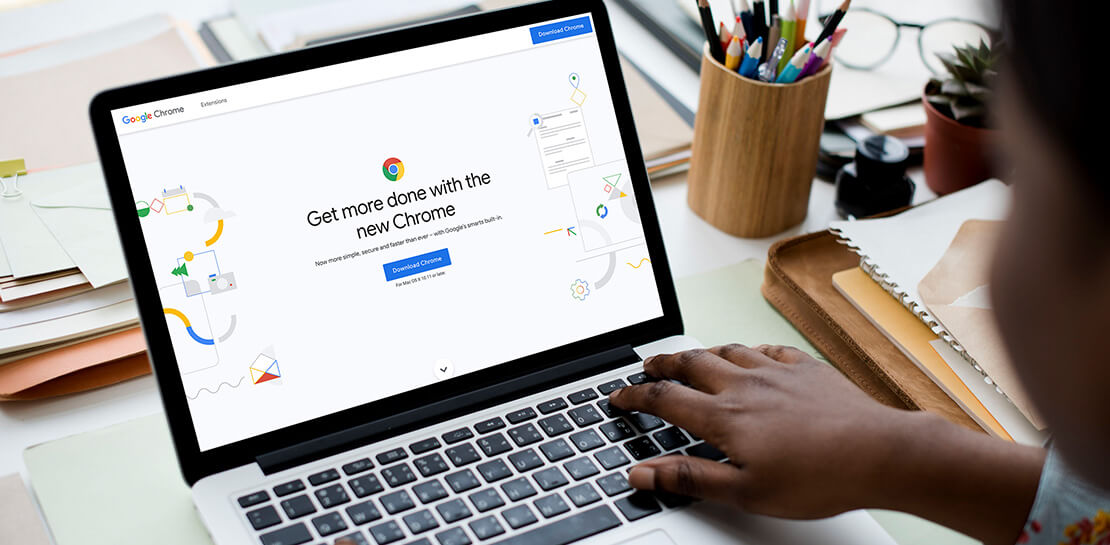
Transitioning to Hybrid Environment with Chrome Browser
4086
Of your peers have already read this article.
3:00 Minutes
The most insightful time you'll spend today!
It’s been quite a year. In general, and for work. Just the other day, I read a new study from Pew Research that shows 71% of people are currently working from home, and 50% of employees say they want to continue working from home at least three days a week. That’s more than half of people wanting to be remote over half the time!
As we’ve been navigating our own return to the office here at Google, one thing has become more clear than ever: the browser is no longer just a portal to the internet—it’s one of the most critical components of our tech stack. And we know we’re not alone in this. As our organization, and other organizations of all sizes, transition to a more hybrid way of working, it’s absolutely key to have a modern browser that’s built to support both admins and end users.
The good news is, Chrome is made for this! Literally. It’s purpose-built for flexible work—and as the future unfolds and businesses’ needs continue to evolve, we’re committed to making sure our browser is even easier to manage, even more secure, and even more helpful, so all of us can be more productive.
What’s next for Chrome
As we design and build Chrome to be a stronger asset for the enterprise, we are focused on these key areas:
- Simple management
- Modernized security
- Productivity enhancements
- Helpful integrations
We’ve already made great strides in all four areas, with more exciting releases to come soon. Let’s take a closer look at what’s new and available right now, what to look forward to, and how each feature is equipping Chrome browser-based businesses (and their users) for what’s next.
When it comes to simple management there have been a lot of exciting developments—Chrome Browser Cloud Management is built for this new hybrid reality, giving IT teams the advantage of powerful and flexible management capabilities both in the cloud and on premises, so they always have the visibility and insights they need to make more informed decisions, quickly.
With recent new releases admins can:
- Track all versions of Chrome from one place. Our new daily version report allows IT teams to see all versions, including minor versions, in a single report to support compliance and make it easier to see and manage their entire deployment.
- Report on apps and extensions across the organization. A new Apps & Usage report provides helpful visibility into all installed extensions, Progressive Web Apps (PWAs), Chrome apps, and Android apps. You can see versions and permissions for each individual app and even force install or block, right from the report.
- Remotely troubleshoot and clear browser data. This is one of my favorites because not only is it incredibly helpful, it was created from customer requests! Admins (and a lot of service desk employees) told us how useful it would be if they could clear an end user’s browsing data, cookies, and cache remotely – and our team made it happen.
- Extension management improvements. Coming this summer: extension request workflow will empower admins to change the behavior of Chrome Web Store so that end users request extensions and admins then approve or deny the installations from a centralized list in Admin Console. Another new release is extension details, where admins can now find out exactly what extensions are installed where, who makes them, what resources they’re using, and all other extension-related details – also right from the Admin console.
Of all of our priorities, modernized security often feels most urgent. In a recent security report, 65% of US and UK employees said they received a phishing email during the remote working period initiated by COVID-19. Further, a study by the Ponemon Institute found that 41% of responding organizations had dealt with an attack involving the compromise of employees’ passwords, costing an average of $267,408 per organization. Between the regular emergence of new threats and the increase in targeted mobile attacks, our new ways of working definitely demand a fresh approach to security.
- BeyondCorp Enterprise, our new modern zero trust solution, enables secure access to critical apps and services with integrated threat and data protection, all delivered through Chrome browser, was introduced in January 2021. Its agentless approach simplifies the admin and end-user experience. We also just launched BeyondCorp Enterprise protected profiles to help organizations protect their extended workforce, including contractors, frontline workers, and anyone working from home who needs to securely access corporate resources from shared or unmanaged devices.
To learn more about Google’s approach to modernizing security, tune into the Wall Street Journal’s Advancing Security in the New Business Environment event tomorrow from 10:35 am – 10:55 am EST, with very own Parisa Tabriz (Head of Chrome Engineering, Product Management and UX) and Phil Venables (CISO of Google Cloud).
When it comes to productivity enhancements, I’m proud to share that we’re consistently releasing features that support users no matter where they’re working. Now that the browser is where so much of our day-to-day work happens, it’s more important than ever before to build in new ways to save time and work together while apart.
Recently released productivity-boosting features include:
- A faster way to take action right from the address bar. Chrome Actions is a feature we launched last year, where you can simply type in commands such as “clear browsing data ” or “open incognito window”and get down to business in just a few clicks. We’re excited to announce new Chrome Actions are now available through our beta channel! Try one of these actions to check it out: “ Run Chrome safety check,” “Create doc,” and “Manage Google Account.”
- Link directly to highlighted text. If you like to share snippets and quotes from articles or websites with your colleagues, you’re in luck. Now, instead of sharing the URL link from the address bar, you can take advantage of the new “link to highlight” feature in Chrome to point to the specific content. Simply choose the content you want to share, right click, select “Copy link to highlight,” and then send the link – to the exact part of the page you want people to see. It’s available for desktop and Android now, and coming soon for iOS.
- Decreased Chrome CPU usage. This means more battery life, less heat coming off of your device, and less fan noise. 🎉 🙌🏻
- And there’s more! To explore additional productivity features, check out this blog post.
Our final area of focus is all about giving Chrome customers more choice with helpful integrations. We’re actively partnering with best-of-breed organizations to bring integrations —and your favorite tools— into Chrome, to create a more seamless and productive experience across the board. Stay tuned on this as we’ll have more to share later this year. In the meantime, hear from our Modern Computing Alliance partners, such as Box, HP, RingCentral, Okta and VMware, as they explore many of the most important questions about returning to the office.
We’re constantly thinking about how we can help people and organizations adapt and thrive as they begin to return to the office. See below for three events from the team that cover how to make the transition to hybrid easier for your team, be sure to check them out.
Modernizing Your Approach to Security session at the Wall Street Journal’s Advancing Security in the New Business Environment event
- Tomorrow June 2, 2021
- 10:35 – 10:55 AM EST
- Register here
Chrome Insider: Browser tips & tricks for IT admins
- June 10, 2021
- 10:00 AM – 11:15 PT
- Register here
6560
Of your peers have already watched this video.
17:00 Minutes
The most insightful time you'll spend today!
Eli Lilly’s Custom-built Translation Service Leverages Google’s Translation Engine
Eli Lilly leverages Google Cloud’s machine translation to globalize content to serve their multilingual employees. Watch the video to learn how the healthcare company built an in-house solution powered by Google Cloud APIs to address the challenge of translating multilingual content at scale. Also explore Google’s innovations and investments into services for language translations produced for machine learning (also called as machine translation or neural machine translation) for safe and secure documents and text translation via an easy-to-use interface and API.
AI-powered Business Messages for Timely, Engaging and Helpful Conversations with Customers

9397
Of your peers have already read this article.
2:00 Minutes
The most insightful time you'll spend today!
Over the last two years, we’ve seen a significant uptick in the number of people using messaging to connect with businesses. Whether it was checking hours of operation, verifying what was in stock, or scheduling a pick-up, the pandemic caused a significant shift in consumer behavior.
- 45% of users are spending more time on messaging services because of the pandemic
- 85% of consumers would like to message brands directly
With the rise in demand for messaging, consumers expect communication with businesses to be speedy, simple, and convenient. For businesses, keeping up with customer inquiries can be a labor-intensive process, and offering 24/7 support outside of store hours can be costly.
To help businesses seamlessly deliver helpful, timely, and engaging conversations with customers when and where they need help, we introduced AI-powered Business Messages.
https://youtube.com/watch?v=fcgP3RHjBLY%3Fenablejsapi%3D1%26
What is AI-powered Business Messages?
With AI-powered Business Messages, you can connect with your customers in their moment of need, in the places they’re looking for answers—such as Google Search, Google Maps, or any brand-owned channel. For instance, check out how Walmart customers in the US are able to receive real-time information on product availability, straight from a search results page.
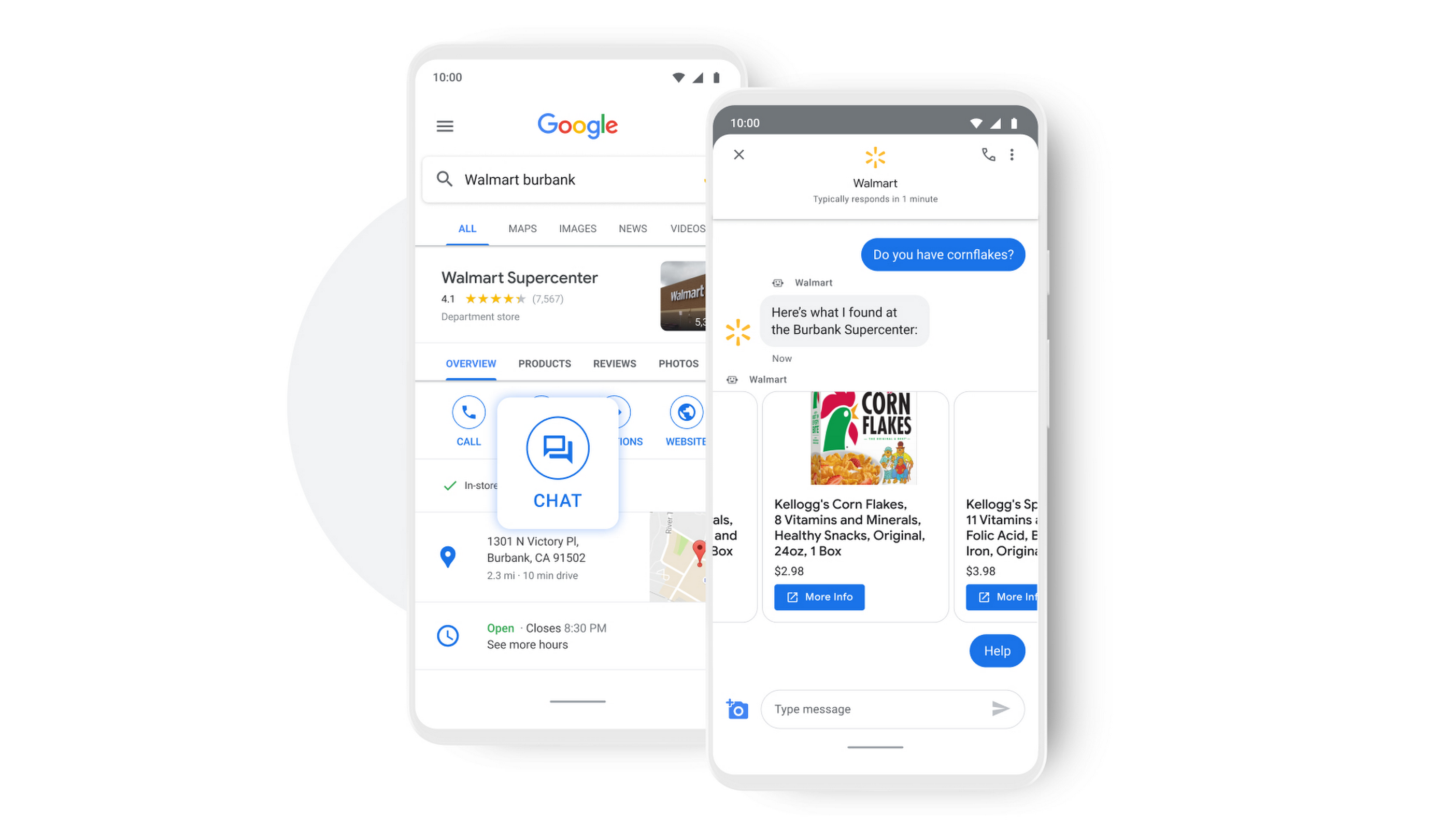
People turn to Google when they are searching for answers to their questions, looking to buy something, or trying to accomplish a particular task with one of our many tools. In fact, 68% of all online experiences begin with a search engine.
At Google, we know how important it is for interactions with a brand to be personalized, helpful, and simple. With AI-powered Business Messages, customers are able to chat with virtual agents that understand, interact, and respond in natural ways.
We are also combining smart automation with the ability for customers to chat with live agents when it’s really needed. This approach saves your customers precious time, while also saving you money. And with Business Messages automatically handling many customer inquiries in the background, businesses have the option to distribute their human customer service agents to address other needs.
Getting started with conversational AI is easy with Bot-in-a-Box
We know it can be difficult to get started with AI. That’s why we are utilizing existing Google AI tools like Dialogflow—part of Google Cloud Contact Center AI—to create the capability within Google’s Business Messages called Bot-in-a-Box, which makes getting started with Conversational AI easy. Bot-in-a-Box allows for fast and effective adoption of automation for businesses of all sizes.
Enabling Business Messages with Bot-in-a-Box can be as simple as leveraging an existing customer FAQ document you already have, whether it’s from a web page or an internal document. And since the conversational AI is powered by Business Messages and Dialogflow working together, your chat bot is able to understand and respond to customer questions automatically without the need to write code.
Bot-in-a-Box also supports other critical journeys like “Custom Intents.” That means that your bot is able to understand the different ways customers express a similar question and respond accurately by using machine learning capabilities.

Finding success
In April 2021, Wake County courthouses in North Carolina partnered with Tango Technology to implement Business Messages when it became apparent that being able to provide the public and attorneys with around-the-clock access to information would significantly reduce the pressure on courthouse staff. Using Bot-in-a-Box, Tango Technology was able to customize a solution for Wake County Courthouse, Justice Center, and Clerk of Superior Court in just four days.
“With the combination of Google’s Business Messages, GCP, and Dialogflow, we were able to spin up an AI-driven bot for the courts in days. And the technology stack allows us to continually improve by adding functionality in an agile process.”— Mike Lotz, Co-Founder, Tango Technology
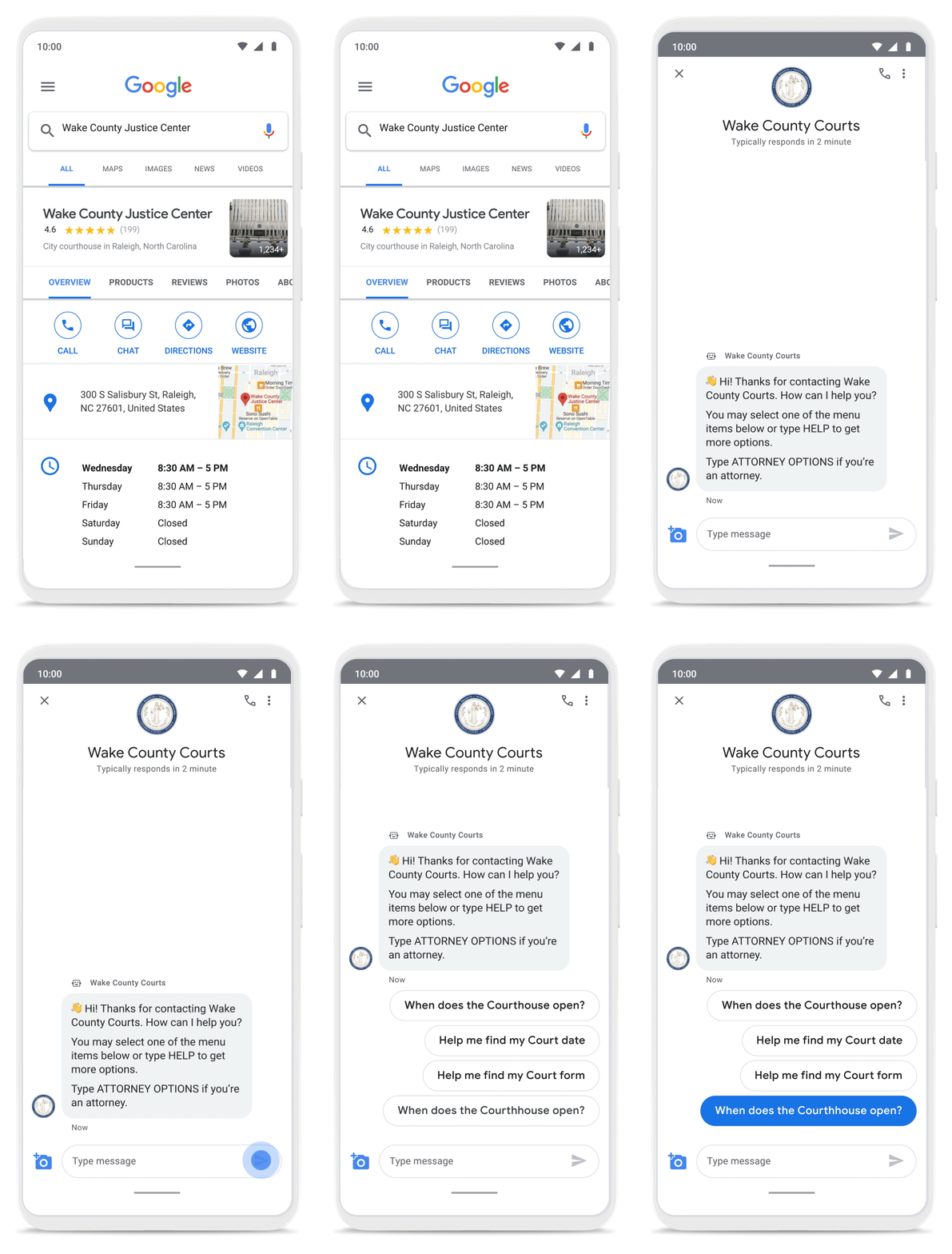
With Business Messages, North Carolina courthouses saw a 37% decrease in the call volume handled by courthouse staff. With 398,298 fewer phone calls during the first year of operation, the AI-based messages helped Wake County Courthouse work more efficiently and productively.
We’ve seen many brands benefiting from AI-powered Business Messages. For instance, Levi’s saw a 30% increase in off-hours shoppers and surpassed 85% customer satisfaction scores after implementing Business Messages. They also drove 30x more store-related questions than Levi’s website chat.
Bring Google’s conversational AI to your storefront with Business Messages
Google’s Business Messages makes it easier for businesses of all sizes to engage their existing or potential customers in a virtual conversation, when and where they need it.
To learn more, watch our Cloud Next session here or visit us at g.co/businessmessages. We have specialized services to help you get started and can share the wisdom of our channel partners and dedicated experts who specialize in unleashing the potential of conversational AI.
Tips to Get Most of Google Workspace and Make Hybrid Work Efficient and Effective!

3746
Of your peers have already read this article.
1:30 Minutes
The most insightful time you'll spend today!
In response to the pandemic, an overwhelming 92% of the U.S. workforce is now interested in working in a hybrid or fully remote capacity1. All employers, including government leaders, are now critically focused on finding the right tools and techniques to foster engagement, improve productivity, and strengthen relationships – in-person and virtually – or risk losing and/or retaining top talent.
Creating a positive work environment starts with having the right technology that can provide a variety of meeting tools to make work easier and more productive from any location. Google Workspace enables agency leaders to support their workforce with capabilities to address a variety of needs, from virtual training and learning, to mobilizing emergency response and critical service delivery. Below we’ve highlighted some of our top tips for getting the most out of Google Workspace to make hybrid work more efficient and effective.
Capture meeting agendas in a Google Doc
Create more effective, engaging meetings by attaching an agenda doc to your Google Calendar event and invite your attendees in to comment and review ahead of time. Google Docs, Google Slides, and Google Sheets allow collaborators to leave color-coded comments that can be incorporated into a live video meeting or a face-to-face roundtable meeting.
Engage attendees with interactive features in Google Meet
We’ve added new features to make meetings more interactive and inclusive throughout 2022. New in-meeting reactions, livestream Q&A and polls, and streaming meetings directly to YouTube, and client-side encryption are all coming to Google Meet soon. We’re incorporating Meet directly into Docs, Sheets, and Slides to make it easier to coordinate on projects.
Knowing how to include everyone into a meeting, even while some folks are remote and some are in the office, will be critical to bringing cohesion to the work experience. Government leaders can foster a culture that helps workers be more productive, satisfied, and perhaps even happier with their work lives.
Add focus time to your calendar and see how time is spent
Google Workspace has also introduced product features to promote wellness. This includes focus time on Google Calendar, out of office and do not disturb statuses on Google Chat, or even backgrounds and noise cancellation on Google Meet that allow individuals to separate their home from work. Allowing employees to set boundaries or notify others of working times can help combat work fatigue. Time Insights in Calendar provide individuals with personalized analytics to see how time is spent across meetings and collaborators throughout a week. A secure cloud environment further brings these tools together to create systems of collaboration.
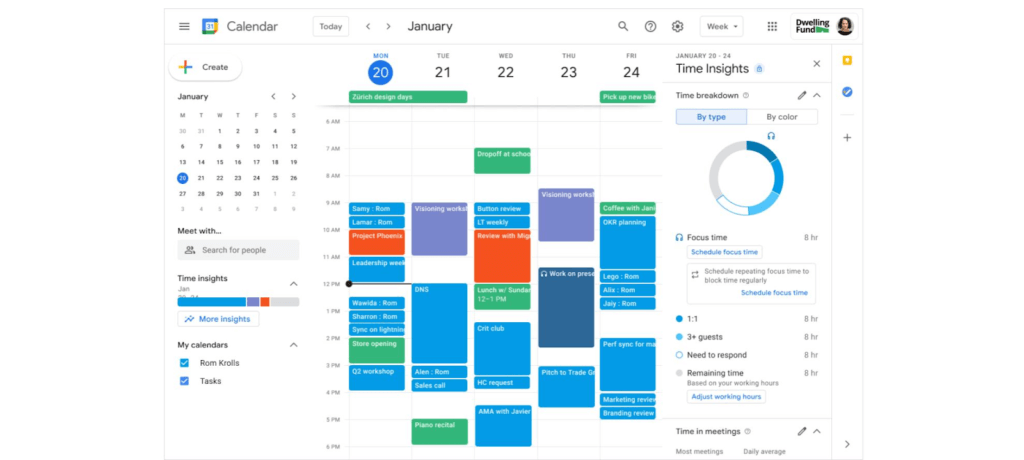
Creating positive outcomes with a culture focused on integrated work environments
The shift to hybrid work has already started leading to more meaningful engagements among all employees. Video calls have connected the new, tech savvy generation of workers with more experienced workers. In a Fedscoop Radio podcast on embracing hybrid-work strategies and tools, Gary Dannoff, Global Google Workspace Strategic Alliance Leader, noted that multigenerational teams with a 25-year age gap between team members are 75% more likely to have positive outcomes than teams with a smaller age span or none. As we return to the office, let’s engage with and support this new culture of cross-cultural, cross-generational, and cross-geographic collaborative environments created by the challenges we all adapted to during the pandemic.
Google Workspace supports a shift toward future-ready workplace cultures while providing the empathy and confidence needed for returning employees. Danoff also explains that to create a “future-proof” culture, you need to shift your mindset towards building a workplace that is future-ready. Using modern technology to foster collaboration in an evolving work environment helps organizations transform how work is done.
Collaborative technology facilitates productivity and constituent engagement
Agencies around the country are embracing the new era of hybrid work. The State of Arizona migrated 36,000 employees to Google Workspace with little disruption to the way people did their jobs. Now, Arizona is planning to expand their platform to support even more departments that require highly regulated data.
To help constituents get back to work, states like Rhode Island and Wisconsin have created Virtual Career Centers that leverage Google Cloud solutions, which includes Google Workspace, where constituents can schedule meetings and video conferences with career coaches, develop and collaborate on resumes using cloud-based document storage, communicate directly with job recruiters, attend virtual job fairs, and apply to open positions.
For more ideas on how to bring a collaborative, innovative culture into the workplace, catch up on content from the Google Workspace Summit.
1 Source: https://www.pwc.com/us/en/library/covid-19/us-remote-work-survey.html#content-free-1-0f39
Let Your Organization Thrive in Hybrid Work with Google Workspace

3120
Of your peers have already read this article.
2:30 Minutes
The most insightful time you'll spend today!
Flexible ways of working have become second nature for people everywhere, especially for the more than 8 million customers that use Google Workspace in their offices, homes, or on mobile devices.
However, the rise of hybrid work has also demonstrated the importance of choice. People don’t want to be locked into a single app or in a closed environment. They want to use productivity tools like email, video conferencing, and chat in a seamless way with other critical apps that perform functions like helping to stay in touch with customers, visualizing data, managing projects, building creative designs, and much more.
Enabling all of those products to work well together — without boundaries or walled gardens — is essential to helping teams and organizations maximize hybrid work. This week at Google Cloud Next, we’re taking significant steps towards making Google Workspace the most open and extensible productivity platform for users worldwide.
Today, we’re launching third-party smart chips in Docs, along with new integrations and enhanced API capabilities for Meet, Chat and Spaces, delivering entirely new ways to use third-party applications within or alongside Google Workspace, allowing organizations to get more value from the solutions they’ve already invested in. The new integrations are with some of the most popular enterprise applications in use today — AO Docs, Asana, Atlassian, Figma, LumApps, Miro, Tableau, and Zendesk — and will help transform the way people work every day.
Together, with our partners, we’re enabling an open ecosystem for hybrid work and ensuring that Google Workspace’s most helpful features don’t stay proprietary.
Bringing smart chips to popular third-party applications
When we launched smart canvas, we gave Google Workspace users the ability to bring the people and information they needed into Docs through simple @-mentions, creating interactive mentions of people, files, meetings, templates, and more. Today, we’re expanding smart chips to our ecosystem of partners, allowing our users to add even more rich data, more context, and critical information right into the flow of their work.
With these new third-party smart chips, you will be able to tag and see critical information from partner applications using @-mentions, and easily insert interactive information and previews from third-party apps directly into a Google Doc.
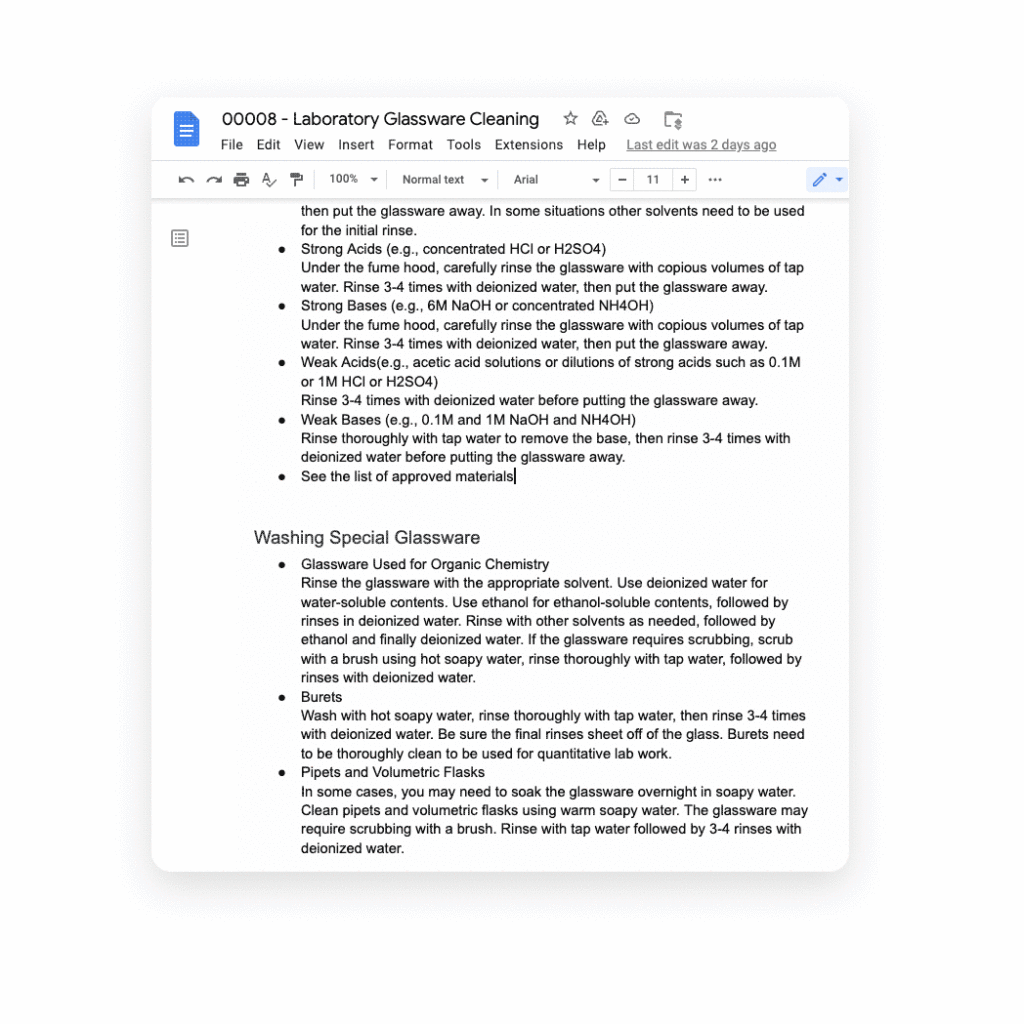
Several of our partners including AO Docs, Atlassian, Asana, Figma, Miro, Tableau, and ZenDesk, are now developing third-party smart chips to add more value to your Google Docs experience:
- AODocs, a fast-growing content services platform, is creating a smart chip that will allow you to link to and interact with controlled documents using AODocs’ content management capabilities within Google Docs.
- Asana, the leading work management platform, is creating smart chips that will enable you to see and manage your tasks and projects easily within a Doc.
- Atlassian, a leading provider of team collaboration and productivity software, is creating smart chips for both its Jira and Confluence apps, enabling you to visualize key details for your project plans directly in a Doc.
- Figma, a design platform for teams who build products together, is using smart chips to embed helpful information about brainstorms, diagrams, and prototypes that are foundational to a product design project into Docs. The chips provide a visual thumbnail of the project so you can easily tell what you’re clicking into.
- Tableau, the analytics platform, is building a new smart chip that will enable Google Docs users to see a live preview of data visualizations and related dashboard metadata.
- Miro, the leading visual collaboration platform, is creating smart chips that will enable you to transform a Miro link into a useful, visual frame of reference that gives preview, title, and other information needed to get a quick summary of your work in a visual format.
- Zendesk, the popular customer service platform, is building smart chips to show users all the relevant and pertinent information for a given Zendesk ticket without leaving Google Docs.
These new smart chip experiences from our partners are examples of the value and innovation we can provide to users and organizations by committing to openness and extensibility.
Smart chips will be available to developers to build out their app integrations in the coming weeks, and will be available to all users in Docs starting January 2023.
Adding third-party capabilities to Google Meet
Google Meet is more than just a video conferencing tool — it’s a hub for collaboration. Earlier this year, we rolled out the capability to join meetings and present directly from Google Docs, Sheets, and Slides to make it easier for people to work together in real-time. We also built an integration with Miro, allowing you to initiate collaboration on Miro whiteboards directly from a Meet call. Now, we’re extending that capability to more third-party applications.
Two new tools for developers — the Google Meet API and Google Meet add-on SDK — will enable our partners to bring their apps together with Google Meet, providing new seamless ways for our customers to use their favorite tools with Google Meet.
With our new Meet add-on SDK, partners can bring the power and functionality of their apps into Meet, where users can then collaborate using other products without leaving the meeting space. For example, Figma is utilizing this SDK to bring its popular design and whiteboarding capabilities into Google Meet. Our shared customers will now be able to collaborate within Figma in real time during Google Meet video calls.
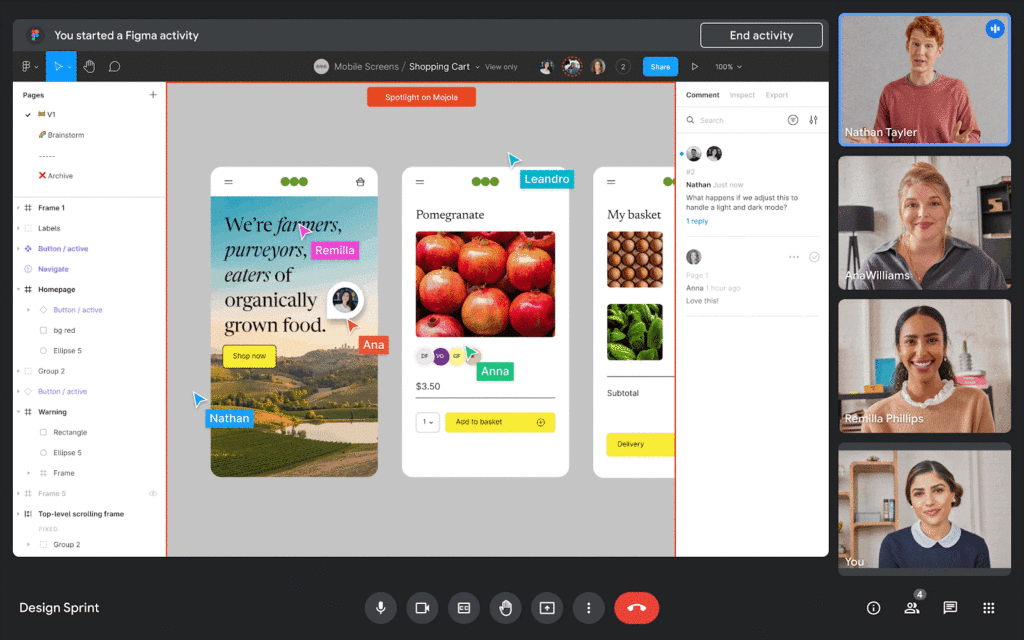
We’re also announcing new Meet API that will enable users to schedule and launch meetings directly from third-party applications. These APIs will also enable users to see whether a meeting is currently live and who is currently in the meeting — all without leaving the application of their choice.
Asana is working to bring the new Meet API together with Drive APIs to create or link to an existing Google Meet meeting directly from a task in Asana. In addition, we’re working with Asana to explore functionality that would allow users to add tasks to a meeting, create a clear agenda for the team, and assign pre-work so teams arrive prepared for a purposeful meeting. We believe that together, Asana and Google Meet can make meetings more actionable by helping users prepare and host results-focused meetings.
Figma is working on bringing Figma and Figjam files right into Meet with this new Meet integration, giving teams the ability to brainstorm and build designs together right in the flow of a meeting. All participants can contribute and engage through Meet, so more voices are heard and projects move forward faster.
We’re also making it easy for people to find and launch partner applications within Google Meet. Joint partner and Workspace customers will be able to discover and install Meet add-ons directly within the Meet UI — even during a live meeting. And of course, partners can register their apps in the Google Workspace Marketplace, helping them reach millions of Workspace users.
The Google Meet API will be available for early access later this year, and the Meet add-on SDK will be available for early access by the end of 2022.
Bringing partner applications into Google Chat and Spaces
Developers already use our Chat and Spaces APIs to add new experiences to Google Workspace. For instance, they are enabling third-party applications to automatically add people to Chat Spaces in time-sensitive, critical scenarios like incident response.
Now, we’re expanding the Chat and Spaces APIs to enable more functionality between Google Chat and our partners’ applications. Soon, these apps will be able to automatically create 1:1 direct messages or group chats programmatically. These apps will also be able to read and write Chat messages without requiring a user to launch an app, further extending the capabilities to allow for contextual understanding of conversations.
For example, imagine you’re discussing an upcoming project with your team in a space, and when you start working on the project in a given app, the app suggests adding a related link or Doc based on the Chat conversation. An app could also automatically copy all messages from one space to another to ensure important messages are shared as broadly as possible with your team.
These are just a few ways partner apps using the Chat and Spaces APIs will be able to enhance user experiences in Chat. Several of our partners are already leveraging these Chat and Spaces APIs to create unique Chat experiences:
Asana is currently using the new Chat and Spaces APIs to notify users and act on Asana tasks right from Google Chat, including actions such as marking a task complete, reassigning a task or even creating an entirely new task, all without leaving Google Chat.
LumApps, the widely-used employee experience platform, is building a new integration with Chat that will enable our joint users to launch a private Google Chat with another employee, directly from their LumApps user directory. Bringing together these two common use cases — finding a coworker and initiating a conversation — helping Google Workspace and LumApps customers communicate more seamlessly and quickly.

Some capabilities for the Chat and Spaces APIs are already available in the Developer Preview Program, with more APIs launching in the next few weeks. Make sure you check out the Developer Preview Program for more details.
The power of an ecosystem
We’re committed to making Google Workspace the most capable, open, and extensible platform for users, and delivering a product that reflects reality for workers today: work doesn’t get done in a single application or a legacy suite of programs anymore.
Together with our partners, we can deliver more helpful, flexible tools, create best in class capabilities for hybrid work, and enable entirely new ways of communicating and collaborating.
You can learn more about Google Workspace add-ons and integrations here, our partner applications here, and read more about the benefits of modernizing legacy office programs here. You can also express interest in partnering with Google Workspace here.
More Relevant Stories for Your Company

How Google Classroom Helps State of Iowa Employees Serve the Public Better
Organizations are pressed with the need to engage, retain, and upskill employees with many positions staying fully or partially remote as the pandemic continues. The Center for Digital Government (CDG) reports that 74% of state and local governments believe they will continue hybrid operations for the long-term. This transition is




Video: How Did GANT Get Products to Market in Just Three Months?
It was in 1949 that a Ukranian immigrant Berl Gantmacher launched--what was going to be an iconic shirt-making company--GANT in Connecticut, America. Since then, the company has reinvented shirts every single day. Headquartered in Stockholm, Sweden, GANT operates in 70 countries. In 2017, GANT wanted to launch a flagship store
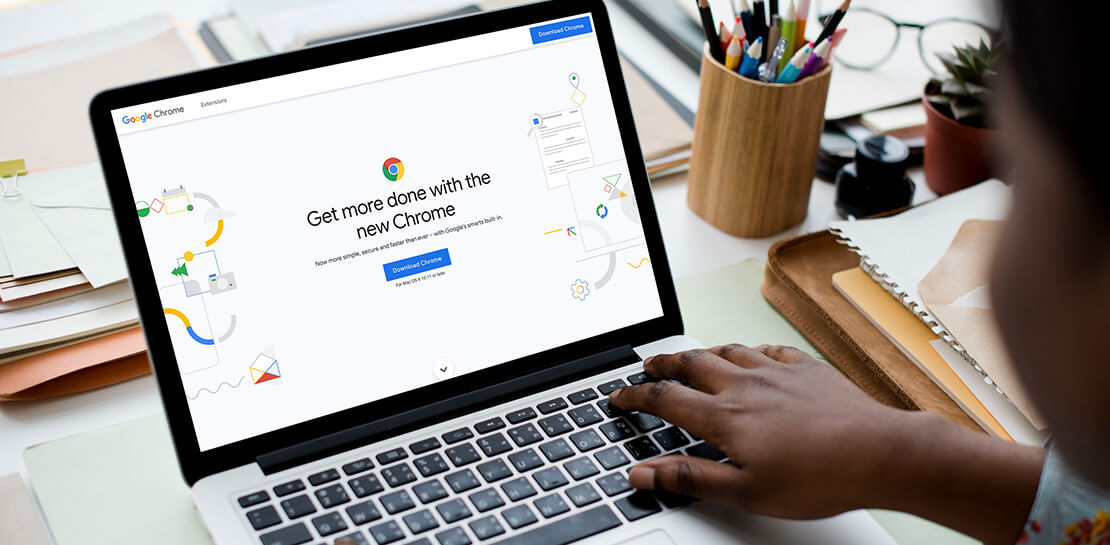
Center for Internet Security’s Latest Benchmark for Securing Chrome
As the way people work continues to evolve, keeping security policies in place that protect organizations but give workers the ability to get things done is more important than ever. IT and security teams must aim to stay a step ahead of web-based security threats that come their organization’s way.

AirAsia Flies High With Data Analytics and AI
AirAsia’s vision is simple: allow everyone to fly. Founded in 2001, the airline and sister company AirAsia X have grown to service 150+ destinations in 25 markets, using 274 aircraft to operate 11,000+ weekly flights from 23 hubs across the region. While the airline is known as a provider of
