





How Swiggy’s UK Competitor Expanded to 14 Countries in Just Three Years

4546
Of your peers have already read this article.
1:30 Minutes
The most insightful time you'll spend today!
Deliveroo is the fastest-growing technology company in the United Kingdom, and the first-ever to win Deloitte’s UK Technology Fast 50 two years in a row. Founded in 2013, the food courier service achieved a three-year growth rate of over 15,000% to 2018, expanding beyond its London base to operate in 14 countries in Europe and the Asia-Pacific region, from Spain to Singapore, Hong Kong, and Taiwan.
“G Suite products work really well, with no steep learning curve. As a fast-growing company, our strategy is to go to G Suite tools first to find immediate, effective answers within one integrated solution.”
– Asif Akmal, Director of IT, Deliveroo
The company runs multiple offices in each of its 14 markets, manned by more than 2,500 full-time staff. “Around 2016, we made a clear decision,” says Asif Akmal, Director of IT at Deliveroo. “As the company was scaling, we needed a strategy for all our offices to scale with us, and we needed the right infrastructure to do that. We can’t afford to have downtime, or to have tools that confuse staff, rather than help them.”
Together with Google Cloud Premier Partner Netpremacy, Deliveroo created a strategy around G Suite that emphasizes the speed and efficiency the company needs to set up offices and train new staff.
“G Suite products work really well, with no steep learning curve,” says Asif. “As a fast-growing company, our strategy is to go to G Suite tools first to find immediate, effective answers within one integrated solution.”
Putting videoconferencing at the core of the business
Videoconferencing is central to the Deliveroo business model. “Many of our international offices rely on operational staff from headquarters, whether for daily one-to-ones or group meetings,” says Asif. “Some of our engineers are constantly present in remote offices on a permanent live video stream, with a screen at the desk where there would be a chair. That makes it mission critical for us to have the correct infrastructure in place in order to do videoconferencing.”
Because internet connectivity can be inconsistent at new offices, Deliveroo teams occasionally need to be able to dial into videoconferencing over the phone, as well as connect through the internet. Previously, Deliveroo used a separate videoconferencing solution in order to have this feature. Now, as G Suite Enterprise users, Deliveroo employees can use Hangouts Meet for the same dial-in functionality, higher quality reception, and up to 100 participants on each call.
“Videoconferencing is crucial. And with Hangouts Meet we can have just one AV person in the whole business setting up and overseeing the infrastructure in 14 countries.”
– Asif Akmal, Director of IT, Deliveroo
“It was a simple decision to switch to Hangouts Meet,” says Asif. “It came with the enterprise package that we were already on, so we made a substantial cost savings by stopping the other solution, which cost almost £15 a month per user. Financially, that made it a no-brainer, but Hangouts also works better from a technical and integration perspective.”
“One of the first things that we address as a company moving into a new office is: Where do we get the videoconferencing system in place so we can start doing calls straight away?” says Elliott Shafii, Google Technology Engineer at Deliveroo. That’s why Deliveroo has a blueprint for video conferencing rooms, specifying the equipment required and the size and acoustics of the rooms where they’ll be installed. Once the necessary Hangouts Meet hardware has been delivered, the Deliveroo AV Manager flies out to the location, installs the equipment in two days, signs off on it, and flies back.
“Videoconferencing is crucial,” says Asif. “And with Hangouts Meet we can have just one AV person in the whole business setting up and overseeing the infrastructure in 14 countries.”
Issuing new devices in one-tenth of the time
Deliveroo facilitates its exceptional growth rate by minimizing the time teams need to spend getting to grips with new tools. “With G Suite, users don’t have much that they need to learn,” says Asif. “That means we can deploy the solution in any country and be comfortable that people can walk into a room and connect to a meeting without problems.”
Asif and his team worked closely with Netpremacy to make training in G Suite tools efficient and accessible, for new starters and anyone who wants to learn. “Collaborating on Docs and Sheets, and using Drive to share files instead of sending attachments allows us to move more rapidly than any other business,” says Asif. “That’s why we have permanent staff in the IT team who concentrate exclusively on the onboarding process, so anyone can learn to use one of the G Suite products in just one hour.”
Introducing Pixelbooks is the latest step in Deliveroo’s pursuit of speed and efficiency. “Previously, it took an average of 50 minutes to set someone up on a laptop,” says Asif. “With Chrome devices, that induction period is down to five minutes. We just open the box, enroll the device, and hand it over.”
Creating a cloud-based company
“Our strong relationships with Netpremacy and Google Cloud product managers mean we can align our internal strategies with them. Working together, we can create the ideal environment for our culture of collaboration.”
– Asif Akmal, Director of IT, Deliveroo
Using G Suite, Deliveroo is building its ideal workplace to support a more mobile, agile approach to work. “By the end of next year, we should have the vast majority of new starters using Pixelbooks,” says Asif. “We expect that to increase the use of Docs and Sheets and other G Suite tools, in place of other applications. We want to see ourselves as a cloud-based company, and G Suite is ideal for reaching that goal.”
As part of the further deployment of G Suite tools, Deliveroo plans to roll out more Jamboards, in addition to the 14 already in use across the business. “Previously, we would take photographs of whiteboards and share those,” says Elliott. “I remember seeing someone wheeling a whiteboard back to his desk from a meeting, and thinking ‘That poor guy is going to have to sit at his desk and copy everything down.'”
“At that point, before Jamboards, we actually made a significant financial investment in another interactive whiteboard solution,” adds Asif. “Now that solution is collecting dust, because we’ve got Jamboards, which are much more cost-effective and work brilliantly within the G Suite system.”
“Our strong relationships with Netpremacy and Google Cloud product managers mean we can align our internal strategies with them,” says Asif. “Working together, we can create the ideal environment for our culture of collaboration.”
Embracing the cloud helps Deliveroo both to enable rapid collaboration and to minimize the maintenance and management of infrastructure: an ideal combination for a fast-growing technology company.
Chrome OS Helped Ocwen Achieve Remote Workplace in Just 2 Weeks during the 2020 Pandemic

4075
Of your peers have already read this article.
1:30 Minutes
The most insightful time you'll spend today!
Editor’s note: Today’s post is by Parveen Chander Aery, CIO, and Rishi Gupta, Head of Global IT Infrastructure, of Ocwen, a provider of residential and commercial mortgage loan services. The U.S.-based company adopted Chrome OS devices to help global contact center teams work productively together.
We’re used to deployments of new technology taking a lot of time and worry. In the past, there wasn’t a fast and easy way to roll out thousands of devices, apps and operating systems to a company of several thousand people. But in March 2020, when we had to help 3500+ contact center and support employees shift safely to remote work, Chrome OS helped us get the job done in just two weeks.
That’s right—we were so impressed that it only took two weeks. We love to talk about the very short Chrome OS deployment timeline, because it happened when we needed everything to go smoothly. We believe we were the first company in our industry to be able to rapidly shift to remote work while maintaining our high levels of service, which are vital to our success.
A rapid but secure pivot to remote work
Preparing for a fully remote workforce was a bit of a scramble at first. There were so many things to consider, like making sure people had adequate internet access, and securing private customer data once everyone worked in the cloud.
Even though we had to decide on remote-work solutions in a hurry, the IT infrastructure team couldn’t compromise on security. With Chrome OS and a mix of HP Chromebooks, Citrix, and AWS, remote employees were able to work in the cloud, accessing productivity tools like Office 365, Black Knight, and regulatory APIs.
Chrome OS and Chrome Enterprise Upgrade also allowed the IT infrastructure team to manage enrolled devices in ways that improved security—for example, turning off Bluetooth access. We equipped everyone with productivity kits that included keyboards, mice, and monitors, along with noise-canceling headphones so contact center workers could block out the sounds of busy pandemic home life. We bought internet dongles in bulk to ensure everyone could get online. All of these tools helped the contact center employees easily access our contact center solution, which was developed on the WebRTC platform.
We benefited from easy integration of Chrome OS with single-sign-on tools as well as using Citrix on a much broader scale. Our timing was perfect in terms of moving the company into the cloud. Prior to the pandemic, only about 20% of applications were accessed via Citrix. Today, 100% are accessed through Citrix.
Cloud is our future
Security was crucial, but there have been many other benefits of adopting Chrome OS, such as making work easier for employees by adding links to key business tools via the Chrome homepage. In fact, the rapid shift to the cloud, dictated by remote work, has also changed our company for the better.
Our IT infrastructure team has worked successfully to ensure applications are compatible with Citrix; we’ve also trained contact center employees on using new devices and how to collaborate in the cloud. The employees were used to getting help in-person in our contact center offices—someone could just raise a hand if they needed IT help. While that’s not always possible today, we were relieved that the contact center teams became familiar with Chrome browser and Chrome OS very quickly. Chrome browser is very common with the general public, so the know-how was already there, even for people who were using Chrome OS devices and Citrix for the first time.
A year and a half after remote work began, we see that Chrome OS devices weren’t simply stopgaps for the pandemic era. They’ve become workplace tools with value far beyond the pandemic. Thanks to the ease of our contact center’s transition to Chrome OS, Ocwen has decided that we’ll remain in a hybrid work model for the foreseeable future, instead of returning 100 percent back to the office. Chrome OS makes this model easy for us because we don’t need to change the data or configuration on a device as people shift from remote to office work.
Three months, 30x demand: How we scaled Google Meet during COVID-19

4173
Of your peers have already read this article.
10:30 Minutes
The most insightful time you'll spend today!
As COVID-19 turned our world into a more physically distant one, many people began looking to online video conferencing to maintain social, educational, and workplace contact. As shown in the graph below, this shift has driven huge numbers of additional users to Google Meet.
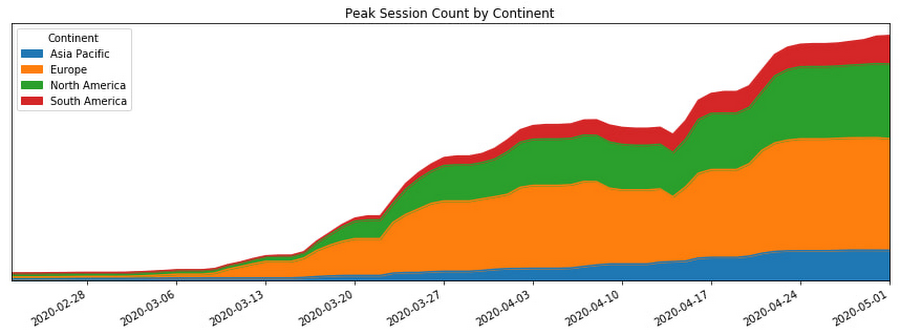
In this post, we’ll share how we ensured that Meet’s available service capacity was ahead of its 30x COVID-19 usage growth, and how we made that growth technically and operationally sustainable by leveraging a number of site reliability engineering (SRE) best practices.
Early alerts
As the world became more aware of COVID-19, people began to adapt their daily rhythms. The virus’s growing impact on how people were working, learning, and socializing with friends and family translated to a lot more people looking to services like Google Meet to keep in touch. On Feb. 17, the Meet SRE team started receiving pages for regional capacity issues.
The pages were symptomatic, or black-box alerts, like “Too Many Task Failures” and “Too Much Load Being Shed.” Because Google’s user-facing services are built with redundancy, these alerts didn’t indicate ongoing user-visible issues. But it soon became clear that usage of the product in Asia was trending sharply upward.
The SRE team began working with the capacity planning team to find additional resources to handle this increase, but it became obvious that we needed to start planning farther ahead, for the eventuality that the epidemic would spread beyond the region.
Sure enough, Italy began its COVID-19 lockdown soon thereafter, and usage of Meet in Italy began picking up.
A non-traditional incident
At this point, we began formulating our response. True to form, the SRE team began by declaring an incident and kicking off our incident response to this global capacity risk.
It’s worth noting, however, that while we approached this challenge using our tried-and-true incident management framework, at that point we were not in the middle of, or imminently about to have, an outage. There was no ongoing user impact. Most of the social effects of COVID-19 were unknown or very difficult to predict. Our mission was abstract: we needed to prevent any outages for what had become a critical product for large amounts of new users, while scaling the system without knowledge of where the growth would come from and when it would level off.
On top of that, the entire team (along with the rest of Google) was in the process of transitioning into an indefinite period of working from home due to COVID-19. Even though most of our workflows and tools were already accessible from beyond our offices, there were additional challenges associated with running such a long-standing incident virtually.
Without the ability to sit in the same room as everyone else, it became important to manage communication channels proactively to ensure we all had access to the information needed to achieve our goals. Many of us also had additional, non-work related challenges, like looking after friends and family members as we all adjusted. While these factors created extra challenges for our response, tactics like assigning and ramping up standbys and proactively managing ownership and communication channels helped us overcome these challenges.
Nevertheless, we carried on with our incident management approach. We started our global response by establishing an Incident Commander, Communications Lead, and Operations Lead in both North America and Europe so that we had around-the-clock coverage.
As one of the overall Incident Commanders, my function was like that of a stateful information router—albeit with opinions, influence, and decision-making power. I collected status information about which tactical problems lingered, who was working on what, and on the contexts that affected our response (e.g. governments’ COVID-19 responses), and then dispatched work to people who were able to help. By sniffing out and digging into areas of uncertainty (both in problem definition: “Is it a problem that we’re running at 50% CPU utilization in South America?” and solution spaces: “How will we speed up our turn-up process?”), I coordinated our overall response effort and ensured that all necessary tasks had clear owners.
Not long into the response, we realized that the scope of our mission was huge and the nature of our response would be long-running. To keep each contributor’s scope manageable, we shaped our response into a number of semi-independent workstreams. In cases where their scopes overlapped, the interface between the workstreams was well-defined.

We set up the following workstreams, visible in the diagram above:
- Capacity, which was tasked with finding resources and determining how much of the service we could turn up in which places.
- Dependencies, which worked with the teams that own Meet’s infrastructure (e.g., Google’s account authentication and authorization systems) to ensure that these systems also had enough resources to scale with the usage growth.
- Bottlenecks, which was responsible for identifying and removing relevant scaling limits in our system.
- Control knobs, which built new generic mitigations into the system in the case of an imminent or in-progress capacity outage.
- Production changes, which safely brought up all of the found capacity, re-deployed servers with newly-optimized tuning, and pushed new releases with additional control knobs ready to be used.
As incident responders, we continuously re-evaluated if our current operational structure still made sense. The goal was to have as much structure as required to operate effectively, but no more. With too little structure, people make decisions without having the right information, but with too much structure, people spend all of their time in planning meetings.
This was a marathon, and not a sprint. Throughout, we regularly checked in to see if anyone needed more help, or needed to take a break. This was essential in preventing burnout during such a long incident.
To help prevent exhaustion, each person in an incident response role designated another as their “standby.” A standby attended the same meetings as the role’s primary responder; got access to all relevant documents, mailing lists, and chat rooms; and asked the questions they’d need answers to if they had to take over for the primary without much notice. This approach came in handy when any of our responders got sick or needed a break because their standby already had the information they needed to be effective right away.
Building out our capacity runway
While the incident response team was figuring out how best to coordinate the flow of information and work needed to resolve this incident, most of those involved were actually addressing the risk in production.
Our primary technical requirement was simply to keep the amount of regionally available Meet service capacity ahead of user demand. With Google’s more than 20 data centers operating around the world, we had robust infrastructure to tap into. We quickly made use of raw resources already available to us, which was enough to approximately double Meet’s available serving capacity.
Previously, we relied on historical trends to establish how much more capacity we’d need to provision. But because we could no longer rely on the extrapolation of historical data, we needed to begin provisioning capacity based on predictive forecasts. To translate those models into terms our production changes team could act upon in production, the capacity workstream needed to translate the usage model into how much additional CPU and RAM we needed. Building this translation model is what later enabled us to speed up the process of getting available capacity in production, by teaching our tools and automation to understand it.
Soon, it became clear that merely doubling our footprint size was not going to be enough, so we started working against a previously unthinkable 50x growth forecast.
Reducing resource needs
In addition to scaling up our capacity, we also worked on identifying and removing inefficiencies in our serving stack. We could bucket much of this work into a couple of categories: tuning binary flags and resource allocations and rewriting code to make it cheaper to execute.
Making our server instances more resource-efficient was a multi-dimensional effort—the goal could be phrased as “the most requests handled at the cheapest resource cost, without sacrificing user experience or reliability of the system.”
Some investigative questions we asked ourselves included:
- Could we run fewer servers with larger resource reservations to reduce computational overhead?
- Had we been reserving more RAM than we needed, or more CPU than we needed? Could we better use those resources for something else?
- Did we have enough egress bandwidth at the edge of our network to serve video streams in all regions?
- Could we reduce the amount of memory and CPU needed by a given server instance by subsetting the number of backend servers in use?
Even though we always qualified new server shapes and configurations, at this point, it was very much worth reevaluating them. As Meet usage grew, its usage characteristics—like how long a meeting lasts, the number of meeting participants, how participants share audio time—also shifted.
As the Meet service required ever more raw resources, we began noticing that a significant percentage of our CPU cycles were being spent on process overhead like keeping connections to monitoring systems and load balancers alive, rather than on request handling.
In order to increase the throughput, or “number of requests processed per CPU per second,” we increased our processes’ resource specification in terms of both CPU and RAM reservation. This is sometimes called running “fatter” tasks.
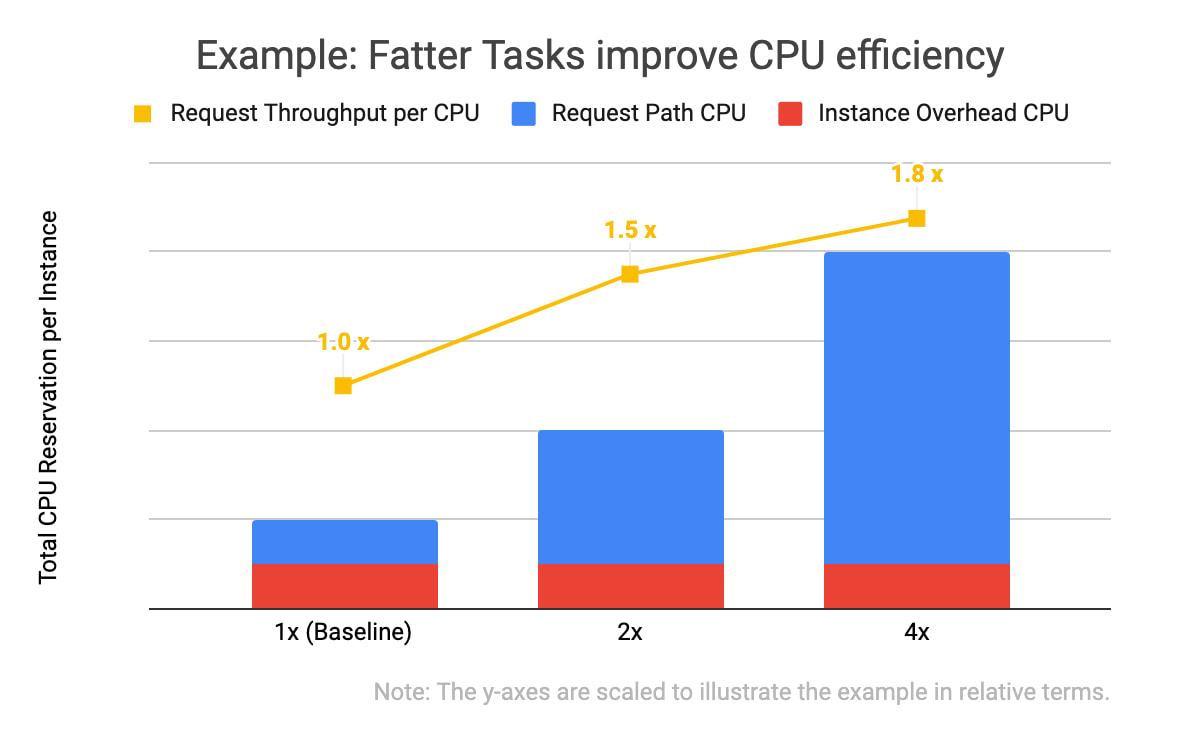
In the example data above, you will notice two things: that all three of the instance specifications have the same computational overhead (in red), and that the larger the overall CPU reservation of an instance, the more request throughput it has (in yellow). With the same total amount of CPU allocated, one instance of the 4x shape can handle 1.8 times as many requests as the four instances with the baseline shape. This is because the computational overhead (like persisting debug log entries, checking if network connection channels are still alive, and initializing classes) doesn’t scale linearly with the number of incoming requests the task is handling.
We kept trying to double our serving tasks’ reservations while cutting in half the number of tasks across our fleet until we hit a scaling limitation.
Of course, we needed to test and qualify each of these changes. We used canary environments to make sure that these changes behaved as expected and didn’t introduce or hit any previously undiscovered limitations. Similar to how we qualify new builds of our servers, we qualified that there weren’t any functional or performance regressions, and that the desired effects of the changes were indeed realized in production.
We also made functional improvements to our codebase. For example, we rewrote an in-memory distributed cache to be more flexible in how it sharded entries across task instances. This, in turn, let us store more entries in a single region when we grew the number of server instances in a cluster.
Crafting fire escapes
Though our confidence in our usage growth forecasts was improving, these predictions were still not 100% reliable. What would happen if we ran out of serving capacity in a region? What would happen if we saturated a particular network link? The control knob workstream’s goal was to provide satisfactory, if not ideal, answers to those kinds of questions. We needed an acceptable plan for any black swans that arrived on our consoles.
A group began working to identify and build more production controls and fire escapes—all of which we hoped we wouldn’t need. For example, these knobs would allow us to quickly downgrade the default video resolution from high-definition to standard-definition when someone joined a Meet conference. That change would buy us some time to course-correct using the other workstreams (provisioning and efficiency improvements) without substantial product degradation, but users would still be able to upgrade their video quality to high-definition if they wanted to.
Having a variety of instrumented controls like this built, tested, and ready to go bought us some additional runway if our worst-case forecasts weren’t accurate—along with some peace of mind.
Operational sustainability
This structured response involved large numbers of Googlers in a variety of roles. This meant that to keep making progress throughout the incident, we also needed some serious coordination and intentional communications.
We held daily handover meetings between our two time zones to accommodate Googlers based in Zurich, Stockholm, Kirkland, Wash., and Sunnyvale, Calif. Our communications leads provided regular updates to numerous stakeholders across our product team, executives, infrastructure teams, and customer support operations so that each team had up-to-date status information when they made their own decisions. The workstream leads used Google Docs to keep shared status documents updated with current sets of risks, points of contact, ongoing mitigation efforts, and meeting notes.
This approach worked well enough to get things going, but soon began to feel burdensome. We needed to lengthen our planning cycle from days to weeks in order to meaningfully reduce the amount of time spent coordinating, and increase the time we spent actually mitigating our crisis.
Our first tactic here was to build better and more trustworthy forecasting models. This increased predictability meant we could stabilize our target increase in serving capacity for the whole week, rather than just for tomorrow.
We also worked to reduce the amount of toil necessary to bring up any additional serving capacity. Our processes, just like the systems we operate, needed to be automated.
At that point, scaling Meet’s serving stack was our most work-intensive ongoing operation, due to the number of people who needed to be up-to-date on the latest forecast and resource numbers, and the number of (sometimes flaky) tools involved in certain operations.

As outlined in the life-cycle diagram above, the trick to automating these tasks was incremental improvements. First we documented tasks, and then we began automating pieces of them until finally, in the ideal case, the software could complete the task from start to finish without manual intervention.
To accomplish this, we committed a number of automation experts from within and outside the Meet organization to focus on tackling this problem space. Some of the work items here included:
- Making more of our production services responsive to changes in an authoritative, checked-in configuration file
- Augmenting common tools to support some of Meet’s more unique system requirements (e.g., its higher bandwidth and lower latency networking requirements)
- Tuning regression checks that had become more flaky as the system grew in scale
Automating and codifying these tasks made a significant dent in the manual operations required to turn up Meet in a new cluster or to deploy a new binary version that would unlock performance improvements. By the end of this scaling incident, we were able to fully automate our per-zone, per-serving job capacity footprint, which precluded hundreds of manually constructed invocations of command-line tools. This freed up time and energy for more than a few engineers to work on some of the more difficult (but equally important) problems.
At this point in scaling our operations, we could move to “offline” handoffs between sites via email, further reducing the number of meetings to attend. Now that our strategy was solidified and our runway was longer, we moved into a more purely tactical mode of execution.
Soon after, we wound down our incident structure and began to operate the remaining work more like how we’d run any long-term project.
Results
By the time we exited our incident, Meet had more than 100 million daily meeting participants. Getting there smoothly was not easy or straightforward; the scenarios the Meet team explored during disaster and incident response tests prior to COVID-19 did not encompass the length or the scale of increased capacity requirements we encountered. As a result, we formulated much of our response on the fly.
There were plenty of hiccups along the way, as we had to balance risk in a different way than we normally do during standard operations. For example, we deployed new server code to production with less canary baking time than normal because it contained some performance fixes that bought us additional time before we were due to run out of available regional capacity.
One of the most crucial skills we honed throughout this two month-long endeavour was the ability to catalog, quantify, and qualify risks and payoffs in a way that was flexible. Everyday, we learned new information about COVID-19 lockdowns, new customers’ plans to start using Meet, and available production capacity. Sometimes this new information made obsolete the work we’d started the day before.
Time was of the essence, so we couldn’t afford to treat each work item with the same priority or urgency, but we also couldn’t afford not to hedge our own forecast models. Waiting for perfect information wasn’t an option at any point, so the best we could do was build out our runway as much as possible, while making calculated but quick decisions with the data we did have.
All of this work was only possible because of the savvy, collaborative, and versatile people across a dozen teams and as many functions—SREs, developers, product managers, program managers, network engineers, and customer support—who worked together to make this happen.
We ended up well-positioned for what came next: making Meet available for free to everyone with a Google account. Normally, opening the product up to consumers would have been a dramatic scaling event all on its own, but after the intense scaling work we’d already done, we were ready for the next challenge.
4900
Of your peers have already watched this video.
9:37 Minutes
The most insightful time you'll spend today!
L’Oréal: Managing Big-data Complexity with Google Cloud
L’Oreal is a global company with a presence in 150 countries worldwide. Between managing all of its brands and requirements for different countries, L’Oreal looks to data to make insightful business decisions. How does L’Oreal unify its data across all its systems and databases? How does L’Oreal make the data accessible to thousands of employees? In this video, Antoine Castex, Enterprise Architect at L’Oreal, discusses with Martin Omander how L’Oreal built a serverless, multi-cloud warehouse based on Google Cloud.
Chapters:
0:00 – Intro
0:23 – Why does L’Oreal need a new data warehouse?
0:51 – Who is the L’Oreal group?
1:35 – Which systems does L’Oreal use?
2:14 – How does L’Oreal manage complexity?
3:59 – What is ELT?
4:57 – Who are L’Oreal’s data consumers?
5:41 – How L’Oreal built the data warehouse
8:51 – L’Oreal’s future plans
9:10 – Wrap up
Google Cloud Workflows → https://goo.gle/3q20M1V
Cloud Run → https://goo.gle/3CSWbXG
Eventarc → https://goo.gle/3B7qhFy
BigQuery → https://goo.gle/3KHgyJ3
Looker → https://goo.gle/3Rx4Ind
Checkout more episodes of Serverless Expeditions → https://goo.gle/ServerlessExpeditions
Subscribe to Google Cloud Tech → https://goo.gle/GoogleCloudTech
3846
Of your peers have already watched this video.
14:49 Minutes
The most insightful time you'll spend today!
Helpful and human: G Suite’s vision for your future workspace
With an accelerated shift to remote working brought on by COVID-19, it’s clearer than ever that an organization’s success relies on its people and how they work. No matter where they’re working from, who they’re working with, or what projects they’re working on, organizations need to enable their employees to have impact.
That’s why, schools are figuring out remote learning models. Doctors are using Google Meet to consult with patients via video call. I believe COVID-19 is the catalyst that will accelerate the transition to more flexible and distributed teams. We’re seeing this trend clearly from both employers and employees. 80% of the workforce would really like the flexibility to work from home at least some of the time, and 74% of CFOs intend to shift some employees to work from home permanently after COVID-19.
From the beginning, G Suite was designed with human impact in mind: to help people work together from anywhere to achieve bigger things in work and in life.
G Suite’s Vice President and General Manager, Javier Soltero, talks about what the future of G Suite means for your organization. Get a window into the newest, most exciting innovations and hear how G Suite is helping organizations navigate what’s next.
Lucent Bio: Boosting collaboration and sustainability with Google Workspace

4678
Of your peers have already read this article.
2:30 Minutes
The most insightful time you'll spend today!
From electrifying transportation to shifting the grid to renewable energy, environmental sustainability is one of the greatest challenges of our generation. A critical but often forgotten goal is the development of sustainable agricultural practices, especially given increasing water shortages and soil degradation around the world.
Lucent Bio was born to solve some of these threats to humanity’s ability to feed itself. It delivers crop nutrition solutions that accelerate the transition to sustainable agriculture. Lucent Bio developed novel technology for bioactive crop nutrition products, including its flagship product—Soileos®—which boosts nutrient density in crops, regenerates soil, avoids polluting agro-ecosystems, and enables the circular economy. Soileos is a plant-based product that is made by upcycling food processing co-products such as lentil and pea hulls into bioactive nutrients that then create the next harvest.
As a start-up, Lucent Bio has used Google Workspace since day one to drive collaboration, streamline operations, and scale. As an organization, it is also closely aligned with Google’s sustainability goals. Google is carbon-neutral for its operations and has made a public commitment with detailed plans to run on carbon-free energy by 2030, meaning clean power every hour of every day.
Google Workspace has been an invaluable resource to fuel collaboration between the engineers at the Lucent Bio pilot plant, the scientists at the research lab and greenhouse, and on-field agronomists as they conduct trials on Soileos across North America. Without the use of Google Workspace during the COVID 19 pandemic, Lucent Bio would not have been able to achieve their current scale.
“In just 18 months, Lucent Bio has been able to scale manufacturing from 1 kg to 1,000 kg of product per day. This year, we’re poised to take the next big step to 20,000 kg per day. During this scale-up process, we went through several iterations of improvements, resulting in a completely zero-waste manufacturing process—a hugely difficult but impressive achievement in line with our mission to accelerate the transformation of agriculture to sustainability. Every step of the way, Google Workspace has been an essential part of our innovation and growth strategy.”
Michael Riedijk, CEO Lucent Bio
Google Workspace runs on the cleanest cloud in the industry. It helps teams of all sizes, and across all industries, connect, create, and collaborate from anywhere. Workspace recently launched AI-generated summaries in Spaces, which help distributed teams stay focused while quickly catching up on chat messages they might have missed. Innovations like these keep the scientists at Lucent Bio collaborating as they build a more sustainable future for agriculture.
You can find more about Google’s commitment to sustainability here, including our goal to become not just carbon-neutral, but carbon-free by 2030, efforts to combat deforestation, and how we’re supporting clean energy.
More Relevant Stories for Your Company

Five Reasons Your Business Should Move to AI-Enabled, Smarter, Spreadsheets
When it comes to data analysis, it’s easy to fall into routine. But no matter how much of a whiz you are at formulas or pivot tables, superb spreadsheet skills only take you so far if you’re working with multiple versions or outdated datasets. On average, your employees spend up
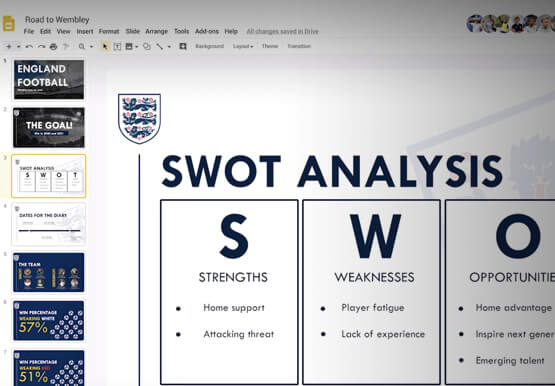

How the UK’s Football Association Turns to Tech to Ensure its 29 Teams Deliver World-Class Performance
The FA is an iconic British institution responsible for overseeing all aspects of football in the UK, from the grassroots club level across the country to the national teams who play at Wembley. However, even icons like The FA must evolve to stay at the top of their game and

BHI: Embracing Google Workspace and AppSheet to transform the workplace
In the last two decades, BHI, once a small construction company in Vernal, Utah, has expanded its operations to dozens of industries in over 25 states. But while the company grew, its technology trailed behind. File sharing and emails both ran off a single server. Editing a document was a grueling

TELUS and Google Cloud Partner to Move Towards a More Sustainable Future
Environmental sustainability is a key priority for TELUS, a world-leading communications technology company. It continues to rank in the top 100 most sustainably managed companies in the world, and seeks to make a healthier planet for all by leveraging its global-leading technology, compassion to drive social change and reduce our
