





12012
Of your peers have already watched this video.
3:26 Minutes
The most insightful time you'll spend today!
How L&T Financial Services Processes 95% of Motorcycle Loans in Less Than Two Minutes
L&T Financial Services is one of the largest lenders in India. India’s demonetization policy in recent years has led to a shift from cash transactions to digital payments. In 2016, the government withdrew 500 and 1000 rupee notes from circulation and encouraged a heavily cash-based population to deposit their canceled notes in banks. Financial institutions needed to pivot to a new way of doing business to stay competitive. L&T Financial Services modernized its IT infrastructure to keep up with changes and capture digital opportunities.
“Working capital is crucial to stimulate growth in rural communities. Our role as a lender is to provide access to funds. We don’t want to burden borrowers with the complexities of getting a loan. Towards this end, digitization is an important step,” says Dinanath Dubhashi, Managing Director and CEO at L&T Financial Services. “Google Cloud helps us streamline service delivery and identify the right customers. By offering the fastest processing time in the industry, we want to be the go-to lender for all customers.”
L&T Financial Services considered multiple cloud providers before choosing Google Cloud. According to Dinanath, Google Cloud understands both the need for businesses to move fast and the need for IT to modernize at different speeds. “We weren’t forced to abandon existing IT systems and migrate lock, stock, and barrel to Google Cloud on day one.”
L&T Financial Services engaged Google Cloud Professional Services to guide its digital transformation journey. The smooth migration from proof of concept to full-scale deployment on Google Cloud took a matter of months.
“Collaboration: a small idea with big opportunities. G Suite helps us connect remote branches with the head office, easily access shared files to submit and track approvals, and conduct face-to-face discussions to accelerate approval processes.”
—Dinanath Dubhashi, MD and CEO, L&T Financial Services
Digitizing the workforce with G Suite
The move to the cloud at L&T Financial Services started in 2017 when the company introduced G Suite to its 14,500 employees. The legacy email system was cumbersome to use, especially for frontline staff who need email access while they are on the road. Using Gmail, employees can connect with customers and co-workers from anywhere, on any device. Employees save time by scheduling meetings with Calendar, collaborating on Docs, and conducting video calls using Hangouts Meet.
Converting data into credit insights using BigQuery
Taking data intelligence one step further, L&T Financial Services adopts a responsible lending approach by applying algorithm-based data analytics to improve credit standards. Beyond traditional data such as credit score and credit payment history, the company also considers macro-economic indicators for risk audits. For example, a farmer’s ability to pay off the loan of his new tractor depends on a successful planting and harvest. So L&T Financial Services feeds long-term data into BigQuery and runs queries to predict loan defaults based on rainfall and crop yield.
Taking Maps Further: New Website Experience for Product Discovery, Budgeting and Access to Dev Documentation

6635
Of your peers have already read this article.
1:30 Minutes
The most insightful time you'll spend today!
For more than 15 years, developers have used Google Maps Platform to deliver location-based experiences to their end users and used location intelligence to optimize their businesses. Along this journey, we’ve made a variety of changes to better support our community as needs have changed and new industries and technologies have emerged. We started rolling out a new website experience, at https://mapsplatform.google.com, to help you better understand the products and solutions best suited to address your objectives. Plus, now you can directly connect to the developer documentation for each product to get started quickly, and you can visualize usage and associated costs to have a better idea of what to expect before getting started.
Getting to your solution faster
Maps, Routes, Places are building blocks that let you develop implementations for any use case. Building for specific use cases, however, typically requires using a combination of APIs and SDKs. To help you quickly understand what’s possible and what you need to build for your use case, you can now visit the solutions tab to select from a list of popular use cases or industries. Once you’ve selected a use case or industry, you’re taken to a page where you can explore relevant products, read helpful blog posts, see how other customers have deployed for similar use cases, and more.

Direct access to developer documentation
Did you know there are more than a thousand pages of developer documentation created to help you get started, unblock you when you’re stuck, and share best practices? Now when you explore a product or solution from the Google Maps Platform website, you can easily navigate back and forth between our website and documentation. Just tap on JS, iOS, Android or API under the product name to get to the documentation you need.

Budgeting for your project
To help you calculate pricing for your project, we’ve introduced a new pricing calculator. Once you find the product and API or SDK you plan to use, pull the slider to reflect your estimated number of monthly requests. This will automatically update the “monthly cost” column for each product and API or SDK you plan to use. If your estimated monthly requests exceed the slider limit, contact our sales team to learn about volume discounts that start at 20% off.

We hope our new website makes it easier to discover our products and solutions, estimate your budget, and start building with our documentation so you can deliver helpful experiences to your users and optimize your business.
For more information on Google Maps Platform, visit https://mapsplatform.google.com.
Bringing Multiple Security Elements Together: Chrome

5379
Of your peers have already read this article.
2:00 Minutes
The most insightful time you'll spend today!
Security and the way we’ve been able to advance user protections over the years is hands down one of my favorite topics when it comes to Chrome. I’ve been on the Chrome team for over 14 years and have seen the browser evolve to become a critical tool that helps people get work done at home or in the office. At the same time, Chrome is often the best line of defense to protect users against malicious software on the internet.
Now more than ever, security has to be top of mind for IT and security teams. Cybercrime is up 600% due to the COVID-19 pandemic, and remote work has increased the average cost of a data breach by $137,000. Those numbers are staggering. And IT teams need to make sure every piece of their tech stack helps support their security needs.
Chrome has worked for years to quickly mitigate risks, block malicious sites and content, and proactively improve web security to keep your users and corporate data safe, pioneering new layered defenses like sandboxing and site isolation. When we think of security and Chrome, we believe it takes multiple elements of security coming together to give organizations the best protection possible.
Security you don’t have to think about: Chrome has many built in protections in place by default that benefit all users. This includes our team’s work to minimize zero days and roll out fixes quickly. With auto updates enabled, Chrome offers enterprises fast and automatic fixes for zero day vulnerabilities. The Chrome security team recently published a post explaining the state of in-wild-bugs that’s worth a read. More examples of the defense-in-depth Chrome offers include capabilities like site isolation and sandboxing that keep malicious code from affecting other visited sites or impacting user machines. Our scanning infrastructure helps us detect and remove harmful extensions from the Chrome Web Store (in fact, last year we saw an almost 90% drop in malware) to prevent your end users from getting infected with malicious extensions. These are protections built directly into Chrome that automatically keep your users and organization safe.
Protections for Chrome users: We provide additional layers of protection that keep your end users safe while they’re on the web and give them helpful information whenever there are potential security risks. For example, Safe Browsing, offered natively in Chrome, helps protect devices by showing warnings to users when they attempt to navigate to dangerous sites or download malicious files. We also give users insights into the safety of their passwords, letting them know if their passwords have been compromised, or even prompting them to change their corporate password if they try to re-use it against company policies. You users are working hard to get things done, and Chrome’s layered security supports their workflows while helping them stay safe on the web.
Enterprise Controls: Every organization has unique security needs. That’s why Chrome provides enterprises with advanced safeguards and granular policy management to help meet those security goals. With hundreds of policy options, admins can use a variety of management tools, including Chrome Browser Cloud Management, to customize the browser. Chrome Browser Cloud Management goes even further, providing powerful enterprise extension management, a security priority for many organizations. Our extension request workflow allows end users to request extensions and admins to allow or deny extension requests. We also recently released extension pinning that allows admins to pin to specific versions of extensions to support any internal security review processes.
Visibility and reporting is another focus area to support IT teams. Through Chrome Browser Cloud Management, administrators can get more insight into their browser environment. This data can help IT teams make security decisions, better understand the devices running Chrome and investigate if issues arise.
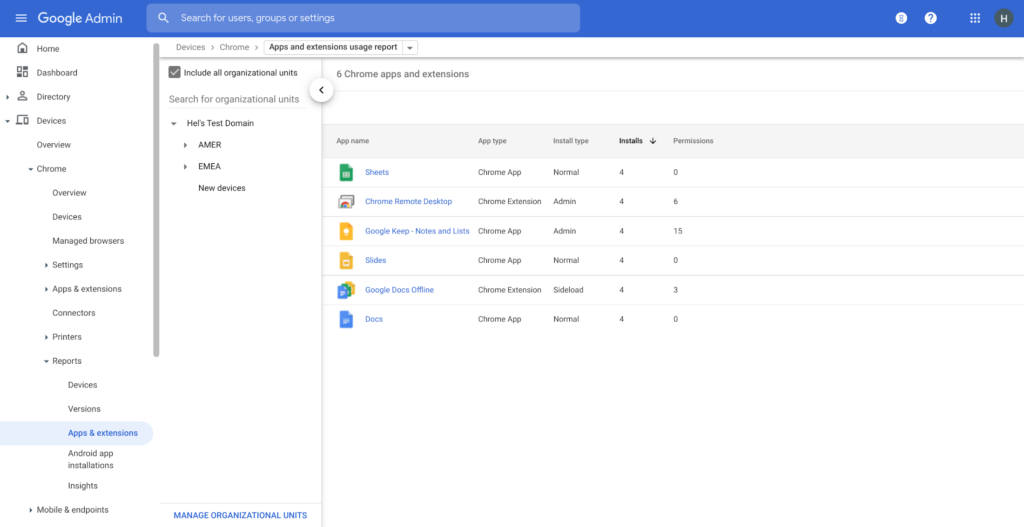
Zero trust security: Finally, Chrome can help modernize an enterprise’s security strategy by migrating to Zero Trust access models. BeyondCorp Enterprise helps secure endpoints by directly integrating Threat and Data Protection in Chrome. This protects against intentional or accidental data loss and prevents malware and phishing in real-time. Additionally, Chrome and BeyondCorp Enterprise provide device trust and endpoint security signals directly from the browser, significantly easing deployment of zero-trust in your environment. In 2022, we plan to partner with leading players in the cybersecurity and zero trust space to add additional integrations.
For security recommendations, check out the new Chrome 2.1 CIS Benchmark that covers independent recommendations on which Chrome policies to configure to help support organizations’ security and compliance needs.
3983
Of your peers have already watched this video.
33:29 Minutes
The most insightful time you'll spend today!
Introducing G Suite Essentials: The simplest way for teams to securely work together from anywhere
With millions of employees forced to work from home, it has become clear that the existing tools many have in place were not cutting it. The Google Cloud team stepped in and accelerated production timelines to launch a new offering. G Suite Essentials is Google’s integrated set of tools designed to support a modern workspace.
With that in mind, Google wants to give an introduction to Essentials and insights into how Google addresses this specific situation we find ourselves in due to the pandemic.
And so the question becomes, now that remote work is the new normal, are the tech tools that we have in place the right ones? And here’s the harsh reality–for many, anything other than collaboration whilst sharing the same conference room in-person is broken.
We all have our examples–incorrect versions of documents, not being able to find the right information, unproductive conference calls, you name it. You have your own story. The unfortunate thing is that it feels normal at this point, and that’s just not fair.
How—and where—people work has changed. Being a part of a distributed team is the new normal, and teams need easy-to-adopt tools that empower them to collaborate from anywhere. Learn how your team can get started in minutes, swiftly and securely.
3766
Of your peers have already watched this video.
11:30 Minutes
The most insightful time you'll spend today!
Sneak peek: What’s to come in Chrome Browser for the enterprise
The Chrome Browser Cloud Management accomplishes three goals. First, it is a single destination for applying Chrome Browser policies across Windows, Mac, and Linux from one pane of glass.
Second, admins can gain easy insight into their deployment, including getting a list of extensions installed in their fleet. And third, for admins that have large organizations, it offers an easy way to delegate management to specific organizational units. We’ve also added a memory limit policy, an M79, which is super useful for admins that manage a lot of virtual machines.
This policy allows admins to limit the amount of memory that Chrome can use before tabs start being discarded. If you have large VMware or Citrix environments, we highly recommend trying out this policy.
Admins will now have more granular controls over update behavior. In addition to the version controls that already exist today, Chrome now has a policy to configure Chrome variations. Watch this video to find out what more you can do with the Chrome Browser Cloud Management solution.
Let Your Organization Thrive in Hybrid Work with Google Workspace

3115
Of your peers have already read this article.
2:30 Minutes
The most insightful time you'll spend today!
Flexible ways of working have become second nature for people everywhere, especially for the more than 8 million customers that use Google Workspace in their offices, homes, or on mobile devices.
However, the rise of hybrid work has also demonstrated the importance of choice. People don’t want to be locked into a single app or in a closed environment. They want to use productivity tools like email, video conferencing, and chat in a seamless way with other critical apps that perform functions like helping to stay in touch with customers, visualizing data, managing projects, building creative designs, and much more.
Enabling all of those products to work well together — without boundaries or walled gardens — is essential to helping teams and organizations maximize hybrid work. This week at Google Cloud Next, we’re taking significant steps towards making Google Workspace the most open and extensible productivity platform for users worldwide.
Today, we’re launching third-party smart chips in Docs, along with new integrations and enhanced API capabilities for Meet, Chat and Spaces, delivering entirely new ways to use third-party applications within or alongside Google Workspace, allowing organizations to get more value from the solutions they’ve already invested in. The new integrations are with some of the most popular enterprise applications in use today — AO Docs, Asana, Atlassian, Figma, LumApps, Miro, Tableau, and Zendesk — and will help transform the way people work every day.
Together, with our partners, we’re enabling an open ecosystem for hybrid work and ensuring that Google Workspace’s most helpful features don’t stay proprietary.
Bringing smart chips to popular third-party applications
When we launched smart canvas, we gave Google Workspace users the ability to bring the people and information they needed into Docs through simple @-mentions, creating interactive mentions of people, files, meetings, templates, and more. Today, we’re expanding smart chips to our ecosystem of partners, allowing our users to add even more rich data, more context, and critical information right into the flow of their work.
With these new third-party smart chips, you will be able to tag and see critical information from partner applications using @-mentions, and easily insert interactive information and previews from third-party apps directly into a Google Doc.
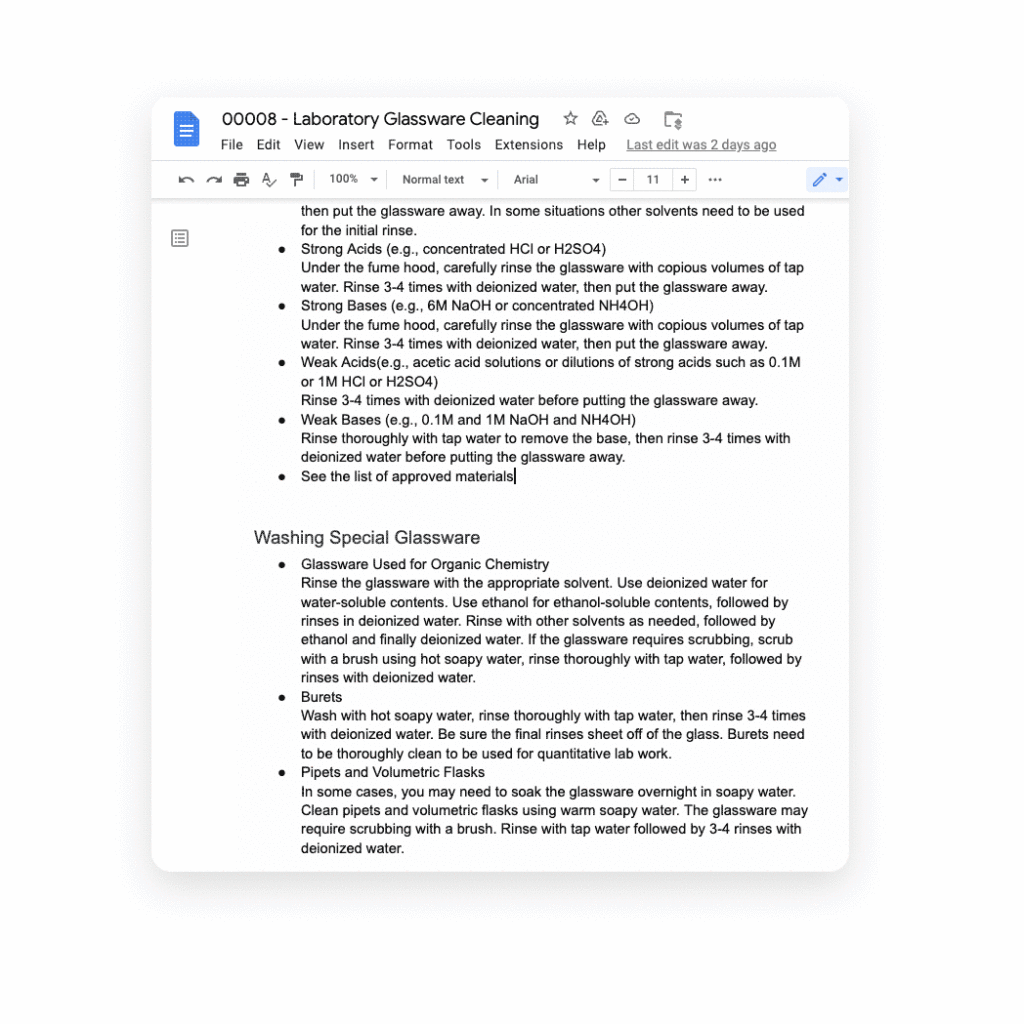
Several of our partners including AO Docs, Atlassian, Asana, Figma, Miro, Tableau, and ZenDesk, are now developing third-party smart chips to add more value to your Google Docs experience:
- AODocs, a fast-growing content services platform, is creating a smart chip that will allow you to link to and interact with controlled documents using AODocs’ content management capabilities within Google Docs.
- Asana, the leading work management platform, is creating smart chips that will enable you to see and manage your tasks and projects easily within a Doc.
- Atlassian, a leading provider of team collaboration and productivity software, is creating smart chips for both its Jira and Confluence apps, enabling you to visualize key details for your project plans directly in a Doc.
- Figma, a design platform for teams who build products together, is using smart chips to embed helpful information about brainstorms, diagrams, and prototypes that are foundational to a product design project into Docs. The chips provide a visual thumbnail of the project so you can easily tell what you’re clicking into.
- Tableau, the analytics platform, is building a new smart chip that will enable Google Docs users to see a live preview of data visualizations and related dashboard metadata.
- Miro, the leading visual collaboration platform, is creating smart chips that will enable you to transform a Miro link into a useful, visual frame of reference that gives preview, title, and other information needed to get a quick summary of your work in a visual format.
- Zendesk, the popular customer service platform, is building smart chips to show users all the relevant and pertinent information for a given Zendesk ticket without leaving Google Docs.
These new smart chip experiences from our partners are examples of the value and innovation we can provide to users and organizations by committing to openness and extensibility.
Smart chips will be available to developers to build out their app integrations in the coming weeks, and will be available to all users in Docs starting January 2023.
Adding third-party capabilities to Google Meet
Google Meet is more than just a video conferencing tool — it’s a hub for collaboration. Earlier this year, we rolled out the capability to join meetings and present directly from Google Docs, Sheets, and Slides to make it easier for people to work together in real-time. We also built an integration with Miro, allowing you to initiate collaboration on Miro whiteboards directly from a Meet call. Now, we’re extending that capability to more third-party applications.
Two new tools for developers — the Google Meet API and Google Meet add-on SDK — will enable our partners to bring their apps together with Google Meet, providing new seamless ways for our customers to use their favorite tools with Google Meet.
With our new Meet add-on SDK, partners can bring the power and functionality of their apps into Meet, where users can then collaborate using other products without leaving the meeting space. For example, Figma is utilizing this SDK to bring its popular design and whiteboarding capabilities into Google Meet. Our shared customers will now be able to collaborate within Figma in real time during Google Meet video calls.
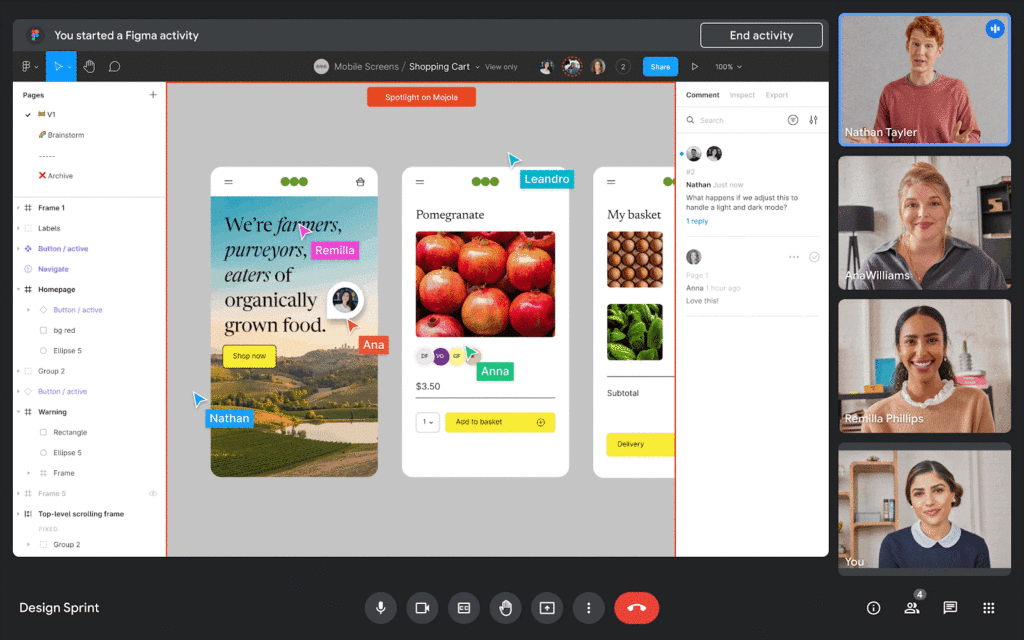
We’re also announcing new Meet API that will enable users to schedule and launch meetings directly from third-party applications. These APIs will also enable users to see whether a meeting is currently live and who is currently in the meeting — all without leaving the application of their choice.
Asana is working to bring the new Meet API together with Drive APIs to create or link to an existing Google Meet meeting directly from a task in Asana. In addition, we’re working with Asana to explore functionality that would allow users to add tasks to a meeting, create a clear agenda for the team, and assign pre-work so teams arrive prepared for a purposeful meeting. We believe that together, Asana and Google Meet can make meetings more actionable by helping users prepare and host results-focused meetings.
Figma is working on bringing Figma and Figjam files right into Meet with this new Meet integration, giving teams the ability to brainstorm and build designs together right in the flow of a meeting. All participants can contribute and engage through Meet, so more voices are heard and projects move forward faster.
We’re also making it easy for people to find and launch partner applications within Google Meet. Joint partner and Workspace customers will be able to discover and install Meet add-ons directly within the Meet UI — even during a live meeting. And of course, partners can register their apps in the Google Workspace Marketplace, helping them reach millions of Workspace users.
The Google Meet API will be available for early access later this year, and the Meet add-on SDK will be available for early access by the end of 2022.
Bringing partner applications into Google Chat and Spaces
Developers already use our Chat and Spaces APIs to add new experiences to Google Workspace. For instance, they are enabling third-party applications to automatically add people to Chat Spaces in time-sensitive, critical scenarios like incident response.
Now, we’re expanding the Chat and Spaces APIs to enable more functionality between Google Chat and our partners’ applications. Soon, these apps will be able to automatically create 1:1 direct messages or group chats programmatically. These apps will also be able to read and write Chat messages without requiring a user to launch an app, further extending the capabilities to allow for contextual understanding of conversations.
For example, imagine you’re discussing an upcoming project with your team in a space, and when you start working on the project in a given app, the app suggests adding a related link or Doc based on the Chat conversation. An app could also automatically copy all messages from one space to another to ensure important messages are shared as broadly as possible with your team.
These are just a few ways partner apps using the Chat and Spaces APIs will be able to enhance user experiences in Chat. Several of our partners are already leveraging these Chat and Spaces APIs to create unique Chat experiences:
Asana is currently using the new Chat and Spaces APIs to notify users and act on Asana tasks right from Google Chat, including actions such as marking a task complete, reassigning a task or even creating an entirely new task, all without leaving Google Chat.
LumApps, the widely-used employee experience platform, is building a new integration with Chat that will enable our joint users to launch a private Google Chat with another employee, directly from their LumApps user directory. Bringing together these two common use cases — finding a coworker and initiating a conversation — helping Google Workspace and LumApps customers communicate more seamlessly and quickly.

Some capabilities for the Chat and Spaces APIs are already available in the Developer Preview Program, with more APIs launching in the next few weeks. Make sure you check out the Developer Preview Program for more details.
The power of an ecosystem
We’re committed to making Google Workspace the most capable, open, and extensible platform for users, and delivering a product that reflects reality for workers today: work doesn’t get done in a single application or a legacy suite of programs anymore.
Together with our partners, we can deliver more helpful, flexible tools, create best in class capabilities for hybrid work, and enable entirely new ways of communicating and collaborating.
You can learn more about Google Workspace add-ons and integrations here, our partner applications here, and read more about the benefits of modernizing legacy office programs here. You can also express interest in partnering with Google Workspace here.
More Relevant Stories for Your Company
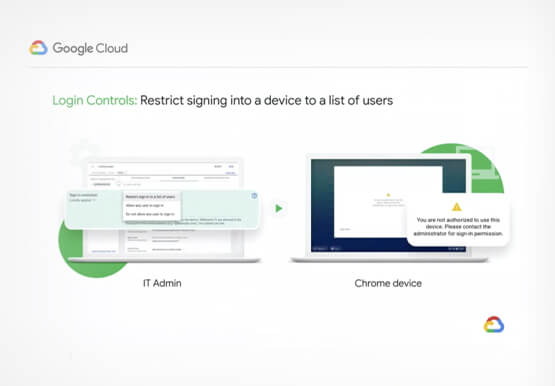

Securing Remote Workers with Google and Chrome Enterprise
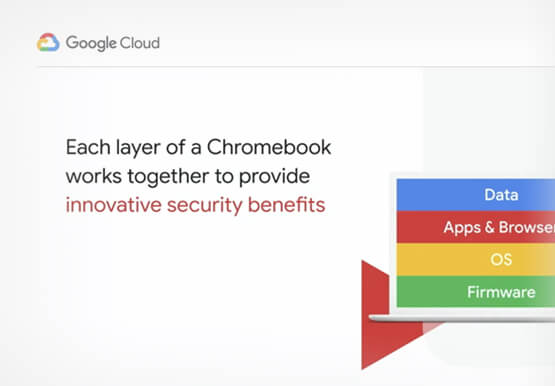
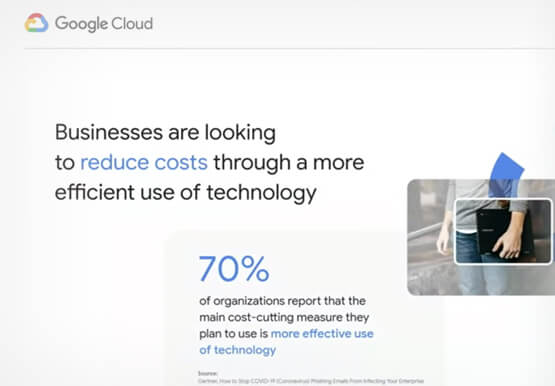
With the proliferation of COVID-19 across the globe, the need for a remote working strategy has become paramount to keep businesses running. A Gartner survey found that 88% of organizations have asked their employees to work remotely. And 97% of the organizations canceled work-related travel. However, only 10% of the

Streamlining Your Experience: Enhanced Search and Navigation in Google Cloud Console
The Google Cloud console is a powerful platform that lets users manage their cloud projects end-to-end with an intuitive web-based UI. With over 120 Google Cloud products across thousands of pages, it can be challenging to navigate through the console quickly, and many users don’t like to use the command

How to sustainably transform while minimizing risk
In previous blog posts, we’ve discussed the benefits that organizations can reap by measuring and then optimizing their overall ESG impact. In this post, we’ll look at the endgame: sustainable transformation into an organization that continually adapts to maximize its resilience while reducing risk. Where will my customers be with the evolving global community

New Study Suggests Public Sector Firms Must Move Over Legacy Productivity Tools
Prior to joining Google Cloud, I spent 20 years in the public sector serving in various security roles, most recently as the head of the cybersecurity division at the newly established Cybersecurity and Infrastructure Security Agency (CISA). I was responsible for delivering services and capabilities to about 100 civilian agencies,
