





How to sustainably transform while minimizing risk

938
Of your peers have already read this article.
3:30 Minutes
The most insightful time you'll spend today!
In previous blog posts, we’ve discussed the benefits that organizations can reap by measuring and then optimizing their overall ESG impact. In this post, we’ll look at the endgame: sustainable transformation into an organization that continually adapts to maximize its resilience while reducing risk. Where will my customers be with the evolving global community landscape? How can I design communities and products with sustainability in mind? Are my assets exposed to physical climate risk — drought, flood, wildfire? Adaptation and resilience are the board and legislative focus areas that the ambition loops created by Google Cloud Ready – Sustainability seek to accelerate.
This is especially important due to the scrutiny of governments and financial institutions as they evaluate the viability of physical asset investments. These organizations want assurances that their investments will not be under undue environmental risk. Similarly, companies embarking on net-zero transitions can realize interest expense savings by providing the measurable, accountable assurances their financiers demand.
Leveraging analytics for climate and business resilience
We’ve said it before, but it bears repeating: The Google Cloud Ready – Sustainability program challenges the notion that sustainability is just a nice-to-have or merely good PR. Rather, we designed the program to help organizations adapt to a net-zero future with solutions that reduce risk, support growth, provide competitive advantages, and positively impact the bottom line. The following partners provide data and analytics that offer deep insights into the environment, natural resources, and social trends that point the way toward sustainable, profitable growth.
Atlas AI has built a geospatial artificial intelligence platform that helps every organization anticipate changing societal conditions — where people live, where wealth and poverty are concentrated, how the physical makeup of communities is evolving, and more — to determine where to invest today to prepare for the world of tomorrow. Atlas AI customers, which range from the World Bank and global NGOs to multinational corporations, use the platform to accelerate growth, future-proof supply chains, target resources to vulnerable populations, and build greater resilience to climate change.
Climate Engine’s SpatiaFi solution, powered by Google Cloud, helps financial services organizations connect economic assets to the world of Earth observation data supporting regulatory reporting, climate risk reduction, and new innovative sustainable finance offerings. Combining billions of planetary observations with peer-reviewed scientific methods, SpatiaFi is connecting Earth science to operational systems offering new levels of accuracy, transparency, scalability, and trust in climate and sustainability data in the context of financial decision-making.
Kumi Analytics‘ KACSAT solution was approved by OxCarbon as a methodology for the calculation and verification of voluntary carbon offsets in support of nature-based solutions. KACSAT leverages multiple satellite platforms and Google Earth Engine‘s state-of-the-art processing tools to enable science-based carbon assessment aligned to the Oxford Offsetting Principles of environmental integrity, additionality, permanence, and achieving net-zero emissions. Environmental organizations, financial institutions, and corporations can now offset their carbon footprints through the reforestation and conservation of millions of hectares of forests — something that was previously limited due to the cost and time of validating high-quality forest projects.
Tensorflight revolutionizes property underwriting with AI. Its cutting-edge tool provides underwriters and insurers with access to rich and highly accurate datasets for commercial and residential properties, enabling them to create superior insurance products. As pioneers of the first property-inspection platform based on convolutional neural networks, Tensorflight’s advanced technology connects seamlessly via API and utilizes ground-level imagery, satellite, and aerial data. This unique approach enables the company to generate precise replacement costs and conduct more comprehensive risk assessments. By automating property inspections and enhancing underwriting accuracy, Tensorflight empowers insurance providers to plan for the future with pragmatic decision-making. With Tensorflight, the future of property underwriting is transformed, offering unparalleled insights, efficiency, and sustainability.
Are you ready for sustainability transformation?
Transforming into a net-zero organization means much more than building resilience to climate change, as important as that is. It also means finding the customers of the future, achieving ongoing energy savings, more sustainable resource usage, and improved transparency to regulatory institutions and consumers. Google Cloud Ready – Sustainability partners offer certified solutions that can help organizations get there.
Look for Google Cloud Ready – Sustainability validated solutions on the Google Cloud Partner Directory Listing, Google Cloud Ready Sustainability Partner Advantage page, and — if applicable — via the Google Cloud Marketplace. We hope to help customers better understand how these technologies can help them meet their ESG goals, find the right solutions for their particular challenges, and implement solutions faster.
Learn more about the Google Cloud Ready – Sustainability validation initiative and explore all our partners in sustainability transformation.
How Kisan Network is Connecting Over 30,000 Farmers to Help them Reap Over 10% More Profits from Their Crops

5715
Of your peers have already read this article.
5:33 Minutes
The most insightful time you'll spend today!
For many people, an Ivy League education is a promise of a better future. But Aditya Agarwalla, who studied computer science at Princeton, didn’t want to limit that future to just himself. He wanted to share his good fortune and create a positive social impact in his home country of India.
When Agarwalla discovered that small farmers didn’t have ways to demand fair prices owed to them for their crops, he knew he’d found his mission. His Princeton thesis project was the basis for a solution: Kisan Network, an online marketplace that connects farmers directly to buyers for produce, eliminating middlemen and increasing farmers’ profits.
Taking a leave from Princeton, Agarwalla returned to Delhi and launched Kisan Network with his father in 2015. Agarwalla and his 70 employees—software developers as well as field employees who consult with farmers throughout India—use G Suite to record crop information from farmers, share ideas for improving Kisan Network’s Android app, and recruit new hires.
Bringing technology back to earth
“Switching to G Suite was seamless. Almost everyone is familiar with the functionality and design of it from their own personal Google accounts.” — Aditya Agarwalla, Founder, Kisan Network
Farmers in rural communities struggle to earn a living without access to information and technology. India’s independent farmers often engage in an outdated selling system involving middlemen who help set low prices that only benefit buyers. Agarwalla saw Kisan Network as a way to connect farmers directly to buyers, so that farmers could be paid fairly.
“We connect a farmer in a Northern Indian state to a buyer located in a Southern Indian state—a 1,500-mile spread,” says Agarwalla. Farmers benefit by doing business with a far broader range of produce buyers than they can reach on their own.
Talking to farmers and buyers across India demanded email and other business tools that could be accessed in a remote field, in Kisan Network’s offices just outside of Delhi, or while meeting job candidates in person. When Kisan Network started out with just four employees, Agarwalla used Microsoft Outlook for email.
“When you’re doing sales and marketing, it matters that you’re reaching out from an authorized company email address,” Agarwalla says. “It conveys a sense of professionalism and gives you validity.”
Adding email addresses with the kisannetwork.com wasn’t easy in Outlook, and once Agarwalla created the addresses, he’d still have to set up accounts and buy licenses for other productivity tools like Microsoft Word.
As Agarwalla started hiring more people, he realized that just about all of the candidates had Gmail addresses, which got him thinking about choosing G Suite for email and workplace collaboration. Since most people already knew their way around Gmail, Agarwalla wouldn’t have to teach them how to use the tools; plus, it was easier for him to manage.
“The ease of setup was important,” Agarwalla says. “Once you set up a new email address in Gmail—which only took a few minutes—that person instantly has access to everything you want them to use in G Suite. My employees needed only a single account for everything.”
Agarwalla liked the ease of creating Kisannetwork.com addresses with G Suite. Another deciding factor was that G Suite could easily integrate with other systems he and his employees used for software development and supply chain management. G Suite was also more affordable than Microsoft Office 365, finalizing Agarwalla’s decision to go with G Suite.
“Switching to G Suite was seamless,” says Agarwalla. “Almost everyone is familiar with the functionality and design of it from their own personal Google accounts.”
Filling the hiring pipeline
Agarwalla had big plans to reform the produce buying process—but he needed more people to make that vision a reality. Right out of the gate, G Suite helped streamline Kisan Network’s hiring process with secure, paper-free tools.
Every job candidate fills out a Google Form, which everyone in the hiring process can access online during interviews. Once candidates are hired, Kisan Network’s hiring team then creates email addresses for new employees through the G Suite admin console—a process that only takes a few minutes.
New hires can browse orientation materials that are shared in Docs and Sheets. The shared online documents help Kisan Network hire people quickly and get new workers up to speed on their roles.
Shrinking the distance between farms
“G Suite seamlessly flows into our everyday work, whether it’s sending emails, setting up meetings, or creating shared documents and presentations.” — Aditya Agarwalla, Founder, Kisan Network
Kisen employees travel all over India to meet with farmers, covering roughly 175,000 miles to date. “We have field presence in many rural regions,” says Agarwalla. “The employees are collecting information like land assessments when they meet farmers and explore new crops.”
Field supervisors log their deployment and destination details into Sheets for quick reference, and use Forms to record the data they collect, including photos of crops and their conditions. In rural India, home internet access is not as common as in cities, so the field supervisors access G Suite apps on their phones.
“They’re constantly working in very remote areas,” Agarwalla says. “Using G Suite on mobile devices is the only way they can do what they do.”
When field supervisors need to speak to colleagues in New Delhi about farmers and their crops, they use Hangouts Meet or Hangouts Chat. “Hangouts is a much better option than Skype for Business, as it works in a browser and can be set up directly from a Calendar event,” Agarwalla says.
Today, Kisan Network employees work across seven Indian states and more than 2,500 villages. The 30,000-plus farmers in the Kisan Network control their entire crop-selling processes through online marketing, earning at least 10 percent more profits than before.
“G Suite seamlessly flows into our everyday work,” says Agarwalla. “Whether it’s sending emails, setting up meetings, or creating shared documents and presentations, we heavily depend on G Suite for everything we do.”
Scaling Your Startup: Strategies for Optimization and Growth

2869
Of your peers have already read this article.
2:30 Minutes
The most insightful time you'll spend today!
Reboot your Startup with our technical guided series
At Google Cloud, we want to provide you with the access to all the tools you need to grow your business. Through the Google Cloud Technical Guides for Startups, leverage industry leading solutions with how-to video guides and resources curated for startups.
This multi-series contains 3 chapters: Start, Build and Grow, which matches your startup’s journey:
- The Start Series: Begin by building, deploying and managing new applications on Google Cloud from start to finish.
- The Build Series: Optimize and scale existing deployments to reach your target audiences.
- The Grow Series: Grow and attain scale with deployments on Google Cloud.
Additionally, at Google we have the Google for Startups Cloud Program, which is designed to help your business get off the ground and enable a sustainable growth plan for the future. The start of the Build Series delineates the benefits of the program, the application process, and more to help your business get started on Google Cloud.
A quick recap of the Build Series
Once you have applied for the Google for Startups Cloud Program, there’s so much to explore and try out on Google Cloud.
Figuring out a rapid but solid application development process can be key to many businesses in reducing time to market. Furthermore, learning what database to use to handle application data can be tricky. Deep dive into our Firestore video which walks through how Firestore can help you unlock application innovation with simplicity and speed.
We then move on to a deep dive into BigQuery and how it can help businesses. BigQuery is designed to support analysis over petabytes of data regardless of whether it’s structured or unstructured. This video is the goto video for getting started on BigQuery!If you are someone looking to run your Spark and Hadoop jobs faster and on the cloud, look to Dataproc. To learn more about Dataproc and how this has helped other customers with their Hadoop clusters, click the video below to learn all things Dataproc related.
Next, we find out what Dataflow can bring to your business; some advantages, sample architectures, demos on the console, and how other customers are using Dataflow.
We also talked about Machine Learning, starting from selecting the right ML solution to Machine Learning APIs on cloud to exploring Vertex AI. Following that we look into API management in Google Cloud and how Apigee helps operate your APIs with enhanced scale, security, and automation.
We ended the series with the last two episodes focusing around security deep-dive and using Cloud Tasks and Cloud Scheduler.
Coming up next – The Grow Series
Dive into the next chapter of this multi-series, with our upcoming Grow Series, where we will be focusing on growing and attaining scale with deployments on Google Cloud.
Check out our website and join us by checking out the video series on the Google Cloud Tech channel, and subscribe to stay up to date.
See you in the cloud!
Taking Maps Further: New Website Experience for Product Discovery, Budgeting and Access to Dev Documentation

6634
Of your peers have already read this article.
1:30 Minutes
The most insightful time you'll spend today!
For more than 15 years, developers have used Google Maps Platform to deliver location-based experiences to their end users and used location intelligence to optimize their businesses. Along this journey, we’ve made a variety of changes to better support our community as needs have changed and new industries and technologies have emerged. We started rolling out a new website experience, at https://mapsplatform.google.com, to help you better understand the products and solutions best suited to address your objectives. Plus, now you can directly connect to the developer documentation for each product to get started quickly, and you can visualize usage and associated costs to have a better idea of what to expect before getting started.
Getting to your solution faster
Maps, Routes, Places are building blocks that let you develop implementations for any use case. Building for specific use cases, however, typically requires using a combination of APIs and SDKs. To help you quickly understand what’s possible and what you need to build for your use case, you can now visit the solutions tab to select from a list of popular use cases or industries. Once you’ve selected a use case or industry, you’re taken to a page where you can explore relevant products, read helpful blog posts, see how other customers have deployed for similar use cases, and more.

Direct access to developer documentation
Did you know there are more than a thousand pages of developer documentation created to help you get started, unblock you when you’re stuck, and share best practices? Now when you explore a product or solution from the Google Maps Platform website, you can easily navigate back and forth between our website and documentation. Just tap on JS, iOS, Android or API under the product name to get to the documentation you need.

Budgeting for your project
To help you calculate pricing for your project, we’ve introduced a new pricing calculator. Once you find the product and API or SDK you plan to use, pull the slider to reflect your estimated number of monthly requests. This will automatically update the “monthly cost” column for each product and API or SDK you plan to use. If your estimated monthly requests exceed the slider limit, contact our sales team to learn about volume discounts that start at 20% off.

We hope our new website makes it easier to discover our products and solutions, estimate your budget, and start building with our documentation so you can deliver helpful experiences to your users and optimize your business.
For more information on Google Maps Platform, visit https://mapsplatform.google.com.
Gmail’s BIMI Increases Confidence about Security and Delivers Immersive Email Experiences

5458
Of your peers have already read this article.
3:00 Minutes
The most insightful time you'll spend today!
Creating a secure-by-default experience based on robust defenses has always been a core design principle for Gmail. That’s why we’ve established a strong baseline of security in Gmail, with built-in protections to help automatically filter out potentially malicious messages. While these defenses help keep Gmail users safe, email functions as part of a large, complex, interconnected ecosystem that we continually invest in and work to protect. After first announcing Gmail’s Brand Indicators for Message Identification (BIMI) pilot last year, today we’re announcing that over the coming weeks we’re rolling out Gmail’s general support of BIMI, an industry standard that aims to drive adoption of strong sender authentication for the entire email ecosystem. BIMI provides email recipients and email security systems increased confidence in the source of emails, and enables senders to provide their audience with a more immersive experience.


“Bank of America has a wide range of security measures in place to support our customers, and we constantly evolve our program to deliver best in class protection. Part of this effort is our partnership with Google on BIMI, which provides an easy way to validate if correspondence is from us.” — Bank of America
BIMI enables organizations that authenticate their emails using Domain-based Message Authentication, Reporting, and Conformance (DMARC)—a standard for providing strong sender authentication that allows security systems to perform better filtering, separating legitimate messages from potentially spoofed ones—to validate ownership of their logos and securely transmit them to Google. BIMI is designed to be easy: for organizations with DMARC in place, validated logos display on authenticated emails from their domains and subdomains.
Here’s how it works: Organizations who authenticate their emails using Sender Policy Framework (SPF) or Domain Keys Identified Mail (DKIM) and deploy DMARC can provide their validated trademarked logos to Google via a Verified Mark Certificate (VMC). BIMI leverages Mark Verifying Authorities, like Certification Authorities, to verify logo ownership and provide proof of verification in a VMC. Once these authenticated emails pass our other anti-abuse checks, Gmail will start displaying the logo in the existing avatar slot.
“Gmail’s support of BIMI is a win for email authentication, brand trust, and consumers alike. BIMI gives organizations the opportunity to provide their customers with a more immersive email experience, strengthening email sender authentication across the entire email ecosystem.” — Seth Blank, Chair of the AuthIndicators Working Group
This is just the start for BIMI. The standard expects to expand support across logo types and validators. For logo validation, BIMI is starting by supporting the validation of trademarked logos, since they are a common target of impersonation. Today, Entrust and DigiCert support BIMI as Certification Authorities, and in the future the BIMI working group expects this list of supporting validation authorities to expand further. To learn more about BIMI and see the latest news, visit the working group’s website.
To take advantage of BIMI, ensure that your organization has adopted DMARC, and that you have validated your logo with a VMC. For Gmail users, no action is required. We’re proud to be one of the leading members in both establishing and supporting the BIMI standard and will continue to support efforts that contribute to security for the entire email ecosystem.
Rethinking time management: Helping employees manage their time efficiently

3587
Of your peers have already read this article.
3:30 Minutes
The most insightful time you'll spend today!
As business leaders evaluate their hybrid work models, employee productivity is top of mind. They’re trying to understand how to balance organizational needs for productivity with employee needs for autonomy, flexibility, and work/life balance. In my role as Google’s Productivity Advisor, I help organizations and employees realize that being productive means working smartly and efficiently — not overworking. And one key to productivity is developing strong time management skills.
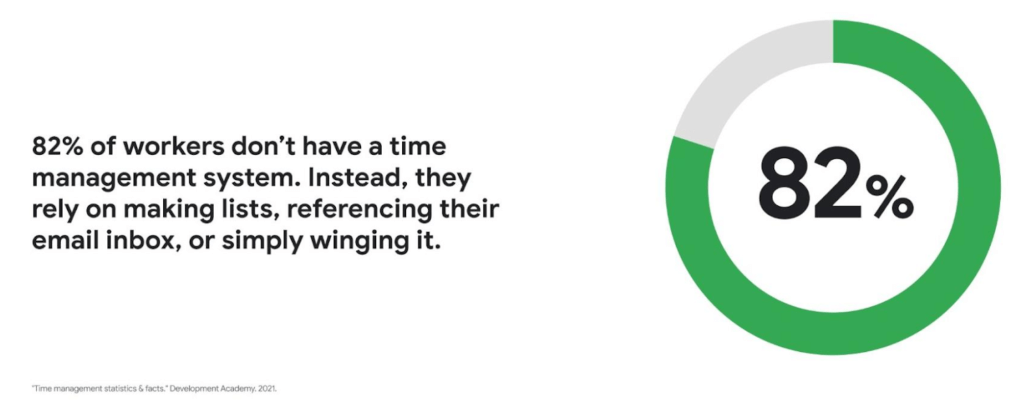
Recent research found that 82% of workers don’t have a proper time management system, however. Instead, they rely on making lists, referencing their inbox, or simply winging it. And the result is telling: 21% of people say “their work is never under control or only under control one day per week.”
Everyone works differently, and one of the best things about hybrid work is that it empowers people to work in their own way, at their own pace. However, if your employees are managing their time inefficiently over the long term, their risk of burnout increases — which can be bad news for employee wellbeing, morale and productivity.
In order for any hybrid work plan to be effective and your teams to be healthy, your employees need to build their time management muscle. You can help them do so with a three-step process:
- Understand how your employees are currently managing their time
- Encourage your employees to identify time management strengths and areas for improvement
- Empower your employees to maximize their time management practices
Step 1: Understanding your employees’ work habits
Before you can help your employees manage their time more effectively, you first need to understand how they spend it. To start, identify habits that might be preventing your employees from establishing productive workflows. For example, some employees might be working too much outside of business hours or spending the majority of their working hours in meetings.
While observation may help you glean some of this information, it’s best to go straight to the source. To find out if your employees feel they’re managing their time efficiently, simply ask them! You can distribute an anonymous questionnaire using a survey tool, like Google Forms, with questions like:
- Are you having trouble getting all your work done?
- Do you feel like you have enough independent working time?
- Do alerts and notifications interrupt or enhance your workflow?
- Which productivity and collaboration tools do you find the most and the least useful?
- How do you communicate best with your coworkers when working on- and off-site?
One major hurdle to effective time management can be too many meetings. To learn if meeting fatigue is plaguing your teams, include a survey question asking employees if they feel like they devote too much time to meetings. Help them get specific by encouraging them to use a tool like Time Insights. With this feature, employees can see exactly how much time they spend in meetings and how much focus time they schedule each week to accurately answer your survey.
Fielding an anonymous questionnaire is a great way to start your time management audit. The learnings that emerge can help you identify patterns in your workplace and among your teams — but they won’t reveal how individual employees work. For that, you’ll need to reach out to them directly.
Step 2: Identifying individual strengths to harness and areas for improvement
Once you have a general idea of how your team works, you can dig deeper into your individual employees’ time management methods and working styles. With this information, you can then help them identify the practices that work — and don’t work — for them.
Suggest to your employees that they spend a week observing their productivity patterns and time management methods. You might encourage people to look at:
- Their level of energy at different times during the day and/or on different days of the week
- The different types of work, such as strategic or administrative, they like doing and when
- How much time they spend doing work versus communicating about work
- How they feel during and after group meetings
- The amount of time they spend in deep-focus versus time spent switching among different tasks
If your organization uses digital timesheets, your employees can consult built-in, automatic time-tracking insights to see where they’re spending their time. Otherwise, you can easily create a custom time-tracking app using a no-code solution like AppSheet to help your employees measure the time they devote to their various responsibilities.
Once everyone has completed their weeklong study, set up dedicated meetings to review your employees’ observations with them individually. Armed with this new understanding, you and your employees can clarify when and how each person does their best work, identify areas for improvement, and start adjusting accordingly.
Step 3: Empowering your employees to flex their time management muscle
Now that you have clarity on how your employees spend their time, you can work with them to develop personal time management practices. To set them up for success, look for opportunities that take advantage of their strengths and offset their challenges — no matter how they like to work.
It’s important to remember there’s no one-size-fits-all solution to using time productively. Some workers love to tackle the most difficult tasks first thing in the morning; others feel more energized at the end of their day. Some people think best in conversation while others prefer to be alone with their thoughts. To help your employees develop time management practices that fit their working style, they need to feel empowered to decide how they can use their time and tools productively.
When it comes to time management, calendars are your best friend, so encourage your employees to take advantage of simple features. Google Calendar lets everyone see availability; by glancing at a shared calendar, coworkers will know when to reach out to someone (and when not to). You can also prompt your employees to block off quiet time during windows when they feel most productive, and use tools like Focus time to protect the time they need for heads-down work.
Email and chat are important, but they can also become a distraction if not used intentionally. Most people open email first thing in the morning, leave it open all day, and check it often. Instead, when you and your employees need to focus, try closing the email tab or using Gmail features to snooze and star emails to stay on task. The same approach applies to chat: check it strategically and turn off notifications when you need deep focus.
Finally, be intentional about building and maintaining trust with your teams as they develop new time management skills. If you decide to use Google Meet for regular check-ins, partner with your employees to develop meeting agendas directly inside Calendar invites to ensure your shared time will be used efficiently.
Valuing impact over output
Hybrid work offers an opportunity for business leaders to rethink their perspective on employee time management and what it means to be productive. Remember, the goal of building effective time management skills isn’t always to become more efficient so one can take on additional work. Often times, taking a step back helps us simplify how we work in order to deepen our impact. When you empower your employees to create a personal time management system, I think you’ll find they will be happier and healthier, with more to contribute to your organization.
More Relevant Stories for Your Company

Report on API-led Digital Transformations in 2020 and the Future
In 2020, many businesses across industries turned their focus and investments towards digital strategies. APIs being an integral part of every organization's digital disruption, will grow in relevance throughout 2021. Read the report to gain more insights on driving API-led digital transformations and in-depth analysis of Google Cloud's Apigee API

Accuracy and Real-time Updates with Google Maps’ On-Demand Rides and Delivery Solution Impacts CX
Last year we launched our on-demand rides and delivery solution to help businesses improve operations as well as transform the driver and customer journey from booking to arrival or delivery. When it comes to on-demand rides and deliveries, every minute matters. When users book a ride or order food, they want a

Google Cloud’s Virtual Appointment Scheduling Tool (VAST) Helps State of Arizona Recover from Unemployment Situation
When the world was forced to go primarily online, state governments also faced the reality of needing to provide community services without the health risk of meeting in person. Old systems that relied on interpersonal contact could not keep up. An unprecedented number of displaced workers swamped every unemployment system.

Canva: Democratizing design and collaborating closely with Google Workspace
Launched in 2013, Canva is a free online design platform with a mission to empower everyone in the world to design. Featuring a simple drag-and-drop user interface and a vast range of templates ranging from presentations, social media graphics, posters, apparel to videos, plus a huge library of fonts, stock
