





Nubian Skin Beats Spikes in Customer Interest with G Suite

4214
Of your peers have already read this article.
2:30 Minutes
The most insightful time you'll spend today!
“Nude” comes in all shapes, sizes and colors. But for Ade Hassan, finding undergarments to match her skin tone took more effort than necessary. Born in the U.K. to Nigerian parents, Hassan searched unsuccessfully for underwear and swimwear that matched her skin—a problem that continued to frustrate her through college and into her professional life.
“My nude isn’t the nude I see in shops,” Hassan says.
Like many other black entrepreneurs, she created her own solution. Hassan founded Nubian Skin, a company that sells lingerie, hosiery, and swimwear for women of color.
With shades like “cafe au lait” and “berry,” Nubian Skin products reflect diverse skin tones and are sold in shops located in the U.K., Nigeria and the U.S., as well as online. Beyoncé and her dancers even asked Nubian Skin to outfit them for their 2017 “Formation” tour.
Since nearly the beginning, Hassan has used G Suite to keep her business humming.
From managing meetings with retailers and manufacturers, to coordinating publicity efforts with fashion press, to keeping track of retail invoices, G Suite has helped Hassan scale her business as quickly as people have demanded her products.
“There are so many pitfalls and so many things that are hard about business,” Hassan says. “It’s really amazing to have something like G Suite that is easy and intuitive.”
Nubian Skin’s fashion fame arrived seemingly overnight. When Hassan posted the company’s first campaign images, its Instagram followers jumped from 50 people to more than 20,000 in just a few weeks.
“People called asking, ‘Can we have the contact for the press department?,” says Hassan. “But at the time, it was just me.” To easily handle media requests, she set up a press@nubianskin.com email address through the G Suite Admin console. And because she had used Gmail for several months before launching the company, using the business version of Gmail came naturally.
“Having that nubianskin.com address gave the business an air of professionalism, which we wouldn’t have had otherwise,” Hassan says. “Usually you need a whole IT department to set up new emails and passwords, but the Admin console removes the hassle of that process.”
Because Nubian Skin employees aren’t always in the showroom together, they need to be able to access business documents—like model photos and customer invoices—from anywhere.
To help, Hassan securely stores business documents in Google Drive (which can be accessed on mobile, too) and works collaboratively with her finance team to process orders using Google Sheets.
“Everyone has access to the spreadsheet so we can fill in what we need at any given point,” says Hassan. “This way, nothing slips through the cracks.”
And when she needs to connect with colleagues quickly or face-to-face, she uses Hangouts Chat or Hangouts Meet. Chat makes it so employees are only a message away, and Meet helps her connect with people as if they’re in person at the office.
Five years after launching Nubian Skin, Hassan is a recognized entrepreneur who’s influenced other retailers to create more inclusive designs.
“Even if you’re small, you want people to see you as a professional business,” Hassan says. “If you’re still growing, you need the building blocks to get you where you want to be. I can’t imagine working without G Suite.”
Discovery’s Massive Workspace Migration Fuels Innovation and Collaboration

3827
Of your peers have already read this article.
1:30 Minutes
The most insightful time you'll spend today!
In the past two decades, Discovery has moved from a purely cable business based in the U.S. to a global media and entertainment powerhouse. Like many other businesses in the industry, we’ve had to adjust to the unique shifts in people’s behaviors and preferences, almost all of which result from the rise in streaming.
We have always been consumer-obsessed at Discovery, with a corporate culture built on the desire to entertain and inspire people of all ages and backgrounds with exceptional content. As we’ve grown, we have also learned just how important it is to be staff-obsessed, giving our employees the best possible experiences so they can continue to innovate and deliver the world-class content our customers expect.
In 2019, we decided one way to fuel innovation and collaboration among employees was to bring in Google Workspace. Selected for its intuitive, easy-to-use, and constantly evolving tools, Google Workspace enables teams to seamlessly create, connect, and collaborate anywhere, anytime.
Given the scope of our ambitions, and recognizing the challenges of migrating 16,500 global employees to a new collaboration solution, we worked with Google Cloud premier partner SADA to get the job done.
Change management amid a massive migration
We began the move to Google Workspace by migrating our document storage system from a legacy cloud provider to Google Drive. This included 86 million items amounting to about two petabytes of data migrated with minimal disruptions. A few months later we completed our move to Google Workspace by migrating 1.2 million calendar invites and 20,800 mail accounts, including thousands of collaborative inboxes and delegated accounts.
In addition to the technical support and Google Workspace expertise that SADA provided, they also partnered with our project team on the change management strategy. Despite challenges presented by the COVID-19 pandemic, our training team and SADA were able to offer outstanding educational opportunities to assist our workforce in the transition and to get the most out of Google Workspace. This included collaborating on over 240 global webinars in seven languages.
Discovering the power of transformative tools
Discovery has many types of end users, from finance professionals and marketing teams to producers and content developers. The fact that Google Workspace has been well-received across the company is a testament to the power of the solution.
Many of our teams have taken advantage of collaborative Gmail accounts and shared drives, providing them with a centralized location to seamlessly communicate and work together on team-focused projects. Our internal communications team is especially happy with the real-time collaborative editing experience within Docs as they work on company-wide emails, announcements, and other projects.
These collaboration tools have allowed us to stay agile amid global lockdowns and will continue to do so as we adapt to a more flexible working environment.
The value of partnership
While we were comfortable with our legacy collaboration suite, one of the biggest benefits of switching to Google Workspace has been Google Cloud’s and SADA’s partnership. They provide us with regular updates on product roadmaps, upcoming features, and more.
This is just the beginning as we plan to grow, deliver new content, and lead the media and entertainment industry with the help of these two great partners and their solutions.
To learn more about Discovery’s journey with Google Workspace, read the full case study.
Download the Forrester Study to Explore the Benefits of AI for IT Operations in Cloud Environment

7104
Of your peers have already read this article.
1:30 Minutes
The most insightful time you'll spend today!
Organizations are currently modernizing their businesses in order to meet the increasing complexity of today’s business landscape. In effect, business leaders must evaluate the best way to mitigate the challenges which plague their cloud operations, all while meeting customers’ growing expectations around digital experience (DX) through agility, automation, and proactive incident avoidance.
In this commissioned study, “Modernize With AIOps To Maximize Your Impact”, Forrester Consulting surveyed organizations worldwide to better understand how they’re approaching artificial intelligence for IT operations (AIOps) in their cloud environments, and what kind of benefits they’re seeing.
Within this July 2021 study, you’ll see that AIOps systems and principles are here to help. It covers how AIOps increases efficiency and productivity across day-to-day operations, and how businesses are taking note. In fact, 91% of respondents have implemented AIOps to address at least one cloud operations issue, and expansion is set to skyrocket. Those that wait to act, risk losing out on the efficacy of their cloud investment and falling behind their more efficient competitors.
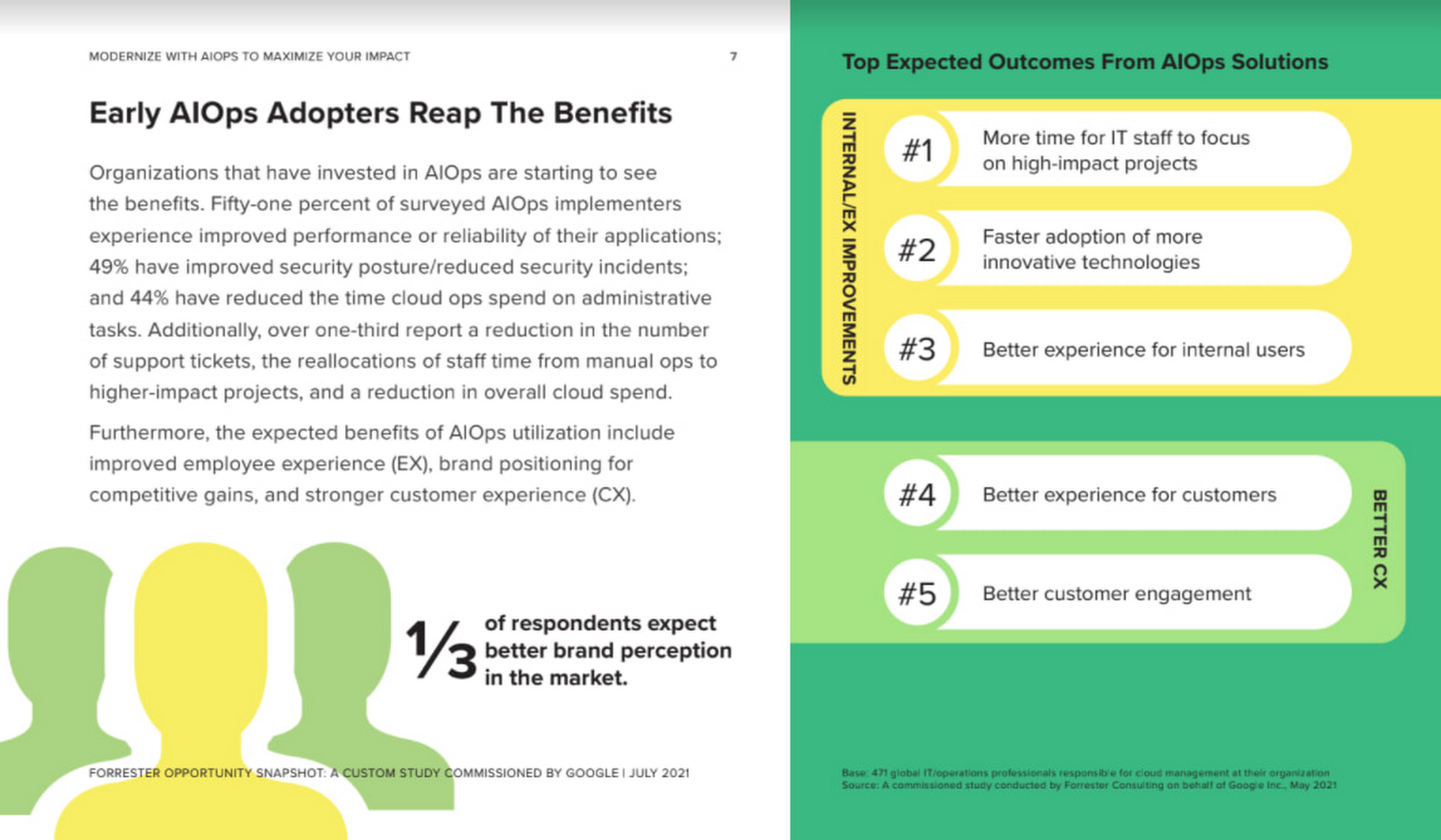
As you can see in the image above, there is a plethora of great information in this complimentary study. So, if you’re looking to enhance your cloud operations and/or adopt AIOps within your organization, be sure to download this free study today.
How Recommendation AI Helps Retailers Optimize Click-through and Conversion Rates

7063
Of your peers have already read this article.
3:00 Minutes
The most insightful time you'll spend today!
Time to go outside again, I guess. I’ll need a sun hat. Sunscreen. Maybe some new sandals? What else?
With the Recommendations AI service, I might be reminded to grab a reusable water bottle and a swimsuit. Or some after-sun aloe lotion. Good thing, cause I’ll need it.

Recommendations AI is a solution that uses machine learning to bring product recommendations to their shoppers across any catalog or client list. This service is part of our full suite of Retail solutions. When you integrate with the Retail API, you get the benefit of Google’s Product Discovery. Integrating once to reap the benefits over and over. Recommendations is the starting point, and you can easily extend into Retail Search and Vision Product Search in the upcoming future.
The Recommendations solution is fully managed, global-scale and powered by deep learning, so you can focus on a great shopping experience and let someone else worry about the infrastructure.
Compared to baseline recommendation systems used by customers, Recommendations AI showed double digit uplift in conversion and clickthrough rates in A/B experiments controlled by the customers. You can optimize for click-through, conversion or session revenue, and fine tune the models to make sure you omit out-of-stock items or duplicates, for example.

So how does it work, and how do you get started? Read on, and we’ll walk you through the pipeline, starting with the data you already have to placement in your online store.
Formula: Data -> Model -> Placement
You start with your catalog, the list of all the things (postcards, movies, pie recipes) that you want to show your customers. Then you ingest your PII-redacted user events -this is the historic event data like home page views, add to cart events and more along with real time user events. This user event is joined with the product catalog and items that allows us to construct the sequence of shoppers’ activity, thus being able to predict what the shopper has a high propensity to purchase next. The user events can come from both online activity across devices or offline store purchases
The recommendation model will return a list of products, which are the recommendations. The brains of the operation, if you will. This model is trained using all the data that you ingest, using the latest neural network models and techniques that Google has built expertise over the years in flagship products like Youtube and News, that allows us to uncover shopper intent, so it can best predict the right recommendations to show to the right people.
Every model outputs a list of product identifiers, but where do they go? They go into placements, the spots, panels, carousels on your customer’s journey interacting with your brand that you’ve set aside to highlight recommendations. A model can send recommendations to one or more placements, but each placement only receives information from one recommendation model. Your pages will then need to render the products with the right images, text or other metadata, using the product ID that is returned by the model.
What do recommendations look like?
Let’s start by browsing our postcard-selling website, where I’ve been buying some vintage California postcards already. The recommendations algorithm has caught on to my interest, showing me other potential cards to purchase based on my history:

Put your data to work
To get started we need to bring your data into the recommendation model, so it can understand your customers, your inventory, and your sales patterns.
The model takes in the product catalog you use, and metadata about those products to better understand nuances in assortment, pricing and variables like size and style. You might already have this data stored in BigQuery or Merchant Center, and hence we provide easy integrations that you can leverage to get started even faster.
As for the user events, don’t worry if you already have systems in place to capture web and mobile activity. We make it easy to bring in your real time event logs by providing seamless integrations with Google Tag Manager, Javascript pixel, or even historic events from Cloud Storage, BigQuery or using inline API or JSON, so you can immediately train the models on this imported data. All this allows you to kickstart integrating with Recommendations AI in a matter of days.
The models then construct a sequence of activities that the user went through and joins with the products that the user engaged with. Once your data is ready to go, it takes a few days to train the model. Next onto making the data work for you.
Quickly customize your model
Setting up your own recommendations project in the console gives you the ability to choose what sort of model to train (based on what recommendations you want to generate) and your objective. Are you optimizing for click-through rate–more people click on the recommendation links or products–or for conversion rate–more people choose or buy what was suggested or revenue ?
Different models can be optimized for different optimization goals.; the GCP console explains what each one can do and how you can choose to optimize it.

Let’s unpack some of this terminology real quick.
We’ve got three model types:
- Recommended for you – Means we think these are items you’ll want to buy, based on your history; this is usually used on a home page to showcase items.
- Others you may like – Means if you’re browsing the page of a water bottle, we will recommend alternative brands of water bottles that you may like as well as a backpack, based on your engagement history.
- Frequently bought together – Means that when anyone buys sunscreen, we notice that they often also buy aloe lotion, so we will surface those items when someone adds any one of them to their cart.
And then we have three business objectives that the models optimize for:
- Click-through rate – How frequently did somebody click on a recommended item?
- Conversion rate– How frequently did somebody add a recommended item to their cart?
- Revenue per session – How much money did the recommendations generate for you?
Deliver anywhere along the journey
Now that you’re all set up in the Retail AI console, you can test out the recommendations in the console, even before you deploy to production.

You can integrate Recommendations into your frontend by calling the Predict APIt. The placements of recommendations will report data back into the dashboard and you can analyze and measure success for future iterations.
On top of that you can use the recommendations for other parts of your customer’s journey. Email promotions, storefront kiosks, display ads or follow-up notifications can include recommendations based on past activity and cart contents. The model gives you useful product recommendations for a wide variety of touchpoints and steps in the purchasing process.
More best practices, and guides, are available inside our documentation.
How to get started
Training your own models can be tedious, time-consuming, and expensive. On top of that it requires deeper data science expertise to set up. Let us do it instead!
You can see how IKEA Retail uses Recommendations AI in this recent talk and blog from the Google Cloud Retail Summit..
To get started today you’ll need to make a Cloud project and enable the Retail API, which then allows you to access all the recommendation tools in one menu. Bring in your catalog and purchasing data, define a placement or two, and you can start putting recommendations on your site in a matter of days.
ShareChat Builds its Diverse, Hyperlocal Social Network. Thanks to Google Cloud

9245
Of your peers have already read this article.
3:00 Minutes
The most insightful time you'll spend today!
Editor’s note: Today’s guest post comes from Indian social media platform ShareChat. Here’s the story of how they improved performance, app development, and analytics for serving regional content to millions of users using Google Cloud.
How do you create a social network when your country has 22 major official languages and countless active regional dialects? At ShareChat, we serve more than 160 million monthly active users who share and view videos, images, GIFs, songs, and more in 15 different Indian languages. We also launched a short video platform in 2020, Moj, which already supports over 80 million monthly active users.
Connecting with people in the language they understand
As mobile data and smartphones have become more affordable in India, we noticed a large new segment of people, many in rural areas, being welcomed onto the internet. However, many of them didn’t speak English, and when it comes to accessing content and information—language plays a significant role. Instead of joining other social media sites where English reigned supreme, new internet users chose to join language or dialect-specific Whatsapp groups where they felt more comfortable instead.
So, we set out to build a platform where people can share their opinions, document their lives, and make new friends, all in their native language. ShareChat simplifies content and people discovery by using a personalized content newsfeed to deliver language-specific content to the right audience.
Given the high-intensity data and high volume of content and traffic, we rely heavily on IT infrastructure. On top of that, a large number of our users rely on 2G networks to post, like, view, or follow each other. Our platform needs to deliver great experiences to people who are spread out across the country and different networks without any reduction in performance.
The right cloud partner to support future growth
ShareChat was born in the cloud—we already knew how to scale systems to serve a large customer base with our existing cloud provider. But like many companies, we struggled with over-provisioning compute and storage to accommodate unpredictable traffic and avoid running out of storage. With demand rising for local language content and an increase in online interactions in response to the COVID-19 crisis, we realized that we would need a more efficient way to scale dynamically and allocate resources as needed.
Google Cloud was a natural choice for us. We wanted to partner with a technology-first company that would make it easy (and cost-effective) to manage a strong technology portfolio that would allow us to build whatever we wanted. Google is at the forefront of technology innovation and provided everything we needed to build, run, and manage our applications (including creating an efficient DevOps pipeline to fix and release new features quickly).
We had a few issues in mind at the start of discussions with the Google Cloud team, but over time, as we got information and support from them, we realized that these were the partners we wanted in our corner when it came time to tackle our most challenging problems. In the end, we decided to take our entire infrastructure to Google Cloud.
To support millions of users, we deploy and scale using Google Kubernetes Engine. While we analyze our data using a combination of managed data cloud services, such as Pub/Sub for data pipelines, BigQuery for analytics, Cloud Spanner for real-time app serving workloads, and Cloud Bigtable for less-indexed databases. We also rely on Cloud CDN to help us distribute high-quality and reliable content delivery at low latency to our users.
We now use just half the total core consumption of our legacy environment to run ShareChat’s existing workloads.
Google Cloud delivers better outcomes at every level
By moving to Google Cloud, we saw major benefits in several key areas:
Zero-downtime migration for users
At the time of migration, we had over 70 terabytes of data, consisting of 220 tables—some of which were up to 14 terabytes with nearly 50 billion rows. Due to our data’s interdependencies, moving services over one at a time wasn’t an option for us.
Even though we were migrating such large volumes of data, we didn’t want to impact any of our customers. Latency spikes for out-of-sync data might affect message delivery. For instance, if a message or notification was delayed, we didn’t want to risk a bad user experience causing someone to abandon ShareChat.
To prepare for the move, we ran a proof-of-concept cluster for over four months to test database performance in a real-world scenario for handling more than a million queries per second. Using an open-source API gateway, we replicated our legacy data environment into Google Cloud for performance testing and capacity analysis. As soon as we were confident Google Cloud could handle the same traffic as our previous cloud environment, we were ready to execute.
Using wrappers, we were able to migrate without having to change anything in our existing application code. The entire migration of 60 million users to Google Cloud took five hours—without any data loss or downtime. Today, ShareChat has grown to 160 million users, and Google Cloud continues to give us the support we need.
Scaling globally to meet unexpected demand
We rely on real-time data to drive everything on ShareChat by tracking everything that goes on in our app—from messages and new groups to content people like or who they follow. Our users create more than a million posts per day, so it’s critical that our systems can process massive amounts of data efficiently.
We chose to migrate to Spanner for its global consistency and secondary index. Unlike our legacy NoSQL database, we could scale without having to rethink existing tables or schema definitions and keep our data systems in sync across multiple locations. It’s also cost-effective for us—moving over 120 tables with 17 indexes into Cloud Spanner reduced our costs by 30%.
Spanner also replicates data seamlessly in multiple locations in real time, enabling us to retrieve documents if one region fails. For instance, when our traffic unexpectedly grew by 500% over just a few days, we were able to scale horizontally with zero lines of code change. We were also launching our Moj video app simultaneously, and we were able to move it to another region without a single issue.
Simplifying development and deployment
On average, we experience about 80,000 requests per second (RPS) –nearly 7 billion RPS per day. That means daily push notifications sent out to the entire user base about daily trending topics can often result in a spike of 130,000 RPS in just a few seconds.
Instead of over-provisioning, Google Kubernetes Engine (GKE) enables us to pre-scale for traffic spikes around scheduled events, such as holidays like Diwali, when millions of Indians send each other greetings.
Migrating to GKE has also enabled us to adopt more agile ways of work, such as automating deployment and saving time with writing scripts. Even though we were already using container-based solutions, they lacked transparency and coverage across the entire deployment funnel.
Kubernetes features, such as sidecar proxy, allows us to attach peripheral tasks like logging into the application without requiring us to make code changes. Kubernetes upgrades are managed by default, so we don’t have to worry about maintenance and stay focused on more valuable work. Clusters and nodes automatically upgrade to run the latest version, minimizing security risks and ensuring we always have access to the latest features.
Low latency and real-time ML predictions
Even though many of our users may be accessing ShareChat outside of metropolitan areas, it doesn’t mean they’re more patient if the app loads slowly or their messages are delayed. We strive to deliver a high-performance experience, regardless of where our users are.
We use Cloud CDN to cache data in five Google Cloud Point of Presence (PoP) locations at the edge in India, allowing us to bring content as close as possible to people and speeding up load time. Since moving to Cloud CDN, our cache hit ratio has improved from 90% to 98.5%—meaning our cache can handle 98.5% of content requests.
As we expand globally, we’d like to use machine learning to reach new people with content in different languages. We want to build new algorithms to process real-time datasets in regional languages and accurately predict what people want to see. Google Cloud gives us an infrastructure optimized to handle compute-intensive workloads that will be useful to us both now—and in the future.
The confidence to build the best platform
Our current system now performs better than before we migrated, but we are continuously building new features on top of it. Google’s data cloud has provided us with an elegant ecosystem of services that allows us to build whatever we want, more easily and faster than ever before.
Perhaps the biggest advantage of partnering with Google Cloud has been the connection we have with the engineers at Google. If we’re working to solve a specific problem statement and find a specific solution in a library or a piece of code, we have the ability to immediately connect with the team responsible for it.
As a result, we have experienced a massive boost in our confidence. We know that we can build a really good system because we not only have a good process in place to solve problems—we have the right support behind us.
Latest Features and Updates to Globally Bolster Translation Services

5300
Of your peers have already read this article.
2:00 Minutes
The most insightful time you'll spend today!
Let’s face it: in the globalized world, which is now more than ever a digital demand world, you need to scale and reach your customers right where they’re at. Translation is a critical piece of that, whether you’re translating a website in multiple languages or releasing a document, a piece of software, or training materials.
Manual translation does not scale, which is why machine translation, powered by machine learning (ML), is becoming more important to our customers. Machine translation has historically been challenging because of the sheer volume and breadth of content that can add value when translated into multiple languages. Companies acquire and share content in many languages and formats, and scaling translation to meet needs is a tall order due to multiple document formats, integrations with optical character recognition (OCR), and the need to correct for domain-specific terminology.
Our goal is to simplify translation services, while enabling flexibility and control for our customers’ unique needs across industries. Read on to learn more about recent features and updates.
Formatting matters: Document Translation is now GA
In many cases, the layout of a document dictates how it should be interpreted—e.g., readers navigate text and discern meaning based on formatting, like bold or italicized text, or markups for headers, paragraphs, and columns. Previously, to automate translation of documents, text needed to be separated from these layout attributes, meaning the document’s structure was either lost or needed to be recreated later in the developer pipeline, after the text had been translated. This required translation teams to do a lot of extra work and maintain a lot of additional code. But now, those steps are unnecessary. Formatting can be retained throughout the translation process, handled directly by the Translation API Advanced.
This feature lets customers translate documents in 100+ languages and supports document types such as Docx, PPTx, XLSx, and PDF while preserving document formatting.
And if your needs go beyond Document Translation, we can help you translate audio as well. For real-time streaming translation, check out the Media Translation API, and for offline transcription translation, combine the Translation API with the Video Intelligence API.
Real-Time translation when you need it, Batch when you don’t
One of the biggest differentiators for Translation API Advanced’s document translation capabilities is the ability to do real-time, synchronous processing for a single file.
For example, if you are translating a business document such as HR documentation, online translation provides flexibility for smaller files and provides faster results. You can easily integrate with our APIs via REST or gRPC with mobile or browser applications, with instant access to 100+ language pairs so that content can be understandable in any supported language.
Meanwhile, batch translation allows customers to translate multiple files into multiple languages in a single request. For each request, customers can send up to 100 files with a total content size of up to 1 GB or 100 million Unicode codepoints, whichever limit is hit first.
State of the Art (SOTA) accuracy, with flexibility for customization
In order to achieve the highest level of accuracy for your translation, we now support multiple options:
- Use Google’s SOTA translation models: Each year, Google heavily invests to improve the quality of our translations across Apps, Cloud APIs, and Chrome, as well to enable multilanguage answers in Search. A popular metric for automatic quality evaluation of Machine translation systems is the BLEU score, which is based on the similarity between machine translation and the reference translations that were generated by people. While we push out incremental improvements for individual models on a monthly cadence, there are also times where we make significant leaps. In the releases since 2019, we have improved our average BLEU score by 5pts on average across 100+ languages and 7pts on low resource languages.
- Leverage glossaries for specific terms and phrases: Glossary is our terminology control feature. It allows you to import source content to define preferred translations, such as product names or department names. Then, when calling the glossary in the API request, your preferred translations will be enforced. This will work for words as well as phrase translation.
- Pick a pre-trained model with model selection: If you create custom models for machine translation, we don’t think you should have multiple client libraries and multiple APIs to maintain in order for you to use the best model for your needs. Translation API Advanced now supports Model Selection. Pick your pretrained model or pick your custom ML model built on AutoML for any language pair you’ve created and use the same API and the same client library.
- Build custom translation models with AutoML: AutoML Translation is a suite of ML products that enable you to build high quality models for your own use case or data, with limited-to-no ML expertise or coding required. Bring your past human-validated translations to improve translation specificity for your domain.
Keep localization local with Regional Endpoints
If you are a customer operating in the EU, we recently launched an endpoint specifically for EU regionalization. This is a configurable endpoint for customers to store and perform machine translation processing of customer data only in the EU multi region. For now, this only supports our pretrained translation models and glossary, but batch translations will be coming soon.
How Eli Lilly uses Cloud Translation to translate content globally
Historically, translations at Eli Lilly have been complicated: numerous translation vendors have been needed for different languages and organizations, all with their own processes and expectations. On top of that, translations have been costly and slow.
To solve this, Eli Lilly took a codified approach to enable users and systems to spend less time and resources to safely generate quality translations.
Learn more, and even catch a demo, from Thomas Griffin, Translation Tech Lead & Global Regulatory Architect for Eli Lilly.
Learn more
- To get started using Cloud Translation – Advanced, complete the setup and then try the Translate text (Advanced edition) quickstart.
- Document Translation is priced per page. For more information, see pricing.
More Relevant Stories for Your Company




Video: How Google App Maker Helps Businesses Build Mobile Apps in No Time
Analysts estimate that the right custom mobile app can save each employee 7.5 hours per week (that’s a week’s worth of lunch breaks!). Yet, too few businesses have the means, let alone the resources, to invest time and effort in building customized mobile apps. Why? That's because their budgets center on

Scope for Tech Adoption and Advancements in Healthcare are Still High: Google Cloud Research
Since the start of the COVID-19 pandemic, there’s been a rapid acceleration of digital transformation across the entire healthcare industry. Telehealth has become a more mainstream and safe way for patients and caregivers to connect. Machine learning modeling has helped speed up innovation and drug discovery. And new levels of

Why APIs are De Facto Business Requirements
The benefits of APIs are becoming more clear in an ever-evolving tech landscape, yet ITDMs still struggle to convince executives and investors to buy into an API-first strategy. Here’s a look at the importance of APIs in a changing world, and how ITDMs can make the business case in order

Making Hybrid Work Human: Google Workspace and Economist Impact Survey
Google Workspace recently commissioned Economist Impact to complete a global survey (October 2021)* on the state of hybrid work, including its challenges and opportunities. We already knew that the pandemic had fundamentally changed the world of work, but the survey emphasizes the scale, reach, and longevity of those changes.. Over 75% of
