





4646
Of your peers have already watched this video.
40:00 Minutes
The most insightful time you'll spend today!
On-Demand Webinar: How Technology is Creating a Smaller World to Help Businesses Grow Big
Consider this: In a pre-cloud world, it took the telephone 75 years, automobiles 62 years, and TVs 14 years to reach 50 million customers. But today’s innovations have narrowed that gap.
In comparison, it took Netflix only 7 years to reach 50 million customers, while Twitter got there in just 9 months! What’s changed? The advent of the Internet and, with it, cloud computing.
That means organizations need to embrace change quickly and think differently. That’s why companies like Colgate-Palmolive, that pre-date the telephone even, are today looking to be cloud-first. That’s a big reason why the company moved its 28,000 employees on to a cloud collaboration platform in just six months.
As a result, organizations like Colgate-Palmolive are now able to increase reach, ideate faster, and be more productive. Google Hangouts from Google Cloud is helping these organizations get there.
With the ability to get on immersive video conferencing meetings, ideate in real-time through Google Cloud’s Jamboard—a digital, smart, whiteboard—your teams have an incredible opportunity to drive your business ahead.
In this webinar, Sandy Jones, Field Sales Representative, Google Cloud, shares how cloud-based collaboration tools are redefining traditional businesses and why they are in the race to become cloud-first.
How This Sri Lankan Bank is Striving to Make Banking Accessible to All

4644
Of your peers have already read this article.
1:30 Minutes
The most insightful time you'll spend today!
Headquartered in the Sri Lankan capital of Colombo, Cargills Bank is not short on ambition or vision: it plans to make banking services accessible to all Sri Lankans and become a financial services leader at home and internationally. Founded in 2014 and licensed by the Central Bank of Sri Lanka to provide domestic and offshore banking services, Cargills Bank provides Retail, Credit and Debit Cards, Corporate, SME, Agri, Micro Finance, Treasury, and Trade banking products to customers.
The bank delivers these products from a network that includes 19 branches, the internet, mobile applications, and a partnership with supermarket chain Cargills Food City that enables customers to transact at more than 370 service points across Sri Lanka.
Cargills Bank initially deployed productivity and communications applications running in an on-premises data center. However, these applications could not support the bank’s growing need to operate as an agile, collaborative, technology-enabled institution. “We wanted to minimize the time and resources dedicated to administration and give our employees the ability to engage and collaborate more effectively. This naturally led us to the cloud and to G Suite,” says Indika Fernando, Senior Manager IT, Applications and Development, Cargills Bank.
Accelerating workflows
The bank also wanted to use scripts to accelerate and automate workflows that incorporated its productivity applications. “The limitations of our previous platform meant it took us three weeks to complete a simple workflow. We wanted to accelerate this process for simple and complex workflows,” explains Fernando.
A technology review by the Cargills Bank IT team found G Suite could meet all of the company’s business and technical requirements. “Employees could meet using voice and video connections from their desktops, mobile devices, and meeting rooms, and collaborate in real time on documents,” says Fernando.
This was a considerable improvement compared to the previous platform that required each stakeholder to wait until other people provided their input, or people providing input into different copies of the same document, forcing a document author to spend time consolidating all feedback into a final version.
“With G Suite, we can be sure that all stakeholders provide detailed and timely input into the documents we rely on to make critical business decisions,” says Fernando.
Augmenting G Suite
G Suite also supported an initiative by Cargills Bank to provide single sign-on for all business applications, while cost effectively giving workers access to cloud-based spreadsheet, document, slide, information collection, web, and wiki creation tools. Furthermore, Apps Script enables the bank’s developers to perform tasks including building add-ons for G Suite products such as Sheets, Docs, Slides, and Forms; writing custom functions for Sheets; publishing web apps embedded in Google Sites; and interacting with services such as AdSense, Analytics, Calendar, Drive, Gmail, and Maps.
Cargills Bank completed migrating its workforce to G Suite a couple of years ago. To help ensure the project was completed on time, within budget, and delivered access to the full range of G Suite tools, the bank engaged Google Partner Finetech Consultancy, which is also headquartered in Colombo.
“The partner oversaw creation of our architecture and undertook training and change management,” says Fernando. “It provided expert consultancy and troubleshooting throughout the three-month deployment and played an integral role in enabling us to launch on schedule.”
The bank has established a Google based social network to create and run internal communities and give its employees the freedom to create communities. “The communities effectively operate as internal social networks that our departments and staff can use to disseminate day-to-day information and announcements,” says Fernando. “For example, leaders of a training and development community use the forum to publish details of upcoming training programs and celebrate people who have completed training exercises.”
Cargills Bank has also established Hangouts Meet as a key communication tool. Employees use voice, video, and chat services to collaborate, with an audit trail that is a requirement in a regulated industry.
Using Apps Script to increase the power of G Suite has delivered a range of benefits to Cargills Bank and enabled the institution to pass on valuable insights to the Sri Lankan Google user community. “Our work with Google has made us a source of expert knowledge that can be accessed by the wider business community” says Fernando.
Workflows increased from 25 to 40
With G Suite and Apps Script, Cargills Bank teams are working more efficiently and the number of streamlined processes has increased from 25 to 40. The bank is using Forms to support simple applications, and a combination of Forms, Apps Script, and HTML code to run complex workflows encompassing validation, documentation, and authorization, and that require sandboxes for code testing and experimentation.
Key workflows supported by Forms and Apps Script include credit card and bank account applications. These workflows automate the process of helping ensure relevant teams review and accept or reject customer applications based on KYC rules. For example, when a customer applies for a new account, a bank employee will scan the request document and supporting information, which is then sent electronically to another team for verification. That team may reject, request more information, or approve the application for escalation to another team for authorization. The authorization team can then approve, reject, or request more information. Each step is automated and associated documentation stored on Drive.
For a credit card application, the Cargills Bank risk department uses a Forms and Apps Script powered workflow to evaluate risk factors such as an applicant’s age, credit history, income, and assets.
Other workflows powered by G Suite manage vehicle reservations, loan origination, customer complaints, incident management, system access requests, lead generation, and e-learning.
“All requests and requirements for vehicles for occasions such as official visits are submitted and authorized through a process supported by Apps Script,” says Fernando. “An approved reservation is sent to the calendar of the person who made the request and pops up in a person’s mobile phone or computer when it is scheduled. This is much simpler than our previous system that required us to send text messages to people to advise them their vehicles were ready.”
E-learning a key process
E-learning is a particularly important activity Cargills Bank has implemented using G Suite. Employees complete learning modules online that help them perform their roles effectively and to pass exams set either by the bank or based on content regulated by the Central Bank of Sri Lanka. Most of the learning material is created in Forms, while Google workflows and dashboards enable managers to track when employees have completed various e-learning modules.
Automation through Google has enabled Cargills Bank to complete backend processes associated with workflows from two days to just two minutes. Uptime is over 99 percent, helping ensure the bank can meet regulatory and internal business requirements.
With workflows powered by G Suite and Apps Script well established within the bank, the institution is continuing to invest in Google Cloud Platform services. A Cloud SQL database manages retail and housing loan information captured and used by Cargills Bank’s loan origination system and workflows. The bank has also started using Google Data Studio to create dashboards that enable it to visualize critical information.
Furthermore, Fernando and his team are exploring the potential of Google machine learning services to help develop chatbots. “Whenever our development team sees a powerful new product from Google, we conduct a deep dive to determine what application it may have for the bank,” Fernando says.
Upgraded G Suite and added new workflows
In January 2019, Cargills Bank elected to upgrade to G Suite Business to take advantage of features such as unlimited storage to archive all its files in digital formats on Drive.
The institution had also used Apps Script to develop complex new workflows across several modules to automate and streamline credit risk scoring, and track and audit hardware movement. In addition, Cargills Bank has developed and deployed new applications using App Maker, available through G Suite Business, and connected them to Cloud SQL to enhance the security of workflow data.
Cargills Bank is now using Google Data Studio, through connectivity to Sheets, to create dashboards for its previously-developed workflow applications.
The institution has also stepped up its collaboration activities through the use of the Jamboard digital whiteboard, available through G Suite. Initially used to exchange ideas between members of the Cargills Bank technology department, the service is due to launch to all users in the coming months.
Reduced friction
Cargills Bank Chief Operating Officer Rohan Muttiah welcomes the role G Suite plays in enabling the business to realize its objectives. “Cloud-based productivity tools such as G Suite reduce friction within our business processes, enabling us to operate more efficiently and effectively in bringing banking to the people of Sri Lanka,” he says.
“Deploying G Suite has given us an agile, dynamic platform to achieve growth based on increased use of fintech and digital technologies,” Fernando says. “Ultimately we want all Sri Lankans to access financial services wherever and whenever they need to and we see G Suite as providing many of the capabilities that enable us to do that.”
4422
Of your peers have already watched this video.
1:32 Minutes
The most insightful time you'll spend today!
How the UK’s Football Association Turns to Tech to Ensure its 29 Teams Deliver World-Class Performance
The FA is an iconic British institution responsible for overseeing all aspects of football in the UK, from the grassroots club level across the country to the national teams who play at Wembley.
However, even icons like The FA must evolve to stay at the top of their game and they realized their old methods of pen and paper needed to change.
So The FA partnered with Google Cloud to transform itself into a digital leader. The first step was to implement G Suite to get all 29 professional national teams on the same page.
For all 350+ staff at St. George’s Park training facility and coaches throughout the country and on the road, G Suite provides an intuitive and easy way for all these entities to work together.
Coaches could communicate through Hangout; analysts could
compile and share data in Sheets; AI training plans could be distributed
and executed using Slides; and Drive helped support players on the
move, giving immediate access to important information, like dietary
requirements, training data, travel docs and more.
Watch the video to find out more.
4583
Of your peers have already watched this video.
41:00 Minutes
The most insightful time you'll spend today!
What IT Managers Really Need to Know About G Suite and Google Cloud Platform
Today, some of the world’s largest organizations are using Google technology to innovate. They are leveraging Google APIs and platform services to find new ways to transform their organizations.
They are also leveraging Google Cloud to empower their G Suite users. But what does the Google Cloud Platform (GCP) really offer?
For starters, GCP brings to the table some of the same capabilities as the G Suite like building globally distributed storage systems and collaboration. GCP has a deep and broad portfolio from moving entire datacenters or providing access to Google APIs so you can build those into your applications and services.
You can also make use of business platforms like Apigee or Orbitera or leverage Google APIs to integrate with your applications. Most organizations today are want don’t want to move any of their infrastructure. And GCP helps organizations achieve exactly that.
Vincent Wienczorkowski, Cloud Sales Manager, Google Cloud, and Nick Pan, Cloud Customer Engineer, Google Cloud, share how IT managers, like you, can help their organizations make the most of Google Cloud Platform.
Customer Stories: Ocado

4052
Of your peers have already read this article.
2:30 Minutes
The most insightful time you'll spend today!
Ocado is the world’s largest online-only grocery store. But Ocado isn’t your typical corner grocery store. For one thing, there’s no corner as we’re an online-only grocery retailer reaching British households, and now with a fast-growing non-food business alongside. Our customers shop online using our award-winning webshop or mobile apps and then their orders are picked and packed in one of our huge automated warehouses, the largest of their kind in the world; hours later, our vans deliver to their kitchens in one-hour delivery slots.
Google Workspace allows us to do things our way, wherever and whenever we want. Our staff use Gmail, Google Calendar and Google Drive to stay on top of their day to day work, and Google+ is helping our teams stay in touch, share information and build local communities. Ultimately, all of these tools help to make sure our customers get the groceries they order, on time and in the best possible condition.
But we didn’t stop there. We looked at other ways we could use Google’s technology to help us run our business and started using Google App Engine for building internal applications. For example, we used App Engine to create a new version of our “Where’s My Order” application, which our customers will soon be using to find out where their orders are within our production cycle. Once their order is on the road, the integration with Google Maps allows them to see exactly where their delivery van is. So we’re taking what used to be a chore, grocery shopping, and making it a simple experience that you can do from the convenience of your own home, or wherever you may be.
Our most recent project was on Google Compute Engine. Within our warehouses there are certain tasks that are repetitive and arduous for humans to do, like picking heavy six packs of bottled water into customer orders. So our robotics team is developing solutions that use robots to automate these sorts of tasks and thus release staff for other more important work. But these robots need sophisticated 3D vision systems to enable them to see what they are doing. These are very computationally intensive applications and by providing the instantly flexible and scalable computing power to crunch all those numbers, Compute Engine provided the perfect solution. And, we are already using the cloud to store and process some of the huge volumes of data that our business spits out every minute.
But with an eye to future growth and international expansion, we have plans to use Compute Engine and Cloud Storage to move other parts of our production systems to the cloud. So walk into an Ocado warehouse in the future and you might run into a robot if you’re not careful. Like I said, we’re not your typical corner grocery store.
*Google Workspace was formerly known as G Suite
Bringing Multiple Security Elements Together: Chrome

5383
Of your peers have already read this article.
2:00 Minutes
The most insightful time you'll spend today!
Security and the way we’ve been able to advance user protections over the years is hands down one of my favorite topics when it comes to Chrome. I’ve been on the Chrome team for over 14 years and have seen the browser evolve to become a critical tool that helps people get work done at home or in the office. At the same time, Chrome is often the best line of defense to protect users against malicious software on the internet.
Now more than ever, security has to be top of mind for IT and security teams. Cybercrime is up 600% due to the COVID-19 pandemic, and remote work has increased the average cost of a data breach by $137,000. Those numbers are staggering. And IT teams need to make sure every piece of their tech stack helps support their security needs.
Chrome has worked for years to quickly mitigate risks, block malicious sites and content, and proactively improve web security to keep your users and corporate data safe, pioneering new layered defenses like sandboxing and site isolation. When we think of security and Chrome, we believe it takes multiple elements of security coming together to give organizations the best protection possible.
Security you don’t have to think about: Chrome has many built in protections in place by default that benefit all users. This includes our team’s work to minimize zero days and roll out fixes quickly. With auto updates enabled, Chrome offers enterprises fast and automatic fixes for zero day vulnerabilities. The Chrome security team recently published a post explaining the state of in-wild-bugs that’s worth a read. More examples of the defense-in-depth Chrome offers include capabilities like site isolation and sandboxing that keep malicious code from affecting other visited sites or impacting user machines. Our scanning infrastructure helps us detect and remove harmful extensions from the Chrome Web Store (in fact, last year we saw an almost 90% drop in malware) to prevent your end users from getting infected with malicious extensions. These are protections built directly into Chrome that automatically keep your users and organization safe.
Protections for Chrome users: We provide additional layers of protection that keep your end users safe while they’re on the web and give them helpful information whenever there are potential security risks. For example, Safe Browsing, offered natively in Chrome, helps protect devices by showing warnings to users when they attempt to navigate to dangerous sites or download malicious files. We also give users insights into the safety of their passwords, letting them know if their passwords have been compromised, or even prompting them to change their corporate password if they try to re-use it against company policies. You users are working hard to get things done, and Chrome’s layered security supports their workflows while helping them stay safe on the web.
Enterprise Controls: Every organization has unique security needs. That’s why Chrome provides enterprises with advanced safeguards and granular policy management to help meet those security goals. With hundreds of policy options, admins can use a variety of management tools, including Chrome Browser Cloud Management, to customize the browser. Chrome Browser Cloud Management goes even further, providing powerful enterprise extension management, a security priority for many organizations. Our extension request workflow allows end users to request extensions and admins to allow or deny extension requests. We also recently released extension pinning that allows admins to pin to specific versions of extensions to support any internal security review processes.
Visibility and reporting is another focus area to support IT teams. Through Chrome Browser Cloud Management, administrators can get more insight into their browser environment. This data can help IT teams make security decisions, better understand the devices running Chrome and investigate if issues arise.
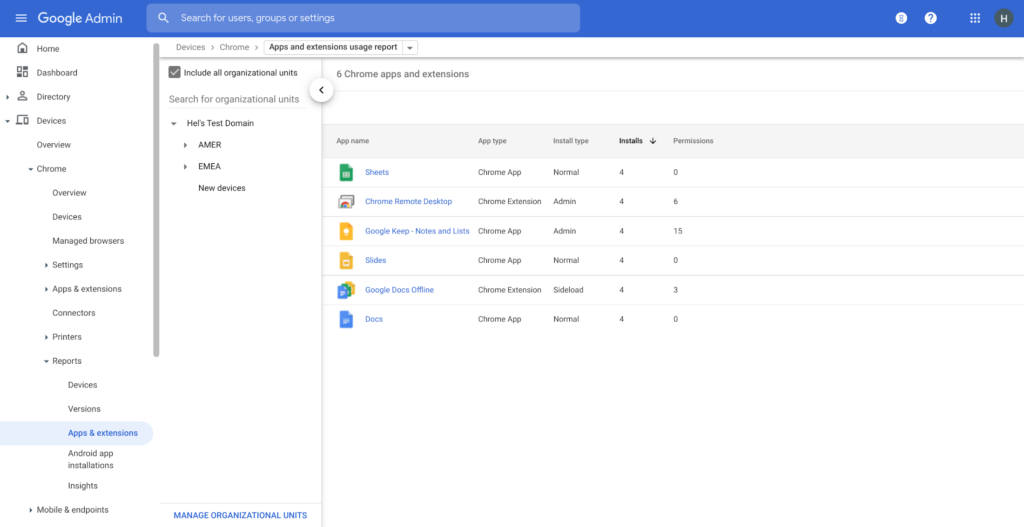
Zero trust security: Finally, Chrome can help modernize an enterprise’s security strategy by migrating to Zero Trust access models. BeyondCorp Enterprise helps secure endpoints by directly integrating Threat and Data Protection in Chrome. This protects against intentional or accidental data loss and prevents malware and phishing in real-time. Additionally, Chrome and BeyondCorp Enterprise provide device trust and endpoint security signals directly from the browser, significantly easing deployment of zero-trust in your environment. In 2022, we plan to partner with leading players in the cybersecurity and zero trust space to add additional integrations.
For security recommendations, check out the new Chrome 2.1 CIS Benchmark that covers independent recommendations on which Chrome policies to configure to help support organizations’ security and compliance needs.
More Relevant Stories for Your Company

Democratizing App Development and Innovation Further with PMI Citizen Developer Partner Program
Today, we are pleased to announce that Google Workspace has joined the Project Management Institute (PMI) Citizen Developer™ Partner Program. By doing so, we are joining organizations from across the globe who are supporting not only the future of work, but the empowerment of the workers who are leading this

Celebrating Google Cloud and State of Wyoming’s Decade of Partnership!
When Wyoming became the first state to transition all its employees to Google Workspace ten years ago, everyone expected a million dollars in cost savings. What started as a move to save money and ease communication has turned into much more. While the cost savings continues to be significant, state efficiency skyrocketed, allowing

Fortune 500 Electronics Manufacturer Makes Collaboration a Competitive Advantage…and Saves $2 Million A Year
When electronics manufacturer Sanmina adopted G Suite several years ago, its goals were clear: reduce licensing costs, simplify management—particularly of its messaging tools—and cut hardware expenditures. Fast forward several years and the Fortune 500 company has achieved those goals and more. By moving to Gmail, Sanmina reduced more than 110 email servers by over 90%,

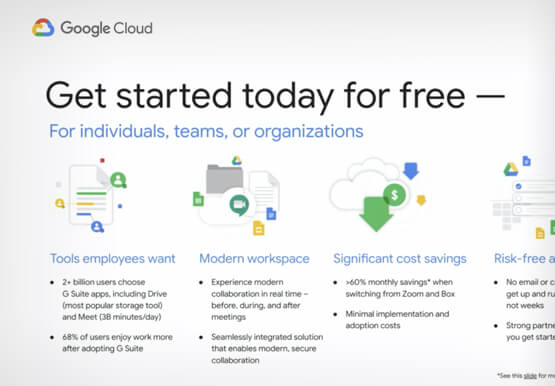
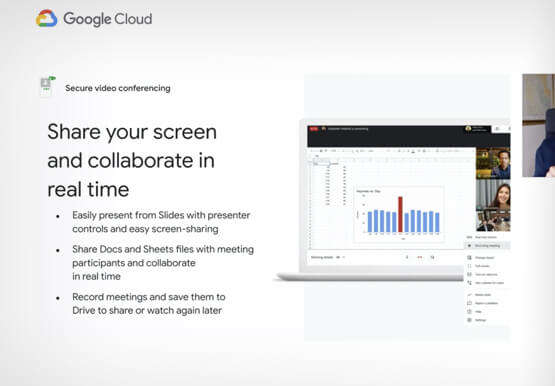

Introducing G Suite Essentials: The simplest way for teams to securely work together from anywhere
With millions of employees forced to work from home, it has become clear that the existing tools many have in place were not cutting it. The Google Cloud team stepped in and accelerated production timelines to launch a new offering. G Suite Essentials is Google's integrated set of tools designed
