






3803
Of your peers have already downloaded this article
10:30 Minutes
The most insightful time you'll spend today!
What Are India’s Biggest Companies Doing on Google Cloud?
9309
Of your peers have already read this article.
6:30 Minutes
The most insightful time you'll spend today!
In the last year, there’s been an upward trend in cloud adoption in India. In fact, NASSCOM finds that cloud spending in India is estimated to grow at 30% per annum to cross the US$7 billion mark by 2022.
At Google, in our conversations with customers, discussions have evolved beyond cost savings and efficiencies. While those are still very relevant reasons for adopting cloud technologies, Indian enterprises are looking to Google Cloud to help them drive digital transformation, identify new revenue generating business models, reach previously untapped consumer markets, and build customer loyalty through greater insight and personalization.
Here are some companies and their stories.
Tata Steel: Mining data and maximizing its power
Tata Steel is a great example of an established enterprise from a traditional industry that is modernizing and embracing cloud computing. With an ambition to be a leader in manufacturing in India and a digital-first organization by 2022, Tata Steel believes smart analytics is key to enhancing operational efficiency and gaining business advantage.
To organize data from siloed systems across the organization and make it easily accessible to all employees, Tata Steel is using Cloud Search and plans to scale it to more than one million documents and 28 disparate enterprise content sources including enterprise resource planning (ERP) and SharePoint. In fact, Tata Steel is one of the first Indian enterprises to harness the power of Cloud Search to meet some of the most aggressive ingestion demands, with indexing durations reduced from weeks to seconds.
They are also leveraging Google Cloud Platform (GCP) services like Google Cloud Storage and BigQuery to build their data lake and enterprise data warehouse so they can take advantage of advanced analytics and machine learning. Managed services such as AI Platform further enable Tata Steel to manage end-to-end AI/ML workflows within the GCP console. This complements their existing on-premise reporting and analytics tools, and brings data management to the forefront of everything they do—from forecasting market demand to predictive equipment maintenance.
“Digital is not just a goal, it’s become a way of life. We are digitizing everything from the deployment of factory vehicles to improving material throughput to marketing and sales. As a result, we have petabytes of structured and unstructured data that is not only waiting to be mined, but that we can generate intelligence from to create opportunities across our multiple lines of business using GCP,” said Sarajit Jha, Chief Business Transformation & Digital Solutions at Tata Steel.
Helping L&T Financial Services reach customers in rural communities
In rural communities, quick access to financial services can make a tremendous difference to livelihoods. L&T Financial Services provides farm-equipment finance, micro loans and two-wheeler finance to consumers across rural India backed by a strong digital and analytics platform. Their digital-loan approval app, which runs on GCP, makes it significantly faster and easier for people to apply for financial assistance to purchase important things such as farming equipment and two-wheelers. It also helps rural women entrepreneurs get quicker access to funds for their businesses through micro loans.
L&T Financial found G Suite to be a far better collaborative tool to help staff work together efficiently. Employees can interact with each other in real time using Hangouts Meet, and the task of information sharing is more seamless and secure through Drive. BigQuery also helps L&T Financial Services generate behavior scorecards to track credit quality of its micro-loan customers.
“Cloud is the technology that enables us to achieve scale and reach. Today there are countless data points available about rural consumers which enable us to personalize our products to serve them better. With access to faster compute power, we can also on-board consumers more efficiently. Our rural businesses have clocked a disbursement CAGR of 60% over the past three years.” said Sunil Prabhune, Chief Executive-Rural Finance, and Group Head-Digital, IT and Analytics, L&T Financial Services.
Creating conversational connections for Digitate’s customers
Digitate, a venture of TCS (Tata Consultancy Services), has integrated Dialogflow into its flagship brand ignio, an award-winning artificial intelligence platform for driving IT operations, workload operations and ERP operations for diverse enterprises. This integration is the next step in ignio’s product development journey, and will enable users to chat or talk with ignio to detect issues, triage problems, resolve them and even predict system behavior.
“ignio combines its unique self-healing AIOps capabilities for enterprise IT and business operations with Dialogflow’s AI/ML-based, easy to use, natural and rich conversational capabilities to create an unparalleled, intuitive and feature-rich experience for our customers,” says Akhilesh Tripathi, Head of Digitate.
Indian enterprises going G Suite
The base of Indian enterprises that are making the switch to G Suite to streamline their productivity and collaboration also continues to grow. Sharechat, BookMyShow, Hero MotorCorp, DB Corp and Royal Enfield are now able to move faster within their organizations, using intelligent, cloud-based apps to transform the way they work.
A hybrid and multi-cloud future in India
IDC predicts that by 2023, 55% of India 500 organizations will have a multi-cloud management strategy that includes integrated tools across public and private clouds. (IDC FutureScape: Worldwide Cloud 2019 Predictions — India Implications (# AP43922319). We look forward to sharing more success stories of Indian enterprises that have taken the next step in their digital transformation journey.
5 Features IT Departments Love About Google Cloud

3666
Of your peers have already read this article.
5:30 Minutes
The most insightful time you'll spend today!
Throughout the past couple of years, I have helped a good number of companies, big and small, migrate their systems to the Google Cloud Platform (aka GCP). During the course of these migrations, there are always a few of those moments where people look at a specific Google Cloud feature and say, “now, that’s cool!”.
More often than not, it is because, coming from other platforms, they have gotten used to some features requiring multiple steps, or some operations being complicated, etc. And often they find out that in GCP you can do this specific operation in a couple of clicks, or by setting up a simple text-based configuration. Then you see that light bulb turning on in their head, and there you go… happy customer.
A few of these happen so often that I compiled them in a list to share with others who might also benefit from these “aha!” moments. You could say these are the five things I wish they told me when I started using Google Cloud.
Projects: Naturally Group Resources Together
A project is a namespace where resources live. Every resource you instantiate in GCP, from load balancers to Kubernetes clusters to virtual machines, belongs to a single project, and has no access (by default) to resources in other projects. User roles and authorisations can be defined per-project and trickle down to everything in it. This has two immediate benefits: you can group things that belong together in neat logical units, and things that don’t belong together are isolated from each other (and isolation is a Good Thing)
This is powerful and quite simple, but it often takes new users off-guard. I’ve had many clients call me and ask me “How can I make sure my developers cannot access the production machines? What’s the best way to create access policies? ”
The answer to this is actually super-simple:
- have a project for development where your developers have rights,
- have a project for production where they don’t.
- That’s it.
Every machine/other resource in the production project won’t be accessible to developers.
Of course there is a lot more to it, and you can refine roles and permissions to a much greater degree using Organizations, Folders, etc. Not to mention all the crazy things you can do with per-project billing. But at least you can say “hey, if it’s a machine in the staging environment then it can be found in the “staging” project”.
Global Virtual Networks Are *Truly* Global
Imagine you are using a Cloud provider and that you have servers in the US, and servers in Singapore, and that they need to communicate.
So you create a VPC (Virtual Private Cloud) network in the US data center, another one in the Singapore data center, and then you will connect them by setting up inter-region VPC peering or a VPN (Virtual Private Network) or a transit VPC or other routing magic.
Lots of work, right? And many moving parts, so lots of opportunities for things to break.
With GCP, however, what makes my clients go “aha!” is when they realize that in GCP a single VPC network covers the entire planet. Only subnets are attached to a geographic location, and virtual machines communicate between subnets on private IPs (good old RFC1918 addresses) — no extra routing needed.
So, to make your server communicate across continents on GCP, here are the steps:
- create a VPC network
- create a subnet in the US, put your US servers in it
- create a subnet in Singapore, put your Singapore servers in it
That’s all there is to it. Your VPC network spanning 2 continents is ready to use. Below is a screenshot of how it looks on my account, for a VPC network called ‘my-global-network’ with 2 subnets. The first column (“us-central1” and “asia-southeast1”) contains the name of the GCP regions (read: data centers). The second column is the subnet name that I picked when I created them.

A machine in the US (on the “us-central” subnet) with IP 10.0.0.5 can communicate directly with a machine in Singapore (on the “singapore”) subnet with IP 10.10.0.8.
Nothing else to set up.
And thanks to the way these networks work, the Google Cloud Load Balancer can present a single IP to the world, and forward traffic to the instances that are the closest to you geographically without having to setup a tedious DNS-based load balancing. But that’s worth an entire blog. I’ll save it for another day.
Firewalls with Tags and (Almost) No IP Addresses
There is no network security without a firewall so unsurprisingly GCP comes with one built-in.
Now, I don’t know about you, but nothing makes my brain hurt like a list of firewall rules displaying IP ranges and addresses and ‘Allow/Deny’ directives. It looks a bit like this:

If you imagine a normal network with a few dozen (hundred?) servers, you can quickly see how this can get out of control. You’d better have a solid printout of your network layout to refer to when you start adding and changing rules. And good luck debugging things!
Wouldn’t it be nice if, instead, you could just tell the firewall: “the HTTP traffic from outside can only reach the HTTP servers and the MySQL database is only reachable by the HTTP server(s) on the same network?”
Turns out it’s pretty simple on GCP by using a little thing called network tags. As the documentation says:
“Network tags are text attributes you can add to Compute Engine virtual machine (VM) instances. Tags allow you to make firewall rules and routes applicable to specific VM instances.”
So let’s see how it works. Firewall rules in GCP are defined in terms of source and target (the traffic flows from the source to the target). You can define filtering rules that apply to the source or the target, and in both cases you can use tags.
This is simpler shown with an example. The rule below states that on the default network, the traffic to the VMs with the tag mysql-server can come from the VMs with the tag http-appserver. Any other traffic is “Deny”-ed by default.

All you have to do is to tag your machines properly, and they will automatically be covered by the rule. You don’t need to enter their IP range.
That’s neat if you ask me. It makes it a lot simpler to grasp what’s happening.
Of course, there’s a TON more to firewalls in GCP. Tags also apply to routes and you can mix and match IP-based rules with tag-based rules. Not to mention that thing called service accounts, but I’ll leave those for another day.
The bottom line is that you can create most rules by just expressing a business need and not having to remember complicated network layouts. I have no hard stats, but I’m pretty sure this has saved me hours of work.
Console Access to VMs from the Browser
Easily access virtual machines (VMs) from the Google Cloud console was one of my first “aha!” moments when I started using GCP.
This is a screen capture of my Google Cloud console, with a virtual machine and its internal IP.

The last column has a header that says “Connect” and when you click on the word “SSH” a separate windows pops up. You wait for a few seconds, and… this is what you get. Your personal shell access — in a browser popup no less.

You are connected through ssh to the virtual machine of your choice. You did not have to download ssh keys and put them in the ~/.ssh directory, do the correct chmod command and run a long-winded ssh -i ~/.ssh/somekey me@<it-took-me-forever-to-copy-paste-the-address-here>
In addition, you have access to a few nifty features such as uploading and downloading files, changing the user etc. Just use the menu behind the cog icon at the top right.
In truth, you should not need to connect directly that often, but when you have to, this is a godsend.
Your Personal Jumphost from the Google Cloud Console
The Google Cloud console has a cool trick: you can actually connect to a virtual environment that is managed by the Google Cloud console itself. It serves a bit as a jump host. You can access most resources from the projects from it, and you can activate it directly from the top menu with, no particular setup on your side. It’s called the Cloud Shell.
This is how it looks at the top right of the console:

When you activate the Cloud Shell, the session opens at the bottom of the console. You get a command line prompt and it’s fully configured with the gcloud command line tool (the jack-of-all-trades of Google Cloud scripting).

You can do a great many things from there, and this even includes uploading and downloading files, editing code or deploying it, a web preview for your AppEngine application, and more.
So you can get access to a fully configured shell environment in your project from any laptop where you can connect with your credentials. On top of this, it persists between connections so you can fine-tune it to your needs and have these changes available the next time you re-connect.
This has saved me many times during my previous life as a traveling consultant!
Live migration
Did I say 5 “Aha!” moments ? Well, you’ve been patient reading all the way to here, so here’s one more for free.
Google Cloud has an amazing way to literally “teleport” a running virtual machine between physical hosts without stopping it. It’s called Live Migration. It allows Google to move your virtual machine away from a defective host, or a host that needs a patch or an upgrade, or for any other infrastructure related reason.
It’s all done in the background, and is totally transparent, so you never really see it happening. Unless you look VERY closely. I once did a demo to a client, where a machine was live migrated while he was simulating a solid network load — and we did not lose a single packet, with no noticeable degradation in latency.
And that’s a wrap!
So there you go. These are 5+1 things that made me go “Aha!” when I became more familiar with the Google Cloud Platform, and that still make my clients do the same.
There is a lot of depth to the platform, and my examples above only scratch the surface of our features. I encourage you to try it yourself. There is a generous free tier, and when you are ready to take the plunge and create that new company, please contact us at Google Cloud for Startups. We’ll get you up and running in no time.
Jerome is a Startup Architect at Google Cloud. Based in Singapore, he helps startups make the most of the Google Cloud Platform.
Datashare for Financial Services: Securing the Publishers and Consumers’ Access to Market Data

8601
Of your peers have already read this article.
4:30 Minutes
The most insightful time you'll spend today!
Access to the cloud has advanced the distribution and consumption of financial information on a global scale. In parallel, the global financial data landscape has been transformed by an influx of alternative data sources, including social media, meteorological data, satellite imagery, and other data. Exchanges and market data providers now find they need to include these new datasets to enrich their products and compete, which has meant they now must consider cloud-based models to keep up with the demands of their customers who expect easy, quick, flexible and cost-efficient ways to consume market data.
To address these needs, today we’re announcing the general availability of Datashare for financial services, a new Google Cloud solution that brings together the entire capital markets ecosystem—data publishers, and data consumers—to exchange market data securely and easily.
Datashare helps organize third-party financial information, making it accessible and useful to market data publishers and data consumers. We open-sourced the entire Datashare solution so market data publishers can now onboard their licensed datasets to Google Cloud securely, quickly and easily, while data consumers can consume that data as a service in tools of their preference, such as BigQuery.
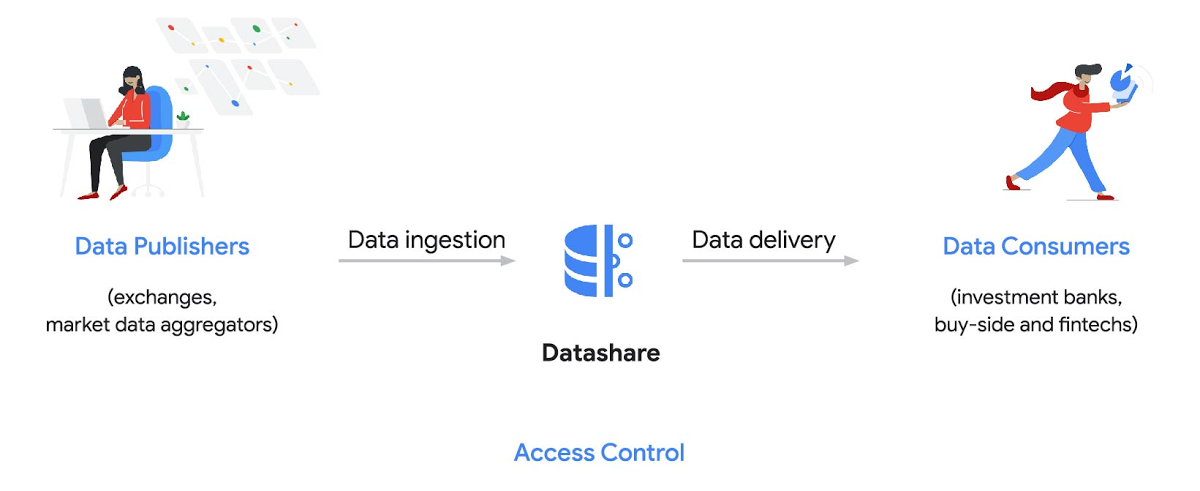
Three ways to distribute and consume your data
Batch data delivery
Datashare provides a batch data delivery mechanism for data publishers to deliver their reference data, historical tick data, alternative market data sources and more via BigQuery, reducing the administrative burden on data consumers to extract insights from data.
Real-time data streaming delivery
By using this event-based data delivery channel for rapidly changing instrument prices, tick data, orders, news and others via Pub/Sub, data consumers can reliably process individual messages or rewind to a point in time to replay a prior market scenario and test model changes.
Monetizing licensed datasets
Market data publishers can onboard their licensed datasets to Google Cloud and make them available via a one-stop-shop on Google Cloud Marketplace, enabling a new sales channel to expand market reach.
Reference architecture
Check out the diagram below to see how you can share your batch and real-time data directly to your Google Cloud customers with BigQuery and Pub/Sub.

As you can see in the above reference architecture, both publishers and consumers can derive several benefits from the solution:
Benefits for data publishers
- You no longer have to maintain your own delivery and licensing infrastructure.
- You can easily package and deliver granular data products and experiments with SQL.
- You can have a solution that scales with your business as data volumes and number of customers grow.
Benefits for data consumers
- Your data is ready for analysis and machine learning (ML)— you no longer have to maintain extract, transform, and load (ETL) pipelines to load files and transform data.
- You can avoid the expense and burden of maintaining multiple copies of large data files.
- You can be more targeted with consumption of data using BigQuery queries, improving performance, and compliance, and reducing cost.
Accessing the datasets
Google Cloud has been working with multiple industry firms on innovating in the market data space. By using Datashare for publishing, data publishers can make their entire datasets available on Google Cloud. Early adopters of Datashare include firms such as OneTick and Accern. OneTick’s datasets include reference and historical futures data (that can be accessed in our console with your login). Accern’s datasets include alternative data such as market sentiment and credit analysis data (that can be accessed in our console with your login).
To make it more helpful, we partnered with Accern to create a hypothetical scenario to describe the data acquisition and analytics process step-by-step.
Accern use case
As a sustainability analyst, you require an economic, social and governance (ESG) dataset to determine which sector is the most widely covered ESG sector by analysts, and to also identify the sector with the lowest ESG sentiment score. Now, you can discover and acquire an ESG dataset in Google Cloud.
Step 1. Navigate to the Financial Services solutions page in the Google Cloud console:

Step 2. Click a dataset, for example Accern AI-Generated ESG Insights, then review the overview details, plans and pricing, documentation and support information. To view the available pricing tiers, click ‘View All Plans’. Once you’ve decided on a tier that you would like to subscribe to, click ‘Select’, choose a billing account and review and accept the terms of service to complete the subscription. Once the steps are complete, click ‘Subscribe’ at the bottom. An overlay window will appear, click ‘Register with Accern’ to activate and complete the subscription.
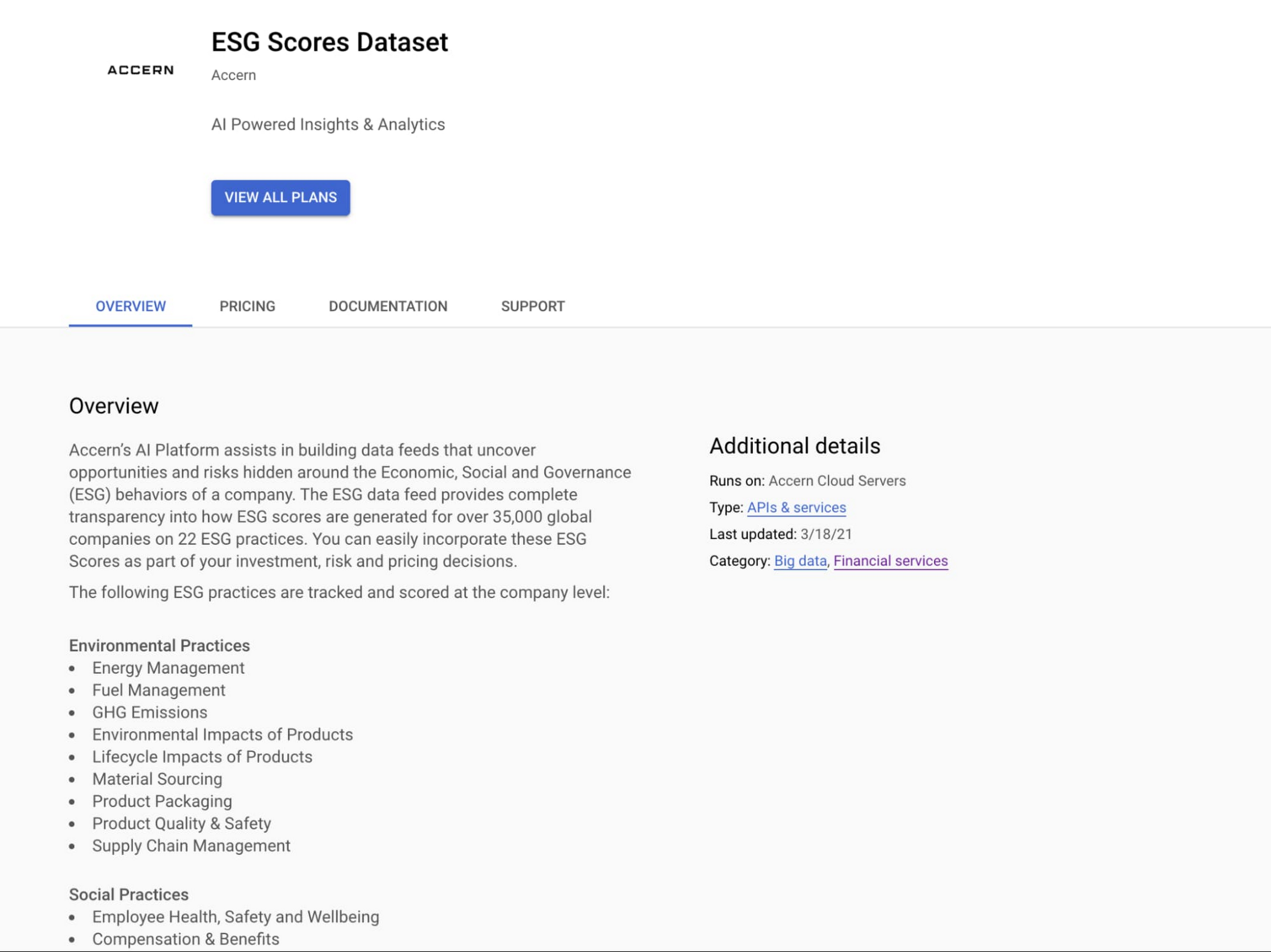

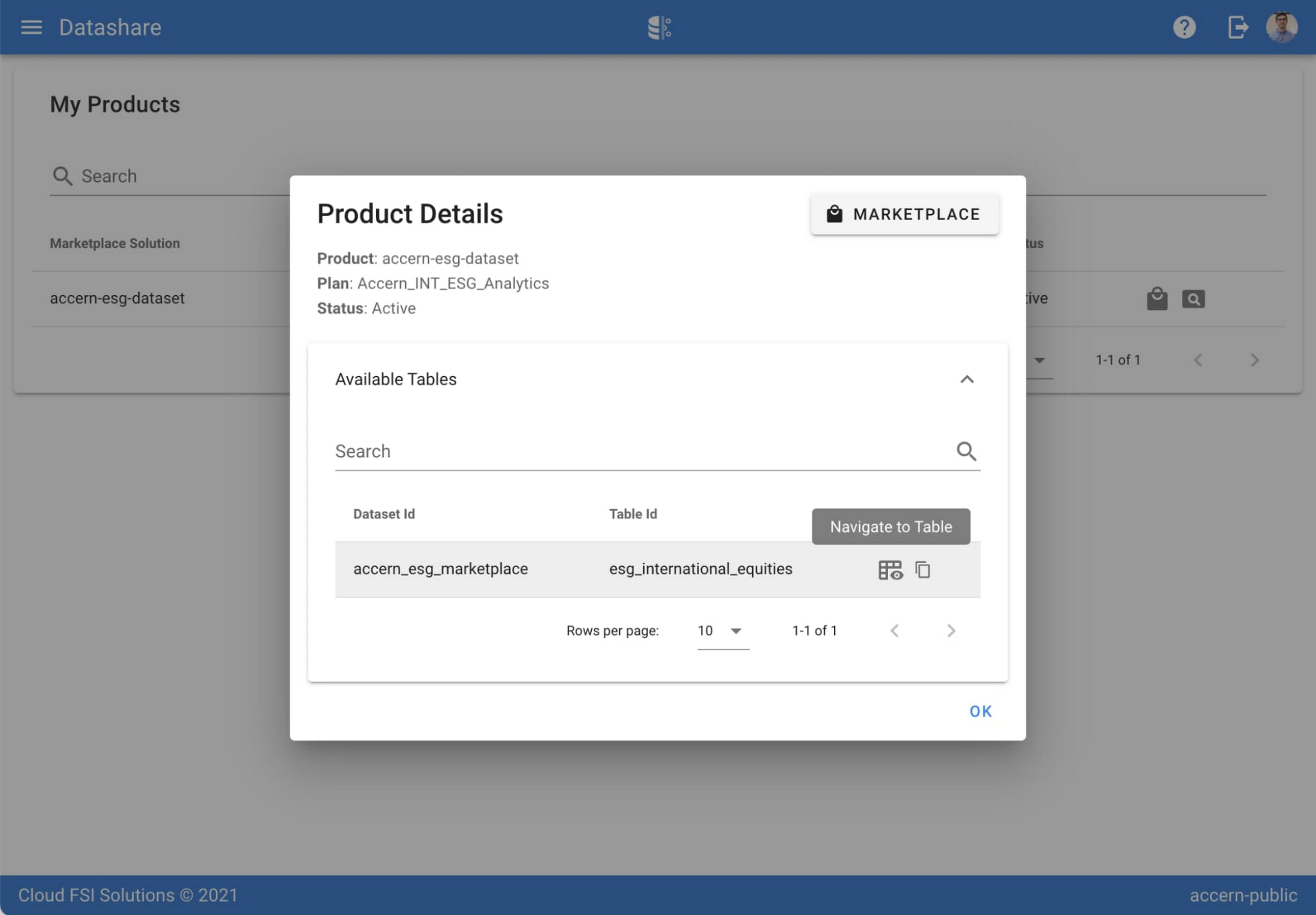
Step 3. Once activation is complete, you’ll be directed to the Datashare ‘My Products’ screen. Voila! You are now subscribed to Accern’s ESG Scores dataset and can access it in your Google Cloud instance using BigQuery. To access the data, click the hour glass icon on the corresponding ‘My Products’ record that you just purchased. An overlay will present you with the details on the dataset and/or table. Click the ‘Navigate to Table’ button to navigate through to the BigQuery console.


Step 4. Now that you have access and are in the BigQuery console, it’s time to generate data insights.
For this example, we’ve eliminated the company identifying information that is included as part of the subscription and aggregated company ESG in a view where each row represents a day, an industry sector, a specific identified ‘ESG Issues’ (event_group and event) and the respective ‘ESG Sentiment’ per issue.

For example, row 1 indicates that within the ‘Healthcare’ sector, there was a ‘Social – Civil Society’ issue identified and it had a negative ESG sentiment score of -15.35.
Step 5. Generate a report by exporting it to Data Studio to build visualizations and conduct additional analysis on the ESG data.
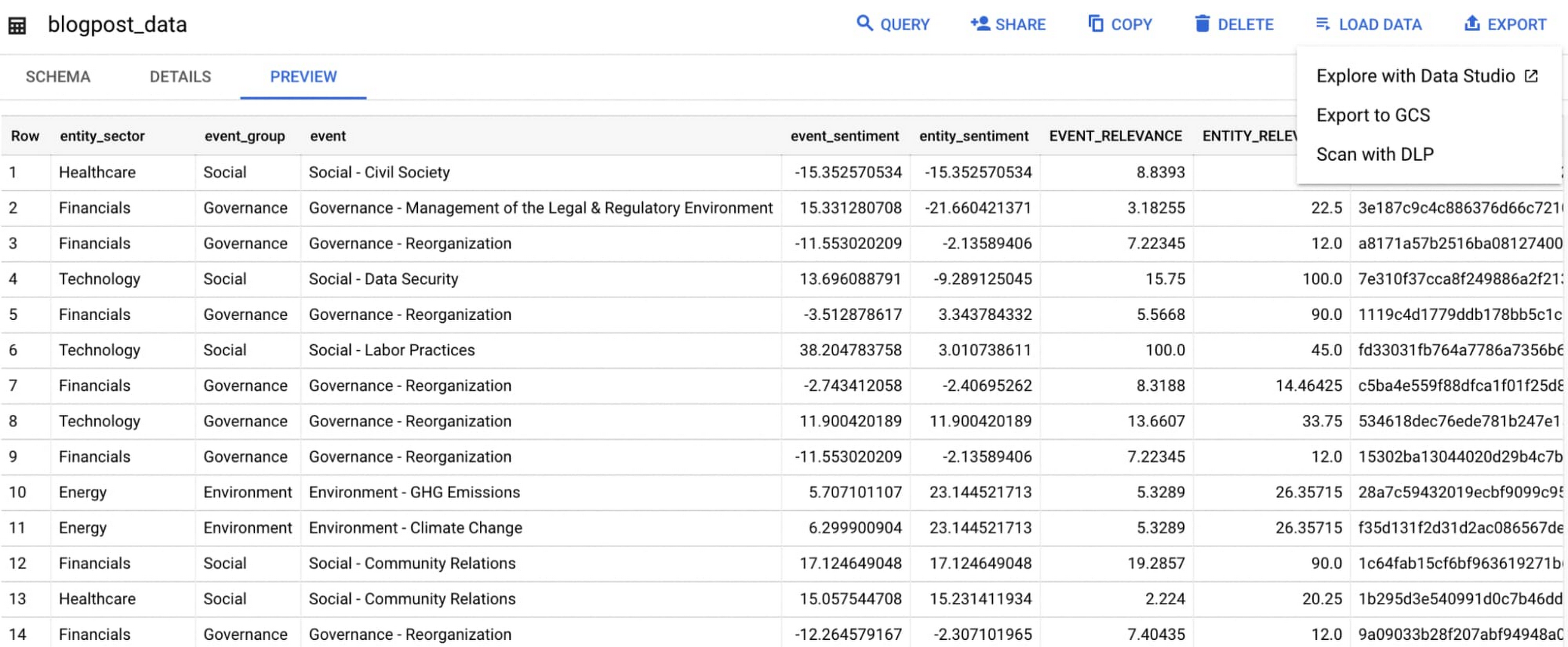
Select ‘Export’ and ‘Explore with Data Studio’.
Step 6. Build a simple/basic report.
Now that the ESG data appears in Data Studio, you can start by building a simple chart to help you understand which industry sectors have the highest volume of discussions around ESG and the overall ESG Sentiment per industry sector.
To build the chart:
- Select the chart type ‘Table’.
- Include
Entity_Sectoras your dimension to aggregate results by ‘Industry Sector.’ - Include
Signal_IDas a measure to count the number of ESG passages identified per ‘Industry Sector.’ - Include
AVG(Event_Sentiment)as a measure to display the overall ESG Sentiment per ‘Industry Sector’ across ESG Issues.

You can see sectors that are most discussed when it comes to ESG related topics and their corresponding ‘ESG Sentiment’ scores.
Step 7. Build your final report in Data Studio.
As a next step you can further drill into the data to understand ESG data specific to each ‘Industry Sector’ and identify positive and negative ESG practices.
Accern has built a more complex sample dashboard and made it available publicly here. You can interact with this report and play around with the data. The dashboard can help to identify material ESG insights for each sector to inform your investment and risk processes. If you have additional questions, you can reach out to Accern directly.

Discovering, accessing and analyzing licensed datasets is quick and easy. Stay tuned for more updates on new licensed datasets.
Publishing your data via Datashare
If you are a publisher of market data, alternative, or exotic data, you can use Datashare to get it published on Google Cloud Marketplace.
Start by joining the Partner Advantage program by registering for the Partner Advantage Portal and applying for the Partner Advantage Build Model engagement. Visit our getting started guide for information to get started on publishing licensed datasets in the Marketplace. Stay tuned for a future blog post about using Datashare to publish datasets in the Marketplace.
More solutions for capital markets
Check out other Google Cloud solutions for capital markets.
Tencent Africa Cuts Cost and Improves Stability with Google Cloud

3433
Of your peers have already read this article.
3:00 Minutes
The most insightful time you'll spend today!
About Tencent Africa
Tencent Africa is dedicated to making every day easier for customers and brands. Opening its doors in 2013 as WeChat Africa, the company is responsible for WeChat operations on the continent.

About Siatik Systems
Founded in 2008, South Africa-based Siatik Systems is a leading Google Cloud Platform solutions provider with a focus on cloud integration services, information technology consulting services, and bespoke software engineering solutions.

Google Cloud Results
- Reduced latency in its service from 180 to 35 milliseconds with powerful hardware and a fast, global network from Google Cloud Platform
- Cut costs with per-minute billing and sustained use discounts
- Increased the speed of provisioning new servers with easy-to-use interface of Google Compute Engine
As one of Africa’s leading technology companies, Tencent Africa is responsible for WeChat operations on the continent. WeChat Africa has successfully launched a number of features including the WeChat Wallet, a mobile payment service for smartphones, which enables seamless and secure transactions for friends to send money to one another, cash money out at Standard Bank ATMs, use at accredited retailers, and make purchases from any SnapScan merchant in South Africa. Under the new name, Tencent Africa recently launched two new mobile products, JOOX, a mobile music streaming application, and VOOV, a social live streaming application.
When China’s Tencent brought its hugely popular instant messaging service WeChat to South Africa, it faced a near saturated market. To gain traction, Tencent Africa had to showcase WeChat’s versatility as a platform that goes far beyond just instant messaging. Engaging with local financial partners helped WeChat launch a WeChat Wallet to facilitate electronic payments, while providing exclusive content from South African cultural figures helped bring the platform extra publicity.
As WeChat started to grow its customer base, its on-premises infrastructure was stretched beyond its limits and the company looked for a cloud-based solution. After evaluating all its options, Tencent Africa found Google Cloud Platform best suited its needs.
“We’re a growing business and constantly upgrading our infrastructure. Getting new servers was becoming quite expensive so we wanted a cloud-based solution to reduce costs,” says Christoff Albertyn, Head of Technology at Tencent Africa. “When we did some latency testing, Google came out on top, so it made sense to go with them. Everybody loves Google, it’s a great brand. Just knowing a company like Google is behind it gives you peace of mind.”
Building a platform to scale
Instant messaging services need a stable infrastructure, the ability to scale at speed, and lightning fast performance. When Tencent Africa built an Official Accounts API to run a number of services on WeChat, to help companies engage with users on the platform, latency was its main concern. The Official Accounts services had to deliver replies over WeChat in under five seconds or the connection would drop.
Between the API on-premises servers in South Africa and WeChat’s main servers in China, Tencent Africa’s services regularly hit the limits of the permissible response time. In addition, by 2015, WeChat was starting to garner more customers across South Africa and Tencent Africa had to provision more servers. The on-premises servers were simply being asked to do too much, and expansion was proving expensive, so the company looked for a cloud-based solution.
Before committing to anything, Tencent Services did a thorough latency test of several cloud-based solutions. Google Cloud Platform came top. Tencent also engaged the help of Siatik, a Google Partner, to gauge what solutions best fit the company’s needs and help implement them. Siatik customers span both the public and private sectors and its consultants are regularly engaged in the health care, education, financial and technology industries. In order to provide leading technology solutions, it partners with industry leaders, such as Google, to provide best-of-breed infrastructure and cloud platform solutions to its customers.
“Siatik was a great partner to work with,” says Christoff. “Any questions I had, I could just pick up the phone and whatever it was they’d help me out. They were also able to get some of the team from Google to come to our offices and see how we worked, which was really good.”
With a simple, clean interface in Google Compute Engine, the company was able to spin up virtual instances very quickly and begin migrating its stack to Google. When it became more comfortable with Google Cloud Platform features, Tencent used Google Cloud SQL and Google BigQuery to manage its data streams, and Google Cloud Storage to store them safely.
From day one, it was very smooth. The interface was amazing—Google must have spent a long time perfecting it because it was so easy to use says Christoff. “I set up the first virtual machine in no time without any struggles.”
In addition to powerful hardware from Google Compute Engine, the fast, global network from Google helped to speed up performance. With the infrastructure ported over to Google, Tencent also brought in G Suite as an office productivity solution, which eased the pressure on its servers even more. Throughout the process, Siatik were on hand to advise and provide technical guidance whenever any issues came up.
What I really like is how quickly you can spin servers up. There’s no messing about and the interface is really easy to use, says Christoff. “You can have a virtual machine running in just a few minutes. It’s very impressive.”
Cutting costs, raising expectations
Google Cloud Platform helped Tencent Africa to slash its latency. Before the migration, pings to the Chinese servers and back would regularly take 180 milliseconds. Afterwards, this fell to around 35 milliseconds, helping to ensure smooth service to Tencent’s South African customers. Google offers innovative pricing, such as per-minute billing and sustained use discounts, which helped significantly cut server costs compared to an equivalent on-premises solution.
As its customer base grew, and Tencent Africa began to release new products, the ease of use of Google Compute Engine meant that spinning up new servers took minutes instead of hours and allowed the company to scale up and down at speed. Exploring products such as Kubernetes for rapid deployment or TensorFlow for machine learning, Tencent Africa continues to evolve and experiment with new products to keep WeChat a growing success in South Africa.
“Initially, we just used per-minute billing, but when I saw how much work we were doing with Google BigQuery and Google Cloud SQL, we started to generate sustained-use discounts, which helped save us a lot of money,” says Christoff. “The other great thing is, Google Cloud Platform monitors how you’re using it and tells you what else you can do to reduce costs.”
Go Green with Google’s Latest Tool and Pick the Most Sustainable Cloud Region

5674
Of your peers have already read this article.
1:30 Minutes
The most insightful time you'll spend today!
As a Google Cloud customer, your carbon footprint is already carbon neutral: Google first achieved carbon neutrality in 2007, and has been purchasing enough solar and wind energy to match 100% of its global electricity consumption since 2017. Now, Google is targeting a new sustainability goal: operating on carbon-free energy (CFE) 24/7, everywhere, by 2030.
We want to empower you to make more sustainable decisions and progress with us towards this 24/7 carbon-free future. Earlier this year, we published the carbon characteristics of our Google Cloud regions. Later, we introduced a simple tool to help you pick a Google Cloud region, taking variables like price, latency and sustainability into account. Our next question was: what’s the best way to surface that sustainability info when you’re actually picking a region for your cloud resources?
Starting today, we are indicating regions with the lowest carbon impact inside Cloud Console location selectors. Available today for Cloud Run and Datastream, you’ll see it roll out to more Google Cloud offerings over time:
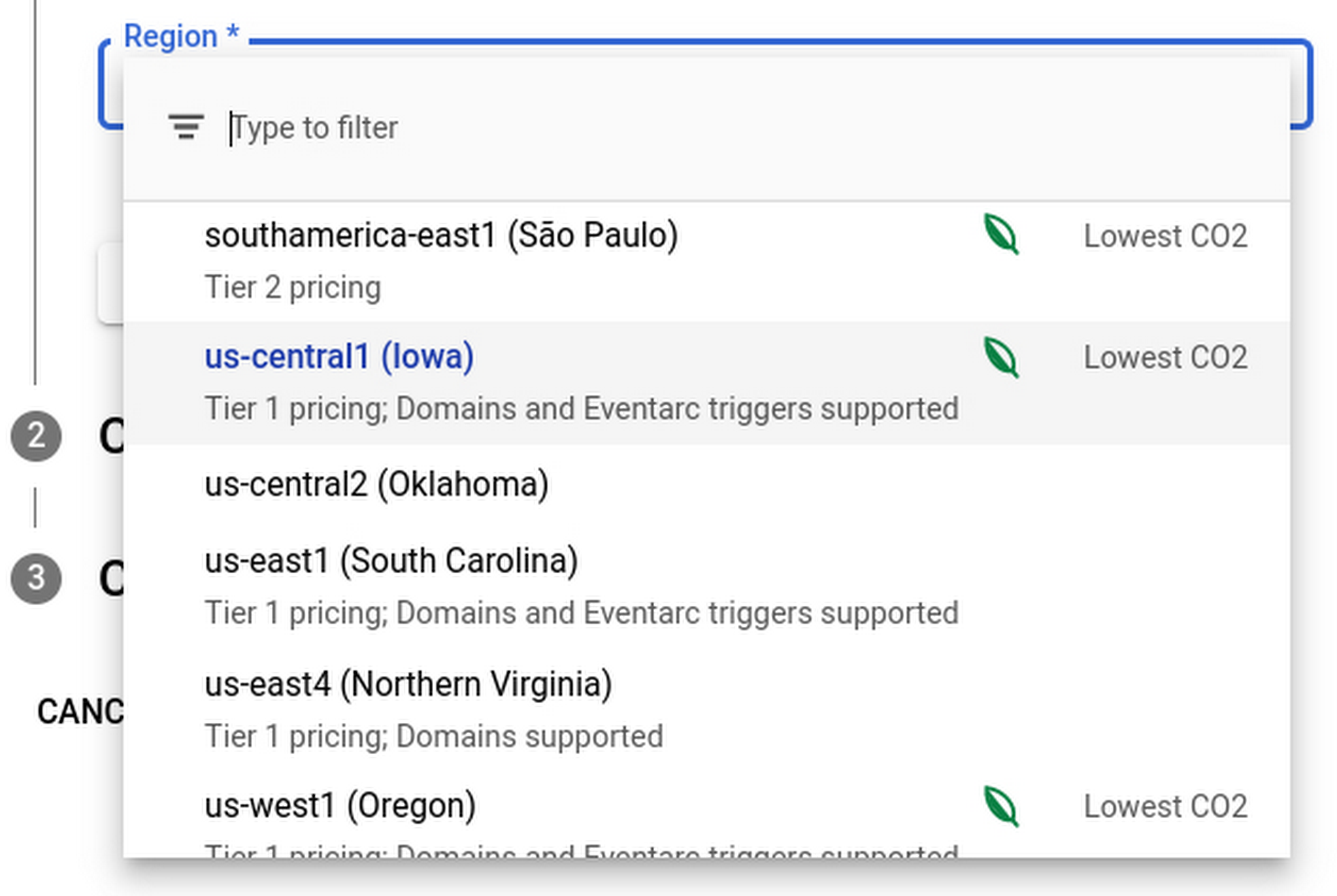
Regions that feature the “Lowest CO2” and the leaf have a CFE% of at least 75%, or, if the information is not available for this region yet, a grid carbon intensity of maximum 200 gCO2eq/kWh. You can read more about how we calculate these metrics in our documentation.
Before releasing this feature, we ran experiments to measure its impact: Users who were exposed to the enhanced region picker were 19% more likely to select a “low carbon” region for their Cloud Run service—a significant lift. These results show that by displaying carbon information in context of when you make the decision of picking a region, we are helping you make more sustainable decisions.
By sharing and displaying carbon information of Google Cloud regions, together we’re making tangible progress towards our goal of a carbon-free future. Learn more about Carbon free energy for Google Cloud regions.
More Relevant Stories for Your Company



Google’s Tau VMs Help Nylas Reach New Heights!
Nylas is a leading provider of scalable and secure communications data platform that powers business process and productivity automation and drive digital engagement for its customers that are fast-growing start-ups as well as large enterprises. The company approached Google Cloud with a complex challenge involving its legacy architecture that gave

How Do You Cut Costs and Improve Staff Productivity, and Business Visibility? Ascend Money Has an Answer
Hundreds of millions of residents of South East Asia have only limited access to banking and finance services. However, help is at hand. One of South East Asia's largest fintech businesses, Ascend Money is using digital technologies to realize its mission of enabling as many people as possible to access

Vimeo Looks to Google Cloud for High-Quality Video Delivery Service
Vimeo is a video-sharing platform that’s home to imaginative video creators and hundreds of millions of viewers. Sixty million people create, host, and sell high-quality videos on Vimeo, including more than 800,000 who subscribe to the service’s premium tools. Over 240 million people in more than 150 countries watch videos

The Cloud-First Imperative To Accelerate Digital Transformation
In a study of 360 business and technology decision makers and influencers from Indian enterprises, conducted by Forrester Consulting, it is revealed that public cloud adoption in India is on the rise with 2 in 3 organizations planning to increase their cloud spending by 5% or more in the next
