





This Diagnostic Company is Revolutionising Healthcare Delivery with AI
5417
Of your peers have already read this article.
5:30 Minutes
The most insightful time you'll spend today!
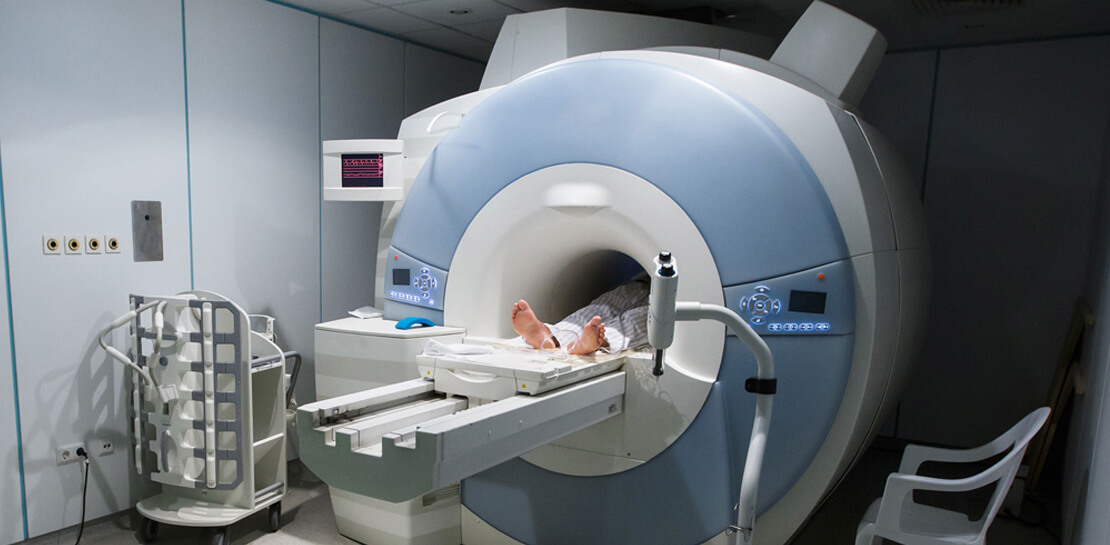
Dr. Elliot Smith cannot be accused of lacking ambition. A high achiever with a Ph.D. in Electrical Engineering and a specialist in magnetic resonance imaging (MRI) systems, Smith aims to deliver top quality healthcare to anyone in the world — regardless of their location or wealth.
Dr. Smith has already made strides on this journey with his Brisbane, Queensland-headquartered business, Maxwell MRI. “I saw there was a big gap in the market around automating the diagnosis of health conditions,” he says. “Existing processes were typically manual and involved a lot of people.”
Artificial intelligence (AI) and machine learning can remove a key obstacle to scaling out medicine and improve the efficiency and accuracy of diagnosing conditions, the healthcare entrepreneur believes.
“Our grand vision is to build an AI doctor that anyone can receive affordable support from and connect to in order to obtain results,” explains Dr. Smith.
Maxwell MRI presently enables clinicians to submit anonymised MRI scans to a machine learning enabled AI platform to help diagnose prostate cancer. The service is sold to clinicians who can then charge a per-session fee to clients. As well as obtaining results for individual cases, the MRI scans and associated information is used to ‘train’ the platform to deliver accurate diagnoses faster and in a more affordable way than existing systems do.
Dr. Smith and his team started by running a number of functions and processes on a single server with graphics processing units (GPUs) and sizable hard disk capacity. However, this infrastructure could not scale to support the planned growth of the business. Each case Maxwell MRI processes involves about 200MB of data in MRI scans alone. Once supplementary data, blood test result, pathology results and genetic information is included, this load can reach more than 1GB of data per patient.
The business aimed to process 150,000 cases by the end of 2018. This required a service that could deliver massive scale in data storage and compute, and could easily be accessed from any location. “We wanted to move from three GPUs to 30 GPUs without having to buy more servers or other associated equipment, so the cloud was the natural next step,” says Dr. Smith.
Maxwell MRI evaluated Google Cloud Platform (GCP) and determined that the managed services component of GCP would remove the burden of infrastructure deployment and administration. In addition, Google Cloud Machine Learning Engine would enable the business to scale to as many GPUs as needed to meet demand.
Maxwell MRI started with some small experiments to determine that GCP met all its requirements and completed its migration to the platform in February 2017. “We really started to scale up the data we had and consequently our computing requirements at that time,” Dr. Smith says.
The Maxwell MRI platform features an upload service that enables clinicians to upload imaging and associated data. This service triggers several different upload pipelines that clean and standardise data. They then write imaging data to Google Cloud Storage, and more structured data to a combination of Google Cloud Datastore and Google Cloud Spanner.
The platform then converts the information into records that can be used to ‘train’ new machine learning configurations or run evaluations through existing machine learning pipelines.
“The tasks we perform including segmenting various anatomical regions for analysis and sending those results back into Google Cloud Storage,” says Dr. Smith. “This then commences that repeated process of running Google Cloud Dataflow pipelines and machine learning algorithms, and presenting those outcomes back to the clinicians.”
Existing Literature Validated
The data processed and analysed to date has, Dr Smith says, enabled Maxwell MRI to help validate existing literature that indicates clinicians lack confidence in existing early-stage testing procedures for prostate cancer. This prompts them to move quickly to the biopsy stage to assure themselves their diagnosis is valid. “New technologies have a lot of potential to rectify this situation and guide treatment to be more accurate, specific and cost-effective,” he says.
Results Delivered in 10-15 Minutes
More specifically, using GCP has enabled Maxwell MRI to guarantee to clinicians that results will be delivered within minutes. “Clinicians are used to getting results back in two days to a week,” says Dr. Smith. “We’re saying that with our platform running on GCP we’ll deliver you results in 10 to 15 minutes, regardless of the number of patients coming in.”
Running on GCP has enabled the business to accelerate its development cycles, test new ideas easily on a subset of data, test in parallel and deliver new services considerably faster than in another environment. In addition, the flexible GCP charging model aligned with the ability to scale compute capabilities quickly and easily has enabled the fledgling business to control its costs.
Google technologies are poised to play an integral role in the business’s future. “With Google available, it doesn’t make sense for us to use our own infrastructure,” Dr. Smith says. “Our expertise in AI, machine learning and clinical engagement complements cloud platform specialties of infrastructure, managed services and ease of use. We see a bright future ahead in helping to transform healthcare globally.”
4552
Of your peers have already watched this video.
31:00 Minutes
The most insightful time you'll spend today!
How Google Secures its Data Centers: Watch Video
Security is in the DNA of Google Cloud’s dozens of data centers, complex network and workloads scattered the globe. Take a tour to the nucleus of data center’s six layers of physical security designed to keep unauthorized access at bay, and also learn about Google Cloud’s security fundamentals to leverage the same philosophy on Google Cloud. Watch now!
6566
Of your peers have already watched this video.
17:00 Minutes
The most insightful time you'll spend today!
Eli Lilly’s Custom-built Translation Service Leverages Google’s Translation Engine
Eli Lilly leverages Google Cloud’s machine translation to globalize content to serve their multilingual employees. Watch the video to learn how the healthcare company built an in-house solution powered by Google Cloud APIs to address the challenge of translating multilingual content at scale. Also explore Google’s innovations and investments into services for language translations produced for machine learning (also called as machine translation or neural machine translation) for safe and secure documents and text translation via an easy-to-use interface and API.
AI Features in Apigee X Helps Build and Manage APIs at Scale

5274
Of your peers have already read this article.
2:00 Minutes
The most insightful time you'll spend today!
APIs are the backbone of digital transformation. Via APIs, you can securely share data and functionality with developers both inside and outside of your organizational boundaries, letting you build applications faster, seamlessly connect and interact with partners, and drive new business revenue.
Because APIs encompass business-critical information, any downtime or performance degradation can lead to significant loss in revenue, customers, and brand value. Therefore, there’s mounting pressure on operations teams to ensure that APIs are always available and performing as expected. If the APIs go down, so too do the services that fuel customer experiences and on which the organization relies for collaboration and business processes.
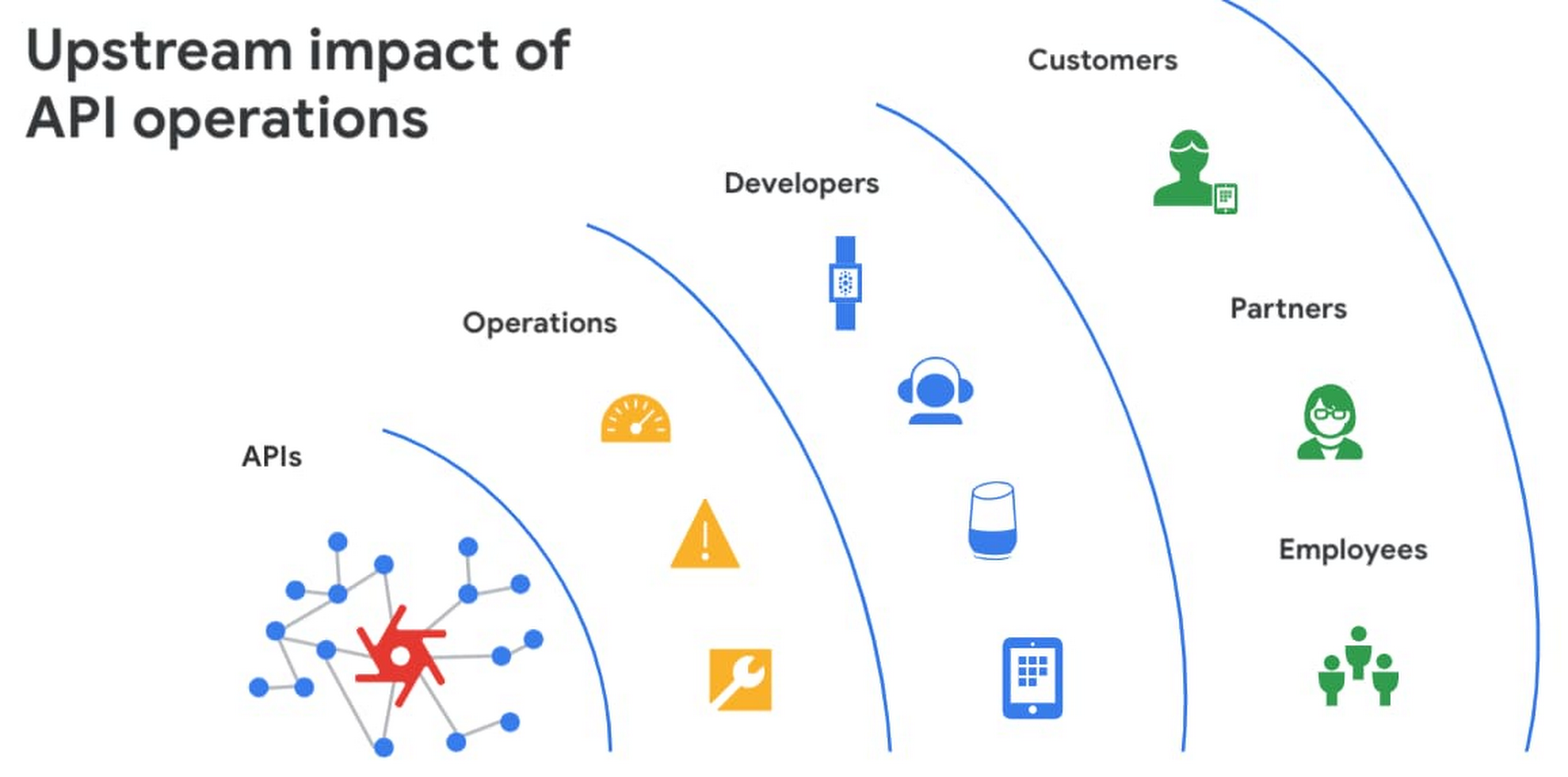
However, as you build and scale your API programs, it becomes practically impossible for API operators to manually monitor and manage all your APIs. To help, we brought the power of industry-leading AI and ML technologies to API operations via Apigee X, a major release of our API management platform. Apigee X seamlessly weaves together Google Cloud’s expertise in AI, security and networking to help you efficiently build and manage APIs at scale.
Put your API data into action
Apigee applies machine learning to your API metadata and provides you the required tools that simplify various aspects of API operations. A great example of AI for APIs is anomaly detection:
- AI-powered rules trigger alerts based on a set of predefined conditions that are determined by applying Google’s industry-leading machine learning models to your historical API data.
- Auto-thresholds adjust the monitoring criteria of your APIs and set them to pattern-based values.
- Reduce overhead results because operators don’t have to manually monitor anomalies or adjust the monitoring thresholds on APIs.
“By applying AI and ML models to our historical API data, these advanced features are able to alert us about scenarios we haven’t thought of. Such automation capabilities significantly reduce our upfront efforts. And from a security perspective, the actionable insights help us ensure that our proxies are exposed only over secure HTTPs ports and adhere to compliance requirements. We’re also able to closely monitor user activity and quickly pull out reports during audits.” – Adam Brancato, Sr. Manager, Global Technology and Security at Citrix

As our customers scale their API programs, they find it extremely useful to harness AI-powered capabilities. In our recent State of the API Economy 2021 report, we found a 230% increase in enterprises’ use of anomaly detection, bot protection, and security analytics features.

To learn more about Apigee X, and see AI and machine learning in action, check out this video, and to try Apigee X for free, click here.
Measuring Deforestation in Extractive Supply Chains With ML

2570
Of your peers have already read this article.
2:30 Minutes
The most insightful time you'll spend today!
Introduction
In my experience, I have observed that it’s common in machine learning to surrender to the process of experimenting with many different algorithms in a trial and error fashion, until you get the desired result. My peers and I at Google have a People and Planet AI YouTube series where we talk about how to train and host a model for environmental purposes using Google Cloud and Google Earth Engine. Our focus is inspiring people to use deep learning, and if we could rename the series, we would call it AI for Minimalists since we would recommend artificial neural networks for most of our use cases. And so in this episode we give an overview of what deep learning is and how you can use it for tracking deforestation in supply chains. I also included a summary of the architecture and products you can use in this blog that I presented at the 2022 Geo For Good Summit. For those of you interested in diving even deeper into code, please visit our end-to-end sample (click “open in colab” at the bottom of the screen to view this tutorial in a notebook format).
What’s included in this article
- What is Deep Learning?
- Measuring deforestation in extractive supply chains with ML
- When to build a custom model outside of Earth Engine?
- How to build a model with Google Cloud & Earth Engine?
- Try it out!
What is Deep Learning?
Out of the many ML algorithms out there, I’m happy to share that deep learning or artificial neural networks is a technique that can be used for almost any supervised learning job.
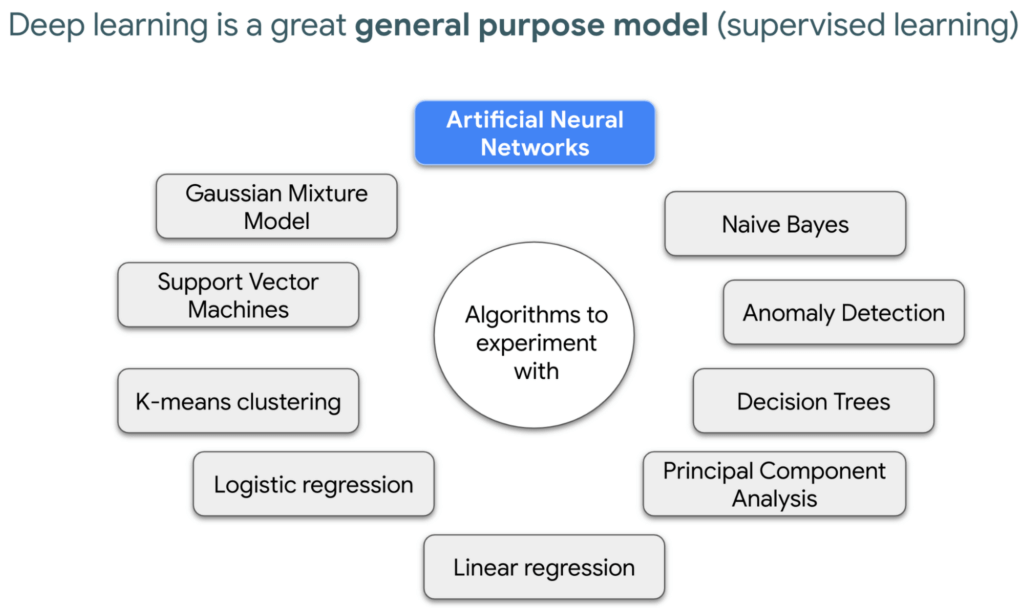
In supervised learning, you tell a computer the right answers to look for, through examples. Deep learning is very flexible, and is a great go-to algorithm. Especially for images, audio, or video files which are types of multidimensional data. This is because each of these data types have one or more dimensions with specific values for each point.
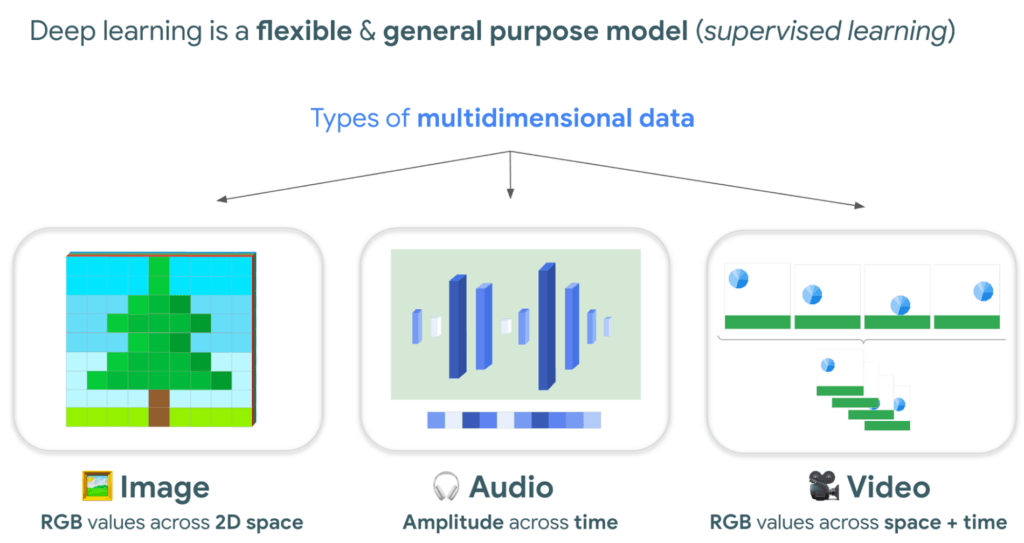
And training a model to classify tree species using satellite images is kind of like an image segmentation problem, where every pixel in the image is classified.
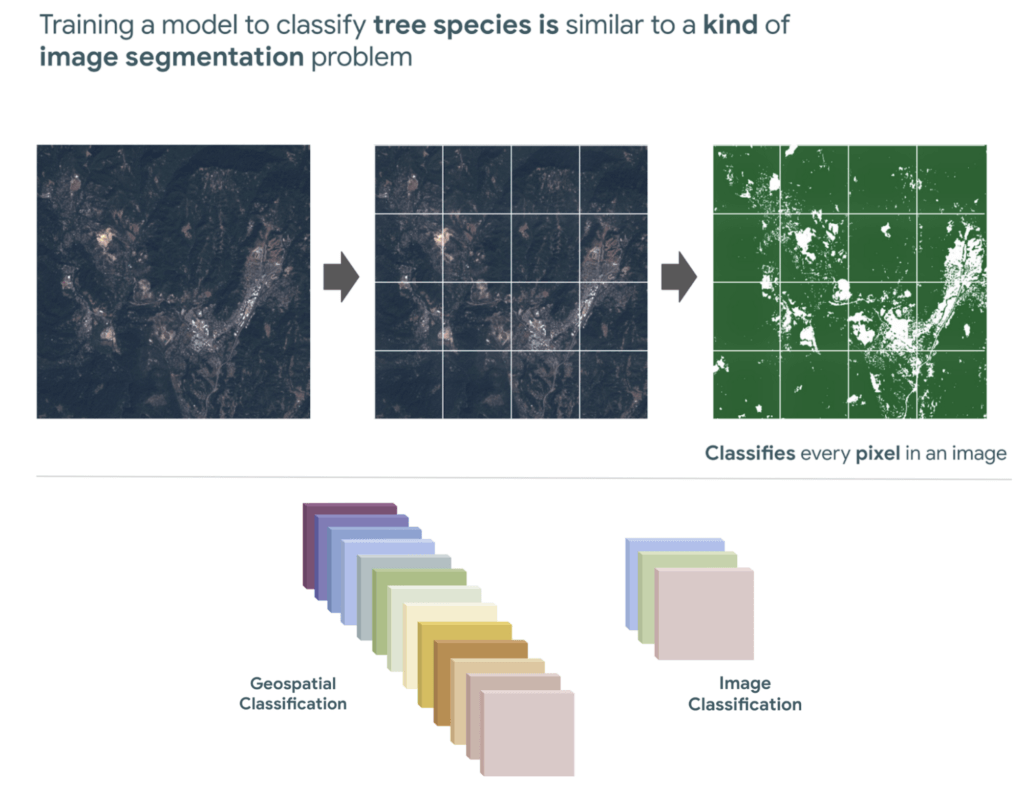
“Deep learning approaches problems differently”
David Cavazos, Developer Programs Engineer
There’s no writing a function with explicit & sequential steps that reviews every single pixel one by one for every image, as traditional software development does. Let’s say you wish to build a model that classifies tree species. You don’t spend time coding all the instructions, but instead give a computer examples of images with tree species labels, and let it learn from these examples. And when you want to add more species, it’s as simple as adding new images of that species to retrain the model.
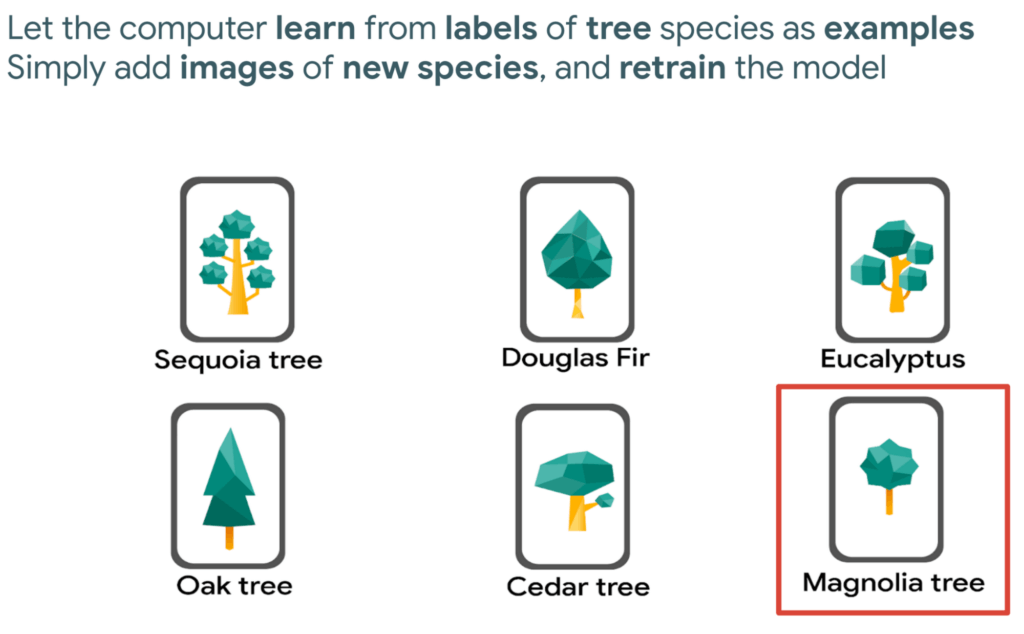
Measuring deforestation in extractive supply chains with ML
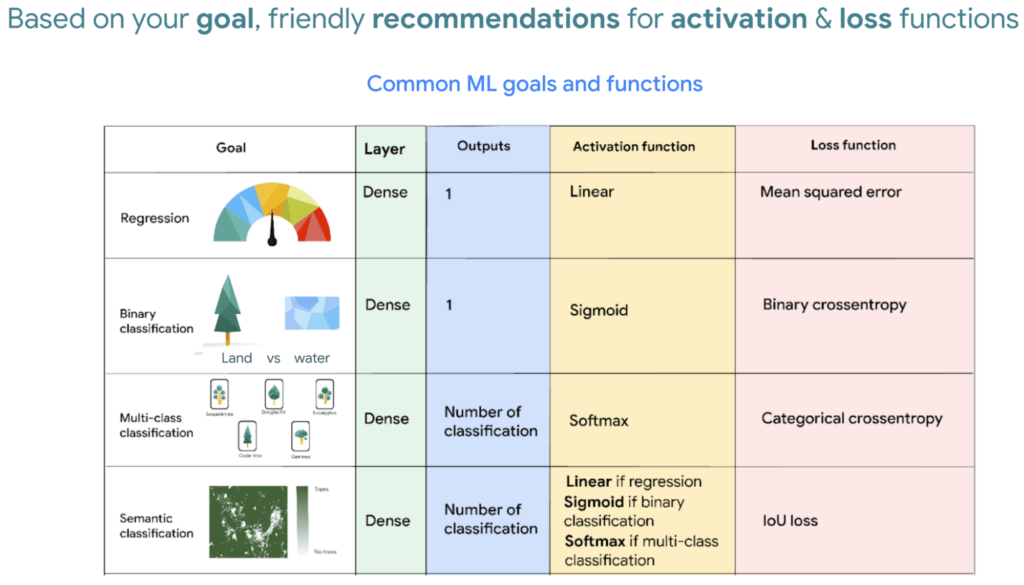
So let’s say we would like to measure deforestation using deep learning; to get started with building a model we first need a dataset that includes satellite images with an even amount of labels marking where there are trees and where there aren’t. Next, we choose a goal, here are a few common ones. In our case, we simply want to know if there are trees or not for every pixel, and so this would be a binary semantic segmentation problem.
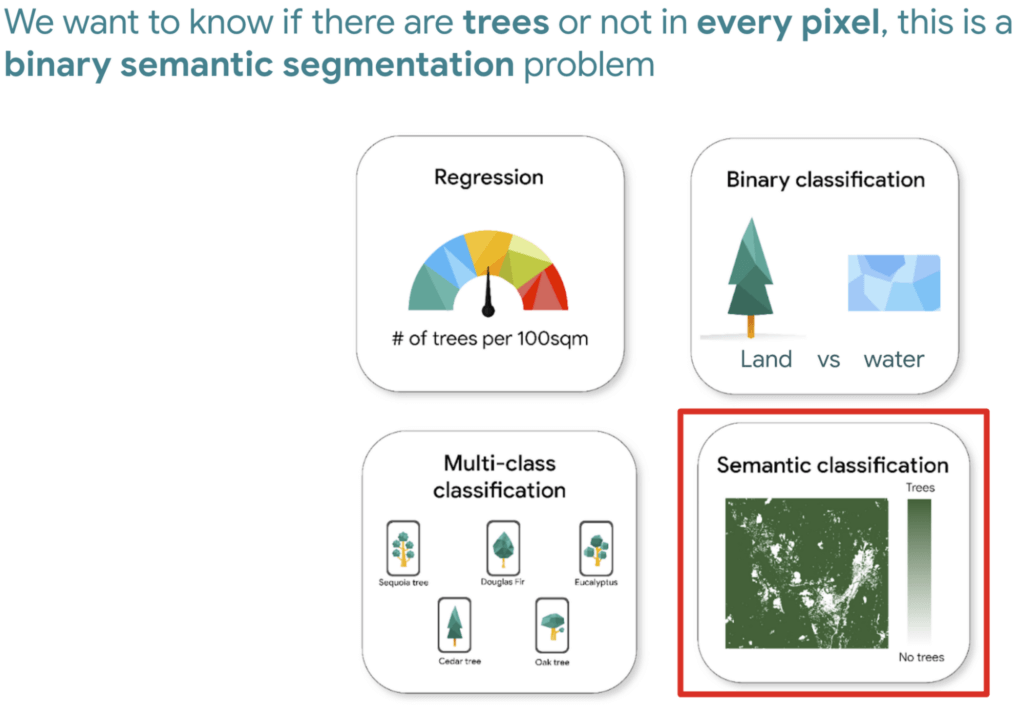
And based on this goal, we expect the outputs to be the percentage of trees for every pixel; as a number between 0 and 1. Zero represents no trees, and one represents a high confidence there are trees.
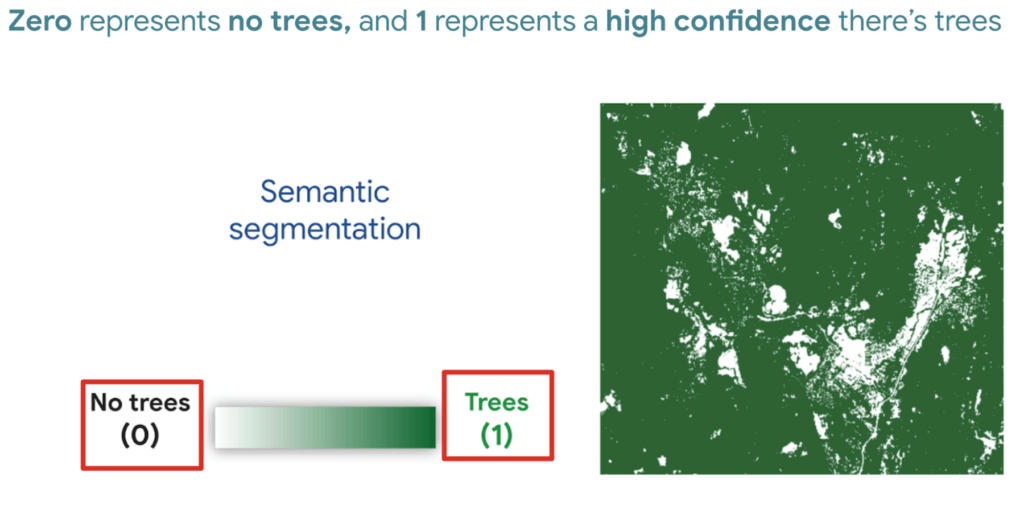
But how do we go from input images into probabilities of trees? Well think about it this way…there are many ways to approach this problem, here are 3 common ways of doing so. My peers and I prefer using Fully convolutional networks when building a map with ML predictions
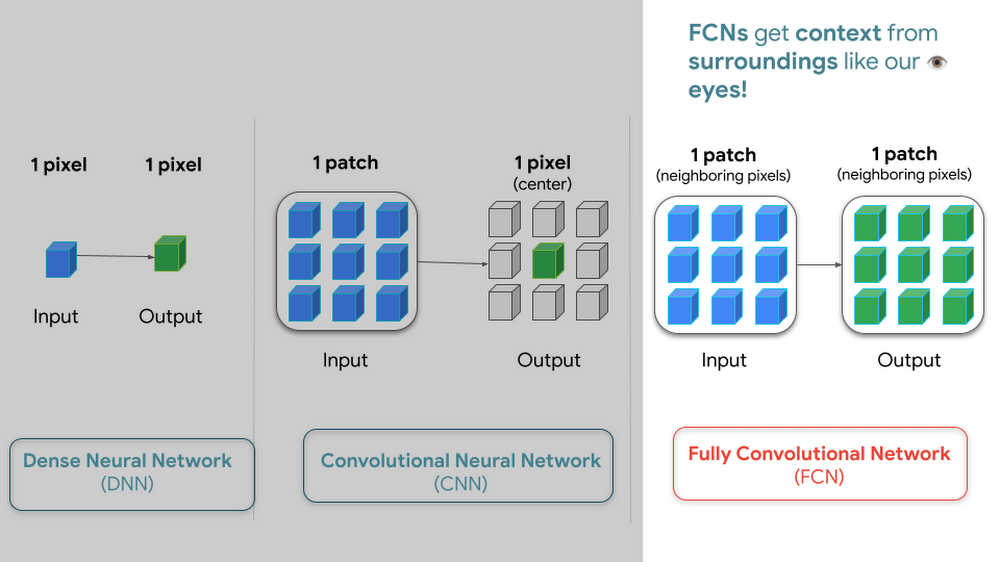
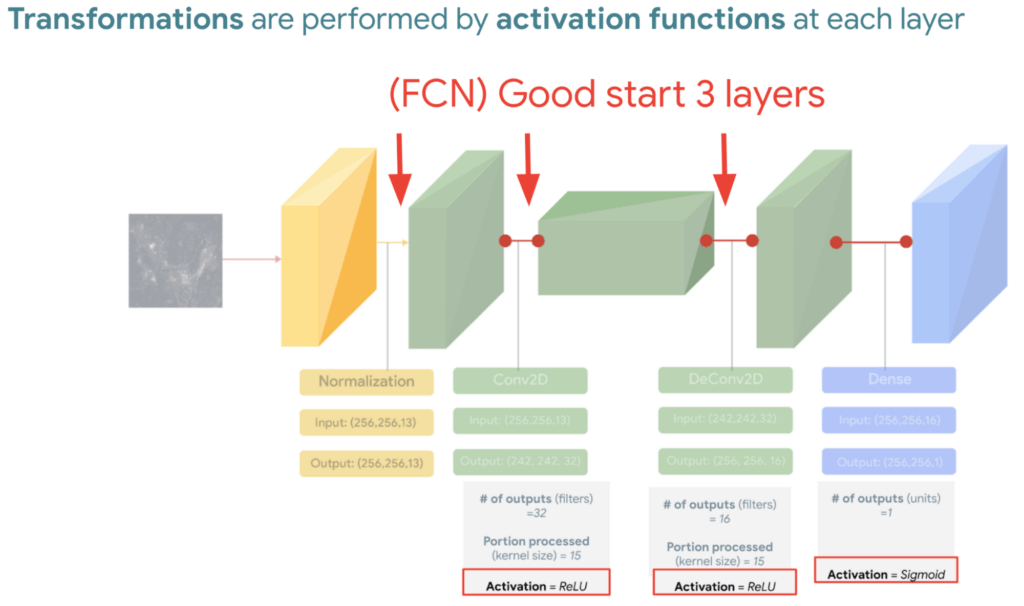
And since a model is a collection of interconnected layers, we must come up with an arrangement of layers that transforms our data inputs based on our desired outputs. Each layer by the way has something called an activation function, which performs the transformations of each layer before it passes them to the next layer.
FYI Below is a handy dandy table, with our recommended activation and loss functions to choose from based on your goal. We hope this saves you time.
We then reach the fourth and last layer. Depending on our goals at the beginning, we also choose an appropriate loss function that helps us score how well the model did during training.
After choosing layers and functions you will split your data into training and validation datasets. Just remember that all of this work is about experimenting repeatedly until you reach desired results. Our 8min episode gives this overview more in detail.
When to build a custom model outside of Earth Engine
So now that we covered what is deep learning, the next step is understanding which tools to use to build our deforestation model. For starters it’s important to call out that Google Earth Engine is a wonderful tool that helps organizations of all sizes find insights about changes on the planet, in order to make a climate positive impact. It has built-in machine learning algorithms (classifiers) that let users quickly spin them up, with just a basic machine learning background. This is fantastic place to start when using ML on geospatial data, however there are multiple situations where you will want to opt to build a custom model such as:
- You want to use a popular ML library such as TensorFlow Keras.
- You wish to build a state of the art model to build a global and accurate land cover map product such as Google’s Dynamic World.
- Or because you generally have too much data to process that you can’t execute it in just one task in Earth Engine (and are trying to figure out hacky ways to export your data).
Whenever you identify with any of these options, you will want to roll up your sleeves and dive into building a custom model, which does require expertise and of course working with multiple products. But I have good news, using deep learning is a great go-to algorithm.
How to build a model with Google Cloud & Earth Engine?
To get started, you will need an account with Google Earth Engine which is free for non-commercial entities and Google Cloud account which has a free tier if you are just getting started for all users. I have broken up the products you would use by function.
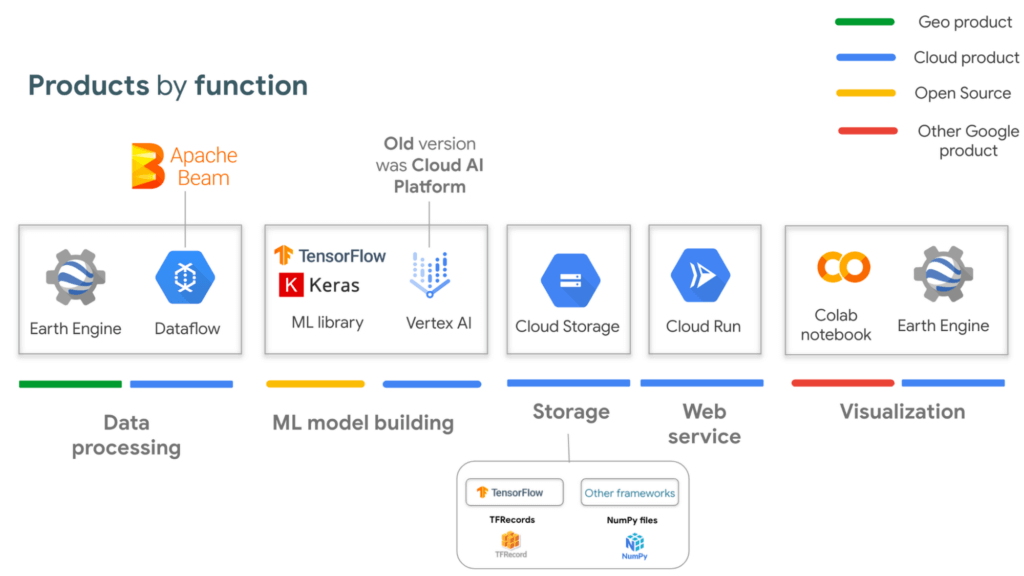
If you are interested in looking deeper into this overview, visit our slides here starting from slide 53 and read the speaker notes. Our code sample also walks through how to integrate with all of these projects end to end (just scroll down and click “open in colab”). But here is a quick visual summary. The main place to start is to identify which are the inputs and which are the outputs.
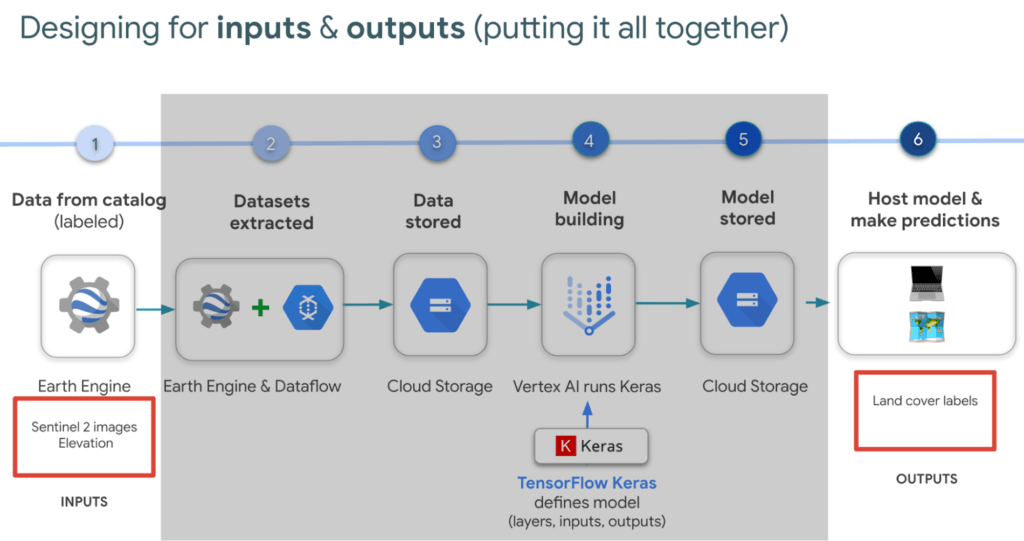
In our latest episodes for our People and Planet AI YouTube series, we walk through how to train a model and then host it in a relatively inexpensive web hosting platform called Cloud Run in episodes of less than 10mins.
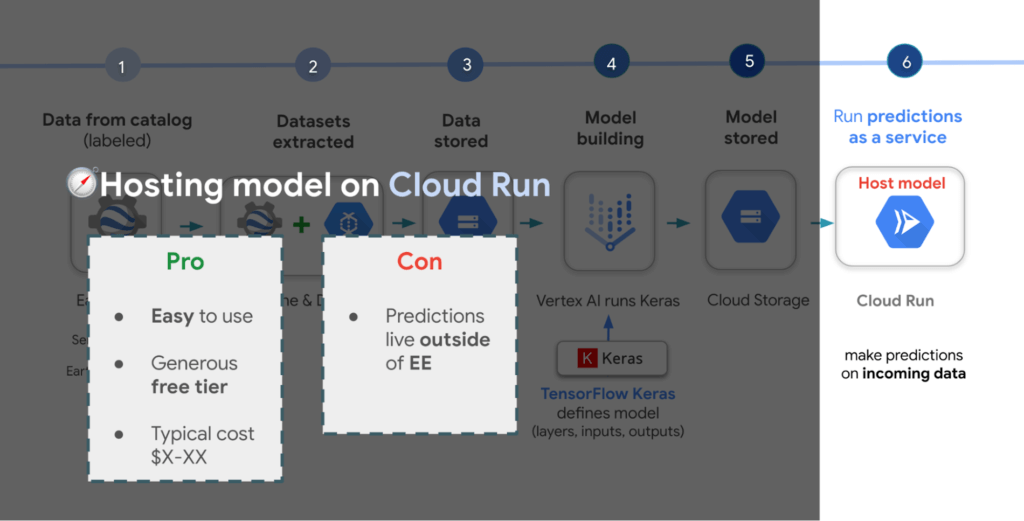
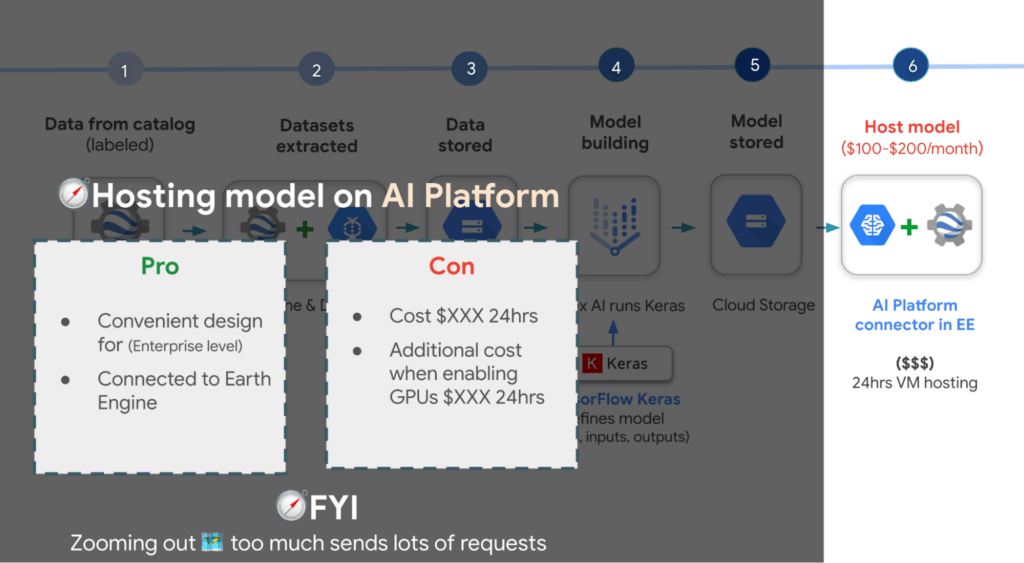
There are a few options presented in the slides, however the current best practice is to train a model using Vertex AI. Do note though that Google Earth Engine is currently not integrated with Vertex AI (we are working on this), but it is with the older (ML predecessor) called Cloud AI Platform (which is the recommended ML platform to use moving forward). As such, if you would like to import your model for detecting deforestation back into Earth Engine after training it in Vertex AI for example, you can host the model in Cloud AI Platform and get predictions. Just note that it’s a 24 hour paid service and so it can cost upwards of $100 or more a month to host your model to stream predictions. It also currently supports the following model building platforms if you don’t wish to use TensorFlow.
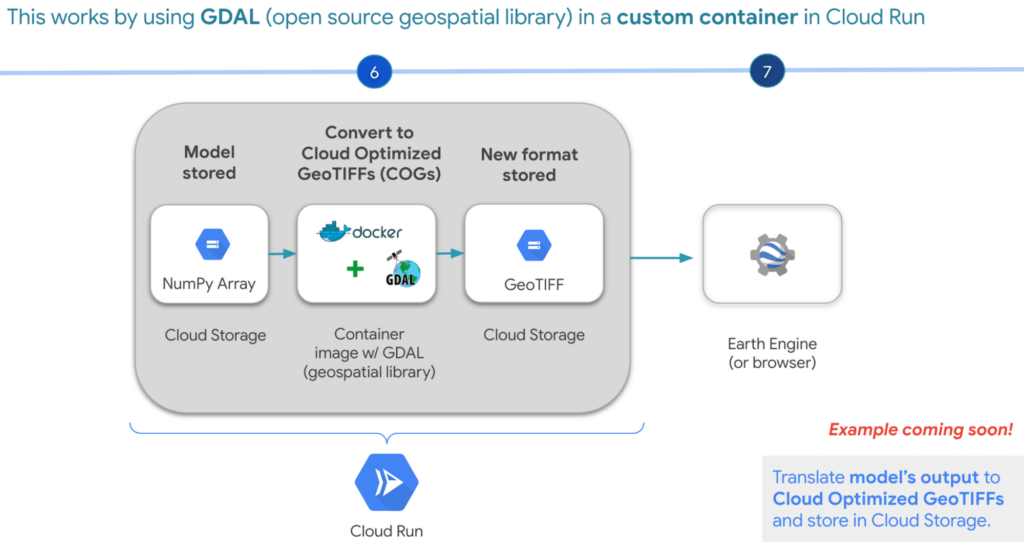
A cheaper alternative but without the convenience AI Platform offers is to manually translate the model’s output, which is NumPy Arrays into Cloud Optimized GeoTIFFs in order to load it back into Earth Engine using Cloud Run. Within this web service you would store the NumPy arrays into a Cloud Storage bucket, then spin up a container image with GDAL, an open source geospatial library in order to convert them into Cloud Optimized GeoTIFF files into Cloud Storage. This way you can view predictions from your browser or Earth Engine.
Try it out
This was a quick overview of deep learning and what Cloud products you can use to solve meaningful environmental challenges like detecting deforestation in extractive supply chains. If you would like to try it out, check out our code sample here (click “open in colab” at the bottom of the screen to view the tutorial in our notebook format or click this shortcut here).
3196
Of your peers have already watched this video.
27:30 Minutes
The most insightful time you'll spend today!
Generating Value with AI
Hear how enterprises leveraging the Google Cloud–across industries–are using AI to navigate uncertain times, and how they are innovating with AI to generate value moving forward.
In this video, you’ll uncover how to start using innovations from Google Cloud AI in your business today, and how customers deploy AI to transform their organizations.
More Relevant Stories for Your Company

Driving Business Transformation in Retail Using AI
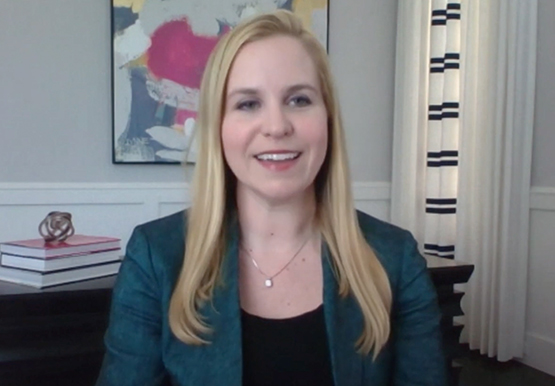
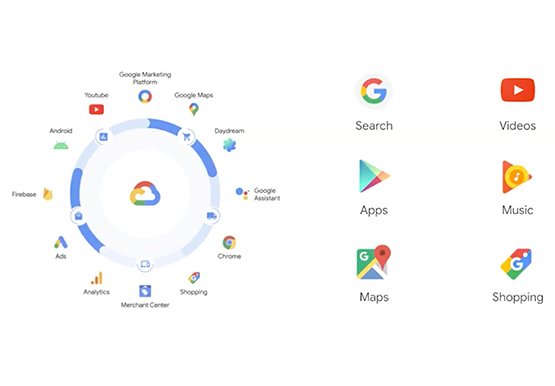
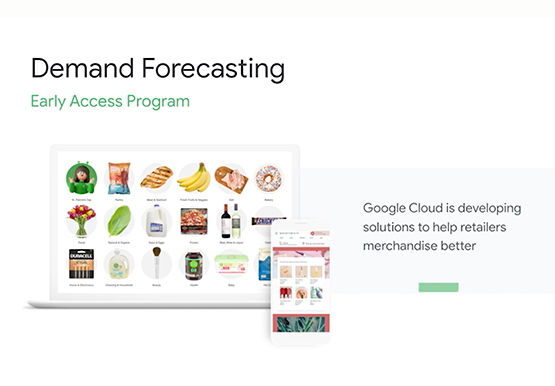
Retailers face numerous challenges in their business every day. Especially today. Watch this discussion of how retailers are working with Google Cloud on machine learning and AI to transform their business. This video presents an overview of the AI Platforms, products, and solutions Google Cloud is building to address those

New Technology: The Projected Total Economic Impact™ Of Google Cloud Contact Center AI
According to Forrester Research, customers expect easy and effective customer service that builds positive emotional connections every time they interact with a brand or organization. Additionally, 40% of surveyed business leaders say that improving their organization’s customer experience (CX) is a high priority, ahead of initiatives like improving products and

UKG Ready: Meeting the Needs of Complex Machine Learning Models and Distributed Data Sets
Business ProblemUKG Ready primarily operates in the Small and Medium Business (SMB) space, so inherently many customers are forced to operate and make key business decisions with less Workforce Management (WFM) / Human Capital Management (HCM) data. In addition to volume, SMB lacks the variety of data needed to create

Data-first Digitization Helps Leverage the Cloud for Your Mainframe Assets
For many enterprises, the venerable mainframe is home to decades’ worth of data about the company’s customers, processes and operations. And it goes without saying that the business would like access to that mainframe data — to report on it, to analyze it with big data analysis tools, or to
