





Streamline Your Business Processes with Google Cloud’s Custom Document Splitter

930
Of your peers have already read this article.
3:30 Minutes
The most insightful time you'll spend today!
Businesses rely on processing an inflow of documents to drive processes and make decisions. Many such documents are combined into a single file. For example, a loan application may have a driver’s license, paystub, W2, bank statement, and other document types within a single file. The complexity of handling many document types within a single file makes it difficult for businesses to manage at scale.
At Google Cloud, we’re committed to solving these challenges with continued investment in our Document AI solutions suite which offers machine learning products for document processing and insights. Document AI Workbench helps users quickly build ML models with world-class accuracy, trained for their specific use cases. In February 2023, we launched the Custom Document Extractor (CDE) in General Availability (GA) to help users extract structured data from documents in production use cases. In March 2023, we launched the Custom Document Classifier (CDC) in GA to help automatically classify document types. Today, we announce the newest feature of Document AI Workbench, Custom Document Splitter (CDS) in GA to help users automatically split and classify multiple documents within a single file.
CDS provides tangible business value to customers by helping them sort and classify documents. For example, businesses can validate if they have all the needed documents from an applicant. Furthermore, individually classified documents enable businesses to better automate downstream processes, including selecting the proper storage, analysis, or processing steps based on the document type. The efficiencies enabled by CDS helps businesses lower their document processing time and cost.
Benefits of splitting and classification models in Document AI Workbench
Document AI Workbench can save time and money by simplifying model training, from dataset management, to testing, to deployment. CDS helps businesses achieve higher automation rates to scale processes while lowering costs.
Sean Earley, VP of Delivery Services at Zencore said, “We completed a project for a large bank using Document AI Workbench to split, classify, and extract data from documents to automate Home Mortgage Disclosure Act reporting. Given the accuracy of the models we built, our client estimated increasing loan reporting coverage from 20% to 100% while eliminating thousands of errors per year, drastically reducing the operational cost of the bank’s compliance reporting procedures.”
Fabian Beckmann, Manager Artificial Intelligence & Data at Deloitte Consulting GmbH said, “By leveraging Document AI’s Custom Document Splitter, our client, Commerzbank, a large european bank, can effortlessly segment customer submissions tailored to their back-office requirements, significantly diminishing the need for extra manual sorting or routing. This integration paves the way towards seamless automation within the Document AI pipeline, delivering substantial business benefits.“
According to Kaïs Albichari – ML Tribe Tech Lead, G Cloud at IT services firm Devoteam, “Custom Document Splitter (CDS) has helped one of our clients in the financial services industry save significant time and improve data accuracy. By identifying which parts of documents they can discard and which they retain for entity extraction, CDS has helped the company automate its document processing tasks. The implementation resulted in a more efficient and streamlined workflow, freeing employees to focus on other tasks. Devoteam’s G Cloud team helped the company implement CDS and achieve these benefits.”
Frank Neugebauer, a Google Cloud Insurance Solutions Consultant, worked with a Fortune 100 insurance company and used CDS to create a model to split and classify millions of insurance documents with up to 98% accuracy. With this information, the insurer can better understand the nature of their unstructured data to inform business strategy, including volume for specific document types to inform extraction work. The customer considers this level of insight unprecedented in their 200+ year history.
How to use Custom Document Splitter
You can leverage a simple interface in the Google Cloud Console and a set of public APIs to prepare training data, create and evaluate models, deploy a model into production, and call an API endpoint to split and classify document types. You can follow the documentation for instructions to create, train, evaluate, deploy, and run predictions with models.
Import and prepare training data
To get started, import and label documents to train and evaluate an ML model.
To quickly build a training dataset, import single documents, one document per file, and bulk label them with the relevant document type. You can import one folder or multiple folders at once and choose the correct document type per folder. As shown in the next image, one import could have a folder with 200 bank statements, another folder with 200 W2s, another folder with 200 paystubs, etc., all of which are labeled at once while imported. Up to 30,000 documents and 100,000 pages can be inputted for training. This way, you can build a training dataset with hundreds of labeled documents per class in minutes. As always, if documents are already labeled using other tools, simply import labels with JSON in the Document format.
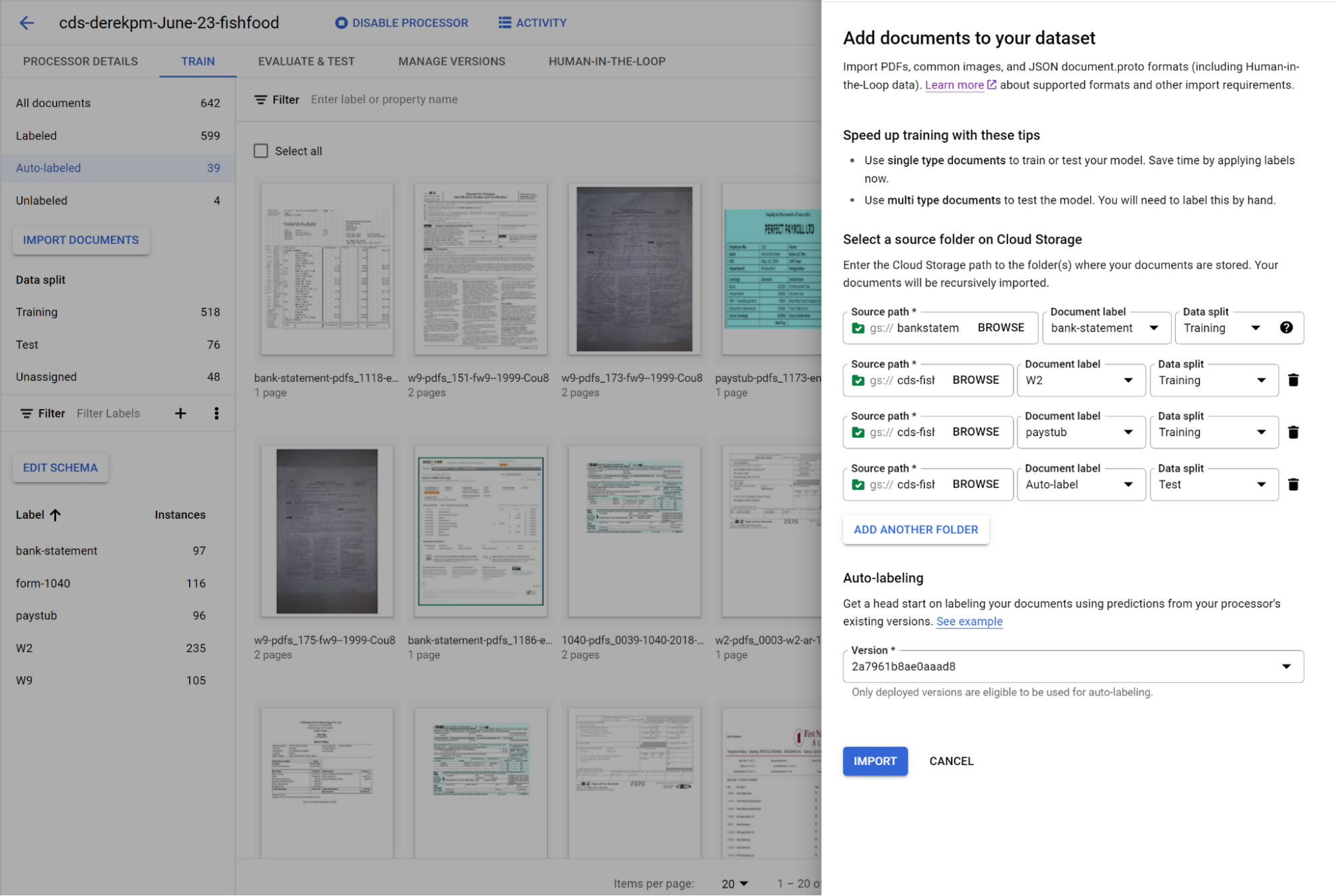
You can initiate training with a click of a button. Once you have trained a model, you can use it to automatically label documents added to your dataset, letting you quickly build robust test and training datasets to evaluate and improve model performance.
To accurately evaluate a CDS model, import files which contain multiple document types within the same file and assign them to the test dataset. Then, use a simple interface to define document boundaries and types.
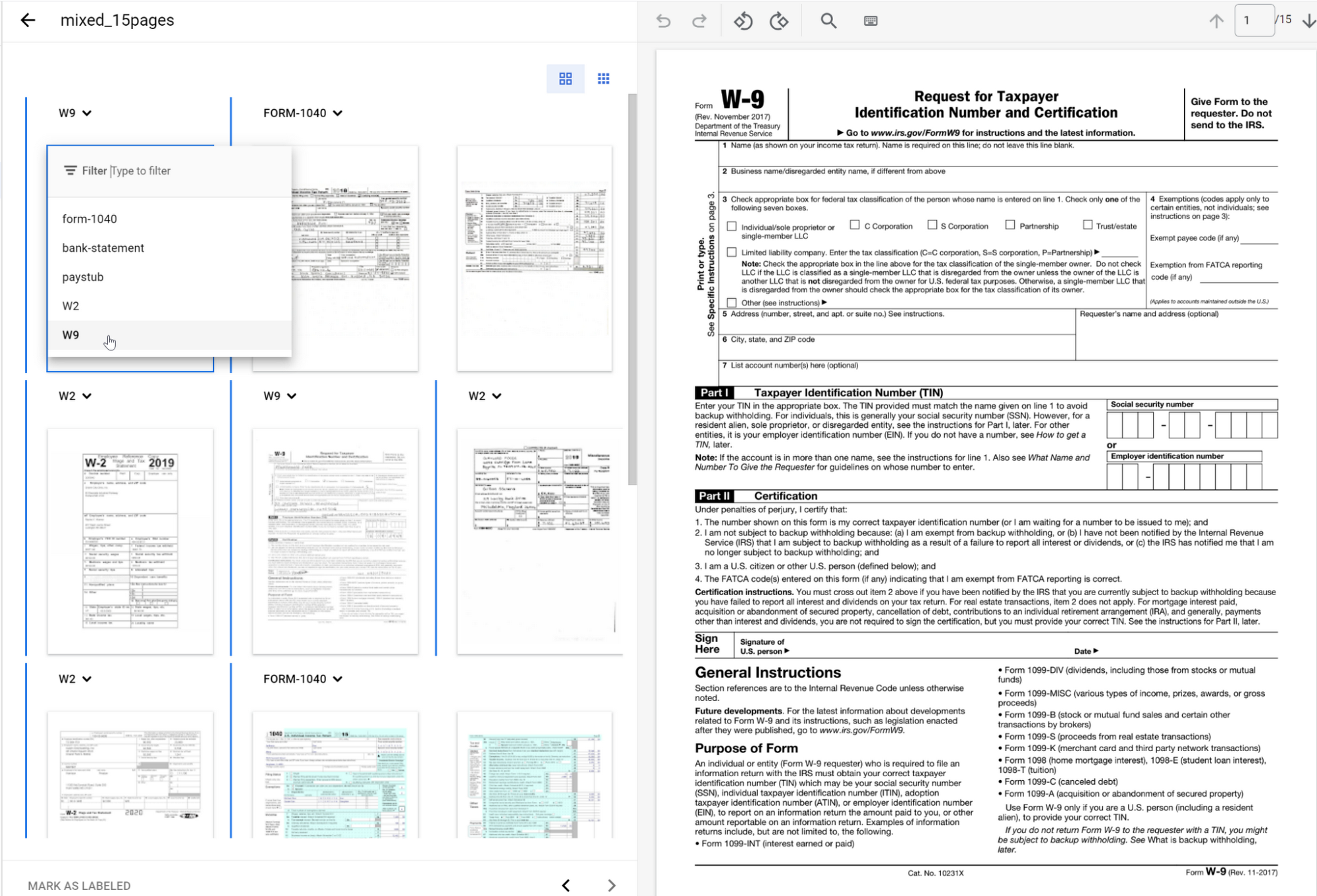
The ground truth you label in the test dataset is used to evaluate splitting and classification predictions from the CDS model.
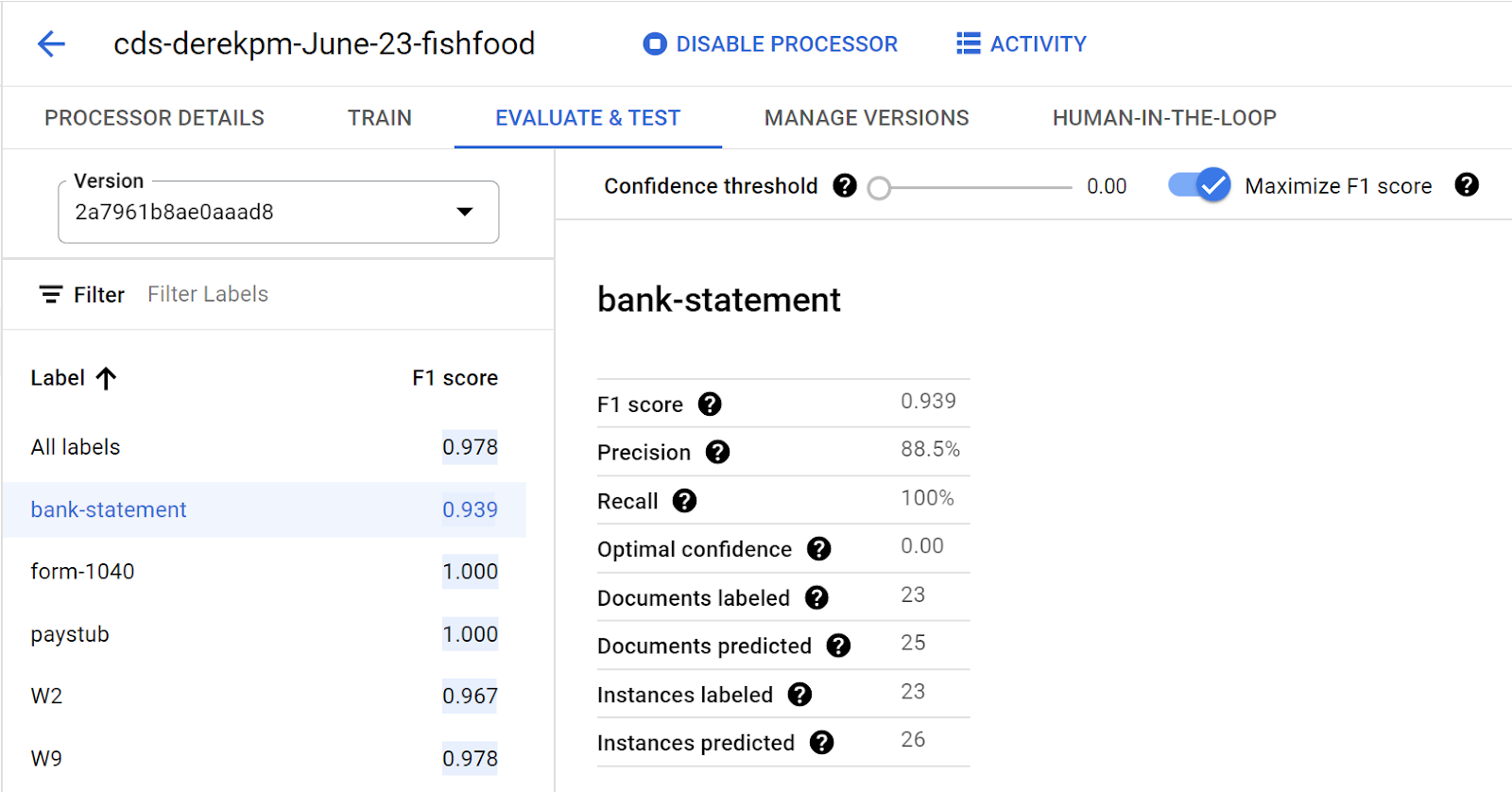
Going into production
Once a model meets accuracy targets, it’s time to deploy into production and call the API endpoint to split and classify document types.
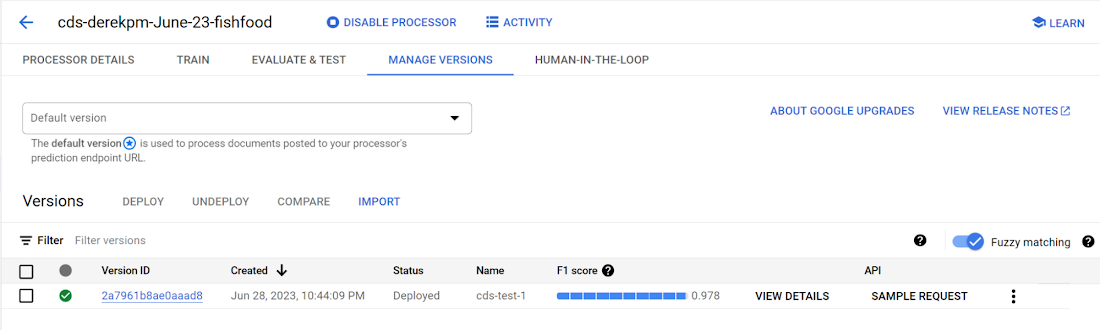
Getting started with Document AI Workbench
Custom Document Splitter is publicly available in GA and ready to help customers automate document splitting and classification. Learn more via our Document AI Workbench web page, Document AI Workbench documentation or try it out in the Google Cloud Console.
How Public Sectors Leverage Google Cloud to Push the Envelop in Human Services and Labor

3116
Of your peers have already read this article.
2: 30 Minutes
The most insightful time you'll spend today!
The COVID-19 pandemic tested our nation’s public benefits system in unimaginable ways. With an unprecedented 60 million individuals turning to unemployment and social services to satisfy their basic needs, state and local governments were stretched to meet the demand.
But state and local government leaders have risen to the challenge of providing their constituents with critical services. They created and administered innovative solutions, complete with wholly original processes, and brought desperately needed employment, cash, food, and healthcare support to families in crisis. These public sector heroes raised the bar during this critical time and facilitated economic recovery for our local communities, making the impossible possible for its people.
When state and local government agencies partner with Google Cloud, they can reimagine how they deliver human services and labor services for their communities. All in a matter of weeks, instead of months or years.
Tools that solve for remote work and service delivery hurdles
Never before was there such a need for modern and accessible tools to allow a workforce to secure new jobs and operate remotely. The Virtual Career Center (VCC), built on Google Cloud, was designed with these needs in mind.
Google Workspace, including Google Meet, allows job seekers to schedule video meetings with career coaches, job recruiters, and potential employers. The Google Job Search API will enable them to explore career opportunities best suited to their skills and interests.
A thousand miles away, the Rhode Island Virtual Career Center was helping its job seekers by offering virtual meetings with career coaches, the ability to schedule meetings with prospective employers, and help on building effective resumes. Skipper, the CareerCompass RI Bot, an intelligent agent for careers, uses data and machine learning to facilitate potential new career paths and reskilling opportunities for Rhode Islanders.
In addition to enabling remote work, Google Workspace can support remote service delivery, a critical need for those involved in health and human services programs. Engaging with individuals and families is an essential component for more of these programs, including eligibility determination, assessment, and service delivery. The ability to engage directly with the public through virtual interviews, counseling sessions, telehealth, etc. improves access for those on both sides of the screen. Further, through Google Classroom, a component of Google Workspace for Education, foster and adoptive parents can obtain virtual training required for licensing.
Tools to expedite relief funds and employment assistance
As the number of people applying for unemployment assistance skyrocketed, so did the backlog of claims requiring review. The pandemic also saw a rise in fraudulent claims, which caused delays for families waiting on legitimate payments and resulted in unnecessary spending for government agencies. Realizing the magnitude of the challenge was beyond the agencies’ current resources, and they shifted their focus to machine learning.
To address the massive backlog of claims, SpringML partnered with Google Cloud to develop the Improper Payment Analytics solution that successfully leverages AI to help agencies identify fraudulent claims and avoid improper payments so aid can be prioritized for those who need it. Though such a tool would typically take months to develop, the team was able to launch it in just weeks, to the benefit of all stakeholders involved. Families awaiting legitimate payments received checks more quickly, and state and local governments saved millions in spending.
For instance, to address erroneous payments totaling $330 million to fraudulent applicants, the State of Ohio partnered with Google Cloud to utilize artificial intelligence and machine learning solutions to proactively identify and decline improper payment risks. As a result, the State avoided paying fraudulent claims and accelerated the payment of legitimate benefits to families facing financial hardship.
The New York State Department of Labor launched a streamlined unemployment application to allow residents to apply for pandemic unemployment assistance without the added burden of applying for unemployment insurance. Success was immediate, and the application backlog plummeted as New Yorkers got the financial aid they desperately needed. Illinois took a different approach, deploying Contact Center Artificial Intelligence (CCAI) to create virtual agents who assist with specialized calls 24/7, in multiple languages, providing turn-by-turn guidance in real-time. Conversations can be turned into insights through analytics and reporting tools that uncover key call drivers and customer sentiment. By solving for spikes in call volume, CCAI has helped process more than 1 million unemployment claims.
Automated data solutions bring immediate food and cash assistance resources
With millions out of work and out of school during the pandemic, food and cash assistance became a critical need. Applying for all of these benefits requires significant documentation that, in most cases, has historically been manually processed. Given the volume of people in need, this took a massive amount of human resources and time.
Using Document AI (DocAI), agencies can automate this highly manual process and speed up the delivery of critical benefits to individuals and families. DocAI extracts the key data, provides a confidence score in a single review pane for staff review, and automatically uploads that data to the case management system–significantly reducing manual processing. Today, these state and local government organizations turn to DocAI to eliminate the difficult paperwork application process to help meet the benefit needs of their residents now and tomorrow, as illustrated by both the Wisconsin Department of Workforce Development (DWD) and the State of Hawaii.
The Wisconsin DWD streamlined their paper unemployment insurance claims using DocAI by enabling DWD staff to receive critical data extracted from submitted applications and make decisions rapidly, saving time for both applicants and staff. The State of Hawaii also used DocAI to extract, interpret, and transport COVID-19 test result data of incoming travelers to Google Cloud instantly. As a result, Hawaii was able to welcome travelers and reopen its economy in the midst of the pandemic.
Partner with us
After making it through this very difficult period, agencies have emerged from the pandemic with stronger labor and health and human service delivery for their residents. State and local governments recognized the necessity of virtual engagement and expanded access to services to meet this critical moment, solving for work, cash, food and healthcare needs.
To learn more about Google Cloud for human services and labor, watch our video on the power of customer innovation or contact your Google Cloud sales representative. Let’s get solving together.
Apigee and Vision API: ICICI Prudential Life Insurance’s Journey of Speeding Document Processing

5541
Of your peers have already read this article.
2:00 Minutes
The most insightful time you'll spend today!
Google Cloud results
- Helps enable instant document approval with optical character recognition by Vision API
- Processes 100,000 documents in 20 minutes with automated document processing product Recognic, powered by Vision API and Apigee
- Helps increase the number of applications processed by 30% within the same timeframe
The insurance landscape in India has seen significant changes in recent years with the adoption of new technology. As one of the major insurance providers in the country, ICICI Prudential Life Insurance has aimed to lead in this transformation journey. “There has been a data explosion across India over the past few years, together with a high mobile penetration rate. Today, about 60% of our customers approach us via mobile, for example, which was certainly not the case before,” says Alpesh Karnik, SVP, IT, at ICICI Life Insurance.
Consumer expectations have also evolved, with easier access to information and online services. “Consumers today are more informed on the importance of investing in insurance products, so there’s much more of a pull factor when it comes to sales, but they also want to be able to get these products quickly and easily,” adds Alpesh. To meet the demands of these consumers, ICICI Prudential Life Insurance realized it needed to make its processes even faster and more efficient. Looking to upgrade its infrastructure, the company turned to Google Cloud.
“The biggest benefit of using Recognic and Vision API is that it eliminates the initial waiting time, which can result in drop-offs. Now customers can know immediately whether their documents are sufficient, or if they need to revise or submit any others.”—Alpesh Karnik, SVP, IT, ICICI Prudential Life Insurance
Serving customers better by speeding up processes with Google Cloud
ICICI Prudential Life Insurance’s distributors were already using tablets to input customer data faster and more efficiently, but many of the company’s solutions still required a team at the back end to manually sift through documents for approval. This meant that customers needed to wait five or six hours, or sometimes until the next working day, to know if their documents were approved or needed revision.
That all changed after partnering with Google Cloud Premier Partner Searce to take advantage of its AI/ML powered automated document processing product Recognic, which is built on Google Cloud. Developed using the optical character recognition (OCR) capabilities of Cloud Vision, Recognic reads, understands, and validates documents at scale, enabling organizations that handle massive amounts of paperwork to digitize these documents and then accurately store and index them.
“Google Cloud has cut down the middle- and back-office work, leading to a 30% increase in the number of applications we can process in the same time span without the need for additional resources.”—Alpesh Karnik, SVP, IT, ICICI Prudential Life Insurance
“In the case of ICICI Prudential, the biggest benefit of using Recognic and Vision API is that it eliminates the initial waiting time, which can result in drop-offs. Now customers can know immediately whether their documents are sufficient, or if they need to revise or submit any others,” Alpesh adds.
Alpesh explains that if the details on the application form match the documents provided, the case doesn’t need to go to the underwriter for further checks and can go directly to policy issuance. “Google Cloud has cut down the middle- and back-office work, leading to a 30% increase in the number of applications we can process in the same time span without the need for additional resources.”
ICICI Prudential Life Insurance is also working with Searce to build deep learning models into Recognic so that it can overcome template barriers and input data from a variety of forms. This is particularly helpful for financial and medical documents underwriting because unlike a passport or driving license, financial documents have a higher structural complexity.
As customer data becomes more important in the work of ICICI Prudential Life Insurance, so does protecting it, and the company is taking every measure to safeguard the security and privacy of its customers’ information. “Details of customers’ contactability are automatically removed by Google Cloud after processing is complete. This step in the workflow gives us the confidence that data is not stored at any level of the optical character recognition process,” says Alpesh.
Partnering with the right teams for dedicated support
In achieving the best solution for its business goals, ICICI Prudential Life Insurance recognizes the importance of its decision to work with partners that truly understand the insurance business. “There are many intricacies involved in this business, and it’s clear that both Google Cloud and Searce really took the time to understand our underwriting processes before coming up with a solution,” says Alpesh. He adds that during the implementation process, all findings were well documented and queries were responded to quickly.
“We didn’t want to take any shortcuts deploying Recognic, but at the same time, we didn’t want to draw out the implementation process. The excellent support from both Google Cloud and Searce throughout the journey was reassuring for us as they were always thinking ahead.”
Future-proofing the organization through machine learning and AI
In the coming years, Alpesh foresees the insurance industry to be even more agile than it is today. “I doubt elaborate processes such as underwriting or operations checks will need to be done manually in the future. Everything will be done through machine learning and AI.” In light of this, ICICI Prudential Life Insurance is doing everything it can to prepare, as customers’ expectations are set to keep evolving. “We have to be prepared for the future, and I believe that with Google Cloud, we can do it.”

About ICICI Prudential Life Insurance
ICICI Prudential Life Insurance aims to lead the Indian insurance field through quality products and a hassle-free claim settlement experience. A customer-centric company, it offers long-term savings and protection plans to meet customers’ needs at every stage of life.Industries: Financial Services & InsuranceLocation: India

About Searce
Searce is a niche cloud consulting business with futuristic tech in its DNA, focused on “realizing the Next in the Now” for its clients. Specializing in cloud data engineering, AI/ML, and ad
Streamlining Business Processes with Google’s Document AI: Invoices, Contracts, and Beyond

1148
Of your peers have already read this article.
3:30 Minutes
The most insightful time you'll spend today!
Editor’s note: In this post, I’ll be showing some amazing ways Document AI can help you extract meaning from your documents – keep reading, or jump directly into a tutorial using the Cloud Console!
Documents are a crucial part of most businesses, used to store and communicate important information. The variety is vast: invoices, contracts, receipts, applications, plus documents unique within industries and geographies. Unfortunately, making the information contained in these documents accessible can be a time-consuming and manual process.

Document AI is a document understanding platform in Google Cloud that takes unstructured data from documents and transforms it into structured data, making them easier to understand, analyze, and consume. By using this technology, you can streamline your document processing workflows, reduce errors, and unlock insights that were previously buried in mountains of paperwork.
Whether you’re a small business owner or an enterprise looking to bring efficiency to your operations, Document AI has something to offer. So let’s take a look and see what it can do!
Understanding documents with Document AI
When we say that Document AI can understand documents, we mean that it is able to analyze the content within documents and derive meaningful insights from it. This goes beyond simply recognizing the characters and words within a document (which is what traditional OCR technology does) – Document AI can actually comprehend the meaning behind the text.
For example, let’s say you have a contract that needs to be processed. Traditional OCR technology might be able to extract the text from the document, but it would not be able to understand the legal terms and clauses within it. Document AI, on the other hand, can actually interpret the meaning of the text and extract key information such as parties involved, terms and conditions, dates, and signatures.
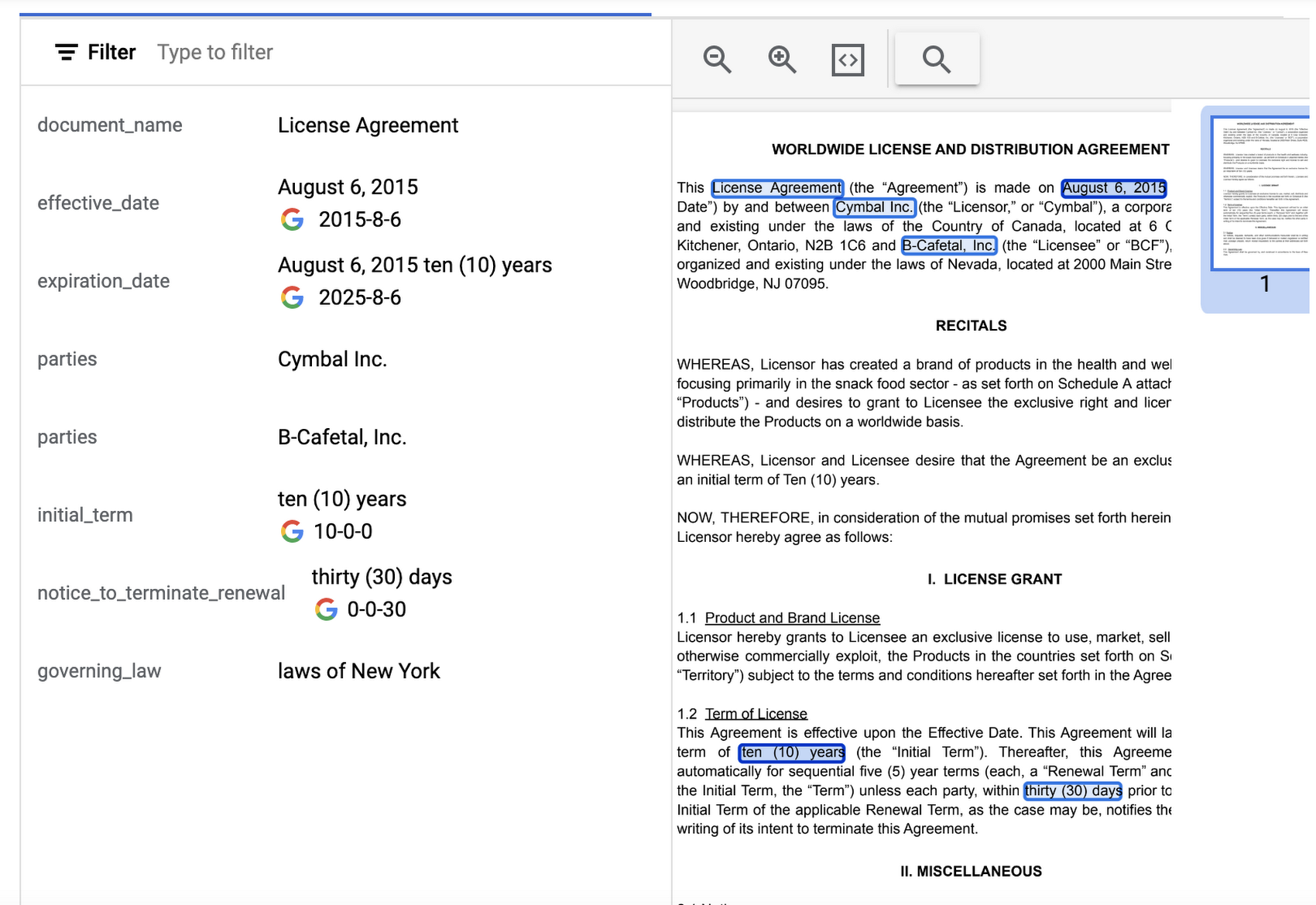
Document AI offers several pre-built models and processors that are specifically designed to extract different types of data from various document types. Within the specific document types, the processors can perform several tasks such as Optical Character Recognition (OCR), form parsing, splitting, classification or entity extraction. These processors can be customized and combined to create powerful document processing workflows that are tailored to a business’s unique needs.
Let’s look closer at a few of the processors available in Document AI, including the Form Parser, Invoice Parser, Expense Parser, Identity Document Proofing Parser, and Intelligent Document Quality Processor.
Form Parser
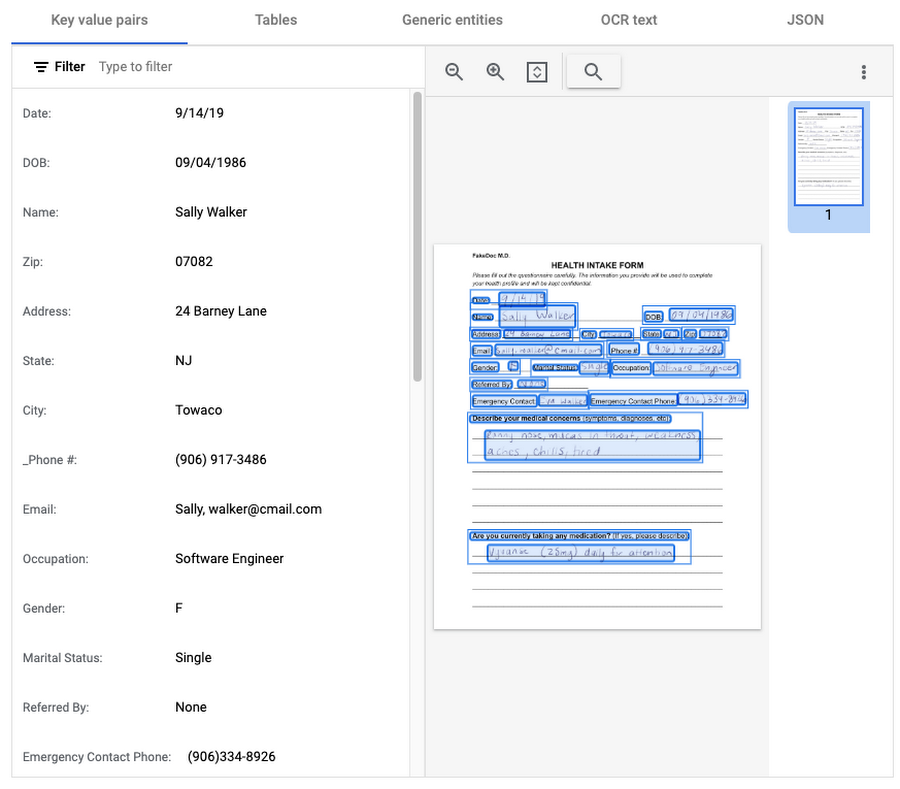
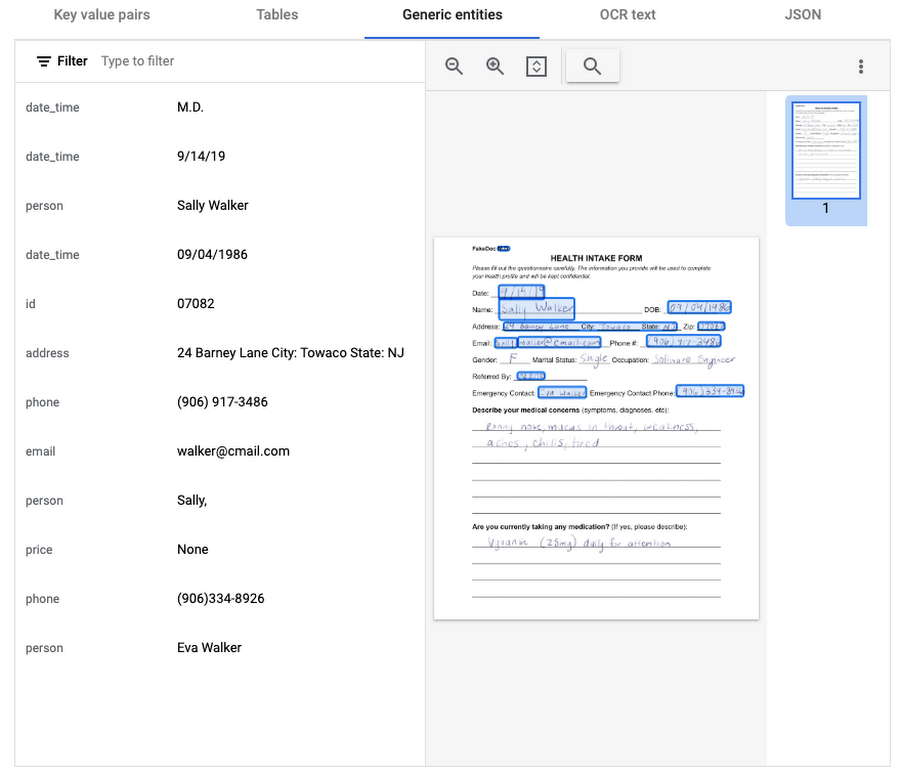
This general processor is designed to extract structured data from forms such as application forms, surveys, and questionnaires. It automatically identifies and extracts data from form fields (key-value pairs), such as names, addresses, dates, and other types of structured data; even checkboxes and tables. This processor also leverages deep learning models to extract generic entities that are common in various document types, meaning it can identify if something is an email address, phone number, datetime, organization, quantity, price, person, and more.
In this visualization of the API response, you can see that Document AI has identified several key value pairs that correspond to the form’s fields and the responder’s answers.
Also of interest is that the form parser recognized certain generic entities including: several dates, an address, phone numbers, email, and two people (the responder and their listed emergency contact).
Invoice Parser
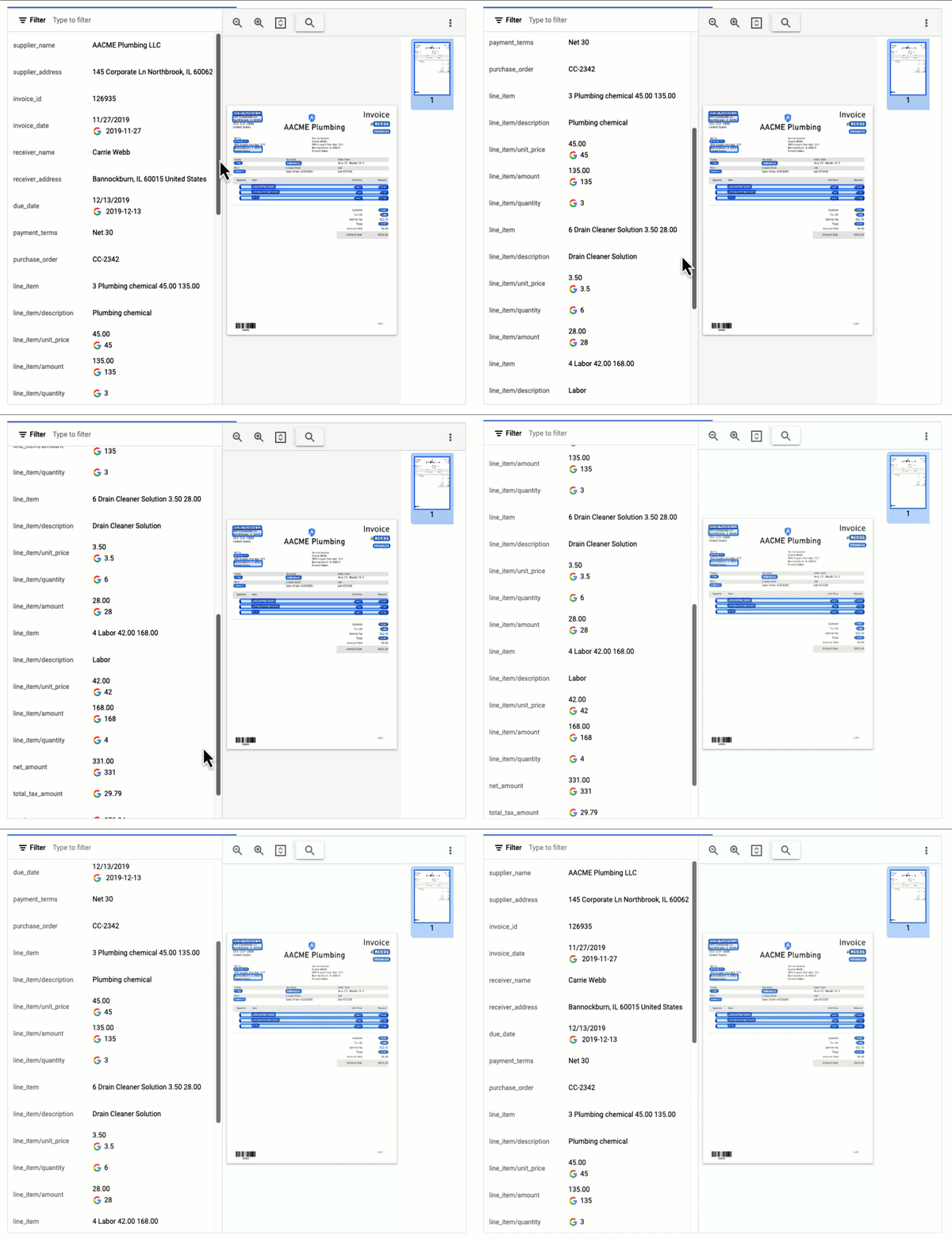
This parser is designed to identify and extract relevant information from invoices including a large number of typical invoice fields, but can also be customized (uptrained) to recognize different invoice layouts, languages, and data fields. Invoices are a critical part of the accounts payable process, making this functionality valuable across industries and companies building A/P features into their products.
In this visualization of the API response, you can see that Document AI has extracted a large number of key-value pairs and even provided normalized values for several of the fields.
Expense Parser
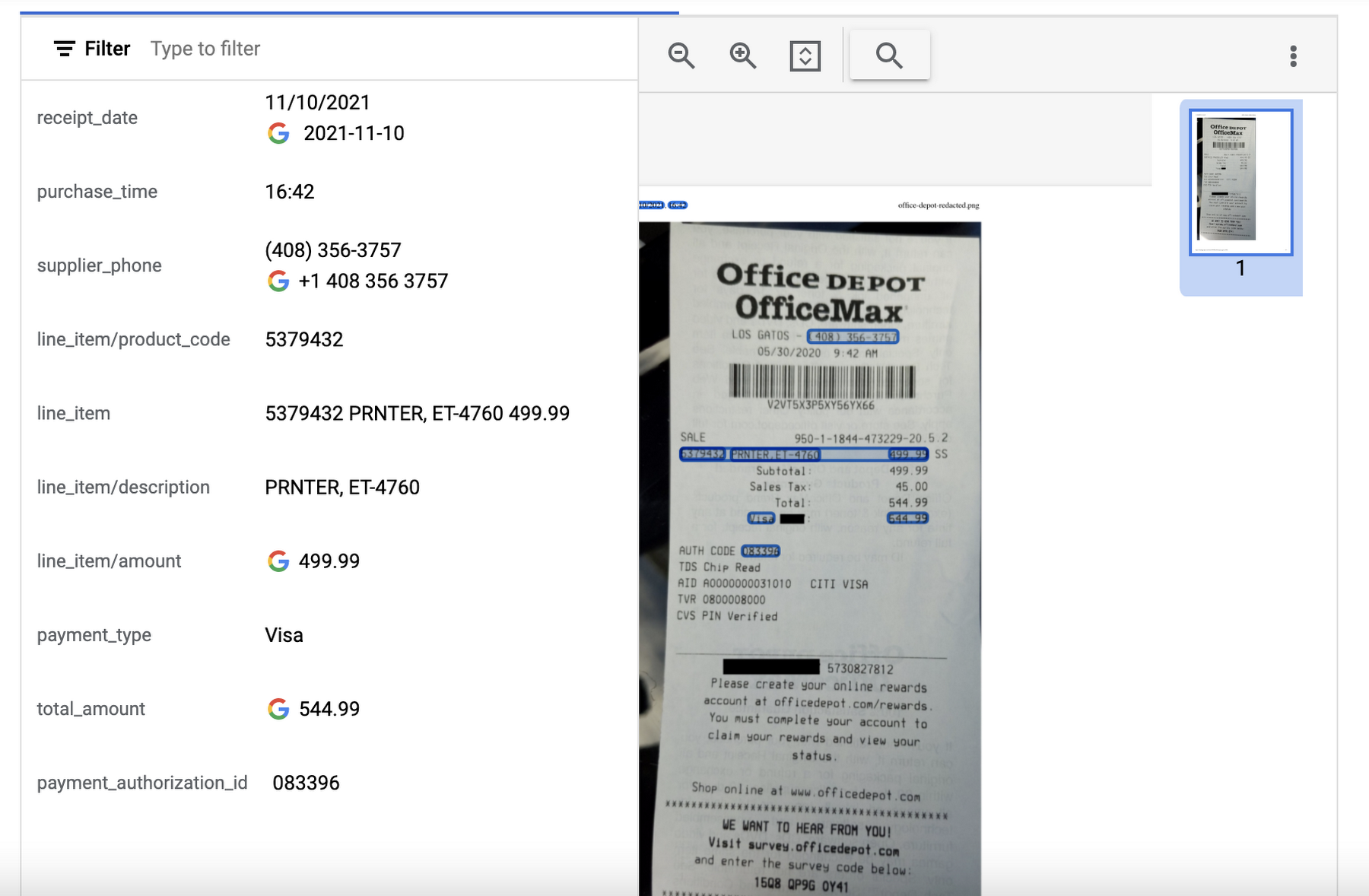
This specialized processor is designed to extract data from receipts and invoices, such as vendor name, date, and total amount paid. It can also identify line items within an invoice and categorize them based on the type of expense (e.g. meals, travel, office supplies). The expense parser makes it easier for you to process expense reports and other financial documents, and it can integrate with other tools and systems to completely automate the entire expense reporting process.
In this visualization of the API response, you can see that Document AI has extracted the text from the receipt and identified several typical entities such as purchase date and time, payment type, and total amount.
Identity Document Proofing Parser
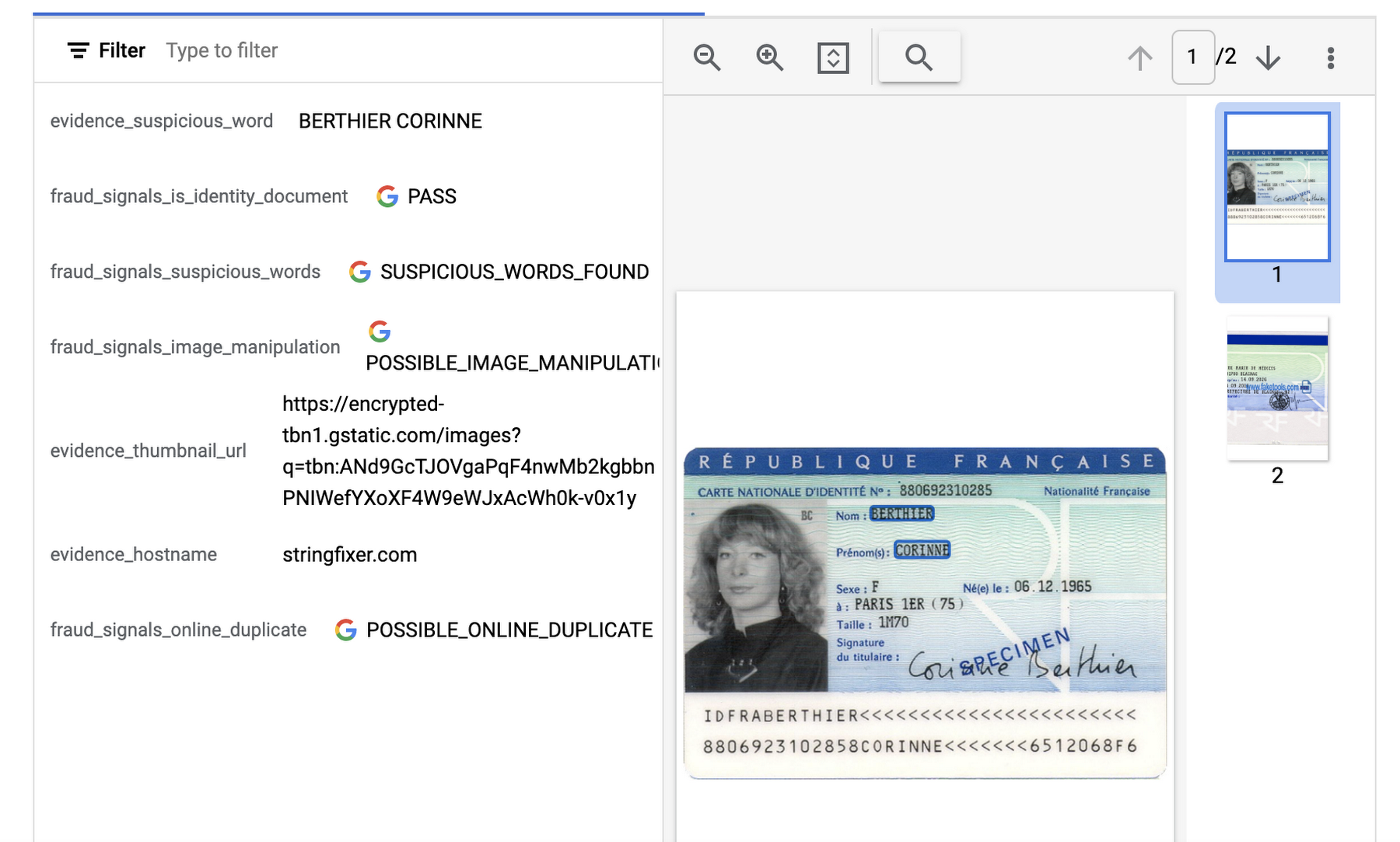
This processor is designed to help predict the validity of ID documents with four different signals.
- is_identity_document detection: Predicts whether an image contains a recognized identity document.
- suspicious_words detection: Predicts whether words are present that aren’t typical on IDs.
- image_manipulation detection: Predicts whether the image was altered or tampered via an image editing tool.
- online_duplicate detection: Predicts whether the image can be found online.
If suspicious words are detected or the image can be found online, additional information is provided to explain these signals.
This can be particularly useful for businesses that need to verify the identity of customers or employees as part of their operations. This processor could be used in conjunction with other processors that extract key information such as name, date of birth, ID number, and expiration date from specific identity documents (US Driver License Parser, US Passport, France National ID Parser, etc.).
In this visualization of the API response, you can see that Document AI has passed the document on the first detection point (is_identity_document), but failed the document for the other three items and provided additional information in the evidence fields.
Intelligent Document Quality Processor
This general use processor is designed to detect a variety of document quality issues, such as missing pages, blurry images, low contrast, inconsistent formatting, and incorrect data, and flag these potential issues which could affect their usability, accuracy, or compliance. It can also identify sensitive information that has not been redacted or missing information required by regulatory standards.
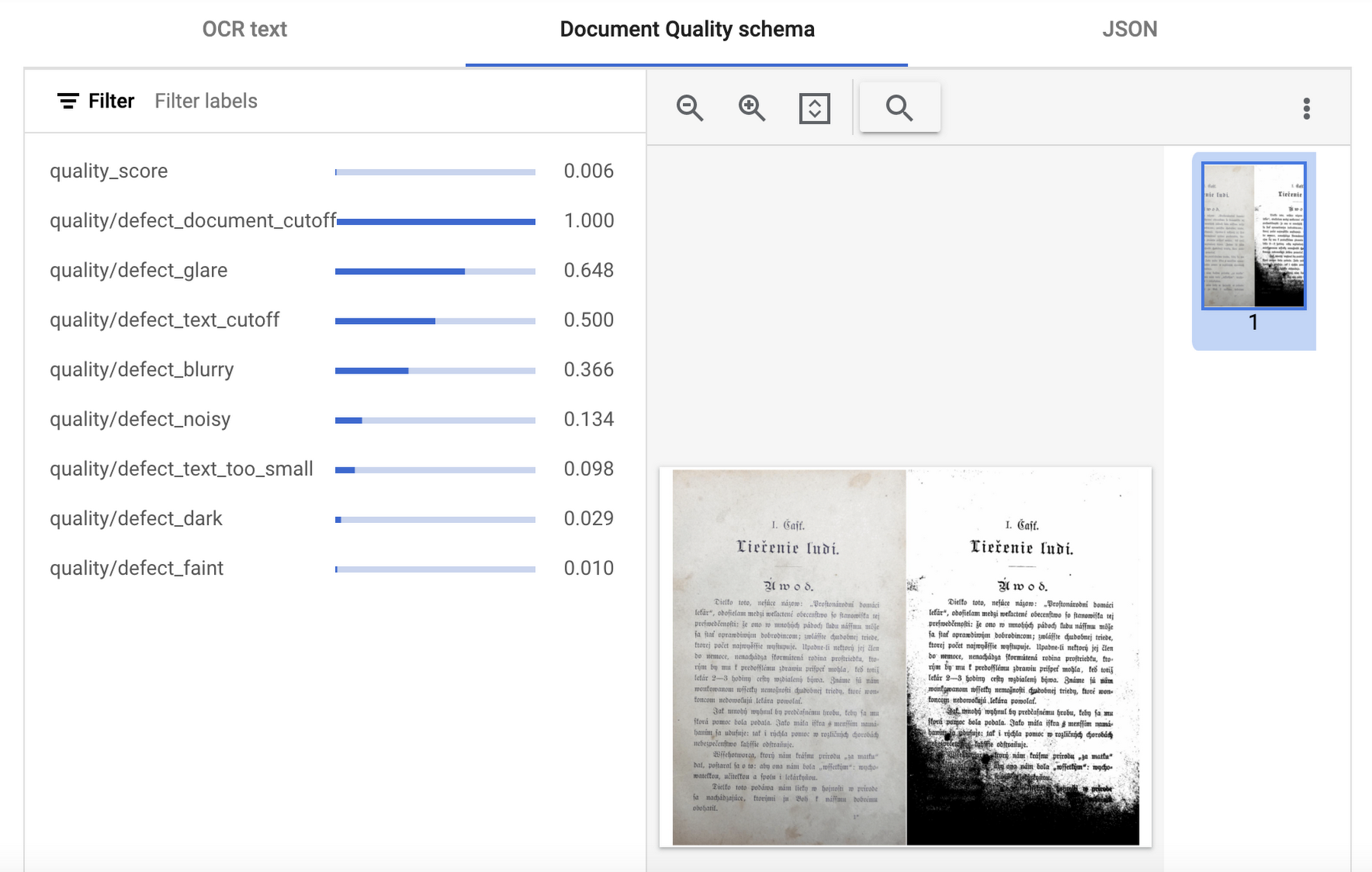
This quality assessment is returned as a quality score from 0 to 1, where 1 means perfect quality. If the quality score detected is lower than 0.5, a list of negative quality reasons (sorted by the likelihood) is also returned.
In this visualization of the API response, you can see that Document AI has determined a quality_score of 0.006 and also provided a list of several reasons including document and text cutoff, blurriness, and glare (among others).
Next steps
These are just a few examples of the types of processors that Document AI offers. Perusing the current documentation, you can find it has more than 40 processors, with each providing several functions, to explore. Document AI also offers you the ability to uptrain certain processors and supports the option to build your own custom processor. Across the board, if a document contains structured or unstructured text, Document AI has the capability to extract valuable data from it.
Get started and learn more by heading to our tutorials in the Cloud Console:
Google Cloud Helped Digitec Galaxus Personalize Over 2 Million Newsletters in a Week

8319
Of your peers have already read this article.
3:00 Minutes
The most insightful time you'll spend today!
Digitec Galaxus AG is the biggest online retailer in Switzerland, operating two online stores: Digitec, Switzerland’s online market leader for consumer electronics and media products, and Galaxus, the largest Swiss online shop with a steadily growing range of consistently low-priced products for almost all daily needs.
Known for its efficient, personalized shopping experiences, it’s clear that Digitec Galaxus understands what it takes to deliver a platform that is interesting and relevant to customers every time they shop.
The problem: Personalizing decisions for every situation
Digitec Galaxus already had established an engine to help them personalize experiences for shoppers when they reached out to Google Cloud. They had multiple recommendation systems in place and were also extensive early adopters of Recommendations AI, which already enabled them to offer personalized content in places like their homepages, product detail pages, and their newsletter.
But those same systems sometimes made it difficult to understand how best to combine and optimize to create the most personalized experiences for their shoppers. Their requirements were threefold:
- Personalization: They have over 12 recommenders they can display on the app, however they would like to contextualize this and choose different recommenders (which in turn select the items) for different users. Furthermore they would like to exploit existing trends as well as experiment with new ones.
- Latency: They would like to ensure that the solution is architected so that the ranked list of recommenders can be retrieved with sub 50 ms latency.
- End-to-end easy to maintain & generalizable/modular architecture: Digitec wanted the solution to be architected using an easy to maintain, open source stack, complete with all MLops capabilities required to train and use contextual bandits models. It was also important to them that it is built in a modular fashion such that it can be adapted easily to other use cases which have in mind such as recommendations on the homepage, Smartags and more .
To improve, they asked us to help them implement a machine learning (ML) contextual bandit based recommender system on Google Cloud taking all the above factors into consideration to take their personalization to the next level.
Contextual bandits algorithms are a simplified form of reinforcement learning and help aid real-world decision making by factoring in additional information about the visitor (context) to help learn what is most engaging for each individual. They also excel at exploiting trends which work well, as well as exploring new untested trends which can yield potentially even better results. For instance, imagine that you are personalizing a homepage image where you could show a comfy living room couch or pet supplies.
Without a contextual bandit algorithm, one of these images would be shown to someone at random without considering information you may have observed about them during previous visits. Contextual bandits enable businesses to consider outside context, such as previously visited pages or other purchases, and then observe the final outcome (a click on the image) to help determine what works best.
Creating a personalization system with contextual bandits
While Digitec Galaxus heavily personalizes their website homepages, they are very very sensitive and also require more cross-team collaboration to update and make changes.
Together with the Digitec Galaxus team, we decided to narrow the scope and focus on building a contextual bandit personalization system for the newsletter first. The digitec Galaxus team has complete control over newsletter decisions and testing various ML experiments on a newsletter would have less chance of adverse revenue impact than a website homepage.
The main goal was to architect a system that could be easily ported over to the homepage and other services offered by Digitec with minimal adaptations. It would also need to satisfy the functional and non-functional requirements of the homepage as well as other internal use cases.
Below is a diagram of how the newsletter’s personalization recommendation system works:

- The system is given some context features about the newsletter subscriber such as their purchase history and demographics. Features are sometimes referred to as variables or attributes, and can vary widely depending on what data is being analyzed.
- The contextual bandit model trains recommendations using those context features and 12 available recommenders (potential actions).
- The model then calculates which action is most likely to enhance the chance of reward (a user clicking in the newsletter) and also minimize the problem (an unsubscribe).
Calculating whether a click was a newsletter or an unsubscribe enabled the system to optimize for increasing clicks and avoid showing non-relevant content to the user (click-bait). This enabled Digitec Galaxus to exploit popular trends while also exploring potentially better-performing trends.
How Google Cloud helps
The newsletter context-driven personalization system was built on Google Cloud architecture using the ML recommendation training and prediction solutions available within our ecosystem.
Below is a diagram of the high-level architecture used:
The architecture covers three phases of generating context-driven ML predictions, including:
ML Development: Designing and building the ML models and pipeline
Vertex Notebooks are used as data science environments for experimentation and prototyping. Notebooks are also used to implement model training, scoring components, and pipelines. The source code is version controlled in Github. A continuous integration (CI) pipeline is set up to automatically run unit tests, build pipeline components, and store the container images to Cloud Container Registry.
ML Training: Large-scale training and storing of ML models
The training pipeline is executed on Vertex Pipelines. In essence, the pipeline trains the model using new training data extracted from BigQuery and produces a trained, validated contextual bandit model stored in the model registry. In our system, the model registry is a curated Cloud Storage.
The training pipeline uses Dataflow for large scale data extraction, validation, processing, and model evaluation, and Vertex Training for large-scale distributed training of the model. AI Platform Pipelines also stores artifacts, the output of training models, produced by the various pipeline steps to Cloud Storage. Information about these artifacts are then stored in an ML metadata database in Cloud SQL. To learn more about how to build a Continuous Training Pipeline, read the documentation guide.
ML Serving: Deploying new algorithms and experiments in production
The training pipeline uses batch prediction to generate many predictions at once using AI Platform Pipelines, allowing Digitec Galaxus to score large data sets. Once the predictions are produced, they are stored in Cloud Datastore for consumption. The pipeline uses the most recent contextual bandit model in the model registry to evaluate the inference dataset in BigQuery and give a ranked list of the best newsletters for each user, and persist it in Datastore. A Cloud Function is provided as a REST/HTTP endpoint to retrieve the precomputed predictions from Datastore.
All components of the code and architecture are modular and easy to use, which means they can be adapted and tweaked to several other use cases within the company as well.
Better newsletter predictions for millions
The newsletter prediction system was first deployed in production in February, and Digitec Galaxus has been using it to personalize over 2 million newsletters a week for subscribers. The results have been impressive, 50% higher than our baseline. However, the collaboration is still ongoing to improve the results even more.
“Working at this level in direct exchange with Google’s machine learning experts is a unique opportunity for us. The use of contextual bandits in the targeting of our recommendations enables us to pursue completely new approaches in personalization by also personalizing the delivery of the respective recommender to the user. We have already achieved good results in our newsletter in initial experiments and are now working on extending the approach to the entire newsletter by including more contextual data about the bandits arms. Furthermore, as a next step, we intend to apply the system to our online store as well, in order to provide our users with an even more personalized experience. To build this scalable solution, we are using Google’s open source tools such as TFX and TF Agents, as well as Google Cloud Services such as Compute Engine, Cloud Machine Learning Engine, Kubernetes Engine and Cloud Dataflow.”—Christian Sager, Product Owner, Personalization ( Digitec Galaxus)
Since the existing architecture and system is also dynamic, it will automatically adapt to new behaviours, trends, and users. As a result, Digitec Galaxus plans to re-use the same components and extend the existing system to help them improve the personalization of their homepage and other current use cases they have within the company. Beyond clicks and user engagement, the system’s flexibility also allows for future optimization of other criteria. It’s a very exciting time and we can’t wait to see what they build next!
1174
Of your peers have already watched this video.
5:30 Minutes
The most insightful time you'll spend today!
Prototyping Language Applications Made Easy with Generative AI
Did you know generative AI allows developers to prototype applications quickly? With Generative AI Studio on Google Cloud, developers can quickly explore and customize AI models that can be leveraged in Google Cloud applications. Watch along and see how developers, with the right tools, can experiment with new ideas in minutes instead of months.
Chapters:
0:00 – Intro
0:29 – Get started with Vertex Generative AI Studio
1:06 – Write your first prompt in Generative AI Studio
1:47 – Prototyping Q&A systems from background text
3:00 – How to save prompts
4:05 – How do LLMs produce output text?
4:41 – Wrap up
Check out more Generative AI for Developers videos → https://goo.gle/GenAIforDevs
Subscribe to Google Cloud Tech → https://goo.gle/GoogleCloudTech
VertexAI #GenerativeAI
More Relevant Stories for Your Company

Revolutionizing Generative AI Applications with Google’s Vertex AI
At Google Cloud, we’re committed to making generative AI useful for everyone. Doing so requires more than making powerful foundation models available to businesses, governments, and developers. Models also need to be backed by platforms that make adoption faster and safer, with onramps to meet organizations wherever they are, regardless of their

Google Cloud Featured at TechCrunch Disrupt 2021
Startups need to move quickly and focus their limited resources on areas where they can differentiate. If infrastructure isn’t your differentiator, don’t put a lot of energy into your infrastructure when someone else can do it for you. What’s more, time-to-market matters to startups more now than ever. Successful early

Combining IoT and Analytics to Warn Manufacturers of Line Break Downs and Increase Profitability
Oden Technologies is using the Internet of Things (IoT) to improve the factories of today. The giant network of “things” (including people) connected to each other via the Internet has the potential to reduce waste, increase efficiency, and improve safety across all walks of life. Oden is leading IoT innovation in

AI Solutions for Government Organizations: How to Get Started
Cloud-native features are helping public sector teams innovate faster than ever. Ideas discussed in a morning meeting can be a working proof of concept later that day. Managed services can remove administrative burden and reduce the steps needed to design and provision cloud infrastructure. Security can be built-in from the
