





Google’s Anti-Pattern Recognition Tool: Streamlining BigQuery Performance

1229
Of your peers have already read this article.
2:30 Minutes
The most insightful time you'll spend today!
Why do we need a BigQuery anti-pattern recognition tool?
BigQuery is a serverless and cost-effective enterprise data warehouse that works across cloud environments and scales with your data. As with any large scale data-intensive platform, following best practices and avoiding inefficient anti-patterns goes a long way in terms of performance and cost savings.
Usually SQL optimization requires a significant time investment from engineers, who must read high-complexity queries, devise a variety of approaches to improve performance and efficiency, and test several optimization techniques. The best place to start is to fix anti-patterns, since this only requires easily applicable changes and provides significant performance improvements.
To facilitate the task of identifying and fixing said anti-pattern, Google Professional Services Organization (PSO) and Global Services Delivery (GSD) have developed a BigQuery anti-pattern recognition tool. This tool automates the process of scanning SQL queries, identifying antipatterns, and providing optimization recommendations.
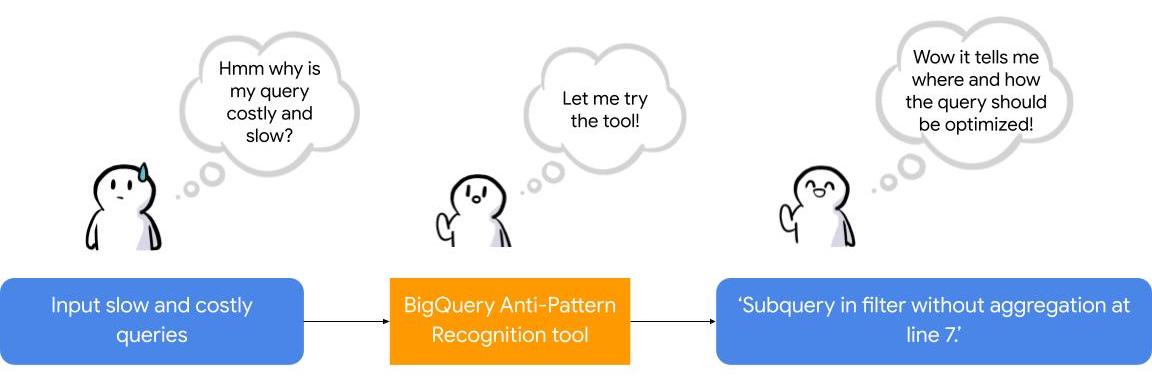
What is the BigQuery anti-pattern recognition tool?
The BigQuery anti-pattern recognition tool let you easily identify performance impacting anti-patterns across a large number of SQL queries in a single go.
It utilizes ZetaSQL to parse BigQuery SQL queries into abstract syntax trees (AST) and then traverses the tree nodes to detect the presence of anti-patterns.
The tool takes a BigQuery SQL query as an input, such as:
SELECT
 t.dim1,
 t.metric1
FROM
 `dataset.table` t
WHERE
 t.id NOT IN (
 SELECT
   id
 FROM
   `dataset.table2`)
And produces the output as:
Subquery in filter without aggregation at line 8.
It examines potential optimizations, including:
- Selecting only the necessary columns
- Handling multiple WITH-clause references
- Addressing subqueries in filters with aggregations
- Optimizing ORDER BY queries with LIMIT
- Enhancing string comparisons
- Improving JOIN patterns
- Avoiding subquery aggregation in the WHERE clause
The solution supports reading from various sources, such as:
- Command line
- Local files
- Cloud Storage files
- Local folders
- Cloud Storage folders
- CSV (with one query per line)
- INFORMATION_SCHEMA
Additionally, the solution provides flexibility in writing output to different destinations, including:
- Printing to the terminal
- Exporting as CSV
Writing to a BigQuery table
Using the BigQuery anti-pattern recognition tool
The BigQuery anti-pattern recognition tool is hosted on GitHub. Below are the Quick Start steps on using the tool via command line for inline queries. You can also leverage Cloud Run to deploy it as a container on cloud.
Prerequisites
- Linux OS
- JDK 11 or above is installed
- Maven
- Docker
- gcloud CLI
Quick start: – steps
1. Clone the repo into your local machine.
git clone git@github.com:GoogleCloudPlatform/bigquery-antipattern-recognition.git
2. Build the tool image inside the `bigquery-antipattern-recognition` folder.
mvn clean package jib:dockerBuild -DskipTests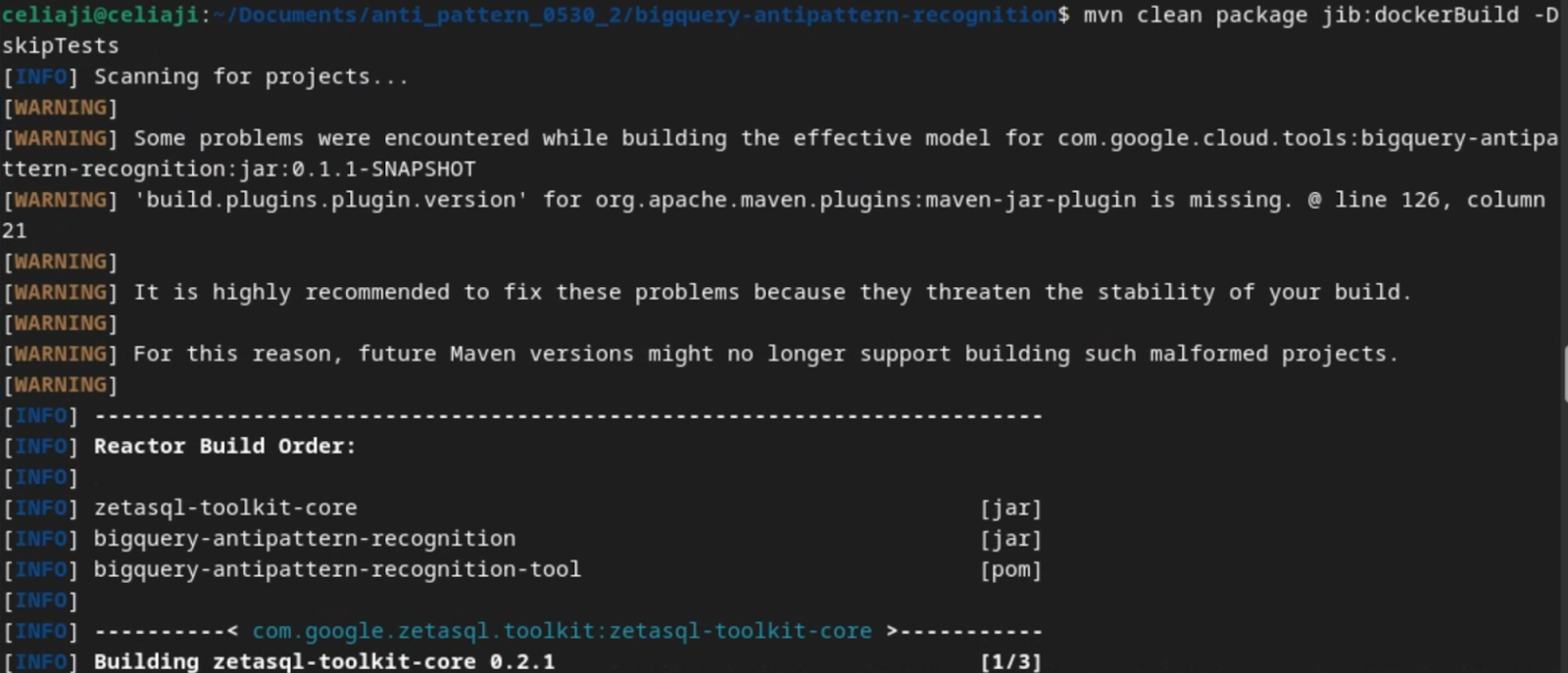
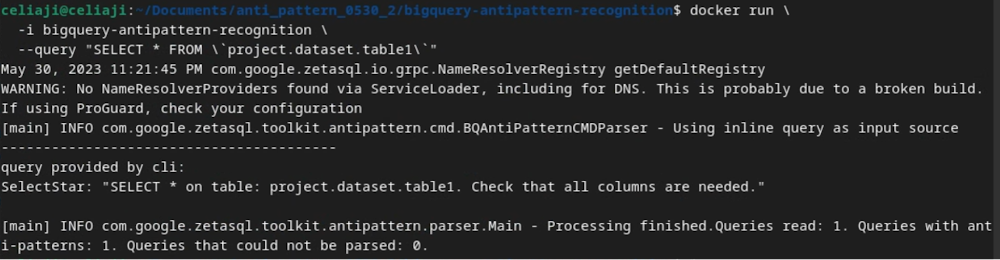
3. Run the tool for a simple inline query.
docker run \
  -i bigquery-antipattern-recognition \
  --query "SELECT * FROM \`project.dataset.table1\`"
4. Below is the output result in the command-line interface:
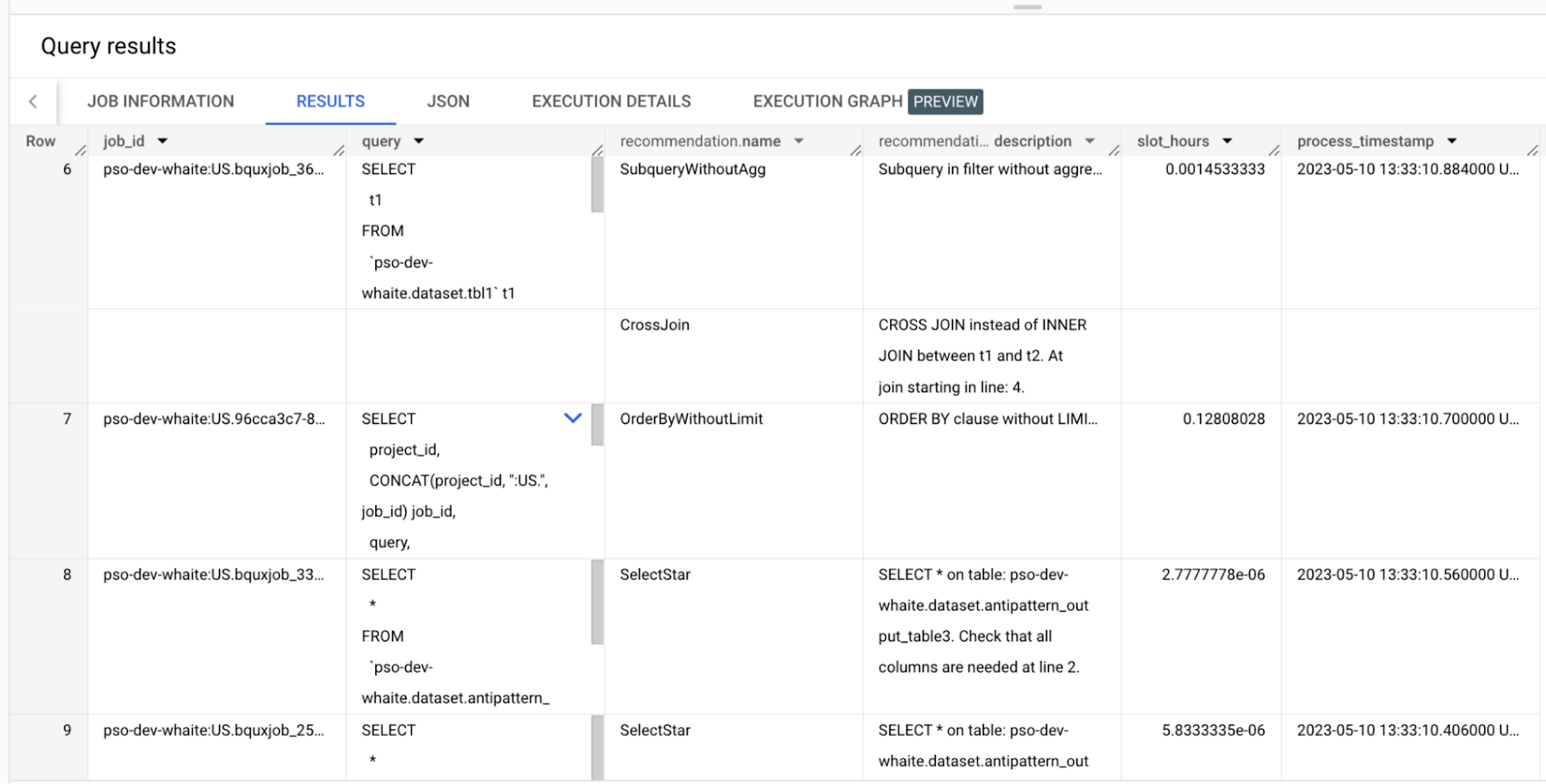
Additionally, the above tool can read queries from Information Schema and load the output recommendations to a BigQuery table.
Below is an example of the BigQuery anti-pattern recognition tool results exported to a BigQuery table.
Getting started
Ready to start optimizing your BigQuery queries and cutting costs? Check out the tool here and contribute to the tool via GitHub.
Have questions or feedback?
We’re actively working on new features to make the tool as useful to our customers. Use it and tell us what you think! For product feedback/technical questions, reach out to us at bq-antipattern-eng@google.com. If you’re already a BigQuery customer and would like a briefing on the tool, please reach out, we’d be happy to talk.
Serverless for Startups, the Best Way to Succeed: Expert Says

7038
Of your peers have already read this article.
1:30 Minutes
The most insightful time you'll spend today!
As Google Cloud has become a choice for more startups, I’ve experienced an increase in founders asking how they should think about cloud services. Though each startup is different and requirements may vary across industries and regions, I’ve seen a few core best practices that help startups to succeed—as well as several traps to avoid.
For example, If you go with a public cloud provider, you’re ideally not starting from ground zero like you would running your own data center, but it’s important not to introduce similar complexity in a virtualized environment. Just because you’re using public cloud infrastructure doesn’t mean you want to manage it.
Instead, you want to leverage platforms that abstract away complexity so your team can focus on delivering value to customers. That’s where serverless comes in. Serverless platforms are fully managed by the provider, offering automatic scaling for workloads, as well as provisioning, configuring, patching, and management of servers and clusters. Freed from these resource-intensive tasks, your technical talent can focus on the things that differentiate your business, not on IT curation.
This applies to not only running stateless applications, but also managing and analyzing data. You should be collecting data points about which features are most popular on your platform, what people are buying, the types of activities that help your customers get their jobs done, and so on. This information is essential to building and executing on a product roadmap that will serve your customers. However, it’s not enough to collect this data, you need to make your data accessible, secure, and easy for your team to analyze—so where do you run and host it?
On Google Cloud, this is where options like Spanner and Cloud SQL can play a large role, as can BigQuery for analysis. You won’t have to worry about standing up infrastructure or patching servers—you can just stream your data to our data management platforms, where it’s available whenever someone needs to run a query. By leveraging a serverless architecture, your startup can be data-driven without having to invest in the traditional complexity of database administration and management—and that can significantly change your playing field.
Serverless is just one of the factors you should consider as you build out your tech stack. To hear my thoughts on a range of other topics relevant to startups — such as security, cloud credits, and the differences among managed services — check out the below video or visit our Build and Grow page.
Combining IoT and Analytics to Warn Manufacturers of Line Break Downs and Increase Profitability

7582
Of your peers have already read this article.
2:45 Minutes
The most insightful time you'll spend today!
Oden Technologies is using the Internet of Things (IoT) to improve the factories of today. The giant network of “things” (including people) connected to each other via the Internet has the potential to reduce waste, increase efficiency, and improve safety across all walks of life. Oden is leading IoT innovation in manufacturing by combining wireless connectivity, big data, and cloud computing.
The use of data to improve manufacturing is practically as old as manufacturing itself. But the computerization of manufacturing has resulted in broad and rapid changes to the way data is collected and processed, as well as the sheer volume of data available.
Oden’s goal is to help manufacturers tap into this data to quickly identify process trends and even warning signs of machine breakdown. Such visibility can reveal opportunities to improve manufacturing and maintenance processes that reduce waste and increase profit margins.
Oden designs and develops data collection devices that can plug into almost any kind of machine and can wirelessly transmit data with minimal complexity and setup time.
Once devices are installed, the Oden technology platform processes data to give manufacturers cutting-edge analytics that are easy to comprehend. Analysis produced by the platform provides factory engineers with data points such as detailed root-cause analysis down to the second, factory-wide performance in real-time, and trend analysis.
Improving cloud delivery
Oden’s previous cloud platform performed satisfactorily, but the company evaluated alternatives in search of potential reductions in cost and complexity and increases in performance.
When evaluating Google Cloud Platform, Oden discovered it would require fewer virtual machine (VM) instances for equivalent performance, which would cut costs. Furthermore, Oden could gain more sophisticated data analytics and machine learning capabilities compared with its existing cloud provider.
Today, Oden runs its entire platform on Google Cloud Platform including Google Compute Engine, Google Cloud Pub/Sub, Google Cloud Bigtable, Google Stackdriver, and Google Kubernetes Engine.
“In order to serve our customers, we need a cloud platform that can scale reliably while keeping costs low, perform under heavy loads, and consistently deliver sophisticated features such as machine learning,” says Willem Sundblad, CEO and Founder at Oden Technologies. “Google Cloud Platform is way ahead in all of these areas compared to our previous cloud provider.”
Capturing tens of millions of metrics a day
Using Google Cloud Platform, Oden can help an average factory capture and store approximately 10 million metrics on a single manufacturing line every day.
Metrics can include extremely granular detail, such as the amount of electricity going to machines, the amount of raw material consumed, and the volume of material produced. Sensors can also capture and transmit environmental information such as temperature, humidity, and dew point so that manufacturers can identify weather-related and seasonal impacts on production.
The updated Oden Cloud Platform uses Kubernetes Engine—powered by the open source Kubernetes system—to run application program interfaces (APIs) that capture data from Oden’s wireless devices on the factory floor.
Google Cloud Pub/Sub then sends the data in real time to Google Cloud Bigtable, where data is processed using Oden’s proprietary analytics tools. Google Stackdriver supports Google Cloud Platform monitoring, logging, and diagnostics, which help Oden deliver its cloud platform with confidence.
Oden Technologies builds dashboards powered by Kubernetes Engine, which pull analyzed data from Google Cloud Bigtable. The dashboards provide customers with real-time visibility into their manufacturing lines. Oden Factory Cloud dashboards allow customers to delve deeper into their data to fine-tune production processes or discover the root causes of production issues.
With the previous cloud provider, Oden required 80 VM instances to run the dashboards. With Google Cloud Platform that number has been cut to 45, which dramatically reduces costs and complexity.
“We migrated from our previous cloud provider to Google Cloud Platform in just one month,” says Willem. “Further, our storage and data analytics costs have decreased by 30%. Cost savings like these allow us to protect customers from rising expenses, keeping us focused on bringing the best products possible to market.”
Faster data access; more efficient factories
With Google Cloud Platform, Oden can now deliver a complete factory analytics picture to manufacturers. In environments where thousands of variables affect the bottom line, businesses can now automatically and perpetually record machine and performance measurement. Oden Factory Cloud gives customers access to comprehensive data insights and can eliminate reliance on onsite infrastructure investments to run their own analytics.
Because manufacturers have access to live data and can analyze production data quickly, they can troubleshoot and resolve problems in minutes rather than months. Such information helps improve product quality, minimize unplanned downtime, cut costs, and improve profitability.
“With the help of Google Cloud Platform, we are helping our customers to be data-driven, which wasn’t possible before,” adds Willem. “They now understand that data is their most important asset. That allows them to be more innovative and continually improve their production processes.”
Experts’ Guideline for Personalizing Platforms with the Right Recommendation System on Google Cloud

4999
Of your peers have already read this article.
5:00 Minutes
The most insightful time you'll spend today!
Over the past two decades, consumers have become accustomed to receiving personalized recommendations in all facets of their online life. Whether that be recommended products while shopping on Amazon, a curated list of apps in the Google Play store, or relevant videos to watch next on YouTube. In fact, in a Verge article “How YouTube perfected the feed: Google Brain gave YouTube new life,” the Google Brain team reveals how their recommendation engine has impacted the platform with “more than 70 percent of the time people spend watching videos on the site being driven by YouTube’s algorithmic recommendations” thereby increasing time spent on the platform by 20X in three years.
It’s become clear that personalized recommendations are no longer a differentiator for an organization but rather something consumers have come to expect in their day-to-day experiences online. So what should you do if you are behind the curve and want to get started or simply want to improve upon what you already have? While there are all sorts of techniques, from content-based systems to deep learning methods, our goal in this recommender-focused blog series is to demystify three available approaches to building recommendation systems on Google Cloud: Matrix Factorization in BigQuery Machine Learning (BQML), Recommendations AI, and deep retrieval techniques available via the Two-Tower built-in algorithm.
One of these approaches can be used to meet you where you are in your personalization journey, no matter if you are just starting or if you are well into it. This first blog post will introduce our three approaches and when to use them.
What is Matrix Factorization and how does it work?
Collaborative filtering is a foundational model for building a recommendation system as the input dataset is simple and the embeddings are learned for you. How does Matrix factorization fit into the mix you might be wondering? Matrix factorization is simply the model that applies collaborative filtering. BQML enables users to create and execute a matrix factorization model by using standard SQL directly in the data warehouse.
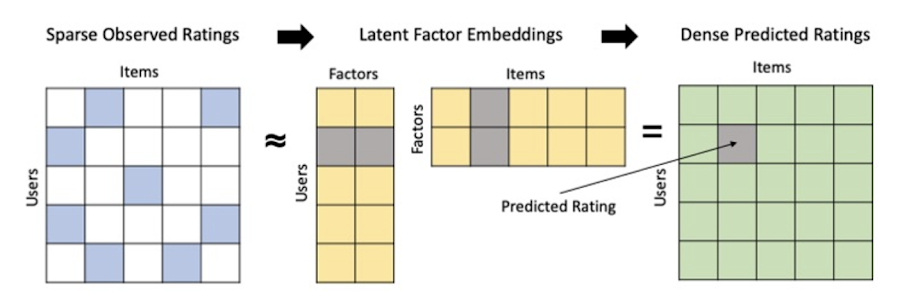
Collaborative filtering begins by creating an interaction matrix. The interaction matrix represents users as a row and items as columns in your dataset. This interaction matrix often is sparse in nature as not all users will have interacted with many items in your catalog. This is where embeddings come into play. Generating embeddings for users and items not only allows you to collapse many sparse features into a lower dimensional space but they also allow you to derive a similarity measure so that similar users/items fall nearby in the embedding space. These similarity measures are key as collaborative filtering uses similarities between users and items to make the end recommendations. The underlying assumption being that similar users will like similar items whether that be movies or handbags.
What’s required to get started?
To train a matrix factorization model you need a table that includes three input columns: user(s), item(s), and an implicit or explicit feedback variable (e.g., ratings is an example of explicit feedback). With the base input dataset in place, you can then easily run your model in BigQuery after specifying several hyperparameters in your CREATE MODEL SQL statement. Hyperparameters are available to specify the number of embeddings, the feedback type, the amount of L2 regularization applied and so on.
Why use this approach and who is it a good fit for?
As mentioned earlier, Matrix Factorization in BQML is a great way for those new to recommendation systems to get started. Matrix factorization has many benefits:
- Little ML Expertise: Leveraging SQL to build the model lowers the level of ML expertise needed
- Few Input Features: Data inputs are straightforward, requiring a simple interaction matrix
- Additional Insight: Collaborative filtering is adept at discovering new interests or products for users
While Matrix Factorization is a great tool for deriving recommendations it does come with additional considerations and potential drawbacks depending upon the use case.
- Not Amenable to Large Feature Sets: The input table can only contain two feature columns (e.g., user(s), item(s)). If there is a need to include additional features such as contextual signals, Matrix factorization may not be the right method for you.
- New Items: If an item is not available in the training data, the system can’t create an embedding for it and will have difficulty recommending similar items. While there are some workarounds available to address this cold-start issue, if your item catalog often includes new items, Matrix factorization may not be a good fit.
- Input Data Limitations: While the input matrix is expected to be sparse, training examples without feedback can cause problems. Filtering for items and users that have at least a handful of feedback (e.g., ratings) examples can improve the model. More information on limitations can be found here.
In summary, for users with a simplified dataset looking to iterate quickly and develop a baseline recommendation system, Matrix Factorization is a great approach to begin your personalization AI journey.
What is Recommendations AI and how does it work?
Recommendations AI is a fully managed service which helps organizations deploy scalable recommendation systems that use state-of-the-art deep learning techniques, including cutting-edge architectures such as two-tower encoders, to serve personalized and contextually relevant recommendations throughout the customer journey.
Deep learning models are able to improve the context and relevance of recommendations in part because they can easily address the previously mentioned limitations of Matrix Factorization. They incorporate a wide set of user and item features, and by definition they emphasize learning successive layers of increasingly meaningful representations from these features. This flexibility and expressivity allows them to capture complex relationships like short-lived fashion trends and niche user behaviors. However, this increased relevance comes at a cost, as deep learning recommenders can be difficult to train and expensive to serve at scale.
Recommendations AI helps organizations take advantage of serving these deep learning models and handles the MLOps required to serve these models globally with low latency. Models are automatically retrained daily and tuned quarterly to capture changes in customer behavior, product assortment, pricing, and promotions. Newly trained models follow a resilient CI/CD routine which validates they are fit to serve and promotes them to production without service interruption. The models achieve low serving latency by using a scalable approximate nearest neighbors (ANN) service for efficient item retrieval at inference time. And, to maintain consistency between online and offline tasks, a scalable feature store is used, preventing common production challenges such as data leakage and training-serving skew.
What’s required to get started?
To get started with Recommendations AI we first need to ingest product and user data into the API:
- Import product catalog: For large product catalog updates, ingest catalog items in bulk using the catalogItems.import method. Frequent catalog updates can be schedule with Google Merchant Center or BigQuery
- Record user events: User events track actions such as clicking on a product, adding items to cart, or even purchasing an item. These events need to be ingested in real time to reflect the latest user behavior and then joined to items imported in the product catalog
- Import historical user events: The models need sufficient training data before they can provide accurate predictions. The recommended user event data requirements are different across model types (learn more here)
Once the data requirements are met, we are able to create one or multiple models to serve recommendations:
- Determine your recommendation types and placements: The location of the recommendation panel and the objective for that panel impact model training and tuning. Review the available recommendations types, optimization objectives, and other model tuning options to determine the best options for your business objectives.
- Create model(s): Initial model training and tuning can take 2-5 days depending on the number of user events and size of the product catalog
- Create serving configurations and preview recommendations: After the model is activated, create serving configurations and preview the recommendations to ensure your setup is functioning as expected before serving to production traffic
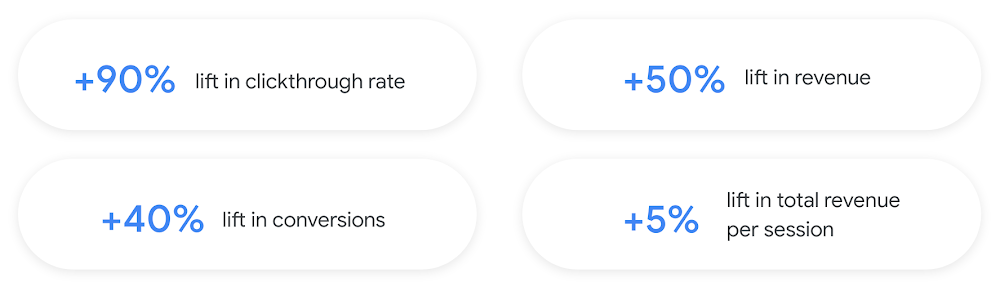
Once models are ready to serve, consider setting up A/B experiments to understand how newly trained models impact your customer experience before serving them to 100% of your traffic. In the Recommendations AI console, see the Monitoring & Analytics page for summary and placement-specific metrics (e.g., recommender-engaged revenue, click-through-rate, conversion rate, and more).
Why use this approach and who is it a good fit for?
Recommendations AI is a great way to engage customers and grow your online presence through personalization. It’s used by teams who lack technical experience with production recommendation systems, as well as customers who have this technical depth but want to allocate their team’s effort towards other priorities and challenges. No matter your team’s technical experience or bandwidth, you can expect several benefits with Recommendations AI:
- Fully managed service: no need to preprocess data, train or hypertune machine learning models, load balance or manually provision you infrastructure – this is all taken care of for you. The recommendation API also provides a user-friendly console to monitor performance over time.
- State-of-the-art AI: take advantage of the same modeling techniques used to serve recommendations across Google Ads, Google Search, and YouTube. These models excel in scenarios with long-tail products and cold-starts users and items
- Deliver at any touchpoint: serve high-quality recommendations to both first-time users and loyal customers anywhere in their journey via web, mobile, email, and more
- Deliver globally: serve recommendations in any language anywhere in the world at low-latency with a fully automated global serving infrastructure
- Your data, your models: Your data and models are yours. They’ll never be used for any other Google product nor shown to any other Google customer
For users looking to leverage state of the art AI to fuel their recommendation systems but need an existing solution to get up and running more quickly, Recommendations AI is the right solution for you.
What are Two Tower encoders and how do they work?
As a reminder, in recommendation system design, our objective is to surface the most relevant set of items for a given user or set of users. The items are usually referred to as the candidate(s) where we might include information about the items such as the title or description of the item, other metadata about the item like language, number of views, or even clicks on the item over time. User(s) are often represented in the form of a query to a recommendation system where we might provide details about the user such as the location of the user, preferred languages, and what they have searched for in the past.
Let’s start with a common example. Imagine that you are creating a movie recommendation system. The input candidates for such a system would be thousands of movies and the query set can consist of millions of viewers. The goal of the retrieval stage is to select a smaller subset of movies(candidates) for each user and then score and rank order them before presenting the final recommended list to the query/user.
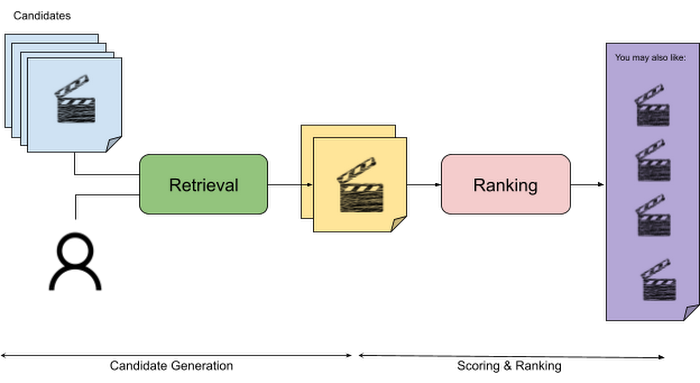
The retrieval stage is able to refine our list of candidates by encoding both the candidate and the query data so they share the same embedding space. A good embedding space will place candidates which are similar to one another closer together and dissimilar items/queries farther apart in the embedding space.
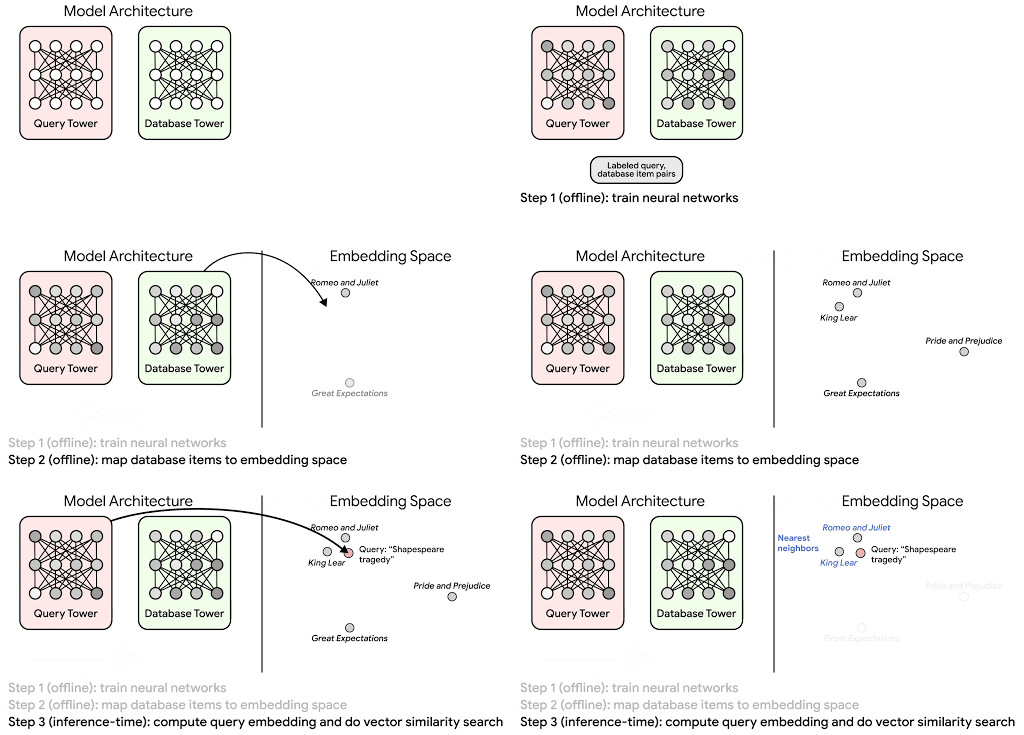
Once we have a database of query and candidate embeddings we can then use an approximate nearest neighbor search method to then generate a list of final “like” candidates, i.e. find a certain number of nearest neighbors for a given query/user and surface final recommendations.
What’s required to get started?
At the most basic level, in order to train a two-tower model you need the following inputs:
- Training Data: Training data is created by combining your query/user data with data about the candidates/items. The data must include matched pairs, cases where both user and item information is available. Data in the training set can include many formats from text, numeric data, or even images.
- Input Schema: The input schema describes the schema of the combined training data along with any specific feature configurations.
Several services within Vertex AI have come available that complement the existing Two-Tower built-in algorithm and can be leveraged in your execution:
- Nearest Neighbor (ANN) Service: Vertex AI Matching Engine and ScANN provide a high-scale and low-latency Approximate Nearest Neighbor (ANN) service so you can more easily identify similar embeddings.
- Hyperparameter Tuning Service: A hyperparameter tuning service such as Vizier can help you identify the optimal hyperparameters such as the number of hidden layers, the size of the hidden layers, and the learning rate in fewer trials.
- Hardware Accelerators: Specialized hardware, such as GPUs or TPUs, can be valuable in your recommendation system to help accelerate experiments and improve the speed of training cycles.
Why use this approach and who is it a good fit for?
The Two-Tower built-in algorithm can be considered the “custom sports car” of recommendation systems and comes with several benefits:
- Greater Control: While Recommendations AI uses the two-tower architecture as one of the available architectures it doesn’t provide granular control or visibility into model training, example generation, and model validation details. In comparison, the Two-Tower built in algorithm provides a more customizable approach as you are training a model directly in a notebook environment.
- More Feature Options: The Two Tower approach can handle additional contextual signals ranging from text to images.
- Cold Start Cases: Leveraging a rich set of features not only enhances performance but also allows the candidate generation to work for new users or new candidates.
While the Two-Tower built in algorithm is an excellent and best-in class solution for deriving recommendations, it does come with additional considerations and potential drawbacks depending upon the use case.
- Technical ML Expertise Required: Two tower encoders are not a “plug and play” solution like the other approaches mentioned above. In order to effectively leverage this approach, appropriate coding and ML expertise is required.
- Speed to Insight: Building out a custom solution via two-tower encoders may require additional time as the solution is not pre-built for the user.
For users looking for greater control, increased flexibility, and have the technical chops to easily work within a managed notebook environment – the two-tower built in algorithm is the right solution for them.
What’s next?
In this article, we explored three common methods for building recommendation systems on Google Cloud Platform. As you can see thus far, there are alot of considerations to take into account before choosing a final approach. In an effort to help you align more quickly we have distilled the decision criteria down to a few simple steps (see below for more details).
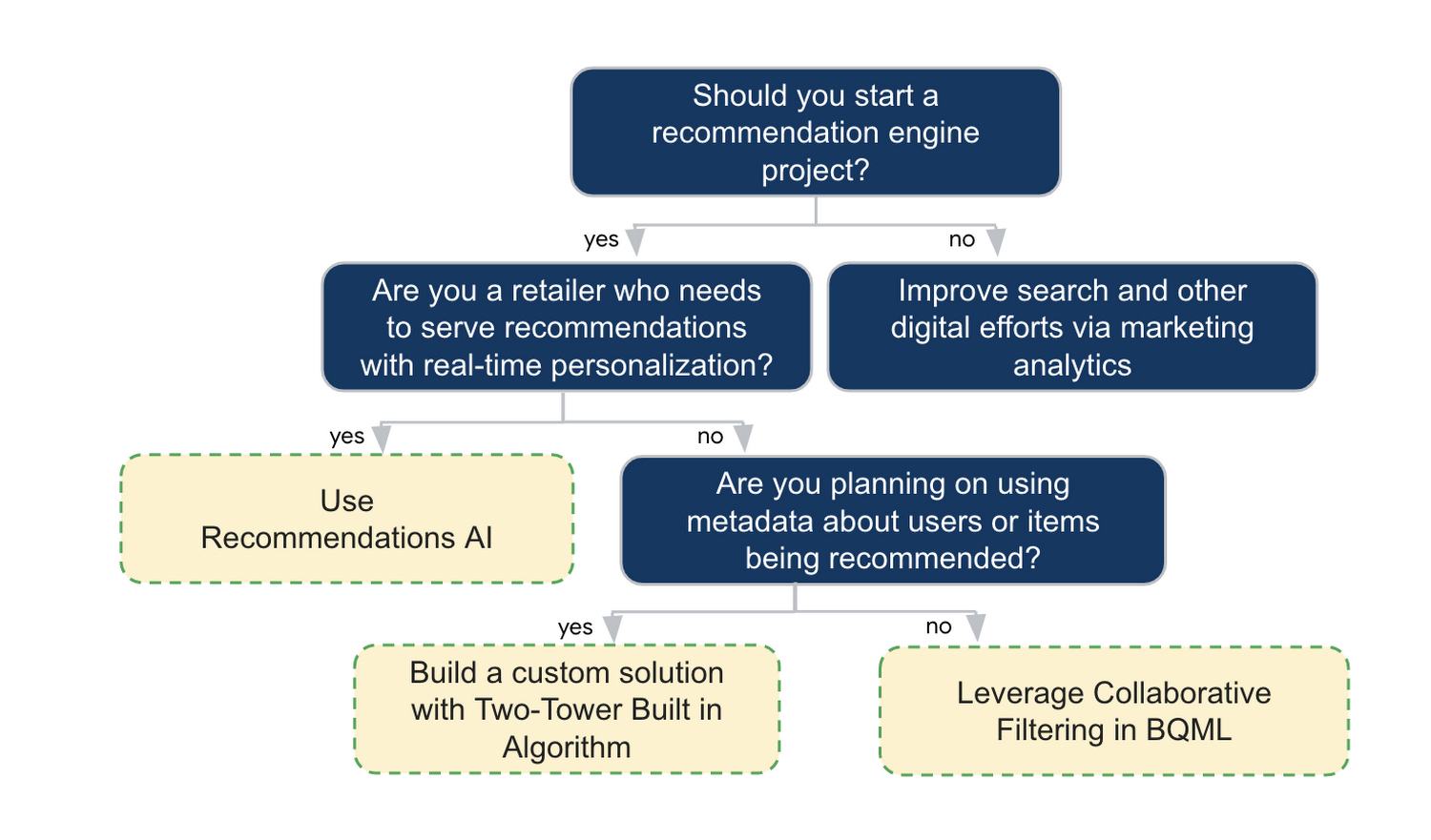
In the next installments of this series, we will dive more deeply into each method, explore how hardware accelerators can play a key role in recommendation system design, and discuss how recommendation systems may be leveraged in key verticals. Stay tuned for future posts in our recommendation systems series. Thank you for reading! Have a question or want to chat? Find authors here – R.E. [Twitter | LinkedIn], Jordan [LinkedIn], and Vaibhav [LinkedIn].
Acknowledgements
Special thanks to Pallav Mehta, Henry Tappen,Abhinav Khushraj, and Nicholas Edelman for helping to review this post.
References
Manhattan Associates’ Seamless Migration to Google Cloud SQL

3391
Of your peers have already read this article.
3:30 Minutes
The most insightful time you'll spend today!
Editor’s note: Manhattan Associates provides transformative, modern supply chain and omnichannel commerce solutions. It enhanced the scalability, availability, and reliability of its software-as-a-service through a seamless migration to Google Cloud SQL for MySQL.
Geopolitical shifts and global pandemics have made the global supply chain increasingly unpredictable and complex.
At Manhattan Associates, we help many of the world’s leading organizations navigate that complexity through industry-leading supply chain commerce solutions like warehouse management, transportation management, order management, point of sale and much more, to continuously exceed increasing expectations.
The foundation for those solutions is Manhattan Active® Platform, a cloud-native, API-first microservices technology platform that’s been engineered to handle the most complex supply chain networks in the world and designed to never feel like it.
Manhattan Active solutions enable our clients to deliver exceptional shopping experiences in the store, online, and everywhere in between. They unify warehouse, automation, labor and transportation activities, bolster resilience, and seamlessly support growing sustainability requirements.
More Resiliency and Less Downtime
Manhattan Active solutions run 24×7 and need a database solution that can support this. Cloud SQL for MySQL helps us meet our availability goals with automatic failovers, automatic backups, point-in-time recovery, binary log management, and more. Cloud SQL also allows us to create in-region and cross-region replicas efficiently with near zero replication lags. We can create a new replica for a TB size DB in under 30 minutes, a process which used to take several days.
We provide a 99.9% overall up-time service level agreement (SLA) for Manhattan Active Platform, and Cloud SQL helps us keep that promise. Unplanned downtime is 83% less than it would have been with our previous database solutions.
Flexibility and Total Cost of Ownership
One of the fundamental requirements in a cloud-native platform like Manhattan Active is a robust, efficient, and cost-effective database. Our original database solutions struggled across different cloud platforms and created challenges in total cost of ownership and licensing.
We needed a more cost-efficient approach to managing a highly reliable and available database engine that could operate as a managed service, and Cloud SQL delivered.
We were able to move every Manhattan Active solution from our previous cloud vendor to Google Cloud, including the shift to Cloud SQL, with less than four hours of downtime.
Today, we run hundreds of Cloud SQL instances and operate most of them with just a few database administrators (DBA). By offloading the majority of our database management tasks to Cloud SQL, we significantly reduced the cost to maintain Manhattan Active Platform databases.
We also need a solution where we resize our database within minutes. This requirement is needed to manage database performance and infrastructure costs. The ease of resizing our database within minutes allows us to keep the optimal performance levels and saves significantly on overall infrastructure costs.
A Winning Innovation Combination
Cloud SQL provides highly scalable, available, and reliable database capabilities within Manhattan Active Platform, which helps us provide significantly better outcomes for our clients and better experiences for their customers.
Learn more about how you can use Cloud SQL at your organization. Get started today.
UKG Ready: Meeting the Needs of Complex Machine Learning Models and Distributed Data Sets

3969
Of your peers have already read this article.
2:30 Minutes
The most insightful time you'll spend today!
Business Problem
UKG Ready primarily operates in the Small and Medium Business (SMB) space, so inherently many customers are forced to operate and make key business decisions with less Workforce Management (WFM) / Human Capital Management (HCM) data. In addition to volume, SMB lacks the variety of data needed to create a dynamic and agile organization. This puts SMB at a major disadvantage compared to larger segments.
Project Goals
People Insights module is committed to surfacing insights to customers in the context of their day-to-day duties and aid in decision making. With the SMB customer data limitations mentioned above, the goal of this project was to create a global dataset that augments individual customer data to bring light to less obvious, yet important information.
Challenges
UKG Ready is a highly configurable application that gives customers the opportunity to build solutions on a platform that meets their specific business needs. High configurability gives high flexibility to customers in their usage of the software. However, it becomes nearly impossible to create a global dataset for machine learning and data insights. UKG Ready manages just under 4 million of the US workforce and some 30,000+ customers. Despite the large employee dataset size, machine learning models that are specific to customers are starved for data because the individual customers have a relatively small employee population. Does that mean we cannot support our SMB customers’ decision making with ML?
Result
Partnering with Google, we were able to develop an approach that allowed us to standardize various domain entities (pay categories, time off codes, job titles, etc.) so that we could build a global dataset to augment SMB customer data. Using machine learning we were able to build a common vocabulary across our customer base. This common vocabulary encapsulates the nuances of how our customers manage their business and yet is generalized and standardized such that the data can be aggregated over the variety of customer configurations. This allows us to serve up practical insights to customers through various use cases. Our partnership allowed us to leverage Google Cloud Services to meet the needs of our complex machine learning models, distributed data sets and CI/CD processes.
How
UKG Ready decided to partner with Google for an end-to-end solution for the analytics offering. This allowed us to focus on our core business logic without having to worry about the platform, environment configurations, performance and scalability of the entire solution. We make use of various Google Cloud services such as Cloud Triggers, Cloud Storage, Cloud Functions, Cloud Composer, Cloud Dataflow, Big Query, Vertex AI, Cloud Pub/Sub… to host our analytics solution. Jenkins manages the entire CI/CD pipelines and cloud environments are configured and deployed using Terraform.
The standardization of business entities problem was solved in three distinct steps:
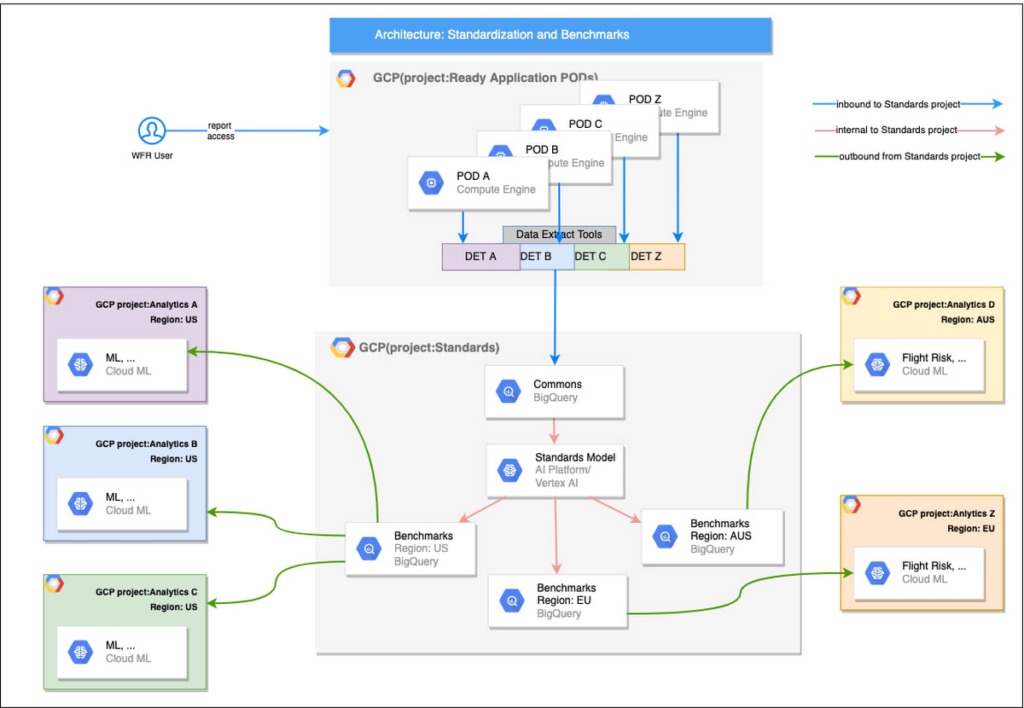
Step 1: Collecting aggregated data
We needed an approach to collect aggregated data from our highly distributed, sharded, multi-tenant data sources. We developed a custom solution that allows us to extract data aggregated at source for PII and GDPR considerations and transfer to Google Cloud Storage in the fastest manner possible. Data is then transformed and stored in Big Query. Services used: GCS, Cloud Functions, DataFlow, Cloud Composer and Big Query. All processes are orchestrated using Cloud Composer and detailed logging is available in Cloud Logging (Stackdriver).
Step 2: Applying NLP (Natural Language Processing)
Once we had the variety of customer configurations or the business entities available, we then applied NLP algorithms to categorize and standardize these in buckets. This approach assumes that customers use natural language for configurations like job titles, pay codes etc.
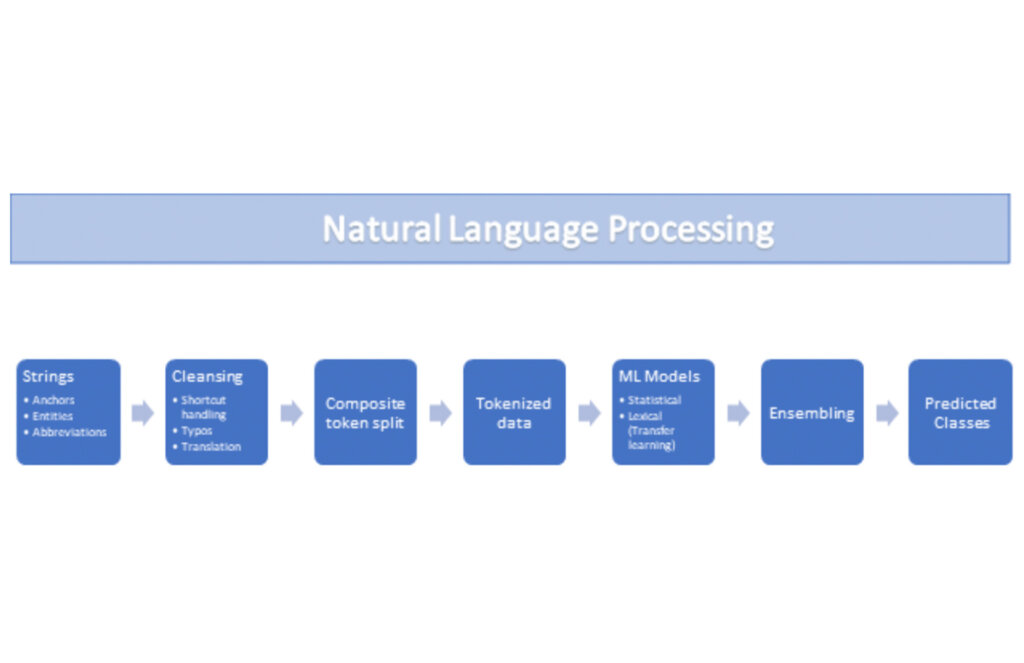
String Preparation
The input data for string preparation process is an entity string or several strings, that describe one entity object (like name-description pair or code-name pair). The output represents set of tokens that may be used to run a classification/clustering model. The process of string preparation tokenizes strings, replaces shortcuts, handles abbreviations, translates tokens, handles grammatical errors and mistypes
ML Models
Statistical
The idea of the model is to use defined target classes (clusters) and assign several tokens (anchors) to each of them an entity that has any of those tokens would be “attracted” to appropriate class. All other tokens are weighted according to frequencies of usage of theses tokens in the entities with anchor tokens:
Using anchor tokens, we are building kind-of Word2Vec - dimensionality of vector is equal to number of target classes. The higher the specific dimension (cluster) value, the higher the probability of entity to be included in appropriate cluster. Final prediction for entity tokens list for specific class is sum of weights of all the tokens included. Predicted cluster is a cluster that has maximal prediction score.
Lexical Model
We managed to generate reasonable amount of labeled data during statistical model implementation and testing. That opens a possibility to build “classical” NLP model that uses labeled data to train classification neural network using pretrained layers to produce token embeddings or even string embeddings. We started experimentation with pre-trained models like GloVe and got good results with single words and bi-grams but started getting issues in handling of n-grams. Our Google account team came to our rescue and recommended some white papers that helped formulate our strategy. We now use Tensorflow nnlm-en-dim128 model to produce string embeddings – it was trained on 200B records English Google News corpus and produces for each input string 128-dimensional vector. After that we use several Dense and Dropout layers to build a classification model.
Ensembling
To perform ensembling all the model results for each class are cast to probabilities using softmax transformation with scale normalization. Final predicted probability is maximal average score of both models among all the classes scores – appropriate class is predicted class.
The machine learning models are deployed on Vertex AI and are used in batch predictions. Model performance is captured at every prediction boundary and monitored for quality in production.
Step 3: Making available common vocabulary
Having the standardized vocabulary, we then needed a mechanism to have the results be available in UKG Ready reports and customer specific models like Flight Risk and Fatigue. For this we again used Google Services for orchestration, data transformation and data storage.
Once the modeling is complete, we made the customer specific models leveraging the above architecture be available in Reports. We utilized our proven existing technology choices in GCP for orchestration, data transformation and data storage
Results
We are able to build a common vocabulary of our customers’ business entities with good confidence. And be an expert advisor to our SMB customers in their decision-making using machine learning. With the advice of our Google account team and using Google services we can add value to our product in a relatively short amount of time. And we are not done! We continue to use this platform for new use cases, complex business problems and innovative machine learning solutions.
Sample result:
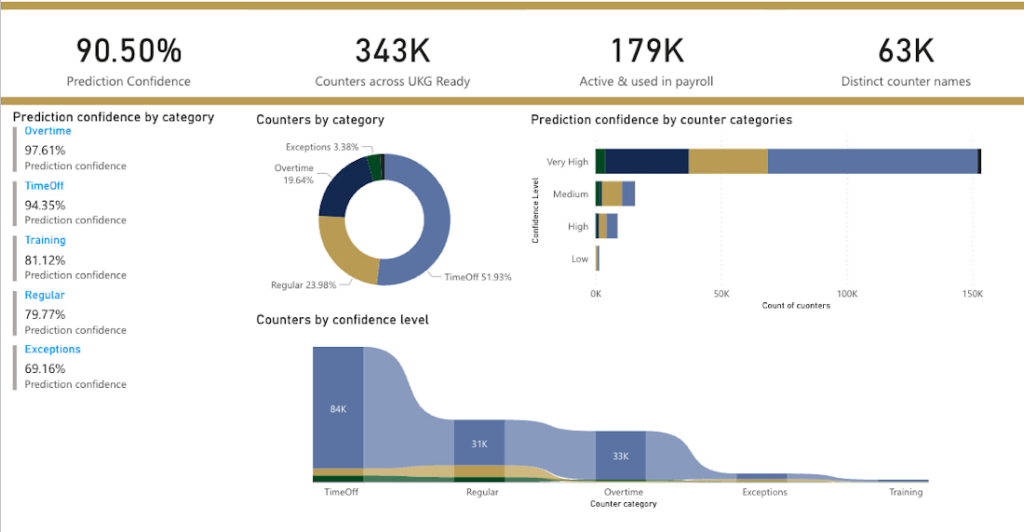
Special thanks to Kanchana Patlolla , AI Specialist, Google for the collaboration in bringing this to light
More Relevant Stories for Your Company

How Arvind Fashions Ltd leads the fashion industry with powerful data analytics on BigQuery
Arvind Ltd has been in the apparel industry for more than 90 years, with its retail powerhouse Arvind Fashions Ltd being the backbone of well-known names in the retail fashion industry in India. Arvind Fashions Ltd (Arvind) has seen significant growth in its portfolio with new franchises being added every

Architecting Data Pipelines Directly Improves Customer Experience at Universe.com
At Universe, we serve customers day and night and are always working to make sure they have a great experience, whether online or at one of our live events. Our technology has to make that possible, and our legacy systems weren’t cutting it anymore. What we needed was a consistent,

BigQuery Reference Guide: Understanding Tables within and Routine for Data Transformation
Last week in our BigQuery Reference Guide series, we spoke about the BigQuery resource hierarchy - specifically digging into project and dataset structures. This week, we’re going one level deeper and talking through some of the resources within datasets. In this post, we’ll talk through the different types of tables

BigQuery Omni: A Game-Changer for Cross-Cloud Data Analysis
Research shows that over 90% of large organizations already deploy multicloud architectures, and their data is distributed across several public cloud providers. Additionally, data is also increasingly split across various storage systems such as warehouses, operational and relational databases, object stores, etc. With the proliferation of new applications, data is
