





Google Cloud & Health-ISAC’s EMEA Collaborate to Boost Healthcare Security

1169
Of your peers have already read this article.
3:30 Minutes
The most insightful time you'll spend today!
Last July, Google Cloud launched our ambassador partnership with the Health Information Sharing and Analysis Center (Health-ISAC) and committed to working with industry leaders to better protect our healthcare ecosystem. Securing healthcare technology and data is a global challenge, and to meet it security professionals need to have better channels for sharing information and effective security practices.
To that end, we’re pleased to announce that our relationship with Health-ISAC is now expanding to include CISOs and security leaders in Europe, the Middle East, and Africa (EMEA).
On May 23, 2023, we’ll join the Health-ISAC on a 17-city tour across the region, starting in Zurich, Switzerland, as part of its European Healthcare Threat Landscape Tour. In each session, we will bring together experts from across the region with cybersecurity practitioners from the Health-ISAC, Google Cloud, law enforcement, and regulatory bodies.
Our goals is to focus the discussions on several topics:
- How the threat landscape is unique to each country we visit;
- How we can better share threat intelligence;
- What are the emerging European laws and regulations that can affect healthcare and cybersecurity;
- How ransomware continues to evolve and the threat that poses to healthcare; organizations;
- What we can do to improve cyber incident response;
- What impact digital sovereignty can have on European healthcare;
- And which initiatives Health-ISAC and Google Cloud are launching to better protect Europe’s healthcare system.
The timing for the tour could not come at a more critical time. Ransomware and digital extortion threatens healthcare and its subsectors, with national health systems in Ireland, UK, Germany, and Spain all recently experiencing extended outages because of ransomware. Threat actors continue to target proprietary data at biotechnology and pharmaceutical firms. Meanwhile, existing regulations such as the Digital Markets Act and GDPR, and new regulations such as the NIS2 Directive (Directive (EU) 2022/2555), which seek to protect EU citizens and businesses from risks posed by the digital world, are raising the bar that CISOs and security leaders must surpass to ensure their businesses can stay compliant and able compete in the global digital economy.
“The European Healthcare Threat Landscape Tour is one of many efforts we have undertaken to build a closer community of trust around threats and cybersecurity practices that keep health organization’s safe,” said Denise Anderson, executive director, Health-ISAC.
“We all rely on these organizations to take care of us and produce therapies that keep us healthy. Delivering these engagements alongside Google Cloud helps us achieve global scale and shows off both organizations’ commitments to building a sustainable, resilient healthcare ecosystem for entire societies.”
Each stop in the tour will provide opportunities to dive deep into these topics, grow an understanding of these challenges, create a space for collaboration, and build closer, trusted partnerships. The meetings are open to member and non-member organizations working in healthcare. Interested participants can contact the Health-ISAC through their contact form or register on their website for the nearest event.
“The Google Cybersecurity Action Team’s mission is to secure customers, secure the cloud, and secure the planet (and beyond). Working with industry groups like Health-ISAC helps us achieve this mission while respecting each other and the unique challenges European health systems face. Myself and our EMEA-based Google Cloud and Mandiant security teams are looking forward to another great collaboration,” said Phil Venables, chief information security officer, Google Cloud.
At Google Cloud, we’re committed to helping build a secure and resilient healthcare ecosystem for everyone. As we hit the road with the Health-ISAC this summer, we’ll be sure to send updates on what we learn through this collaboration and how we can all work together to secure smarter in 2023 and beyond.
5188
Of your peers have already watched this video.
25:30 Minutes
The most insightful time you'll spend today!
Modernize Your Security Posture for Cloud-Native Applications with Anthos
Modern security approaches have moved beyond a traditional perimeter-based security model. As many organizations seek to adopt cloud-native architectures and are deploying applications in hybrid and multi-cloud environments they demand a more flexible and extensible approach towards security.
Learn how to address security issues as early in the development and deployment life-cycle as possible—when addressing security issues can be less costly—and do so in a way that is standardized and consistent. Help keep your organization secure and compliant with Anthos.
What You Need to Know About Compute Engines

6530
Of your peers have already read this article.
1:30 Minutes
The most insightful time you'll spend today!
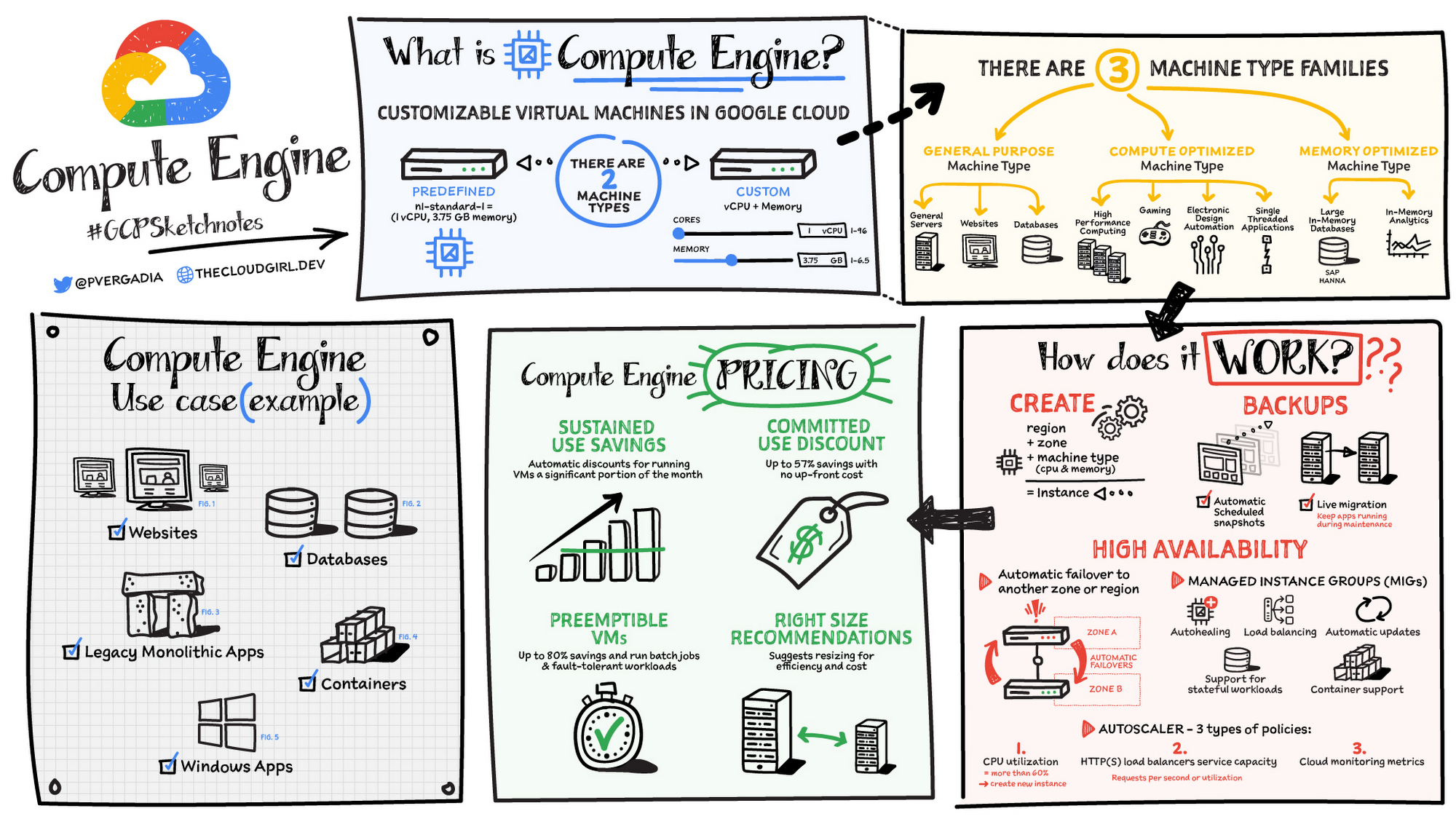
Compute Engine is a customizable compute service that lets you create and run virtual machines on Google’s infrastructure. You can create a Virtual Machine (VM) that fits your needs. Predefined machine types are pre-built and ready-to-go configurations of VMs with specific amounts of vCPU and memory to start running apps quickly. With Custom Machine Types, you can create virtual machines with the optimal amount of CPU and memory for your workloads. This allows you to tailor your infrastructure to your workload. If requirements change, using the stop/start feature you can move your workload to a smaller or larger Custom Machine Type instance, or to a predefined configuration.
Machine types
In Compute Engine, machine types are grouped and curated by families for different workloads. You can choose from general-purpose, memory-optimized, compute-optimized and accelerator-optimized families.
- General-purpose machines are used for Day-to-day computing at a lower cost and for balanced price/performance across a wide range of VM shapes. The use cases that best fit here are web serving, app serving, back office applications, databases, cache, media-streaming, microservices, virtual desktops, development environments.
- Memory-Optimized machine are recommended for ultra high-memory workloads such as in-memory analytics and large in-memory databases such as SAP HANA
- Compute-Optimized machines are recommended for ultra high performance workloads such as High Performance Computing (HPC), Electronic Design Automation (EDA), gaming, video transcoding, single-threaded applications.
- Accelerator-Optimized machines are optimized for high performance computing workloads such as Machine learning (ML), Massive parallelized computations and High Performance Computing (HPC)
How does it work?
You can create a VM instance using a boot disk image, a boot disk snapshot, or a container image. The image can be a public operating system (OS) image or a custom one. Depending on where your users are you can define the zone you want the virtual machine to be created in. By default all traffic from the internet is blocked by the firewall and you can enable the HTTP(s) traffic if needed.
Use snapshot schedules (hourly, daily, or weekly) as a best practice to back up your Compute Engine workloads. Compute Engine offers live migration by default to keep your virtual machine instances running even when software or hardware update occurs. Your running instances are migrated to another host in the same zone instead of requiring your VMs to be rebooted.
Availability
For High Availability (HA) Compute Engine offers automatic failover to other regions or zones in event of a failure. Managed instance groups (MIGs) help keep the instances running by automatically replicating instances from a predefined image. They also provide application based autohealing health checks. If an application is not responding on a VM, the auto healer automatically recreates that VM for you. Regional MIGs let you spread app load across multiple zones. This replication protects against zonal failures. MIGs work with load balancing services to distribute traffic across all of the instances in the group.
Compute Engine offers autoscaling to automatically add or remove VM instances from a managed instance group based on increases or decreases in load. Autoscaling lets your apps gracefully handle increases in traffic, and it reduces cost when the need for resources is lower. You define the autoscaling policy for automatic scaling based on the measured load, CPU utilization, requests per second or other metrics.
Active Assist’s new feature, predictive autoscaling, helps improve response times for your applications–When you enable predictive autoscaling, Compute Engine forecasts future load based on your Managed Instance Group’s (MIG) history and scales it out in advance of predicted load, so that new instances are ready to serve when the load arrives. Without predictive autoscaling, an autoscaler can only scale a group reactively, based on observed changes in load in real time. With predictive autoscaling enabled, the autoscaler works with real-time data as well as with historical data to cover both the current and forecasted load. That makes predictive autoscaling ideal for those apps with long initialization times and whose workloads vary predictably with daily or weekly cycles. For more information, see How predictive autoscaling works or check if predictive autoscaling is suitable for your workload, and to learn more about other intelligent features, check out Active Assist.
Pricing
You pay for what you use. But you can save cost by taking advantage of some discounts! Sustained use saving are automatic discounts applied for running instances for a significant portion of the month. If you know your usage upfront, you can take advantage of committed use discounts which can lead up to significant savings without any upfront cost. And by using short lived preemptive instances you can save up to 80%, they are great for batch jobs and fault tolerant workloads. You can also optimize resource utilization with automatic recommendations. For example if you are using a bigger instance for a workload that can run on a smaller instance you can save costs applying these recommendations.
Security
Compute Engine provides you default hardware security. Using Identity and Access Management (IAM) you just have to ensure that proper permissions are given to control access to your VM resources. All the other basic security principles apply, if the resources are not related and don’t require network communication amongst themselves, consider hosting them on different VPC networks. By default, users in a project can create persistent disks or copy images using any of the public images or any images that project members can access through IAM roles. You may want to restrict your project members so that they can create boot disks only from images that contain approved software that meet your policy or security requirements. You can define an organization policy that only allows Compute Engine VMs to be created from approved images. This can be done by using the Trusted Images Policy to enforce images that can be used in your organization.
By default all VM families are Shielded VMs. Shielded VMs are virtual machine instances that are hardened with a set of easily configurable security features to ensure that when your VM boots, it’s running a verified bootloader and kernel — is the default for everyone using Compute Engine, at no additional charge. For more details on Shielded VMs refer to the documentation here.
For additional security, you also have the option to use Confidential VM to encrypt your data in use, while it’s being processed in Compute Engine. For more details on Confidential VM refer to the documentation here.
Use cases
There are many use cases Compute Engine can serve in addition to running websites and databases. You can also migrate your existing systems onto Google Cloud, with Migrate for Compute Engine, enabling you to run stateful workloads in the cloud within minutes rather than days or weeks. Windows, Oracle or VMware applications have solution sets enabling a smooth transition to Google Cloud. To run windows applications either bring your own license leveraging Sole-tenant nodes or using the included licenced images.
Conclusion
Whatever your application use case may be, from legacy enterprise applications to digital native applications, Compute Engine’s families will fit it. For a more in-depth look into Compute Engine check out the documentation.
For more #GCPSketchnote, follow the GitHub repo. For similar cloud content follow me on Twitter @pvergadia and keep an eye out on thecloudgirl.dev
Manage IAM permissions with the Google Cloud mobile app

1207
Of your peers have already read this article.
2:00 Minutes
The most insightful time you'll spend today!
What’s new with Permissions Management on the Cloud Mobile App
Identity and Access Management (IAM) is the foundation of a strong cloud security posture, ensuring that the right access and permissions for cloud resources are granted across your organization. The Google Cloud mobile app gives cloud administrators the ability to quickly and easily manage their organization’s cloud identities and access from the mobile platform of their choice.
Permissions management is one of the top user-requested features for the Cloud mobile app based on feedback we’ve received. The Permissions tab is used by more than half of our mobile users every month, highlighting the importance of easily managing permissions on-the-go.
We are excited to announce the availability of enhanced permissions management on the Google Cloud mobile app. This new capability enables you to easily view, assign and search for all the roles in your organization.
Manage permissions easily on-the-go
The Cloud mobile app has expanded beyond supporting the three basic roles of Owner, Editor, and Reader, to supporting all the roles in your organization. Administrators are not only able to see all the roles but also assign these roles across their organization:
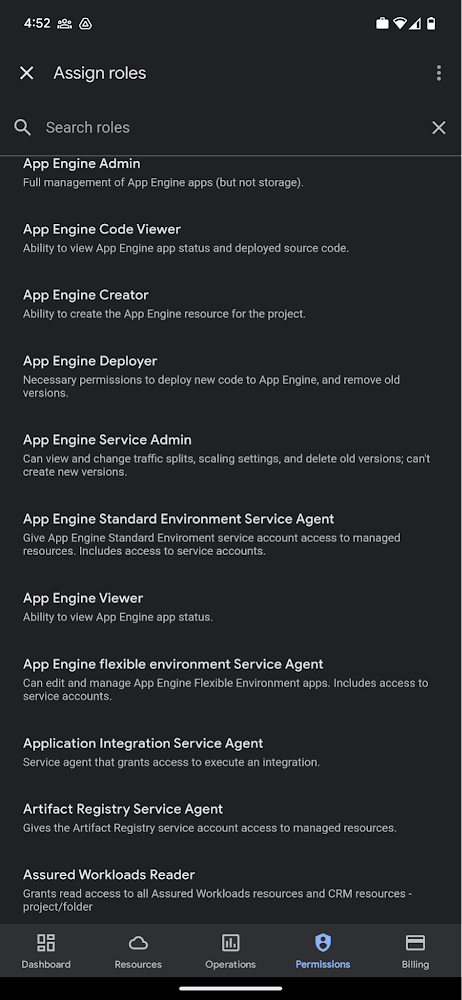
Administrators can also easily view a list of users, and click into each to see all the roles assigned to each user. On top of that, you can easily leverage the search capability to check if a role is assigned and modify its assignment. You can even assign multiple roles at the same time for easy editing. The app will show you a summary of changes before you will proceed.
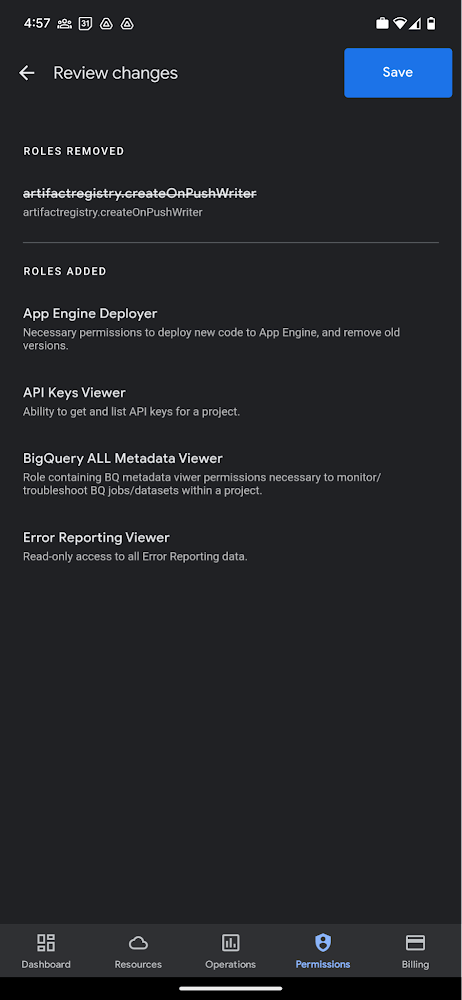
The layout is optimized for mobile, with the categories of information organized for easy viewing. Currently assigned roles are always displayed on the top of the screen so they are easily accessible. Basic roles appear below, followed by all other roles grouped by Google Cloud products.
Get started on the Google Cloud app today
To summarize we’ve enhanced permissions management on the Google Cloud mobile app with:
- Smoother navigation
- Support for all the roles in your organization
- Easy search for assigned roles
- Ability to review changes before applying
Give enhanced permission management a try and explore the possibilities by downloading the app today from Google Play or the Apple App Store. If you have any feedback, we would love to hear from you – simply click on the “send feedback” button in the app to share your experience.
How Firewall Insights can Simplify Corporate Firewall Rules

3117
Of your peers have already read this article.
3:30 Minutes
The most insightful time you'll spend today!
Corporate firewalls typically include a massive number of rules, which accumulate over time as new workloads are added. When rules stack up piecemeal like this, misconfigurations occur that, at best, create headaches for security administrators, and at worst, create vulnerabilities that lead to security breaches.
To address this, we have introduced the Firewall Insights module in our Network Intelligence Center, which provides a single console for managing Google Cloud network visibility, monitoring and troubleshooting.
What are Firewall insights?
Historically, there hasn’t been an easy way to deal with the accumulation of complicated firewall rules. That was until we created Firewall Insights, which provides metrics reports and insight reports. These two reports contain information about firewall usage and the impact of various firewall rules on your VPC network. Even better, these insights and metrics are integrated into your Google Cloud Console for the VPC firewall and are also available via APIs.
You can use metrics reports to verify that firewall rules are being used appropriately and as intended. This report can uncover leftover rules from the past that are not actively used, review that the firewall rules allow or deny what is intended, perform live debugging of connections dropped, and leverage Cloud Monitoring to discover malicious attempts to access your network.
You can use insight reports to identify firewall misconfigurations, detect security attacks, and optimize and tighten your security rules.
Let’s take a look at how these reports work.
Metrics Report, a deeper dive
Metrics insights analyzes your VPC firewalls usage by tracking metrics such as firewall hit counts and last used. Let’s check this out with an example:
When you navigate to your VPC network and click on Firewall, ensure that you have selected Logs, Hit count and also Last hit in the column display options:
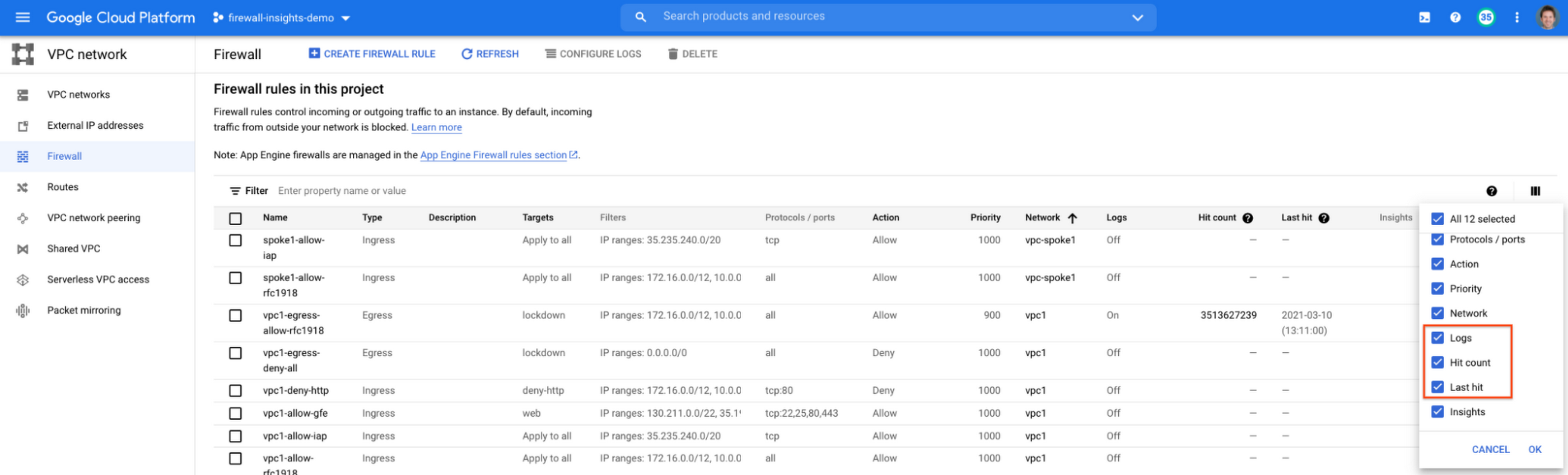
After this is enabled, now you should be able to see your VPC firewall rules with the hit count and last hit metrics. In the image below you can see that if logs are not enabled for rules, hit count and last hit metrics will not be collected. If logs are enabled, these details are collected, and shown in the VPC firewalls console.
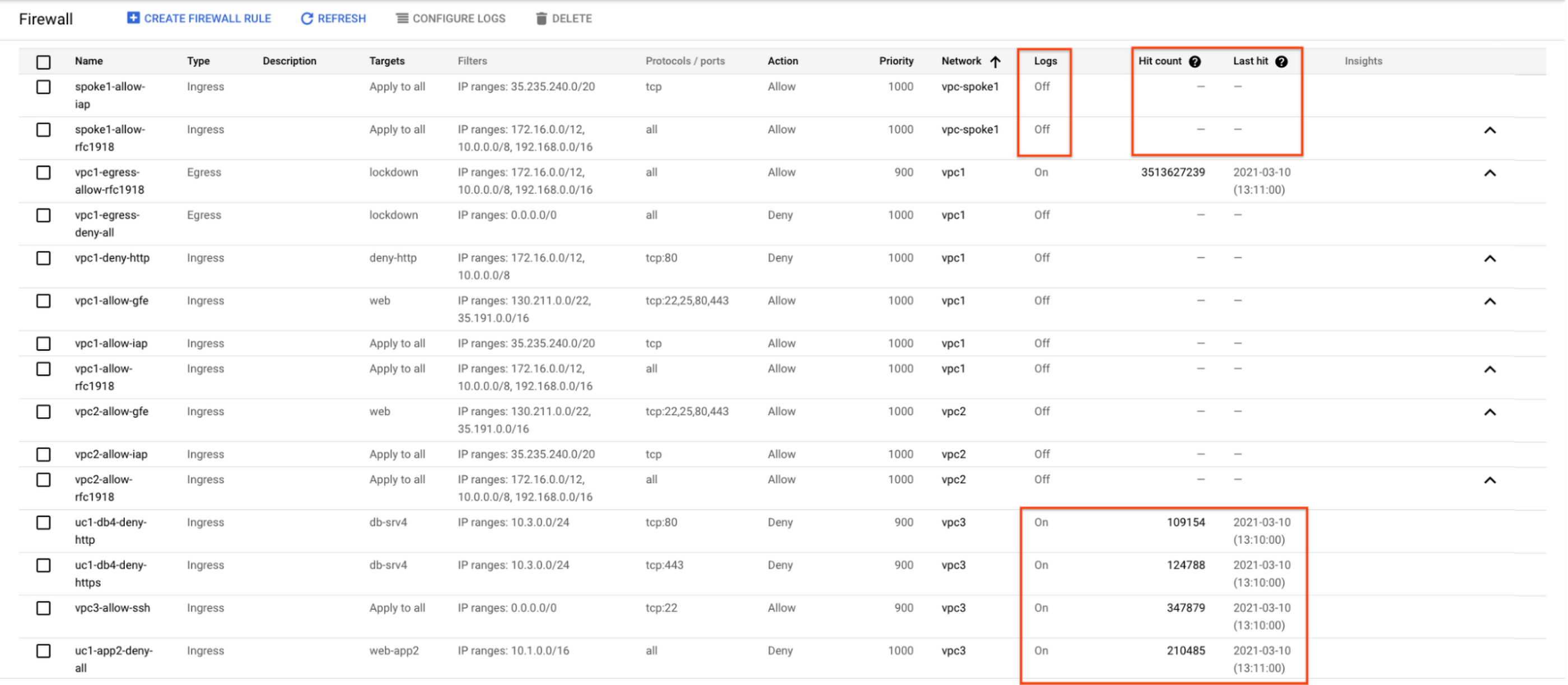
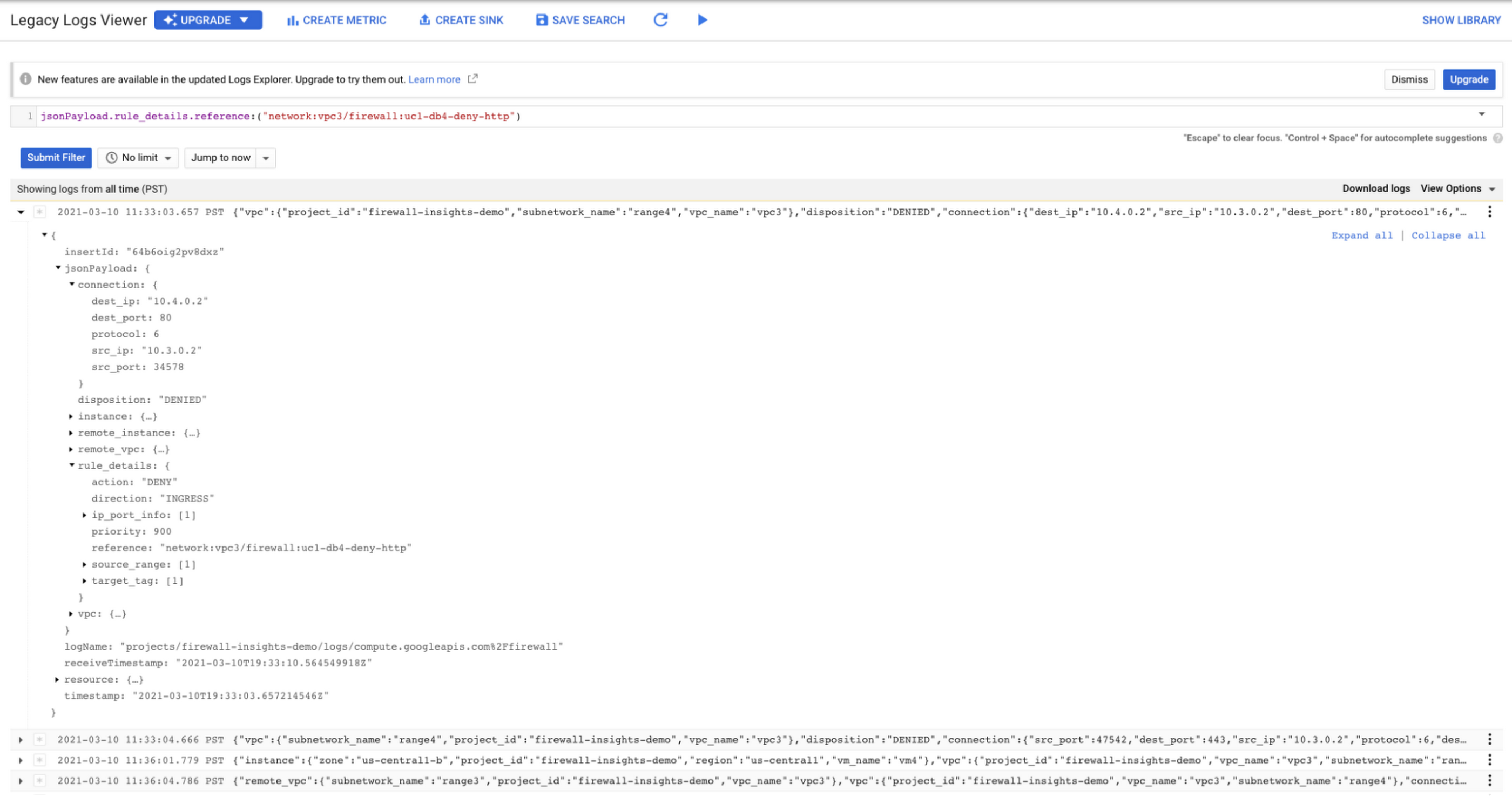
As you can see in Figure 1.2, each firewall rule which has logging enabled will show hit counts, so based on the example above, the rule “uc1-db4-deny-http” has been hit 109,154 times, the last time being 2021-03-10 (13:10:00). If you want to dive even deeper, you can click on the hit count and this will bring you to the logs viewer page where you can expand these logs and analyze all the details:
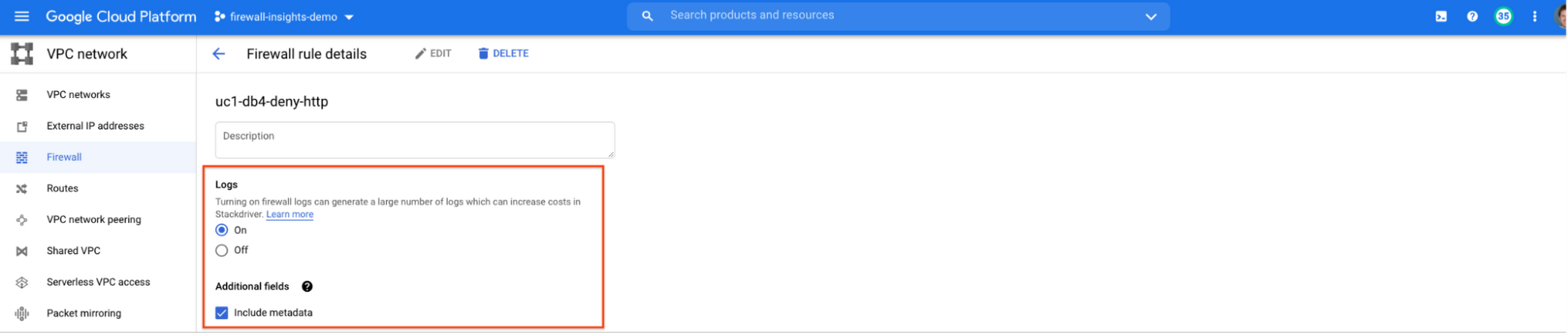
In order to enable logs for a particular firewall rule, you can edit it and turn logs on. By default, metadata is added in firewall logs. If you want to reduce the log size, you can do so by excluding these additional fields. Excluding these metadata fields will not impact the functionality of Firewall Insights.
From the “Firewall” page, you can also multi-select a group of firewall rules and turn on all logs at once.
Firewall rule usage metrics are accurate only for the period of time during which Firewall Rules Logging is enabled.
Insights Report, a deeper dive
Insights Report provides an intelligent analysis of the configuration of your firewalls. A report can contain one or more insights.
We will see examples now about the different insight reports which include:
- Shadowed firewall rules
- Allow rules with no hit in the last six weeks
- Deny rules with hits in the last 24 hours
By definition, a shadowed rule is a VPC firewall rule that is completely overshadowed by one or more firewall rules with higher or equal priority. We call that shadowing rules. Let’s see an example on how to find shadowed rules:Let’s say that you try to use ping between two VMs but it fails. Let’s take a look at the firewall rules applied to the VM:
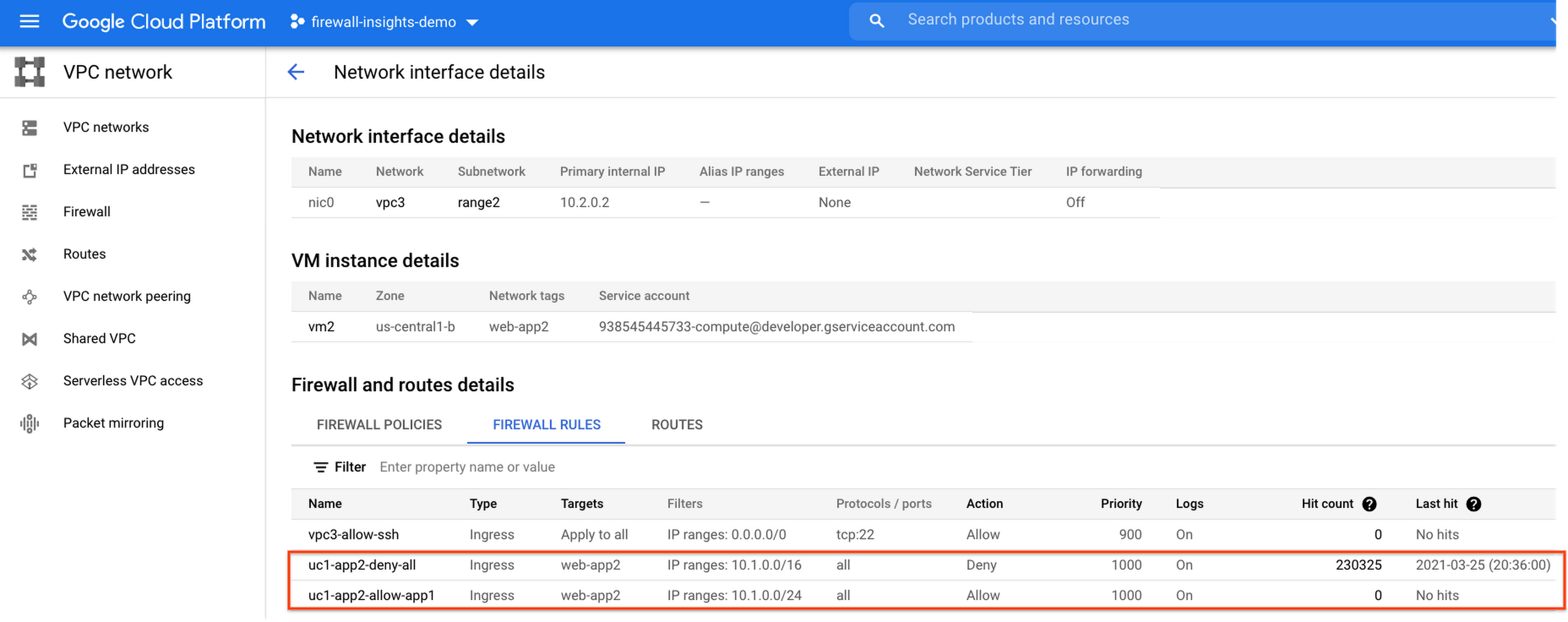
If we look closely, we can see that there are two rules with the same target tag, and those are almost identical except their source IP range. The IP range of the deny rule “uc1-app2-deny-all” includes the IP range of the rule allow “uc1-app2-allow-app1”. Therefore, we can see that “uc1-app2-allow-app1” is shadowed by “uc1-app2-deny-all”, and the ping between these VMs failed due to that.
To avoid such incidents in the future, Firewall Insights provides you with a convenient list of rules overshadowed by other firewall rules.
To see shadowed rules, you can click on the column selector, and add “Insights” to the firewall and route details:

Once this is applied, you will be able to see shadowed rules here:

Alternatively, you can navigate to Network Intelligence > Firewall Insights, where we will see the shadowed rule report:
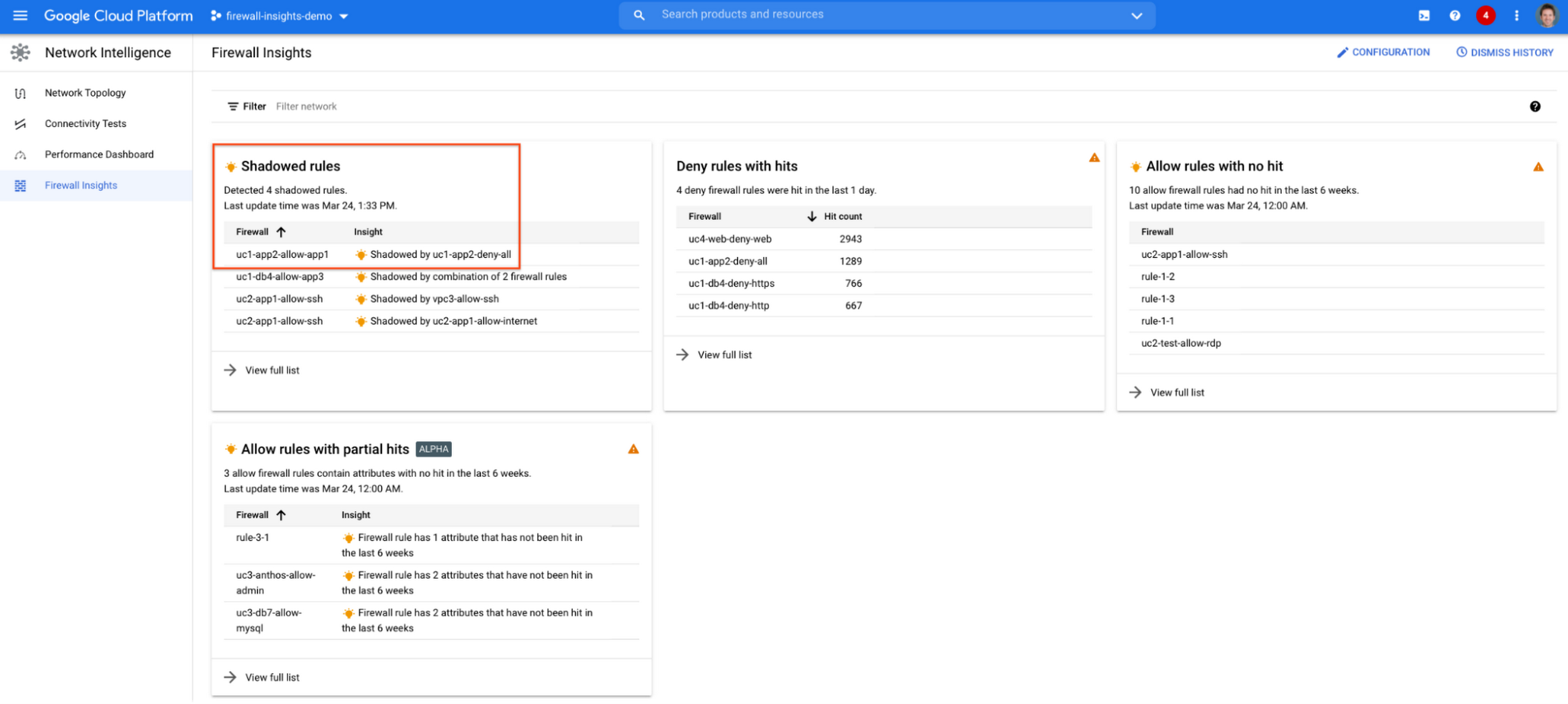
If we click on the insight we will get more details:

Going back to the firewall insights card (Figure 1.8), we can also identify that “uc1-db4-allow-app3” is shadowed by a combination of two rules and if we clicked on the insight this would provide all the details.
From the Firewall Insights dashboard, let’s move on to “allow rules with no hit”, where we can see firewall rules that have not logged any hits in the past six weeks. Such rules could be as a result of a misconfiguration, or leftover rules from past deployments. Tighten your security boundaries by identifying and removing such rules. If we go back to Network Intelligence > Firewall Insights, we can see allow rules with no hit:

We can drill down to view the full list of rules with no hit. We can see, for instance, one of the rules, the bottom one “uc2-app1-allow-internet”, might be a leftover rule to allow internet access from a past deployment, which means it has little likelihood of being hit in the future. So you may want to consider removing it from the rule set:

Click on the firewall rule to review all the details, and take a look at the prediction, which is made based on the hit pattern that we saw for similar rules in the same organization:

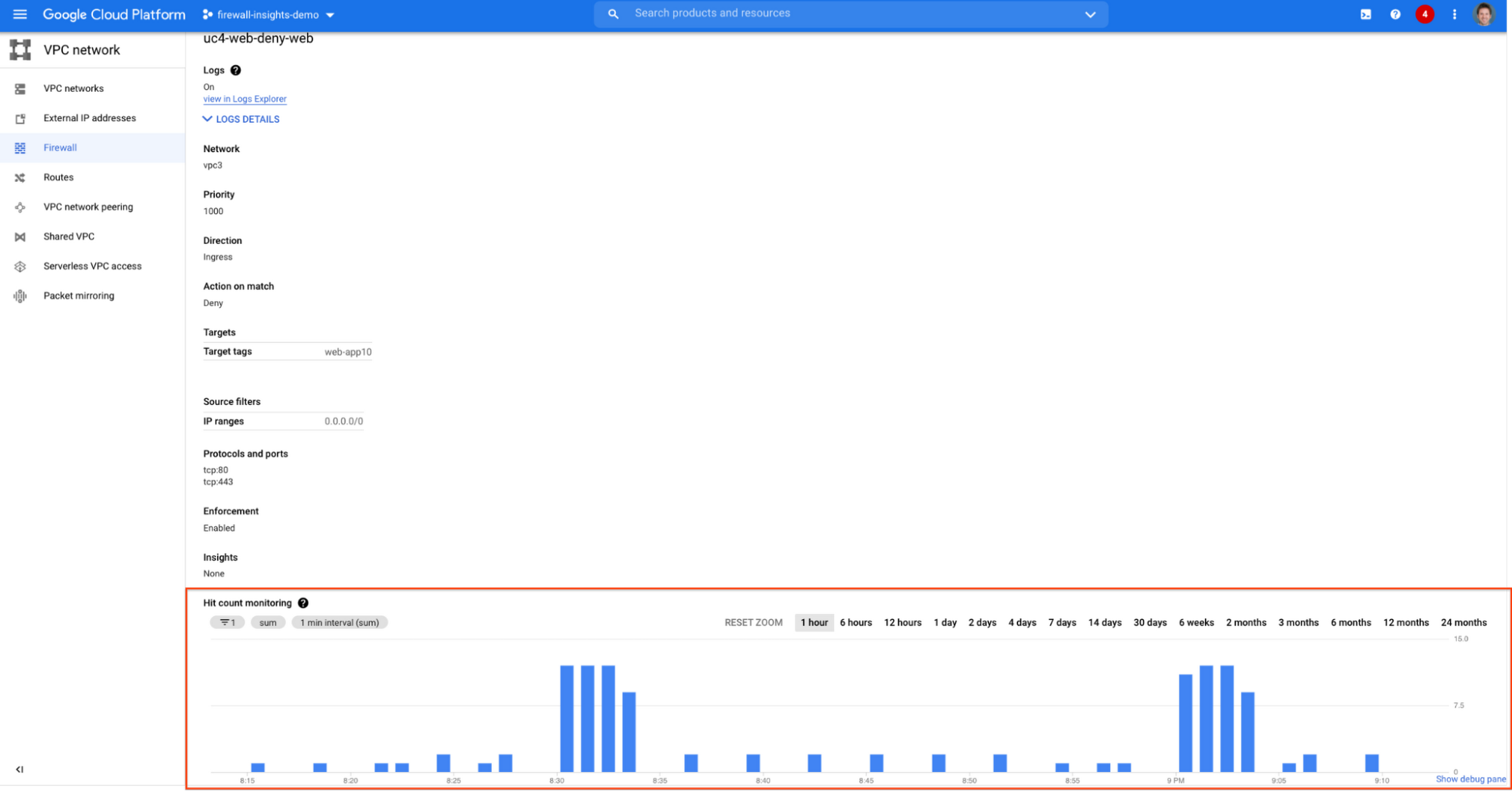
Let’s go back to the Firewall Insights dashboard and move on to the last category, “deny rules with hits in the last 24 hours”, which help you capture the traffic blocked by deny rules. These traffic types could indicate external attacks into your VPC network, or compromised VM instances attempting to send traffic out of your network. Let’s examine future hit prediction on a firewall rule. Navigate to Network Intelligence > Firewall Insights and take a look at the deny rules with hits card:

If your click on the “uc4-web-deny-web” rule, you can see the hit count monitoring, and if you click on the hit number we can dive deeper in the logs:

These tips should help you effectively leverage Firewall Insights to gain better control over a massive firewall rule set. Automate shadowed rule detection, quickly troubleshoot misconfigured rules, effortlessly pinpoint the overgranting rules hidden in the rule set, and identify the failed attempts to break into your network that were rejected by your firewall rules.
To learn more about Firewall Insights, please refer to our documentation. Additionally, to see how we’re advancing intelligent automation in network security, check our recent blog post.
Building Effective Visibility into Technology Assets Used in Healthcare

3172
Of your peers have already read this article.
4:00 Minutes
The most insightful time you'll spend today!
When technology just works, it’s easy to trust. But too often, we place our trust in technology that doesn’t deserve it. When we do this with technology to provide healthcare, we put the safety of patients and the security and reliability of our global healthcare system at risk.
The institutions that make up our global healthcare system also place their trust in cybersecurity measures and technology to keep their systems running and repelling the unceasing wave of attacks they face. We often hear about the institutions that succumb to cyberattacks, but we don’t read much about the institutions that have been successful at defending their digital perimeter, and ultimately protected their ability to treat and protect patients.
Why were some institutions successful and others not as much? What cybersecurity capabilities made the healthcare institution resilient from these attacks? As we covered in our previous post on how healthcare can strengthen its cybersecurity resilience, establishing visibility and antifragility practices are necessary to repel attackers and build trust in the security and reliability of the technology our global healthcare system relies on.
As we continue our series on healthcare and cybersecurity, we’ll focus next on establishing sustainable visibility mechanisms so cybersecurity teams working in our global healthcare system can secure and preserve patient care and safety.
Visibility is akin to a patient taking 20 different medications but their doctor only knows about 10 of them. That’s the current state of many healthcare organizations’ relationship to the technology used on their networks and systems: They aren’t always aware of what technology is in use, whether it has vulnerabilities, how serious those vulnerabilities are, or how one weakness could lead to another or cascade out of control.
Visibility maps those technology assets (including the software, hardware, configurations, protections, who built it, and where the component parts come from) and help prioritize the importance of those assets in keeping systems and networks secure, no matter how complex the healthcare organization’s use of technology might be.
Building effective visibility
Building visibility into technology assets requires a structured approach. As mentioned in the first blog in this series, using a guide like the NIST Cybersecurity Framework (CSF) provides an important mental model we can use to get a clear picture of the strengths and weaknesses of an organization’s cybersecurity risk profile, and how it applies to the assets the organization seeks to protect.
Cybersecurity author and leader Sounil Yu’s book Cyber Defense Matrix provides an important interpretation of the NIST CSF framework that can help us better understand what visibility we have into technology assets and how they are protected. Visibility is about more than just seeing all assets we have all at once. It’s also about understanding which assets are mission-critical and must be protected at all costs versus which ones are perhaps important but less crucial overall. Without the right balance, we end up trying to protect everything while not protecting what matters enough. This is where structural awareness comes in.
Structural awareness, or the conscious understanding and state of an organization’s assets, is established as one implements controls captured in the NIST CSF functions Identify and Protect. These controls focus on identifying assets, their bill of materials, their creators, their dependencies on other assets, the protections and vulnerabilities they have, and the threats they face. While visibility helps create an accurate map of technology assets, structural awareness builds on that visibility and answers questions such as, “What are the ways the threat actor could compromise that asset? What could be lost? How would it most likely happen? Would I know?”
Yu says that structural awareness is efficiently achieved with the help of automation, and is not as people-intensive as many practitioners, decision-makers, and executives might think. If a cyberattack is like an explosion, cybersecurity teams’ structural awareness helps them understand how the explosion could happen before (or ‘left of’) it goes ‘boom’.
It’s also important to remember that while structural awareness is related to situational awareness in some ways, they are different concepts. Situational awareness refers to mechanisms that are used to detect and respond to an event. Structural awareness mechanisms are ‘left of boom,’ or mechanisms that protect your assets so that events don’t happen. The goal is to stay ‘left of boom’ and avoid being ‘right of boom’. Being proactive in your protections and being ready to respond in either case is really important, nonetheless.
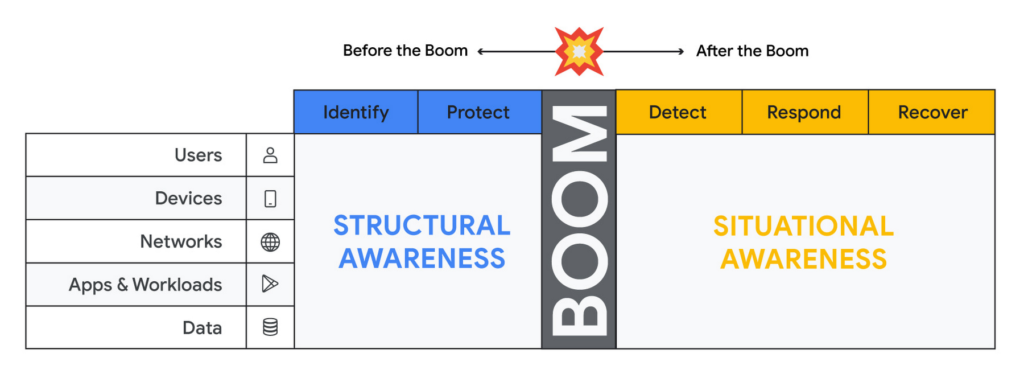
Thinking about assets in terms of users, devices, networks, applications and workloads and data (asset classes), and adopting mechanisms to discover assets of each type through visibility controls suggested by the NIST CSF, will lead to developing structural awareness. Structural awareness can help avoid the boom, but if the boom does happen, it can also help shape the situational awareness needed to react. The Cyber Defense Matrix is an ongoing project, and you can read more about it (and contribute to it) here.
Framing asset discovery for resilience
Cybersecurity teams must map out their organizations’ most critical healthcare services and systems that support them, but that’s easier said than done. Asset discovery can feel overwhelming. Trying to find, count, and audit the hardware, software, users, and data down to the component across even a small part of one’s technology footprint can feel like pushing a dead car up a steep hill. The way to make this easier is to prioritize this effort in the parts of the business where the impact of a quality or safety issue has the potential to create the most harm to the organization and those who depend on it.
A smart place to begin the process to find and evaluate the measurements that an institution uses to monitor those processes.
Healthcare providers: Start with the quality and safety measurements which must be submitted to various regulatory agencies in order to maintain licenses to operate.
- Health insurers: Look at the performance improvement metrics used to ensure subscriber benefits, quality requirements, and legal mandates are being met.
- Health IT services: Use service level agreements for measuring contract compliance with things like uptime, recovery time and point objectives, and response turnarounds.
- Life sciences organizations: Begin with the relevant Good Practice definitions and the metrics used to monitor quality and safety levels of products and services.
When analyzing the types of technology unique to healthcare – like network-connected medical devices such as infusion pumps, implantable pacemakers, ventilators, EKG equipment, and MRI machines – it’s important to ask what are the immediate safety hazards if there was a cyberattack. Not sure how to answer that question? The International Medical Device Regulators Forum produced a risk categorization model that could be helpful in framing that response. Operational technology, like blood bank and sample refrigerators, climate control, air handling, infection control and pneumatic tube systems, may also be used to identify and prioritize inventory efforts.
Once priorities have been set, teams can begin gathering data on critical services, the owners of those services, the systems those owners rely on, and the technology itself.
Inventory tactics on Google Cloud
Building service-technology mapping is not a one-time exercise. Organizations should take the time to automate inventory creation and maintenance, so they can maintain an up-to-date view of all the items in their environment at any given time. This is especially for organizations that have highly dynamic environments.
Google Cloud provides best practices on discovering and cataloging assets in its Cloud Architecture Center. Implement controls found in the Identity and Protect categories using the NIST Framework & Google Cloud technical paper. Automation is your friend when building and maintaining a complete and accurate inventory. Google Cloud Asset Inventory and Security Command Center can be used to inventory a variety of resources running in Google Cloud. Cloud Build, Google Cloud’s CI/CD platform, implements SLSA 1 and provides a trustworthy audit of software artifacts deployed through a managed pipeline. Cloud DLP inventories and labels data stored on Google Cloud Storage and services like BigQuery.
Meanwhile, a number of Google Cloud Marketplace partners have solutions that can help build a comprehensive inventory, and innovation continues to improve our technological options. One emerging field of security technology, called attack surface management, helps discover previously-unknown assets. Finally, our next blog on resilience discusses how to use a software bill of materials (also known by the breezy acronym SBOM) to gain visibility and structural awareness into applications.
It’s important to remember that when starting down this path, the goal is not to gain 100% visibility into every single component on every single device attached to every network supporting every service running. Success or failure is not achieved when the inventory process has reached an arbitrarily-determined ‘percentage complete.’ We want to prioritize expanding visibility and developing structural awareness on assets where safety and quality are at risk, so we can improve their resilience.
And finally, we feel it’s important to emphasize that in the past, healthcare industries have focused mainly on protecting the confidentiality of data. While that’s important, we must evolve security programs beyond protecting confidentiality as its primary (and some cases, only) focus.
To be resilient, we must design and build cybersecurity capabilities that deliver safety, integrity, and availability of the technology that cares for patients directly. As we gain visibility into the technology we depend on to keep us healthy, we improve our understanding about which parts of it we can trust, and which parts we can’t. Improving visibility is an important early step on our path to resilience.
More Relevant Stories for Your Company

10 Reasons that Make Google Cloud the Champion of IaaS
When you choose to run your business on Google Cloud you benefit from the same planet-scale infrastructure that powers Google’s products such as Maps, YouTube, and Workspace. We have picked 10 ways in which Google Cloud Infrastructure services outshine alternatives in the market in how they simplify your operations, save

Private Services Connect in Google Cloud Regions Enables Customers to Consume Services Faster
At Google Cloud, we believe in making it simple and secure to consume services whether they're from Google, a third party or customer-owned. With Private Service Connect, we have adopted a service-centric approach to our network that abstracts the underlying networking infrastructure. And today, we are announcing Private Service Connect is

The Ultimate Guide to VPC Service Controls: Strengthening Your Security Posture
While cloud security skeptics might believe that data in the cloud is just one access configuration mistake away from a breach, the reality is that a well-designed set of defense in depth controls can help minimize the risk of configuration mistakes and other security issues. Our Virtual Private Cloud (VPC) Service Controls can play

Embracing Confidential Computing: Secure Your Data in the Cloud
As one of the most trusted cloud platform providers, Google is committed to providing our clients secure and reliable environments for their workloads. Google believes the future of computing will increasingly shift to private, encrypted services where users can be confident that their data is not being exposed to cloud
