





10 Reasons that Make Google Cloud the Champion of IaaS

10408
Of your peers have already read this article.
5:00 Minutes
The most insightful time you'll spend today!
When you choose to run your business on Google Cloud you benefit from the same planet-scale infrastructure that powers Google’s products such as Maps, YouTube, and Workspace.
We have picked 10 ways in which Google Cloud Infrastructure services outshine alternatives in the market in how they simplify your operations, save money, and secure your data.
1. Custom Machine Types means no wasted resources
Compute Engine offers predefined machine types that you can use when you create a VM instance. A predefined machine type has a preset number of vCPUs and a preset amount of memory; each type is billed at a set price as described on the Compute Engine pricing page.
If predefined machine types don’t meet your needs, you can create a VM instance with a custom number of vCPUs and custom amount of memory, effectively building a custom machine type. Custom machine types are available only for general-purpose machine families. When you create a custom machine type, you are deploying a custom machine type from the E2, N2, N2D, or N1 machine family on GCP. No other leading cloud vendor offers custom machine types so extensively.
Custom machine types are a good idea for workloads that aren’t a good fit for the predefined machine types and for workloads that require more processing power or memory but don’t need all of the upgrades provided by the next machine type level. This translates into lower operating costs. They are also useful for controlling software licensing costs that are based on the number of underlying compute cores.
Jeremy Lloyd, Infrastructure and Application Modernization Lead at Appsbroker, a Google partner:
“Custom machine types coupled with Google’s StratoZone data center discovery tool provides Appsbroker with the flexibility we need to provide cost efficient virtual machines matched to a virtual machine’s actual utilization. As a result, we are able to keep our customers’ operating costs low while still providing the ability to scale as needed.”
2. Compute Engine Virtual Machines are optimized for scale-out workloads
For scale-out workloads, T2D, the first instance type in the Tau VM family, is based on 3rd Gen AMD EPYC processors and leapfrogs VMs for scale-out workloads of any leading public cloud provider today, both in terms of performance and price-performance. Tau VMs offer 56% higher absolute performance and 42% higher price-performance compared to general-purpose VMs from any leading public cloud vendor (source). The x86 compatibility provided by these AMD EPYC processor-based VMs gives you market-leading performance improvements and cost savings, without having to port your applications to a new processor architecture. Sign up here if you are interested in trying out T2D instances in Preview.
For SAP HANA, Google Cloud has demonstrated with SAP how we can run the world’s largest scale-out HANA system in the public cloud (96TB). With such innovation, you are covered as your business grows exponentially.
3. Largest single node GPU-enabled VM
Google is the only public cloud provider to offer up to 16 NVIDIA A100 GPUs in a single VM, making it possible to train very large AI models. Users can start with one NVIDIA A100 GPU and scale to 16 GPUs without configuring multiple VMs for single-node ML training, without crossing the VM layer.
Additionally, customers can choose smaller GPU configurations—1, 2, 4 and 8 GPUs per VM—providing the flexibility to scale their workload as needed.
The A2 VM family was designed to meet today’s most demanding applications—workloads like CUDA-enabled machine learning (ML) training and inference, for example. This family is built on the A100 GPU which offers up to 20x the compute performance compared to the previous generation GPU and comes with 40 GB of high-performance HBM2 GPU memory. To speed up multi-GPU workloads, the A2 VMs use NVIDIA’s HGX A100 systems to offer high-speed NVLink GPU-to-GPU bandwidth that delivers up to 600 GB/s. A2 VMs come with up to 96 Intel Cascade Lake vCPUs, optional Local SSD for workloads requiring faster data feeds into the GPUs and up to 100 Gbps of networking. A2 VMs provide full vNUMA transparency into the architecture of underlying GPU server platforms, enabling advanced performance tuning. Google Cloud offers these GPUs globally.
4. Non-disruptive maintenance means you worry less about planned downtime
Compute Engine offers live migration (non-disruptive maintenance) to keep your virtual machine instances running even when a host system event, such as a software or hardware update, occurs. Google’s Compute Engine live migrates your running instances to another host in the same zone without requiring your VMs to be rebooted. Live migration enables Google to perform maintenance that is integral to keeping infrastructure protected and reliable without interrupting any of your VMs. When a VM is scheduled to be live-migrated, Google provides a notification to the guest that a migration is imminent.
Live migration keeps your instances running during:
- Regular infrastructure maintenance and upgrades
- Network and power grid maintenance in the data centers
- Failed hardware such as memory, CPU, network interface cards, disks, power, and so on. This is done on a best-effort basis; if a hardware component fails completely or otherwise prevents live migration, the VM crashes and restarts automatically and a hostError is logged.
- Host OS and BIOS upgrades
- Security-related updates
- System configuration changes, including changing the size of the host root partition, for storage of the host image and packages
Live migration does not change any attributes or properties of the VM itself. The live migration process transfers a running VM from one host machine to another host machine within the same zone. All VM properties and attributes remain unchanged, including internal and external IP addresses, instance metadata, block storage data and volumes, OS and application state, network settings, network connections, and so on. This has the benefit of reducing operational and maintenance overhead, helps you build a more robust security posture where infrastructure can be consciously revamped from a known good state and minimizes risks for advanced persistent threats.
Refer to Lessons learned from a year of using live migration in production on Google Cloud from the Google engineering team.
5. Trusted Computing: Shielded VMs guard you against advanced, persistent attacks
Establishing trust in your environment is multifaceted, involving hardware and firmware, as well as host and guest operating systems. Unfortunately, threats like boot malware or firmware rootkits can stay undetected for a long time, and an infected virtual machine can continue to boot in a compromised state even after you’ve installed legitimate software.
Shielded VMs can help you protect your system from attack vectors like:
- Malicious guest OS firmware, including malicious UEFI extensions
- Boot and kernel vulnerabilities in the guest OS
- Malicious insiders within your organization
To guard against these kinds of advanced persistent attacks, Shielded VMs use:
- Unified Extensible Firmware Interface (UEFI) BIOS: Helps ensure that firmware is signed and verified
- Secure and Measured Boot: Helps ensure that a VM boots an expected, healthy kernel
- Virtual Trusted Platform Module (vTPM): Establishes root-of-trust, underpins Measured Boot, and prevents exfiltration of vTPM-sealed secrets
- Integrity Monitoring: Provides tamper-evident logging, integrated with Stackdriver, to help you quickly identify and remediate changes to a known integrity state
The Google approach allows customers to deploy Shielded VMs with only a simple click, thereby easing implementation.
6. Confidential Computing encrypts data while in use
Google Cloud was a founding member of the Confidential Computing Consortium. Along with encryption of data in transit and at rest using customer-managed encryption keys (CMEK) and customer-supplied encryption keys (CSEK), Confidential VM adds a “third pillar” to the end-to-end encryption story by encrypting data while in use. Confidential Computing uses processor-based technology that allows data to be encrypted in use while it is being processed in the public cloud. Confidential VM allows you to to encrypt memory in use on a Google Compute Engine VM by checking a single checkbox.
All Confidential VMs support the previously mentioned Shielded VM features under the covers—you can think of Shielded VM as helping to address VM integrity, while Confidential VM addresses the memory encryption aspect which relies on CPU features. With the confidential execution environments provided by Confidential VM and AMD Secure Encrypted Virtualization (SEV), Google Cloud keeps customers’ sensitive code and other data encrypted in memory during processing. Google does not have access to the encryption keys. In addition, Confidential VM can help alleviate concerns about risk related to either dependency on Google infrastructure or Google insiders’ access to customer data in the clear.
See what Google Cloud partners say about Confidential Computing here.
7. Advanced networking delivers full-stack networking and security services with fast, consistent, and scalable performance
Google Cloud’s network delivers low latency, reduces operational costs and ensures business continuity, enabling organizations to seamlessly scale up or down in any region to meet business needs. Our planet-scale network uses advanced software-defined networking and security with edge caching services to deliver fast, consistent, and scalable performance. With 28 regions, 85 zones, and 146 PoPs connected by 16 subsea fiber cables around the world, Google Cloud’s network offers a full stack of layer 1 to layer 7 services for enterprises to run their workloads anywhere. Enterprises can be assured that they have best-in-class networking and security services connecting their VMs, containers, and bare metal resources in hybrid and multi-cloud environments with simplicity, visibility, and control.
Google Cloud’s network has protected customers from one of the world’s largest DDoS attacks at 2.54 Tbps. With our multi-layer security architecture and products such as Cloud Armor, our customers ran their business with no disruptions. Furthermore, our recent integration of Cloud Armor with reCAPTCHA Enterprise adds best-in-class bot and fraud management to prevent volumetric attacks. Cloud Armor is deployed with our Cloud Load Balancer and Cloud CDN, extending the secure benefits at the network edge for traffic coming into Google Cloud so customers have security, performance, and reliability all built in. Furthermore, we are excited to offer Cloud IDS in preview, which was co-developed with security industry leader, Palo Alto Networks, to run natively in Google Cloud.
Our advanced networking capabilities also extends to GKE and Anthos networking. With the GKE Gateway controller, customers can manage internal and external HTTPS load balancing for a GKE cluster or a fleet of GKE clusters with multi-tenancy while maintaining centralized admin policy and control. Unlike other Kubernetes offerings, we offer eBPF dataplane which brings powerful tooling such as Kubernetes network policy and logging to GKE. eBPF is known to kernel engineers as a “superpower” for its unique architecture to load and unload modules in kernel space, and now this capability is built in with Google Cloud networking.
For observability and monitoring, our customers deploy Network Intelligence Center, Google Cloud’s comprehensive network monitoring, verification and optimization platform. With four key modules in Network Intelligence Center, and several more to come, we are working towards realizing our vision of proactive network operations that can predict and heal network failures, driven by AI/ML recommendations and remediation. Network Intelligence Center provides unmatched visibility into your network in the cloud along with proactive network verification. Centralized monitoring cuts down troubleshooting time and effort, increases network security and improves the overall user experience.
8. Regional Persistent Disk for High Availability
Regional Persistent Disk is a storage option that provides synchronous replication of data between two zones in a region. Regional Persistent Disks can be a great building block if you need to ensure high availability of your critical applications as they offer cost-effective durable storage and replication of data between two zones in the same region.
Regional Persistent Disks are also easy to set up within the Google Cloud Console. If you are designing robust systems or high availability services on Compute Engine, Regional Persistent Disks combined with other best practices such as backing up your data using snapshots enable you to build an infrastructure that is highly available and recoverable in a disaster. Regional Persistent Disks are also designed to work with regional managed instance groups. In the unlikely event of a zonal outage, Regional Persistent Disks allow continued I/O through failover of your workloads to another zone. Regional Persistent Disks can help meet zero RPO and near-zero RTO requirements and other stringent SLAs that your critical applications might require by maximizing application availability and protection of data during events such as host/VM failures and zonal outages.
9. Cloud Storage’s single namespace for dual-region and multi-region means managing regional replication is incredibly simple
Similar to how Persistent Disk makes data more available by replicating data across zones, Cloud Storage provides similar benefits for object storage. Cloud Storage within a region is cross-zone by definition, reducing the risk that a zonal outage would take down your application. Cloud Storage adds to this by also providing a cross-region option that can protect against a regional outage and gets your data closer to distributed users. This comes in the form of Dual-region or Multi-region settings for a bucket. These are the simplest to implement cross-region replication offerings in the industry—just a simple button or API call to enable them. In addition to being simple to implement, they offer an added advantage of using a single bucket name that spans regions.
This is unique in the industry. Competitive offerings currently require setting up and managing two distinct buckets, one in each region and they don’t offer the strong consistency properties Cloud Storage offers across regions. Operations and app development are burdened by this design. Google’s single namespace approach dramatically simplifies application development (the app runs on single region or dual/multi-region without any changes), and provides simpler application restarts and testing for DR.
10. Predictive autoscaling
Customers use predictive autoscaling to improve response times for applications with long initialization times or for applications with workloads that vary predictably with daily or weekly cycles. When you enable predictive autoscaling, Compute Engine forecasts future load based on your Managed Instance Group’s history and scales out the MIG’s in advance of predicted load, so that new instances are ready to serve when the load arrives. Without predictive autoscaling, an autoscaler can only scale a group reactively, based on observed changes in load in real time.
With predictive autoscaling enabled, the autoscaler works with real-time data as well as with historical data to cover both the current and forecasted load. Forecasts are refreshed every few minutes (faster than competing clouds) and consider daily and weekly seasonality, leading to more accurate forecasts of load patterns.
For more information, see How predictive autoscaling works and Checking if predictive autoscaling is suitable for your workload.
These are just a few examples of customer-centric innovation that set Google Cloud infrastructure apart. Bring your applications and let the platform work for you.
Get started by learning about your options for migration, or talk to our sales team to join the thousands of customers who have embarked upon this journey.
Acknowledgement
Special thanks to Dheeraj Konidena (Google) for contributing to this article.

5259
Of your peers have already downloaded this article
10:30 Minutes
The most insightful time you'll spend today!
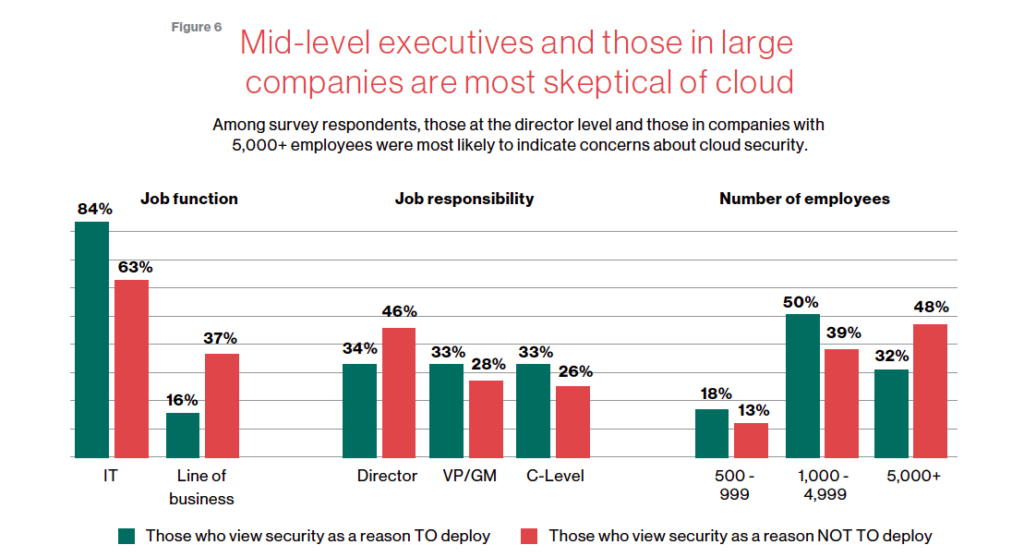
The age of unthinking fears about cloud security is over. Not only is cloud adoption rising steadily across geographies, industries and job functions, but confidence in cloud security is rising as well — to the point where increased security is a major reason enterprises opt for cloud solutions.
Gone are the days when organizations accessed applications and infrastructure over the internet only because it was the least expensive way to scale compute, storage and networking resources as business needs changed. The cloud today is a strategic necessity, with increased agility, integration and speed (as well as security) being the prime drivers of its increased adoption.
This MIT SMR survey of security professionals studies trends in security, which workloads are seeing the highest cloud utilization, the steady growth of comfort with cloud security–and interestingly paints a picture of the executives who are holding out with regards to cloud security.
Download the report now!

5425
Of your peers have already downloaded this article
4:30 Minutes
The most insightful time you'll spend today!
Security is often a deciding factor when choosing a public cloud provider. At Google Cloud, security is of the utmost importance and the security strategy encompass authentication, integrity, and encryption, for both data at rest and in transit.
Hence, Google Cloud encrypts and authenticates all data in transit at one or more network layers when data moves outside physical boundaries not controlled by Google or on behalf of Google. Data in transit inside a physical boundary controlled by or on behalf of Google is generally authenticated but not necessarily encrypted.
In addition, Google works actively with the industry to help bring encryption in transit to everyone, everywhere. It has several open-source projects that encourage the use of encryption in transit and data security on the Internet at large including Certificate Transparency, Chrome APIs, and secure SMTP.
Download this whitepaper and understand Google’s approach to the encryption of data in transit, where it is applied, and why Google is the industry leader in encryption in transit.
Announcing easier de-identification of Google Cloud Storage data

2877
Of your peers have already read this article.
2:30 Minutes
The most insightful time you'll spend today!
Many organizations require effective processes and techniques for removing or obfuscating certain sensitive information in the data they store. An important tool to achieve this goal is de-identification. Defined by NIST as a technique that “removes identifying information from a dataset so that individual data cannot be linked with specific individuals. De-identification can reduce the privacy risk associated with collecting, processing, archiving, distributing or publishing information.
Always striving to make data security easier, today we are happy to announce the availability of a de-identification action for our Cloud Storage inspection jobs. Now, you can de-identify Cloud Storage objects, folders, and buckets without needing to run your own pipeline or custom code. Additionally, we have enhanced our transforms by adding a new dictionary replacement method that can help you achieve stronger privacy protection – especially with unstructured data you might store like customer support chat logs.
The “De-identify findings” Action
The “de-identify findings” action for Cloud DLP inspection jobs is a fully managed feature that creates a de-identified copy of the data objects that are inspected. This means that you can inspect a Cloud Storage bucket for sensitive data like Personal Identifiable Information (PII) and then create a redacted copy of these objects all with a few clicks in the Console UI. No need to write custom code or manage complex pipelines and since it’s fully managed, it will auto-scale for you without you needing to manage quota.
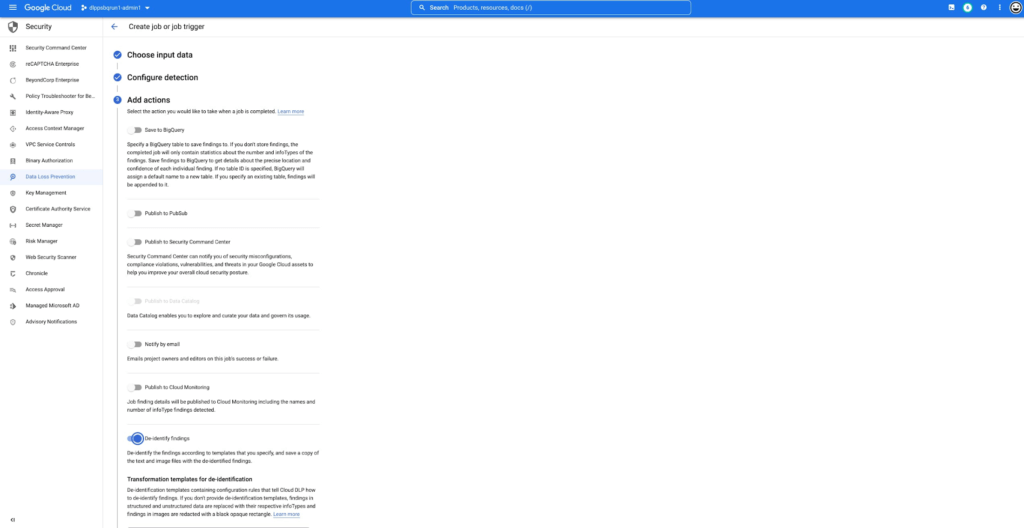
This new action supports the following data types:
- Text files
- Comma- or tab-separated values
- Images (see regional limitations)
Once enabled, the DLP job will perform an inspection of the data and produce a de-identified copy of all supported files into the output bucket or folder.
You can also use the new de-identify action on Job Triggers to automatically de-identify new content as it appears on a recurring schedule. This is useful for creating a workflow with a safe drop zone for incoming files that need to be de-identified before being made accessible.
What can automatic De-identification do?
Cloud DLP provides a set of transformation techniques to de-identify sensitive data while attempting to make the data still useful for your business. These techniques include:
- Redaction: Deletes all or part of a detected sensitive value.
- Replacement: Replaces a detected sensitive value with a specified surrogate value.
- Masking: Replaces a number of characters of a sensitive value with a specified surrogate character, such as a hash (#) or asterisk (*).
- Crypto-based tokenization: Encrypts the original sensitive data value using a cryptographic key. Cloud DLP supports several types of tokenization, including transformations that can be reversed, or “re-identified.”
- Bucketing: “Generalizes” a sensitive value by replacing it with a range of values. (For example, replacing a specific age with an age range, or temperatures with ranges corresponding to “Hot,” “Medium,” and “Cold.”)
- Date shifting: Shifts sensitive date values by a random amount of time.
- Time extraction: Extracts or preserves specified portions of date and time values.
New Dictionary Replace method
When a sensitive data element is found, dictionary replacement replaces it with a randomly selected value from a list of words that you provide. This transformation method is especially useful if you want the redacted output to have more realistic surrogate values.
Consider the following example: You collect customer support chat logs as part of providing service to your customers. These support chat logs contain various types of Personal Identifiable Information (PII) including people’s names and email addresses. Cloud DLP can find and de-identify the sensitive elements with static replacements such as “[REDACTED]” to help prevent someone from seeing this sensitive data.
With the new dictionary replacement method you can instead replace these findings with a randomly selected value from a dictionary. This dictionary replacement provides two key benefits over static replacement:
- The resulting output can look more realistic
- Because the output looks more realistic, it can help conceal any residual names (a privacy de-identification technique sometimes referred to as “hiding in plain sight”)
An example of this:
Input:
[Agent] Hi, my name is Jason, can I have your name?
[Customer] My name is Valeria
[Agent] In case we need to contact you, what is your email address?
[Customer] My email is v.racer@example.org
[Agent] Thank you. How can I help you?
De-identified Output:
[Agent] Hi, my name is Gavaia, can I have your name?
[Customer] My name is Bijal
[Agent] In case we need to contact you, what is your email address?
[Customer] My email is happy.elephant44@example.org
[Agent] Thank you. How can I help you?
As you can see in the output, the names and email addresses have been replaced with a random value that both protects the original sensitive information but also makes the output look more realistic. This can make the data more useful and help “hide” any residual PII.
Next Steps:
To learn more about De-Identification check out our Technical Docs, try De-identification of Storage in the Cloud Console and Watch a recent Google I/O talk on De-identification of data.
5679
Of your peers have already watched this video.
22:00 Minutes
The most insightful time you'll spend today!
Chronicle Security Analytics: Key to Address Security Data Overload
Google Cloud’s Chronicle is a security analytics platform built for modern use cases to combat modern threats. In today’s world, enterprises have undergone significant changes in all aspects, and must adapt to their security needs to counter threats and attacks. Watch the video to learn Google Cloud’s initiative to help businesses improve their security by 10x to catch up with the way the world is changing and how Chronicle Security Analytics is poised to help address data security challenges.
How Air Asia’s CIO Ensures Its 22,000 Employees Service Customers Efficiently and Preserve Security

3523
Of your peers have already read this article.
2:48 Minutes
The most insightful time you'll spend today!
At AirAsia, we operate a fleet of more than 270 aircraft across 23 markets, fly to more than 150 destinations and carry 100m guests each year. We’ve also been named the world’s best low-cost carrier for 11 years running. To accomplish all of this, we rely heavily on our 22,000 Allstars (employees). As AirAsia co-founder Tony Fernandes likes to say, “it has always been about the people.”
In my role as CIO, it’s critical that I give our Allstars the tools and technology they need to get their jobs done, while at the same time ensuring that our company’s data is protected and secure. While this is challenging enough in normal circumstances, we’re also in the midst of rapidly moving from legacy on-premises technologies to the cloud. Google Cloud has been a critical partner for us on this journey.
Identity challenges
AirAsia, like many other enterprises, has relied on a legacy on-premises directory for many years. As our company has quickly grown and expanded to new markets and regions, we’ve had to manage multiple servers across a number of on-premises data centers and the public cloud, which has proved costly and time-consuming.
Our Allstars, located all across Asia, need to easily access a number of legacy on-premises apps in addition to a growing number of SaaS apps. As a business, we also needed a more seamless integration between our HR system of record and our identity solution for user provisioning and lifecycle management. Solving these challenges with our existing on-premises directory was simply not feasible for us.
In recent years, we partnered with Google Cloud to help drive our digital transformation, including moving dozens of workloads and apps to Google Cloud Platform (GCP), deploying G Suite as our collaboration and productivity solution for all of our employees, and replacing thousands of Windows laptops with fast and secure Chromebooks.
We brought up our identity concerns with the Google Cloud team, and after a number of conversations, we decided to deploy Cloud Identity, Google’s cloud-based identity, and access management solution, to help address the identity challenges we were facing.
Why Cloud Identity for AirAsia?
We ended up choosing Cloud Identity for a few key reasons. Here at AirAsia, we are eager to move to the cloud as quickly as possible, and moving identity management to the cloud is a key enabler of this and our broader digital transformation. Managing identities from the cloud also enables us to have a single identity and set of credentials for each employee, which they can use to access all of the applications they need to be productive, both in the cloud and on-premises.
In addition, deploying Cloud Identity is a key step towards enabling the BeyondCorp (or zero trust) security model, which we feel is the best approach to strengthen our security posture and fight modern threats. Cloud Identity also integrates seamlessly with our existing technologies, which includes not only Google Cloud products like GCP, G Suite, and Chrome OS, but also third-party tools like Citrix, Papercut, and others.
And finally, Cloud Identity offered us significant cost and resource savings. With Cloud Identity in place, our IT department can spend less time worrying about managing multiple on-premises directory servers and can instead focus on delivering value to our Allstar employees.
More Relevant Stories for Your Company

Google Cloud Leads the Landscape for Unstructured Data Security Platform: Forrester
As organizations expand their use of cloud computing services, more of their sensitive data inevitably moves to and lives in the cloud. Much of this sensitive data is unstructured and can be challenging to secure. Despite this potential challenge, the usefulness of cloud for data storage and processing is too

More and More Businesses Trust the Cloud. Here’s Why.
What’s behind the rising confidence in cloud security? First hand experience, and careful, systematic assessments that tap multiple sources such as detailed audits and comparisons. The most frequent driver of increased confidence was the direct experience of the quality of security in the cloud versus on-premises. As a result, the


Redefining the approach to mobile security
When it comes to mobile security, everyone assumes open means unsecure. There are three terms that people often confuse: vulnerability, malware, and exploit. A vulnerability is really nothing more than a software flaw that is potentially exposed, where there is a possibility of it being attacked. It doesn't mean it

Google Maps Platform Can Elevate FinTech Experience with Less Risks and Higher Security
The financial services industry is changing—an estimated $68 trillion in wealth transferring from baby boomers to millennials.1 This means financial service providers will have to deliver the speed, ease-of-use, technological sophistication, and tailored services that millennials have come to expect. In fact, half of all millennials are willing to switch to
