





Snap and Google Cloud Team Up to Upskill Teams Worldwide

1653
Of your peers have already read this article.
2:30 Minutes
The most insightful time you'll spend today!
Snap inc., the developer of the Snapchat platform, has become a global leader in the social media industry. Snap runs its business on Google Cloud, and relies on Premium Support to optimize its cloud business imperatives. Snap sought new ways to extract business value from their cloud data, so turned to their assigned Google Technical Account Management team to develop a means to strengthen and expand cloud skills to meet their goal. The Technical Account Managers (TAMs) serve as an extension of the Snap Engineering Program Management team to deliver deep expertise of Google Cloud and guide Snap in their cloud journey including mapping the essential cloud skills for Snap to achieve broader business strategy. Since Snap employees had varying levels of cloud expertise, it meant that their TAM team needed to design a tailored learning program to optimally meet Snap’s needs.
The TAM team engaged with Google Cloud Customer Experience (CCE) team which included cloud support, learning, consulting, customer success and customer insight and advocacy services. The Google team leveraged a Skill Training Survey for the Snap team to identify, extract and map existing skills to the level of targeted cloud skills that would enable them to design a learning curriculum to boost employee productivity, enable efficient scaling and strengthen the mitigation of technical issues while optimizing their environment for issue prevention. In addition, Google Cloud offered instructor-led virtual training focused on Looker, Kubernetes and others topics of interest and a tailored Snap Global Training Program was launched in the last quarter of 2022.
By including training for Looker, it expanded Snap employees’ ability to reach data-driven decisions. Snap also took advantage of the Google Cloud Skills Boost licenses delivering access to a learning platform with over 700 courses and learning labs, included with Premium Support.
Next, the TAMs and CCE teams were tasked to raise internal awareness of the global Snap training program, so they developed a comprehensive marketing and communications plan to drive promotion over a twelve week period to prospective trainees through newsletters, email groups, Slack channels, Engineering meetings, and an internal site dedicated to Snap training resources.
“Partnering with Google to provide Snap engineers with learning opportunities aligns with Snap’s values of Kind, Smart and Creative. Investing in growing our team member’s skills helps them personally advance and helps our business achieve our goals.”—Michele Vaughan, Snap Engineering Program Manager
The Google-led Snap Global Training Program includes hands-on, instructor-led training, in-person gamified Cloud Hero Learning Events, and access to on-demand Google Cloud Skills Boost labs. Over 100 trainees at Snap initially participated in the instructor-led training, and more than 500 employees completed the on-demand labs. This training program has enabled Snap employees to develop and strengthen skills in the targeted cloud areas including data visualization, AI and ML, and Kubernetes. In addition, the program ignited a Looker Advisory Professional Services initiative to advise Snap with best practices and improvements for the usage of Looker. These skills enable Snap to extract increased value for their cloud data and guide the future of their business for sustaining a competitive advantage in a dynamic marketplace.
To learn more about how Google Cloud Customer Experience can support your organization’s business transformation journey with cloud support, learning, consulting, customer success, and customer insight and advocacy services, visit:
- Premium Support to empower business innovation with expert-led technical guidance and cloud support
- Google Cloud Training & Certification to expand and diversify your team’s cloud education
5565
Of your peers have already watched this video.
1:30 Minutes
The most insightful time you'll spend today!
A Quick Guide to Cloud Monitoring
Cloud Monitoring is a tool that allows you to gain visibility into the performance, availability, and health of your applications and infrastructure. In this video, we show you what Cloud Monitoring is and how you can use it to custom define service-level objectives (SLOs), monitor application metrics, and the overall health of your applications infrastructure. Watch to learn how you can use Cloud Monitoring!
Cloud-Native Observability: Google Cloud and Chronosphere Join Forces

1341
Of your peers have already read this article.
2:30 Minutes
The most insightful time you'll spend today!
As digital transformation continues apace, cloud native adoption has skyrocketed — and so has the volume, velocity, and variety of data that organizations must monitor to maintain visibility over their IT environments. Rather than a fixed number of virtual machines (VMs) running a single application each, systems are more flexible and ephemeral — with thousands of containers and microservices emitting data — and services and systems have greater interdependencies. All of this has led to an explosion in complexity that makes it nearly impossible to reliably and efficiently operate cloud-native services using traditional observability solutions without dramatically increasing overhead.
Built on Google Kubernetes Engine (GKE), Chronosphere is the only cloud-native observability solution that helps teams quickly resolve incidents before they affect the customer experience and the bottom line. And the relationship between Google Cloud and Chronosphere has developed into a growing partnership. Chronosphere brings the ability to rapidly and reliably control observability data and costs to Google Cloud customers, while maintaining open source compatibility. Recently, GV (Google Ventures) participated in Chronosphere’s $115 million round of Series C funding. Chronosphere is also available on Google Cloud Marketplace, making it easy for customers to procure and deploy.
Why Chronosphere chose to build on Google Cloud
Chronosphere’s founders, CEO, Martin Mao, and CTO, Rob Skillington, wanted to build an observability solution that solved some of the same problems they encountered when leading the observability team at Uber. The challenges at Uber focused on scale, reliability and cost, with a key emphasis on how these were not easily solvable for monitoring of cloud-native applications. Martin and Rob were looking to build a solution that was cloud-native, highly reliable, and capable of managing the high volume of data that modern organizations process every day. For those reasons, Martin and Rob chose to build Chronosphere on top of Google Kubernetes Engine (GKE):
Cloud-native mindset: When Martin and Rob launched Chronosphere, one of the first considerations was this: A cloud-native problem needs a cloud-native solution. Google Cloud and Chronosphere work together to provide a purpose-built software-as-a-service (SaaS) observability solution platform for cloud-native technologies like Kubernetes. Chronosphere runs much of its critical infrastructure on Google Cloud, using the service’s global infrastructure to deliver secure and reliable services to hypergrowth customers.
Open platform: Martin and Rob have a commitment to openness — a commitment that Google Cloud makes to its customers as well. All of the ins and outs of Chronosphere are open source compatible –built on GKE, the platform ingests both metric and trace data in a variety of open source formats, such as Prometheus, OpenTelemetry, and StatsD, so teams can get onboard easily while avoiding vendor lock-in. And they remain fully in control of how much data to ingest, how it’s ingested, how it’s stored, and for how long. That way, customers remain in control of their observability costs while their systems and data continue to grow, and can troubleshoot and remediate issues more quickly.
Mission-critical performance: Observability is a mission-critical service because it is essential for the reliability and performance of mission-critical systems. For this reason, Martin and Rob wanted to offer the strongest service level agreements (SLAs) possible for availability, reliability, and performance. Google Cloud provides the secure global infrastructure that allows them to do so.
Data volume: Modern organizations emit huge volumes of data that they have to sift through in near-real time to gain full visibility. Google Cloud offers the same infrastructure and networks that Google uses to support billions of users every day, capable of processing petabytes of data with ease.
How Chronosphere works with Google Cloud
GKE provides specific technical benefits that Chronosphere leverages to offer customers the performance and availability they need to spend less time managing their observability systems and more time creating value.
The Chronosphere collector is a Kubernetes-native, Prometheus-compatible agent that collects, processes, and exports telemetry data, including metrics and traces. When you install the collector in a Kubernetes cluster, it automatically discovers all your workloads and starts to gather data from them.
The Chronosphere UI tailors the experience to each user based on what services that individual owns or which teams that person belongs to. This makes the overall user experience friendlier and less overwhelming while helping people get to the bottom of issues faster.
Running on GKE means that Chronosphere can leverage Google Cloud’s multiple zones in each geographic region to distribute workloads evenly, ensure customer data stores are isolated from each other, and build tolerance for zonal failures. It also allows for data persistence across multiple zones. At the same time, Google Cloud’s global load balancers bring the data physically closer to the customer, shortening the time it takes for a data point to be visible to a user after its emission.
What this means for customers
The partnership brings together the best in cloud-native services and cloud-native observability. With the power of Google Cloud and Chronosphere, observability teams can transform their observability data based on need, context, and utility, storing only the useful data to reduce costs and improve performance. With purpose-built solutions for a cloud-native world, teams gain faster issue detection and resolution, and also benefit from Chronosphere’s 99.99% availability and open source compatibility — eliminating vendor lock-in.
“Companies growing their online infrastructure risk huge hits to their bottom line if they don’t also manage increased complexity and cost,” says Martin. “Our partnership with Google Cloud brings together the world’s leading cloud services platform with our powerful observability solution to unlock the benefits of a cloud-native world, while optimizing for efficiency, reliability, and cost.”
Google Cloud and Chronosphere: The perfect match
Google Cloud and Chronosphere offer an industry-leading observability solution built from the ground up to abstract away the complexities of cloud computing for already stressed teams. And the future of this partnership is sure to bring new innovations around performance, reliability, and cost efficiency as both companies continue to invest in these three areas. The goal: to deliver the best performance for cost in the industry.
Learn more about what Chronosphere and Google Cloud are doing for customers, and check out the Chronosphere listing on Google Cloud Marketplace.
Safeguarding time and attention with Google Workspace and Gmail

3988
Of your peers have already read this article.
3:30 Minutes
The most insightful time you'll spend today!
As the pandemic forced millions of people to work from home, many of us found ourselves spending more time in video meetings and in our inboxes as a way to bridge the distance from our colleagues. When the workplace became the living room or the makeshift home office, and as professional and personal responsibilities sometimes collided, we had to find new ways to manage time and attention and to sustain human connection.
When it comes to work emails during the pandemic, we were sending more of them, to more recipients, and we often sent them outside of normal business hours. A study conducted by the Organizational Behavior Unit of Harvard Business School assessed email statistics eight weeks before the start of the pandemic-related lockdowns and eight weeks after. The study concluded that after lockdowns, employees sent 5.2% more emails a day, emails had 2.9% more recipients, and about 8.3% more emails were sent after business hours.
Many of the latest Google Workspace features are designed to help people save time, find focus, and manage tasks more efficiently, whether it’s with smarter emails, writing suggestions, Google Assistant, segmentable working hours, or predictive search. These features combine to save the equivalent of a full working month every year, per person, so that you can spend more time on what matters instead of managing tools.
With that in mind, let’s take a deeper look at how Gmail can help you better manage time and attention.
1. Use dynamic email to help recipients complete tasks directly inside an email message. With the new dynamic email support in Gmail, you can easily send and receive emails that enable the reader to take action directly from within the message. This removes the burden of opening multiple documents and tabs. Email recipients can grant access to Drive files, respond to or resolve comments in Docs, Slides, or Sheets, and RSVP to events—all without leaving the message. Learn more.
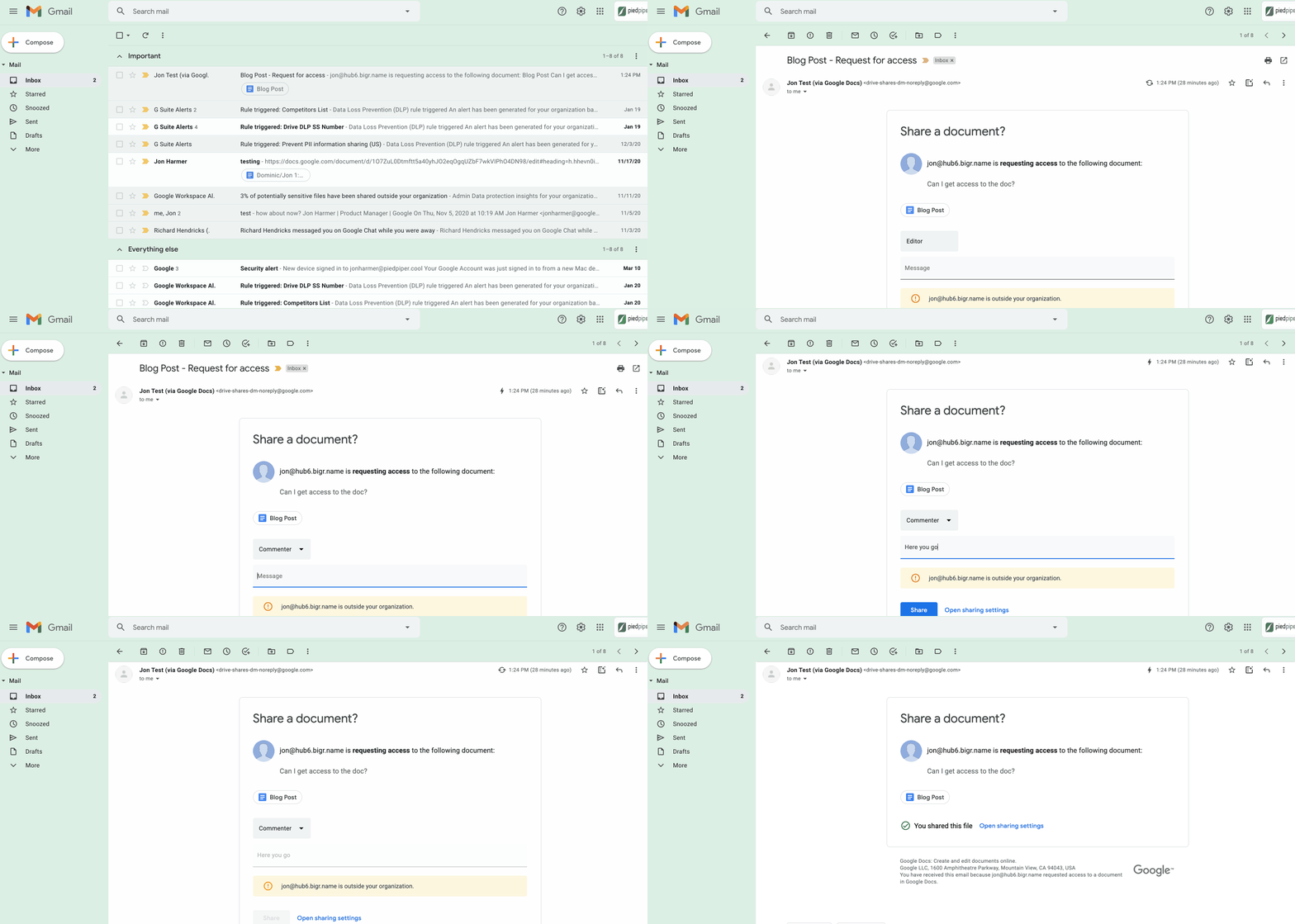
2. Stay productive, even when you’re offline. Gmail Offline lets you read, reply, delete, and search your Gmail messages when you’re not connected to the internet. Once you set it up, an outbox will appear in the left panel. When a connection later becomes available, Gmail will automatically send the messages from your outbox, and download any new messages to your inbox. This is great for those working on the frontlines who need to stay productive and informed, even when they’re offline.
3. Get organized and prioritize your work with Tasks in Gmail. This feature allows you to easily convert emails into tasks with just one click. You can create due dates that will automatically appear in your calendar, and check tasks off as you complete them. Baked directly into the side panel, you can create, view and manage your task lists without leaving Gmail.
4. Spend time innovating, not writing emails. Gmail’s template functionality lets you create standardized email messages that can be edited and sent out to different recipients in a matter of seconds. If this feature sounds appealing, check out Smart Reply and Smart Compose to learn more ways to write and reply to emails faster.
5. Get search results faster in Gmail. Search chips help you find what you’re looking for in Gmail faster, without needing to sort through irrelevant results or use search operators (e.g., from: marketing@company.com). For example, you can search a colleague’s name and further narrow your results by selecting search chips like attachment type (Doc, Sheet, PDF, etc.) or a specific timeframe. You can even exclude specific keywords and calendar invites from your results. You can also use search chips to search your Google Chat history, directly from within Gmail. To use search chips, all you need to do is type in a Gmail search, click on the search filter chips below the search box and Gmail will take care of the rest.

6. Tune out the irrelevant with the Gmail mute feature. Because we’ve all found ourselves trapped in unnecessary email threads, we created the Gmail Mute feature. With two clicks, you can mute email threads that aren’t relevant or that you no longer wish to follow. All future responses to that thread will now be automatically muted so you can focus your attention elsewhere. If you decide to rejoin the conversation, you can unmute the email thread just as easily.
Learn to Easily Administer Multi-cluster Kubernetes Environs: Part 4 KRM Series

5568
Of your peers have already read this article.
4:00 Minutes
The most insightful time you'll spend today!
This is part 4 in a multi-part series about the Kubernetes Resource Model. See parts 1, 2, and 3 to learn more.
Kubernetes clusters can scale. Open-source Kubernetes supports up to 5,000 Nodes, and GKE supports up to 15,000 Nodes. But scaling out a single cluster can only get you so far: if your cluster’s control plane goes down, your entire platform goes down; if the Cloud region running your cluster has a service interruption, so does your app.
Many organizations choose, instead, to operate multiple Kubernetes clusters. Besides availability, there are lots of reasons to consider multi-cluster, such as allocating a cluster to each development team, splitting workloads between cloud and on-prem, or providing burst capability for traffic spikes.
But operating a multi-cluster platform comes with its own challenges. How to consistently administer many clusters at once? How to keep the clusters secure? How to deploy and monitor applications running across multiple clusters? How to seamlessly fail over from one region to another?
This post introduces a few tools that can help platform teams more easily administer a multi-cluster Kubernetes environment.
The platform base layer, with Config Sync
In the last post, we explored how thoughtful platform abstractions can help reduce toil for app developers- including for a multi-cluster environment, where automation such as CI/CD handles all interactions with the staging and production clusters. But equally important is the platform base layer, the Kubernetes resources and configuration that are shared across services. Your platform base layer might consist of Namespaces, role-based access control, and shared workloads like Prometheus.
Platform abstractions depend on the existence of these base-layer resources. And so does the security and stability of your platform as a whole. It’s important that these resources not only get deployed, but also stay put. CI/CD is great for deploying resources, but what about making sure resources stay deployed? What if a Kubernetes Namespace gets deleted? Or a Prometheus StatefulSet is modified?
Kubernetes’ job is to ensure that the cluster’s actual state matches the desired state. But sometimes, the “desired” state isn’t desired at all – it’s a developer who mistakenly modified a resource, or a bad actor that’s gained access into the system. For this reason, a platform base layer needs more than a one-and-done CI/CD pipeline. A tool called Config Sync can help with this.
Config Sync is a Google Cloud product that can sync Kubernetes resources from a Git repository to one or more GKE or Anthos clusters. Unlike CI/CD tools like Cloud Build, Config Sync watches your clusters constantly, making sure that the intended resource state in the cluster always matches what’s in Git. Config Sync is designed primarily for base-layer resources like namespaces and RBAC. In this way, Config Sync is complementary to, not a replacement for, CI/CD.
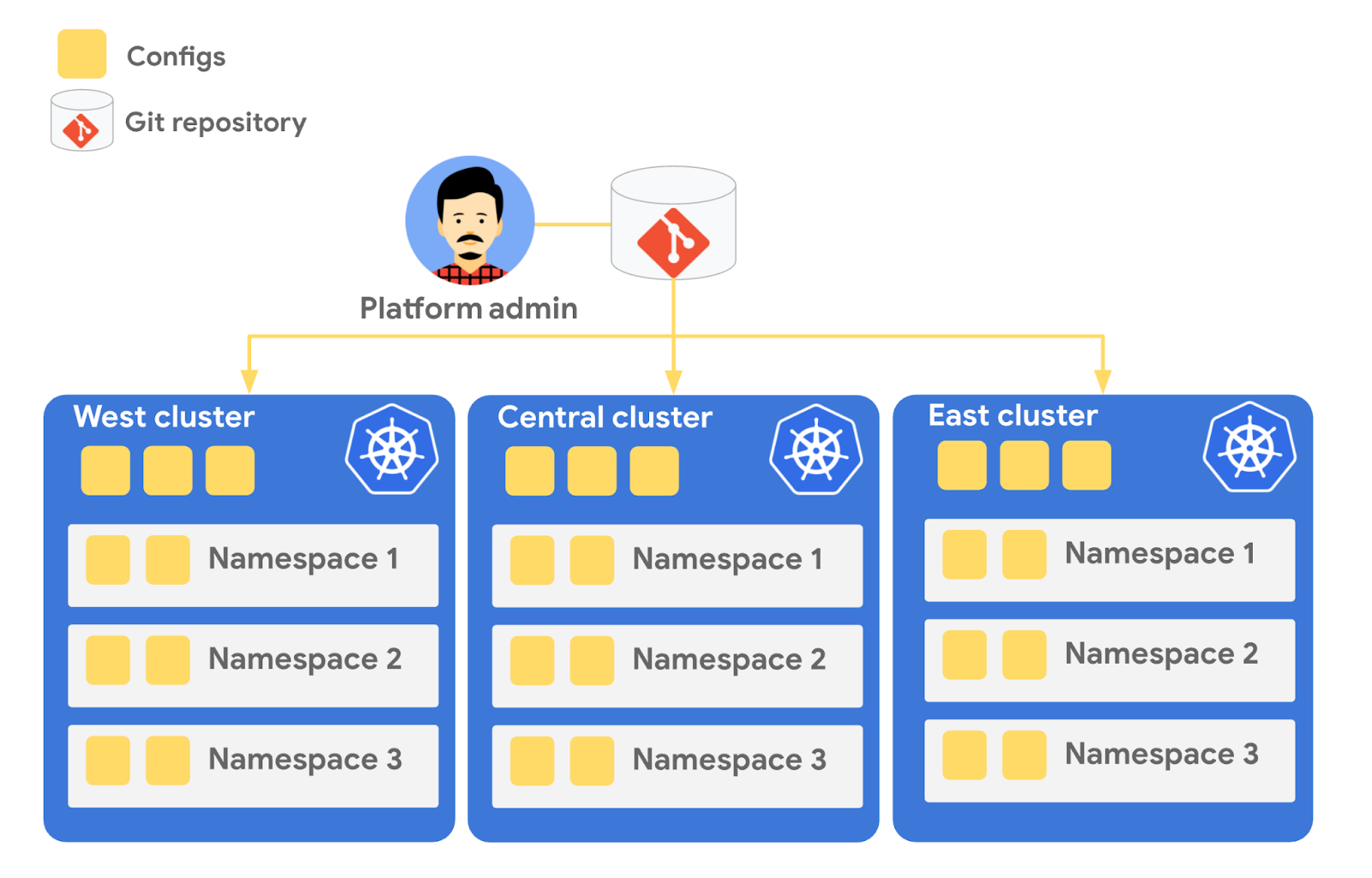
Config Sync runs in a Pod inside your Kubernetes cluster, watching your Git config repo for changes, and also watching the cluster itself for any divergence from your desired state in Git. If any configuration drift is detected from what’s stored in Git, Config Sync will update the API Server accordingly.
You can point multiple Config Sync deployments at the same Git repo, allowing you to manage the base-layer platform resources for multiple clusters using the same source of truth. And by using Git as the landing zone for config, you can benefit from some of the GitOps principles we discussed in part 2, including the ability to audit and roll back configuration changes.
Let’s walk through an example of how to manage base-layer resources with Config Sync.
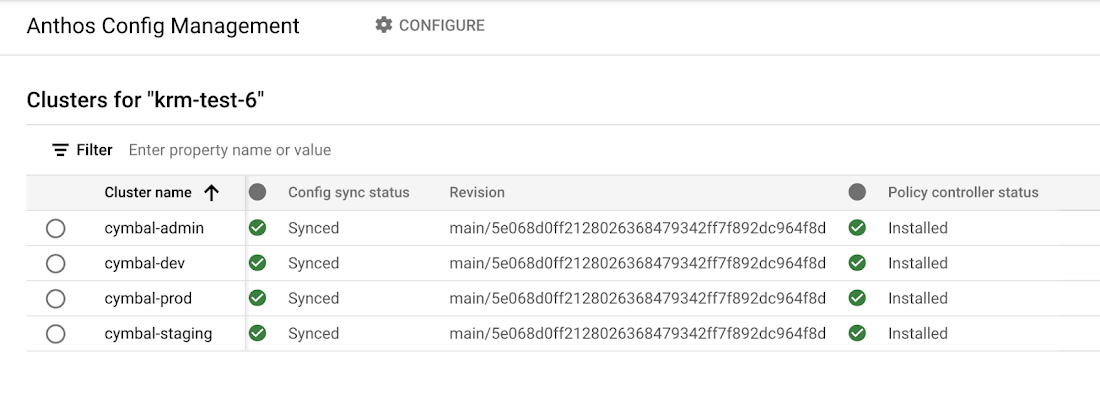
The Cymbal Bank platform consists of four GKE clusters: admin, dev, staging, and prod. We can install Config Sync on all four clusters using the gcloud tool or the Google Cloud Console, pointing all four clusters at a single Git repository, called cymbalbank-policy. Note that this repo is separate from the application source and config repos, and is managed by the platform team. From the Console, we can see that all four clusters are synced to the same commit of the cymbalbank-policy repo.
Now, let’s say that the Cymbal Bank platform team wants to limit the amount of CPU and memory resources each application team can request for their service. Kubernetes ResourceQuotas help impose these limits, and prevent unexpected Pod evictions.
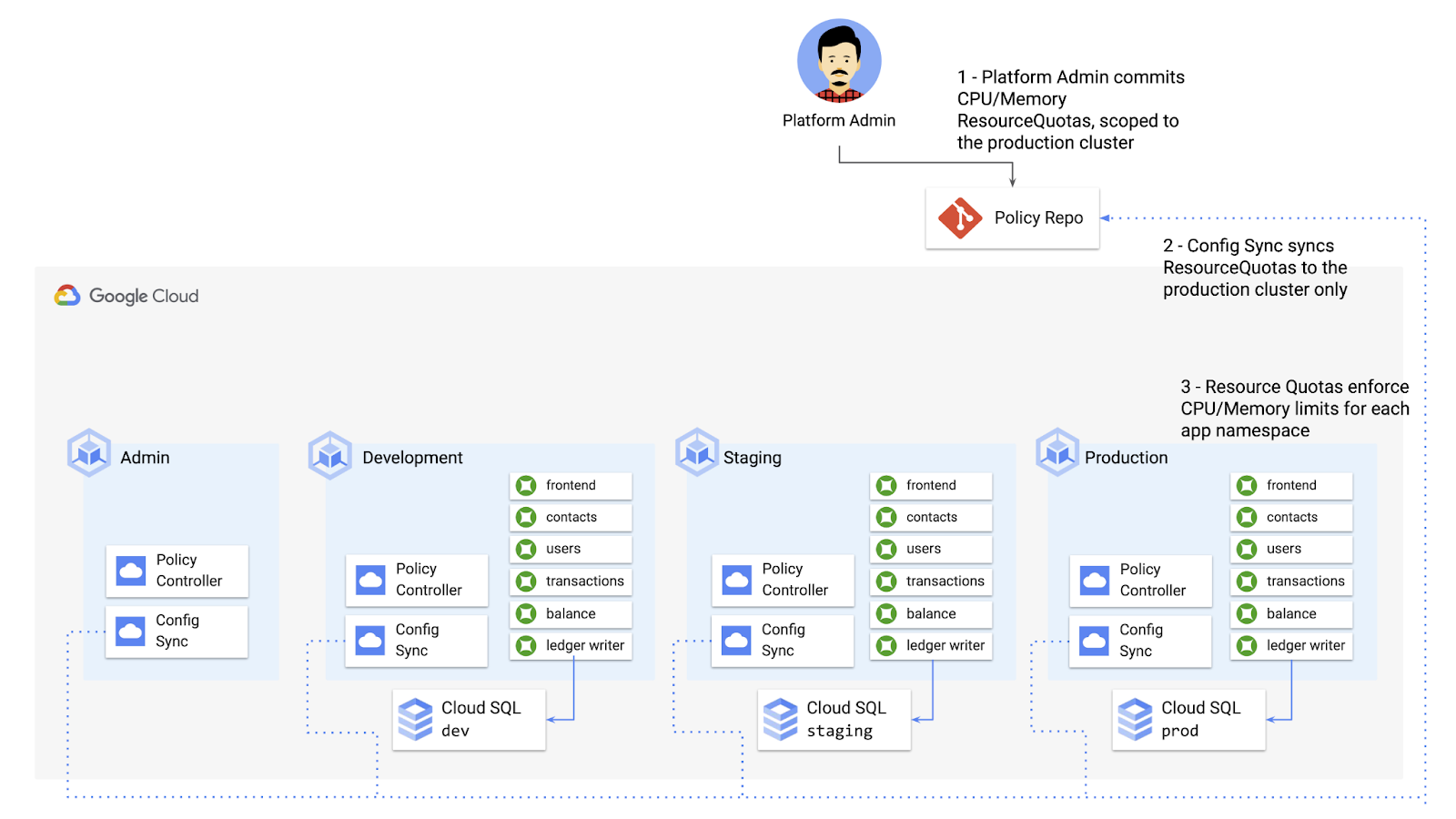
The platform team can define a set of ResourceQuotas for each application namespace. They can also scope the resources to only be applied to a subset of clusters – for instance, to the production cluster only. (If no cluster name selector is specified, Config Sync will deploy the resource to all clusters by default.)
apiVersion: v1kind: ResourceQuotametadata:name: production-quotanamespace: frontendannotations:configsync.gke.io/cluster-name-selector: cymbal-prodspec:hard:cpu: 700mmemory: 512Mi
From here, the platform team can commit the resources to the cymbalbank-policy repo, and Config Sync, always watching the policy repo, will deploy the resources to the production cluster:
NAMESPACE NAME AGE REQUEST LIMITbalancereader production-quota 6m56s cpu: 300m/700m, memory: 612Mi/512Mi
If a developer tries to delete one of the ResourceQuotas, Config Sync will block the request, helping to ensure that these base-layer resources stay put.
error: You must be logged in to the server (admission webhook "v1.admission-webhook.configsync.gke.io" denied the request: requester is not authorized to delete managed resources)
In this way, Config Sync can help platform teams ensure the stability of that platform base-layer, as well as ensure resource consistency across multiple clusters at once. This, in turn, can help organizations mitigate the complexity of adding new clusters to their environment.
Enforce policies on Kubernetes resources
Config Sync is a powerful tool on its own, and can work with any Kubernetes resource that your cluster recognizes. This includes Custom Resource Definitions (CRDs) installed with add-ons like Anthos Service Mesh.
But Config Sync, by default, doesn’t have an idea of “good or bad” Kubernetes resources. It will deploy whatever resources land in Git, even resources that might pose a security risk to your organization. Security is an essential feature of any developer platform, and when it comes to Kubernetes, it’s important to think about security from the initial software design stages, and set up your clusters with security best-practices in mind.
But it’s just as important to think about security at deploy-time. Who and what can access your clusters? What kinds of Kubernetes resources – and fields within those resources- are allowed? These decisions will depend on lots of factors, including the kinds of data your application deals with, and any industry-specific regulations.
One common security use case for KRM is the need to monitor incoming Kubernetes resources, whether they’re coming in through kubectl, CI/CD, or Config Sync. But if you have multiple clusters, your Kubernetes environment has multiple API Servers, and therefore multiple entry points.
A Google tool called Policy Controller can help automate resource monitoring across multiple clusters. Policy Controller is a Kubernetes admission controller that can accept or reject incoming resources based on custom policies you define. Policy Controller is based on the OpenPolicyAgent Gatekeeper project, and it allows you to define policies, or “Constraints,” as KRM. This means you can deploy them using Config Sync, via Git. Once deployed, Policy Controller uses your Constraints as a set of rules to evaluate all incoming KRM, rejecting resources that fall out of compliance.
Let’s walk through an example. Say that the Cymbal Bank security team wants to ensure that no code in development is accessible to the public. Kubernetes Services of type LoadBalancer expose public IP addresses by default, so the platform team wants to define a PolicyController constraint that blocks Services of that type on the development GKE cluster.
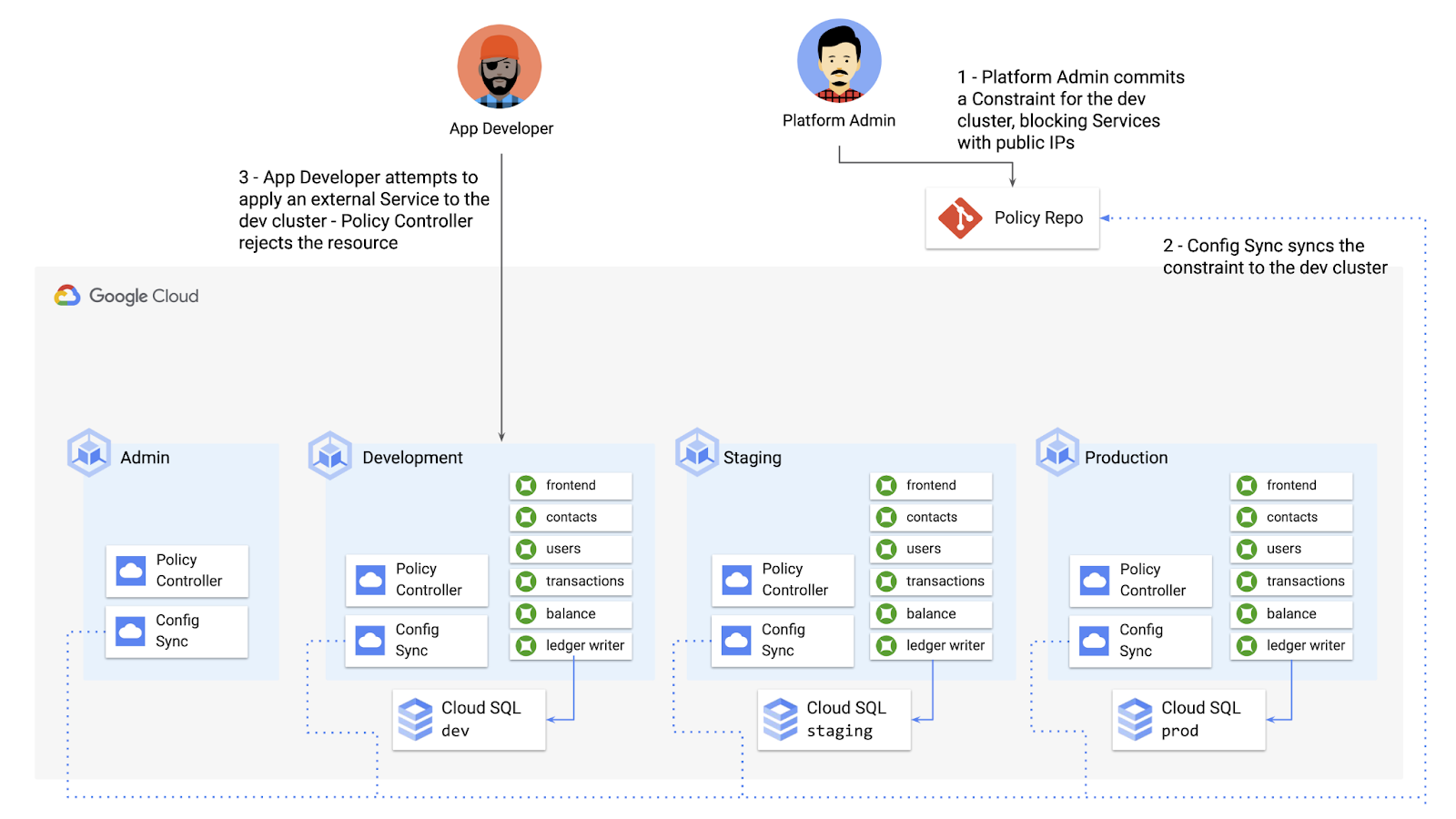
To do this, the platform team can define a Policy Controller Constraint as KRM. This Constraint uses a Constraint Template, provided through the pre-installed Constraint Template library. The ConstraintTemplate defines the logic of the policy itself, and the Constraint makes the template concrete, populating any variables needed to execute the policy logic. Here, we’re also adding a Config Sync cluster name annotation, to scope this resource to apply only to the development cluster.
apiVersion: constraints.gatekeeper.sh/v1beta1kind: K8sNoExternalServicesmetadata:name: dev-no-ext-servicesannotations:configsync.gke.io/cluster-name-selector: cymbal-devspec:internalCIDRs: []
The platform team can then commit the resource to the cymbalbank-policy repo, and Config Sync will deploy the resource to the development cluster.
From here, if an app developer tries to create an externally-accessible Kubernetes Service, Policy Controller will block the resource from being created.
for: "constraint-ext-services/contacts-svc-lb.yaml": admission webhook "validation.gatekeeper.sh" denied the request: [denied by dev-no-ext-services] Creating services of type `LoadBalancer` without Internal annotation is not allowed
The platform team can define as many of these Constraints as they want, each defining a separate policy.
Writing custom policies
The Policy Controller Constraint Template library provides a lot of functionality, from blocking privileged containers, to requiring certain resource labels, to preventing app teams from deploying into certain namespaces. But if you want to enforce custom logic on your organization’s KRM, you can do so by writing a custom Constraint Template.
Constraint Templates are written in a query language called Rego. Rego was designed for policy rule evaluation, and it can introspect Kubernetes resource fields to make a conclusion as to whether the resource is allowed or not.
For instance, let’s say that the platform team wants to limit the number of containers allowed inside a single application Pod. Too many containers per Pod can cause outage risks— when one container crashes, the entire Pod crashes.
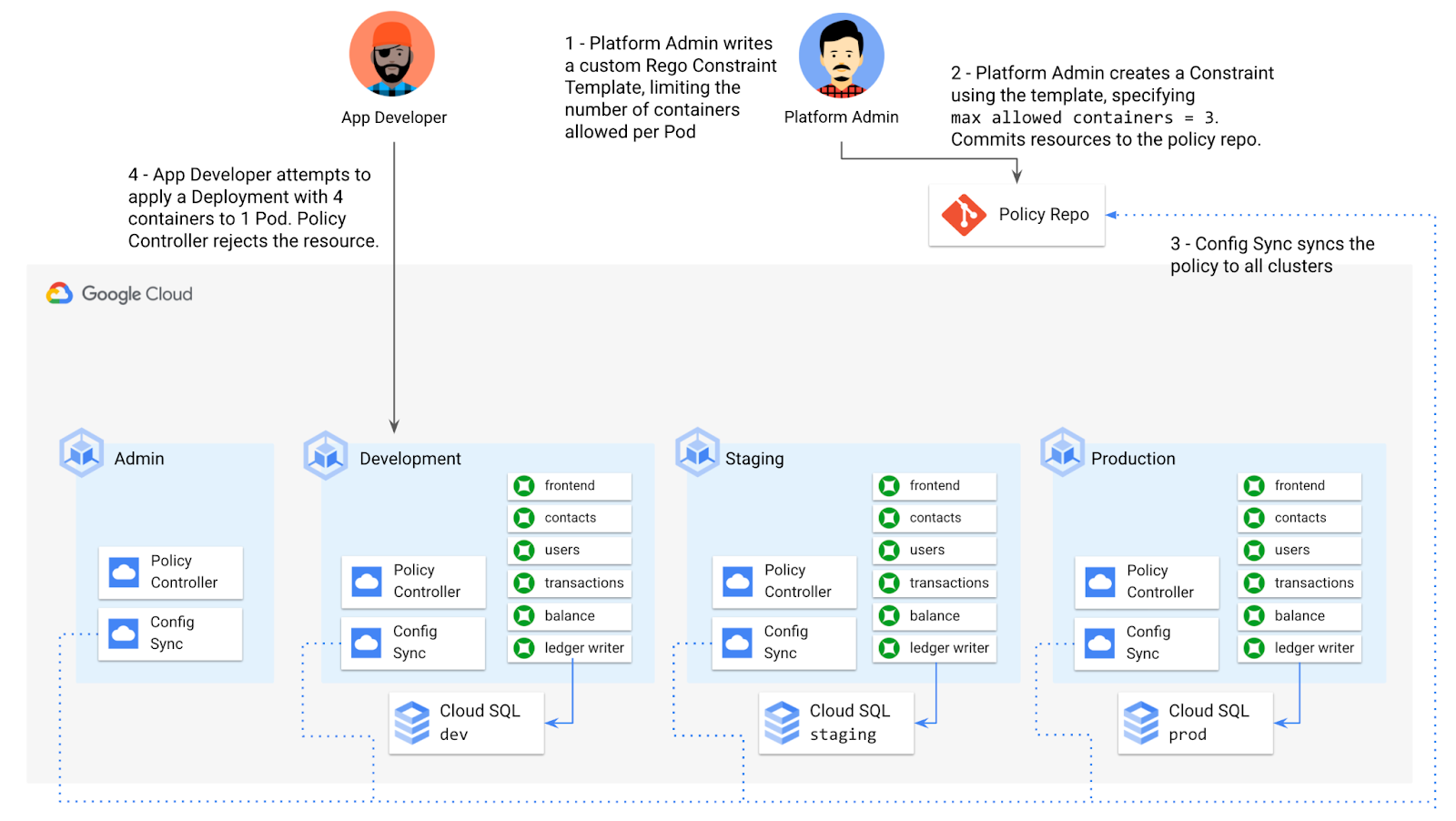
To enforce this policy, the platform team can define a Constraint Template, using the Rego language, that looks inside a resource to ensure that the number of containers per Pod is within the allowed limit:
apiVersion: templates.gatekeeper.sh/v1beta1kind: ConstraintTemplatemetadata:name: k8slimitcontainersperpodspec:crd:spec:names:kind: K8sLimitContainersPerPodvalidation:openAPIV3Schema:properties:allowedNumContainers:type: integertargets:- target: admission.k8s.gatekeeper.shrego: |package k8slimitcontainersperpodnumTemplateContainers := count(input.review.object.spec.template.spec.containers)numRunningContainers := count(input.review.object.spec.containers)containerLimit := input.parameters.allowedNumContainerstemplate_containers_over_limit = true {numTemplateContainers > containerLimit}running_containers_over_limit = true {numRunningContainers > containerLimit}violation[{"msg": msg}] {template_containers_over_limitmsg := sprintf("Number of containers in template (%v) exceeds the allowed limit (%v)", [numTemplateContainers, containerLimit])}violation[{"msg": msg}] {running_containers_over_limitmsg := sprintf("Number of running containers (%v) exceeds the allowed limit (%v)", [numRunningContainers, containerLimit])}Then, the platform team can define a concrete Constraint, using this Constraint Template, to set the number of allowed containers per Pod to 3:apiVersion: constraints.gatekeeper.sh/v1beta1kind: K8sLimitContainersPerPodmetadata:name: limit-three-containersspec:parameters:allowedNumContainers: 3
Finally, the platform team can push these resources to the cymbalbank-policy repo, and Config Sync will deploy the policy to all four clusters. If a developer tries to define a Kubernetes Deployment containing more containers per pod than what’s allowed, the resource will be blocked at deploy time:
Error from server ([limit-three-containers] Number of containers in template (4) exceeds the allowed limit (3)): error when creating "constraint-limit-containers/test-workload.yaml": admission webhook "validation.gatekeeper.sh" denied the request: [limit-three-containers] Number of containers in template (4) exceeds the allowed limit (3)
Custom Constraint Templates can give platform teams lots of flexibility in the types of policies they define and enforce in a Kubernetes environment.
Integrating policy checks into CI/CD
As we explored earlier, Config Sync and CI/CD are complementary tools. Config Sync works great for base-layer platform resources and policies, whereas CI/CD works well for application tests and deployment.
But one pitfall of having two separate KRM deployment mechanisms is that app developers may not know that their resources are out of policy until they try to deploy them into production. This is especially true if some policies are scoped only to production, as we saw with the ResourceQuota example. Ideally, the platform team has a way to empower developers and code reviewers to know ahead of time whether new or modified resources are still in compliance. We can enable this use case by integrating policy checks into the existing Cymbal Bank CI/CD.
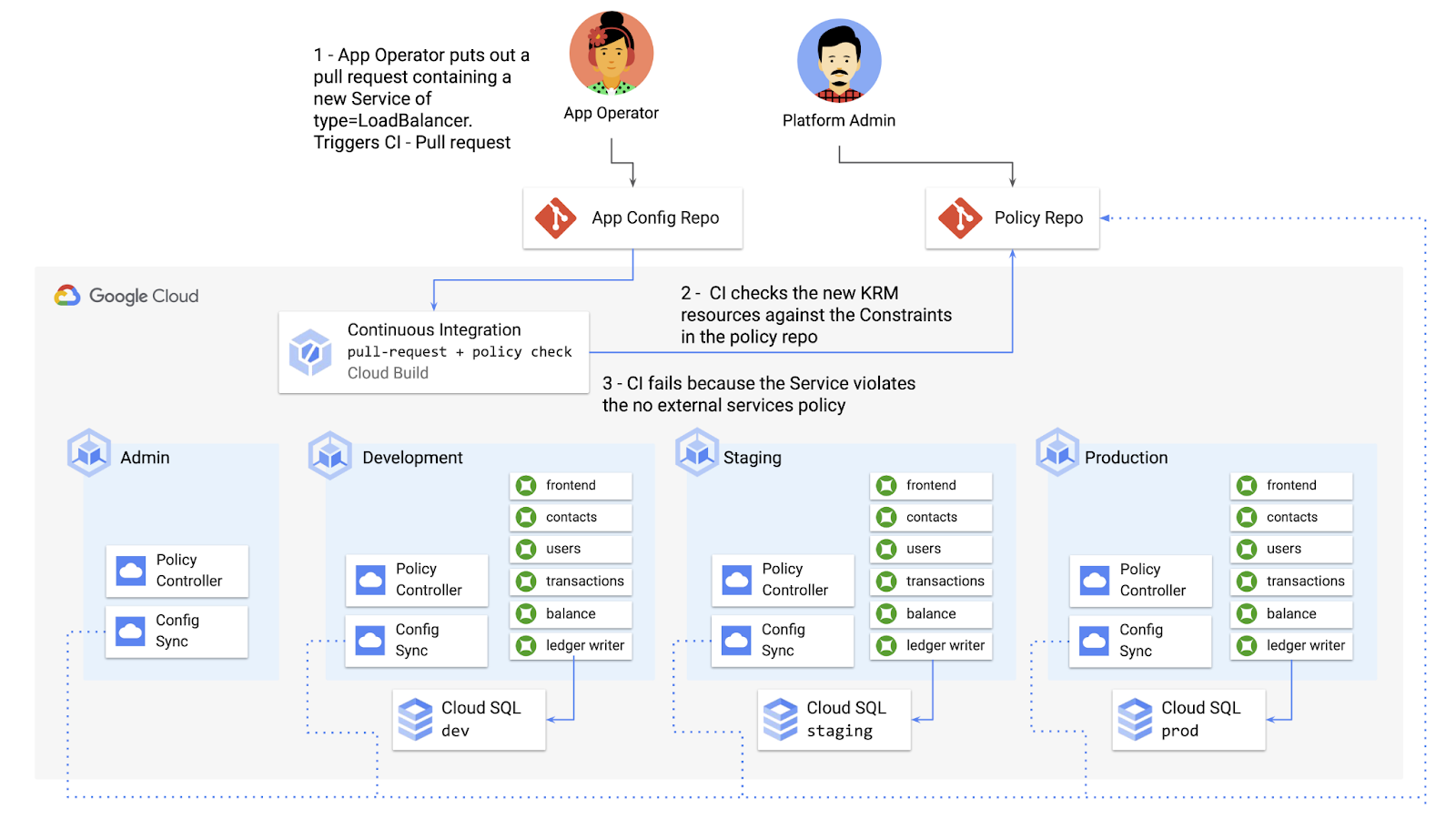
Policy Controller operates, by default, as a Kubernetes Admission Controller running inside the cluster. But Policy Controller also provides a “standalone” mode, running inside a container, that can be used outside of a cluster, such as from inside a Cloud Build pipeline.
In the example below, Cloud Build executes Policy Controller checks by getting the cymbalbank-app-config manifests, cloning the cymbalbank-policy resources, and using the “policy-controller-validate” container image to evaluate the app manifests against the policies.
steps:- id: 'Render prod manifests'name: 'gcr.io/google.com/cloudsdktool/cloud-sdk'entrypoint: '/bin/sh'args: ['-c', 'mkdir hydrated-manifests && kubectl kustomize overlays/prod > hydrated-manifests/prod.yaml']- id: 'Clone cymbalbank-policy repo'name: 'gcr.io/kpt-dev/kpt'entrypoint: '/bin/sh'args: ['-c', 'kpt pkg get https://github.com/$$GITHUB_USERNAME/cymbalbank-policy.git@main constraints&& kpt fn source constraints/ hydrated-manifests/ > hydrated-manifests/kpt-manifests.yaml']secretEnv: ['GITHUB_USERNAME']- id: 'Validate prod manifests against policies'name: 'gcr.io/config-management-release/policy-controller-validate'args: ['--input', 'hydrated-manifests/kpt-manifests.yaml']availableSecrets:secretManager:- versionName: projects/${PROJECT_ID}/secrets/github-username/versions/1env: 'GITHUB_USERNAME'timeout: '1200s' #timeout - 20 minutes
From here, an app developer or operator can know if their resources violate org-wide policies, by looking at the Cloud Build output for their Pull Request:
Status: Downloaded newer image for gcr.io/config-management-release/policy-controller-validate:latestError: Found 1 violations:[1] Number of containers in template (4) exceeds the allowed limit (3)
By integrating policy checks into CI/CD, app development teams can understand whether their resources are in compliance, and platform teams add an additional layer of policy checks to the platform.
Overall, Config Sync and Policy Controller can provide a powerful toolchain for standardizing base-layer config across a multi-cluster environment. Check out the Part 4 demo to try out each of these examples.
And stay tuned for Part 5, where we’ll learn how to use KRM to manage cloud-hosted resources.
Why APIs are De Facto Business Requirements

5534
Of your peers have already read this article.
1:30 Minutes
The most insightful time you'll spend today!
The benefits of APIs are becoming more clear in an ever-evolving tech landscape, yet ITDMs still struggle to convince executives and investors to buy into an API-first strategy. Here’s a look at the importance of APIs in a changing world, and how ITDMs can make the business case in order to secure the best API strategy for their organization.

According to Google Cloud’s new “State of the API Economy 2021” report, a majority of IT decision-makers view application programming interfaces, or APIs, as essential ingredients in improved customers experiences, expanded partner engagement, accelerated innovation, and other demands of today’s business environment. This is encouraging: APIs are how software talks to other software, and since much of digital transformation involves combining disparate data and functionality into rich user experiences and process automations, APIs are an essential ingredient in modern business strategies.
What’s less encouraging: the research surveys primarily IT professionals, not business leaders. It’s clear that IT people see the benefits of APIs in the ever-changing tech landscape, but we still hear regular concerns from these same people that they have trouble convincing executives and investors to buy into an API-first strategy. In this article, we’ll look into why they are having these difficulties and some proven ways to successfully position an API strategy not just as a technological solution, but also as a business requirement.
The importance of APIs in a changing world
The rise of APIs has been heavily influenced by the introduction of disruptive new business models and evolving customer preferences that traditional technologies are not positioned to quickly and efficiently address.
For example, traditionally, if your business sold tickets to events, it would build physical ticket booths and maybe a website or first-party mobile app. Today, tickets in many cases aren’t so much a physical thing presented to an usher as a digital code that an usher scans. Likewise, tickets are less-often purchased in person as opposed to online, and reliance on a first-party website can be unnecessarily restrictive. It places the burden on the business to attract customers, whereas surfacing organically in social media, search engine results, and other digital experiences lets the business meet customers where they’re already assembled.
Moreover, as COVID-19 continues to disrupt events throughout the world, many ticket sellers—and most organizations, for that matter—have pivoted to digital-first business interactions as a matter of necessity. All of these changes in the business model, and all of the interacting systems and functionality that underpin them, rely on communication among APIs.
Similarly, today’s banks cannot grow by simply building more branches or hiring more tellers. Instead, they need to make financial information and functionality available when and where customers require it, whether that means via an ATM, a first-party app, or within some other digital experience. Many banks also need to do more than just present this functionality, as customers are increasingly interested in the analytics and insights their spending patterns can yield. Again, all of these interactions—from customers making a purchase within an app to banks applying machine learning in order to offer customers financial insights—are enabled by APIs.
Related: The “State of API Economy 2021” report describes how digital transformation initiatives evolved throughout 2020, as well as where they’re headed in the years to come. Download for free.
When guidance meets resistance
These examples do not illustrate technology that updates the status quo, but rather technology that unlocks business opportunities that transcend the status quo—and that help businesses to thrive even as the status quo fades into irrelevance and obsolescence. APIs are thus not just an IT topic but also important business enablers that should be understood by everyone involved with the enterprise’s investments, from internal stakeholders approving business strategies to external shareholders trying to assess an organization’s trajectory.
The challenge for investor relations is to convey these financial and operational benefits in a way that clearly communicates the need for a new business model rather than refinements to the existing models. It’s essential that IT professionals understand APIs, but it’s also essential for business leaders to understand them too.
This is even trickier given that arguments for API investments are often based on future potential, while arguments for more conservative alternatives are based on past success.
At a high level, the API value proposition is clear: In the past, valuable functionality and data have been encased in systems and applications, making them difficult to scale or leverage for new, evolving use cases. In contrast, APIs make functionality and data infinitely reusable, infinitely scalable, and modular such that APIs can easily be combined for new uses. All of this accrues to richer user experiences and more flexibility than ever for companies to monetize their digital assets, share them with partners, or combine them with assets from third parties.
It’s essential that IT professionals understand APIs, but it’s also essential for business leaders to understand them too.
But investors typically want as much information as possible because their decisions can affect not just productivity and output, but company stock prices and potential future growth. High-level arguments may not be persuasive. The deeper assurances investors crave would normally come from guidance.
Guidance in this context refers to insights based on growth forecasts and customer adoption, but this can be difficult early in market entry. Robust forecasting processes need to be developed to demonstrate the efficacy and value of the API economy, which can be hard to predict: whereas APIs are well understood in some sectors, and especially among digital natives, they are in the early stages of the growth rate in other verticals, making it challenging to forecast developer adoption of a given API. And since there is a shortage of information, trying to use traditional guidance comes with a risk of being wrong and thus of little value to investors.
Related: Set your 2021 API resolutions with these top 2020 posts.
How to deliver a more useful value proposition
While guidance may be premature during the early stages of market entry, investor relations teams still need to convey the full value of an enterprise to investors. To do this, they need a value proposition that emphasizes the intrinsic value of the investment while reinforcing the benefits that can best drive business and stock growth. Considering how large an investment of time, effort, and money transitioning to an API economy can be, it is vital to convey that the benefits are substantial.
A solid value proposition should demonstrate maximum returns, and while this shouldn’t include far-fetched or unobtainable claims, it can include reasonable aspirational visions alongside statistical insights. To craft these aspirational narratives, investor relations teams should look to their organization’s existing business needs and challenges, and then demonstrate how APIs can benefit the organization in these areas. Here are some options that speak to a number of common business requirements:
- Sales channel: API investments are reusable, improve speed to market, enable automated processes and partner onboarding, and can uncover unanticipated opportunities.
- Cost: Businesses can reduce operational costs by using and reusing APIs for innovation and business development, and by using the services native to your partner’s digital surface, you can further reduce innovation costs and risks.
- Earnings: API-enabled digital ecosystems unlock a variety of partner services that leverage the business’s shared data to drive new customer acquisition, new market positions, new transaction volumes, and direct API monetization.
- Risk mitigation: By investing in a credible API, businesses can mitigate downside risks that traditional enterprises can face from market disruptors, industry-wide shifts to digital tools, and inabilities to ingest and analyze growing data sources.
- Intellectual property: Unlike project-driven innovation and customized, point-to-point integration that traps enterprise knowledge in small teams and divisional silos, APIs are reusable and modular, breaking down silos and encouraging intra-organizational collaboration.
- Speed to market: The efficient, repeatable API interface informs improvements to the fulfillment process with consistent access to data from across the organization, which drives solutions that more quickly and efficiently meet customer needs.
- Ethics: APIs offer the flexibility and economical advantages that give organizations the capacity to focus on their brand’s ethical “reason for being” beyond profitability by serving economically marginal and underserved market segments.
- Customer credibility: Organizations can deliver the extended, connected digital experiences that customers expect with the tools and flexibility included with API products.
- Employee retention: Businesses can avoid losing key employees by updating their legacy technologies with APIs, giving employees the opportunity to enhance their skills with modern technologies.
- Corporate strategy: Enterprises that use APIs’ reusable, modular structure and tools are more capable of adapting to rapid structural shifts in customer demand patterns and sectoral changes in the economy.
Whichever of these business challenges a team speaks to, it is imperative that they demonstrate the benefits of APIs, and that once they’ve determined the angle they intend to use, they keep their message consistent. While we’ve seen a number of viable ways to position APIs as a winning strategy, switching among them could make the presentation—and APIs in general—seem insubstantial and unreliable.
This is why it’s key to decide on the most relevant business concerns, and once you’ve tailored your presentation, to make sure that you have message alignment, including buy-in and support from C-level executives. With a strong pitch built around solving existing business concerns and solidarity from relevant stakeholders, you can go into your investor meeting with the confidence to secure the best API strategy for your organization.
Strengthen your pitch with additional insights. Here are five key trends in 2021 for API-first digital transformation.
About the Author: Paul Rohan is a researcher on Open Banking and a Google Cloud solutions consultant. Paul works with banking C-Suites that are examining the impact of the Platform Economy and Digital Ecosystems on financial services industry growth, market structures and governance. Paul is the author of “PSD2 in Plain English” and “Open Banking Strategy Formation”.
More Relevant Stories for Your Company

Go Green with Google’s Latest Tool and Pick the Most Sustainable Cloud Region
As a Google Cloud customer, your carbon footprint is already carbon neutral: Google first achieved carbon neutrality in 2007, and has been purchasing enough solar and wind energy to match 100% of its global electricity consumption since 2017. Now, Google is targeting a new sustainability goal: operating on carbon-free energy (CFE) 24/7,

Rethinking time management: Helping employees manage their time efficiently
As business leaders evaluate their hybrid work models, employee productivity is top of mind. They’re trying to understand how to balance organizational needs for productivity with employee needs for autonomy, flexibility, and work/life balance. In my role as Google’s Productivity Advisor, I help organizations and employees realize that being productive


How to Cut the Sales Cycle Short and Close a Deal Quickly
Did you know sales reps only spend about one-third of their time actually selling? Believe it. The remaining two-thirds are spent on two things: Creating presentations, pushing boxes around on a slide deck, and doing administrative work like setting up meetings with clients. That’s all the time you could have

Swiggy: Delivering Local Food Within 40 Minutes
Founded in 2014, Swiggy started small, delivering food to a few neighborhoods in Bengaluru, India. As the company grew, the team wanted a mapping technology that could help expand the service throughout India. Swiggy needed a scalable mapping platform that covered a wide geographic area and offered tools to help
