





Stay on Top of Your Cloud Monitoring with Google’s Mobile App

1535
Of your peers have already read this article.
3:30 Minutes
The most insightful time you'll spend today!
We are pleased to announce the availability of Google Cloud Monitoring uptime checks in the Google Cloud mobile app.
The uptime check capability offered by Cloud Monitoring is a simple yet powerful observability tool to monitor an application’s availability and performance on URLs provided by customers. The primary purpose of an uptime check is to track resource availability on an on-going basis. It’s essentially a pulse check for a system and is often the first to detect impending issues. Using uptime checks can proactively detect availability and latency issues with an application and reduce the time and severity your users are impacted by an outage. Uptime check can validate if the response code from your application is as expected, and also the latency of your service from different regions. Uptime checks can further inform your SLAs and SLOs, and track your service’s health over time. SREs at Google use uptime checks as an important part of their daily routine.
Given the critical role served by uptime checks, we heard your feedback on having the ability to track these checks in the Google Cloud mobile app. With this launch SRE’s, operators or administrators can do exactly that, in addition to easily accessing their cloud resources (App Engine, Compute, Databases, Storage), managing permissions using IAM, viewing logs, incidents, errors, and billing.
To access uptime checks, simply tap the “Operations” tab in the Google Cloud mobile app on your iOS or Android device.
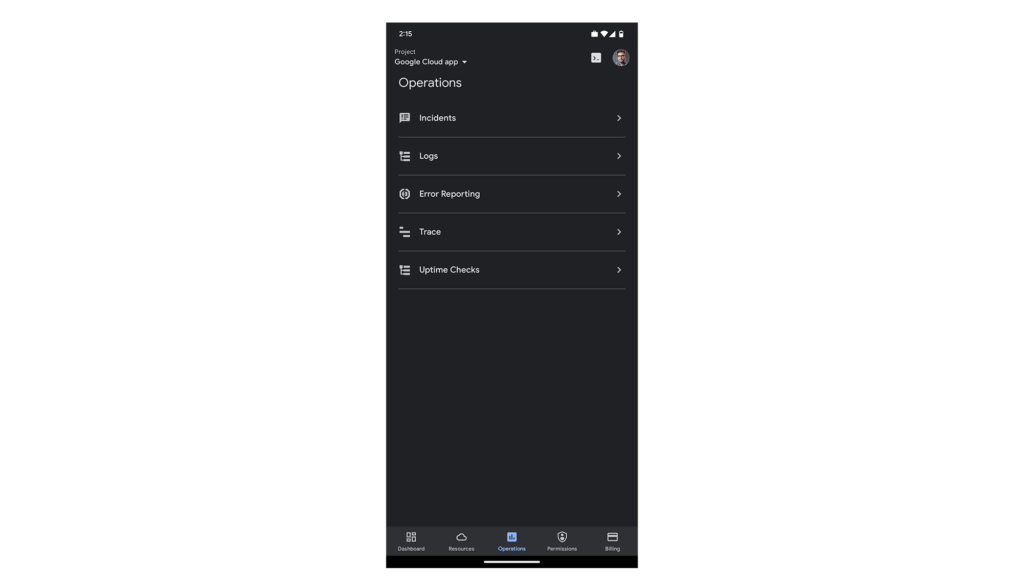
After navigating to “Uptime Checks”, you will see a list of all the services you have previously added using the Create public uptime check documentation.
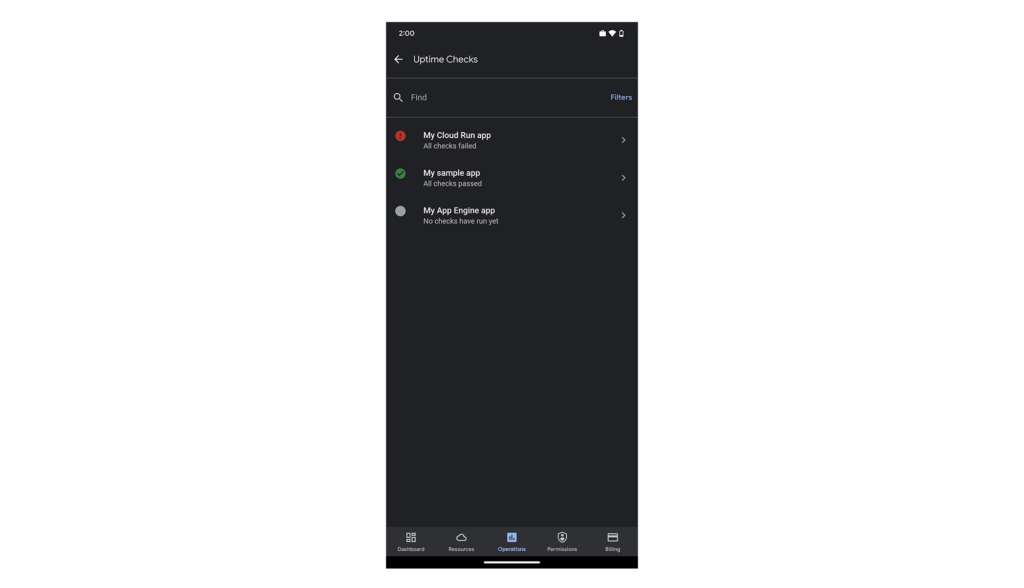
The list is sorted by status, so all failing checks are at the top. You can easily filter by status using the “Filters” option in the top-right corner of the screen.
Tapping any of the uptime checks will take you to the “details”-screen.
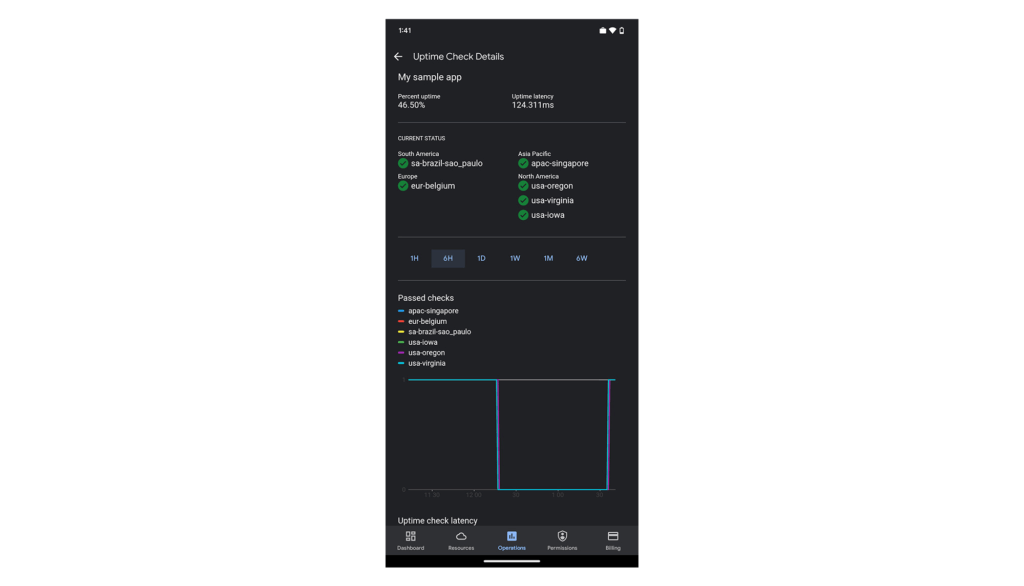
Here you’ll see your application’s uptime, latency, status per region (if you’re monitoring your application from more than one cloud region) and graphs to give you a sneak preview. The “passed check”-graph is showing how many checks passed in the last hour up to 6 weeks. You can easily change the interval using the scale above the graphs.
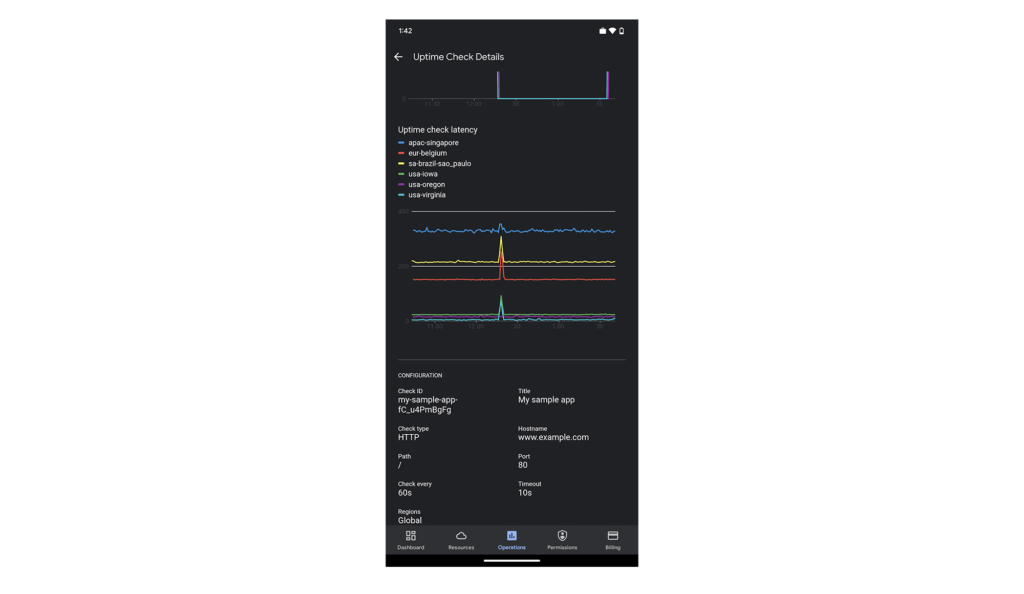
Scroll down the page to see more data. At the bottom of the screen, we’ve included some configuration details for this uptime check, so you can check the above data against this specific setting.
We hope you find this new uptime check feature useful in your daily work. To create new uptime checks, start here: Create public uptime check.
We’re working hard to make the Google Cloud app your companion for monitoring and managing your Google Cloud resources on the go.
For pricing information on uptime checks, please see the Cloud Monitoring pricing summary.
This new feature is available for you to use today. If you have any feedback, we would love to hear from you — just click the “Send feedback” button in the app. And if you don’t have the app – go ahead and download the app today from Google Play or the Apple App Store.
Google Products Helps HMH’s Healthcare Staff Work from Anywhere Efficiently and Securely!

10218
Of your peers have already read this article.
3:00 Minutes
The most insightful time you'll spend today!
Hackensack Meridian Health (HMH) executive Mark Eimer explains how an ambitiously-timed rollout of a comprehensive suite of Google products helped the entire organization—from doctors to IT staff—achieve better security, cultivate a more equitable work environment, and ultimately, improve patient outcomes.
How does a recently merged, 17-hospital healthcare system fast-track a platform migration and hardware rollout securely and in a way that improves work for everyone, regardless of location or role? These are the questions that kept me up at night in early 2020, when the pandemic demanded a “big bang”—something our legacy laptops and operating systems couldn’t handle.
We began our work with Google in 2020 with the adoption of Chrome as our default browser. As we migrated platforms, keeping patient data safe was of the utmost importance to us, along with providing every staff member with the tools they needed to work virtually. Our staff often experienced issues accessing our web-based applications using Internet Explorer or Edge Browser, a problem that went away when we switched to Chrome. Chrome’s versatile compatibility also made it easier for my team to migrate all of our web-based operations, and Chrome’s security and manageability were key components to making this switch a huge win for the organization.
The success of this migration led us to extend our Google partnership to patient care applications—where Google’s expertise in AI and ML helps scale the use of diagnostics tools and improve other aspects of the patient journey.

Achieving security at every step
Like so many other healthcare organizations, we’ve been concerned about ransomware attacks. This is part of why we moved to Google Workspace and distributed over 3,000 Chrome OS devices in kiosk mode in March of 2020, when many of us went remote due to the pandemic. We were very concerned about team members accessing corporate applications through home devices that were running EOL operating systems (WIN7), as well as a general lack of antivirus and encryption measures.
We were protected by the fact that Google’s software and hardware both had built-in security features that we needed to stave off sophisticated attackers. For example, Chrome OS automatically updates to the latest security update and encrypts data living outside the cloud on the hardware. These features protected us from security-related disruptions, letting us securely move a huge library of file shares and emails across thousands of accounts to Google Chrome OS in just four months.
A year later, in March 2021, we migrated the enterprise over to Google Workspace and saw an immediate reduction in spam by 30% from the inherent built-in AI/ML. This meant staff were less likely to receive (and click through) phishing attempts. My team could connect, create, and collaborate easily and securely—even as more of us were working from home and needed to access sensitive data remotely.
Leveling the playing field
As an organization, we were surprised by how many team members didn’t have personal computers at home. We quickly decided that if we needed team members to work from home, the health network would have to supply hardware. Chromebooks’ lower price tag compared to PCs—on top of their built-in security controls—allowed us to purchase, deploy, and support that initial distribution of 3,000 Chromebooks to team members in less than three weeks, providing devices to every eligible remote employee instead of just a select few. This was vital to reaching our equitable technology goal as part of our diversity and inclusion initiative: everybody has the same tools to do good work.
When all employees have what they need to do their jobs well, we get better patient outcomes. Before we began this cloud adoption journey, patient and staff experiences were different within the hospitals and outside of them.
Now it’s the same wherever our staff is, and we’ve seen efficiency and accessibility benefits extend to the patient side. For example, we built a web-based contact center that supports 80 locations that use Workspace and Chrome OS devices. Since customer service, admin, and providers are all on the same system, it has become a one-stop shop for patients.
Furthermore, through the Grow with Google program, we were able to provide another benefit to employees that drove our equity goals. Google trained 50 non-IT staff members—from environmental services, food and nutrition, and other non-tech areas who were interested in making a career change to IT—on the Google products we were using. They may not have thought about switching to a career in IT before the Grow with Google program came to our organization, but through this partnership, they now have that opportunity.
A strategic, long-term partner
With any large-scale rollout, the work doesn’t end once laptops are in employee hands. Google has shown their commitment to long-term collaboration as they continuously optimize their products for the unique needs of healthcare providers and go the extra mile in tailoring tools to our staff’s workflows.
For example, on the Chrome OS side, the Google team has helped our registration desks and document centers with device integration for hardware like credit card readers and e-signature pads. They’ve also helped us meet security and privacy requirements mandated by state and federal governments around HIPAA, Medicaid, and Medicare reimbursements. Over this next year, we’ll look at a feature roadmap with Google Cloud to deliver further enhancements, iterating on the product itself to meet our needs for the present and the future.

Delivering the future of healthcare
The benefits we’ve seen around security and usability—and the ability to provide all staff with equal access to Google’s technology—are why we’re expanding our partnership with Google to both the administrative and clinical sides of HMH. In addition to further Google rollouts with corporate, next year we’re distributing Chromebooks to all 350 of our ambulatory clinics.
We’re also working with the Google professional services team to create a custom AI model that analyzes 3D mammogram images. This AI model will enable two providers to read mammograms—which adheres to international best practices but is currently rare in the US—without requiring additional time. Conducting double readings of mammograms will yield better health outcomes for our patients, such as a lower patient recall rate and an increased accuracy in detecting breast cancer.
We’re currently building the model using a variety of Google Cloud products, including Cloud Healthcare API. Once complete, this model is expected to be trained, deployed, and maintained in Google’s Vertex AI, allowing our providers to be more productive as they make clinical decisions with AI support. As the model is proven over time, we plan to make the predictive services accessible to other healthcare organizations.
With Google, we’re able to achieve a unified architecture for storing data as well as training and deploying AI models, which enable our staff to work more efficiently and securely from anywhere. While I may not be able to predict the future as accurately as AI can, I foresee our continued partnership with Google as a key part of HMH’s improved provider and patient outcomes.
Expert Takeaways on API Strategies from The State of API Economy 2021 Report

5741
Of your peers have already read this article.
8:00 Minutes
The most insightful time you'll spend today!
Did you know API traffic for Apigee customers increased 46% year-over-year, to 2.21 trillion calls, between 2019 and 2020? If you have more questions on APIs trends and their role in disrupting enterprises digitally, you can catch up on key take aways from the Google Cloud’s State of API Economy 2021 report and insights from Google’s experts on API-best practices.
Quick Recap on Google Cloud: Latest News, Launches, Updates, Events and More

12902
Of your peers have already read this article.
2:00 Minutes
The most insightful time you'll spend today!
Want to know the latest from Google Cloud? Find it here in one handy location. Check back regularly for our newest updates, announcements, resources, events, learning opportunities, and more.
Tip: Not sure where to find what you’re looking for on the Google Cloud blog? Start here: Google Cloud blog 101: Full list of topics, links, and resources.
Week of May 24-May 28 2021
- Google Cloud for financial services: driving your transformation cloud journey–As we welcome the industry to our Financial Services Summit, we’re sharing more on how Google Cloud accelerates a financial organization’s digital transformation through app and infrastructure modernization, data democratization, people connections, and trusted transactions. Read more or watch the summit on demand.
- Introducing Datashare solution for financial services–We announced the general availability of Datashare for financial services, a new Google Cloud solution that brings together the entire capital markets ecosystem—data publishers and data consumers—to exchange market data securely and easily. Read more.
- Announcing Datastream in Preview–Datastream, a serverless change data capture (CDC) and replication service, allows enterprises to synchronize data across heterogeneous databases, storage systems, and applications reliably and with minimal latency to support real-time analytics, database replication, and event-driven architectures. Read more.
- Introducing Dataplex: An intelligent data fabric for analytics at scale–Dataplex provides a way to centrally manage, monitor, and govern your data across data lakes, data warehouses and data marts, and make this data securely accessible to a variety of analytics and data science tools. Read more.
- Announcing Dataflow Prime–Available in Preview in Q3 2021, Dataflow Prime is a new platform based on a serverless, no-ops, auto-tuning architecture built to bring unparalleled resource utilization and radical operational simplicity to big data processing. Dataflow Prime builds on Dataflow and brings new user benefits with innovations in resource utilization and distributed diagnostics. The new capabilities in Dataflow significantly reduce the time spent on infrastructure sizing and tuning tasks, as well as time spent diagnosing data freshness problems. Read more.
- Secure and scalable sharing for data and analytics with Analytics Hub–With Analytics Hub, available in Preview in Q3, organizations get a rich data ecosystem by publishing and subscribing to analytics-ready datasets; control and monitoring over how their data is being used; a self-service way to access valuable and trusted data assets; and an easy way to monetize their data assets without the overhead of building and managing the infrastructure. Read more.
- Cloud Spanner trims entry cost by 90%–Coming soon to Preview, granular instance sizing in Spanner lets organizations run workloads at as low as 1/10th the cost of regular instances, equating to approximately $65/month. Read more.
- Cloud Bigtable lifts SLA and adds new security features for regulated industries–Bigtable instances with a multi-cluster routing policy across 3 or more regions are now covered by a 99.999% monthly uptime percentage under the new SLA. In addition, new Data Access audit logs can help determine whether sensitive customer information has been accessed in the event of a security incident, and if so, when, and by whom. Read more.
- Build a no-code journaling app–In honor of Mental Health Awareness Month, Google Cloud’s no-code application development platform, AppSheet, demonstrates how you can build a journaling app complete with titles, time stamps, mood entries, and more. Learn how with this blog and video here.
- New features in Security Command Center—On May 24th, Security Command Center Premium launched the general availability of granular access controls at project- and folder-level and Center for Internet Security (CIS) 1.1 benchmarks for Google Cloud Platform Foundation. These new capabilities enable organizations to improve their security posture and efficiently manage risk for their Google Cloud environment. Learn more.
- Simplified API operations with AI–Google Cloud’s API management platform Apigee applies Google’s industry leading ML and AI to your API metadata. Understand how it works with anomaly detection here.
- This week: Data Cloud and Financial Services Summits–Our Google Cloud Summit series begins this week with the Data Cloud Summit on Wednesday May 26 (Global). At this half-day event, you’ll learn how leading companies like PayPal, Workday, Equifax, and many others are driving competitive differentiation using Google Cloud technologies to build their data clouds and transform data into value that drives innovation. The following day, Thursday May 27 (Global & EMEA) at the Financial Services Summit, discover how Google Cloud is helping financial institutions such as PayPal, Global Payments, HSBC, Credit Suisse, AXA Switzerland and more unlock new possibilities and accelerate business through innovation. Read more and explore the entire summit series.
- Announcing the Google for Games Developer Summit 2021 on July 12th-13th–With a surge of new gamers and an increase in time spent playing games in the last year, it’s more important than ever for game developers to delight and engage players. To help developers with this opportunity, the games teams at Google are back to announce the return of the Google for Games Developer Summit 2021 on July 12th-13th. Hear from experts across Google about new game solutions they’re building to make it easier for you to continue creating great games, connecting with players and scaling your business. Registration is free and open to all game developers. Register for the free online event at g.co/gamedevsummit to get more details in the coming weeks. We can’t wait to share our latest innovations with the developer community. Learn more.
Taking Maps Further: New Website Experience for Product Discovery, Budgeting and Access to Dev Documentation
6636
Of your peers have already read this article.
1:30 Minutes
The most insightful time you'll spend today!
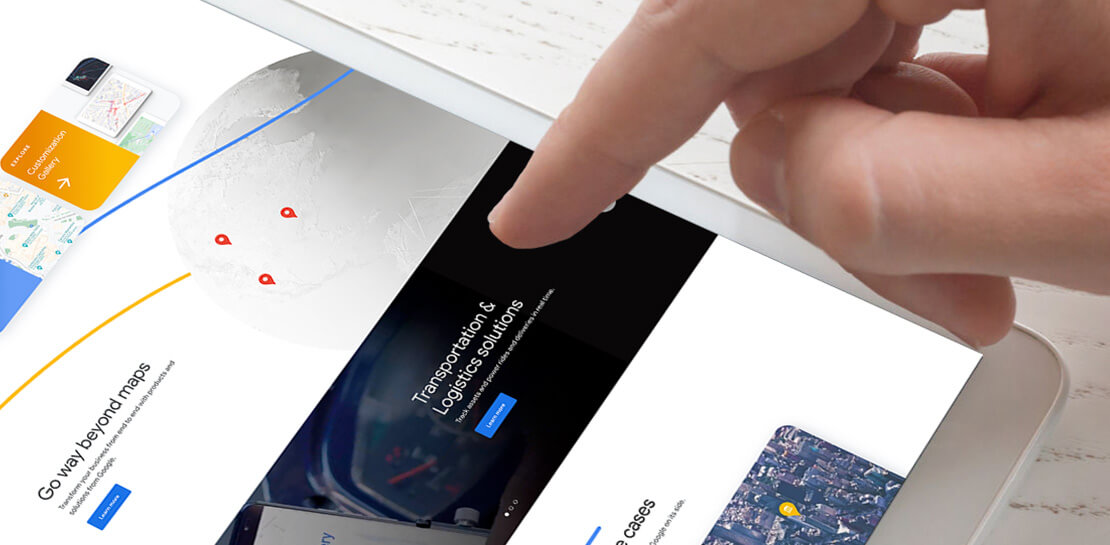
For more than 15 years, developers have used Google Maps Platform to deliver location-based experiences to their end users and used location intelligence to optimize their businesses. Along this journey, we’ve made a variety of changes to better support our community as needs have changed and new industries and technologies have emerged. We started rolling out a new website experience, at https://mapsplatform.google.com, to help you better understand the products and solutions best suited to address your objectives. Plus, now you can directly connect to the developer documentation for each product to get started quickly, and you can visualize usage and associated costs to have a better idea of what to expect before getting started.
Getting to your solution faster
Maps, Routes, Places are building blocks that let you develop implementations for any use case. Building for specific use cases, however, typically requires using a combination of APIs and SDKs. To help you quickly understand what’s possible and what you need to build for your use case, you can now visit the solutions tab to select from a list of popular use cases or industries. Once you’ve selected a use case or industry, you’re taken to a page where you can explore relevant products, read helpful blog posts, see how other customers have deployed for similar use cases, and more.

Direct access to developer documentation
Did you know there are more than a thousand pages of developer documentation created to help you get started, unblock you when you’re stuck, and share best practices? Now when you explore a product or solution from the Google Maps Platform website, you can easily navigate back and forth between our website and documentation. Just tap on JS, iOS, Android or API under the product name to get to the documentation you need.

Budgeting for your project
To help you calculate pricing for your project, we’ve introduced a new pricing calculator. Once you find the product and API or SDK you plan to use, pull the slider to reflect your estimated number of monthly requests. This will automatically update the “monthly cost” column for each product and API or SDK you plan to use. If your estimated monthly requests exceed the slider limit, contact our sales team to learn about volume discounts that start at 20% off.

We hope our new website makes it easier to discover our products and solutions, estimate your budget, and start building with our documentation so you can deliver helpful experiences to your users and optimize your business.
For more information on Google Maps Platform, visit https://mapsplatform.google.com.
How Barilla Created a Social Media Style App to Improve Efficiency

5644
Of your peers have already read this article.
3:30 Minutes
The most insightful time you'll spend today!
Google Cloud Results
- Replaced conflicting, time-consuming paper logs with a near real-time, transparent app
- Scaled rapidly and easily to accommodate new teams thanks to Google App Engine
- Enables photographic and video communication to replace confusing text
- New factory solution rolled out in just 15 days
In 1877, Pietro Barilla set up a small bakery to make pasta and baked goods for the people of Parma, Italy. Today, Barilla applies its 140 years of baking knowledge on a global scale, with six major manufacturing sites in Italy and an international network employing over 8,000 people. As the world’s leading producer of pasta, Barilla knows that when it comes to making quality food, great communication is key. That’s why the company plans to become a completely digital, looking to technology to improve the way it works.
Teams at the Barilla factory in Cremona work along a production line more than one-kilometer long, staffed by three shifts of workers a day. When one shift handed over to the next or requested machine maintenance teams, they used paper notebooks and unofficial instant messaging to communicate. That meant there was no authoritative, real-time record of events, communication was messy, oversight was poor, and teams had to hold daily morning meetings to synchronise notes.
Barilla worked with the Google Cloud Partner Injenia to create a solution, beginning with a consultative process on the factory floor.
“We had the idea to to start from the bottom and work up,” says Cristiano Boscato at Injenia. “Barilla’s top staff were brilliant about letting us do it. Eight of us from Injenia spent months on the factory lines with Barilla workers, collecting ideas on Google Docs, making presentations with Slides and collecting feedback with Forms. The CollaborAction app we created is the result of an amazing partnership.”
Co-designing a team social network
“Everything at the Cremona plant was managed offline, with paper,” explains Alessandra Ardrizzoia, Digital Engagement Senior Manager at Barilla. “Workers on the line would track events in notebooks, the shift leader would have another notebook, and the leader of the maintenance team would have yet another notebook. Everybody wrote their own text description of events, so there would be mismatches in the information going around.”
To resolve this, teams would meet at 8:30am every day to reconstruct a consistent narrative. In addition, machine maintenance workers were already using instant messaging to communicate with the line. Barilla and Injenia looked for a solution that could deliver a searchable, single version of events, with the ease of use of a mobile messaging application.
After consulting factory workers for ideas, Injenia created CollaborAction, a custom-built app that brought G Suite collaboration tools together on an Google App Engine platform, using Google Cloud SQL to index files. Google+, Google Drive and Hangouts were not only highly available and easy-to-use, they also “helped with fast adoption, with interfaces that workers could already relate to.” Meanwhile Google App Engine enabled the Injenia team to deliver updates and new versions at speed, as part of a feedback process with workers who offered suggestions through a link to Forms embedded in the app.
Google+ provides an intuitive social media dashboard that workers felt comfortable with. Now teams use company tablets placed at intervals along the line to log in, report issues to other teams, photograph problems, schedule maintenance, give status updates through Hangouts chat, and have visibility on the whole process as it takes place.
“Everyone in the Cremona plant was really happy with the new social collaboration process. Because they were involved in designing the solution, they felt involved and really engaged with the process,” says Alessandra. “And now that everyone is aligned with CollaborAction, all the work in the plant is more effective. They are more agile and can use their time in more added-value activities.”
Optimization and a national roll-out
Created in Cremona, now CollaborAction connects over 1,000 users in six of Barilla’s factories in Italy. “The pilot at Cremona took one month, and adoption has been easier and faster in every plant we’ve taken it to,” says Cristiano. “We have another five or six plants more, and it takes no more than 15 days to introduce. That’s incredible.”
Because CollaborAction is a mobile app built on Google App Engine, scaling to meet new demand has been simple. Now maintenance teams use the app on smartphones, line workers use it on tablets, and shift leaders use it on laptops, so the entire team is aligned in close to real-time on a single version of events. And now teams communicate with video and photographs as well as text, there’s less room for confusion, as Alessandra explains. “It’s no problem understanding what’s happening in a video or picture, compared to a message that just says ‘something is going wrong.’ On a production line, where one part leads into the next, that speed makes a difference, and means we don’t have to throw as much food away when something breaks down.”
“Now we’re collecting feedback from all of the plants using CollaborAction and using it to create a standardised solution that we can apply across all of our plants,” says Alessandra. “We’re side-by-side with the workers in that sense, trying to address their needs with new features. It’s a way to make the workers feel like part of the solution, and that the app represents their needs and their voice.”
Solving a universal problem
By the end of 2018, Barilla and Injenia aim to have deployed CollaborAction to 2,700 employees at 18 factories worldwide. Barilla has already collected more than 50,000 posts with the app, including around 20,000 photographs and videos, and is now considering ways to apply Cloud Machine Learning Engine to create a maintenance chatbot or direct IoT connection with machinery.
“CollaborAction hasn’t just made our maintenance processes faster and more efficient, its also exponentially increased the knowledge and understanding employees have about their work,” says Alessandra. “It’s improving team spirit, too, such as when employees use CollaborAction to arrange to play soccer. It’s become the main communication tool for the entire plant.”
More Relevant Stories for Your Company

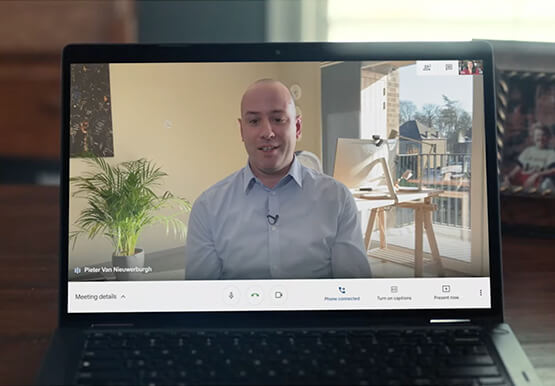


Teamwork from anywhere: G Suite’s vision for content collaboration
So the world has changed. We all know that the COVID-19 pandemic has fundamentally shifted where we work, when we work, and how we work. And during this time period, there has been a dramatic increase in the number of people working from home. It went from just 13% before

Beyond Traditional Learning: AI-based Online Learning Platform and Google Cloud Solutions Push Learners to Get Ahead
The combination of a vital need for IT experts among businesses and a digital skills gap is making lifelong learning increasingly critical. Beyond professional development, learning new skills offers additional rewards from building peer connections to boosting your creativity. That’s why in 2020 Krishna Deepak Nallamilli and I launched KIMO.ai to reimagine how people

15 Companies–from Korean Air to Salesforce–Share How G-Suite and Google Meet Help Them Battle COVID-19
More than a decade ago we introduced secure, easy-to-use business collaboration and productivity apps (now known as G Suite), and we envisioned a new way of working in the cloud. And although we always knew the value of cloud-based collaboration, it is more important than ever at a time like
How to Cut the Sales Cycle Short and Close a Deal Quickly
Did you know sales reps only spend about one-third of their time actually selling? Believe it. The remaining two-thirds are spent on two things: Creating presentations, pushing boxes around on a slide deck, and doing administrative work like setting up meetings with clients. That’s all the time you could have
