





Maximizing API Potential: A Look at 7 Prominent API Management Use Cases

2705
Of your peers have already read this article.
4:30 Minutes
The most insightful time you'll spend today!
Paper currency — which started gaining prominence in the 1600s — changed the face of global economics and ushered in a new era of international monetary regulation. The primary reason currency created such disruption was its ability to standardize the “medium of exchange”. APIs created a similar effect in the world of technology and digitalization by creating a standardized, reusable, and secure way to exchange information.
Modern web APIs took shape in the early 2000s and played a key role in “.com”mercializing every business. APIs started as a connective tissue primarily relegated to a technical context and quickly evolved into a gateway to new business models, revenue streams, and ecosystems. In 2017, McKinsey estimated a total of $1 Trillion in profit could be up for grabs in the API economy. And in 2022, GGV Capital created an index of API-first startups — a generation of stylistically divergent SaaS companies with leaner operating cost structures and organic usage growth. Just as currency is going through an evolution from banknotes to digital wallets, the world of API management is also on the brink of change.
With more than 15 years of experience managing APIs at Google-scale, we’ve got a unique vantage point from which to observe that change. In today’s post, we will spotlight seven API management use cases that we see growing in prominence — and how you can take advantage of these trends to future-proof your architecture.
1 “Shift left” in API security
As a gateway to a wealth of information, APIs have also quickly become the primary attack vector in security incidents. When we surveyed 500 technology leaders, we learned that more than 50% of organizations experienced an API security incident in the last 12 months. Adding to the increasing magnitude of attacks, there are an increasing number of vectors for potential API security incidents like misconfigurations, outdated APIs/data/components, and bots/spam/abuse.
These security issues aren’t just in production APIs, but at every stage in the API lifecycle. Notably, we found that 67% of the issues are discovered during testing as part of the release management process. This trend ushers in the need for forward-thinking organizations to “shift left with security” — moving controls earlier into the production workflow — by bringing security teams and API teams closer. To stay ahead of security threats, many organizations are actively looking for solutions that allow them to be proactive while minimizing the burden on their security teams. According to our research, integrating capabilities that proactively identify security threats (60%) is top of mind for most IT leaders for the next year.
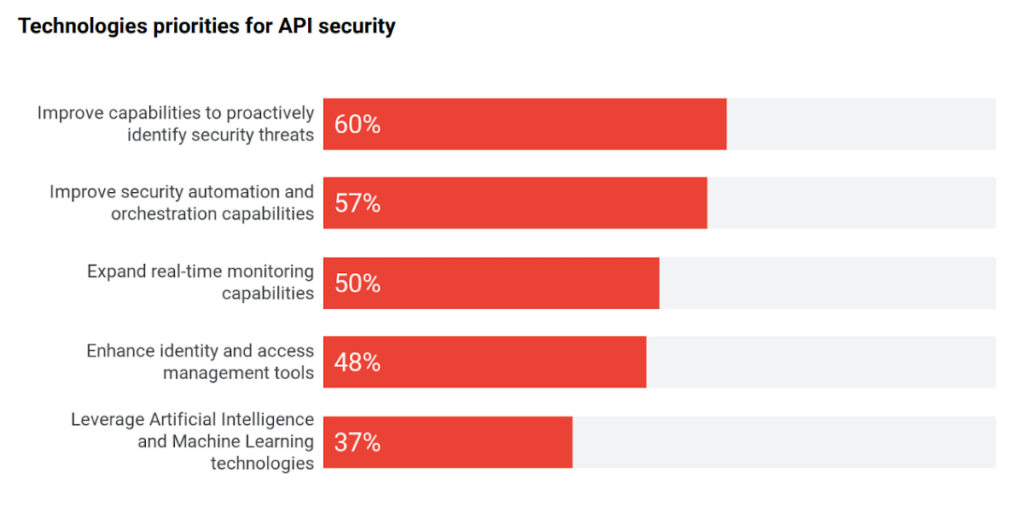
Source: 2022 API Security Research Report
2 “Knowledge graph” for your enterprise APIs
It comes as no surprise that every organization is relying on APIs to expand and even ground their digital ecosystem — a network of partners, developers, and customers facilitated by modern, cloud-first technologies. There is a growing magnitude and variety of middleware assets, contributing to the growth of IT complexity.
As the number of APIs continues to increase, there is a need to simplify consumption for internal and external developers. Even the most objectively useful APIs remain unseen by most of the organization. In turn this results in redundant code, reduced developer productivity, or worse — turned into a potential security attack vector. This complexity is shifting focus towards consolidation of all middleware assets, growing adoption, and improving education (see below) to improve developer efficiency and de-mystify the IT complexity.
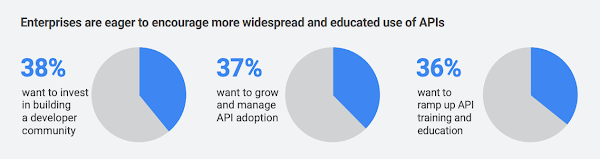
This sprawl is a growing problem in the world of APIs, but it has a lot in common with an age-old phenomenon in the world of web pages and content—search. Google was born out of this problem to help organize the world’s information. Similar to Google’s knowledge graph for web pages, there is a need to index, organize, and instantly present API information for developers that need it. Although it is an emerging practice, we see an increasing number of digital leaders and security teams in larger organizations with mature API programs invest in solutions that help consolidate all APIs, organize their information, and manage their lifecycle.
3 The imminent need for “omni” control planes
APIs have taken on such a vital role in the modern application stack that they have slowly become the neural links across the entire enterprise architecture — bridging legacy and modern applications, shifting architectures towards microservices, and enabling operations across heterogeneous environments. To support all these technological decisions without sacrificing speed, organizations adopted multiple API gateways and fragmented API management solutions. However, this led to a lack of universal visibility, consistent governance, comprehensive security, and meaningful analytics across ALL the enterprise APIs (not just the ones within the confines of a given API management solution). And it increases the maintenance costs — fundamentally undercutting the value of APIs. With this evolution there is a growing need for an omni control plane — analogous to the brain in a human body — across all enterprise APIs.
4 API governance rising through the priority ranks
Despite the clear need for governance, there is still no unified understanding on a good (or right) approach to API governance. With the rapid adoption of APIs without appropriate standardization or quality standards, API governance is top of mind for IT leaders, again.
According to our research, 45% of IT leaders identified API governance as a critical component of their API program. The top three components of API security, performance analytics, and governance demonstrate the critical need for visibility, quality, and security across all APIs.
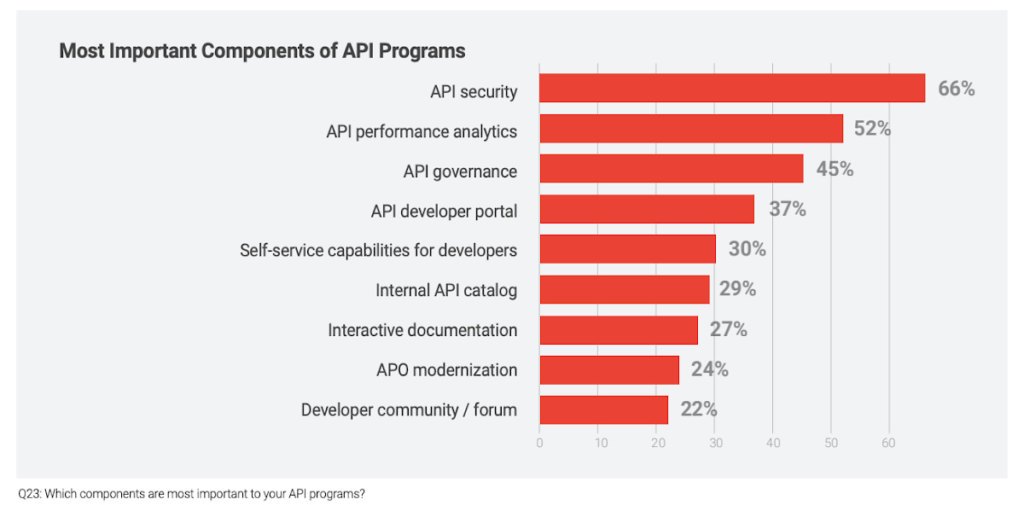
As digital consumers, we have seen this phenomenon across many industries and digital products. For example AirBnB disrupted the short-term rental market by providing standardized listings, detailed information, and high-resolution photos. In fact, the same governance phenomenon is ubiquitous in the world of e-commerce where there is a clear correlation between a high-quality website or product listing and increasing sales.
The same analogy holds true in the world of APIs, as ~90% of developers use APIs in their work there is a direct correlation between the use of APIs and developer productivity. Digital officers and CIOs need to add appropriate governance controls to standardize API design and improve reuse without adding friction to development timelines.
5 Evolution of design patterns with multiple API gateways
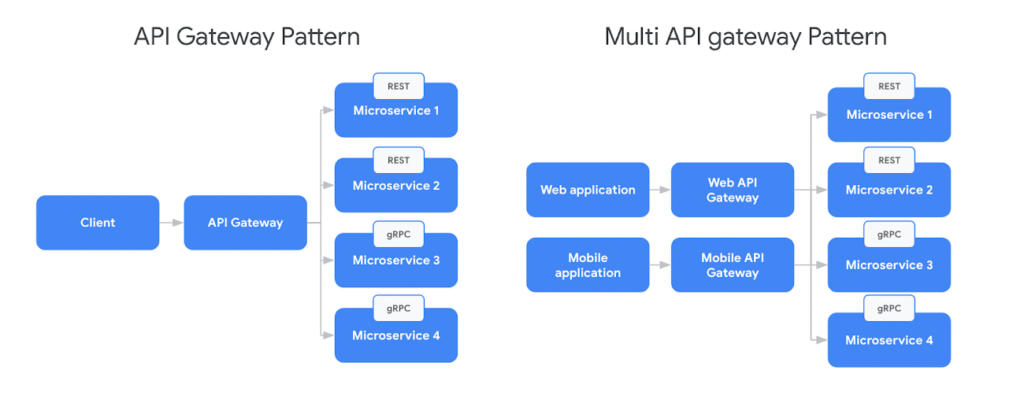
Adoption of new API architectural styles and microservices increased the complexity of the modern application stack. Our research found that 54% of organizations use a service mesh and API management in conjunction today to support the API gateway design pattern. In parallel, there is broad adoption of new protocols like GraphQL or AsyncAPI, outpacing the innovation in API gateways. For example, in a recent survey from DZone found that GraphQL accounted for 22.7% of application integrations.
In response to this challenge IT teams are adopting multiple API gateways — by design — which is creating the need for complex communication patterns for future scalability. But the existing design patterns were mostly sufficient when client applications used homogeneous API protocols (Ex: REST). Although patterns like Backend For FrontEnd (BFF) intended to provide specific API interactions that are relevant on a per-client basis, they still did not account for complexities from multiple gateways and protocols. In response to the adoption of new protocols, there is a need to evolve the existing BFF pattern to account for multiple API gateways and protocols.
6 Driving green value chains with digital twins
A digital twin is an effectively indistinguishable virtual representation of a physical object, system, or a process. For example the digital twin of a wind turbine (the object being studied) might be used to capture data like performance, rpm (revolutions per minute), or output captured by various sensors outfitted on the turbine. Digital twin adoption is growing and McKinsey estimates investments in digital twins will reach $58 billion by 2026 with a 58% CAGR. Every digital twin uses APIs to monitor, engage, and possibly control the physical asset. For example, Google created the Digital Buildings project — an open source, Apache-licensed effort to manage applications and analyses between a large heterogeneous portfolio of buildings.
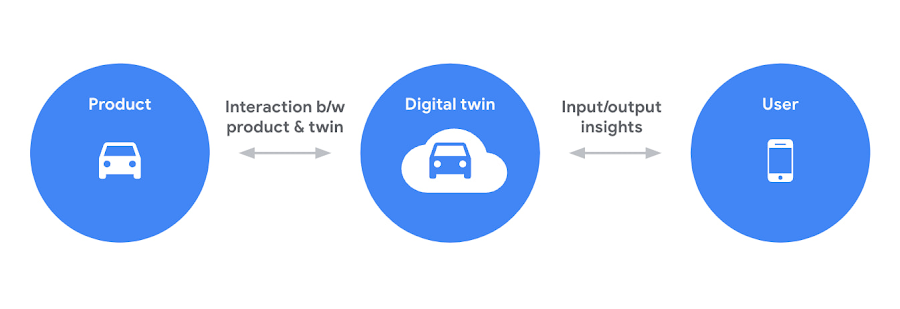
Sustainability is one of the driving forces behind the increased use of digital twins. As the need to reach net zero emissions accelerates, many organizations are tying performance (and in some cases even executive pay) to environmental, social, and governance goals. APIs help connect the dots between digital twins and sustainability. For example, an organization operating a manufacturing process could build a digital twin with APIs to collect behavioral data from sensors, monitoring systems, or other sources — which can eventually be integrated into the organization’s digital platform or applications. These digital twins could be used to analyze and optimize the use of materials and energy, to minimize waste and emissions. Additionally, digital twins could be used to monitor and analyze the performance of systems over time, to identify opportunities for continuous improvement.
Overall, APIs play a valuable role in supporting sustainability efforts by enabling digital twins, effectively driving more efficient operation of systems, and providing insights to improve environmental impact. For further examples, check out this video about driving a green value chain with APIs.
7 Commercializing access to data products
The growing use of data-rich services (like IoT, ML models, remote access services, and web scraping, etc.) coupled with massive ingestion of data everyday is creating massive growth in data delivery paradigms like data lakehouses, data marketplaces, and data streaming systems (global data marketplaces alone are poised to reach $3.5 billion by 2028). Unfortunately, most of these systems are fragmented with almost no relationship or interoperability.
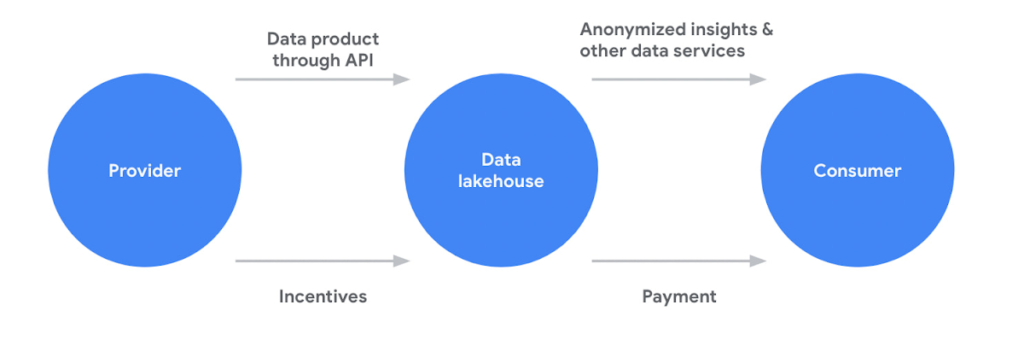
APIs are filling this critical gap for organizations in two critical ways. First, APIs are providing standard and easy access to systems like data lakehouses or analytics hubs. Second, APIs are a key enabler of data products (digital products or services built using data as a core value proposition), a core component of any data sharing system. APIs provide a standardized way for different applications to interact with the data product. For example, an API could be used to allow a mobile app to access data from a weather forecast or a recommendation engine data product. Beyond data products, APIs also provide easy and standardized access various data management platform
APIs continue to play a critical role in every application, experience, and ecosystem. Robust API strategies help organizations adapt to any architecture, business model, or environment in the face of changing technology landscape. Learn more about how Apigee is driving innovation and helping companies future proof their architectures to stay ahead of the top API trends.
WebGL-powered Features to Build Next-generation Mapping Experience

3457
Of your peers have already read this article.
3:00 Minutes
The most insightful time you'll spend today!
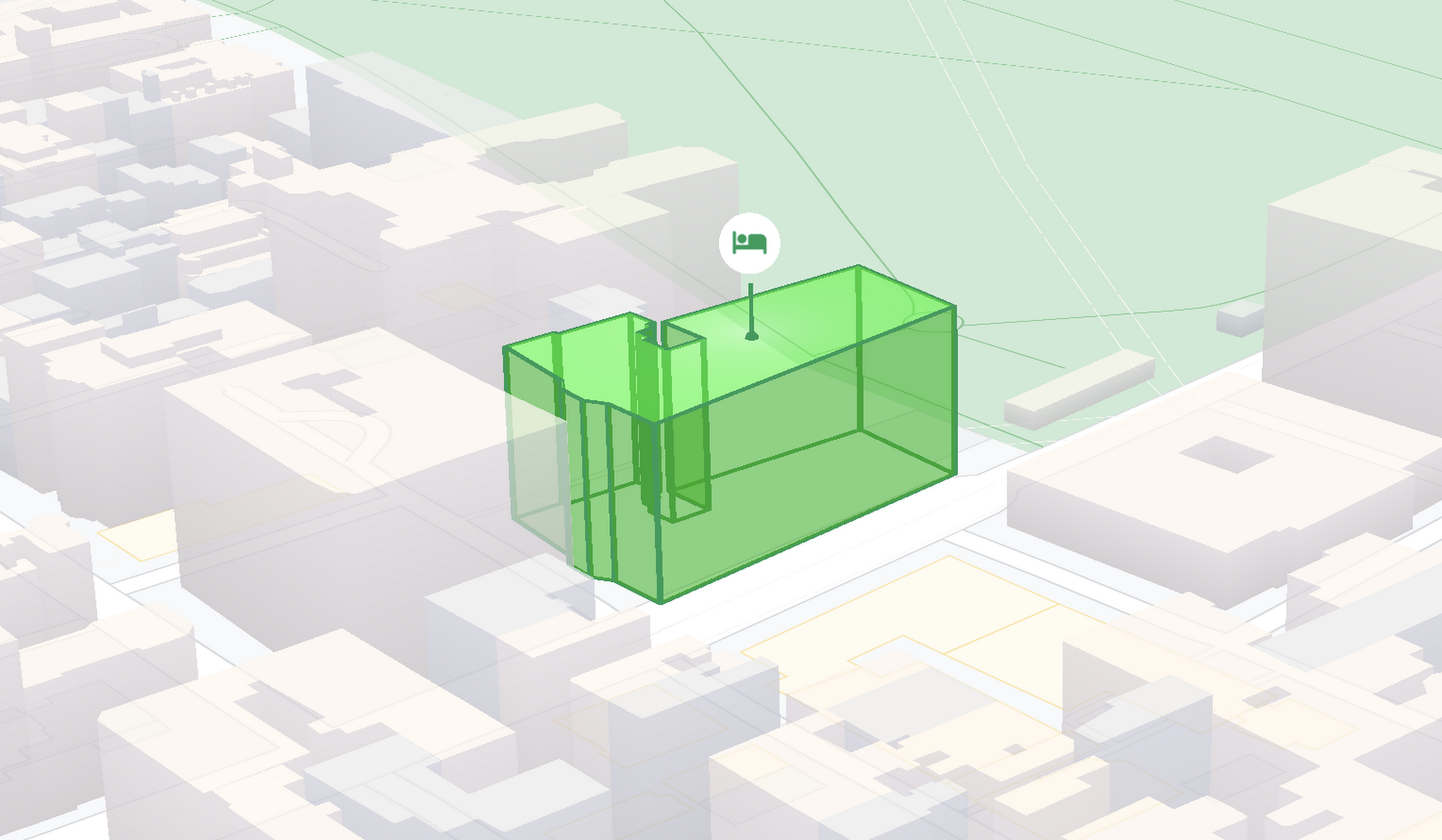
At Google I/O 2021, we announced the beta release of Tilt and Rotation, and Webgl Overlay View, which give you a fundamentally new way to build mapping experiences. You may be familiar with the existing Overlay View feature of the Maps JavaScript API that lets you render in a transparent layer that sits on top of the map. For years, developers have been using Overlay View to draw in two dimensions over the top of the map, but for as much as you can do with Overlay View, it only allows you to render on a transparent layer that effectively floats above the map.
In contrast, WebGL Overlay View gives you direct hooks into the lifecycle of the exact same WebGL rendering context we use to render the vector basemap. This means that for the first time ever, you can performantly render two and three dimensional objects directly on the map, enabling you to build experiences that were previously impossible with the Maps JavaScript API.https://www.youtube.com/embed/9eycQLef6iU?enablejsapi=1&
Today, we’re going to give you a quick overview of the new WebGL-powered features of the Maps JavaScript API, so that you have all the knowledge you need to get started creating next generation mapping experiences.
What is WebGL?
WebGL is a low-level browser API, originally authored by the Mozilla Foundation, that gives you access to the rendering and processing power of the graphics processing unit (GPU) on client devices, such as mobile phones and computers, in your web apps. On its own, the browser is not able to handle the heavy computation needed to render objects in 3D space, but using WebGL it is able to pass those processes off to be handled by the GPU, which is purpose built to handle such computations.
To learn more about WebGL, check out the documentation from the Khronos Group, the designers and maintainers of WebGL.
Requirements
To use WebGL Overlay View, you’ll need a Map ID with the vector map enabled. It’s also strongly recommended that you enable Tilt and Rotation when you create your Map ID, otherwise your map will be constrained to the default top-down view – in short, you won’t be able to move your map in three-dimensions.
To learn more about using Map IDs and the vector map, see the documentation.
Setting Tilt and Rotation
To load your map with a set tilt and rotation, you can provide a value for the `tilt` and `heading` properties when you create the map:
const mapOptions = {mapId: "15431d2b469f209e",tilt: 0,heading: 0,zoom: 17,center: {lat: -33.86957547870852,lng: 151.20832318199652}}const mapDiv = document.getElementById("map");const map = new google.maps.Map(mapDiv, mapOptions);
Tilt is specified as a number or float in degrees between 0 and 67.5, with 0 degrees being the default straight down view and 67.5 being the maximum tilt. The available maximum tilt also varies by zoom level.
The rotation is set in the heading property as a number or float between 0 and 360 degrees, where 0 is true north.
You can also change the tilt and rotation programmatically at runtime whenever you want by calling `setTilt` and `setHeading` directly on the map object. This is useful if you want to change the orientation of the map in response to events like user interactions.
map.setTilt(45);map.setHeading(180);
In addition, your users can manually control the tilt and rotation of the map by holding the <shift> key and dragging with the mouse or using the arrow keys.
For more information on Tilt and Rotation, see the documentation.
Adding WebGL Overlay View to the Map
WebGL Overlay View is made available in the Maps JavaScript API by creating an instance of `google.maps.WebglOverlayView`. Once an instance of the overlay is created, you simply need to call `setMap` on the instance to apply it to the map.
const webglOverlayView = new google.maps.WebglOverlayView;webglOverlayView.setMap(map);
To give you access to the WebGL rendering context of the map and handle any objects you want to render there, WebGL Overlay View exposes a set of five hooks into the lifecycle of the WebGL rendering context of the vector basemap.
Here’s a quick rundown:
- `onAdd` is where most of your pre-processing should be done, like fetching and creating intermediate data structures to eventually pass to the overlay. The reason to do all of that here is to ensure you don’t bog down the rendering of the map.
- `onRemove` is where you’ll want to destroy all intermediate objects, though it would be nice if you did it sooner.
- `onContextRestored` is called before the map is rendered and is where you should initialize, bind, reinitialize or rebind any WebGL state, such as shaders, GL buffer objects, etc.
- `onDraw` is where we actually render the map, as well as anything that you specify in this hook. You should try to execute the minimal set of draw calls to render your scene. If you try to do too much here you’ll bog down both the rendering of the basemap and anything you’re trying to do with WebGL, and trust me, no one wants that.
- `onContextLost` is where you’ll want to clean up any state associated with pre-existing GL state, since at this point the WebGL context will have been destroyed, so it’ll be garbage.
To implement these hooks, set them to a function, which the Maps JavaScript API will execute at the appropriate time in the WebGL rendering context lifecycle. For example:
webglOverlayView.onDraw = (gl,coordinateTransformer) => { //do somerendering }
For more information on using WebGL Overlay View and its lifecycle hooks, check out the documentation.
Creating Camera Animations
As part of the beta release of WebGL Overlay View, we’re also introducing `moveCamera`, a new integrated camera control that you can use to set the position, tilt, rotation, and zoom of the camera position simultaneously. Like `setTilt` and `setHeading`, `moveCamera` is called directly on the `Map` object.
By making successive calls to `moveCamera` in an animation loop you can also create smooth animations between camera positions. For example, here we are using the browser’s `requestAnimationFrame` API to change the tilt and rotation each frame:
const cameraOptions = {tilt: 0,heading: 0}function animateCamera () {cameraOptions.tilt += 1;cameraOptions.heading += 1;map.moveCamera(cameraOptions);}requestAnimationFrame(animateCamera);
Plus, all of these adjustments, including zoom, support floats, which means not only can you control the camera like never before, you can also do it with a high degree of precision.
For more information on `moveCamera`, see the documentation.
Give it a tryYou can try the new WebGL-powered features of the Maps JavaScript API right now by loading the API from the beta channel. We’ve got a new codelab, and documentation with all the details, as well as sample code and end-to-end example apps to help you get started. Also, be sure to check out our feature tour and travel demos to learn more and play with a real implementation of these features.
And let us know what you think by reporting through our issue tracker. We need your bug reports, your feature requests, and your feedback to help us test and improve the new WebGL-based map features.
Have fun building with the map in 3D—we can’t wait to see the amazing things you’ll build.
For more information on Google Maps Platform, visit our website.

3915
Of your peers have already downloaded this article
5:30 Minutes
The most insightful time you'll spend today!
The 2019 Accelerate State of DevOps Report confirms analyst reports that DevOps is crossing the chasm with the proportion of elite performers almost tripling compared to last year.
The report finds that delivering software quickly, reliably, and safely is at the heart of technology transformation and organizational performance. The report also finds that there’s a right way to handle the change approval process, and it leads to improvements in speed and stability and reductions in burnout.
Download this report and get:
- Insights on how to achieve elite performance in software development and delivery so you can deliver more value to your customers and stakeholders.
- Role of cloud computing in driving technology and organizational performance, with guidance on how to improve your use of the cloud.
- Smart ways to improve productivity and how the highest performers scale DevOps to maximize success.
Rollouts Made Simple: Cloud Deploy’s Deploy Hooks

918
Of your peers have already read this article.
2:30 Minutes
The most insightful time you'll spend today!
Cloud Deploy is a fully managed continuous delivery platform that automates the delivery of your application. Recently, we’ve heard from users that they want Cloud Deploy to also perform self-defined pre- and post-deployment operations to reduce the amount of additional toil required for each rollout. Examples of such operations include database schema updates, application infrastructure deployment, and network configuration adjustment.
Today, we are pleased to announce the public preview availability of Cloud Deploy deploy hooks. With this launch, Cloud Deploy now offers an easy way to define and execute pre- and post-deployment operations as part of a rollout.
Deploy hooks
The ability to run user defined actions immediately before and after deployment is a powerful feature that allows DevOps organizations to build out complete CI/CD pipelines to meet their specific deployment needs.
With the introduction of deploy hooks in Cloud Deploy, you can now take advantage of this capability by configuring your delivery pipeline to include pre-deploy and post-deploy actions. These actions take advantage of the custom actions defined through Skaffold. When enabled, two new jobs — predeploy and postdeploy — will be performed when deploying a rollout into a target.
Deploy hooks are supported for all target types (GKE, Cloud Run, Anthos, and Multi-Target) and can be used with all deployment strategies, such as canary deployments.
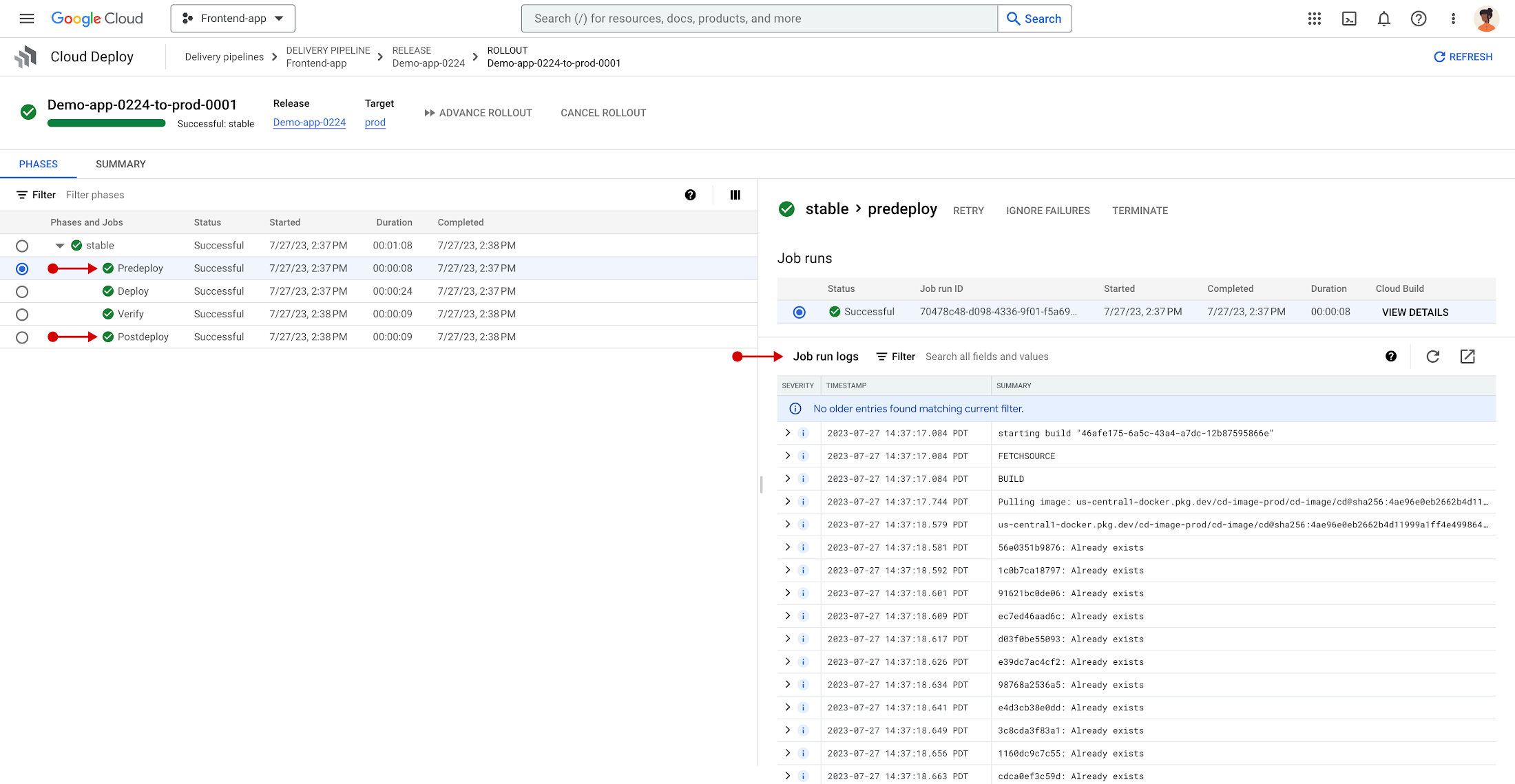
As enabled, deploy hooks can be used in a variety of ways, such as:
- Performing a database migration prior to deployment
- Performing infrastructure deployment prior to application deployment
- Interacting with third-party platforms post deployment, such as sending out an email or updating an open task tracker
Like other rollout jobs, Cloud Deploy provides the same observability and control for predeploy and postdeploy jobs. This includes the ability to view logs and perform control over individual jobs, such as retry, terminate, or ignore — all within the same rollout details interface.
Interested in exploring deploy hooks for yourself? Get started now with our quickstart and documentation!
The future
Comprehensive, easy-to-use, and cost-effective DevOps tools are key to building an efficient software delivery capability, and it’s our hope that Cloud Deploy will help you implement complete CI/CD pipelines. Stay tuned as we introduce exciting new capabilities and features to Cloud Deploy in the months to come.
In the meantime, check out the product page, documentation, quickstarts, and tutorials. Finally, If you have feedback on Cloud Deploy, you can join the conversation. We look forward to hearing from you!
Bigbasket: Delivering Groceries Across 25 Cities in India

7312
Of your peers have already read this article.
1:30 Minutes
The most insightful time you'll spend today!
When Bigbasket was founded in December 2011, it guaranteed to deliver goods within a one-hour delivery slot of its customers’ choosing or it would refund them 10 percent of their orders. The company also introduced an express service, delivering groceries within 90 minutes of an order being placed.
Bigbasket needed a mapping platform that could help it meet its delivery times, and offer a familiar interface to customers. MediaAgility, a digital consulting company, recommended Google Maps Platform to Bigbasket.
When customers use the Bigbasket mobile app to place orders, they select their locations on a Google Map. The prices and availability of groceries varies according to location, so a customer’s location determines the cost of the order and what can be ordered.
Google Maps Platform Results
- Bigbasket handles more than one million orders per month, and delivers in more than two dozen cities in India
- Bigbasket now has more than four million customers
- Orders are delivered on time, increasing customer loyalty
It is also used to determine driver routes. Bigbasket used the Maps Javascript API to build a web-based app for the company’s backend that tracks all orders and delivery progress. Dispatchers use the Directions API to match drivers with orders and customers, and the Distance Matrix API to get estimate the time of arrival for deliveries. As dispatchers track the progress of deliveries on the map, they can tweak routes as necessary.
“We’ve built Bigbasket from the ground up using Google Maps Platform. It makes sure we have the right customer locations and deliver to them on time. We couldn’t have started Bigbasket without Google Maps. It helps us to be fast and efficient, and make sure our customers get what they’ve ordered quickly,” said Pramod Jajoo, Chief Technology Officer, Bigbasket
Swiggy: Delivering Local Food Within 40 Minutes

8810
Of your peers have already read this article.
1:30 Minutes
The most insightful time you'll spend today!
Founded in 2014, Swiggy started small, delivering food to a few neighborhoods in Bengaluru, India. As the company grew, the team wanted a mapping technology that could help expand the service throughout India.
Swiggy needed a scalable mapping platform that covered a wide geographic area and offered tools to help the company to build an efficient mobile app and website for customers and delivery staff.
Customers find restaurants and order from them using the Android app, iOS app, or the website. Swiggy worked with Google Maps Partner Media Agility and used a variety of Google Maps Platform APIs to develop web and mobile apps that incorporate relevant local restaurant details.
Google Maps Platform Results
- Built a hyper-local delivery service that is growing throughout India at a rate of 25 percent per month
- Deliveries are made quickly, resulting in higher customer satisfaction and retention—users have been so satisfied that nearly 80 percent of its orders are from repeat customers
- Drivers seamlessly handle tens of thousands of orders per day
In order to guarantee fast food delivery, Swiggy returns only restaurants within four to five kilometers of the customer’s location. The Directions API is used by drivers to easily route to restaurants and customers. The customer can track the progress of the delivery and estimated arrival time using a mobile app or the website.
“Google Maps provides the most accurate and reliable data, which is crucial for us because maps and location are central to our business. We also knew Google’s intuitive interface would provide a great customer experience with little to no learning curve… Google Maps’ ability to provide customer location and the distances of nearby restaurants is the backbone of our success, because it ensures a reliable, consistent customer experience,” said Aman Jain, Senior Product Manager, Swiggy.
More Relevant Stories for Your Company

Conquering Hybrid API Management: Building The Perfect Team and Platform
Introduction In our discussions with technology leaders from around the world for – The Digital Crunch Time: 2022 State of APIs and Applications – two themes emerged #1 Cloud — and hybrid cloud specifically — is becoming a driving factor of success with 59% of respondents saying they were looking to increase



Simplified Document Processing with AppSheet Automation
Move over legacy, time-consuming systems and processes to update data from documents and invoices into disparate data systems. AppSheet integrates no-code development with Google Cloud's state-of-the-art Document AI to automate the data extraction and validation from invoices, documents, receipts, etc. You can end all 'guesstimates' and rely on the accuracy

AI Features in Apigee X Helps Build and Manage APIs at Scale
APIs are the backbone of digital transformation. Via APIs, you can securely share data and functionality with developers both inside and outside of your organizational boundaries, letting you build applications faster, seamlessly connect and interact with partners, and drive new business revenue. Because APIs encompass business-critical information, any downtime or

Vodafone Turns to Google Maps Platform to Expand and Improve its Network
Vodafone India had a manual, labor-intensive process for determining network capabilities and reach. The company sent field operatives to every customer location to conduct a feasibility study. These feasibility studies help Vodafone determine whether they can provide connectivity and services to customers based on the infrastructure at that location. Everyone
