





Vodafone Turns to Google Maps Platform to Expand and Improve its Network

6378
Of your peers have already read this article.
1:30 Minutes
The most insightful time you'll spend today!
Vodafone India had a manual, labor-intensive process for determining network capabilities and reach. The company sent field operatives to every customer location to conduct a feasibility study. These feasibility studies help Vodafone determine whether they can provide connectivity and services to customers based on the infrastructure at that location.
Everyone from the IT team and end users to the field operatives doing the work recognized the need to adopt a new solution to automate the measurements. They needed a technology that was easy to use and maintain.
“Vodafone used to manually perform physical surveys for each feasibility, which is a time-consuming and labor-intensive process. Often, feasibility studies were delayed, and we missed out on opportunities to serve additional customers. With SmartFeasibility, we’ve increased our capacity 15 fold, which positively impacts our bottom line and allows us to provide better and smarter customer service.”
—Rajneesh Asthana, IT Planning and Delivery, Vodafone India
Partnering with Lepton Software (a leading global provider of location-based analytics solution) Vodafone introduced SmartFeasibility—a solution that changed the feasibility testing from a manual to an automated process. This involved a full Google geo platform solution – leveraging world class technology like maps, roads and directions.
Google Maps Platform Results
- Employees are able to access information faster with SmartFeasibility—they have data at their fingertips, rather than waiting for an employee to collect it
- Field operatives have increased their conversion rates by providing more accurate readings on feasibilities and closing more customer business
- Addresses are now easy to find with a click of a button. The Vodafone India team can search feasibilities that have been loaded into the database, so if there’s an issue or if they need to reference a past action, they have that information at their fingertips
- 2 day turnaround versus 5 before the solution was implemented
- 400+ new customers added per day
With the new solution, Vodafone India no longer needs field operatives to manually calculate these measurements. With Google Maps, users can search customers’ addresses, calculate the distance between Vodafone’s location and the customer’s location and research building data such as height.
The old system of having field operatives collect data was unreliable. With Google Maps Platform, the Vodafone India team knows that the measurements are accurate and reliable.

Google Cloud named a Leader in API Management Solutions in The Forrester Wave
DOWNLOAD RESEARCH REPORTS3537
Of your peers have already downloaded this article
10:00 Minutes
The most insightful time you'll spend today!
The right API strategy is a key element of your digital business success, so choosing the best API management solution is critical – but often challenging. Organizations like yours need to address a wide range of criteria to support an effective digital business strategy, and that requires a robust API management solution that not only meets your immediate needs, but also supports your future digital initiatives.
The Forrester Wave: API Management Solutions, Q3 2020, provides an analysis of the most significant vendors that make up the API management market and explains why Google Cloud’s Apigee API management platform is a Leader. In addition to being named a Leader, Google Cloud received the highest score possible in criteria such as market presence, product vision, and planned enhancements.
Why You Should Consider API-first Integration

3155
Of your peers have already read this article.
1:30 Minutes
The most insightful time you'll spend today!
Enterprises need to move faster than ever to gain a competitive advantage in today’s customer-focused environment. Time-to-market for products and services has shortened dramatically, from years to days. IT teams must move fast, react fast, and enable business strategies via constant innovation.
All of this digital transformation is about more than adopting the latest technologies. It is also about maximizing the use of existing data and services to improve efficiency and productivity, drive engagement and growth, and ultimately make the lives of customers, partners, and staff better. Connecting existing data and services and making them easily accessible via APIs promises a path forward, empowering enterprises to extend the value they already possess with new technologies, managed services, ecosystems, and support.
In addition to the challenges of legacy data and systems, today’s organizations are overwhelmed by the variety of cloud applications to meet their business needs and deliver innovative services to their customers.
Managing all of this data, connecting sources, integrating applications, and surfacing them as easy-to-use APIs for development is a crucial competency for any IT organization.
Design APIs with an Outside-in Approach
Many IT organizations have focused on solving this challenge with an “inside-out” approach: starting with the integration layer, building the flow, and then developing the APIs. But this approach is inefficient and fundamentally flawed because it looks at the problem from an “exposure” model; rather than designing for the business use cases of developers and other API consumers. Leaders in the organization end up seeing all of this data, connectivity, and integration as the “table stakes plumbing”, and thus do not seek inputs regarding business value from key business stakeholders.
The key issue is not exposure but rather how you leverage your data, services, and systems to drive impact across your digital value chain. Goals such as meeting your adoption or sales targets, reducing costs across lines of business, speeding up time to market, and reducing time spent supporting your customers may all be within reach. Easy-to-use APIs, rather than crudely exposed systems, are foundational enablers of this impact, and they are almost always designed from the outside-in, from the perspective of teams that are consuming the APIs to achieve a business goal.
Embrace API-first Integration
To accelerate the speed of development, enterprise IT teams need to take an API-first approach to integration, starting with the consumers’ use cases rather than the structure of the data in their systems.
The notion of outside-in thinking should be familiar to product managers, who routinely have to demonstrate customer empathy and put themselves in their customers’ shoes. If your team has a product owner, be sure they are empowered to decide what functionality is needed from their data.
Maximize your APIs with the right technology enablers
An API-first strategy treats the API not as middleware but as a software product that empowers developers, enables partnerships, and accelerates innovation—a big shift from integration-first operations in which APIs are typically exposed and then forgotten.
Possessing APIs is only part of the equation. If a company is going to share valuable digital assets with outsiders, it needs API management tools to:
- apply security protections, such as authentication and authorization
- protect assets from malicious attacks
- monitor digital services to ensure availability and high performance
- measure and track usage of the assets
With the right tools in place, APIs can unlock incredible business opportunities—which is a reason for every enterprise to aspire to be API-first!
Visit our website to learn more about API management with Google Cloud.
Maximizing Reliability, Minimizing Costs: Right-Sizing Kubernetes Workloads

932
Of your peers have already read this article.
3:30 Minutes
The most insightful time you'll spend today!
Do you know how much money you could save by adjusting workload requests to better represent their actual usage? If you’re not rightsizing your workloads, you might be overpaying for resources that your workloads aren’t even using or worse, putting your workloads at risk for reliability issues due to under provisioning.
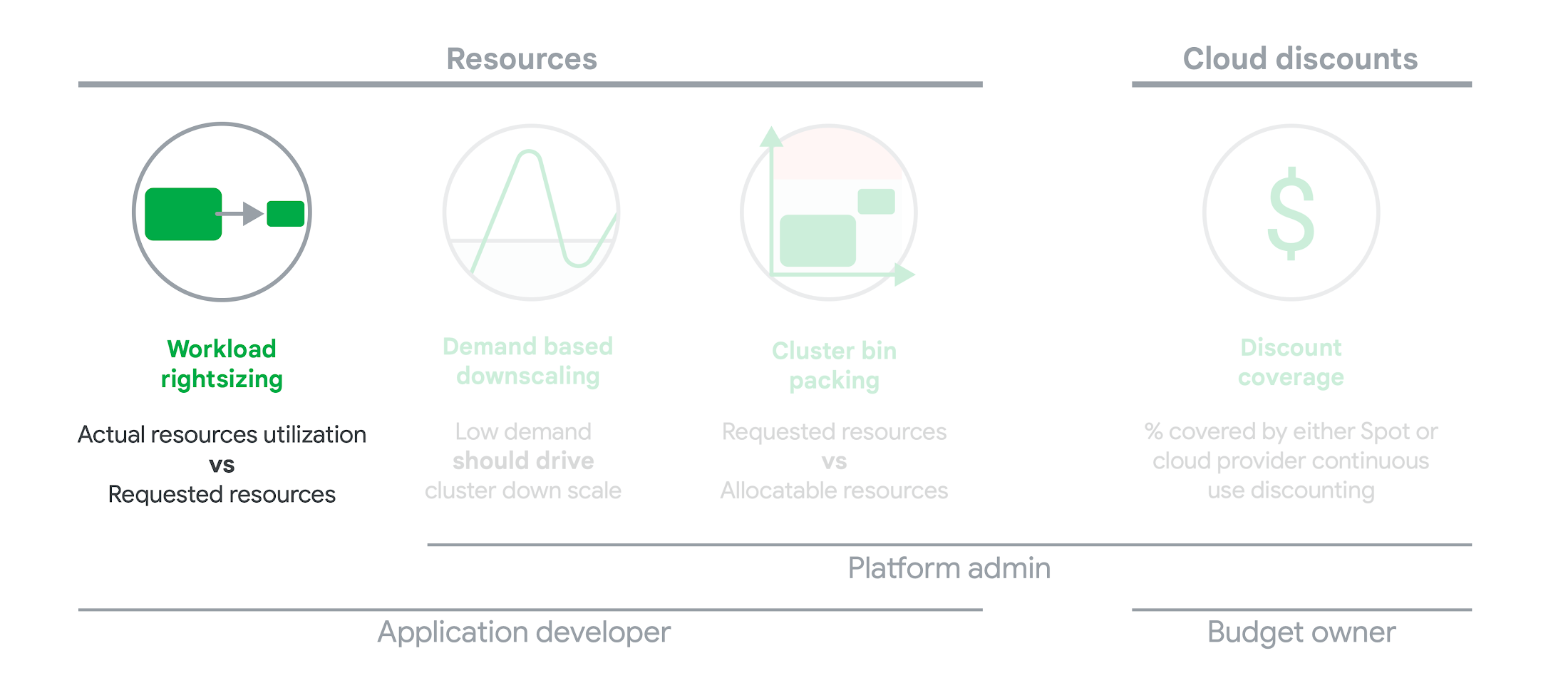
As we’ve previously discussed, setting the resources is the most important thing you can do to increase the reliability of your Kubernetes workloads. In this blog we will help you with the second key finding from the State of Kubernetes Cost Optimization report!
The research … found that workload rightsizing has the biggest opportunity to reduce resource waste.
State of Kubernetes Cost Optimization report
According to our research findings, workload rightsizing is the most important golden signal. Workload rightsizing measures the capacity of developers to properly use the CPU and memory they have requested for their applications.
Rightsizing is challenging
It can be quite difficult to predict the resource needs of your applications, which historically has not been a concern for developers in traditional data center environments.In traditional data center environments, resources were typically over-provisioned upfront to ensure capacity for peak demand and future growth, so developers didn’t need to focus on accurately predicting resource needs as they were covered by the excess capacity, whereas in cloud environments, resources are consumed on-demand. Finding a balance between efficiency and reliability can often feel like a delicate balancing act.
Tools for workload rightsizing
There are native tools in Cloud Monitoring and the GKE UI you can use to rightsize your workloads running on GKE.
Rightsizing in the console
The Workload Cost Optimization tab helps you identify workloads that can be optimized by displaying the resources used versus what’s requested.
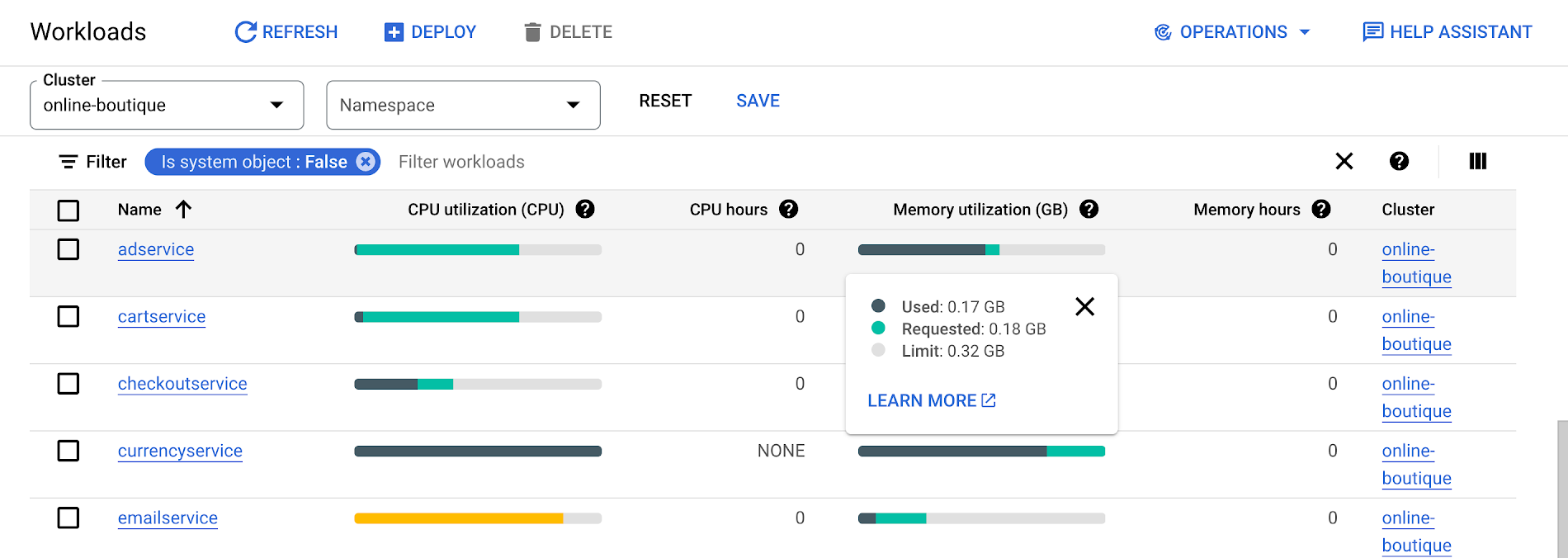
To take advantage of potential cost savings, you can drill into clusters to see workload level resource recommendations.
To view workload resource recommendations for Deployment objects only:
- In the GKE Cost Optimization.
- Select a cluster.
- Click Workloads > Cost Optimization.
- Select one Deployment workloads
- In the workload’s detail page, select Actions > Scale > Edit Resource Requests
Rightsizing with Cloud Monitoring
Cloud Monitoring provides built-in VPA scale recommendations metrics that you can use to monitor the performance of your workloads and to identify opportunities to rightsize them without the need to create VPA objects.
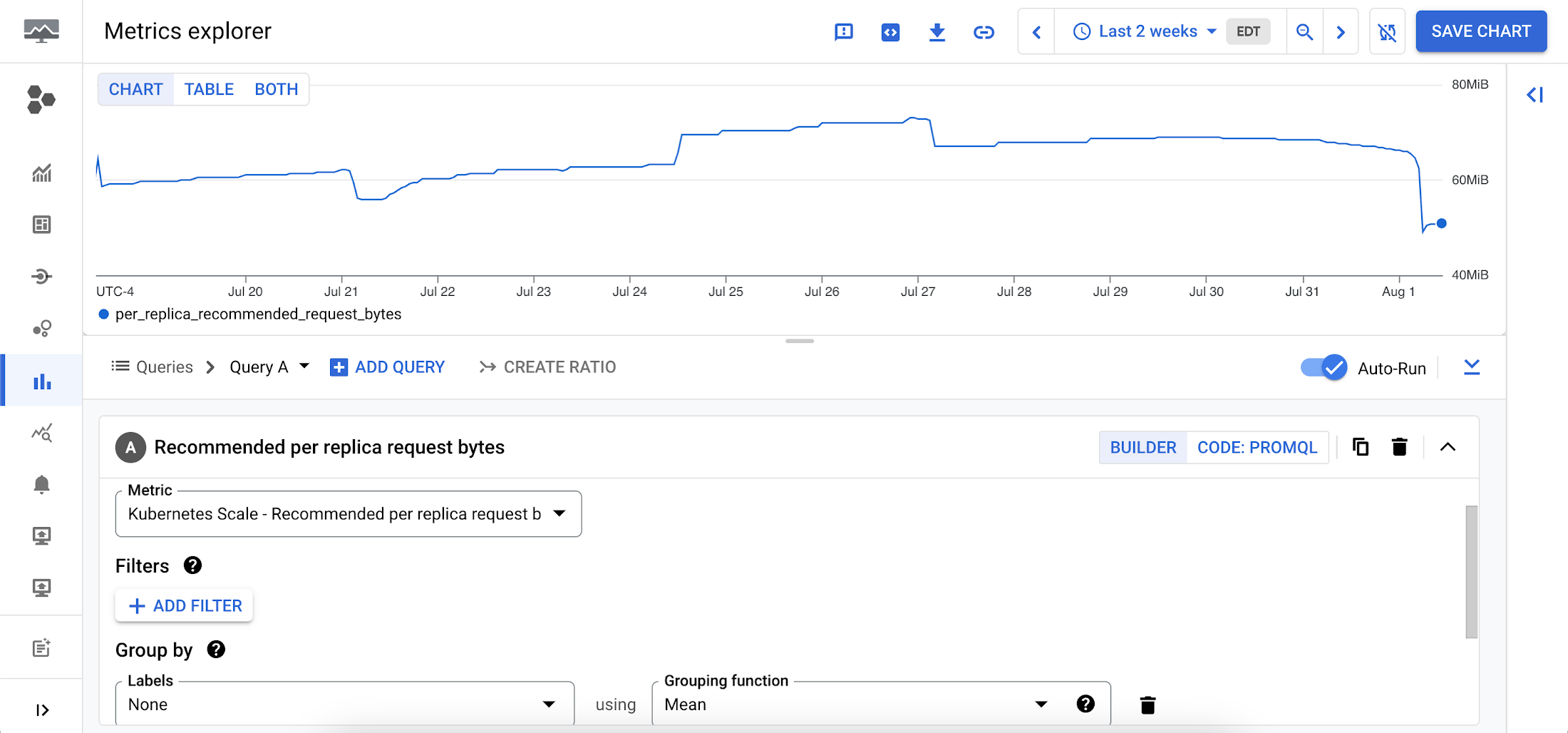
To view these metrics:
1. Go to the Cloud Monitoring > Metric Explore console.
2. In the Metric dropdown, select the metrics:
- Memory recommendations:
Kubernetes Scale > autoscaler > Recommended per replica request bytes - CPU recommendations:
Kubernetes Scale > autoscaler > Recommended per replica request cores
Rightsizing at scale
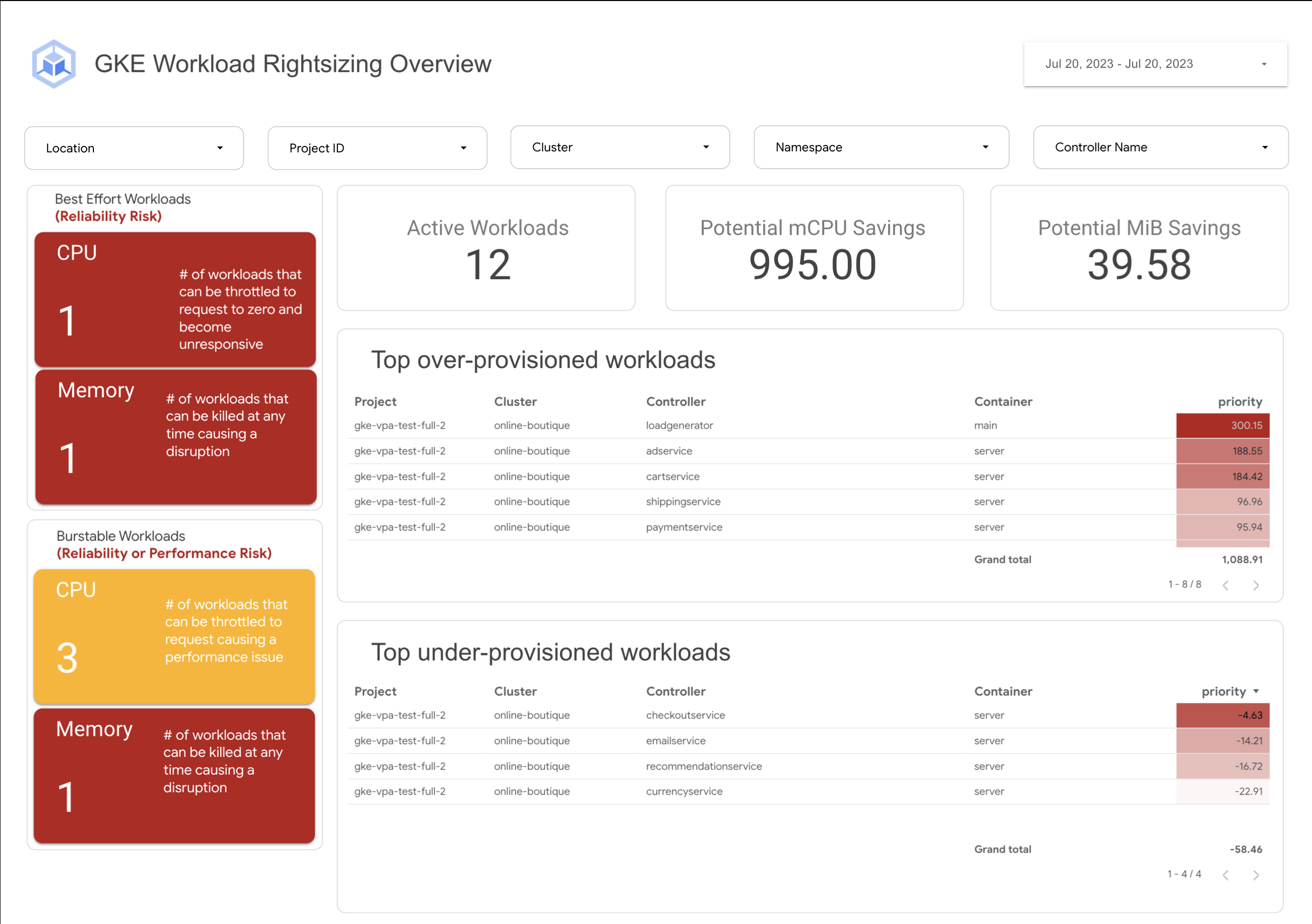
If you’re interested in viewing recommendations across clusters and projects, We’ve created a guide that you can use today to help you right-size your GKE workloads at scale. This solution leverages your actual cluster’s metric data and built-in workload recommendations provided by Cloud Monitoring. You can determine the resource requirements for all your workloads without having to create additional VPA autoscaler objects in each of your clusters. The guide walks you through deploying the solution.
In conclusion
In conclusion, rightsizing your workloads is essential for both cost savings and reliability. By following the tips in this blog, you can ensure that your workloads are using the right amount of resources, which will save you money and increase your workload’s reliability.
Links to the solution presented in this blog and other useful tools to help you optimize your cluster are listed below:
- The Right-sizing workloads at scale solution guide
- Setting resource requests: the key to Kubernetes cost optimization
- The simple kube-requests-checker tool
- An interactive tutorial to get set up in GKE with a set of sample workloads
Download the State of Kubernetes Optimization report, review the key findings, and stay tuned for our next blog post.
App Engine Basics to Help You Build and Deploy Low-latency, Scalable Apps

3513
Of your peers have already read this article.
2:00 Minutes
The most insightful time you'll spend today!
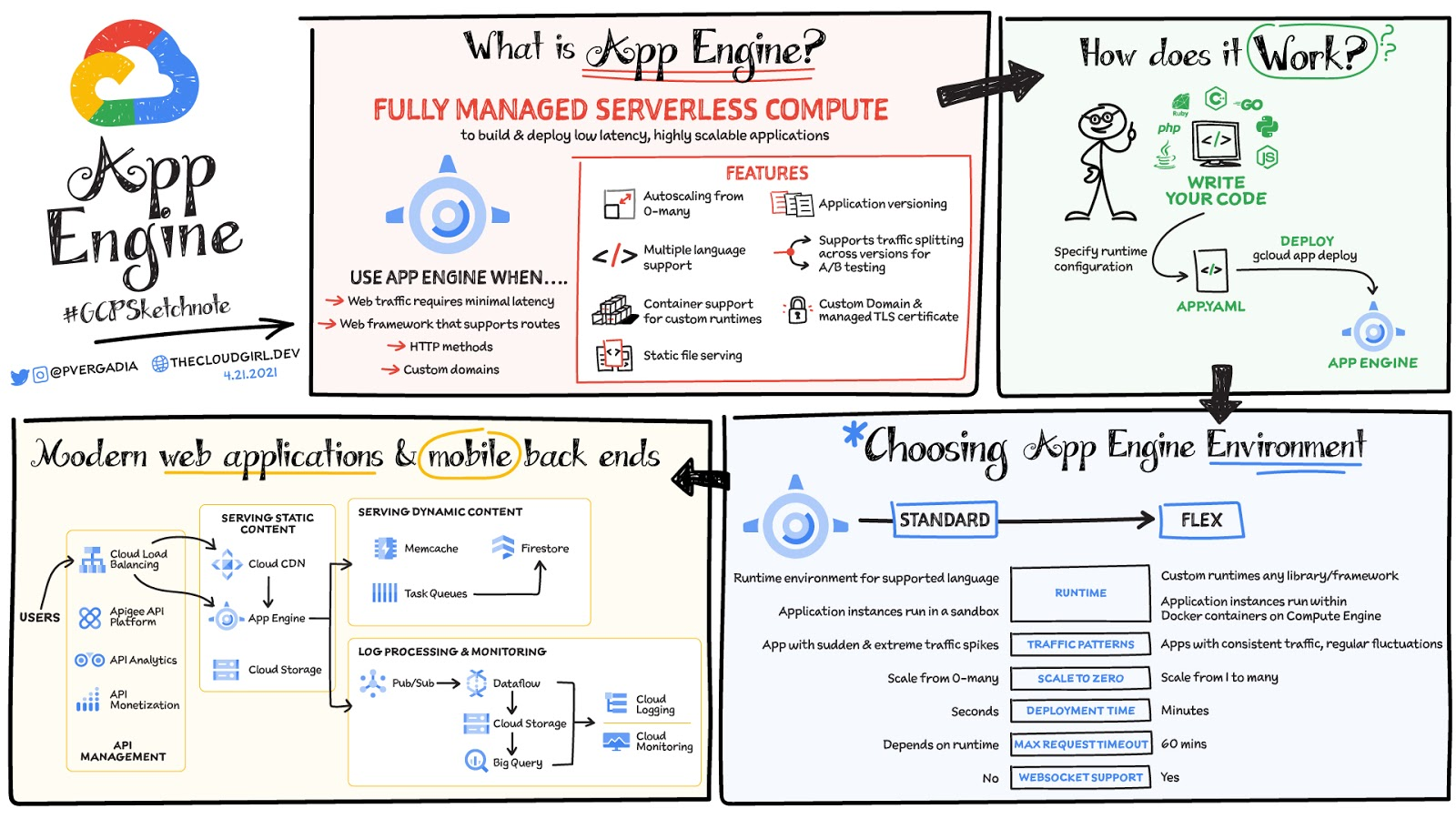
App Engine is a fully managed serverless compute option in Google Cloud that you can use to build and deploy low-latency, highly scalable applications. App Engine makes it easy to host and run your applications. It scales them from zero to planet scale without you having to manage infrastructure. App Engine is recommended for a wide variety of applications including web traffic that requires low-latency responses, web frameworks that support routes, HTTP methods, and APIs.
Environments
App Engine offers two environments; here’s how to choose one for your application:
- App Engine Standard – Supports specific runtime environments where applications run in a sandbox. It is ideal for apps with sudden and extreme traffic spikes because it can scale from zero to many requests as needed. Applications deploy in a matter of seconds. If your required runtime is supported and it’s an HTTP application, then App Engine Standard is the way to go.
- App Engine Flex – Is open and flexible and supports custom runtimes because the application instances run within Docker containers on Compute Engine. It is ideal for apps with consistent traffic and regular fluctuations because the instances scale from one to many. Along with HTTP applications it also supports applications requiring WebSockets. The max request timeout is 60 minutes.
How does it work
No matter which App Engine environment you choose, the app creation and deployment process is the same. First write your code, next specify the app.yaml file with runtime configuration, and finally deploy the app on App Engine using a single command: gcloud app deploy.
Notable features
- Developer friendly – A fully managed environment lets you focus on code while App Engine manages infrastructure.
- Fast responses – App Engine integrates seamlessly with Memorystore for Redis enabling distributed in-memory data cache for your apps.
- Powerful application diagnostics – Cloud Monitoring and Cloud Logging help monitor the health and performance of your app and Cloud Debugger and Error Reporting help diagnose and fix bugs quickly.
- Application versioning – Easily host different versions of your app, and easily create development, test, staging, and production environments.
- Traffic splitting – Route incoming requests to different app versions for A/B tests incremental feature rollouts, and similar use cases.
- Application security – Helps safeguard your application by defining access rules with App Engine firewall and leverage managed SSL/TLS certificates by default on your custom domain at no additional cost.
Conclusion
Whether you need to build a modern web application or a scalable mobile backend App Engine has you covered. For a more in-depth look, check out the documentation. Click here for demos on how to use serverless technology and free hands-on training.https://www.youtube.com/embed/Xuf3J6SKVV0?enablejsapi=1&
For more #GCPSketchnote, follow the GitHub repo. For similar cloud content follow me on Twitter @pvergadia and keep an eye out on thecloudgirl.dev.
Reference Guide to Get You Started with Development on GKE

5553
Of your peers have already read this article.
1:30 Minutes
The most insightful time you'll spend today!
Getting started with Kubernetes is often harder than it needs to be. While working with a cluster “from scratch” can be a great learning exercise or a good solution for some highly specialized workloads, often the details of cluster management can be made easier by utilizing a managed service offering. Google Kubernetes Engine (GKE) allows for an easier end-to-end developer experience with convenient tooling and built-in integrations along with the convenience of offering Kubernetes clusters as a managed service.
GKE is the most mature container orchestration service available today, delivering a fully-managed service and hands-off experience with the GKE Autopilot mode of operation. GKE provides industry-first capabilities such as release channels, multi-cluster support, unique four-way auto scaling, node auto repair, and can support up to 15K nodes in a single cluster.
Our modern, end-to-end platform is built on cloud-native principles you are already familiar with and prioritizes speed, security, and flexibility, in ways that are highly differentiated from other cloud platforms.
We have put together a new reference guide for you as you begin your journey developing on GKE. It covers every step of your journey from writing, running, operating, to managing code. Even if it isn’t your first time using GKE, this e-book will be a valuable resource highlighting important considerations and best practices. By implementing the technical recommendations, following the steps, and utilizing the tools described, you can reach the following goals:
- Write, deploy, and debug code faster with Cloud Code and Cloud Shell
- Continuously integrate and deliver updates with Cloud Build
- Run easily, securly, cost effectively at scale with GKE
- Monitor and troubleshoot with Google Cloud’s operations suite
Kick-start your journey by downloading the e-book and join us live June 22 at 9am PDT for our half-day Cloud OnBoard event: Getting Started with Google Kubernetes Engine.
More Relevant Stories for Your Company

Seven Steps to Making DevOps a Reality
When it comes to creating a business that can thrive in the digital age, the benefits of DevOps are clear. In a recent survey sponsored by Google Cloud, Harvard Business Review Analytic Services found that about two-thirds of the respondents who use DevOps have seen benefits that impact their bottom line, including




Video: How Pitney Bowes Leveraged Apigee to Create New Revenue Streams
Headquartered in Stamford, Connecticut, Pitney Bowes helps businesses navigate the complex world of commerce. They enable organizations to send parcels and packages across the globe. Pitney Bowes serves 90 percent of Fortune 500 companies, has 90 plus years of innovation, supports 1.5 million small businesses and has 15,000 employees globally.

Google Maps’ Cloud-based Styling Features Betters UX, Control and Flexibility
This year at Google I/O, we announced the general availability of Cloud-based maps styling for the Maps JavaScript API. In an effort to provide you with more options and more control to help create the best experience for your users, today we’re releasing new features to Cloud-based maps styling. You may

How Experian Transformed its Business by Using APIs
Chances are, when you think of Experian you think of a traditional credit bureau that provides credit reports. But Experian has transformed into a true technology and software provider. We gather, analyze, and process data in ways that other companies just can’t. Businesses use this data to make smarter decisions about credit
