





The SolarWinds Attack: A Case Study in Supply Chain Threats

2591
Of your peers have already read this article.
2:30 Minutes
The most insightful time you'll spend today!
Our quarterly Security Talks series brings together experts from Google Cloud Security teams and the industry to share information on our latest security products, innovations and best practices. Below is an introduction to Mandiant’s Security Talks presentation on Dec. 7, Mandiant Tales from the Front Lines: Activate Cyber Defenses Against Supply Chain Compromise.
The discovery in December 2020 of the SolarWinds supply chain compromise, a global computer intrusion campaign, caused organizations and security leaders to completely reassess their Cyber Threat Profiles, risk assessments, and defensive postures. It was a rare, watershed event that savvy security leaders and IT decision makers have been using to improve how security teams protect systems, networks, and data across industries and sectors, especially critical infrastructure. Two years later, we’re looking back at the security incident, what we’ve learned, and how it continues to drive change across security teams and organizations.
The SolarWinds compromise leveraged access to the software maker’s Orion business software in order to distribute a malicious update containing malware. Mandiant has since attributed this operation to APT29, a Russia-based espionage group assessed to be sponsored by the Russian Foreign Intelligence Service (SVR). This operation afforded APT29 with unparalleled access to an estimated 18,000 global organizations for follow-on targeting based on the attacker’s discretion and collection priorities.
While the security industry has yet to see anything that rivals the scale and scope of the SolarWinds compromise since it was discovered, a recent Google Cloud research report on software supply chain security found that there’s been a sharp increase in software supply chain attacks across nearly every sector.
Mandiant analysis identified supply chain compromise as the second-most prevalent initial infection vector in 2021. When the initial infection vector was identified, supply chain compromise accounted for 17% of intrusions in 2021 compared to less than 1% of intrusions in 2020. Further, 86% of supply chain compromise intrusions in 2021 were related to the SolarWinds breach.
Since 2020, Mandiant has also observed an increase in financially-motivated threat actors targeting the software supply chain. These actors compromised popular software packages and even mobile applications in order to deploy ransomware, cryptocurrency miners, and banking trojans. In one case, malicious code was inserted into a popular package, prompting the U.S. Cybersecurity and Infrastructure Agency (CISA) to issue an alert about the compromise.
Mitigation recommendations
The discovery of the SolarWinds incident resulted in increased global attention around supply chain compromise threats. Government authorities and technology organizations have responded with several initiatives, legislation, and studies seeking to reduce software supply chain and software dependency risk. Although these initiatives may make it more difficult for threat actors to conduct these operations, organizations should also take steps to mitigate supply chain threats.
Mandiant suggests that organizations contemplate applying multiple layers of security policies, plans, and solutions to maximize opportunities to provide early threat detection and prevent an anomaly or compromise stemming from the supply chain. This guidance is aligned with best practices Google Cloud has recommended for organizations to improve their software supply chain security.
Mandiant has also provided the following additional recommendations for organizations to consider more generally:
- Establish a vendor vetting process to evaluate vendor security practices before deploying hardware or software.
- Create a change control process and board for all enterprise hardware and software changes, which could include a centralized IT or IT security managed process for downloading, testing, and pushing updates to users.
- Use an advanced endpoint security solution, such as an endpoint detection and response (EDR), to detect malicious behavior when a tainted software package is downloaded and executed.
- Ensure proper logging and monitoring is in place between the software, hardware, and the internet.
- Implement the software and hardware using network segmentation with minimal access to the internet.
- Enact employee training programs and policies to encourage security best practices, including security audits of code in development.
Next steps
You can watch the Google Cloud Security Talks presentation on SolarWinds and the current state of supply chain threats here. You can learn more about Google Cloud’s solutions to help improve software supply chain security here, or for more general inquiries, please contact us or reach out to your sales representative to learn how we can assist.
Improving Your Security Posture: Integrating Cloud DLP with Security Command Center

1200
Of your peers have already read this article.
4:00 Minutes
The most insightful time you'll spend today!
Our Cloud Data Loss Prevention (Cloud DLP) discovery service can monitor and profile your data warehouse to bring awareness of where sensitive data is stored and processed. Profiling is also useful for confirming that data is not being stored and processed where you don’t want it.
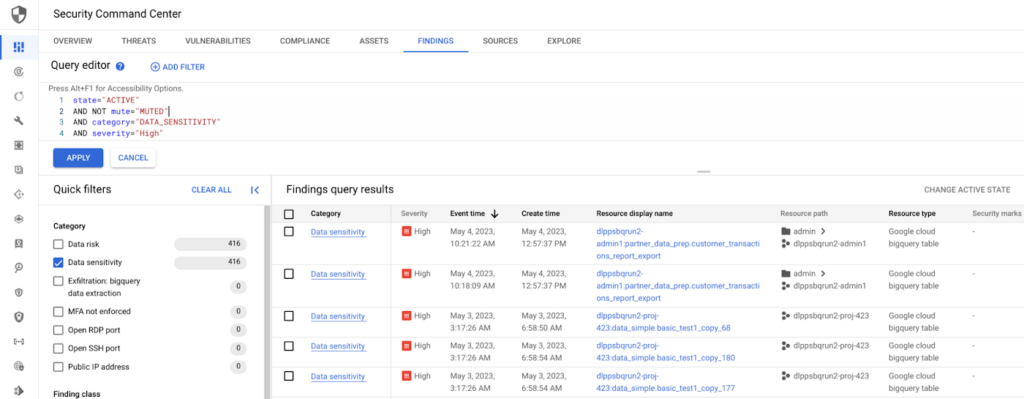
But how can you make use of this intelligence within your existing security and governance workflows so you can reduce risk? Starting today, we have integrated Cloud DLP’s sensitive-data discovery service with Security Command Center, our platform-native security and risk management solution. By bringing together sensitive data intelligence with your security controls, security teams can identify and act quickly on the vulnerabilities and help address threats that matter for your organization.
Data sensitivity and risk prioritization
Not all security threats, vulnerabilities, and misconfigurations generate an equal degree of risk. Some affect only test data or development environments. But others can place your organization’s sensitive information at risk of exposure or misuse. Understanding what to prioritize is often a big challenge for security professionals.
When this awareness is fed into Security Command Center, it allows your team to prioritize the Security Command Center findings that are driving greater security and compliance risk, and to help make informed decisions as to how to address those issues.
Understanding BigQuery data exfiltration threats
Security Command Center’s threat detection capability can analyze access and copy behavior of BigQuery data to help detect potential risk of exfiltration. With Cloud DLP intelligence on where sensitive data lives in BigQuery tables and datasets, you can now focus and prioritize on the exfiltration findings tied to your sensitive assets.
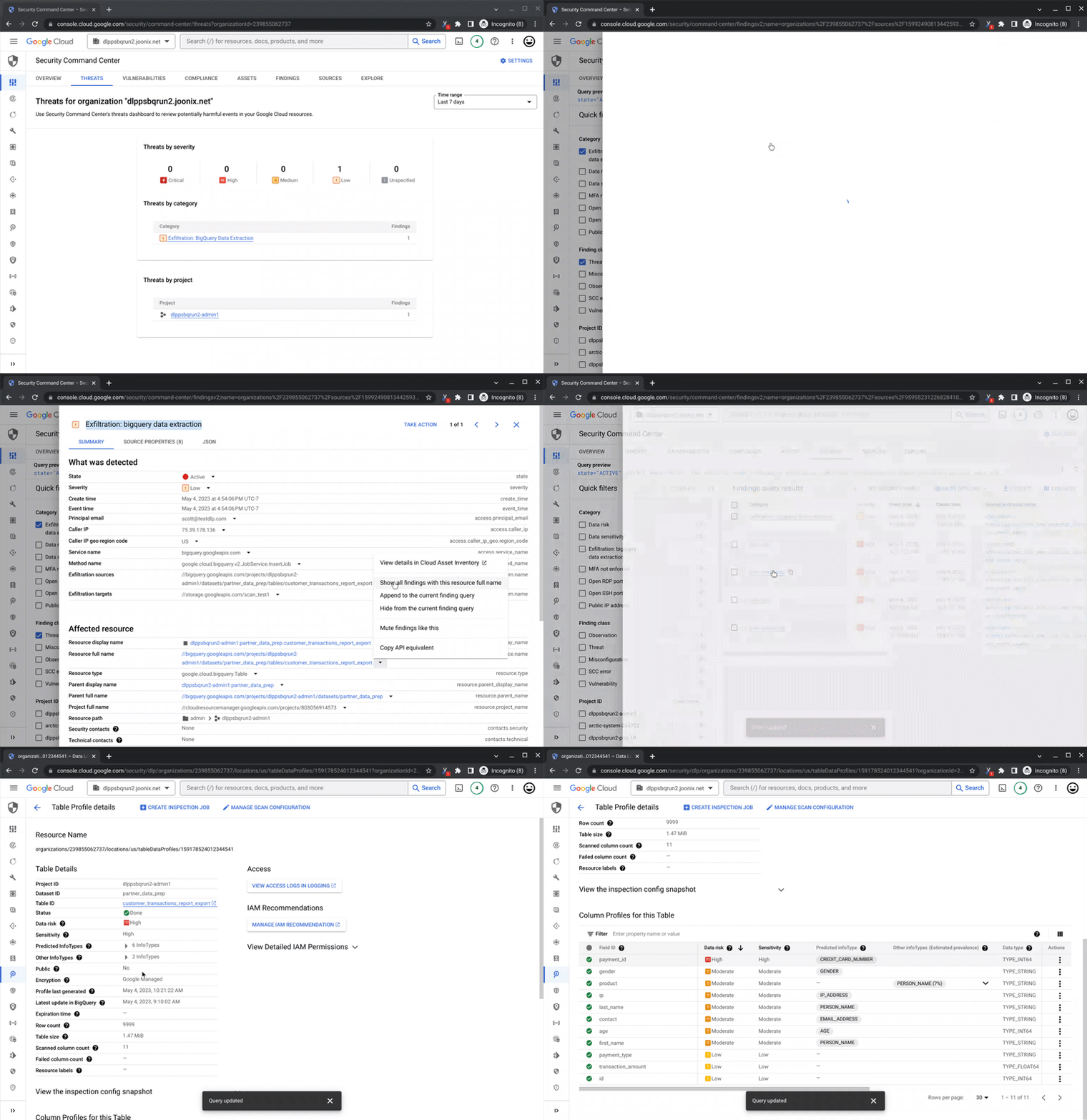
Remediation and data security posture management
The intelligence from Cloud DLP’s sensitive-data discovery service helps you take a data-first approach to securing your assets. Use insights like Cloud DLP’s predicted infoType to apply column-level, fine-grained access or dynamic masking policies and consider de-identification to further help reduce the risk of data use operations and improve your overall security, privacy, and compliance posture.
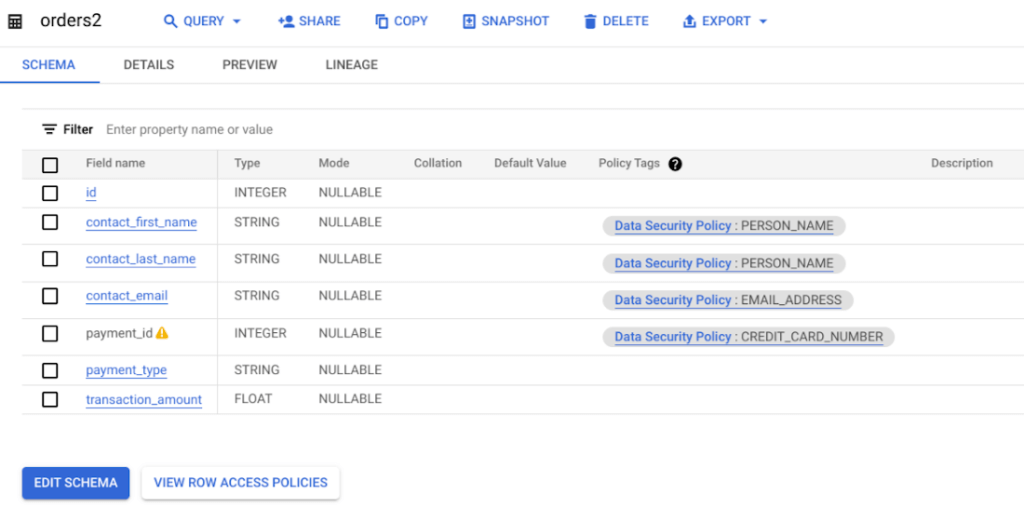
Get started
To get started with richer sensitive data intelligence, enable the connection between Cloud DLP’s discovery service and Security Command Center. There is no additional cost to enable the integration for users of both products.
As soon as it’s enabled, you can begin to use your sensitive data intelligence to supercharge your security and support your compliance teams’ work.
Read more about how the sensitive data discovery service can meet your organization’s needs, and how you can get started managing your security posture with Security Command Center.
Announcing New, Faster Search and Investigative Experience in Chronicle Security Operations

2929
Of your peers have already read this article.
1:30 Minutes
The most insightful time you'll spend today!
In cybersecurity, speed matters. Whether a security analyst is trying to understand the details of an alert that was triggered by an indicator of compromise (IoC), or find additional context for a suspicious asset, speed is often the critical factor that will help thwart a cyberattack before threat actors are able to inflict damage.
With speed in mind, we are pleased to announce the general availability of our new investigative experience in Chronicle Security Operations. We are continuing to deliver on our mission to bring the power of Google to security operations and are raising the bar for search and the investigative experience in the SOC.
With this release, SecOps teams will be able to harness Chronicle’s lightning-fast search across any form of structured data. Additionally, the new investigation experience can provide greater flexibility to pivot and drill-down when conducting complex, open-ended threat investigations and surface insights quickly and easily.
Our Unified Data Model (UDM) schema, with its built-in flexibility that can effectively handle a wide variety of security related events, is at the heart of Chronicle’s powerful search. We have scaled this capability by optimizing query responses across structured data. Additionally, analysts can investigate large datasets and build complex queries with a new and intuitive user experience. With user personalization enhancements, analysts can quickly access saved searches and top queries in their environment to improve routine SOC workflows.
With the new investigative experience, security teams can:
- Drive faster threat understanding with an interactive event results timeline that helps eliminate unnecessary long wait times by streaming results as they are processed to quickly begin threat analysis
- Use enhanced context and operationalize relevant data for threat analysis with one-click filter-to-query conversion
- Personalize the analyst experience with saved search and search history functions for quicker analyst knowledge recall
- Power threat investigation and hunting with a new, improved, highly performant UDM search
Let’s look at an example of how to use the reimagined investigative experience and our new broader, faster search.
In our use-case, a security analyst is investigating a curated detection alert for potentially suspicious behavior on a Windows environment. Additionally, there is a low prevalence domain from host “win-dc-01” with ip “10.166.0.3”. To investigate further, let’s open the UDM Search page and construct a query containing the host and IP information along with destination information of the domain the host was contacting (edge.microsoft.com). Over 70,000 events stream into the investigation interface providing the analyst an immediate picture of data surrounding their alert.
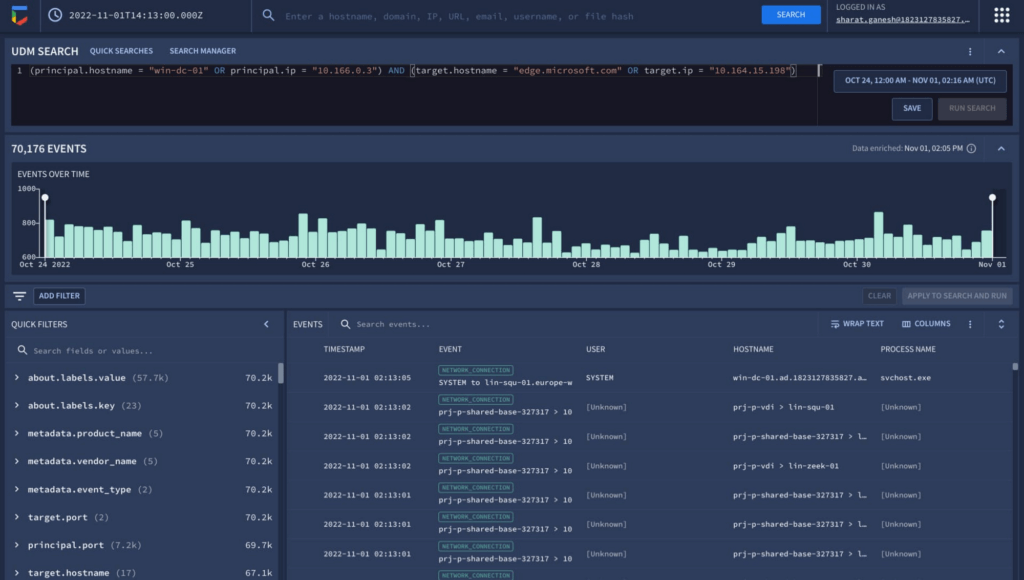
The new interactive events timeline can provide a clear picture of event trends over time with key statistical data which can be easily filtered. Additionally, with the new quick filters, the analyst is able to easily filter out hosts that are known-good to get pertinent information about the domain.
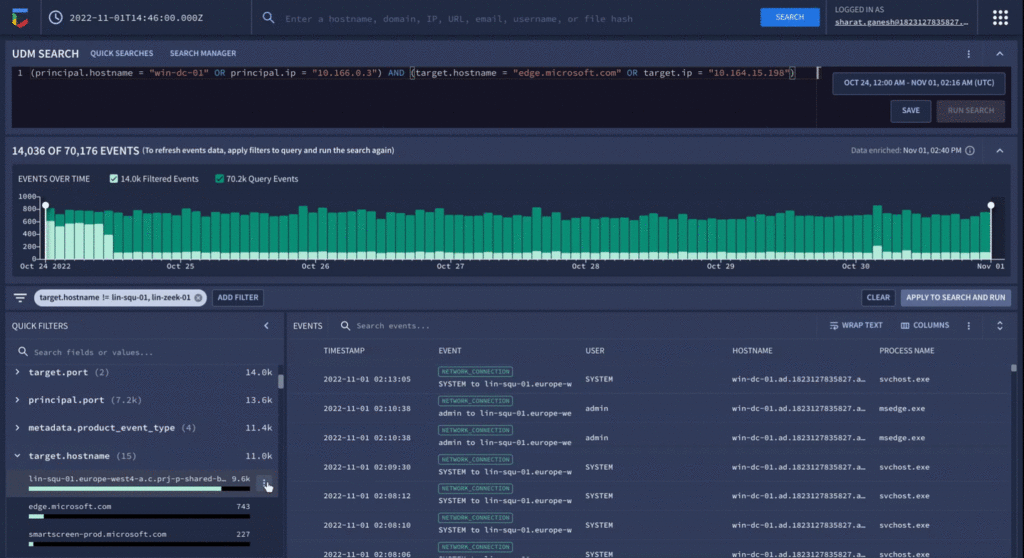
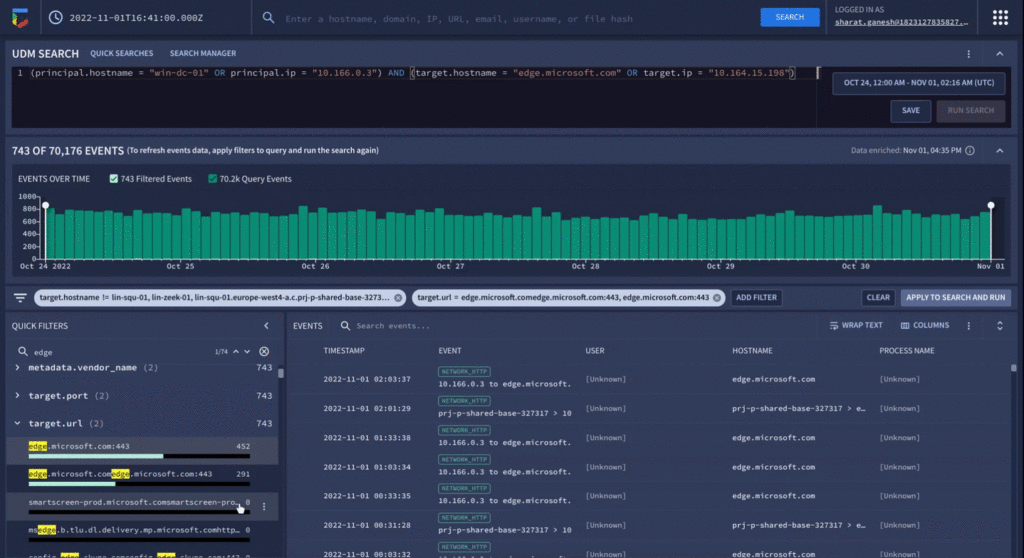
Analyzing value aggregations present in the filter panel, automatically generated by Chronicle, enables analysts to domain values of highest interest, and quickly determine that approximately 800 events were present in the last week that related to edge.microsoft.com URL. Since Microsoft Edge is disallowed in the organization, there should not be any outbound traffic to this type of destination.
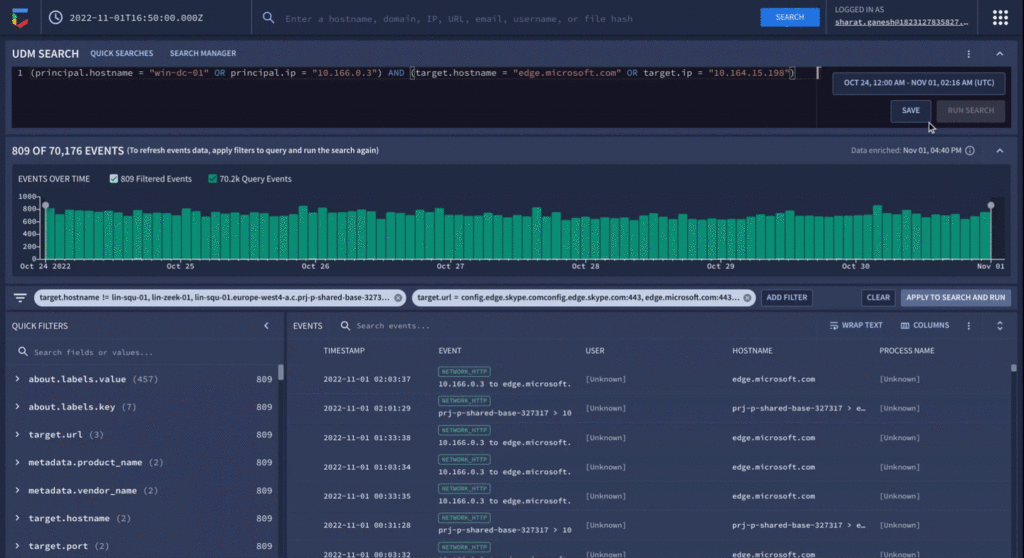
As a final step before orchestrating a response in Chronicle SOAR’s case management, the analyst can save their search to quickly recall the steps they took in the future for related investigations.
We have already seen our customers use these new capabilities in preview to build new use cases, accelerate existing threat hunting workflows, and drive faster threat response. We will continue our mission to bring Google speed, scale, and intelligence to the investigative experience, expediting “time to aha” for security analysts, and driving better, faster responses.
Ready to put Chronicle to work in your Security Operations Center? Contact Google Cloud sales or your customer success CSM team. You can also learn more about all these new capabilities in Google Chronicle in our product documentation.
New Certificate Manager Helps Leverage Google’s Network Security and Performance

3035
Of your peers have already read this article.
2:00 Minutes
The most insightful time you'll spend today!
We’re excited to announce the public preview of Certificate Manager and its integration with External HTTPS Load Balancing. Certificate Manager enables you to use External HTTPS Load Balancing with as many certificates or domains as you need. You can bring your own TLS certificates and keys if you have an existing certificate lifecycle management solution you’d like to use with Google Cloud, or enjoy the convenience of our fully Managed TLS offerings.
Extend the security and performance of the Google network to your customers
Certificate Manager brings support for multiple certificates per customer. When coupled with our global anycast load balancing solution with automated autoscaling and failover, you now have a powerful platform for building robust SaaS and PaaS offerings. This enables custom domain support for your customers with the lowest latency and the highest level of availability.
Alon Kochba, the head of web performance at website-building service Wix, explained how the new features lighten their workload.
“As a SaaS product, we need to terminate SSL for millions of custom domains and certificates. GCP’s Certificate Manager and External HTTPS Load Balancing lets us do this at the edge, close to the clients, without having to rely on our own custom solution for terminating SSL,” Kochba said.
Customers who switch to External HTTPS Load Balancing can also now protect their SaaS users from denial of service attacks, OWASP Top 10 risks, and other common Web attacks by adopting Cloud Armor.
DNS authorization
This release also now enables you to provision your Google-managed certificates with DNS-based authorizations and have them ready to use before your load-balancing production environment is fully set up. This will help streamline the migration process to Google Cloud, for example. To create a DNS authorization, use the following command:
gcloud beta certificate-manager dns-authorizations create example-authorization --domain="example.com"
This command returns the CNAME record for _acme-challenge.example.com that you must add to your DNS configuration in the DNS zone of the target domain. This CNAME record points to a special Google Cloud domain, e.g.: “534959-1a8a-40cf-90b6-b1f5f8d22517.2.authorize.certificatemanager.goog” that is used to verify domain ownership.
When you request a certificate based on the above authorization, Cloud Certificate Manager will work with the Certificate Authority automatically to get and later renew your certificate for that domain.
Wildcard support
This DNS-based domain control authorization also allows us to bring you support for wildcard certificates. To configure the use of wildcard certificates you first must configure the DNS authorization as we’ve indicated above. Once that has been completed, you can configure the use of a wildcard certificate using the following command. Our example below is for a top-level registered domain and its wildcard subdomains.
gcloud beta certificate-manager certificates create example-wildcard-certificate --domains="example.com,*.example.com" --dns-authorizations="example-authorization"
Monitoring for Certificate Expiration
Another new feature that will be enabled with this product is the ability to monitor certificate expiration with Google Cloud Logging. Cloud Logging creates a record of certificate expiration, uses the `certificatemanager.googleapis.com/Project` monitored resource, and is represented by the following message:
message CertificatesExpiry {// Expiration state of the certificate.enum State {// Unspecified state, should never be reported.STATE_UNSPECIFIED = 0;// Certificate will expire soon.CLOSE_TO_EXPIRY = 1;// Certificate is expired.EXPIRED = 2;}// Number of reported certificates.int64 count;// Names of reported certificates. If there are too many, the list is sampled.repeated string certificates = 2;// State of reported certificates.State state = 3;// Approximate expiration time of reported certificates.// Multiple certificates with close expiration time are batched// together in a single log, so the timestamp is not precise.google.protobuf.Timestamp expire_time = 4;}
The log message is delivered every hour and contains a sample of the certificates being close to expiry or already expired.
Pricing
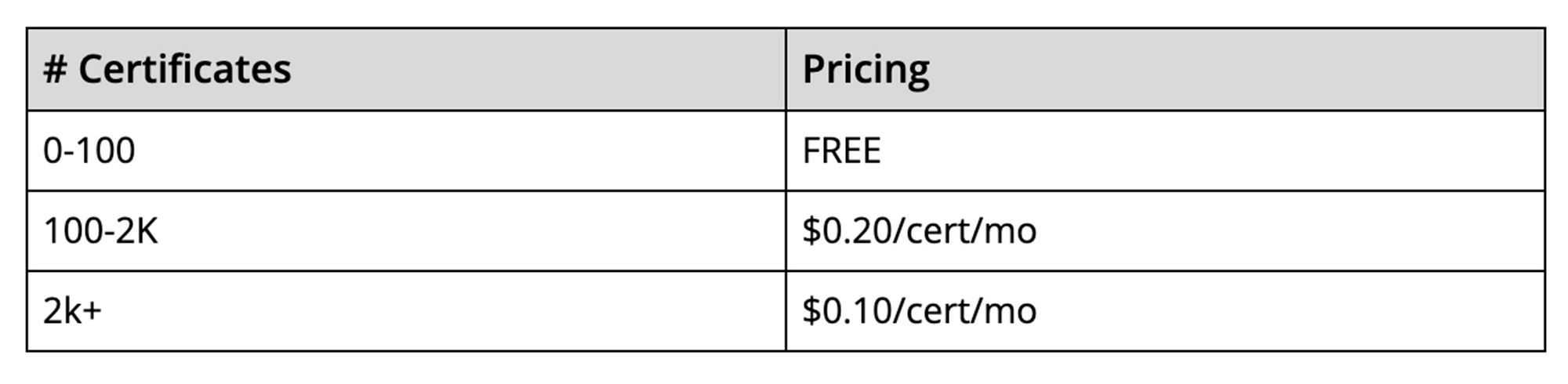
The best part is that there’s no additional charge to use the Certificate Manager for the first 100 certificates. To use more than 100 certificates with the management tools, we will charge on a per-certificate, per-month pricing structure. This empowers you to scale up to as many certificates as you need, and as cost-effectively as possible. The pricing will be enabled when the solution goes to General Availability.
It is our hope that these new features, combined with the programmability offered by Certificate Manager, will enable you to simplify the way you deploy HTTPS and offer a more scalable and secure service to your customers.
How to Configure GCP for Live Network Forensics

3045
Of your peers have already read this article.
3:00 Minutes
The most insightful time you'll spend today!
Forensics is the application of science to criminal and civil laws. It is a proven approach for gathering and processing evidence at a crime scene. An integral step in the forensics process is the isolation of the scene without contaminating or modifying the evidence. The isolation step prevents any further contamination or tampering with possible evidence. The same philosophy can be applied to the investigation of digital events.
In this post we will review methods, tactics and architecture designs to isolate an infected VM while still making it accessible to forensic tools. The goal is to allow access so that data and evidence can be captured while protecting other assets. There are many forensic tools for networking that can be used to analyze the captured traffic. This post does not cover these tools but rather how to configure GCP to capture live traffic in the most efficient and secured way. Once traffic is captured, customers can use whatever tools they prefer to run the analysis. More details about these tools and required agents can be found here and details about open source tooling that Google and others are developing are available here.
In cloud security context, when a VM shows signs of compromise, the most common immediate reaction is to take a snapshot, shut down the instance and relocate the image snapshot to an isolated environment, a method known as “dead analysis”. However, shutting down the instance will impede an important step in the investigation and digital forensics, as some important information in a buffer or the RAM may be lost.
The other forensic approach is “live analysis”, in which the VM is kept on and evidence is gathered from the VM directly. Live forensics enables the imaging of RAM, bypasses most hard drives and software encryption, determines the cause of abnormal traffic, and is extremely useful when dealing with active network intrusions. This process is usually performed by forensic analysts. For example, if there is a good chance the malware resides only in memory then live forensics is, in some cases, the only way to capture and analyze the malware. In this method, in addition to disk and memory evidence, a forensic analysis can also capture live-network from data sent over the compromised VM network interfaces. Some of the benefits of collecting live networks are reconstruction and visualizing traffic flow in real-time, in particular during active network intrusions or attacks.
In the cloud, a VM must be isolated when it becomes apparent that an incident has happened, in order to protect other VMs from being infected. Our Cloud Forensics 101 session covers the process and required artifacts, such as logs, that need to be collected for cloud forensics.
What happens when your image is compromised
Let’s now assume that one of the VMs in your infrastructure has been compromised and alarms are coming from products such as GCP’s Cloud Security and Command Center, Chronicle backstory or your SIEM.
An incident response plan consists of 3 phases: preparation (actions taken before an attack), detection (actions taken during an attack) and response (actions taken after an attack). During the detection phase, the Computer Security Incident Response Team (CSIRT) or threat analysts decide whether live acquisition analysis is required. If live forensics is required, for example when it is vital to acquire a VM’s RAM, then one of the first courses of action is to isolate and contain the VM from the rest of the world and connect the Forensics VPC to the VM for investigation. The forensics VPC resides in a forensics GCP project, it includes digital forensics tools to capture evidence from the VM such as SANS Investigative Forensics Toolkit – SIFT, The Sleuth Kit, Autopsy, Encase, FTK and alike. These tools are already installed, configured, tested and ready to use. The forensics project will also save and preserve evidence such as disk and memory images for forensic review.
We’ll cover two scenarios in this post, the first scenario is to isolate the image and connect the forensics VPC to the image for live acquisition.
In the second scenario we will also capture live traffic from the isolated image for live network digital forensics. To capture live traffic from the infected VM, we will leverage the GCP Packet Mirroring service to duplicate all traffic going in and out of the VM and send it to a Forensics VPC for analysis. Network forensics analysis tools such as Palo Alto VM-Series for IDS, ExtraHop Reveal(x), CheckPoint CloudGuard, Arkime (formerly Moloch), Corelight are installed, configured and ready for deployment in the Forensics VPC, these tools will be used to analyze the duplicate network traffic.
Isolating the infected VM from other resources and connecting the forensics VPC
As part of the Incident Response plan preparation phase, the CSIRT created a Google Cloud Forensics Project. Since the Forensics project will be used only when needed, it’s better to automate the creation of the project and its resources with a tool such as Terraform. It is important to grant access to this project only to individuals and groups who deal with incident response and forensics, such as CSIRT. As shown in figure 1, the Forensics project on the right includes its own VPC, non-overlapped subnet and VM images with pre-installed and pre-configured forensics tools. Internal load-balancer and instance-groups are also configured, we will use these resources to capture live traffic, as described later in this post.
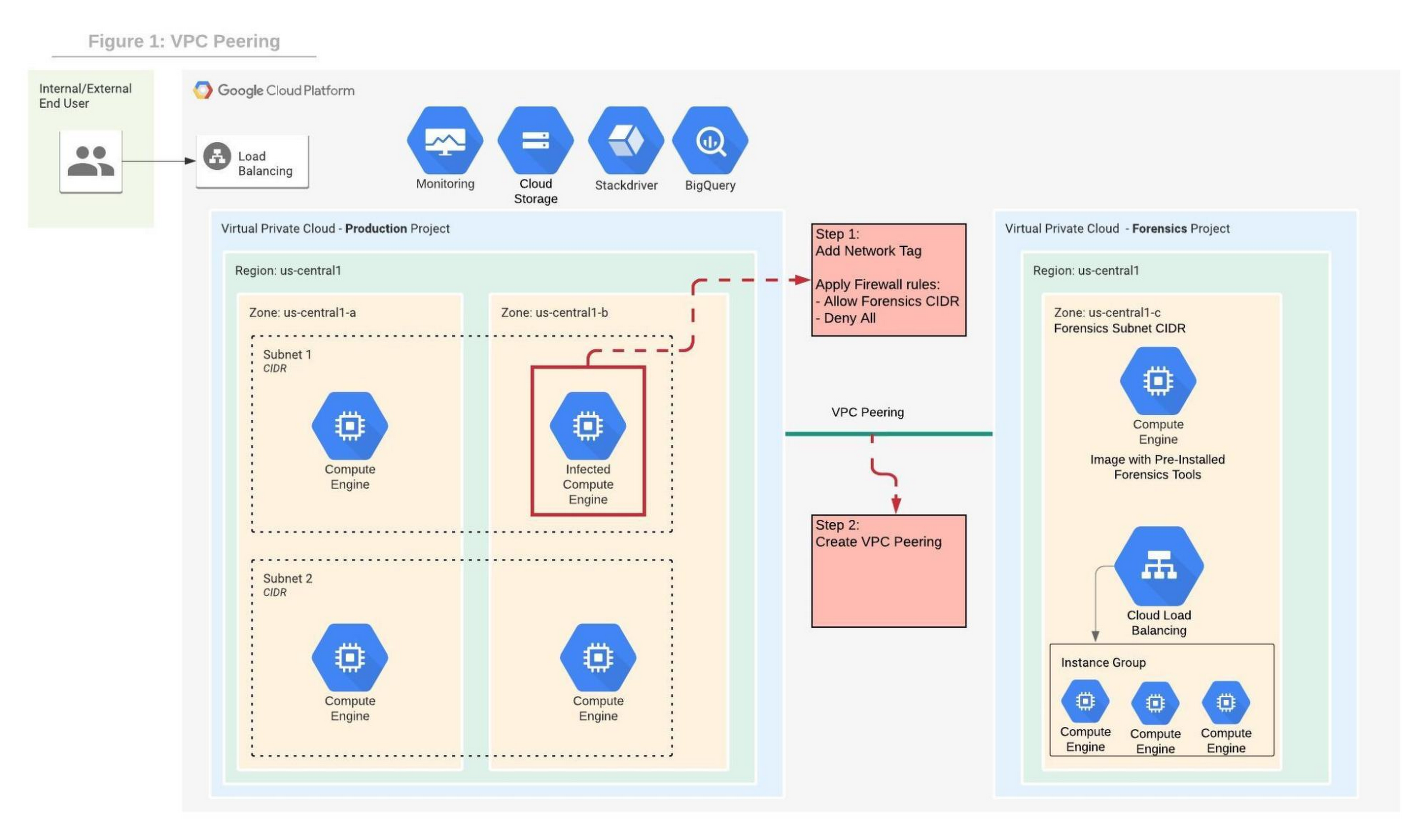
In order to contain the spread of any malware or network activity, such as data exfiltration, we’ll isolate the VM with VPC firewall rules. The GCP VPC firewall is a distributed firewall that always enforces its rules, protecting the instances regardless of their configuration and operating systems. In other words, the compromised VM cannot override the firewall enforcement if its policies follow the principle of least privilege . Rules can be applied to all instances in the network, target network tags or service accounts.
Step 1 in the diagram above shows how an infected VM is isolated from the rest of the network by firewall rules that deny any ingress and egress traffic from any CIDR beside the forensics subnet CIDR. The infected VM is tagged with a unique network tag, for example “<image-name>_InfectedVM”, then firewalls rules are applied on the network tag. This ensures that the infected VM is isolated from the project and the Internet while enabling access to the VM via VPC peering which we’ll configure in step-2. You can learn more about VPC firewalls rules here.
In step 2, the VPC from the forensics project is peered with the VPC in the production project. When VPC peering is established routes are exchanged between the VPCs. By default, VPC peering exchanges all subnet routes, however, custom routes can also be filtered if required. At this point, the VM from the forensics project can communicate with the infected VM and start the live forensics analysis job using the pre-installed and pre-configured forensics tools.
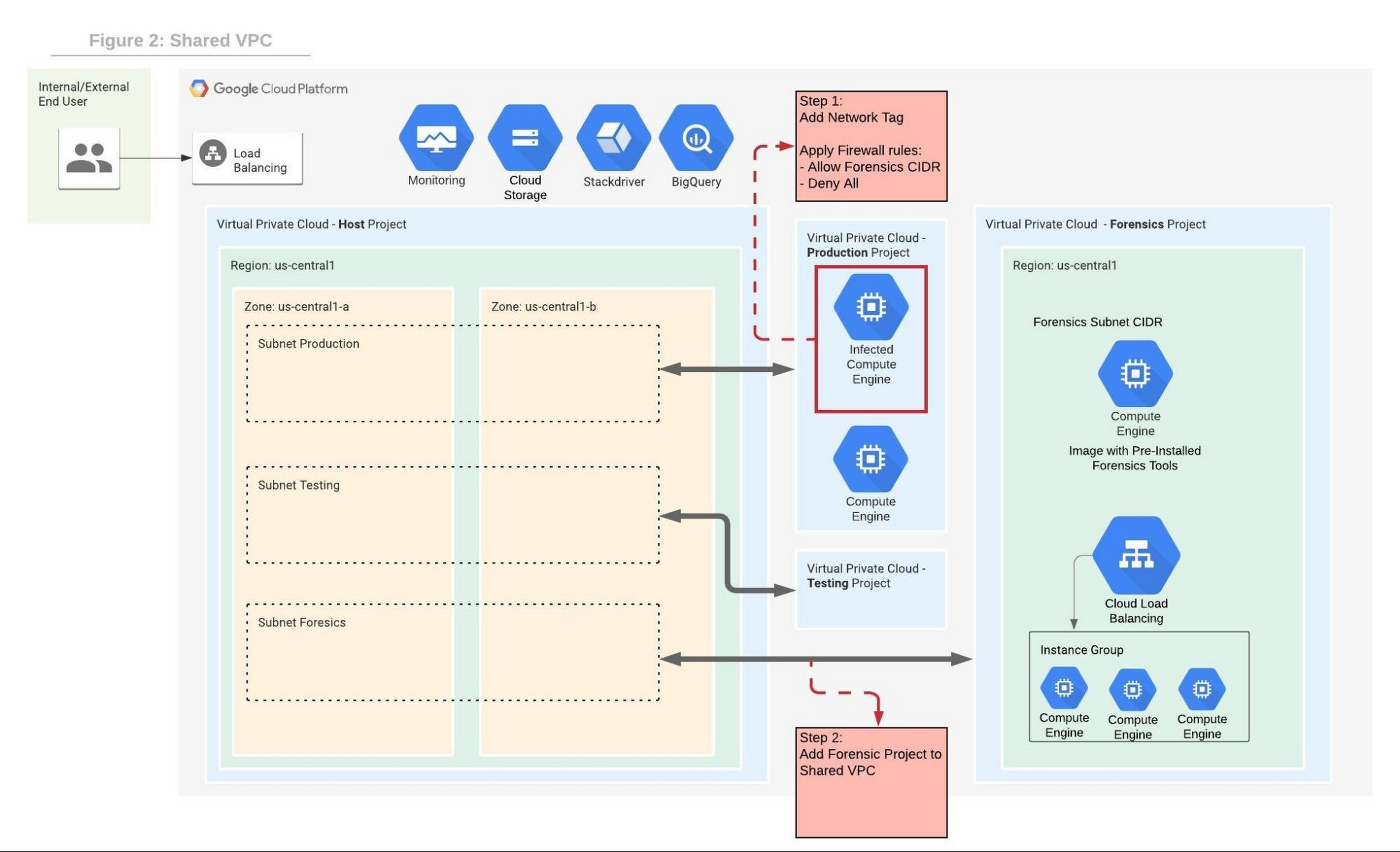
Shared VPC is a network construct that allows you to connect resources from multiple projects, called service-projects, to a common VPC in a host-project. VPCs from different projects can securely communicate with each other via the hosted project network while centralizing the network administration. Figure 2 depicts Shared VPC topology, rather than using VPC peering, during step 2 the Forensics project is simply attached to the host project. After the attachment, the Shared VPC allows the forensics tools to communicate with the infected VMs.
Capturing live network traffic with Google Traffic Mirroring
If live network forensics is required, for example during active network intrusions, then the incoming and outgoing traffic needs to be duplicated and captured. While VPC Flow logs capture the networking metadata telemetry, this is not enough for live network forensics analysis. GCP Packet Mirroring clones the traffic of a specified instance in a VPC and forwards it to a specified internal load balancer which collects the mirrored traffic and sends it to an attached instance group. Packet mirroring captures all the traffic from the specified subnet, network tags, or instance name.
Figure 3 depicts the steps that allow the compromised VM to communicate with the rest of the world (for example beaconing with C&C) while capturing all traffic for investigation in a peered VPC deployment.
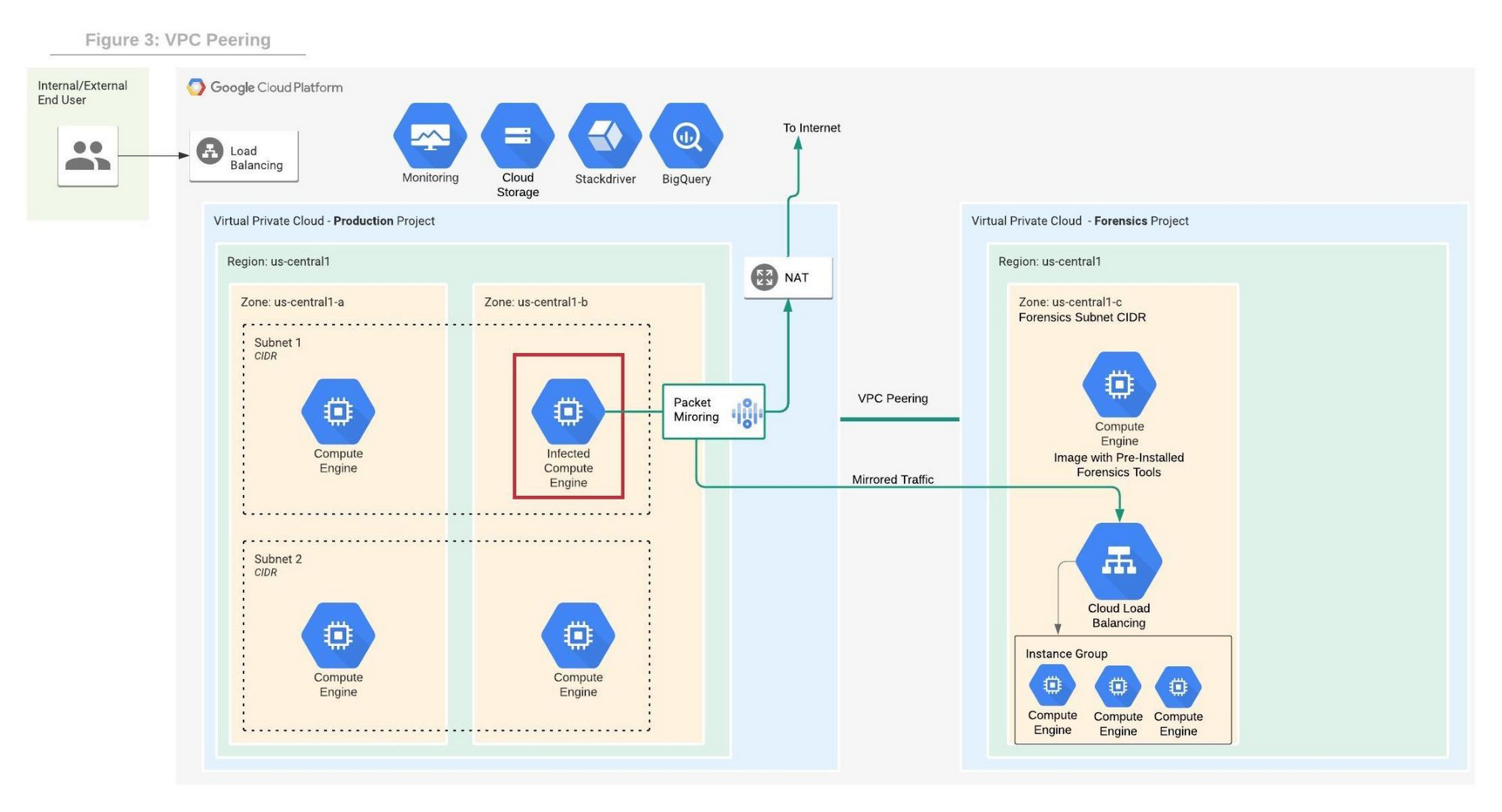
Figure 4 depicts the steps that allow the compromised VM to communicate with the rest of the world while capturing all traffic for investigation in a shared VPC deployment.
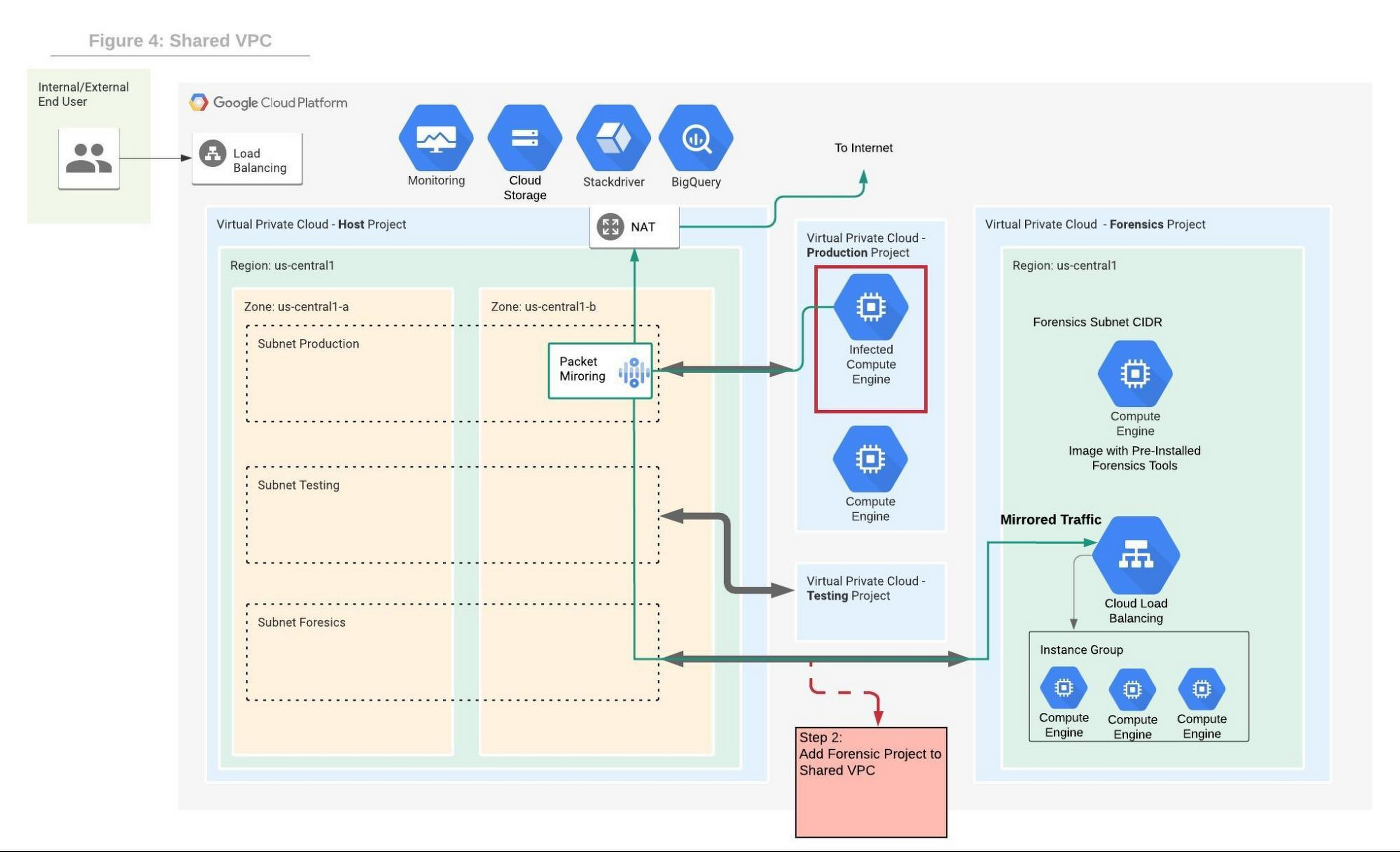
We will use the Forensics’ project internal load balancer and the instance group VMs which include packet capture and analysis tools. Note that production and forensics networks must be in the same region. Detailed steps to configure packet mirroring are available on this page.
If you are using a Shared VPC then check the Packet Mirroring configuration for Shared VPC for configuration details. Figure 4 depicts the packet mirroring flow in a shared VPC topology.
It is recommended to automate and periodically test the process to make sure that in case of an incident, the entire setup and Forensics toolchain can be quickly deployed. If after initial investigation a suspicious destination, such as a Command and Control [C&C] Server, has been identified, then the Packet Mirroring policy can be adjusted with a policy filter that only mirrors traffic from that C&C server IP address.
An incident management plan must be in place for companies using cloud services, and this plan should also include the option of using live acquisition when necessary. design and preparation for forensics acquisition allows the company to build the infrastructure that can be deployed and connected to the appropriate VM automatically. The architectures described in this post can help the process of collecting and preserving vital evidence for the forensic process, while the incident response team resolves the incident.
Cloud Security : The First Priority for Enterprises

3336
Of your peers have already read this article.
2:00 Minutes
The most insightful time you'll spend today!
Cloud-based solutions were a technology life raft for organizations during the COVID-19 pandemic as employees took to the virtual office and companies scrambled to adjust to a distributed, remote reality. However, these rapid and substantial changes in the role of cloud technologies on the business came with an increased focus on security.
The accelerated move to the cloud also meant companies needed to rapidly evolve existing security practices to protect everything that matters at the core of business—from their people and their operational and transactional data to customers and their most sensitive personal information. Suddenly, enterprises were keenly aware of where business practices, employee training, and security policies were falling short.
A recent Google-commissioned study by IDG explored the details behind the heightened focus on security solutions since the start of the pandemic while highlighting the role cloud-based security solutions are playing in helping keep customers safe. The survey of 2,000 global IT leaders serves to illustrate that in this new and unfamiliar world, enterprises are more ready than ever to embrace cloud security.LEARN MOREIT Leaders Research ReportWhat are the biggest IT priorities in 2021? Explore insights from a survey of 2,000 Senior IT leaders conducted by IDG, in collaboration with Google Cloud.
Security is an even higher priority post-pandemic
In the wake of the pandemic, many organizations are facing a broader attack surface than ever before as employees moved to temporarily working from remote home offices (and in some cases, encouraged to stay there for the foreseeable future). With fewer inherent security protections on personal internet connections and more work meetings happening via video conferencing, attackers have launched a cyber pandemic of their own designed to take advantage of and exploit new weaknesses.
However, even as businesses amp up security initiatives and preventative measures, the growing wave of threats continue to keep security top of mind for IT leaders. Security risks and concerns remain one of the top pain points impeding innovation according to the IDG study respondents—only surpassed by insufficient IT and developer skills.
Enterprises looking to cloud providers for help with security
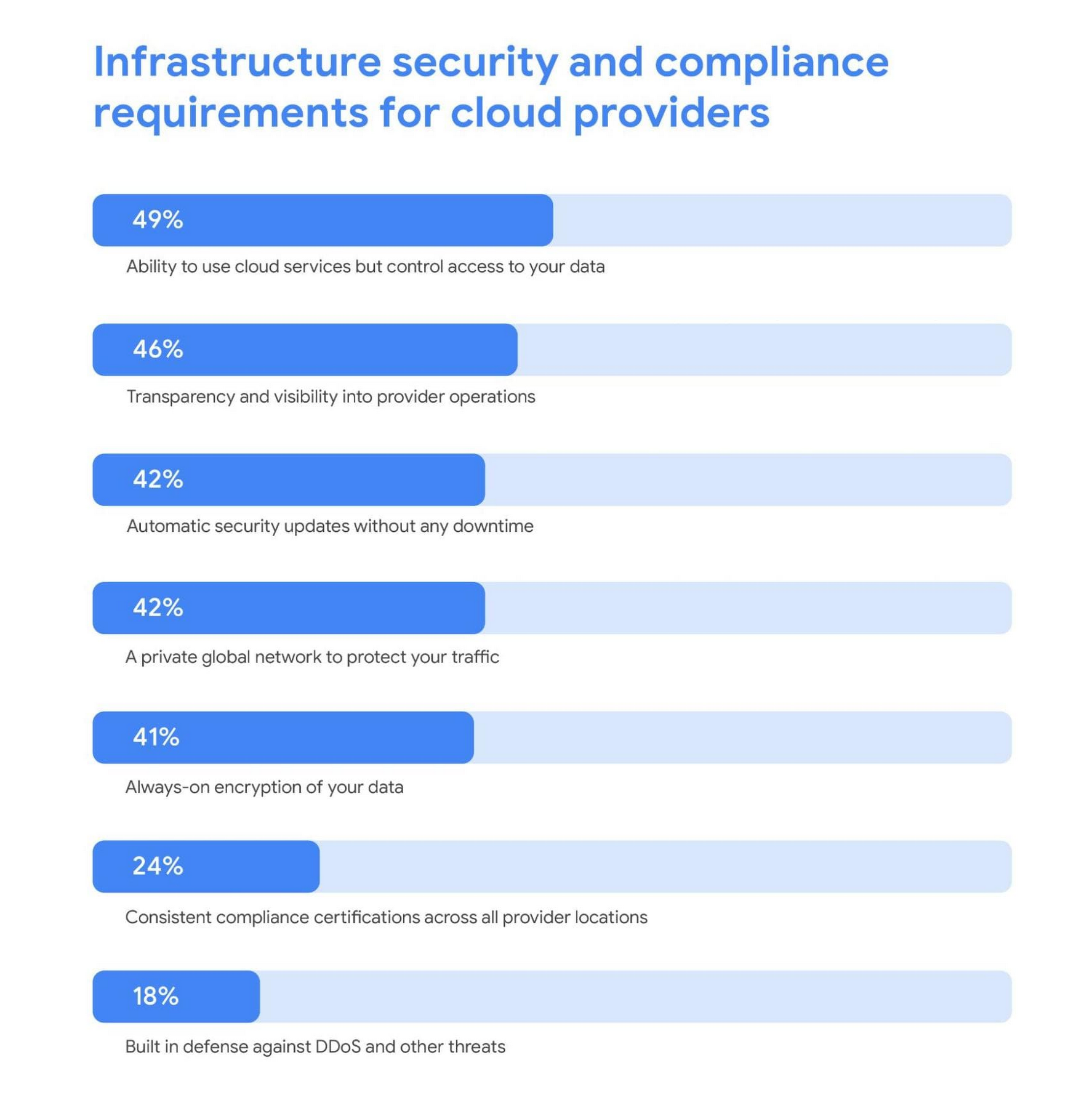
As a result, addressing security risks is a leading area where IT leaders turn to cloud providers for support. For these organizations, the ability to control access to data while using cloud services was the most required infrastructure security and compliance features from a cloud provider.
Cloud security is more trusted than ever
A deeper look into the results also revealed a shift in perspective about whether cloud security is really up to the task of protecting enterprises against modern attacks. Despite skepticism in the past, the majority of IT leaders are now comfortable with using cloud-based security solutions.
Confidence in the security of cloud infrastructure is extremely high with 85% of respondents stating they feel secure (or more secure) than on-premises infrastructure—compared to just 15% who believe on-premises is still safer.
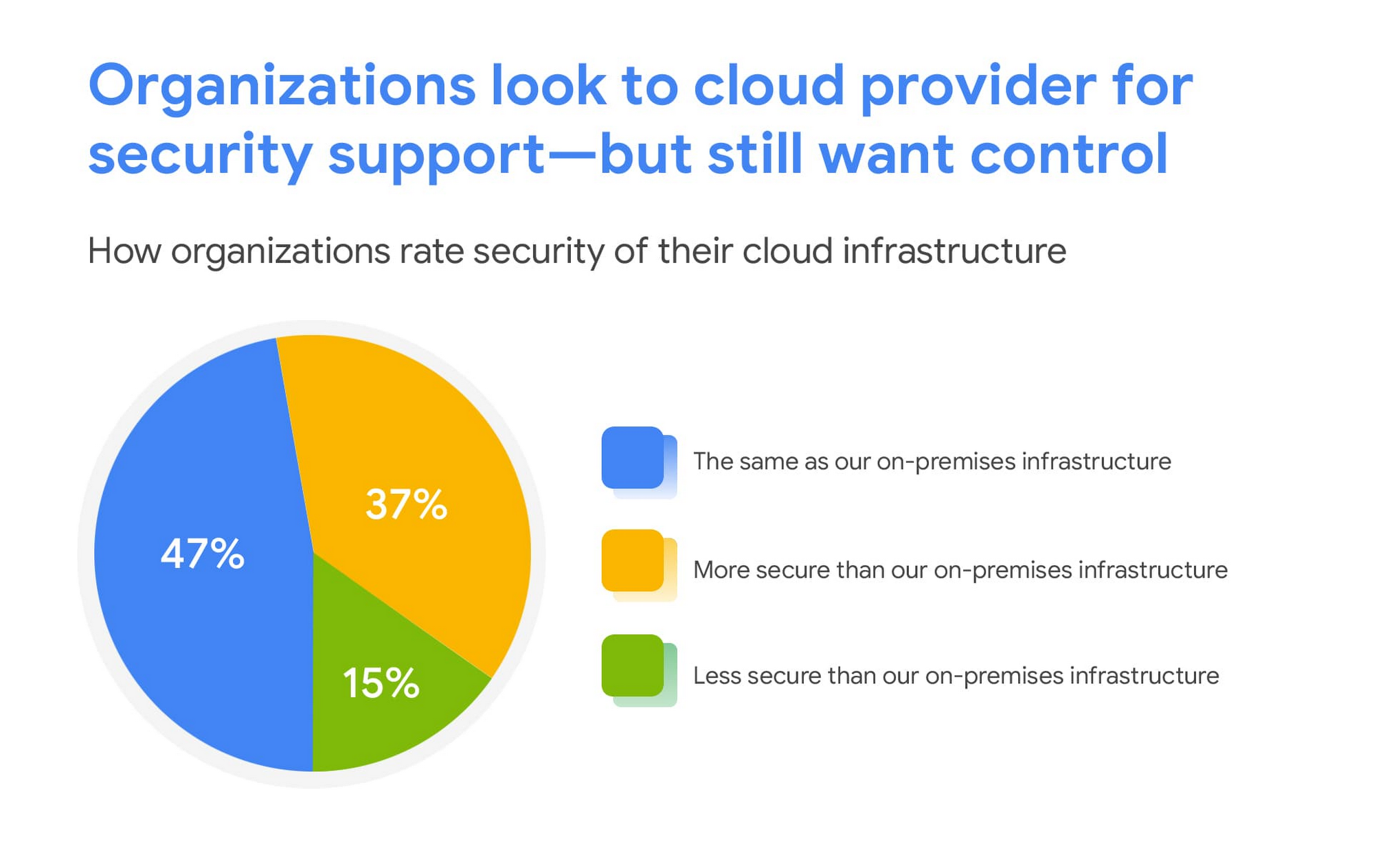
This is a clear indication that there are fewer reservations around the efficacy of cloud-based security solutions, signaling an increase in trust as organizations invest in cloud-based infrastructure and solutions.
We are committed to safe, secure solutions
Google Cloud protects your data, applications, and infrastructure, as well as your customers, from fraudulent activity, spam, and other types of online abuse. We protect you against a growing list of cybersecurity threats using the same infrastructure foundation and security services that we use for our own operations, so you never have to compromise between ease of use and advanced security.
To learn more about the IDG findings and how IT leaders are addressing security concerns post-COVID, download the full report.
Interested in how Google Cloud’s commitment to providing safe, secure solutions helps you address your security needs?
Our networking, data storage, and compute services encrypt data at rest and in transit to ensure the integrity, authenticity, and privacy of your data and your customers’ data. We also offer the ability to encrypt data in use, while it’s being processed in VM and container workloads, and our advanced security tools support compliance and data confidentiality with minimal operational overhead.
More Relevant Stories for Your Company

Google Cloud Security Foundations Guide
Security in public clouds differs intrinsically from customer-owned infrastructure because there is shared responsibility for security between the customer and the cloud provider. Cloud Security is different from on-premises security because of the combination of the following: Differences in security primitives, visibility, and control points within the infrastructure, productsand services.New

How to overcome the 5 most common SecOps challenges
The success of the modern security operations center, despite the infusion of automation, machine learning, and artificial intelligence, remains heavily dependent on people. This is largely due to the vast amounts of data a security operations center must ingest—a product of an ever-expanding attack surface and the borderless enterprise brought

Google Cloud Accelerates Financial Organizations’ Journey towards Digital Transformation
When I reflect back on the past year and the pandemic, I’m struck by how the reliance on remote work and operations has changed the fundamentals of business forever. For the financial services industry, this rings particularly true. Many conversations I’m having right now with organizations revolve around embracing a transformation

Ensuring Ironclad Security: Our Validation Process for the Confidential Space
We’re pleased to announce that Confidential Space, our new solution that allows you to control access to your sensitive data and securely collaborate in ways not previously possible, is now available in public Preview. First announced at Google Cloud Next, Confidential Space can offer many benefits to securely manage data
