






5537
Of your peers have already downloaded this article
1:30 Minutes
The most insightful time you'll spend today!
Google Products Helps HMH’s Healthcare Staff Work from Anywhere Efficiently and Securely!

10204
Of your peers have already read this article.
3:00 Minutes
The most insightful time you'll spend today!
Hackensack Meridian Health (HMH) executive Mark Eimer explains how an ambitiously-timed rollout of a comprehensive suite of Google products helped the entire organization—from doctors to IT staff—achieve better security, cultivate a more equitable work environment, and ultimately, improve patient outcomes.
How does a recently merged, 17-hospital healthcare system fast-track a platform migration and hardware rollout securely and in a way that improves work for everyone, regardless of location or role? These are the questions that kept me up at night in early 2020, when the pandemic demanded a “big bang”—something our legacy laptops and operating systems couldn’t handle.
We began our work with Google in 2020 with the adoption of Chrome as our default browser. As we migrated platforms, keeping patient data safe was of the utmost importance to us, along with providing every staff member with the tools they needed to work virtually. Our staff often experienced issues accessing our web-based applications using Internet Explorer or Edge Browser, a problem that went away when we switched to Chrome. Chrome’s versatile compatibility also made it easier for my team to migrate all of our web-based operations, and Chrome’s security and manageability were key components to making this switch a huge win for the organization.
The success of this migration led us to extend our Google partnership to patient care applications—where Google’s expertise in AI and ML helps scale the use of diagnostics tools and improve other aspects of the patient journey.

Achieving security at every step
Like so many other healthcare organizations, we’ve been concerned about ransomware attacks. This is part of why we moved to Google Workspace and distributed over 3,000 Chrome OS devices in kiosk mode in March of 2020, when many of us went remote due to the pandemic. We were very concerned about team members accessing corporate applications through home devices that were running EOL operating systems (WIN7), as well as a general lack of antivirus and encryption measures.
We were protected by the fact that Google’s software and hardware both had built-in security features that we needed to stave off sophisticated attackers. For example, Chrome OS automatically updates to the latest security update and encrypts data living outside the cloud on the hardware. These features protected us from security-related disruptions, letting us securely move a huge library of file shares and emails across thousands of accounts to Google Chrome OS in just four months.
A year later, in March 2021, we migrated the enterprise over to Google Workspace and saw an immediate reduction in spam by 30% from the inherent built-in AI/ML. This meant staff were less likely to receive (and click through) phishing attempts. My team could connect, create, and collaborate easily and securely—even as more of us were working from home and needed to access sensitive data remotely.
Leveling the playing field
As an organization, we were surprised by how many team members didn’t have personal computers at home. We quickly decided that if we needed team members to work from home, the health network would have to supply hardware. Chromebooks’ lower price tag compared to PCs—on top of their built-in security controls—allowed us to purchase, deploy, and support that initial distribution of 3,000 Chromebooks to team members in less than three weeks, providing devices to every eligible remote employee instead of just a select few. This was vital to reaching our equitable technology goal as part of our diversity and inclusion initiative: everybody has the same tools to do good work.
When all employees have what they need to do their jobs well, we get better patient outcomes. Before we began this cloud adoption journey, patient and staff experiences were different within the hospitals and outside of them.
Now it’s the same wherever our staff is, and we’ve seen efficiency and accessibility benefits extend to the patient side. For example, we built a web-based contact center that supports 80 locations that use Workspace and Chrome OS devices. Since customer service, admin, and providers are all on the same system, it has become a one-stop shop for patients.
Furthermore, through the Grow with Google program, we were able to provide another benefit to employees that drove our equity goals. Google trained 50 non-IT staff members—from environmental services, food and nutrition, and other non-tech areas who were interested in making a career change to IT—on the Google products we were using. They may not have thought about switching to a career in IT before the Grow with Google program came to our organization, but through this partnership, they now have that opportunity.
A strategic, long-term partner
With any large-scale rollout, the work doesn’t end once laptops are in employee hands. Google has shown their commitment to long-term collaboration as they continuously optimize their products for the unique needs of healthcare providers and go the extra mile in tailoring tools to our staff’s workflows.
For example, on the Chrome OS side, the Google team has helped our registration desks and document centers with device integration for hardware like credit card readers and e-signature pads. They’ve also helped us meet security and privacy requirements mandated by state and federal governments around HIPAA, Medicaid, and Medicare reimbursements. Over this next year, we’ll look at a feature roadmap with Google Cloud to deliver further enhancements, iterating on the product itself to meet our needs for the present and the future.

Delivering the future of healthcare
The benefits we’ve seen around security and usability—and the ability to provide all staff with equal access to Google’s technology—are why we’re expanding our partnership with Google to both the administrative and clinical sides of HMH. In addition to further Google rollouts with corporate, next year we’re distributing Chromebooks to all 350 of our ambulatory clinics.
We’re also working with the Google professional services team to create a custom AI model that analyzes 3D mammogram images. This AI model will enable two providers to read mammograms—which adheres to international best practices but is currently rare in the US—without requiring additional time. Conducting double readings of mammograms will yield better health outcomes for our patients, such as a lower patient recall rate and an increased accuracy in detecting breast cancer.
We’re currently building the model using a variety of Google Cloud products, including Cloud Healthcare API. Once complete, this model is expected to be trained, deployed, and maintained in Google’s Vertex AI, allowing our providers to be more productive as they make clinical decisions with AI support. As the model is proven over time, we plan to make the predictive services accessible to other healthcare organizations.
With Google, we’re able to achieve a unified architecture for storing data as well as training and deploying AI models, which enable our staff to work more efficiently and securely from anywhere. While I may not be able to predict the future as accurately as AI can, I foresee our continued partnership with Google as a key part of HMH’s improved provider and patient outcomes.
5226
Of your peers have already watched this video.
17:00 Minutes
The most insightful time you'll spend today!
AppSheet: Reduce Shadow IT and Accelerate Development of Enterprise-grade Apps
Google Cloud findings suggest that nearly 40 percent of organizations’ investments are consumed by shadow IT and can be a detractor to the adoption of cutting-edge tools and solutions. Also, about 51 percent of the surveyed executives are of the opinion that the inability to adapt to digital transformation trends and practices are at the risk of going out of business in the next 3-4 years. However, enterprises need not be blindsided by the mounting expenses involved with the implementation and optimization of solutions and tools meant for empowering employees. AppSheet, Google Cloud’s no-code application development and automation platform is at the helm of empowering organizations to custom build apps for employees without relying on third-party services.
Watch the video from the Google Workspace sessions of Next ’21 to hear experts’ insights on AppSheet to effectively govern workforce and ward off security threats to helps employees build enterprise-grade applications!
Vulnerability Exploitability eXchange: Prioritize cybersecurity risk for the healthcare industry

2555
Of your peers have already read this article.
1:30 Minutes
The most insightful time you'll spend today!
Diagnosing and treating chronic pain can be complex, difficult, and full of uncertainties for a patient and their treating physician. Depending on the condition of the patient and the knowledge of the physician, making the correct diagnosis takes time, and experimenting with different treatments might be required.
This trial-and-error process can leave the patient in a world of pain and confusion until the best remedies can be prescribed. It’s a situation similar to the daily struggle that many of today’s security operations teams face.
Screaming from the mountain tops “just patch it!” isn’t very helpful when security teams aren’t sure if applying a patch might create even worse issues like crashes, incompatibility, or downtime. Like a patient with chronic pain, they may not know the source of the pain in their system. Determining which vulnerabilities to prioritize patching, and ensuring those fixes actually leave you with a more secure system, is one of the hardest tasks a security team can face. This is where a Vulnerability Exploitability eXchange (VEX) comes in.
The point of VEX
In previous blogs, we’ve discussed how establishing visibility and awareness into patient safety and technology is vital to creating a resilient healthcare system. We’ve also looked at how combining software bills of materials (SBOM) with Google’s Supply chain Levels for Software Artifacts (SLSA) framework can help build more secure technology that enables resilience.
The SBOM provides visibility into the software you’re using and where it comes from, while SLSA provides guidelines that help increase the integrity and security of software you then build. Rapid diagnostic assessments can be added to that equation with VEX, which the National Telecommunications and Information Administration describes as a “companion” document that lives side-by-side with SBOM.
To go back to our medical metaphor, VEX is a mechanism for software providers to tell security teams where to look for the source of the pain. VEX data can help with software audits when inventory and vulnerability data need to be captured at a specific point in time. That data also can be embedded into automated security tools to make it easier to prioritize vulnerability patching.
You can then think of SBOM as the prescription label on a bottle of medication, SLSA as the child-proof lid and tamper-proof seal guaranteeing the safety of the medication, and VEX as the bottle’s safety warnings. As a diagnostic aide, a VEX can help security teams make accurate diagnoses of “what could hurt” and system weaknesses before the bad guys do.
Yet making an accurate assessment of that threat model can be challenging, especially when looking at the software we use to run systems. The ability to quickly and accurately evaluate an organizations’ weaknesses and pain points can be vital to hastening response to a vulnerability and stopping cyberattacks before they become destructive. We believe that VEX is an important part of the equation to help secure the software supply chain.
As an example, look no further than the Apache Log4j vulnerabilities revealed in December 2021. Global industries including healthcare were dealt another blow when Apache’s Log4j 2 logging system was found to be so vulnerable that relatively unsophisticated threat actors could quickly infiltrate and take over systems. Through research conducted by Google and information contributed by CISA, we learned of examples of where vulnerabilities in Log4j 2, a single software component, could potentially impact thousands of companies using software that depend on it because of its near-ubiquitous use.
While a VEX would not capture zero-day vulnerabilities, it would be able to inform security teams of other known vulnerabilities in Log4j 2. Once vulnerabilities have been published, security teams could use SBOM to find them, and use VEX to understand if remediation is a priority or not.
How does VEX contribute to visibility?
A key reason we focus on visibility mechanisms like SBOM and SLSA is because they give us the ability to understand our risks. Without the ability to see into what we must protect, it can be difficult to determine how to quickly reduce risk.
Visibility is a crucial first step to stopping malicious hackers. Yet without context, visibility leaves security teams overwhelmed with data. Why? Well, where would you start when trying to mitigate the 30,000 known vulnerabilities affecting just open source software, according to the Open Source Vulnerabilities database(OSV)? NIST’s National Vulnerability Database (NVD) is tracking close to 181,000 vulnerabilities. We’ll be patching into the next millennium if we adopt a “patch everything” approach.
It’s impossible to address every vulnerability individually. To make progress, security teams need to be able to prioritize findings and go after the ones that will have the greatest impact first. The goal of a VEX artifact is to make prioritization a little easier.
While SBOMs are created or changed when the material included in a build is updated, VEXs are intended to be changed and distributed when a new vulnerability or threat has changed. This means that VEX and SBOM should be maintained separately. Since security researchers and organizations are constantly discovering new cybersecurity vulnerabilities and threats, a more dynamic mechanism like VEX can help ensure builders and operators have the ability to quickly ascertain the risks of the software they are using.
Let’s dig into this VEX example from CycloneDX. You can see the list of vulnerabilities found, third parties who track and report those vulnerabilities, vulnerability ratings per CVSS, and most importantly, a statement from the developer that guides the operator reading the VEX to those vulnerabilities that are exploitable and need to be protected. At the bottom, you’ll see the VEX “affects” an SBOM.
This information allows the user of the VEX document to refer to its companion SBOM. By necessity, the VEX is intentionally decoupled from the SBOM because they need to be updated at different times. A VEX document will need to be updated when new vulnerabilities emerge. An SBOM will need to be updated when changes to the software are made by a manufacturer. Although they can and need to be updated separately, the contents of each document can stay aligned because they are linked.
Increasing resilience powered by visibility—SBOM+VEX+SLSA
VEX could dramatically improve how security vulnerabilities are handled. It’s not uncommon to find operators buried in vulnerabilities, best-guessing the ones that need fixing, and trying to make sense of tens (and sometimes hundreds) of pages of documentation to determine the best, lowest impact fix.
With SBOM+SLSA+VEX, operators are using software-driven mechanisms to conduct analyses and evaluate risk instead of relying on intuition and best guesses. The tripartite SBOM+SLSA+VEX approach provides an up-to-date list of issues and perspective on what needs attention. This is a transformative development in security—enabling teams to get a better handle on doing vulnerability mitigation, starting where it could hurt the most.
Driven by repeated cyberattacks on critical infrastructure such as healthcare, government regulators have taken a more interested stance in software security and supply chains. Strengthening the effectiveness of SBOMs in the United States is a big part of the newly proposed Protecting and Transforming Cyber Health Care (PATCH) Act. The law would require medical device manufacturers adhere to minimum cybersecurity standards in their products, including the creation of SBOMs for their devices, and plans to monitor and patch any cybersecurity vulnerabilities that are discovered during the device’s lifetime.
Meanwhile, new draft medical device cybersecurity guidance from the FDA continues that agency’s involvement in aggressively encouraging medical device manufacturers to improve the cybersecurity resilience of their products. The White House spoke for SBOMs, as well. An Executive Order from May 2021 lays out requirements for secure software development, including the production and distribution of SBOM for software used by the federal government.
Regardless of how these initiatives pan out, Google believes controls like those provided by SBOM+SLSA+VEX are critical to protect software and build a resilient healthcare ecosystem. This approach provides detailed, critical risk exposure data to security teams so they can take necessary steps to reduce immediate and long-term risks.
What do we suggest you do?
At Google, we are working with the Open Source Security Foundation on supporting SBOM development. Our Know, Prevent, Fix report on secure software development creates a broader outline of how Google thinks about securing open source software from preventable vulnerabilities. You can read more about these efforts for securing workloads on Google Cloud from our Cloud Architecture Center. Take a look at Cloud Build, a Google Cloud service that can be used to generate up to SLSA Level 2 build artifacts.
Customers often have difficulty getting full visibility and control over vulnerabilities because of their dependence on open source software (OSS). Assured Open Source Software (Assured OSS) is the Google Cloud service that helps teams both secure the external OSS packages they use and overcome avoidable vulnerabilities by simply eliminating them from the code base. Finally, ask us about Google’s Cybersecurity Action Team, the world’s premier security advisory team and its singular mission supporting the security and digital transformation of governments, critical infrastructure, enterprises, and small businesses.
If you’re a software supplier, please consider our suggestions above. Whether you are or not, you should begin:
- Contractually mandating SBOM+VEX+SLSA (or their equivalent) artifacts to be provided for all new software.
- Train procurement teams to ask for and use SBOM+VEX+SLSA to make purchasing decisions. There should be no reason an organization procures software or hardware with known, preventable issues. Even if they do, the information these mechanisms provide should help security teams decide if they can live with the risks before equipment enters their networks.
- Establishing a governance program that ensures those who control procurement decisions are aware of and owning the risks associated with software they are buying.
- Enabling security teams to build pipelines to ingest SBOM+VEX+SLSA artifacts into their security operations and use it to strategically advise and drive mitigation activities.
At Google, we believe the path to resilience begins with building visibility and structural awareness into the software, hardware, and equipment it rides on as a critical first step. Time will tell if VEX becomes widely adopted, but the point behind it won’t change—we can’t know how we are vulnerable without visibility. VEX is an important concept in this regard.
Next month, we’ll be shifting gears slightly to focus on building resilience by establishing a security culture that obsesses over its patients and products.
Collaboration with Google Cloud: Introducing Cloud Analytics by MITRE Engenuity Center
3027
Of your peers have already read this article.
3:30 Minutes
The most insightful time you'll spend today!
The cybersecurity industry is faced with the tremendous challenge of analyzing growing volumes of security data in a dynamic threat landscape with evolving adversary behaviors. Today’s security data is heterogeneous, including logs and alerts, and often comes from more than one cloud platform. In order to better analyze that data, we’re excited to announce the release of the Cloud Analytics project by the MITRE Engenuity Center for Threat-Informed Defense, and sponsored by Google Cloud and several other industry collaborators.
Since 2021, Google Cloud has partnered with the Center to help level the playing field for everyone in the cybersecurity community by developing open-source security analytics. Earlier this year, we introduced Community Security Analytics (CSA) in collaboration with the Center to provide pre-built and customizable queries to help detect threats to your workloads and to audit your cloud usage. The Cloud Analytics project is designed to complement CSA.
The Cloud Analytics project includes a foundational set of detection analytics for key tactics, techniques and procedures (TTPs) implemented as vendor-agnostic Sigma rules, along with their adversary emulation plans implemented with CALDERA framework. Here’s a overview of Cloud Analytics project, how it complements Google Cloud’s CSA to benefit threat hunters, and how they both embrace Autonomic Security Operations principles like automation and toil reduction (adopted from SRE) in order to advance the state of threat detection development and continuous detection and response (CD/CR).
Both CSA and the Cloud Analytics project are community-driven security analytics resources. You can customize and extend the provided queries, but they take a more do-it-yourself approach—you’re expected to regularly evaluate and tune them to fit your own requirements in terms of threat detection sensitivity and accuracy. For managed threat detection and prevention, check out Security Command Center Premium’s realtime and continuously updated threat detection services including Event Threat Detection, Container Threat Detection, and Virtual Machine Threat Detection. Security Command Center Premium also provides managed misconfiguration and vulnerability detection with Security Health Analytics and Web Security Scanner.
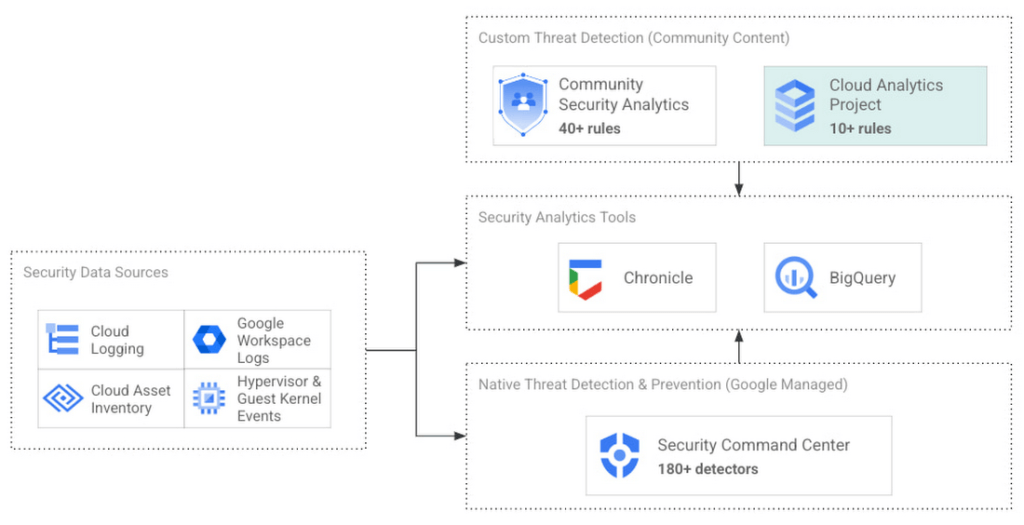
Cloud Analytics vs Community Security Analytics
Similar to CSA, Cloud Analytics can help lower the barrier for threat hunters and detection engineers to create cloud-specific security analytics. Security analytics is complex because it requires:
- Deep knowledge of diverse security signals (logs, alerts) from different cloud providers along with their specific schemas;
- Familiarity with adversary behaviors in cloud environments;
- Ability to emulate such adversarial activity on cloud platforms;
- Achieving high accuracy in threat detection with low false positives, to avoid alert fatigue and overwhelming your SOC team.
The following table summarizes the key differences between Cloud Analytics and CSA:
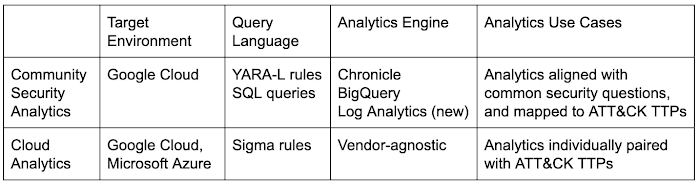
Together, CSA and Cloud Analytics can help you maximize your coverage of the MITRE ATT&CK® framework, while giving you the choice of detection language and analytics engine to use. Given the mapping to TTPs, some of these rules by CSA and Cloud Analytics overlap. However, Cloud Analytics queries are implemented as Sigma rules which can be translated to vendor-specific queries such as Chronicle, Elasticsearch, or Splunk using Sigma CLI or third party-supported uncoder.io, which offers a user interface for query conversion. On the other hand, CSA queries are implemented as YARA-L rules (for Chronicle) and SQL queries (for BigQuery and now Log Analytics). The latter could be manually adapted to specific analytics engines due to the universal nature of SQL
Getting started with Cloud Analytics
To get started with the Cloud Analytics project, head over to the GitHub repo to view the latest set of Sigma rules, the associated adversary emulation plan to automatically trigger these rules, and a development blueprint on how to create new Sigma rules based on lessons learned from this project.
The following is a list of Google Cloud-specific Sigma rules (and their associated TTPs) provided in this initial release; use these as examples to author new ones covering more TTPs.
Sigma rule example
Using the canonical use case of detecting when a storage bucket is modified to be publicly accessible, here’s an example Sigma rule (copied below and redacted for brevity):
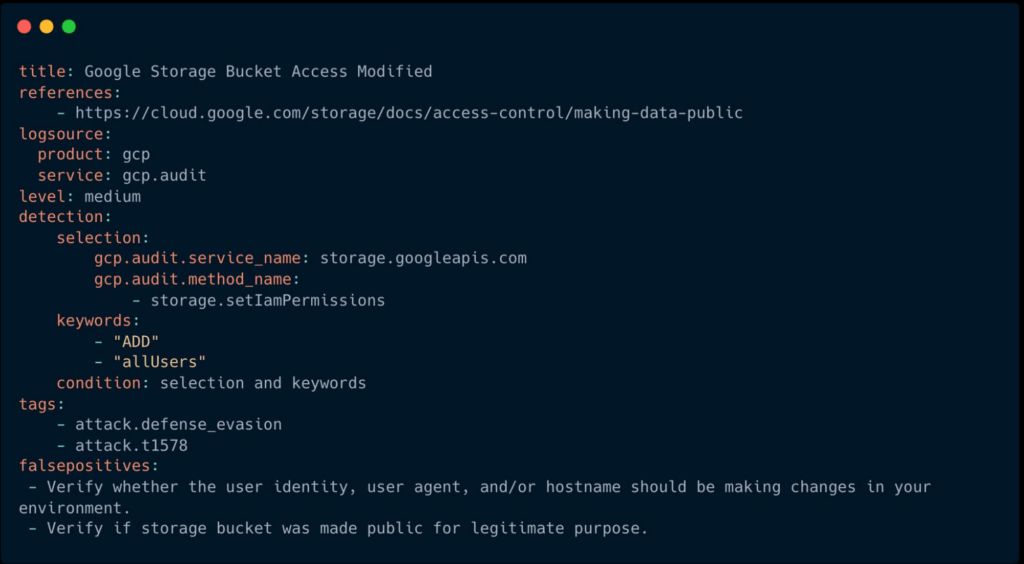
The rule specifies the log source (gcp.audit), the log criteria ( storage.googleapis.com service and storage.setIamPermissions method) and the keywords to look for (allUsers, ADD) signaling that a role was granted to all users over a given bucket. To learn more about Sigma syntax, refer to public Sigma docs.
However, there could still be false positives such as a Cloud Storage bucket made public for a legitimate reason like publishing static assets for a public website. To avoid alert fatigue and reduce toil on your SOC team, you could build more sophisticated detections based on multiple individual Sigma rules using Sigma Correlations.
Using our example, let’s refine the accuracy of this detection by correlating it with another pre-built Sigma rule which detects when a new user identity is added to a privileged group. Such privilege escalation likely occurred before the adversary gained permission to modify access of the Cloud Storage bucket. Cloud Analytics provides an example of such correlation Sigma rule chaining these two separate events.
What’s next
The Cloud Analytics project aims to make cloud-based threat detection development easier while also consolidating collective findings from real-world deployments. In order to scale the development of high-quality threat detections with minimum false positives, CSA and Cloud Analytics promote an agile development approach for building these analytics, where rules are expected to be continuously tuned and evaluated.
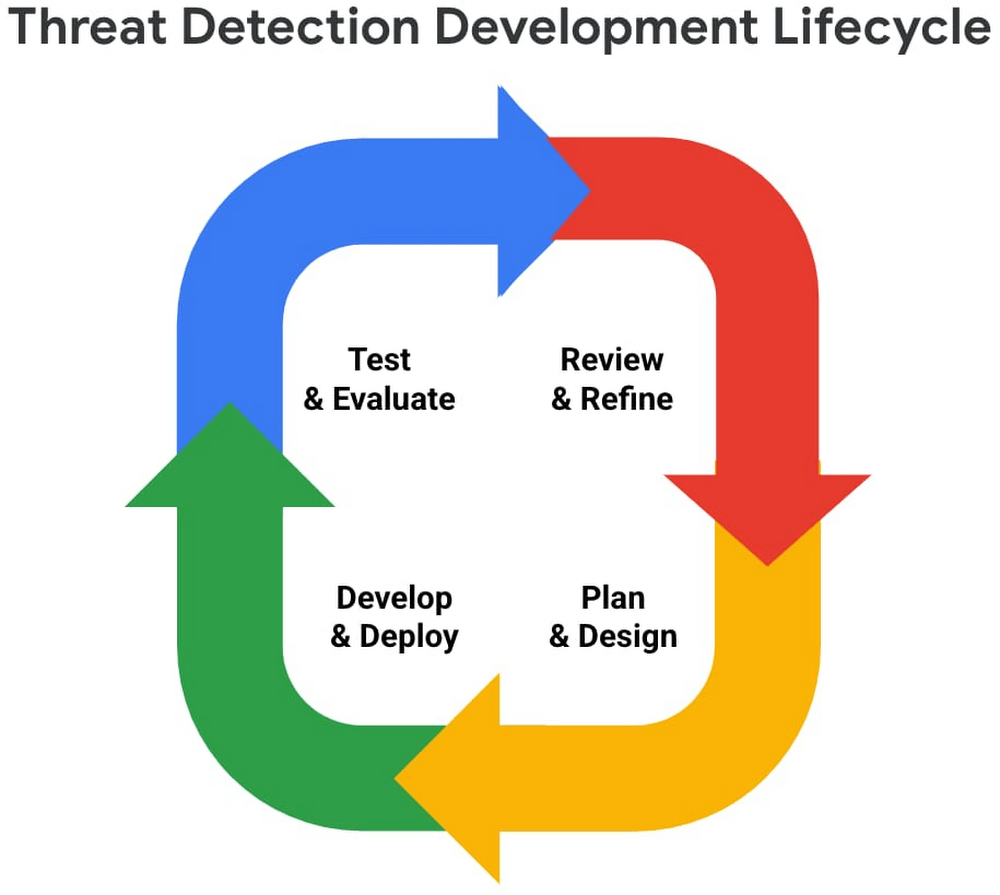
We look forward to wider industry collaboration and community contributions (from rules consumers, designers, builders, and testers) to refine existing rules and develop new ones, along with associated adversary emulations in order to raise the bar for minimum self-service security visibility and analytics for everyone.
Acknowledgements
We’d like to thank our industry partners and acknowledge several individuals across both Google Cloud and the Center for Threat-Informed Defense for making this research project possible:
Desiree Beck, Principal Cyber Operations Engineer, MITRE
Michael Butt, Lead Offensive Security Engineer, MITRE
Iman Ghanizada, Head of Autonomic Security Operations, Google Cloud
Anton Chuvakin, Senior Staff, Office of the CISO, Google Cloud
Chrome OS’s Hybrid Work Model Powers Google’s Return to Work Strategy

7485
Of your peers have already read this article.
1:30 Minutes
The most insightful time you'll spend today!
The pandemic continues to deeply affect our lives around the globe. In some places, new cases are surging and returning to work is the last thing on people’s minds. In other areas, conditions are improving and companies are starting to think about transitioning their workforce back to the office.
Exactly when and how to do this remains complex and varies by country, industry, and company. What’s certain is that hybrid work will become an essential part of the business world moving forward. And finding solutions that bridge the gap between “in-person” and “somewhere else” are crucial.
At Google, we’ve been focused on what the hybrid transformation means for us. To prepare for hybrid work, using modern solutions is a key enabler.
Chrome OS: Supporting Google’s return to office strategy
At Google, we’ll move to a hybrid work week where most Googlers spend approximately three days in the office and two days wherever they work best. It’s no surprise that as the modern, secure, cloud-first platform, Chrome OS is playing a key role in our transition to a hybrid work model. Because Chrome OS devices can easily be shared, more flexible working models and spaces are now possible. And with user profiles stored in the cloud and collaboration solutions like Google Workspace, employees can log in to any Chrome OS device, access what they need and pick up where they left off.
Here are just a few ways we are using Chrome OS and its tools to support the return to the office:
- In select office locations, Googlers can reserve desks through an internal booking tool set up with a high-performance Chromebox, keyboard, mouse, and monitor. Employees can log in to the Chromebox which syncs their cloud profile, and start working with the same environment they have on all their Chrome OS devices.
- We’re announcing new docking stations that are designed for Chrome OS devices and allow employees to bring in their Chromebook from home, connect to the dock with one USB-C cable, and use a monitor, keyboard, and mouse for a full desktop experience.
- Every Chrome OS device enables a zero-trust security working model with BeyondCorp Enterprise providing our workforce with simple and secure access to applications while providing additional security controls for IT.
- We’ve deployed the new Chrome OS Readiness Tool to our extended workforce to identify employees that are able to switch to Chrome OS. This allows us to expand the latest security, deployment, and manageability benefits to more of the workforce.
Additional ways Chrome OS is helping organizations with return to office
We aren’t the only ones supporting our return to office and hybrid work strategy with Chrome OS. We’ve heard more ways our customers are using Chrome OS to make the transition as smooth as possible. These include:
- Streamlining deployment and management of Chrome OS devices using zero-touch enrollment which allows devices to automatically enroll into a corporate domain without IT configuration.
Grab & Go Chromebooks being used for frontline and hybrid information workers, allowing employees to grab a Chromebook from a cart and get to work right away. - Parallels Desktop for Chrome OS being deployed to allow employees to access Windows or legacy apps locally on their Chrome OS devices.
- Existing Windows and Mac devices being modernized and repurposed to run a Chrome OS experience using CloudReady. (Google is currently offering a CloudReady promotion. Learn more here.)
While the Chrome OS team has been working towards making remote working as seamless as possible for IT, we’ve also made advancements in supporting traditional technology that’s required in the office.
- In October, we announced Chrome Enterprise Recommended: a collection of identity, printing, productivity, communications, and virtualization solutions that are verified to run great on Chrome OS.
- With the increased usage of video conferencing on Chrome OS devices, we’ve made improvements to Google Meet and Zoom performance including camera and video improvements to reduce any unnecessary processing and features that intelligently adapt to your device, your network, and what you are working on.
- For improved access to Windows and legacy apps, VMware Horizon introduced multi-monitor support and USB redirection and Citrix Workspace released a tech preview with webcam enhancements and Microsoft Teams optimizations.
- We integrated with the Okta Workflows platform, so IT administrators can include Chrome OS in it’s access logic and deploy quickly without code. Recently, we’ve added the ability to require users to reauthenticate on their Chrome OS device once Okta has detected that the user has changed their password. Try out this new capability by signing up for our Trusted Tester program.
- We’ve increased our support for direct IP printing with additional printer models since the beginning of 2020. In addition, we have made improvements to management features, including support for multiple print servers and launched policy APIs to provide a better IT admin experience.
Join us for a digital event with Modern Computing Alliance and its newest member HP
Last year we announced the launch of the Modern Computing Alliance—a collaboration of industry leaders including Box, Chrome Enterprise, Citrix, Dell, Google Workspace, Imprivata, Intel, Okta, RingCentral, Slack, VMware, and Zoom aim to create the pioneering solutions that businesses need. We are thrilled to introduce HP, who brings their innovative hardware and enterprise hardware expertise to the Modern Computing Alliance and has been working closely with the alliance to ensure true silicon-to-cloud innovation.
As an alliance, we’ve been deeply engaged in the hybrid work shift. We invite you to join us for a digital event where we discuss questions about returning to work. Like how product design can encourage participation and collaboration regardless of where employees are, important security issues to keep in mind, and what factors businesses should consider to support a safe, working environment.
Home. Heading back. Hybrid.
Hear from the experts on hybrid work and return to office.
Date: May 20th, 2021
Register here.
If you are ready to try Chrome OS today, it’s easy to get started. You can contact us to get connected to a partner, sign up for a free 30-day trial of Chrome Enterprise Upgrade to start managing Chrome OS devices, or deploy the Chrome OS Readiness Tool to identify employees that are ready to switch to Chrome OS.POSTED IN:
More Relevant Stories for Your Company



Journey to Transformation and Modernization with Google’s Distributed Cloud
Google Cloud has been leading the way of helping businesses make most from their cloud investments to drive digital transformation through modern application platforms that cater to today's customer needs. Watch the video from the Next '21 to explore three areas where companies are supported by Google Cloud throughout their
Broadcom’s Journey to Simplified Compliance with Google Cloud’s Assured Workloads
Broadcom is a global technology leader that designs, develops, and supplies many semiconductor and infrastructure software solutions. Broadcom’s category-leading product portfolio serves critical markets including data center, networking, software, broadband, wireless, storage, and industrial sectors. Our customers, many of whom operate in the federal public sector, need ready-made SaaS solutions to

Best Practices for Cost Optimization in the Cloud
When customers migrate to Google Cloud Platform (GCP), their first step is often to adopt Compute Engine, which makes it easy to procure and set up virtual machines (VMs) in the cloud that provide large amounts of computing power. Launched in 2012, Compute Engine offers multiple machine types, many innovative features, and is available in
Google Cloud Leads the Pack Among Data Security Vendors: Forrester
In its 25-criterion evaluation of data security portfolio providers, Forrester identified the 13 most significant ones and researched, analyzed, and scored them. Here's a summary of what Forrester said about Google Cloud Google puts cloud and cloud security at the center of its strategy. Capabilities from Google Cloud Platform, G Suite,
